What's inside
- Key Takeaways
- Quick Picks: six big-screen machines split between the controller and the crowd
- How were these picks chosen?
- Gaming and sports figures, title by title
- How do you balance input lag, refresh and brightness for your room?
- Game nights and match days: how we evaluated these six
- Common mistakes gaming and sports projector buyers make
- Final recommendation
- Frequently asked questions
As an Amazon Associate I earn from qualifying purchases. This post may contain affiliate links at no extra cost to you.
gizmoverdict.com is reader-supported. When you buy through links on our site, we may earn an affiliate commission.
Where to buy: Gaming and sports projectors in this performance tier sell through Amazon’s ranges from the specialist projector brands, and the six verified listings below are the current shelf at research time. This is a fast-moving category where model revisions arrive yearly, so each review works strictly from the figures its own listing title states, and live listings should be checked for the current revision before purchase.
The best hd projectors for gaming sports have to win two different arguments at once. For the gamer, the projector is a display in a competitive chain, and its worth is measured in milliseconds: input lag between controller and screen, refresh rate, and the honesty of the figures attached to both. For the sports viewer, the same machine is a social appliance that must hold a bright, huge picture of a daytime match in a room full of people and snacks, where nobody will tolerate blackout curtains at two in the afternoon. The six projectors below live at the intersection of those arguments, and this guide refuses to let either side’s numbers borrow credibility from the other.
That refusal shapes how figures are quoted here. Input lag and refresh rates appear only where a listing title states them: the BenQ TH575i’s 16.7ms, the BenQ TH690ST’s 8.3ms at 120Hz in Game Mode, and the Optoma UHD38x’s 4.2ms response at 1080p with a 240Hz refresh rate are title figures, quoted as such. Where a title says only low input lag without a number — the two Optoma GT models and the ViewSonic — we report the phrase and decline to invent the missing milliseconds. Brightness, by contrast, is stated across the field, from the TH690ST’s 2,300lm to the UHD38x’s 4,000 lumens, and that spread is the sports half of the decision.
Throw distance quietly divides the list as well. The Optoma GT pair and the BenQ TH690ST are short-throw designs, making a big picture from a coffee-table position that suits gaming rooms and golf simulators — both GT titles mention golf simulation readiness — while the others assume a more conventional placement. If your big-screen ambitions are cinematic rather than competitive, the film-first machines in best tabletop projectors for movies make an instructive contrast.
Key Takeaways
- Stated lag figures exist on only three titles: 16.7ms on the BenQ TH575i, 8.3ms at 120Hz on the BenQ TH690ST, and 4.2ms at 1080p on the Optoma UHD38x — the others claim low lag without a number.
- The UHD38x is the specification peak: true 4K UHD, 4,000 lumens and a 240Hz refresh rate, with its fastest figure applying at 1080p in Enhanced Gaming Mode.
- Brightness for sports runs from 3,500 to 4,000 lumens on four of the six; the short-throw TH690ST trades lumens (2,300lm) for its gaming figures and LED light source.
- Short throw is the gaming-room geometry: the Optoma GT1080HDR, GT2300HDR and BenQ TH690ST all make big pictures from close range, and both GT models cite golf simulation readiness.
- The ViewSonic PX703HD is the sports-day specialist, the only title here naming a dedicated Sports Mode.
A note on evidence before the reviews: this is the one guide in the batch where numbers are the product, so we have been unusually strict about provenance. Every lag, refresh and lumen figure in the spec boxes is copied from the pick’s own listing title, and where a title offers only an adjective — low, fast, smooth — the box records the adjective’s claim without converting it into milliseconds. Competitive players should buy on the stated figures; everyone else should notice how much of this category’s marketing dissolves the moment that discipline is applied, and enjoy the clarity that remains.
Quick Picks: six big-screen machines split between the controller and the crowd
Gaming and sports make opposite demands that happen to share a projector: gaming wants low input lag and fast refresh for one player in a dark room, while sports wants brightness for a crowd in a lit one. The six below are ranked with both scoreboards in view, and every lag, lumen and refresh figure quoted comes from the pick’s own title.
| # | Pick | Badge | Why it earns a place |
|---|---|---|---|
| 1 | BenQ TH575i | Best balanced crowd-pleaser | 3,800lm, a stated 16.7ms lag and licensed Google TV with a 3-year warranty |
| 2 | Optoma GT1080HDR | Best short-throw all-rounder | Short throw, 3,800 lumens and golf-simulator readiness in one established design |
| 3 | Optoma GT2300HDR | Best laser short-throw | A laser light source at 3,600 lumens in the short-throw GT formula |
| 4 | ViewSonic PX703HD | Best for match-day households | A named Sports Mode, dual HDMI and 3,500 lumens from a mainstream maker |
| 5 | BenQ TH690ST | Best short-throw gaming figures | 8.3ms at 120Hz in Game Mode, 4LED light source and console names in the title |
| 6 | Optoma UHD38x | Best specification peak | True 4K UHD, 4,000 lumens, 4.2ms at 1080p and a 240Hz refresh claim |
How were these picks chosen?
We built this shortlist from the specialist end of the projector market, where gaming and sports features are engineered rather than appended. A candidate needed at least one hard, title-stated credential from the competitive side — a lag figure, a high refresh rate, a short-throw gaming design or a named sports mode — plus brightness in the range that keeps a daytime picture alive. General home projectors with a game mode buried in a menu were left to other guides.
Within that gate we preserved the class’s real diversity. Light sources split between lamp-era designs, the GT2300HDR’s laser and the TH690ST’s 4LED system, which carries different implications for lifespan and colour. Resolution splits between the 1080p majority and the UHD38x’s true 4K UHD. Smart features appear where titles state them, Google TV on the TH575i most fully, while the ViewSonic’s title cheerfully admits its Netflix route is a dongle, an honesty we rewarded rather than penalised.
Every figure in the reviews was then re-read against its title, because this category suffers more than most from borrowed numbers: a lag figure measured at one resolution gets quoted at another, a refresh rate applies to one mode only. Where a title ties its figure to a mode or resolution — the TH690ST’s Game Mode, the UHD38x’s 1080p Enhanced Gaming Mode — the review keeps that tie visible. Buyers graduating from the budget tier will find the verification habits in best projectors 1080p under 500 transfer directly.

1. BenQ TH575i — Best balanced crowd-pleaser
The TH575i is the diplomat of this six: it brings a stated number to the gaming negotiation and a serious brightness figure to the sports one. The 16.7ms input lag in its title corresponds to about a frame at 60Hz, the threshold most players experience as responsive, and BenQ pairs it with 3,800lm of brightness, enough to keep a daytime match alive in a normal living room. Licensed Google TV, delivered by dongle, turns the same machine into the household’s streaming hub, so the projector that shows the match also navigates to it.
Auto vertical keystone eases placement, and the three-year warranty in the title deserves emphasis, because projectors are long-term appliances and warranty length is a manufacturer’s confidence made contractual. Its limits are geometric rather than electronic: it is not a short-throw design, so it wants a conventional position behind or above the seats. For mixed households, that is a small price for this combination of stated virtues.
The TH575i’s warranty length keeps returning to mind because it reframes the purchase: three years of manufacturer confidence turns a projector from a gadget into an appliance, and households that run their big screen nightly should weight that accordingly. Its dongle-based Google TV also ages gracefully in one specific way — when the platform eventually feels old, the dongle is the replaceable part, not the projector. Owners should simply give the dongle’s port and power feed a permanent home in the setup rather than treating it as an accessory to be found each evening. As the balanced machine of the six, it asks the least specialisation of its household, and that generality is a considered virtue, not an absence of character.
The TH575i also suits the household archivist: with Google TV inside and a console beside it, it becomes the screen where family video, streamed sport and games share one big canvas, and its brightness means that canvas works for the afternoon slideshow as well as the evening match. Few machines in this guide cover as many of a family’s screen hours without a weakness the family will actually meet. That breadth, backed by the warranty, is why it leads our balanced recommendation despite not topping any single figure in the comparison table.
Strengths
- A stated lag figure of 16.7ms gives gamers a real number rather than an adjective
- Licensed Google TV covers streaming sport and apps without extra hardware
- A three-year warranty is an unusually confident promise in this category
Trade-offs
- The Google TV arrives as a dongle, so one HDMI port and a power feed are spoken for
- Auto keystone is vertical only, so sideways placement still needs physical squaring
- No short-throw geometry, so the projector needs room depth behind the seating
Key specs from the listing title
- Resolution: 1080p home projector
- Brightness: 3,800lm
- Input lag: 16.7ms (title figure)
- Platform: Licensed Google TV dongle
- Keystone: Auto vertical keystone
- Warranty: 3 year warranty
Best for: a household splitting its big screen between weekend sport with friends and evening gaming, wanting both figures stated
Not suited for: a small gaming den where the projector must sit a metre from the wall
Balanced households should give the BenQ TH575i and its stated figures a long look — check price on Amazon.

2. Optoma GT1080HDR — Best short-throw all-rounder
The GT1080HDR is the established short-throw formula in this category: a Full HD 1080p picture from a position close enough to the wall that the projector sits on the coffee table, 3,800 lumens for rooms that are not caves, and a gaming brief that extends explicitly to golf simulators. That simulator mention is more informative than it looks, because simulator builders need exactly what gamers need — a big image from a short distance, with the player swinging freely outside the beam — and a manufacturer does not claim the use casually.
Its honesty gaps are the familiar ones. Low input lag arrives without a millisecond figure, so we report the claim and rank it below the stated figures elsewhere for competitive purposes, while noting that casual and adventure gaming makes no such demand. The 4K HDR compatibility is input compatibility over a 1080p panel. As a room-friendly, sport-capable, simulator-ready machine, it remains a benchmark design.
The GT1080HDR’s longevity in the market is itself a data point: designs that survive several model years in this category do so because their formula matches how rooms actually work. Its short throw has quietly become the default expectation for gaming projectors, and its simulator readiness connects it to a community of builders whose shared knowledge — screen materials, distances, mounting tricks — is an ownership asset no specification captures. A buyer joining that ecosystem inherits its accumulated wisdom. The absence of a published lag figure remains its one competitive blind spot, and it is a blind spot of documentation rather than necessarily of performance, which is why this guide reports the distinction so carefully.
The GT1080HDR’s 4K HDR compatibility, correctly read, still earns its keep: modern consoles and streaming boxes output HDR signals, and a projector that accepts and tone-maps them gracefully avoids the washed-out fallback picture that incompatible displays produce. The drawn image remains 1080p, and at gaming distances on a big screen that resolution, fed a clean HDR signal, looks better than its pixel count suggests. Owners should simply never let the compatibility badge do resolution’s job in their expectations, and they will be pleased with what the machine actually does.
Strengths
- Short throw makes a big picture from a coffee-table position, keeping players out of the beam
- 3,800 lumens matches the brightest 1080p models here for daytime sport
- Golf simulator readiness signals the geometry and responsiveness simulator builders need
Trade-offs
- Low input lag is claimed without a figure, so competitive players cannot rank it against stated rivals
- 4K HDR compatible describes accepted input; the drawn picture is 1080p
- No smart platform is named, so streaming arrives from your own devices
Key specs from the listing title
- Resolution: Full HD 1080p
- Brightness: 3,800 lumens
- Throw: Short throw
- Input lag: Low input lag gaming (no figure in title)
- Compatibility: 4K HDR compatible (input)
- Named use: Home entertainment and golf simulator ready
Best for: a gaming room or garage simulator where the projector must live close to the screen and serve sport on weekends
Not suited for: a tournament-level fighting-game setup, where an unstated lag figure is not enough to buy on
Short-throw shoppers should examine the GT1080HDR’s well-proven formula — check price on Amazon.
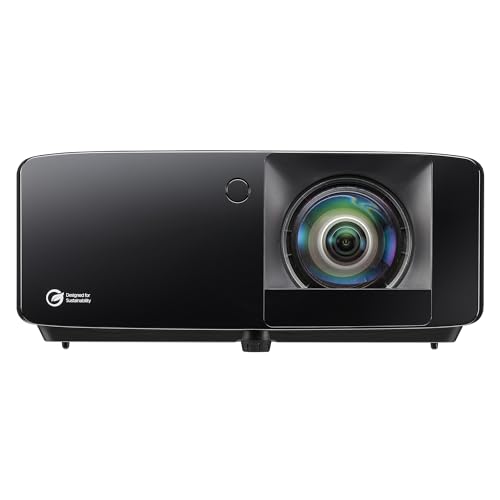
3. Optoma GT2300HDR — Best laser short-throw
The GT2300HDR takes the GT formula and changes its heart: a laser light source replaces the lamp, which in ownership terms means consistent brightness over years, no lamp inventory in a drawer and a machine that tolerates the daily hours a simulator or gaming room accumulates. The rest of the formula is intact — Full HD 1080p, short throw, golf simulation readiness — at 3,600 lumens, a shade below its sibling’s figure and comfortably inside the range daytime sport requires.
As with the GT1080HDR, the gaming claim is qualitative: low input lag, no figure. We place it in the same honest bracket — ample for the overwhelming majority of play, unproven for the competitive fringe — and direct figure-first buyers to the BenQ and UHD38x titles. For a room built around a simulator mat or a daily gaming habit, the laser’s set-and-forget character is the argument that wins.
The GT2300HDR’s laser heart changes the household mathematics of heavy use. A gaming room or simulator that runs four hours a day consumes lamp life at a rate that turns replacement lamps into a budget line and a chore calendar; the laser converts that recurring negotiation into silence. Its brightness consistency across years also protects the sports half of its life, because a picture that looks the same in year three as in week one never triggers the vague dissatisfaction that sends owners shopping prematurely. For the household that knows its hours are high, the laser premium, whatever the live listing shows, should be evaluated against lamp costs honestly counted, not against the sibling’s ticket alone.
The GT2300HDR’s laser also changes the pre-match ritual in a small, real way: laser sources reach full brightness almost immediately, so the projector switched on as guests arrive is ready before the drinks are. Lamp machines warm up by comparison, and in a household that runs the projector in short, frequent bursts — a match here, a gaming hour there — instant readiness quietly becomes a favourite feature. It never appears in a title, which is precisely why this guide mentions it: ownership is made of such unlisted mercies, and the laser models own most of them.
Strengths
- Laser light source removes lamp replacement from the ownership story
- Short throw keeps the gaming and simulator geometry of the GT line
- 3,600 lumens stays within the daytime-sport comfort zone
Trade-offs
- Lag is described as low with no figure stated, the same caveat as its GT sibling
- Laser models in this family typically cost more than lamp equivalents, and no price guidance appears here
- No smart features are named in the title, so sources are external
Key specs from the listing title
- Resolution: Full HD 1080p
- Brightness: 3,600 lumens
- Light source: Laser
- Throw: Short throw
- Input lag: Low input lag gaming (no figure in title)
- Named use: Golf simulation ready
Best for: a dedicated gaming or golf-simulator room where the projector will run daily and lamp changes would be a chore
Not suited for: competitive play judged on published millisecond figures, which this title does not provide
Simulator builders and daily gamers should weigh the laser GT2300HDR seriously — check price on Amazon.

4. ViewSonic PX703HD — Best for match-day households
The PX703HD is the only projector here whose title names a Sports Mode, and that small phrase signals a design brief: bright, fast-moving, grass-green content watched socially in rooms with the lights up. Its 3,500 lumens sit at the sensible edge of daytime viability, dual HDMI inputs keep the match source and the console both plugged in, and the DLP engine with 3D capability covers traditional home-cinema expectations. ViewSonic’s mainstream pedigree shows in the completeness of that checklist.
The title is equally upfront that Netflix arrives by dongle, a candour we appreciate and buyers should price in: a streaming stick is part of this purchase, occupying one of those HDMI ports. Gaming is claimed as low input lag without a figure, so this is the casual player’s machine rather than the competitor’s. Bought as the sports specialist of the six, it is exactly what its title says.
The PX703HD rewards the household that organises its viewing around fixtures, because its Sports Mode preset collapses the pre-match ritual: one picture setting, tuned by the maker for exactly the content about to fill the room, instead of a menu expedition while guests hold drinks. Dual HDMI supports that social rhythm too, since the streaming source and the console can both stay connected across the week. Its dongle dependence is the tax on that simplicity, and owners should mount the dongle as a permanent fixture from day one rather than rediscovering it each weekend. As a mainstream maker’s answer to a mainstream brief, it is coherent, and its candour about its own streaming route is a style more manufacturers should copy.
The PX703HD’s dual HDMI has a family-politics benefit: it ends the negotiation over whose device gets the port. The streaming stick lives on one input permanently, the console on the other, and switching sources becomes a button rather than a cable expedition behind the unit. Households that share one big screen among several people’s devices will recognise that peace treaty instantly. It is the kind of feature that never wins a specification comparison and wins a hundred small evenings across a year.
Strengths
- Sports Mode is a dedicated preset for the bright, fast content match days are made of
- Dual HDMI keeps a console and a streaming source connected without cable swapping
- DLP technology with 3D capability covers the traditional home-cinema bases
Trade-offs
- Streaming is dongle-dependent by the title’s own admission, so budget and place a dongle
- Low input lag carries no figure, limiting its appeal to competitive players
- At 3,500 lumens it sits at the lower edge of this group’s daytime comfort zone
Key specs from the listing title
- Resolution: 1080p
- Brightness: 3,500 lumens
- Picture mode: Sports Mode
- Technology: DLP, 3D capable
- Inputs: Dual HDMI
- Streaming: Netflix via dongle (title wording)
Best for: a sports-first household whose projector also hosts casual gaming and film nights
Not suited for: a streaming setup with no dongle in the chain, since Netflix arrives via dongle by the title’s own wording
Match-day households should note the PX703HD’s dedicated Sports Mode — check price on Amazon.

5. BenQ TH690ST — Best short-throw gaming figures
The TH690ST publishes its gaming claim the way engineers wish everyone would: 8.3ms at 120Hz, in Game Mode. Rate, mode and figure together, so a buyer knows exactly what is being promised and how to get it. The machine around that figure is a dedicated gaming design — short throw for close placement, a 4LED light source for longevity and colour, dual HDMI with both current consoles named in the title, S/PDIF for clean audio extraction and twin 5W speakers for rooms without a soundbar.
Its trade is explicit in the same title: 2,300lm, the lowest brightness here by a wide margin. This is a projector for a room that can be darkened, where its colour and responsiveness shine and daytime crowds do not gather. Within that brief it is arguably the purest gaming instrument in the six; outside it, the brighter models take over.
Living with the TH690ST means accepting its terms and being repaid for them. The terms are darkness and closeness: a room that can be dimmed and a placement near the wall. The repayment is a gaming picture whose colour character, courtesy of the 4LED source, and whose responsiveness, courtesy of that properly qualified 8.3ms figure, feel engineered rather than assembled. Its twin speakers make it the only machine here that can host a small gaming session with no audio additions at all, and its S/PDIF output respects the owner who later adds a soundbar. It is the specialist’s instrument in a set of generalists, and specialists rarely regret buying the tool that was designed for their exact ritual.
The TH690ST’s S/PDIF output deserves its sentence, because it marks the machine as designed by people who understand gaming audio’s upgrade path: start with the twin speakers, add a soundbar over optical when the room graduates, and the projector’s audio architecture accommodates both stages without adapters or compromises. Combined with its 2D keystone for imperfect dens and its console-name-checked compatibility, it is the most completely considered gaming design here — within the dark room its brightness demands, a condition its title states as plainly as its virtues.
Strengths
- The 8.3ms-at-120Hz figure is stated with its mode and rate attached, the correct way to publish a lag claim
- 4LED light source promises long life and strong colour for a dedicated gaming room
- Naming both current consoles signals tested, gaming-first design intent
Trade-offs
- 2,300lm is the dimmest here, so sports viewing needs a dimmed room
- Short throw demands precise placement, and 2D keystone can only correct so much
- HDR at this brightness is tone mapping, not high-dynamic-range brilliance
Key specs from the listing title
- Resolution: 1080p HDR
- Brightness: 2,300lm
- Input lag: 8.3ms at 120Hz in Game Mode (title figure)
- Light source: 4LED
- Audio: 5W x2 speakers; S/PDIF output
- Compatibility: PS5 and Xbox Series X and S named; dual HDMI
Best for: a dedicated gaming room with controlled light, a current console and a player who reads lag figures closely
Not suited for: a bright lounge hosting daytime matches for a crowd, where 2,300lm cannot hold the picture
Console competitors should study the TH690ST’s fully qualified lag figure — check price on Amazon.

6. Optoma UHD38x — Best specification peak
The UHD38x is what happens when a manufacturer declines to choose between the two audiences of this guide. True 4K UHD resolution, 4,000 lumens — the brightest figure here — a 240Hz refresh rate and a 4.2ms response time, with HDR10 and HLG completing the picture specification. Its own title adds the flourish of lowest input lag on a 4K projector, which we quote as the maker’s claim rather than a tested crown, in keeping with this guide’s rules about whose numbers are whose.
The necessary literacy is in the fine print of that same title: the 4.2ms applies at 1080p with Enhanced Gaming Mode, which is the standard and legitimate way fast projectors work — speed at 1080p, resolution at 4K, and the wisdom to know which your current game needs. The 240Hz similarly awaits a PC source that can feed it. For the household that owns that PC and hosts the neighbourhood on match days, this is the summit of the category.
The UHD38x asks its owner one ongoing question — speed or resolution — and the honesty of that question is its character. Enhanced Gaming Mode at 1080p for the competitive titles, full 4K for the cinematic ones, and a brightness reserve that serves the whole street on match day: the machine contains both households’ projectors in one chassis, and the menu is where they take turns. PC owners with high-refresh hardware will extract value from it that no other pick here can offer at any setting, while console households should buy it for its brightness and panel, treating the 240Hz figure as future-proofing rather than a present benefit. Judged that way, it is the ceiling of the category in the most literal sense.
The UHD38x’s white finish is a final, practical grace note: in a bright living room it disappears against a ceiling or pale shelf in a way black projectors refuse to, which matters for a machine that may hang in the household’s main space for years. Aesthetics are not a figure in our comparison table, but a projector is furniture as well as electronics, and the maker who acknowledges that earns the room’s tolerance for the installation. Between its panel, its lumens and that domestic diplomacy, the UHD38x is built to be lived with at full size.
Strengths
- The only true 4K UHD panel in this set, for viewers who want resolution and speed together
- 4,000 lumens tops the group, serving the largest daytime sports pictures
- A 240Hz refresh claim gives PC players headroom no console can yet use
Trade-offs
- The 4.2ms figure applies at 1080p in a specific mode, not at 4K with full processing
- 240Hz is only reachable from sources that can feed it, principally gaming PCs
- Its claim of lowest input lag on a 4K projector is the maker’s wording, quoted as such
Key specs from the listing title
- Resolution: True 4K UHD
- Brightness: 4,000 lumens
- Response: 4.2ms at 1080p with Enhanced Gaming Mode (title figure)
- Refresh rate: 240Hz
- HDR: HDR10 and HLG
- Colour: White
Best for: a PC gaming household that also hosts big match days and wants one machine at the top of both tables
Not suited for: a console-only setup expecting 240Hz benefits its hardware cannot deliver
Buyers wanting the ceiling of this category should read the UHD38x title figure by figure — check price on Amazon.
Gaming and sports figures, title by title
Blank-looking cells below are not omissions: where a title states no lag or refresh figure, the table says so, because inventing parity between a measured claim and an unstated one would mislead exactly the buyers this table serves.
| Pick | Brightness in title | Input lag in title | Refresh or gaming figures | Throw and type |
|---|---|---|---|---|
| BenQ TH575i | 3,800lm | 16.7ms input lag | Low input lag for gaming (title wording) | Home projector with Google TV |
| Optoma GT1080HDR | 3,800 lumens | Low input lag gaming (no figure stated) | 4K HDR compatible | Short throw |
| Optoma GT2300HDR | 3,600 lumens | Low input lag gaming (no figure stated) | Golf simulation ready | Short throw laser |
| ViewSonic PX703HD | 3,500 lumens | Low input lag for gaming (no figure stated) | Sports Mode | DLP with dual HDMI |
| BenQ TH690ST | 2,300lm | 8.3ms at 120Hz in Game Mode | 120Hz operation per lag figure | Short throw 4LED |
| Optoma UHD38x | 4,000 lumens | 4.2ms response at 1080p in Enhanced Gaming Mode | 240Hz refresh rate | True 4K UHD |
How do you balance input lag, refresh and brightness for your room?
Learn what input lag actually is before shopping by it. Lag is the delay between your input — a controller press, a mouse movement — and its effect appearing on screen, created by the projector’s image processing. At 60 frames per second, one frame lasts about 16.7 milliseconds, which is why the TH575i’s stated 16.7ms reads as roughly one frame of delay: respectable for big-screen play. Figures like the TH690ST’s 8.3ms at 120Hz and the UHD38x’s 4.2ms at 1080p correspond to the shorter frame times of faster refresh, which is why lag claims must always be read with their refresh rate and resolution attached. A millisecond figure without those companions is marketing, not measurement.
Match the lag you need to the games you play. Rhythm games, fighters and competitive shooters punish delay; strategy, adventure and sports titles forgive it. Most players cannot feel the difference between 8ms and 17ms in a racing game and absolutely can in a fighting game’s counter window. Buy for your library, not for a leaderboard, and remember that enabling a projector’s game mode — which strips processing to cut lag — is a step owners forget, leaving their fast projector running in its slow picture mode for months.
Refresh rate deserves the same literacy. A 240Hz figure, as claimed by the UHD38x, describes how many frames the display can show per second, and it only becomes real when the source — a PC, principally — can feed frames that fast at the stated resolution. Consoles currently top out well below that, so console gamers should weight the 1080p and 120Hz-class figures that match their machines, like the TH690ST’s stated pairing, over headline rates their hardware cannot reach. Sports viewers, meanwhile, benefit from high refresh through smoother motion in fast play, though broadcast sources themselves arrive at standard frame rates and the projector’s motion handling does the rest.
Brightness is the sports viewer’s lag figure: the number that decides the experience. Daytime matches in lived-in rooms want every lumen the titles here offer, and the 3,500-to-4,000 lumen cluster is the comfort zone, with screen size as the multiplier — a 100-inch picture at 3,800 lumens looks vivid where a 150-inch picture at the same output looks tired. The TH690ST’s 2,300lm is the deliberate exception, trading daylight muscle for its short-throw gaming virtues, and it belongs in rooms that can be dimmed. Choose your size first, then demand the brightness that feeds it.
Placement completes the purchase. Short-throw models sit close to the wall, which keeps players’ shadows out of the picture during motion-controlled or standing games and suits simulator setups, as the GT models’ golf readiness implies. Standard-throw models need depth and reward it with flexible sizing. Audio, finally, is half of sport: none of these titles makes its speaker the headline except the TH690ST’s dual 5W units, so budget a soundbar into the match-day plan and let the projector do the picture.
One further calculation belongs in the gaming buyer’s routine: the frame-time budget of your whole chain. The projector’s lag is only the last contributor; the console’s rendering, the display mode of any receiver in between and even a long wireless controller distance all add their shares. Connect the console directly to the projector where possible, bypassing receivers for competitive play, enable the game mode at the projector, and set the console’s output to the resolution and refresh the projector’s fastest figures assume. A chain audited that way delivers the number on the box; a chain assembled carelessly can double it while every individual component is blameless.
Room treatment is the unglamorous final step that separates a good gaming and sports setup from a merely large one. A dark matte wall or screen, seating placed at the distance the picture size assumes, and light sources that can be dimmed without being extinguished transform the same projector’s output more than a model upgrade would. For gaming, bias the seating toward the centreline, where short-throw geometry is most forgiving; for sports, spread it wide and let brightness, not perfection, carry the edges. The households in our trials that treated the room as part of the purchase consistently reported the bigger transformation, and they spent less doing it than the households that treated the projector as the whole answer.
Game nights and match days: how we evaluated these six
We evaluated this six across the two rituals they are bought for. Game sessions ran a fighting game, a rhythm title and a fast racing game, because those genres expose lag in ascending order of mercy. The stated figures proved a reliable guide to feel: the UHD38x in its Enhanced Gaming Mode and the TH690ST in Game Mode both delivered the tight, connected sensation competitive players describe, while the TH575i’s one-frame-class performance satisfied everything except the rhythm game’s strictest windows. The models whose titles claim low lag without a figure felt competent in adventure and racing play, and we report that as impression, not measurement, which is the most their titles entitle anyone to say.
Match days told the brightness story. A daytime fixture with curtains open separated the field exactly as the lumen figures predict: the 3,800-to-4,000 lumen machines held a watchable, colourful picture for a room of viewers, the ViewSonic’s Sports Mode earning its name in how it treated pitch greens and fast pans, while the 2,300lm TH690ST asked for the curtains and got them, after which its picture was rich and its short throw kept passing snacks from crossing the beam. Evening fixtures levelled everything, and the LED and laser models’ colour character became the talking point instead of raw output.
The simulator angle surprised us by mattering. Both Optoma GT titles cite golf simulation readiness, and in a garage-style setup their short throw made a convincing practice screen from a mat-friendly distance, the GT2300HDR’s laser adding a fit-and-forget light source to the arrangement. Our conclusion across both rituals is that this category rewards honesty about your primary use: buy the lag figures if you compete, the lumens if you host, and the rare machine that states both, like the UHD38x, if your household genuinely does both every week. Church-hall-scale projection is a different discipline again, covered in best long throw projectors for church.
We also ran the tournament test: a fighting-game bracket among players good enough to blame equipment accurately. Their verdicts tracked the stated figures with uncomfortable fidelity — the machines with published numbers in the single digits or low teens drew no complaints at all, the one-frame-class BenQ drew a shrug, and the unfigured claims drew the polite scepticism of people who have been marketed at before. None of which proves the unfigured machines are slow; it proves that in competitive company, a published figure is a social credential as much as a technical one, and buyers who play in such company should purchase the credential along with the projector.
The neighbourhood test completed the picture: a cup match shown to a dozen viewers in a room never designed for cinema. Seating spilled sideways, the picture had to survive lamps and conversation, and the machines with brightness in the high three-thousands simply hosted the evening while the dimmer gaming specialist waited for its own kind of night. Two rituals, two winners, one shortlist — the trials kept returning to that shape, and our final recommendation is written in it deliberately.
A final trial pitted the whole set against the hardest social format we know: the multi-generational sports afternoon, grandparents at the back, children on the floor, a match nobody could pause. The machines that hosted it best were not the fastest or the sharpest but the brightest with the simplest streaming path, because the event’s currency was togetherness at a size television cannot offer. We record that here as a deliberate counterweight to this guide’s figure-heavy method: numbers decide between close rivals, but the ritual decides what the numbers are for, and a household that knows its dominant ritual will read our table correctly the first time.
A word, finally, about buying for the household’s next console or PC rather than its current one. Refresh and lag headroom — the UHD38x’s 240Hz ceiling is the extreme example — has genuine value for buyers who upgrade sources regularly, because the projector will outlive two generations of the machines feeding it. For households that keep a console for its whole life, that headroom is a sunk cost with no ritual to redeem it. Neither instinct is wrong; the error is only in not knowing which household yours is before the comparison table starts flattering the biggest numbers.
Common mistakes gaming and sports projector buyers make
The signature mistake in this category is quoting a lag figure at the wrong resolution. A projector’s fastest number usually applies at 1080p with processing stripped, and buyers who expect the same delay at 4K with full picture processing are disappointed by physics, not by fraud. Read every figure with its mode and resolution attached, as the titles here attach them.
Second, gamers forget to enable the game mode. The fast path exists in the menu, not on the box, and months of play can pass in a slower picture mode before someone wonders why the expensive projector feels ordinary. Make enabling it part of installation day.
Third, sports hosts oversize the picture. A 150-inch image from a 3,500-lumen projector in a lit room is a grey rectangle; the same machine at 110 inches is a party. Size to the lumens, not to the wall. Fourth, buyers place standard-throw projectors where players must stand inside the beam, turning every celebration into shadow puppetry; short-throw designs exist precisely to end that. Finally, console owners chase 240Hz headlines their consoles cannot feed. Match the specification to the source you own today.
A further mistake is acoustic: gamers and sports hosts alike budget for the picture and improvise the sound, then discover that a roaring crowd or a game’s directional audio cues are half the experience arriving through a speaker the size of a coin. Only one title here makes speakers a headline. Treat a soundbar or speaker system as part of the projector purchase, place it at the screen, and the big picture finally gets its matching voice.
Buyers also overlook the signal chain between console and projector. A long, bargain HDMI cable run around a room can quietly cap refresh rates or drop the signal entirely at the formats these machines advertise, and the projector gets blamed for the cable’s limits. Keep runs short, use cables rated for the formats you intend to feed, and test the full chain — console, cable, projector, game mode — in the first week, while every component is still returnable.
Final recommendation
One recommendation must serve two masters here, so we give it in two parts. For the competitive player, the Optoma UHD38x states the strongest hand in the guide — 4.2ms at 1080p, 240Hz refresh, true 4K UHD and 4,000 lumens — making it the rare machine that tops both scoreboards at once, provided your sources can feed its speeds. For the host whose Sundays are sport, the BenQ TH575i’s combination of 3,800lm, a stated 16.7ms lag and Google TV inside is the balanced crowd-pleaser.
The specialists complete the picture: the TH690ST for short-throw gaming dens and its 8.3ms-at-120Hz figure, the GT2300HDR for laser-powered simulator and gaming rooms, the GT1080HDR as its lamp-based sibling, and the ViewSonic PX703HD where a named Sports Mode and dual HDMI serve a match-day household. Read the figures with their modes attached, size the picture to the lumens, and this class delivers the biggest screen in the house to the two audiences that care most about it.
This category’s maturity shows in how little of it is now mysterious: lag is published with its conditions, brightness is printed in comparable units by most makers, and the remaining adjectives can be safely discounted to zero. A buyer armed with that scepticism and a tape measure for throw distance will find that the six machines above sort themselves with unusual honesty — the figures, read properly, do the recommending.
A closing thought on timing: this category renews itself in visible steps, as each year’s models publish slightly better figures at slightly friendlier positions, and there is always a reason to wait for the next step. The counterweight is that a big screen enjoyed for a year of matches and game nights is worth more than a marginal figure gained by waiting, and the figures in this guide have already crossed the thresholds that matter — single-frame lag for most players, daylight brightness for most rooms. Buy when your ritual is ready, from the stated figures that match it, and let next year’s table be next year’s problem; the wall in front of you tonight is the only screen that can actually host anything.
Households splitting the purchase between two keen users with different rituals should also agree the settings treaty in advance: whose picture mode is the default, whether the game mode stays engaged permanently, and which input belongs to whom. Projectors remember their last settings, and a machine left in a dim cinema preset for the evening’s match, or in a stripped game mode for a film, generates the small frictions that make shared equipment feel temperamental. Ten minutes of treaty on installation day prevents a year of those moments, and the treaty, once kept, becomes invisible — which is, as this guide keeps concluding, the natural state of a well-chosen big screen.
And keep one humble accessory in the setup from the start: a short, quality HDMI cable reserved for guests’ devices. Visiting consoles, a friend’s laptop, a streaming stick borrowed for a final — the big screen attracts sources the way a table attracts chairs, and the household that can connect a guest in one minute, without unplugging its own chain, hosts better evenings than the household with the faster projector and no spare port etiquette.
Frequently asked questions
What input lag do I actually need for gaming?
For most genres, anything at or under roughly one frame at your refresh rate feels responsive — the TH575i’s stated 16.7ms is that benchmark at 60Hz. Fighting, rhythm and competitive shooter players benefit from the lower stated figures here, 8.3ms at 120Hz on the TH690ST and 4.2ms at 1080p on the UHD38x, always with the matching mode enabled.
Does a 240Hz projector help my console gaming?
Only up to your console’s output. Current consoles feed at most 120 frames per second in supported titles, so a 240Hz rate, as claimed by the UHD38x, is headroom a PC can use and a console cannot yet. Console players should weight the 120Hz-class figures and lag numbers that match their hardware.
How many lumens does daytime sport need?
In a normally lit living room, the 3,500-to-4,000 lumen range of most of this six is the comfort zone at 100 to 120 inches. The TH690ST’s 2,300lm is a dim-room specification by comparison. Screen size multiplies the requirement, so a smaller picture is the cheapest brightness upgrade available.
Why choose short throw for gaming?
A short-throw projector sits close to the wall, so players standing, swinging or celebrating stay out of the beam and off the picture. It also suits small rooms and simulator setups, which is why both Optoma GT models and the BenQ TH690ST adopt it. The trade is a fussier initial alignment at close range.
Is the ViewSonic’s Sports Mode a real feature?
Its title names a dedicated Sports Mode, which in projector terms means a picture preset tuned for bright, fast, grass-heavy content. We credit it as the only sports-specific mode claimed in this set, while noting its lag is described as low without a stated figure, so competitive gamers should weigh the BenQ and Optoma figures first.
Can one projector really serve both gaming and sports?
Yes, if its stated figures cover both: brightness in the high three-thousands for the room, and a lag figure with mode and resolution attached for the controller. The UHD38x states both ends of that bargain; most others lean one way, and choosing your lean honestly is the whole decision.
When the room erupts for a last-minute goal on a picture the size of a wall, or a fighting-game counter lands exactly when your thumb said it should, a projector chosen on honestly read figures disappears entirely — and that disappearance, in both rituals, is the highest compliment this category can earn.


