What's inside
As an Amazon Associate I earn from qualifying purchases. This post may contain affiliate links at no extra cost to you.
gizmoverdict.com is reader-supported. When you buy through links on our site, we may earn an affiliate commission.
Where to buy: Portable projectors sell through the consumer electronics listings on Amazon, where pico models cluster thickly and business travel units sit a shelf above them, so each model below was confirmed on its own listing before inclusion. The link inside every review leads back to that listing, letting road warriors verify the current bundle — several Kodak models ship in kit variations — before a trip depends on it.
The phrase best projectors for travel meetings hides two different products, and this guide separates them before ranking anything. In one corner stands a genuine boardroom projector that happens to travel: bright enough for a lit conference room, sharp enough for a spreadsheet, built by a business-projector maker for exactly the meeting its name promises. In the other corner gather the pico projectors — pocket-sized, battery-powered, charming — which serve a huddle of three people around a darkened table and must never be sold as boardroom-bright. Confusing those two classes is the most expensive mistake in this category, so the reviews below keep the boundary visible in every verdict.
The Epson PowerLite 1785W carries the boardroom flag alone here, and its review explains what that class buys. The four Kodak Luma models and the WONNIE pico then compete honestly among themselves: for the hotel-room rehearsal, the client dinner presentation, the field engineer’s evening review, the small-team pitch where the lights can go down and the audience sits close. Brightness numbers in the pico class deserve a warning label of their own — the makers quote LED and lux-style marketing figures that do not translate into the ANSI world of the Epson — and this guide says so once, clearly, in the choosing section rather than pretending the scales compare.
Weight, battery, and inputs are the pico axes that matter, and each is judged strictly as titled. Where a Kodak title omits the battery or the resolution, the spec box records the omission instead of borrowing a sibling model’s numbers, because the Luma line’s four models differ precisely in those details.
Air travel imposes its own quiet specifications on this category. A projector flies in the cabin bag, because lithium batteries and checked luggage do not mix and because equipment that must work on arrival cannot be entrusted to the hold. That single constraint explains the pico class’s existence and disciplines the Epson’s design as well: everything in this roundup is sized for the bag that stays with its owner, through connections, delays, and the occasional sprint across a terminal.
Key Takeaways
- Two classes live here: one true boardroom traveler, and five pico projectors for dark, small-group work.
- The Epson 1785W is the only pick suited to a lit conference room presentation.
- Pico brightness figures are LED marketing numbers, not ANSI measurements — compare them only within the class.
- Battery runtime is stated for the Luma 400 (3 hours) and Luma 75 (2 hours); other titles leave it unstated.
- The Luma 350 kit adds a tripod stand and EVA case, the most travel-complete bundle here.
- Every pico here earns its place in a bag; none earns a place above a boardroom table at noon.
Quick Picks
| Pick | Model | Badge |
|---|---|---|
| 1 | Epson PowerLite 1785W | Best for real boardrooms |
| 2 | KODAK Luma 350 | Best complete travel kit |
| 3 | KODAK Luma 400 | Best pico battery life |
| 4 | KODAK Luma 150 | Best simple pocket pick |
| 5 | KODAK Luma 75 | Best ultra-pocket format |
| 6 | WONNIE Pico Pocket DLP | Best wireless pico value |
The table’s ordering is a class statement before it is a ranking. Pick one answers the question “what presents to twelve people at 2 p.m.?” and picks two through six answer “what presents to three people at 8 p.m.?” — both legitimate questions, with no honest overlap.
Travelers should also weigh the ecosystem each pick implies. The Epson assumes a professional’s kit bag with cables and adapters; the Kodaks assume a phone-centric workflow; the WONNIE assumes wireless everything. The right choice follows the traveler’s existing habits more than any specification.
How were these travel projectors chosen?
Class honesty governed the selection from the start. The roundup deliberately includes one boardroom-grade traveler so the contrast with the picos is visible in the same document, because shoppers cross-shop these classes constantly and deserve a guide that names the difference. Within the pico class, models were differentiated by what their titles actually state — kit contents, battery hours, resolution, input lists — rather than by brand folklore about the Luma line.
Battery claims were treated as first-class specifications, since a travel projector that dies mid-meeting is worse than one that never left the office. Inputs were inventoried for the realities of the road: HDMI for the laptop that always works, USB and microSD for the presentation carried on a stick, wireless casting for the phone that holds the latest version of the deck. Streaming platforms earned credit where an Android system is built in, because hotel-room downtime is part of travel life too.
Brightness was handled with deliberate restraint. The Epson’s class reports brightness in the business tradition, though this particular title leaves the figure unstated, while the pico titles mostly avoid numbers altogether — a silence this guide respects rather than fills. The one general warning, stated in the choosing section, covers the class: pico output figures quoted elsewhere in marketing are LED or lux numbers that flatter, and the true test is a dark room and a modest image size.
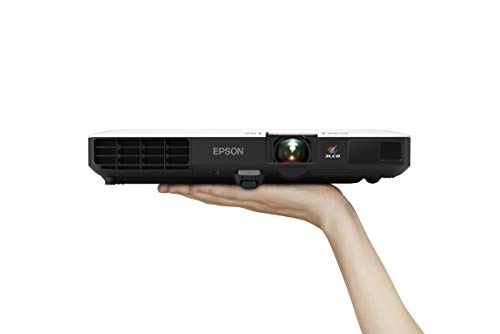
1. Epson PowerLite 1785W — Best for real boardrooms
The 1785W is the professional in the room, and its austere title — Epson PowerLite 1785W 3LCD WXGA wireless mobile projector, stated twice as if the listing itself were impatient — signals a product sold on reputation, its name already familiar to its professional audience. PowerLite mobile models are built for the traveling presenter: slim enough for a briefcase, bright enough for a conference room that cannot be darkened, and wireless so the deck can run from wherever the presenter stands.
WXGA resolution suits the meeting repertoire precisely. Slides, spreadsheets, dashboards, and documents render in the widescreen shape every business laptop produces, with enough detail for a table of colleagues to read figures without leaning in. The 3LCD engine delivers the color stability that branded templates and data charts need, and wireless connectivity removes the ceremonial passing of the HDMI cable around the table — a small ritual whose abolition every regular presenter appreciates.
The title’s brevity cuts both ways, and this guide will not decorate it. Brightness, battery, weight, and port counts go unstated in the title, so buyers should confirm them on the listing against their own road kit. What the title does establish — the PowerLite line, the mobile positioning, the WXGA class, the wireless capability — is the skeleton of the correct purchase for lit-room presenting, with the listing supplying the flesh.
Frame the choice plainly: this is the pick for the traveler whose meetings are the trip’s purpose, presenting to clients and rooms full of colleagues under fluorescent light. Its natural habitat is the conference table, powered from the wall, with the pico class’s battery anxieties entirely absent. Travelers whose presenting happens in darkened huddles can save the weight and money by reading on; travelers who have ever squinted at a pico’s ghost of a spreadsheet in a bright room already know why this Epson leads.
There is a client-psychology dimension to this pick that road veterans understand instinctively. Arriving with a recognizable business projector signals preparation before a word is spoken; the equipment reads as professional infrastructure rather than as a gadget. In rooms where the presenter is selling competence — consulting, training, enterprise sales — that signal compounds with the legible slides themselves. The Epson’s value therefore includes the impression it makes in the first ninety seconds, a period when the pico class, however capable in the dark, simply cannot compete under conference-room light.
Strengths
- PowerLite mobile lineage is purpose-built for traveling presenters.
- WXGA widescreen matches business laptops and data content.
- Wireless presenting frees the speaker from the cable’s end.
Trade-offs
- Brightness is not stated in the listing title.
- Battery operation is not claimed in the listing title.
- Weight and dimensions are not stated in the listing title.
Spec box
- Resolution: WXGA
- Engine: 3LCD
- Wireless: yes, as titled
- Brightness: Not stated in the listing title
- Battery: Not stated in the listing title
- Inputs: Not stated in the listing title
Best for: client-facing presentations in lit conference rooms while traveling. Not suited for: a pocket carry-on strategy, since this is a briefcase-class business machine rather than a pico.
Presenters whose meetings matter most can check the 1785W on Amazon and confirm its full specifications against their travel kit.
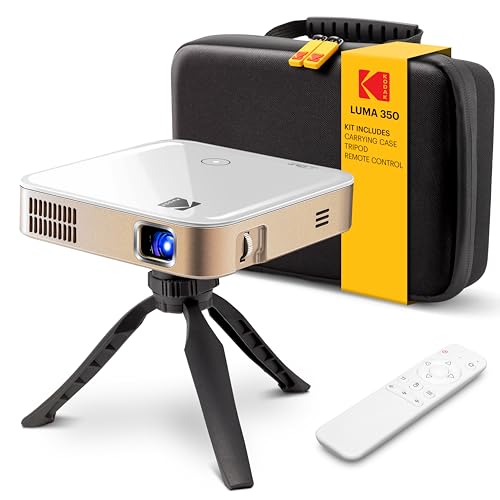
2. KODAK Luma 350 — Best complete travel kit
The Luma 350 arrives as the most considered travel bundle in the pico class. Its title lists a smart mini projector with built-in Android, sold in white as a pocket design, kitted with a tripod stand and an EVA case, with Miracast and DLNA casting, auto vertical keystone, and dual 1.5-watt speakers. The case and tripod are not garnish: a pico without a stand gets propped on books and coffee cups in every hotel room it ever visits, and a pico without a case arrives at the meeting with a scratched lens.
Android built in changes the travel workflow. The projector itself can carry streaming apps for the evening and presentation content for the morning, while Miracast and DLNA casting cover the phone-and-laptop handoffs that meetings actually consist of. Auto vertical keystone squares the image when the tripod sits below screen height, which on the road is nearly always. Dual speakers, modest as 1.5 watts each must be, cover narration for a small group without a Bluetooth speaker joining the packing list.
The pico boundary applies in full, and the review will not blur it: this is a dark-room, small-audience instrument. A hotel room at night, a dimmed huddle space, a restaurant’s private corner after hours — there, the Luma 350’s image is a pleasure and its kit completeness shines. A fluorescent conference room at midday defeats it as surely as it defeats every pico in this roundup, and the Epson above exists for that room.
Battery and resolution figures are not stated in this title, a silence the spec box records. Buyers for whom runtime is decisive should compare the Luma 400’s stated three hours below, and buyers focused on resolution should note the 720p figure the 400’s title provides. The 350’s case rests on the bundle and the platform, which is a legitimate and distinct proposition.
The EVA case deserves one more sentence of respect, because travel gear dies by accumulation of small insults rather than by single disasters. A projector that rides in a fitted case survives the bag’s daily violence — the laptop charger’s corners, the umbrella’s damp, the security tray’s drop — while an unprotected pico ages a year per quarter. Kodak bundling the case signals that this kit was designed by people who have actually watched travel destroy electronics, and buyers should weight that signal accordingly.
Strengths
- Tripod stand and EVA case complete the travel kit in the box.
- Built-in Android plus Miracast and DLNA cover content broadly.
- Auto vertical keystone simplifies improvised setups.
Trade-offs
- Battery runtime is not stated in the listing title.
- Resolution is not stated in the listing title.
- Dual 1.5W speakers serve small groups only.
Spec box
- Platform: Android OS built in
- Kit: tripod stand and EVA case included
- Casting: Miracast and DLNA
- Keystone: auto vertical
- Speakers: dual 1.5W
- Battery: Not stated in the listing title
Best for: a self-contained hotel-room and huddle-space kit that travels protected. Not suited for: a noon presentation to a full conference table under fluorescent light.
Road warriors wanting the complete bundle can review the Luma 350 kit on Amazon before their next itinerary firms up.

3. KODAK Luma 400 — Best pico battery life
The Luma 400’s title leads with the specification pico buyers ask about first: a three-hour battery. Around that headline it assembles a black smart projector running Android 9.0 streaming apps, USB and HDMI inputs with wireless casting, auto keystone, 720p HD resolution, and 4K input acceptance. For the traveler, the three-hour figure translates into a full evening session — a rehearsal, a dinner presentation, a film — untethered from the wall outlet’s geography.
Battery freedom rearranges meeting logistics more than any other pico feature. The presenter stops scouting the room for outlets, stops running a cable across the client’s carpet, and starts choosing the seat with the best sightline instead. Three hours also covers the realistic worst case of travel presenting: the meeting that runs long, in the room that was not the planned room, with the deck that needed one more revision shown from the battery’s reserves.
The 720p resolution deserves its honest framing. For slides with confident type sizes, video, and photo material, 720p at pico image sizes reads clearly and pleasantly. For dense spreadsheets and small-print documents, it shares the class limit — and that content, in a lit room, belongs to the Epson regardless. The 4K input acceptance is a compatibility courtesy for modern sources, not a display resolution, and the review treats it as such.
Android 9.0 is an older platform generation, worth noting for travelers whose streaming habits lean on the newest app versions; the casting and HDMI paths bypass that concern for meeting work entirely. Within the pico class, the 400’s combination of stated battery, stated resolution, and full input coverage makes it the most completely specified of the Kodaks here.
Evening economics favor this model in a way specification tables miss. A consultant billing by the day who can rehearse in the hotel, present at the client’s dinner venue, and review the day’s photographs afterward — all on one charge — extracts three sessions from a single device. The three-hour battery is what makes that triple duty plausible without outlet anxiety threading through the day. Travelers whose itineraries are built from exactly such stacked, location-shifting sessions will find the 400’s headline figure less a specification than a description of their calendar.
Strengths
- Three-hour battery is the longest runtime stated in this roundup.
- 720p resolution and 4K input acceptance are stated plainly.
- USB, HDMI, and wireless casting cover road sources completely.
Trade-offs
- Android 9.0 is an older platform generation.
- 720p limits fine-print documents at larger image sizes.
- Speaker power is not stated in the listing title.
Spec box
- Battery: 3 hours, as titled
- Resolution: 720p HD, 4K input accepted
- Platform: Android 9.0 streaming apps
- Inputs: USB, HDMI, wireless casting
- Keystone: auto
- Speakers: Not stated in the listing title
Best for: untethered evening presentations and rehearsals away from outlets. Not suited for: a bright boardroom where its pico output cannot hold the room’s attention.
Travelers who present away from power can look at the Luma 400 on Amazon with their longest meeting in mind.
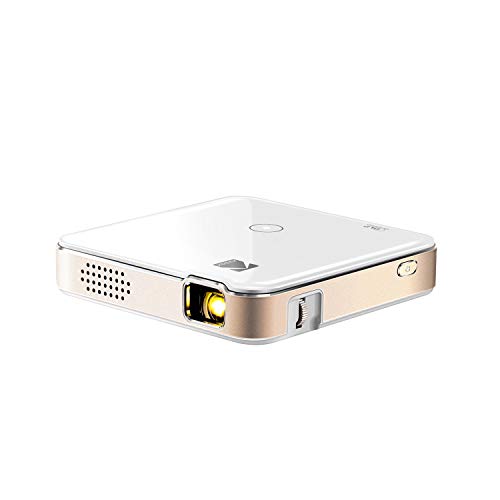
4. KODAK Luma 150 — Best simple pocket pick
The Luma 150’s title is the shortest in the roundup — mini projector, 1080p input, battery — and the review honors that economy by judging the model as the simple pocket option of the Luma family. It accepts 1080p input, it runs on a battery, and it fits the pocket format the line is known for. Everything else a buyer needs — runtime hours, native resolution, casting, speakers — the title leaves unstated, and the spec box below records each silence rather than importing a sibling’s figures.
That restraint cuts in the buyer’s favor in one specific way: the Luma 150 is the low-decision member of the family. For casual hotel-room viewing and the occasional two-person deck review, without speccing the purchase like a procurement exercise, this is the landing spot. The 1080p input acceptance means modern phones and laptops connect at their best through the appropriate cable, and the battery removes the outlet from the evening’s planning.
The class warnings apply with full force. No title claim supports boardroom ambitions, runtime planning must be confirmed on the listing, and the image belongs in darkened rooms at modest sizes. Buyers should also confirm the native resolution on the listing if slide text matters, since input acceptance and display resolution are different specifications that pico marketing loves to blur — this guide declines to blur them.
Within those boundaries, the 150’s simplicity is a genuine product position. Travel kits accumulate complexity until travelers stop carrying them; a projector that asks for one cable and one dark room keeps its place in the bag. For the casual-presenting traveler, that persistence is the feature that outranks every specification.
Gift and secondary-use patterns suit the 150 as well. It is the projector lent to a colleague without anxiety, packed for a family trip without a checklist, and pulled out for a photo slideshow at a reunion without a rehearsal. Devices in that social role succeed by being unintimidating, and the 150’s title — three facts, no fine print — advertises exactly that temperament. Stepping up is easy, deliberately, through the models above and below it in this roundup; settling for approachable is equally respectable, and this is the approachable one.
Strengths
- Battery operation and pocket format suit the lightest travel kits.
- 1080p input acceptance matches modern phones and laptops.
- The simplest decision in the Luma family.
Trade-offs
- Battery runtime hours are not stated in the listing title.
- Native resolution is not stated in the listing title.
- Casting and speaker details are not stated in the listing title.
Spec box
- Input acceptance: 1080p
- Battery: yes, runtime not stated in the listing title
- Native resolution: Not stated in the listing title
- Casting: Not stated in the listing title
- Speakers: Not stated in the listing title
- Platform: Not stated in the listing title
Best for: casual hotel-room viewing and two-person deck reviews on the road. Not suited for: a scheduled client presentation where unstated runtime and resolution are risks the meeting cannot carry.
Minimalist packers can check the Luma 150 on Amazon and confirm its listing details against their lightest bag.

5. KODAK Luma 75 — Best ultra-pocket format
The Luma 75 is the smallest statement in the roundup: a mini portable projector with 1080p HD DLP technology, a two-hour runtime, a pocket-sized black design, HDMI, USB, and microSD inputs, travel and smartphone positioning, a display up to 100 inches, and plug-and-play controls. Where the 400 competes on stamina, the 75 competes on disappearance — it is the projector that fits the jacket-adjacent corner of a bag and is therefore the one actually present when an impromptu screen is needed.
DLP technology in a pico brings a particular character: compact optics and crisp pixel structure that serve slides and video well at the modest sizes this class projects best. The 100-inch maximum display claim should be read as the class reads all such claims — achievable in darkness, pleasant at considerably smaller sizes. A 60-to-80-inch image in a dark hotel room is this unit’s honest stage, and on that stage it performs the pico repertoire completely.
MicroSD input is the sleeper feature. A presentation, a photo set, or a video carried on a card lets the projector work with no laptop, no phone, and no network at all — the purest form of the travel promise. Combined with HDMI for the laptop and USB for storage, the input trio covers the road’s realistic sources without a casting negotiation. Two hours of runtime covers a meeting or a film with a small reserve, though back-to-back sessions will want the wall outlet or the Luma 400’s longer battery.
Plug-and-play controls complete the positioning. The traveler who presents twice a year does not want a menu system to relearn in a client’s spare office; the 75’s promise is that the controls explain themselves. In a category full of small print, that promise, plus genuine pocket size, defines the pick.
Sales engineers and field trainers form this model’s natural constituency. Their presenting is episodic — a diagram on a site-office wall, a safety video in a break room, a photograph reviewed with the crew — and it happens wherever the work is, under whatever light discipline they can improvise. A projector that lives in the same bag as the tape measure and the tablet, ready in a minute, serves that rhythm better than a brighter machine that lives back at the office. The 75 is equipment for people whose office has wheels.
Strengths
- Pocket-sized design is the most portable in this roundup.
- HDMI, USB, and microSD inputs cover card-carried content.
- Two-hour battery and plug-and-play controls suit impromptu use.
Trade-offs
- Two-hour runtime trails the Luma 400 for long sessions.
- The 100-inch claim assumes darkness and modest expectations.
- Wireless casting is not stated in the listing title.
Spec box
- Technology: DLP, 1080p HD positioning
- Battery: 2 hour runtime, as titled
- Inputs: HDMI, USB, microSD
- Maximum display: 100 inches, as titled
- Controls: plug-and-play
- Casting: Not stated in the listing title
Best for: impromptu small-group presenting from the smallest possible bag footprint. Not suited for: a three-hour workshop session run entirely on battery power.
Ultra-light travelers can see the Luma 75 on Amazon and weigh two hours against their longest agenda item.
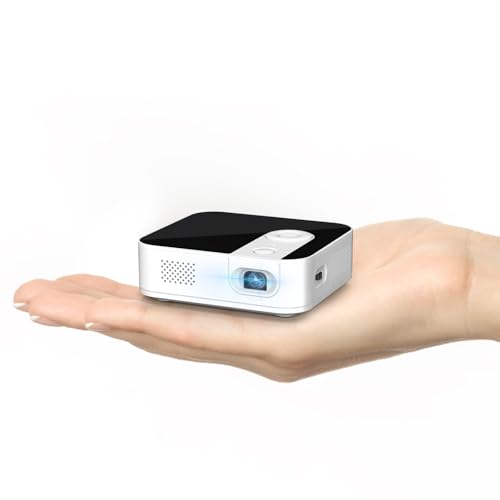
6. WONNIE Pico Pocket DLP — Best wireless pico value
The WONNIE closes the roundup as the unbranded wireless contender: an ultra-mini pico pocket projector with 1080P support, DLP LED technology, a built-in rechargeable battery and speaker, wireless connectivity over WiFi and Bluetooth, and compatibility with phones, tablets, and HDMI sources. Its title covers the pico checklist completely, positioning the unit as the value route into the class for buyers unpersuaded by the Kodak badge.
Wireless emphasis is its distinguishing accent. WiFi for casting and Bluetooth for audio describe the workflow phone-first travelers actually live: the deck is on the phone, the speaker is in the bag, the projector is the meeting point between them. A built-in speaker covers the smallest huddles when the Bluetooth speaker stays home, and the rechargeable battery keeps the whole arrangement untethered.
The candor paragraphs write themselves with an unbranded pico, and this guide writes them: the title states no runtime hours, no native resolution beyond 1080P support language, and no brightness figure. Support, in the pico class’s marketing dialect, describes input acceptance rather than display resolution, and buyers should carry that translation into the listing, where the full specifications can confirm what the title leaves open. The unit’s case rests on its wireless completeness and pocket format, judged as a dark-room, small-group device like every pico here.
Value framing completes the picture. A traveler adding a first pico for occasional huddles, a student presenting in dorm-room conditions, a field worker reviewing photos with two colleagues — these buyers need the class’s core experience without the brand premium, and the WONNIE’s titled feature set delivers exactly that core. Presenters carrying professional stakes should still start at the Epson and work down only as far as their rooms honestly allow.
Students and early-career travelers deserve a direct word here, because the WONNIE’s proposition is calibrated to their reality. A first pico bought for study-group sessions, internship presentations, and dorm-room films teaches its owner the class’s grammar — darkness, distance, battery discipline — at a value tier where mistakes are tuition rather than trauma. Graduates of that school buy their second projector with the precision this guide tries to teach, and many of them start exactly here.
Strengths
- WiFi and Bluetooth wireless cover casting and audio together.
- Rechargeable battery and built-in speaker complete the pico core.
- Phone, tablet, and HDMI compatibility spans road sources.
Trade-offs
- Battery runtime hours are not stated in the listing title.
- Native resolution beyond 1080P support is not stated in the title.
- The listing carries no established brand name in its title.
Spec box
- Technology: DLP LED pico
- Input support: 1080P support, as titled
- Wireless: WiFi and Bluetooth
- Battery: built-in rechargeable, hours not stated in the title
- Speaker: built-in
- Native resolution: Not stated in the listing title
Best for: phone-first travelers wanting a wireless pico for dark, small-group sessions. Not suited for: a lit-room client presentation, which remains the Epson’s exclusive territory in this roundup.
Value-minded travelers can check the WONNIE pico on Amazon and confirm its full specifications on the listing.
Comparison table
| Model | Class | Battery as titled | Resolution as titled | Defining trait |
|---|---|---|---|---|
| Epson PowerLite 1785W | Boardroom traveler | Not stated in the listing title | WXGA | Lit-room presenting, wireless |
| KODAK Luma 350 | Pico | Not stated in the listing title | Not stated in the listing title | Tripod and case kit, Android |
| KODAK Luma 400 | Pico | 3 hours | 720p HD | Longest stated runtime |
| KODAK Luma 150 | Pico | Battery, hours not stated | 1080p input accepted | Simplest pocket pick |
| KODAK Luma 75 | Pico | 2 hours | 1080p HD DLP positioning | Ultra-pocket, microSD input |
| WONNIE Pico | Pico | Rechargeable, hours not stated | 1080P support | WiFi and Bluetooth wireless |
Travelers equipping a home base as thoroughly as their carry-on may enjoy the contrast with best projectors for training rooms, where the projectors never move and legibility is the entire law.
One more selection habit deserves naming: we distrusted any title that promised everything. The listings that state their limits — a runtime here, a resolution there, silence elsewhere — proved more informative than any breathless enumeration could, because a seller who specifies some things precisely can be believed about the rest. That is why the spec boxes below preserve every silence they found; the silences are data, and a traveler planning around them plans better than one planning around guesses.
How do you choose a projector that truly travels?
Start with the room your meetings actually happen in, described at its brightest. If clients host you in lit conference rooms and the deck must land, the boardroom class is not optional — choose the Epson and accept the briefcase. If your presenting happens in hotel rooms, dimmed huddles, and evening sessions where the lights are yours to command, the pico class opens up, and the choice narrows to battery, inputs, and kit.
Within the pico class, battery honesty decides first. Match the stated runtime to your longest realistic session with reserve to spare: the Luma 400’s three hours for the untethered evening, the Luma 75’s two hours for the standard meeting, and listing-confirmed figures for the models whose titles stay silent. Inputs come second — HDMI for certainty, casting for convenience, microSD for the laptop-free scenario — followed by the kit question, since a tripod and case transform a pico from a gadget into equipment.
Now the brightness warning this guide promised, stated once and plainly: pico projectors are marketed with LED and lux-style figures that do not correspond to the ANSI lumen scale used by business projectors, and a pico quoting a huge number is not brighter than a business machine quoting a modest one. Judge picos in the conditions they are built for — darkness, modest image size, close audience — and judge any seller who promises boardroom performance from a pocket device as having told you what you need to know about the seller.
Hotel logistics deserve a paragraph of their own. The room’s best projection wall is rarely the one facing the bed; curtains, artwork, and the television compete for the flat surfaces. Scout on arrival, move the one chair that blocks the throw, and learn whether the room’s outlets sit where the projector needs them. Ten minutes of this reconnaissance on the first evening converts every later session in that room from improvisation into routine, and routine is what a tired traveler at the end of a working day actually needs.
Finally, rehearse the trip before the trip. Run the full meeting from the bag in your own office: unpack, set up, present, pack. Time it, note the missing adapter, and fix the kit while home stores are near. The projector that survives that rehearsal without improvisation is the one that will survive the client site.
Presenting from a carry-on: our evaluation notes
We evaluated this class by simulating the trips its buyers take. The first scenario is the consultant’s standard week: a flight, a hotel room, a client conference room at midday, a working dinner. In that week the Epson earns its briefcase space on the client-room day alone, while the picos serve the hotel rehearsal and the dinner huddle — a division of labor that suggests many heavy travelers honestly need one of each class, at different moments of the same trip.
The second scenario is the field review: two or three colleagues, a site office or a rented car after dark, photographs and a short deck to discuss. Here the picos stop being compromises and become the correct tool, with the Luma 350’s tripod and case, the 75’s microSD independence, and the WONNIE’s phone casting each winning a different version of the evening. Battery stated in hours proved to be the specification our scenario planning reached for most, which is why the titles that state it earned their prominence in this guide.
The third scenario is the failure rehearsal every traveler dreads: the client’s room has no working display, the meeting starts in ten minutes, and the bag holds the only screen. In that moment the virtues reorder themselves brutally — setup speed, input certainty, and battery reserve outrank every picture refinement, and the projector that simply works becomes the hero of a story the client retells. Travelers building a permanent presenting base after the trip can compare the stay-at-home counterparts in best projectors for sports bars, where reliability under pressure is likewise the first virtue.
Our closing note concerns weight discipline. Every traveler claims to pack light and then adds one more device. The pico class survives that audit because each unit replaces a negotiation — with hotel televisions, with client equipment, with the hope that the room provides — and a device that replaces uncertainty earns its ounces in a way a merely delightful gadget does not.
Sound in hotel conditions rounded out our scenario notes. Thin walls and late hours argue for modest volume and close seating, and the pico speakers — deliberately small in every model here — suit that etiquette naturally. A video-heavy session with a room-filling soundtrack calls for the packed Bluetooth speaker and its extra ounces, rather than asking a pico’s built-in audio to perform a job its designers never assigned it.
Common mistakes when buying a travel projector
Believing pico marketing is the founding error of this category. A pocket projector promised as a boardroom machine produces the specific misery of a presenter watching a client’s team squint at a ghost image, and the memory attaches to the presenter, not to the advertisement. Buy the class your brightest room requires. The second mistake is the mirror image: hauling a briefcase business projector on trips whose presenting is all hotel-room huddles, paying in weight and cost for lumens the itinerary never uses.
Runtime optimism follows. A battery figure is a ceiling measured under favorable conditions, not a promise for a maximum-brightness marathon, so planning a session that consumes the entire stated runtime is planning to finish in the dark. Keep a cable in the bag regardless of the battery’s size. Third, travelers neglect the surface: hotel art, textured wallpaper, and glass whiteboards all sabotage pico images, and a portable screen or even a plain light wall section, scouted on arrival, rescues more presentations than any setting.
Adapter amnesia closes the list. The cable that connects your laptop to HDMI, the phone’s casting quirk on a foreign network, the presentation stranded in a cloud account behind a hotel login page — these small logistics end more travel presentations than hardware failures do. Carry the deck locally, carry the cable physically, and let wireless be the bonus rather than the plan.
Security and loss form the final mistake category. A projector left visible in a parked car or an unattended conference room is a projector negotiating its own departure. Keep the unit in the bag, the bag with the person, and a record of the model and serial details in the traveler’s records at home. The pico class’s small size is an anti-theft virtue only when the owner exploits it by keeping the device genuinely pocketed or bagged between sessions.
Final recommendation
Choose by room, and the roundup resolves itself. Lit conference rooms and client stakes point to the Epson PowerLite 1785W without a serious rival here. Dark, small-group travel presenting points to the pico class, where the Luma 350’s complete kit, the Luma 400’s three-hour battery, the Luma 75’s pocket format and microSD independence, the Luma 150’s simplicity, and the WONNIE’s wireless value each fit a distinct traveler. The only wrong purchase is the one that confuses the two classes, and this guide has tried to make that confusion impossible.
Before the next itinerary, run the bag rehearsal described above and let its results arbitrate between the finalists. Presenters whose trips end at a home office desk may also appreciate best projectors for garage man caves for the fixed-installation counterpart to this portable discipline — the rooms differ, but the honesty about light applies to both.
Frequently asked questions
Should the projector fly in carry-on or checked luggage?
Carry-on, always. Battery-powered devices belong in the cabin under airline rules, and even the mains-powered Epson deserves cabin custody: the meeting it serves is the trip’s purpose, and a projector touring the baggage system while its owner presents is a failure no specification can excuse. A fitted case — the Luma 350 includes one — also speeds the security tray moment, keeping lens and cables together through the one part of the journey designed to scatter small electronics.
Can a pico projector really handle a business meeting?
A small, darkened one, yes — a huddle of two to four people around a table with the lights down is the pico’s home ground. A lit conference room with a dozen attendees is not, and no pico in this roundup claims otherwise in its title when read carefully.
What image size should a pico aim for in a hotel room?
Smaller than its maximum claim, deliberately. A pico image between roughly fifty and eighty inches in a darkened room looks bright and composed, while the same unit stretched to its headline size spreads its light thin. Presenters who resist the maximum-size temptation are consistently the ones whose pico images impress the room. Seat the audience a little closer rather than enlarging the image, and the whole presentation gains the intimacy that small meetings do best.
Why does this guide warn about pico brightness numbers?
Because the pico market quotes LED and lux-style figures that do not map onto the ANSI scale business projectors use. A pico with a spectacular marketing number can still be a dark-room device, and planning a lit-room meeting around that number is the category’s classic disappointment.
What belongs in the projector’s travel kit besides the projector?
The cable that fits your laptop without an adapter chain, a compact power adapter with the right prongs for the destination, the presentation stored locally on two devices, and a microfiber cloth for the lens. The Luma 350’s bundled tripod and case cover the hardware side; the rest is the presenter’s own discipline, and it weighs almost nothing. Add a slim remote or a phone-based control habit, and the presenter is free to stand, move, and speak to people rather than to the machine.
Which pick has the longest battery life?
The KODAK Luma 400, at three hours as titled. The Luma 75 states two hours, and the remaining pico titles confirm battery operation without stating hours, so their listings carry the figures a runtime-critical buyer needs.
Can a travel projector replace the hotel television for work?
For reviewing material, yes: the smart picos stream and cast onto a wall at sizes no hotel television matches, and the presenter controls the content completely. For the meeting itself, the television comparison is irrelevant — the projector’s job is the deck, the data, and the discussion, at whatever surface the room provides. Many travelers discover the evening review session becomes the trip’s most productive hour precisely because the wall-sized deck invites honest scrutiny.
Is WXGA enough for client presentations?
For the standard meeting repertoire — slides, spreadsheets, dashboards, documents — yes. WXGA matches business laptops’ widescreen shape and renders figures legibly at conference-table distances, which is the actual requirement. Fine-print legal review at large sizes is the edge case that wants more.
How do I handle a client room with no darkening options?
Change the plan, not the laws of physics: move the meeting to the room’s darkest wall, shrink the image to concentrate the light, enlarge the deck’s type for the session, or promote the Epson class to the job. A presenter who adapts the format to the light looks resourceful; one who fights the light with a pico looks unprepared. Carry a large-type emergency version of the deck for exactly these rooms, and the adaptation takes seconds rather than apologies.
Do I need a screen when traveling?
A light, smooth wall serves in most hotel and office settings, and the Luma 350’s tripod helps aim at whatever surface the room offers. Travelers presenting in unknown rooms weekly sometimes add a small portable screen, but the first upgrade is usually a rehearsal habit, not an accessory.
How should slides be designed for pico presenting?
Boldly: larger type than feels elegant, fewer words per slide, charts rebuilt as single-message graphics, and contrast that survives a modest image. A deck designed for pico conditions also reads better on every other screen it will ever meet, so the discipline pays rent far beyond the road. Keep a standard version for boardroom days and a bold version for pico evenings, clearly named, so the right file opens under pressure.
What separates the four Kodak Luma models from each other?
Kit, battery, and specification candor. The 350 leads on bundle completeness, the 400 on stated runtime and resolution, the 150 on simplicity, and the 75 on pocket format with card-based independence. They are one family expressing four travel temperaments, and the titles state enough to choose among them without folklore. A buyer upgrading within the family later will find the habits transfer — the same darkness discipline, the same sizing restraint — with only the stamina and kit improving.
Is a travel projector worth it for occasional trips?
For two or three presenting trips a year, the pico class usually justifies itself on the first rescued meeting alone. Travelers presenting less often should weigh rental and borrowing honestly, while a presenter earning a living from the deck will find the arithmetic settles quickly in ownership’s favor. The occasional traveler should still rehearse with a borrowed or newly bought unit before the trip that matters, because familiarity is the real product being purchased. A projector that has presented in your own office ten times will present in a stranger’s boardroom as if it belonged there, which is the entire ambition of travel equipment in one sentence, and the standard every pick in this roundup was ultimately judged against.
Which Kodak suits a phone-first presenter?
The casting models: the Luma 350 with Miracast and DLNA, the Luma 400 with wireless casting, and the WONNIE with WiFi at the center of its pitch. A presenter whose deck, photos, and video all live on the phone should shortlist those three and decide by battery and kit rather than by brand habit. Test the casting at home on your own network first, because a pairing learned calmly at the desk is a pairing that works in the client’s spare office.
Do travel projectors need special care between trips?
Minimal but real: charge the battery before storage rather than after, keep the lens capped or cased, and run the unit briefly every month or two on long gaps between trips. Equipment that is exercised and stored charged greets the next itinerary ready; equipment abandoned in a drawer negotiates its readiness at the worst possible moment. Store the cables with the unit rather than in the general cable drawer, because a projector separated from its one essential lead is luggage, not equipment.
What if the meeting grows beyond the pico’s audience?
Split the difference honestly: seat the group closer and tighter, dim what can be dimmed, and present the bold deck — or acknowledge the room has outgrown the tool and move the session to the Epson class or a proper display. Audiences forgive a format change announced confidently; they do not forgive an hour of squinting. Note the headcount for next time, because recurring overflow is the market telling the traveler to upgrade classes.
Should a frequent traveler own one of each class?
Many should, and this roundup is quietly built for that conclusion. The Epson covers the lit, high-stakes rooms; a pico covers the hotel, the huddle, and the evening. Together they weigh less than the uncertainty they replace, and the traveler stops gambling the trip’s purpose on the host room’s equipment cupboard. The pairing also ages gracefully, since the pico absorbs the casual sessions and saves the business machine’s hours for the rooms that justify it.
What is the fastest sanity check before a trip?
The bag rehearsal: unpack the projector at your own desk, connect the laptop you will travel with, run the real deck in a lit room and then in a dark one, and pack everything away. Fifteen minutes at home exposes the missing cable, the tired battery, and the class mismatch while every fix is still easy. Repeat the rehearsal whenever any element of the kit changes — a new laptop, a new cable, a new bag — because travel kits fail at their newest joint.
Do international trips change the choice?
Only at the margins: confirm the power adapter and voltage story for the destination, prefer battery models where outlet access is uncertain, and favor the pico that works from a phone when laptop policies differ abroad. The class logic — boardroom versus pico, darkness versus light — survives every border unchanged. Download the deck and any streaming material before departure, because foreign hotel networks are the least reliable link in any traveler’s chain.
Can these projectors double as hotel-room entertainment?
The smart picos were practically designed for it: the Luma 350 and 400 carry Android streaming, the WONNIE casts from a phone, and all of them turn a hotel wall into a cinema after the meeting ends. The Epson presents for a living and leaves entertainment to its downtime versatility as a wireless display.
The road rewards the presenter whose screen simply appears — in the client room, the hotel, the borrowed corner — and disappears again into the bag without drama, because in travel presenting, reliability is not one virtue among many; it is the entire reputation the audience remembers.


