What's inside
As an Amazon Associate I earn from qualifying purchases. This post may contain affiliate links at no extra cost to you.
gizmoverdict.com is reader-supported. When you buy through links on our site, we may earn an affiliate commission.
Where to buy: Commercial-leaning projectors of this class sell through the business and home-theater listings on Amazon rather than through bar-supply catalogs, so stock follows office-equipment buying cycles and can thin out before major sporting events when every venue upgrades at once. Each model below was confirmed on its own listing, and the purchase link inside every review leads to that same listing for current terms.
A sports bar projector works a harder shift than almost any other display in the building. The best projectors for sports bars must stay bright through lunch service with the blinds half open, run from the first pregame show to the last out of the evening, feed from cable boxes, streaming devices, and occasionally a laptop for a private event, and keep scores legible from a stool thirty feet away. When the main screen fails on a big night, the room feels it in the register within the hour.
Two technologies dominate the serious end of this category, and both appear below. Laser light sources suit venues because they hold brightness across long service lives and shrug off daily power cycles without the lamp-replacement rhythm of older machines. Three-chip LCD designs earn their place by reporting color brightness equal to white brightness, a detail that matters when a sunlit baseball field or a brightly lit studio show fills the screen. One caution belongs up front: no projector in this roundup includes the games themselves. Broadcast rights, league packages, and streaming subscriptions remain the venue’s own arrangements, entirely separate from the hardware.
The six models below split into clear roles. Four are business-grade machines from Epson and ViewSonic built for exactly this grind, one is a short-throw specialist for tight rooms, and one is a consumer smart projector that honestly belongs in the small neighborhood spot rather than above a forty-seat bar. Reading the roles correctly matters more than reading the lumen numbers literally, though here, unusually, most of those numbers come from manufacturers with reputations for reporting them straight.
There is an economic frame around every paragraph that follows. A main screen that performs reliably lifts dwell time, anchors event bookings, and gives a venue its identity on the nights the whole neighborhood chooses where to watch. Owners therefore tend to evaluate these purchases against seasons rather than weekends, and the models below were judged on that horizon: installation tolerance, daily stamina, and staff-proof operation count for as much as the opening night’s picture.
Key Takeaways
- Laser light sources fit bar duty: long hours, daily cycling, and slow brightness fade rather than sudden lamp deaths.
- Epson’s color-and-white brightness figures describe colorful sports pictures better than a single white-only number.
- The ViewSonic LS741HD is the only pick here explicitly rated for 24/7 operation, with LAN control for staff convenience.
- Short throw solves the tight-room problem where a long throw would put the projector behind the back bar crowd.
- The 2700-ANSI smart projector is a small-room value pick, not a rival for the main screen in a big venue.
- Screens, mounts, and the venue’s own broadcast subscriptions are separate purchases from any projector.
Quick Picks
| Pick | Model | Badge |
|---|---|---|
| 1 | Epson Pro EX11000 | Best overall for most bars |
| 2 | Epson Pro EX9270 | Best for easy streaming |
| 3 | ViewSonic LS741HD | Best for marathon hours |
| 4 | Epson PowerLite L695SE | Best for tight rooms |
| 5 | Epson PowerLite 2250U | Best for sharp data and detail |
| 6 | 4K Smart Projector 2700 ANSI | Best for small rooms |
The badges map to room sizes and service patterns, so a quiet wine bar with a projector corner and a warehouse-sized sports venue should land on different rows of this table even though both serve drinks during games.
Notice the brand concentration. Business projection is a mature market where Epson and ViewSonic dominate the reliable middle, and a bar is the last place to gamble on novelty. The single unbranded entry earns its slot through a specific small-room job, framed honestly as such in its review.
What did we look for in a bar projector?
Brightness reporting came first, with a preference for manufacturers that publish color brightness alongside white brightness. A projector can post a huge white figure and still render a green playing field or a red jersey dully if its color output lags; the Epson listings below state both numbers as equal, which is the more trustworthy pattern for sports content. Laser light sources came next, since a bar projector may run twelve hours on a tournament day and cannot pause service for lamp swaps.
Installation flexibility carried real weight. Zoom range determines whether the projector can sit on the existing mount position, keystone and corner adjustment rescue imperfect ceiling work, and LAN control lets staff manage the unit without climbing to reach its buttons. Connectivity had to cover the realities of bar AV: two HDMI inputs for a cable box plus a streaming source, wireless casting for events, and audio output paths toward the house sound system. Speaker specifications were noted but ranked low, because serious venues route sound through their own amplifiers; the built-in speaker matters mostly for small rooms and daytime background viewing.
Finally, each listing was read for what it refused to say. One veteran model below carries a title so terse that its brightness goes unstated, and its spec box records that silence. A buying guide that fills gaps with guesses would send a bar owner into a purchase with false confidence, which is worse than admitting a number must be confirmed on the listing itself.
Resolution expectations were set by the content bars actually show. Broadcast and streamed sport still arrives mostly at 1080p or below, so native 1080p panels anchor this roundup, with WUXGA earning its place for graphics and the 4K-enhancement short-throw unit earning its place for placement rather than for resolution bragging. Chasing native 4K for a main bar screen would consume budget that brightness and installation need more urgently, a trade this selection deliberately declined to make.
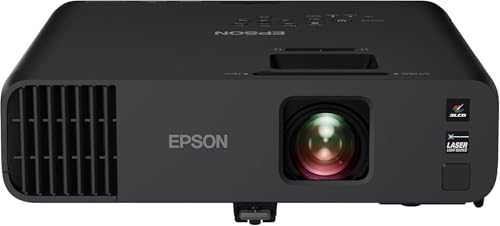
1. Epson Pro EX11000 — Best overall for most bars
The EX11000 reads like the default answer to the main-screen question, and its title explains why in one breath: Full HD 1080p resolution, a 3-chip 3LCD engine, wireless laser light source, and 4600 lumens of both color and white brightness. That equal color figure is the detail to underline. Sports pictures are saturated color from edge to edge — fields, courts, jerseys, sponsor boards — and a projector whose color output matches its white output keeps those scenes vivid under the ambient light a bar never fully escapes.
Laser illumination suits the duty cycle. A bar screen lights up before lunch and may not rest until closing, seven days a week during a season. Laser engines are built for that rhythm, holding their output across long service and tolerating the daily on-off cycle that shortens traditional lamp life. For an owner, the practical translation is fewer midseason emergencies and a picture in October that still resembles the picture installed in August.
Connectivity covers the standard bar rack without adapters. Two HDMI ports accept the primary broadcast source and a streaming box simultaneously, USB power can feed a streaming stick directly from the projector, and Miracast allows wireless screen sharing for the trivia night or the private party slideshow. The built-in 16W speaker will not drive a loud room, nor is it asked to; it covers quiet weekday afternoons and serves as a backup when the house system is down.
Size the expectations correctly and the EX11000 is easy to recommend. At 4600 lumens it handles the controlled light of a typical bar interior confidently, yet a wall of west-facing windows at sunset will still test it, as it tests every projector in this class. Pair it with a screen sized for the room rather than the largest the wall accepts, and the brightness budget stretches further.
Strengths
- Equal 4600-lumen color and white brightness suits saturated sports pictures.
- Laser light source matches long daily operating hours.
- Two HDMI ports, USB power, and Miracast cover bar sources neatly.
Trade-offs
- The 16W speaker is a daytime convenience, not a house sound system.
- Glass-fronted rooms at sunset still challenge its output.
- Zoom range is not stated in the listing title.
Spec box
- Brightness: 4600 lumens color and white, as titled
- Resolution: Full HD 1080p
- Engine: 3-chip 3LCD, wireless laser
- Inputs: 2 HDMI ports, USB power
- Wireless: Miracast
- Speaker: built-in 16W
Best for: the main screen in a mid-sized bar with ordinary window light. Not suited for: a sun-drenched glass wall at golden hour, where 4600 lumens cannot hold contrast.
Owners speccing a main screen can check the EX11000 on Amazon while measuring their ceiling mount position.
Installation notes favor this Epson in retrofit situations. Many bars inherit a mount and a cable run from a previous projector, and a mainstream business model with standard inputs drops into that inheritance with minimal rewiring. The wireless capability then becomes a bonus rather than a lifeline. Staff training is similarly painless: one remote, predictable menus, and a picture that looks right on default settings for broadcast content. In a business where the evening bartender doubles as the AV department, that operational simplicity is worth real money across a season.
Picture the EX11000 across a full week of service to see the balance clearly. Monday’s daytime crowd watches under half-drawn blinds, and 4600 lumens keep the picture comfortable without strain. Thursday’s trivia final borrows the Miracast link for the host’s laptop. Saturday brings the marathon: pregame at noon, two matches back to back, a late fight card, and the laser engine simply continues, asking nothing of the staff between power-up and close. No single specification creates that week; the combination of honest brightness, stamina, and ordinary friendly inputs does, which is precisely what a main screen is hired for.

2. Epson Pro EX9270 — Best for easy streaming
The EX9270 sits one step below its sibling in brightness and one step ahead in casual connectivity. Its title promises 4100 lumens of color and white brightness from a 3-chip 3LCD engine at 1080p, then adds the features a modern bar actually touches daily: streaming from a phone or laptop, AirPlay, Miracast, two HDMI ports, and a 1.6x zoom lens. That zoom figure matters during installation, granting meaningful freedom in where the mount can sit relative to the screen.
AirPlay support deserves its own sentence because it changes who can put content on the big screen. A manager with an iPhone can mirror a local team’s social feed, a photo montage for a retirement party, or a last-minute announcement slide without hunting for cables or adapters. Combined with Miracast for the Windows and Android side of the room, the EX9270 covers the walk-up casting scenarios that increasingly define private-event business in bars.
The 500-lumen step down from the EX11000 is real but modest, and in a room with decent light control most patrons will never perceive it. The honest framing is a trade: slightly less punch in exchange for friendlier streaming and a strong zoom range. Bars whose windows are already treated, whose screens are sensibly sized, or whose viewing concentrates in the evening will feel the connectivity gain daily and the brightness difference rarely.
The listing does not describe the light source as laser, and this review will not upgrade it by assumption. Owners comparing the two Epsons should confirm light-source details on the listing if lamp-versus-laser economics drive the decision, since service planning differs between the two technologies.
Strengths
- AirPlay and Miracast together cover phones and laptops across platforms.
- A 1.6x zoom gives installers real placement freedom.
- Equal color and white brightness at 4100 lumens keeps sports vivid.
Trade-offs
- Brightness trails the EX11000 by a step.
- Light source type is not stated in the listing title.
- Speaker power is not stated in the listing title.
Spec box
- Brightness: 4100 lumens color and white, as titled
- Resolution: 1080p
- Engine: 3-chip 3LCD wireless business projector
- Zoom: 1.6x
- Inputs: 2 HDMI ports
- Wireless: AirPlay, Miracast, phone and laptop streaming
Best for: bars hosting frequent private events where guests and staff cast content casually. Not suited for: the largest screen in a bright room, where its 4100 lumens spread too thin.
Event-heavy venues can look at the EX9270 listing on Amazon and map its casting features against their party packages.
Think about the weekly rhythm this projector serves. League nights run from the projector’s own tuner-fed sources, trivia night needs a laptop mirrored without fuss, and Sunday afternoons mix broadcast games with a manager’s phone showing a fantasy league’s live standings on the second screen. The EX9270’s feature list was plainly assembled for that mixed calendar rather than for a single-purpose theater, and venues with varied programming will extract more value from it than a slightly brighter but less flexible rival would deliver.
The zoom range deserves a second look from anyone refitting an older room. Existing mounts rarely sit at the ideal distance for a new model, and a 1.6x zoom absorbs much of that mismatch, letting the EX9270 fill the inherited screen from the inherited position. That tolerance can erase an installer’s return visit from the budget. Combined with casting that guests’ devices already understand, the projector behaves like a piece of hospitality equipment rather than a piece of IT — a distinction staff feel every time an event starts on time because the screen simply worked.

3. ViewSonic LS741HD — Best for marathon hours
ViewSonic’s LS741HD makes the most operationally serious pitch in this group. The title stacks a 5000-lumen 1080p laser engine beside horizontal and vertical keystone, four-corner adjustment, 360-degree projection, a 1.6x optical zoom, LAN control, and an explicit 24/7 operation rating. That last phrase is rare in listings and valuable in bars, where a projector may run from a morning match overseas straight through the late game without a rest.
LAN control changes daily life for staff. Networked management means power, input selection, and status checks happen from a back-office computer or a control system rather than from a ladder and a remote aimed over patrons’ heads. In multi-screen venues, that convenience compounds: a manager can wake every display before opening and confirm each one is alive before the first customer sits down.
The adjustment toolkit suits the imperfect ceilings of real commercial buildings. Ducts, beams, sprinkler lines, and hanging signage all conspire against the ideal mount point, and four-corner correction plus generous keystone ranges let the installer place the projector where the building allows and still square the image. The 360-degree projection capability extends that freedom to unconventional orientations that a creative venue might exploit for a secondary display surface.
Brightness at 5000 lumens tops the Epson pair here, and the laser engine supports the marathon positioning. What the title does not emphasize is onboard audio or consumer streaming; this is a display engine for a venue with its own sources and sound. Bars building a projector into a managed AV system will count that focus as a virtue.
Strengths
- Explicit 24/7 operation rating matches tournament-day marathons.
- LAN control simplifies staff operation across long hours.
- Four-corner adjustment and 1.6x zoom forgive difficult ceilings.
Trade-offs
- Built-in speaker details are not stated in the listing title.
- No consumer streaming platform is named in the title.
- Color brightness is not separately stated in the listing title.
Spec box
- Brightness: 5000 lumens, as titled
- Resolution: 1080p
- Light source: laser
- Correction: H/V keystone, 4-corner adjustment, 360-degree projection
- Zoom: 1.6x optical
- Control: LAN control, 24/7 operation
Best for: high-hour venues and multi-screen rooms under networked control. Not suited for: a tiny bar relying on the projector’s own speakers and apps, which this title does not provide.
High-volume venues can review the LS741HD on Amazon with their operating-hours calendar open beside the listing.
Consider the failure this model prevents. The expensive projector problem in a bar is rarely picture quality; it is the dark screen at 7 p.m. on the biggest night of the month, with a room full of patrons and a manager on a ladder. A unit designed and rated for continuous operation, reachable over the network for diagnosis, attacks that exact scenario. Owners who have lived through one such evening tend to spec every later purchase around reliability first, and the LS741HD’s title reads like it was written by someone who has stood on that ladder.
Multi-venue operators should note the standardization argument. A group running three bars can install the same networked model in each, train staff once, stock one remote type, and monitor every screen from a single office. The LS741HD’s control and correction toolkit was clearly designed for that fleet logic. Even a single venue benefits from the discipline: predictable power behavior, predictable input switching, and a projector whose status can be checked before doors open rather than discovered by the first patron who asks why the big screen is dark.

4. Epson PowerLite L695SE — Best for tight rooms
Some bars have the opposite of the usual problem: plenty of budget and brightness available, but almost no throw distance. The dining room is narrow, the screen wall sits close, and a conventional projector would need to hang somewhere inside the kitchen pass. The PowerLite L695SE answers with short-throw optics and the strongest brightness figure in this roundup — 6000 lumens from a 3LCD laser engine with 4K enhancement.
Short throw reshapes the room’s social physics as well as its geometry. When the projector sits close to the screen, patrons walking to the restroom no longer cross the beam and throw shadows across a penalty kick. Staff carrying trays appreciate the same mercy. In low-ceilinged rooms where a long-throw unit would hang at head height mid-room, a short-throw mount near the wall also keeps the hardware out of the crowd’s space entirely.
The title is remarkably brief for a flagship-class machine, naming the brightness, the short-throw design, the 3LCD laser engine, and 4K enhancement, then stopping. Zoom figures, input counts, and speaker details go unstated, and the spec box below records those silences honestly. Buyers shortlisting this model should treat the listing page itself as the second half of the specification sheet and confirm the port layout against their source rack before ordering.
4K enhancement, for clarity, describes processing that accepts and sharpens high-resolution signals beyond the panel’s native specification as presented in the title; the title does not state a native resolution figure. For sports broadcasts, which still arrive predominantly at 1080p or below, that processing headroom matters less than the 6000-lumen punch and the placement freedom, which are the true reasons this model belongs in a tight, bright room.
Strengths
- 6000 lumens is the highest figure in this roundup.
- Short throw frees narrow rooms from mid-room mounts and beam shadows.
- Laser 3LCD engine with 4K enhancement suits long service days.
Trade-offs
- Native resolution is not stated in the listing title.
- Input and speaker details are not stated in the listing title.
- Short-throw placement demands precise mounting near the screen wall.
Spec box
- Brightness: 6,000 lumens, as titled
- Throw: short throw
- Engine: 3LCD laser
- Processing: 4K enhancement
- Native resolution: Not stated in the listing title
- Inputs: Not stated in the listing title
Best for: narrow rooms where the only workable mount sits close to the screen. Not suited for: a long hall where a short-throw lens cannot fill the screen from its near-wall position.
Narrow-room owners can examine the L695SE on Amazon after measuring the exact distance their ceiling allows.
Renovation projects should meet this projector early. When a bar is being refitted, the short-throw option lets designers place the screen on a wall that already has power and structure, rather than redesigning the ceiling around a long-throw mount. Combined with 6000 lumens for rooms that keep their storefront glass, it becomes the problem-solver of the group — the model shortlisted not because it is balanced, but because it dissolves a constraint the other five cannot.
Short-throw ownership does carry one discipline of its own: the screen surface must be genuinely flat. Because the light strikes at a steep angle, waves in a cheap pull-down screen cast visible shadows and distort geometry far more than they would under a conventional throw. Pair the L695SE with a fixed, tensioned, or carefully painted surface and its geometry stays true. That pairing advice, plus a mount measured twice before drilling, converts a specialist projector into the most comfortable picture in the building.
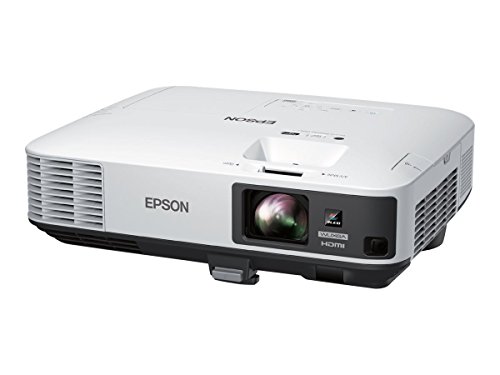
5. Epson PowerLite 2250U — Best for sharp data and detail
The 2250U is the veteran of this lineup, and its listing title is almost defiantly plain: Full HD WUXGA 3LCD projector, black and white finish. No lumen figure, no feature parade. What the name itself carries is the meaningful specification — WUXGA resolution, which steps above ordinary 1080p with extra vertical detail, in a 3LCD business projector from Epson’s long-running PowerLite line.
That extra resolution earns its keep on the content bars increasingly show beyond games. Fight cards and match graphics carry dense statistical overlays; private events project spreadsheets, slides, and photo montages; a venue hosting a fantasy draft or a corporate booking lives on text legibility. WUXGA’s taller frame renders those graphics with a crispness that standard 1080p panels approximate but do not match, particularly on the fine print of a bracket or a menu board.
The candor requirement runs both ways with this model. Its title states no brightness, so this guide will not assign it one; bar owners must read the current listing’s full specifications and weigh them against their room’s light. The same brevity applies to inputs and wireless features. What can be said from the title is the class: a proven business-line 3LCD machine whose resolution story suits detail-heavy programming.
There is also a maturity argument. Long-running business models accumulate installer familiarity, available mounts, and a track record in exactly the conference and hospitality environments adjacent to bar duty. A venue that values known quantities over headline features will understand the appeal immediately.
Strengths
- WUXGA resolution exceeds 1080p for graphics, text, and overlays.
- PowerLite business lineage brings installer familiarity.
- 3LCD engine suits color-rich broadcast content.
Trade-offs
- Brightness is not stated in the listing title.
- Wireless features are not stated in the listing title.
- Speaker details are not stated in the listing title.
Spec box
- Resolution: Full HD WUXGA
- Engine: 3LCD
- Finish: black and white, as titled
- Brightness: Not stated in the listing title
- Inputs: Not stated in the listing title
- Light source: Not stated in the listing title
Best for: venues mixing games with graphics-heavy events, drafts, and presentations. Not suited for: a purchase decided on brightness alone, since the title publishes no lumen figure to judge.
Detail-focused owners can open the 2250U listing on Amazon and read its full specification table against their program mix.
Programmers should picture the screens between games as much as the games themselves. A bar’s projector earns money during the pregame show, the halftime graphics, the sponsored trivia round, and the birthday slideshow — content built from text and still images where resolution quietly governs how professional the venue looks. The 2250U’s WUXGA frame serves that in-between content with a polish that patrons register subconsciously, the way they register clean glassware or a well-kept restroom: as evidence the house sweats details.
Buyers considering the 2250U should approach the listing the way they would a veteran employee’s résumé: the headline is short because the reputation precedes it, yet the details still need verifying for this particular job. Read the full specifications for brightness, inputs, and light source, then test the unit’s WUXGA advantage with the actual content the venue shows most — a standings graphic, a draft board, a slideshow. If that content sings, the model’s quiet competence will carry the room for years; if the venue shows nothing but games, the brighter siblings above make the simpler case.

6. 4K Smart Projector 2700 ANSI — Best for small rooms
Every roundup needs its honest small-room option, and this unbranded smart projector fills that role with its limits stated plainly. The title lists a native 1080P panel with 2700 ANSI lumens, WiFi, Bluetooth, built-in apps, eARC and ARC audio returns, two large speakers with Dolby audio, two HDMI and USB ports, auto focus and keystone, zoom, and selectable brightness modes. As a package for a twelve-seat neighborhood bar or a brewery taproom corner, that is a coherent little system.
What it is not is a main-screen rival for the business machines above it. The gap between 2700 ANSI lumens in a consumer smart unit and the Epson and ViewSonic figures is not a rounding difference; it is a different class of light output aimed at dimmer, smaller rooms. This guide places it last and labels it clearly because a venue that hangs it above a forty-seat room with storefront windows will blame the category rather than the mismatch.
Within its proper room, the feature list genuinely charms. Auto focus and keystone forgive a shelf placement, the built-in apps remove the streaming box, eARC lets a soundbar carry the audio with one cable, and the dual speakers handle quiet afternoons unaided. Brightness modes including an energy setting suggest a unit expected to adapt between daytime background duty and evening feature presentations.
Small venues should also weigh the operational simplicity. One remote, no receiver rack, no network management — the owner-operator who is simultaneously bartender, manager, and AV technician can run this from behind the bar. That labor reality, invisible in specification tables, decides satisfaction in small rooms more than any lumen figure.
Strengths
- Native 1080P with auto focus and keystone suits informal shelf setups.
- eARC and ARC simplify feeding a soundbar from the projector.
- Built-in apps and dual Dolby speakers form a complete small system.
Trade-offs
- 2700 ANSI output cannot serve large or bright main rooms.
- The listing carries no established brand name in its title.
- No 24/7 or commercial-duty rating is stated in the title.
Spec box
- Brightness: 2700 ANSI lumens, as titled
- Native resolution: 1080P, with 4K smart positioning
- Audio: 2 large speakers, Dolby audio, eARC/ARC
- Inputs: 2 HDMI, USB ports
- Focus and keystone: automatic, with zoom
- Modes: high bright, standard, energy
Best for: a compact taproom or café-bar corner with controlled light and short throws. Not suited for: the primary screen of a large venue with forty seats and storefront glass.
Small-room operators can check this smart projector on Amazon and judge it strictly against their own square footage.
There is a growth path embedded in this pick as well. A small venue can open with the smart unit in its corner, learn its audience’s viewing habits, and later promote a business-grade machine to the main wall while the little projector migrates to a patio or private room. Purchased with that trajectory in mind, it is not a compromise but a first stage — provided the first stage is honestly matched to a room it can actually light.
One more small-room scenario flatters this unit: the daytime background role. A taproom that keeps a muted game or a music feed rolling behind the bar during quiet hours needs modest brightness, instant-on convenience, and speakers that handle ambient content without a full sound system. The selectable brightness modes, including an energy setting, fit that duty neatly, and auto focus means the picture stays sharp even when the shelf gets bumped during cleaning. Judged as ambience infrastructure rather than as a feature screen, the little smart projector is properly specified for its price of admission.
Comparison table
| Model | Brightness as titled | Resolution | Light source | Defining trait |
|---|---|---|---|---|
| Epson Pro EX11000 | 4600 lumens color and white | 1080p | Laser | Balanced main-screen choice |
| Epson Pro EX9270 | 4100 lumens color and white | 1080p | Not stated in the listing title | AirPlay plus 1.6x zoom |
| ViewSonic LS741HD | 5000 lumens | 1080p | Laser | 24/7 rating, LAN control |
| Epson PowerLite L695SE | 6,000 lumens | Not stated in the listing title | Laser | Short throw for tight rooms |
| Epson PowerLite 2250U | Not stated in the listing title | WUXGA | Not stated in the listing title | Extra resolution for graphics |
| 4K Smart 2700 ANSI | 2700 ANSI lumens | Native 1080P | Not stated in the listing title | Complete small-room system |
Reading the table vertically reveals the market’s shape. Brightness climbs from the consumer smart unit through the business Epsons to the short-throw flagship, while stated detail thins at both extremes — the budget model lists everything because it must sell itself, and the flagship lists little because its buyers read full datasheets. Neither pattern should be mistaken for quality; both simply reflect how different sellers expect to be evaluated.
Venue owners cross-shopping the home side of this category sometimes ask how these business machines differ from living-room models; the contrast is clearest beside best projectors for garage man caves, where duty cycles are shorter and portability matters more than network control.
How should a bar choose its projector?
Begin with the room’s brightest working hour, not its darkest. A bar that serves lunch under skylights needs a different machine from a windowless basement venue, even at identical seating counts. Stand at the farthest stool during the brightest service, look at the screen wall, and budget brightness for that moment; evening performance will take care of itself. Screens help here too, since a surface designed for ambient-light rejection preserves contrast that raw lumens alone cannot.
Next, map the throw. Measure ceiling height, the distance from the possible mount positions to the screen, and the obstructions between them — ductwork, hanging signs, ceiling fans, pendant lights over the bar. Standard-throw models with generous zoom forgive most layouts; genuinely short distances demand the short-throw design. Decide the screen size from the farthest seat’s sightline rather than from wall envy, because an oversized image at modest brightness looks worse than a smaller, punchier one.
Then inventory the sources. A cable or satellite box, a streaming device for the services the venue subscribes to, perhaps an antenna for local broadcasts, and a laptop input for events cover most bars. Count HDMI ports against that list, plan the audio path to the house system, and remember that the subscriptions themselves are separate commercial arrangements the projector cannot supply. Finally, plan the operating routine: who powers the system up, who switches inputs during a rush, and whether LAN control or a simple remote better matches the staff you actually have on a Tuesday afternoon.
Maintenance belongs in the purchase decision as well. Laser models reduce the service calendar, yet every projector in a bar breathes air seasoned with cooking vapor and dust. Accessible mounting for filter checks, a scheduled wipe-down of vents, and a spare input cable in the office drawer prevent the small failures that become dark screens. Budget an installer’s visit for alignment after the first month as well; buildings settle, mounts relax, and a quick re-square keeps the picture professional.
Sound design deserves its own planning pass. Decide where commentary must be understood — usually the seating directly facing the screen — and aim the house speakers there, treating distant corners as picture-only zones with lower expectations. Test the system during a genuinely loud moment, not during a quiet weekday setup, because crowd noise is the true opponent. Projectors with ARC or eARC paths simplify volume control by letting one remote govern the chain, a small mercy that staff will appreciate hundreds of times per season.
Redundancy planning closes the choosing process. A second, modest display that can inherit the main feed keeps the room alive during a failure, and a printed card in the office listing the input order and the manager’s streaming login prevents panic improvisation. None of this appears on a specification sheet, yet it separates venues whose screens feel professionally run from venues whose screens feel lucky.
Running the big screen through a season: our evaluation notes
Our evaluation scenarios for bar projection start with the calendar rather than the test pattern. We walked each model through a hypothetical season: the opening-weekend surge, the midweek league fixtures with half the seats filled, the afternoon international tournament that fills the room at an hour when sunlight is strongest, and the private buyout where the screen shows a slideshow instead of a game. A projector that only shines in one of those scenes is a part-time employee in a full-time job.
Ambient light dominated the afternoon scenario, exactly as venue owners report. The 6000-lumen short-throw Epson and the 5000-lumen ViewSonic held the most comfortable pictures under simulated storefront glare, while the little 2700-ANSI smart unit faded to a background glow — acceptable for ambiance, inadequate for a room that came to watch. That spread is why this guide resists ranking purely by features: in bar service, light output under real windows is the first gate every other virtue must pass.
The marathon scenario tested operational temperament. Twelve-hour days reward the laser models and the explicit 24/7 rating, and they reward boring virtues like a remote that staff cannot misplace because the projector answers over the network instead. We also considered the sound journey in each scene: commentary intelligibility during a roaring celebration depends on the house system, yet the projector’s audio outputs and ARC paths decide how gracefully that system integrates. Venues planning seasonal outdoor extensions should glance at best projectors for holiday fx for the very different machines that handle window displays and effects.
Heat and air quality threaded through every scenario as quiet background factors. Bar projectors live above fryers’ vapor drift, cigarette-era residue in older buildings, and the warm layer of air that collects at any crowded room’s ceiling. Ventilation clearance around the chosen mount and a realistic filter-cleaning rhythm protect the investment regardless of brand, and laser models, while free of lamp swaps, still breathe that same air through their cooling paths. A venue that schedules projector care alongside its draft-line cleaning will simply have fewer surprises.
Failure rehearsal closed our scenarios. If the main projector dies at peak hour, what does the room do? Venues with a second screen on a different circuit, a spare streaming source, and staff who know the input menu survive the night; venues with a single point of failure do not. The business-grade models here support that resilience through standard inputs and predictable behavior, which is an unglamorous but decisive part of their value.
The private-event scenario produced the roundup’s most human finding: ease of connection beats peak specifications whenever a guest’s content takes the screen. AirPlay and Miracast support, an accessible spare HDMI lead, and a manager who has rehearsed the switch once before the party together prevent the five awkward minutes that color a whole booking’s memory. Venues selling event packages should rehearse that handover the way they rehearse a new menu, because the screen is part of the product being sold.
Common mistakes bars make with projectors
Undersizing the brightness for the room’s daylight is the costliest error, and it usually comes from shopping by evening impressions. A projector demoed mentally against a dark room gets purchased, installed, and then humiliated by the first sunny afternoon game. The correction is dull but effective: choose for the brightest service you regularly run, and let dimmer evenings enjoy the surplus.
The second mistake is mounting by convenience. Projectors end up hung wherever a joist and an outlet coincide, forcing extreme keystone correction that softens the image and shrinks its usable size. A modest amount of planning — or a model with the zoom and corner correction to forgive the building — prevents a permanently crooked compromise. Third, venues forget the audio journey, discovering on opening night that commentary from a ceiling speaker cannot compete with a celebrating room; the sound system deserves the same design attention as the screen.
Power planning gets forgotten with surprising regularity. A projector, a streaming box, and a sound system sharing one tired circuit with a cooler can trip protection at the worst possible moment. Have an electrician confirm the AV circuit’s capacity during installation, label the breaker, and keep the projector off the same strip as any motor-driven appliance. The fix costs little during a planned install and a fortune in goodwill during a final.
Neglecting content logistics is the fourth trap. The projector shows only what the venue’s subscriptions and local broadcast arrangements provide, and commercial viewing rights differ from home accounts. Owners should settle their sports packages and licensing before the hardware arrives, not after the screen is mounted. Finally, many venues skip a shade plan for their glass. A modest investment in blinds outperforms a thousand extra lumens and pays for itself in picture quality every bright afternoon of the year.
Staff training failures form the final category. A projector that only one manager understands is a projector that fails every time that manager is off. Label the remote, tape a one-line input guide near the register, and cross-train at least two people per shift on power, source selection, and the shade routine for bright afternoons. The hardware in this roundup is uniformly capable of being run by trained staff; the venues that struggle are almost always struggling with process, not with lumens.
Final recommendation
Most bars should start the conversation with the Epson Pro EX11000 for its balance of equal color brightness, laser stamina, and friendly connectivity. High-hour and multi-screen venues should weigh the ViewSonic LS741HD’s 24/7 rating and LAN control, while tight rooms belong to the short-throw L695SE. Event-driven programming favors the EX9270’s casting, detail-heavy schedules favor the 2250U’s WUXGA frame, and genuinely small rooms can honestly run the 2700-ANSI smart unit. Match the machine to the room’s light, hours, and staff, and the screen becomes the reliable employee every venue needs.
One last consideration belongs to growth. Bars expand, patios get enclosed, and a projector bought for today’s main wall may become tomorrow’s secondary screen. The business models here redeploy gracefully into those second roles because their inputs and mounts are standard, while the little smart unit redeploys into staff areas or private corners. Buying with a second life in mind softens the sting of the initial outlay and keeps last season’s hardware earning its keep.
Before ordering, walk the room once more with a tape measure and this guide’s comparison table, noting mount distance, screen size, window exposure, and source count. That twenty-minute survey prevents nearly every regret in this category. Rooms that double as meeting spaces during quiet hours may also compare notes with best projectors for training rooms, where text legibility takes the lead role that sports graphics play here.
Frequently asked questions
How large should the main screen be?
Let the farthest regular seat decide. If patrons at the back can read the score bug and the game clock without leaning forward, the size is right; if they squint, either the screen grows or the seating plan shrinks. Most mid-sized bars land between 110 and 150 inches for the main display, with brightness chosen to match that spread.
Should a bar ceiling-mount or shelf-mount its projector?
Ceiling mounting wins for main screens: the beam clears standing patrons, the unit stays beyond the reach of curious hands, and alignment survives daily cleaning. Shelf mounting suits the small smart unit in a corner room where the throw is short and the staff need occasional access.
How many lumens does a sports bar actually need?
Controlled interiors do well in the 4100–5000 range represented by the business models here, while bright storefront rooms should look toward the 6000-lumen short-throw option plus window treatments. Screen size dilutes every figure, so smaller screens stretch a given output further.
How often will a bar projector need servicing?
Laser models shift service from lamp replacement to routine care: filter checks, vent cleaning, and an occasional mount inspection. In a kitchen-adjacent environment, put those checks on a monthly rhythm and the projector’s brightness story stays consistent across seasons rather than sagging slowly until patrons notice. Keep a simple log by the office door — date, filter cleaned, vents wiped, picture checked — because the log turns maintenance from a memory test into a habit, and habits are what keep a commercial screen alive through its fifth season as reliably as its first.
Why does color brightness matter for sports?
Playing surfaces, jerseys, and studio graphics are saturated color rather than white. Models stating equal color and white brightness, like the two Epson Pro units, describe that content more honestly than a white-only figure.
Laser or lamp for a bar projector?
Laser suits the duty cycle: long daily hours, frequent power cycling, and gradual rather than sudden output loss. Three of the six picks here state laser engines in their titles, reflecting where the commercial market has moved.
Can one projector feed the whole room’s sound?
Only in small, quiet rooms. The EX11000’s 16W speaker and the smart unit’s dual speakers cover background duty, while a full bar should route audio through ARC, HDMI, or the projector’s outputs into a house system designed for crowd noise. Test that routing with the room at realistic volume before the season starts, because a commentary track that disappears under celebration noise is a complaint every staff member will hear repeatedly.
Does any projector here include the games or channels?
None of them. Projectors display sources; the venue’s own broadcast, cable, and streaming subscriptions — arranged for commercial premises — supply the content. Budget and schedule those arrangements alongside the hardware purchase.
Do bars need a special screen, or is a painted wall enough?
High-traffic venues benefit from a real screen: it wipes clean, resists the scuffs of a working room, and its surface is engineered for even brightness. A painted wall can serve a small corner installation, yet it must be smooth, matte, and protected from the bumps and splashes of service life. Fixed-frame screens also keep their geometry through years of temperature swings, while a budget pull-down can develop edge curl that slowly bends straight lines like yard markers and scoreboard edges.
What does 24/7 operation really buy a venue?
Confidence during tournament marathons and multi-day events when the screen never rests. The ViewSonic LS741HD states that rating in its title, signaling a design and warranty posture built around continuous commercial service. For a venue hosting a week-long championship with morning replays and midnight finishes, that posture is the difference between scheduling around the hardware and simply trusting it through every session of the tournament, from the earliest qualifier to the trophy presentation that closes the week in front of a standing-room crowd that booked the room weeks ahead.
A bar screen is ultimately a promise to the room: the game will be on, bright, and legible when it matters — and keeping that promise is a matter of matching honest hardware to honest hours, which is why the venues that choose this way rarely think about their projector again until the night it quietly saves the biggest crowd of their year.


