What's inside
- Key Takeaways
- Quick Picks
- How Did We Sort Spectrum Routers Into Two Honest Categories?
- Which Devices Speak to Spectrum’s Network, and Which Speak to Its Modem?
- Combo or Separate Modem and Router: Which Spectrum Setup Fits Your Home?
- How Do You Swap Spectrum Equipment Without an Evening of Outage?
- What Does Spectrum’s Own Equipment Arrangement Mean for Your Choice?
- How Do the Six Compare on Type, Standard and Role?
- What Mistakes Do Spectrum Customers Make When Buying Routers?
- Final Recommendation
- Frequently Asked Questions
- Related Guides
As an Amazon Associate I earn from qualifying purchases. This post may contain affiliate links at no extra cost to you.
gizmoverdict.com is reader-supported. When you buy through links on our site, we may earn an affiliate commission.
Where to buy: All six products below link to listings verified against this site’s product pool; Spectrum promotions move costs too often for a printed figure to stay honest, so costs live only on the listing, and no fixed star score is quoted here either. It opens with the distinction the whole keyword turns on, because confusing the two halves of this pool is the most expensive mistake a Spectrum customer can make: three picks are modem-router combos with a DOCSIS cable modem built in, and three are pure routers with no modem at all. The combos replace Spectrum’s modem and router together, on cable service only. The pure routers sit behind a modem — Spectrum’s or your own — and never touch the cable signal themselves.
The best routers that work with Spectrum ISP divide along that line because “works with Spectrum” means two different jobs. In the first job, the device must speak DOCSIS, the cable-industry language of Spectrum’s coax network, at a version and channel capacity that matches your speed tier; that is a modem’s qualification, and only the three NETGEAR combos in this pool hold it. In the second job, the device must simply be a good router behind whatever modem terminates the line, taking an Ethernet feed and running the home; any competent router qualifies, and the three pure routers here are graded as routers, full stop. Knowing which job you are hiring for makes a wrong purchase from this page nearly impossible. Not knowing invites the classic errors: a beautiful DOCSIS combo bought for a fibre address, where it will never connect to anything, or a pure router delivered to a home with no modem, where it will wait forever for a signal it cannot create. The reviews below therefore begin every verdict by restating which of the two jobs the device in hand was actually built to do every day of its working life.
Spectrum’s own arrangements frame the choice. The company supplies a modem for its cable service and offers its WiFi service as an add-on arrangement; customers who buy from this page are typically escaping one or both halves of that — replacing the supplied WiFi with a router they control, or replacing the modem as well with a combo of their own. One discipline applies to the combos especially: cable providers certify specific modem models for specific speed tiers, so the final authority on whether a given combo serves your address at your tier is Spectrum’s approved equipment list, checked against the exact model. The listing titles in this pool name the DOCSIS standard and the WiFi class; where a title does not print Spectrum’s name, the spec box says so, and the guide’s advice is to verify the model on the provider’s list before the box is opened. That five-minute check is the difference between an upgrade and a return, and it is the cheapest five minutes in the entire purchase.
Our Top Picks
 TP-Link AC1200 Gigabit Dual Band WiFi RouterWi-Fi 5 AC12008.46 x 4.92 x 1.81 inches0.71 poundsCheck on Amazon
Key Takeaways
- Three picks are DOCSIS modem-router combos for cable service; three are pure routers that need a separate modem.
- A DOCSIS combo works only on cable — it cannot connect to fibre or DSL service of any provider.
- Pure routers work with Spectrum by sitting behind its modem on Ethernet; their qualification is router quality, not cable standards.
- Verify any combo’s exact model against Spectrum’s approved equipment list for your speed tier before buying.
- DOCSIS 3.1, printed in two titles here, is the current cable standard for gigabit-class tiers in particular.
- Replacing Spectrum’s WiFi with your own router is the commonest upgrade; replacing the modem too is the combo’s extra step.
- Keep the return receipt and the activation details for any swap; support calls ask for them by name for years afterwards, without fail.
Quick Picks
| Pick | Badge | Why it is here |
|---|---|---|
| NETGEAR Nighthawk CAX80 | Flagship DOCSIS 3.1 combo | A WiFi 6 modem-router combo rated at 6 Gbps class, for gigabit cable tiers and busy homes. |
| NETGEAR Nighthawk CAX30S | Mid-tier DOCSIS 3.1 combo | The same one-box cable formula at 2.7 Gbps class, sized for mainstream Spectrum tiers. |
| NETGEAR C6230 | Compact cable combo | A cable modem with a built-in WiFi router, for smaller homes wanting one tidy box on cable. |
| TP-Link Archer A6 | Pure router, value | An AC1200 gigabit dual-band router to run the home behind a Spectrum modem, at the pool’s simplest level. |
| TP-Link Archer AX21 V5 | Pure router, WiFi 6 | An AX1800 WiFi 6 router for households keeping Spectrum’s modem and upgrading everything behind it. |
| ASUS RT-AX1800S | Pure router, extendable | A WiFi 6 router with subscription-free security and a mesh growth path, behind any modem Spectrum supplies. |
How Did We Sort Spectrum Routers Into Two Honest Categories?
By refusing to let the keyword blur them. Selection began by reading each title for the word modem, because that word changes what the device is. The three NETGEAR titles declare modem hardware — two print DOCSIS 3.1 explicitly, one describes a cable modem with a built-in WiFi router — and those three were assessed as cable gateways: DOCSIS generation, WiFi class, and the household scale their speed classes imply. The other three titles describe routers only, and they were assessed as routers: wireless generation, wired ports, platform character, and growth paths. No pick was credited with Spectrum certification in words, because no title in this pool prints the provider’s name; instead the guide teaches the verification step — Spectrum’s approved list, by exact model and tier — that turns a compatible-in-principle combo into a confirmed one for your address.
Within the two categories we spread the household scales deliberately. The combos ascend from the compact C6230 through the mainstream CAX30S to the flagship CAX80, mirroring the climb from modest cable tiers and small homes to gigabit tiers and device fleets. The pure routers ascend from the Archer A6’s value simplicity through the AX21’s WiFi 6 mainstream to the ASUS’s extendable platform. The result is a page that can be read two ways: vertically, as six reviews; or as two shortlists of three, between which the reader’s first decision — do I need a modem in the box? — does most of the choosing before the reviews even begin.
One more selection note, because Spectrum’s footprint invites it. The provider’s name covers a patchwork of legacy cable systems absorbed over the years, and the plant in one town can differ in detail from the plant in another — another reason the approved list, which is organised by the customer’s actual service, outranks any general guide, including this one. We treat that patchwork honestly by grading what is universal: DOCSIS generations, the modem-versus-router distinction, and router quality behind the modem. Those universals travel across every legacy system in the footprint. The particulars live where they belong, on the list, checked against the address that will actually plug the box in.
Which Devices Speak to Spectrum’s Network, and Which Speak to Its Modem?
The detailed reviews keep the two conversations separate on purpose. Combo reviews talk about the cable line, the tier and the one-box household. Pure-router reviews talk about the network behind the modem — and each one repeats, without embarrassment, that it contains no modem at all.
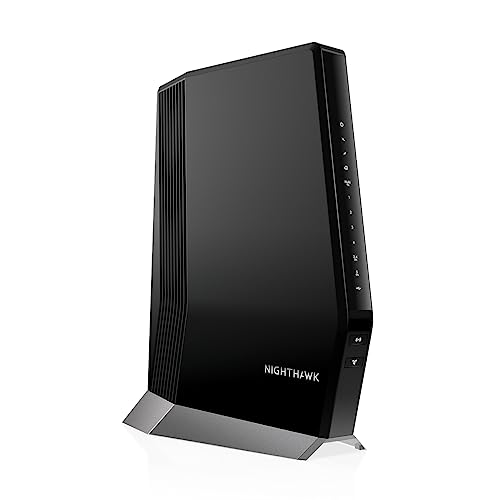
NETGEAR Nighthawk CAX80 — Flagship DOCSIS 3.1 combo
The CAX80 is the pool’s cable flagship, and its title stacks the credentials in order: a Nighthawk DOCSIS 3.1 modem router combo, WiFi 6, at a 6 Gbps class. DOCSIS 3.1 is the generation of cable technology that carries gigabit-class tiers, so this is the combo aligned with Spectrum’s fastest cable plans — the household that pays for the top tier and wants a single owned box, modem and router together, that does not apologise to it. The WiFi 6 platform behind the modem is sized for the same ambition: many devices, simultaneous streams, a wired backbone for the desk and the console. As a purchase it replaces two pieces of provider-adjacent equipment at once, which is its economy and its commitment in equal measure — one box to own, one box to verify against the approved list, one box whose failure would be total and whose competence, therefore, matters most.
The verification discipline deserves its paragraph here because the flagship invites the most expensive assumption. Cable systems certify modems by model and tier, and a DOCSIS 3.1 combo of this class is built for the top of that system — but the authority remains Spectrum’s approved equipment list for your specific plan, checked by exact model name before purchase, as the spec box instructs. The title does not print Spectrum’s name, and this guide does not print it on the title’s behalf. What the title does guarantee — DOCSIS 3.1, WiFi 6, the Nighthawk line — describes a device squarely in the category Spectrum’s gigabit cable customers shop from. Households on fibre or DSL addresses should close this review and read the pure routers below: this box cannot speak to their lines at all, and no firmware update will ever teach it.
For the right household, the ownership logic is compelling. One device draws one power outlet, holds one firmware stream, presents one interface for everything from the cable signal to the guest network, and removes the finger-pointing that two-box setups invite when something stutters — modem or router, provider’s or mine. The CAX80 is bought by households that want that singleness at the highest tier. It asks, in return, that the buyer do the five minutes of list-checking and accept the combo’s eternal trade: when the day comes to change one half, both halves change together.
Placement and cabling, unglamorous as they are, decide whether the flagship’s capacity reaches the rooms. A combo lives where the coax enters, which is rarely the home’s centre; on a gigabit tier with a houseful of wireless devices, the honest options are a long Ethernet run to a wired access point for the far end, or accepting that the combo’s kingdom is the half of the house it can see. Check the coax itself while you are there — a loose connector or a legacy splitter behind the television taxes every tier, and the flagship will be blamed for a fitting that costs pennies. Big equipment rewards tidy infrastructure; give it some.
- Model: NETGEAR Nighthawk CAX80
- Type: modem-router combo — DOCSIS modem built in
- Modem standard: DOCSIS 3.1 (from the listing title)
- Wireless: WiFi 6, 6 Gbps class (from the listing title)
- Service type: cable only — not usable on fibre or DSL
- Spectrum named in title: Not stated in the listing title — verify with NETGEAR documentation and Spectrum’s approved equipment list for your tier
Strengths
- DOCSIS 3.1 and WiFi 6 in one box, aligned with gigabit-class cable tiers.
- Single-device ownership ends modem-versus-router fault arguments.
- Flagship capacity suits device-dense, high-tier households.
Trade-offs
- Cable only — useless at a fibre or DSL address.
- Exact-model verification against the provider’s approved list is essential homework.
- Combo economics: upgrading one half later means replacing both.
Best for: a gigabit-tier Spectrum cable household seeking one owned flagship box. Not suited for: any non-cable address, or a household in the habit of upgrading modem and router separately.

NETGEAR Nighthawk CAX30S — Mid-tier DOCSIS 3.1 combo
The CAX30S applies the flagship’s formula at the mainstream scale: a DOCSIS 3.1 modem router combo, WiFi 6, at a 2.7 Gbps class. Most Spectrum households do not buy the top tier; they buy the middle ones, in homes with a dozen or two devices and an evening pattern of streams and calls. For that household the CAX30S is the proportionate one-box answer — the current DOCSIS generation for longevity on the cable plant, WiFi 6 for the modern device fleet, and capacity matched to the tiers below gigabit rather than priced for the tier above them. The S in its name marks it as a model variant sold through particular channels; the substance is the same Nighthawk combo recipe in a mainstream serving.
Everything said about verification for its flagship sibling applies here with equal force, because the mechanism is identical: the title establishes the category — DOCSIS 3.1 cable gateway — and Spectrum’s approved list, consulted by exact model and your tier, confirms the individual. That two-step is not a weakness of these reviews; it is how cable equipment is honestly bought, and any guide that skips it is selling convenience at the price of a possible return trip. Note also what the combo replaces in a mainstream home: typically the provider modem plus the provider WiFi arrangement, consolidated into a box whose interface, guest network and settings the household actually controls. For many families that control, more than any speed figure, is the upgrade they feel — the network stops being a rented mystery and becomes an appliance they own.
Where the CAX30S concedes ground to the CAX80 is headroom, and the concession should be sized honestly. A household expecting to climb to the gigabit tier within the equipment’s life, or already running a small office’s worth of devices, buys the flagship’s margin once. A household settled on a mid tier, in a mid-sized home, buys this and spends the difference on the things mid-tier households actually lack — a mesh node for the far bedroom someday, a spare Ethernet cable that is not borrowed from the printer. Proportion is a feature, and the CAX30S is this pool’s most proportionate cable box.
A detail of mainstream life suits this combo well: the school-night surge. Between homework uploads, two televisions, a parent’s late call and a console downloading tomorrow’s game, the mid-tier household’s demand arrives in overlapping bursts rather than a steady flood. A DOCSIS 3.1 combo with WiFi 6 scheduling absorbs that pattern gracefully — the cable side has channel depth, the wireless side has modern manners — and the household experiences the evening as nothing happening, repeatedly, which is the entire ambition. Equipment that only shines in a speed test is a trophy; equipment that makes the surge invisible is infrastructure, and the CAX30S is aimed squarely at being the second kind.
- Model: NETGEAR Nighthawk CAX30S
- Type: modem-router combo — DOCSIS modem built in
- Modem standard: DOCSIS 3.1 (from the listing title)
- Wireless: WiFi 6, 2.7 Gbps class (from the listing title)
- Service type: cable only — not usable on fibre or DSL
- Spectrum named in title: Not stated in the listing title — verify with NETGEAR documentation and Spectrum’s approved equipment list for your tier
Strengths
- Current DOCSIS 3.1 generation at a mainstream scale and capacity.
- One-box replacement for the provider modem plus rented WiFi arrangement.
- WiFi 6 covers the modern household’s device fleet comfortably.
Trade-offs
- Cable only, like every DOCSIS combo — no use at fibre or DSL addresses.
- Less headroom than the CAX80 for tier climbers and device fleets.
- Approved-list verification by exact model remains the buyer’s homework.
Best for: a mid-tier Spectrum cable household seeking one proportionate owned box. Not suited for: a gigabit-tier household or a non-cable address.

NETGEAR C6230 — Compact cable combo
The C6230’s title tells its story in plain order: a cable modem with a built-in WiFi router. No DOCSIS generation is printed, no speed class is trumpeted — this is the compact end of the combo category, aimed at smaller homes on mainstream cable tiers that want the one-box simplicity without flagship dimensions or ambitions. A flat, a small house, a modest device count: the C6230 terminates the cable line and runs the home’s wireless from a single modest footprint, replacing the provider’s modem and WiFi in one move. For the household whose current arrangement is a rented box in a corner and a vague dissatisfaction, that consolidation is the entire pitch, and it is a respectable one.
The homework matters most precisely here, because the title withholds the DOCSIS version. Cable tiers are certified against modem capabilities, and a combo whose generation is unstated must be matched to the household’s tier through NETGEAR’s documentation and Spectrum’s approved list with more than usual care — the spec box flags the silence rather than papering over it. A modest tier and a listed model make a happy pairing; an ambitious tier and an unverified box make a slow disappointment that speed tests will blame on everything except the real cause. Read the C6230, then, as the combo for confirmed-modest needs: its virtues are size, simplicity and singleness, and they are genuine, provided the paperwork agrees before the purchase does.
There is also a household-temperament argument for this pick. Some homes want the network to be a single unremarkable object — no mesh nodes to place, no modem-router diplomacy, no settings safari — and for them the flagship combos are over-engineering wearing a badge. The C6230 serves that temperament at the cable wall: plug the coax in, set the network name, and let the internet be a utility again. Its wireless will not win the far-bedroom championship, and this guide will not pretend otherwise; within its honest radius, it is the pool’s tidiest answer to a Spectrum line.
Consider who inherits this box. The C6230 is the combo most likely to be bought for somebody else — a parent’s flat, a student house, a relative whose provider equipment has become a recurring phone call. For that duty its simplicity is a support feature: one device to describe over the phone, one set of lights to read aloud, one interface if remote help is ever needed. The buyer doing the verification homework up front, as this review insists, is also doing the kind thing: the recipient gets the calm of a single owned box without ever meeting the approved list that made it possible.
- Model: NETGEAR C6230
- Type: modem-router combo — cable modem built in
- DOCSIS version: Not stated in the listing title — verify with NETGEAR documentation
- Service type: cable only — not usable on fibre or DSL
- Scale: compact, smaller homes and mainstream tiers
- Spectrum named in title: Not stated in the listing title — verify with NETGEAR documentation and Spectrum’s approved equipment list for your tier
Strengths
- One compact box replaces modem and router for smaller cable homes.
- Simple ownership story: one device, one interface, one firmware stream.
- Proportionate to mainstream tiers and modest device counts.
Trade-offs
- The title omits the DOCSIS generation, making tier verification doubly important.
- Wireless reach and capacity are compact-class, not whole-big-house class.
- Cable only — no role at fibre or DSL addresses.
Best for: a smaller Spectrum cable home seeking tidy one-box simplicity. Not suited for: a high-tier line or a large home needing mesh reach.
TP-Link Archer A6 — Pure router, value
Crossing to the pure routers means crossing to a different purchase logic: the modem already exists — Spectrum supplied it, or an owned modem sits beside it — and the job is running the home behind that modem well. The Archer A6, an AC1200 gigabit dual-band WiFi router by its title, is the value expression of that job. Its gigabit ports matter more than its wireless class for this keyword: the WAN port takes the modem’s Ethernet feed at full mainstream speed, the LAN ports wire the stationary machines, and the dual-band Wi-Fi covers a modest home’s rooms. Thousands of Spectrum households need exactly this and nothing more — a router they own, with their settings, replacing the provider’s WiFi arrangement while the provider’s modem keeps doing the one thing it does.
The A6’s honesty is generational. AC1200 is a Wi-Fi 5 class, and device-dense or speed-hungry households should read the two WiFi 6 picks below instead. But notice what does not age: the architecture. A pure router behind a modem survives provider changes, tier changes and even a move from cable to fibre, because its job never touches the line’s technology — Ethernet in, home network out. The A6 bought for a Spectrum flat today is the same A6 that would run a fibre flat’s network tomorrow, behind that network’s own terminal. That portability is the pure-router category’s deepest advantage, and the A6 delivers it at the pool’s simplest level: a small home, a modest fleet, a network that finally belongs to its household.
Setup counsel for this pick is the category’s standard liturgy, worth following literally. Power the modem first and let it fully sync; connect the A6’s WAN port; then power the router and configure it, so the modem hands its connection to a router that is ready to receive it. If the household previously used the provider’s WiFi, keep the same network name and password on the A6 and every device in the home will migrate without a re-onboarding afternoon. The modem does not care which router follows it. The household will care, daily, that the router is theirs.
One more A6 virtue deserves recording: repairability of the arrangement. When a two-box network misbehaves, the diagnosis is a sentence long — swap the Ethernet cable, test a laptop wired to the modem, and the guilty half identifies itself. Households without a resident technician benefit from that clarity more than from any feature list, and a value router that keeps the architecture legible is doing support work every quiet month it runs. The A6 will never be the fastest object in the house. It may well be the most understood, and understood equipment gets fixed instead of replaced.
- Model: TP-Link Archer A6
- Type: pure router — no modem built in
- Wireless: AC1200 dual band (from the listing title)
- Ports: gigabit (from the listing title)
- Requires: a separate modem — connects to Spectrum’s modem by Ethernet
- Service type: any service delivered through a modem or terminal with Ethernet
Strengths
- The simplest owned-router upgrade behind a Spectrum modem.
- Gigabit WAN and LAN keep mainstream tiers fully fed.
- Technology-agnostic: survives a future move between cable and fibre.
Trade-offs
- Wi-Fi 5 class; dense or demanding households should step to WiFi 6.
- Contains no modem — useless alone at the cable wall.
- Coverage is single-box class, sized for modest homes.
Best for: a modest Spectrum household seeking an owned router behind the provider modem. Not suited for: a home with no modem, or a device fleet needing WiFi 6.

TP-Link Archer AX21 V5 — Pure router, WiFi 6
The Archer AX21 is the mainstream centre of the pure-router half: an AX1800 WiFi 6 router, in its fifth hardware revision, with gigabit wiring and TP-Link’s friendly interface. Behind a Spectrum modem it delivers the upgrade most households are actually shopping for — modern WiFi 6 for the current fleet of phones, laptops and televisions, an owned settings page, a guest network under household control — while the modem question stays settled by whatever already terminates the line. The revision count deserves a kind word: a model in its V5 form has been manufactured, reviewed and firmware-tended for years, and its behaviours, including the correct order of modem-and-router power-up dances, are documented across a small library of owner experience.
For Spectrum households specifically, the AX21 represents the conservative architecture at its best. The provider’s modem is a known quantity on the provider’s list by definition; the router behind it can be chosen purely on networking merit, replaced purely on networking merit, and carried across a future change of provider or technology without a thought for DOCSIS generations. If the household later buys its own modem, the AX21 neither knows nor cares. If the household moves to a fibre street, the AX21 follows. That insulation from the access technology is worth real money over a router’s lifetime, and it is the standing argument for the two-box pattern whenever a household does not specifically crave the combo’s singleness.
Its limits are the mainstream’s: AX1800 capacity for ordinary homes rather than device fleets, single-box coverage for ordinary floor plans rather than estates. Within those borders it is complete — and the borders are stated in its own title rather than discovered in a review’s small print, which this guide counts as a virtue in itself. Spectrum customers who keep the modem and upgrade the home will find the AX21 the most travelled road on this page, worn smooth by exactly their predecessors.
The AX21 also handles the commonest Spectrum-specific errand gracefully: the tier upgrade. When a household climbs from a mid tier to a faster one, the provider reprovisions the modem, and the router behind it simply finds a wider road — no settings pilgrimage, no compatibility interview, because the router never spoke DOCSIS in the first place. Owners feel that non-event as a small luxury the first time it happens. It is the two-box architecture paying its dividend in the currency households actually spend, which is evenings not spent on hold or in menus.
- Model: TP-Link Archer AX21 V5 (AX1800)
- Type: pure router — no modem built in
- Wireless: WiFi 6, dual band (from the listing title)
- Ports: gigabit class
- Requires: a separate modem — connects to Spectrum’s modem by Ethernet
- Service type: any service delivered through a modem or terminal with Ethernet
Strengths
- WiFi 6 mainstream performance behind any Spectrum modem.
- A mature, multiply-revised model with deep documentation and community knowledge.
- Fully portable across providers and access technologies.
Trade-offs
- No modem inside — it cannot terminate a cable line alone.
- AX1800 class suits ordinary homes, not device fleets or huge floor plans.
- Two-box setup keeps the modem as a second device to house and power.
Best for: a Spectrum household keeping the provider modem and upgrading the home network. Not suited for: a one-box household or a very large home needing mesh.

ASUS RT-AX1800S — Pure router, extendable
The ASUS RT-AX1800S closes the pure-router trio with the growth argument. Its title describes a dual-band WiFi 6 extendable router with subscription-free network security, and “extendable” is the word a Spectrum household should underline: this router can begin life alone behind the Spectrum modem and later become the root of an AiMesh system when a far room defeats it, without the original purchase being wasted. That path distinguishes it from the Archer pair — not better in the abstract, but insured against the commonest change in a home’s life, the discovery that one room needed more than one box could give. The subscription-free security adds the other household-friendly note: protective features that do not convert into a monthly toll after the first year.
ASUS’s platform character completes the case. ASUSWRT exposes the settings a household grows into — guest networks with real rules, per-device visibility, traffic controls — in an interface that remains approachable at the surface. Behind a provider modem, that depth is pure benefit, because none of it interacts with the cable plant at all: the modem’s world ends at the Ethernet cable, and everything beyond it is the household’s governed territory. Spectrum households that enjoy that governance, or expect to, will find this the most future-facing of the pure routers here, at a mainstream wireless class shared with the AX21.
The standing cautions are the category’s own. It contains no modem; at a bare cable wall it is a radio waiting for a feed. Its AX1800 class is mainstream, so the household planning a device fleet should weigh mesh systems from our other guides as the eventual shape, with this ASUS as their root. And its extendability is a promise about ASUS’s ecosystem, so the future node should be an AiMesh partner rather than a stranger’s extender. Within those honest borders, the AX1800S is the pure-router pick for the Spectrum home that wants today’s simplicity with tomorrow’s door left open.
There is a security-posture footnote that flatters this pick behind a provider modem. The modem terminates the street; the ASUS governs the house, and its subscription-free protections — malicious-site blocking, device safeguards of the AiProtection family pattern — operate on the household’s traffic without a meter running. For a family replacing the provider’s WiFi partly out of a wish to govern its own perimeter, that combination of an owned edge and unmetered protection is the substance of the wish. It does not make the household invulnerable, and this guide will not use that word; it makes the perimeter theirs, visibly and adjustably, which is what owning a router was always supposed to mean.
- Model: ASUS RT-AX1800S
- Type: pure router — no modem built in
- Wireless: dual-band WiFi 6, extendable (from the listing title)
- Security: subscription-free network security (from the listing title)
- Requires: a separate modem — connects to Spectrum’s modem by Ethernet
- Expansion: AiMesh-compatible growth path
Strengths
- Extendable design insures the purchase against the far-room problem.
- Subscription-free security avoids an ongoing toll for protection features.
- ASUS settings depth serves households that grow into governing their network.
Trade-offs
- No modem — requires Spectrum’s modem or an owned modem in front of it.
- Mainstream AX1800 class; fleets and estates will outgrow the single box.
- Mesh growth stays inside the ASUS ecosystem to work as promised.
Best for: a Spectrum household seeking an owned router with a mesh future. Not suited for: a bare cable wall with no modem, or a one-box purist.
Combo or Separate Modem and Router: Which Spectrum Setup Fits Your Home?
The decision reduces to three questions. First, what does your address actually have? Spectrum service in most of its footprint is cable, and every pick here presumes that world — but households at fibre or DSL addresses, whatever the marketing name on the bill, must buy from the pure-router half only, because a DOCSIS modem cannot speak to their lines. Second, what do you already own and what are you paying for? A household content with Spectrum’s supplied modem, and tired only of its WiFi, buys a pure router and finishes. A household set on owning every box on the shelf, or on replacing a modem the provider no longer supports well, buys a combo — after the approved-list check. Third, how do you like your failures? One box fails wholly and is replaced wholly; two boxes fail separately and are diagnosed separately. Neither temperament is wrong, and this pool happily serves both.
Two refinements keep the decision honest. Speed tier discipline applies to combos with real teeth: the modem half must be certified for your tier, and buying a combo whose DOCSIS generation belongs to a slower era than your plan silently caps the service you pay for — the reason the C6230’s unstated generation gets flagged rather than forgiven in its review. And the rental arithmetic should be done with your actual bill in hand rather than from folklore: what the provider charges for its WiFi arrangement, what a supplied modem costs or does not, and how long you expect to keep the equipment decide whether ownership pays in your case. This guide prints no prices, including the provider’s; it insists only that the sum be done deliberately, once, with the real numbers, instead of assumed from a neighbour’s bill in another state.
A fourth question, often decisive, is who in the household can be the network’s mechanic. The two-box pattern doubles the blinking objects but halves the mystery of each; the combo concentrates everything into one interface whose owner must be willing to learn it. Households with a confident member choose freely. Households without one often do best with the pattern whose failures are easiest to describe to a support line — and there is no shame in that calculus, because the true cost of home networking equipment is never the purchase. It is the evening spent restoring the children’s homework connection, priced in a currency no spec sheet prints.
How Do You Swap Spectrum Equipment Without an Evening of Outage?
For a pure router, the sequence is gentle. Note the current network name and password. Power down the modem, connect the new router’s WAN port to it, power the modem and wait for its lights to settle into their connected pattern, then power the router and configure it — ideally reusing the same network name and password so the household’s devices migrate silently. If the connection does not establish, the classic remedy is another patient modem power cycle with the router already attached, since modems often bind to the first device they meet after waking. Keep the old router unplugged but unreturned for a week, as the rollback.
For a combo, add the provider step. A new modem on a cable network generally must be activated — the provider needs to know the device, by its MAC address, and provision it for your account and tier, a process usually completed through the provider’s app, website or a phone call with the combo’s label in hand. Schedule the swap for an hour when an activation queue would be an inconvenience rather than a crisis, keep the old equipment connected until the moment of the swap, and run the household’s critical checks — work laptop, television, the one smart device that pays the rent — before the old box goes into its return packaging. Done in that order, an equipment swap is a half-hour errand; done in any other order, it is the story the neighbours hear about.
After either swap, spend one week in observation before declaring the project closed. Note the times of day when the household loads the network hardest and glance at performance then, not at midnight; confirm the far rooms on an ordinary evening; and check, once, that the old provider WiFi name has truly stopped broadcasting — a phone’s Wi-Fi list in the far bedroom will tell you. Only when that week passes quietly should the old equipment make its return trip, receipt photographed. Networks, like new shoes, declare their real character after a few days of ordinary walking, and the household that waits those days rarely meets a surprise it has not already solved.
What Does Spectrum’s Own Equipment Arrangement Mean for Your Choice?
Understanding the provider’s defaults clarifies what each purchase replaces. In Spectrum’s standard cable arrangement, the company supplies the modem that terminates the coax — the device whose compatibility with the network is the provider’s own problem to guarantee — and offers WiFi as a service arrangement on top, with the provider’s router and its settings managed in the provider’s style. Households live happily inside that arrangement for years; this keyword exists for the moment they want out of some part of it. The pure-router buyer exits the WiFi arrangement and keeps the guaranteed modem. The combo buyer exits both, accepting the approved-list discipline in exchange for a shelf with one owned box on it. Naming which exit you are making, before shopping, is the single most useful sentence a Spectrum customer can say out loud.
The exits have different paperwork, and the paperwork deserves respect rather than resentment. Returning provider equipment promptly, with receipts kept, closes the WiFi arrangement cleanly; activating an owned modem registers the combo exit with the network itself. Households that skip the paperwork end up in the familiar purgatory of being billed for a service arrangement they no longer use, or running an unregistered modem that works until the network’s next audit. None of it is difficult. All of it is sequential: choose the exit, buy the matching category from this page, perform the swap in the order the setup section describes, and file the two receipts — the return and the activation — where the household files such things. The network will not remind you. The bill, eventually, will.
How Do the Six Compare on Type, Standard and Role?
| Pick | Type | Standard / class from title | Works with Spectrum as |
|---|---|---|---|
| NETGEAR CAX80 | Modem-router combo | DOCSIS 3.1, WiFi 6, 6 Gbps class | Replaces modem and router (cable) |
| NETGEAR CAX30S | Modem-router combo | DOCSIS 3.1, WiFi 6, 2.7 Gbps class | Replaces modem and router (cable) |
| NETGEAR C6230 | Modem-router combo | Cable modem with built-in WiFi; DOCSIS version not stated | Replaces modem and router (cable) |
| TP-Link Archer A6 | Pure router | AC1200, gigabit | Sits behind Spectrum’s modem |
| TP-Link Archer AX21 V5 | Pure router | AX1800 WiFi 6 | Sits behind Spectrum’s modem |
| ASUS RT-AX1800S | Pure router | WiFi 6, extendable | Sits behind Spectrum’s modem |
What Mistakes Do Spectrum Customers Make When Buying Routers?
The expensive one is buying across the categories: a DOCSIS combo for a fibre address, where it will never sync, or a pure router delivered to a home whose only modem was just returned to the provider. Both mistakes are made in the first minute of shopping, by reading the WiFi class and skipping the word modem — which is why this guide put the distinction in its first paragraph. The second mistake is skipping the approved-list check on a combo, discovering at activation that the model and the tier do not match the provider’s certification, and conducting the return with no internet in the house. Five minutes with the list, before purchase, is the whole vaccine.
The quieter mistakes happen after a successful install. Leaving the provider’s old WiFi broadcasting alongside the new router splits the household across two networks and manufactures every discovery gremlin in the catalogue; switch the old radios off. Putting a new router behind the provider’s gateway without addressing double NAT invites the odd device that cannot be reached and the game that cannot host. Accepting the first speed test as the verdict — rather than testing wired, at a quiet hour, after activation has fully provisioned — sends households chasing faults that were only the network settling. And the administrative classic: discarding the old equipment’s return receipt and the new combo’s MAC label, the two pieces of paper every future support call will request by name.
A final mistake is about timing the purchase to the provider’s calendar rather than the household’s. Tier promotions, a move of house, a provider technology change in the street — each can invert the right category within a season. The household about to move to a fibre street should buy the portable pure router today and let the combo go; the household signing a two-year cable arrangement at a gigabit tier can buy the flagship combo with a clear conscience. Equipment lives for years, but the correct purchase is always made against the next two of them, not the last two.
Final Recommendation
Decide the modem question first and this page chooses for you, almost literally, because the two ladders share no rungs at all in practice. Spectrum cable households that want to own the whole shelf take the combo ladder: the C6230 for confirmed-modest needs in smaller homes, the CAX30S as the mainstream DOCSIS 3.1 answer, the CAX80 where the gigabit tier and a device fleet justify the flagship — each verified against the approved list for the exact tier before money moves. Households content with the provider’s modem take the pure-router ladder: the Archer A6 for value simplicity, the Archer AX21 for WiFi 6 maturity, the RT-AX1800S where a mesh future is worth insuring. Either way, the household ends with the same prize — a network whose name, settings and behaviour belong to the people who live on it, connected to Spectrum by equipment chosen with its eyes open about which box speaks to the street and which one speaks to the home.
File the evidence of the change — the list entry you verified, the activation confirmation, the return receipt — with the household’s other infrastructure papers. A year from now, when a support call asks which modem is registered or a housemate wonders why the shelf looks different, those three scraps will reconstruct the whole decision in a minute. Good networks are documented networks, and documented networks are the ones that stay good.
Frequently Asked Questions
Will any router work with Spectrum, or do I need a special one?
Any competent pure router works behind a Spectrum modem, because the modem handles the cable network and hands the router an ordinary Ethernet connection. The special requirement applies only when you also replace the modem: then the device must be a DOCSIS cable modem or combo certified for your tier, which is the category the three NETGEAR combos here belong to — verified against Spectrum’s approved list by exact model.
Can I stop using Spectrum’s WiFi and keep their modem?
Yes — that is the pure-router pattern, and it is the commonest upgrade on this page. Connect the Archer A6, AX21 or ASUS RT-AX1800S to the modem, reuse your network name and password if you are replacing an existing setup, and turn off any old WiFi radios still broadcasting. The modem keeps terminating the cable line; everything in the home becomes yours.
Why does my new combo need activation?
Cable networks provision modems individually: the provider registers the device’s MAC address to your account and pushes the configuration for your tier. Until that happens, a new combo may sync with the cable plant yet pass no traffic. Activation through the provider’s app, site or support line is a normal, once-only step — schedule the swap when a short wait is tolerable and keep the old equipment until the new one is live.
Does DOCSIS 3.1 matter for my tier?
DOCSIS 3.1 is the current cable generation and the one associated with gigabit-class tiers; older generations serve lower tiers. The practical rule is certification per tier rather than the logo alone: match the combo’s model to Spectrum’s approved list for the plan you pay for. The CAX80 and CAX30S print DOCSIS 3.1 in their titles; the C6230’s title omits the generation, which is why its review insists on the documentation check.
Will a DOCSIS combo work if I move to a fibre provider?
No. A DOCSIS modem speaks the cable network’s language only; fibre arrives through an optical terminal and DSL through a different modem again. The combo would be retired or resold at such a move. A pure router, by contrast, simply connects to the new provider’s terminal by Ethernet and carries on — the portability argument for the two-box pattern, stated in the Archer reviews.
Should I return Spectrum’s modem if I buy a pure router?
No — a pure router has no modem inside, so the provider’s modem remains the device that terminates your cable line, and returning it would end the connection the router exists to serve. What you can return, once your own router is running, is any separate provider WiFi equipment covered by the WiFi arrangement you are leaving. Keep the modem, keep its power supply with it, and photograph every return receipt.
How do I check whether a combo is approved for my plan?
Use Spectrum’s approved equipment list, published for its customers, and search by the exact model name and your speed tier. Retail listings, including the titles in this pool, establish the category — DOCSIS standard and WiFi class — but the provider’s list is the authority on certification. This guide marks every title that omits the provider’s name as not stated, deliberately, to keep that final check where it belongs: with you, before purchase.
Related Guides
Continue with our guide to cable modems and DOCSIS generations explained, our walkthrough of replacing an ISP router with your own, and our explainer on modem-router combos versus separate devices. Together they cover the street side and the home side of the line this guide’s six picks divide between them — and if your household is still deciding which side of that line to own first, the explainer is the place to begin, because it prices the decision in evenings and flexibility rather than in specifications alone.


