What's inside
- Key Takeaways
- Quick Picks
- How Did We Sort the Pocket Routers Worth Packing?
- What Does a Travel Router Actually Do in a Hotel Room?
- Which Connection Modes Matter on the Road?
- How Do You Get a Travel Router Past a Hotel Captive Portal?
- Six Pocket Routers, Compared by the Trips They Suit
- What Do Travellers Get Wrong With These Little Routers?
- What Can a Travel Router Not Do?
- How Does Power Decide What Makes the Bag?
- What Does a Travel Router Do Between Trips?
- How Should a Traveller Pack and Protect the Kit?
- When Is the Phone’s Own Hotspot Enough?
- What Security Settings Matter Most on the Road?
- How Does a Long Stay Change the Calculation?
- How Do Trains, Planes and Shared Desks Bend the Pattern?
- What Should a First-Time Buyer Expect on the First Night?
- How Far Can One Little Router Stretch a Weak Signal?
- Final Recommendation
- Frequently Asked Questions
- Related Guides
As an Amazon Associate I earn from qualifying purchases. This post may contain affiliate links at no extra cost to you.
gizmoverdict.com is reader-supported. When you buy through links on our site, we may earn an affiliate commission.
Where to buy: Every router below links to its Amazon listing; check the listing’s own photographs for the true pocket size and port layout, because travel routers are bought by dimensions as much as by specifications.
The best traveling routers exist because hotel Wi-Fi is a small ceremony of distrust repeated in every city: a captive portal asking for a room number, a network shared with four hundred strangers, a per-device limit that counts a phone, a laptop and a tablet as three separate guests. A travel router ends the ceremony. It joins the hotel network once, as a single device, then builds a private network of its own inside the room — one login, one network name the traveller’s devices already know, and a layer of encryption between the room and the corridor’s shared air.
The category has a strict definition, and this guide holds it. A travel router is a small router that repeats, bridges or tethers an existing connection — hotel Wi-Fi, a wired hotel port, a phone’s shared data — and rebroadcasts it as a private network. It is not a mobile hotspot: none of the six picks below carries a SIM slot or a cellular modem, and none can conjure internet from empty air. Each needs a connection to adopt, and in exchange it gives that connection privacy, consistency and a single point of control. Listings that blur that line were left out; the six here are routers, honestly sized for a bag.
Within the definition, the field divides by ambition. Four of the six come from GL.iNet, a maker that treats the travel router as its home turf, with OpenWrt firmware and VPN support recurring across its range. Two come from TP-Link’s Roam line, carrying the mainstream polish of a big networking brand. Between them they span Wi-Fi 7 down to a deliberately tiny veteran design, and the differences that matter are the traveller’s differences: size, power source, how the unit joins a strange network, and how much router is left over when it comes home again. Read the picks by the trips they suit rather than by the radios they carry, and the right one usually identifies itself before the comparison table arrives.
Key Takeaways
- A travel router adopts an existing connection — hotel Wi-Fi, a wall port, a tethered phone — and rebroadcasts it as one private network.
- One captive-portal login covers every device in the room, because the venue sees only the router.
- None of these six picks contains a cellular modem; a SIM-based hotspot is a different purchase entirely.
- VPN support recurs across the line-up, turning untrusted venue Wi-Fi into an encrypted path for the whole room.
- Power and size decide real portability: the smallest pick weighs 145g per its listing, the newest folds its controls into a touchscreen.
- Repeater, tethering and wired modes matter more on the road than headline wireless class.
Quick Picks
| Pick | Badge | Why it earns its place |
|---|---|---|
| GL.iNet GL-MT3000 (Beryl AX) | Wi-Fi 6 pocket flagship | Dual-band Wi-Fi 6 with a 2.5G WAN port and OpenWrt, the strongest all-round specification in a travel body. |
| GL.iNet GL-BE3600 (Slate 7) | Touchscreen Wi-Fi 7 traveller | A Wi-Fi 7 unit whose touchscreen toggles VPN or AdGuard, pitched by its listing at hotels, cruises, RVs and planes. |
| TP-Link Roam 6 (TL-WR1502X) | USB-C powered mainstream pick | An AX1500 design running from USB-C power, with phone tethering and public Wi-Fi sharing modes from a major brand. |
| GL.iNet GL-SFT1200 (Opal) | Featherweight with wired ports | A 145g pocket router still finding room for three gigabit ports and both modern VPN protocols. |
| GL.iNet GL-MT300N-V2 (Mango) | The tiny original | The pocket VPN router in its most minimal form: two Ethernet ports, OpenWrt, and a body that vanishes into a cable pouch. |
| TP-Link Roam 6 (TL-WR3002X) | Strongest TP-Link traveller | An AX3000 multi-gig design with OpenVPN and WireGuard named, built for public network sharing on hotel and cruise trips. |
How Did We Sort the Pocket Routers Worth Packing?
Size came first, because a travel router that stays home has failed before it starts. Every pick had to be a genuine pocket or pouch device by its listing’s framing, not a home router with optimistic marketing. The second filter was joining ability: a travel router earns its keep by adopting connections, so repeater behaviour for venue Wi-Fi, a wired WAN option for the hotel wall port, and phone tethering each counted as core competence rather than extras. The third filter was privacy machinery — VPN client support named in the listing — because the entire premise of using one of these devices on a stranger’s network is not trusting that network.
Home usefulness acted as the tiebreaker. Several of these units double as respectable small routers, extenders or wired bridges back at base, and a device that works twelve months a year justifies its purchase differently from one that travels twice. Raw wireless class, by contrast, was deliberately demoted: hotel internet rarely arrives faster than the slowest radio on this page, so the AX and BE numbers were read as headroom for room-local traffic — laptop to tablet, laptop to portable drive — rather than as promises about the venue’s connection.
What Does a Travel Router Actually Do in a Hotel Room?
The routine runs like this. The router wakes up in the room and joins the hotel’s network in repeater mode, presenting itself as one ordinary guest device. The traveller opens the captive portal once — on the router’s behalf, through a connected phone or laptop — enters the room number or clicks the acceptance box, and the hotel is satisfied. From that moment, every other device in the room joins the router’s private network instead: the network name and password they already carry from home, no portal, no per-device counting, no negotiation with the front desk about a third device.
Two consequences follow, and both are the real product. The first is privacy: traffic between the room’s devices and the router is the traveller’s own encrypted Wi-Fi, and traffic beyond the router can be wrapped in a VPN tunnel, so the hotel network — and anyone sharing it — sees far less than it would from naked devices. The second is stability of identity: the laptop’s video calls, the tablet’s downloads and the phone’s messages all emerge from one device as far as the venue is concerned, which quietly resolves the session drops and device limits that make raw hotel Wi-Fi feel haunted.
The same trick serves other venues with local variations. A wired hotel port turns the router into an access point with no repeater penalty. A phone tethered by cable lends its data connection to the whole room, useful in a rental flat with no broadband. A cruise ship’s per-device pricing — the listing for two picks names cruise use directly — makes the one-device-many-people arithmetic financially eloquent. The router is small; the situations it regularises are not.
Which Connection Modes Matter on the Road?
Repeater mode is the headline act: the router receives the venue’s Wi-Fi on one side and serves its own network on the other. Its hidden cost is airtime — a single radio receiving and retransmitting on the same channel shares its capacity between the two jobs — which is why dual-band designs earn their keep here, dedicating one band to the venue link and the other to the room where the layout allows. Wired WAN mode, fed by a hotel Ethernet port or a host’s router in a rental, removes that compromise entirely and is the fastest, calmest way to run a room when a socket exists.
Tethering is the third mode, and the listings name it for both TP-Link picks: a phone connected by USB shares its mobile data through the router, so a laptop and tablet join a network with a proper name and password rather than squinting at a phone hotspot’s battery anxiety. A fourth pattern, less discussed, is the router as pure privacy layer at a desk that already has internet — plugged into a wired connection at a client site or a co-working space, serving one laptop through a permanent VPN tunnel. The six picks divide these talents unevenly, and the individual reviews below say which modes each listing actually claims, because a mode absent from the listing is a mode to verify, not to assume.

GL.iNet GL-MT3000 (Beryl AX) — Wi-Fi 6 pocket flagship
The Beryl AX is the travel router grown up. Its listing pairs dual-band Wi-Fi 6 — 574Mbps on the 2.4GHz band and 2402Mbps on the 5GHz band — with a 2.5G WAN port, a gigabit LAN port and USB 3.0, a specification that would flatter a small home router, folded into GL.iNet’s travel format with OpenWrt underneath and VPN in the name. The 2.5G WAN is the telling detail: in a wired hotel room or a short-let flat with a fast fibre feed, the uplink stops being the ceiling, and the room’s network runs at the speed the traveller’s own devices can use between themselves.
OpenWrt is the second half of the proposition. GL.iNet’s travel firmware has long centred the VPN client — connect the room to a provider or back home, then let every device inherit the tunnel — and the open base means the behaviour can be extended and inspected rather than merely trusted. At home between trips, the same unit serves credibly as a small router for a studio flat, a wired bridge for a desk, or the household’s spare network brain, which is how a travel gadget justifies living in the drawer nearest the door rather than the box in the attic.
The honest costs are size-by-category and appetite. The Beryl AX is pocketable in the way a paperback is pocketable — a coat, yes; a trouser pocket, optimistically — and its specification invites being used as a main router, a job its travel thermals and single LAN port will eventually argue with in a device-dense house. As the one travel router a frequent traveller buys once and stops researching, it is the centre of this guide.
- Wi-Fi class: Wi-Fi 6 dual band — 574Mbps (2.4GHz) plus 2402Mbps (5GHz), per listing
- Wired ports: 2.5G WAN, gigabit LAN
- Firmware: OpenWrt
- VPN: VPN support named in the listing title
- Extra: USB 3.0 port
Strengths
- Fastest wired uplink in this line-up for wired venues
- OpenWrt base keeps VPN behaviour extensible
- Doubles as a credible small home router between trips
Trade-offs
- Largest interpretation of “pocket” among the GL.iNet picks
- Single LAN port limits wired-room ambitions
- Specification tempts main-router duty it is not built for
Best for: a frequent traveller standardising every room on one capable private network
Not suited for: an ultralight packer counting grams in a jacket pocket

GL.iNet GL-BE3600 (Slate 7) — Touchscreen Wi-Fi 7 traveller
The Slate 7 is the newest thinking in this category, and its listing leads with an interface idea rather than a speed: a touchscreen, on the router itself, that toggles VPN or AdGuard. That small screen answers the travel router’s most human problem — the settings page nobody wants to open on a hotel bed at midnight. Glance at the unit, see the tunnel’s state, tap to change it: the router becomes an appliance with a face, and the companion listing language aims it squarely at hotels, cruises, RVs, business trips and plane connectivity, the full itinerary of modern itinerancy.
Underneath the screen sits a Wi-Fi 7 platform with 2.5G connectivity in a body the listing calls 1-inch mini size. Wi-Fi 7 in a travel router is not about the hotel’s connection, which will be slower than any radio here; it is about the room itself — several devices moving files, streams and calls between each other and the uplink with the newest generation’s efficiency, and about a purchase that will not feel dated while the traveller’s phones and laptops cycle through their own upgrades. The VPN and AdGuard toggles frame the software story as privacy-by-default: encryption and tracker filtering as physical switches rather than menu archaeology.
Newness carries its usual cautions. A touchscreen is a component that can fail in ways a blank plastic shell cannot, the Wi-Fi 7 premium buys capacity most venues cannot feed, and a first-generation flagship in any maker’s line rewards a buyer comfortable being early. A traveller measuring trips in dozens of nights a year, with patience for admin pages measured in seconds, is exactly the audience this design is courting.
- Wi-Fi class: Wi-Fi 7, per listing
- Interface: Touchscreen toggling VPN or AdGuard, per listing
- Wired: 2.5G connectivity, per listing
- Stated venues: Hotel, cruise, RV, business trip, plane
- Form: 1-inch mini size, per listing
Strengths
- Physical VPN control ends midnight settings-page sessions
- Newest radio generation future-proofs the room network
- Venue list in the listing matches real travel patterns
Trade-offs
- Touchscreen adds a fragile component to a bag device
- Wi-Fi 7 headroom exceeds nearly every venue feed
- Flagship novelty pricing within the category
Best for: a road-heavy professional toggling privacy controls without opening a laptop
Not suited for: a rough-and-tumble backpacker treating luggage as a contact sport

TP-Link Roam 6 (TL-WR1502X) — USB-C powered mainstream pick
The TL-WR1502X makes its argument through a power cable. Its listing states USB-C powered plainly, and that single fact reorganises the travel kit: the router runs from the same chargers, power banks and laptop ports already in the bag, with no proprietary brick to forget in a hotel socket in another country. Around that convenience sits an AX1500 portable Wi-Fi 6 platform with an internal antenna, multi-mode operation and explicit approval in the listing for hotel, RV and travel use — the mainstream traveller’s checklist, written by the mainstream’s biggest name.
Two modes earn the listing’s emphasis. Public Wi-Fi sharing is the repeater pattern described earlier in this guide, the one-login private room. Phone Wi-Fi tethering lets a handset lend its connection through the router, turning a single phone’s data into a named network for a laptop and tablet — the rental-flat and countryside-cottage scenario, where the phone has signal and the building has nothing. TP-Link’s setup experience is the third quiet asset: travellers migrating from a home TP-Link will find the grammar familiar, and the first configuration can plausibly happen before the first trip rather than during it.
The compromises are the class’s compromises. AX1500 is the gentlest wireless figure among the dual-band Wi-Fi 6 picks here, the internal antenna trades peak reach for tidiness, and the listing does not headline VPN protocols the way the GL.iNet and larger Roam listings do — a traveller for whom the tunnel is the whole point should compare the WR3002X below before deciding, and treat this unit’s VPN detail as a verify-before-ordering item, recorded in its box.
- Wi-Fi class: AX1500 Wi-Fi 6 portable, per listing
- Power: USB-C powered, stated in the listing title
- Modes: Multi-mode, including public Wi-Fi sharing and phone Wi-Fi tether
- VPN detail: Not stated in the listing title — verify with TP-Link documentation
- Antenna: Internal
Strengths
- Runs from chargers and power banks already in the bag
- Tethering mode rescues stays with no fixed broadband
- Big-brand setup polish lowers the first-trip learning curve
Trade-offs
- Gentlest wireless class among the Wi-Fi 6 picks
- Internal antenna favours tidiness over reach
- VPN specifics absent from the listing’s own wording
Best for: a mainstream traveller seeking one charger to power phone, laptop and router alike
Not suited for: a tunnel-first traveller requiring named protocols in the listing

GL.iNet GL-SFT1200 (Opal) — Featherweight with wired ports
The Opal’s listing leads with a number travellers actually feel: 145g, pocket weight, for an AC1200 dual-band router that still finds room for three gigabit ports. That port count is the surprise and the point. Travel routers usually ration wired connections to one or none; the Opal lets a room wire a laptop and a streaming stick and still have a port spare, which matters in the venues where travel networking gets serious — the trade-show booth, the site office, the long-stay apartment where the television, the work machine and the router all deserve cables.
The software keeps GL.iNet’s house pattern: OpenWrt underneath, OpenVPN and WireGuard named in the listing, and compatibility with more than thirty VPN services claimed alongside. For a device at this weight, that is the full privacy argument — the room joins the venue once, the tunnel wraps the room’s traffic, and the traveller’s own devices connect to a network name they already trust. AC1200 radios are a generation behind the Wi-Fi 6 picks, and in repeater duty the honest reading of that figure is “ample for venue feeds, modest for room-local bulk transfers.”
Age is the Opal’s tax. It is an established design in a line-up filling with Wi-Fi 6 and 7, its ceiling will show first in a wired gigabit venue, and its value case rests on weight and ports rather than novelty. A traveller working wired rooms under a strict baggage discipline will find those priorities correctly ordered; a traveller chasing the newest radio should look up the page to the Beryl AX or the Slate 7.
- Wi-Fi class: AC1200 dual band
- Weight: 145g pocket format, per listing
- Wired ports: 3 gigabit ports
- VPN: OpenVPN and WireGuard; 30+ VPN services, per listing
- Firmware: OpenWrt
Strengths
- Three wired ports at a weight rivals reach with none
- Both modern VPN protocols named in the listing
- Genuinely pocketable for jacket-and-go travel
Trade-offs
- AC1200 radios trail the Wi-Fi 6 and 7 picks
- Established design in a fast-moving category
- Room-local transfers cap below the newer units
Best for: a weight-watching traveller working rooms that still run on cables
Not suited for: a speed-chasing traveller feeding a gigabit wired venue
GL.iNet GL-MT300N-V2 (Mango) — The tiny original
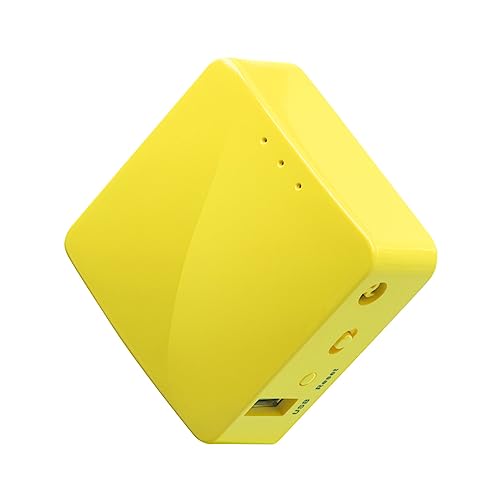
The Mango is the travel router reduced to its essence, and its longevity in the market is itself a specification. The listing describes a portable mini pocket VPN router with two Ethernet ports, a USB 2.0 socket, OpenWrt, and OpenVPN and WireGuard support aimed at public and hotel Wi-Fi. Nothing in that sentence reaches for a headline; everything in it addresses the original problem — join the strange network once, privately, from a device small enough to live permanently in a cable pouch and cheap enough, in spirit, to be forgotten in a Lisbon hotel room without grief.
Its working pattern is the purest in this guide. In a café or hotel it repeats the venue network into a private one and wraps the session in a tunnel; wired to a wall port it becomes a personal access point; tethered or bridged it adapts to the odd topologies of borrowed desks and relatives’ houses. The USB 2.0 port serves light duties — powering, or modest file sharing in the OpenWrt manner — and the administration happens through a panel the listing describes as easy, a claim its years of documentation and community answers quietly support.
Limits must be stated with the same plainness. The listing title names no Wi-Fi generation or speed class for the Mango, and this guide records that silence in the box below rather than filling it from folklore: what can be said from the listing is that this is a minimal, single-purpose design from an earlier era of the category, and its throughput expectations should be set for messaging, browsing, calls and standard streaming rather than bulk transfers. Travellers travelling light, with lighter bags still, will not experience that as a flaw. It is the pick that understands the assignment is disappearance.
- Role: Portable mini pocket VPN router, per listing
- Wired ports: 2× Ethernet
- VPN: OpenVPN and WireGuard, per listing
- Wi-Fi class: Not stated in the listing title — verify with GL.iNet documentation
- Extra: USB 2.0; OpenWrt; admin panel setup
Strengths
- Smallest, simplest expression of the travel-router idea
- Both modern VPN protocols despite the minimal brief
- Years of community knowledge behind every setting
Trade-offs
- Listing silent on wireless generation and speed
- Throughput expectations belong to lighter workloads
- USB 2.0 dates the peripheral side of the design
Best for: a minimalist traveller keeping a permanent tunnel in the cable pouch
Not suited for: a media-heavy traveller moving large files room to room

TP-Link Roam 6 (TL-WR3002X) — Strongest TP-Link traveller
The TL-WR3002X is TP-Link’s fuller answer to the GL.iNet challenge: an AX3000 dual-band Wi-Fi 6 travel router the listing calls multi-gig portable, with OpenVPN and WireGuard named outright — the protocol specificity its smaller sibling’s listing leaves unstated. Public network sharing and phone tethering headline the modes, hotel and cruise use are named approvals, and USB 3.0 plus multi-mode operation complete a specification that reads like the category’s consensus checklist, executed by a brand with mainstream support behind it.
The positioning matters. A traveller loyal to TP-Link’s ecosystem, or wary of enthusiast firmware, gets the tunnel-forward travel router without leaving the grammar of a major vendor’s app and documentation. AX3000 radios double the smaller Roam’s class, which shows up in the room rather than at the venue: several devices streaming, calling and syncing through one uplink, plus laptop-to-drive transfers at respectable pace when a USB device is attached. On a cruise, where the listing’s approval language points, the one-connection-many-devices pattern is the entire economic argument, and this unit makes it with the strongest radios TP-Link offers in the format.
Its costs are the format’s grown-up costs: a bigger body and a bigger appetite than the Mango or Opal, and a feature set whose depth most occasional travellers will only partially use. Between the two Roam picks, the division is clean — the WR1502X for power simplicity and price-tier modesty, this one for protocol certainty and room performance — and travellers should choose by which of those sentences sounds like their own itinerary.
- Wi-Fi class: AX3000 dual-band Wi-Fi 6
- VPN: OpenVPN and WireGuard, named in the listing title
- Modes: Public network sharing, phone tethering, multi-mode
- Stated venues: Hotel and cruise approved, per listing
- Extra: USB 3.0; multi-gig portable design
Strengths
- Protocol certainty from a mainstream brand
- Strongest room performance in TP-Link’s travel line here
- Cruise economics of one connection for the whole party
Trade-offs
- Less pocketable than the featherweight picks
- Depth of features exceeds occasional-travel needs
- Shares the category’s dependence on an existing feed
Best for: a TP-Link loyalist seeking named VPN protocols in a travel body
Not suited for: a twice-a-year traveller paying for depth that stays unused
How Do You Get a Travel Router Past a Hotel Captive Portal?
The portal is the one ritual the router cannot perform alone, and understanding why prevents the only genuinely confusing five minutes in travel networking. A captive portal identifies a guest by the device that logs in — and the device that must log in is the router, since the router is the guest as far as the hotel knows. The working sequence is to connect a phone or laptop to the router’s fresh network first, then open the router’s administration page and join the hotel network from there; the portal page, when it appears, is completed through that same connected device, on the router’s behalf. From then on the portal is satisfied, and the rest of the room joins the private network without meeting it.
Two failure patterns cover nearly every bad evening. The first is logging in with the laptop directly before the router joins, which registers the laptop rather than the router and leaves the room’s other devices facing the portal individually; the cure is patience with the order of operations. The second is a venue that filters by device type or enforces short sessions, where the honest remedies are the router’s wired mode if a port exists, a call to the venue’s support line to register the router as a games console or similar device, or accepting the venue’s own terms per device. A travel router regularises cooperative networks beautifully; it is not a skeleton key, and this guide will not pretend otherwise.
Six Pocket Routers, Compared by the Trips They Suit
| Pick | Radios | VPN in listing | Wired highlight | Trip it suits |
|---|---|---|---|---|
| GL.iNet Beryl AX | Wi-Fi 6 dual band | Named generally | 2.5G WAN | Frequent business travel, wired venues |
| GL.iNet Slate 7 | Wi-Fi 7 | Touchscreen toggle | 2.5G | Hotel, cruise, RV, plane circuit |
| TP-Link Roam 6 WR1502X | AX1500 Wi-Fi 6 | Not itemised | USB-C power | Mainstream hotel and RV trips |
| GL.iNet Opal | AC1200 dual band | OpenVPN, WireGuard | 3× gigabit | Wired rooms, light baggage |
| GL.iNet Mango | Not itemised | OpenVPN, WireGuard | 2× Ethernet | Minimalist carry, café privacy |
| TP-Link Roam 6 WR3002X | AX3000 Wi-Fi 6 | OpenVPN, WireGuard | USB 3.0, multi-gig | Cruises and busy shared rooms |
The table’s honest lesson is that “best” in this category is a packing decision wearing a specification’s clothes. The radios ascend from the Mango’s unstated minimum to the Slate 7’s Wi-Fi 7, yet the right row is chosen by the trip: how the venue feeds the room, how much wire the room needs, how the unit is powered, and how much router the traveller wants to think about. Nobody’s holiday was improved by a faster radio repeating a slow hotel feed; several holidays in this guide’s construction were improved by the right port, the right power cable and a tunnel that started on the first tap.
What Do Travellers Get Wrong With These Little Routers?
The founding mistake is expecting connectivity from nothing: a travel router in a dead-zone cabin has no more internet than the phone beside it, because it adopts connections rather than creating them, and a destination lacking any feed sends the traveller to the cellular hotspot category instead. The second mistake is configuring the unit for the first time in the venue, jet-lagged, against a portal timer; every pick here rewards a home rehearsal — join it to the home network, set the private name and password, load the VPN, and pack it already knowing its job.
Third, travellers forget the room’s own physics. A router buried in a suitcase behind a metal minibar fridge repeats a weakened signal to devices three metres away; placed openly near the door or the wired port, the same unit feels twice as capable. Fourth, the power question gets improvised: a unit that runs from USB-C still needs a port with enough output, and a power bank shared between phone and router is a negotiation, not a plan. Finally, some travellers tunnel everything home and then wonder why local services — the venue’s own streaming television, a country’s banking app — misbehave; the tunnel’s geography is a setting, and the trip decides it.
What Can a Travel Router Not Do?
It cannot fix a venue’s bandwidth. A hotel selling a thin connection to four hundred rooms will deliver a thin connection to the router, and the private network inside the room will divide that thinness privately. It cannot make an unwilling network cooperate: venues that block VPN traffic, filter unfamiliar devices or forbid sharing in their terms are stating a policy, and the router is a tool for privacy and convenience, not an argument with the house rules. It cannot replace a phone’s mobility — it has no battery of its own in these listings and no cellular radio at all — and it cannot improve the feed in a moving train or a rural dead zone beyond what the adopted connection provides.
Stated plainly, those limits are also the category’s integrity. Each pick here is a small, honest machine for a specific transformation: one untrusted or awkward connection in, one trusted and familiar network out. Travellers who buy that transformation get a device that earns its grams on every trip; travellers who buy a fantasy of internet-from-nowhere will be disappointed by hardware that never promised it.
How Does Power Decide What Makes the Bag?
Every travel router is two products: the network it builds and the power arrangement that keeps it alive. The second product decides whether the first gets used. A unit running from USB-C, as the Roam 6 WR1502X’s listing states outright, plugs into the ecosystem already travelling — the laptop charger with a spare port, the power bank in the day bag, the seat-back USB on a long flight — and asks for no dedicated socket in rooms where sockets are contested territory. A unit with its own supply claims one of those sockets permanently, and in older hotels with two outlets and four devices, that claim is a negotiation the traveller loses nightly.
Power banks deserve a sentence of arithmetic honesty: a router sipping power for a working day and a phone charging from the same bank are sharing a finite meal, and the traveller who plans to run both should size the bank for both rather than discovering the division at midnight. The venue’s wiring helps where it exists — a router beside a wired port usually sits near power too — and the lightest kits in this guide, the Opal and Mango class, earn part of their following simply by asking so little of the room. When two picks otherwise tie, choose the one whose power story matches the chargers already owned; the best travel router is the one still running on the third night, not the one with the finest specification on the first.
What Does a Travel Router Do Between Trips?
A device used twelve nights a year must justify its drawer, and the better picks here moonlight convincingly. As a home extender, a travel router can carry a home network’s name into a garden office or a spare room, repeating the main router’s signal in the same repeater pattern it uses in hotels. As a wired bridge, it gives a single Ethernet-only device — an older printer, a desktop in a room without cabling — a Wi-Fi citizenship it never had, using the LAN ports the Opal and Beryl AX provide. As a privacy desk unit, it can sit permanently at a home office desk, tunnelling one workstation through a VPN while the rest of the house runs direct, a job the Mango’s minimalism suits surprisingly well.
The GL.iNet units add a hobbyist afterlife through OpenWrt: the same hardware becomes a test bench for network experiments, a guest-network appliance for visitors, or a dedicated segment for smart-home gadgets whose chatter the household prefers to quarantine. The TP-Link pair lean the other way, toward set-and-stay utility inside a familiar app. Either way, the purchase logic improves: a travel router that works at home is a router that happens to travel, and its cost-per-night arithmetic collapses in the buyer’s favour.
How Should a Traveller Pack and Protect the Kit?
The router itself is the smallest part of the system. The working kit is the unit, its power lead, one short Ethernet cable for wired venues, and — for the tethering pattern — the phone cable that turns a handset into the room’s uplink. Coiled together in one pouch, the kit deploys in minutes; scattered across three bags, it deploys eventually, after the search. The short cable deserves emphasis: hotel ports hide behind desks and televisions, and the difference between a thirty-centimetre lead and a metre lead is the difference between the router sitting in the open, radiating well, and the router dangling behind furniture, radiating into a wall.
Protection is mostly about expectations. These are plastic travel instruments, built for bags rather than building sites, and the Slate 7’s touchscreen in particular argues for a pouch rather than a loose life among keys and chargers. A traveller crossing many borders might also note the network name the router broadcasts: a private name carried from home is convenient, and on the road it is also an announcement, which is why some travellers rename the travelling network to something anonymous while keeping the password their devices remember — a small opsec courtesy the router’s settings page makes trivial.
When Is the Phone’s Own Hotspot Enough?
The honest rival to every pick here is already in the traveller’s pocket. A phone hotspot covers a solo traveller with a laptop for an afternoon, costs nothing extra, and asks for no pouch space. Its limits arrive with company and duration: the phone’s battery becomes the room’s infrastructure, the hotspot’s device count and idle timeouts interrupt longer sessions, other people’s devices join awkwardly, and the phone must stay in the room for the network to exist — a tether on the traveller as much as on the data. There is also no VPN layer for the room, no wired port, and no persistent network identity between venues.
The travel router wins precisely where the hotspot frays: multiple travellers, multi-day stays, wired devices, tunnelled traffic, and the simple luxury of leaving the room while the downloads continue. Solo and brief, the phone suffices and this guide says so without resentment. The moment a trip involves a second person, a second device class or a second night, the little router stops being a gadget and becomes the trip’s quietest utility — which is why the category survives every prediction of its death by smartphone.
What Security Settings Matter Most on the Road?
A travel router’s default posture should be suspicion, organised. The private network it broadcasts deserves a strong, unique password — not the home password, because this network’s name and key will be typed into borrowed laptops, shared with travelling companions and occasionally read aloud in rooms with thin walls. WPA encryption at the strongest level the unit and the oldest travelling device both support is the floor, and the administration password must be changed from its default before the first venue, since the admin page is the keys to every other setting on this list.
The VPN decision deserves the same deliberateness. On a venue network, the tunnel protects traffic beyond the router; inside the room, the private network’s own encryption protects the hop to the router. Travellers sometimes treat one as a substitute for the other and run the room openly because the tunnel is on — a misunderstanding, since an open room network admits the corridor’s strangers to the local side of the router, where the tunnel does not watch. Run both. Finally, automatic firmware updates, enabled at home during the rehearsal setup, keep the little box patched while its owner is thinking about anything else, which on a trip is precisely the point of owning it.
How Does a Long Stay Change the Calculation?
A one-night stop asks the router for a portal login and an evening of privacy. A month-long rental asks it to become infrastructure, and the priorities reorder themselves. Wired performance rises in importance, because the long-stay traveller wires the desk, the television and the router into a small permanent arrangement — the Opal’s three ports and the Beryl AX’s 2.5G uplink stop being trivia. Stability displaces novelty: the unit that reconnects without drama after the building’s nightly network hiccup beats the unit with the finer screen. And the VPN’s exit geography becomes a residency question, since a month of appearing to live in another country frays banking, tax and streaming relationships in ways a weekend never does.
Long stays also expose the venue feed’s true character, and the router’s honest role within it. If the rental’s broadband is weak, the router cannot strengthen it; what it can do is organise it — one stable network name for a month of devices, a tunnel for work hours, direct routing for local services, and a wired core for the machines that matter. Travellers signing a season somewhere should also weigh the home-router afterlife in reverse: a unit bought for the long stay will come home eventually, and the picks that moonlight best, the Beryl AX and the Roam 6 WR3002X, soften the purchase accordingly.
How Do Trains, Planes and Shared Desks Bend the Pattern?
Moving venues compress the travel router’s virtues. On a train, the adopted connection is the carriage Wi-Fi or a tethered phone, sessions are short, and the router’s gift is continuity: devices stay joined to one familiar network while the uplink changes underneath them. In the air — a venue the Slate 7’s listing names directly — the pattern is one purchased connection shared by the traveller’s own devices, subject to the airline’s terms, with the tunnel started after the portal clears and expectations set by the altitude’s bandwidth rather than the router’s radios.
Shared desks and client sites bend the pattern toward discretion. A small router wired at a borrowed desk, serving one laptop through a permanent tunnel back to a home or office network, is a professional tool: it keeps work traffic off the host’s network in both directions and presents the host with a single, well-behaved device. The Mango and Opal, inconspicuous and silent, were practically designed for that drawer-to-desk life. In each of these venues the lesson repeats: the router’s specification matters less than the fit between its modes and the venue’s rules, which is why this guide read the listings for modes first and radios second.
What Should a First-Time Buyer Expect on the First Night?
Realism helps: the first deployment takes fifteen unhurried minutes, not two. The router joins the venue network, the portal asks its questions through a connected phone, the tunnel connects, and one by one the traveller’s devices migrate onto the private network and are forgotten by the venue entirely. The second night takes three minutes, because the sequence is now a habit, and by the third venue the routine has the quality of hanging up a coat — performed without attention, missed immediately when skipped. Travellers who rehearsed at home skip the first night’s learning curve altogether, which is why this guide keeps prescribing the rehearsal: the hotel room is a poor classroom, with an audience of tired people.
The subtler expectation is psychological. A private network changes how a room feels: the laptop stops being a guest on a stranger’s system and becomes a resident of the traveller’s own, with the home network’s name on the door. Work travellers report the effect as focus; families report it as the end of the nightly Wi-Fi negotiation with children and front desks. Neither effect appears in a specification table, and both are why owners of these small boxes tend to keep buying the category as it evolves from Mango to Beryl to Slate, long after the original problem could have been declared solved.
How Far Can One Little Router Stretch a Weak Signal?
Not far, and the traveller should know the geometry. In repeater mode the router must hear the venue and be heard by the room, so its own position is a compromise between the corridor’s signal and the bed’s laptop — usually near the door, elevated, in the open. A unit placed where the phone shows two bars will serve the room at roughly that quality divided by the repeater’s airtime sharing; a unit placed where the phone shows none will serve nothing, privately and securely. The wired port, where a room offers one, abolishes the compromise, which is why experienced travellers scout for it the way they scout for outlets.
Within the room, expectations should be set by walls, not wishes. One room, one router, is the design centre; the suite with a separate bedroom is served by moving the router to the middle ground or accepting that the far bed runs at the network’s gentler edge. None of the six picks pretends to be a mesh system, and pairing one with the home network’s name does not make it one. The category’s promise is a room made private and familiar — kept honestly by every pick here — rather than a building made fast.
Final Recommendation
Choose by itinerary. The Beryl AX is the default for the frequent traveller working often-wired rooms, with standards set at home; the Slate 7 serves the traveller seeking privacy controls at fingertip distance on the newest radios; the two Roam units split the mainstream between power simplicity and protocol depth; the Opal packs wired competence into 145 grams; the Mango disappears into a pouch and simply refuses, trip after trip, to be the thing that went wrong at check-in — which, in the end, is the highest praise travel equipment can earn. Whichever row of the table matches the next journey, set it up at the kitchen table first, pack the short cable beside it, and let the first hotel evening be about the trip rather than the network; the router will handle the network, quietly, in every city after that as well.
Frequently Asked Questions
Does a travel router create its own internet connection?
No. Every pick here adopts an existing connection — venue Wi-Fi, a wired port or a tethered phone — and rebroadcasts it privately. A device that originates a connection from a SIM card is a mobile hotspot, a different category that none of these six belongs to.
Will one travel router cover a whole travelling family?
Yes, within the venue’s own bandwidth. The venue sees one device — the router — while the family’s phones, tablets and laptops join the router’s private network. Per-device venue charges and portal logins are handled once, at the router, and the children inherit a network name they already know instead of a fresh negotiation in every new lobby.
Is a VPN necessary with a travel router?
Not necessary, but it is the category’s founding argument: venue networks are shared with strangers, and a tunnel encrypts the room’s traffic beyond the router. Four picks name VPN protocols or VPN support directly; the TP-Link WR1502X’s listing leaves the detail to its documentation. Travellers working with employer systems on the road should treat the tunnel as mandatory rather than optional, since the room’s privacy layer protects the hop to the router while only the tunnel protects the long road beyond it.
Can a travel router work on a cruise ship?
Two listings — the Slate 7 and the Roam 6 WR3002X — name cruise use directly. The pattern is the hotel pattern with higher stakes: one purchased connection at the router, the whole party’s devices behind it, subject always to the ship’s own terms for connection sharing.
Does a travel router help in a rental flat with no broadband?
Yes, through tethering, which both TP-Link picks name in their listings. A phone with a healthy mobile signal connects to the router and lends its data to the room, so laptops and tablets join a proper named network instead of queuing on a handset hotspot. The phone’s data allowance becomes the flat’s allowance, so the pattern suits stays measured in days of ordinary use rather than weeks of heavy streaming — and the router, unlike the phone, can stay plugged in by the window where the signal lives, while its network covers the rooms where the people live.
What should be set up before the first trip?
The private network name and password, the VPN configuration, and a rehearsal join to a network away from home. A unit configured calmly at the kitchen table behaves identically in a hotel; a unit configured for the first time at midnight in one frequently does not get the chance.
Related Guides
Continue with best routers that use VPNs for the full-size tunnel story at home, best WiFi 7 routers for the newest radio generation at desk scale, and best portable WiFi routers for the wider pocket-network field.


