What's inside
- Key Takeaways
- Quick Picks
- How Did We Judge Routers for Work That Cannot Buffer?
- What Is Bonding, and How Is It Different From Failover?
- Why Does the Uplink Rule This Category?
- How Do You Build a Streaming Connection That Fails Gracefully?
- Six Rigs Compared: What Actually Keeps the Stream Alive?
- What Errors Turn a Professional Rig Amateur at Showtime?
- How Do Data Plans and Carrier Choice Shape a Cellular Rig?
- How Do Power and Antennas Decide Field Performance?
- What Does the Crew’s Own Traffic Owe the Stream?
- How Should a Streamer Rehearse a Venue Before Doors Open?
- What Does Remote Management Change at Showtime?
- How Does a One-Person Streamer Grow Into This Category?
- What Should the Budget Beyond the Box Include?
- How Do Encoders and Platforms Fit Around the Router?
- Why Do Professionals Keep the Old Router in the Kit?
- What Separates a Streaming Router From a Business Router With Ambitions?
- Final Recommendation
- Frequently Asked Questions
- Related Guides
As an Amazon Associate I earn from qualifying purchases. This post may contain affiliate links at no extra cost to you.
gizmoverdict.com is reader-supported. When you buy through links on our site, we may earn an affiliate commission.
Where to buy: Each unit below links to its Amazon listing, where the modem category, SIM arrangement and port layout stated in the listing title can be confirmed against the streamer’s own carriers and venue plans before ordering.
The best routers for professional live streaming are not chosen the way home routers are chosen, because the failure they guard against is public. A home router that stumbles costs a household a buffered film; a streaming router that stumbles costs a broadcaster a frozen frame in front of a live audience, a sponsor’s logo dissolving into macroblocks, a wedding ceremony’s vows replaced by a spinning wheel for the relatives watching from another continent. Professional streaming is therefore a reliability discipline first and a speed discipline second, and the routers in this guide were selected on that order of priorities.
The core technology dividing this field is bonding: the ability to treat several internet connections — two cellular carriers, a cellular link plus venue wired internet, a pair of broadband lines — as one logical pipe, spreading a stream’s packets across all of them so that the failure or congestion of any single link degrades the broadcast gracefully instead of ending it. Beside bonding sits its simpler cousin, failover, which keeps a second connection warm and switches to it when the first dies: cheaper, less seamless, and still vastly better than the single-connection roulette that amateur setups play. Ordinary dual-WAN routers do failover and load balancing; dedicated bonding routers merge links at packet level. The six picks below contain both kinds, labelled honestly, because a streamer who buys failover believing it is bonding will learn the difference on air.
Five of the six are cellular machines built around SIM slots and modems, from a dual-cellular bonding specialist to Peplink’s field-proven single-modem range; the sixth is a rack-mount wired dual-WAN router for a studio solving its reliability problem with two fixed lines instead. None is a camera, an encoder or a streaming service subscription; each is the connection layer, the part of the rig whose entire job is to still be working when everything else becomes interesting.
Key Takeaways
- Bonding merges several connections into one resilient pipe; failover merely switches between them, and the difference shows on air.
- Cellular diversity — two carriers, redundant SIM slots — is the field streamer’s insurance against a single network’s bad day.
- The Miri X510 is the only pick here built solely around dual-cellular bonding, and it bundles a 90-day Speedify license.
- Two Peplink BR1 Mini variants differ by modem category, CAT 4 against CAT 7, a distinction stated in their own titles.
- The NETGEAR PR60X bonds nothing; it anchors a studio with two wired lines, 10G ports and cloud management instead.
- Uplink stability, not download speed, is the specification a stream actually lives on.
Quick Picks
| Pick | Badge | Why it earns its place |
|---|---|---|
| Miri X510 | Bonding specialist | A dual-cellular bonding router with a 90-day Speedify license bundled, aimed by its listing at live streaming and remote production. |
| Peplink MAX BR1 Mini (LTE CAT 4) | Field workhorse | A single-modem cellular router with redundant SIM slots, built-in eSIM and an upgrade path to dual WAN. |
| Peplink MAX BR1 Mini (LTE CAT 7) | CAT 7 step-up | The same BR1 Mini formula with a higher-category LTE modem for busier cellular environments. |
| Peplink MAX BR1 Pro 5G (HW3) | Vehicle-ready 5G flagship | An X65 5G modem, PoE input, GPS and ignition sensing in a router built for moving and fixed rigs alike. |
| Peplink B One 5G | Studio-base dual WAN | A gigabit dual-WAN cellular router rated by its listing at 1Gbps throughput and 150 users, set up through an app. |
| NETGEAR PR60X | Wired dual-WAN anchor | A rack-mount 10G dual-WAN router with Insight cloud management and failover protection for fixed installations. |
How Did We Judge Routers for Work That Cannot Buffer?
The first test was the resilience mechanism, read strictly from each listing’s own words. A pick had to state its arrangement — bonding, multi-WAN, failover, load balancing, redundant SIMs — because the vocabulary is the product in this category, and a router vague about its failover behaviour will be vague at the worst possible moment. Where a listing claims bonding, the pick is treated as a bonding router; where it claims failover or dual WAN without bonding language, the pick is treated as exactly that, and the reviews below keep the two ideas separated even when the marketing would prefer them blurred.
The second test was the uplink’s diversity. Professional streams leave buildings, so cellular capability weighed heavily: modem generation as stated, SIM redundancy, eSIM presence, and the option to add wired WAN beside the cellular link. The third test was operational — how the unit is powered, managed and mounted — because a router that needs a desk, a mains socket and a laptop for every adjustment is a studio appliance, while the field picks here run from vehicle power, accept PoE, or report their position by GPS. Speed figures, where listings state them, were read as ceilings rather than expectations; cellular reality is written by towers, not boxes.
What Is Bonding, and How Is It Different From Failover?
Failover is a spare tyre. The router runs on its primary connection, watches it, and when the connection fails, moves the whole operation to the secondary. The stream experiences a handover: encoders reconnect, viewers see a stall or a quality collapse, and the broadcast resumes on the backup link. For a business keeping its tills and email alive, that pause is a triumph. For a live audience, it is a visible wound — survivable, sometimes unnoticed in a long broadcast, never free.
Bonding is a second engine. The router maintains several connections simultaneously and distributes the stream’s packets across all of them, reassembling the flow at a bonding server on the other end. If one link degrades, its share of packets shrinks and the others absorb the load; if one link dies outright, the stream continues on the survivors with a quality dip rather than an interruption. The audience sees a softer picture for a few seconds instead of a frozen one. That grace is what the word “professional” buys in this category, and it is why bonding hardware and its accompanying services — the Miri’s bundled Speedify license is the visible example in this guide — carry the prices they do.
Load balancing, the third term in these listings, is neither: it spreads different sessions across different links — the crew’s browsing on one, the stream on another — without merging any single flow. A load-balanced router can still lose a stream when the link carrying it fails. Streamers reading listings should hunt for the exact words, and this guide’s specification boxes quote them rather than paraphrasing them into mush.
Why Does the Uplink Rule This Category?
Consumer internet is sold by download speed and lived by streamers on upload. A household connection boasting a spectacular download figure may offer a modest, contended upload channel, and the live stream lives entirely inside that channel, pushing a continuous, unforgiving flow that cannot be paused, cached or retried the way a file upload can. Venue connections sharpen the problem: a conference centre’s wired port and a stadium’s press Wi-Fi are shared with everyone else’s ambitions, and their upload behaviour at showtime is a lottery the professional refuses to enter unprotected.
Cellular links invert the usual logic usefully. A 5G or LTE connection at a venue is a private road rather than a shared hall — not uncongested, but independent of the building’s infrastructure and its other tenants — and two cellular links on two different carriers are independent of each other as well, which is the entire premise of the dual-cellular Miri and the redundant-SIM Peplinks. The professional pattern that emerges from these listings is layered independence: no two links sharing a failure mode, so that no single tower, cable, provider or building system can end the show alone.

Miri X510 — Bonding specialist
The Miri X510 is the purest expression of this guide’s thesis: a dual cellular bonding router whose listing names its purposes without detour — live streaming, remote production, business connectivity — and whose mechanism is 5G/4G multi-WAN bonding and failover over Wi-Fi 6. Two cellular links, bonded, means the stream rides a pair of carriers simultaneously, and the failure of either becomes a footnote rather than a finale. The inclusion of a 90-day Speedify license in the box is the honest tell about how bonding works: the router’s merged traffic is reassembled by a bonding service, and this unit arrives with that service’s first season paid, so the rig can be built and judged before the subscription question comes due.
For the working streamer, the shape of the proposition is a single box replacing a tangle. The encoder feeds the Miri, the Miri feeds two carriers, the service stitches the flow, and the platform receives a stream whose connection has already survived the venue’s worst ideas. Remote production is the second named use and the same logic pointed at contribution feeds: a camera position in a field, a press box, a church hall, sending its feed back to a studio through two networks because one network’s behaviour at event time is a rumour.
The disciplines are cost and dependence. Bonding consumes data on two plans at once, and the service relationship continues after the bundled ninety days expire — a streamer should price the rig as hardware plus service plus two data plans, because that is what it is. A broadcaster working venues with trustworthy wired internet may also find the cellular emphasis surplus. But for the professional haunted by a frozen frame during the moment the audience came for, the X510 is the pick that was designed inside that nightmare and built its way out.
- Mechanism: Dual cellular bonding, multi-WAN, failover — per listing
- Cellular: 5G/4G links
- Bundled: 90-day Speedify license
- Wi-Fi: Wi-Fi 6 for local devices
- Stated work: Live streaming, remote production, business connectivity
Strengths
- True packet-level bonding across two carriers
- Bundled service license lets the rig prove itself first
- Purpose-built for streaming rather than adapted to it
Trade-offs
- Running costs stack: service plus two data plans
- Bonding depends on a service beyond the hardware
- Cellular emphasis surplus where wired venues are reliable
Best for: a professional streamer bonding two carriers against a public failure
Not suited for: a hobbyist broadcaster streaming from a desk on trusted fibre

Peplink MAX BR1 Mini (LTE CAT 4) — Field workhorse
The BR1 Mini in its CAT 4 form is the dependable single-modem cellular router: an LTE modem, three Ethernet LAN ports, built-in Wi-Fi, redundant SIM slots with a built-in eSIM, VPN capability, and an upgrade path to dual WAN stated in its listing. Read that inventory as a field kit rather than a specification sheet. The redundant SIMs mean two carriers’ cards ride in the unit, so a dead zone for one network is a configuration change rather than a disaster; the eSIM adds a third identity without a third piece of plastic; the LAN ports wire the encoder, a laptop and a spare directly, keeping the stream off contested air entirely.
Peplink’s ecosystem is the context that makes a modest modem category sensible. The BR1 Mini is the entry rung of a professional range, and its value includes the management and the upgrade grammar of that range: the listing’s note that the unit is upgradeable to dual WAN describes a router that can grow a second connection — a wired venue feed beside the cellular — when the streamer’s work graduates. For single-camera and small-rig streaming, a ceremony streamed from a hall, a market report, a sideline feed, CAT 4 cellular with genuine SIM redundancy covers the professional requirement: not the fastest link, but a link with a plan B living inside the same box.
The ceiling is the modem’s generation, stated in the title and not to be wished away: in a strong 5G district this unit leaves speed on the table that its Pro sibling below collects, and as a single-modem device its bonding story depends on the dual-WAN upgrade and Peplink’s wider system rather than on twin radios of its own. Buy it as the resilient core of a small rig and it will be remembered as the box that never embarrassed anyone; buy it expecting flagship cellular throughput and the title already warned against the expectation.
- Modem: LTE (CAT 4), per listing title
- SIM: Redundant SIM slots, built-in eSIM
- Wired: 3 Ethernet LAN ports
- Growth: Upgradeable to dual WAN, per listing
- Extras: Built-in WiFi; VPN capable
Strengths
- SIM redundancy insures the single modem properly
- Wired LAN trio keeps the encoder off the air
- Upgrade path defers the dual-WAN decision
Trade-offs
- CAT 4 modem leaves faster cellular unused
- Single modem: bonding needs the wider system
- Entry rung of a range that invites spending upward
Best for: a small-rig streamer prioritising a backup carrier inside one compact box
Not suited for: a 5G-district production chasing the fastest cellular link available
Peplink MAX BR1 Mini (LTE CAT 7) — CAT 7 step-up
Two listings in this guide share a name, and the difference between them is the lesson: this BR1 Mini carries an LTE CAT 7 modem where its sibling carries CAT 4, with the rest of the formula — three Ethernet LAN ports, built-in WiFi, redundant SIM slots, built-in eSIM, dual-WAN upgradeability, VPN capability — held constant. LTE categories describe a modem’s capability class, and a higher category means a modem able to work a cellular network harder: more of the carrier’s capacity usable, better behaviour in the congested cells where events actually happen. The streamer choosing between the twins is choosing how much cellular headroom to buy inside an identical operational shape.
That shape is worth restating because it is the professional part. Redundant SIM slots plus eSIM give the unit multiple carrier identities; the wired LAN ports keep the production machines cabled; the dual-WAN upgrade path lets a venue’s wired feed join the cellular link later. In a city venue with strong LTE, the CAT 7 modem converts that strength into uplink margin for the stream — margin being the professional’s true currency, the distance between the bitrate the show needs and the bitrate the network can sustain on its worst minute.
Why would anyone buy the CAT 4, then? Because cellular reality is local: in districts where the towers offer modest LTE regardless, the dearer modem buys headroom the network cannot fill, and the saving funds the second carrier’s data plan, which protects the stream more than modem class does. The twins therefore divide by venue geography — CAT 7 for the urban circuit of conferences, arenas and media events; CAT 4 for the regional circuit — and a streamer working both should read the choice as a map question rather than a status question.
- Modem: LTE (CAT 7), per listing title
- SIM: Redundant SIM slots, built-in eSIM
- Wired: 3 Ethernet LAN ports
- Growth: Upgradeable to dual WAN, per listing
- Extras: Built-in WiFi; VPN capable
Strengths
- Higher modem class harvests stronger LTE districts
- Identical redundancy story to its CAT 4 sibling
- Same compact field format, no new workflow to learn
Trade-offs
- Premium buys nothing where towers are modest
- Still a single modem at the design’s core
- No 5G, for venues already living on it
Best for: an urban-circuit streamer working congested cells at media events
Not suited for: a rural-circuit streamer on towers too modest for the dearer modem

Peplink MAX BR1 Pro 5G (HW3) — Vehicle-ready 5G flagship
The BR1 Pro 5G is the field router at full specification. Its listing names an X65 5G modem with redundant SIM slots, Wi-Fi 6, GPS, PoE input, edge computing, load balancing and failover, and ignition sensing — a cluster of features that tells a story about where this router expects to live. Ignition sensing is a vehicle feature: the router wakes and sleeps with the engine, which makes the Pro the natural brain of an outside-broadcast van, a mobile production unit, a team bus sending content home between venues. GPS extends the same logic to fleets and moving rigs, reporting where the connection is, not merely how it feels.
PoE input deserves its own sentence because it changes installations. A router powered over its Ethernet cable can live where the antennas live — high, clear of obstructions, at the end of one cable that carries both power and data — rather than where the sockets happen to be. For temporary venues, that freedom is the difference between a modem in a basement corridor and a modem with a view of the tower. Edge computing, the listing’s most modern phrase, points at workloads the router can host at the network’s edge; for streaming crews it signals headroom and a platform intended to be built upon, though the core purchase remains the 5G link and its failover behaviour.
The Pro’s cautions are proportionate to its ambition. It is the flagship of its line here, priced and specced for professionals treating the connection as a revenue surface; its load-balancing and failover vocabulary, read strictly, stops short of the Miri’s dedicated bonding claim, so a streamer requiring packet-level merging across carriers should compare mechanisms before assuming the flagship does everything. Judged as a vehicle-and-venue 5G router with installation freedoms the others do not offer, it stands alone in this line-up.
- Modem: X65 5G modem, redundant SIM slots
- Power: PoE input; ignition sensing for vehicle installs
- Position: GPS, per listing
- Mechanisms: Load balancing and failover, per listing
- Extras: Wi-Fi 6; edge computing platform
Strengths
- 5G modem with the installation freedoms of PoE
- Ignition sensing makes it a true vehicle router
- GPS suits moving rigs and managed fleets
Trade-offs
- Flagship pricing for a connection layer
- Listing claims failover, not dedicated bonding
- Vehicle features wasted on a static desk rig
Best for: a broadcast-vehicle operator wiring a moving production unit
Not suited for: a static home-studio streamer paying for ignition sensing

Peplink B One 5G — Studio-base dual WAN
The B One 5G relocates the professional pattern to a fixed base. It is a gigabit dual-WAN cellular WiFi router whose listing states 1Gbps throughput, Wi-Fi 6 dual-band radios, four LAN ports and support for 150 users, with setup through the Peplink app. Translate those figures into a streaming workplace: a small studio, a church media room, a school production space — somewhere the stream originates from the same desk every week, the crew and their devices share the network, and the connection arrangement is a wired primary line with 5G cellular standing behind it, or the reverse, the two WANs watching each other so the Sunday broadcast survives the weekday provider’s worst Sunday.
The 150-user figure matters in that setting because the streaming router in a fixed venue rarely serves the stream alone; it serves the room — producers’ laptops, a graphics machine, the audience-facing lobby display, the volunteers’ phones — and a router that treats the stream as one flow among many, on a gigabit chassis, keeps the show’s traffic from queuing behind the congregation’s photo uploads. App-based setup lowers the operational bar for the volunteer-run venues that produce a large share of the world’s regular live streams.
Its limits are the fixed base’s limits. This is not the box for a rucksack or a van; its dual WAN is an arrangement of two connections at one address, and its cellular side is a single integrated path rather than the Miri’s bonded pair. A streamer rotating venues should look up the page; a streamer with one room, one provider risk at showtime, and a crew sharing the network the show rides on, has found the pick shaped exactly like that problem.
- Throughput: 1Gbps, per listing
- WAN: Gigabit dual WAN with cellular
- Wi-Fi: Wi-Fi 6, dual band
- Capacity: 4 LAN ports; supports 150 users, per listing
- Setup: Peplink app
Strengths
- Dual WAN sized for a whole production room
- Gigabit chassis keeps crew traffic off the stream’s back
- App setup suits volunteer-run venue teams
Trade-offs
- Fixed-base design, not a field unit
- Cellular side is a single path, not a bonded pair
- Rated figures describe ceilings, not showtime guarantees
Best for: a fixed venue streaming weekly with a crew sharing the network
Not suited for: a roving reporter packing the whole rig into one bag
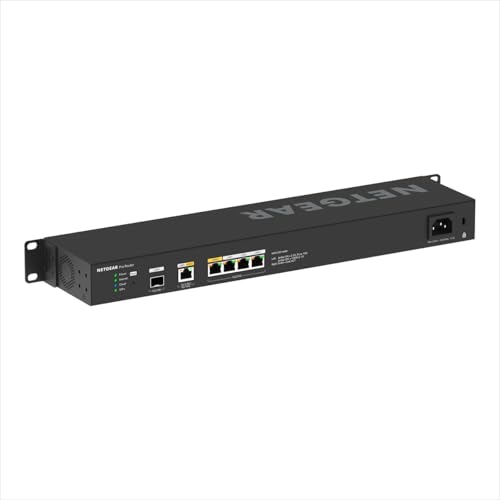
NETGEAR PR60X — Wired dual-WAN anchor
The PR60X is this guide’s deliberate counterpoint, included so the wired half of the professional world is represented by a serious machine. It is a 10G/multi-gigabit dual-WAN cloud-managed pro router: one 10G LAN/WAN port, one 2.5G WAN port, three 2.5G LAN ports, a 10G SFP+ socket, Insight remote management, failover protection and a rack-mount chassis. There is no modem and no SIM in that inventory, and the absence is the point — in a studio with two fixed internet lines available, from two providers, over two physical paths into the building, wired dual WAN with failover delivers the professional requirement without a cellular plan in sight.
The port layout reads like a small facility’s wiring plan. The 10G and SFP+ options serve the studio’s backbone — a switch feeding edit suites, a NAS holding the show’s media — while the dual WANs face the street, and Insight’s cloud management lets an engineer watch and adjust the router from wherever engineers actually are when something misbehaves at showtime. Failover protection, the listing’s own phrase, is the mechanism: line one dies, line two carries the building, the stream’s encoder never learns the difference beyond a handover the audience may not even catch on a wired pair.
Its boundaries must be as plain as its strengths. The PR60X bonds nothing and contains no cellular fallback, so a failure that takes out the building’s wired infrastructure takes out both its WANs’ neighbourhood; and as a router only, it broadcasts no Wi-Fi of its own — the studio’s access points are a separate purchase. A streamer building a permanent room with two wired providers gets, in this unit, the most facility-grade answer here; a streamer leaving buildings for work should close this tab of the guide and return to the cellular five.
- WAN: Dual WAN — 10G LAN/WAN plus 2.5G WAN
- LAN: 3× 2.5G ports, 1× 10G SFP+
- Management: Insight remote management, per listing
- Mechanism: Failover protection, per listing
- Cellular: None — wired connections only
Strengths
- 10G backbone ports serve a media facility properly
- Cloud management suits engineer-supported studios
- Rack format installs like permanent infrastructure
Trade-offs
- No cellular path when the building’s lines share a fate
- No Wi-Fi radios; access points are separate
- Failover only — no bonded merging of the two lines
Best for: a permanent studio running two wired providers into one rack
Not suited for: a field streamer facing a new venue every weekend
How Do You Build a Streaming Connection That Fails Gracefully?
Begin by listing failure modes rather than products. The primary link can die, degrade, or congest; the venue’s power can flicker; a carrier can throttle; an encoder can be starved by the crew’s own traffic. Against each mode, the rig needs an answer that does not require a human decision at showtime: bonded links against link failure, failover against line death, wired LAN against contested air, a router whose mechanisms — quoted in this guide from the listings themselves — match the modes actually feared. The streamer’s rehearsal then tests the answers: pull the primary link mid-test-stream and watch what the audience would see, because a failover never rehearsed is a hypothesis, not a plan.
Bitrate discipline is the second half of graceful failure. A stream encoded at the edge of the uplink’s best minute has nowhere to go when the link dips; a stream encoded with headroom lets bonding and failover mechanisms trade quality for continuity, which is the trade audiences forgive. Adaptive arrangements, where the platform or encoder can step the bitrate down, pair naturally with bonded connections: the pipe narrows, the picture softens, the show continues. Professionals plan the soft picture in advance, as a designed behaviour, rather than meeting it as a surprise.
Six Rigs Compared: What Actually Keeps the Stream Alive?
| Pick | Links | Mechanism in listing | Home ground |
|---|---|---|---|
| Miri X510 | Dual cellular 5G/4G | Bonding and failover | Fields, halls, remote production |
| Peplink BR1 Mini CAT 4 | Single LTE, dual SIM + eSIM | Failover between SIM identities; dual-WAN upgrade | Small field rigs |
| Peplink BR1 Mini CAT 7 | Single LTE, dual SIM + eSIM | Failover between SIM identities; dual-WAN upgrade | Urban event circuit |
| Peplink BR1 Pro 5G | 5G, redundant SIM | Load balancing and failover | Vehicles and temporary venues |
| Peplink B One 5G | Wired plus 5G dual WAN | Dual-WAN failover arrangement | Fixed studios and venues |
| NETGEAR PR60X | Two wired lines | Failover protection | Rack rooms with two providers |
Only one row claims bonding in its own listing words, and the table preserves that distinction on purpose: the Miri merges, the others switch, spread or stand ready. Switching is not a consolation prize — a rehearsed failover on healthy links keeps most broadcasts intact — but it is a different promise, priced differently, and a professional reading this guide should leave knowing which promise each box actually made.
What Errors Turn a Professional Rig Amateur at Showtime?
The first is single-link confidence in a borrowed venue: one wired port, one carrier, one hope. The second is untested redundancy — the backup SIM never activated, the second WAN never actually failed over in rehearsal, the bonding service’s trial expired the morning of the event. Redundancy that has never carried the show is decoration. The third is starving the stream with the crew’s own traffic, running updates, cloud sync and a dozen phones across the same unmanaged link the encoder is trying to fill; the wired LAN ports and dual-WAN arrangements in these listings exist partly to give the stream its own road.
Fourth, professionals forget the router’s own logistics: the field unit left uncharged in its case is a power question, not a network one; the vehicle router without its antennas fitted is a sculpture. Fifth, and most quietly, teams buy the mechanism whose name sounds strongest rather than the one their venues need — bonding for a studio with two superb wired lines, or a wired anchor for a circuit of fields. This guide arranged its six picks by home ground for exactly that reason: the map of where the streams happen should choose the router, not the brochure’s adjectives.
How Do Data Plans and Carrier Choice Shape a Cellular Rig?
The router is the visible purchase; the data plans are the recurring reality. A bonded rig consumes data on two plans simultaneously, and a failover rig consumes peace of mind on the second plan whether or not it ever carries a show. Streamers budget accordingly: the primary carrier chosen for coverage at the venues actually worked, the secondary chosen for independence — a different network, ideally riding different towers in the districts that matter — because two SIMs from carriers sharing infrastructure are one failure wearing two costumes. The redundant SIM slots and eSIM arrangements in the Peplink listings exist to make that independence physical: the second identity is already in the box when the first network disappoints.
Plan terms deserve the same scrutiny as router listings. A plan that throttles after a threshold turns a season’s final event into a low-bitrate negotiation; a plan whose terms exclude tethering-style use can end a bonded arrangement administratively rather than technically. Professionals read the data contract as part of the rig, test the full setup on the actual plans at the actual venue class, and treat the carriers’ coverage maps as advertising rather than evidence. The evidence is a test stream, run at the venue, at a similar hour, on the worst day of the week available.
How Do Power and Antennas Decide Field Performance?
Cellular routers live or die by placement, and placement is decided by power and antenna logistics more than by preference. A modem buried in a equipment case under a stage hears the tower through metal and bodies; the same modem raised on a stand, antennas clear, hears it plainly. The BR1 Pro 5G’s PoE input is the elegant answer — one cable carrying power and data lets the router sit where the signal is, at the top of a pole or the venue’s high corner — while battery and vehicle power arrangements serve the rigs that move. Ignition sensing, in that mobile world, is the difference between a router that manages its own waking and one flat battery teaching the lesson instead.
Antennas are the unglamorous half of the same discipline. The listings here describe routers, and a field kit’s real antenna story — placement, orientation, keeping the encoder’s cables short and the modem’s environment cool — is assembled by the crew. Heat deserves a mention: a cellular router working two radios in a sunlit press box is doing arithmetic in an oven, and ventilation is a reliability feature no specification table lists. The professionals’ kits look boring for a reason: stands, cables, shade and slack, arranged so the connection layer is never the most interesting part of the day.
What Does the Crew’s Own Traffic Owe the Stream?
Every production carries two networks in one: the stream’s road and the crew’s pavement. Producers upload stills, graphics machines pull assets, volunteers check running orders, and all of it queues for the same uplink the audience is watching — unless the rig separates them. The dual-WAN and multi-LAN designs in this guide are the separation tools: the encoder wired to its own port, the crew’s devices on Wi-Fi or the secondary path, the stream’s flow given the road’s best lane by arrangement rather than by luck. The B One 5G’s 150-user rating is really a statement about this: a venue’s whole room can be served without the show’s traffic standing in line behind it.
The discipline extends to time. Cloud backups, operating-system updates and media syncs are scheduled citizens of a network, and on show day they are told to wait. A streamer who has watched a stream degrade because a laptop chose the broadcast hour to upload a photo library learns to audit the crew’s machines the way pilots audit a checklist — not from distrust, but because the uplink is a shared stage and everything on it is, for those hours, part of the performance.
How Should a Streamer Rehearse a Venue Before Doors Open?
The rehearsal is a failure drill disguised as a sound check. Arrive early enough to place the router where the signal is honest, run the test stream at the show’s intended bitrate, and then break things on purpose: pull the primary link and watch the failover or the bond absorb it, crowd the uplink with a large upload and watch the stream’s margin, walk the venue’s dead corners with the monitoring page open. Each test converts an assumption in the rig’s design into a fact about this venue, this carrier, this hour — the only facts that will matter when the audience arrives and the tests are over.
Venue knowledge compounds across a season. The hall whose wired port is secretly shared with the box office, the stadium whose press row faces the wrong tower, the church whose thick walls forgive nothing: a crew that logs these facts builds a private map no product listing can sell. The routers in this guide were chosen to reward that professionalism — redundant identities, wired options, mechanisms stated in plain words — because the hardware’s job is to give a prepared crew options, and the crew’s job is to know, before doors, which options the building allows.
What Does Remote Management Change at Showtime?
The professional router increasingly lives under remote supervision, and the listings reflect it: NETGEAR’s Insight management on the PR60X, Peplink’s app setup on the B One 5G, the platform ecosystems behind the field units. The operational change is profound. The engineer who built the rig need not stand beside it; the router reports its links’ health, its failover state and its traffic to a phone in another city, and adjustments — a WAN priority, a reboot of one path, a bandwidth limit on the crew’s segment — happen without a stagehand’s guided tour of a rack cupboard. For organisations running streams from many rooms, that supervision is the difference between a network and a hope.
Remote management also rewrites the failure conversation. A link degrading at a distant venue announces itself in the telemetry before the audience sees it in the picture, and a streamer watching the dashboard can lower the encoder’s bitrate deliberately, trade quality for continuity on their own terms, rather than discovering the trade after the platform’s player has made it for them. The discipline cuts both ways: remote access to a production router is itself a door, and its credentials deserve the same seriousness as the stream key it protects. Managed well, the router becomes the calmest member of the crew — the one that reports problems in numbers while everyone else is still reporting them in adjectives.
How Does a One-Person Streamer Grow Into This Category?
Few professionals begin with a bonded rig; they begin with a camera, a laptop and a venue connection, and they graduate through failures. The growth path visible in this guide’s picks is deliberate. The first graduation is redundancy of identity: a BR1 Mini with two carriers’ SIMs, so a single network’s bad day stops being a cancelled show. The second is separation: the encoder wired, the crew elsewhere, the stream given its own lane. The third is mechanism: failover rehearsed, then — when the work’s value justifies it — bonding, with its service and second data plan accepted as production costs like insurance and batteries.
The fixed-base path grows differently: a room wired properly, a B One 5G or a PR60X installed once and supervised remotely, the venue’s stream becoming a utility the organisation stops thinking about. Both paths share the same graduation test, and it is not a bitrate figure. It is the moment the streamer stops hoping the connection holds and starts knowing what happens when it does not — because the rig was built, and rehearsed, to answer that question in advance. Every pick in this guide sits somewhere on that road; the buyer’s task is to locate their own position on it honestly.
What Should the Budget Beyond the Box Include?
The router’s price is the entry fee, not the production budget. A cellular rig carries data plans — two, if redundancy is real — and bonded arrangements carry a service subscription after any bundled period, the Miri’s ninety days being the visible example. Antennas, stands, cases and cables turn a router into a kit; a spare of the cable that matters most is the cheapest insurance in the whole bag. Fixed installations carry their own second line: the second provider’s monthly fee is the premium on the studio’s continuity policy, and it is paid in quiet months to be collected in one loud minute.
Time is the last line item. A rig rehearsed costs an hour a venue; a rig unbuilt costs an audience. Professionals fold these figures into their rates without apology, because clients are not buying a router’s specification — they are buying the property that the stream ends when the event does. Read against that standard, the six picks here divide less by price than by which failure they retire, and the correct purchase is the one retiring the failure the buyer’s own calendar keeps scheduling.
How Do Encoders and Platforms Fit Around the Router?
The router is one layer in a chain that runs camera, encoder, connection, platform, audience — and it is the layer this guide can specify, because the others belong to different buying guides. The chain matters here for one reason: each layer’s settings must agree with the connection’s honest capacity. An encoder configured for a bitrate the bonded pipe sustains on its best minute will spend the show negotiating with reality; the same encoder set with headroom, and paired with adaptive behaviour where the platform supports it, turns the router’s mechanisms into invisible insurance. Stream keys, ingest endpoints and platform failover options live in the encoder’s and platform’s menus, and the professional sets them with the same rehearsal discipline as the router’s own failover — the chain is only as rehearsed as its least-tested link, and the least-tested link is almost always the one nobody owned.
Contribution work — the remote production the Miri’s listing names — adds a return path to the chain: the field unit sends its feed to a studio, the studio produces and publishes, and talkback, timing and monitoring flows ride back down the same bonded connection. A router that keeps the contribution feed alive is, in that world, carrying the whole programme, which is why remote-production crews spec their connection layer with a seriousness that single-stream broadcasters sometimes find excessive — right up until the evening the field feed is the only camera on the story.
Why Do Professionals Keep the Old Router in the Kit?
Seasoned crews rarely sell the previous router; it becomes the spare, the second angle’s connection, the loaner for the sister production. The habit encodes a truth about this category: a known router, with known behaviour on known carriers, is worth more in a crisis than a theoretically superior stranger. Configurations are documented, the failover has been watched failing over, the quirks are folklore rather than surprises. New purchases in this guide should be read with that afterlife in mind — today’s primary is next season’s backup, and a rig built from two generations of trusted units, bonded or failed over between them, is a more professional object than any single box, however flagship its listing sounds.
What Separates a Streaming Router From a Business Router With Ambitions?
The boundary is worth drawing because the shelves blur it. A business router — the PR60X is the honest example here — protects an organisation’s connectivity: many users, many sessions, an outage measured in lost productivity. A streaming router protects one flow’s continuity in public, where an outage is measured in audience trust. The overlap is real — dual WAN, failover, remote management serve both — and a small production company may rationally buy one box for both jobs, as the B One 5G’s studio profile suggests. But the priorities invert at the margin: the business box optimises for the many, the streaming box for the one flow that cannot pause, and a buyer haunted by a frozen broadcast should weight SIM redundancy, bonding vocabulary and wired encoder ports above user counts and office features every time.
The listings themselves teach the distinction to a careful reader. Streaming-first language talks about links surviving, feeds continuing, productions shipping; business-first language talks about users supported, throughput aggregated, branches connected. Neither dialect is dishonest — they are answers to different questions — and this guide’s six picks were arranged so that both dialects appear with their home grounds labelled, letting the streamer’s calendar, rather than a category label, arbitrate between them.
Final Recommendation
Match the mechanism to the map. The Miri X510 is the answer when the stream itself must survive a link’s death in public, in venues with no infrastructure to trust. The BR1 Mini twins carry the small field rig, divided by the cellular wealth of the districts they will work; the BR1 Pro 5G equips the vehicle and the serious temporary venue; the B One 5G settles the fixed room with a crew to serve; the PR60X anchors the wired studio. Each of the six retires a different fear, and the honest buyer names the fear first — the tower’s bad day, the provider’s outage, the building’s shared fate — because the router that retires a stranger’s fear is merely an expensive ornament in the wrong kit bag. Buy the failure you actually fear, rehearse it before the audience arrives, and the stream will end the way professional streams are supposed to end — because the show finished, not because the connection did.
Frequently Asked Questions
Is bonding always better than failover for streaming?
Bonding is smoother — the stream continues through a link’s death with a quality dip rather than a handover — but it costs more in hardware, service and data. A rehearsed failover on two healthy links serves many professional broadcasts well. The unforgivable option is neither: one link, no plan. There is also a middle discipline worth naming: a single strong link, monitored, with the encoder’s bitrate set conservatively and a phone hotspot staged as a manual backup, carries thousands of legitimate professional streams every week. The category’s ladder exists so that each production can stand on the rung its audience size and revenue justify, and the streamer who climbs it deliberately — rather than buying the top rung out of anxiety — usually ends up with the calmer rig.
Why do two picks share the name BR1 Mini?
They are variants of one Peplink model differing in the LTE modem category stated in their titles — CAT 4 and CAT 7. The chassis story, SIM redundancy and port layout are shared; the modem class decides how hard each can work a cellular network.
Can these routers stream over Wi-Fi alone?
The cellular picks carry built-in Wi-Fi for local devices, and an encoder can feed them wirelessly in a pinch. Professional practice wires the encoder to the router’s LAN ports wherever possible, reserving the air for the audience-facing and crew devices that cannot be cabled. The pinch case is real — a camera position across a hall, a last-minute relocation — and a rehearsed wireless feed at a conservative bitrate beats an unrehearsed cable run across a public walkway every time.
Does the NETGEAR PR60X work for streaming away from a studio?
It is a rack-mount wired router with no cellular modem and no Wi-Fi of its own, designed for fixed installations with two wired internet lines. Away from such infrastructure it has nothing to connect to; the cellular picks exist for that work.
What does the Miri X510’s bundled license change?
The listing bundles a 90-day Speedify license, the bonding service that reassembles the router’s merged traffic. The bundle lets a streamer build and prove the bonded rig immediately, with the continuing service cost becoming part of the budget after the bundled period ends.
How many separate connections should a streaming rig carry?
Two genuinely independent ones is the professional floor: independence meaning different carriers, different physical paths, or a wired line beside a cellular link, so no single failure owns both. A third adds comfort in bonded arrangements, absorbing a degradation while the show continues, but the step from one connection to two retires most of the risk that ends broadcasts; the step from two to three refines a rig that already survives. Crews should also count the humble connections — the monitoring laptop’s path, the phone running the dashboard — because a streamer blind to the rig’s state during an incident is working with one hand, whatever the encoder is doing.
Related Guides
Continue with best routers that use VPNs for tunnel-capable routing in depth, best routers for large businesses for gateway-class hardware, and best dual WAN routers for the two-connection pattern in full.


