What's inside
- Where to buy
- Key Takeaways
- Quick Picks
- How did we choose these motherboards for a Zen+ chip?
- What should a 2700X owner understand about BIOS and AGESA before buying?
- How do the best motherboards for the Ryzen 7 2700X compare side by side?
- What does a careful 2700X board swap actually involve?
- Which mistakes send 2700X board buyers back to the returns desk?
- How should memory be chosen and tuned around a Zen+ processor?
- What will a well-housed 2700X still do well, and where does it honestly fade?
- Final Recommendation
- Which supporting parts deserve a look while the system is apart?
- Frequently Asked Questions
- What changes when the board comes from old stock or the used market?
- Related Guides
As an Amazon Associate I earn from qualifying purchases. This post may contain affiliate links at no extra cost to you.
gizmoverdict.com is reader-supported. When you buy through links on our site, we may earn an affiliate commission.
Where to buy
Shopping for the best 2700x motherboards in 2026 means shopping with a clear head about one awkward fact: the Ryzen 7 2700X is a Zen+ chip from 2018, and the AM4 board market has moved through three chipset generations since it launched. The boards that were designed around it — B450 and X470 — are now thin on shelves, the X570 generation that followed it still welcomes it on most CPU support lists, and the B550 generation that dominates what remains in stock was never officially built for it at all. AMD positioned B550 around Zen 2 and Zen 3 processors, and many B550 boards simply do not list the 2700X as supported. That single fact shapes this entire guide, so we state it before any pick: if you need a board that runs your 2700X today, the native-fit picks below come first; if your 2700X is a placeholder while you save for a Ryzen 5000 chip, the B550 picks become the smarter money, provided you understand you may be buying the board for the next CPU rather than guaranteed service with this one.
There is also a quiet environmental and economic argument for this whole exercise that deserves one breath: a working eight-core processor diverted from landfill by a single board purchase is the greenest upgrade in computing, and the second-hand value of a complete, tested 2700X system remains real for students, home servers and first workstations. Keeping the platform alive is not nostalgia; it is arithmetic that happens to feel good.
Why keep a 2700X running at all? Because eight cores and sixteen threads still chew through video encoding, software compiling, virtual machines and heavily modded games with a competence that surprises people who only read launch charts. Owners typically arrive at this page from one of three directions: a B450 board has died and needs replacing like for like, a cramped early build is moving into a better case with more storage, or a planned two-step upgrade buys the board now and the processor later. Each direction points at a different pick, and we label them honestly rather than pretending one board serves all three. Every linked board below was verified in our pool with an official product image, and every compatibility statement is kept qualitative — BIOS and AGESA behaviour varies by board revision and update history, so the CPU support list for the exact board you buy is the final authority, not any guide including this one.
Key Takeaways
- B450 and X470 are the native home of the 2700X; X570 usually keeps it on the support list; most B550 boards do not officially list Zen+ at all.
- Decide whether this purchase serves the 2700X itself or a planned Ryzen 5000 upgrade — the right board is different for each job.
- The 2700X is a modest power draw by modern standards, so mid-range VRM designs that would worry a 16-core owner are perfectly comfortable here.
- PCIe generation follows the pairing, not the board badge: a Zen+ chip runs its lanes at PCIe 3.0 speeds even inside a PCIe 4.0 board.
- Check the exact board revision and its published CPU list before ordering, because AM4 support shifted between revisions and BIOS branches.
- DDR4 pricing and availability now favour finishing an AM4 build well over abandoning the platform mid-life.
- An open case during the swap is the cheapest moment to retire an ageing power supply and refresh tired thermal paste.
Quick Picks
| Pick | Badge | Why it earns its place |
|---|---|---|
| MSI B450 Tomahawk MAX | The native fit | The B450 board the 2700X generation itself voted for, with a 32MB BIOS chip that dodged the AM4 BIOS-size squeeze. |
| Gigabyte X570 AORUS Elite | The storage upgrade | X570 chipset lanes and PCIe 4.0 wiring for builders adding fast NVMe storage around a still-willing Zen+ chip. |
| MSI MAG B550 Tomahawk WiFi | The two-step upgrade | Buy it for the Ryzen 5000 chip you plan next; treat any 2700X service on it as a bonus to verify, never a promise. |
| ASUS ROG Strix B550-F Gaming WiFi II | The feature-rich step-up | Polished audio, networking and BIOS polish for the builder whose next CPU is already picked out. |
| Gigabyte B550 AORUS Elite AX V2 | The wireless value step-up | WiFi on board and a calmer price than the flagship B550s, aimed squarely at a future Zen 3 transplant. |
| MSI B550 Gaming WiFi6E | The newest-radio option | WiFi 6E branding for households already running a 6GHz router, again as an upgrade-path board first. |
How did we choose these motherboards for a Zen+ chip?
We started by splitting the candidate list along the compatibility line rather than by price. A board that cannot be trusted to POST with a 2700X has no business topping a guide for 2700X owners, however handsome its heatsinks are, so native-fit boards were evaluated as replacements and B550 boards were evaluated as transplant foundations. Within the native group we weighted three things: a VRM comfortably oversized for a 105-watt-class eight-core, a BIOS chip and update history that survived the AM4 era without the stripped-down emergency firmware some early B450 boards were forced into, and everyday connectivity that does not feel like 2018 — enough USB, at least one M.2 slot, and fan headers where a modern case expects them.
Within the B550 group the weighting flipped. There, the question is how the board will treat a Ryzen 5000 processor in a year or two, so memory topology, PCIe 4.0 CPU lanes, front-panel USB-C support and wireless generation mattered more than anything the 2700X itself can use. Across both groups we excluded boards whose listings in our verified pool could not be matched to an official image, boards from the A320 tier that would throttle the spirit if not the letter of an eight-core build, and micro-ATX boards — not because the form factor is wrong for this chip, but because the remaining stock skews toward models with support lists too murky to recommend responsibly. What survived is a short list with an honest split personality, and the detailed sections below never blur which half a pick belongs to.
What should a 2700X owner understand about BIOS and AGESA before buying?
AGESA is the AMD reference code inside every AM4 BIOS, and across the platform’s long life it has been both hero and villain. Successive AGESA releases added support for newer processors, and on boards with small BIOS chips something had to give — early B450 owners watched graphical BIOS interfaces shrink to text menus so a newer processor family could fit. The Tomahawk MAX in our picks exists precisely because MSI answered that squeeze with a larger chip. For a 2700X owner the practical lesson is narrower: a board can carry a BIOS new enough to have quietly dropped polish for Zen+ while still booting it, and a board shipped from old stock can carry a BIOS old enough to predate fixes you want. Either way, the remedy is boring and reliable — read the CPU support page for the exact model, note which BIOS branch it names for the 2700X, and plan a USB flash update as part of the build rather than discovering the need with the cooler already mounted.
We deliberately avoid naming specific BIOS version numbers in this guide. Version strings differ between board revisions that share a retail name, vendors renumber branches, and a version that was current when a listing was written may be three releases old when your box arrives. Anyone who prints a precise version as a universal answer for a retail board name is guessing with your money. The qualitative rule travels better: Zen+ support on B450 and X470 is foundational, on X570 it is normal but worth a list-check, and on B550 it is the exception that must be proven board by board. Keep that rule and the support-list habit, and the rest of AM4 shopping becomes straightforward.

MSI B450 Tomahawk MAX — The native fit
If your 2700X needs a home today, with no asterisk and no future transplant required to justify the money, this is the board the guide is built around. The Tomahawk name earned its reputation during exactly your chip’s era: a B450 board whose power delivery was engineered a class above the budget boards it sat beside, whose heatsinks were real finned metal rather than decoration, and whose MAX revision solved the BIOS-capacity problem with a larger firmware chip at the moment other owners were losing features to make room for newer processors. Dropping a 2700X into it feels like reuniting parts that were introduced to each other — because they were. Memory training with DDR4 kits of the period is well-mapped territory, the board’s behaviour under sustained all-core loads is a known quantity, and the community knowledge base for any quirk you might meet is deeper for this pairing than for any other in this guide.
The compromises are the era’s compromises, and naming them plainly matters more than apologising for them. Storage tops out at a single M.2 slot running PCIe 3.0 through the Zen+ chip, which is still entirely respectable for game libraries and project drives but will not feed a modern Gen4 SSD at full song. There is no onboard wireless, so a desktop that cannot reach an Ethernet cable needs a USB or PCIe adapter budgeted alongside. Rear USB is generous for its generation without matching the port counts of current B550 flagships. None of that diminishes the central fact: as a like-for-like resurrection of a 2700X system, or as the foundation of a budget eight-core workstation built from a cheap used chip, nothing else in this guide asks so few questions. Buy it knowing it is the end of a platform rather than a bridge to one, and it will repay you with the most predictable build day on this page.
- Chipset / socket: AMD B450, AM4
- Form factor: ATX
- Memory: DDR4, four slots
- Storage highlight: single M.2 slot, SATA for bulk drives
- Networking: wired Ethernet; no onboard WiFi
- BIOS note: MAX revision with enlarged firmware chip
Strengths
- Designed in the 2700X’s own generation, so support is foundational rather than retrofitted.
- Power delivery with genuine headroom for an eight-core under long renders.
- The larger BIOS chip avoided the feature-stripping that hit early B450 owners.
Trade-offs
- One M.2 slot only, so storage expansion means SATA or an adapter card.
- No built-in WiFi or Bluetooth for desks far from a cable run.
- It is a platform endpoint — a later Ryzen 5000 move deserves a fresher board.
Best for: 2700X owners replacing a dead board or finishing a value eight-core build today. Not suited for: anyone whose real plan is a Ryzen 5000 transplant within the year.
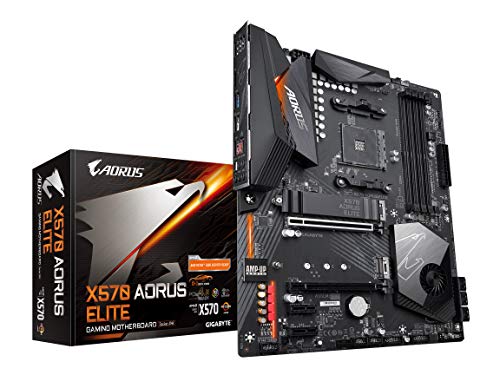
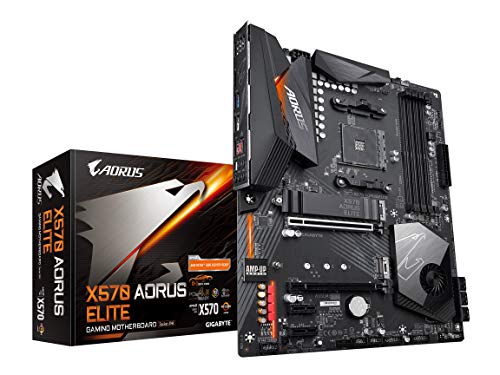
Gigabyte X570 AORUS Elite — The storage upgrade
X570 was the chipset of the generation after yours, and it kept a foot in your world: most X570 boards, this AORUS Elite among them, carried Zen+ processors on their support lists while wiring the board for the PCIe 4.0 era. That makes it the interesting middle path for a specific 2700X owner — the one whose complaint is not the processor at all, but the platform around it. If your B450 board’s single M.2 slot is full, your chipset lanes feel crowded, and your case has room for a storage layout that looks like a modern workstation, stepping sideways to X570 refreshes everything except the chip. The chipset itself contributes PCIe 4.0 lanes and additional high-speed storage options, so even though the 2700X feeds its own lanes at PCIe 3.0 speeds, the board’s storage ceiling rises immediately, and rises again the day a Zen 3 chip eventually drops in.
Ownership details separate this board from cheaper X570 survivors. The chipset fan is the generation’s known foible — X570’s chipset ran warm enough that most boards cool it actively, and fan behaviour in the BIOS deserves ten minutes of tuning on build day so it stays inaudible under desktop loads. Gigabyte’s Q-Flash Plus, which updates firmware without a processor installed, is genuinely valuable insurance on a platform where BIOS branches matter as much as they do here. The VRM, built for a chipset generation that anticipated 16-core flagships, treats a 2700X as light exercise, which shows up as cool, quiet delivery during overnight encodes. What you give up versus the B550 picks is nothing the 2700X can use today; what you give up versus the B450 pick is a little money and the simplicity of a same-generation pairing. For the storage-led upgrader, that trade is the entire point.
- Socket / chipset: AM4 with AMD X570
- Size: ATX
- RAM: four DDR4 slots
- Storage highlight: multiple M.2 options with PCIe 4.0 chipset wiring
- Networking: wired Ethernet; no onboard WiFi on this variant
- Cooling note: actively cooled chipset, tune its fan curve at setup
Strengths
- Raises the storage and expansion ceiling around a 2700X without replacing it.
- Q-Flash Plus allows firmware updates with no CPU installed.
- Power delivery sized for flagship chips runs an eight-core effortlessly.
Trade-offs
- The chipset fan is one more moving part than B450 or B550 boards carry.
- The processor still feeds its own lanes at PCIe 3.0 speeds.
- No onboard wireless on this variant, despite the step-up positioning.
Best for: 2700X owners whose bottleneck is storage and expansion, not compute. Not suited for: buyers who want the quietest possible board with zero chipset-fan tuning.

MSI MAG B550 Tomahawk WiFi — The two-step upgrade
Read this pick’s label carefully, because it is the most misunderstood board in the guide. The MAG B550 Tomahawk WiFi is an excellent motherboard — for the processor you buy next. B550’s official remit begins at Zen 2, and MSI’s support documentation for this class of board is written around Ryzen 3000, 4000 and 5000 families. Some owners have coaxed Zen+ chips to run on some B550 boards with some BIOS branches, and forum threads will happily tell you so; a buying guide cannot responsibly convert anecdotes into a promise. So the honest pitch is a two-step plan with the steps in the right order: if a Ryzen 5000 transplant is genuinely scheduled — the chip chosen, the budget forming — then buying this board when you find it well-priced is rational, because everything about it is ready for that day. Its power delivery was designed against flagship Zen 3 loads, its primary M.2 slot wires PCIe 4.0 straight to the future processor, and its onboard WiFi removes the adapter question permanently.
Judged purely as a B550 board, it is easy to like. The Tomahawk lineage’s heatsink discipline carried into this generation, the BIOS flashback button means a future CPU swap never needs a loaner chip, and the board’s memory support was validated against the faster DDR4 kits a Zen 3 build wants. What it cannot do is rewind its chipset’s remit: if your plan depends on the 2700X running in it from day one, verify that against MSI’s published CPU list for the exact revision, in writing, before money moves — and if the list does not name your chip, believe the list. Builders who follow that discipline get a board that will outlast two processors. Builders who skip it sometimes get a very handsome object that beeps at them. The difference is five minutes of reading, which is the cheapest insurance in this entire guide.
- Platform: AM4, AMD B550 chipset
- Format: full ATX
- Memory: 4x DDR4 DIMM slots
- Storage highlight: PCIe 4.0 primary M.2 from a supported future CPU
- Networking: onboard WiFi plus wired Ethernet
- Compatibility stance: upgrade-path board; verify any Zen+ use against the CPU list
Strengths
- Power delivery and cooling designed for flagship Ryzen 5000 loads.
- BIOS flashback makes the eventual CPU transplant a low-drama afternoon.
- Onboard WiFi settles the networking question for the build’s whole life.
Trade-offs
- 2700X support is not its official purpose and must never be assumed.
- Money spent here earns nothing until the planned processor arrives.
- PCIe 4.0 benefits stay locked until a Zen 3 or later chip is installed.
Best for: disciplined upgraders executing a stated plan toward Ryzen 5000. Not suited for: anyone who needs the 2700X running tonight with no list-checking detours.

ASUS ROG Strix B550-F Gaming WiFi II — The feature-rich step-up
The Strix F occupies the tier where B550 boards stop apologising for existing beneath X570 and start arguing they are the better everyday product. For the two-step upgrader who cares about the texture of ownership — the BIOS that explains itself, the audio that does not hiss at idle, the networking that behaves under a house full of devices — this is the board that usually wins the argument. ASUS layered its ROG conveniences onto a fundamentally sound B550 foundation: strong power stages cooled by substantial heatsinks, a second-generation WiFi implementation reflected in the II suffix, and firmware whose fan-tuning and memory-training pages are the friendliest in the class for a builder who visits them twice a year rather than weekly. None of that changes the chipset’s official processor remit, and this pick carries the same instruction as the Tomahawk above: it is a foundation for your next CPU, with any Zen+ service treated as a list-verified exception.
Where the Strix pulls ahead of its B550 siblings in this guide is integration. The audio section is properly isolated and drives demanding headphones without an amplifier detour. The rear panel anticipates a modern desk — fast USB for external SSDs, a BIOS flashback button, antenna connectors that do not fight the GPU bracket for space. In a living-room-adjacent build, its blacked-out styling avoids the light-show tax entirely if you leave the headers empty. The honest debits are equally specific: you pay a ROG premium for polish that a render node never sees, the second M.2 slot’s lane-sharing rules deserve a manual page before you populate both slots and a capture card simultaneously, and — the refrain of this half of the guide — a 2700X owner buying it for today rather than tomorrow has misread the product. As tomorrow’s board, it is the most complete one here.
- Chipset: AMD B550 on socket AM4
- Board size: ATX
- Memory: DDR4 — four DIMM slots
- Storage highlight: dual M.2 with lane-sharing rules worth reading first
- Networking: WiFi 6E-generation onboard wireless plus Ethernet
- Audio note: ROG-grade isolated audio section
Strengths
- The most polished firmware and fan-tuning experience among these picks.
- Audio quality that satisfies headphone listeners without extra hardware.
- Complete rear-panel connectivity for a modern multi-device desk.
Trade-offs
- The ROG premium buys polish, not additional processor support.
- Lane sharing between slots needs planning before a fully loaded build.
- Same B550 caveat as its siblings: Zen+ is not the official remit.
Best for: upgraders who value daily polish and plan a high-end Zen 3 transplant. Not suited for: pure render-node builders who never see the features they would fund.
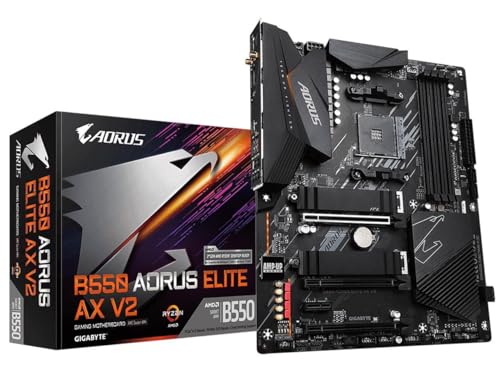
Gigabyte B550 AORUS Elite AX V2 — The wireless value step-up
Not every two-step plan wants flagship money spent at step one. The AORUS Elite AX V2 is the B550 board for the upgrader who would rather keep the difference in the processor fund: it covers the essentials a Zen 3 build actually feels — competent power delivery with real heatsinks, a PCIe 4.0 primary M.2 slot, onboard WiFi in the AX trim, and Gigabyte’s Q-Flash Plus for CPU-free firmware updates — while skipping the decorative and audiophile layers that inflate its Strix rival. The V2 suffix matters when ordering, because Gigabyte revised this board during its life; the support list, the wireless module and small layout details follow the revision, so the exact product page and box label deserve the same five-minute verification this guide keeps prescribing. That habit, incidentally, is the whole skill of late-era AM4 shopping: names stayed still while boards quietly changed, and the careful buyer reads revisions the way earlier buyers read reviews.
In service as a transplant foundation, its personality is unobtrusive, which is a compliment for a motherboard. It does not demand a lighting ecosystem, its BIOS is functional rather than beautiful, and its fan headers cover a typical mid-tower without splitters. Builders moving a 2700X-era storage set across will find the SATA count adequate and the slot layout conventional. The limitations map to its price with unusual honesty: the audio is ordinary onboard fare, the rear USB count trails the flagships, and the VRM — perfectly matched to six and eight-core Zen 3 chips and respectable beyond them — is not the choice for someone planning to feed a 16-core flagship under sustained all-core loads for years. Inside its intended envelope, though, it may be the most rational purchase in this guide: the least money that buys a genuinely ready Zen 3 foundation with wireless included.
- Socket and chipset: AM4 / AMD B550
- Dimensions: ATX form factor
- RAM provision: four-slot DDR4
- Storage highlight: PCIe 4.0 primary M.2 plus full SATA complement
- Networking: onboard WiFi (AX trim) plus wired Ethernet
- Revision note: V2 — confirm revision-specific details before ordering
Strengths
- Keeps the transplant budget pointed at the processor, where it belongs.
- Q-Flash Plus removes the loaner-CPU problem from future upgrades.
- Wireless included, unlike many boards at its level of the range.
Trade-offs
- Ordinary onboard audio compared with the ROG pick above.
- Power delivery is tuned for mainstream Zen 3, not 16-core endurance.
- Revision differences make careless ordering a real, avoidable risk.
Best for: value-led upgraders funding a six or eight-core Zen 3 transplant. Not suited for: builders planning a flagship 16-core AM4 finale on this board.

MSI B550 Gaming WiFi6E — The newest-radio option
The final pick exists for one household in particular: the one that has already upgraded its router to WiFi 6E, watches the desktop lose the 6GHz advantage to every laptop in the house, and is executing the same two-step AM4 plan as the readers above. MSI’s B550 Gaming board with WiFi 6E is a mainstream B550 foundation — modern power delivery for Zen 3 processors, PCIe 4.0 from a supported CPU, dual M.2 storage — distinguished mainly by the newest wireless radio in this guide. That distinction is real but narrow, and we rank the board last precisely because a radio generation is a reason to choose between B550 boards, never a reason to choose B550 itself. Every caveat from the previous three picks applies unchanged: the chipset’s official story starts at Zen 2, a 2700X is a guest whose invitation must be checked on the published list, and the purchase only makes full sense with a processor transplant on the calendar.
Taken on its own terms, the board is a sensible modern foundation. MSI’s BIOS remains the one many builders learned AM4 on, its memory support lists are extensive, and the board’s layout leaves the primary graphics slot breathing room that compact B550 designs sometimes steal. The 6GHz band, where local regulations and a matching router allow it, offers the cleanest wireless a desktop in a dense apartment building can get — genuinely useful for the game-streaming and large-file shuffle a media-room PC performs. Against that, weigh the ordinary: wired Ethernet is the mainstream specification rather than a multi-gigabit flourish, the audio is standard onboard fare, and households still on WiFi 5 or early WiFi 6 routers will extract nothing from the headline feature. Buy it when the router already justifies it and the transplant plan already exists; otherwise the AORUS above spends the same idea more cheaply.
- Chipset / socket pairing: AMD B550, AM4
- Form factor: standard ATX
- Memory fitted: DDR4 across four slots
- Storage highlight: dual M.2, PCIe 4.0 with a supported CPU
- Networking: WiFi 6E onboard plus wired Ethernet
- Positioning note: radio generation is the deciding flourish, not the foundation
Strengths
- WiFi 6E serves 6GHz routers that older onboard radios cannot use.
- MSI’s mature BIOS and deep memory lists ease the transplant build.
- Layout gives the graphics card proper breathing room.
Trade-offs
- The headline radio is wasted on households with older routers.
- Mainstream Ethernet and audio beneath a flagship-sounding name.
- Identical B550 Zen+ caveat: verify, never assume, processor support.
Best for: 6GHz households executing a planned Zen 3 transplant. Not suited for: anyone buying a wireless generation their router cannot speak.
How do the best motherboards for the Ryzen 7 2700X compare side by side?
| Board | 2700X stance | Storage ceiling | Wireless | Buy it when |
|---|---|---|---|---|
| MSI B450 Tomahawk MAX | Native fit | Single M.2, PCIe 3.0 | None | The chip stays and the board must simply work |
| Gigabyte X570 AORUS Elite | Listed on most X570 support lists — verify revision | Multiple M.2, PCIe 4.0 chipset lanes | None on this variant | Storage, not compute, is the bottleneck |
| MSI MAG B550 Tomahawk WiFi | Upgrade-path board — verify any Zen+ use | PCIe 4.0 primary M.2 with future CPU | WiFi onboard | A Ryzen 5000 transplant is scheduled |
| ASUS ROG Strix B550-F WiFi II | Upgrade-path board — verify any Zen+ use | Dual M.2 with lane sharing | WiFi onboard | Polish and audio matter for the next build |
| Gigabyte B550 AORUS Elite AX V2 | Upgrade-path board — Zen+ use needs list proof | PCIe 4.0 on the primary M.2 | WiFi onboard | The processor fund matters more than trim |
| MSI B550 Gaming WiFi6E | Upgrade-path board — check the list for Zen+ | Two M.2 slots | WiFi 6E onboard | The house already runs a 6GHz router |
One row of that table deserves a second look from workstation builders: the X570 board’s chipset lanes keep working at full specification even while the processor’s own lanes run a generation behind, which is why a capture card, a second NVMe drive and a fast network adapter can coexist around a Zen+ chip more gracefully on X570 than its launch-era boards ever allowed. Conversely, the B450 row’s modesty is also its virtue in a workshop or studio machine that must simply never surprise its owner — fewer controllers, fewer firmware branches, fewer behaviours to learn. There is no row here that embarrasses itself; there are only rows answering different questions, and the costliest outcome in this market remains answering a question you were never asked by a listing page sorted by discount.
Read the table’s second column as the decision itself. Everything to its right is preference; that column is physics. A native-fit buyer and a two-step buyer can both leave this page with the right board, but they cannot leave with the same board, and the listings ecosystem will not warn them apart — identical five-star shelves hold both kinds side by side. If you take one habit from this guide, take the support-list check: model, revision, processor, in the vendor’s own table, before the order. It converts AM4’s long, complicated twilight from a gamble into a catalogue.
What does a careful 2700X board swap actually involve?
Begin a week before the screwdriver comes out. Photograph the current build’s cable routing, export or screenshot your BIOS settings if the old board still boots, and back up anything whose loss would sting — a board swap is not supposed to touch your drives, but supposed-to is not a backup strategy. Download the new board’s manual and its current BIOS onto a USB stick from another machine, and read the CPU support page one final time with the physical box in front of you, matching revision markings rather than retail names. Check your Windows activation situation as well: a motherboard change is the one upgrade the operating system treats as a new computer, and linking the licence to your account beforehand converts a potential support call into a sign-in. Finally, confirm the unglamorous fitments — that your case’s front-panel USB and audio cables reach the new board’s headers, that your cooler’s AM4 bracket is in the parts drawer, and that your power supply carries the CPU power connectors the new board expects, since some step-up boards add an auxiliary connector a budget supply may lack.
While the parts are still in their boxes, settle the question of what success looks like on the first evening. A realistic first session ends with the machine POSTing, the operating system activated and one familiar workload completed — not with every cable sleeved, every fan curve sculpted and every benchmark beaten. Builders who chase the perfect finished build in a single sitting are the ones who introduce faults at midnight that a rested morning would never have made. Stage the work: resurrection first, refinement across the following week, when the board has proven its temperament and your notes about its quirks are written by experience rather than by hope.
On the bench, the discipline is sequence. Build the board outside the case first — processor, cooler, one memory stick, graphics card — and ask for a POST before a single standoff is involved; a fault found on the desk is a puzzle, while the same fault found inside the case is an excavation. Update the BIOS at this naked stage if the support list calls for it, while the flashback or update utility has your full attention. Only then dress the board into the case, route the front-panel leads with the manual open, and add drives one at a time so a storage surprise identifies itself. Inside Windows, install the chipset driver from AMD before the board vendor’s utilities, let the operating system rediscover hardware across two patient reboots, and only then restore your old BIOS habits — memory profile first, fan curves second, anything resembling an overclock last and optionally never. A 2700X at stock settings in a well-cooled board remains a civilised, productive machine; the swap’s goal is reliability, and every step above is priced in minutes rather than the weekend a rushed swap can consume.
Which mistakes send 2700X board buyers back to the returns desk?
The champion mistake is buying B550 on the assumption that AM4 is AM4. The socket accepts the chip physically, the listing photographs look identical, and the disappointment only arrives at first power-on — or worse, intermittently, weeks later, in ways that get blamed on memory and power supplies before anyone re-reads the support list. Second place belongs to ignoring board revisions: ordering by retail name while the vendor quietly shipped a V2 with a different wireless module, a different support matrix or a relocated header your case cables no longer reach. Third is the reverse error — assuming a dead-feeling system means a dead board, and replacing the motherboard when the actual fault was a tired power supply or a memory kit drifting out of tolerance; a 2700X-era system deserves one evening of component isolation before it deserves a purchase. Fourth, buyers fixate on the chipset and forget the physical layer entirely: the cooler bracket discarded years ago, the I/O shield preinstalled on one board and loose in the box of another, the front-panel USB-C cable in a modern case with no header waiting on a 2018 board. None of these mistakes requires expertise to avoid — only the willingness to read two documents, the support list and the manual, that the entire AM4 aftermarket quietly assumes you have opened.
How should memory be chosen and tuned around a Zen+ processor?
Memory is where 2700X builds quietly gain or lose the performance their owners then credit to the motherboard, so it deserves a section of its own. Zen+ improved on the first generation’s finicky memory controller without curing it entirely: two sticks remain dramatically easier to run at speed than four, single-rank kits of the period forgive more than dense dual-rank sets, and the practical sweet spot for this chip sits in the DDR4-3000 to DDR4-3200 region with sane timings rather than at the exotic frequencies Zen 3 owners chase. If you are carrying memory across from the failed board, begin at the kit’s rated profile and one notch below its rated frequency if training fails; the performance surrendered between 3200 and 2933 is measurable in benchmarks and invisible in editing timelines, whereas a build that fails to train at all performs at exactly zero. Populate the slots the manual names for a two-stick kit — on most ATX boards here that is the second and fourth slots from the processor — because daisy-chain and T-topology boards genuinely differ in which slots they prefer, and this is one of the few places where the manual’s diagram outperforms a decade of habit.
When buying memory fresh for a resurrection build, resist two temptations. The first is the bargain four-stick kit bought for its looks: filling every slot photographs beautifully and trains reluctantly on Zen+, and the RGB tax buys nothing the workload can spend. The second is chasing a premium high-frequency kit whose headroom this memory controller cannot use; that money serves the build better as a larger SSD or the wireless adapter the B450 pick lacks. For the two-step upgraders, the calculation reverses politely — a quality DDR4-3600-class two-stick kit bought now will serve the future Zen 3 chip at its own sweet spot, making memory the one component that can be purchased for tomorrow without compromising today. Whichever route you take, run a proper memory stability test overnight before declaring the swap finished. Intermittent memory errors masquerade as Windows corruption, game crashes and dying drives, and the 2700X platform’s twilight is full of ghosts that were only ever an untrained kit asking for ten minutes of patience.
What will a well-housed 2700X still do well, and where does it honestly fade?
Setting expectations is part of choosing the board, because a buyer who understands the chip’s remaining strengths will not overbuy its foundation. In threaded work — video encoding, code compilation, compression, software rendering, running a development stack of containers — sixteen threads of Zen+ still deliver a working day that feels unhurried, and the platform’s cheap DDR4 means feeding those threads with generous memory costs little. In gaming, the honest picture is a split one: at higher resolutions, where the graphics card carries the load, a 2700X system remains thoroughly enjoyable across modern titles, while in high-refresh competitive play and in simulation games that lean on a few fast threads, the chip’s single-core pace — not its core count — sets a ceiling no motherboard can lift. That is precisely why this guide resists selling you an expensive board as a performance upgrade: a board swap restores, enables and connects, but it does not make Zen+ into Zen 3, and any seller implying otherwise is selling the heatsinks.
The fade shows in smaller places too. Instruction-set support stops where 2018 stopped, so a handful of newest software features that assume later extensions will simply not appear. Resizable BAR and similar modern graphics conveniences arrived as platform features of later generations and should be treated as absent unless your exact board’s documentation claims them. None of this diminishes the value case that brought you here: a processor already owned, on a board that costs a fraction of a platform change, inside a memory ecosystem at end-of-life prices, is one of the cheapest competent computers a person can assemble in 2026. Spend the board money on the pick whose stance toward the chip matches your plan, keep the difference for the component that actually limits your day, and the build will justify itself every time it boots without complaint.
Final Recommendation
For the majority of readers — a working 2700X and a board that has failed or outgrown its case — the MSI B450 Tomahawk MAX is the answer this guide exists to give: same-generation certainty, generous power delivery, and a BIOS chip that survived the platform’s growing pains. If storage is the itch, the X570 AORUS Elite scratches it without touching the processor. The three B550 picks are good boards wearing a condition: they belong to buyers whose next processor is already chosen, and they reward that discipline with years of service. Match the purchase to the plan you actually have, not the plan that makes a listing sound exciting, and an eight-core chip from 2018 will keep earning its desk space long after its launch reviews are forgotten. That is the real verdict on this platform’s long twilight: not that old hardware deserves charity, but that a processor with honest work left in it deserves a board chosen with open eyes — native when the chip is the plan, forward-looking when the transplant is, and never bought on a compatibility assumption nobody checked.
Which supporting parts deserve a look while the system is apart?
A board swap opens the case, and an open case is the cheapest maintenance window a computer ever gets. The power supply deserves first attention, not because the 2700X is demanding but because supplies from this chip’s era are now genuinely old: a unit that has hummed through seven years of thermal cycles, dust and summer heat is the component most likely to be misdiagnosed as a motherboard fault, and testing the new board against a tired supply poisons the whole diagnosis. If the supply predates the processor, replacing it during the swap is not upselling yourself — it is removing the largest uncontrolled variable from the build. Cooling comes second. The 2700X shipped in an era of capable bundled and aftermarket air coolers, most of which remain entirely adequate, but their thermal paste does not age as gracefully as their fins; a fresh application during the transplant costs minutes and routinely returns temperatures to launch-day behaviour. Check that the cooler’s AM4 mounting hardware survived any intervening moves, and if the build lives somewhere dusty, treat the swap as the occasion for the deep clean the machine has been postponing.
Storage and case deserve the same honest glance. A SATA boot drive from 2018 transplanted onto a board with an empty M.2 slot is a missed opportunity measured in every cold start for the rest of the system’s life; even the B450 pick’s PCIe 3.0 slot transforms the machine’s responsiveness for the price of a modest NVMe drive, and cloning tools make the migration an evening rather than a reinstall. Case fans that have begun to tick or hesitate will not heal themselves inside a new build, and a board with fresh headers and modern fan control makes quiet replacements feel better than they ever did on the old one. None of these additions changes which motherboard you should buy — the support-list logic in this guide stands untouched — but together they decide whether the swap feels like a repair or like the second youth of a machine that still has work to do. Budget for the board first, the supply if its age demands it, and the boot drive if the slot is empty; that order spends money exactly where an ageing AM4 system feels it.
Frequently Asked Questions
Will a Ryzen 7 2700X work in a B550 motherboard?
Not as an official promise. AMD scoped B550 to Zen 2 and later families, and many B550 boards omit the 2700X from their CPU support lists entirely. Individual boards and BIOS branches sometimes run it, but that is an exception to verify in the vendor’s own table for your exact revision — never a basis for an unresearched purchase.
Is it worth replacing a motherboard for a 2700X instead of upgrading platforms?
Often, yes. If the processor still meets your workload, a native-fit board costs a fraction of a platform change that would also demand a new CPU and, on current platforms, new DDR5 memory. The maths flips only when you were already planning the processor upgrade — then the B550 two-step route in this guide is the honest middle path.
Does an X570 board give a 2700X PCIe 4.0 graphics?
No. The processor supplies the graphics lanes, and Zen+ supplies them at PCIe 3.0 speeds regardless of the board’s wiring. X570’s PCIe 4.0 benefits arrive through its chipset lanes and storage today, and through the CPU lanes only after a later processor transplant.
How much motherboard does a 2700X actually need for power delivery?
Less than internet folklore suggests. It is a 105-watt-class part, and any competently built B450 board with heatsinked power stages — the Tomahawk class — runs it at sustained all-core loads without drama. The flagship VRMs in this guide earn their place by serving future 16-core ambitions, not this chip.
Should a 2700X owner buy DDR4 now or save toward a DDR5 platform?
For a system being revived this month, DDR4 is the rational spend: it is the only memory this platform accepts, it is inexpensive at end-of-life, and a matched two-stick kit bought today will still be serving the machine years from now. Saving toward DDR5 only makes sense inside a written platform-change plan with a date on it; money held back for a hypothetical future build does nothing for the computer that must encode, compile or play tonight. The two-step buyers in this guide split the difference correctly — their B550 board and a quality DDR4 kit both carry forward to a Zen 3 transplant, so nothing they buy this year is stranded by next year’s processor.
What should I check first if the new board will not POST with my 2700X?
The support list, before the hardware. Confirm the board and its installed BIOS branch both cover Zen+, reseat memory into the manual’s preferred slots with a single stick, and use the board’s flashback or update path if the list names a newer BIOS for your chip. Most no-POST stories in this platform’s twilight are paperwork failures wearing hardware costumes.
What changes when the board comes from old stock or the used market?
Late-platform shopping has its own weather, and a paragraph of candour about it will save some readers real money. B450 and X570 boards increasingly reach buyers as warehouse remnants, retailer returns or second-hand listings, and each channel shifts what to inspect. Old stock may carry a BIOS from early in the board’s life — harmless for a 2700X, whose support is foundational on native boards, but worth knowing before a two-step buyer assumes a B550 box is transplant-ready for a Ryzen 5000 chip without a flash. Return-channel boards deserve a physical once-over that a sealed flagship never needs: bent socket-area pins are not an AM4 concern since the pins live on the processor, but a damaged retention bracket, a missing I/O shield, an M.2 standoff rolling loose in the bag or a CMOS battery long past its shelf life all appear in real listings. Photograph the board on arrival, test it on the bench before it enters the case as the how-to section prescribes, and keep the return window sacred — a board that POSTs on day one and misbehaves on day twenty is a warranty conversation, not a troubleshooting hobby.
The used market adds one more variable this guide has leaned on throughout: revision ambiguity. A listing titled with a retail name may describe any of several hardware revisions, and on AM4 the revision decides support lists, wireless modules and occasionally slot layouts. Ask the seller for the revision printed on the board itself, compare it against the vendor’s page, and treat a seller who cannot or will not confirm it as a discount you are being offered to absorb their uncertainty. None of this makes late-platform buying foolish — the entire value case for keeping a 2700X alive rests on it — but it does mean the careful habits this guide repeats, list-checking and bench-testing and revision-matching, are not pedantry. They are the difference between the cheapest competent computer of 2026 and a shelf of almost-compatible parts.
Related Guides
Continue planning your AM4 build with our companion reading: best motherboards for the Ryzen 9 3950X, best 400 series motherboards explained, and best aesthetic PC cases for a finished build.