What's inside
- Key Takeaways
- Quick Picks
- How Did We Choose the Best Bang for Buck Security Cameras Using Cat5 Cable?
- Why Does One Cable Matter So Much?
- The Six Picks in Detail
- How Long Does Round-the-Clock Recording Actually Keep?
- Where Should the Recorder and Switch Live?
- Side-by-Side: How Do the Six Routes Compare?
- How Do You Plan a Weekend Installation That Actually Finishes?
- What Mistakes Do Buyers Make With PoE Systems?
- Final Recommendation
- How Will the Household Actually Watch All This?
- How Does a Wired System Age Over Five Years?
- How Do You Choose Viewpoints Like an Installer Rather Than a Homeowner?
- What If You Rent, or the Building Restricts Drilling?
- How Should You Set Detection Zones, Schedules and Alerts?
- What Does a Small Business or a Church Hall Gain From the Same Recipe?
- Frequently Asked Questions
- Related Guides
As an Amazon Associate I earn from qualifying purchases. This post may contain affiliate links at no extra cost to you.
gizmoverdict.com is reader-supported. When you buy through links on our site, we may earn an affiliate commission.
Where to buy: Five of the six routes in this guide link to live Amazon listings, and the listing page is where you confirm the current kit contents — above all the hard drive situation — before ordering, because storage is the detail that varies most between near-identical PoE systems. The sixth route, the cable and switch infrastructure every wired system stands on, is covered in words only.
There is a reason the wired camera market keeps circling back to a cable standard old enough to have wired the first office networks. A Power over Ethernet camera takes everything it needs — its electricity and its network connection — down one run of Cat5 or Cat5e cable, back to a recorder that never sleeps, never needs its battery charged, and never drops off the WiFi because the router had a bad afternoon. The best bang for buck security cameras using cat cat5 cable are the systems that exploit that old-fashioned reliability at the sharpest overall value: enough cameras to cover a real house, resolution that identifies rather than merely detects, recording that runs around the clock, and detection features that are actually named in the listing rather than implied by the marketing photographs.
One clarification before the picks, because the search results for this topic are flooded with it: the cable itself is not a pick. Cat5e cable, connectors and switches are infrastructure — bought by the drum and the handful, judged by standards rather than by brand stories — and they get their own prose section at the end of the list. What follows ranks the cameras and systems that run on that infrastructure. A second clarification concerns storage, the quiet divider of this whole category. One system below ships with no hard drive at all, one with a 500GB drive, one with a 2TB drive, and the difference decides how many days of footage you own before the recorder starts overwriting its oldest hours. Read the titles on storage as carefully as the titles on resolution; in this guide, we did.
Detection language gets the same discipline. Where a title names smart person, vehicle or pet detection, we say so for that pick; where it names only human or motion detection, we say exactly that; and nowhere do we convert a detection feature into an accuracy promise, because no title here makes one and neither should a buying guide. The value question in this category is never simply the cheapest box. It is the total cost of a working system — cameras, recorder, storage, cable, switch ports, and the Saturday it takes to install — divided by the years of uneventful, watchful service it returns.
Our Top Picks
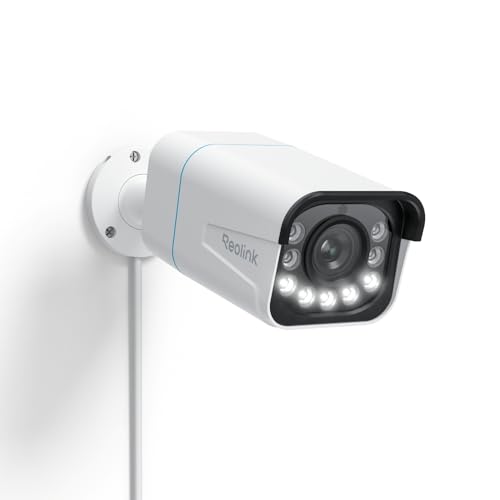 REOLINK PoE Security Camera RLC-811A 5X Optical Zoom1 Count (Pack of 1)11.4 x 4.7 x 5.5 inches1.8 poundsCheck on Amazon
Key Takeaways
- PoE runs power and data down a single Cat5/Cat5e cable per camera, which is why these systems record 24-7 without batteries, charging or WiFi dropouts.
- Storage is the hidden divider: the 4-camera REOLINK ships with no HDD, the generic 4-camera system includes 500GB, and the 6-camera REOLINK includes a 2TB HDD — price the drive into any comparison.
- The 6-camera REOLINK system is the most complete box here: six 5MP cameras, an 8-channel 4K NVR and 2TB of storage for round-the-clock recording as titled.
- The RLC-811A is the single-camera route — 4K, 5X optical zoom and up to 512GB microSD support as titled — for adding one serious viewpoint to an existing setup.
- The Anpviz turret states plainly that it requires an NVR and does not work independently; that honesty makes it an add-on camera, never a first purchase.
- Cable, terminations and a PoE switch are infrastructure, covered as a prose route: buy them by specification, and they will outlast two generations of cameras.
Quick Picks
| Pick | Badge | Why it earns a place |
|---|---|---|
| REOLINK 8CH 5MP PoE System (4 cameras) | Best starter system | Four 5MP PoE cameras and an 8-channel NVR with room to grow; bring your own hard drive. |
| REOLINK 8CH 5MP PoE System (6 cameras) | Most complete box | Six cameras and a 2TB HDD included, so the system records 24-7 from the day it is installed. |
| REOLINK RLC-811A 4K PoE Camera | Best single viewpoint | 4K with 5X optical zoom, a 123° field of view and two-way talk for the one angle that matters most. |
| Anpviz 5MP PoE Turret Camera | Best add-on camera | A full-metal 5MP turret with built-in mic for extending an existing NVR system, as titled. |
| PoE Security Camera System (4 cameras, 500GB) | Storage included, simple maths | Four cameras with a 500GB HDD inside and person/pet/vehicle detection as titled. |
| Cable + PoE switch infrastructure | The foundation | The Cat5e runs, switch and protection that every system above depends on, bought by specification. |
How Did We Choose the Best Bang for Buck Security Cameras Using Cat5 Cable?
We priced systems, not cameras. The first filter was the total working cost: a kit that excludes storage is not cheaper than one that includes it until the drive is added to the basket, so every comparison in this guide carries its HDD situation in plain sight. The second filter was coverage arithmetic. Four cameras is the honest minimum for a typical house — front, back, driveway, side passage — and eight channels on the recorder, as both REOLINK systems state, leave room for the two viewpoints every homeowner discovers they need in month two. The third filter was resolution with a purpose: 5MP across the systems here is the value sweet spot, fine enough to read a face and a number plate at driveway distances without the storage appetite of an all-4K fleet.
The fourth filter was detection, judged strictly as titled. Person, vehicle and pet detection — named on the REOLINK systems and the generic kit — is what turns 24-7 recording from an ocean of footage into a searchable set of events, and in a home with animals it is the difference between forty alerts a day and four that matter. Single cameras were judged by a different rule: what one viewpoint, added to a house, earns its cable run. The zoom on the RLC-811A and the turret form of the Anpviz answer that question in two different ways. Installers comparing these kits with the wider wired shelf will find the same total-cost logic in our guide to the best 8 channel home security cameras.
Why Does One Cable Matter So Much?
Because every alternative pays rent somewhere else. Battery cameras pay it in charging ladders and missed events during the flat week. WiFi cameras pay it in signal — the camera at the far corner of the house is always the one negotiating with the router through two brick walls — and in the quiet anxiety of a network that a neighbour’s new router can disturb. A PoE camera pays nothing after installation day: the same Cat5e run that carries its picture carries its power, the recorder at the other end records whether the internet is up or down, and the system’s reliability stops depending on anything in the house that gets unplugged, updated or replaced.
There is a longevity argument, too. Cat5e installed in a wall is infrastructure with a decades-long horizon; the cameras at its ends will be replaced twice in that span, and the cable will not care. That is the deep reason this category is the value play it claims to be: the expensive part of a wired system is the labour of the cable runs, and that labour is spent once, on a standard that every future camera in this guide’s lineage will happily reuse. Buy the cameras for this decade; run the cable for the next three.
The Six Picks in Detail

REOLINK 8CH 5MP PoE System (4 cameras) — Best starter system
This is the system for the homeowner who already owns, or happily will buy, a hard drive of their own choosing. Four 5MP wired PoE cameras for outdoors, an 8-channel NVR described in the title as 4K, smart person, pet and vehicle detection — and, stated with unusual honesty in the title itself, no HDD. That last phrase is why this kit often looks like the bargain of the category, and the honest reading is more interesting: the recorder is built for 24-7 recording, the channels double the camera count for future additions, and the storage is a deliberate separate decision. Fit a drive sized for your retention ambitions and the system’s true price is the kit plus that drive — still, for many buyers, the sharpest route into a proper REOLINK system.
The detection trio matters in a family home. Person and vehicle events are the ones a homeowner acts on; pet detection is the one that saves the system from crying wolf at the resident dog’s patrol schedule, and it is named here in the title rather than left to hope. Four cameras cover the canonical four faces of a house, and the empty channels are an invitation rather than a waste — the side gate and the garage interior that nobody thinks of in week one are precisely the additions month six demands. As a foundation purchase, bought with its storage maths done openly, this is the value pick for the planner.
- Cameras stated in title: 4pcs 5MP wired PoE cameras, for home outdoors
- Recorder stated in title: 4K 8CH NVR
- Storage stated in title: No HDD — drive required for 24-7 recording
- Detection stated in title: Smart person/pet/vehicle detection
- System reference in title: RLK8-410B4-5MP
- Cable included in the kit: Not stated in the listing title — verify with the maker’s documentation
Strengths
- Eight channels for four cameras leaves the system half-empty and ready to grow without a new recorder.
- Person, pet and vehicle detection as titled filters the alert stream the way a real household needs.
- The no-HDD honesty lets a buyer choose storage size deliberately instead of inheriting a small drive.
Trade-offs
- It records nothing until a hard drive is bought and fitted — the kit alone is not a working system.
- True cost comparisons must add that drive, which erases some of its apparent price advantage.
- Four cameras is a starting coverage, not a finished one, for larger or oddly shaped properties.
Best for: the planner set on a REOLINK foundation who prefers to choose their own storage size. Not suited for: installations that must record on installation day with no further purchases, since the title states no HDD is included.

REOLINK 8CH 5MP PoE System (6 cameras) — Most complete box
If the 4-camera kit is the foundation, this is the finished house. Six 5MP wired outdoor PoE cameras, the 8-channel NVR — described as 4K/8MP in the title — and a 2TB HDD already inside for 24-7 recording. Nothing else needs buying for the system to work the day the cables are run, and that completeness is a form of value that headline prices never capture: no second order, no compatibility question, no weekend lost to a missing drive. Six cameras is also a genuinely different coverage proposition — front, back, both sides, driveway and door — the full perimeter of most houses, watched in one system with one app and one recorder.
The detection naming matches its sibling: person, vehicle and pet detection as titled, filtering the same household noise. The 2TB drive sets the retention horizon; at six cameras recording around the clock, it holds a shorter archive than the same drive behind four cameras, which is the honest arithmetic of more eyes. Owners chasing longer retention can expand storage later — the point is that the system starts complete and grows by choice. For the buyer who prefers the decision finished rather than begun, this is the guide’s most straightforward recommendation.
- Cameras stated in title: 6pcs 5MP wired outdoor PoE IP cameras
- Recorder stated in title: 4K/8MP 8CH NVR
- Storage stated in title: 2TB HDD for 24-7 recording
- Detection stated in title: Person/vehicle/pet detection
- System reference in title: RLK8-410B6-5MP
- Spare channels remaining: 2 of 8, by the title’s arithmetic
Strengths
- The only fully self-contained system here — cameras, recorder and substantial storage in one purchase.
- Six cameras cover a whole perimeter at once, ending the which-four-faces dilemma.
- 2TB of included storage makes the 24-7 recording promise real from the first night.
Trade-offs
- The largest single outlay in the guide, even though it retires the accessory list entirely.
- Six cable runs is the biggest installation Saturday here — a full day’s drilling and clipping.
- Six cameras drain the shared 2TB faster than four, shortening the archive before overwriting.
Best for: the homeowner covering the whole perimeter and running the whole system in one installation. Not suited for: a small flat or a two-face property, where six cameras and eight channels are capacity that will never be aimed at anything.
REOLINK RLC-811A 4K PoE Camera — Best single viewpoint
Not every house needs a system; some need one serious eye on the one place that matters — the driveway where the cars sleep, the gate the deliveries come through, the long side passage. The RLC-811A is that eye, and its title is a specification for a viewpoint rather than a network: 4K resolution, 5X optical zoom, a 123° field of view, colour night vision, human, vehicle and animal smart detection, two-way talk, and support for a microSD card up to 512GB. The optical zoom is the soul of it. A fixed camera watches a scene; a zoom camera can be aimed, at installation, to frame the number-plate zone or the door swing exactly, and that framing decision is worth more than any resolution figure.
The microSD support gives it a second personality: as a standalone recorder on a card, it can watch a viewpoint before a full NVR system exists, or hold a local copy alongside a system. Two-way talk serves the doorstep conversation — the courier, the neighbour, the dog being told to come in — and colour night vision, as titled, keeps clothing and car colours meaningful after dark, which is when descriptions matter. As the single addition to an existing REOLINK system, or the first serious camera of a house that will grow one, it is the connoisseur’s pick of this list.
- Resolution stated in title: 4K
- Zoom stated in title: 5X optical zoom
- Field of view stated in title: 123° FoV
- Night capability stated in title: Colour night vision
- Detection stated in title: Human/vehicle/animal smart detection
- Audio stated in title: 2 way talk
- Local storage stated in title: Supports up to 512GB microSD card
Strengths
- Optical zoom lets one camera be framed precisely on the zone that matters, rather than watching everything loosely.
- 4K detail plus colour night vision keeps evidence descriptive after dark, as titled.
- MicroSD support lets it work standalone or as a belt-and-braces local copy inside a system.
Trade-offs
- One camera is one viewpoint; it is an addition or a beginning, never a whole-house answer.
- Card-based recording, used standalone, holds far less archive than an NVR with a hard drive.
- Its per-camera cost is the highest here, justified only where the viewpoint genuinely matters.
Best for: the single critical viewpoint — driveway, gate, main door — or the premium addition to a REOLINK system. Not suited for: whole-house coverage on a budget, since a system kit divides its cost across four or six viewpoints at once.

Anpviz 5MP PoE Turret Camera — Best add-on camera
This title contains the most honest sentence in the guide: ‘Require NVR | NOT Work Independently’. Anpviz is telling you, in capital letters, exactly what this camera is — a 5MP PoE turret that joins a recorder-based system — and that honesty should be rewarded with a clear-eyed reading of its virtues. It is full metal, which matters for a camera that lives outdoors being weathered and occasionally knocked by ladders and footballs. It has smart colour night vision and AI human motion detection as titled, and a built-in microphone, so the viewpoint it covers gains sound as well as sight. The turret form — a ball in a socket — aims easily and resists the casual nudge that re-aims lesser mounts.
Its role is expansion. A house running an NVR system with spare channels — the REOLINK kits above leave two to four — can add this viewpoint at a fraction of a system’s cost, and the NDAA note in the title will matter to some institutional and business buyers whose procurement rules ask the question. What it must never be is a first purchase by a reader who skimmed past the capitals: without a recorder it is an ornament. Bought knowingly, as the fifth or sixth eye of a growing system, it is exactly the sort of unglamorous, metal-bodied workhorse that value hunters exist to find.
- Resolution stated in title: 5MP
- Form stated in title: Turret security IP camera, outdoor wired, full metal
- Requirement stated in title: Require NVR — not work independently
- Night capability stated in title: Smart colour night vision
- Detection stated in title: AI human motion detection
- Audio stated in title: Built-in mic
- Compliance note in title: NDAA (U Series)
- Vehicle or pet detection: Not stated in the listing title — verify with the maker’s documentation
Strengths
- Full-metal turret construction suits exposed outdoor positions and aims precisely.
- A built-in microphone adds audio to its viewpoint, which most system cameras leave silent.
- The title’s blunt NVR requirement prevents the commonest buying mistake in this category.
Trade-offs
- It cannot work alone — an NVR must already exist in the house for this camera to show anything.
- Detection as titled is human-motion only, narrower than the person/vehicle/pet sets on the REOLINK systems.
- No local storage is mentioned, so its footage lives and dies with the recorder.
Best for: extending an existing NVR system with a tough, metal viewpoint that also hears. Not suited for: any first purchase, since its own title states it does not work independently of a recorder.

PoE Security Camera System (4 cameras, 500GB) — Storage included, simple maths
The generic system in the list makes its pitch on completeness at the simpler end: four cameras, an NVR kit, person, pet and vehicle detection as titled, 24-7 recording — and a 500GB HDD already inside. Against the 4-camera REOLINK, the trade is legible: this one works out of the box with storage fitted, where the REOLINK asks you to bring a drive; the REOLINK answers with the named brand, the stated 5MP resolution and the 8-channel growth room, where this title leaves its camera resolution and channel count unstated. Neither is a trick. They are two honest shapes of value — completeness now, or a named platform to grow — and the right choice depends on whether the house plans to expand.
The 500GB drive deserves the arithmetic the REOLINK section promised. Four cameras recording around the clock will cycle that drive in a matter of days-to-weeks depending on settings — enough for the ‘what happened last weekend’ question, short for a month’s holiday absence. Owners can typically record on motion events to stretch it, leaning on the titled detection to decide what counts. As a self-contained answer for a smaller property — a flat with a parking space, a terraced house with two real faces to watch — it is the least homework of any system here.
- Cameras stated in title: 4pcs cameras
- Storage stated in title: 500GB HDD inside
- Detection stated in title: Person/pet/vehicle detection for 24-7 recording
- System type stated in title: PoE security camera system surveillance NVR kit
- Camera resolution: Not stated in the listing title — verify with the maker’s documentation
- NVR channel count: Not stated in the listing title — verify with the maker’s documentation
Strengths
- Storage is fitted and included, so the system records from installation day with no second purchase.
- The full person/pet/vehicle detection trio is named, matching the REOLINK systems’ filtering.
- The simplest total-cost maths in the guide — one price, one working system.
Trade-offs
- 500GB is the smallest archive here; continuous recording cycles it quickly.
- Resolution and channel count are unstated in the title, so growth room and detail level need the listing’s confirmation.
- An unbranded kit leans harder on the seller’s support than a REOLINK system does.
Best for: a smaller property wanting one complete, working system with no accessory decisions left over. Not suited for: a house planning to grow past four cameras, since the title states no channel count to grow into.
Cable + PoE switch infrastructure — The foundation
We are not linking cable, because cable is bought by specification, not by listing. What a wired system stands on is this: Cat5e cable runs — solid-core cable for the fixed in-wall and in-loft runs, terminated properly at both ends — from each camera position back to the recorder or to a PoE switch; a switch with enough powered ports for the cameras you have plus the ones month six will add; and, where the recorder lives on a shelf with the router, a surge-protected power strip and a tidy patch arrangement that lets a human trace one camera’s cable in under a minute. None of it is glamorous, all of it outlasts the cameras, and the difference between an installation that serves for a decade and one that gets ripped out in year two is almost entirely in this layer.
Two working rules cover most of the craft. Keep each run within the Ethernet distance limit and test every run before the camera goes up — a cable tester costs little and finds the one bad termination while the ladder is still in the garden. And label both ends of every run with the viewpoint’s name; the person who thanks you, during a fault hunt three winters from now, will be you. Churches and halls running PoE camera networks for streaming make the same runs for the same reasons — the cable discipline transfers whole, even though the cameras’ purposes differ entirely.
- Cable: Cat5e (or Cat5 where already installed), solid-core for fixed runs
- Switch: PoE switch with ports for current cameras plus growth
- Practice: Test every run before mounting; label both ends
- Protection: Surge-protected power for recorder and switch
- Specific products and lengths: Not stated in the listing title — verify with the maker’s documentation
Strengths
- Infrastructure bought once serves two or three generations of cameras.
- A PoE switch centralises power, so cameras can be rebooted from one shelf.
- Tested, labelled runs turn future fault-finding from archaeology into minutes.
Trade-offs
- The cable runs are the labour of the whole project — a full day for a six-camera house.
- Listed buildings and rented homes may restrict drilling, pushing some viewpoints to other solutions.
- A switch is one more box to house, power and protect alongside the recorder.
Best for: every system in this guide, as the layer that decides whether the installation is a decade’s infrastructure or a season’s experiment. Not suited for: a single-camera doorway setup, where running structured cable for one viewpoint outweighs the benefit and the RLC-811A’s card recording carries the load alone.
How Long Does Round-the-Clock Recording Actually Keep?
Retention is where the storage lines in these titles turn into calendar dates, and every buyer should do the rough arithmetic before choosing. A drive fills in proportion to the number of cameras, their resolution and how busy the scenes are; when it fills, the recorder overwrites the oldest footage, so the archive is always a rolling window ending now. The 2TB system behind six cameras and the 500GB system behind four are therefore not simply ‘more’ and ‘less’ — they are different window sizes, and the honest question is which window your household’s life requires. A family that reviews incidents within days lives happily in a short window; a house left empty for a month’s holiday, or a small business with a quarterly question to answer, needs the window wide.
Two levers widen any window without buying a bigger drive. Recording on detection events rather than continuously — leaning on the person, vehicle and pet filtering named across these titles — can multiply retention several times over, at the cost of trusting the detection to catch what matters. And lowering a quiet viewpoint’s frame rate or resolution trims its appetite with no practical loss: the side-passage camera does not need the driveway camera’s detail. The systems here give you both levers; the discipline is to set them deliberately on installation day rather than discover them after the first incident scrolls off the edge of the archive.
Where Should the Recorder and Switch Live?
The recorder’s home decides the system’s manners for a decade. Choose somewhere dry, ventilated, boring and hard to stumble upon: a hall cupboard’s top shelf, a study corner, the loft’s edge where the cable runs naturally converge. It needs power with surge protection, a network connection to the house router for remote viewing, and enough air around it that a hard drive spinning for years stays cool — drives die of heat and neglect long before they die of age. It should not live in the garage it watches, for the obvious reason that the one room a burglar is guaranteed to visit should not hold the evidence of the visit.
Cable geography flows from that decision, which is why it belongs before the drilling: every camera run in the house terminates at this one point, so the recorder’s shelf is the centre of the map the installation weekend draws. Put the PoE switch beside it where one is used, label the shelf like the cables, and leave the one-page system summary taped inside the cupboard door. The best security systems are the ones a household can operate half-asleep at 3am; the recorder’s home is where that operability is built.
Side-by-Side: How Do the Six Routes Compare?
| Route | Cameras as titled | Storage as titled | Detection as titled | Standout fact |
|---|---|---|---|---|
| REOLINK 8CH 5MP (4 cameras) | 4 × 5MP | No HDD | Person/pet/vehicle | 8 channels, room to grow |
| REOLINK 8CH 5MP (6 cameras) | 6 × 5MP | 2TB HDD | Person/vehicle/pet | Complete in one box |
| REOLINK RLC-811A | 1 × 4K | Up to 512GB microSD | Human/vehicle/animal | 5X optical zoom, 123° FoV |
| Anpviz 5MP Turret | 1 × 5MP | None — NVR required | AI human motion | Full metal, built-in mic |
| PoE System (4 cameras, 500GB) | 4 | 500GB HDD | Person/pet/vehicle | Works out of the box |
| Cable + PoE switch infrastructure | Not applicable | Not applicable | Not applicable | The foundation layer |
How Do You Plan a Weekend Installation That Actually Finishes?
Walk the house first with the camera list in hand and choose viewpoints by what each must prove: the driveway camera must read a plate and a face at the car, the door camera must frame a visitor head-to-toe at arm’s length, the garden camera must cover the shed and the back door in one sweep. Stand where each camera will live and look at its view before a single hole is drilled — the corner that seems obvious from the ground is regularly wrong from three metres up. Then plan the cable routes to the recorder’s home: loft runs where the building allows, external runs in conduit where it does not, every route measured with slack to spare.
Install in the order that de-risks the day: recorder and switch first, powered and networked on the shelf; then the longest, hardest run; then the rest, testing each cable before its camera is mounted, and aiming each camera with a helper watching the live view while the ladder work happens. Finish with the unglamorous hour that separates systems from gadgets — name every channel by its viewpoint, set the detection zones and the recording schedule, change every default password, and write the system’s one-page summary for the household: where the recorder lives, how to view playback, who to call. The same planning discipline serves any fixed-camera building, as our guide to the best 4k security cameras argues from the resolution end of the same shelf.
What Mistakes Do Buyers Make With PoE Systems?
The expensive mistake is comparing kits by camera count alone, ignoring the storage line — a ‘cheaper’ four-camera kit with no drive can cost more, working, than the complete system it undercut. The second is mounting for coverage on paper: cameras placed to satisfy a diagram, too high to identify a face, aimed at scenes rather than at the choke points — doors, gates, the car’s parking spot — where identification actually happens. The third is forgetting the network’s manners: recorders left on default passwords, systems connected carelessly, the one layer of homework that costs nothing but attention.
The fourth is under-buying channels. A recorder filled to its last port in month one has no answer for the viewpoint every homeowner eventually wants — the garage, the side gate, the new shed — and replacing a recorder to gain two channels is the category’s most avoidable expense. Both REOLINK systems here state eight channels for exactly this reason. Buy the headroom; it is the cheapest line in the whole budget. Households whose watching brief centres on animals will also recognise the detection logic from our guide to the best cameras to watch your pets, where the pet filtering earns its keep indoors.
Final Recommendation
Decide first whether you are founding or finishing. Founding, with storage chosen deliberately and growth ahead: the 4-camera REOLINK and a drive sized to your retention. Finishing in one weekend, perimeter complete: the 6-camera REOLINK with its 2TB aboard. One critical viewpoint, treated properly: the RLC-811A. An existing system growing a viewpoint: the Anpviz turret, bought with its NVR requirement understood. A smaller property wanting one box and no homework: the 500GB system. And underneath every one of those answers, the same foundation — tested, labelled Cat5e runs and a switch with ports to spare.
Run the cables once, run them properly, and the house will quietly watch itself for years — through two generations of cameras, if history is any guide, on the same copper you clipped up one careful weekend. That is the bang, and the buck, of the whole category: not the cheapest box on the page, but the system whose costs all sit in the first weekend and whose service runs, unglamorous and unbilled, for the decade after. Buy it once, wire it well, label everything twice — and then, in the best sense, forget about it entirely. The footage will be there on the one night you ever truly need it, time-stamped, labelled and quietly complete, which is the only promise this category has ever needed to keep.
How Will the Household Actually Watch All This?
Three screens serve three moods. The recorder’s own monitor — or the television it feeds — is the incident screen: playback searched by time and by the detection events the titles describe, at the size where a face is a face. The phone app is the alert screen: a person detected at the gate, checked in four seconds from anywhere, with the two-way talk of the RLC-811A available where that camera stands. The computer is the archive screen, for the patient work of exporting a clip for the insurer or the police, a task whose ease is decided by the recorder’s software manners and is worth ten minutes of the installation weekend to rehearse.
Set the alert discipline as carefully as the cameras. Detection zones drawn around the driveway and the doors, sensitivity set so the washing on the line does not report itself as an intruder, pet filtering doing its titled work — the goal is a system whose alerts are rare enough to be believed. A security system that cries wolf forty times a day trains its household to ignore it, which is worse than no alerts at all; a system tuned to four true events a week becomes a member of the household, trusted the way a good dog is trusted.
How Does a Wired System Age Over Five Years?
Gracefully, if the foundation was honest. Year one is the shakedown: a viewpoint re-aimed, a detection zone redrawn, the spare channels quietly acquiring the garage camera the household swore it did not need. Years two and three are the plateau every owner actually bought — nothing happens, in high resolution, around the clock — punctuated by the moments the archive answers a question nobody expected to ask: when the parcel really arrived, whose dog, which night the fence came down. Somewhere in years three to five a hard drive, the system’s one true consumable, will ask to be replaced; the no-HDD REOLINK’s buyer will find that conversation oddly familiar and entirely painless.
By year five the cameras themselves begin to look dated beside the new shelves — and here the infrastructure route collects its dividend. New cameras, same cables, same switch, same recorder shelf: the upgrade is an afternoon, not a building project. That is the whole value argument of this category stated as a timeline, and it is why the cable section of this guide, the one with no link and no product, may be the most valuable pick on the page.
How Do You Choose Viewpoints Like an Installer Rather Than a Homeowner?
Homeowners aim cameras at areas; installers aim them at journeys. Every unwanted visit follows a path — gate to path to door, fence to garden to window — and a camera earns its cable when it intersects that path at a point where a face must turn toward it. The door camera works because a caller faces the door. The driveway camera works when it watches the gap between the cars and the gate, the corridor every arrival walks. Height follows the same logic: identification wants cameras lower than instinct suggests, near enough to head height at the choke point that a cap brim stops being a disguise, balanced against reach and tampering by mounting them just beyond a casual arm’s swing.
Overlap is the professional’s other habit. Viewpoints that share an edge let an event be followed from camera to camera without a blind handover, and the six-camera system’s real luxury is exactly this continuity — the visitor’s whole journey, gate to door, in one playback. Four-camera houses achieve a partial version by prioritising the two likeliest journeys over the four compass points. However many cameras the budget buys, draw the journeys first, on paper, from the street’s point of view. The map that results is the installation plan, and it is worth more than any single specification in any title in this guide.
What If You Rent, or the Building Restricts Drilling?
Then the wired gospel needs translating rather than abandoning. Many rental agreements and listed-building rules restrict new penetrations but say nothing about using what exists: cable runs already in the walls, routes through existing trunking, loft voids and the paths of previous installations. A conversation with the landlord, armed with the fact that Cat5e runs are small, reversible and often an asset to the next tenant, succeeds more often than tenants expect — especially when the alternative the landlord is imagining is a dozen adhesive WiFi cameras and their chargers. Where drilling is truly impossible, prioritise the one or two viewpoints reachable without it; a single RLC-811A on an existing route, recording to its card, protects more than a grand design that never leaves the page.
Renters should also keep the system’s paperwork portable: the recorder, switch and cameras leave with you, and labelled cables — the infrastructure section’s unfashionable advice — are what make the same system reinstallable in the next house in a day. Value, in a rented decade, is a system that moves house as gracefully as its owner does.
How Should You Set Detection Zones, Schedules and Alerts?
Give the configuration hour the same respect as the drilling day, because it decides what the system means. Draw each camera’s detection zone around its choke point — the gate’s swing, the door’s approach, the driveway’s parking line — and deliberately exclude the public street, the neighbour’s garden and the tree that dances in every storm. The titled person, vehicle and pet filtering then works on a stage you have already tidied, and the alert stream narrows to events with a subject and a place. Schedules deserve the same thought: the household’s own rhythms — the school run, the dog’s evening patrol, the cleaner’s Tuesday — can be taught to the system as quiet periods or expected patterns on most recorders, so that the alerts which remain carry news.
Then test it like an adversary and like a resident. Walk every journey at day and at night, at a stroll and at a hurry, and watch what the system makes of you: where it notices, where it names you correctly, where the night view loses your face to a cap brim or a headlight’s flare. Adjust one viewpoint, one zone, one sensitivity at a time, and re-walk. An evening spent this way is the difference between a system that is installed and a system that is commissioned — and commissioning, unglamorous as it sounds, is the entire distance between footage and evidence.
What Does a Small Business or a Church Hall Gain From the Same Recipe?
Everything the house gains, with the stakes squared. A shop, a workshop or a hall has the same choke points — doors, yard, car park, the corridor to the office — the same need for evidence that survives the internet’s mood, and the same allergy to subscription creep across a decade of budgets. The wired recipe answers all of it in the same order: journeys mapped, cables run once, a recorder with channels to spare, storage sized to the retention the insurers actually ask about. The Anpviz turret’s NDAA note in its title, an irrelevance to most households, becomes a live detail here, where procurement rules and grant conditions sometimes ask exactly that question.
The discipline transfers whole because it was never really about houses. It is about refusing to rent your own security back from a subscription, refusing to let evidence depend on a router’s goodwill, and spending the money once — on copper, channels and storage — where it keeps working while everything wireless around it is replaced twice. Houses, halls and workshops are all just buildings with journeys through them; wire the journeys, and the building watches itself.
Frequently Asked Questions
Can I use the Cat5 cable already in my walls?
Often, yes. PoE cameras in this class run on standard Ethernet cabling, and existing Cat5 or Cat5e runs — from an old office network, a previous alarm or a home-network install — can frequently be repurposed if they are continuous, undamaged and terminated properly. The keyword’s own wording nods at this: houses wired in the Cat5 era are not antiques to be rewired but assets to be audited, run by run, with a tester. Where a legacy run passes, it carries a modern 5MP camera as happily as it once carried a printer; where it fails, it fails in one replaceable length, not across the whole house. Test each run before trusting it, and replace any length that fails; the cable is the foundation, and foundations are no place for optimism.
How much storage do I actually need?
Work backwards from the question you want the system to answer. ‘What happened last night’ needs days; ‘what happened while we were on holiday’ needs weeks. Put a date on it before you buy: decide the longest absence the house regularly takes, add the days an incident might sit unnoticed after your return, and let that total — not a headline, not a hunch — choose between the fitted 500GB, the fitted 2TB and the empty bay filled to your own measure. Storage bought against a calendar is storage bought once; storage bought against a feeling is bought twice. Continuous 24-7 recording — which these NVR systems are built for, as titled — consumes the 500GB drive fastest, the 2TB drive slowest of the included options, and event-based recording stretches any of them. The 4-camera REOLINK’s empty drive bay exists so this decision can be yours rather than the kit’s.
What is the difference between the two REOLINK systems?
Completeness and coverage. The 4-camera system ships with no HDD and leaves four of its eight channels free; the 6-camera system ships with a 2TB HDD fitted and leaves two channels free. Both state 5MP cameras, 8-channel NVRs and person/vehicle/pet detection. Choose the first to found and grow, the second to finish in one installation.
Do these systems work without the internet?
Recording does. A PoE system’s cameras, recorder and storage are a local network doing a local job — they record around the clock whether the broadband is alive or not, which is one of the wired category’s core virtues. Remote viewing on a phone is the part that needs the internet; the evidence-gathering continues regardless. The same independence covers power cuts, up to a point: a modest uninterruptible power supply on the recorder shelf — the surge protection of the infrastructure section, grown up — keeps the system recording through the short outages that otherwise carve holes in exactly the nights an owner most wants covered, and lets the recorder shut down gracefully when a long cut finally wins.
Can I add cameras from a different brand to an NVR system?
Sometimes, and it is the question to verify per system rather than assume — compatibility depends on the protocols the recorder and the camera share, which is a documentation check, not a hope. Where mixing works, it works best at the edges: the specialist viewpoint, the turret with the microphone, added to a recorder with channels to spare, while the core perimeter stays on the system’s own cameras, whose behaviour with the recorder’s detection and app is the tested combination. Grow the fleet that way — homogeneous heart, verified additions — and you collect the savings of the add-on market without inheriting its surprises. The safe patterns are the ones this guide is built on: grow a REOLINK system with its own channels in mind, and treat a camera like the Anpviz — which states its NVR requirement plainly — as an addition to be confirmed against your recorder’s supported list before ordering.
How long can one Cat5e run be?
Ethernet runs are built to a standard segment length — a hundred metres is the figure installers plan around for a single run — and every system in this guide lives comfortably inside it for any ordinary house and garden. Measure honestly: the route a cable actually travels, up the wall, across the loft and down again, is routinely twice the straight-line distance between camera and recorder, and the drum that runs out on the last run is a rite of passage bestowed on installers who measured with their eyes. Order with slack, coil the surplus neatly at the recorder end, and the surplus becomes next year’s spare channel run, already in the building. Longer properties solve distance with a switch part-way, powered where the run demands it, rather than by hoping a heroic cable will behave. Measure your longest viewpoint’s route, with its bends and climbs, before ordering drums of cable.
Related Guides
For the always-on end of the same thinking, see the best 24 7 security cameras, and for a lighter-touch setup, the best airbnb security cameras cover properties where guests change the rules of the game entirely — shorter stays, shared spaces, and a watching brief that has to respect the people being hosted as carefully as the property being protected.


