What's inside
- Where to buy
- Key Takeaways
- Quick Picks
- How We Chose These Picks
- Why Are Mini Projectors Honest Only in Dim Rooms?
- What Should a Presenter Check Before Trusting Slides to a Pocket Projector?
- How Do You Run a Meeting From a Projector’s Own Smart Platform?
- How Should You Pack and Plan Battery for a Presenting Day?
- The Six Picks in Detail
- Battery, Inputs and Focus: The Six PowerPoint Picks Side by Side
- Common Mistakes
- Final Recommendation
- How Do You Design a Deck That Any Mini Projector Can Carry?
- What Is the Ninety-Second Room Routine?
- How Do You Handle the Room That Defeats the Mini Projector?
- What Separates a Presenting Kit From a Gadget?
- How Do You Win the First Sixty Seconds in a Client’s Room?
- Frequently Asked Questions
- Related Guides
As an Amazon Associate I earn from qualifying purchases. This post may contain affiliate links at no extra cost to you.
gizmoverdict.com is reader-supported. When you buy through links on our site, we may earn an affiliate commission.
Our Top Picks
Where to buy
The best mini projectors for powerpoint presentations are bought for a specific, unglamorous miracle: a deck that lives in a jacket pocket or a handbag, appears on a wall ninety seconds after entering a room, and stays legible through a thirty-minute pitch. Set the expectation honestly at the start, because this guide will repeat it until it becomes a reflex: mini projectors are dim-room instruments. Their brightness suits small audiences — a huddle room, a classroom corner, a hotel-room rehearsal, a client’s office with the blinds drawn — and no pick in this guide will defeat a sunlit boardroom, however confident its listing sounds. Judged inside that honest envelope, the class is genuinely useful. Judged outside it, every mini projector ever made is a disappointment waiting for a bright Tuesday.
Kodak’s Luma range dominates this shortlist for a simple reason: it is the branded, consistently specified pocket-projector line in a category flooded with anonymous boxes. The Luma 350 brings onboard Android, Wi-Fi and Bluetooth and a rechargeable battery. The Luma 500 steps up to Google TV, native 1080p, autofocus and a stated two-hour eco mode. The Luma 150 is the stripped, pocketable deck-runner with 1080p input, and the Luma 75 is the smallest of all — DLP, pocket-sized, with a stated 100-inch display ceiling that should be read as a dark-room maximum, not a meeting-room promise. Around the Kodaks sit two alternatives: an AKASO mini DLP with HDMI, WiFi, battery and speakers stated, and a YGSKK mini projector whose electric focus and wide stated device support suit the laptop-and-slides traveller.
For PowerPoint specifically, the specification that matters is not the one listings shout about. Slides are text and charts: they demand legible resolution at the size you will actually project, a focus system that stays true across the whole image, a connection path that matches your laptop or phone without a dongle hunt, and setup fast enough that the room’s attention survives it. Native resolution deserves the sharpest reading — ‘1080p input’ and ‘native 1080p’ are different sentences, and this guide’s reviews translate each title’s dialect into plain meaning.
Battery, finally, is the mini class’s party trick and its planning trap. A rechargeable projector frees the presenter from the wall socket and the cable across the floor, and the Luma 500’s stated two-hour eco mode covers most meetings — but brightness on battery and brightness plugged in are not always the same, and the wise presenter rehearses on battery before the meeting that matters. With those ground rules set, the six picks below are ranked for the deck-carrying life as it is actually lived.
Key Takeaways
- Set the envelope first: mini projectors suit small rooms and dimmed light — none of these will win against a sunlit boardroom.
- The KODAK Luma 500 is the specification leader: Google TV, native 1080p, autofocus and a stated 2-hour eco mode.
- Read resolution dialect carefully — the Luma 150 states 1080p input, the Luma 500 states native 1080p, and slides can tell the difference.
- The Luma 75’s stated 100-inch display is a dark-room ceiling, not a pitch-room plan; text size, not diagonal, is the limit.
- Electric focus on the YGSKK and autofocus on the Luma 500 protect the corners of a slide, where the small print lives.
Quick Picks
| Pick | Role in this guide | Headline detail from the listing title |
|---|---|---|
| KODAK Luma 350 | Smart pocket deck-runner with Android | Onboard Android, Wi-Fi & Bluetooth, rechargeable battery, keystone correction |
| KODAK Luma 500 | Native 1080p with autofocus — the spec leader | Google TV, native 1080p, autofocus & keystone, 2-hour eco mode |
| KODAK Luma 150 | The stripped pocket deck-runner | 1080p input and battery — the shortest title in the guide |
| KODAK Luma 75 | The smallest Luma — true pocket size | DLP, pocket-sized, 100-inch display stated, rechargeable power |
| AKASO Mini Projector | HDMI and WiFi with speakers aboard | DLP, HDMI, WiFi, rechargeable battery, stereo speakers, remote, Type-C |
| YGSKK Mini Projector | Electric focus and wide source support | Electric focus, WiFi and Bluetooth, built-in apps, supports laptop/HDMI/USB |
How We Chose These Picks
We built this shortlist from the mini and pico class only — projectors that travel in a pocket or small bag — and read each title for the PowerPoint virtues: stated resolution and whether it is native or input, focus mechanism, battery presence, and the connection story for laptops and phones. Kodak’s Luma line took four seats because its titles consistently state the facts a presenter needs: the Luma 350’s onboard Android with Wi-Fi and Bluetooth, the Luma 500’s Google TV with native 1080p and autofocus, the Luma 150’s 1080p input and battery, the Luma 75’s DLP engine and pocket form. In a category where most listings are fog, that consistency is itself a qualification.
The two non-Kodak seats were earned on stated presentation features. The AKASO mini DLP states HDMI and WiFi together — the two doors a presenter actually uses — plus a rechargeable battery, stereo speakers and a remote. The YGSKK states electric focus, the feature that lets a presenter sharpen the image from their seat rather than from the projector’s side of the room, alongside built-in apps and an unusually explicit list of supported sources: smartphone, TV stick, iPad, PS5, laptop, HDMI and USB. Each review marks what its title omits — brightness is stated by none of the six, a class-wide silence this guide treats as the dim-room rule rather than a per-product mystery.
We ranked for the deck first and the film night second. Several titles here are marketed at Christmas movie nights, and they will all show a film charmingly in the dark; but a projector that renders a spreadsheet’s footnote legibly at six feet of diagonal has passed the harder test, and that test ordered this list.
Why Are Mini Projectors Honest Only in Dim Rooms?
Brightness is the mini class’s physics bill, and it always arrives. A pocket projector’s lamp or LED, battery and optics live in a body the size of a paperback; the light it can produce is a fraction of a desk projector’s, and that light must then be spread across the projected image. Double the image’s diagonal and the same light covers four times the area at a quarter of the brightness. This is why the Luma 75 can honestly state a 100-inch display and honestly be a poor choice at 100 inches in a lit room: the figure describes what the optics can draw, in the dark, not what an audience can read at noon. None of the six titles in this guide states a lumen figure, and the correct response to that silence is not suspicion — it is a planning assumption: small room, controlled light, modest size.
PowerPoint, luckily, is the most forgiving content in dim conditions. Slides are high-contrast by design — dark text on pale ground, bold chart colours — and they remain legible at brightness levels where a film’s shadow detail would drown. The presenter controls the other variables too: sit the audience close, keep the image to the size the room’s light allows, draw the blinds without apology, and choose slide designs with large type and thick chart lines. A mini projector used this way is a professional tool. The same projector stretched across a bright boardroom’s far wall is a prop in a story about disappointment, and the projector is not the author of that story.
There is a useful rehearsal that settles the question for any specific room: arrive ten minutes early once, project your densest slide at your intended size in the room’s actual light, and walk to the farthest seat. If the footnote reads cleanly, the setup is honest. If it does not, shrink the image, darken the room or bring the bigger projector — three respectable answers, all cheaper than discovering the limit in front of the client.
What Should a Presenter Check Before Trusting Slides to a Pocket Projector?
Resolution first, in the title’s own dialect. Native resolution is the panel’s true pixel count and the ceiling on text sharpness; input resolution merely names the largest signal the machine accepts and downscales. The Luma 500 states native 1080p — the strongest text claim in this guide. The Luma 150 states 1080p input, which promises compatibility, not sharpness. For slides, the practical translation is type size: a native-1080p pocket image at five or six feet renders ordinary slide text cleanly, while a lower native panel at the same size asks the presenter to enlarge fonts and simplify charts. Whichever machine you carry, design the deck for it — 24-point minimums, one idea per slide, charts rebuilt bold — and the hardware question shrinks.
Focus is the second check, and it is about corners. A slide’s most important small print — axis labels, totals, the disclaimer — lives at the edges of the image, exactly where cheap optics soften first. Autofocus, as the Luma 500 states, and electric focus, as the YGSKK states, both beat a thumbwheel for a reason beyond convenience: they let you focus from the audience’s viewpoint, at the podium, rather than crouching at the projector guessing. Keystone correction, stated on the Luma 350 and Luma 500, squares an angled image; use it lightly, because heavy keystone spends resolution, and text notices the spending.
Third, the connection rehearsal. Decide the one cable or wireless path your deck will travel — HDMI from the laptop, mirroring from the phone, files on the projector’s own Android or Google TV — and rehearse that exact path at home, including the embarrassing parts: the adapter, the sign-in, the moment the deck opens in the wrong app. Every pick here offers at least two doors; the professional habit is to walk through one of them in advance and carry the cable for the second in the bag.
How Do You Run a Meeting From a Projector’s Own Smart Platform?
The Luma 350’s onboard Android and the Luma 500’s Google TV promise a seductive setup: no laptop at all, the deck opened from cloud storage or a streaming app directly on the projector. For the travelling presenter, that is a genuinely lighter bag and a faster room entry — arrive, join Wi-Fi, sign in, present. It works best when the deck is simple, stored in a mainstream cloud service, and rehearsed: fonts the platform can render, charts embedded as images where fidelity matters, and a downloaded offline copy for the venue whose Wi-Fi requires a portal, a password and a prayer.
Know the failure modes in advance. A borrowed network can block the projector’s sign-in; a complex deck can reflow when a substitute font renders; a video embedded in a slide may or may not survive the platform’s player. The professional pattern is hybrid: run the meeting from the smart platform when it behaves, and keep the laptop-and-HDMI path — supported across this guide’s picks, explicitly on the AKASO and YGSKK — as the rehearsed understudy. The audience should never learn which path you used. They should only learn that the deck appeared, on time, in focus.
Treat the projector’s accounts with meeting hygiene. Sign out of personal services on a device that travels to client sites, keep decks in a work account, and clear downloaded files after trips. A pocket projector is a computer with a lens; the Luma line’s smart platforms make it a useful one, and the same habits that protect a travel laptop protect it.
How Should You Pack and Plan Battery for a Presenting Day?
Battery arithmetic is the mini class’s quiet examination. The Luma 500 states a 2-hour eco mode; other picks state a rechargeable battery without a duration. Eco modes typically trade brightness for endurance, so the two-hour figure describes the dimmer, longer-lived configuration — fine for a dim room, and the rehearsal should be run in that same mode to keep the promise honest. A presenting day is rarely one meeting: it is a rehearsal, two pitches and a spill-over, and the battery that covered the first meeting beautifully can die introducing the third. Carry the charger, know the projector’s plugged-in brightness advantage, and plug in whenever a socket is politely available, saving the battery for the rooms that truly lack one.
Pack the kit as a system. The projector, its charger, one HDMI cable, one USB-C adapter matching your laptop, a clicker if you use one, and a microfibre cloth — in the same pouch, every time, checked the night before rather than at the client’s reception desk. The AKASO’s included remote and the tripod mounts mentioned in the Luma titles point at the other half of the system: height. A projector on a stack of the client’s books works; a projector on a mini tripod at screen-centre height works every time, squares the image without keystone, and looks like a professional arrived. The YGSKK’s electric focus and the Luma 500’s autofocus both reward that stable, centred perch with a uniformly sharp slide.
Finally, plan the room’s first ninety seconds. Enter, place the projector, power it, and while it wakes, introduce yourself rather than the technology. The mini class’s whole value is that setup shrinks to a gesture — the deck is simply there, on the wall, as the conversation starts. Every rehearsal and packing habit in this section exists to protect those ninety seconds, because they are what the client actually remembers about your projector.
The Six Picks in Detail
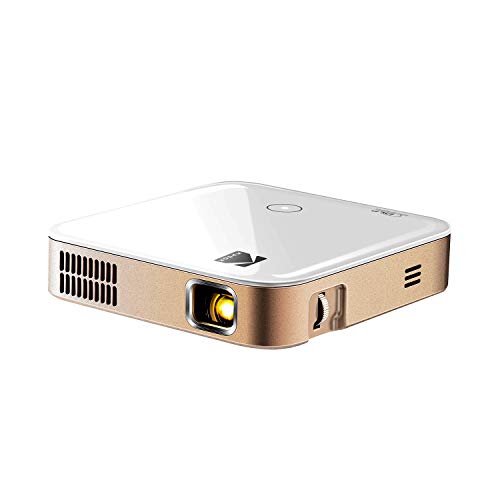
KODAK Luma 350 (Android)
The Luma 350 is the pocket presenter with a computer aboard: its title states onboard Android with Wi-Fi and Bluetooth, a rechargeable battery, iPhone compatibility, a tripod mount and keystone correction. For PowerPoint, that combination describes the lightest possible meeting kit — the deck opened from the projector’s own platform, the phone as companion and source, no laptop in the bag at all. The tripod mount deserves its line: a pocket projector at the right height, square to the wall, is a professional instrument, and the mount is what makes that posture repeatable in strange rooms rather than a negotiation with borrowed books.
Read its title with the guide’s dialect discipline. No native resolution is stated for the 350, so text expectations should be set by rehearsal rather than by assumption — design the deck bold, as this guide advises for the whole class, and the 350’s smart platform carries it gracefully. Keystone correction is stated and will square an angled setup at the usual small cost in sharpness, so the tripod-first habit matters. As the middle Luma, it is the balanced travel choice: smarter than the 150, smaller in ambition than the 500, and honest about being a pocket machine for small rooms.
What the listing title states
- Platform: onboard Android, Wi-Fi & Bluetooth, as stated in the title
- Battery: rechargeable battery, as stated in the title
- Setup: tripod mount, keystone correction, as stated in the title
- Compatibility: compatible with iPhone, as stated in the title
- Native resolution: Not stated in the listing title — verify with the maker’s documentation
Strengths
- Onboard Android lets the deck run without a laptop in the bag
- A tripod mount makes the square, centred setup repeatable in any room
- Battery plus Bluetooth and Wi-Fi cover the untethered meeting completely
Trade-offs
- Native resolution is not stated, so fine slide text must be proven by rehearsal
- Keystone correction, leaned on heavily, spends the sharpness slides need
- Its smart platform adds sign-in and account hygiene to the presenter’s checklist
Best for: travelling presenters who want the deck on the projector itself, a phone as the companion, and no laptop in the bag.
Not suited for: a data-dense financial deck with small print, until its text rendering is proven in rehearsal — or step up to the native-1080p Luma 500.
Laptop-free presenters can check the Luma 350’s current Amazon price; rehearse your densest slide on it during the returns window.

KODAK Luma 500 (Google TV)
The Luma 500 states the two phrases a slide presenter scans every listing for: native 1080p and autofocus. Native resolution means the panel truly holds a Full HD pixel grid, so slide text, spreadsheet excerpts and chart labels render at the sharpness the deck was designed with, at the five-to-seven-foot sizes this class serves best. Autofocus means the machine sharpens itself when placed — and re-sharpens if the table is nudged — protecting the corners of the slide where the totals and footnotes live. Add Google TV as the onboard platform, Bluetooth, a rechargeable battery and keystone correction, and the 500 is the most completely specified mini projector in this guide.
Its one stated limit is equally useful: a 2-hour eco mode. That figure frames the battery story honestly — eco operation stretches endurance, typically at gentler brightness — and two hours covers the standard meeting with room to spare, provided the day holds one meeting rather than three. Presenters with a full itinerary will plug in when possible and treat the battery as freedom rather than fuel. None of that dents the conclusion: within the mini class’s dim-room envelope, the Luma 500 is the pick that asks the fewest compromises of a PowerPoint deck.
What the listing title states
- Resolution: native 1080p, as stated in the title
- Platform: Google TV, Bluetooth, as stated in the title
- Focus: autofocus & keystone, as stated in the title
- Battery: rechargeable projector, 2-hour eco mode, as stated in the title
- Brightness: Not stated in the listing title — verify with the maker’s documentation
Strengths
- Native 1080p is the strongest text-sharpness claim in this guide
- Autofocus keeps slide corners sharp without a crouching ritual
- Google TV aboard means the laptop can stay home for rehearsed decks
Trade-offs
- The stated battery endurance is an eco mode — plan brightness and duration together
- Google TV sign-in on venue networks needs the rehearsed, offline backup plan
- It remains a mini projector: bright boardrooms defeat it as surely as any pick here
Best for: presenters whose decks carry real text and charts, in small rooms, who want the sharpest pocket image this class states.
Not suited for: a sunlit boardroom or a lecture hall, where the whole mini class is out of its depth and a desk projector belongs.
If your slides carry small print, the Luma 500 is the first price to check on Amazon — native 1080p and autofocus are the pairing to beat.
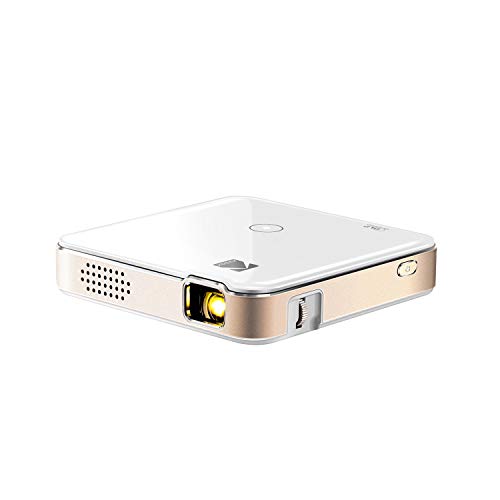
KODAK Luma 150
The Luma 150’s title is three facts long — mini projector, 1080p input, battery — and the review will honour that brevity with clarity. This is the simple pocket machine of the Luma line: it accepts a 1080p signal, runs on a battery, and asks to be judged as the deck-runner you throw in the bag when the meeting is a conversation with slides in support, rather than a document-reading exercise. The dialect point from this guide’s introduction applies in full: 1080p input is a compatibility promise. The native panel resolution is not stated, so fine text should be rehearsed, fonts kept bold, and charts simplified — the standard discipline that makes any mini projector look professional.
What the 150 offers in exchange for its simplicity is the class’s core miracle undiluted: a battery-powered projector that lives in a pocket and turns a wall into a screen in a minute. For the salesperson’s five-slide conversation, the teacher’s quick visual, the site visit where a plan needs showing on the only wall available, that is the entire requirement, and extra platforms and pixels would be luggage. Buy it as the honest minimum, carry the cable its simplicity implies, and it will be in the bag on the day the bigger kit was left at home — which is when pocket projectors earn their keep.
What the listing title states
- Input: 1080p Input, as stated in the title
- Battery: battery, as stated in the title
- Form: mini projector, as stated in the title
- Native resolution: Not stated in the listing title — verify with the maker’s documentation
- Focus system: Not stated in the listing title — verify with the maker’s documentation
Strengths
- The simplest possible pocket proposition: signal in, battery aboard, deck on wall
- Its minimal kit fits the bag that actually gets carried, every day
- Kodak’s line gives it a clearer pedigree than the anonymous end of this category
Trade-offs
- 1080p input is not native 1080p — small slide text is a rehearsal question, not a promise
- No focus system is stated, so expect manual adjustment at the machine
- No smart platform is stated, so a laptop or phone must always accompany it
Best for: sales conversations, site visits and quick show-and-tell decks where the slides support a talk rather than carry a document.
Not suited for: a text-heavy review meeting, where the Luma 500’s stated native 1080p earns its premium in legibility.
Minimalists can check the Luma 150’s current Amazon price — and budget the one cable its simplicity requires.

KODAK Luma 75
The Luma 75 is the pocket projector at its most literal: a pocket-sized DLP machine with rechargeable power, a smartphone-projector brief, and a stated 100-inch display. That last figure needs the guide’s translation before anything else. A 100-inch image from a mini projector is a dark-room event — a film on a bedroom wall, a deck enlarged in a blacked-out room — while a meeting-room PowerPoint at 100 inches would spread this class’s modest light across sixteen square feet of wall and ask the back row to read a whisper. At the sizes its light can honestly serve, in the dim, the 75 is a delight: the projector that is simply always there, in the pocket, when a screen would help.
DLP is its imaging technology, the same family as the AKASO and the Caydo M1C in the previous guide — compact, contrast-friendly and well suited to bold slide graphics. ‘1080p HD’ in its title is the listing dialect this guide keeps translating: it is not the word ‘native’, so text expectations belong to rehearsal and bold deck design. Judged as the smallest, simplest Luma — the spare, the backup, the one lent without anxiety — the 75 has a clear role. Judged as a boardroom instrument, it has the same answer as the whole class, only sooner.
What the listing title states
- Technology: DLP, as stated in the title
- Form: pocket-sized form factor, portable projector, as stated in the title
- Display: 100″ Display, as stated in the title — a dark-room ceiling; see the review
- Power: rechargeable power, as stated in the title
- Native resolution: Not stated in the listing title — verify with the maker’s documentation
Strengths
- True pocket size means it is present for the unplanned meeting, not just the planned one
- DLP imaging suits bold slides and film nights alike
- Rechargeable power keeps the whole kit to one small object
Trade-offs
- The stated 100-inch display is a darkness figure, not a lit-room plan
- Resolution wording stops short of ‘native’, so fine text needs bold deck design
- The smallest body in the line carries the class’s tightest light budget
Best for: an always-carried spare and personal projector — hotel rehearsals, impromptu show-and-tell, films in the dark.
Not suited for: a scheduled client pitch with detailed slides, where the Luma 500’s stated specification should take the meeting.
Check the Luma 75’s current Amazon price as the pocket spare; let the 500 carry the meetings that matter.

AKASO Mini DLP Projector
The AKASO’s title reads like a presenter’s packing list completed: pocket-sized DLP, support for HDMI and WiFi, a built-in rechargeable battery, stereo speakers, a remote control, and updated Type-C charging. HDMI is the door that matters most for PowerPoint — the direct, no-accounts, no-network cable from laptop to wall that works in every client’s office on earth — and WiFi covers the phone-mirroring alternative. Stereo speakers aboard means a deck with a video clip or a voiceover does not go mute in a room with no audio plan, a small mercy that presenters learn to value exactly once, in public, and never forget.
Its resolution wording — ‘1080P’ in the listing’s cheerful dialect, attached to a projector nicknamed for a cookie — gets the guide’s standard translation: native resolution is not stated, so bold decks and a rehearsal govern text expectations. The remote and Type-C charging are the modern conveniences: control from the podium rather than the projector’s side, and charging from the same cable ecosystem as the laptop. As the non-Kodak all-rounder, the AKASO’s case is completeness — every connection and convenience a small-room presenter reaches for, stated in one title.
What the listing title states
- Technology: DLP portable projector, pocket-sized, as stated in the title
- Connections: support HDMI, WiFi, updated Type-C, as stated in the title
- Battery: built-in rechargeable battery, as stated in the title
- Audio and control: stereo speakers and remote control, as stated in the title
- Native resolution: Not stated in the listing title — verify with the maker’s documentation
Strengths
- HDMI and WiFi together cover the laptop meeting and the phone meeting alike
- Built-in stereo speakers rescue decks with video or narration
- Type-C charging shares the modern laptop’s cable ecosystem
Trade-offs
- Native resolution is not stated, so chart small print is a rehearsal verdict
- Its movie-projector marketing undersells a genuinely presentation-ready kit
- Battery duration is not stated — plan the presenting day with the charger packed
Best for: presenters who live on HDMI from a laptop, show decks with sound, and want one pocket box with no missing piece.
Not suited for: a presenter wanting an onboard smart platform to ditch the laptop — that is the Luma 350 and 500’s territory.
Cable-first presenters can check the AKASO’s current Amazon price; its HDMI-plus-WiFi pairing is the completeness to compare.

YGSKK Mini Projector (electric focus)
The YGSKK’s headline is a focus mechanism, and for presenters that is a more serious headline than it sounds: electric focus. Instead of a thumbwheel on the machine — adjusted while crouching beside it, guessing at sharpness from the wrong side of the image — electric focus is driven from the remote, at the presenter’s position, judged from the audience’s seats. Slide corners come into focus under the presenter’s own eyes. Around that feature, the title states WiFi and Bluetooth, built-in apps, and a source list that reads like a presenter’s luggage roll-call: smartphone, TV stick, iPad, PS5, laptop, HDMI and USB. Whatever you arrived with, this machine claims a door for it.
The dialect discipline applies to its ‘1080P Video Projector’ wording — native resolution unstated, bold decks advised — and its bedroom-movie marketing undersells the presentation kit in the same way the AKASO’s does. No battery is stated in its title, a genuine planning difference from the other five picks: this reads as a plug-in mini for rooms with a socket, which in practice means most meeting rooms, with the trade that the cable-free gesture is unavailable. For the presenter whose ritual is laptop, HDMI, focus from the podium, present — the YGSKK states that ritual’s exact requirements.
What the listing title states
- Focus: electric focus, as stated in the title
- Connectivity: Wifi and Bluetooth, built-in apps, as stated in the title
- Sources supported: Smartphone/TV Stick/iPad/PS5/Laptop/HDMI/USB, as stated in the title
- Native resolution: Not stated in the listing title — verify with the maker’s documentation
- Battery: Not stated in the listing title — verify with the maker’s documentation
Strengths
- Electric focus sharpens slides from the podium, judged from the audience’s view
- The widest stated source list here — laptop, iPad, phone, stick, HDMI and USB
- Built-in apps plus WiFi and Bluetooth cover the laptop-free fallback
Trade-offs
- No battery is stated, so the untethered meeting is not its act
- Native resolution goes unstated — text sharpness is a rehearsal question
- Its bedroom-movie positioning hides presentation features a buyer must read closely to find
Best for: laptop presenters who focus from the podium and plug into whatever source the day brings, in rooms with a socket.
Not suited for: a cable-free, battery-only pitch in a socketless space, where the Luma and AKASO picks carry their own power.
Podium-focus presenters can check the YGSKK’s current Amazon price — electric focus is rarer in this class than its usefulness deserves.
Battery, Inputs and Focus: The Six PowerPoint Picks Side by Side
| Pick | Resolution as stated in the title | Focus as stated | Battery as stated |
|---|---|---|---|
| KODAK Luma 350 | Not stated in the listing title | Keystone correction (stated) | Rechargeable battery (stated) |
| KODAK Luma 500 | Native 1080p (stated) | Autofocus & keystone (stated) | Rechargeable, 2-hour eco mode (stated) |
| KODAK Luma 150 | 1080p input stated; native not stated | Not stated in the listing title | Battery (stated) |
| KODAK Luma 75 | 1080p HD stated; native not stated | Not stated in the listing title | Rechargeable power (stated) |
| AKASO Mini Projector | 1080P stated; native not stated | Not stated in the listing title | Built-in rechargeable battery (stated) |
| YGSKK Mini Projector | 1080P stated; native not stated | Electric focus (stated) | Not stated in the listing title |
The resolution column is this guide’s dialect lesson in one view: one pick states native 1080p, and it is not a coincidence that it also states autofocus — the Luma 500 is specified like a presentation instrument, while its rivals are specified like entertainment devices that present perfectly well when the deck is designed for them. The battery column shows five rechargeable picks against the YGSKK’s silence, which simply relocates it to socketed rooms. And no column for brightness exists, because no title states it: the class’s shared dim-room rule stands in for the missing figures, and the rehearsal — densest slide, real room, farthest seat — remains the only brightness test that has ever mattered.
Common Mistakes
Projecting at the maximum size because the listing allows it
A stated 100-inch ceiling describes optics in darkness, not legibility in a meeting. Every step up in size quarters the light per area as the diagonal doubles, and text is the first casualty. Choose the smallest image your farthest seat can read comfortably — for most mini projectors and most decks, that is a far more modest diagonal than the box advertises — and let the audience’s eyes, not the listing, set the size.
Trusting ‘1080p’ without asking which kind
Input, supported, HD and native are four different promises wearing one number. Only a native-1080p panel — stated by the Luma 500 here — guarantees the pixel grid your slide text was designed on. For every other wording, the professional response is not rejection but design: bigger fonts, bolder charts, fewer words per slide, and a rehearsal that proves the deck survives the panel it will meet.
Arriving with an unrehearsed connection path
The meeting that fails, fails at the cable: the missing adapter, the Wi-Fi that wants a portal, the app that wants a password reset. Every pick in this guide offers multiple doors, and the mistake is treating that abundance as a substitute for rehearsal. Walk one path at home, carry the cable for a second, and keep an offline copy of the deck. Ninety seconds of setup is the product; protect it.
Running the whole day on battery optimism
A stated 2-hour eco mode is a meeting, not a day, and unstated battery durations are not infinite ones. Plug in whenever a socket is available, save the battery for the rooms that lack one, and rehearse in eco mode if that is the mode the big meeting will use — brightness promises made in one mode do not transfer to another.
Final Recommendation
For a PowerPoint deck that must survive its own footnotes, the Luma 500 is this guide’s answer: native 1080p and autofocus stated, Google TV aboard, and a battery whose eco-mode limit is printed rather than discovered. The Luma 350 serves the laptop-free traveller, the AKASO the HDMI traditionalist with sound in the deck, the YGSKK the podium-focuser, and the two smaller Lumas the everyday carry and the spare — each inside the class’s honest envelope of small rooms and merciful light.
Rehearse the densest slide, size the image to the farthest seat, and carry the cable: a mini projector handled that way stops being a compromise and becomes what its best users know it is — the meeting that simply starts, on any wall, in ninety seconds.
How Do You Design a Deck That Any Mini Projector Can Carry?
Design for the weakest projector you might meet and every projector becomes strong. Set a floor of 24 points for body text and far more for titles, and let any idea that needs smaller type become two slides instead. Rebuild charts with thick lines, large labels and a maximum of four series; a chart that survives a pocket projector at six feet will look magnificent on any screen it ever meets. Put one claim per slide, in words the back seat can read in three seconds, and move the detail to a handout or an appendix deck — the audience came for the argument, not the archive.
Choose contrast like you mean it: near-black text on white, or white on a deep solid colour, and never pale grey on paler grey, however elegant it looked on your calibrated monitor. Embed photographs at sensible sizes rather than full-resolution monsters that make the projector’s platform labour. Save a PDF twin of the deck beside the native file; a PDF renders identically on every platform in this guide, from Google TV to a phone mirror, and has rescued more travelling presenters than any other single habit.
What Is the Ninety-Second Room Routine?
Enter, and put the projector down before the laptop. Its placement is the meeting’s foundation: centred on the wall or screen, at the height a tripod or table gives without keystone heroics, close enough for the image size the room’s light allows. Power it, let autofocus or your electric focus settle, and open the deck while introductions happen — the technology should finish waking before the conversation needs it, never during. If the room fights you — bright sun, no wall, a screen that is secretly a window — shrink the image, move the audience, or present from the laptop screen to a huddle of four without a flicker of apology.
The routine’s secret is that it is a routine: the same order, the same pouch, the same rehearsed path, in every room, until the setup disappears from your attention entirely. That is the state the mini class was invented for — the projector as a gesture rather than an event — and it is available to any presenter willing to rehearse the gesture a dozen times at home. The picks in this guide differ in platform, focus and battery. The routine is what makes any of them professional.
How Do You Handle the Room That Defeats the Mini Projector?
It exists in every presenter’s territory: the glass-walled meeting room at noon, the café corner with the sun behind the wall you need, the hall whose ‘screen’ is a yellowed blind. The professional response begins before arrival — a scouting question in the booking email, asking about blinds, screen and socket, costs nothing and converts surprises into plans. If the answer describes a bright box, the mini projector’s honest options are three: present to a huddle around the laptop, negotiate the room’s light like it matters — blinds, lights off on the screen side, audience repositioned — or deploy the plan-B display the scouting revealed, from the venue’s own television to a bigger projector borrowed from the host.
When the room is merely marginal, technique closes much of the gap. Shrink the image until the text firms up; a four-foot image that reads beats a seven-foot image that glows. Move the projector closer and the audience closer with it, converting a lecture geometry into a huddle geometry, which most small meetings secretly prefer. Switch the deck to its high-contrast dress if you prepared one — the PDF twin with the bolder palette — and narrate the numbers the chart can no longer whisper. Audiences forgive a small, clear image instantly. They never forgive a large, illegible one, because it tells them the presenter did not test the room they are sitting in.
And when the room truly wins, lose gracefully and immediately. A presenter who abandons the wall in the first minute and gathers the group around a laptop loses nothing; a presenter who spends ten minutes fighting the sun loses the meeting. The mini projector’s portability includes the portability of the decision — it goes back in the pocket as easily as it came out, and the deck, rehearsed and bold by design, survives the smaller stage.
What Separates a Presenting Kit From a Gadget?
A gadget is the projector alone, bought on a specification and met for the first time in the client’s reception area. A kit is the projector plus everything its use has ever demanded, living together in one pouch: the charger, the HDMI cable, the adapter your laptop actually needs, the mini tripod, the clicker, the cloth, and the deck stored on the device itself as well as on the laptop. The kit is checked the night before by touch, not by memory, and it is replenished the day a cable is borrowed from it. Every pick in this guide can be the heart of such a kit; none of them is a kit on its own, and the difference between the two is the difference between presenters who trust their gear and presenters who apologise for it.
The kit also includes the untestable made testable: the venue’s Wi-Fi question asked in advance, the offline deck copy, the PDF twin, the phone hotspot rehearsed as a network of last resort. None of these weigh anything. All of them were earned, by every experienced presenter, in a specific room on a specific bad morning — which is why they read as fussiness to the novice and as hygiene to everyone who has survived that morning.
Review the kit quarterly. Platforms update, adapters change, the laptop is replaced and its port is suddenly a different shape. A ten-minute quarterly rehearsal — full setup, deck open, focus checked — keeps the kit a kit. The mini projector class promises a meeting that starts in ninety seconds. The kit is how the promise is kept after the first month, when the gadget alone would have started, slowly, to break it.
How Do You Win the First Sixty Seconds in a Client’s Room?
The first minute in a client’s room sets the meeting’s temperature, and the mini projector’s whole design serves it. Walk in with the kit pouch, not a tangle; place the projector while greeting, not after; let the deck appear on the wall as the natural background to the introductions rather than as a scheduled event. If a cable is needed, produce it from the pouch without looking — the small theatre of preparedness — and if the room’s own screen or television offers a better surface, take it graciously and let your projector be the source. The audience is reading your competence from these gestures before a single slide appears, and they are not wrong to: a presenter who has mastered their tools has usually mastered their material.
Have the opening slide be the meeting itself — title, names, the question the hour will answer — rather than a desktop, a file browser or a streaming service’s home screen. Every smart platform in this guide will happily show the room your other apps and recent files if you let it; the professional sequence opens the deck at home, pauses it on the title, and lets the room see nothing earlier than the title. Sign-in prompts, update offers and notifications belong to the rehearsal, where they can be dismissed once, forever, in private.
And if something still fails — because something, someday, will — fail forward into the material. Begin the conversation from the printed one-pager or the laptop screen while the projector sorts itself, and let the deck join when it is ready, mid-flow, without an apology tour. The audience remembers the argument and the composure in equal measure. The mini projector, at its best, disappears into both.
Adopt one small ritual that ties this guide together: the night-before projection. The evening before any meeting that matters, set the projector up at home exactly as the kit will travel — same pouch, same cable, same deck copy — and project the three hardest slides at roughly the size you expect. Focus them, read them from across the room, and pack the pouch only when all three pass. The ritual takes ten minutes, catches the dead battery, the missing adapter and the corrupted file while they are still free to fix, and sends you to sleep with the meeting’s first ninety seconds already rehearsed. Presenters who keep it stop having projector stories. That is rather the point.
Frequently Asked Questions
Can a mini projector really handle PowerPoint text?
Yes, within its envelope: small room, controlled light, modest image size and a boldly designed deck. The Luma 500’s stated native 1080p renders ordinary slide text cleanly at five to seven feet of diagonal. Picks stating only 1080p input need larger fonts and a rehearsal to prove legibility — design for the panel and the panel performs.
Which pick is best for presenting without a laptop?
The Luma 500 on Google TV and the Luma 350 on onboard Android both run decks from their own platforms. Keep an offline copy of the deck on the device for venues with awkward Wi-Fi, embed critical charts as images so fonts cannot reflow, and retain the laptop-and-HDMI path as a rehearsed fallback.
How big should I project in a meeting room?
As small as the farthest seat comfortably reads. For this class, that usually means roughly four to seven feet of diagonal for text-bearing slides in a dimmed room — far below the 100-inch ceilings some titles state, which describe dark-room maximums for film, not lit-room legibility for footnotes.
Is autofocus or electric focus worth caring about?
For slides, yes. The important detail sits at the image’s edges, where softness strikes first. Autofocus on the Luma 500 sharpens the whole frame automatically; electric focus on the YGSKK lets you sharpen from the podium, seeing what the audience sees. Both beat a thumbwheel judged from beside the machine.
How long will the battery last across a day of meetings?
Only the Luma 500 states a figure — a 2-hour eco mode — and eco endurance typically trades brightness for time. Treat any mini projector’s battery as one meeting’s freedom, plug in whenever a socket is available, and carry the charger as part of the kit rather than as an afterthought.
Why does no pick in this guide state its brightness?
Because mini-projector listings commonly omit lumen figures, and this guide reports titles as written rather than borrowing numbers. The safe planning assumption for the whole class is a small, dimmable room — then verify your specific room with the rehearsal test: densest slide, intended size, farthest seat.
Related Guides
- Best mini Bluetooth projectors for phone-first presenting
- Best battery powered projectors for rooms without sockets
- Best business conference room projectors when the mini class is not enough
When the room outgrows the pocket projector, the installation class in our guide to the best led projectors for auditorium is the honest next step.
A mini projector moonlighting as a tracing tool is judged properly in our guide to the best art projectors for large canvas.


