What's inside
- Where to buy
- Key Takeaways
- Quick Picks
- How Did We Choose Televisions for Children?
- What Should Parents Actually Prioritise in a Kids’ TV?
- How Much Television Belongs in a Child’s Room at All?
- What About Screen Time, Timers and Watching Together?
- Which of These Six Sets Fits Your Child’s Room?
- How Do You Set Up a Child’s TV Safely on Day One?
- What Mistakes Do Parents Make Buying a Child’s Television?
- Final Recommendation
- Frequently Asked Questions
- Related Guides
As an Amazon Associate I earn from qualifying purchases. This post may contain affiliate links at no extra cost to you.
gizmoverdict.com is reader-supported. When you buy through links on our site, we may earn an affiliate commission.
Where to buy
You will find all six sets at Amazon in the United States, where each product page spells out the screen size, resolution and remote bundled with that model. Children’s televisions get moved, bumped and occasionally redecorated with stickers, so check the stand design and the VESA mount pattern against the room it will actually live in before ordering.
Choosing the best smart tvs for kids is a different exercise from choosing one for yourself, because the priorities invert. Your own television rewards size, spectacle and a deep settings menu; a child’s television rewards the opposite virtues — a screen small enough for the room and the viewing distance, an interface a seven-year-old can drive without summoning an adult every four minutes, a remote that survives being sat on, and controls that let a parent set boundaries once rather than negotiate them nightly. The six sets below are all 32- or 43-inch models from the three platforms families actually use, chosen for how they behave in bedrooms, playrooms and shared family spaces rather than for cinema credentials.
Budget thinking in this category also runs backwards compared with the main family television. There, stretching for the better panel pays for a decade; here, the set’s working life is set by the child’s growth and the platform’s software support, and a current, modest set refreshed in a few years beats a flagship ageing in a bedroom. That logic is why this guide favours recent model years at sensible tiers — the Hisense and TCL sets are 2025 and 2026 designs — over older premium stock wearing a discount. Fresh software, in a child’s room, is worth more than a grand panel running yesterday’s interface.
Size is the first kindness. A 32-inch screen in a child’s bedroom sits at a sensible distance from a bed or a desk chair, fills the view without dominating it, and costs little enough that the inevitable accident — a thrown toy, a toppled stand — is a bad afternoon rather than a financial event. A 43-inch set suits the playroom or the family room corner where siblings watch together and where a parent is usually within earshot. Every pick here lives in that range deliberately; nothing in this guide requires a child to sit in front of a wall of light.
There is a temptation, shopping in this category, to hunt for the television that advertises itself as designed for children — chunky casing, cartoon branding, a remote shaped like a star. Resist it gently. Those products date in a year and strand the child with a toy when what the room needed was a television. The sets in this guide are ordinary, current televisions in child-appropriate sizes, running the same platforms as the household’s main screen, which means they age at the speed of software rather than the speed of a child’s changing tastes. A seven-year-old’s bedroom set that still serves a twelve-year-old’s homework is a better gift than a novelty that embarrasses its owner by the second school term.
A word about what we can and cannot promise. We judge these sets on what their listings state — screen size, resolution, platform, audio features, headphone options — and on the known behaviour of the Fire TV and Roku platforms they run, including the parental-control settings those platforms provide for parents to configure. We do not claim any television makes a child safe online by itself; the controls still need a parent to set them up, and the setup section below walks through doing exactly that, platform by platform, in plain terms.
Key Takeaways
- The Hisense 32-inch A4 is our first call for a child’s bedroom: a Full HD 1080p picture at 32 inches, a simple Fire TV interface and DTS Virtual:X sound that keeps dialogue clear at low evening volumes.
- Insignia’s 32-inch F20 is the straightforward budget bedroom set, with a voice remote children can operate and free live TV channels built into the Fire TV home screen.
- Roku’s own 43-inch Select Series is the shared-room pick: 4K sharpness for family viewing and a Bluetooth headphone mode that lets a child watch without filling the house.
- TCL’s 43-inch R7D adds QLED colour and both Google Cast and AirPlay 2, suiting families whose photos, homework videos and streams arrive from every kind of phone.
- Amazon’s Ember 43-inch 4-Series is the Fire TV flagship of this group, with HDR10+, Dolby Audio and an Ambient Experience that turns the idle screen into a calm display rather than an advertisement.
- Hisense’s 32-inch QD4 brings QLED colour and full-array backlighting to the smallest size here, on the Roku platform parents often find the simplest to lock down.
Quick Picks
| Pick | Badge | Why it is here |
|---|---|---|
| Hisense 32″ A4 Series Fire TV (32A4NF) | Best Bedroom Pick | Full HD at 32 inches with clear low-volume dialogue for bedtime viewing. |
| Insignia 32″ F20 Series Fire TV | Best Simple Starter | A voice remote and built-in free channels make it the easiest first television to hand over. |
| Roku 43″ Select Series 4K | Best for Shared Rooms | 4K family picture plus Bluetooth headphone mode for peaceful evenings. |
| TCL 43″ R7D QLED Roku TV (43R7D) | Best for Casting | QLED colour with Google Cast and AirPlay 2 covering every phone in the house. |
| Amazon Ember 43″ 4-Series Fire TV | Best Fire TV Option | HDR10+, Dolby Audio and Ambient Experience in the most polished Fire TV package here. |
| Hisense 32″ QD4 Roku TV (32QD4HSR) | Best Small QLED | QLED colour and full-array backlighting at 32 inches on the Roku platform. |
How Did We Choose Televisions for Children?
We started with the room, not the spec sheet. Children’s televisions live in bedrooms, playrooms, kitchens and the corners of family rooms, at viewing distances of a metre or two, often watched from the floor, a beanbag or the end of a bed. That dictated the size ceiling: 43 inches is the largest screen here, and 32 inches — the size half this guide occupies — is treated as a feature rather than a compromise. Resolution was judged at those distances too; a 1080p panel at 32 inches looks crisp from a bed, which is why the Hisense A4’s Full HD specification matters more in practice than a larger set’s paper advantages.
Platform simplicity came next. Fire TV and Roku are the two interfaces children genuinely learn, and both appear here in strength. We looked for voice remotes, because a child who can say the name of a show makes fewer accidental journeys through menus than one typing with a directional pad; for headphone options, because a set that can go quiet without going off solves the oldest conflict in shared housing; and for free live TV built into the home screen, because a channel guide of broadcast content is a gentler default landing place than an algorithmic video feed.
We also considered the household’s other screens. A child whose family lives inside Amazon’s ecosystem will find Fire TV’s voice search and profiles familiar from the first evening, while a household standardised on Roku remotes in every room gains from one more identical grid. Ecosystem gravity is a soft factor that hardens with time: every month, the familiar platform gets easier and the foreign one gets more foreign. The guide therefore refuses to crown a platform, and instead describes each set’s temperament carefully enough for the household’s existing habits to make the final call.
Finally, we weighed the parent’s side of the glass. Both platforms in this guide provide parental-control settings — PIN-protected purchases, app and content restrictions, viewing profiles — that a parent configures once. We do not credit any individual set with controls its listing does not mention; the credit belongs to the platforms, and the honest advice is to enable them on whichever pick you buy, during the first setup, before the television’s first evening in service. Durability was judged pragmatically: slim bezels and light cabinets are easy to mount securely, and a wall mount out of climbing reach is worth more than any ruggedness claim.
What Should Parents Actually Prioritise in a Kids’ TV?
Before the hierarchy, a small test worth performing in the shop or during the return window: hand the remote to the child the set is for, say nothing, and watch. Can they find their programme? Can they stop it? Do they end up somewhere you would rather they had not, within ninety seconds of innocent exploring? That ninety seconds predicts the next three years more accurately than any specification in this guide, and it is why the reviews below describe interfaces in terms of temperament — calm, busy, voice-led, grid-led — rather than merely listing them.
The honest hierarchy starts with control, not picture quality. A television a parent can bound — purchases behind a PIN, apps chosen deliberately, a sleep timer that ends arguments by ending the programme — contributes more to a household’s peace than any panel specification. Both platforms represented here support that bounding at the system level, and the differences between the six sets matter less than the fifteen minutes a parent spends in the settings on day one. Buy the set that fits the room; then do the fifteen minutes.
Volume behaviour is the second priority, and the least marketed. Children’s viewing happens at odd hours, in rooms adjacent to sleeping babies and working adults, and dialogue clarity at low volume is what separates a considerate set from a household nuisance. That is why the audio notes in these listings — DTS Virtual:X on the Hisense A4, Dolby Audio on the Ember and the QD4 — earn their mentions, and why the Roku Select’s Bluetooth headphone mode might be the single most peace-preserving feature in this entire guide.
Energy and light deserve a brief word, because children’s rooms are slept in. A television whose standby light glows like a beacon, or whose screen wakes itself for promotions in the small hours, is a poor roommate for a light sleeper. The Ember’s Ambient Experience is the designed answer at the polished end; at every tier, a parent should check the standby behaviour during the first nights and use the platform’s settings — and, if necessary, a simple switched socket for the whole entertainment corner — to make the room properly dark when the day is done. Sleep is the one specification no listing prints and every parent values.
Third comes the interface’s centre of gravity. A home screen organised around apps and channels a parent selected behaves very differently from one organised around recommendations. Roku’s grid is famously plain and app-led; Fire TV is richer and more promotional but answers beautifully to a child’s voice. Neither is wrong; they suit different households, and the reviews below try to make the temperament of each set plain enough that you can match it to the child who will actually hold the remote.
How Much Television Belongs in a Child’s Room at All?
It is worth pausing on the question underneath the shopping, because the answer shapes which set you should buy. A television in a child’s room is not inherently a concession; it is a tool whose character depends entirely on how it is bounded. A small set with a curated app list, a sleep timer and a parent who chose its place in the room behaves like a bookshelf — a defined resource the child uses within known edges. The same screen, unbounded and enormous, behaves like a casino. Every design decision in this guide quietly serves the bookshelf version: modest sizes, platforms with real parental settings, features that end sessions gracefully instead of extending them.
Age changes the brief more than any specification does. For a five-year-old, the television is a window an adult opens and closes; voice control and free broadcast channels are the kindest tools, and the set’s own cleverness barely matters. For a ten-year-old, the set becomes homework infrastructure and social currency — the place series everyone at school discusses are watched — and resolution for text, casting for school content and a measure of interface independence start to count. For the early teenager inheriting the room, the television is effectively a small adult screen, and the 43-inch 4K sets here exist for the playrooms and shared spaces that stage of life gathers in. Matching the set to the stage, rather than to the child’s most optimistic birthday, is the discipline this category rewards.
There is also a household-ecology point worth making plainly: a child’s set absorbs viewing that would otherwise colonise the family’s main screen. The cartoon hour, the homework video, the sleepover film — giving them a right-sized home of their own keeps the living room’s television free for the household’s shared life and keeps children’s viewing in a space a parent can furnish, bound and overhear. Judged that way, the modest sets in this guide are not lesser televisions. They are load-bearing furniture in a well-run house.

Hisense 32″ A4 Series Fire TV (32A4NF) — Best Bedroom Pick
The A4 earns the bedroom recommendation by getting the fundamentals of the room right. It is a 32-inch set with a Full HD 1080p panel — the only one of the 32-inch picks here whose listing states full 1080p rather than HD — and at bedroom distances that resolution keeps cartoons, nature programmes and the small text of educational apps genuinely crisp from the end of a bed. The slim bezel design keeps the cabinet compact for small rooms and crowded desks, and the 2025 model year means its Fire TV software starts life current.
Audio is the A4’s quiet argument. DTS Virtual:X is listed among its features, and its practical gift is dialogue that stays intelligible when the volume is low — the exact condition of bedtime viewing in a house where other people are asleep or studying. Alexa is built in, so a child can ask for a programme by name, and a parent in the kitchen can answer a question or set a timer through the same voice ecosystem many households already use. Fire TV’s parental settings, configured once, put purchases and mature content behind a PIN.
Set expectations correctly and the A4 delights: it is a bedroom television, not a cinema. Its screen will not anchor a family film night for six people, and Fire TV’s home screen carries Amazon’s recommendations, which some parents prefer to tame through the profile settings. But as the set a child grows with — homework videos at the desk, a chapter of a series before lights-out, weekend cartoons from a beanbag — its combination of size, resolution and low-volume manners is the most complete in this guide.
- Screen: 32-inch, Full HD 1080p
- Audio: DTS Virtual:X
- Design: slim bezel
- Voice: Alexa built in
- Platform: Fire TV (32A4NF, 2025 model)
- Best room: child’s bedroom or study corner
Strengths
- True 1080p at 32 inches keeps text and detail crisp at bedroom distances.
- DTS Virtual:X keeps voices clear at the low volumes bedtime demands.
- A current-model Fire TV with Alexa voice control children can actually use.
Trade-offs
- Fire TV’s home screen promotes content; parents should set up the child’s profile promptly.
- Thirty-two inches is right-sized for a bedroom and wrong-sized for family film nights.
- Like all sets here, its speakers are modest; it favours clarity over fullness.
One practical pairing deserves mention: the A4 and a small pair of wired or Bluetooth headphones cover the two-chair reality of many bedrooms, where one child watches and another reads. Even without a headline headphone feature, a set used at genuinely low volume in a small room rarely travels through a closed door — and the A4’s dialogue clarity is precisely what makes that low volume workable rather than a strain.
Best for: a child’s own bedroom, where one viewer watches from bed or desk at close range. Not suited for: a playroom where four siblings and two cousins pile in for a film.

Insignia 32″ F20 Series Fire TV — Best Simple Starter
The F20 is the television equivalent of a first bicycle with stabilisers: deliberately simple, honestly priced as a tier, and easy for a whole household to operate. It is a 32-inch LED HD set running Fire TV, with a voice remote with Alexa in the box — the feature that matters most for young children, who can hold a button and name a programme long before they can spell one into a search box. Free and live TV is built into the platform’s home experience, giving the set a channel-surfing innocence that pure app grids lack: a child can land on broadcast children’s programming without an account, a subscription or a recommendation engine’s opinion.
Resolution is the deliberate compromise. The listing states HD rather than Full HD, and at 32 inches from across a small bedroom the difference is gentler than the specification suggests — animation, children’s programming and streamed shows all originate at modest resolutions and look entirely at home here. What the F20 spends its budget on instead is the platform and the remote, which is the correct allocation for a first television: children experience the interface a hundred times a day and the pixel count only when an adult points it out.
Durability thinking also favours this tier. A first television in a young child’s room should be a set whose loss would sting briefly rather than echo for months, and the F20’s positioning delivers exactly that peace of mind. Mount it securely, set up the Fire TV parental PIN during the first evening, and it becomes the appliance children learn television on — with the household’s real screen, whatever it is, safely elsewhere in the house.
- Screen: 32-inch LED, HD
- Remote: voice remote with Alexa
- Content: free and live TV through Fire TV
- Platform: Fire TV
- Positioning: entry tier of this guide
- Best room: young child’s bedroom or a grandparent’s spare room
Strengths
- Voice-first operation suits pre-readers and early readers better than any menu.
- Built-in free live TV offers a gentle, account-free default for casual viewing.
- Its tier makes it the least worrying set here to place in a young child’s room.
Trade-offs
- HD rather than Full HD; close-up text and fine detail are softer than the A4’s.
- Fire TV carries advertising and recommendations that need a parent’s settings pass.
- It is a starter set in ambition as well as price, and older children will outgrow it.
Grandparents’ houses are this set’s second natural habitat. A spare-room F20 gives visiting grandchildren a screen of their own that any adult can operate without a tutorial, on a platform whose free channels work even where subscriptions and accounts are not signed in. It is the rare piece of technology that reduces, rather than relocates, the number of questions a visit generates.
Best for: younger children’s first television, where simplicity and voice control rule. Not suited for: older children doing homework from the screen, who will feel the HD resolution in text.

Roku 43″ Select Series 4K — Best for Shared Rooms
Roku makes this television itself, and it shows in the priorities: a 43-inch 4K HDR panel, a voice remote, Wi-Fi, and one feature that deserves to be famous — Bluetooth headphone mode. A child pairs headphones to the set and the room goes quiet while the picture stays big. For shared spaces, flats with thin walls, and evenings when one child is awake and the household is not, that single feature resolves more conflicts than any other specification in this guide. It also gives parents a natural volume ceiling: the loudest the television can get is inside the headphones.
The 4K panel earns its place because this set’s room is shared. Forty-three inches at 4K suits a playroom or family corner where adults will also watch — the news over breakfast, a match at the weekend — and Roku’s platform is the great leveller of television interfaces: a plain grid of apps and inputs that grandparents, babysitters and children all navigate identically. The listing highlights streaming access to live local news, sports and movies, which keeps the set useful to the whole household rather than branded as the children’s screen nobody else touches.
As a 2026 model, the Select Series also offers the longest software runway of the group, which matters for a set expected to serve a child from first cartoons to early-teens viewing. Roku’s parental controls live at the platform level — PINs for purchases and channel additions, content settings within the major apps — and the platform’s simplicity makes those controls easier to find and audit than most. If one television must serve a mixed-age room gracefully for years, this is the candidate.
- Screen: 43-inch, 4K (2160p) HDR, flat LED
- Audio feature: Bluetooth headphone mode
- Remote: voice remote
- Connectivity: Wi-Fi and Bluetooth
- Platform: Roku (2026 model)
- Best room: playroom or shared family corner
Strengths
- Bluetooth headphone mode is the finest peace-keeping feature in this guide.
- Roku’s plain interface is equally manageable by children, guests and grandparents.
- A 2026 4K panel gives the set years of shared-room usefulness.
Trade-offs
- Forty-three inches is a lot of screen for a small child’s solo bedroom.
- Headphone mode depends on the child keeping headphones charged and intact.
- Roku’s simplicity means fewer of the ambient and voice extras the Ember offers.
Renters and flat-sharers with children will also feel the Select’s logic: one screen that is the children’s in the afternoon and the household’s in the evening, quiet when it must be, current enough to keep for years. Its restraint is its luxury. In a guide full of sets asking to be noticed for a feature, the Roku is the one that asks to be noticed for the absence of friction, which busy households reliably rank first once the novelty of everything else has worn off.
Best for: playrooms and shared family spaces where the set serves children and adults alike. Not suited for: a small bedroom, where its size overwhelms the room and the viewer.

TCL 43″ R7D QLED Roku TV (43R7D) — Best for Casting
Modern children’s content does not live only on the television; it lives on a parent’s phone, a sibling’s tablet and a school laptop, and the R7D is built for that traffic. This 43-inch QLED Roku TV lists both Google Cast and AirPlay 2 among its features, which between them cover effectively every phone and tablet a family owns — a grandparent’s holiday video, a teacher’s recommended clip, a child’s own recorded performance can all be sent to the big screen in two taps, under a parent’s eye, instead of being watched hunched over a handset.
The panel itself is the most ambitious of the 43-inch group: QLED colour, 4K UHD with HDR, a high-brightness design per the listing, and Motion Rate 240 for smooth sports and animation. In a bright playroom — the room with the patio doors, where children’s televisions so often end up — that brightness headroom keeps the picture confident at midday, and the live TV channel guide built into Roku gives broadcast content a tidy home alongside the apps. Roku’s platform keeps the whole apparatus calm and app-led, which parents administering the set will appreciate weekly.
The R7D is therefore the pick for the sociable room: the space where viewing is an event shared across people and devices. Its casting generosity does ask for one parental habit — the household Wi-Fi is the gatekeeper, so the router’s own settings and the Roku PINs deserve the same day-one attention as the other sets here. Set that ground rule, and this is the television around which a family’s screens most naturally gather.
- Screen: 43-inch QLED, 4K UHD HDR
- Casting: both major phone casting systems built in
- Motion: Motion Rate 240 per listing
- Brightness: high-brightness design per listing
- Platform: Roku TV with live TV channel guide
- Model: 43R7D, 2026 per listing
Strengths
- Both major casting systems cover every device a mixed household owns.
- QLED colour and a bright panel suit sunlit playrooms unusually well.
- Roku’s channel guide blends broadcast and streaming into one calm menu.
Trade-offs
- Casting convenience means parents should treat Wi-Fi access as part of supervision.
- Its panel ambition is wasted in a dark, tiny bedroom where smaller picks fit better.
- Motion-rate figures are processing claims; fast sport still depends on the source.
School life quietly strengthens the R7D’s case year by year. Teachers increasingly share video material, music practice arrives as clips, and children produce their own recordings they are proud to premiere. A television that receives all of it gracefully, on the room’s biggest screen with a parent on the sofa, turns that traffic into a family ritual instead of a series of handset huddles — a small but real change in how a household’s screens relate to each other.
Best for: playrooms and family rooms where content arrives from everyone’s phones and tablets. Not suited for: a strictly controlled solo bedroom, where its sharing talents go unused.

Amazon Ember 43″ 4-Series Fire TV — Best Fire TV Option
The Ember 4-Series is Amazon’s own flagship of this group, a 43-inch 4K Ultra HD set with Fire TV at its most polished. HDR10+ support gives compatible streamed content proper highlight handling, Dolby Audio covers the sound side, and the listing’s fast-processor claim shows in daily life as an interface that answers a child’s requests without the pauses that invite random button-pressing. For households already speaking to Alexa elsewhere in the home, the included Alexa remote and the platform’s voice search — including the listing’s note about finding shows faster with Alexa+ — make this the most conversational television here.
Its distinctive feature is the Ambient Experience: when the television is idle, instead of pushing a carousel of promotions, it can rest as a calm display of artwork or information, in the manner of a framed picture that occasionally tells the time. In a child’s room or a family space, that behaviour changes the set’s presence in the house — a screen that settles rather than shouts when nobody is watching it. Parents who dislike the modern television’s habit of advertising at their children from standby will understand the appeal immediately.
The Ember asks the usual Fire TV diligence in return: set up the child’s profile, PIN the purchases, and curate the apps on day one, because the platform’s richness cuts both ways. Do that, and this is the most complete 43-inch package in the guide — the set for the family room where children watch in the afternoon and adults inherit a properly capable 4K television in the evening, with free and live TV woven through the same home screen.
- Screen: 43-inch, 4K Ultra HD
- HDR: HDR10+
- Audio: Dolby Audio
- Idle behaviour: Ambient Experience
- Voice: Alexa remote; find shows faster with Alexa+ per listing
- Platform: Fire TV (newest model per listing)
Strengths
- Ambient Experience makes the idle screen calm instead of promotional.
- The most polished Fire TV experience here, with HDR10+ and Dolby Audio.
- Voice search is genuinely helpful for children who know what they want by name.
Trade-offs
- Fire TV’s richness needs a parent’s profile and PIN setup to be child-appropriate.
- Forty-three inches and flagship positioning exceed what a solo toddler’s room requires.
- Ambient features reward a household that will actually configure them.
The Ember also handles the sleepover scenario with unusual grace. A roomful of children, a film chosen by committee, a volume that must satisfy the back row of cushions without reaching the adults’ end of the house — Dolby Audio’s dialogue-forward tuning and a 43-inch 4K picture carry that evening comfortably, and the Ambient Experience gives the set something calm to do when the film ends and the whispering begins.
Best for: family rooms in Alexa households that want one polished set for children by day and adults by night. Not suited for: parents who want the plainest possible interface with nothing to configure.
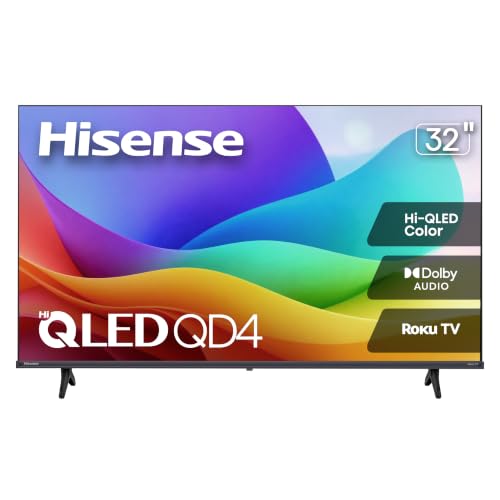
Hisense 32″ QD4 Roku TV (32QD4HSR) — Best Small QLED
The QD4 is the overachiever of the small sets: a 32-inch television whose listing includes QLED colour — the Hi-QLED branding is Hisense’s own — a full-array LED backlight, Dolby Audio and the Roku platform, in a slim-bezel cabinet. Full-array backlighting at this size is unusual and worthwhile; it evens out the panel’s illumination so a dark scene in an evening film looks uniform rather than patchy, and QLED colour gives animation the saturation children notice even when they cannot name it. For a small room that doubles as the household’s second film space, this is the connoisseur’s 32-inch.
Roku is the other half of its appeal. Where the same-sized Fire TV sets lean on voice and Amazon’s ecosystem, the QD4 offers the plain grid, the uncluttered home screen and the platform many parents find easiest to audit — every app visible at a glance, additions behind a PIN, nothing promoted into the child’s eyeline by an algorithm. Alexa compatibility is listed for households with smart speakers, but the set never depends on voice; the remote and the grid are the whole story, and for many families that restraint is the recommendation.
Resolution is the honest caveat: the listing describes an HD panel, so like the Insignia it trades pixel count for its other talents, and at 32 inches across a bedroom that trade is mild. What the buyer gets instead — colour, backlight evenness, Dolby Audio, platform calm, a 2026 model year — amounts to the most grown-up small television in this guide, sized for a child and specified like an adult’s second set.
- Screen: 32-inch Hi-QLED, HD
- Backlight: full-array LED
- Audio: Dolby Audio
- Design: slim bezel
- Platform: Roku TV (32QD4HSR, 2026 per listing)
- Voice: compatible with Alexa per listing
Strengths
- QLED colour and full-array backlighting are rare luxuries at 32 inches.
- Roku’s auditable, promotion-light home screen suits supervised viewing.
- A 2026 model with Dolby Audio, specified beyond its size class.
Trade-offs
- HD resolution, like the Insignia; the Hisense A4 is the 1080p alternative.
- No voice remote headline feature, so young children navigate by grid and arrows.
- Its talents are wasted if the room only ever shows background cartoons.
Think of the QD4 as the set for the child who has started to care. The one who notices that the cartoon’s colours look better at a friend’s house, who watches nature documentaries and asks about the animals, who is beginning the long apprenticeship of actually seeing pictures. Giving that child the best small panel in the guide is not indulgence; it is encouragement aimed at exactly the right moment, in a size that still respects the room.
Best for: small rooms where an older child or the whole family also watches films, on the calmest platform here. Not suited for: pre-readers who need voice-first operation to watch independently.
What About Screen Time, Timers and Watching Together?
No television setting settles the screen-time question by itself, but the right features make a household’s answer easier to keep. The sleep timer is the unsung hero: available across these platforms, it converts the end of viewing from a parental decision, renegotiated nightly, into a property of the furniture. Children accept the television switching itself off with a grace they rarely extend to a parent switching it off, and bedtime routines built around a timer hold their shape on tired evenings when willpower is scarce on both sides of the negotiation.
Co-viewing is the other half of the craft, and it argues for the shared-room sets in this guide more than any specification can. A playroom 43-inch where a parent can plausibly sit in — for the first episode of a new series, for the documentary the whole family ends up watching — produces a different viewing culture from a solo screen behind a closed door. That is not an argument against bedroom sets; the A4 and its siblings serve real needs in real houses. It is an argument for choosing the room deliberately, knowing that the room, more than the panel, decides what kind of viewing grows up around the television.
Finally, expect the arrangement to need revisiting. The controls that suit a six-year-old chafe a twelve-year-old, and the app list that was generous in January is a battleground by October. The platforms here make those revisions cheap — a PIN change, a profile adjustment, an app added as a privilege earned — and households that treat the settings as a living agreement, reviewed at birthdays and school-year starts, get the most from whichever set they choose. The television is the easy purchase; the agreement is the actual product, and these six sets are simply the ones that hold an agreement most gracefully.
Which of These Six Sets Fits Your Child’s Room?
| Television | Size and panel | Platform | Household it suits |
|---|---|---|---|
| Hisense A4 | 32-inch, Full HD 1080p | Fire TV | Bedroom viewing with low-volume evenings |
| Insignia F20 | 32-inch, HD | Fire TV | A young child’s first television |
| Roku Select Series | 43-inch, 4K HDR | Roku | Shared rooms needing headphone peace |
| TCL R7D | 43-inch, QLED 4K | Roku | Casting from every family device |
| Amazon Ember 4-Series | 43-inch, 4K HDR10+ | Fire TV | Alexa homes wanting a polished all-rounder |
| Hisense QD4 | 32-inch, QLED HD | Roku | Small rooms with grown-up picture tastes |
Notice, too, what no row of the table can show: the age of the child standing in front of the set. A six-year-old and a twelve-year-old are different audiences sharing a category name, and the wisest purchases in this guide are the ones made for the child as they are this year, with a platform whose controls can loosen as trust is earned. Every set here supports that loosening; none requires replacing the television to achieve it, which is precisely why the size ceiling and the platform shortlist were drawn where they were.
The table’s real message is that platform and room decide before panel does. Choose Fire TV if your household speaks Alexa and your children are voice-first; choose Roku if you prize a plain, auditable grid. Choose 32 inches for a child’s own room and 43 for any space the family shares. Within those decisions, each set above is the right answer to a slightly different version of childhood — the first solo screen, the siblings’ playroom anchor, the quiet-evening peacekeeper.
How Do You Set Up a Child’s TV Safely on Day One?
Begin with the physical setup, because it is the part no software can fix later. Wall-mount the set or secure the stand to the furniture with the straps televisions ship with or inexpensive furniture anchors; a 32- or 43-inch set is light enough for a determined climber to pull, and the mount also lifts the screen out of the arc of thrown toys and swinging dressing gowns. Route the power cable where small hands and feet cannot trip on or chew the idea of it, and place the remote’s spare batteries — if the remote uses them — in an adult drawer, not the toy box.
Then do the fifteen minutes of software. Create the child’s profile where the platform offers one; set the purchase and app-install PIN; install the handful of apps the child is allowed, and remove or hide the rest; turn on the sleep timer habit from the first night, so the television ending the evening is a routine rather than a verdict. On Fire TV sets — the Hisense A4, Insignia F20 and Ember — work through the parental controls in settings and the Alexa privacy options. On the Roku sets — the Select Series, TCL R7D and Hisense QD4 — set the platform PIN and review each app’s own profile settings, since streaming services keep their content controls inside their own walls.
While you are in the settings, attend to the account questions nobody enjoys. The television will be signed into someone’s Amazon or Roku account, and that account’s payment method is what the purchase PIN protects. Some households prefer a dedicated account for the children’s set, with no stored card beyond what subscriptions require; others are content with the PIN on the family account. Either is defensible. What is not defensible is discovering the arrangement by accident, on a statement, in a month when a small person has been industrious with a remote.
Finish with the viewing habits that outlast any setting: agree where the television may be watched, keep the bedroom door arrangement that lets an adult hear the room, and revisit the app list every few months as the child grows. Controls are a fence, not a supervisor; the sets in this guide make the fence easy to build, and the rest is ordinary parenting with better tools than the previous generation had.
What Mistakes Do Parents Make Buying a Child’s Television?
The most common is buying the television they themselves want — large, spectacular, laden with features — and installing it in a child’s life, where its size dominates the room, its interface bewilders its user and its replacement cost turns every accident into a household incident. Children need right-sized, calm, bounded televisions; this guide’s ceiling of 43 inches is a deliberate act of restraint. The second mistake is skipping the setup: a smart TV handed over with factory settings is an open door with a remote control, and every protection these platforms offer is opt-in.
Plan ahead for the second remote — the lost one. Every household with children should expect the remote to vanish into the sofa’s archaeology at intervals, and both platforms here offer phone-based remote apps that restore control in seconds. Knowing that fallback exists before the evening it is needed is a small piece of parental preparedness, like knowing where the torch lives. It also doubles as the parent’s own control surface, letting an adult pause or stop a programme from the next room without a negotiation conducted through a doorway.
Third, parents underestimate the remote. For a young child the remote is the television, and a voice remote — on the Fire TV sets and the Roku Select — is the difference between independence and a parent summoned to type searches twenty times a day. Fourth, they forget the audio problem until the first evening: a set without headphone options or low-volume dialogue clarity will be negotiated about nightly. And fifth, they place the set opposite a window in a bright playroom and blame the panel; a small repositioning, or the brighter TCL R7D, solves what no settings menu can.
Final Recommendation
A closing thought on budget, since this category tempts two opposite errors: overspending on spectacle a child cannot use, and underspending into a set so compromised that the household routes around it. The six sets here occupy the sensible middle deliberately — current platforms, honest panels, sizes matched to rooms — and the differences between them are differences of fit, not of worthiness. Choose the fit, mount it properly, bound it kindly, and then let the television do the unglamorous, valuable work of being one less thing the household has to think about.
For a child’s own bedroom, buy the Hisense A4 and spend the savings on a proper wall mount; its Full HD picture and low-volume manners fit that room like they were designed for it, because they were. For a first television for a younger child, the Insignia F20’s voice-first simplicity is the kindest start. Shared rooms split by temperament: the Roku Select’s headphone mode for peace, the TCL R7D for a family that casts everything, the Ember for Alexa households wanting polish, and the little QD4 wherever a small room deserves a grown-up picture. Whichever you choose, do the fifteen minutes of setup on the first evening — the right television, bounded well, becomes part of the household’s furniture instead of its arguments.
Frequently Asked Questions
What size television is right for a child’s bedroom?
For most children’s bedrooms, 32 inches is the sweet spot: large enough to watch comfortably from a bed or desk, small enough to sit at a healthy distance in a modest room and to mount securely out of harm’s way. The three 32-inch sets here — Hisense A4, Insignia F20 and Hisense QD4 — exist for exactly that room. Reserve 43 inches for playrooms and shared family spaces where several viewers watch together.
Are Fire TV or Roku better for children?
Both platforms provide parental-control settings, PIN-protected purchases and child profiles, and both appear in this guide because both work. Fire TV leans on voice, which suits younger children and Alexa households; Roku’s plain app grid is easier for a parent to audit at a glance and promotes less content. The better platform is the one whose controls you will actually set up — that fifteen minutes matters more than the logo.
Do these televisions have parental controls?
The platforms they run do: Fire TV and Roku both offer PINs for purchases and app installation, content restrictions and profile options, and individual streaming apps keep further controls inside their own settings. No television applies these automatically, and no listing here claims otherwise — a parent needs to enable them during setup, which is why the setup section above treats that step as part of the purchase rather than an optional extra.
What should I do when my child outgrows the settings, not the television?
Loosen them in stages, and say that is what you are doing. Add an app as a privilege, extend the timer on weekends, move a profile from child to teen settings at a birthday — each change is cheap on both platforms here, and each one teaches the negotiation the household actually wants to practise. The sets in this guide were chosen partly because their controls graduate smoothly; a television that can only be locked or unlocked forces a cliff-edge where a staircase would serve everyone better.
Is 4K worth it on a television for children?
At 32 inches, mostly not — a 1080p panel like the Hisense A4’s looks crisp at bedroom distance, and children’s content rarely stresses resolution. At 43 inches in a shared room, 4K earns its place because adults watch the same screen and viewing distances vary; that is why all three 43-inch picks here are 4K models. Buy resolution for the room’s other viewers, not for the cartoons.
How can I limit how loud a child’s television gets?
Three of the approaches in this guide help. Bluetooth headphone mode, on the Roku Select Series, moves the sound into headphones entirely. Clear-dialogue audio processing, such as the DTS Virtual:X on the Hisense A4, keeps voices intelligible at lower volumes so nobody needs to turn up. And platform settings on both Fire TV and Roku let parents shape the viewing environment, including timers that end sessions before volume becomes the evening’s negotiation.
Should a child’s television be wall-mounted?
Mounting is the single most effective physical precaution: it removes tip-over risk, lifts the screen beyond the reach of climbing toddlers and thrown objects, and frees the furniture surface the stand would occupy. If mounting is impossible — a rented room with strict rules, a wall that will not take fixings — the fallback is a low, heavy, stable piece of furniture, the set pushed well back from the edge, and the manufacturer’s anti-tip straps fastened to the wall or the furniture itself. What matters is that the television cannot be pulled down by a child using it as a climbing aid, a scenario every parent of a toddler should picture once, vividly, before choosing the easy option. it removes tip-over risk, lifts the screen beyond the reach of climbing toddlers and thrown objects, and frees the furniture surface the stand would occupy. Every set in this guide is light enough for a standard mount matched to its VESA pattern — confirm the pattern on the listing, use fixings appropriate to your wall, and the installation is an hour’s work that pays for itself in peace of mind.
Related Guides
Parents furnishing the family room rather than a child’s room can step up with our guide to the best tvs for brightness, built for sunlit shared spaces. For a compact second screen in a study or guest room, our picks of the best 43 inch 4k tvs with hdr cover the same size class with a grown-up brief. And if the viewing spot is a covered patio where the family gathers in summer, our roundup of the best lcd tvs for outdoors covers weatherproof sets made for that life.


