What's inside
- Where to buy
- Key Takeaways
- Quick Picks
- How Did We Choose Non-Smart 4K Panels in a Smart World?
- Who Actually Buys a Television Without a Smart Platform?
- What Does “Commercial Grade” Actually Buy You?
- What Should Home Buyers Know Before Adopting a Commercial Panel?
- How Do the Six Commercial Panels Divide the Work?
- How Do You Set Up a Commercial Panel for Business or Home?
- What Mistakes Do Buyers of Non-Smart TVs Make?
- Final Recommendation
- Frequently Asked Questions
- Related Guides
As an Amazon Associate I earn from qualifying purchases. This post may contain affiliate links at no extra cost to you.
gizmoverdict.com is reader-supported. When you buy through links on our site, we may earn an affiliate commission.
Where to buy
The six televisions below are sold through Amazon in the United States, largely through commercial and business channels rather than the consumer storefront, and their listings are where you confirm the exact model code, tuner specification and mounting pattern. Commercial panels are bought against a plan — a signage schedule, a waiting room, a classroom — so confirm the inputs and the content software against that plan before ordering.
Let us begin with the honest truth this entire guide is built on: the best 4k tvs not smart barely exist as consumer products anymore, and pretending otherwise would waste your money. Walk into any electronics shop and every 4K television on the wall is a smart TV, because the streaming platform costs the manufacturer almost nothing and subsidises itself. The genuine non-smart 4K panel survives in a different world — the commercial and hospitality market, where Samsung’s Pro TV and LG’s Commercial Lite lines sell 4K UHD panels with tuners, speakers and signage software, and no consumer smart platform chasing your viewing data. That is where this guide shops, openly, and the six picks below are those real products, judged for the real jobs they do.
Why would anyone want such a thing? The reasons are better than nostalgia. A business that needs a screen to show its own content — menus, timetables, presentations, a lobby welcome loop — gains nothing from a consumer smart platform and loses plenty: updates that rearrange the interface mid-season, accounts that expire, recommendations that appear in front of customers. A household may want a panel that simply displays what is plugged into it, for a parent who finds smart menus bewildering, for a room where a streaming stick of the owner’s choosing does the clever work, or for anyone who prefers their television to be a screen rather than a service. Commercial panels answer all of those briefs, with tuners for broadcast television and builds designed for long daily hours.
Search behaviour deserves a candid note, because it is how most readers arrive here misled. Type this guide’s title into a shop and the results will be salted with ordinary smart TVs wearing the phrase in their descriptions, with small monitors, and with sets whose “non-smart” claim dissolves on the product page. The consumer industry has no non-smart 4K line to sell you, so its marketing borrows the words. Everything in this guide was therefore verified from its own commercial listing — maker, range and class — rather than from any retailer’s keyword garnish, and readers continuing their research elsewhere should apply the same suspicion to every result that is not plainly a Pro TV, a Commercial Lite or a signage display.
Two cautions belong at the front. First, commercial does not mean primitive: several picks below carry proper signage software, HDR support and business content platforms, and one Samsung model lists Alexa built in — a voice feature inside a business television, which we note exactly as its listing states it. Second, commercial does not mean a consumer warranty or consumer retail experience; these sets are specified, sold and supported as business equipment, and the reviews below treat them that way, because a buyer who understands what these panels are will be delighted by them, and a buyer expecting a living-room smart TV in disguise will not.
Key Takeaways
- True non-smart 4K televisions are commercial displays now: every pick here comes from Samsung’s Pro TV or LG’s Commercial Lite and signage lines, with tuners and no consumer smart platform.
- Samsung’s BE43T-H Pro TV is the archetype: a 43-inch 4K commercial panel with digital signage software, HDMI, USB, tuner and speakers, rated by its maker at 250 nits for indoor business use.
- LG’s UR340C Commercial Lite is the hospitality-minded alternative, a 43-inch 4K UHDTV from LG’s commercial range with TAA compliance for institutional buyers.
- Samsung’s BEC-H Pro TV adds HDR and PurColor processing to the commercial formula for businesses whose content deserves a better picture.
- The 55-inch BE55T-H serves larger spaces — boardrooms, cafés, halls — with the same tuner-and-signage recipe at a room-filling size.
- LG’s PK340S and Samsung’s newest BEHX-H represent the signage-first end of the category, built around advertising, retail and hospitality content systems.
Quick Picks
| Pick | Badge | Why it is here |
|---|---|---|
| Samsung 43″ BE43T-H Pro TV | The Commercial Archetype | Signage software, tuner, speakers and a 4K panel in the classic business configuration. |
| LG 43″ UR340C Commercial Lite | Best Hospitality Alternative | LG’s commercial-grade 4K panel for hotels, care settings and institutions. |
| Samsung 43″ BEC-H Pro TV | Best Picture of the Group | Crystal UHD processing, HDR and PurColor inside the business formula. |
| Samsung 55″ BE55T-H Pro TV | Best for Bigger Rooms | The Pro TV recipe at 55 inches for boardrooms, cafés and halls. |
| LG 43″ PK340S Commercial Signage | Best Signage Specialist | A 4K HDR signage display aimed at retail, advertising and hospitality screens. |
| Samsung 43″ BEHX-H Business Pro TV | Newest Business Platform | Samsung’s latest business TV with its Business TV app and VXT content ecosystem. |
How Did We Choose Non-Smart 4K Panels in a Smart World?
We started by enforcing the category’s definition strictly. A pick had to be a genuine 4K UHD panel with a tuner, sold as a commercial or hospitality display rather than as a consumer smart TV. That single rule eliminated the entire consumer market — including every set elsewhere in our guides — and left the professional ranges of the two makers who dominate commercial displays, Samsung and LG. We make no apology for the shortlist’s concentration: in this category, those two catalogues are effectively the market, and a guide that padded itself with relabelled smart TVs would be lying to the exact readers who came here to escape them.
Within the commercial ranges, we judged the things commercial buyers judge. Content handling came first: what software drives the signage, how content arrives — USB, HDMI, a business app platform — and how a non-technical member of staff fares when the person who installed it is on holiday. Duty expectations came second; these panels are built for the long daily hours of business use rather than an evening’s viewing, and their brightness figures, where listings state them, are modest indoor numbers quoted honestly rather than consumer marketing peaks. Inputs, speakers and tuners were checked per listing, because a commercial panel that needs three accessories to perform its basic job is a worse buy than its price suggests.
We also checked our own category discipline against the listings one final time, because this guide’s entire value rests on not smuggling a smart TV into a non-smart list. Every pick’s identity was confirmed from its own listing: Pro TV, Commercial Lite, commercial signage. Where a listing mentioned a connected feature — the BEC-H’s Alexa line is the standing example — we reported it in the open rather than quietly dropping the model or quietly dropping the fact, and the review tells the principled buyer exactly what that means for their decision.
Finally, we kept the home buyer in the room. Some readers of this guide want a dumb panel for domestic reasons — simplicity for a relative, a screen for a stick or a console, a television that asks for no account. For those readers we note, in each review, what living with a commercial panel actually involves: business menus, business remotes, support channels aimed at companies. The panels will do the domestic job well, but they will do it in a business accent, and honesty about the accent is part of the recommendation.
Who Actually Buys a Television Without a Smart Platform?
The café owner, first of all, whose menu board must show the menu — today’s menu, edited this morning — and nothing else: no update prompt, no recommendation row, no expired account warning photographed by a customer. The clinic and the salon, whose waiting rooms need a calm loop of their own content or a broadcast channel, run by staff whose job is not television administration. The school, the church hall, the gym, the estate agent’s window: anywhere a screen is a tool with one job, a commercial panel’s indifference to everything except its inputs is a professional virtue.
Hospitality is the category’s ancestral home. A hotel or guesthouse television must wake up behaving identically in forty rooms, show the welcome screen or the broadcast channels, and never present a previous guest’s account to the next one. Commercial Lite and Pro TV designs exist because that discipline is a feature consumers never ask for and businesses cannot live without. Anyone furnishing a rental property, a holiday let or a serviced apartment is shopping, knowingly or not, in this guide’s territory.
Rental and letting properties deserve their own paragraph, because they sit between the business and the household and inherit both sets of reasons. A landlord furnishing a tenancy needs a screen that shows broadcast television and the tenant’s own devices, holds no previous occupant’s accounts, survives being operated by strangers, and can be replaced like-for-like when it eventually fails. That specification is a commercial panel’s portrait. The growing number of landlords who have learned this — usually after one tenancy’s smart TV presented the next tenant with the previous one’s streaming life — now buy from this catalogue as a matter of policy.
And then there is the principled household. Some buyers simply decline the modern arrangement in which a television is a data-collecting service terminal that also shows programmes. A commercial panel plus a source of the owner’s choosing — a tuner for broadcast, a disc player, a streaming device they control, a computer — restores the older, clearer relationship: the screen displays, the owner decides. This guide respects that buyer as much as the café owner, and the reviews below keep both in view throughout.
What Does “Commercial Grade” Actually Buy You?
The phrase invites scepticism, so let us itemise it. Commercial panels are specified for longer daily operating hours than consumer sets, because a café screen runs from opening to closing and a hotel screen is never truly off duty. Their setup systems assume fleets: an installer can configure one set and clone the result across a property, a behaviour no consumer platform offers because no consumer needs it. Their software priorities run in the opposite direction from a smart TV’s — stability over novelty, the same interface this year as last, changes arriving by the buyer’s decision rather than by overnight update. And their product cycles are longer and duller, which in business equipment is praise: a hotel can buy the same model next year to match the rooms it fitted this year.
None of that makes a commercial panel a better television for watching a film on a Friday night, and this guide has not claimed otherwise. It makes it a better appliance for premises and for people who value predictability over possibility. The distinction matters because disappointment in this category almost always traces to a buyer importing consumer expectations — app stores, cinematic HDR, a remote that feels like a toy of the future — into a purchase whose virtues are precisely the absence of those excitements. Read the six reviews below with the commercial definition in mind, and every trade-off listed will read as a design decision rather than a deficiency.
There is a final, underappreciated dividend: longevity of relevance. A consumer smart TV’s usefulness is hostage to its platform’s fortunes — apps withdraw, interfaces slow, accounts migrate. A commercial panel’s usefulness is hostage only to its inputs, and HDMI has outlived every platform so far. The screen bought to show a USB loop in 2026 will show whatever replaces the USB loop in 2036 with equal indifference. For buyers tired of replacing televisions because their software aged out from under their hardware, that indifference is the most modern feature in this entire guide.
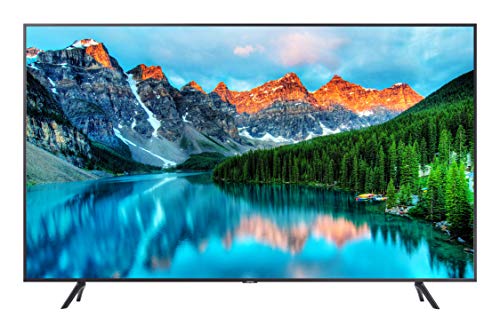
Samsung 43″ BE43T-H Pro TV — The Commercial Archetype
If the category has a textbook example, this is it. The BE43T-H is Samsung’s 43-inch Pro TV: a commercial 4K panel with the maker’s easy digital signage software, HDMI and USB inputs, a built-in tuner, speakers, and a stated 250-nit brightness suited to indoor business environments. Nothing in that list chases a consumer; everything in it serves a premises. The signage software is the soul of the product — templates and scheduling that let a café, salon or small retailer put professional-looking content on the wall without a media department, updated from a phone or a USB stick rather than a server room.
The tuner deserves emphasis, because it is what makes this a television rather than a monitor. Broadcast channels arrive through the aerial like any domestic set, so the same panel that shows the menu board at lunch can show the news or the match when the business wants it — a flexibility cafés and waiting rooms use constantly. The 250-nit figure, quoted from Samsung’s own listing, tells the placement truth plainly: this is an indoor panel for ordinary lighting, not a shop-window fighter against direct sun, and it does not pretend otherwise.
For the home buyer seeking a dumb 4K screen, the BE43T-H is the purest route: plug in your chosen source and the panel’s job is done, with no platform lobbying for attention in between. Accept the business manners — a commercial remote, menus written for installers, support aimed at companies — and you gain the category’s defining peace: a television that will present exactly the same face in five years as on the first morning, because there is no consumer platform inside it to rearrange itself.
- Screen: 43-inch, 4K commercial panel
- Software: easy digital signage software per listing
- Inputs: HDMI, USB
- Built in: tuner and speakers
- Brightness: 250 nits per Samsung’s listing
- Class: Samsung Pro TV (BE43T-H), black
Strengths
- The complete business recipe in one box: signage, tuner, speakers, inputs.
- Signage software a non-specialist can genuinely run day to day.
- An honestly stated indoor brightness figure, with no consumer hype.
Trade-offs
- No consumer smart platform — streaming requires your own source device, by design.
- Picture refinement is business-grade rather than cinema-grade.
- Menus, remote and support channels speak business, not living room.
A word for the secondhand-curious, because commercial panels circulate: ex-hotel and ex-business stock of lines like this one reaches the used market regularly, and a Pro TV’s business build makes it a more rational used buy than a consumer set of the same age. Check the panel for uniformity, confirm the remote is the commercial original, and remember that this guide’s links lead to new listings — but the category’s durability is part of its story, and the used market’s respect for it is evidence.
Best for: cafés, salons, waiting rooms and small retail needing a self-sufficient 4K screen. Not suited for: a living room expecting built-in streaming apps and movie-night polish.

LG 43″ UR340C Commercial Lite — Best Hospitality Alternative
LG’s answer to the Pro TV is the Commercial Lite line, and the UR340C is its 43-inch representative here: a 4K UHDTV LED-LCD panel from LG’s commercial catalogue, in a navy blue finish, with TAA compliance noted in its listing. TAA compliance is a procurement phrase — it speaks to institutional and government-adjacent buyers whose purchasing rules require it — and its presence in the listing tells you exactly which world this panel was built for: hotels, healthcare settings, education and public institutions, where televisions are bought by specification and expected to behave identically by the dozen.
Commercial Lite is an honest name. These panels carry the hospitality essentials — a proper tuner, commercial setup and cloning behaviour that lets an installer configure many rooms from one — without the heavier signage machinery of full commercial displays. For a guesthouse, a care home lounge, a school or a rental portfolio, that lightness is the correct specification: the set shows broadcast television and the establishment’s own welcome information, asks for no accounts, and presents the same face to every guest and resident.
Home buyers are a smaller but real audience for this panel, particularly those furnishing a room for an older relative. A television that turns on to television, with a remote innocent of app grids, restores a relationship with the device that many people quietly miss. The LG badge brings a maker’s support network of the first rank, and the commercial build is designed for the long daily hours that a lounge or family room set actually accumulates. It will not stream anything by itself, and this guide counts that, for the right buyer, as the headline feature.
- Screen: 43-inch LED-LCD TV, 4K UHDTV
- Line: LG Commercial Lite (43UR340C9UD)
- Finish: navy blue per listing
- Compliance: TAA compliant per listing
- Class: hospitality and institutional commercial panel
- Best setting: hotels, care settings, schools, rentals
Strengths
- Hospitality-grade discipline: identical behaviour across many rooms.
- TAA compliance opens institutional procurement doors.
- LG’s commercial support and installer ecosystem stand behind it.
Trade-offs
- Signage ambitions are lighter than Samsung’s Pro TV software story.
- The listing is specification-spare; confirm inputs for your exact installation.
- Like every pick here, streaming needs an external source you provide.
Procurement officers will recognise the UR340C’s listing language as a dialect spoken fluently by institutions: model codes, compliance marks, a catalogue rather than a campaign. That dialect is a feature for anyone buying on behalf of an organisation, because it means the panel can be specified, matched and re-ordered through the channels such buyers already use. The television is almost the least of it; the paperwork works, and in institutional life the paperwork is half the product.
Best for: guesthouses, care settings, schools and landlords furnishing rooms that must just work. Not suited for: businesses wanting rich built-in signage software.

Samsung 43″ BEC-H Pro TV — Best Picture of the Group
The BEC-H is the Pro TV for businesses that care how the content looks. Its listing describes a Crystal UHD 4K panel in Samsung’s BEC-H series with HDR, PurColor and a Contrast Enhancer, 3D surround sound, and a brief spanning digital signage and commercial television use. Read that as the commercial formula wearing the consumer line’s picture processing: wider, more accurate colour from PurColor, HDR handling for content mastered with it, and processing that keeps a brand film or a property showcase looking like the asset the business paid to produce.
One line of the listing requires this guide to be precise: it names Alexa built in. A voice assistant inside a business television is a feature Samsung chose to include in this series, and we report it as stated — it does not convert the BEC-H into a consumer smart TV, and we do not present it as one; the set’s identity remains a commercial Pro TV with signage at its centre. Buyers whose reason for shopping here is a principled objection to voice features should note the line and weigh the BE43T-H instead; buyers untroubled by it gain a hands-free control option in busy premises.
Positioned against its own sibling, the BEC-H is the choice when the screen is part of the shopfront’s persuasion — the estate agent’s listings loop, the showroom’s brand wall, the hotel lobby that wants its welcome film to glow. Its 2023 model year places it a generation behind Samsung’s newest business line, represented later in this guide, but picture processing ages gracefully, and for content that must look expensive, this remains the most persuasive panel of the six.
- Screen: 43-inch Crystal UHD 4K, BEC-H series
- HDR: HDR Pro TV per listing
- Colour: PurColor, Contrast Enhancer
- Audio: 3D surround sound per listing
- Voice: Alexa built in, per listing
- Model: LH43BECHLG, 2023
Strengths
- The strongest picture processing in this commercial group.
- HDR and PurColor flatter brand and property content noticeably.
- Full Pro TV signage brief with a more polished face.
Trade-offs
- Alexa’s presence may disqualify it for buyers avoiding voice features on principle.
- A 2023 model; Samsung’s newer business platform appears later in this guide.
- Its picture talents are wasted on plain text menu boards.
Consider the BEC-H in a estate agency’s window-adjacent wall or a car showroom, and its brief clarifies: the content is the business’s own photography and film, produced at real cost, and the panel is the frame that either honours or cheapens it. PurColor’s wider, more accurate palette and the contrast processing exist for exactly that frame duty. A business that has paid for good content and then displays it on a washed-out panel has saved money in the wrong place; this set is where the saving stops.
Best for: showrooms, agencies, lobbies and retailers whose content must look its best. Not suited for: buyers whose non-smart brief explicitly excludes voice assistants.
Samsung 55″ BE55T-H Pro TV — Best for Bigger Rooms
The BE55T-H is the BE43T-H’s recipe cooked for a larger room: a 55-inch commercial 4K panel with the same easy digital signage software, HDMI and USB, tuner and speakers, and the same honestly stated 250-nit indoor brightness. Scale changes the jobs a panel can do. At 55 inches a menu board becomes readable across a café, a presentation fills a boardroom wall without a projector’s fuss, a hall’s broadcast becomes watchable from the back row, and a showroom message carries the length of the floor.
Boardrooms are this set’s quiet triumph. A commercial panel with a tuner is, in meeting-room terms, a presentation display that never needs its inputs explained: plug in the laptop, and when the meeting ends the same screen can carry the company’s signage loop or the news. There is no consumer platform updating itself the night before the board arrives, no account signed in by a previous presenter. Institutional calm is the product, and at 55 inches it is calm at the size modern meeting rooms actually specify.
The responsibilities of size apply as they did outdoors in our other guides, minus the weather: a 55-inch commercial panel wants a wall and a mount rated for it, installed into structure, with power and cabling planned rather than trailed. Its brightness class confines it to interior lighting, as its listing states, so sun-struck atriums should look at dedicated high-brightness signage instead. Within interiors, it is the straightforward answer whenever the 43-inch archetype is simply not enough wall.
- Screen: 55-inch, 4K commercial panel
- Software: easy digital signage software per listing
- Inputs: HDMI, USB
- Built in: tuner and speakers
- Brightness: 250 nits per Samsung’s listing
- Class: Samsung Pro TV (BE55T-H), black
Strengths
- The proven Pro TV recipe at a room-filling size.
- A presentation-and-signage double life that suits boardrooms perfectly.
- Same staff-friendly software as its 43-inch sibling.
Trade-offs
- Indoor brightness class; bright atriums and window walls will defeat it.
- Its size demands structural mounting and a two-person install.
- No consumer smart features, by the same design as the whole guide.
Places of worship and community halls form a constituency this size serves weekly and well: lyrics, notices and presentations through the week, broadcast events when the hall becomes the village’s front room. A panel that does both without an operator’s licence — and that no well-meaning volunteer can accidentally sign into a personal account — solves a real governance problem in such buildings, where the person who understands the screen is rarely the person standing beside it.
Best for: boardrooms, cafés, halls and showrooms needing the recipe at scale. Not suited for: small premises where 43 inches already fills the wall.

LG 43″ PK340S Commercial Signage — Best Signage Specialist
The PK340S is the most single-minded product in this guide. Its listing describes a 43-inch 16:9 4K Ultra HD HDR digital signage commercial LED TV, aimed in its own words at advertising screens, retail displays and hospitality signage. Where the other picks balance television and signage duties, this panel’s centre of gravity sits firmly on the signage side: it exists to show a business’s content, in HDR where the content carries it, in the environments where customers actually stand.
That focus has practical consequences a buyer should welcome rather than discover. A signage-first display is designed around content systems and long operating hours, with the commercial buyer’s questions — how content loads, how schedules run, how the screen behaves after a power cut — answered by design rather than by workaround. Retail and hospitality are unforgiving environments for screens: bright ambient light, constant operation, staff with no time for menus. A panel specified for that life, from LG’s commercial catalogue, brings the right assumptions in the box.
It is, correspondingly, the pick least aimed at anyone’s living room, and this guide says so plainly. A household seeking a dumb television for broadcast and a disc player will find the UR340C’s hospitality manners more congenial; the PK340S speaks fluent retail. But for the shop, the salon chain, the hotel corridor and the exhibition stand, its specialism is the recommendation — the one set here that never pretends to be anything other than a professional display doing a professional job.
- Screen: 43-inch, 16:9, 4K Ultra HD HDR
- Type: digital signage commercial LED TV
- Positioning per listing: advertising screen, retail display, hospitality signage
- Maker: LG commercial catalogue
- Class: signage-first commercial display
- Best setting: retail and hospitality content walls
Strengths
- Signage-first design for the environments that punish ordinary screens.
- 4K HDR headroom for professionally produced advertising content.
- LG commercial engineering and support behind a specialist brief.
Trade-offs
- The least domestic panel here; households should look at the UR340C.
- Its listing leads with signage, so television-first buyers must confirm tuner details.
- Specialist positioning prices it for business budgets rather than spare rooms.
Exhibition and event work deserves a line in the PK340S’s favour, because temporary installations punish improvisation. A signage panel that arrives knowing its job — content in, schedule set, behaviour after power interruptions already decided by design — is the difference between a stand that opens calmly and one whose first morning is spent in menus. Hire companies and exhibitors buy that calm deliberately, and this LG is built to be bought that way.
Best for: retail displays, advertising screens and hospitality signage installations. Not suited for: home viewers wanting a simple broadcast television.

Samsung 43″ BEHX-H Business Pro TV — Newest Business Platform
The BEHX-H is where Samsung’s business television line currently arrives: a 43-inch Business Pro TV with 4K resolution, a feature its listing calls Playlock, and an ecosystem built around the Samsung Business TV app and Samsung VXT for commercial content. The direction of travel is clear — content managed through Samsung’s business platform, screens administered as a fleet rather than as individual appliances — and for a business with several locations or ambitions to have them, that platform story is the reason to choose this generation over its elders.
Playlock, as its name suggests, speaks to a proprietor’s oldest worry: the screen showing what it is supposed to show. In premises where staff, guests or the public can reach a remote, a business platform that keeps the intended content in charge is not a luxury. Combined with the Business TV app’s content tools, the BEHX-H is aimed at the owner-operator who manages the screen from a phone between other jobs — the café whose menu changes with the market, the gym whose class schedule changes weekly, the retailer whose promotions change with the stock.
As the newest line here, it also carries the longest support runway of the Samsung picks, which matters in a category where a panel is bought to be forgotten for years. The honest framing remains the guide’s own: this is a business platform television, not a consumer smart TV and not a dumb monitor — a third thing, purpose-built, and all the more useful for being exactly itself. A business that prefers its screens administered like its other systems will find this the most contemporary answer in the category.
- Screen: 43-inch, 4K
- Series: BEHX-H Business Pro TV (LH43BEHHLGFXGO)
- Feature: Playlock per listing
- Content: Samsung Business TV app, Samsung VXT
- Positioning: commercial content and business use
- Class: Samsung’s newest business TV generation here
Strengths
- The most current Samsung business content platform in this guide.
- Playlock-style content control suits public-facing premises.
- Fleet thinking for businesses with more than one screen or site.
Trade-offs
- Platform-managed content is a system to learn, unlike a USB stick’s simplicity.
- Its business-app ecosystem is overkill for a single static menu board.
- Home buyers gain little from fleet features they will never open.
Franchise and chain buyers are the BEHX-H’s natural constituency, and their logic is worth borrowing even at small scale: content approved once, pushed everywhere, identical in every location, with the screen’s local behaviour locked to the brand’s intention. A two-site business that adopts that discipline early saves itself the peculiar chaos of every location’s screen drifting into a different state — a chaos anyone who has walked a small chain’s premises has seen glowing from the walls.
Best for: multi-screen and growing businesses wanting a managed content platform. Not suited for: a single premises content with one static loop and no plans to change it.
What Should Home Buyers Know Before Adopting a Commercial Panel?
Adopting one of these sets into a home is a good decision made better by three pieces of foreknowledge. The first is the remote: commercial remotes are functional, plentiful in buttons and innocent of the sculpted minimalism of consumer design, and households either adapt in a day or appoint a universal remote to mediate. The second is the first boot: commercial panels may greet you with setup wizards aimed at installers, hospitality modes and cloning options, and the correct response is patience rather than alarm — the domestic configuration is in there, and once set, the panel’s stability means you will rarely visit those menus again.
The third is sound and picture expectation. Built-in speakers on commercial panels are specified for speech in working spaces — announcements, news, presentations — and a home film night will want the soundbar conversation sooner than a consumer set would force it. The picture, similarly, is tuned for legibility in lit rooms rather than for a dark room’s drama. Neither is a flaw; both are the honest consequences of a brief written for premises. The home buyer who shops here knowingly trades those refinements for control, and most who make the trade with open eyes report the particular satisfaction of owning the least demanding appliance in the house.
There is one more household this category quietly serves better than any other: the home of someone who finds modern interfaces genuinely distressing — an older parent, a technophobe partner, anyone for whom an app grid is not convenience but obstacle. A tuner, a remote with numbers, a screen that opens onto television: that combination still exists, it lives in this catalogue, and restoring it to someone who missed it is among the most worthwhile purchases a family can make. The commercial accent is, for that buyer, not even a compromise. It is the sound of a television being a television again.
How Do the Six Commercial Panels Divide the Work?
| Television | Size | Centre of gravity | Natural buyer |
|---|---|---|---|
| Samsung BE43T-H | 43-inch | Signage software plus tuner | Small business all-rounder |
| LG UR340C | 43-inch | Hospitality discipline | Hotels, care, institutions |
| Samsung BEC-H | 43-inch | Picture quality in signage | Showrooms and lobbies |
| Samsung BE55T-H | 55-inch | The recipe at scale | Boardrooms and halls |
| LG PK340S | 43-inch | Signage specialism | Retail and advertising |
| Samsung BEHX-H | 43-inch | Managed content platform | Multi-site businesses |
One pattern in the table deserves naming: Samsung occupies four rows and LG two, and that is not favouritism but market shape. Samsung’s Pro TV programme is the broadest in the business — multiple generations, sizes and software tiers — while LG’s commercial range answers with hospitality depth and signage specialism. A buyer whose premises already run one maker’s ecosystem will find continuity arguments on both sides; a buyer starting fresh should let the centre-of-gravity column, not the badge, arbitrate, because in commercial display the software routine matters more to daily life than the logo on the bezel.
The table’s lesson is that “not smart” is a beginning, not a specification. Within the honest category, the real questions are how content arrives, who administers it, how large the room is and whether the screen’s first job is showing television or showing the business. Answer those four and the table collapses to a row or two remarkably quickly — which is how commercial buyers have always shopped, and why their market, invisible to most consumers, runs so calmly on panels like these.
How Do You Set Up a Commercial Panel for Business or Home?
Begin with content, not cables. Decide the screen’s single primary job — menu, loop, broadcast, presentations — and build the installation around it: content loaded and tested before the panel goes on the wall, the update method (USB, app, platform) practised once by the person who will actually do it, and a printed note of the routine kept where staff can find it. Commercial panels reward this dull preparation disproportionately, because their whole virtue is that, once set, they ask for nothing.
The physical installation follows business rules. Mount into structure with a commercial-rated bracket, set the height for standing readers if it is signage or seated viewers if it is television, and route power and signal cables so they cannot be unplugged by a cleaner’s vacuum or a curious guest. If the panel will run long hours, give its vents the clearance the maker specifies; commercial builds are designed for duty, not for being sealed into joinery. Set the on/off schedule the software offers — a screen that sleeps when the business sleeps saves energy and panel life, and wakes already behaving.
Accessibility, often forgotten in commercial buying, is worth a deliberate check before a fleet purchase. Waiting rooms, clinics and public halls serve everyone, and the panel installation should be planned with subtitles available on broadcast content, volume discipline that respects hearing loops and neighbours, and mounting heights that serve wheelchair users as well as standing readers. Commercial panels handle the broadcast side of that brief as a matter of course; the installation plan is where the rest is won, and a buyer who writes accessibility into the plan rather than retrofitting it will serve their public properly from the first day.
Home adopters should add one step of their own: choose the source deliberately. A streaming stick you control, a disc player, a tuner-fed aerial, a small computer — the panel will faithfully display whichever you appoint, and the appointment is the whole philosophy of this category. Configure that source’s accounts and updates on your own terms, and the combination delivers what no consumer smart TV quite does: a screen whose behaviour you completely own.
What Mistakes Do Buyers of Non-Smart TVs Make?
A related error is buying a computer monitor and calling the problem solved. Monitors are fine instruments, but they bring their own mismatches to this brief: no tuner for broadcast, speakers that are absent or token, remotes that do not exist, and power behaviour designed for desks rather than premises. The commercial televisions in this guide exist in the exact space a monitor cannot fill — television when television is wanted, signage when signage is wanted, silence about everything else — and buyers who tried the monitor shortcut first usually arrive here with the story already learned.
The foundational mistake is expecting the consumer market to supply this product and settling, frustrated, for a smart TV with the Wi-Fi turned off. That compromise inherits every drawback — a platform that nags about its disconnected state, updates that reset preferences, an interface designed around accounts — and none of the commercial panel’s virtues. If the brief is genuinely non-smart, buy from the commercial catalogue, as this guide does, and get the real article.
Second, businesses underestimate content. A beautiful panel showing a stretched, misspelled menu photographed from a phone undoes the entire investment in an afternoon; the signage software in these picks exists to prevent exactly that, and an hour spent learning its templates is the highest-value hour in the whole installation. Third, buyers place indoor-class panels in window light and blame the panel — the 250-nit class stated in the Samsung listings is an interior figure, and shop windows facing the sun are a different product category entirely. Fourth, home buyers forget the remote and the menus speak business, then resent the panel for an accent they were told about. And fifth, everyone forgets the schedule setting, leaving screens glowing in empty premises all night, spending money to advertise to nobody.
Final Recommendation
If a single sentence must carry the guide’s advice to the checkout, it is this: decide what the screen is for, in one sentence of your own, and buy the panel whose listing already says that sentence back to you. The café’s sentence is a menu that never misbehaves; the hotel’s is forty identical mornings; the principled household’s is a screen that displays and nothing more. Each pick above is one of those sentences made physical, and the wrong purchases in this category are simply mismatched sentences — good panels bought for jobs their listings never promised to do.
Buy the category honestly and it will serve you quietly for years. Most small businesses should start with Samsung’s BE43T-H, the archetype, scaling to the BE55T-H when the room demands it; hospitality and institutions should look first at LG’s UR340C; businesses whose content must look expensive should choose the BEC-H, signage specialists the PK340S, and anyone administering several screens the BEHX-H’s platform. Home buyers seeking a screen without a service attached will find the same panels answer their brief in a business accent they may come to prefer. The non-smart 4K television did not die; it moved to the commercial catalogue, grew a tuner and signage software, and got on with its work — and now you know where it lives.
Frequently Asked Questions
Are there any truly non-smart 4K TVs for the home?
As consumer products, effectively no — the home market’s 4K televisions are all smart. The genuine article survives as commercial and hospitality panels, which is why every pick in this guide comes from Samsung’s Pro TV or LG’s commercial lines. Those panels work perfectly well in a home when paired with a source you choose; they simply arrive with business menus, business support and no streaming platform of their own.
Can I watch broadcast TV on these panels without internet?
Yes — that is one of the category’s defining comforts. It is worth pausing on how complete that independence is: no router, no account, no password typed with a remote while a room watches, no service whose terms can change in the night. An aerial, a power socket and a panel with a tuner constitute the entire infrastructure, exactly as they did for the first fifty years of television, and for premises whose internet is unreliable — rural businesses, older buildings, temporary sites — that self-sufficiency is not nostalgia but operations. The Samsung Pro TV listings here explicitly include a tuner, and hospitality panels like LG’s UR340C are built around broadcast delivery to rooms. Connect an aerial and the panel behaves like televisions always did, entirely indifferent to whether your internet exists. Streaming, by contrast, always requires a source device you supply, because there is no consumer platform inside to provide it.
What is the difference between a Pro TV and a normal TV with the internet off?
Intent, mostly, and everything follows from it. A Pro TV’s software is designed to show your content on a schedule, identically every day, with no accounts, recommendations or update theatre; its build assumes long business hours. A disconnected smart TV remains a smart TV in exile — its interface still centres on the platform it cannot reach. Buyers who have lived with both rarely mistake one for the other again.
Are commercial panels good enough for watching films at home?
They are honest 4K panels, and the BEC-H’s HDR and PurColor processing make it genuinely pleasant with film content from a disc player or your chosen source. Set the scene honestly, though: a family film night built around a commercial panel is a disc player, a soundbar and a screen that minds its own business — an arrangement many households find they prefer to the smart alternative, because every component was chosen and none of them is selling anything. What the panel will not do is improvise capabilities it never had; the experience is exactly as good as the sources you appoint, which is either the category’s limitation or its entire philosophy, depending on the household. What they will not give you is the flagship cinema experience — exotic backlights, filmmaker modes and the rest of the consumer high end — because that was never their brief. If the brief is a screen you control showing sources you choose, they serve film nights respectably and everything else superbly.
What does the 250-nit figure on the Samsung Pro TVs mean for placement?
It is the maker’s stated brightness for these models, and it describes an indoor panel: offices, cafés, lounges and homes with ordinary lighting are its territory. Context helps the number land properly. A typical living room in the evening asks very little of a screen, and a panel of this class looks entirely at home there and in the lit interiors of working premises; it is only direct sun through glass — the shop window at noon, the conservatory wall — that belongs to a different, specialised category. Buyers should therefore read the figure as a placement instruction rather than a deficiency, the way they would read a ladder’s rated load. It is not a shop-window specification, and a screen that must fight direct sunlight through glass belongs to the high-brightness signage category instead. We quote the figure because Samsung states it, and because matching a panel’s class to its lighting is the oldest rule in commercial display.
Can I add streaming to a commercial panel later?
At any moment, in minutes, with the device of your choosing — and that reversibility is precisely the category’s charm. The panel never has a platform, but its HDMI inputs accept any source you appoint: a streaming stick, a small computer, a games console, a disc player. Appoint one and the screen becomes as capable as the device; remove it and the screen returns to its tuner-and-signage innocence. You are buying the display as a permanent fixture and renting the cleverness in replaceable form, which many owners come to see as the correct way round.
Do these televisions need special installation or support?
Installation is ordinary — a rated mount, structure fixings, planned cabling — with commercial habits: set the schedule, test the content routine, keep the instructions where staff can find them. Support runs through business channels rather than consumer ones, which institutional buyers prefer and home buyers should simply expect. Nothing in the category requires specialist contractors beyond a competent electrician if new power is needed.
Related Guides
Readers who decide a smart platform is acceptable after all can compare our picks of the best 43 inch 4k tvs with hdr, the consumer counterparts of these commercial panels. For a screen that must work in daylight rather than merely indoors, our guide to the best tvs for brightness covers the high-output consumer class. And for premises with an actual outdoor area to serve, our roundup of the best lcd tvs for outdoors takes the display conversation outside properly.


