What's inside
- Where to buy
- Key Takeaways
- Quick Picks
- How did we choose these picks?
- DVR or NVR: which technology should carry your sixteen channels?
- How does an installation day actually go?
- How do the six systems compare on paper?
- How much footage will your system actually keep?
- Where should the eight cameras actually go?
- Which mistakes do first-time system owners make?
- How will you use the eight spare channels?
- Final Recommendation
- Frequently Asked Questions
- What does owning one of these systems ask of you each year?
- What about privacy, neighbours and the law?
- How should you set up alerts so the system stays useful?
- Related Guides
As an Amazon Associate I earn from qualifying purchases. This post may contain affiliate links at no extra cost to you.
gizmoverdict.com is reader-supported. When you buy through links on our site, we may earn an affiliate commission.
Where to buy
All six systems below are sold on Amazon’s US store at the linked listings. These are heavy, multi-box kits — recorder, eight cameras, cables, power supplies and a pre-installed hard drive — so check the listing in front of you for the drive size and camera style, since both vary between listings with similar names, and the reviews below flag exactly those details for each system.
The best 16 channel dvr with 8 cameras is a deliberately unfinished purchase, and understanding why is the key to buying it well. A sixteen-channel recorder shipped with eight cameras leaves eight channels empty — not as a shortcoming, but as the plan. Properties grow into their camera systems: the gate camera comes first, then the side yard, then the workshop, then the driveway angle you did not know you needed until the first incident taught you. Buying the recorder with headroom costs little more today and saves replacing the entire heart of the system tomorrow. This guide compares six such kits, and it starts with the distinction that decides everything else about them. Read it with your own property in mind — its walls, its wiring, its dark corners and its future extensions — because the best system in this list is not an absolute title but a match, and the match is made by the building as much as by the boxes on the shelf.
That distinction is hiding in plain sight in the category’s name. Some of these systems are true DVRs: analogue cameras sending video over coaxial cable to a recorder that digitises it. Others — the two Reolink kits — are NVRs: digital IP cameras sending data over Ethernet, with power carried on the same cable. Both sit under the same search term, both arrive as a recorder plus eight cameras, and they differ in cabling, image quality, expansion path and price in ways that matter for a decade of ownership. This guide names which is which in every review, explains what the difference means for your walls and your wallet, and ranks the six for the homes and small businesses that buy them.
Key Takeaways
- The two Reolink kits are PoE NVR systems, not analogue DVRs — they record 4K from 8MP IP cameras over single Ethernet cables, and they are the image-quality leaders here.
- The ZOSI and ANNKE kits are true DVR systems running 1080p analogue cameras over coax — cheaper per camera, simpler to understand, and ideal where coax already exists.
- Every system here ships with eight cameras on a sixteen-channel recorder, leaving eight channels of expansion you will genuinely use.
- The ANNKE’s 5-in-1 hybrid DVR accepts nearly every analogue format plus IP cameras, making it the best rescue for a property with mixed old cameras.
- Hard drive size decides your archive: the 4TB Reolink kits hold far more footage than the 2TB DVR kits before overwriting.
- Person and vehicle detection appears across the range now — it is the feature that turns a recorder from an archive into an alarm.
Quick Picks
| Pick | Badge | Why it is here |
|---|---|---|
| Reolink RLK16-800D8 | Best overall system | A 16-channel 4K PoE NVR with eight 8MP dome cameras and a 4TB drive — the sharpest, cleanest-installing kit here. |
| Reolink RLK16-800B8 | Best for long-range outdoor coverage | The bullet-camera twin of the dome kit: same NVR and 4K clarity, in housings that deter and see further outdoors. |
| ZOSI H.265+ 16CH 1080p Dome System | Best value true DVR | A sixteen-channel DVR with eight 1080p domes and smart detection, at a price that respects a household budget. |
| ZOSI 1080p 16CH System with 2TB | Best weatherproof DVR kit | Eight 2MP weatherproof cameras, AI human and vehicle detection and a 2TB drive in a workhorse analogue package. |
| ANNKE 16CH 1080P Lite Hybrid DVR | Best for mixed existing cameras | A 5-in-1 hybrid recorder that speaks TVI, AHD, CVI, CVBS and IP — the diplomat of this guide. |
| ZOSI 3K Lite 16CH System | Best entry to the ZOSI range | A 3K Lite DVR with eight 1080p cameras and 2TB of storage for buyers stepping up from a small kit. |
Check price on Amazon from the links above, and confirm the drive capacity on the listing — it is the specification most likely to differ between near-identical kit names, and the one whose absence you would feel most keenly in the month after installation, when the first incident sends you looking for footage from three weeks ago.
How did we choose these picks?
We began by separating the field into its two technologies and judging each system first against its own kind. An analogue DVR kit should be scored on the quality of its 1080p image, the intelligence of its detection, the generosity of its drive and the honesty of its cabling; a PoE NVR kit on its sensor resolution, its per-camera features and the cleanliness of its single-cable installation. Comparing a 1080p analogue camera’s image directly with an 8MP IP camera’s is not a review, it is a price announcement — so each review below tells you what its system does well within its technology, and the comparison sections handle the cross-technology decision explicitly.
Recording endurance came next. A sixteen-channel system recording eight cameras around the clock consumes storage at a rate that surprises first-time buyers, so drive size and compression efficiency — H.265 and H.265+ feature across this guide for a reason — were scored as core specifications, not footnotes. Detection quality mattered almost as much: person and vehicle alerts that filter out swaying branches and passing headlights are the difference between a system you respond to and a system you learn to ignore, and an ignored security system is furniture.
Finally, we scored the expansion story, because the eight empty channels are the point of the category. How does the recorder accept its ninth camera? For the DVR kits, any compatible analogue camera on a coax run will do, cheaply and simply. For the Reolink NVRs, additional PoE cameras join over Ethernet, and the recorder’s per-channel resolution headroom decides whether future cameras can be sharper than the ones in the box. A system whose empty channels are easy and affordable to fill in year three is worth more than one whose are technically present and practically orphaned.
We also read the listings the way a returns department would: what is actually in the box, which cables and power supplies are included, whether the drive is genuinely pre-installed and formatted, and how much assembly stands between the delivery and a working picture. In this category, a kit that includes everything except the one splitter or supply you needed is not a bargain but a delay, and the reviews credit the systems whose boxes respect the installer’s Saturday. Where a detail varies between listings under the same kit name, we flag it rather than guess, because the honest answer to “does it include the drive” is sometimes “check the listing in front of you” — and a guide that guesses at your expense has failed at its only job.

Reolink RLK16-800D8 — Best overall system
First, the naming honesty this guide promised: the RLK16-800D8 is an NVR system, not a DVR. Its sixteen-channel network video recorder takes in eight 8MP IP dome cameras over Power over Ethernet, meaning each camera needs exactly one cable that carries both its picture and its power. The practical consequences cascade pleasantly. Installation is a matter of running Ethernet — thinner, more flexible and easier to terminate than coax-plus-power — and the image that arrives is 4K, with a level of fine detail that changes what the footage is for: faces are identifiable at distance, plates are legible, and zooming into a recorded frame in playback reveals information instead of smearing it. Smart person and vehicle detection runs on the cameras, and the 4TB hard drive gives the system a deep archive before it begins overwriting.
The dome form factor suits the places most cameras actually live — porches, eaves, shop ceilings, garage corners — where a low-profile housing is less conspicuous and harder to knock out of alignment than a bullet. The system’s debits are the class debits of NVR ownership: the kit costs more than the analogue systems here, expanding it means buying IP cameras rather than bargain analogue ones, and the recorder’s talents are best accessed through Reolink’s own app and client ecosystem, which is good but is an ecosystem. For a new installation with no legacy cable in the walls — the majority of buyers reading a guide like this — the D8 kit is the system we would install ourselves, and its eight spare channels accept more Reolink PoE cameras the day the property asks for them.
- Recorder: 16-channel 4K NVR (PoE) — not an analogue DVR
- Cameras: 8 × 8MP (4K) dome cameras
- Storage: 4TB hard drive pre-installed
- Detection: smart person and vehicle detection
- Cabling: single Ethernet cable per camera carries data and power
Strengths
- 4K detail turns footage from “someone was there” into evidence that identifies.
- One-cable PoE installation is the cleanest cabling job in this guide.
- The 4TB drive holds a genuinely useful archive across eight cameras.
Trade-offs
- Highest system price here, and expansion cameras cost IP-camera money.
- Domes favour wide, near coverage over long, aimed sightlines.
- Best experience lives inside Reolink’s app ecosystem.
Best for: new installations at homes and small businesses that want maximum clarity and room to grow. Not suited for: properties with existing coax runs, or the tightest budgets.
Check price on Amazon.
Reolink RLK16-800B8 — Best for long-range outdoor coverage
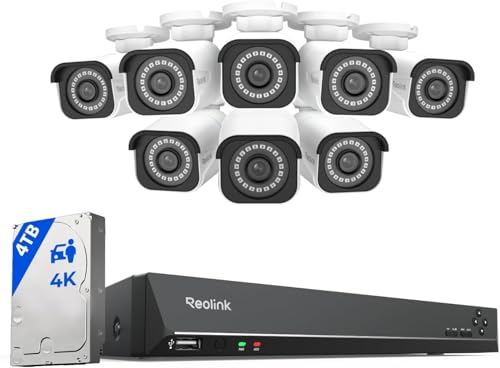
The RLK16-800B8 is the D8’s twin with a different silhouette: the same sixteen-channel 4K NVR, the same 4TB drive, the same eight channels of expansion — but the eight cameras are bullets rather than domes, and that change is a genuine functional fork, not a styling choice. Bullet cameras announce themselves. Mounted on a wall, they are visible from the street, and visibility is a security feature in its own right: a meaningful share of opportunistic crime simply chooses a different house. Their housings also suit longer, aimed sightlines — down a driveway, along a fence line, across a yard to a gate — where a dome’s wide, downward gaze wastes its pixels on lawn.
Everything said about the PoE architecture applies unchanged: one Ethernet cable per camera, 8MP clarity, person and vehicle detection, H.265 compression stretching the 4TB archive. The choice between this kit and the D8 is therefore refreshingly honest — it is a question about your building, not about specifications. Mixed properties often answer it with both: domes at the doors, bullets on the approaches, all on the same recorder, which is exactly the kind of system the sixteen channels invite you to grow into. The debits mirror the D8’s — price, IP-camera expansion costs, ecosystem — with one addition: exposed bullets can be re-aimed by a determined hand or a stray ladder, so mount them high and check the angles after any work on the building.
- Recorder: 16-channel 4K NVR (PoE)
- Cameras: 8 × 8MP bullet cameras, H.265
- Storage: 4TB hard drive pre-installed
- Detection: person and vehicle detection
- Cabling: single Ethernet cable per camera
Strengths
- Visible housings deter before they record — prevention as a feature.
- Bullets aim naturally down driveways, paths and fence lines.
- Same 4K clarity and deep archive as the dome kit.
Trade-offs
- Exposed cameras can be knocked or re-aimed if mounted within reach.
- Premium pricing, and expansion means premium cameras.
- Bullet silhouettes are conspicuous where a discreet look is wanted.
Best for: properties with long outdoor approaches, yards, gates and driveways to watch. Not suited for: discreet indoor coverage, or coax-based upgrades.
Check price on Amazon.

ZOSI H.265+ 16CH 1080p Dome System — Best value true DVR
Here is the genuine article the category is named for: a sixteen-channel DVR recording eight 1080p analogue dome cameras over coaxial cable. ZOSI’s kit is the value centre of this guide, and its specification is tuned to what analogue does well — dependable, understandable recording at a price that leaves budget for installation. The H.265+ compression is the quiet hero: it squeezes 1080p streams far more efficiently than older codecs, which is how a kit at this price keeps a useful archive on its drive. Human and vehicle detection bring the alert intelligence that used to be reserved for premium systems, filtering the notifications that matter from the moth-and-branch noise that trains owners to ignore their phones.
The analogue architecture carries its own honest ledger. Coax runs need a power feed alongside — the kits supply the cables and splitters, and the runs are forgiving, long and cheap — and 1080p detail is what it is: excellent for knowing what happened and who, in general terms, was involved; less forensic at distance than the Reolink 4K footage. The dome cameras suit porches, eaves and interiors, the recorder’s menus are approachable, and expansion is the analogue superpower: any compatible camera, from any era of the format, can fill those eight spare channels for very little money. For a household or small business that wants a real, complete, expandable system without the NVR price of entry, this is the kit the guide keeps returning to.
- Recorder: 16-channel DVR, H.265+ compression
- Cameras: 8 × 1080p indoor/outdoor dome cameras
- Detection: human and vehicle detection
- Cabling: coaxial runs with power, supplied in the kit
- Expansion: 8 spare channels for any compatible analogue cameras
Strengths
- The best price-to-completeness ratio among the true DVR kits.
- H.265+ makes the included storage go further than older codecs.
- Smart detection at a budget price keeps alerts meaningful.
Trade-offs
- 1080p detail cannot match the 4K NVR kits for identification at range.
- Coax plus power cabling is bulkier to run than single-cable PoE.
- Dome cameras are near-field tools; long driveways will want bullets.
Best for: homes and small businesses wanting a complete, expandable DVR system on a sane budget. Not suited for: buyers who need forensic 4K detail.
Check price on Amazon.

ZOSI 1080p 16CH System with 2TB — Best weatherproof DVR kit
This second ZOSI kit trades the domes for eight 2MP weatherproof cameras in housings built to live outdoors permanently, and pairs them with a sixteen-channel DVR carrying a 2TB hard drive. It is the workhorse specification of the analogue world: AI human and vehicle detection to keep alerts honest, H.265+ compression to keep the archive deep, and cameras whose weather sealing suits the eaves, barns, workshops and yard corners where security cameras actually earn their keep. Where the dome kit reads as a house system, this one reads as a property system — the kit for the buyer whose cameras face weather as a daily condition rather than an occasional event.
The 2TB drive deserves a plain sentence: across eight cameras recording continuously, it holds days rather than weeks, and owners who need a longer archive should either lean on motion-based recording — which the detection makes practical — or plan a drive upgrade, which DVRs of this class accept readily. The 1080p image carries the usual analogue character, strong on event clarity and weaker on distant identification, and the cabling is the familiar coax-plus-power. None of that dents the kit’s purpose. It is a complete, weather-ready, expandable analogue system at a working property’s price, and its eight spare channels will accept the extra cameras that barns and yards always eventually demand.
- Recorder: 16-channel DVR, H.265+
- Cameras: 8 × 2MP (1080p) weatherproof cameras
- Storage: 2TB hard drive pre-installed
- Detection: AI human and vehicle detection
- Cabling: coaxial runs with power supplies included
Strengths
- Weatherproof housings suit permanent outdoor mounting anywhere on a property.
- AI detection keeps phone alerts worth answering.
- Drive upgrades are easy when the archive needs to grow.
Trade-offs
- 2TB fills quickly under continuous recording on eight channels.
- 1080p limits identification detail at long range.
- Two-cable runs per camera make for a bulkier install than PoE.
Best for: farms, workshops, yards and homes whose cameras live outdoors full-time. Not suited for: buyers needing month-long continuous archives out of the box.
Check price on Amazon.

ANNKE 16CH 1080P Lite Hybrid DVR — Best for mixed existing cameras
The ANNKE’s party trick is diplomacy. Its DVR is a 5-in-1 hybrid that accepts TVI, AHD, CVI and CVBS analogue cameras plus IP cameras — which, translated from the alphabet, means it will talk to nearly any wired camera installed on a property in the last fifteen years. That makes this kit the natural heart of an upgrade: keep the existing cameras that still work, on their existing coax, replace the dying recorder, and add this kit’s cameras where coverage is missing. The 2TB drive, H.265+ compression and AI human and vehicle detection bring the recording side fully up to date while the camera side respects your history.
As a from-scratch system it is equally coherent, if less sharply specialised than the ZOSI kits: 1080P Lite recording is the honest label for an efficient, slightly leaner flavour of HD that suits general surveillance well. The hybrid nature does ask a little more of the installer — sixteen channels that can each be one of several formats is a menu system with opinions — and buyers building new should weigh whether they need the diplomacy at all. But properties are rarely blank slates, and recorders die more often than cameras do. For the reader nodding at that sentence, this is your kit: the one that turns a graveyard of mixed cameras back into a system.
- Recorder: 16-channel 5-in-1 hybrid DVR (TVI/AHD/CVI/CVBS/IP)
- Recording: 1080P Lite with H.265+ compression
- Storage: 2TB hard drive pre-installed
- Detection: AI human and vehicle detection
- Compatibility: works with mixed generations of analogue cameras
Strengths
- Unmatched compatibility rescues existing cameras and cabling.
- Modern detection and compression on a legacy-friendly recorder.
- An upgrade path that replaces the recorder, not the whole property’s wiring.
Trade-offs
- 1080P Lite is a leaner HD than full 1080p on the newest kits.
- Hybrid flexibility means more settings to understand at setup.
- From-scratch buyers pay for diplomacy they may never use.
Best for: properties with existing mixed cameras, and anyone replacing a dead recorder. Not suited for: buyers wanting the simplest possible first installation.
Check price on Amazon.

ZOSI 3K Lite 16CH System — Best entry to the ZOSI range
The third ZOSI in this guide occupies the range’s front door: a 3K Lite sixteen-channel DVR with eight 1080p cameras and a 2TB drive. The “3K Lite” label describes the recorder’s ceiling — it can accept and record sharper cameras than the ones in the box, in the efficient Lite encoding — which makes this kit an interesting proposition for a buyer thinking in stages. Install the eight included cameras now; when budget allows, the spare channels can take higher-resolution analogue cameras that the recorder is already prepared to handle, rather than stranding you at the kit’s original specification.
Day to day, it behaves as the family resemblance promises: H.265+ compression, AI human and vehicle detection, app viewing, and the straightforward menus that make ZOSI kits manageable for non-specialist owners. The debits are the range’s debits — 1080p included cameras, a 2TB archive that rewards motion-based recording, coax-and-power cabling — plus the mild caveat that Lite encodings trade a little fidelity for their efficiency. As an entry point that does not paint its owner into a corner, it is a thoughtful kit, and for buyers stepping up from a four-camera toy system, it will feel like arriving at the real thing.
- Recorder: 16-channel DVR, 3K Lite ceiling, H.265+
- Cameras: 8 × 1080p wired cameras
- Storage: 2TB hard drive pre-installed
- Detection: AI human and vehicle detection
- Expansion: spare channels accept sharper analogue cameras later
Strengths
- Recorder headroom lets the system grow in resolution, not just camera count.
- Complete, approachable kit for first-time sixteen-channel owners.
- Detection and compression match the best of the analogue class.
Trade-offs
- Included cameras are 1080p; the sharper ceiling needs future purchases.
- 2TB archive is modest for continuous recording.
- Lite encoding slightly softens fine detail versus full-rate recording.
Best for: buyers stepping up to a full-size system who want a growth path. Not suited for: buyers who need maximum clarity from the included cameras on day one.
Check price on Amazon.
DVR or NVR: which technology should carry your sixteen channels?
Strip away the brand names and the choice is about cable and consequence. An analogue DVR system sends a video signal over coaxial cable and needs power delivered separately — usually a siamese cable that bonds the two together. Coax is forgiving: runs can be long, connectors are simple, the cameras are cheap and interchangeable across decades of the format, and a camera can be swapped in minutes with no configuration at all. The image tops out, in this guide, at 1080p-class detail, and every feature — detection, compression, intelligence — lives in the recorder, because the cameras themselves are essentially eyes without brains.
An NVR system inverts that. Each IP camera is a small computer with its own sensor processing, sending data over Ethernet while drawing power from the same cable. The image can be far sharper — 4K in the Reolink kits — detection can happen at the camera, and a single slim cable per camera makes for the neatest installation in the business. The costs are money per camera, a recorder tied more closely to its camera family, and configuration that, while much improved, still exceeds the analogue plug-and-record simplicity.
The deciding questions are practical. Is there coax in the walls already? Then a DVR — especially the hybrid ANNKE — respects that investment. Is this a new build or a renovation with open walls? Then Ethernet is the cable of the future, and the NVR kits’ clarity is worth their premium. How far is the furthest camera? Both technologies handle typical properties; extreme runs favour planning either way. And how forensic must the footage be? A shop that needs to identify faces at the till and plates at the gate is an NVR customer. A home that needs to know what happened, and roughly who, is honestly served by the DVR kits at half the system price.
How does an installation day actually go?
Begin at the recorder, not at the ladder. Bench-test the whole system on a table first: connect every camera with its shortest cable, power the recorder, and confirm that all eight pictures appear, the drive is recording and the app connects. Twenty minutes on a table saves a day of diagnosing a dead camera from the top of a ladder, and it teaches you the menus while you are comfortable. Label both ends of every cable run before anything enters a wall — channel number, location, date — because the person troubleshooting this system in four years is you, with less memory and more urgency.
Run cable with the building’s future in mind. Leave a service loop of slack at each camera and at the recorder, keep runs away from mains wiring where you can, and use exterior-grade cable for exterior spans even when the kit’s included cable would technically reach — ultraviolet light is patient and kit cable is thin. For PoE runs, remember Ethernet’s hundred-metre practical ceiling per run; for coax, the analogue formats here tolerate long runs gracefully, which remains one of their quiet virtues on big properties. Drill once, seal every penetration, and slope exterior entries so water runs away from the hole rather than along the cable into your wall.
Mount cameras after the cable, and aim them with a second person at the monitor or the app open on your phone — the difference between the angle you imagined and the angle you need is always visible and rarely guessable. Tighten, then check the night picture before you call it done; infrared reflections off soffits and nearby walls can bloom a night image into fog, and a small re-aim fixes what no setting can. Finish at the recorder: change every default password, set the clock and time zone correctly — wrong timestamps poison evidence — configure detection zones per camera, set the recording schedule, and run one playback from the oldest hour to prove the archive works. Then write the passwords and the drive’s install date in the property’s records, somewhere the next person will actually find them.
How do the six systems compare on paper?
| System | Recorder type | Cameras included | Storage | Expansion character |
|---|---|---|---|---|
| Reolink RLK16-800D8 | 16CH 4K NVR, PoE | 8 × 8MP domes | 4TB | More PoE IP cameras |
| Reolink RLK16-800B8 | 16CH 4K NVR, PoE | 8 × 8MP bullets | 4TB | More PoE IP cameras |
| ZOSI 1080p Dome System | 16CH DVR, H.265+ | 8 × 1080p domes | Check listing | Any compatible analogue camera |
| ZOSI 1080p Weatherproof | 16CH DVR, H.265+ | 8 × 2MP weatherproof | 2TB | Any compatible analogue camera |
| ANNKE Hybrid | 16CH 5-in-1 DVR | Kit cameras — check listing | 2TB | Mixed formats, old and new |
| ZOSI 3K Lite | 16CH DVR, 3K Lite | 8 × 1080p | 2TB | Sharper analogue cameras later |
Read the storage column with the recording column in mind: a 4TB drive behind 4K cameras and a 2TB drive behind 1080p cameras are closer in days-of-archive than the raw numbers suggest, because sharper footage is heavier footage. Compression and motion-based recording decide the real archive on every row. Read the expansion column as a personality test: the analogue rows promise cheap, universal growth with yesterday’s cameras welcome, while the PoE rows promise sharper growth inside one family’s ecosystem — and the right answer is the one that matches the property you actually own, its walls, its existing wiring and its next five years of building plans.
How much footage will your system actually keep?
Storage arithmetic is where security systems quietly succeed or fail, so do it before the first incident rather than after. Eight cameras recording continuously at 1080p with modern H.265+ compression consume, as a working rule, in the region of tens of gigabytes per camera per day depending on scene activity and settings — a busy street scene compresses far worse than a quiet yard. Multiply across eight cameras and a 2TB drive holds days of continuous footage, not weeks. The 4TB Reolink kits double the raw space but spend much of the advantage feeding 4K sensors, landing in a similar band of days under continuous recording.
The lever that changes the arithmetic entirely is motion-based recording. Most properties are uneventful for most of the day, and a system that records at full quality when its detection sees a person or vehicle — and idles at low frame rates or pauses otherwise — can stretch the same drive across weeks. This is why the detection quality scored so heavily in our selection: it is not merely an alert feature, it is the archive strategy. Set the system up that way from day one, keep a lower-quality continuous sub-stream if your recorder offers one as a safety net, and check the archive depth in the second week, while there is still nothing you need to find in it.
Retention deserves one deliberate decision rather than a default. Think about what your footage is for: most households need the last week or two — long enough to notice a problem, report it and export the clip — while businesses may carry obligations or insurance expectations that argue for a month. Set the system to the retention you actually intend, because an archive that silently holds four days when you assumed thirty is a policy you wrote by accident. The playback menu states the oldest available hour plainly; read it, compare it with your intention, and adjust the drive, the resolution or the recording mode until the two agree.
One more storage habit separates careful owners from regretful ones: the moment footage matters, export it. Every recorder here can copy a clip to USB or download it through the app. Drives overwrite themselves by design, and the clip of the incident is only yours once it exists somewhere else — the lesson is free if you learn it from this paragraph and expensive if you learn it from an insurance claim.
Where should the eight cameras actually go?
Placement beats pixel count, so spend the planning hour here. The front door and the driveway carry the highest value for most homes — the door camera should be low enough to capture faces under caps, which usually means lower than the instinct to mount it out of reach. The gate or street approach wants the aimed, longer view a bullet gives. Back doors and ground-floor windows on the shadowed side of the building are the entries burglars actually prefer, and they are the angles owners most often forget. Side yards, garages, workshops and the path between them complete the usual eight, with one camera kept as the floater — mounted where the first month’s experience says the blind spot lives.
Height is a compromise to strike consciously: high cameras see patterns and survive tampering; low cameras see faces. The professional answer is a mix, with at least one camera at near-head height on the main approach, protected by its angle and by the other cameras watching it. Overlap the fields of view slightly at the important seams — a subject should pass from one camera’s frame into another’s without a gap to disappear into — and walk the property at night before finalising positions, because the infrared picture at 2 a.m. is the product you actually bought.
Small businesses should add the till, the stockroom door and the car park to the residential list, and should think about what the footage is for: insurance evidence wants identification quality at the door; staff safety wants coverage of lone-working areas; delivery disputes want the loading bay. The sixteen-channel ceiling means the second thoughts can become cameras nine through sixteen, which is, once more, the entire point of buying this category.
Which mistakes do first-time system owners make?
The first is mounting every camera high and wide, producing beautiful establishing shots in which no human being has ever been identified. The second is leaving the recorder’s default password and settings untouched — a security system with default credentials is a contradiction, and changing them takes four minutes. The third is discovering the archive depth after an incident: test the overwrite horizon in week two, not month six. The fourth is cabling laziness — unlabelled runs and a recorder stuffed in an unventilated cupboard, cooking its hard drive slowly toward the failure that arrives, as failures do, the week before it is needed.
A related error is recorder placement as an afterthought in security terms: the recorder holds every camera’s footage, so a burglar who finds it in an obvious cupboard can simply take the evidence with them. Site it discreetly, ventilated and, for businesses, locked down — and use the systems’ remote viewing and clip export as your off-site insurance for the incidents that matter most. The cameras watch the property; something should watch the recorder.
The fifth mistake is alert fatigue by design: detection zones left at factory settings, every passing car announced at full volume, until the owner mutes the app and the system becomes a very expensive archive of unwatched footage. Spend the twenty minutes the detection settings ask for — draw the zones, set the sensitivity per camera, schedule the quiet hours — because a system that only speaks when it matters is a system that still gets heard in year three.
How will you use the eight spare channels?
Experience gives the spare channels a predictable biography. The first addition, usually within months, is the angle the first incident revealed — the side gate nobody watched, the blind stretch of fence, the parking spot just out of frame. The second wave follows the property’s life: a workshop built, a business expanded, a relative’s car now parked nightly where nothing parked before. The third wave is quality rather than coverage — replacing the weakest original camera with a sharper one on the same channel, which on the 3K Lite ZOSI and the Reolink NVR is a genuine upgrade path rather than a like-for-like swap.
Two habits make those future additions painless. The first is cabling generosity during the original installation: where a run passes a location that might one day want a camera — the far eave, the garage’s other corner — some installers pull an extra cable while the ladders and drills are already out, coiled and labelled in the loft. Cable is cheap; scaffolding a Saturday is not. The second habit is buying additions inside the system’s family and format, even when a bargain elsewhere tempts: the ANNKE’s hybrid diplomacy forgives mixing, but every other recorder here rewards consistency with simpler setup and matched image character across channels.
And a word of restraint to close the topic: sixteen channels are a ceiling, not a quota. A property watched well by ten cameras beats a property watched thinly by sixteen, and the empty channels lose no value by waiting. Add cameras when a place earns one — a new asset, a new risk, a new lesson — and let the recorder’s patience be a feature you use rather than a gap you feel obliged to fill.
Final Recommendation
New installation, clarity first: the Reolink D8, or its bullet twin the B8 if your coverage runs long and outdoors. Honest budget, true DVR: the ZOSI dome system for houses, its weatherproof sibling for properties. A recorder graveyard to resurrect: the ANNKE hybrid, without hesitation. A staged build with sharper cameras in its future: the ZOSI 3K Lite. Whichever you choose, change the passwords on day one, label every cable, and let the eight empty channels wait patiently — a sixteen-channel system is not eight cameras too many; it is the first security purchase most owners never have to make twice.
If the decision still feels tangled, untangle it with the single question this category keeps asking: what is already in your walls? Coax and old cameras point to the DVR kits and make the ANNKE the cleverest money in the guide. Empty walls and a wish for clarity point to PoE and the Reolinks. Nothing in the walls and a household budget points to ZOSI. Answer that one question honestly and the six-way choice collapses into the one or two kits that were always yours — the rest is placement, passwords and the patience to let a good system grow into its spare channels.
Frequently Asked Questions
Why buy sixteen channels if I only need eight cameras today?
Because the recorder is the one component that is painful to replace — every camera, cable and setting hangs off it. Sixteen channels cost modestly more than eight today and absorb years of additions: the gate camera, the workshop, the new angle an incident reveals. Owners almost never regret spare channels; they routinely regret their absence.
What is the real difference between the DVR and NVR kits here?
DVR kits record analogue cameras over coax, with power on a companion cable; the image is 1080p-class and the cameras are cheap and interchangeable. NVR kits record digital IP cameras over a single Ethernet cable that also powers them; the image reaches 4K and the cameras cost more. Both are legitimate — the right one depends on your cabling, your clarity needs and your budget.
Can I mix dome and bullet cameras on one system?
Yes — on the Reolink NVR, compatible PoE domes and bullets coexist happily, and on the DVRs any compatible analogue camera can join any channel. Mixed systems are the norm in practice: domes at doors, bullets on approaches, each where its shape serves best.
Is a sixteen-channel system difficult to install for a first-timer?
It is a weekend project rather than an afternoon one, and the difficulty lives in the cabling, not the electronics. The recorders are genuinely plug-and-record once cameras are connected, and the bench-test-first method in this guide removes most of the risk. Rent or borrow a tall ladder, enlist a second pair of hands for aiming, and the average homeowner finishes in a day with breaks; the average homeowner who skips the bench test finishes in two, with opinions.
How long will the hard drive keep footage?
Under continuous recording, days rather than weeks on the drive sizes here — sharper cameras and busier scenes shorten it further. Motion-based recording, which the person and vehicle detection on these systems makes practical, stretches the same drive to weeks. Check your own archive depth in the playback menu during the second week so the number is a fact, not a hope.
Can I watch the cameras on my phone from away?
Yes — every system here offers app viewing with live feeds, playback and detection alerts. Set the alerts up carefully, with zones and schedules per camera, so the notifications stay meaningful. Remote viewing also makes the spare channels more valuable: the camera you add at the gate next year appears in the same app automatically.
Can I add a camera from a different brand later?
On the analogue side, usually yes — the formats are standards, and the ANNKE hybrid accepts the widest mixture of all. On the Reolink NVR, stick to compatible PoE cameras; IP ecosystems are less promiscuous than analogue ones, and a camera the recorder cannot fully manage is a channel half-used. When in doubt, buy the addition from the same family as the recorder.
What happens when the hard drive fills up?
The recorder overwrites the oldest footage automatically and keeps recording — the system never stops, but the archive horizon is set by drive size, resolution and recording mode. That is why this guide insists on checking the horizon early and exporting any clip that matters the moment it matters.
Do the analogue cameras work in total darkness?
They carry infrared illumination for night recording, producing monochrome footage within their IR range. Range and clarity vary, and a little ambient light — a porch light, a yard lamp — improves any camera’s night picture more than any specification does. Walk your property at night after installation and adjust angles to the picture you actually get.
What does owning one of these systems ask of you each year?
Less than most technology, but not nothing — and the little it asks is exactly the little that decides whether it works on the one night it matters. Hard drives are consumables wearing a disguise: a surveillance drive spinning continuously should be regarded as a three-to-five-year component, and the recorder will usually warn you as it begins to fail, provided anyone looks. Put a twice-yearly playback test in the calendar — pick a random hour from a random camera and watch it — because that single habit catches failed drives, dead cameras, drifted clocks and full archives while they are still embarrassments rather than evidence gaps.
Cameras ask for a cloth and a ladder once or twice a year. Spider webs across a lens are the classic night-vision spoiler, blooming white in the infrared; a soft brush on a pole clears them in seconds. Check the aim after storms and after any building work, and re-check the night picture on the same visit. Firmware updates deserve a calm afternoon rather than an automatic reflex: update when the system is stable and you have time to verify all eight channels afterwards, and note the version you left and the version you installed, in the same property record that holds the passwords.
The system’s paperwork is its final maintenance item. Keep the list of what is installed — recorder model, drive size and date, camera positions, cable routes — somewhere findable. Properties change hands, staff change roles, and the sixteen-channel system you installed as a coherent whole becomes, without that page, an archaeological puzzle for whoever inherits it. Ten minutes of documentation is the cheapest channel on the recorder.
What about privacy, neighbours and the law?
A sixteen-channel system watches more than its owner’s land unless its owner is deliberate, and a short section on restraint belongs in any honest guide. Aim cameras at your own property and its approaches; where a camera’s view unavoidably includes a neighbour’s space or a public path, use the privacy-masking features these recorders provide to block those regions from recording. The masking costs you nothing you were entitled to watch and buys goodwill that no footage is worth.
Audio deserves extra care: several cameras in this class can record sound, and audio recording is regulated more strictly than video in many places, including rules about consent that vary by jurisdiction. Many owners disable audio on exterior cameras entirely and keep it, if anywhere, at a staffed entrance with signage. Signage itself is both a courtesy and, in some places, a requirement for businesses — and it doubles as deterrence, which makes it the rare compliance step that also improves security. Rules differ by country, state and use, so treat this paragraph as a prompt to check your local position rather than as legal advice; the systems give you the tools — masking, audio toggles, retention limits — and the responsibility for pointing them is, properly, yours.
How should you set up alerts so the system stays useful?
The technology in every kit here can detect people and vehicles; the difference between a guardian and a nuisance is configuration. Start by drawing detection zones that match the legal and practical geography of each camera: the driveway yes, the public pavement beyond it no; the yard yes, the neighbour’s garden party no. A camera that reports the street will report it forever, and each false alert spends a little of your attention that a real one will need later.
Sensitivity is a per-camera setting, not a global one. The camera facing a tree wants different manners from the camera facing a door. Set each one, live with it for a week, and adjust from the alert history rather than from theory — every system here keeps one, and it is the most honest document in the whole installation. Schedule alerts around the household’s rhythm: a family home may want silence from its own comings and goings at school-run hour and full voice at 3 a.m., while a business wants the opposite emphasis on weekends. The systems support the nuance; the owner’s job is supplying it.
Finally, decide in advance what an alert makes happen. An alert nobody acts on is a diary entry. For most homes the honest protocol is simple — glance at the live view, and if the picture is wrong, the response is a call, a light, a neighbour, in an order decided calmly in advance rather than improvised at midnight. For businesses, tie the alert to the existing closing and opening routines so checking the cameras becomes part of locking up rather than an extra chore that quietly stops happening. A security system’s value is the product of its pictures and its protocol; this guide can only sell you the first half.
Related Guides
Continue building the system: best 1080p wireless surveillance cameras for cable-free additions, best 10 security cameras for a wider field of options, and best 180 degree cameras when one wide view must cover a whole space such as a yard, a warehouse aisle or a shop floor without a second camera, a second cable run or a second channel spent from the sixteen you have.


