What's inside
- Key Takeaways
- Quick Picks: Six Dedicated Microscope Cameras, From Flagship Stills to Bench Inspection
- How We Chose These Picks
- What Is the Nikon-Body Route, and When Does It Beat a Dedicated Camera?
- Why Does the Reduction Lens Matter as Much as the Sensor?
- How Do You Calibrate a Microscope Camera So Its Measurements Mean Something?
- Why Do Illumination and Specimen Preparation Decide More Than the Camera?
- What Should the Software Half of the System Do Well?
- How Does the Right Choice Change Between Slides, Specimens and Circuit Boards?
- The Six Microscope Cameras Compared on Mount, Connection and Purpose
- How Do You Run a Demonstration Microscope So a Whole Room Learns From It?
- What Goes Wrong With Microscope Cameras, and What Fixes It?
- What Should You Verify About Your Microscope Before Any of These Cameras Arrives?
- Which Misunderstandings Cost Microscope Buyers the Most?
- When Is the Eyepiece Camera the Right Answer Rather Than the Cheap One?
- How Should a Department Grow From One Camera to a Fitted Laboratory?
- Final Recommendation
- Frequently Asked Questions
- Related Guides
As an Amazon Associate I earn from qualifying purchases. This post may contain affiliate links at no extra cost to you.
gizmoverdict.com is reader-supported. When you buy through links on our site, we may earn an affiliate commission.
Where microscope cameras get bought: every dedicated camera below is sold through Amazon, and each name links to its listing so you can check the included adapters, lenses and cables against your own microscope before ordering.
Anyone searching for the best nikon cameras for microscopy deserves one polite correction before any ranking, because it will save real money: Nikon does not sell microscope cameras as such. There is no Nikon-branded camera that drops into a microscope’s eyetube the way the search phrase imagines. What actually exists are two working routes. The first is a dedicated microscope camera — made by microscopy specialists such as Swift — that mounts on a trinocular head or in an eyetube and sends the image to a computer. The second is a Nikon camera body you may already own, fitted to the microscope through a T-mount adapter, which keeps the Nikon badge in the system but puts an ordinary photographic sensor at the end of an optical path it was not designed for.
This guide ranks the first route, because it is the one that works out of the box for teaching labs, hobbyists documenting specimens, and technicians inspecting parts. All six linked picks are dedicated microscope cameras, judged on the terms their own listings state — megapixels, mount style, connection speed and the calibration and adapter hardware included. None of them is a Nikon product, and this guide will not pretend otherwise; the Nikon-body route is discussed honestly in its own section below, as a prose route for readers who already own the body, rather than as a pick you can buy from this list.
That honesty turns out to be liberating. Freed from chasing a badge, the buyer can shop on the numbers that decide microscope imaging: how many pixels the sensor puts across a specimen, whether the camera includes the reduction lens and eyetube adapters your microscope needs, whether the connection is fast enough for smooth live view while you focus, and whether a calibration kit is in the box so the beautiful image can also become a measurement. Those are the axes of the ranking that follows.
Key Takeaways
- Nikon sells no microscope cameras; the working choices are dedicated microscope cameras or a Nikon body on a T-mount adapter.
- All six ranked picks are dedicated Swift or C-mount cameras that mount on a trinocular head or eyetube and feed a computer.
- The Swiftcam line spans 25MP down to 5MP; the sensible purchase is the resolution your specimens and screen actually need.
- USB 3.0 models keep live view smooth while focusing; the USB 2.0 eyepiece camera trades speed for simplicity and price class.
- Reduction lenses, eyetube adapters and calibration kits in the box matter as much as the sensor — check them per pick.
- The 37MP HDMI C-mount camera serves a different master: a monitor-first inspection bench rather than a computer-first lab.
Quick Picks: Six Dedicated Microscope Cameras, From Flagship Stills to Bench Inspection
| Pick | Badge | Why it made the cut |
|---|---|---|
| Swiftcam 25MP Microscope Camera | Highest-resolution Swiftcam | Twenty-five megapixels with reduction lens, calibration kit and eyetube adapters over USB 3.0 for publication-grade stills. |
| Swiftcam 20MP Microscope Camera | Balanced flagship alternative | Twenty megapixels over USB 3.0 with reduction lens and calibration kit, aimed at compound and stereo scopes alike. |
| Swiftcam 10MP Microscope Camera | Sensible teaching-lab choice | Ten megapixels with the full adapter and calibration package, matched to classroom screens and budgets. |
| Swiftcam 16MP Microscope Camera | Mid-range detail step | Sixteen megapixels in the same complete USB 3.0 package for users outgrowing entry resolution. |
| Swift 5.0MP Microscope Camera | Simple eyepiece starter | A USB 2.0 eyepiece-mount camera for colour photography and video on Windows and Mac with the least setup in the set. |
| 37MP C-Mount Microscope Camera (HDMI) | Monitor-first inspection | A C-mount industry camera with HDMI output at 1080P and 60 frames per second for electronics inspection benches. |
How We Chose These Picks
We began by enforcing the premise correction: no pick could borrow Nikon’s name, and every pick had to be a camera a reader can actually mount on a microscope this week. Within that rule we ranked on what the listings themselves state — sensor resolution, the connection offered, the mount and adapter hardware included, and the presence of a calibration kit, because a microscope camera without calibration is a viewing device while one with it is a measuring instrument. We kept the set deliberately within two families: the Swiftcam and Swift range, whose packages are built for education and laboratory microscopes, and one C-mount industrial camera representing the inspection-bench world that shares the same search results.
We also resisted ranking by megapixels alone. Microscope imaging is a chain — objective, reduction lens, sensor, connection, software, screen — and the weakest link sets the quality of the whole. A 25MP sensor behind the wrong reduction lens wastes its pixels on a vignetted circle; a 10MP camera correctly matched to a classroom projector delivers the sharper lesson. The reviews therefore treat each camera as a package and say plainly which link in the chain it strengthens.
What Is the Nikon-Body Route, and When Does It Beat a Dedicated Camera?
The prose route deserves its fair hearing. If you already own a Nikon mirrorless or DSLR body, a T-mount adapter and the appropriate photo eyepiece arrangement can put that body on a trinocular microscope, and the results can be excellent for still photography: a large, mature sensor, sophisticated processing, and files in a workflow you already know. For a research hobbyist with a Z body on the shelf and occasional documentation needs, this route can cost little more than the adapter hardware and an afternoon of alignment.
Its weaknesses are practical rather than optical. A photographic body is heavy on a microscope’s head, its live-view and tethering behaviour varies by model, it offers no calibration path of its own, and it spends its shutter life on a bench instead of in the field. It also answers a different question from the one most searchers are asking, which is how to give a classroom, a lab bench or an inspection station a permanent, computer-connected eye. That is why the ranked picks are dedicated cameras, and why the Nikon route is presented here as informed context: a legitimate choice for the already-equipped, not a product category that exists on a shelf.
One more warning belongs in this section. Listings and forums alike sometimes describe generic microscope cameras with language borrowed from famous photographic brands. Judge any camera by the maker’s own name on the listing — as this guide does — and a buyer will never pay a badge premium for a badge that is not there.

Swiftcam 25MP Microscope Camera — Highest-resolution Swiftcam
The 25MP Swiftcam is the still-photographer’s flagship of this set. Twenty-five megapixels across a microscope field is not a number for its own sake: it is the ability to crop into a specimen — a wing scale pattern, a circuit trace, a stained tissue boundary — and still hold a printable, presentable image, and to fill a large monitor with a live field that stays detailed when students lean in. The package around the sensor is what makes that resolution usable: a reduction lens to match the camera to the microscope’s image circle, a calibration kit so pixels can be converted into honest measurements at each objective, eyetube adapters for fitting, and a USB 3.0 cable carrying the data at a speed that keeps live view fluid while you focus through the specimen’s depth.
Compatibility is stated broadly — Windows, Mac and Linux — which matters in real laboratories where the microscope computer is whatever the institution provides. In a teaching setting, this is the camera for the demonstration microscope at the front of the room, the one whose image becomes the lecture; in a research or quality setting, it is the camera whose stills go into reports and publications without apology.
The discipline it demands is storage and processing realism. Twenty-five-megapixel frames accumulate quickly in a session of focus-stacked or survey work, and the host computer should be specced to preview and store them without turning the bench into a waiting room. A teacher whose actual output is a classroom screen will never spend this headroom — the 10MP model below serves that bench better — while anyone cropping, printing and publishing will feel the difference in every session.
- Sensor, as listed: 25 megapixel camera for microscopes
- Included optics, as listed: Reduction lens included
- Included hardware, as listed: Calibration kit and eyetube adapters
- Connection, as listed: USB 3.0 cable
- Compatibility, as listed: Windows, Mac and Linux
Strengths
- Highest stills resolution here, with room to crop into a specimen
- Complete package — reduction lens, calibration and adapters in the box
- USB 3.0 keeps live view responsive at full resolution
Trade-offs
- Large files demand a capable host computer and storage habit
- Resolution is wasted on users whose only screen is a classroom projector
- Flagship of the range, with a flagship’s expectations of its owner
Best for: demonstration microscopes, documentation and publication-grade stills. Not suited for: casual classroom viewing where a projector is the final destination.
See the Swiftcam 25MP listing on Amazon to confirm the adapter set matches your microscope.

Swiftcam 20MP Microscope Camera — Balanced flagship alternative
The 20MP Swiftcam occupies the thoughtful middle of the flagship tier. Its listing describes a digital eyepiece camera for compound and stereo microscopes — a breadth worth pausing on, because those are different instruments serving different work: the compound scope’s transmitted-light world of slides and sections, and the stereo scope’s reflected-light world of insects, minerals, coins and components. A camera package that serves both, with its reduction lens and calibration kit included and USB 3.0 carrying the image, is a laboratory’s general-purpose eye rather than a single bench’s specialist.
Twenty megapixels is, for most documentation, the point of comfortable surplus: enough to crop moderately, print generously and fill any teaching screen, without the file sizes of the 25MP model pressing on an ordinary lab computer. Stereo work in particular rewards this camera, because three-dimensional specimens invite exploration at low magnification where field of view matters as much as raw resolution, and the eyepiece format suits the way stereo scopes are actually shared — one observer at the oculars, everyone else at the screen this camera feeds.
Choose between this and the 25MP model by output, not by appetite. If your images end on screens and in standard reports, the 20MP package is the complete answer and the calmer purchase. If they end cropped, printed large or published, step up. Either way the calibration kit keeps the camera honest as a measuring tool across both microscope types, which is the feature teaching staff end up valuing most by the second term.
- Sensor, as listed: 20MP microscope camera
- Connection, as listed: USB 3.0
- Included hardware, as listed: Reduction lens and calibration kit
- Scope fit, as listed: Digital eyepiece for compound and stereo microscopes
- Compatibility, as listed: Windows, Mac and Linux
Strengths
- Serves compound and stereo microscopes in one package
- Resolution surplus for screens and reports without flagship file sizes
- Calibration kit supports measurement on both instrument types
Trade-offs
- Cropping headroom stops short of the 25MP model
- General-purpose breadth means checking adapter fit for your specific scope
- Still a computer-tethered workflow, not a standalone bench display
Best for: mixed teaching and lab benches running both compound and stereo scopes. Not suited for: a single-purpose inspection station that never touches a computer.
Check the Swiftcam 20MP listing on Amazon for the current package contents.
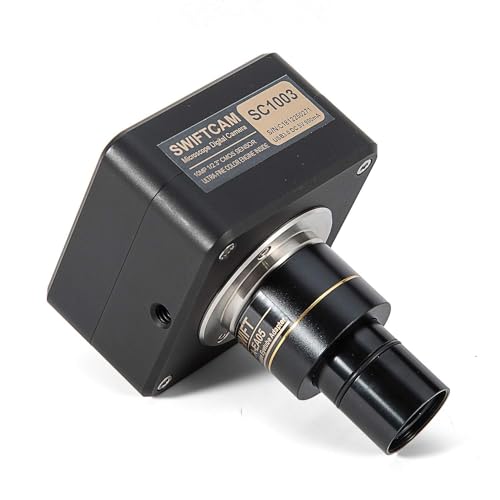
Swiftcam 10MP Microscope Camera — Sensible teaching-lab choice
Ten megapixels is where microscope cameras meet the reality of most teaching screens, and this Swiftcam makes that meeting completely. The package mirrors the flagships where it counts — reduction lens, calibration kit, eyetube adapters, USB 3.0 cable, Windows, Mac and Linux compatibility — at a resolution matched to projectors, interactive whiteboards and student laptops, none of which can display more than a fraction of what the 25MP sensor captures. A school or training lab equipping several microscopes will find this the model that multiplies: the budget that buys one flagship demonstration camera buys a bench of these, and a class where every group sees its own specimen on screen learns more than a class watching one perfect image.
It is also the forgiving choice for the computers education actually owns. Ten-megapixel files preview quickly, store modestly and survive being emailed, uploaded to the learning platform and printed at worksheet size without conversion rituals. Live view over USB 3.0 stays smooth while a student hunts focus, which is the moment lessons are won or lost — a lagging image teaches impatience with the instrument, a fluid one teaches microscopy.
The boundary is output ambition. Crop hard into a 10MP field and the image thins; print large and the flagship earns its premium. But those are publication problems, not teaching problems, and for the work this camera is bought to do — shared seeing, honest measurement with the calibration kit, documentation of coursework — it is not a compromise at all. It is the correctly sized tool, which is a rarer thing in catalogues than the biggest one.
- Sensor, as listed: 10 megapixel camera for microscopes
- Included optics, as listed: Reduction lens included
- Included hardware, as listed: Calibration kit and eyetube adapters
- Connection, as listed: USB 3.0 cable
- Compatibility, as listed: Windows, Mac and Linux
Strengths
- Full flagship-style package at a classroom-matched resolution
- Files stay light for school computers and learning platforms
- Multi-bench purchases become realistic for teaching labs
Trade-offs
- Cropping and large printing expose the resolution ceiling quickly
- Same tethered workflow discipline as the dearer models
- Ambitious hobbyists may outgrow it as their output ambitions rise
Best for: schools, training labs and multi-bench teaching setups. Not suited for: publication pipelines that crop deeply into every frame.
View the Swiftcam 10MP listing on Amazon to verify the included adapters for your scopes.

Swiftcam 16MP Microscope Camera — Mid-range detail step
The 16MP Swiftcam is the upgrade path made product: the same complete package as its siblings — reduction lens, calibration kit, eyetube adapters, USB 3.0, three-platform compatibility — with a sensor that sits between the teaching 10MP and the flagship pair. Its natural buyer is the user who started at entry resolution and discovered a specific appetite: the entomologist whose specimen photographs get printed, the electronics hobbyist whose board documentation gets zoomed, the advanced student whose coursework is becoming a portfolio. Sixteen megapixels answers those appetites with real cropping room while keeping files within the manners of an ordinary computer.
Because the package and workflow are identical to the rest of the Swiftcam line, this model also plays a strategic role in mixed installations: a lab can standardise on one software and calibration routine across benches while grading the cameras by bench importance — 10MP for the student row, 16MP for the advanced bench, 25MP for the demonstration scope. That kind of fleet thinking is how institutions actually buy, and a range with consistent accessories makes it painless.
Its risk is the middle child’s risk: anyone who truly needs flagship output will wish they had stretched, and anyone who only teaches will never spend the extra resolution. Read your own last twenty images before choosing. If they were cropped, printed or scrutinised, this is your camera; if they were projected and forgotten, the 10MP model is the honest buy and the saving belongs in a better objective.
- Sensor, as listed: 16 megapixel camera for microscopes
- Included optics, as listed: Reduction lens included
- Included hardware, as listed: Calibration kit and eyetube adapters
- Connection, as listed: USB 3.0 cable
- Compatibility, as listed: Windows, Mac and Linux
Strengths
- Real cropping and printing headroom above the teaching tier
- Identical package and workflow to the rest of the Swiftcam range
- Lets a lab grade cameras by bench while keeping one routine
Trade-offs
- Middle resolution can be outgrown in both directions
- Premium over the 10MP buys nothing a projector can show
- Still requires the host-computer setup of the whole range
Best for: advancing hobbyists and advanced benches outgrowing entry resolution. Not suited for: pure projection teaching, where the extra pixels never reach a screen.
Open the Swiftcam 16MP listing on Amazon to compare its package against the other sizes.

Swift 5.0MP Microscope Camera — Simple eyepiece starter
The Swift 5.0MP camera is the entry door of the set, and its listing keeps the promise simple: a digital camera for microscopes with an eyepiece mount, a USB 2.0 connection, colour photography and video, and compatibility with Windows and Mac. Eyepiece mount is the operative phrase — this camera is designed to fit where an eyepiece goes, which makes it the natural first camera for a school microscope, a home bench or a clinic’s occasional documentation, anywhere the goal is to get the specimen onto a screen this afternoon rather than to build a measurement station.
Five megapixels, judged fairly, covers that goal completely. A classroom display, a shared video call with a remote tutor, a record photograph for a student’s file — none of these outputs can use more, and the camera’s simplicity is a feature in rooms where the microscope itself is already the most complicated object present. USB 2.0 is the honest trade: live view and file transfer run at the older standard’s pace, which a stills-led workflow barely notices and a fast-scanning survey workflow will.
What it does not bring is the flagship furniture — no reduction lens and calibration kit are claimed in its title, and the buyer who expects measurement should step up to a Swiftcam model where those are listed in the box. As a first camera that teaches a department what it actually needs, though, it is perfectly cast: inexpensive in spirit, honest in specification, and good enough that many owners never replace it.
- Sensor, as listed: 5.0 megapixel digital camera for microscopes
- Mount, as listed: Eyepiece mount
- Connection, as listed: USB 2.0 connection
- Capture, as listed: Colour photography and video
- Compatibility, as listed: Windows and Mac compatible
Strengths
- Simplest installation in the set via the eyepiece mount
- Resolution honestly matched to classroom and record-keeping outputs
- Colour video covers demonstration and remote-teaching uses
Trade-offs
- USB 2.0 pace shows during fast live scanning
- No calibration kit claimed, so measurement is not its trade
- Five megapixels leave no room for cropping
Best for: first microscope cameras for schools, home benches and occasional documentation. Not suited for: measurement work or any output that will be cropped and printed.
See the Swift 5.0MP listing on Amazon for its current offer and fit details.

37MP C-Mount Microscope Camera (HDMI) — Monitor-first inspection
The final pick comes from the other branch of the microscope-camera family tree: industry. Its listing describes a 37MP digital C-mount camera producing 1080P video at 60 frames per second, supplied with an HDMI cable and a conversion adapter, and aimed at laboratory, industrial and electronics inspection work. Every element of that sentence points at a bench rather than a classroom. C-mount is the standard thread of industrial optics; HDMI output means the image goes straight to a monitor with no computer in the loop; 60 frames per second means the live image stays fluid while a board moves under the lens on an inspection line.
For electronics work — solder joints, PCB traces, connector damage, the whole archaeology of why a board failed — that monitor-first workflow is the correct one. The technician’s hands are on the board and the iron, not on a mouse; the screen hangs where the eyes already are; a colleague can watch the same joint without crowding the eyepieces. The 37MP stills figure serves documentation of defects for a customer or a quality file, captured from the same live view.
Fit is the caveat to check with care. A C-mount camera expects a C-mount port or the right adapter on the microscope — the listing includes a conversion adapter, but the buyer should confirm the thread and the image circle against their specific stereo scope before ordering, because industrial and educational microscopes speak different mounting dialects. Confirm that, and this is the most purpose-built inspection camera in the ranking; skip the check, and it is a box of almost-right hardware.
- Sensor, as listed: 37MP digital microscope camera
- Video, as listed: 1080P at 60FPS
- Mount, as listed: C-mount industry video camera
- Included, as listed: HDMI cable and conversion adapter
- Intended work, as listed: Lab, industrial and electronics inspection
Strengths
- HDMI output feeds a bench monitor with no computer in the loop
- 60fps live view stays fluid while parts move under the lens
- C-mount matches industrial and inspection microscope hardware
Trade-offs
- Mount compatibility must be verified against your specific scope
- Monitor-first design omits the computer workflow the Swiftcams assume
- Video resolution is 1080P despite the high stills figure — know which you need
Best for: electronics inspection benches and industrial quality stations. Not suited for: classroom teaching built around a computer and a projector.
Review the 37MP C-mount listing on Amazon and check the adapter details against your microscope.
Why Does the Reduction Lens Matter as Much as the Sensor?
A microscope does not produce an image the size of a camera sensor; it produces an image circle designed for an eyepiece and an eye. Put a sensor of the wrong size directly in that path and you photograph either a cropped tunnel of the field or a field that overfills the sensor and throws away its edges. The reduction lens — included across the Swiftcam range — sits between microscope and camera and rescales the image so the sensor sees the same field the observer sees at the eyepieces. It is the unglamorous component that decides whether the megapixels you bought are spent on specimen or on the black ring around it.
This is also why complete packages outrank bare sensors in this guide. A camera sold with its reduction lens and eyetube adapters arrives as a matched optical system whose field the maker has already reconciled; a bare camera body leaves the buyer to discover thread sizes, adapter lengths and field mismatch by trial. For a single home bench that trial can be a hobby in itself. For a school technician equipping a room of microscopes before term starts, the package is the product.
How Do You Calibrate a Microscope Camera So Its Measurements Mean Something?
Calibration converts the camera from a window into an instrument, and the kits included with the Swiftcam models exist for this procedure. The method is constant across laboratories: photograph a stage micrometer — a slide ruled with a known scale — at each objective you use, tell the software how many pixels span a known distance, and store that relationship per objective. From then on, the software can measure a cell, a fibre or a trace width in real units rather than in pixels and good intentions.
Three habits separate honest measurement from decorative numbers. Calibrate at every objective separately, because the pixel-to-distance relationship changes with magnification and last month’s 10x calibration says nothing about today’s 40x. Recalibrate when anything in the optical path changes — a different reduction lens, a different camera, a spacer added or removed. And keep a photographed micrometer frame in each project’s folder, so a measurement questioned in six months can be traced to the calibration that produced it. Do those things and even the 10MP teaching camera becomes a measuring device a scientist can cite; skip them and the 25MP flagship is only taking very large pictures.
Why Do Illumination and Specimen Preparation Decide More Than the Camera?
Every microscope camera photographs the same thing: the image the microscope’s illumination manages to build. A transmitted-light specimen that is too thick, unevenly stained or lit by a misaligned condenser hands the camera a muddy field, and no sensor in this ranking can recover contrast the optics never created. Before blaming a new camera for disappointing first images, run the unglamorous checks the instrument’s own manual teaches: centre and focus the condenser, set the aperture diaphragm for the balance of contrast and resolution the specimen needs rather than leaving it wherever the last user abandoned it, and clean the objective’s front element with proper lens tissue, because a semester of fingerprints photographs exactly like a faulty sensor.
Stereo work has its own version of the same lesson. A specimen lit by a single harsh lamp from one side photographs as glare and black shadow; the same specimen under a ring light or two angled sources reveals the surface the inspection actually cares about. The HDMI inspection camera’s fluid live view earns its keep here, because lighting a three-dimensional object is a conversation conducted while watching the screen — move the lamp, watch the glare travel, settle it where the solder joint reads clearly. Anyone who budgets a modest light alongside the camera routinely out-photographs someone who spent the same money on the next resolution tier, and the effect is not subtle.
Preparation completes the triangle. A well-made slide — thin, evenly mounted, coverslipped without bubbles — gives any of these cameras a subject worth its pixels, while a rushed preparation wastes a flagship. Laboratories that teach preparation and calibration together produce students whose 10MP images embarrass the unprepared 25MP work of the bench across the hall, which is the deepest reason this guide keeps ranking packages and habits alongside sensors.
What Should the Software Half of the System Do Well?
A microscope camera is half hardware and half the program that receives it, and the software’s duties decide the daily experience. Live view must be fluid enough to focus by — the practical argument for USB 3.0 across the Swiftcam range — because focusing on a lagging image teaches the hand to overshoot and turns every session into a negotiation with delay. Capture controls should expose the unglamorous essentials: white balance set against a blank field so stains render truthfully, exposure that can be locked when a survey crosses fields of different brightness, and a scale bar burned in only when the calibration behind it is the current one.
Beyond capture, judge the software by what your setting does with images. A teaching lab needs quick annotation — arrows, labels, a measurement read aloud to the room — and painless export to the platform the school already uses. A documentation bench needs file naming that carries the specimen’s identity into the archive without retyping, and formats that a report can ingest directly. An inspection station needs the still capture to be one keystroke from the live view, because the technician’s other hand is holding the board. The cameras in this ranking all feed mainstream computers — Windows and Mac across the set, Linux across the Swiftcam range — so the deciding questions are about your software habits, and they are worth an hour of trial before a fleet purchase makes them permanent.
Archive discipline belongs in the software conversation too. Microscope images have a way of becoming evidence — of a result, a defect, a student’s progress — months after they were taken, and the folders that survive are the ones named by date, specimen and objective from the first day. Set that convention when the camera is new and it costs nothing; retrofit it to two thousand loose images and it costs a week.
How Does the Right Choice Change Between Slides, Specimens and Circuit Boards?
Biology on slides is the compound microscope’s kingdom: thin, stained, transmitted-light subjects at meaningful magnification, where resolution serves the fine structure of cells and tissues. That work rewards the Swiftcam stills cameras directly, with the 20MP and 25MP models earning their place when the images will be examined rather than merely shown, and calibration turning coursework into measurement. Fluorescence and other specialised illumination sit beyond anything these listings claim, and a buyer in that world should be reading a different, far more specialised guide — honesty about that boundary is part of this one’s job.
Natural history and hobby specimens — insects, minerals, coins, botanical material — live on the stereo microscope at low magnification, where the subject is three-dimensional and the camera’s task is field, depth and faithful colour. The 20MP Swiftcam’s explicit compound-and-stereo brief fits here, and the working technique leans on focus stacking, capturing a staircase of focal planes for software to merge, because no single frame at useful magnification holds a beetle in focus from back to belly. A fluid live view and a stable mount matter more to stacking than the last megapixels do.
Electronics inspection is the third country, already introduced by the C-mount pick: reflected light, moving subjects, a monitor rather than a computer, and success measured in faults found per hour. Its camera priorities — frame rate, HDMI immediacy, an industrial mount — would be eccentric in a biology lab and are exactly correct at the bench. Naming which of the three countries your work lives in is the single most clarifying step in this entire purchase, and it should happen before resolution is discussed at all.
The Six Microscope Cameras Compared on Mount, Connection and Purpose
| Camera | Resolution as listed | Connection as listed | Natural home |
|---|---|---|---|
| Swiftcam 25MP | 25 megapixels | USB 3.0 | Demonstration and publication stills |
| Swiftcam 20MP | 20 megapixels | USB 3.0 | Compound and stereo lab work |
| Swiftcam 10MP | 10 megapixels | USB 3.0 | Teaching benches and classrooms |
| Swiftcam 16MP | 16 megapixels | USB 3.0 | Advanced hobby and documentation benches |
| Swift 5.0MP | 5.0 megapixels | USB 2.0, eyepiece mount | First camera, simple shared viewing |
| 37MP C-Mount (HDMI) | 37 megapixels, 1080P 60fps video | HDMI, C-mount | Electronics and industrial inspection |
How Do You Run a Demonstration Microscope So a Whole Room Learns From It?
The demonstration setup — one microscope, one camera, one large screen — is where microscope cameras changed teaching most, and it has a craft of its own. The teacher’s microscope becomes a stage: specimens are found and centred at the eyepieces first, focus is ridden gently while narrating what the room is seeing, and the camera’s exposure is locked before a bright or dark field can make the image pump distractingly as slides change. The Swiftcam flagships suit this role because their resolution survives the journey to a wall-sized display and their USB 3.0 live view keeps the narration and the image in step, but the deeper requirement is rehearsal: a demonstration practised once in private runs like a lecture, and one improvised runs like a search.
Interaction is the second half of the craft. A camera on the demonstration scope lets a student’s own slide become the lesson in seconds — their preparation, their found specimen, projected for discussion — and that moment teaches more microscopy than an hour of perfect prepared images, because the room watches a real field being interpreted rather than a result being admired. Teachers who build that exchange into the session also build the case for the bench cameras in this ranking: the 10MP units on student scopes feed the same conversation at group scale, each table’s discovery one cable away from the big screen’s attention.
Record the demonstrations worth keeping. A short captured sequence of a living specimen — pond water is the eternal example — becomes next term’s introduction and the absent student’s catch-up, and the cameras here all capture video as part of their ordinary work. A small library of such captures, named and dated like the stills archive, is one of the highest-value by-products a department gains from equipping its scopes.
What Goes Wrong With Microscope Cameras, and What Fixes It?
The fault list is refreshingly physical. A dark ring around the image means the reduction lens and sensor are mismatched to the microscope’s image circle, or an adapter in the stack is the wrong length — solved by checking the package’s intended configuration rather than by software cropping that throws away the field you paid for. A soft image at the screen that looks sharp at the eyepieces usually means the camera’s focal plane and the eyepieces’ focal plane are not parfocal, an adjustment every trinocular head provides and every installer should make once, carefully, at setup. Dust appears as fixed shadows that rotate with the camera rather than the slide, which is the diagnostic that sends you to clean the sensor window and the reduction lens rather than the specimen.
Colour that nobody believes — the stain that renders purple on screen and pink at the eyepiece — is a white-balance problem, cured by balancing against a blank, lit field at the start of the session and locking the result. Flicker in live view under artificial light is a mains-frequency argument between the room and the camera’s exposure, settled by the anti-flicker setting or a shutter speed chosen to match the lighting. And the universal fault, the camera that worked last term and is invisible to the computer today, is almost always a cable, a port or an operating-system update that reassigned something — which is why the installation notes, the labelled cable and the photographed settings belong in the same folder as the calibration frames. None of these failures is a reason to replace a camera; all of them are reasons to keep the five-minute diagnostic habit that separates laboratories from lucky rooms.
What Should You Verify About Your Microscope Before Any of These Cameras Arrives?
Five facts about the instrument decide compatibility, and all five are knowable today. The head type — monocular, binocular or trinocular — decides whether a camera shares the view or replaces an eyepiece. The eyetube diameter decides which adapter in a Swiftcam package will be used, and whether an unlisted size needs sourcing first. The presence and thread of a C-mount port decides the inspection camera’s welcome. The objectives’ condition decides whether any camera is worth buying yet, since a damaged front element taxes every image downstream of it. And the computer’s operating system and available ports decide the connection story, USB 3.0’s presence being the difference between the Swiftcam range’s fluid promise and a bottleneck of the buyer’s own making.
Write those five facts on the purchase note itself. It takes ten minutes with the instrument in front of you, it converts the listings in this guide from hopeful reading into a checklist, and it is the entire difference between a camera that is imaging specimens on its first afternoon and a camera waiting a fortnight for the adapter nobody checked. Microscopy rewards the methodical at every stage; procurement is simply the first stage.
Which Misunderstandings Cost Microscope Buyers the Most?
The founding misunderstanding is the one this guide opened with: shopping for a famous photographic brand in a category that brand does not serve, and paying for confusion in either money or months. Close behind is buying resolution as a substitute for optics — the largest sensor in the ranking will not rescue a microscope with a dirty, damaged or bottom-tier objective, and in many real setups the honest upgrade order is objective first, illumination second, camera third. A camera can only record the image the microscope in front of it actually forms.
Then come the fit failures: a camera bought without checking whether the microscope has a trinocular head, an eyetube of the right diameter, or a C-mount port; a package opened to discover the one adapter the setup needed was the one not in the box. Every one of these is prevented by the same five minutes — photograph your microscope’s head, note its ports, and read the pick’s included hardware list against that photograph before ordering. The listings in this guide state their inclusions plainly; the failure is never in the fine print, only in the assumption.
When Is the Eyepiece Camera the Right Answer Rather Than the Cheap One?
More often than specification culture admits. The 5MP Swift’s eyepiece design serves every microscope already in the room without asking whether any of them has a camera port, which makes it the only pick here that can tour a department — Monday on the sixth-form scope, Wednesday on the home bench, Friday demonstrating at an open evening on a borrowed instrument. Portability between microscopes is a genuine capability, and for outreach work, peripatetic teaching and the lone microscope in a small clinic, it outweighs specifications that assume a permanent installation.
It is also the right answer when the camera’s role is communication rather than documentation: the video call where a remote mentor watches a preparation happen, the photograph attached to a query sent to a specialist, the quick record that settles what a specimen looked like before the slide dried. Those tasks reward immediacy and forgive resolution, and a camera that is actually mounted and working beats a superior camera still awaiting its adapter debate. Buy the eyepiece model with that brief in mind and it is not the cheap option at all; it is the correctly aimed one, and the money it saves buys the stage micrometer that makes its bigger siblings honest.
How Should a Department Grow From One Camera to a Fitted Laboratory?
In stages, with each stage teaching the next purchase. Stage one is a single camera on the demonstration microscope, where the department learns its software, sets its calibration and archiving habits, and discovers how its teaching actually uses shared images. Stage two extends cameras to the student benches at the teaching resolution, reusing every habit stage one built — the reason the Swiftcam range’s consistent packages matter more to an institution than any single model’s specification. Stage three, if the work demands it, specialises: a flagship for the research bench, an HDMI C-mount station for the inspection corner, each bought against a named need rather than a general sense of upgrade.
The mistakes happen when stages are skipped or reversed — a fleet bought before the habits exist to run it, a flagship stranded on a bench whose computer cannot feed it, an inspection camera ordered for a microscope with no compatible port. The staged path also protects the budget’s story: each phase is justified by the previous phase’s evidence, in enrolments taught, defects caught or documentation produced. Microscopy programmes are long-lived things, and the camera system that grows with the programme, at the programme’s own pace, is the one still earning its bench space a decade later.
Final Recommendation
Buy the camera your output actually requires, in the package that fits your microscope. Publication and demonstration work belongs to the 25MP Swiftcam; a mixed laboratory is best served by the 20MP; teaching fleets by the 10MP; advancing documenters by the 16MP; a first shared screen by the little 5MP eyepiece camera; and an inspection bench by the HDMI C-mount model. Keep the Nikon body, if you own one, for the field work it was made for, and let a dedicated eye live on the microscope. The specimen does not care whose name is on the camera — only whether the image is honest, calibrated and in focus.
Frequently Asked Questions
Can I put my Nikon camera on my microscope instead?
Yes, with a T-mount adapter arrangement on a suitable trinocular head. Be aware of the practical texture of that route before choosing it: the body must be mounted and aligned carefully, its weight supported as the microscope’s maker intends, and its live view arranged through whatever tethering the model supports, which varies enough between bodies that the adapter is only the beginning of the shopping list. Photographers who already live in that ecosystem absorb these frictions invisibly; a laboratory buying from zero would be purchasing them deliberately, which is precisely why the dedicated cameras above exist as products. That route suits occasional stills for someone who already owns the body; it is not a product Nikon sells as a microscope camera, and it brings no calibration path of its own.
How many megapixels do I need for classroom teaching?
Fewer than marketing suggests. There is a useful bench test for any classroom: display one of your own captured fields on the actual projector, from the back row’s distance, and judge it as a student would. Cameras are bought from desks at arm’s length and used at twenty feet, and the back-row test has settled more honest purchases than any specification table — including, on occasion, the purchase of a brighter projector instead of a dearer camera, which is sometimes the correct outcome of shopping for a camera. A projector or whiteboard displays a small fraction of even the 10MP camera’s output, so the teaching Swiftcam or the 5MP eyepiece model fills the screen completely. Spend the difference on a second bench camera or a better objective.
Will these cameras fit my microscope?
The Swiftcam packages include eyetube adapters and are built for standard educational and laboratory microscopes; the C-mount model needs a C-mount port or its included conversion adapter to suit. In every case, compare the listing’s included hardware against your microscope’s head before ordering.
What is a trinocular head, and do I need one?
It is a microscope head with two eyepieces for the observer and a third port for a camera, usually with a beam splitter that divides light between the observer and the camera in a fixed proportion. That division is why a trinocular setup asks a little more of the illumination than an eyepiece camera does — some of the light is always paying for the photograph — and why the better-lit bench gives the more comfortable demonstration. If your microscope offers a trinocular option as an upgrade, it is the single hardware change that most improves any of the dedicated cameras in this ranking, because it ends the either-or between looking and recording that defines the eyepiece arrangement., letting you view and photograph simultaneously. Eyepiece-mount cameras like the 5MP Swift work without one by replacing an eyepiece; dedicated bench setups generally prefer the trinocular arrangement.
Is a higher-megapixel camera always sharper at the specimen?
No, and understanding why prevents the most common disappointment in this category. A microscope objective resolves a fixed amount of detail set by its optics; once a sensor samples that detail adequately, additional megapixels record the same information spread over more, smaller pixels — with larger files as the only guaranteed difference. The 25MP camera earns its place through cropping room and display scale, not through magically finer optics, and a buyer whose objective is modest will see the 10MP and 16MP models deliver images of very similar true sharpness. Match the camera to the objective’s quality and the output’s destination, in that order.
Can these cameras measure specimens, or only photograph them?
The Swiftcam models ship with calibration kits, which — used with a stage micrometer and the software routine described above — turn pixel counts into real measurements per objective. The eyepiece and inspection cameras make no such claim in their listings and should be bought as imaging devices.
Related Guides
Keep equipping the bench with our neighbouring guides: best microscopes for students, best cameras for macro photography and best usb cameras for inspection.
Patience at the eyepiece and patience at the nest are the same virtue, and our guide to the best live nest cameras for filming hummingbird nesting practices it outdoors.
Documenting a space faithfully is one discipline at two scales, and our guide to the best point and shoot cameras for real estate works the room-sized end of it.
The body you already own for the stage has a second life in the field, and our guide to the best nikon cameras for concert photography is where that life is judged.
Recorded evidence, kept honestly and reviewed calmly, is the point of both benches — ours and the systems in our guide to the best ip cameras for warehouse.


