What's inside
- Key Takeaways
- Quick Picks
- How did we rank laptops for flying duties?
- Does the right answer change for students, instructors and commercial crews?
- Does a pilot actually need a rugged laptop, or is that hangar folklore?
- What should you check about screens before trusting one on the ramp?
- How do you carry, power and protect a laptop across a flying season?
- Which of these machines earns its keep, pick by pick?
- How do the six routes compare side by side?
- What mistakes do pilots make when buying a laptop for flying?
- How should you set the machine up for aviation work in its first week?
- How does the laptop fit the rest of the flight bag, headset and simulator kit?
- Final Recommendation
- Frequently Asked Questions
- Related Guides
As an Amazon Associate I earn from qualifying purchases. This post may contain affiliate links at no extra cost to you.
gizmoverdict.com is reader-supported. When you buy through links on our site, we may earn an affiliate commission.
Where to buy: The three linked machines below lead to their live Amazon listings, and the listing page is where you confirm the exact configuration in the cart, because rugged laptop families often sell several builds under a single model name. The other three routes in this guide are discussed without links, for a reason explained in the next paragraph.
Start with an honesty note that shapes everything in this guide. The fully rugged, sunlight-readable laptop class — the machines built to live on a ramp, in a cockpit side pocket or on the seat of a work truck between flights — is dominated on Amazon by renewed stock. When we verified listings for this guide, the Getac V110, the Dell Latitude 5414 and 5424, and the Panasonic Toughbook models all came back as renewed units, with that word sitting at the end of their full listing titles. The best laptops for pilots therefore split into two honest groups: three current listings sold as new, which carry the links here, and the renewed rugged fleet plus the tablet route most pilots actually fly with, which we cover in words only so nobody mistakes a refurbished unit for a factory-fresh one.
Why would a pilot shop for a rugged laptop at all, when the electronic flight bag lives on a tablet in most cockpits? Because the laptop does the ground work the tablet does badly: flight school study, logbook and records software, maintenance documentation, weather briefing on a full browser, licence paperwork, and the second-screen role during simulator sessions. It also gets carried across sunlit tarmac, left in hot cars, and used with gloves half-removed in a cold hangar. Those conditions, not processor benchmarks, are what this ranking rewards.
Key Takeaways
- Only one pick in this guide states a screen brightness figure: the MUNBYN IRX16, titled at 1000 nits and described by its maker as sunlight readable. Neither Dell title states a nit figure, so treat any brightness assumption about them as unverified until Dell’s own documentation confirms it.
- The classic fully rugged names — Getac V110 and Panasonic Toughbook CF-33 — reached us as renewed listings, so they appear here as prose-only routes with that condition stated openly rather than hidden behind a buy link.
- All three linked picks carry 16GB of memory and 512GB of storage, which covers charts, records, office software and briefing tools without strain; the differences that matter are screen, sealing and processor generation.
- The MUNBYN is the only pick whose title claims a waterproof rating, IP65, and the only one that calls its solid-state drive replaceable — a field-service point that matters far from a repair bench.
- Most pilots still fly the flight bag itself on a consumer tablet, so the final pick covers that route honestly instead of pretending a 15.6-inch rugged notebook belongs on a yoke mount.
Quick Picks
| Pick | Badge | Why it earns its place |
|---|---|---|
| MUNBYN Rugged Laptop IRX16 | Only stated sunlight figure | Its title puts 1000 nits, an IP65 waterproof claim and a replaceable SSD in writing, which is more outdoor evidence than any other listing here offers. |
| Dell Latitude 5430 Rugged | Established rugged line | A 14-inch Full HD machine from Dell’s long-running rugged Latitude family, in a new listing with 16GB of memory and a 512GB drive. |
| Dell Pro Rugged 14 | Newest processor here | The Core Ultra 7 build brings the most recent silicon in this group, with a backlit keyboard and HD webcam for briefing calls and training sessions. |
| Getac V110 G6 | Renewed convertible route | A respected fully rugged convertible whose current Amazon stock verified as renewed, so it is discussed as a refurbished purchase, not a new one. |
| Panasonic Toughbook CF-33 | Renewed detachable route | The detachable-screen Toughbook appears in renewed listings only; the design idea is sound, the stock condition is the caveat. |
| Mainstream EFB tablet route | What most cockpits use | A consumer tablet running the flight bag apps remains the practical in-flight answer, with the laptop handling everything on the ground. |
How did we rank laptops for flying duties?
Four pressures decided the order. The first is the screen, because a pilot reads this machine outdoors: on the ramp during a walk-around with a checklist open, in a bright crew room, through a windscreen glare that turns an ordinary panel into a mirror. Brightness figures are the cleanest evidence, which is why the one listing that states a figure leads, and why this guide refuses to invent figures for the listings that stay silent. A matte, anti-glare style finish helps in the same fight; our roundup of the best laptops matte screen goes deeper on finishes if glare is your main enemy and full rugged construction is not.
The second pressure is survival. Rain on the ramp, dust in a hangar, a bag dropped from a crew car — the rugged class exists because ordinary business laptops die these deaths quietly. Sealing claims count when a title states them, as the MUNBYN’s IP65 line does; where a title leans on a rugged family name instead, we credited the lineage without inventing a rating the listing never printed. The third pressure is the ground workload itself: records software, training material, documents and calls. Sixteen gigabytes of memory and a half-terabyte drive, the specification all three linked picks share, handles that workload with room to spare.
The fourth pressure is candour about condition. A renewed rugged laptop can be a rational purchase — these machines were built to be serviced — but only when the buyer knows that is the transaction. That is why the renewed routes sit in this guide as clearly labelled prose rather than as links dressed up as new stock, and why the final pick acknowledges the tablet reality instead of forcing every reader into a rugged notebook they may never carry into a cockpit.
Does the right answer change for students, instructors and commercial crews?
More than the spec sheets suggest. A student pilot’s laptop lives in classrooms, cars and kitchen tables, and its workload is study: ground school video, exam preparation, the first logbook, the first flight plans. Rugged construction is a luxury there, and honesty requires saying the money usually serves a student better as a larger screen for study and a fund for flying hours. The exception is the student training at a rough field school where the laptop genuinely lives at the airfield — in which case the MUNBYN’s printed sealing and brightness claims address a real environment rather than an imagined one.
The instructor is the rugged class’s natural customer. An instructor’s laptop works where the teaching happens: open on a hangar bench during a maintenance question, carried to the aircraft for a systems walk-through, read in full sun during a pre-flight briefing, borrowed by students, dropped by students. It also carries the school’s records dimension — lesson plans, progress notes, scheduling — which makes the encryption and backup habits in this guide operational rather than theoretical. For a school buying several, standardising on one of the Dell rugged builds turns chargers and docks into shared infrastructure, and that fleet logic outweighs small specification differences between the two.
Commercial and airline pilots sit at the other pole. The operator issues or approves the flying device, the laptop is personal infrastructure for rosters, recurrent training, union and company paperwork, and a great deal of hotel-room life. There, the honest priorities are screen quality for long study sessions, a keyboard that survives report writing at 2 a.m., and a machine light enough that carrying it for a four-day trip never becomes a negotiation. Ruggedness ranks last unless the operation is bush, charter or utility flying, where the commercial pilot’s world starts to resemble the instructor’s. The Dell Pro Rugged 14’s current processor and backlit keyboard speak to the airline pattern; the MUNBYN speaks to the strip. Knowing which pattern is yours is the whole decision, and no benchmark table can make it for you.
Does a pilot actually need a rugged laptop, or is that hangar folklore?
It depends on where the machine spends its working life, and the honest split runs like this. A laptop that travels between home, office and the simulator centre in a padded bag, and flies only as carry-on luggage, lives a gentle life; a well-built ordinary business notebook survives it for years, and the money saved buys a better screen or a second monitor. Plenty of airline pilots work exactly this pattern, pairing a mainstream laptop with the tablet that runs the flight bag.
The rugged case builds itself at the other end of the pattern: flight instructors whose laptop lives at a training airfield, bush and utility pilots working from strips and hangars, maintenance-adjacent roles where the same machine reads manuals beside the aircraft, and pilots whose computer genuinely rides in the aircraft as working equipment rather than luggage. Heat, dust, vibration and the occasional soaking are cumulative, and they kill consumer machines in ways that look like random failure — a port that stops seating, a hinge that loosens, a fan choked with hangar dust. If your laptop’s failure would cancel a working day rather than inconvenience an evening, the rugged premium is insurance, not folklore. Readers weighing the same question for workshop life will find a parallel discussion in our guide to the best laptops for automotive technicians, where grease and concrete floors make the argument even more bluntly.
What should you check about screens before trusting one on the ramp?
Treat brightness as a claim that needs a number. A listing that prints a nit figure, as the MUNBYN title does at 1000 nits, gives you something to hold the maker to; a listing that says nothing gives you a standard indoor panel until proven otherwise, regardless of the word rugged on the badge. The two Dell titles in this guide state resolution — Full HD, 1920 x 1080 on the Latitude — and stay silent on brightness, so the correct move with either Dell is to open the maker’s own documentation and find the panel specification before assuming ramp readability.
Resolution matters for a different reason: chart and document work. At Full HD on 14 or 15.6 inches, approach plates, manuals and spreadsheets render with room for two windows side by side, which is how briefing actually happens. Touch is the third question, and here the titles are mostly silent, so assume a conventional non-touch panel unless the documentation says more; with gloves in cold weather, a good keyboard and trackpad beat a touchscreen you cannot operate accurately anyway. Finally, think about the second screen at home: the machine that briefs in the hangar usually also drives a desk monitor, and the rugged class is built with that docked life in mind even when a given title does not enumerate its ports — another documentation check worth ten minutes.
How do you carry, power and protect a laptop across a flying season?
Ownership details decide whether a rugged laptop stays an asset or becomes a hangar ornament, and they start with the bag. A rugged machine still deserves a padded sleeve inside the flight bag, not because the chassis is fragile but because the screen is the one component no rugged certification makes immortal, and because zips, headset hardware and buckles scratch with enthusiasm. Keep the laptop in its own compartment, away from the metal clutter of the flight bag’s main pocket, and the machine will look professional at the end of a season instead of battle-worn by July.
Power is the second discipline. Field flying means outlets of opportunity — a crew room socket, a hangar wall, the aircraft’s own power where regulations and the operator’s rules allow it — and a charging habit built around topping up whenever the machine sits still for twenty minutes, rather than heroic full cycles at the end of a long day. Carry the charger in the same pocket every time; the one accessory guaranteed to be left behind is the one whose place changes. If your flying involves vehicles between strips, a vehicle charger matched to the machine’s requirements turns dead transit time into charge time, and it is worth buying before the second screen or the fancier mouse.
Weather deserves its own sentence in the ownership plan. A sealed machine shrugs off the rain shower during a tiedown check, but the bag it travels in usually does not, and a soaked bag will keep a closed laptop damp for hours after the weather clears. A simple waterproof liner inside the flight bag, or a dry bag for the laptop sleeve, costs almost nothing and closes the one gap the rugged chassis cannot. Cold works the other way: a machine brought in from a freezing car needs a few minutes to reach room temperature before it is opened and charged, because condensation forms on cold internal surfaces exactly the way it forms on a windscreen. Rugged construction buys tolerance, not immunity, and the season is long.
Protection extends to the data as much as the hardware. Set the machine’s storage encryption on, as the setup section below repeats, and keep an off-machine copy of the records that would hurt to lose: logbook exports, training records, scanned licence and medical documents. A rugged laptop is unusually likely to survive the drop that destroys its owner’s filing system, and unusually likely to be left in the kinds of places — crew cars, clubrooms, borrowed offices — where loss rather than damage is the realistic threat. The third protection is mundane: photograph the serial number, keep the purchase paperwork with your aviation documents rather than in a downloads folder, and, on a renewed purchase, keep the seller’s grading description with it. When a warranty or insurance conversation happens, it runs on paperwork, and pilots of all people should respect a paper trail.
Which of these machines earns its keep, pick by pick?

MUNBYN Rugged Laptop IRX16 — Only stated sunlight figure
MUNBYN is not the name pilots grew up with in rugged computing, which makes the candour of its listing title more interesting, not less: it states numbers the famous brands leave out. The screen is a 15.6-inch panel rated at 1000 nits and described as sunlight readable — the only brightness claim anywhere in this guide — and the chassis carries an IP65 waterproof claim, the only sealing rating any title here prints. For a machine that will be read on a bright ramp and carried through weather, those two lines are the whole argument, and they are printed where a buyer can hold the seller to them.
Underneath, the specification is modern-mainstream rather than exotic: an Intel Core i5-1235U, 16GB of DDR5 memory and a 512GB solid-state drive that the title describes as replaceable, a word worth pausing on. A replaceable drive means a full drive can be swapped or upgraded at a bench with basic tools instead of retiring the machine, and for an owner-operator keeping records across years of flying, that serviceability is worth more than a benchmark gap. Windows 11 Pro and Wi-Fi 6 round out a build that handles briefing, records and training software without drama. The caution is brand depth: MUNBYN’s rugged line is younger than Dell’s or Panasonic’s, so long-term parts availability is a question to weigh, not a fact to assume.
Consider the working day this specification describes. Morning briefing at a sunlit training field, the chart and weather picture readable without hunting for shade or cupping a hand around the screen. A records session in the clubhouse afterwards, the 15.6-inch panel giving documents and a spreadsheet genuine side-by-side room. A drive swap years later when the archive outgrows 512GB, done at a kitchen table rather than a service centre. None of that requires exotic performance; it requires the outdoor evidence this title prints and the mainstream headroom behind it, which is precisely the combination the famous rugged brands currently sell mostly as renewed stock.
- Display: 15.6-inch panel, 1000 nits, described as sunlight readable
- Processor: Intel Core i5-1235U
- Memory: 16GB DDR5 RAM
- Storage: 512GB SSD, described as replaceable
- Sealing: IP65 waterproof claim in the listing title
- Wireless: Wi-Fi 6
- Operating system: Windows 11 Pro
- Not stated in the listing title — verify with the maker’s documentation
Strengths
- The only brightness figure in this guide, printed at 1000 nits for ramp reading
- IP65 waterproof claim stated outright, where rival titles stay silent on sealing
- Replaceable SSD wording that supports long ownership and easy capacity upgrades
Trade-offs
- A younger rugged brand, so the long-term parts and service story is less proven than Dell’s
- The 15.6-inch size is the largest footprint here, bulky beside a flight bag
- The title names no webcam, so briefing-call hardware needs confirming before purchase
Best for: the pilot whose laptop genuinely works outdoors — instructing at a training field, briefing on the ramp, living in the aircraft between sectors. Not suited for: a buyer counting on a decade of manufacturer parts support, because this young product line has no such track record behind it yet.
Stock in this class turns over quickly, so check price on Amazon while this new listing is the one on offer.

Dell Latitude 5430 Rugged — Established rugged line
The Latitude 5430 Rugged is the conservative heart of this guide: a 14-inch Full HD notebook from the rugged line Dell has sold to field services, utilities and aviation-adjacent fleets for years, offered here in a listing that does not carry the renewed label its 5414 and 5424 siblings wore at verification time. That lineage is the product. A fleet buyer or an individual pilot gets a machine from a family with an established service ecosystem, in a size that still fits a crew bag, with a 1920 x 1080 screen that renders charts and manuals cleanly.
The stated internals are a generation behind the newest Dell below: an 11th-generation Intel Core i5-1145G7, quad-core at 2.60 GHz, with 16GB of memory and a 512GB solid-state drive. Nothing in the pilot ground workload — briefing software, records, documents, calls, study material — strains that specification, and there is an argument that proven silicon in a sealed field chassis is a feature. Two silences in the title deserve respect rather than filling-in. The listing states no brightness figure, so ramp readability is unproven until Dell’s documentation speaks; and it does not name an operating system in the title text we verified, so confirm the installed edition on the listing page before ordering rather than assuming.
There is also a fleet logic to this machine that individual buyers inherit for free. Rugged Latitudes are bought by organisations that standardise chargers, docks and spares across dozens of units, and that ecosystem is exactly what a small flight school or a busy independent instructor ends up asking for in year two: a second charger that definitely fits, a dock that definitely works, a colleague’s machine that behaves identically when yours is in for service. Buying into the line buys into that accumulated infrastructure, and for working aviation — where the laptop is equipment, not entertainment — boring interoperability is a genuine specification, even though no listing title can print it.
- Display: 14-inch Full HD, 1920 x 1080
- Processor: Intel Core i5-1145G7, 11th generation, quad-core, 2.60 GHz
- Memory: 16GB total RAM
- Storage: 512GB SSD
- Colour: Black
- Not stated in the listing title — verify with the maker’s documentation
Strengths
- Dell’s established rugged Latitude family, with the service depth that lineage implies
- 14-inch size that travels in a crew bag more easily than the 15.6-inch MUNBYN
- Full HD resolution stated plainly for chart and document work
Trade-offs
- No brightness figure in the title, so sunlight performance is an open question
- An 11th-generation processor, the oldest silicon among the linked picks
- The title does not name the operating system edition, which must be confirmed on the listing
Best for: the pilot who values a proven rugged platform and an established maker over spec-sheet novelty, and who briefs mostly indoors or in shade. Not suited for: daily midday ramp reading as the primary use, because no brightness figure in this listing supports that job.
Because sibling configurations circulate under similar names, it is worth checking the current price on Amazon against this exact 16GB and 512GB build.
Dell Pro Rugged 14 — Newest processor here
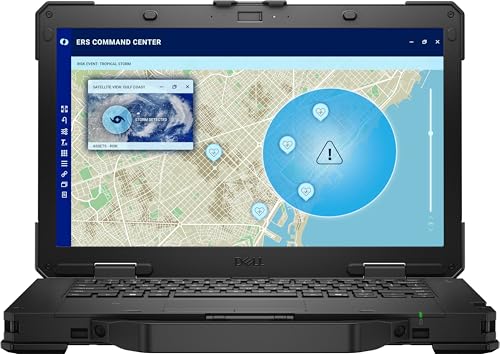
Dell’s Pro Rugged 14 is where the rugged line meets the current processor generation. The title leads with an Intel Core Ultra 7 165U — twelve cores, up to 4.9 GHz, with AI Boost — backed by 16GB of DDR5 memory and a 512GB NVMe solid-state drive. For the pilot whose ground laptop doubles as the machine for video-heavy recurrent training, recorded simulator debriefs and a browser carrying a dozen briefing tabs, that headroom is the difference between a computer that disappears into the work and one that keeps reminding you it exists.
The supporting details read like they were chosen by someone who works in crew rooms. An HD webcam covers the training call and the remote groundschool session. A backlit keyboard covers the darkened room and the early report time. Windows 11 Pro covers the management and encryption side of carrying records. Intel Graphics, integrated rather than discrete, suits a workload of documents, charts and video far better than it suits gaming, and keeps the machine in the rugged class’s sealed, fan-conscious design language. What the title does not give you, again, is a brightness number: the 14-inch FHD panel’s outdoor performance is a documentation question, and this guide will not pretend the Ultra processor answers it.
Think of this Dell as the pick for the pilot whose laptop is also their only computer. The instructor who edits training video in the evening, the contractor who runs a small aviation business from the same machine, the student working through ground school with recorded lectures and a simulator companion app — those blended lives reward current silicon and DDR5 memory in a way a dedicated hangar machine never would. The rugged construction then reads differently: not as preparation for daily abuse, but as a long-life chassis for a machine expected to serve five or six years of being carried everywhere its owner goes, which is its own kind of harsh duty cycle.
- Display: 14-inch FHD panel
- Processor: Intel Core Ultra 7 165U, 12-core, up to 4.9 GHz, AI Boost
- Memory: 16GB DDR5 RAM
- Storage: 512GB NVMe SSD
- Graphics: Intel Graphics
- Camera and keyboard: HD webcam, backlit keyboard
- Operating system: Windows 11 Pro
- Not stated in the listing title — verify with the maker’s documentation
Strengths
- The newest processor among the linked picks, with twelve cores for heavy multitasking
- Backlit keyboard and HD webcam fitted for training calls and dark crew rooms
- DDR5 memory and NVMe storage, the current-generation pairing
Trade-offs
- Still no stated brightness figure, so the ramp-reading question stays open
- Integrated Intel Graphics only, which caps any graphics-heavy side use
- The same 512GB storage ceiling shared by every linked pick here
Best for: the pilot whose ground workload is heavy and modern — training video, big documents, many applications at once — on a machine from an established rugged line. Not suited for: graphics-heavy simulator visuals driven from the laptop itself, because the title specifies integrated Intel Graphics and nothing stronger.
If the current-generation build is the one you are after, check the price on Amazon for this Ultra 7 configuration specifically.
Getac V110 G6 — Renewed convertible route
The Getac V110 is one of the designs that defined the fully rugged convertible: a compact notebook whose screen rotates and folds flat into a thick tablet, built for vehicle docks, field inspections and cockpits-adjacent work where a conventional hinge is a liability. As a concept for aviation ground work it remains persuasive — one machine that is a laptop at the desk and a slate at the aircraft. The problem is not the design; it is the stock. When we fetched the full listing titles for this guide, the V110’s Amazon presence carried the word renewed, and that single word changes the purchase from buying a product to buying a particular refurbished unit’s history.
So this pick is a route, not a link. A renewed V110 bought knowingly — from a seller whose refurbishment process, battery policy and return terms you have read closely — can put a genuinely rugged convertible into a training organisation’s hands for ground duties at a fraction of its original fleet pricing. Bought unknowingly, the same listing is how a pilot ends up with a tired battery and a scratched digitiser while believing they paid for new. Because condition varies unit by unit, this guide states no specifications for it beyond its class: judge any individual renewed listing by its own stated configuration, its seller’s grading language, and a return window long enough to test the machine through a week of real work.
The convertible mechanism deserves one more honest paragraph, because it is the reason to accept renewed risk at all. At the aircraft, a folded V110 reads like a clipboard that happens to contain the maintenance manual, the checklist and the camera; at the desk it opens back into an ordinary laptop with a real keyboard for the report writing. Tablet-route pilots give up the keyboard, and conventional rugged laptops give up the slate. If your ground work genuinely alternates between those two postures several times a day, the V110’s hinge earns its keep — and if it does not, the renewed gamble buys a mechanism you will fold twice a year, which is a poor reason to accept unit-by-unit condition.
- Class: fully rugged convertible notebook, screen folds to a slate
- Market status at verification: renewed listings on Amazon
- Not stated in the listing title — verify with the maker’s documentation
Strengths
- A convertible form that suits both desk work and walk-around checks
- Fully rugged design lineage aimed at vehicle and field deployment
- Renewed pricing can undercut new rugged stock substantially
Trade-offs
- Condition, battery health and included accessories vary by individual unit
- No new-unit warranty story to lean on; the seller’s terms are the safety net
- Verifying a specific listing’s configuration takes more homework than a new purchase
Best for: a flight school or operator equipping ground roles, comfortable inspecting and grading refurbished hardware on arrival. Not suited for: a buyer expecting factory-sealed condition and a full new-unit warranty, because the verified stock for this model is renewed.
Panasonic Toughbook CF-33 — Renewed detachable route
Panasonic’s Toughbook CF-33 takes the opposite mechanical bet from the Getac: instead of a rotating screen, the display detaches entirely from its keyboard base, so the machine works as a full laptop at a desk and as a standalone rugged tablet at the aircraft. For maintenance documentation, inspection checklists and training material carried around an airframe, that split personality is genuinely useful, and the Toughbook name carries decades of fleet deployment behind it. It is the design many pilots picture when someone says rugged aviation computer.
The same verification caveat applies, and it is not a small one: the CF-33 listings we fetched carried renewed status in their full titles. Everything said about the V110 applies here with the detachable twist — a detachable design has more connectors, latches and seals whose condition depends on the individual unit’s previous life, so a renewed CF-33 deserves an even closer arrival inspection, latch and dock included. Buy it as a known refurbished purchase with eyes open about grading and returns, and it can be the most versatile ground machine in this guide; buy it expecting new, and the disappointment is guaranteed before the box opens. We therefore discuss it without a link and without invented specifications.
Picture the inspection workflow the detachable design serves. The screen leaves the base and goes under the wing with the checklist and the manual open; photographs and notes happen at the airframe rather than back at the bench; then the screen clicks home and the whole unit is a laptop again for the write-up, the parts order and the email to the owner. No other route in this guide collapses that loop into one device. The renewed condition is the toll charged for it, and operators who already run Toughbooks will judge that toll familiar — the rest of the market should count the inspection homework honestly before paying it.
- Class: fully rugged detachable, screen separates from keyboard base
- Market status at verification: renewed listings on Amazon
- Not stated in the listing title — verify with the maker’s documentation
Strengths
- Detachable screen covers desk, hangar and walk-around roles in one unit
- Toughbook fleet heritage, with a long record in demanding field services
- Renewed availability keeps a premium design within reach of smaller operators
Trade-offs
- Detach latches and dock connectors are wear points whose state varies by unit
- Renewed grading language differs between sellers and must be read literally
- Two-piece designs are easier to separate from their own accessories over time
Best for: maintenance-adjacent and inspection work where the screen genuinely needs to leave the keyboard behind at the aircraft. Not suited for: a purchaser who cannot inspect and, if necessary, return a refurbished unit, because condition is the whole gamble with this stock.
Mainstream EFB tablet route — What most cockpits use
End with the truth the rugged industry understates: in the cockpit itself, the flight bag has already been won by the consumer tablet. The major electronic flight bag applications are built for mainstream tablets, the mounts and cases form a mature ecosystem, and a tablet’s size and weight suit a yoke or kneeboard in a way no 14-inch rugged notebook ever will. If the question behind your search is which screen to fly with, this route — a current consumer tablet, a proper aviation case and mount, and a subscription to your chosen flight bag app — is the answer most working pilots actually chose, and our look at the best rugged tablets great battery life covers the harder-wearing end of that tablet world.
The laptop in this guide earns its place everywhere the tablet is clumsy: building the flight in the first place, records and logbook upkeep, licence and medical paperwork, training study, maintenance documentation, and the briefing desk at home. Many pilots run both, and the pairing is complementary rather than redundant — the tablet flies, the laptop files. If budget forces one purchase first, buy for the role that is currently failing: the pilot drowning in ground paperwork needs the laptop; the pilot squinting at paper charts needs the tablet. What neither role needs is a rugged laptop bought to do the tablet’s cockpit job, which is the one purchase this guide exists to talk you out of.
One refinement matters for pilots building this pairing from scratch: keep the two devices’ jobs sealed apart. The tablet carries the flight — charts, plates, the moving map, the checklist — and nothing that would distract from flying. The laptop carries the business of flying: the bookings, the accounts, the study, the correspondence. Pilots who blur the line end up doing accounts on a kneeboard-sized screen and flying with a laptop open on the passenger seat, the worst of both. Bought in that order and kept in those lanes, the tablet-plus-laptop pairing is not a compromise at all; it is the setup the professionals converged on while the rugged industry was still arguing.
- Class: consumer tablet running electronic flight bag applications
- Role: in-flight charts and documents; laptop covers ground duties
- Not stated in the listing title — verify with the maker’s documentation
Strengths
- The flight bag applications are designed for this class of device first
- Size and weight suit cockpit mounting in a way no laptop matches
- A mature ecosystem of aviation cases, mounts and kneeboards exists
Trade-offs
- Ground paperwork, records and study remain clumsy on a tablet alone
- Consumer tablets are not sealed field machines and dislike ramp weather
- App subscriptions are an ongoing cost layered on top of the hardware
Best for: the in-flight chart role itself, paired with any capable laptop for ground work. Not suited for: serving as the only computer for records, training and paperwork, because the applications and keyboard work those jobs involve outgrow a slate quickly.
How do the six routes compare side by side?
| Route | Screen as titled | Memory and storage | Condition and route |
|---|---|---|---|
| MUNBYN Rugged Laptop IRX16 | 15.6-inch, 1000 nits stated | 16GB DDR5, 512GB replaceable SSD | New listing, IP65 claim |
| Dell Latitude 5430 Rugged | 14-inch Full HD 1920 x 1080 | 16GB, 512GB SSD | New listing, established line |
| Dell Pro Rugged 14 | 14-inch FHD, brightness unstated | 16GB DDR5, 512GB NVMe SSD | New listing, newest processor |
| Getac V110 G6 | Convertible, folds to slate | Varies by individual renewed unit | Renewed listings only at verification |
| Panasonic Toughbook CF-33 | Detachable rugged tablet screen | Varies by individual renewed unit | Renewed listings only at verification |
| Mainstream EFB tablet route | Consumer tablet class | Chosen with the tablet itself | New retail, app subscription extra |
What mistakes do pilots make when buying a laptop for flying?
The first mistake is buying a rugged laptop to do the tablet’s job — mounting expectations on a machine that belongs on the ground — and then resenting its weight in the cockpit. Decide the role first; the hardware follows. The second mistake is assuming sunlight performance from the word rugged. Of six routes here, exactly one prints a brightness figure. If ramp reading matters, buy the figure or verify it in the maker’s documentation; do not buy the adjective.
Third, pilots misread the renewed market in both directions: some pay new-machine money for refurbished stock because the listing photography looks fresh, while others dismiss renewed rugged machines entirely and miss that this class was engineered to be refurbished and resold to fleets. The error is not buying renewed; the error is buying it unknowingly or uninspected. Fourth, buyers fixate on the processor and ignore the service story — who repairs this machine in three years, and can its drive be replaced when it fills with a decade of records. The MUNBYN’s replaceable-drive wording and Dell’s service depth both speak to that longer horizon. Finally, there is the quiet mistake of buying for the licence you hold today: the laptop bought for private flying gets asked to support instructor work, then a first commercial role, then training duties. Headroom in memory and storage is cheaper bought once, early.
How should you set the machine up for aviation work in its first week?
Begin with the unglamorous layer: accounts and encryption. Turn on full-drive encryption before the first client record, logbook export or company document touches the machine, set a sign-in method you will actually use forty times a day, and record the recovery keys somewhere that is not the laptop itself. Then install in working order — flight planning and briefing tools first, records and logbook software second, office and document tools third — testing each against a real file from your current flying rather than a sample, because file-format surprises surface in week one or at the worst possible moment in month three.
Next, rehearse the physical life. Carry the machine in the bag it will actually travel in, read its screen in the brightest place it will actually work, and time a cold start to a usable briefing screen, since that number is your real morning friction. If you bought renewed, this first week is also the inspection window: run the battery through full cycles, seat and reseat every port and latch, photograph any cosmetic surprises, and decide inside the return window rather than after it. Finally, set the backup habit before the machine becomes load-bearing — an automatic copy of records and documents to a second location — because a rugged laptop survives drops that its owner’s filing discipline may not. Pilots building the wider cockpit kit around the machine will also want our guide to the best aviation headsets with noise canceling, the other purchase where honest condition and fit matter more than spec-sheet noise.
How does the laptop fit the rest of the flight bag, headset and simulator kit?
A working pilot’s technology is a small ecosystem, and the laptop sits at its centre without being its star. The tablet flies, the headset talks, the laptop organises. That division has practical consequences for setup. Keep the flight bag applications off the laptop’s critical path and the laptop’s paperwork off the tablet; synchronise records between them on the ground, at home, where a sync failure is an annoyance rather than a departure delay. When the two machines share one account ecosystem, the handoff of documents — a briefing pack built at the desk, read in the cockpit — becomes a single gesture instead of a cable hunt.
The simulator deserves a mention because it quietly shapes laptop purchases in training-heavy careers. Home simulator work for instrument currency and procedure practice asks for graphics capability that the rugged class, with integrated graphics as titled on the Dell Pro Rugged 14, does not pretend to offer. Pilots serious about a home simulator should treat that as a separate machine or a desktop question, and judge the laptops here on the ground duties they are actually built for. Forcing one rugged notebook to be briefing tool, records keeper and simulator engine produces a machine that is mediocre at the job it does daily in service of a job it does monthly.
Finally, budget the ecosystem rather than the device. The realistic purchase is laptop plus bag organisation, a spare charger, the tablet mount, and the software subscriptions that make both machines useful — a total that argues for buying the laptop one tier more honestly rather than one tier more heroically. The pilots who regret technology purchases rarely regret the machine; they regret the accessories and subscriptions discovered afterwards, each small, all unavoidable, none in the original plan. Price the whole kit on one page before ordering any of it.
Final Recommendation
Match the purchase to the machine’s real workplace.
If the laptop will live outdoors — instructing, briefing on ramps, riding to strips — the MUNBYN IRX16 is the only pick that prints its outdoor evidence in the title: 1000 nits, an IP65 claim, a replaceable drive. If it will live in crew rooms and carry-on bags with occasional rough handling, Dell’s Pro Rugged 14 brings the newest processor and the deepest service story, while the Latitude 5430 Rugged remains the proven, slightly older alternative. Treat the Getac and the Toughbook as what the market currently says they are — renewed routes to buy knowingly and inspect on arrival — and let a tablet do the flying. A pilot’s logbook is a career written in entries; the laptop that keeps it deserves to be bought with the same care as the entries themselves.
Frequently Asked Questions
Can a rugged laptop replace the tablet in the cockpit?
Not sensibly. The flight bag applications are built for tablets, and no 14-inch notebook mounts or handles like a slate on a yoke or kneeboard. The laptop’s value is on the ground — planning, records, study, paperwork — which is why this guide treats the tablet as a complementary route rather than a rival.
Is 1000 nits actually enough for reading on a sunny ramp?
It is the strongest figure any listing in this guide states, and it sits in the range makers market as sunlight readable, which is why the MUNBYN title uses that phrase. Individual eyes, screen finish and the angle of the sun all play a part, so read the machine in your own brightest working spot during the return window rather than trusting any figure blindly — including this one.
Are the renewed Getac and Toughbook listings a bad buy?
Not inherently. This class of machine was designed for fleet service and refurbishment, and a graded renewed unit from a seller with clear battery and return policies can be excellent value for ground duties. The risk is buying renewed unknowingly, or skipping the arrival inspection. Condition is unit-specific, so the seller’s terms matter as much as the model name.
Why do the Dell listings not state a brightness figure?
Because their listing titles, as verified for this guide, simply do not include one — they state resolution and the core specification and stop there. That silence is not evidence the panels are dim; it is evidence the claim is unmade. Dell’s own product documentation is the place to find the panel specification before assuming ramp performance.
How much memory and storage does aviation ground work really use?
The 16GB and 512GB pairing shared by all three linked picks covers the realistic load — briefing tools, records software, training video, documents and a browser — with room to spare. Records archives grow over a career, which is why a replaceable or upgradeable drive, as the MUNBYN title describes, is worth valuing beyond the first year’s needs.
What is the difference between rugged and fully rugged in these listings?
The market uses the words loosely, which is exactly why this guide leans on printed claims instead. A title that states a sealing rating, as the MUNBYN does with IP65, is making a testable promise about dust and water behaviour. A title that rests on a rugged family name, as the Dell listings do, is pointing at a design lineage — reinforced chassis, sealed ports and fleet testing in that maker’s own programme — without printing a single rating for you to verify. Neither approach is automatically superior, but they are different kinds of evidence, and the buyer should know which kind they are holding before paying for it.
How long should a pilot expect one of these machines to serve?
Plan around the records, not the processor. The ground workload in this guide — documents, briefing tools, training material — will run comfortably on 16GB of memory and these processor generations for many years, so the realistic lifespan is set by the battery, the drive filling with a career’s records, and the maker’s parts support. That is why this guide keeps returning to serviceability: a replaceable drive and an established service network are, in practice, lifespan specifications, and they matter more to a five-year owner than a half-generation of processor speed.
Should a flight school buy the same machine as an individual pilot?
A school buys for handover: several instructors, shared machines, more drops and more weather. That pattern argues for the sealed, serviceable end of this guide and for standardising on one model so chargers, docks and habits stay uniform. An individual buying for personal flying can weight screen and processor more heavily, since the machine’s life will be gentler and its user constant.
Related Guides
Readers building out the wider kit may also want our roundup of the best laptops for vet techs, where the same rugged class faces clinic floors instead of ramps, and the guide to the best laptops for automotive technicians above for another trade that buys computers by survival first and specifications second.


