What's inside
- Key Takeaways
- Quick Picks
- How Did We Choose These Picks?
- What Does a Fitness Camera Actually Have to Survive?
- How Do the Six Compare Side by Side?
- How Should You Set Up a Studio Corner for Recording?
- What Mistakes Do Instructors Make When Filming Classes?
- Live Class or Recorded Library — Which Are You Really Building?
- Final Recommendation
- Frequently Asked Questions
- Related Guides
As an Amazon Associate I earn from qualifying purchases. This post may contain affiliate links at no extra cost to you.
gizmoverdict.com is reader-supported. When you buy through links on our site, we may earn an affiliate commission.
Where to buy: The six cameras below each link to a checked listing, and every claim about tracking, frame rate, resolution and field of view is taken from that listing’s title. A boundary worth stating at the top: tripods and stands appear in this guide only as advice, never as picks — the products below are cameras, and the support you stand one on is a separate, simpler decision covered in the setup section.
Recording a fitness class breaks every assumption a normal webcam is built on. The subject will not sit still, will not stay at one distance, and will not face the lens — the instructor lunges toward the camera, retreats to the back of the mat, drops to the floor for core work and rises again, turning sideways to demonstrate form while calling out counts and cues the whole time. The best webcams for recording fitness class are therefore not the sharpest desk cameras but the ones that solve a movement problem: a wide enough view to hold the whole exercise space, tracking that follows the instructor through it, a frame rate that keeps fast limbs legible, and a microphone arrangement that survives an instructor who is rarely standing next to it.
That movement problem sorts this list into two honest camps. Four picks build their titles around AI tracking and PTZ movement — the OBSBOT Tiny SE, the MT-VIKI, the HuddleCamHD MiniTrack and the EMEET PIXY — because a camera that steers itself is the difference between an instructor who teaches and an instructor who teaches while also operating a camera. The remaining two make different cases: an unbranded 4K AI-powered conference webcam with microphones and Zoom certification, aimed at the studio that also runs hybrid classes on meeting platforms, and a plain Macally 1080p webcam with a microphone, included deliberately as the fixed-camera baseline — the right answer for a small space where the whole class fits in one wide frame and never leaves it.
Frame rate deserves its paragraph before the picks, because fitness is where it stops being a specification and becomes the lesson. A jumping jack at 30 frames per second is a suggestion of arms; at 60, and still more at the 100fps the Tiny SE’s title claims, the movement resolves into positions a student can copy. Slow-motion review — the instructor scrubbing back through a recorded set to check a client’s squat depth — is only as useful as the frames captured per second. Studios filming for on-demand libraries, where the recording is the product and will be watched for years, should weight frame rate and tracking smoothness as heavily as resolution. Studios streaming a live class to regulars should weight the microphone and the wide angle more, because the students in a live class forgive soft detail and forgive nothing they cannot hear.
Key Takeaways
- Fitness recording is a movement problem: wide framing, self-steering tracking and high frame rates matter more than desk-webcam sharpness.
- Four titles lead with AI tracking — OBSBOT Tiny SE, MT-VIKI, HuddleCamHD MiniTrack and EMEET PIXY — each with a different control style.
- The Tiny SE’s title claims 1080p at 100fps, the strongest motion specification here; the MT-VIKI pairs 4K positioning with a 1080p 60fps mode and a stated 92° wide angle.
- Microphones are the weak point of every camera-led setup; titles claiming microphone arrangements deserve attention, and large rooms should plan audio separately.
- The Macally is the honest fixed-camera baseline for small spaces where the class never leaves one frame.
- Tripods and stands are accessories discussed in prose — none is a pick in this guide.
Quick Picks
| Pick | Badge | Why it is here |
|---|---|---|
| OBSBOT Tiny SE | Best motion capture | 1080p at 100fps with AI tracking in a PTZ streaming body built for moving presenters. |
| MT-VIKI 4K AI PTZ Webcam | Best gesture control | Auto tracking with gesture control, 1080p 60fps and a 92° wide angle in the title. |
| 4K AI-Powered Conference Webcam | Best hybrid-class option | 4K AI-powered camera with microphones and Zoom certification for platform-run classes. |
| HuddleCamHD MiniTrack 4K | Best compact tracker | 4K auto-tracking in the MiniTrack format from a conference-camera specialist. |
| Macally 1080P Webcam | Best fixed baseline | Straightforward 1080p with a microphone for small spaces that fit in one frame. |
| EMEET PIXY | Best dual-camera design | Dual-camera AI-powered PTZ at 4K, supplied with a remote for manual override. |
How Did We Choose These Picks?
Tracking came first, because it is the feature that changes an instructor’s working day. A camera that follows removes the second job — framing — from a person whose first job is demonstrating exercise safely and cueing clearly. The four tracking picks were then separated by how control works when the instructor needs to intervene: gesture control on the MT-VIKI, a physical remote with the EMEET PIXY, and the tracking-led designs of the OBSBOT and HuddleCamHD. In a class, the intervention moments are constant — pausing the follow to hold on a demonstration mat, widening for a group shot, returning to tracking for the next set — and the method of intervening matters as much as the tracking itself.
Motion specification came second. Titles were read for frame rate with the same strictness applied to resolution: the Tiny SE states 1080p and 100fps together, the MT-VIKI states 4K in its name and 1080p 60fps in its details — a pairing read here as a 4K camera whose high-frame-rate mode runs at 1080p, the common engineering arrangement — and the remaining titles were not credited with frame rates they do not state. Studios should adopt the same reading habit: the number beside the resolution in a title and the number beside the frame rate are frequently different modes of the same camera, and planning a class around the wrong pairing produces footage that is either softer or slower than the marketing suggested.
Third came the room audit every fitness buyer should run. How wide is the teaching space, in metres of mat? How far does the instructor travel from the camera’s position? Is the class live, recorded, or both? The picks were arranged so each answer has a champion: the wide-angle MT-VIKI for the broad studio, the high-frame-rate Tiny SE for the recorded library, the certified conference camera for the hybrid platform class, the PIXY for an instructor seeking tracking with a remote in hand, the MiniTrack for the compact installation, and the Macally for the spare-room studio where the frame never needs to move.
What Does a Fitness Camera Actually Have to Survive?
Distance, first of all. A desk webcam lives half a metre from its subject; a fitness camera lives three to six metres away, across a mat, and everything about the job hardens at that range. Faces become small, so framing must be deliberate. The instructor’s voice crosses the same distance, arriving at a camera-mounted microphone weakened and mixed with the room’s echo and the class playlist — which is why the audio sections of this guide keep returning to separate microphone planning for larger spaces. And the instructor’s gestures, the visual language of cueing, must stay readable at that range, which is a field-of-view and resolution question working together: wide enough to hold the movement, detailed enough that a sideways lunge reads as form rather than blur.
Vertical movement is the second trial, and the one desk cameras never face. A fitness session travels from standing work to floor work and back a dozen times; a camera fixed at standing eye level films the floor segment from above at a steep, unflattering and genuinely uninformative angle, while a PTZ camera can tilt down to meet the mat. Tracking systems that follow the instructor’s body handle this travel automatically when they work well, and it is during the floor segments that the difference between a tracking camera and a fixed one is most visible on screen. Instructors filming a Pilates or yoga library should test any camera’s floor behaviour before committing a catalogue to it — a free returns window and one filmed class is the honest trial.
Heat, chalk dust, sprayed disinfectant and the occasional knocked stand complete the survival list, and they argue for placement as much as product: a camera positioned out of the traffic pattern, on a stable support at the room’s edge, with its cable dressed along a wall rather than across a floor where feet and equipment travel. The support itself — tripod, stand, shelf mount — is an accessory choice this guide discusses in the setup section; none is sold to you here as a pick, because the camera decision and the furniture decision deserve separate thought.

OBSBOT Tiny SE — Best motion capture
The Tiny SE’s title states the specification this category cares about most: 1080P at 100FPS, with AI tracking in a PTZ streaming camera. One hundred frames per second is a specification borrowed from sports filming, and its presence on a webcam tells you exactly which problem OBSBOT set out to solve. Fast, repetitive, whole-body movement — the entire vocabulary of a fitness class — is rendered at that rate with each position of a limb captured distinctly, so a student’s screen shows the instructor’s movement as a sequence of readable poses rather than a smear between two of them. For recorded classes especially, where students pause and replay a combination until it clicks, that legibility is the product.
The tracking half of the design carries the other half of the class. OBSBOT’s Tiny line is built around a motorised gimbal that follows its subject, and in a studio that means the instructor’s travel across the mat — forward for a close demonstration, back for the full movement, sideways for a profile view of a squat — is followed by the frame instead of escaping it. The instructor teaches one class, not two. Studios that have filmed with a fixed camera know the alternative choreography: the instructor mentally maps the frame’s edges and teaches inside an invisible box, checking a monitor between sets. Tracking abolishes the box, and the teaching gets visibly freer within a single session.
The honest trade in this specification is resolution headroom. The title’s claim is 1080p, full stop, at an exceptional frame rate — not 4K. For a large television in a client’s living room, a 1080p class is entirely respectable, and the motion clarity will read as quality. For a studio planning to crop recordings in editing — pulling a close-up from a wide shot for a form-check segment — 1080p leaves nothing to crop with, and the 4K tracking picks below serve that workflow better. Choose the Tiny SE when the movement is the message and the frame can be composed live by the tracking itself, which for most class formats is most of the time.
Placement completes this pick’s story. A gimbal camera earns its keep positioned where its pan range covers the teaching area symmetrically — centred on the mat’s long axis, at roughly chest height of the standing instructor, so its tilt travel divides evenly between standing and floor work. Put it in a corner and half its steering range is wasted on a wall. The camera’s own intelligence does the following; the studio’s one job is giving it a fair vantage, and that job is shared by every tracking pick in this list.
- Resolution: 1080P at 100FPS, as stated in the listing title
- Tracking: AI tracking PTZ, per the listing title
- Positioning: streaming camera, per the listing title
- Field of view: Not stated in the listing title — verify with OBSBOT documentation
- Microphone arrangement: Not stated in the listing title — verify with OBSBOT documentation
Strengths:
- 100fps capture keeps fast, whole-body movement legible frame by frame.
- AI tracking frees the instructor from teaching inside a fixed frame.
- Gimbal PTZ design follows travel across the mat in both axes.
Trade-offs:
- 1080p ceiling leaves no resolution for cropping in editing.
- Field of view and microphone details wait on the listing.
- Tracking quality depends on a centred, fair vantage point.
Best for: a buyer seeking the clearest motion capture for recorded class libraries. Not suited for: a buyer seeking 4K footage for crop-heavy editing workflows.
Think of the recorded class from the student’s sofa for a moment, because that is the vantage the specification serves. The student is following along in a living room, half watching the screen and half watching their own limbs, glancing up at the moments of transition — the change of exercise, the modification for a bad knee, the advanced version for the strong. Those glances land on whatever frame the camera chose. A tracking camera at 100fps makes those glances land on a clear, centred instructor mid-demonstration, which is a small mercy repeated forty times a session. Multiplied across a library and a subscriber base, small mercies are what retention is made of.

MT-VIKI 4K AI PTZ Webcam — Best gesture control
The MT-VIKI title is the most information-dense in this list: 4K AI PTZ, auto tracking, gesture control, 1080P 60fps, and a 92° wide angle. Take the gesture control first, because it solves the fitness instructor’s specific remote problem. An instructor mid-class cannot walk to a laptop, cannot hold a remote through a kettlebell set, and cannot ask the class to wait while framing is fixed. Gestures — a raised hand shape that starts or stops tracking, a signal that recentres the frame — put control back in the instructor’s body, which is the only interface available while teaching. Any studio that has watched an instructor break a set’s rhythm to adjust a camera will recognise this feature as the opposite of a gimmick.
The 92° wide angle is the second fitness-native number. Ninety-two degrees at a typical studio distance holds a full mat’s width and the instructor’s travel across it, including the wide stances and lateral movements that narrower desk cameras amputate. Wide angles carry a known cost — the subject grows smaller as the frame grows wider — which is why the pairing with tracking matters: the camera can start wide for the full-body view and follow tight when the instructor steps in to demonstrate detail. Width plus following is the combination a fixed wide camera cannot offer, and it is this pick’s structural argument.
Read the resolution and frame-rate figures with the care this guide keeps recommending. The title presents the camera as 4K and separately states 1080P 60fps; the natural reading is a 4K camera whose 60fps mode operates at 1080p, which is a sensible engineering split — 4K for composed, slower content, high-frame-rate HD for the fast sets. An instructor filming a mixed class gets both modes in one unit and chooses per segment. What the title does not state is the microphone arrangement, and in a music-filled studio that omission deserves the usual listing check before purchase.
Against the Tiny SE, this pick trades peak frame rate for resolution, width and gesture control; against the PIXY below, it trades the dual-camera design and physical remote for the gesture interface. Studios run by a solo instructor, where nobody else touches the setup, will likely find gestures the most natural of the three control philosophies. Studios where a second person manages the recording may prefer the remote. Either way, the MT-VIKI’s title reads like it was written by someone who has stood in front of a class with a camera running — a rarer quality in this market than any single specification.
- Resolution: 4K, with 1080P 60fps mode, as stated in the listing title
- Field of view: 92° wide angle, as stated in the listing title
- Tracking: auto tracking, per the listing title
- Control: gesture control, per the listing title
- Microphone arrangement: Not stated in the listing title — verify with MT-VIKI documentation
Strengths:
- Gesture control suits an instructor whose hands are never free.
- 92° wide angle holds a full mat and lateral movement.
- 4K and 1080p 60fps modes cover composed and fast segments.
Trade-offs:
- Peak frame rate is 60fps, below the Tiny SE’s motion ceiling.
- Microphone particulars are unstated in the title.
- Gesture systems need a learning session before the first real class.
Best for: a buyer seeking hands-free control and wide framing for solo-taught classes. Not suited for: a buyer seeking the highest available frame rate for slow-motion review.
The gesture vocabulary deserves one honest caveat: it must be learned, and it must be learned before an audience arrives. An instructor fluent in the signals runs a class that looks telepathic; an instructor half-remembering them produces visible fumbling at exactly the moments the class is watching most closely. Budget a private session — film yourself teaching an empty room, practise starting and stopping the follow until the gestures are as automatic as a count-in — and treat that session as part of the purchase price. The same advice, mutatis mutandis, applies to every control system in this list; gestures merely make the learning curve visible enough to respect.

4K AI-Powered Conference Webcam with Microphones — Best hybrid-class option
This unbranded pick speaks a different dialect from the tracking specialists: 4K, AI-powered, conference webcam, microphones, Zoom Certified. Its natural habitat is the hybrid class — the studio session where half the students are on mats in the room and half are tiles on a screen, joining through the platform the certification names. That format has settled in as a permanent feature of the fitness business rather than an emergency measure, and it imposes a specific requirement the pure recording cameras do not face: the camera must behave inside meeting software, with the platform’s own framing and audio expectations, for an hour at a time, in front of paying customers on both sides of the screen.
Certification is the claim to weigh. Zoom Certified status, stated in the title, means the device has been tested against the platform’s requirements, and in a hybrid class that tested behaviour covers the unglamorous moments that decide whether a class feels professional: the camera appearing correctly when the session starts, its AI framing cooperating with the platform’s layout, the microphones the title mentions presenting the instructor’s voice to the remote students without a separate audio setup. A studio whose revenue includes remote members is buying reliability in exactly those moments, and certification is the only claim in any title here that speaks to them directly.
The microphones in the title matter for the same hybrid reason. In a recorded class, audio can be repaired, replaced or re-recorded; in a live hybrid class, the instructor’s cues must arrive intelligibly the first time, over music, across a room. A conference camera that builds its audio path for meeting voices is at least aimed at that problem, though the physical truth from the earlier sections still applies — distance taxes every microphone, and a large studio should test this camera’s reach with a real class before trusting it with the timetable. The listing will carry the microphone particulars the title compresses into one word.
The reservation with this pick is its anonymity and its generality. No brand stands in the title, and “AI-powered” is a phrase whose specific behaviours — tracking? framing? both? — the title does not unpack, so the listing check carries unusual weight: confirm what the AI does, confirm the tracking behaviour if your format needs it, and confirm the microphone arrangement. A studio whose classes are purely recorded, with no live platform element, will find the tracking specialists above and below more precisely aimed. A studio living the hybrid life should start here and verify carefully.
- Resolution: 4K, as stated in the listing title
- AI features: AI-powered, per the listing title; specific behaviours to verify with the listing documentation
- Audio: microphones included, per the listing title
- Certification: Zoom Certified, per the listing title
- Tracking type: Not stated in the listing title — verify with the listing documentation
Strengths:
- Zoom certification suits studios running hybrid classes on that platform.
- Microphones are part of the title’s promise, not an afterthought.
- 4K resolution serves both the room screen and the recording.
Trade-offs:
- Unbranded listing puts the full weight of verification on its details.
- The AI’s exact behaviours are not unpacked in the title.
- Conference framing may track less athletically than the specialist trackers.
Best for: a buyer seeking a certified camera for live hybrid classes. Not suited for: a buyer seeking a named brand and fully specified tracking behaviour.
The hybrid format also reframes what reliability means across a timetable. A recording camera that misbehaves costs a reshoot; a hybrid camera that misbehaves costs a room of remote students their paid hour, in public, with the studio’s name attached. That asymmetry explains the certification premium and also the testing discipline a hybrid studio should adopt: join your own class from a second location weekly, hear what the remote students hear, and treat any drift in that experience as a maintenance item rather than a surprise to be discovered through complaints. The camera is the studio’s storefront for half its members, and storefronts get inspected.

HuddleCamHD MiniTrack 4K — Best compact tracker
HuddleCamHD’s MiniTrack compresses the tracking proposition into its name: a miniature auto-tracking camera at 4K, from a brand whose entire catalogue is conference-room video. The fitness relevance is the format. Many classes are not filmed in studios at all but in multipurpose spaces — community halls, school gyms, church rooms, the cleared end of a physiotherapy practice — where the camera cannot be a permanent installation and must arrive, set up and pack away with the instructor. A compact tracking camera is the difference between that travelling setup being a pleasure and being a production, and the MiniTrack’s whole design brief is that difference.
Auto-tracking at 4K, as the title states it, pairs the two properties a travelling instructor needs: the camera follows without an operator, and the resolution leaves room to crop the footage afterwards — useful when a multipurpose room’s only camera position is farther from the mat than ideal, and the edit needs to tighten the frame the room’s geography imposed. That crop tolerance is the practical meaning of 4K in a tracking camera, more than any sharpness contest, and it forgives the imperfect placements that real venues impose.
The brand context cuts in this pick’s favour in a specific way. HuddleCamHD builds for rooms where cameras are installed and expected to behave for years, and its tracking products inherit that installation mindset: the MiniTrack is meant to be configured — its tracking zone and behaviour set deliberately — rather than waved at a room and hoped over. Instructors willing to spend one setup session defining how the camera should follow them will get repeatable behaviour in every venue afterward, because the configuration travels with the camera. Instructors seeking tracking that runs itself without any further thought should temper expectations of every pick in this list, this one included; tracking is a behaviour you tune, not a spell you cast.
What the title leaves unstated is the supporting detail — frame rate, field of view, microphone arrangement — and for a fitness buyer the frame rate is the check that matters most, for the motion reasons this guide opened with. Confirm it on the listing against your class style: a yoga and Pilates catalogue forgives a modest frame rate that a HIIT catalogue would not. Confirmed, the MiniTrack is the travelling instructor’s tracker; unconfirmed, it is a well-bred camera with one important question outstanding.
- Resolution: 4K, as stated in the listing title
- Tracking: auto-tracking, per the listing title
- Format: MiniTrack compact tracking camera
- Frame rate: Not stated in the listing title — verify with HuddleCamHD documentation
- Microphone arrangement: Not stated in the listing title — verify with HuddleCamHD documentation
Strengths:
- Compact tracking format suits travelling, multi-venue teaching.
- 4K leaves cropping room for imperfect venue placements.
- Conference-specialist brand with an installation mindset.
Trade-offs:
- Frame rate is unstated in the title and matters for fast class styles.
- Tracking rewards a deliberate configuration session.
- Field of view and audio details wait on the listing.
Best for: a buyer seeking a portable auto-tracking camera for varied venues. Not suited for: a buyer seeking stated-in-title frame rates for high-intensity formats.
Venue reality adds one more argument for the compact tracker. Multipurpose rooms impose setup windows measured in minutes — the previous booking leaving as your class arrives — and a camera that mounts, powers and begins behaving inside that window protects the class’s start time, which is a small professionalism students notice without naming. A larger rig with separate components spends that window on assembly and cable negotiation. The MiniTrack’s format is therefore not merely about luggage; it is about the timetable discipline of teaching in borrowed rooms, where the equipment’s readiness is part of the service being sold.
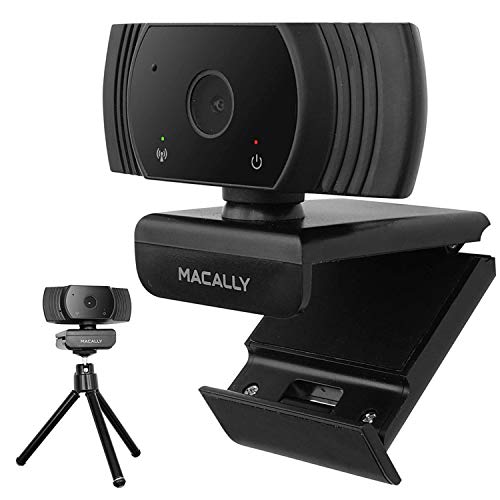
Macally 1080P Webcam with Microphone — Best fixed baseline
Every category needs its honest baseline, and the Macally is this one’s: a 1080p webcam with a microphone, no tracking, no AI vocabulary, no frame-rate claims in its title. Its inclusion is a deliberate act of guidance, because a real slice of fitness recording happens in spaces where the sophisticated picks are solutions to absent problems. A spare-room studio with one mat, an instructor who teaches facing the camera within a two-metre arc, a class format — chair exercise, gentle mobility, seated yoga — where the subject’s travel is measured in centimetres: in those rooms, a fixed frame holds everything, tracking has nothing to follow, and the expensive intelligence of the other five picks idles.
What the Macally offers that room is simplicity with a long memory. Macally has made unglamorous computer peripherals for decades, and a fixed webcam from such a maker is a device with one job, clearly bounded: sit at the frame’s centre, deliver 1080p and microphone audio, and be forgotten. For an instructor filming a first catalogue — testing whether an audience exists before investing in a tracking rig — that boundedness is a business virtue. The camera costs the least thought of anything here, and the classes it can film well are a legitimate catalogue, not a compromise catalogue.
The boundaries must be stated as plainly as the virtues. The moment a format involves travel — a dance fitness class crossing the floor, a martial-arts session using the room’s length, floor work filmed from a standing-height fixed camera — this pick’s frame becomes a cage the instructor teaches inside, and the footage shows it. Its microphone, like every camera-mounted microphone, is bound to the camera’s position, so the small-room assumption is doing real work in this recommendation: in a small space the instructor is never far from it, and the audio is correspondingly honest. Buy the Macally for the room it fits, and it will not disappoint; buy it hoping tracking can be added later, and it will, because it cannot.
There is a second, quieter role this pick plays in many real setups: the second angle. Studios that grow into multi-camera editing often keep a simple fixed camera as the wide safety shot — the frame that never moves, never loses the subject, and rescues any moment the tracking camera spent looking the wrong way. A modest 1080p fixed camera is exactly right for that duty, and an instructor whose ambitions outgrow the Macally as a main camera may find it graduating to that role rather than to a drawer.
- Resolution: 1080P, as stated in the listing title
- Audio: microphone included, per the listing title
- Tracking: none claimed in the listing title
- Frame rate: Not stated in the listing title — verify with Macally documentation
- Field of view: Not stated in the listing title — verify with Macally documentation
Strengths:
- Simple, bounded and dependable for small, fixed-frame spaces.
- 1080p with a microphone covers seated and gentle class formats fully.
- Doubles later as a wide safety angle in a growing setup.
Trade-offs:
- No tracking; any instructor travel escapes the frame.
- Camera-position microphone limits room size honestly.
- Frame rate and field of view are unstated in the title.
Best for: a buyer seeking a simple camera for a small, single-mat recording space. Not suited for: a buyer seeking to film formats with travel across a room.
There is a dignity argument for the baseline pick that guides rarely make. A great deal of online fitness teaching is done by instructors at the start of their businesses, filming in real homes, for small audiences, on equipment budgets that compete with rent. Telling that instructor that nothing under a tracking rig will do is bad advice dressed as standards. A fixed 1080p camera, a tidy background, decent light and a well-taught class is a complete product, and audiences for gentle, well-explained formats reward the teaching long before they audit the tracking. The Macally’s place in this list is a reminder that the camera is the third most important thing in the room, after the instructor and the light.

EMEET PIXY — Best dual-camera design
The PIXY’s title carries a design idea none of the other trackers here offers: dual cameras in an AI-powered PTZ unit at 4K, with a remote included. A dual-camera arrangement in a tracking webcam typically divides the labour — one view keeping the wide scene in mind while the other holds the subject closely — and the practical promise for a fitness instructor is tracking that loses its subject less easily, because the wide view can reacquire what the close view lost when the instructor moved fast or left the frame’s edge. Tracking failures in class footage are rarely gradual; the camera simply ends up filming an empty mat while the instructor demonstrates outside it. Any architecture that shortens those absences earns its complexity.
The remote is the second half of the proposition, and it represents the opposite control philosophy from the MT-VIKI’s gestures. A remote is deterministic: a button widens, a button recentres, a button hands control back to the tracking. An instructor who teaches with a colleague managing the recording, or who films in blocks — tracking for the workout, manual framing for the explanation segments — gets precise, repeatable control without learning a gesture vocabulary or wondering whether a signal registered. The remote can also live on the floor at the mat’s edge, tapped by a foot’s neighbour hand between sets, in the moments an instructor’s hands are briefly free. Both philosophies work; they suit different temperaments, and this list is better for containing the argument rather than settling it.
4K resolution completes the specification, with the by-now familiar benefit: crop tolerance in the edit, and a frame that stays detailed when the instructor is at the far end of the tracking range. What the title does not state — frame rate, field of view, microphone particulars — follows the pattern of its peers and belongs on the pre-purchase checklist, with frame rate again the fitness-critical item. EMEET’s broader presence in this guide’s other lists reflects a catalogue-wide focus on camera-and-audio devices for presenters; the PIXY is that focus aimed at the moving presenter specifically.
Judge this pick, finally, on the failure it prevents. Every tracking camera in this list will, on some day, in some class, lose the instructor for a few seconds. The question a studio is really buying is how the system behaves across a month of classes: how often the frame is wrong, how quickly it recovers, and how much of the instructor’s attention the recovery costs. The PIXY’s dual-camera reacquisition and its remote override are two different answers to that question built into one unit — belt and braces, deliberately — and for a studio whose recorded catalogue is its income, that redundancy is not excess. It is insurance priced into the hardware.
- Resolution: 4K, as stated in the listing title
- Design: dual-camera AI-powered PTZ, per the listing title
- Control: remote included, per the listing title
- Frame rate: Not stated in the listing title — verify with EMEET documentation
- Microphone arrangement: Not stated in the listing title — verify with EMEET documentation
Strengths:
- Dual-camera design aims to lose and recover the subject faster.
- A physical remote gives deterministic override of the tracking.
- 4K frame tolerates cropping and distance in the edit.
Trade-offs:
- Frame rate is unstated in the title; fast formats must verify.
- Two control systems mean a fuller setup session to learn both.
- Its redundancy is surplus in a small, single-frame room.
Best for: a buyer seeking tracking with both fast recovery and manual override. Not suited for: a buyer seeking the simplest fixed-frame recording setup.
One more discipline separates the PIXY’s likely owners from the rest: redundancy as a habit. Studios that depend on recordings keep spare cables, a backup recording running on a second device, a plan for the day the main camera fails mid-class. A dual-camera unit with two control philosophies fits that temperament — it is bought by people who think in failure modes. If that description sounds like over-engineering for your spare-room sessions, it is, and the list’s simpler picks exist for you. If it sounds like Tuesday, the PIXY was specified by people who share your Tuesdays.
How Do the Six Compare Side by Side?
| Pick | Resolution (title) | Frame rate (title) | Tracking and control |
|---|---|---|---|
| OBSBOT Tiny SE | 1080P | 100FPS | AI tracking PTZ |
| MT-VIKI 4K AI PTZ | 4K | 1080P 60fps mode | Auto tracking, gesture control, 92° wide |
| 4K AI Conference Webcam | 4K | Not stated in title | AI-powered; Zoom Certified; microphones |
| HuddleCamHD MiniTrack | 4K | Not stated in title | Auto-tracking, compact format |
| Macally 1080P | 1080P | Not stated in title | None claimed; fixed frame, microphone |
| EMEET PIXY | 4K | Not stated in title | Dual-camera AI PTZ, remote included |
Read the frame-rate column as the fitness column. And read the whole table against your own room’s measurements rather than against an abstract ranking, because the distance between your camera position and your farthest lunge is a fact no reviewer can know for you — it is the first number to write down before any of these six is ordered, and the one that will still be deciding your satisfaction a year from now. Only two titles state one, and they state it proudly, because motion is this category’s currency. The unstated cells are not accusations — they are the buyer’s checklist, in the order a fitness buyer should ask the questions: frame rate first, then field of view, then the microphone arrangement.
How Should You Set Up a Studio Corner for Recording?
Place the camera on the room’s long axis, centred on the teaching space, at about the instructor’s chest height when standing. That height divides the tilt range fairly between standing work and floor work, and centring means the tracking picks spend their steering range on the instructor rather than on a wall. The support — a tripod, a stand, a fixed shelf — is an accessory decision, deliberately not a pick in this guide: choose something stable enough to ignore, tall enough to reach the position, and place it outside the traffic pattern of the class, where no travelling lunge or rolling equipment can reach it. Dress the cable along the wall from the first day; cables across studio floors are tripping hazards wearing a technical disguise.
Light the space from behind the camera’s position, so the instructor’s front — the side the students study — is the lit side, and keep the background dimmer and uncluttered so movement reads against stillness. Then film one full class as a rehearsal and watch it as a student would: on a television if that is where students watch, with the sound at living-room level. Check the floor segments, the farthest travel, the moments the instructor turns away to demonstrate. Every weakness of the setup appears in that rehearsal, in private, where fixing it costs an afternoon rather than a catalogue.
Audio gets the last setup word. While you are at it, record the room empty for thirty seconds and listen to that too: the hum of a heater, the buzz of a light fitting, the corridor through the wall — a camera microphone hears the room’s resting voice on every recording, and knowing it in advance lets you kill the one switch that silences it. Test the camera’s microphone at teaching distance with the class playlist playing, because that is the real condition. If cues are being swallowed, the remedy is a microphone nearer the instructor — a separate purchase, planned as such — not a louder voice, which an instructor cannot sustain across a timetable anyway.
What Mistakes Do Instructors Make When Filming Classes?
A sixth mistake is subtler and belongs to the playlist: filming with the music loud in the room for energy, then discovering the recording’s music has swallowed the cues or attracted a copyright claim on the platform. Studios solve this by keeping room music at teaching level rather than party level, or by adding music in editing where its licence and volume are controlled. The camera records what the room gives it; the room’s mix is a production decision, and it deserves the same rehearsal as the framing.
The commonest is framing for the standing segment
and forgetting the floor exists, so a third of every class is filmed from above at an angle that hides the very form being taught. Second is trusting a camera-mounted microphone across a music-filled room, producing libraries of beautiful, inaudible instruction. Third is buying tracking and never tuning it — leaving default behaviour to guess at a room it has never been introduced to. Fourth is chasing resolution while filming at a frame rate that smears the movement the class exists to teach. And fifth is placing the camera where the room is convenient rather than where the students’ view is honest: off-axis, too low, half behind a pillar of stacked equipment. Every one of these mistakes is a setup decision, which is good news — setup decisions can be revisited this week, with the camera already owned.
Live Class or Recorded Library — Which Are You Really Building?
The two businesses buy differently, and confusing them is expensive. A live class is an event: its camera must behave inside meeting software, its audio must arrive intelligibly the first time, and its failures are public and unrepeatable — the profile that points at the certified conference pick or a well-tested tracking setup with a rehearsed operator habit. A recorded library is a catalogue: its camera must capture movement beautifully, its footage must survive editing and cropping, and its failures cost a reshoot rather than a reputation — the profile that points at the Tiny SE’s frame rate or the 4K trackers’ resolution headroom. Many studios do both, and the honest sequence is to buy for the format that pays first and let the second format inherit the camera, rather than buying a compromise that serves neither master on its best day.
Growth changes the answer on a schedule studios can predict. The first catalogue is filmed in one room, by one instructor, in one format — a single pick from this list covers it completely. The second year adds venues, instructors or a hybrid timetable, and the camera that was perfect becomes one component in a small system, often graduating to the second-angle or backup role the Macally section described. Buying with that graduation in mind — choosing standard connections, keeping boxes and mounts, documenting the tracking configuration that worked — turns today’s purchase into next year’s infrastructure instead of next year’s clutter.
Final Recommendation
For a recorded library where movement is the product, the OBSBOT Tiny SE’s 100fps tracking is the standout specification in this list, and the MT-VIKI runs it close with a wider angle, gesture control and a 4K mode for composed segments. The EMEET PIXY is the choice when tracking must come with a remote in reach and a second camera watching for recovery, and the HuddleCamHD MiniTrack serves the instructor carrying a class between venues. Studios living the hybrid life should start with the Zoom Certified conference camera and verify its AI behaviour on the listing, while the small, single-mat room should save its money and take the Macally’s honest fixed frame. Whatever you choose, rehearse one full class before the catalogue depends on it — because a fitness camera earns its place across a month of sessions, in floor work and far corners and shouted cues, and the rehearsal is where you find out whether yours will.
Frequently Asked Questions
Do I really need a tracking camera for fitness classes?
Only if the instructor travels. Formats taught from one spot — seated, chair-based, gentle mobility — film perfectly well in a fixed frame, which is the Macally’s whole case. The moment a class crosses the floor, drops to the mat and returns, tracking stops being a luxury and becomes the difference between teaching freely and teaching inside an invisible box.
Why does frame rate matter so much for exercise footage?
Because the movement is the content. At low frame rates, fast limbs smear between positions and students cannot copy what they cannot see; at 60fps and above, positions resolve. The Tiny SE’s stated 100fps is the extreme of that logic, and it also makes slow-motion form checks genuinely useful when reviewing a recorded set.
Can a webcam microphone handle a full studio?
At small-room distances, usually adequately; across a large, music-filled studio, rarely well. Voice weakens with distance and competes with the playlist and the room’s echo. Test at real teaching distance, and if cues are lost, plan a microphone nearer the instructor as a separate purchase rather than blaming the camera for physics.
What frame rate and resolution combination should a HIIT studio choose?
Prioritise the frame rate. A HIIT catalogue lives on fast, repeated movement, so the Tiny SE’s 1080p at 100fps or the MT-VIKI’s 1080p 60fps mode will serve students better than a slower 4K picture. Studios filming slower, form-heavy disciplines can reverse the priority and take the 4K tracking picks’ cropping room instead.
Where should the camera stand in the studio?
Centred on the teaching space’s long axis, at the instructor’s standing chest height, outside the traffic pattern, lit from behind its own position. That placement divides pan and tilt travel fairly between standing and floor work. The support is an accessory choice — a stable tripod or stand — and is deliberately not one of this guide’s picks.
How do I film floor work so students can actually see it?
Give the camera a tilt path to the mat: a PTZ or tracking camera positioned at standing chest height can angle down to the floor segment, while a fixed camera cannot change its mind. Rehearse the transition — stand, kneel, lie — and watch where the frame’s edges fall at each level. If the floor position crops the instructor’s feet or head, lower the camera slightly or move it back half a metre; small geometry changes at setup are invisible in the finished class, while a cropped plank is visible in every session forever.
What should I verify before buying a tracking webcam?
The frame rate where the title omits it, the field of view, and the microphone arrangement — in that order for fitness use. Three picks here leave frame rate unstated in their titles, and for fast class formats that single figure decides whether the footage teaches or merely suggests.
Related Guides
Class recording touches several neighbouring setups, so you may also find our guides to PTZ webcams with remote control for presenters, webcams for live streaming on Facebook and high quality webcams for online coaching useful as the studio grows.


