What's inside
- Key Takeaways
- Quick Picks
- How did we judge laptops for a trading desk?
- How many monitors can these machines actually run?
- What does the trading day demand from memory and storage?
- Does the network connection deserve a section of its own?
- What does a twelve-hour screen day demand from the desk around the laptop?
- Six desks, six engines: the picks in detail
- How do the six compare side by side?
- What mistakes do traders make when buying a desk laptop?
- How should you build the desk around the laptop in the first week?
- Final Recommendation
- Frequently Asked Questions
- Related Guides
As an Amazon Associate I earn from qualifying purchases. This post may contain affiliate links at no extra cost to you.
gizmoverdict.com is reader-supported. When you buy through links on our site, we may earn an affiliate commission.
Where to buy: Each machine below links to its live Amazon listing, and the cart is where the exact configuration gets confirmed, because workstation and premium laptop families sell one name across several memory, storage and graphics builds. A trader’s desk is the worst place to discover that the listing bought was the smaller variant.
A trading laptop is judged by a session, not a benchmark. From the London open to the New York close, the machine runs charting platforms with a dozen instruments open, a browser carrying the economic calendar and the news wire, a spreadsheet tracking positions, and a second or third monitor hanging off its ports — for ten, twelve, fourteen hours without a restart, a stutter or a fan-driven distraction. The best laptops for forex trading are ranked here on the facts their titles state: the display outputs actually named, the memory headroom actually fitted, and the always-on reliability features actually listed. One boundary is absolute and worth printing in the introduction: no laptop improves a trading strategy, and nothing in this guide claims otherwise. The machine’s job is to never be the reason a session fails; the decisions remain the trader’s.
That framing produces a distinctive ranking. Ports outrank processors where the two conflict, because a trading desk is a multi-screen organism and the screens connect through what the title names — Thunderbolt and USB-C in this selection, since not one of these six titles names an HDMI port, a fact this guide states rather than smooths over. Memory outranks graphics for most traders, except the ones whose charting and analysis tools lean on the GPU. And the unglamorous features — wired Ethernet, fingerprint sign-in, a webcam fit for the broker call — earn their mentions because a trading day touches all of them before the first hour is out.
Key Takeaways
- Multi-monitor support is counted only where a title names the output: the Dell XPS 16 leads with three Thunderbolt 4 ports, the HP EliteBook 8 G1a names two Thunderbolt ports, and the MSI Raider names USB Type-C — while no title here names HDMI, so hub and dock planning starts from those facts.
- The Dell Precision 7680 doubles the field’s memory at 64GB of DDR5, the workstation answer for traders running several platforms, virtual machines or heavy analysis beside the charts.
- Five of the six picks carry 32GB or more; the EliteBook 8 G1a is the exception at 16GB, which suits a single-platform desk and should be weighed as such.
- Storage reaches 2TB only in the MSI Raider’s title; the rest of the field standardises on 1TB, with the EliteBook at 512GB — ample for platforms and records, since trading data itself is light.
- Only one pick titles wired Ethernet: the Lenovo ThinkPad E16 Gen 3, which pairs it with 32GB of memory, a terabyte of storage and a privacy shutter.
- Two picks bring OLED panels — the XPS 16 at 4K across 16.3 inches and the XPS 14 at 3.2K across 14.5 — for traders whose chart reading is an all-day visual occupation.
Quick Picks
| Pick | Badge | Why it earns its place |
|---|---|---|
| Dell XPS 16 | Three Thunderbolt 4 ports, 4K OLED | The multi-monitor flagship: a 16.3-inch 4K OLED touchscreen, an RTX 5060 and three Thunderbolt 4 ports for a docked wall of charts. |
| Dell Precision 7680 Mobile Workstation | The 64GB workstation anchor | Sixty-four gigabytes of memory and an RTX 2000 Ada professional graphics card, built for traders whose desk runs everything at once. |
| Dell XPS 14 Premium | Portable OLED chart machine | A 3.2K OLED touchscreen in a 14.5-inch traveller, with 32GB of memory for the trader whose desk changes cities. |
| Lenovo ThinkPad E16 Gen 3 (32GB) | Wired Ethernet and value | The only Ethernet port titled here, with 32GB, a terabyte and a privacy shutter, at the business end of the field. |
| MSI Raider A16 HX | 2TB and 240Hz powerhouse | An RTX 5080, 2TB of NVMe storage and a 240Hz QHD+ panel — the maximalist build for analysis-heavy trading. |
| HP EliteBook 8 G1a | Dual Thunderbolt, Wi-Fi 7 business build | Two Thunderbolt ports, a 5MP IR webcam and Wi-Fi 7 in a 16-inch anti-glare business machine with a numeric keypad. |
How did we judge laptops for a trading desk?
Four tests, ordered by how a trading day actually fails. The first is display output as titled, because the modern trading desk is two or three screens and the laptop is the engine at its centre. Thunderbolt carries video, data and power in one cable, so a title naming three Thunderbolt 4 ports, as the XPS 16 does, describes a desk that docks completely through one connection and multiplies screens through a hub. A title naming none — and two of these six name no video output at all — describes a machine whose monitor story must be verified in the maker’s documentation before a desk is planned around it. This guide counts only what is printed, and the comparison table records the silences as faithfully as the claims.
The second test is memory headroom, because the trading stack is a many-window organism: the platform, its charts and indicators, the browser’s calendar and news, the spreadsheet, the communication tools, all resident for the whole session. Thirty-two gigabytes, the figure five picks meet or exceed, is the comfortable floor for that organism; the Precision’s 64GB serves the traders who add virtual machines, second platforms or serious backtesting to the pile. The third test is the screen itself, read for ten hours at a stretch: size, resolution and finish decide whether the close of the session finds the trader’s eyes fresher than the market left them. The fourth is the reliability ring — wired networking where titled, sign-in hardware, the professional support classes behind the Precision and EliteBook names — because an always-on desk values the absence of incidents above the presence of spectacle. Traders considering a genuinely two-panel laptop instead of a docked arrangement should also read our guide to the best dual screen laptops, where the second display is built into the machine.
How many monitors can these machines actually run?
Answer from the titles, not from hope. The XPS 16 names three Thunderbolt 4 ports; through those ports and a suitable dock or hub, a multi-monitor desk is a plan rather than a wish, and the laptop’s own 4K OLED becomes the centre or the side panel of the arrangement. The EliteBook 8 G1a names two Thunderbolt ports, which supports the same docked pattern with one fewer native connection. The MSI Raider names USB Type-C, the modern all-purpose port through which display output typically travels on this class of machine, though the title does not spell out a monitor count and this guide will not invent one.
The remaining three titles — the Precision 7680, the XPS 14 and the ThinkPad E16 — name no video output in the text verified for this guide. That silence is not a verdict: mobile workstations and ThinkPads live docked lives by design, and their makers’ documentation describes the display arrangements each supports. It is, however, a homework assignment. A trader building a three-screen desk around any pick should confirm the exact monitor count, resolutions and dock requirements in the maker’s documentation before ordering either the laptop or the screens. The expensive version of this lesson is a wall of monitors and a machine that drives one of them; the cheap version is ten minutes of reading, done in the order this paragraph suggests. Screen choice itself is its own discipline — panel size, resolution and the ultrawide question — surveyed in our roundup of the best affordable ultrawide monitors for traders tempted by one wide canvas instead of two standard ones.
What does the trading day demand from memory and storage?
Less drama than the marketing suggests, and more headroom than a first purchase usually allows. Charting platforms are not games; a single platform with a dozen charts and a shelf of indicators runs comfortably in the specification every pick here meets. The memory pressure arrives from accumulation — the second platform for a different broker or asset class, the browser’s thirty tabs of calendar, news and research, the spreadsheet that grew into a journal, the screen-sharing call — until the machine is holding a small company in its RAM for twelve hours straight. Thirty-two gigabytes absorbs that accumulation without the swapping that makes a platform feel sticky at the worst moment; sixty-four, in the Precision, absorbs it twice over and adds room for virtualised environments and backtesting workloads that genuinely eat memory by the hour.
One accumulation deserves naming because it surprises traders who came from leaner software: platform data itself grows teeth over time. Years of tick history for backtesting, indicator libraries, recorded webinars and session captures, the chart templates of a dozen abandoned systems still kept for reference — the trading folder swells quietly until it is the largest thing on the drive. A yearly archive ritual, moving dead history to external storage while the live stack stays lean, keeps any of these machines feeling fast; the Raider’s 2TB simply postpones the ritual the longest. Storage discipline, like network discipline, is a desk habit wearing a specification’s clothes.
Storage is the calmer ledger.
Platforms, their data caches and a career of trade journals and statements are, by modern standards, light — every pick’s drive is sufficient, and the Raider’s 2TB is a luxury whose real beneficiary is the trader who also keeps recorded sessions, screen captures and a media life on the same machine. What storage cannot forgive is disorganisation: the journal that lives in downloads, the statements scattered across three folders, the backup that was always tomorrow’s job. A trading laptop should be boring about storage — one drive, one filing discipline, one automatic backup — because the records it holds are the trader’s memory of every decision, and they outlast any single machine. The memory question in its general form is treated fully in our guide to the best 32gb ram laptops non gaming, where this guide’s floor specification gets a market-wide comparison.
Does the network connection deserve a section of its own?
Yes, because it is the one component whose failure is indistinguishable from the market’s failure. A frozen chart and a frozen feed look identical for the first three seconds, and those seconds are the expensive ones. The titled facts here are stark: exactly one pick, the ThinkPad E16 Gen 3, names a wired Ethernet port, while the wireless flags run from Wi-Fi 6 on that same machine to Wi-Fi 7 on the XPS 16, the Raider and the EliteBook. The professional reading of that table is not that five machines are unusable — modern wireless in a controlled home office is a serious connection — but that the wired option, where it exists natively, removes a variable the trader cannot see. For the other five, the wired path runs through the dock, which makes the dock a network purchase as much as a monitor purchase, and it should be specified with the same care.
There is a subtler network point that experienced desk traders learn once: consistency beats peak speed for this work. A charting feed asks for a stable, unbroken stream rather than a spectacular burst, and a connection that holds its character for twelve hours — no periodic drops when the household wakes, no contention when the evening streaming begins — serves the session better than a faster line with moods. That is the practical case for wiring the desk even in a house with excellent wireless, and for scheduling the household’s heavy downloads away from the sessions that matter. The laptop cannot choose its network’s character, but the desk can, and the desk’s choices here repay attention out of all proportion to their cost.
Redundancy is the grown-up version of the same thought.
A serious desk plans the second path before it needs one: the wired line and the wireless network as mutual backups, the phone’s hotspot rehearsed rather than theoretical, the platform’s mobile application signed in and current. None of that is a laptop specification, and all of it decides whether the laptop’s specification ever gets tested. This guide ranks machines, but it ranks them inside a desk, and the desk’s weakest connection — not its fastest processor — is where sessions go to die. Buy the machine for its titled outputs and memory; then spend one unglamorous afternoon making its connection boring, because boring is the highest praise a trading network can earn.
What does a twelve-hour screen day demand from the desk around the laptop?
The laptop is the engine, but the session is sat in a chair, and the ergonomics of a trading desk decide whether the trader’s attention survives to the close. Screen height is the first law: the main chart display belongs at eye level, which for a laptop means a stand or a docked external monitor rather than the machine’s own panel hunched on the desk. That is another quiet argument for the docked pattern the XPS 16 and EliteBook describe — the laptop closes or rises, the monitors sit where necks prefer them, and the keyboard and mouse become separate, positionable tools rather than fixtures of the screen’s location.
Light is the second law. A trading room’s lighting should serve the screens rather than compete with them: no window directly behind the main display, no lamp reflected in it. This is where the titled finishes earn their keep — the EliteBook’s anti-glare panel forgives a bright room, while the XPS pair’s OLEDs reward a controlled one with contrast that makes thin indicator lines legible at a glance. Neither is universally better; each is better in a specific room, and the trader who knows their room’s light knows their panel. The third law is sound, or its absence: a desk near the household’s traffic will leak concentration, and the machine cannot fix geography — but a laptop that runs its fans quietly under the trading stack, as business-class machines tend to against gaming flagships under load, at least declines to add its own voice to the room.
Finally, the desk should be arranged for the session’s rituals: the journal within reach, the phone out of the sightline, the cables dressed so that nothing needs unplugging mid-session, ever. Traders speak of their process as a system of small disciplines; the desk is simply that system made physical, and the laptop — chosen for its outputs, its memory and its calm — is the component that lets the rest of the system stay exactly where it was put, session after session.
Six desks, six engines: the picks in detail

Dell XPS 16 — Three Thunderbolt 4 ports, 4K OLED
The XPS 16 is the desk-builder’s pick, and its title leads with the two facts that matter most: a 16.3-inch 4K OLED touchscreen at 120Hz, and three Thunderbolt 4 ports. Read those together and the intended life is obvious — the laptop as the luminous centre of a docked multi-screen desk, its own panel the sharpest chart surface in the room, its ports feeding the satellite monitors, the wired network through the dock, and everything else a trading day attaches. Behind the glass sit an Intel Core Ultra 9 285H, an NVIDIA RTX 5060, 32GB of memory and a 1TB drive: a specification with no thin place for platform work, analysis or the browser’s sprawl.
The supporting cast fits the professional pattern. A 1080P IR webcam handles face sign-in and presentable broker calls; a fingerprint reader is titled alongside it, giving two biometric routes; Wi-Fi 7 is the newest wireless here for the rooms that run it; Windows 11 Pro carries the management and encryption side. Dell titles the machine a business AI PC, and for trading the label’s useful translation is longevity — current silicon that will run the platforms’ next five years of feature growth. The honest cautions are the class’s usual ones inverted: this is a premium flagship whose talents concentrate at a desk, and its OLED panel, while glorious for charts, is a touchscreen on a machine most traders will drive with mouse and keyboard across three screens. Buy it as the desk’s engine and it has no rival here; buy it as a traveller and the XPS 14 below asks a fair question.
Picture the session it serves. Pre-market, the dock wakes three screens from one cable. Through the London hours the main charts live on the OLED, where candle detail and indicator lines render with a clarity that rewards the all-day reader; the satellites carry the calendar, the news and the journal. At the close, one cable disconnects and the machine is a laptop again. That choreography — many screens, one connection, zero ceremony — is what three titled Thunderbolt ports actually buy, and it is why this pick leads the guide despite strong competition below.
- Display: 16.3-inch OLED, 4K, 120Hz, touchscreen
- Processor: Intel Core Ultra 9 285H
- Graphics: NVIDIA RTX 5060
- Memory: 32GB RAM
- Storage: 1TB SSD
- Ports: 3 Thunderbolt 4
- Camera and sign-in: 1080P IR webcam, fingerprint reader
- Wireless and system: Wi-Fi 7, Windows 11 Pro
- Not stated in the listing title — verify with the maker’s documentation
Strengths
- Three Thunderbolt 4 ports, the richest titled output set here
- 4K OLED across 16.3 inches for all-day chart reading
- Ultra 9 processor with an RTX 5060 behind the glass
Trade-offs
- No Ethernet port named, so the wired path runs through a dock
- A flagship desk machine whose talents are wasted on pure travel
- The touchscreen serves the docked desk less than the spec sheet implies
Best for: the docked multi-screen desk where one cable should wake the whole arrangement every morning. Not suited for: a trading life lived in transit, because a 16.3-inch flagship and its dock choreography are built to stay on one desk.
Desks are built once and used for years, so check price on Amazon for this three-port configuration before the monitors are ordered around it.

Dell Precision 7680 Mobile Workstation — The 64GB workstation anchor
The Precision 7680 is the heavyweight in the literal, professional sense: a mobile workstation whose title doubles this guide’s memory standard to 64GB of DDR5 and pairs it with an NVIDIA RTX 2000 Ada carrying 8GB of its own memory — a professional graphics card from Dell’s workstation line rather than a gaming part. The processor is an Intel Core i7-13850HX, twenty cores as titled, a generation behind the XPS silicon and chosen from the workstation catalogue where stability credentials outrank novelty. Storage is 1TB, the screen a 16-inch FHD+ panel, and Windows 11 Pro the system, as the class expects.
Translate that into trading terms. The 64GB figure serves the desks that run several platforms at once — spot here, a second broker there, a virtual machine isolating an experimental setup, backtesting grinding in the background through the live session. The professional graphics card serves longevity and multi-display stability rather than frame rates. And the Precision name itself is the pick’s quiet headline: this is Dell’s engineered-for-uptime line, sold to organisations whose computers are infrastructure. A trader running a one-person fund’s worth of tooling from a single desk is, in workload terms, exactly such an organisation.
The title’s silences deserve the standing treatment. No ports are named — no Thunderbolt count, no Ethernet — so the docked-desk plan for this machine runs through Dell’s documentation, where the workstation’s display arrangements are specified properly. No camera or sign-in hardware is titled either. None of that dents the pick’s logic, but it does mean the Precision buyer does the most homework in this guide, in exchange for the most headroom. Workstations reward that temperament: they are bought by specification review rather than by photograph, and they serve for a long time afterwards.
One more Precision consideration belongs to the traders who keep their whole operation on the desk: serviceability across years. Workstation lines are built to be maintained — panels opened, drives and memory serviced, parts catalogued — in a way sealed consumer flagships are not. A trader whose machine is quite literally the business should weigh that maintainability as a financial feature, because the alternative to a serviced workstation in year four is a replaced one. Dell’s documentation, already required for this pick’s port plan, describes the service story as well; read both chapters before ordering, and the Precision’s premium explains itself in the only terms a workstation respects, which are years.
- Display: 16-inch FHD+
- Processor: Intel Core i7-13850HX, 20-core as titled
- Graphics: NVIDIA RTX 2000 Ada, 8GB
- Memory: 64GB DDR5 RAM
- Storage: 1TB SSD
- Class: mobile workstation
- Operating system: Windows 11 Pro
- Not stated in the listing title — verify with the maker’s documentation
Strengths
- 64GB of memory, double the field, for multi-platform and virtualised desks
- Professional RTX 2000 Ada graphics with 8GB of dedicated memory
- Workstation-class engineering aimed at uptime over spectacle
Trade-offs
- No ports named in the title, so the monitor plan needs documentation homework
- An older processor generation than the XPS flagship’s Ultra 9
- FHD+ resolution where two rivals offer OLED panels
Best for: the heaviest single-desk workload in this guide — several platforms, background analysis and virtual machines sharing one session. Not suited for: a purchase expected to settle the monitor arrangement from the listing alone, because this title names no display outputs at all.
Workstation purchases are documentation exercises, so it is worth checking the current price on Amazon once the 64GB configuration is confirmed as the one in the cart.
Dell XPS 14 Premium — Portable OLED chart machine
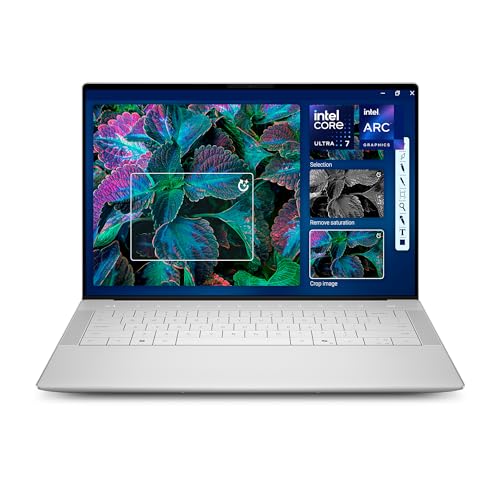
The XPS 14 Premium compresses the flagship idea into a travelling size: a 14.5-inch touchscreen with a 3.2K OLED panel refreshing between 48 and 120Hz, an Intel Core Ultra 7 255H, Intel Arc graphics, 32GB of memory and a 1TB drive, with a backlit keyboard and fingerprint reader titled. For the trader whose desk is a series of cities — the laptop opened in a serviced apartment in Singapore this month and a home office the next — that combination is the whole argument: a chart surface of genuine quality that travels in a carry-on, with the memory figure of a desk machine.
The variable refresh rate deserves translating out of gaming dialect. A range of 48 to 120Hz lets the panel run smoothly when content moves and sip power when it does not; for charts, which are mostly still images punctuated by ticks, the practical meaning is a display that is easy on the eyes across a long session and easy on the battery across a long day. Intel Arc graphics, integrated rather than discrete, suit charting and analysis honestly; the trader whose tools lean hard on GPU acceleration should weigh the RTX machines above and below. The title names no ports at all, so the travelling dock story — one cable at the hotel desk, the second screen in the bag — must be confirmed from Dell’s documentation, where this line’s Thunderbolt provision is described.
Position the XPS 14 as the second-desk machine that can serve as the only desk. It will not out-dock its 16-inch sibling and it will not out-store the Raider, but it is the one pick here a trader can carry through an airport without once thinking about the carrying, and still open onto a screen that respects the work. In a guide of desk anchors, that portability is a specialism of its own.
- Display: 14.5-inch touchscreen, 3.2K OLED, 48-120Hz
- Processor: Intel Core Ultra 7 255H
- Graphics: Intel Arc Graphics
- Memory: 32GB RAM
- Storage: 1TB SSD
- Sign-in: fingerprint reader in backlit keyboard as titled
- Not stated in the listing title — verify with the maker’s documentation
Strengths
- 3.2K OLED in a genuinely portable 14.5-inch body
- 32GB of memory, matching desk machines twice its travel weight
- Variable refresh for long, mostly-static chart sessions
Trade-offs
- Integrated Intel Arc graphics rather than a discrete RTX card
- No ports named in the title, so docking must be verified in documentation
- A single smaller screen makes an external monitor near-mandatory at base
Best for: the travelling trader who refuses to read charts on a compromised screen between home desks. Not suited for: GPU-heavy analysis tooling as the centre of the workflow, because the titled graphics are integrated Intel Arc and nothing stronger.
Travellers should confirm the dock plan first, then check the price on Amazon for this 32GB OLED configuration.

Lenovo ThinkPad E16 Gen 3 (32GB) — Wired Ethernet and value
The ThinkPad E16 Gen 3 holds this guide’s most quietly professional distinction: it is the only title here that names an Ethernet port. Around that port, Lenovo assembles the value specification of the field — an Intel Core Ultra 7 255H, 32GB of DDR5 memory, a 1TB drive, a 16-inch FHD+ display, a fingerprint reader, a backlit keyboard and a privacy shutter, on Windows 11 Pro. No OLED, no discrete graphics, no flagship pricing logic: a business machine whose titled facts map, one by one, onto the trading day’s actual requirements.
The privacy shutter earns a trading-specific note. A trader’s screen life includes broker calls, mentor sessions and screen-shared analysis, and the camera question — is it watching the room between calls — is answered on this machine by a physical cover rather than a settings page. The 16-inch FHD+ panel is the honest middle of the guide’s screens: not the XPS pair’s OLED richness, but a full-size chart surface with room for the platform and the journal side by side when the desk runs a single display. Wi-Fi 6, a generation behind the Wi-Fi 7 machines, matters only where the router is equally current, and the wired port makes the point mostly moot at the desk where this machine will live.
What the title does not name is any video output, so the multi-monitor plan for the E16 runs through Lenovo’s documentation and a dock, as with the Precision. That homework is the pick’s only real tax. Everything else about it reads as the guide’s recommendation for the trader seeking the professional basics complete — memory, storage, wired network, sign-in, shutter, big screen — without paying for a flagship’s theatre. Desks built on that philosophy tend to be the ones still running, unchanged and unbothered, five years later.
The E16 also makes the guide’s best second-machine argument, which serious desks eventually have. A backup laptop for trading does not need OLED or a flagship processor; it needs the platform installed, the journal synced, the wired connection ready — precisely this machine’s profile, at this machine’s tier. Traders building toward redundancy can buy the E16 as the main machine now and let it retire into the backup role when a flagship arrives, or buy it as the backup outright beside an existing desk engine. Either sequencing is rational, and both are cheaper than the night that teaches the lesson uninvited.
- Display: 16-inch FHD+
- Processor: Intel Core Ultra 7 255H
- Memory: 32GB DDR5 RAM
- Storage: 1TB SSD
- Sign-in and camera: fingerprint reader, privacy shutter
- Ports and wireless: Ethernet named, Wi-Fi 6
- Keyboard: backlit
- Operating system: Windows 11 Pro
- Not stated in the listing title — verify with the maker’s documentation
Strengths
- The only titled Ethernet port, for a wired desk connection
- 32GB of memory and 1TB of storage at the field’s value end
- Privacy shutter and fingerprint reader for call-heavy days
Trade-offs
- No discrete graphics card; charting only, by design
- No video output named, so the monitor plan needs a documentation check
- Wi-Fi 6 where three rivals title Wi-Fi 7
Best for: the wired, single-desk trader seeking the professional basics complete, every one of them, without flagship pricing logic. Not suited for: GPU-accelerated analysis as a core tool, because no discrete graphics appear in this build’s title.
Value at this completeness moves quickly, so check the current price on Amazon for the 32GB and 1TB configuration specifically.
MSI Raider A16 HX — 2TB and 240Hz powerhouse
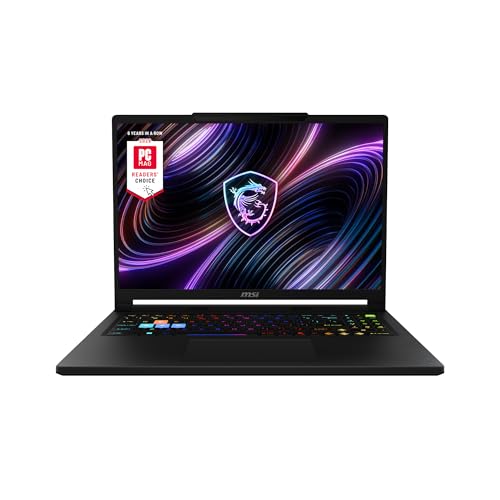
The Raider is the maximalist entry, a gaming flagship whose specification reads like it was assembled without a budget meeting: an AMD Ryzen 9-8940HX, an NVIDIA GeForce RTX 5080, 32GB of DDR5 memory, 2TB of NVMe storage, and a 16-inch QHD+ panel at 240Hz, with USB Type-C and Wi-Fi 7 named. Translated into trading terms, that is the heaviest analysis engine here — backtesting, recorded-session review, data tooling and the live platform all drawing on resources none of them can exhaust — wrapped around the largest storage figure and the fastest-refreshing screen in the guide.
Honesty requires sorting its virtues by relevance. The 2TB drive and the RTX 5080 are genuinely useful to the analysis-heavy trader; the 240Hz refresh rate is a gaming glory that charts, which update by the tick, will never exercise — it costs the buyer nothing in use, but it should earn nothing in the decision either. Windows 11 Home is the build’s one professional compromise, worth noting for traders whose business tooling prefers the Pro edition. The Type-C naming supports the docked-desk pattern without quantifying it, so the multi-monitor plan joins the documentation homework list. And a machine of this class brings the gaming world’s physical character with it: substantial, fan-cooled under load, built for a permanent desk rather than a daily bag.
Buy the Raider for the workload that justifies it — the trader-analyst whose laptop is a research station that also trades — and it is the most capable machine in this guide by a clear margin. Buy it for ordinary platform work and its surplus is decoration. The guide places it fifth not because it is weak but because trading, unlike gaming, pays for headroom only where the workflow reaches for it; where the workflow does reach, nothing else here reaches back as far.
The Raider’s QHD+ resolution deserves its own honest sentence amid the surplus. Spread across 16 inches, that pixel count gives a charting layout genuine room — more instruments visible, finer indicator detail, a platform interface that can show its panels without collapsing them. For the analyst-trader, screen information density is a working tool, and on that measure the Raider’s panel is a professional feature wearing gaming clothes. It is the pick’s refresh rate, not its resolution, that trading cannot use; the distinction matters, because dismissing the whole display as gaming excess would throw away the one screen here that rivals the XPS 16 for sheer chart acreage per inch.
- Display: 16-inch QHD+, 240Hz
- Processor: AMD Ryzen 9-8940HX
- Graphics: NVIDIA GeForce RTX 5080
- Memory: 32GB DDR5 RAM
- Storage: 2TB NVMe SSD
- Ports and wireless: USB Type-C named, Wi-Fi 7
- Operating system: Windows 11 Home
- Not stated in the listing title — verify with the maker’s documentation
Strengths
- RTX 5080 and 2TB of storage, the heaviest figures in this guide
- QHD+ resolution for dense chart and data layouts
- Wi-Fi 7 for current wireless infrastructure
Trade-offs
- Windows 11 Home rather than the Pro edition
- The 240Hz panel is surplus to anything charting can use
- A gaming flagship’s size and cooling character suit a fixed desk only
Best for: the trader-analyst running backtests, recorded review and heavy data tools beside the live session. Not suited for: a business setup standardised on Windows 11 Pro, because this build titles the Home edition.
Maximalist builds vary by listing, so it is worth checking the price on Amazon against the 2TB configuration described here.

HP EliteBook 8 G1a — Dual Thunderbolt, Wi-Fi 7 business build
HP’s EliteBook 8 G1a closes the six with the business traveller’s version of the docked desk: two Thunderbolt ports named in the title, a 16-inch FHD+ anti-glare display, a 5MP IR webcam, a numeric keypad, Wi-Fi 7 and a fingerprint reader, around an AMD Ryzen 7 PRO 250 with 16GB of DDR5 memory and a 512GB drive. The two Thunderbolt ports are its headline for traders — the docked monitors, the wired network through the dock, the whole desk through the modern port — in a machine from HP’s managed business line rather than the gaming world.
The 5MP IR camera is the strongest webcam claim in this guide, and trading gives it real work: broker and mentor calls where presence matters, face sign-in that keeps the desk’s lock discipline effortless across a long day. The anti-glare finish serves the bright home office where a glossy OLED would mirror the window. The numeric keypad absorbs the journal and spreadsheet arithmetic that trading generates daily. Against those virtues stand the field’s lightest core figures — 16GB of memory and 512GB of storage — which suit a single-platform desk with a tidy browser habit and will feel tight to the multi-platform accumulator. This is the pick whose buyer should count their open windows honestly before ordering.
Position it as the professional-services trader’s machine: the consultant who trades and advises, the part-time professional whose desk is also an office, the traveller who docks at two locations and wants the same two-cable ritual at both. Its specification is a deliberate trade — ports, camera and wireless at the front, memory and storage at the standard tier — and for the right workload the trade is not a compromise at all.
- Display: 16-inch FHD+ anti-glare
- Processor: AMD Ryzen 7 PRO 250
- Memory: 16GB DDR5 RAM
- Storage: 512GB SSD
- Camera and sign-in: 5MP IR webcam, fingerprint reader
- Ports and wireless: 2 Thunderbolt ports, Wi-Fi 7, numeric keypad
- Operating system: Windows 11 Pro
- Not stated in the listing title — verify with the maker’s documentation
Strengths
- Two Thunderbolt ports named for a docked multi-screen desk
- 5MP IR webcam, the strongest camera titled here
- Numeric keypad and anti-glare panel for office-bright rooms
Trade-offs
- 16GB of memory, half the figure five rivals carry
- 512GB of storage, the smallest drive in this guide
- No Ethernet port named, so wired networking runs through a dock
Best for: the docking professional whose desk ritual is two cables and whose platform load is a single, well-kept stack. Not suited for: a multi-platform, many-window accumulation habit, because the titled 16GB of memory is this guide’s tightest ceiling alongside its smallest drive.
Port-rich business builds sell in several variants, so check the current price on Amazon with the dual-Thunderbolt configuration confirmed.
How do the six compare side by side?
| Pick | Outputs as titled | Memory and storage | Screen as titled |
|---|---|---|---|
| Dell XPS 16 | 3 Thunderbolt 4 | 32GB, 1TB SSD | 16.3-inch 4K OLED touch |
| Dell Precision 7680 | None named in title | 64GB DDR5, 1TB SSD | 16-inch FHD+ |
| Dell XPS 14 Premium | None named in title | 32GB, 1TB SSD | 14.5-inch 3.2K OLED touch |
| ThinkPad E16 Gen 3 (32GB) | Ethernet named | 32GB DDR5, 1TB SSD | 16-inch FHD+ |
| MSI Raider A16 HX | USB Type-C named | 32GB DDR5, 2TB NVMe | 16-inch QHD+ 240Hz |
| HP EliteBook 8 G1a | 2 Thunderbolt | 16GB DDR5, 512GB SSD | 16-inch FHD+ anti-glare |
What mistakes do traders make when buying a desk laptop?
The first is shopping by processor and discovering the ports later. A trading desk is a system — screens, dock, network, backup — and the laptop’s titled outputs decide whether that system assembles cleanly or through a drawer of adapters. Count the outputs before admiring the silicon. The second mistake is treating the laptop as a performance edge. It is not one, and the trader who believes a faster machine improves results will underinvest in the things that do — the journal’s quality, the connection’s reliability, the backup’s existence. This guide’s whole philosophy is that the machine should be invisible: present for every session, absent from every post-mortem.
Third, traders buy the screen for the shop rather than the session. A glossy showpiece in a bright room, a small panel for a twelve-chart layout, a resolution that crowds the platform’s panels — the session punishes all three daily, while the specification that looked modest in the shop, the anti-glare FHD+ with room to breathe, quietly wins the year. Fourth, the single point of failure gets ignored: one laptop, one drive, one copy of the journal. The professional desk treats backup as part of the laptop purchase, not as a later virtue. Fifth, buyers forget the room’s second shift — the machine that trades all day often also runs the household’s evening, and a laptop bought without a separate work profile ends up carrying games, family accounts and a desktop of distractions into the session. Keep the trading machine’s life as narrow as its job, and it will repay the discipline in the only currency that matters here: uneventful sessions, stacked end to end.
How should you build the desk around the laptop in the first week?
Assemble in the order the failures would arrive. First the connection: wire the desk if the machine or its dock allows it, test the wireless as the backup rather than the plan, and rehearse the phone-hotspot path once so it exists as a drill rather than a discovery. Second the screens: arrange the monitors, set the platform’s layout across them, and save that layout inside the software before the first live session depends on muscle memory. Third the records: one folder discipline for journals and statements, one automatic backup running before the first trade is journaled, because retrofitting order onto a year of files is a weekend nobody enjoys.
While the desk is new, settle the update question as well, because it ambushes more sessions than any hardware fault. Operating systems and platforms both like to restart themselves on their own schedules, and the middle of a volatile morning is where those schedules land when nobody has chosen better. Set the machine’s active hours to your trading hours, give the platform updates a chosen weekly window, and restart deliberately in that window rather than accidentally in the market’s. It is the least technical paragraph in this guide and may be the most valuable, which is usually how reliability works.
Then rehearse a full session on a quiet market day or a simulator account, at the real desk, with the real stack open
— platform, calendar, news, journal, call software — for the full length of your longest trading day. Note where the machine warms, where the fan sits in your attention, where the windows crowd. Adjust the layout once, deliberately, and then freeze it: a trading desk should become boring through familiarity, and every rearrangement spends the attention the market will want later. Finish the week by writing down what you bought — model, configuration, dock, screens — in the trading journal’s equipment page. Traders record everything else; the desk deserves the same respect, and the record will be wanted at upgrade time, which arrives sooner than anyone plans.
Final Recommendation
Build the desk you actually trade from. The multi-screen flagship is the XPS 16, whose three Thunderbolt ports and 4K OLED make the docked wall of charts a one-cable ritual. The heaviest workload belongs to the Precision 7680 and its 64GB. The travelling chartist takes the XPS 14 and its portable OLED. The wired value desk takes the ThinkPad E16, the analyst takes the Raider, and the two-cable professional takes the EliteBook 8. None of them will find you a better entry or forgive a careless one; that was never a laptop’s gift. What the right one gives is a session that never becomes a story about the computer — a quiet desk, a clear screen, a connection that holds from the first coffee to the final review — so that the only record the day leaves is the one in your journal, written by your decisions alone, in a hand that never had to think about the machine underneath it.
Frequently Asked Questions
How many monitors should a forex trader run?
Two is the working standard this guide’s picks are chosen around — charts on one, calendar, news and journal on the other — with a third for traders whose platform layout genuinely uses it. What matters more than the count is that the laptop’s titled outputs can drive the arrangement: the XPS 16’s three Thunderbolt 4 ports and the EliteBook’s two make the plan concrete, while the picks whose titles name no output require a documentation check before screens are ordered.
Is 32GB of memory necessary, or is that gaming influence?
For a single platform and a tidy browser, 16GB — the EliteBook’s figure — runs a session honestly. The case for 32GB is accumulation across a long day: second platforms, research sprawl, screen-sharing, the journal and the news, all resident for twelve hours. Most serious desks land on 32GB as the comfortable floor, and the Precision’s 64GB serves the minority running virtual machines or heavy backtesting beside the live session. It is headroom bought against the day’s worst hour, not the average one.
Does a graphics card matter for charting?
For ordinary charting, modestly; integrated graphics drive multiple chart windows without drama, as the XPS 14’s Intel Arc build assumes. The discrete cards — the XPS 16’s RTX 5060, the Precision’s professional RTX 2000 Ada, the Raider’s RTX 5080 — earn their place where the workflow adds GPU-accelerated analysis, many high-resolution screens, or recorded and streamed sessions. Buy the graphics for the tools you actually run, and let the gaming flagship’s surplus be a bonus rather than the argument.
Should a trader prefer wired Ethernet over Wi-Fi 7?
At a fixed desk, the wired connection removes a variable, which is why the ThinkPad E16’s titled Ethernet port earns its prominence and why the other picks’ docks should be specified with networking in mind. Wi-Fi 7, titled on three picks here, is a strong modern wireless standard and entirely serviceable in a controlled home office. The professional pattern is both: wired as the plan, wireless rehearsed as the backup, and a phone hotspot drilled for the day both fail.
Can one laptop serve for trading and everything else?
It can, and most home traders’ machines do. The discipline that makes it work is separation: a dedicated work profile or account for the trading stack, the session’s software kept free of the household’s clutter, and updates scheduled away from market hours. Where the budget allows, a machine whose life is only trading — the pattern the ThinkPad and Precision picks suit — removes the negotiation entirely. What does not work is the unexamined mixture, where the family’s evening and the market’s morning share one desktop and one update schedule.
How often should a trading laptop be replaced?
On the records horizon rather than the release calendar. The workloads in this guide — platforms, browsers, journals, calls — will run on these specifications for years, so the practical rhythm is set by battery wear, the maker’s support window and the growing weight of the software stack. Many desks land on four or five years, retiring the old machine into the backup role this guide keeps recommending. The replacement to avoid is the emergency one, mid-season, with layouts and journals to migrate under pressure; a calm, planned succession — new machine built and rehearsed beside the old — is the professional pattern, and it is available to any trader who starts it a season early.
What is the most overlooked part of a trading laptop purchase?
The backup of the records. Platforms can be reinstalled and machines replaced in a day, but the journal — the trader’s own history of decisions, statements and notes — exists exactly where it was saved and nowhere else. Every pick in this guide has ample storage for the records themselves; the overlooked step is the automatic copy to a second location, set up in the first week. A desk that can lose its laptop without losing its memory is the real professional standard, and it costs an afternoon rather than a fortune.
Related Guides
Traders whose confidentiality and client-facing work overlap with trading will find the neighbouring discipline in our guide to the best laptops for counselors, and those equipping a small professional office alongside the desk should read the best laptops for small firm lawyers comparison, where the same ports-and-memory logic is applied to a different confidential trade with its own long hours, its own demanding clients, its own court dates, its own filing deadlines and its own unforgiving paper records that outlast every single last partner in the entire firm.


