What's inside
- Where to buy
- Key Takeaways
- Quick Picks
- How Did We Judge Rugged Tablets Without Inventing Battery Numbers?
- The Rugged Field, Compared at a Glance
- How Do You Match a Rugged Tablet to a Working Environment?
- How Do Charging Systems Decide Real-World Endurance?
- How Should a Rugged Tablet Be Set Up for Its First Tour of Duty?
- What Should You Verify During the First Fortnight in the Field?
- Which Mistakes Do Rugged-Tablet Buyers Keep Making?
- Final Recommendation
- Frequently Asked Questions
- Related Guides
As an Amazon Associate I earn from qualifying purchases. This post may contain affiliate links at no extra cost to you.
gizmoverdict.com is reader-supported. When you buy through links on our site, we may earn an affiliate commission.
Where to buy
Every linked pick below is sold through Amazon, and the search for the best rugged tablets great battery life hides a measurement problem this guide refuses to fudge: battery capacity is only comparable when a maker actually states it. Two picks here print serious milliamp-hour figures in their listings — the FOSSIBOT DT3 at 21,560 mAh and the Ulefone Armor Pad 4 Ultra at 11,800 mAh, both quoted exactly as their titles state them. The enterprise machines from Samsung, Getac and Zebra do not print a capacity in their listing titles, so this guide describes their endurance in the terms their makers use for field work — swappable or serviceable designs, all-shift intent, charging ecosystems — and tells you plainly where a number is absent rather than inventing one. A rugged tablet is bought on trust more than any other category; the trust starts with not fabricating the headline figure.
The six entries divide by tribe. Samsung’s Galaxy Tab Active5 Pro represents the mainstream rugged class: a sealed 10.1-inch Android tablet built for warehouses, delivery rounds and field service, sold here as the international SM-X356B version, factory unlocked with WiFi and 5G LTE cellular. Getac and Zebra represent the industrial tier — Windows and enterprise Android machines with barcode readers, smart card readers and sunlight-readable screens, priced and specced for fleets rather than individuals. Ulefone and FOSSIBOT represent the value-rugged tribe: Chinese brands wrapping big batteries and high ingress ratings around consumer Android. And the enterprise detachable class — Panasonic’s Toughbook CF-33, the Getac UX10 G3, Dell’s Latitude 7030 — appears as a prose-only entry, because every verified listing for that class was renewed stock, and renewed buying deserves its own honest framing.
Who needs rugged at all? Anyone whose tablet works where tablets die: construction sites, farms, boats, warehouses, delivery routes, outdoor events, utility field crews. The premium over a consumer slate buys sealed ports, reinforced frames, screens readable in sunlight and batteries sized for shifts rather than evenings. Buyers whose worst environmental hazard is a coffee ring should save the money — but buyers who have already buried one consumer tablet in the field will find the arithmetic here familiar.
One more framing before the picks: rugged is a system, not a shell. The tablets below earn their keep as combinations of sealed hardware, readable screens, charging furniture and support arrangements, and the sections that follow the picks — environment matching, charging systems, first-fortnight verification — matter as much as the product verdicts. Readers who skip to a name and order it without the furniture usually return within a season to buy the furniture; readers who plan the system once tend to disappear from the market for years, which is the surest sign the category worked.
Key Takeaways
- Battery figures are quoted only where a listing states them: FOSSIBOT DT3 at 21,560 mAh and Ulefone Armor Pad 4 Ultra at 11,800 mAh, exactly as their titles print them.
- The Samsung Galaxy Tab Active5 Pro in this listing is the international SM-X356B, factory unlocked with WiFi and 5G LTE — verify band compatibility with your carrier before deploying it.
- Getac’s UX10 G2 and Zebra’s ET80 are fleet machines: barcode and smart-card reading, Windows platforms and sunlight-readable screens matter more there than raw milliamp-hours.
- The Toughbook CF-33, UX10 G3 and Dell Latitude 7030 detachable class is a renewed-only route in verified listings, presented prose-only with the checks that route requires.
- Ingress ratings, screen readability and charging logistics decide field usefulness as much as battery size; the biggest battery in a tablet you cannot read at noon is a paperweight with stamina.
Quick Picks
| Pick | Badge | Why it earns its place |
|---|---|---|
| Samsung Galaxy Tab Active5 Pro | Mainstream rugged, 5G on board | The fleet-friendly Android rugged tablet in an international factory-unlocked listing, with cellular for routes beyond WiFi. |
| Getac UX10 G2 Rugged Tablet | Industrial Windows detachable | A 10.1-inch fully rugged Windows machine with keyboard, barcode reader and smart card reader for enterprise crews. |
| Zebra ET80 Rugged Tablet | Enterprise performance tier | A 12-inch Windows rugged tablet with serious memory and storage for data-heavy field applications. |
| Ulefone Armor Pad 4 Ultra 5G | Big battery, dock charging | 11,800 mAh as titled, IP68 and IP69K sealing, and dock charging for shift-based consumer and prosumer field work. |
| FOSSIBOT DT3 Rugged Tablet | Largest stated battery | 21,560 mAh as titled with rapid charging, for multi-day off-grid stretches where outlets are theoretical. |
| Panasonic Toughbook CF-33 / Getac UX10 G3 / Dell Latitude 7030 class | Renewed-only, prose-only | The enterprise detachable aristocracy, available through verified listings only as renewed stock — unlinked on purpose. |
How Did We Judge Rugged Tablets Without Inventing Battery Numbers?
We began with the honesty rule stated above: capacity figures appear in this guide only where the listing title prints them, and everywhere else endurance is discussed through design evidence — cell size class, charging speed and method, swappability, and the duty the maker builds for. That rule costs the enterprise picks some headline glamour, and we accept the cost. A fleet manager comparing a stated 21,560 mAh against an unstated enterprise pack should understand they are comparing a number with a philosophy: consumer rugged brands compete on printed capacity, while enterprise brands compete on service networks, accessory ecosystems and batteries treated as replaceable fleet consumables.
Ruggedness itself was judged on named evidence rather than adjectives: ingress ratings where the title states them, display brightness and sunlight readability where claimed, and the physical toolkit — barcode readers, smart card readers, NFC, vehicle docks — that separates a work tool from a toughened toy. We also weighed platform fit. Android picks serve the warehouse and delivery app world; the Windows picks from Getac and Zebra serve organisations whose line-of-business software never left Windows; and the international-version Samsung carries a carrier-band caveat that domestic listings would not.
Finally, we considered total deployment cost in the fleet sense: not the shelf price, but docks, cases, spare batteries, warranty handling and the price of a dead tablet at a loading dock at 6 a.m. That lens is why the renewed-only enterprise class earns a prose-only place rather than an omission — for small crews, renewed fleet hardware with a returns window can be the rational route, provided the arrival checks in that section are actually performed.
We also discounted two seductive irrelevancies. Camera counts and benchmark scores decide almost nothing at a loading dock, so they appear in spec lists for completeness rather than in verdicts. And headline drop-test theatre — tablets thrown from drones in launch videos — was ignored entirely; what matters is the rated standard, the seal design and the service path when the rating meets its exception, not the choreography of a marketing stunt.

Samsung Galaxy Tab Active5 Pro — Mainstream rugged, 5G on board
The Galaxy Tab Active5 Pro is the rugged tablet most organisations can actually deploy without a specialist procurement process, and its listing needs reading with care: this is the SM-X356B, the international version, factory unlocked, with WiFi and 5G LTE cellular, 128GB of storage and 6GB of memory, in Green. Factory unlocked is the operative phrase — the tablet is not tied to a carrier, but international models speak the cellular bands of their home markets, so a buyer planning to run it on a specific domestic network should confirm band compatibility before ordering a fleet’s worth. Used on WiFi or on a compatible network, it is the most polished rugged Android in this guide.
Samsung’s Active line earns its reputation on the unglamorous details of shift work. The touchscreen is designed to respond to gloved hands and wet conditions, the body is sealed and reinforced for drops onto concrete, and the platform plugs into Samsung’s enterprise management world, which matters when fifty tablets need the same apps, the same restrictions and the same update policy by Monday. The 10.1-inch size hits the field-work sweet spot: large enough for forms, maps and picking lists, small enough for a vehicle mount or a jacket-adjacent carry. For delivery, inspection, warehousing and field-service software that lives on Android, this is the default answer against which the rest of the list is priced.
Battery discussion for the Active5 Pro follows this guide’s rule. The listing title states no capacity figure, so we print none; what can be said is that the Active line is engineered around shift-length working days and Samsung’s charging and dock ecosystem, and that buyers standardising on it should confirm the rated capacity and the spare-battery and dock options in Samsung’s documentation for the SM-X356B specifically, since regional variants differ. Fleets that run multi-day routes without depot returns should compare that documentation carefully against the stated capacities of the Ulefone and FOSSIBOT below before assuming the famous name also wins the endurance argument.
The honest limitations are the international listing itself and the ecosystem’s centre of gravity. Warranty handling for international versions can differ from domestic stock, and buyers who need carrier certification for a specific network feature should verify rather than assume. None of that diminishes the machine; it defines the homework. For Android field work bought knowingly, the Active5 Pro remains the benchmark rugged tablet of this list.
A day riding with a delivery crew shows why the benchmark status persists. The tablet wakes in the mount already showing the route, comes off the mount forty times for signatures and photos without a creak or a case adjustment, takes a rain shower at a farm gate and a flour-dusting at a bakery drop without ceremony, and returns to the depot with the day’s records synced. Nothing in that day is a specification; it is the accumulation of small reliabilities, and it is what fleet managers are describing when they say a device “just works in the field”. Rivals beat the Active5 Pro on individual lines — capacity, price, screen size — but the whole-day fluency is the standard the lines are measured against.
- Display: 10.1-inch rugged tablet format
- Model: SM-X356B, international version, factory unlocked, Green finish
- Connectivity: WiFi plus 5G LTE cellular — confirm carrier band compatibility before fleet orders
- Memory and storage: 6GB memory, 128GB storage
- Battery: No capacity figure is printed in the listing title — consult Samsung’s documentation for the SM-X356B rating
- Rugged design: Sold as a rugged tablet in Samsung’s Active line; verify the exact ingress and drop ratings in the maker’s documentation
Strengths
- The most deployable rugged Android here, with enterprise management support behind it.
- Cellular on board for routes and sites where WiFi is a rumour.
- A 10.1-inch working size that suits mounts, forms and one-handed carry between tasks.
Trade-offs
- International version: band compatibility and warranty handling need checking first.
- No battery capacity is stated in the listing, so endurance comparisons require the maker’s documents.
- Samsung’s enterprise strengths reward Samsung-managed fleets most; mixed fleets gain less.
Best for: warehouses, delivery and field-service teams standardising on managed Android with cellular. Not suited for: buyers who need guaranteed domestic carrier certification out of the box, or off-grid users whose first requirement is a printed multi-day battery figure.
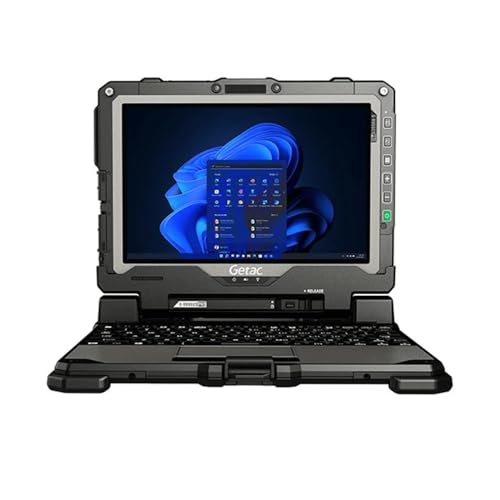
Getac UX10 G2 Rugged Tablet — Industrial Windows detachable
The Getac UX10 G2 belongs to a different civilisation from the Android picks: a fully rugged Windows tablet with its keyboard included in this listing, built for the public-safety, utility and industrial crews whose software, credentials and workflows live on Windows and outdoors at the same time. The title’s specification reads like a field kit rather than a tablet advert — a 10th-generation Intel Core i5, 8GB of memory, 256GB of storage, a 10.1-inch Full HD multi-touch screen described as sunlight readable, a barcode reader, a smart card reader and Windows 11 Pro. Each item answers a real deployment question: the smart card reader is how a utility crew authenticates, the barcode reader is how assets get logged, and sunlight readability is how a screen stays a screen at noon in a rail yard.
The detachable form is the UX10’s working argument. With the keyboard attached it is a small rugged laptop for reports, diagrams and email at a tailgate desk; detached, it is a tablet for inspections, meter work and patient-side or asset-side data entry. Getac’s ecosystem of vehicle docks, carry solutions and service support surrounds the machine, and that ecosystem — more than any processor figure — is what enterprise buyers are actually purchasing. A broken consumer tablet is an errand; a broken fleet device with a service contract is a ticket that gets closed.
Endurance, per this guide’s rule, is discussed without a printed figure, because the title states none. Fully rugged Windows machines are engineered around shift patterns and dock charging — the tablet lives in a vehicle dock or a cradle between tasks, sipping power as a way of life — and fleet buyers should confirm the rated battery configuration and hot-swap or spare options in Getac’s documentation for the exact unit being ordered. Buyers whose work is a three-day backpack traverse should look at the stated capacities further down this list instead; buyers whose work is a twelve-hour shift with a truck nearby are the UX10’s natural constituency.
The costs of the civilisation are weight, price class and commitment. A fully rugged Windows detachable with its keyboard is a serious carry and a serious purchase, justified by downtime arithmetic rather than by specifications lust. Individuals tempted by the spec sheet should ask whether their work truly authenticates with smart cards and scans barcodes in the rain; if not, the Samsung above delivers most of the rugged life at a fraction of the ceremony.
The UX10’s second life deserves a sentence, because enterprise machines are bought for arcs, not seasons. A detachable that starts as a patrol-car terminal can be re-docked as a workshop reference station years later, its keyboard and docks following it through roles, and Getac’s parts and service culture is organised around exactly that longevity. Buyers comparing sticker prices against consumer tablets should compare them against the second and third deployments instead; rugged enterprise hardware is one of the few technology categories where the expensive purchase routinely turns out to have been the frugal one.
- Display: 10.1-inch Full HD multi-touch, described in the title as sunlight readable
- Processor: Intel Core i5, 10th generation
- Memory and storage: 8GB memory, 256GB storage
- Included: Keyboard, per the listing title
- Readers: Barcode reader and smart card reader named in the title
- Operating system: Windows 11 Pro
- Battery: No capacity is stated in the listing title — verify configuration and spares in Getac’s documentation
Strengths
- A complete field credential kit: barcode and smart-card reading built in, not bolted on.
- Sunlight-readable screen and fully rugged build for genuine outdoor Windows work.
- Keyboard included, making the detachable laptop mode real from day one.
Trade-offs
- Enterprise weight and price class; overkill for light-duty users.
- Battery configuration must be confirmed in documentation, not assumed from the title.
- Its value compounds inside Getac’s dock and service ecosystem; standalone buyers gain less.
Best for: utility, public-safety and industrial crews running Windows software outdoors with credential and barcode workflows. Not suited for: casual rugged buyers, backpack multi-day users, or anyone whose field kit fits in a jacket pocket.

Zebra ET80 Rugged Tablet — Enterprise performance tier
Zebra’s ET80 is the heavyweight of this list in every sense that matters to an enterprise architect. The listing specifies an Intel Core i5-1130G7 processor, 16GB of RAM and a 512GB solid-state drive behind a 12-inch touchscreen at 2160 by 1440 resolution, with NFC and Wi-Fi 6E on board and Windows 10 Pro in this configuration. Those are laptop-class internals wearing a rugged frame, chosen for field applications that are genuinely heavy: mapping with dense layers, inspection software with large local datasets, warehouse and manufacturing systems that treat the tablet as a primary terminal rather than a companion.
Zebra’s name carries a specific promise in this market. The company builds the scanners and mobile computers that run the world’s warehouses, and the ET80 is designed to live inside that world — docks, vehicle mounts, enterprise management, and a service culture that understands a dead device on a loading dock as a logistics event, not a gadget problem. The 12-inch screen suits the two-handed, workbench-and-vehicle rhythm of that world: forms with real depth, schematics that stay legible, split views of inventory and instructions. Buyers outside the enterprise orbit should note the configuration detail in the title — Windows 10 Pro rather than 11 — and confirm their organisation’s platform policy before standardising.
Battery honesty applies here with full force: the listing title prints no capacity, and this guide prints none either. Zebra designs for shift work within a dock-and-charge ecosystem, and the ET80’s endurance conversation belongs with its fleet documentation — rated pack configurations, spare and charging options, and the duty cycle assumptions behind them. What can be said from the specification is that a 12-inch performance tablet will live closer to its dock than the big-battery consumer picks below, and that trade is deliberate: the ET80 spends its engineering budget on compute and screen, trusting the fleet’s charging furniture to keep it fed.
For the right buyer, that is exactly correct. Organisations replacing ageing rugged laptops, or extending a Zebra-managed estate to a larger Windows canvas, will find the ET80 the most capable machine in this guide. Solo buyers and small crews should weigh whether their work needs its headroom, because its price class and ecosystem assume a fleet standing behind the purchase.
There is a training dividend to the ET80’s size that fleet planners mention and spec sheets miss. A 12-inch canvas at QHD resolution lets a new hire shadow a trainer on one screen — form on the left, instruction video or annotated diagram on the right — without the squinting choreography smaller terminals impose. In warehouses and plants where the tablet is the interface to the entire operation, that legibility is a safety feature as much as a convenience: pick instructions, torque values and hazard notes read correctly the first time are worth more than any processor benchmark.
- Display: 12-inch touchscreen, 2160 by 1440 (QHD)
- Processor: Intel Core i5-1130G7, up to 4 GHz, with Intel Iris Xe graphics
- Memory and storage: 16GB RAM, 512GB SSD
- Connectivity: NFC and Wi-Fi 6E, per the listing title
- Operating system: Windows 10 Pro 64-bit in this listing — confirm your platform policy
- Battery: No capacity figure appears in the title; consult Zebra’s fleet documentation for rated configurations
Strengths
- Laptop-class memory and storage for genuinely heavy field applications.
- A 12-inch high-resolution canvas for schematics, maps and dense forms.
- Zebra’s enterprise ecosystem of docks, mounts and service behind the device.
Trade-offs
- Windows 10 Pro in this configuration, which some organisations have already retired.
- Performance-first design expects a dock-centred charging life, not multi-day autonomy.
- Fleet pricing and assumptions; a solitary buyer pays for an ecosystem they may not use.
Best for: enterprises extending a managed Windows fleet to heavy field applications on a large rugged screen. Not suited for: off-grid multi-day work, small crews without fleet infrastructure, or buyers who need a stated battery figure to plan around.

Ulefone Armor Pad 4 Ultra 5G — Big battery, dock charging
The Ulefone Armor Pad 4 Ultra speaks the value-rugged dialect fluently, and its title leads with the number this guide is allowed to quote: an 11,800 mAh battery with 33W charging, plus 10W dock charging for shift furniture. Around that battery sits a specification aimed at outdoor Android work — a 10.36-inch 2K Corning display, IP68 and IP69K ingress ratings as titled, Android 15, 16GB of memory with 256GB of storage and expansion up to 2TB, dual 5G, NFC, and a camera pairing of 50MP and 32MP with 1100-lumen LED lights that turn the tablet into its own work lamp. It is a specification written by people who understand that field tablets get used as flashlights, cameras and radios as often as computers.
The dock charging deserves emphasis, because it changes the battery conversation from size to system. A tablet that drops into a dock at a depot, a vehicle or a site cabin and charges without cables being fumbled by gloved hands will, in practice, be charged more often and more completely than a larger battery that depends on someone remembering a cable. Ulefone pairing a substantial stated capacity with that convenience is the most operationally literate move in the consumer half of this list. The IP69K rating — protection against high-pressure, high-temperature water jets, beyond the usual IP68 immersion claim — suits washdown environments in agriculture and food work where tablets are hosed off with everything else.
Temper the enthusiasm with the tribe’s usual caveats. Ulefone’s software support cadence and service network are not Samsung’s or Zebra’s; a buyer deploying fifty units should pilot five first and learn the update and warranty reality before scaling. Camera megapixel counts and LED lumens are title claims that describe hardware, not photographic destiny. And dual 5G in an international-market device deserves the same band-check discipline as the Samsung above. Judged as what it is — a big-battery, well-sealed Android for outdoor work at a value-rugged price class — the Armor Pad 4 Ultra is a coherent and likeable machine.
Picture its happiest owner: a fencing contractor or a farm manager whose office is a truck cab and whose previous tablet died of a cracked screen and a rained-on charging port in the same month. The Ulefone lives in the cab’s dock, charges without a cable ceremony, comes out for photographs of completed work and livestock records, gets hosed off with the boots, and uses its own LED array when the last job of a winter day runs past dark. That owner does not need smart-card authentication or a service contract; they need a tablet that treats weather as a scheduling detail. The Armor Pad was clearly specced by someone who had met that owner.
- Battery: 11,800 mAh with 33W charging, plus 10W dock charging — all as stated in the listing title
- Display: 10.36-inch 2K Corning display
- Sealing: IP68 and IP69K ratings, per the title
- Memory and storage: 16GB memory figure, 256GB storage with expansion up to 2TB as titled
- Platform: Android 15, dual 5G, NFC
- Cameras and light: 50MP and 32MP cameras, 1100-lumen LED lights, as titled
Strengths
- A stated 11,800 mAh battery paired with cable-free dock charging for shift rhythms.
- IP69K sealing suits washdown work that lesser ratings only survive in theory.
- Work-light LEDs and serious cameras make it a genuine multi-tool outdoors.
Trade-offs
- Brand support and update cadence trail the enterprise names; pilot before fleet orders.
- International 5G bands need confirming against your carrier.
- Headline camera and light figures are hardware claims, not quality guarantees.
Best for: agricultural, construction and outdoor crews who want stated battery capacity, dock charging and washdown sealing without enterprise pricing. Not suited for: organisations that need guaranteed long-term software support contracts, or credential-heavy Windows workflows.

FOSSIBOT DT3 Rugged Tablet — Largest stated battery
The FOSSIBOT DT3’s title contains the biggest number in this guide, and the guide quotes it exactly as printed: a 21,560 mAh battery in a 10.4-inch rugged tablet, with 66W rapid charging to refill it. Around that headline, the title stacks the expected value-rugged furniture — Android 15, a 2K IPS display, Wi-Fi 6, IP68 and IP69K waterproofing, 5G connectivity, a memory and storage configuration printed as 32GB plus 256GB with 2TB expansion, 64MP and 32MP cameras, face unlock and OTG support. The “32GB” figure follows the category’s habit of summing physical and extended memory; treat the 256GB storage figure as the concrete one and confirm the physical memory in the full listing if it matters to your workload.
What is a battery of that class actually for? Multi-day autonomy away from infrastructure: survey and inspection routes that sleep in vehicles, disaster-relief and event work where generators are rationed, marine and remote-site duty, and any job where the tablet is also the team’s hotspot, camera and light. Rapid charging at the stated 66W matters as much as capacity in those settings, because opportunity charging — forty minutes at a depot socket — converts into days of margin only if the pack can drink quickly. A huge battery with slow charging is a commitment; a huge battery with rapid charging is a strategy.
The discipline this guide applies to every pick applies here too, in reverse: a printed capacity is a claim about a cell, not a promise about your week. Screen brightness in sunlight, 5G searching for signal at a coverage edge, cold weather and hotspot duty all tax a battery in ways no title can foresee, so plan multi-day work with the same reserve you would give a fuel tank. FOSSIBOT’s support footprint is the value tribe’s standard caveat — thinner than the enterprise names, priced accordingly — and the sensible deployment is the same pilot-first pattern advised for the Ulefone. Within those honest bounds, the DT3 is the endurance specialist of this list, and it is not close.
Endurance at this scale changes behaviour in a way smaller margins never do. A tablet that measures its autonomy in days stops being rationed: the screen can stay bright in sunlight, the hotspot can stay on for the team’s phones, the mapping app can track continuously, and nobody performs the mental arithmetic of whether a photograph is worth the percentage it costs. Field workers describe the shift as the device becoming infrastructure rather than equipment — closer to the vehicle’s fuel tank than to a phone. Buyers whose work has that character will find the DT3’s headline figure less interesting than the freedom standing behind it.
- Battery: 21,560 mAh with 66W rapid charging, exactly as stated in the listing title
- Display: 10.4-inch 2K IPS display
- Sealing: IP68 and IP69K waterproof ratings, per the title
- Platform: Android 15, Wi-Fi 6, 5G connectivity
- Storage: 256GB with expansion up to 2TB as titled; the title’s 32GB memory figure appears to include extended memory — confirm physical memory in the full listing
- Cameras: 64MP and 32MP cameras, face unlock and OTG, as titled
Strengths
- The largest stated battery in this guide, paired with genuinely rapid refilling.
- Full IP68 and IP69K sealing for wet, dirty, washdown-prone work.
- Storage expansion headroom for offline maps, media and field records.
Trade-offs
- A battery that size brings weight; this is a tool-bag tablet, not a jacket one.
- Value-brand support and updates trail the enterprise tier — pilot before scaling.
- Real-world endurance still depends on signal, brightness and temperature, not the headline figure alone.
Best for: off-grid, multi-day and infrastructure-poor work where stated capacity and rapid charging decide feasibility. Not suited for: weight-sensitive carry, managed-fleet buyers needing service contracts, or credential-based Windows workflows.
Panasonic Toughbook CF-33 / Getac UX10 G3 / Dell Latitude 7030 class — Renewed-only, prose-only
The final entry is a class rather than a product, and it is unlinked for the reason this guide has stated from the top: every verified listing we could confirm for the enterprise detachable aristocracy — Panasonic’s Toughbook CF-33, Getac’s UX10 in its G3 generation, Dell’s Latitude 7030 rugged tablet — was renewed stock. These are the machines that police fleets, ambulance services and utilities standardised on: detachable keyboards, hot-swappable battery philosophies, vehicle docks in every bay, and service ecosystems built over decades. New, they sit at the summit of rugged pricing. Renewed, they become reachable for small crews, volunteer services and solo professionals whose work genuinely matches the class.
Renewed buying at this level is a skill, and the checks are specific. Confirm the exact generation and configuration in the unit’s own system information on arrival, because listings for long-lived enterprise models blur generations and options. Test both batteries if the design carries two, run the touchscreen and pen across every corner, verify the keyboard dock latches and charges, and check that ports and slot covers — the seals that make the ruggedness real — are present and undamaged. Buy only through programmes with a clear returns window, and treat the first week as an inspection tour rather than a honeymoon. Performed calmly, those checks convert renewed from a gamble into the best value route in this entire category.
Battery expectations for the class should be set by design rather than by number. These machines were built around docks and swappable packs inside fleet infrastructures, so a renewed unit’s endurance depends heavily on the health of the specific packs in the box — one more arrival test, and a reason to budget for a fresh spare pack as part of the purchase. Buyers who need a printed capacity to plan a multi-day route should take the FOSSIBOT above and accept its trade-offs instead. Buyers whose work has a vehicle, a dock and a returns window will find this class, bought carefully, to be the most professional hardware in the guide.
A final practical note on sourcing: the renewed market for this class runs through refurbishers who grade units, replace worn packs and stand behind the result, and through looser channels that do none of those things. The price difference between the two is the inspection and warranty you are either buying or performing yourself. Crews with a technically confident member can shop wider and inspect harder; crews without one should pay the refurbisher’s margin gladly, because it is, in effect, the fleet-service contract this class was designed around, sold in a smaller denomination.
- Availability: Verified listings for the CF-33, UX10 G3 and Latitude 7030 class are renewed stock only — this entry is intentionally unlinked
- Form: Enterprise detachable tablets with keyboard docks, built for vehicle and fleet ecosystems
- Battery: Pack health varies by individual renewed unit; test on arrival and budget for a fresh spare
- Condition checks: Generation, configuration, seals, dock function and touchscreen corners, verified during the returns window
- Warranty: Set by the renewing programme rather than the original maker in most cases — read its terms closely
- Best route: Programmes with clear grading and returns, never unverifiable one-off listings
Strengths
- The most proven fleet hardware in the category, at renewed rather than new prices.
- Detachable keyboards and dock ecosystems that consumer rugged cannot match.
- Designed for serviceability, so packs and parts follow a professional logic.
Trade-offs
- Condition, battery health and configuration vary unit by unit — inspection is mandatory.
- Renewed warranty terms are thinner than new enterprise contracts.
- No printed battery figure to plan around; endurance is an arrival measurement.
Best for: small crews and professionals whose work matches fleet workflows and who will perform the arrival checks. Not suited for: buyers who need new-device certainty, printed endurance figures, or a purchase they never have to inspect.
The Rugged Field, Compared at a Glance
The battery-evidence column is the conscience of this table. Where it says a figure, the figure came from the product’s own listing title and can be checked there; where it says the title is silent, the honest next step is the maker’s documentation, and any source that quotes you a precise capacity for those models without one should be treated as folklore. Read the rest of the row for fit — platform, signature tool, working personality — and let the evidence column govern how much verification homework each candidate assigns you.
| Tablet | Platform | Battery evidence | Signature tool | Working personality |
|---|---|---|---|---|
| Samsung Galaxy Tab Active5 Pro | Android | Not stated in listing title | 5G cellular, enterprise management | Managed fleet all-rounder (international version) |
| Getac UX10 G2 | Windows 11 Pro | Not stated in listing title | Barcode and smart card readers | Credential-carrying industrial detachable |
| Zebra ET80 | Windows 10 Pro | Not stated in listing title | 12-inch QHD canvas, NFC | Performance tier for heavy field apps |
| Ulefone Armor Pad 4 Ultra 5G | Android 15 | 11,800 mAh as titled | Dock charging, IP69K sealing | Shift-based outdoor value pick |
| FOSSIBOT DT3 | Android 15 | 21,560 mAh as titled | 66W rapid charging | Multi-day off-grid endurance specialist |
| Toughbook / UX10 G3 / Latitude 7030 class | Windows | Renewed units — test on arrival | Detachable fleet ecosystems | Renewed-only professional route |
How Do You Match a Rugged Tablet to a Working Environment?
Start with the three questions that actually kill tablets outdoors. What hits it — water, dust, drops, washdown jets, vehicle vibration? What must it do at noon — stay readable in full sun, respond to gloves, scan a barcode through shrink-wrap? And where does it sleep — a vehicle dock, a depot cradle, a backpack, a boat locker? The picks sort themselves quickly once those answers exist: washdown points to the IP69K pair, credential workflows point to the Getac, dock-centred fleets point to Samsung, Zebra or the renewed class, and sleeping-in-a-backpack autonomy points to the FOSSIBOT’s stated capacity.
Then be honest about the software map. Field organisations rarely choose a platform freely; the warehouse system, the inspection suite or the public-safety stack has already chosen. Android’s field-app ecosystem is broad and current, Windows holds the legacy and credential-heavy ground, and mixing the two inside one small fleet doubles the management burden for no field benefit. Individual buyers have the luxury of choosing by task instead — and for them the stated-battery Android picks deliver the most rugged life per unit of money, provided the support caveats are accepted with open eyes.
Temperature deserves a line of its own in the environment audit, because it taxes both halves of a rugged tablet’s promise. Cold thickens battery chemistry and slows screens; heat throttles processors and punishes charging. Crews working winters in unheated vehicles or summers on rooftops should treat the operating-temperature range in each maker’s documentation as a first-order specification, equal to the ingress rating — a tablet can be perfectly sealed against the rain and still be the wrong tool for a January night shift in an open yard.
How Do Charging Systems Decide Real-World Endurance?
Ask a fleet manager what battery life means and they will talk about furniture, not cells. A tablet’s lived endurance is the product of its capacity and the number of times a day it passes a charger it can actually use: the vehicle dock on every route, the depot cradle at shift change, the rapid charger that converts a lunch break into half a battery. This is why the enterprise picks, with no printed capacities in their titles, can out-endure larger consumer packs in service — their ecosystems are designed so that charging happens by geography rather than by memory. It is also why the Ulefone’s 10W dock charging, a modest figure on paper, punches above its wattage: a dock that is always used beats a fast charger that is sometimes forgotten.
Solo and off-grid buyers live in the opposite world, where the cell is the system. With no dock network waiting, capacity and charging speed are the whole strategy, and the FOSSIBOT’s pairing of a stated 21,560 mAh with 66W rapid charging is the only entry in this guide built entirely for that world. The practical advice splits accordingly: if your work has walls, vehicles and depots, buy the ecosystem and let endurance take care of itself; if your work has horizons, buy the battery — and still carry the discipline of a reserve margin, because weather and signal strength tax every cell ever made.
How Should a Rugged Tablet Be Set Up for Its First Tour of Duty?
Configure before deployment, not during it. Load the device management profile, the field apps and the offline maps while the tablet is still on a desk with good connectivity, because a construction site is a poor place to discover a missing licence. Fit the case, hand strap or shoulder strap the crew will actually use, pair the dock and confirm the tablet charges in it without a wiggle ritual, and set the screen timeout and brightness policy for sunlight work rather than office defaults. For cellular models, activate and test the SIM in coverage before the route that leaves coverage.
Then rehearse the failures. Simulate a dead battery at shift change: where is the spare, the dock, the cable, and who owns the swap? Simulate a cracked screen: which programme, which ticket, which loaner? Fleets that rehearse these small disasters in week one treat them as logistics; fleets that meet them first at a loading dock treat them as crises. Solo professionals should run the same rehearsal at kitchen-table scale — a charged power bank that the tablet accepts at full speed, a backup way to reach the day’s documents, and the returns or warranty paperwork filed somewhere findable.
Connectivity checks belong in the same rehearsal week. Pair every Bluetooth accessory the crew uses — scanners, printers, headsets — and confirm they reconnect without a pairing ceremony after the tablet sleeps, because field mornings have no patience for settings menus. Save the day’s essential documents and maps for offline use and open them once with connectivity off; the middle of a coverage dead zone is the wrong place to learn that a “downloaded” file was only ever a shortcut. These are ten-minute verifications that convert a new tablet from a promising object into known equipment.
What Should You Verify During the First Fortnight in the Field?
New rugged hardware should earn trust in a deliberate order. In the first days, verify the claims your work depends on: the screen’s readability at the actual noon of your actual site, the touchscreen’s behaviour with your actual gloves, the scanner’s aim on your actual labels, and the dock’s charge across a real shift rather than a desk hour. Note the battery percentage at shift start and end for a week; the pattern that emerges is your device’s true endurance signature, worth more than any figure printed anywhere, and the baseline against which ageing will later be measured.
In the second week, test the recovery paths while nothing is at stake. Swap the battery or run the device to empty and time the recharge. Break the routine deliberately — leave the tablet in a cold vehicle overnight, use it in the rain your site actually gets, drop it the careful half-metre onto the surface it will meet in service — and confirm the seals, screen and records survive as the ratings promise. Fleets should log these results per unit; solo buyers should at least keep the notes with the warranty paperwork. A rugged tablet that has passed its own fortnight is no longer a purchase; it is equipment, and the distinction is the entire point of the category.
Which Mistakes Do Rugged-Tablet Buyers Keep Making?
The headline mistake is comparing battery numbers that do not exist on equal terms — treating a printed consumer capacity as a verdict against enterprise machines whose makers simply do not compete on that line of the spec sheet, or worse, trusting unsourced figures for the enterprise models repeated around the web. The second mistake is buying the rating and forgetting the system: an IP69K tablet without a dock, a strap or a charging routine still dies of logistics. Third comes the international-version oversight — deploying a factory-unlocked tablet on a network whose bands were never checked, then blaming the hardware for a paperwork failure. Renewed buyers repeat their own classic error: skipping the arrival inspection while the returns window stands open. And individuals chronically over-buy, purchasing fleet-grade Windows machinery for garden-and-workshop duty that the value Android picks would have served happily for years.
A final mistake is quieter: deploying the tablet before the charging furniture arrives. Docks, cradles and spare packs are frequently ordered in a second wave, weeks after the devices, and in the interval the crew develops cable habits and battery anxieties that harden into the fleet’s culture. Order the system as a system — device, dock, strap, spare — and the first month teaches the rhythms the hardware was designed for, instead of improvisations nobody later bothers to unlearn.
Final Recommendation
Match the machine to the shift. Managed Android fleets should standardise on the Galaxy Tab Active5 Pro, having done the band homework its international listing demands. Windows crews with credentials and barcodes belong on the Getac UX10 G2; enterprises with heavy applications and an existing Zebra estate belong on the ET80. Outdoor crews who buy their own tools should weigh the Ulefone’s dock-and-capacity system against the FOSSIBOT’s sheer stated endurance, and professionals who know the enterprise detachable class should shop it renewed, carefully, through programmes that let them inspect. The right rugged tablet is the one still working, readable and charged at the end of the worst shift of the year — judge every claim in this guide against that single afternoon, and you will not go far wrong.
And keep the receipt of your reasoning. A short note — why this model, which checks it passed in its first fortnight, where its spare pack and paperwork live — turns the next purchase, years later, into a comparison against evidence rather than against nostalgia. Rugged fleets are built one documented decision at a time, and even a fleet of one deserves the documentation.
Frequently Asked Questions
Why do some picks have no battery figure in this guide?
Because their listing titles print none, and this guide quotes capacity only from the title rather than repeating figures of uncertain origin. Samsung, Getac and Zebra publish ratings in their own documentation; the FOSSIBOT and Ulefone figures quoted here — 21,560 mAh and 11,800 mAh — are the ones their titles state. The distinction matters because fleet decisions built on folklore figures fail in the field, where the truth arrives uninvited, usually at the worst possible hour of the working week.
What does an IP69K rating add over IP68?
IP68 covers immersion in water under the maker’s stated conditions. IP69K adds resistance to high-pressure, high-temperature water jets — the washdown scenario in agriculture, food processing and vehicle cleaning. If your tablet gets hosed down, the K matters; if it merely gets rained on, IP68 already covers the day.
Is the international Galaxy Tab Active5 Pro safe to buy for cellular use?
It is factory unlocked, which means no carrier lock — but unlocked is not the same as universally band-compatible. Check the SM-X356B’s supported bands against your carrier’s network before ordering, especially for fleet quantities. On WiFi, the question does not arise.
Should a small business buy the renewed enterprise class?
It can be the smartest money in this category, provided the purchase goes through a programme with grading and returns, and the arrival checks — generation, batteries, seals, dock, screen corners — are performed inside the returns window. Skipping the inspection converts a value strategy into a lottery.
Do rugged tablets need cases like ordinary tablets?
They need carry systems more than armour: hand straps, shoulder straps, vehicle docks and depot cradles matched to the work. The device itself is built for impact; the accessories exist so it is held securely, charged reliably and readable at the angle the job demands. A screen protector is still cheap sense in abrasive environments — sand and grit defeat more touchscreens than drops ever will — and it costs almost nothing beside the device it guards.
How long should a rugged tablet stay in service?
Longer than a consumer slate, by design. Enterprise models are built for multi-year fleet deployments with serviceable parts, and even the value-rugged Android picks should give several seasons of field work. The practical limits are software support and battery ageing, both of which argue for confirming update policy and spare-pack availability before a fleet commits. Planning a replacement cycle around the battery’s realistic life, rather than the frame’s, keeps a fleet honest and funded.
Related Guides
Field kit rarely travels alone; see also our guide to tablets for work in clinics and veterinary practices, the roundup of tablets for writing and typing in rough conditions, and our large-screen tablet picks for reading schematics and manuals.


