Our Top Picks


What's inside
- How Joy-Con charging works in the first place
- The battery inside each controller, in real numbers
- What a separate charging dock actually solves
- Electrical basics: 5 volts, modest current, four small cells
- Reading the lights: per-slot indicators and protection circuits
- The main shapes of dock, and what each suits
- Rails, latches and copper: the mechanics of the connection
- Compatibility: Switch, Switch OLED, Pro controllers and imitations
- Choosing by household: slots, people and playing patterns
- Where the power comes from: console ports, adapters and shared supplies
- Safety markings and build quality signals
- Travel, desks and second rooms
- Daily habits that keep controllers ready
- Troubleshooting the common complaints
- What specifications are worth comparing, and which are decoration
- How dock charging compares with charging on the console
- Frequently asked questions
- Check prices on Amazon
- Disclosure and a closing note
As an Amazon Associate I earn from qualifying purchases. This post may contain affiliate links at no extra cost to you.
A pair of Joy-Con controllers looks simple from the outside: two small gamepads, each with a stick, four face buttons, shoulder rails and a battery sealed inside a slim plastic shell. Keeping those batteries ready is less simple once a household owns more than one pair. The console itself can charge a single attached pair, and that arrangement works neatly for a solo player who docks the system every night. It breaks down quickly for families, roommates and anyone who keeps a spare pair for multiplayer sessions, because controllers left loose in a drawer or resting on a shelf receive no power at all. A dedicated Joy-Con dock charger addresses that gap directly. It gives two or four controllers a fixed home, feeds them at a modest and predictable rate, and shows at a glance which units are full and which still need time.
This guide works through the category in practical order. Early sections explain how Joy-Con charging actually functions, what the battery inside each controller can and cannot do, and why the electrical demands involved are small compared with charging a phone or a console. Middle sections separate the different shapes of charger on sale, including the important distinction between a charger that only holds Joy-Con controllers and a console dock that also sends video to a television. Later sections cover fit, contact wear, compatibility across Switch models, power sources, safety markings and travel use, ending with a buying checklist matched to different household sizes.
Nothing in this category requires exotic technology. The differences that matter are mechanical and organisational rather than spectacular: how firmly a controller seats on its rail, whether each slot reports its own status, whether the base stays put on a shelf, and whether the power supply is shared sensibly across all occupied slots. A charger that handles those basics well will feel invisible in daily use, which is exactly the point. Controllers go back to the same place after every session, they are full when the next session starts, and nobody has to hunt for a loose left controller with a flat battery ten minutes before guests arrive.
How Joy-Con charging works in the first place
Each Joy-Con charges through the rail that runs along its inner edge. That rail is the same interface used to slide the controller onto the side of the console, where mechanical latches hold it in place and a row of electrical contacts near the bottom of the rail carries power and data. When a controller is attached to the console, the console feeds it from its own battery or from mains power when the system is docked. When a controller sits in a separate charging dock, the dock reproduces the power side of that connection: the controller slides onto a short rail, the contacts meet, and current flows into the small internal cell.
The data side of the connection matters far less for a charging accessory than the power side. A charging dock does not need to pair controllers, update firmware or pass button inputs anywhere. Pairing and updates remain jobs for the console itself, handled when a controller is attached to the system or connected wirelessly after pairing. That division of labour keeps charging docks simple and inexpensive, but it also explains a common moment of confusion. A controller placed in a charging dock for the first time has not been introduced to any new system; the dock is closer to a powered stand than to a piece of gaming hardware, and no setup menu is involved.
The slide, the click and the contacts
Owners already know the physical routine from the console itself. The controller approaches from above, the rail guides it straight, and a small latch engages near the top with a click that can be felt as much as heard. A well-made charging dock copies that geometry closely, so the motion learned on the console transfers without thought. A poorly made dock copies it loosely, and the difference shows up as wobble, as a controller that needs a second push, or as a unit that reports charging only when held at a particular angle. Because the electrical contacts sit at a fixed point in the rail, alignment is not a cosmetic detail. Alignment is the connection.
Charging begins automatically once the contacts meet, with no switch to press on most designs. Removing a controller is equally direct, usually involving the small release button on the back of the rail, the same button used when detaching from the console. Docks that omit a proper latch and rely on gravity or friction alone tend to frustrate in busy households, since a knocked shelf or a curious child can break the connection silently. The battery then sits unchanged until someone notices, which is usually at the worst possible moment.
The battery inside each controller, in real numbers
Manufacturer documentation places the capacity of a single Joy-Con battery at roughly 525 milliamp hours, with a nominal voltage in the usual lithium-ion range. That is a small cell by modern standards, around a seventh of the capacity found in a typical phone, and its size explains both the strengths and the limits of the controllers. Runtime is quoted at approximately 20 hours of play from a full charge, a figure that holds up well because the controllers draw very little power in ordinary use. Motors for vibration, motion sensors and wireless communication all sip rather than gulp, so a pair charged on Monday can plausibly last through a week of evening sessions.
Refilling that cell takes longer than many owners expect. A full charge from empty is quoted at roughly three and a half hours, which sounds slow for such a small battery until the design priorities are considered. Gentle charging keeps heat negligible inside a sealed plastic shell with no ventilation, reduces stress on a cell that cannot be replaced without opening the controller, and suits the intended pattern of use, where controllers rest for many hours between sessions. A charging dock follows the same philosophy. Speed records are irrelevant here; overnight or between-session charging is the natural rhythm, and every dock in this category is fast enough for it.
What 525 milliamp hours means across a household
Arithmetic becomes more interesting when several controllers enter the picture. Four Joy-Con controllers hold a combined capacity of about 2,100 milliamp hours, still modest, but they empty at different rates depending on who plays what. A pair used for a motion-heavy fitness game may drain faster than a pair used for a slow strategy title. One controller in a set often becomes the favourite, picked up first and put down last, and its battery ages accordingly. A multi-slot dock smooths out these differences by topping up every controller after every session, rather than waiting until one dies mid-game and triggers an emergency rotation.
Battery ageing deserves a mention even at this small scale. Lithium-ion cells lose capacity gradually with charge cycles and with time spent sitting full or empty at high temperature. Controllers that live on a dock spend much of their lives at full charge, which is not ideal in a laboratory sense, yet the practical impact is softened by the gentle charge rate and the low heat involved. For most households the convenience of always-ready controllers outweighs a theoretical difference in capacity several years from now, especially since a 20-hour starting point leaves generous headroom before ageing becomes noticeable in daily play.
What a separate charging dock actually solves
The core problem is capacity at the console. A Switch or Switch OLED can charge exactly two Joy-Con controllers at once, the pair attached to its sides. A household with two pairs, a common setup for four-player games, must either swap pairs on the console in rotation or accept that one pair lives uncharged. Swapping sounds trivial and becomes irritating within a fortnight: controllers migrate around the room, the charged pair is never the pair in hand, and the console itself gets handled far more than necessary, with the attendant risk of drops and scratched rails.
A four-slot dock removes the rotation entirely. All four controllers return to one visible place, all four charge together, and the state of the whole collection can be read from across the room. Readers comparing wider charging arrangements for the console itself may also find the overview at best alternative switch chargers useful, since a Joy-Con dock often sits alongside, rather than instead of, the main console dock in a typical entertainment unit.
Spare controllers and the multiplayer moment
Multiplayer sessions are where the value concentrates. Party games, kart racers and sports titles are frequently spontaneous, suggested after dinner or when friends arrive unplanned. The difference between a dock and a drawer is the difference between starting in two minutes and starting after a half-hour delay that quietly kills the idea. A charged spare pair also changes how the main pair gets treated. Instead of nursing a nearly empty controller through the end of a session, players swap to the fresh pair and let the tired one charge, which is better for the battery and better for the evening.
There is a storage benefit that has nothing to do with electricity. Small controllers are easy to lose, especially the single sideways Joy-Con used in casual games, which is roughly the size of a television remote and just as prone to sliding between sofa cushions. A dock creates a fixed address for each controller. Households with children tend to value this above the charging itself: a simple rule that controllers live on the dock is enforceable in a way that a rule about drawers never quite is.
Electrical basics: 5 volts, modest current, four small cells
Joy-Con charging docks draw power over USB, most commonly through a USB-C input on the back of the base, and distribute it at 5 volts to each slot. The current assigned to an individual slot is small, typically a few hundred milliamps, because the receiving battery is small and its charge controller is configured for a gentle rate. Product listings sometimes advertise a combined figure for the whole dock, which can mislead readers into comparing totals rather than per-slot delivery. A four-slot dock quoting a healthy total may still feed each controller slowly if the supply is divided strictly, while a well-designed unit gives each slot enough headroom to charge at the controller’s natural pace regardless of how many neighbours are occupied.
The practical test is simple to reason about. If a single controller takes roughly three and a half hours to fill when attached to the console, a good dock should land in a similar neighbourhood when all its slots are occupied. A dock that stretches that figure dramatically with a full load is sharing too little power, often because it ships with or expects a weak supply. Conversely, claims of dramatically faster charging deserve scepticism rather than excitement. The controller itself decides how much current to accept, and no dock can safely force a small sealed cell to drink faster than its own controller allows.
Why the power supply behind the dock matters
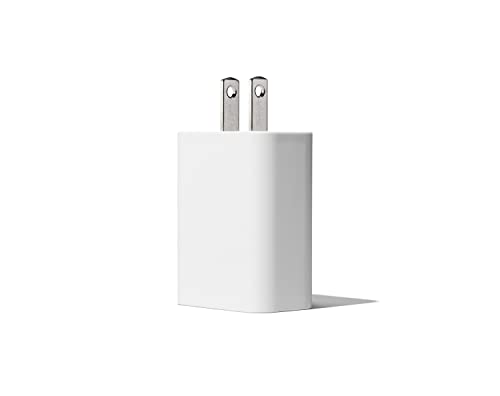
Many docks arrive with a cable and no mains adapter, expecting power from a USB port on the console dock, a television, a computer or a spare phone charger. Those sources differ widely. An older USB port may offer only 500 milliamps in total, which split four ways leaves each controller sipping. A modern USB-C adapter rated for higher output removes the bottleneck entirely. Households setting up a permanent charging corner often solve several small power questions at once with a compact multi-port adapter, and the selection advice at best 2 port usb chargers covers that pairing well, since one port can serve the Joy-Con dock while the other handles a phone or a headset case.
Cable quality plays a minor but real role at these low power levels. A long, thin cable introduces voltage drop, and a dock at the far end of a two-metre bargain cable may feed its slots slightly less than expected. The effect is far smaller than with fast phone charging, yet it explains occasional reports of one dock feeling slower than another on the same shelf. Keeping the supplied cable, or a short replacement of decent construction, removes that variable. Coiling spare cable neatly behind the dock also keeps the entertainment unit tidy, which matters more to most owners than a few minutes of charge time.
Reading the lights: per-slot indicators and protection circuits
The small light above or below each slot is the dock’s entire user interface, and its design separates thoughtful products from careless ones. The common convention uses red or amber while a controller is charging and green or blue once it is full, with one independent light per slot. Independent indication matters. A single shared light can only report that something is charging somewhere, leaving the owner to guess which controller is ready before a session. Four lights answer the only question that matters at a glance: which units can be picked up right now.
Behaviour at the end of charging also varies. Better docks stop feeding a full controller and simply hold the green indication, while basic designs may keep a trickle flowing indefinitely. The difference connects to the protection circuitry inside the dock, which should include overcharge protection, short-circuit protection and some form of temperature awareness, even if rudimentary. These circuits are inexpensive and standard in competent designs, and their presence in a specification list is a reasonable minimum expectation rather than a premium feature. A dock that makes no mention of protection at all is asking buyers to trust invisible engineering, which is a poor bargain for a device left powered around the clock.
When a light misbehaves
Indicator oddities usually trace back to seating rather than electronics. A light that flickers as a controller is placed suggests contacts meeting imperfectly, often because the controller was slid in at a slight angle or because debris has reached the contact area. A light that stays red for many hours beyond the expected charge window can indicate a controller with an aged battery, a slot receiving reduced power from an overloaded shared supply, or a contact surface that needs cleaning. A light that never appears at all, on a slot that previously worked, points first to the cable and power source, which should be swapped before the dock itself is condemned. Methodical substitution, one variable at a time, resolves most charging mysteries in this category without any tools.
The main shapes of dock, and what each suits
Two-slot docks are the smallest and cheapest form, mirroring the single pair that most consoles ship with. They suit solo players and couples who own one pair plus perhaps a single spare controller, and their compact footprint fits crowded shelves and travel bags alike. The limitation is obvious: a third or fourth controller has nowhere to go. Buyers who suspect a second pair is in their future, which includes most households that play local multiplayer even occasionally, usually save money by stepping straight to four slots rather than replacing a two-slot unit later.
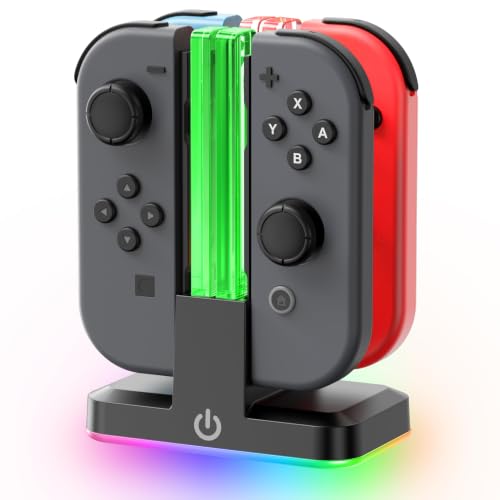
Four-slot docks dominate the category for good reason. They stand as a single row, a two-by-two block or a small tower, depending on brand, and they hold the full multiplayer complement of a typical home. Row designs make the status lights easiest to read and the controllers easiest to grab, while block designs save depth on shallow shelves. Tower designs, where controllers hang vertically around a central column, look striking and save the most space, though they can feel less stable when fully loaded on a soft surface. None of these shapes charges faster than another by virtue of shape alone; the choice is about furniture, not electricity.
Chargers combined with a console stand
A hybrid category combines Joy-Con slots with a stand or cradle for the console itself. These products organise an entire setup into one footprint: the console rests upright or at an angle, controllers flank it, and sometimes a row of game cards or a headset hook joins the arrangement. For a desk setup, where the console is played on a monitor and stored in the same place, a hybrid stand can be genuinely elegant. The trade-offs are bulk and commitment. The stand occupies its space permanently, travels poorly, and ties the charging arrangement to one location, whereas a plain four-slot dock can move between rooms in one hand.
Cooling claims occasionally appear in marketing for stand hybrids, usually involving a small fan. The console already manages its own thermals through its internal fan and vents, and an external breeze adds little beyond noise in most rooms. Buyers should treat such features as neutral extras, neither a reason to choose a stand nor a reason to avoid one, and should check that any stand leaves the console’s own vents unobstructed, since a cradle that blocks an intake works against the cooling it advertises.
The console dock is a different product entirely
Confusion between a Joy-Con charging dock and a console dock has caused real misunderstanding, so the distinction deserves plain language. A console dock connects to the Switch itself, drawing power through the console’s USB-C port, charging the console battery, and sending video and audio to a television. A Joy-Con charging dock connects only to the small controllers. It never touches the console, never carries video, and never negotiates anything with the console’s power system. The two products share a word and almost nothing else.
That distinction matters because of the well-documented history of damaged consoles associated with certain third-party console docks. Those incidents involved the console’s USB-C power delivery negotiation, the process by which the console and a connected dock agree on voltage. A faulty implementation at that stage could expose the console to conditions it was not designed for, with serious consequences. A Joy-Con charging dock plays no part in that process. It supplies plain 5-volt USB power to controllers whose own charge controllers manage the rest, the same low-risk arrangement as charging a wireless mouse. Fears carried over from console dock stories should not be applied to this category, though they remain a fair reason to choose console docks themselves with care.
Rails, latches and copper: the mechanics of the connection
Inside each slot, a short section of rail guides the controller while a set of spring contacts presses against the contact pads at the base of the controller’s own rail. Those contacts are typically copper alloy with a plated finish, chosen for conductivity and resistance to corrosion. The spring pressure has to sit in a narrow band. Too light, and the connection becomes intermittent, especially on a shelf that vibrates when a cupboard door closes nearby. Too heavy, and sliding controllers in and out dozens of times a week begins to wear both the contacts and the controller rails themselves.
Owners can feel the quality of this mechanism without any instruments. A good slot accepts the controller smoothly, with even resistance and a definite latch at the end of travel. A poor slot feels gritty, loose in the middle of the slide or tight at one point and slack at another. Because a dock may be used several times a day for years, small mechanical differences compound. A dock that feels right on day one and still feels right after a thousand insertions is worth more than one with extra lights or a sculpted shell that begins to wobble by spring.
Wear, dust and gentle maintenance
Contact surfaces live in the open, and living rooms are dusty places. Fine dust, pet hair and the occasional crumb migrate into slots and onto rails, particularly in homes where controllers rest on coffee tables between sessions. The remedy is unglamorous: a soft dry brush or a blast of compressed air for the slots, a dry microfibre cloth for the controller rails, and a strict avoidance of liquids near the contacts. Isopropyl alcohol on a cotton swab is the standard approach for stubborn grime on metal contacts, applied sparingly with everything unplugged and allowed to dry fully before use.
Rail wear on the controllers themselves is a longer story. The plastic rail of a Joy-Con and the latch that clicks into place both endure friction at every attachment, whether to the console or to a dock. A dock with clean, correctly shaped rails adds no more wear than the console does. A dock with rough moulding or misaligned rails can add noticeably more, which is another reason the feel of the slide deserves attention at purchase time rather than after months of use. Controllers that have grown loose on the console over years may also sit slightly differently in a dock, and a design with a positive latch tolerates that looseness far better than a friction-only design.
Compatibility: Switch, Switch OLED, Pro controllers and imitations
Joy-Con controllers for the original Switch and for the Switch OLED are the same controllers in fit and electrical terms, sold in different colours and bundled with different consoles. Any dock that correctly fits one fits the other, and mixed sets charge together without any special consideration. Left and right controllers are mirrored rather than identical, so slots are normally arranged in left-right pairs or accept either side in any position, depending on design. A dock that demands a specific side in a specific slot is not a problem, but clear markings help younger players return controllers correctly without thinking about it.
The Pro Controller is a different shape with a different charging arrangement: a USB-C port on its top edge, charged by cable like a phone. A standard Joy-Con dock cannot charge it, and product photographs that seem to suggest otherwise usually show the Pro Controller resting nearby for scale or show a hybrid stand with a separate cable or dedicated cradle for it. A small number of larger charging stations do include a Pro Controller position with its own connector. Households that use a Pro Controller as the main single-player pad and Joy-Con for multiplayer should check this point carefully, since a station that handles both can tidy an entire controller collection onto one shelf.
Third-party controllers and the question of fit
Replacement and alternative controllers from other makers vary in rail thickness, overall width and contact placement. Some follow the official dimensions closely and charge in standard docks without issue. Others add grips, enlarge the body or reshape the rail enough that they will not slide into a dock designed around the official outline, or will slide in but fail to meet the contacts reliably. The specification to look for is an explicit statement of compatibility from the controller maker or the dock maker, rather than an assumption based on appearance. Where no statement exists, a dock with slightly more open slot geometry offers better odds, though never a guarantee.
Accessories attached to the controllers create a simpler version of the same problem. Wrist strap attachments widen the rail area and generally must be removed before docking, which most designs require anyway. Silicone sleeves and protective shells almost always prevent docking, since even a millimetre of extra material defeats the rail fit. Households that favour shells face a nightly choice between protection and convenient charging, and many solve it by keeping one docked pair shell-free for multiplayer and letting a shelled pair charge on the console itself.
Choosing by household: slots, people and playing patterns
The simplest buying rule in this category counts controllers, not people. Count every Joy-Con in the home, including the pair attached to the console and any single controller bought for a specific game, and choose a dock that can hold all of them except, perhaps, the pair that usually lives on the console. A two-player home with one pair needs no dock at all in strict terms, though even there a small dock frees the console pair from charging duty and gives controllers a home away from the system. A four-player home with two pairs benefits most, and homes with three pairs, which exist wherever siblings each claim a set, should look at four-slot docks plus console charging as a combined system.
Playing patterns refine the count. A household that plays together every Friday needs reliability on a schedule, and a dock delivers it passively. A household where the console travels between two homes, perhaps between parents after a separation or between a term-time room and a family house, may do better with two inexpensive docks than one premium model left in the wrong place. Students in shared houses face the opposite pattern, many controllers and one shelf, and should value a dock with a small footprint and lights readable in a dim room. Storage for related media follows a similar logic of keeping small things in fixed places, a theme that also runs through organising game libraries on memory cards, as covered at best affordable nintendo switch sd cards.
Children, guests and the durability question
Young players are harder on charging gear than adults are. Controllers get pushed into slots at angles, pulled out without the release button, and occasionally used as building blocks. A dock for a family room should therefore have a weighted or wide base, slots with forgiving entry angles, and a cable that exits at the back where small hands rarely go. Magnetic or snap-in novelty designs that delight adults may not survive a determined six-year-old. Guest use points the other way: visitors do not know the house system, so a dock that makes the correct action obvious, with visible lights and an unforced slide, prevents the quiet failure of a controller left resting near, but not in, its slot all night.
Where the power comes from: console ports, adapters and shared supplies
Plugging a Joy-Con dock into a USB port on the console dock is the tidiest arrangement and the one most product photographs show. Cable runs stay short, everything switches on together, and no extra mains socket is consumed. The caveat is supply. Ports provided for accessories on console docks and televisions are convenience ports, often limited in output, and a four-slot charger asking for its full share may receive less than it wants precisely when all four controllers arrive home empty together. The symptom is not failure but slowness, with full charges stretching well beyond the usual three and a half hours.
A dedicated mains adapter removes that uncertainty. Any reputable USB adapter with output comfortably above the dock’s stated input requirement will keep every slot fed, and the adapter can live permanently behind the entertainment unit. This arrangement also decouples controller charging from the console entirely, so controllers can charge in a hallway, a bedroom or an office where the console is not. For players who use headsets and other powered accessories at the same shelf, planning the socket and port layout once, rather than improvising monthly, pays off; the accessory combinations discussed at best headsets for gaming nintendo switch often end up sharing the same small charging corner.
Surge protection and always-on devices
A charging dock is an always-on device, drawing a small standby amount even when every controller is full. That places it in the same category as a router or a clock for safety planning. Plugging the adapter into a surge-protected strip is sensible in areas with unreliable mains, and choosing an adapter from a maker that publishes its safety certifications matters more than saving a trivial sum on an anonymous import. Heat at the adapter, rather than at the dock, is the figure to monitor casually: warm is normal, hot to the touch is a reason to replace the adapter regardless of brand or age.
Safety markings and build quality signals
Electrical safety certification for a low-voltage USB accessory concerns the whole chain, especially the mains adapter if one is included. Marks such as UL, ETL, CE or UKCA indicate that a product has been assessed against the relevant regional standards, though the mark alone is only as trustworthy as the maker behind it. Established accessory brands publish certification details and model numbers that can be checked. Anonymous listings that print a wall of marks without a model number or a responsible company name offer decoration rather than assurance. The dock itself operates at 5 volts, a level that cannot shock, so the realistic risks are heat, poor soldering and failure modes in a cheap included adapter, all of which reputable sourcing largely eliminates.
Build quality signals are visible in photographs and specifications for readers who know where to look. A stated weight suggests a base with some substance rather than a hollow shell that skates across a shelf. Rubber feet or a full rubber base pad indicate that sliding was considered. Strain relief where the cable meets the dock, a recessed port rather than one flush with a thin wall, and screws rather than only glue in the case construction all point the same way. None of these details guarantees longevity, but their absence across an entire product is a consistent warning.
Non-slip bases and shelf realities
The daily enemy of a charging dock is the one-handed grab. A player lifts a controller upward, the dock tries to follow, and either the latch releases cleanly or the whole base rises and clatters back down. Weight and friction solve this, and so does slot angle: designs that release the controller with a slight backward tilt of the hand feel easier than designs demanding a perfectly vertical pull. On glass or polished shelves, a rubber base is close to essential. On carpeted floors, where some docks end up despite intentions, a wide base prevents the slow topple that leaves controllers scattered and uncharged by morning.
Travel, desks and second rooms
A Joy-Con dock earns a place in a travel bag when a trip involves multiplayer at the destination: a rented house with friends, a family visit where cousins appear, a hotel evening after a tournament day. Two-slot models travel best, being little larger than the controllers themselves, and they pair naturally with a compact mains adapter already carried for a phone. The controllers themselves provide the protection story here; packed loose, their sticks can drift or suffer pressure, so many travellers carry controllers in a case and treat the dock as destination equipment rather than transit protection.
Desk setups present a different set of virtues. A dock beside a monitor keeps controllers visible and ready for short sessions between work, and the status lights double as a subtle indicator that the play corner is in order. Cable management matters more at a desk than at a television, since the dock’s cable crosses a workspace rather than hiding behind a cabinet. Models with a rear-facing port and a right-angled cable option route neatly. In second rooms, such as a children’s playroom with its own screen, a second dock is often cheaper than the arguments caused by controllers migrating and never returning, and consistency of model between rooms means every family member already knows how the lights behave.
Daily habits that keep controllers ready
The dock only delivers its promise if controllers return to it, and return habits form around friction. A dock placed where play ends, within arm’s reach of the sofa or directly under the television, gets used without thought. A dock placed in a cupboard, however logical the storage plan looked, gets used for a week. Households that struggle with the habit often find that moving the dock, not exhorting the players, fixes the problem. The end of a session also has a natural order worth copying: game saved, console docked or put to sleep, controllers onto the charging dock, lights confirmed with one glance. That final glance catches the mis-seated controller while correction still costs two seconds.
Rotation is the second habit. Where two pairs share duty, alternating which pair plays and which pair rests spreads wear and battery cycles evenly, so both pairs age together rather than one collapsing years before the other. Rotation happens naturally when the dock is the default storage place and players simply take the front pair. It fails when a favourite pair is always chosen for its colour, a surprisingly common pattern with the brighter colour combinations, in which case a gentle house convention of taking whichever pair shows green and sits nearest the edge achieves the same result.
Charging before a known event
Planned gatherings deserve a small routine of their own. The night before a party or a family visit, every controller goes on the dock regardless of its apparent state, and the lights are checked in the morning rather than at the door. Controllers that have sat unused for months, perhaps a spare pair kept for exactly such occasions, benefit from this attention most, since lithium-ion cells self-discharge slowly and a pair stored since summer may hold noticeably less than a full charge by winter. A spare pair that will be stored for a long stretch is best left around half charge in a cool drawer and given a full dock session the day before it is needed, rather than living on the dock for months on end.
Troubleshooting the common complaints
Most complaints about Joy-Con docks reduce to four patterns. The first is a controller that shows no charging light. Reseating it firmly, trying a different slot and trying the controller on the console itself isolates the fault within a minute: if the console charges it happily, the dock slot or its contacts are at fault; if nothing charges it, the controller needs attention. The second pattern is slow charging across all slots, which points upstream to the power source, as discussed earlier, and is cured by a stronger adapter far more often than by a replacement dock.
The third pattern is a controller that charges but dies quickly. That is a battery story rather than a dock story, most often an older controller whose cell has lost capacity, and it can be confirmed by timing a session after a full charge and comparing the result with the roughly 20-hour expectation for a healthy unit in ordinary play. The fourth pattern is physical: a controller that has become hard to insert or remove. Inspection under a bright light usually reveals a bent contact, a cracked rail guide or debris wedged where it does not belong, and each of those has a specific remedy rather than a replacement purchase.
Intermittent connections and the wobble test
An intermittent slot reveals itself through a light that changes state when the shelf is bumped or the controller is touched lightly. The wobble test is simply to rest a fingertip on the docked controller and apply gentle sideways pressure while watching the light. A healthy connection ignores this. A marginal one flickers, and the cause is usually contact pressure lost through wear or a rail guide that has widened. Cleaning comes first, since a film of grime can produce the same symptom, followed by checking whether the problem follows the controller to other slots or stays with the slot itself. That distinction decides whether the dock or the controller deserves the repair budget.
What specifications are worth comparing, and which are decoration
A short list of specifications genuinely predicts satisfaction. Slot count and arrangement come first, followed by the input requirement of the dock stated plainly in volts and amps, so a buyer can match an adapter correctly. Per-slot indication, named protection features and the physical dimensions and weight complete the useful list. Cable length deserves a check against the intended shelf, since a half-metre cable reaches very few sockets from a typical entertainment unit, and discovering that on delivery day is a needless annoyance.
Decoration, by contrast, includes headline charging speeds expressed without reference to what the controllers accept, elaborate lighting effects that add cost without information, and compatibility lists padded with every console variant ever sold when the controllers in question are identical across them. Colour-changing light shows deserve a particular note for bedroom installations: a dock that cycles colours all night in a child’s room will be unplugged by the end of the week, taking its usefulness with it. A dim, steady status light is a feature; a light show is a liability in most homes.
A compact buying checklist
Before choosing, a buyer can settle the decision with six questions. How many controllers must the dock hold on the busiest night of the year? Does every slot have its own status light? What power source will feed it, and does that source meet the stated input with room to spare? Does the base have the weight and grip to stay put during one-handed use? Are the maker’s safety details and protection features published and checkable? Finally, will the shape suit the actual shelf, desk or bag it must live in? A dock that answers all six satisfactorily is very likely to serve quietly for the life of the console, which is the highest praise available in this category.
How dock charging compares with charging on the console
Owners sometimes wonder whether controllers charge differently depending on where they sit, and the honest answer is that the battery cannot tell the difference. Whether the power arrives through the console rail or through a dock rail, the same small cell receives a gentle 5-volt feed managed by the same internal charge controller, and the time to full lands in the same three-and-a-half-hour neighbourhood from empty. What changes is everything around the electricity: visibility, capacity and convenience. On the console, two controllers charge hidden in plain sight, attached to a system that may itself be asleep, awake or away from home. On a dock, up to four controllers charge in the open, their status displayed continuously, independent of where the console happens to be.
There is one subtle interaction worth knowing. A console that is itself charging from empty will prioritise its own battery and its attached controllers in a shared arrangement, and during heavy play with the system undocked, attached controllers may hold their charge rather than gain much, because the console is spending energy as fast as it arrives. None of that applies to a separate dock on its own adapter, which is why players who use the console portably through the day often prefer the dock for overnight recovery: the console goes into its case or onto its own dock to refuel, the controllers go onto theirs, and by morning every battery in the kit is full rather than most of them.
Grips, wheels and other play accessories
Joy-Con controllers spend part of their lives inside other objects: steering wheel shells for racing games, grip frames that join a pair into a single conventional pad, fishing rod and sword shells for novelty titles, and the wrist-strap attachments that widen each controller for motion games. Almost none of those shells can remain fitted while charging on a dock, because the rail must be bare and the controller body must match the slot outline closely. The nightly routine in an accessory-rich household therefore includes a small undressing step, wheels and grips returning to their own box while controllers return to the dock. Households that skip this step and leave controllers in a grip frame tend to charge that pair on the console instead, which works, but splits the collection across two locations and weakens the single fixed address that makes a dock valuable. A labelled box for shells beside the dock is a humble addition that keeps the whole system flowing, since nobody abandons a routine that takes twenty seconds, while a routine that requires hunting for a grip in another room quietly dies within a month.
Frequently asked questions
Can controllers be left on the dock permanently?
For practical purposes, yes. A competent dock stops or greatly reduces charging once a controller is full, and the gentle rates involved generate negligible heat. Controllers kept on a dock are ready at all times and come to little harm across the normal lifespan of a console generation. Owners storing a spare pair unused for many months are the exception, and for them a half-charge in a drawer, refreshed before use, is the kinder treatment.
Does a charging dock update or pair controllers?
No. Pairing, firmware updates and button configuration belong to the console. A charging dock supplies power only, which is why a brand-new controller should still meet the console first, attached or paired wirelessly, before beginning its life in the household rotation. After that introduction, the dock handles its daily energy needs without further ceremony.
Will a dock charge controllers while the console is elsewhere?
Yes, provided the dock has its own power source. Fed from a mains adapter, a dock is entirely independent of the console and will charge controllers in any room. Fed from a USB port on the console dock, it depends on that dock being powered, though the console itself need not be present in it for the accessory ports to supply power in most setups.
Are left and right controllers interchangeable in the slots?
Many designs accept either controller in any slot, while others arrange slots as mirrored pairs. Both approaches work; the mirrored designs simply ask for a moment of attention when putting controllers away. In family rooms, an any-slot design reduces small nightly frictions, especially for younger players.
A note on colour, matching and the look of the shelf
Controllers arrive in assertive colours, and a dock becomes part of the room’s furniture whether its maker planned for that or not. A plain black or white base disappears under most televisions and lets the controllers provide the colour, while transparent shells with internal lighting suit gaming desks where the charging corner is deliberately on display. Matching a dock exactly to a console colour is rarely necessary, since the OLED and original models present mostly black or white faces to the room in any case. The more practical aesthetic question is cable colour and length, because a bright cable snaking across a dark cabinet draws more attention than the dock itself. Routing the cable behind the base, choosing a length that reaches the socket without a draped surplus, and keeping the status lights facing the seating rather than the wall all contribute to an installation that looks intentional instead of improvised, and an installation that looks intentional tends to be left alone, fully plugged in and doing its job month after month.
Check prices on Amazon
Live listings for the shortlist in this guide are pulled from Amazon below, so prices and availability are always current at the moment you look.


Disclosure and a closing note
Links on this page may be affiliate links, which means a commission can be earned when a reader buys through them, while the price that reader pays stays exactly the same as buying directly, a model that supports guides of this kind without adding cost at checkout.
Four small controllers standing in a row, each with its own green light showing, is an unremarkable sight that quietly prevents the most deflating sentence in local multiplayer, and a household that adopts the dock habit rarely gives the arrangement another thought afterwards.