What's inside
- Key Takeaways
- Quick Picks: The Best Chargers for Google Pixel 6 Pro Owners
- How were these six chargers shortlisted for one phone?
- What actually happens between a charger and a Pixel?
- Which of the six belongs in your pocket, bag or nightstand?
- How do the six compare on title facts?
- How do you build a Pixel charging kit that covers home, desk and road?
- Which Pixel charging mistakes waste money?
- Why does GaN keep appearing in these titles?
- How should you treat the Pixel’s battery across years of charging?
- How does charging behaviour change between the nightstand and the airport?
- What should you make of wattage labels when shopping for any phone?
- How do you spot a charger listing that is overpromising?
- Why do two chargers with identical ratings feel different in the hand?
- How does a second phone in the household change the answer?
- What role does the humble cable play in fast charging?
- How do you charge considerately in shared and public spaces?
- What happens to a charger over years of daily service?
- How should you think about a spare charger?
- Why does this phone’s generation make charger choice simpler than it used to be?
- How do you diagnose a charging setup that suddenly feels slow?
- What is the honest environmental ledger of a phone charger?
- How does wireless charging fit beside these wired picks?
- What should a gift-buyer know about chargers for a Pixel owner?
- How do you read a charger’s temperature without becoming paranoid about it?
- Final Recommendation
- Frequently Asked Questions
- Related Guides
As an Amazon Associate I earn from qualifying purchases. This post may contain affiliate links at no extra cost to you.
gizmoverdict.com is reader-supported. When you buy through links on our site, we may earn an affiliate commission.
Where to buy: Each charger below links to its own Amazon listing, and every wattage quoted in this guide is the charger’s own output figure taken from its listing title — so confirm that figure on the listing page before ordering, and note carefully which listings include a cable and which leave it out.
The best chargers for google pixel 6 pro all answer the same deceptively simple question: what should you plug a USB-C Pixel into, now that the box it came in held no charger at all? The six answers below split into two families. Google’s own two bricks argue that the phone and its charger should share a maker; the Anker and UGREEN contingent argues that gallium nitride miniaturisation and multi-port layouts have moved the game on. Every figure in this guide is a charger-side figure from a listing title — the output a brick can offer. What the phone does with that offer is a negotiation between the phone’s own charging system and the brick, and this guide describes that side qualitatively rather than printing phone-side numbers it cannot verify from a charger listing.
That discipline shapes the whole comparison. A 65-watt brick does not force its full output into a phone; it offers headroom, and the phone draws what its design requests. Headroom is still worth having — it is what lets one brick serve a phone today and a laptop tomorrow — but it should be bought as flexibility, not as a promise of proportionally faster phone charging. Read the six picks with that lens and the ordering becomes a conversation about ports, size and pedigree rather than a wattage arms race.
Key Takeaways
- Every wattage in this guide is the charger’s rated output from its listing title; the phone’s side of the negotiation is described qualitatively, because a charger listing cannot verify what a handset accepts.
- Two picks carry PPS in their titles — the Anker Nano 30W and the Anker Nano 65W — the programmable-supply language that fast-charging ecosystems speak, stated where it matters.
- Google’s own 30W and 45W bricks are the pedigree picks; the 45W title’s extra headroom buys future-proofing rather than a verified change in this phone’s behaviour.
- Ports divide the group as sharply as watts: the UGREEN and the larger Anker are three-port chargers for desks and bags that carry more than a phone.
- GaN appears in four of the six titles, and it is the reason the high-output picks can stay pocket-sized — the material story and the travel story are the same story.
Quick Picks: The Best Chargers for Google Pixel 6 Pro Owners
| Pick | Badge | Why it earns its place |
|---|---|---|
| Google 30W USB-C Charger | The house recipe | Google’s own 30-watt brick, the reference point the phone’s charging system was designed alongside. |
| Google 45W USB-C Power Charger | First-party headroom | The maker’s stronger brick at 45 watts, for owners seeking Google’s own hardware with room to grow. |
| Anker Nano 30W | Folding pocket PPS | A 30-watt GaN charger with foldable prongs and PPS named in the title, built for pockets and carry-ons. |
| UGREEN 3-Port 30W | Three ports, small brick | 30 watts shared across three ports in a GaN II block — the nightstand consolidator of the group. |
| Anker Nano 65W | One brick for phone and laptop | 65 watts of GaN II with PPS and folding prongs, the travel pick that also feeds a USB-C laptop. |
| Anker 67W 3-Port | Desk-and-bag hub | 67 watts across three ports, the highest total output here, for charging a phone beside its companions. |
How were these six chargers shortlisted for one phone?
The filter was compatibility of language before compatibility of hardware. Every pick is a USB-C charger whose title speaks the vocabulary the Pixel ecosystem uses — wattage stated plainly, PPS named where the maker claims it, GaN named where the design uses it. Single-port specialists and multi-port generalists were both admitted, because Pixel owners divide exactly that way: some want the smallest possible brick dedicated to the phone, others want one charger that runs a whole travel kit. Two first-party Google units anchor the list, since the maker’s own hardware is the control group every third-party claim should be measured against.
Excluded were chargers whose titles could not state an output at all, and proprietary-system bricks built around another maker’s private fast-charge language. What remains is a group where the genuine questions are ergonomic and economic — how many ports, how small, whose name — rather than electrical, and the reviews treat them that way.
What actually happens between a charger and a Pixel?
Plugging in starts a negotiation. The phone and the brick introduce themselves over the USB-C connection, agree on what the brick can offer and what the phone will request, and then settle into a charging curve that is brisk early and gentler as the battery fills — behaviour the phone controls to protect its battery’s long-term health. This is why charger shopping for a modern phone is not a hunt for the biggest number. The brick’s rating is its ceiling; the phone’s request is the reality; and the gap between the two is not wasted money when the same brick also serves a tablet or a laptop, but it buys the phone itself nothing extra.
Two consequences follow for this shortlist. First, the 30-watt class is the natural home of a phone-dedicated brick, and both Google’s own 30W unit and the Anker Nano 30W live there for good reason. Second, PPS — the programmable power supply language named in two titles — matters because it lets a brick fine-tune its offer to the phone’s requests rather than stepping between fixed voltages, and its presence in a title is a more meaningful fast-charging signal than a wattage figure alone. Everything else is ports, size and trust.
Which of the six belongs in your pocket, bag or nightstand?
The reviews below keep charger facts and phone behaviour in their separate lanes: title facts in the spec boxes, and the phone’s side of the story told in the qualitative terms it deserves.
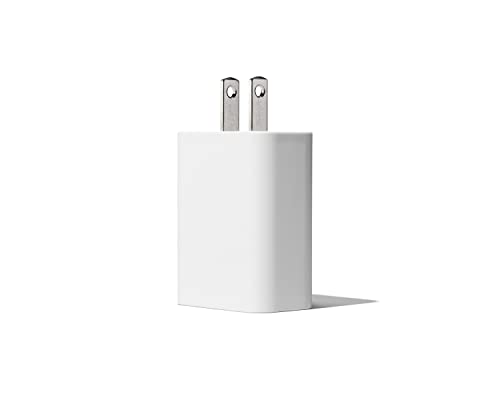
Google 30W USB-C Charger — The reference brick
Google’s own 30-watt charger is the control group for this entire category: the brick the Pixel’s charging system was designed beside, sold by the maker, carrying no translation risk between ecosystems. Its title is almost aggressively plain — the maker’s name, the output, the connector — and that plainness is the product. A first-party charger removes every question about negotiation behaviour, because the two ends of the cable were specified by the same engineering culture. For an owner whose only goal is to charge this phone the way its maker intended, the conversation can legitimately end here.
The limitations are the limitations of a single-purpose object. One port, phone-class output, and no stated folding prongs or GaN construction in the title — the brick is a home fixture more than a travel instrument, and it will not grow into laptop duty. Cable inclusion is not stated in the title either, so confirm what is in the box before assuming the drawer cable situation is solved. None of that diminishes its role; it defines it. This is the charger as appliance: bought once, questioned never, and quietly correct every night.
In a group full of cleverer objects, the Google 30W’s argument is that cleverness was never the requirement.
- Output stated in title: 30W
- Connector stated in title: USB-C
- Maker: Google, first-party
- Ports: Not stated in the listing title — verify with Google documentation
- Cable included: Not stated in the listing title — verify with Google documentation
- PPS: Not stated in the listing title — verify with Google documentation
Strengths
- First-party pairing with the phone’s own charging design
- Output class matched exactly to phone-dedicated duty
- Zero ecosystem translation risk at either end of the cable
Trade-offs
- Single-purpose output — no laptop future for this brick
- Port count and cable contents need a listing check
- No travel features claimed in the title
Best for: a Pixel owner seeking the maker’s own charger on the nightstand and no further decisions to make.
Not suited for: a traveller hoping one brick will also feed a laptop and a tablet.

Google 45W USB-C Power Charger — The maker’s stronger hand
Google’s 45-watt brick raises an interesting question that this guide will answer carefully: why buy the maker’s bigger charger for this phone? Not because the title promises the phone a different experience — it makes no phone-side claim at all — but because headroom is a property of the brick, and bricks outlast phones. A 45-watt first-party unit serves the Pixel today and stands ready for the hungrier devices in the same household: a larger tablet, a Chromebook-class machine, the next phone whose requests may be larger. Bought in that spirit, the 45W is the future-facing version of the 30W’s argument, with the same first-party negotiation comfort.
Bought in any other spirit, it deserves a sceptical note. If the expectation is that fifteen extra watts on the title translate into a transformed charging experience for the Pixel 6 Pro specifically, the listing offers no evidence for it, and this guide’s discipline is to sell headroom as headroom. The title also leaves ports, cable and construction unstated, as its smaller sibling does. What is stated — maker, output class, USB-C — is stated cleanly.
Choose it as the household’s Google-branded all-rounder, and it is a strong pick; choose it as a phone-speed upgrade, and you are buying a story the title never told.
- Output stated in title: 45W
- Connector stated in title: USB-C
- Maker: Google, first-party
- Ports: Not stated in the listing title — verify with Google documentation
- Cable included: Not stated in the listing title — verify with Google documentation
- PPS: Not stated in the listing title — verify with Google documentation
Strengths
- First-party trust with meaningful headroom for other devices
- Output class that reaches into small-laptop and tablet duty
- The same negotiation comfort as the 30W, with a longer future
Trade-offs
- No title evidence of a changed experience for this phone specifically
- Ports and cable contents unstated
- Larger output invites a larger brick than the 30W’s minimalism
Best for: a Google-loyal household seeking one first-party brick with room for hungrier devices later.
Not suited for: a buyer expecting the extra watts alone to transform this phone’s charging.

Anker Nano 30W — The pocket specialist
The Anker Nano 30W is what happened when the phone charger absorbed the lessons of miniaturisation: GaN construction, foldable prongs, and a title that still finds room to name PPS. Each of those three facts serves travel. GaN keeps a 30-watt brick small enough to disappear into a pocket or a wash bag. Folding prongs keep it from snagging, scratching screens or snapping in luggage. PPS speaks the fine-grained negotiation language that modern fast charging uses, stated here in the title where a buyer can hold the listing to it. As a phone-dedicated travel brick, the specification is close to complete.
The boundaries are equally legible. Thirty watts is a phone-class ceiling, so laptop ambitions end at the title; a single port — the Nano format’s defining trade — means the brick serves one device at a time; and cable inclusion is unstated, so the travel kit’s cable must be accounted for separately. None of these are flaws in a product whose entire thesis is smallness with the right language spoken.
For the Pixel owner whose charger lives in a jacket rather than a drawer, this is the group’s most coherent object.
- Output stated in title: 30W
- Technology stated in title: GaN
- Fast-charge language stated in title: PPS
- Design stated in title: foldable
- Ports: single-device Nano format; confirm count in the Anker documentation
- Cable included: Not stated in the listing title — verify with Anker documentation
Strengths
- PPS named in the title — the meaningful fast-charge signal
- Foldable, pocket-first design for genuine travel
- GaN miniaturisation at the phone’s natural output class
Trade-offs
- One device at a time, by design
- No headroom for laptop duty
- Cable contents need confirming before a trip
Best for: a travelling Pixel owner seeking the smallest competent brick in the jacket pocket.
Not suited for: a desk where phone, watch and buds all expect to charge at once.

UGREEN 3-Port 30W — The nightstand consolidator
UGREEN’s entry reframes the purchase: not a phone charger with extras, but a small power station that happens to total 30 watts. Three ports in a GaN II block, per the title, aimed at the nightstand and the travel pouch where a phone, a watch charger and a set of earbuds all arrive thirsty at the same hour. The honest arithmetic of multi-port bricks applies — the 30-watt total is a shared budget, so simultaneous devices divide it — and for overnight duty that division is painless, because everything has until morning. The black finish named in the title is a small thing that nightstand buyers genuinely care about.
What the title does not claim is PPS, and in a group where two rivals name it, that absence is information: this brick’s case rests on consolidation, not on negotiation finesse. Cable inclusion is likewise unstated. Neither gap wounds the concept; they simply define it as the breadth pick rather than the speed pick.
For the owner whose charging problem is a tangle rather than a wait, the UGREEN is the tidiest answer in the group.
- Total output stated in title: 30W
- Ports stated in title: 3-port
- Technology stated in title: GaN II
- Connector family stated in title: USB-C / Type C fast charging
- PPS: Not stated in the listing title — verify with UGREEN documentation
- Cable included: Not stated in the listing title — verify with UGREEN documentation
Strengths
- Three devices from one wall outlet — the tangle solution
- GaN II keeps a multi-port block genuinely small
- Overnight division of the shared budget costs nothing in practice
Trade-offs
- Simultaneous fast charging divides the 30-watt total
- No PPS claim in the title
- Not a single-device speed specialist
Best for: a nightstand or travel pouch where phone, watch and buds share one outlet overnight.
Not suited for: a user seeking the phone’s fastest possible session while other devices charge.
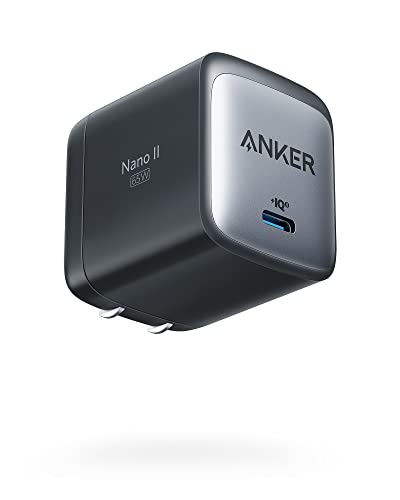
Anker Nano 65W — One brick, two jobs
The Nano 65W is the pick that collapses two purchases into one: a GaN II brick with PPS in the title and foldable prongs, whose 65-watt output class covers the Pixel with room to spare and steps up to genuine USB-C laptop duty when the bag demands it. That dual citizenship is its whole thesis. The traveller who carries a phone and a slim laptop otherwise carries two bricks; this one folds flat, speaks the programmable language the phone’s ecosystem uses, and still disappears into a carry-on pocket. Anker’s Nano line has been refining exactly this proposition for several generations, and the title reads like the mature version of it.
The discipline notes are the familiar ones, plus one of proportion. The phone will draw what it requests, not the headline figure, so the 65 watts should be valued as laptop capability and household headroom — real value, honestly labelled. Cable inclusion is unstated, and at laptop outputs the cable’s own rating becomes part of the system, so the documentation and the cable drawer both deserve a check. Port count should likewise be confirmed rather than assumed from the Nano name.
As the single-brick travel solution for a Pixel-and-laptop life, nothing else in the group makes its case as completely.
- Output stated in title: 65W
- Technology stated in title: GaN II
- Fast-charge language stated in title: PPS
- Design stated in title: foldable, compact
- Cable included: Not stated in the listing title — verify with Anker documentation
- Port count: Not stated in the listing title — verify with Anker documentation
Strengths
- Phone and laptop served by one folding brick
- PPS stated, keeping the phone negotiation fluent
- Headroom that future devices can actually use
Trade-offs
- The phone itself will not use the headline output
- Cable rating becomes part of the laptop equation
- More brick than a phone-only owner needs to carry
Best for: a traveller carrying a Pixel and a USB-C laptop who refuses to pack two chargers.
Not suited for: a minimalist who charges only a phone and values the smallest possible object.

Anker 67W 3-Port — The bag’s power hub
The largest Anker here totals 67 watts across three ports, and its parish is the bag and the desk rather than the pocket: phone, tablet and accessory charging side by side, from a GaN block that stays compact by the standards of what it replaces — three separate bricks and the strip they fed. The title states the total, the port count and the technology plainly. As with every multi-port design, the total is a shared budget whose division depends on what is plugged in, so its natural habitat is the overnight and the desk day, where simultaneous devices have time on their side.
PPS is not named in this title, a distinction worth noticing beside the two Nano picks that do name it; buyers for whom that negotiation language is the priority should weigh the Nano 65W’s stated fluency against this unit’s extra ports and total. Cable inclusion is unstated here as well. The comparison is genuinely balanced — breadth against finesse — and the right answer depends on whether the phone usually charges alone or in company.
For the household whose charging happens in a cluster, this is the cluster’s engine.
- Total output stated in title: 67W
- Ports stated in title: 3-port
- Technology stated in title: GaN
- Format stated in title: compact wall charger block
- PPS: Not stated in the listing title — verify with Anker documentation
- Cable included: Not stated in the listing title — verify with Anker documentation
Strengths
- Highest total output in the group, across three ports
- Replaces a strip of single-purpose bricks
- Enough headroom for a tablet beside the phone
Trade-offs
- Shared budget divides when all ports are busy
- No PPS language in the title
- Larger than the pocket-class Nano picks
Best for: a desk or travel bag where the Pixel charges alongside a tablet and accessories.
Not suited for: a jacket-pocket minimalist counting grams and cubic centimetres.
How do the six compare on title facts?
| Charger | Output from title | Ports from title | PPS in title | Defining trait |
|---|---|---|---|---|
| Google 30W | 30W | Not stated | Not stated | First-party reference |
| Google 45W | 45W | Not stated | Not stated | First-party headroom |
| Anker Nano 30W | 30W | Single-device format | Stated | Foldable GaN pocket brick |
| UGREEN 3-Port | 30W total | 3 | Not stated | Nightstand consolidation |
| Anker Nano 65W | 65W | Not stated | Stated | Phone-and-laptop traveller |
| Anker 67W | 67W total | 3 | Not stated | Multi-device hub |
The table’s lesson is that “best” in this category is a shape, not a summit: the pocket shape, the nightstand shape, the one-brick-for-everything shape. Wattage climbs down the list while suitability simply changes direction.
How do you build a Pixel charging kit that covers home, desk and road?
Think in stations rather than chargers. The nightstand station rewards the multi-port picks — the UGREEN or the Anker 67W — because sleep hours forgive divided budgets and punish cable sprawl. The desk station rewards whatever keeps a cable permanently in place, which is where a first-party Google brick earns its keep as a fixed, unquestioned fixture. The road station rewards the folding Nano pair, chosen by whether a laptop travels too. Assigning one pick per station ends the daily migration of a single charger around the house, which is the low-grade friction that actually defines most people’s charging experience.
Cables deserve station thinking as well. A cable that lives at each station ends the borrow-and-forget cycle, and the cable’s own rating matters at the higher outputs — a lead chosen for a phone may not be the lead a 65-watt laptop session wants. Since none of the six titles confirms a cable in the box, budget the kit as bricks plus cables from the start, and the arithmetic stays honest.
Which Pixel charging mistakes waste money?
The classic is buying wattage as if it were speed — paying for a high-output brick in the belief the phone will drink proportionally deeper, when the phone’s own requests govern the session. The second is ignoring the cable: a worn or under-rated lead can quietly become the slowest part of the system while the brick takes the blame. Third is assuming a cable is in the box, an assumption none of these six titles supports, discovered at a hotel desk. Fourth is buying a multi-port brick for a solo phone and then wondering why the shared budget feels ordinary when a second device joins. The last is neglecting the battery’s own preferences — overnight charging on any of these bricks is gentle duty, while repeated hot, fast top-ups in a sun-baked car are the sessions a battery remembers; the charger is rarely the problem, but the environment often is.
Why does GaN keep appearing in these titles?
Gallium nitride is a semiconductor material that switches more efficiently than the silicon it replaces in charger design, and efficiency at small scale means less heat in a smaller box — which is why four of these six titles name it and why the high-output picks can stay pocketable. For the buyer, the material translates into three practical goods: a brick that runs cooler against a nightstand’s wood, a travel charger that shares a pouch with a phone without menace, and output classes that used to require a laptop brick’s bulk now arriving in a wall-wart’s body. GaN is not a performance promise about the phone’s session — the negotiation still governs that — it is a promise about the brick’s size and temperature, and on those terms it has genuinely changed this category within a few product generations.
How should you treat the Pixel’s battery across years of charging?
A phone battery ages by chemistry and by habit. The habits within an owner’s control are modest and cumulative: favour overnight charging over repeated deep fast top-ups where life allows, keep the phone out of heat while it charges, and let the phone’s own battery-health features do their quiet work. The charger contributes by being competent and boring — every pick here qualifies — rather than exotic. Owners who think in years also keep one known-good cable and brick as the reference set, so that when charging behaviour seems to change, the variable can be isolated: swap the cable first, then the brick, and only then suspect the phone. That diagnostic order, applied calmly, prevents most unnecessary purchases in this category, including a second copy of any charger on this page.
How does charging behaviour change between the nightstand and the airport?
The same phone and the same brick lead two different lives. At the nightstand, time is abundant and the session is a marathon at walking pace: the phone fills early in the night and rests at full for hours, which is the gentlest duty a battery knows. Any of the six handles it, and the multi-port picks arguably handle the household better, because the nightstand is where devices congregate. At the airport, the session is a raid — twenty minutes at a gate outlet between connections — and the virtues reorder themselves: a brick that is already in the jacket, with prongs that fold and a negotiation that starts briskly, beats a theoretically finer charger sitting in checked luggage. The Nano pair were designed inside that second story, and their titles — foldable, compact, PPS — read like a checklist written by a frequent flyer.
The practical kit acknowledges both lives rather than optimising for one. A fixed station at home, built from whichever pick suits the household’s device count, and a folding brick that never leaves the travel bag: that two-part answer costs less than most single “premium” purchases and outperforms them in both theatres. Owners who travel weekly reach this arrangement by experience; this guide’s shortcut is simply to describe it before the experience bills you for the lesson.
What should you make of wattage labels when shopping for any phone?
A charger’s wattage is a ceiling printed as a headline, and ceilings are honest but incomplete information. The complete picture has three parts: the ceiling itself, the languages the brick speaks — PPS being the one named in this group — and the device’s own requests, which no charger listing can state for it. Shopping by ceiling alone produces the familiar disappointment of the owner whose bigger brick changed nothing they could feel. Shopping by language produces better matches, because the negotiation is where sessions are actually decided. Shopping by shape — ports, prongs, size — produces the charger that is present when needed, which outperforms the theoretically ideal charger left at home.
That hierarchy explains this guide’s ordering instincts. Google’s bricks win on pedigree, the Nanos win on language and shape, the multi-port pair win on household shape. Wattage, the number printed largest on every box in the category, finishes a distant fourth in actual importance — useful for sorting a shelf, useless for predicting satisfaction.
How do you spot a charger listing that is overpromising?
Read titles the way this guide has read these six: as testimony. A trustworthy title states output, connector and technology in plain terms and lets the product carry the rest. Warning signs live in the adjectives — claims of miraculous speed untethered to any standard, compatibility lists spanning every phone ever made, wattage figures that belong to a multi-port total presented as if a single device could drink them. The six titles here are, by that standard, a well-behaved group: their claims are specific, their silences are findable, and their biggest numbers come with port counts attached so the arithmetic stays visible.
The companion habit is to treat silence as a question rather than an insult. Cable inclusion is silent in all six titles; the correct response is a ten-second check of the box contents, not suspicion. PPS is silent in four; the correct response is to decide whether the language matters to your use, not to assume it hides there. A listing culture read this way — claims weighed, silences checked — protects a buyer in every charger category, not just this phone’s.
Why do two chargers with identical ratings feel different in the hand?
Because a charger is also an industrial-design object, handled twice a day for years. Weight distribution decides whether a brick stays seated in a loose wall outlet or sags out of it at 3 a.m. Prong design decides whether it packs flat or wages war on the inside of a bag. Case texture and heat decide whether the nightstand session feels like an appliance or a worry. The titles gesture at this layer — foldable, compact, the Nano name itself — but the honest truth is that ergonomics are verified by ownership, which is why the established lines in this group, refined across generations of exactly this feedback, carry an advantage no specification can print.
There is a purchasing consequence: when two picks tie on the electrical facts, buy the one whose physical design has been iterated longest, and buy it from the listing whose title states the facts you care about. Hands notice what spec sheets omit, every single day, for the whole life of the object.
How does a second phone in the household change the answer?
Two phones turn a charger from a personal accessory into shared infrastructure, and shared infrastructure rewards ports and headroom over pocketability. A mixed household — this Pixel beside a partner’s phone of another make — benefits from the standards-based nature of everything here: USB-C negotiation is a common language, and all six bricks speak it, so the household can standardise on the multi-port picks without exiling either phone to a proprietary corner. The nightstand math changes too: two phones plus a watch plus earbuds is a four-device problem, and the Anker 67W’s three ports with a shared budget start to look less like abundance and more like planning.
The travel answer splits in the other direction: two phones on a trip argue for two small bricks rather than one shared hub, because simultaneous top-ups at a gate or in a rental car are the moments sharing fails. Map charging by situation — shared at home, duplicated on the road — and the low-battery conversation stops entirely, which is the real product this category sells.
What role does the humble cable play in fast charging?
The cable is the session’s silent partner, and it can veto the brick’s ambitions. A lead’s job is to carry current and negotiation faithfully; a worn, frayed or under-specified lead does neither, and its failures masquerade as charger failures — slow sessions, intermittent connections, a phone that charges only when the cable holds a particular bend. Because none of the six titles here confirms a cable in the box, the cable deserves its own line in the purchase plan: one known-good lead per charging station, replaced when its jacket or connectors show wear, and kept as the reference against which any strange behaviour is diagnosed.
Cable length is the other half of the decision, and it is ergonomic rather than electrical. The nightstand wants a lead long enough to use the phone in bed without tethering its owner to the wall; the travel kit wants the shortest lead that reaches, because every extra coil is bag clutter. Owners who choose cable lengths per station, the way they choose bricks per station, find the whole system settles into invisibility — which, for infrastructure, is the highest available praise.
How do you charge considerately in shared and public spaces?
A modern phone charger is a guest in other people’s infrastructure more often than its owner notices: the café outlet, the airport column, the train seat, the colleague’s desk strip. The etiquette is light but real. Compact bricks — the folding Nanos above all — hog less of a shared strip and block fewer neighbouring outlets, which on a crowded airport column is a civic virtue. Charging to a comfortable margin and freeing the outlet beats camping at full for an hour. And a cable kept short and tidy in public is a trip hazard declined. None of this is onerous; all of it is the difference between the traveller other travellers are glad to sit beside and the one they photograph for the group chat.
There is a security footnote worth the same breath: public USB ports of unknown provenance are a reason to use your own brick in a wall outlet rather than a stranger’s bare port. Every pick in this group is a wall brick by design, which quietly resolves the question — your charger, your cable, a plain power outlet, and the data layer never enters the arrangement.
What happens to a charger over years of daily service?
A good brick ages invisibly, which is why its failures surprise people. The prongs loosen their spring, the case’s seams learn the shape of a thousand insertions, the cable’s strain relief — usually the first casualty — begins to fray where it bends at the connector. Heat cycles do slow work on the internals. None of the six titles speaks to service life, and this guide will not rank their longevity on imagination; what can be said is that the established makers here have the deepest field history, and that a charger’s retirement should be prompted by observation — intermittent sessions, visible cable damage, a case running hotter than its history — rather than by a calendar.
The owner’s part is mostly placement. A brick that lives in a ventilated spot, unplugged during long absences if the household prefers, and never buried under bedding while working, will outlive the phone it was bought for, probably twice over. Chargers are among the longest-lived electronics a household owns; treat the purchase with the ten-year lens the earlier sections applied to headroom, and the slightly better brick stops looking expensive.
How should you think about a spare charger?
The case for a spare is written by every forgotten charger in history. A second brick — one that lives permanently in the travel bag, the car or the office drawer — deletes an entire category of small emergencies, and this group’s pricing tier makes the duplication painless in a way laptop bricks never were. The natural pairing is one fixed, one mobile: a Google brick or a multi-port hub anchored at home, a Nano folded into the bag. Owners who adopt the pairing stop performing the nightly charger census, and the census, faithfully performed across a household, is worth more than the spare costs.
Choose the spare for the place it will live rather than duplicating the main pick by reflex. The bag wants folding prongs; the car wants compactness and indifference to temperature swings; the office drawer wants whatever the desk’s other devices dictate. The six picks divide those posts among themselves neatly, which is a final, quiet argument for this shortlist’s shape.
Why does this phone’s generation make charger choice simpler than it used to be?
A few product generations ago, phone charging was a dialect map: each maker guarded a proprietary fast-charge language, and the wrong brick meant a crawl. The Pixel 6 Pro’s generation sits on the other side of that history. USB-C with standardised negotiation is the common tongue, PPS refines it, and the practical consequence is visible in this very shortlist — a Google phone can be served well by Google’s bricks, by Anker’s, by UGREEN’s, with the differences lying in shape and ports rather than in secret handshakes. Standardisation did not make chargers identical; it made them honestly comparable, which is a better world for buyers and the reason a guide can rank six of them on ergonomics without caveats swallowing the page.
It also means the purchase ages well. A standards-speaking brick bought for this phone will speak to the next one, whatever badge it wears, and to the tablet and laptop already in the house. In a category once defined by planned incompatibility, that portability of the purchase itself may be the most consumer-friendly fact on this page.
How do you diagnose a charging setup that suddenly feels slow?
Work the chain from the wall outward, changing one variable at a time. Start with the outlet and the brick’s seating — a sagging connection in a worn socket is a commoner culprit than any electronics. Then the cable: swap in the known-good reference lead, because cables fail oftener than bricks and their failures are masters of disguise. Then the brick itself, against another device whose behaviour you know. Only after the chain is cleared should suspicion reach the phone, and even then the first checks are environmental — a phone charging in heat, or while working hard at navigation and hotspot duty, will pace itself for reasons that are protective rather than faulty.
Keep notes as you go, even mental ones with dates attached. Intermittent slowness that correlates with one cable, one outlet or one hot car is a solved problem wearing a disguise; slowness that follows the phone across every combination is a service conversation. The six bricks here are all competent enough that, within this shortlist, the charger is statistically the last suspect — which is itself a reason to buy from a shortlist built on stated facts rather than from the bargain shelf, where the brick returns to the top of the suspect list.
What is the honest environmental ledger of a phone charger?
Small electronics carry small footprints, but the category’s habit of treating chargers as disposable multiplies them. The greenest charger in this group is whichever one its owner keeps for a decade, and that argues for the same qualities this guide has ranked all along: standards-based negotiation that survives the next phone, construction from a maker with a track record, and headroom that postpones the next purchase. The phone arriving without a brick in its box — the industry change that created this entire market — only delivers its environmental promise when the brick bought separately is bought once, well.
Practically: retire damaged cables rather than binning whole kits, pass a still-sound spare charger to the family member whose drawer lacks one, and resist the novelty upgrade whose only yield is a different colour of the same capability. None of the six picks needs replacing on a fashion cycle; that durability, more than any material claim, is their environmental story.
How does wireless charging fit beside these wired picks?
It fits as a convenience layer, not a replacement. A wireless pad on the nightstand offers the small luxury of a phone set down rather than plugged in, and for overnight duty its slower pace costs nothing. But the wired brick remains the system’s backbone — faster when time is short, more efficient as a matter of physics, and the only option when a phone needs real recovery between commitments. Owners who run both usually discover a division of labour: the pad owns the nightstand, the brick owns the bag and the desk, and the phone migrates between them without a thought. Nothing in this shortlist is threatened by that arrangement; the six bricks are the wired half of a two-part system, and they are ranked here on how well they play that half.
What should a gift-buyer know about chargers for a Pixel owner?
That a charger is one of the rare tech gifts that is useful on the day it is given and every day after, provided it is chosen from a list like this one rather than from a novelty shelf. The safe gifts are the shape-led picks: the Nano 30W for the traveller, the UGREEN for the nightstand-tangler, the Nano 65W for the laptop-carrier. The gift to avoid is the anonymous ultra-cheap brick whose title promises everything and states nothing; a charger is a mains appliance that works inches from a bed, and its maker’s name is part of the present. Include a good cable if the listing’s box contents leave the question open, and the gift arrives complete rather than as a errand.
How do you read a charger’s temperature without becoming paranoid about it?
Warm is information; hot is a message. A brick working at a substantial fraction of its rating converts a little energy to heat as a matter of physics, and a case that feels warm during a hard session is behaving normally — the GaN designs in this group exist partly to keep that warmth modest in a small body. The signals worth acting on are changes and extremes: a charger markedly hotter than its own history, heat concentrated at a cable connector rather than spread across the case, or warmth paired with intermittent sessions. Each points at a connection or a component asking for retirement, and the correct response is substitution, not monitoring. Owners who learn their own kit’s normal temperature by hand, once, own a diagnostic instrument for the life of the kit.
Placement does the preventive half of the work. A charger working under a pillow, inside a closed drawer or against a radiator is being asked to shed heat into a blanket, and even the best design sulks. Give the brick air, keep the cable’s bends gentle, and the thermal story of any of these six stays boring — which, for a device that works while you sleep, is exactly the story you are paying for.
One closing observation about value: a charger is the cheapest component in the phone system and the one touched most often, which inverts the usual logic of economising. Saving a trivial sum on an anonymous brick risks the daily experience of an expensive phone; spending sensibly on a named, standards-speaking unit from this list protects that experience for years. Few purchases in a phone owner’s life offer a kinder ratio than that, and fewer still keep paying it back quietly, twice a day, for as long as the phone and its successors remain in service.
Final Recommendation
Decide what the brick’s second job is, and the pick makes itself. No second job — just this phone, charged as its maker intended — points to the Google 30W, with the Google 45W as the same trust extended toward future devices. A pocket is the second job: take the Anker Nano 30W and its stated PPS. A laptop is the second job: take the Nano 65W. A household of devices is the second job: take the UGREEN for the nightstand’s modest total or the Anker 67W where a tablet joins the cluster. Every pick here will charge the Pixel 6 Pro competently; the differences that matter are measured in ports, pockets and future devices — and the owner who buys for those, rather than for a wattage headline, is the one still satisfied when the next phone arrives.
Frequently Asked Questions
Will a 65W charger damage the Pixel 6 Pro?
No. A USB-C charger offers output and the phone requests what its charging system is designed to take; the brick’s higher ceiling is headroom, not pressure. The Nano 65W’s extra capacity exists for laptops and future devices, and the phone simply draws its own measure.
What does PPS mean, and should I care?
PPS is a programmable power supply mode within USB-C fast charging that lets a brick adjust its output in fine steps to match a device’s requests. Two titles here name it — the Anker Nano 30W and Nano 65W — and its presence is a meaningful sign that a charger speaks the negotiation language modern phones use.
Is the cable as important as the charger?
Yes. The cable is part of the charging system, and a poor or damaged cable can limit a session regardless of the brick. None of the six titles confirms a cable is included, so check the box contents and keep a known-good cable as your reference.
One port or three?
It depends on company. A phone that charges alone overnight gains nothing from extra ports; a phone that shares its outlet with a watch and earbuds gains a tidier nightstand from the UGREEN or Anker 67W, at the cost of a shared wattage budget while everything charges at once.
Can I leave the Pixel plugged in overnight on any of these?
Yes. Overnight is the gentlest duty in this entire guide: the phone manages its own charging curve and rests at full without the brick forcing anything, and every pick here is built for exactly that unattended, hours-long service. The phone’s own overnight charging features add extra kindness to the battery, but the charger itself needs no supervision and no unplugging ritual — set it up once, and the nightstand simply works.
Why buy Google’s charger over a cheaper third-party brick?
For the negotiation certainty of a first-party pairing and the simplicity of a single-purpose appliance. The third-party picks answer with features the Google bricks do not claim — folding prongs, PPS in the title, multiple ports, laptop-class output — so the choice is between pedigree and capability, both honestly on offer here.
Related Guides
Phone charging is one room in a larger house. Continue with fast chargers for the Galaxy Note 20 and its Super Fast Charging language and solar chargers for keeping a phone alive off-grid.


