What's inside
- Key Takeaways
- Quick Picks
- Why Does an Atomos Recorder Refuse to Work Like a Computer Drive Bay?
- Which SSDs Earn a Place in the Recorder, and Why?
- How Do the Six Options Compare?
- What Should You Check Before Buying Recording Media?
- How Do You Prepare Media Before a Shoot, and Offload After It?
- Which Mistakes Ruin Atomos Shoots?
- Final Recommendation
- How Does Your Codec Choice Change What the Media Must Survive?
- What Does a Shoot Day Look Like on Each Kind of Media?
- When Should Recording Media Be Retired, and How Does Heat Factor In?
- In What Order Should You Build a Media Kit as Your Work Grows?
- What Do You Do When a Recorder Drops Frames or Ignores a Drive?
- How Do Rental Houses and Production Companies Manage Media at Scale?
- Why Does the Archive at the End of the Chain Deserve as Much Thought as the Media?
- Frequently Asked Questions
- Related Guides
As an Amazon Associate I earn from qualifying purchases. This post may contain affiliate links at no extra cost to you.
gizmoverdict.com is reader-supported. When you buy through links on our site, we may earn an affiliate commission.
Where to buy: The six listings below were checked against this site’s verified product pool. One honesty note before anything else: this guide prints no prices and no star ratings, and it will not pretend that a spinning hard drive belongs inside a field recorder, because it does not.
Anyone searching for the best hard drives to use with atomos recorder gear deserves a straight answer in the first paragraph: Atomos recorders do not record to hard drives. They record to solid-state drives — 2.5-inch SATA SSDs that slide into the recorder inside a Master Caddy, or, on the models that take them, Angelbird’s compact AtomX modules built for exactly that slot. The word “hard drive” survives in the search because that is what we all called portable storage for thirty years, but the media that survives a day of 4K recording is flash, not platters. This guide therefore reviews the SSDs that actually belong in an Atomos workflow, explains why the recorder demands them, and covers the one job where a spinning drive genuinely does belong: the archive you copy everything to when the shoot wraps.
Four of the six picks are Angelbird listings, which reflects the market honestly. Angelbird built its name on media for cinema cameras and Atomos recorders specifically, and its AtomX line exists for no other purpose. The pool returned several Angelbird listings whose titles give the brand without a fuller model string, and rather than invent capacities we have kept those picks clearly labelled by their listing so you can match them at the retailer. The remaining two picks are the twin pillars of the do-it-yourself caddy route: Samsung’s 870 EVO and Western Digital’s WD Red SA500, both 2TB SATA SSDs in the standard 2.5-inch shape a Master Caddy swallows.
Key Takeaways
- Atomos recording media is SSD, full stop: the recorder writes sustained high-bitrate video that spinning disks cannot accept inside a caddy, and vibration on set would finish the argument anyway.
- The Master Caddy is the real interface. Any 2.5-inch SATA SSD you buy travels inside one, so caddy fit and connector alignment matter as much as the drive itself.
- Angelbird’s AtomX media removes the caddy question entirely on recorders that accept the module — it is the purpose-built route, priced like one.
- Sustained write speed, not peak read speed, is the figure that decides whether a long take survives; a drive that is fast for thirty seconds and slow for thirty minutes will cost you footage.
- Budget for media in pairs. A card or drive that is full at the worst moment of a shoot day is a production problem, not a storage problem.
- The spinning hard drive’s real role in an Atomos kit is the evening offload: big, cheap, verified copies back at base.
Quick Picks
| Pick | Badge | Why it earns its place |
|---|---|---|
| Angelbird AtomX 4K RAW | Purpose-built for Atomos | Media designed around Atomos recording, named for the 4K RAW workflows these recorders are bought for. |
| Samsung SSD 870 EVO 2TB | The caddy-route default | The SATA SSD most crews already trust, in the 2.5-inch shape the Master Caddy was drawn around. |
| WD Red SA500 2TB | Built for always-on duty | A NAS-rated SSD whose design brief — sustained work, all day — matches a recorder’s demands unusually well. |
| Angelbird SSD (listing B07JWD1ZYF) | Specialist media, verified listing | An Angelbird pool listing for shooters who want the recorder-media specialist’s badge on their media. |
| Angelbird SSD (listing B07WZTBQSQ) | Second-unit media | Another verified Angelbird listing, suited to building out a matched set of media for a second recorder. |
| Angelbird SSD (listing B07GH7CT7G) | Spare-caddy insurance | A further Angelbird option for the spare slot in the kit bag, because media failures choose their moment. |
Why Does an Atomos Recorder Refuse to Work Like a Computer Drive Bay?
Because the job is different in kind, not just degree. When you press record on an Atomos unit capturing high-quality 4K footage, the recorder begins writing a river of data that does not pause, throttle or apologise. It will keep writing that river for as long as the take lasts — an interview answer, a wedding ceremony, a theatre performance — and the medium has exactly one duty: accept every byte, in order, without a single gap. A spinning hard drive fails this duty three ways. Its sustained write speed across a whole disk is marginal for high-bitrate codecs; its platters and heads are physically vulnerable to the knocks and vibrations of a working set; and its power and spin-up behaviour inside a small caddy were never designed around a camera rig’s battery discipline.
An SSD has no moving parts to jar, writes at a pace set by its controller and flash rather than by the position of a head over a platter, and tolerates being carried in a jacket pocket between locations. That is why Atomos standardised on SATA SSDs in caddies from the beginning, and why Angelbird’s entire Atomos line is flash. Choosing media for an Atomos is therefore not a search for the best hard drive in the computer sense; it is a search for the SSD whose sustained-write behaviour, endurance and physical fit you can stake a shoot on.
The third factor is heat and time. A recorder on a summer exterior, writing for hours, warms its media steadily. SSDs respond to heat by slowing down if their controllers decide they must, which is why sustained-write reputation matters more than the peak figure on a box. The picks below were chosen for exactly that reputation, for physical compatibility with the caddy system, and for the unglamorous virtue of being boring under pressure.
Which SSDs Earn a Place in the Recorder, and Why?

Angelbird AtomX 4K RAW — Purpose-built for Atomos
The AtomX 4K RAW is the pick that skips the whole caddy conversation. Angelbird designed the AtomX form factor with Atomos, for Atomos recorders that accept the compact module directly, and the name tells you the workload it was validated against: 4K RAW recording, the most demanding sustained-write job these recorders offer. Where a standard SSD rides inside a Master Caddy and presents a SATA connector to the world, the AtomX presents itself as a finished piece of camera media — something a focus puller can swap in the dark, by feel, without wondering whether a connector has seated.
That integration is worth most on professional sets, where media changes happen against the clock and the cost of a fumbled swap is measured in missed moments rather than in money. It also matters for the smallest rigs: a monitor-recorder perched on a mirrorless camera is a tidier object without a full-size caddy protruding from its side. The honest cautions are compatibility and commitment. AtomX media serves Atomos recorders that accept it; it is not a general-purpose SSD you will later repurpose into a laptop. Buy it because your recorder takes it and your work justifies dedicated media, and it will feel less like a purchase and more like part of the camera.
- Form: AtomX module for compatible Atomos recorders
- Named workload: 4K RAW recording
- Maker: Angelbird, in collaboration with the Atomos ecosystem
- Capacity: verify the exact capacity of this listing before ordering
Strengths
- Designed for the recorder rather than adapted to it — fit and handling are solved problems.
- Validated positioning for the heaviest sustained-write work an Atomos can demand.
- Compact module keeps small camera rigs small.
Trade-offs
- It only serves recorders that accept AtomX media; it has no second career elsewhere.
- Dedicated media always costs more per gigabyte than a general-purpose SSD.
- The listing name does not state capacity, so confirming the size you are buying is on you.
Best for: working shooters whose Atomos recorder accepts AtomX media and who swap media under time pressure. Not suited for: owners of recorders that only take full-size Master Caddies, because the module physically has nowhere to go in those units.

Samsung SSD 870 EVO 2TB — The caddy-route default
If the AtomX is the tailored suit, the 870 EVO is the dependable workhorse already hanging in half the industry’s kit rooms. Samsung’s EVO line became the default SATA SSD for Atomos caddies through years of accumulated trust: the drives fit the Master Caddy’s 2.5-inch SATA shape exactly, their sustained-write behaviour is a known quantity among shooters, and a replacement can be sourced in almost any city on earth if a shoot goes wrong far from home. This listing is the 2TB model, with read speeds quoted up to 560MB/s — a figure that matters at offload time, when the day’s footage pours into the archive, far more than during recording itself.
Two terabytes inside a caddy is a particular kind of freedom. At the bitrates most Atomos owners actually record — high-quality 4K rather than all-day RAW — it swallows a long day without a mid-shoot swap, which means the media question leaves your head entirely and stays gone. That mental quiet is the real product. The 870 EVO asks for the standard caddy disciplines in return: seat it carefully, treat the caddy’s connector as the precision part it is, and format the drive in the recorder before the shoot rather than trusting a computer’s formatting choices. Do those small things and this drive disappears into the workflow, which is where recording media belongs.
- Capacity: 2TB as listed
- Interface: SATA III, 2.5-inch form factor
- Read speed: up to 560MB/s as listed
- Mounting: rides in a Master Caddy (caddy supplied with the recorder)
Strengths
- The most widely trusted SATA SSD in Atomos caddies, with years of field history.
- 2TB capacity removes mid-day media swaps from most shooting schedules.
- Available everywhere, so a mid-production replacement is a shopping trip, not a shipment.
Trade-offs
- It depends on the caddy system; a worn caddy connector can mimic a failing drive.
- As a general-purpose SSD it carries no Atomos-specific validation story.
- Its read-speed headline is an offload virtue, not a recording guarantee — sustained write is what counts in the recorder.
Best for: the majority of Atomos owners recording through Master Caddies who want proven, roomy media. Not suited for: rigs built around AtomX-only recorders with no caddy slot, because a 2.5-inch SATA drive has no way into those units.

Western Digital 2TB WD Red SA500 — Built for always-on duty
The WD Red SA500 arrives at the Atomos question from an unexpected direction: it was designed for NAS boxes, machines that run around the clock. That design brief turns out to translate beautifully to a recorder. A NAS SSD is built around sustained workloads, long service and steady behaviour under constant writing — precisely the stresses a day of high-bitrate recording applies. This 2TB model presents the same standard 2.5-inch SATA shape as the Samsung, rides in the same Master Caddy, and brings an endurance-first engineering culture to a job where endurance is the whole game.
There is also a systems argument for this pick. Many Atomos shooters offload to a WD Red-based NAS at home or in the studio, and there is a quiet satisfaction in media and archive sharing a design philosophy: everything in the chain was built to be written to, hard, for years. In the recorder itself, what you feel is steadiness. Long takes are the SA500’s home terrain; a drive family intended to absorb a small business’s entire working day does not blink at a ceremony or a keynote. As with the Samsung, the disciplines are caddy disciplines — seat it well, format it in the recorder, and keep the caddy’s connector clean — and the capacity, again 2TB, keeps swaps rare enough to plan around rather than react to.
- Capacity: 2TB as listed
- Type: NAS 3D NAND internal SSD, per the listing
- Form: 2.5-inch SATA
- Design brief: always-on, sustained-duty storage
Strengths
- NAS-rated design intent matches the recorder’s sustained-write demands closely.
- Same roomy 2TB capacity and standard caddy fit as the Samsung pick.
- Endurance-first engineering suits shooters who record long-form content daily.
Trade-offs
- Less Atomos-specific field folklore than the 870 EVO; fewer shooters can vouch from personal kit.
- Still a caddy-dependent solution, with the same connector care required.
- Its talents are invisible in short bursts — the value appears across long, heavy days.
Best for: long-form recordists — events, conferences, theatre — whose takes run long and whose media works daily. Not suited for: AtomX-only recorder setups, for the same physical reason as any 2.5-inch drive: no caddy slot, no entry.

Angelbird SSD (listing B07JWD1ZYF) — Specialist media, verified listing
This pool listing carries the Angelbird name without a fuller model string, and we would rather tell you that plainly than dress it in invented detail. What the name itself guarantees is the manufacturer’s specialism: Angelbird makes media for digital cinema, and its SSDs for the Atomos ecosystem are built and tested around recorder workloads rather than adapted from a laptop parts bin. For a shooter who has decided to standardise on the specialist’s media, a verified listing like this one is a legitimate way into that ecosystem.
The working advice is procedural. Before this drive earns a place on a paying shoot, confirm its exact model and capacity against the listing and Angelbird’s own documentation, check it against Atomos’s published media compatibility guidance for your recorder, and then prove it at home: format it in the recorder, record a long test at your highest intended bitrate, and play the file back end to end. Media that passes that rehearsal has earned trust in the only currency that matters. Media bought on a name alone, untested, is a gamble regardless of the badge — a discipline that applies to every pick in this section, stated here because this listing asks you to do the verification yourself.
- Maker: Angelbird
- Model and capacity: not stated in the pool listing title — verify with Angelbird documentation
- Intended ecosystem: Atomos recording media
- Status: verified pool listing
Strengths
- Comes from the one maker whose entire business is camera and recorder media.
- A route into matched, specialist media for shooters standardising a kit.
- Verified through this site’s pool rather than gathered from an unverified listing.
Trade-offs
- The listing title gives no capacity, so homework is required before ordering.
- Compatibility with your specific recorder model must be confirmed, not assumed.
- It demands the full home-rehearsal routine before its first paying job.
Best for: shooters deliberately building an Angelbird media kit who will verify model and capacity before the shoot. Not suited for: a shoot scheduled for tomorrow morning, because this listing requires a verification step before its first job.

Angelbird SSD (listing B07WZTBQSQ) — Second-unit media
Two-recorder shoots expose a truth that single-camera work hides: your media set is only as deep as your second unit’s bag. This second verified Angelbird listing is included with that production reality in mind. When the main recorder wears the AtomX or the big Samsung, the B-camera’s recorder still needs media with the same sustained-write character, and mixing a specialist drive on one unit with an unknown bargain drive on the other simply moves the risk to the angle you cannot retake.
Treat this pick the same way a production treats any second-unit kit: verify the model and capacity from the listing against Angelbird’s documentation, confirm compatibility with the specific recorder it will serve, and rehearse it — a full-length test recording at working bitrate, played back completely, before it travels. Matched media across units also simplifies the evening offload, because every drive that comes back to base behaves the same way in the same readers. Productions run on such small symmetries, and media is one of the cheapest places to buy them.
- Maker: Angelbird
- Model and capacity: not stated in the pool listing title — verify with Angelbird documentation
- Role in this guide: media for a second recorder
- Status: verified pool listing
Strengths
- Lets a two-recorder production keep specialist media on both units.
- Matched media behaviour simplifies offload and wrangling at day’s end.
- Specialist maker with recorder workloads as its core business.
Trade-offs
- Same verification homework as its sibling listing — capacity is not in the title.
- A second unit’s media is easy to under-test; the rehearsal step is not optional.
- Value depends on actually running two recorders; single-camera shooters should look at the named picks first.
Best for: two-recorder productions that refuse to let the B-camera’s view ride on lesser media. Not suited for: a single-recorder owner shopping for a first drive, who is better served by the fully specified Samsung, WD or AtomX picks above.
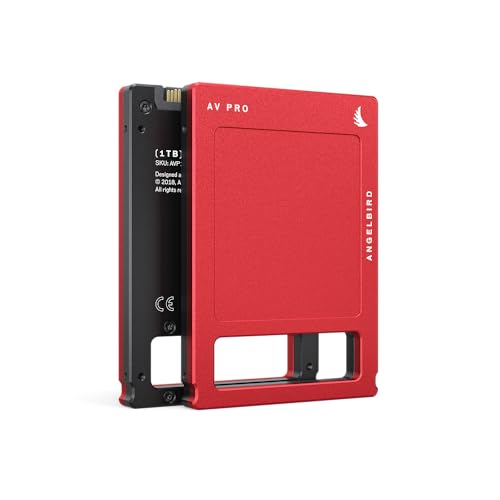
Angelbird SSD (listing B07GH7CT7G) — Spare-caddy insurance
Every experienced shooter carries media they hope not to use. Drives fail rarely, but they fail at weddings, at keynotes, at the one performance of the tour — and a spare that lives in the kit bag, formatted, tested and ready, converts that moment from a catastrophe into a ninety-second interruption. This third verified Angelbird listing fills that slot in this guide: not the star of the media kit, but the understudy who knows the part.
Keeping a spare honest requires a small routine. It gets the same verification as any Angelbird pick here — model and capacity confirmed against the maker’s documentation, compatibility checked against your recorder, a full test recording made and reviewed — and then it gets rotated, not entombed. Use it for a day’s B-roll every few shoots so it stays a known quantity rather than a talisman, and let the drive it rested take the spare’s place in the bag. Media rotation is how professionals keep every drive in the kit inside its proven period, and a spare that rotates is worth three that merely sit.
- Maker: Angelbird
- Model and capacity: not stated in the pool listing title — verify with Angelbird documentation
- Role in this guide: the kit-bag spare
- Status: verified pool listing
Strengths
- Specialist-maker media held in reserve turns a failure into a brief pause.
- Rotation-friendly: identical ecosystem behaviour to the other Angelbird picks.
- A spare bought calmly, in advance, always beats one bought in a panic near the venue.
Trade-offs
- It is money sitting in a bag until the day it saves the production — budget accordingly.
- Requires the same verify-and-rehearse routine as a primary drive.
- An unrotated spare quietly becomes untested media; the routine is part of the purchase.
Best for: professional kits where one failed drive must never become a failed delivery. Not suited for: a hobbyist’s first media purchase, where the money belongs in a fully specified primary drive before any spare is considered.
How Do the Six Options Compare?
| Pick | Route | Capacity from listing | Defining trait |
|---|---|---|---|
| Angelbird AtomX 4K RAW | AtomX module | Verify before ordering | Purpose-built for Atomos RAW work |
| Samsung 870 EVO | Master Caddy | 2TB | The field-proven default |
| WD Red SA500 | Master Caddy | 2TB | NAS-rated sustained-duty design |
| Angelbird (B07JWD1ZYF) | Specialist media | Verify before ordering | Recorder-media specialist’s listing |
| Angelbird (B07WZTBQSQ) | Specialist media | Verify before ordering | Second-unit depth |
| Angelbird (B07GH7CT7G) | Specialist media | Verify before ordering | The bag spare |
The table resolves into one question: does your recorder take AtomX modules, or does it take caddies? AtomX owners have a dedicated route and should take it when the work justifies dedicated media. Caddy owners choose between the two fully specified 2TB drives — Samsung’s field history against WD’s endurance-first design — and then decide how deep their Angelbird bench needs to be. Nobody’s correct answer involves a spinning disk in the recorder itself.
What Should You Check Before Buying Recording Media?
Compatibility first, capacity second, price last. Atomos publishes media guidance for its recorders, and Angelbird publishes its own compatibility documentation; the five minutes spent cross-checking your recorder model against the drive you are about to buy is the cheapest insurance in this entire guide. Incompatibility rarely announces itself at the shop. It announces itself as a recorder that refuses to see the drive, or worse, sees it and drops frames at minute forty of a ceremony. Neither failure cares that the drive was a bargain, and neither can be appealed once the moment it ruined has passed.
Capacity planning needs your real bitrate, not the recorder’s maximum. Work out how many gigabytes your chosen codec consumes per hour — your own test recordings tell you this precisely — and multiply by your longest day, then add the day that goes wrong and runs long. Media you must swap mid-event is media bought too small, whatever the sticker said. Most owners find that 2TB-class drives turn media management from a recurring anxiety into a once-a-day event, while smaller drives still serve perfectly well as the rotating spare.
Finally, count the caddies, not just the drives. A caddy is a mechanical object with a connector that ages; a drive without a healthy caddy to ride in is a paperweight with excellent sustained-write figures. Keep at least one more caddy than you have drives in daily use, inspect connectors when you clean the kit, and retire a caddy that needs wiggling to be recognised. The recorder, the caddy and the SSD are one system, and it fails at whichever link you inspected least.
How Do You Prepare Media Before a Shoot, and Offload After It?
The night before, format every drive in the recorder that will use it. In-recorder formatting guarantees the filesystem and structure the unit expects, and it wipes the previous job completely — which is why the rule has a twin: nothing gets formatted until its contents exist in two other places. Charge, label and pack the caddies, then record a minute of test footage on each drive and play it back. That minute is the cheapest quality control in filmmaking, and it catches the unseated connector, the tired caddy and the drive that was never actually formatted.
During the shoot, treat full media as exposed film. A drive that comes out of the recorder goes into a marked case, write-protected by habit and by labelling, and is never reinserted “just to check something” on a whim. If you must review footage in the field, review it from the copy, not from the master.
The evening offload is where the spinning hard drive finally takes its bow. Copy each drive to a large desktop disk or NAS with verification enabled, then to a second destination, and only then update the labels and return the media to the format pile. Verification matters: a copy utility that compares checksums turns “the files are there” into “the files are right”, and on the day a copy silently corrupts, that difference is the whole production. Keep the masters untouched until both copies verify. This rhythm — format in the recorder, guard the masters, copy twice with proof — is the entire secret, and it has carried more productions safely home than any single product in this guide.
Which Mistakes Ruin Atomos Shoots?
The founding mistake is the one this article opened with: shopping for a literal hard drive, then discovering that a spinning disk in a caddy cannot sustain the write river, resents being carried, and was never the medium the recorder was designed around. The second mistake is buying on peak speed. A drive advertised by its read figure tells you how fast the evening offload might go, not whether minute forty of a take survives; sustained write behaviour is the only speed that records.
The third mistake is rehearsal skipped. New media, new caddy, new recorder firmware — each deserves a full-length test at working bitrate before a paying job, and each is routinely trusted blind instead. The fourth is formatting from the computer out of habit, then blaming the recorder for the structure it was handed. And the fifth, the quietest, is owning exactly enough media for the planned day. Days do not stay planned. The spare drive in the bag is the difference between a story you tell and a refund you write.
Final Recommendation
Start from the recorder you own. If it accepts AtomX media and your work is paid, the Angelbird AtomX 4K RAW is the honest first choice — dedicated media for a dedicated tool. If you record through Master Caddies, choose the Samsung 870 EVO for its depth of field history or the WD Red SA500 for its endurance-first design; both in 2TB turn media into a solved problem for most shooting days. Build Angelbird depth behind them as your production grows — a second unit’s media, then a tested spare — verifying each listing’s model and capacity as you go. And give the humble spinning drive the job it is actually good at: waiting back at base, enormous and patient, to receive two verified copies of everything the SSDs brought home.
How Does Your Codec Choice Change What the Media Must Survive?
Not all recording is equally hungry, and the honest way to choose media is to start from the hungriest thing you actually shoot. A recorder capturing a compressed codec at modest frame rates writes a steady, manageable stream that any quality SATA SSD absorbs without comment. Push toward high frame rates and the stream thickens. Push into RAW recording — the workload the AtomX 4K RAW is named for — and the stream becomes a flood that must be accepted at full force for as long as the director keeps the cameras rolling. The drive does not know which mode you chose; it only knows the river’s speed, and its sustained-write character either matches that speed with headroom or it does not.
Headroom is the operative word. A drive whose sustained pace merely equals your codec’s appetite has no margin for the hot afternoon when its controller begins protecting itself, or for the ageing that every flash drive accumulates across its service life. This is why experienced shooters buy media rated comfortably beyond their everyday codec: the margin is not waste, it is the difference between a drive that is adequate in March and one that is still adequate in the August of its second year. When you test new media at home, test it in the greediest mode you plausibly own — the mode you will reach for on the one shoot where failure is unaffordable — because a drive proven there is proven everywhere below it.
There is a budgeting corollary. Higher codecs consume capacity at a rate that surprises owners who planned from compressed figures: a media set that comfortably holds a week of interviews may hold a single day of RAW. Capacity and sustained speed therefore have to be planned together, from the same test footage, before the production that depends on both. The shooters who get caught are rarely using bad media; they are using good media in quantities and modes nobody arithmetic-checked in advance.
What Does a Shoot Day Look Like on Each Kind of Media?
Dawn on a commercial set with AtomX media is a study in small mercies. The modules live in a labelled case, each one a finished object that clicks home without a caddy ritual, and the data wrangler’s morning check is a row of green lights rather than a series of connector prayers. When the director calls for a media change mid-setup, the swap is seconds and nobody’s heart rate changes. The AtomX day feels like using camera media designed by people who have stood on sets, because it was.
The caddy day with the Samsung or the WD inside has a different texture — not worse, just more deliberate. Media changes involve the tray, a moment of alignment, a firmer push. Crews who run caddies develop the muscle memory within a day, and the system’s compensating virtue appears at the production office rather than on set: when a drive must be replaced in a strange city, the 2.5-inch SATA standard means the replacement exists in a shop nearby, and any healthy caddy in the bag can carry it. Standardisation is its own kind of reliability, purchased with a few seconds per swap.
Evening is when the two routes converge. Every drive, module or caddy-born, arrives at the wrangler’s station and surrenders its footage to the verified double copy. The day’s footage total gets read against the media plan — if the day consumed more than the plan predicted, tomorrow’s media order changes tonight, not at tomorrow’s dawn. And the drives that performed without incident go back into rotation with their reputations quietly enhanced, which is the most that recording media can ever offer: not excitement, but the absence of a story.
When Should Recording Media Be Retired, and How Does Heat Factor In?
Flash media wears by writing. Every SSD in this guide has a finite budget of program-erase cycles, consumed fastest by exactly the work recorders do: enormous, continuous writes. Professional practice treats media as a consumable with a long life rather than a permanent possession. Drives that have absorbed season after season of full-capacity days gradually belong on lighter duties — B-roll, backups, the spare’s spare — while fresh media takes the mission-critical slot. The drive does not need to fail to justify this demotion; it only needs to have served long enough that its remaining margin is a guess.
Heat accelerates every part of that story. A recorder baking on a sunlit exterior, or sealed into a weather cover, warms its media well beyond the conditions of your home test. This is why the home rehearsal should include your longest realistic take rather than a two-minute sample: sustained writing at sustained temperature is the condition that separates the media that merely benchmarks well from the media that records well. On the day, small kindnesses help — shade for the rig between setups, airflow where the production allows it, and a wrangler who notices a drive that comes out of the recorder uncomfortably warm and quietly promotes its twin into the primary slot.
Retirement, when it comes, should be recorded like everything else in a professional kit: the drive’s label gains a date and a new role, or it leaves service entirely and its footage-bearing days end with a verified wipe. Media management is unglamorous in direct proportion to its importance, and the productions that treat it as a craft discipline are the ones whose wrap parties never include the sentence “about the footage”.
In What Order Should You Build a Media Kit as Your Work Grows?
Start with one excellent primary drive and resist every temptation to start with three mediocre ones. For a caddy-based recorder, that means one of the fully specified 2TB picks — Samsung or WD — rehearsed thoroughly and trusted completely. A single proven drive teaches you your real consumption rate, your real swap rhythm and your recorder’s real temperament, and those three numbers govern every purchase that follows. The second purchase is not a second primary; it is depth — either a twin of the first drive for long days, or the beginning of an Angelbird bench if your production is moving toward multi-unit work.
The spare comes third, and it should be bought while the kit is healthy rather than after the first failure concentrates the mind. The Angelbird listings in this guide suit that stage of a kit’s growth: specialist media, verified individually, rotated into service on lighter days so that its readiness is a fact rather than a hope. Fourth comes capacity for the archive side of the workflow — the big spinning storage at base that receives the verified copies — because a media kit whose offload destination is full is a kit that stops turning, however good its SSDs are.
Notice what never appears in this sequence: the bargain drive bought to make the numbers look deeper on paper. Media kits fail at their weakest member, on the day that member is in the recorder. A shallow kit of proven drives outperforms a deep kit of question marks at every stage of growth, and the upgrade path above keeps every purchase doing real work from the week it arrives.
What Do You Do When a Recorder Drops Frames or Ignores a Drive?
Work the chain in order of physical simplicity. First, reseat: remove the caddy or module, inspect the connector for the dust and pocket lint that sets provide in abundance, and refit it with the deliberate pressure the mechanism expects. A surprising share of “dead drives” are unseated connectors wearing a disguise. Second, swap the caddy if the drive rides in one; if the fault follows the caddy, you have found it, and if it follows the drive, you have found something more serious. Third, try the drive in a computer or reader: a drive that reads perfectly at the desk but misbehaves in the recorder points suspicion at power, heat or the recorder’s own connector, while a drive that misbehaves everywhere has told you its own story.
Dropped frames mid-recording, with a drive that mounts happily, usually trace to one of three causes: the codec’s appetite exceeding the media’s sustained pace on a hot day, a drive filled so close to capacity that its controller has nowhere to breathe, or media at the worn end of its service being asked for its greediest work. The remedies match the causes — step the codec down a level and see whether the drops vanish, keep working media comfortably below full, and demote elderly drives before they announce themselves. Keep notes when it happens. The combination of drive, caddy, temperature and codec that produced the failure is diagnostic gold, and the crew that writes it down solves the mystery once instead of meeting it again next season.
Above all, protect the footage that exists before troubleshooting the footage that does not. A drive that has glitched goes to the wrangler for a verified copy attempt before it goes back into any recorder, and it is never formatted in a panic to “see if that fixes it”. Formatting fixes nothing that matters and destroys the one thing that does.
How Do Rental Houses and Production Companies Manage Media at Scale?
Watch a rental house prep an Atomos package and you will see this entire guide expressed as habit. The recorder leaves with media that has a history the house can recite: when it entered service, how many productions it has survived, when it was last tested at full bitrate. Nothing about that is superstition. It is the recognition that media reliability is partly a property of the drive and partly a property of the system around the drive — the testing schedule, the labelling, the retirement policy — and that the system half is entirely within your control whatever your budget.
The labelling alone repays study. A rental drive carries its identity where a tired wrangler can read it at midnight: a number, a capacity, a colour for its role. Productions that adopt the same discipline on a smaller scale — primary drives in one colour, the spare in another, archive-bound media marked the moment it leaves the recorder — discover that most media “failures” in amateur kits were actually identity failures: the wrong drive formatted, the unverified drive trusted, the full drive mistaken for the empty one. The SSDs in this guide are all capable of professional work; what separates a professional kit from a hopeful one is that every drive in it can be identified, and its state known, in the dark, by feel and by label.
Testing cadence completes the system. Rental houses re-verify media between hires because the cost of a failed production dwarfs the cost of an afternoon’s testing. A working shooter can borrow the rhythm at a sustainable scale: every drive gets a full-length, full-bitrate rehearsal when it enters the kit, after any firmware change to the recorder, and at the start of any production that matters. Between those milestones the drives simply work, accumulating the only credential that counts — a record of days on which nothing went wrong.
There is a final lesson in the rental model, and it is about money. Houses buy media from the proven shelf — the Samsungs and WDs of the world, the specialist Angelbirds — not because they enjoy spending, but because they have done the arithmetic that a single failed day performs for free. The home shooter and the small production company face the same arithmetic with smaller numbers. Buy the proven drive, test it like a rental house, label it like a wrangler, and the media question quietly leaves your list of production risks.
Why Does the Archive at the End of the Chain Deserve as Much Thought as the Media?
Because footage has a longer life than the production that made it, and the archive is where that life is spent. The SSDs in the recorder are working media — fast, expensive per terabyte, and destined to be formatted and reused until they retire. The archive is the opposite in every respect: it should be capacious, cheap per terabyte, verified at ingest and then disturbed as rarely as possible. This is the spinning hard drive’s true vocation in an Atomos workflow, and it is a vocation it performs superbly. A large desktop drive or a NAS full of big mechanisms holds a season of masters for what a handful of recording SSDs cost, and its modest speeds are irrelevant to a job measured in overnight copies.
The archive’s rules are the mirror of the recorder’s. Where the recorder wants the fastest sustained writer, the archive wants the most honest copying: checksum verification at ingest, a second copy on separate hardware, and a catalogue that lets a human find a shot three years later without mounting a dozen drives. Where recording media is rotated and eventually retired, archive media is written, verified and left alone — spinning drives tolerate that life gracefully, and every unnecessary spin-up you spare them is longevity bought for free.
Shooters who plan only the recorder half of this chain end up with beautiful media and a drawer of unlabelled archive drives, which is to say with footage that exists but cannot be found, verified or trusted. Plan both halves together: the SSDs bring the day home, the big quiet disks keep it. The productions that can still sell, relicense and re-edit their work in five years are the ones that understood the archive as part of the camera department’s job from the first day.
One closing thought for shooters assembling their first kit: the media you choose will be handled by tired people in bad light at the end of long days, so choose the system that forgives tired hands. Big labels, caddies that seat with a positive click, drives whose state can be read from a coloured dot — these are not cosmetic preferences. They are the interface between your storage and the humans who must operate it flawlessly when flawless is hardest. The products above give you the performance; the forgiveness you build yourself, one label and one routine at a time. Start with the drive your recorder loves most, prove it at home, and let every later purchase deepen a system that already works.
Frequently Asked Questions
Can I really not use a regular hard drive in an Atomos recorder?
Correct — not for recording. Atomos recorders are built around SATA SSDs in Master Caddies or AtomX modules. A spinning drive cannot sustain the write demands of high-bitrate recording, is vulnerable to knocks and vibration on set, and is not the medium the system was designed around. Hard drives belong in the workflow at the offload and archive stage.
Why do some Angelbird listings here not state a capacity?
Because the verified pool returned those listings under the Angelbird name without a fuller title, and this guide does not invent specifications. The listings are genuine; the homework is real too. Confirm the exact model and capacity against the listing and Angelbird’s documentation before ordering, then test the drive in your recorder before a paying shoot.
How much recording time does a 2TB drive give me?
It depends entirely on your codec and frame rate, and anyone who gives you a single number without asking is guessing. Record a ten-minute test at your working settings, note the file size, and scale it up — that arithmetic, from your own footage, is the only estimate worth planning a shoot around. For most 4K workflows the answer lands in “a full day” territory, which is why 2TB is the comfortable class.
Should I format a new SSD in the recorder or on a computer?
In the recorder, every time. The unit prepares the drive exactly as it expects to find it, and the habit removes an entire category of mysterious incompatibilities. Just observe the golden rule that makes formatting safe: a drive is only formatted after its previous contents exist in two verified copies elsewhere.
What is a Master Caddy, and do I need spares?
The Master Caddy is the tray that carries a standard 2.5-inch SATA SSD into the recorder, aligning its connector with the unit. Recorders ship with caddy accommodation, and yes, spares are worth owning: the caddy is the mechanical link in the chain, its connector ages with every swap, and a tired caddy can impersonate a failing drive convincingly enough to waste an evening of troubleshooting.
Is the WD Red SA500 a strange choice for a camera recorder?
It looks strange until you compare design briefs. A NAS SSD is engineered for sustained writing, constant availability and long service — the same three demands a recorder makes. The badge on the box describes its first intended home, not the limits of its competence, and its 2.5-inch SATA shape is exactly what the caddy holds.
How many caddies and drives should a one-person shooter carry?
Two drives and three caddies is the honest minimum for paid work: a primary in the recorder, a tested spare in the bag, and one more caddy than the drives need, because the caddy is the part most likely to be dropped, lent or quietly cracked. Solo shooters working only for themselves can run leaner, but the day a single drive is both the primary and the backup plan is the day the production has no plan at all. The spare does not need to be the largest drive you own; it needs to be proven, formatted and present.
Can I use the same SSD in the recorder and later inside a computer?
The 2.5-inch SATA picks — the Samsung and the WD — are ordinary internal SSDs in shape and interface, so yes, a retired recording drive can begin a second life in a laptop or desktop, provided it is healthy and you reformat it for its new role. The AtomX module cannot make that journey; it belongs to the recorder ecosystem alone. Many shooters plan exactly this cascade, letting recorder media graduate to computer duty once its hardest years are behind it.
Related Guides
Recording media is one part of a field kit that has to survive the day. Shooters building out their rigs should also read our guide to field monitors and recorder accessories, our roundup of the best NAS drives for video archives, and our walkthrough of offload and backup workflows for video production.


