What's inside
- Key Takeaways
- Quick Picks
- How Did We Choose Drives for a Film Library Specifically?
- What Is Living With Each of These Library Drives Actually Like?
- How Do the Six Shelves Compare?
- What Should You Work Out Before Choosing a Capacity?
- How Do You Set Up a Library Drive So It Stays Usable at 10,000 Files?
- Which Mistakes Shrink or Endanger a Film Library?
- Final Recommendation
- What Does a Year in the Life of a Library Drive Look Like?
- Where Does the Drive Fit in a Ripping and Ingest Workflow?
- What Happens When the Library Outgrows the Drive Anyway?
- How Quiet Is Quiet Enough Beside a Television?
- How Does a Library Drive Serve a Whole House?
- What Is the Honest Economics of Never Deleting a Film Again?
- What Should You Do When a Library Drive Starts Behaving Oddly?
- Why Do Subtitles, Artwork and Metadata Deserve Space in a Drive Guide?
- Frequently Asked Questions
- Related Guides
As an Amazon Associate I earn from qualifying purchases. This post may contain affiliate links at no extra cost to you.
gizmoverdict.com is reader-supported. When you buy through links on our site, we may earn an affiliate commission.
Where to buy: Every drive below links to a listing checked against this site’s verified product pool, so the capacity on the box is the capacity that arrives. This guide prints no prices and no star ratings; a film library cares about terabytes, steadiness and silence, in that order.
The best hard drives to store and use movies have to do two jobs that pull in opposite directions. As storage, they should be enormous and cheap per terabyte, because a serious film collection is one of the few household archives that grows by hundreds of gigabytes a month and never, ever shrinks. As a playback source, they should be steady and quiet — a drive feeding a film to your television or media server is performing live, and any stutter, spin-up pause or fan chorus lands directly in the middle of a scene. The six desktop drives in this guide, from 8TB to a frankly cinematic 24TB, were chosen for households that have stopped deleting films and started curating them. Each one was also chosen to be replaceable without tears, because a library’s hardware should be the most ordinary thing about it.
Western Digital takes four of the six slots, split between its two great tribes: the Elements line, which is storage at its most honest — a big drive, a USB cable, nothing else — and the My Book line, which adds password protection for households whose library drive might travel or be borrowed. Seagate’s Expansion drives answer with the same simplicity philosophy and, at 24TB, the single largest capacity in the guide. None of these drives is exotic. That is the point: a film library should live on the most boring, capacious, replaceable hardware in the house. Boring, here, is a compliment earned across millions of uneventful evenings — the drive you forget exists is the drive doing its job perfectly, and every pick below has built its reputation on being forgotten.
Key Takeaways
- Film collections grow in one direction. Buy at least twice the capacity your library occupies today, or you will be performing this same purchase again within two years.
- Playback is an easy job for any of these drives — even the largest, highest-quality film files stream far below what a desktop hard drive delivers over USB 3.0.
- The Elements-versus-My Book decision is really about password protection: My Book listings state it, Elements listings promise plug-and-play simplicity instead.
- A library drive is not a backup. The bigger the collection on one drive, the more a second copy matters — films you ripped yourself represent hours of your life, not just gigabytes.
- Where the drive lives matters: beside the television it must be quiet and discreet; in a cupboard feeding a media server, only capacity and cool air matter.
- Organise from day one. A library of thousands of files with no naming discipline becomes unsearchable at exactly the size where searching matters most.
- Treat the purchase as a pair, even if the second drive comes later: the library and its shadow are one system, and the household that budgets for both sleeps better from the first night.
Quick Picks
| Pick | Badge | Why it earns its place |
|---|---|---|
| Seagate Expansion 24TB | The whole vault | The largest single drive in this guide, for collectors who intend to stop buying storage for years. |
| WD 20TB Elements | Simple, enormous | Twenty terabytes of plug-and-play storage with no software layer between you and the films. |
| WD 18TB My Book | Protected library | My Book capacity with password protection, for a library drive that might leave the house. |
| WD 14TB Elements | The balanced shelf | The size most growing collections actually need, in the line that does least besides store. |
| WD 12TB My Book | Protected, mid-size | Password protection at a capacity that suits a focused, well-kept collection. |
| Seagate Expansion 8TB | The starter archive | The sensible first library drive for households graduating from scattered portables. |
How Did We Choose Drives for a Film Library Specifically?
We began with the arithmetic of the hobby. A film collection’s size is set by quality choices: keep files as they come from your discs and a single title can occupy the space of a hundred streamed downloads. Households differ enormously, so this guide spans 8TB to 24TB rather than pretending one size blesses everyone — but every pick is a desktop drive, because the library’s home is a shelf, not a pocket, and desktop mechanisms offer the deepest capacity at the calmest cost per terabyte.
Second, we valued steadiness over speed. Playing a film is a gentle, sequential read sustained for two hours, and every drive here performs it without effort. What separates a good library drive is behaviour across the whole evening: no aggressive sleeping between episodes, no distracting chatter during quiet scenes, no companion software demanding updates while the family waits. The Elements and Expansion lines earn their places partly by having almost no software personality at all.
Third, we considered the drive’s second job as the household’s memory. A film library accumulates personal meaning — the rips of discs that are scratched now, the home-video folders that migrate in beside the features, the collection built over a decade. Drives for that duty should come from lines with long service records and painless replacement stories, and the library should never exist in exactly one copy. Every pick below is good enough to be the library; none of them is good enough to be the only library. That distinction — between a good drive and a sufficient strategy — runs through every recommendation in this guide, because the finest drive ever made is still one dropped shelf away from being a story about loss.
What Is Living With Each of These Library Drives Actually Like?
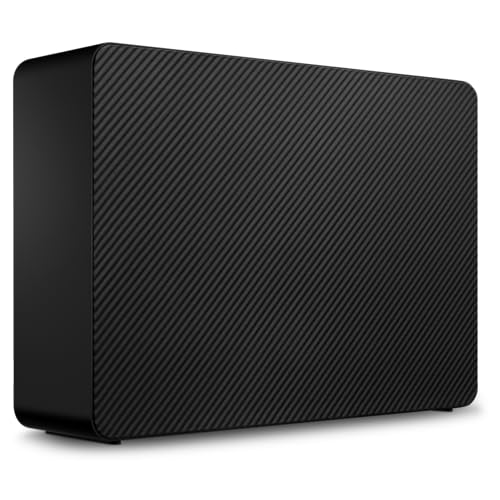
Seagate Expansion 24TB — The whole vault
Twenty-four terabytes changes the emotional register of a film collection. On smaller drives, collecting is an act of triage — every new arrival argues with something old for its shelf space. On the Expansion 24TB, the argument ends. Entire director filmographies live together; the television archive, the children’s collection, the concert films and the home videos all fit with room for the next several years of enthusiasm. Seagate’s Expansion line wraps that capacity in the plainest possible packaging philosophy: a desktop drive, a USB connection, and no software layer insisting on participating in your evening.
The responsibilities scale with the room, and this guide insists on naming them beside the largest pick rather than in a footnote. Twenty-four terabytes on one mechanism is a great deal of household memory in a single point of failure, so this drive demands the backup conversation more urgently than any other pick here — a second drive, even a smaller one holding the irreplaceable subset, is part of this purchase whether it is made today or guiltily later. It also asks for a permanent, ventilated home rather than a life of being moved between rooms; big desktop drives are furniture, and they age best when treated as such. Grant those two conditions and the Expansion 24TB is the last library drive most collectors will buy for a very long time.
- Capacity: 24TB as listed
- Line: Seagate Expansion desktop
- Connection: external desktop drive (USB)
- Role: whole-collection vault
Strengths
- The guide’s largest capacity — collecting without triage for years.
- Expansion-line simplicity: storage without a software entourage.
- One volume for the whole library keeps media-server organisation sane.
Trade-offs
- The largest single point of failure in the guide; a backup plan is part of the price.
- A full copy of 24TB takes serious time whenever you make one.
- Desktop-sized and desk-bound — it is a home, not a travelling companion.
Best for: committed collectors whose library has outgrown two drives already and who will pair it with a backup. Not suited for: a first library drive for a small collection, where its scale buys years of empty space and an outsized backup bill.

WD 20TB Elements Desktop — Simple, enormous
The Elements philosophy reaches its full expression at 20TB: a drive that does one thing, stated in its own listing as plug-and-play storage over USB 3.0, and declines to do anything else. There is no password system to configure, no dashboard to learn, no account to create. You attach it to the television, the media player or the little computer that runs your library software, you point the software at it, and the relationship is complete. For a household media server — where the drive’s audience is other software, not a person — that absence of personality is the highest virtue on offer.
Twenty terabytes is also the size at which a library stops needing supervision. The collection can double, the home videos can move in, the television recordings can accumulate through an entire season of good intentions, and the capacity warning stays silent. Owners of the big Elements drives tend to describe the same experience: the drive disappears. It sits in the cupboard or behind the screen, warm and patient, and the household’s film life simply happens on top of it. When a drive’s finest review is that nobody in the house can remember when it was installed, the Elements line has done exactly what it promised.
- Capacity: 20TB as listed
- Connection: USB 3.0, plug-and-play per the listing
- Line: WD Elements desktop
- Role: set-and-forget library volume
Strengths
- Enormous capacity with the least possible software friction.
- Ideal media-server citizen: it serves files and stays out of the way.
- Elements line’s long record as the default big, simple drive.
Trade-offs
- No password protection — physical access to the drive is access to the library.
- One mechanism holding 20TB still needs a second copy somewhere.
- Its simplicity means no frills for households that wanted an app-managed drive.
Best for: media-server households and television-attached libraries that value invisibility. Not suited for: a library drive that travels to friends’ houses or lives in shared spaces, where the My Book’s password protection answers a real concern.
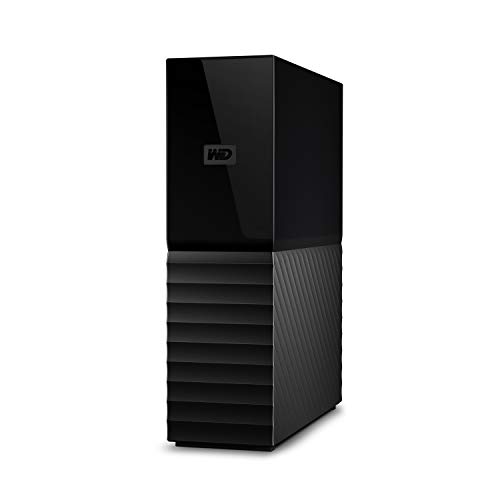
WD 18TB My Book — Protected library
The My Book line exists for the household that loves the Elements idea but has one more requirement: the library should be private. This 18TB model pairs desktop-drive capacity with password protection, as its listing states, so the drive that holds a decade of films — and, in many homes, the family videos shelved beside them — does not open for anyone who plugs it in. That matters in shared houses, in offices that double as screening rooms, and in the classic scenario of the library drive lent to a relative for a weekend.
Eighteen terabytes keeps this from being a compromise purchase; it is within a step of the largest capacities in the guide while adding the protection layer. The My Book’s manner is slightly more ceremonial than an Elements — protection implies a password to keep, and a password forgotten is a library locked against its owner, so the household’s password discipline becomes part of the setup. Keep the credential somewhere sensible, tell the one other person who would need it, and the ceremony reduces to a moment at connection time. In exchange, the drive can travel, be stored off-site as the library’s second copy, or sit in a shared room without broadcasting the family’s viewing history to every curious guest with a laptop.
- Capacity: 18TB as listed
- Connection: USB 3.0
- Stated feature: password protection, per the listing
- Line: WD My Book desktop
Strengths
- Password protection for a library that travels or lives in shared space.
- Near-flagship capacity — protection without a small-drive penalty.
- Doubles naturally as the off-site second copy of a home library.
Trade-offs
- A forgotten password locks the owner out as thoroughly as any stranger.
- Slightly more setup ceremony than the plug-in-and-forget Elements.
- Protection guards the drive’s contents, not its physical safety — it can still be dropped.
Best for: households whose library drive moves, is shared, or stores family videos beside the films. Not suited for: a permanently cupboard-bound media-server drive, where nobody will ever plug in uninvited and the password only adds friction.

WD 14TB Elements Desktop — The balanced shelf
If the guide has a centre of gravity, it is here. Fourteen terabytes is where a growing film collection’s present and near future meet: large enough to absorb a serious library plus its next few years of growth, modest enough that backing it up remains an overnight job rather than a project. The Elements formula — USB 3.0, plug-and-play, no software entourage — suits the role of the household’s main library volume precisely because the role is mostly waiting: waiting beside the television, waiting under the media PC, being ready the instant someone presses play.
The 14TB Elements is also the natural first “big” drive for collectors graduating from a pile of portables. Consolidating three or four small drives onto one volume transforms a media library’s usability — the server software sees one library instead of a federation, the shelf loses its cable nest, and the question “which drive is that film on” retires. Keep the best of the old portables as the new drive’s backup target and the graduation is complete: one library, one copy, no archaeology. For most households this pick is not the compromise; it is the destination, and the larger drives exist for the collectors who have already outgrown a destination like this once.
- Line: WD Elements desktop
- Capacity: 14TB as listed
- USB connection: 3.0
- Role: the balanced main library
Strengths
- The capacity most growing collections actually need for the next several years.
- Elements simplicity — nothing between the library software and the films.
- Backup copies of 14TB stay practical, which keeps the backup habit alive.
Trade-offs
- Uncompressed-everything collectors will outgrow it sooner than they expect.
- No password protection for shared or travelling duty.
- Still a single mechanism — the second copy remains your responsibility.
Best for: the main household library drive, especially consolidating a scattered portable collection. Not suited for: archivists keeping full-disc copies of everything, whose arithmetic points at the 20TB and 24TB picks.

WD 12TB My Book — Protected, mid-size
The 12TB My Book is the protection pick for the curated household: the collector who keeps what they love rather than everything they have ever seen. Twelve terabytes holds a large, deliberately chosen library with room to breathe, and the My Book’s password protection — stated in its listing — guards a collection that often shares its drive with the family’s own recordings. In many homes this is the drive that lives in the study rather than the cupboard, attached to the machine where films are organised, renamed and prepared before they join the shelf by the television.
That working-drive role suits the My Book’s slightly more deliberate personality. Protection means the drive participates in the household’s security habits; the capacity means organising sessions move terabytes without urgency. It is also the natural choice for the two-drive strategy executed modestly: this My Book as the protected working library, an Elements as its plain backup, each sized to a collection that values curation over accumulation. Owners who prune — who delete the film they will never rewatch and keep the shelf meaningful — will find 12TB lasts far longer than the raw number suggests, because a curated library grows at the speed of taste rather than the speed of release schedules.
- Stated feature: password protection, per the listing
- Capacity: 12TB as listed
- USB connection: 3.0
- Line: WD My Book desktop
Strengths
- Password protection at a size that rewards curated collections.
- Well suited as the working, organising drive in a two-drive household.
- My Book line’s long presence in home backup and media duty.
Trade-offs
- Hoarders will fill it; the capacity assumes some curation.
- Password discipline is part of ownership, as with its larger sibling.
- No advantage over an Elements if the drive never leaves a private cupboard.
Best for: curated collections and households wanting protection on the working library drive. Not suited for: keep-everything collectors, whose growth curve belongs on the 18TB, 20TB or 24TB picks.

Seagate Expansion 8TB — The starter archive
Every film library in this guide began somewhere smaller, and for many households this is the right somewhere. The 8TB Expansion is the starter archive: enough room to gather a scattered collection — the films on the laptop, the downloads on the desktop, the portable drive in the drawer — into one organised volume, at the gentlest commitment in the guide. Seagate’s Expansion line keeps the ceremony at zero, which suits a first library drive; the household is learning organisation habits, and the drive should not add software habits to the curriculum.
Eight terabytes is also the honest size for the download-and-stream household, whose local library is a curated top layer over services rather than a complete archive. In that life the drive fills slowly, serves instantly, and may never be outgrown at all. And when it is outgrown, the Expansion graduates gracefully into the role every library needs filled: the backup. A starter drive that becomes the second copy when its successor arrives has not been wasted money; it has been the first instalment of the only storage strategy that actually protects a collection. Buy it as a beginning, organise it like a professional from the first folder, and its successor will inherit a library instead of a mess.
- Capacity: 8TB as listed
- Line: Seagate Expansion desktop
- Connection: external desktop drive (USB)
- Role: first consolidated library
Strengths
- The gentlest entry into a single organised library volume.
- Expansion simplicity — no software layer to learn or maintain.
- Graduates into the backup role when the collection outgrows it.
Trade-offs
- Serious disc-ripping households will fill it within a couple of years.
- No password protection for shared spaces.
- Its successor purchase is predictable — buy it knowing the roadmap.
Best for: first-time consolidation and streaming-era households with a curated local shelf. Not suited for: anyone already holding more than 8TB of films across other drives, who should consolidate onto a larger pick directly.
How Do the Six Shelves Compare?
| Drive | Capacity | Line character | Defining trait |
|---|---|---|---|
| Seagate Expansion | 24TB | Plain desktop storage | Largest vault in the guide |
| WD Elements | 20TB | Plug-and-play | Enormous and invisible |
| WD My Book | 18TB | Password protection | Big library, guarded |
| WD Elements | 14TB | Plug-and-play | The balanced centre |
| WD My Book | 12TB | Password protection | Curated and guarded |
| Seagate Expansion | 8TB | Plain desktop storage | The starter archive |
Two decisions organise the table. The first is the protection question, and it splits the guide cleanly: if the drive will travel, be shared or hold family recordings, the My Book column is yours; if it will sit in a private cupboard serving a television, the Elements and Expansion column gives you simplicity instead. The second decision is capacity honesty — measure your current library, double it, and buy the shelf that swallows the doubled figure. Every regret in this category comes from buying the library you have instead of the library you are becoming. If the doubled figure lands between two sizes, take the larger: the cost of surplus room is paid once, while the cost of insufficient room is paid at every ingest for years.
What Should You Work Out Before Choosing a Capacity?
Do the library audit nobody wants to do. Gather every film file you own, wherever it currently hides, and total it. Then examine your quality policy honestly: a household that keeps full disc images lives in a different capacity universe from one that keeps tidy compressed files, and the same film can differ tenfold between the two policies. Your audit number, under your policy, doubled for growth, is your shopping figure — and if the doubled figure embarrasses you, the embarrassment is information: it means the larger picks are not extravagance but accuracy.
Decide where the drive will live before it arrives. Beside the television, it shares the room’s acoustics and sightlines, so a discreet, quiet desktop unit placed on a soft surface away from the screen’s heat is the goal. In a cupboard or study feeding a media server over the network, placement liberates you — only ventilation and a permanent power socket matter. The two homes reward different picks from this guide, and the household that buys first and places later usually ends up moving a drive it had already cabled beautifully.
Finally, plan the second copy in the same breath as the first. The cheapest effective pattern is an unequal pair: the main library on the pick that suits your life, the backup on the largest drive you can justify, updated on a schedule. Films you can re-download are replaceable; the rips of your own discs, the recordings and the home videos are not, and the backup exists for them.
How Do You Set Up a Library Drive So It Stays Usable at 10,000 Files?
Organisation is a gift you give your future self at the moment it is cheapest: the beginning. Choose a folder structure before the first copy — most households thrive on a simple split between Films, Television, Children’s and Home Videos, with one folder per title inside, named consistently with the title and year. Media-server software rewards that consistency by matching artwork and metadata automatically, and punishes improvisation with a library full of unidentified files wearing grey boxes.
Connect the drive to its permanent home and let it be permanent. Library drives suffer more from being moved, re-lettered and re-purposed than from any amount of honest playback, so give the volume a fixed name, a fixed place in the server software, and a fixed role. Then run the first full copy as a verified copy, and watch one film from the middle of the alphabet all the way through — the household equivalent of the test recording — before the old scattered drives are wiped or retired. Only when the new library has played a whole evening without incident has the migration actually happened.
Set the backup rhythm while the enthusiasm lasts: a scheduled copy to the second drive, weekly for active collectors, monthly for stable ones, with the drive’s health checked at the same sitting. Libraries rarely die dramatically; they die of a neglected year, and the rhythm is what prevents the year from happening.
Which Mistakes Shrink or Endanger a Film Library?
Buying the library you have is the founding error — capacity chosen for today’s collection in a hobby whose only law is growth. The second error is treating the library drive as the backup of itself, a confusion that survives until the first failure explains it. The third is the unlabelled federation: films scattered across portables with names like “Stuff 2”, a system that works until the evening it matters and then works never again.
Two subtler mistakes complete the set. Owners plug the library drive into whatever is nearest — a television’s underpowered USB port, a hub shared with six other devices — and blame the drive for hesitations that belong to the connection; give a desktop library drive its own proper power and a direct port. And households forget that a drive beside a television lives in a hostile climate of heat, dust and small children, so the library’s home deserves the same thought as a plant’s: out of direct sun, off the floor, and away from the subwoofer’s enthusiastic vibrations.
Final Recommendation
For most households, start at the centre and let your audit argue you up or down. The 14TB Elements is the balanced main library for a growing collection; the 20TB Elements is the same idea for the household that has already outgrown balance once. Collectors keeping full-quality copies of everything should skip the intermediate steps and take the 24TB Expansion, accepting the backup duty its scale imposes. If the library will travel, be shared, or hold the family’s own recordings, choose from the My Book column — 18TB for the accumulators, 12TB for the curators — and guard the password like the house key it is. And if you are consolidating for the first time, the 8TB Expansion is a respectable beginning that becomes the backup when its successor arrives. A film library is a decade-long project disguised as a purchase; buy the shelf the decade needs, organise it on the first day, and keep its twin copy current, and the collection will outlast every screen it ever plays on.
What Does a Year in the Life of a Library Drive Look Like?
January is the drive’s busiest social season. The holidays delivered discs, downloads and well-meaning relatives with portable drives, and the library grows by its largest single increment of the year. This is when the capacity decision made at purchase is first audited: the household that doubled its audit figure watches the new arrivals settle into abundant room, while the household that bought for last year’s library begins the familiar arithmetic of what might be deleted. January is also when the backup earns its keep, because the ingest marathon — hours of copying in both directions — is precisely the workload that finds a weakening drive.
Spring and summer are the drive’s quiet profession: serving. Evening films, weekend series, the children’s rainy-day rotation. A library drive in its serving season is judged on invisibility, and the picks in this guide pass into the household’s background noise — the soft spin-up before a film, unnoticed by the third week. This is the season to perform the year’s one act of maintenance: check the drive’s health report, confirm the backup copy completed, and clear the downloads folder that has been using the library as a waiting room. Ten minutes, twice a year, is the entire service schedule of a well-kept library.
Autumn brings the collectors’ second growth spurt — awards season, box sets, the television recordings of everything the household meant to watch — and with it the honest measurement: how full is the drive, really, and at the current rate, when does it cross the line where fullness becomes fragility? The household that asks the question in autumn buys its successor calmly in a sale; the household that asks it in a panic, mid-copy, buys whatever is on the shelf. A library drive’s year, properly kept, contains no emergencies. Its biography is a long, dull, honourable service — which is to say, exactly the biography you want for the shelf that holds a decade of evenings.
Where Does the Drive Fit in a Ripping and Ingest Workflow?
For households that build their library from their own discs, the drive sits at the end of a small production line, and understanding the line prevents the classic bottleneck complaint. A disc is read by the computer, processed into the household’s chosen format, and written to the library. The drive’s part — accepting a large file at the end — is the least demanding step; even a patient desktop mechanism absorbs a film-sized write without drama. The delays in such a workflow live in the reading and processing, which is why blaming the library drive for a slow evening of ripping is nearly always a misdiagnosis.
The workflow’s real demand on the drive is organisational. Ingest in batches, name at the moment of ingest, and let the server software catalogue new arrivals before the next batch begins; a drive that receives fifty unnamed files in a night becomes a dig site by the end of the month. Keep a staging folder for new arrivals — a quarantine where files wait until they are named, checked and backed up — and the library proper stays clean enough to browse with pleasure. The staging habit also protects playback: a half-copied file never reaches the shelf the television reads, so the mid-film failure caused by an interrupted ingest simply stops occurring.
Households that download rather than rip follow the same shape with different furniture: the staging folder receives, the naming happens, the verified copy joins the library, the backup absorbs it on schedule. In both workflows the drive’s virtues are the same — capacity that forgives a busy month, steadiness that never interrupts a viewing, and a presence so undemanding that the household’s attention stays where it belongs, on the films.
What Happens When the Library Outgrows the Drive Anyway?
It happens to the careful as well as the careless, because taste grows and quality policies inflate. The migration to a successor drive deserves the same respect as the original setup, and it begins with the same act: a verified copy of everything, made while the old drive is healthy, to the new volume that will replace it. Copy with verification enabled, in batches organised by your folder structure, and keep the old drive mounted under a different name until the household has watched from the new library for a full week. A week of evenings is the real test — the server software’s catalogue, the television’s connection, the children’s favourites, the subtitle file that lives in exactly one place.
Then comes the succession decision, and it is the moment the two-drive strategy pays its dividend. The old library drive, demoted, becomes the backup — a role that asks little of an ageing mechanism and gives the household its second copy without a second purchase. Label it with its new role and the date, update the backup schedule to point at the new library, and run the first scheduled copy manually to watch it succeed. The household now owns what it should have owned all along: a library with room to grow, and a shadow of itself, each on its own mechanism.
Resist the one temptation migration offers, which is reorganising everything mid-move. Change the drive or change the filing system, never both in the same week, because when a film cannot be found you must know which change lost it. Reorganise next month, from inside the new library, at the pace of a household chore rather than a rescue. Libraries are built across years; they can afford to be moved across weeks.
How Quiet Is Quiet Enough Beside a Television?
A library drive in the living room joins the cast of every quiet scene, so its acoustics deserve the same seriousness as its capacity. The sounds a desktop drive makes are modest — a soft whir as it wakes, a faint murmur of seeking during a library scan — but a treated living room at night is an unforgiving auditorium, and the distance between the drive and the nearest seat matters more than any figure a maker could publish. The household remedies are physical and effective: place the drive on a soft mat rather than a resonant shelf, keep it out of the television stand’s hollow cabinet where the enclosure acts as a sounding board, and give it a few feet of separation from the seating. Most households that perform these three small acts stop hearing their library entirely.
Behaviour matters as much as placement. A drive that sleeps aggressively will announce every episode change with a spin-up pause and a whir; a drive that never sleeps hums its availability through the whole evening. The middle path — the operating system’s or media player’s own power settings, tuned so the drive rests between sessions but stays awake within one — is set once and forgotten, and it is worth the ten minutes in the settings panel. Media-server households dodge the question entirely by banishing the drive to a cupboard in another room, which is the acoustic argument for the server pattern: the library’s noise, heat and blinking lights all emigrate together, and the living room keeps only the screen.
Vibration deserves its sentence. A desktop drive on a shared surface with a subwoofer is a drive being gently shaken for every action film in the collection, and while modern mechanisms tolerate ordinary life, the considerate owner separates the two — different shelf, soft feet, a little distance. Drives die from heat and neglect far more often than from drama, but a library that is placed kindly is a library that serves longer, and kindness to hardware is mostly a matter of where you put it on the first day.
How Does a Library Drive Serve a Whole House?
The single-television pattern is where most libraries begin: drive attached to the screen or its player, one room served, simplicity total. Its limits appear when the household does — the bedroom television, the teenager’s laptop, the kitchen tablet all develop opinions about the library, and a drive physically married to one screen cannot attend the others. The media-server pattern answers by moving the drive to a small always-on computer or a capable router-adjacent hub, from which library software serves every screen in the house from the one catalogue. Every pick in this guide serves happily in either pattern, because the drive’s job — hold the files, hand them over steadily — does not change; only its audience multiplies.
The server pattern rewards the larger, simpler drives. An Elements or Expansion volume attached to the server asks nothing of the network but files, and its lack of password machinery is no loss because the server software manages who sees what. The My Book’s protection finds a different role in this pattern: as the server’s backup, stored elsewhere in the house or off-site, where its lock guards the household’s memory against the casual and the curious. Households often discover that the two patterns are not rivals but chapters — the direct-attached year teaches the collection’s shape, the server year shares it — and the drive bought for chapter one serves chapter two without complaint.
Whichever pattern you run, name the library once and keep the name. Screens, players and server software all remember the library by its identity, and a drive that changes names or letters with every reconnection teaches every device in the house to lose it. Stability is a feature you configure, and in a whole-house library it is worth more than any capacity figure in this guide.
What Is the Honest Economics of Never Deleting a Film Again?
The never-delete household has done a sum that the streaming era tries to hide. A large desktop drive holds, per unit of money, an amount of film that dwarfs the monthly cost of renting the same shelf back from services that may withdraw titles at a contract’s whim. The collector’s library is an asset with peculiar properties: it cannot be delisted, it does not buffer, it works during internet outages and in houses the broadband forgot, and its marginal cost per additional film falls with every purchase because the shelf was bought once. That is the economic soul of every pick in this guide — capacity bought outright, owned outright, and amortised across a decade of evenings.
The sum has a second line that honest collectors include: the backup drive roughly doubles the hardware cost of the library, and the electricity of an always-on shelf adds its modest rent. Even with both lines counted, a serious collection’s cost per film-hour undercuts the alternatives so thoroughly that the argument stops being financial and becomes temperamental. Some households prefer the infinite, shifting river of streaming; others prefer the shelf that is theirs. This guide serves the shelf people, and its only economic advice is to buy the shelf at the size the decade needs, because the one genuinely wasteful purchase is the almost-big-enough drive replaced twice.
What Should You Do When a Library Drive Starts Behaving Oddly?
Odd behaviour has a vocabulary, and learning it saves libraries. A drive that occasionally vanishes from the computer and returns after a reconnection is usually reporting on its cable, its port or its power supply before it reports on itself — swap the cable and the port first, because they are cheap suspects and frequent culprits. A drive that has grown slow to open folders may be honestly full, honestly fragmented by years of additions, or beginning the decline that health utilities exist to describe; check the health report before reorganising anything, because the report distinguishes housekeeping from emergency.
New sounds are the symptom to respect immediately. A drive that clicks, retries or sings a note it never sang before is asking to be copied, today, to its successor, before any other experiment is performed on it. The order of operations in a drive emergency is always the same: secure the data first, diagnose second, and never let a diagnostic tool’s thorough test run on the only copy of a library, because thorough tests are themselves work an ailing mechanism may not survive. This is the moment the backup strategy justifies its entire existence — the household with a current second copy performs this week as an errand, while the household without one performs it as a vigil.
When the copy is safe, the old drive’s fate can be decided calmly: warranty conversation if it is young, honourable retirement if it is old, and in neither case a return to library duty. A drive that has announced its decline once has told you its intentions, and libraries are built on drives whose intentions are boring.
Why Do Subtitles, Artwork and Metadata Deserve Space in a Drive Guide?
Because a film library is not made of film files alone, and the invisible half is where collections quietly succeed or fail. Every title on a well-kept shelf travels with companions: subtitle files in the languages the household actually uses, artwork the server displays, and the metadata — year, edition, cut — that distinguishes the director’s version from the theatrical one in a catalogue of thousands. These companions are tiny beside the films themselves, but they live or die by the library’s organisation, and a migration that copies the films while orphaning their companions has preserved the library’s body and lost its memory.
The drive-level lesson is to keep companions with their films, always: subtitles in the same folder as the title they serve, named so the player finds them without being asked, and the whole structure copied by tools that take folders intact rather than files by type. The household that filters a copy by extension — films yes, everything else forgotten — discovers the loss months later, mid-film, in a language nobody present speaks. It is the most preventable disappointment in the entire hobby, prevented by the dull discipline of treating the folder as the unit of the library.
Editions deserve the same care. The collector who keeps two cuts of a beloved film owns an asset that streaming cannot replicate, and the catalogue should say so proudly and precisely, in the folder name itself. Years from now, when the library passes to a bigger drive or a different server, that precision is what survives. Capacity is the visible half of what these six drives sell; the invisible half is a structure worth filling — and the owners who build the structure on day one are the ones whose libraries remain a pleasure at ten thousand files instead of becoming a very large, very quiet attic.
One last habit separates the households whose libraries survive decades from those whose collections quietly evaporate: the annual viewing of the system itself. Once a year, on an evening with no film planned, open the library’s catalogue, confirm the backup copy is current, read the drive’s health report, and check the capacity against last year’s figure. The ritual takes less time than a single film and performs the same service for the collection that a screening performs for a print — it catches the small decay while the small decay is still cheap to fix. Libraries are not lost in disasters nearly as often as they are lost to unattended years.
Frequently Asked Questions
Can these drives play films directly through a television’s USB port?
Generally yes, with two caveats that have nothing to do with the drives. The television must support the filesystem the drive is formatted with and the file formats in your library, and both vary by brand and age — check the TV’s manual for its USB playback support. Where a television proves picky, the standard remedy is a small media player or a media-server computer between the drive and the screen, which is how most of these drives end up serving anyway.
How many films fit on 14TB?
It depends entirely on your quality policy, and any single number would be a lie of precision. A library of compressed downloads might hold thousands of titles; a library of full disc copies might hold a few hundred. Measure your own collection’s average file size — your existing drives tell you the truth in one folder inspection — and divide. Your number, from your files, is the only one worth shopping with.
What is the practical difference between Elements and My Book?
Character, mostly. Elements is storage with the software stripped away: plug it in and it is a volume. My Book adds password protection and a slightly more managed personality, as its listings state. The capacities overlap, the underlying job is identical, and the choice is whether your library’s life involves travel, sharing or private family material that deserves a lock.
Should my library drive stay switched on all the time?
A media-server drive usually does, and desktop drives tolerate the life well provided they have ventilation and clean power. What they dislike is the opposite extreme: being power-cycled several times a day for weeks. Pick a pattern — always available, or on for the evening’s viewing — and let the drive live it consistently, with the operating system’s sleep settings doing the resting in between.
Is one big drive better than two smaller ones for a library?
For the library itself, yes: one volume means one catalogue, one search, one place to organise. For the household’s safety, the second drive still needs to exist — as the backup, not as a rival library. The winning arrangement is asymmetric: the biggest sensible drive as the library, another drive as its shadow.
Does a bigger drive make films load or play any faster?
No, and it does not need to. Playback asks for a modest, steady stream that every pick here supplies with enormous headroom, so a film starts as quickly from the 24TB vault as from the 8TB starter. What size changes is everything around the playing: how much the library holds, how rarely it needs pruning, and how long a full backup takes. Choose size for the collection’s future, not for a speed difference that does not exist.
Can I move a library drive between a computer and a television?
Physically, yes; habitually, it is a poor idea. Each move risks the cable, the connector and the drive’s catalogue consistency, and televisions and computers sometimes disagree about filesystems and folder conventions. Libraries thrive on permanence: give the drive one home, one connection and one role, and let the household’s other screens reach it through a player or server rather than by carrying the shelf to them.
Related Guides
A library deserves a proper stage. Pair these drives with our guide to media server setups for a household library, our roundup of the best drives for a home NAS, and our walkthrough of backing up a large media collection.


