What's inside
- Key Takeaways
- Quick Picks
- Why Does Sequencing Data Demand Enterprise-Class Drives?
- What Does Each Drive Bring to a Sequencing Workflow?
- How Do the Six Compare for a Sequencing Facility?
- How Should a Lab Size Storage for Its Sequencing Output?
- How Should Raw Data Move From Instrument to Archive?
- Which Storage Mistakes Cost Sequencing Labs the Most?
- Final Recommendation
- What Does a Week of Sequencing Do to a Storage Tier?
- How Do Public Archives and Retention Rules Change Local Storage?
- What Should Happen When a Data-Tier Drive Fails Mid-Project?
- Where Do SSDs Fit in a Sequencing Pipeline, If These Picks Are All Spinning?
- What Do Power, Cooling and Vibration Do to a Drive Array?
- How Do Checksums and Scrubbing Protect Data That Sits Still?
- Why Standardise a Fleet on One Drive Model?
- Who Owns the Data Tier in a Lab, and Why Does It Matter?
- Frequently Asked Questions
- Related Guides
As an Amazon Associate I earn from qualifying purchases. This post may contain affiliate links at no extra cost to you.
gizmoverdict.com is reader-supported. When you buy through links on our site, we may earn an affiliate commission.
Where to buy: All six drives below link to listings checked against this site’s verified product pool, so the model and capacity described are the model and capacity on the listing. This guide prints no prices and no star ratings; sequencing storage is judged on sustained writes, workload class and terabytes, not scores.
The best hard drives for rna seq data are not chosen the way ordinary storage is chosen, because RNA sequencing produces an extraordinary kind of data. A single run delivers FASTQ files by the hundreds of gigabytes — raw reads pouring off the instrument in a continuous write that does not pause for office hours — and those files are only the beginning: alignment, quantification and quality control each generate their own generations of intermediate data, all of it needing to live somewhere fast enough to work on and capacious enough to keep. The drives in this guide are enterprise and NAS-class mechanisms of 14TB to 24TB, because that is the class of hardware whose design brief matches a sequencing workload: sustained, heavy, around-the-clock writing, year after year, in facilities where a lost run is a lost experiment rather than a lost afternoon of documents.
Seagate’s Exos line anchors the list with two 20TB enterprise models, the kind of drive that fills data-centre racks. Western Digital answers with a 14TB Ultrastar from its own enterprise family and a 22TB Red Pro built for NAS duty. Seagate’s IronWolf Pro contributes the guide’s largest internal capacity at 24TB and states its CMR recording technology in its listing — a detail this guide will return to, because recording technology quietly decides whether a drive sustains its write pace under sequencing loads. The final pick wraps a 22TB enterprise Ultrastar mechanism in a desktop enclosure, for the lab that needs enterprise storage without a server to put it in. Between them, the six cover every architecture a sequencing operation realistically runs, from a single workstation to a facility NAS, and the sections that follow match each drive to the station it serves best.
Key Takeaways
- RNA-seq storage is a sustained-write problem: a run writes hundreds of gigabytes continuously, so workload class matters more than any burst-speed figure.
- Enterprise and NAS Pro drives earn their place through design intent — they are built and warranted for the 24/7 duty cycle a sequencing core actually runs.
- CMR recording, stated in the IronWolf Pro’s listing, is the safer technology for sustained heavy writes; ask the question of any drive destined for raw-data ingest.
- Raw FASTQ files are irreplaceable in a way processed results are not — you can re-run an analysis, but re-running the sequencer costs the sample, the reagents and the week.
- Plan capacity from the run sheet: runs per month, gigabytes per run, retention policy for intermediates — the arithmetic decides between 14TB and 24TB, not preference.
- One drive is a workstation; a mirrored pair or a NAS is a facility. Match the architecture to how many people’s science depends on the data.
- Verification is the archive: checksums at ingest and scheduled scrubbing afterwards are what turn a pile of large drives into a trustworthy data tier.
Quick Picks
| Pick | Badge | Why it earns its place |
|---|---|---|
| Seagate IronWolf Pro 24TB | Largest, CMR stated | The guide’s biggest internal drive, an enterprise NAS model whose listing names its CMR technology. |
| WD Red Pro 22TB | NAS anchor | Western Digital’s Pro-tier NAS drive at a capacity that swallows a core facility’s active projects. |
| G-DRIVE 22TB Desktop | Enterprise, no server needed | An enterprise-class 7200RPM Ultrastar mechanism in a desktop enclosure for direct-attached labs. |
| Seagate Exos X24 20TB | Data-centre pedigree | Seagate’s flagship-class enterprise drive, built for rack-scale sustained duty. |
| Seagate Exos X20 20TB | The specified workhorse | An Exos model whose listing states its 7.2K RPM speed and full model number for exact procurement. |
| WD Ultrastar DC HC530 14TB | Proven enterprise line | The data-centre Ultrastar family in a 14TB size suited to analysis workstations and smaller cores. |
Why Does Sequencing Data Demand Enterprise-Class Drives?
Consider what a sequencing run asks of storage. The instrument writes continuously for the length of the run, and the files it produces are not documents — they are the experiment itself, in its least processed and most valuable form. Downstream, the analysis pipeline reads those files repeatedly and writes intermediate results that can exceed the raw data in size. Then the next run arrives, and the next, on a schedule set by the science rather than by the storage budget. A consumer desktop drive in this environment is a component working far outside its design brief: engineered for bursty, intermittent use, it is asked for sustained industrial duty, and it answers the way anything does when misapplied — eventually, and at the worst moment.
Enterprise drives invert the brief. The Exos and Ultrastar families are designed for enclosures full of their siblings, running continuously, under workloads measured in hundreds of terabytes written per year. NAS Pro drives — the Red Pro and IronWolf Pro — adapt the same philosophy to the smaller facility: multi-bay boxes, constant availability, vibration from neighbouring drives, and users who notice downtime in lost experiments rather than lost convenience. This guide chose exclusively from those two families, in capacities from 14TB upward, because below that class and size the conversation is about making do, and sequencing data punishes making do.
The third reason is accountability. Enterprise and Pro NAS lines publish their intentions — workload ratings, duty cycles, recording technology — in a way consumer lines do not, and a lab manager speccing storage for a five-year data-retention obligation needs intentions in writing. Where a listing in this guide states a fact, we use it; where it does not, we say so rather than guess, which is the same discipline the drives themselves are bought for. A sequencing facility is, in the end, a promise made to future collaborators, reviewers and students: the data behind the conclusions will still exist, intact and findable, when they come to check. Storage is where that promise is physically kept, and it deserves to be specified with the same rigour as the experiment it preserves.
What Does Each Drive Bring to a Sequencing Workflow?

Seagate IronWolf Pro 24TB — Largest, CMR stated
The IronWolf Pro takes the guide’s capacity crown at 24TB and carries the specification this workload cares about most in plain sight: its listing describes an enterprise NAS internal drive with CMR technology, in the standard 3.5-inch SATA form. CMR — conventional magnetic recording — writes its tracks without overlapping them, which means sustained write performance stays where it starts even as the drive fills and the workload turns random. For a NAS ingesting FASTQ files from an instrument while analysts simultaneously pull reads for processing, that steadiness is not a refinement; it is the difference between a storage tier that keeps up and one that becomes the pipeline’s bottleneck.
As a NAS drive, the IronWolf Pro is also built for company: multi-bay enclosures where neighbouring drives vibrate, temperatures run warm, and availability is measured in years. Twenty-four terabytes per bay changes facility planning — a modest enclosure of these holds a core’s entire active portfolio with the raw data, the intermediates and the breathing room coexisting. The Pro tier’s positioning matters for support as much as hardware: this is Seagate’s line for installations whose owners will actually call when something goes wrong, specced accordingly. If your sequencing storage lives in a NAS — and for a shared facility it should — this is the pick the rest of the guide is measured against.
- Capacity: 24TB as listed
- Class: enterprise NAS internal HDD
- Recording technology: CMR, stated in the listing
- Interface: SATA 6Gb/s, 3.5-inch
Strengths
- Largest internal capacity here, with CMR confirmed in the listing itself.
- Built for multi-bay NAS life: vibration, heat and constant availability.
- Pro-tier positioning suits facilities that need vendor accountability.
Trade-offs
- Its talents assume a NAS or a serious workstation bay; it is wasted as a lone desktop drive.
- 24TB per drive makes mirrored pairs a significant budget line.
- Capacity this large tempts labs to postpone the archive tier — resist.
Best for: sequencing cores running a NAS as the primary data tier. Not suited for: a single workstation with one bay and no redundancy plan, where 24TB of raw data would sit unprotected on one mechanism.

WD Red Pro 22TB — NAS anchor
Western Digital’s Red Pro line is the company’s answer to the same facility question, and this 22TB model is its heavyweight representative in the guide. The Red Pro badge distinguishes it from the standard Red line in the way that matters here: the Pro tier is the one WD positions for larger enclosures, heavier workloads and buyers who measure downtime in other people’s experiments. In a sequencing NAS, that positioning translates to a drive intended to be written to by an instrument’s ingest, read by a cluster of analysts, and left alone to do both for years.
Twenty-two terabytes pairs naturally with the IronWolf Pro as the guide’s twin NAS anchors, and the honest difference between them is ecosystem rather than capability: labs standardise on a maker’s management tools, warranty handling and procurement channels, and both anchors reward that standardisation. Where the Seagate states its CMR technology in the listing, this guide notes the WD’s listing does not raise the subject, and labs for whom the recording technology is a hard requirement should confirm it against Western Digital’s own documentation for this model before standardising — the same verify-before-standardising discipline this guide applies to every unstated specification. As an anchor for a multi-year data tier, the Red Pro’s combination of capacity class and Pro-tier intent is exactly the conservative choice a facility wants.
- Capacity: 22TB as listed
- Class: NAS internal hard drive, Pro tier
- Form: 3.5-inch internal
- Recording technology: not stated in the listing title — verify with Western Digital documentation
Strengths
- Pro-tier NAS design intent at near-flagship capacity.
- Suits standardisation on WD’s ecosystem across a facility’s enclosures.
- Sized for active-portfolio storage: raw, intermediates and workspace together.
Trade-offs
- Listing does not state recording technology; verification is the buyer’s step.
- Like all NAS anchors, it assumes an enclosure and a redundancy scheme.
- Standard Red shoppers should note the Pro premium buys workload intent, not capacity.
Best for: NAS-based sequencing facilities standardised on Western Digital. Not suited for: direct-attached single-workstation use where its NAS tuning brings no benefit and the G-DRIVE pick below is the simpler instrument.
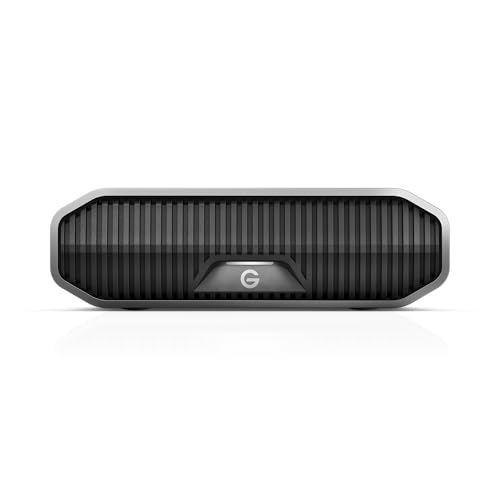
G-DRIVE 22TB External Desktop — Enterprise, no server needed
Not every sequencing operation has a server room, and this pick exists for the lab that does its computing on a workstation and its storage on the desk. The G-DRIVE’s listing is unusually explicit about what is inside: an enterprise-class 7200RPM Ultrastar hard drive — Western Digital’s data-centre mechanism — inside a 22TB external desktop enclosure. That transparency matters, because the eternal question of external drives is which mechanism hides inside, and here the answer is the guide’s own Ultrastar family wearing a desktop coat.
The use case writes itself: the instrument’s control PC or the analysis workstation gains an enterprise-grade data tier by plugging in one enclosure. Ingest lands on Ultrastar internals, analysis works against the same volume, and the drive can be carried — carefully, powered down — between the instrument room and the office in a way a rack of Exos drives cannot. The cautions are the desktop form’s own: one mechanism means no redundancy inside the box, and a drive that can be carried can be dropped, so the G-DRIVE earns its keep as a working tier with a backup elsewhere, not as the archive of record. For the small lab or the single-investigator group, it is the fastest honest route from no enterprise storage to enterprise storage.
- Capacity: 22TB as listed
- Internal mechanism: enterprise-class Ultrastar, 7200RPM, per the listing
- Form: external desktop hard drive
- Role: direct-attached enterprise tier
Strengths
- Enterprise mechanism disclosed in the listing — no mystery drive inside.
- Server-free deployment: enterprise storage for a workstation lab.
- Movable between instrument and office in a way rack storage is not.
Trade-offs
- Single mechanism: redundancy must come from the lab’s backup scheme.
- Desktop enclosures invite being moved; every move is a small risk to schedule carefully.
- Serves one machine at a time — shared facilities outgrow direct attachment.
Best for: small labs and single workstations needing an enterprise data tier without infrastructure. Not suited for: multi-user cores where several analysts and an instrument must reach the data simultaneously through a network.

Seagate Exos X24 20TB — Data-centre pedigree
The Exos line is Seagate’s enterprise flagship family — the drives that fill hyperscale racks — and the X24 at 20TB is its representative here. An Exos in a sequencing context is a statement about workload: these mechanisms are designed for enclosures that never sleep, written and read at industrial rates, in fleets where reliability is tracked statistically across thousands of siblings. A core facility building a storage server, or a lab speccing the ingest tier of a NAS with enterprise rather than NAS-branded drives, is shopping in exactly this aisle.
The X24’s listing keeps its description tight — enterprise internal hard drive, 20TB — so this guide will not decorate it with unstated figures. What the Exos name itself certifies is the design brief, and for sequencing storage the brief is the purchase: sustained duty, high workload tolerance, and behaviour that stays predictable as the drive fills with run data. Pair them in a mirrored or parity arrangement inside a proper enclosure, give them the cooling enterprise drives assume, and they become the tier nobody in the lab ever has to think about — which, for the storage under a multi-year research programme, is the entire point.
- Capacity: 20TB as listed
- Class: enterprise internal hard drive
- Family: Seagate Exos X24
- Form: 3.5-inch internal (server/NAS bays)
Strengths
- Flagship enterprise design brief: continuous, heavy, fleet-scale duty.
- Predictable behaviour under sustained ingest — the sequencing pattern.
- The natural choice for a purpose-built storage server.
Trade-offs
- Enterprise drives assume enterprise housing: cooling, power and mounting matter.
- The listing states few specifics, so procurement should confirm details against Seagate documentation.
- Overkill, honestly, for a single low-throughput workstation.
Best for: storage servers and serious NAS builds at the centre of a sequencing facility. Not suited for: a lone desktop without proper bays and cooling, where an enterprise mechanism’s assumptions about its housing are not met.

Seagate Exos X20 20TB (ST20000NM007D) — The specified workhorse
The X20’s listing is the most procurement-friendly in the guide: it states the full model number ST20000NM007D, the 20TB capacity, the 7.2K RPM rotational speed, the SATA 6Gb/s interface and the 3.5-inch form. For a lab manager, that completeness is a feature in itself — the purchase order can name the exact mechanism, the receiving bench can verify it on arrival, and the asset register stays honest. Underneath the paperwork sits the same Exos enterprise proposition as its X24 sibling: a drive family designed for continuous heavy service in serious enclosures.
Choosing between the two Exos picks is a fleet question rather than a performance question this guide can settle from listings alone. Facilities already running X20 drives gain spares commonality and predictable behaviour by continuing; new builds may prefer the X24’s newer family position. Either way, the sequencing-relevant traits are shared: enterprise workload intent, sustained-write steadiness, and the assumption of a redundant array around the individual mechanism. A single Exos on a shelf is a component; the drive comes into its own as a citizen of an enclosure, and labs should buy it as one.
- Capacity: 20TB as listed
- Model: ST20000NM007D, stated in the listing
- Speed: 7.2K RPM, SATA 6Gb/s, per the listing
- Class: enterprise internal hard drive
Strengths
- Fully specified listing — exact model, speed and interface for procurement.
- Exos enterprise brief for continuous ingest duty.
- Fleet commonality for facilities already running the X20 generation.
Trade-offs
- An earlier Exos generation than the X24 pick; new fleets should compare deliberately.
- Requires proper enclosure, cooling and redundancy to show its value.
- No consumer conveniences — it is a component, not an appliance.
Best for: facilities standardising a fleet, and buyers who need an exactly specified enterprise mechanism. Not suited for: direct-attached desktop use without an enclosure plan, where the G-DRIVE’s appliance form answers the actual need.

WD Ultrastar DC HC530 14TB — Proven enterprise line
The Ultrastar DC HC530 brings Western Digital’s data-centre lineage to the guide at 14TB — the smallest capacity here, and the right size for a defined set of sequencing jobs. Not every tier needs to hold the whole facility’s history. The analysis workstation that holds current projects, the ingest buffer that receives runs before they graduate to the archive, the secondary server that mirrors the critical subset: these are 14TB-shaped roles, and filling them with an enterprise mechanism rather than a consumer drive is the decision this pick makes easy. Its listing states the full model string WUH721414ALE6L4, which procurement-minded labs will appreciate for the same reasons as the X20’s candour.
The HC530 generation has a long service history in data centres, and that history is its argument: behaviour documented across enormous fleets, failure manners understood, a known quantity in the most literal sense. For a lab, known quantities are worth capacity points. A 14TB drive whose character the industry has mapped can be the wisest purchase in the guide for the workstation tier, leaving the 20TB-plus picks to the archive and NAS roles where their scale is the requirement. Buy it for a defined job, mirror it where the job is critical, and it will do that job with enterprise manners for years.
- Capacity: 14TB as listed
- Model: WUH721414ALE6L4, stated in the listing
- Family: Ultrastar DC HC530, SATA HDD
- Class: data-centre enterprise
Strengths
- Enterprise lineage with a long, documented fleet history.
- Right-sized for workstation and ingest-buffer tiers.
- Full model number stated for exact procurement and spares matching.
Trade-offs
- Smallest capacity here — a facility’s main archive will outgrow it.
- An established generation; buyers wanting the newest family should look at the larger picks.
- Still assumes proper mounting and cooling, as all enterprise drives do.
Best for: analysis workstations, ingest buffers and mirrored critical subsets. Not suited for: the facility’s primary long-term archive, where 14TB fills faster than retention policies forgive.
How Do the Six Compare for a Sequencing Facility?
| Drive | Capacity | Class | Defining trait |
|---|---|---|---|
| Seagate IronWolf Pro | 24TB | Enterprise NAS | CMR stated in listing; largest internal |
| WD Red Pro | 22TB | NAS Pro | WD’s Pro-tier facility anchor |
| G-DRIVE Desktop | 22TB | Enterprise external | Ultrastar 7200RPM inside, per listing |
| Seagate Exos X24 | 20TB | Enterprise | Flagship family, fleet duty |
| Seagate Exos X20 | 20TB | Enterprise | Fully specified model and speed |
| WD Ultrastar HC530 | 14TB | Enterprise | Proven generation, workstation tier |
Read the table by architecture. If the data tier is a NAS, the IronWolf Pro and Red Pro are the shortlist, separated by ecosystem and by the CMR statement in Seagate’s listing. If the tier is a storage server built from components, the two Exos models and the Ultrastar compete on fleet history and capacity. If there is no server at all, the G-DRIVE stands alone as the enterprise answer that plugs into a workstation. Every route assumes redundancy somewhere in the design — the differences are where the redundancy lives, not whether it exists. Choose the architecture first and the drive second, and most of the catalogue anxiety in this category simply evaporates.
How Should a Lab Size Storage for Its Sequencing Output?
Start from the run sheet, not the catalogue. Count the runs your instrument realistically produces in a month, multiply by the FASTQ volume of a typical run at your read length and depth — your own completed runs state this figure precisely — and then apply the multiplier that catches new labs out: the analysis multiplier. Alignment outputs, quantification tables, QC reports and the intermediate files pipelines scatter can together rival or exceed the raw data, and a storage plan that budgets only for FASTQ is a plan to run out of room mid-project. Labs that keep intermediates for reproducibility should budget for them as first-class citizens; labs that delete them should write that deletion into policy so the decision is deliberate rather than desperate.
Retention is the second variable, and it is a governance question wearing a technical costume. Funders, journals and institutions increasingly expect raw data to persist and to be deposited in public archives; local retention until deposition, plus the working life of the project, defines the minimum. Multiply monthly ingest by the retention months, add the active-analysis workspace, and the honest capacity figure appears. For most cores it lands in the territory this guide covers — one to two dozen terabytes of live tier, backed by a colder archive — and it explains why every pick here starts at 14TB.
Leave headroom as a matter of doctrine. A data tier above eighty percent full is a tier whose performance, housekeeping and morale all degrade, and sequencing does not schedule its emergencies around your procurement cycle. The drive you buy should hold the plan’s figure at seventy percent on its busiest projected day. Write the projection down, with its date and its assumptions, and file it with the tier’s inventory: when the actual growth curve argues with the projected one, the written version tells you whether the science changed or the arithmetic did, and that distinction decides whether the next purchase is a correction or an expansion.
How Should Raw Data Move From Instrument to Archive?
The pipeline has three stations, and each station’s storage should be chosen for its own job. At the instrument, ingest must be fast enough and capacious enough to never throttle a run — the workstation tier, where the Ultrastar pick or a mirrored pair earns its place. From ingest, completed runs move to the facility tier — the NAS of IronWolf Pro or Red Pro drives, or the Exos-based server — where they become shared, redundant and backed up. From the facility tier, aged runs graduate to the archive: deposited publicly where required, and held locally on the cheapest, coldest storage the retention policy allows.
Movement between stations should be verified movement. Copy utilities that compare checksums turn “the run arrived” into a provable statement, and in a field where a corrupted FASTQ can quietly poison a month of analysis, provable is the only acceptable standard. Automate the transfers so they do not depend on a tired postdoc’s memory at midnight, log them so the audit trail exists, and keep the instrument’s local copy until the facility copy verifies — the sequencing equivalent of not formatting the camera card until the photos are home twice.
Names and metadata travel with the data or the data is only half moved. Sample sheets, run parameters and the lab’s own identifiers belong in the run’s folder from the first copy onward, because the FASTQ file named by an instrument’s default scheme is anonymous within a year. Storage architecture is partly folder architecture, and the labs that understand this are the ones whose five-year-old data is still science rather than archaeology.
Which Storage Mistakes Cost Sequencing Labs the Most?
Buying consumer drives for an enterprise workload is the founding error, and it is usually made by a spreadsheet: the consumer drive wins the price-per-terabyte comparison in the meeting and loses the facility a run in the winter. The second error is the single copy of raw data — the run that lives on the instrument PC’s drive until someone needs the PC. Raw data is the one dataset in the building that cannot be regenerated from anything else in the building; treat its duplication as part of the run itself, not as housekeeping afterwards.
The third error is ignoring recording technology until the ingest slows. Drives that overlap their write tracks can sustain fine speeds on an empty disk and falter under exactly the mixed, continuous writing sequencing applies; that is why this guide highlights the listing that states CMR and instructs verification where listings are silent. The fourth error is capacity planning from the brochure instead of the run sheet, and the fifth is its cousin: no succession plan, so the tier fills during a grant’s busiest quarter and the emergency purchase is whatever the courier can bring. Sequencing is a planned science; its storage should be the most planned thing in the building. A sixth error, quieter than the rest, is letting the tier’s knowledge live in one person’s head — the inventory, the passwords, the array’s history — so that a single departure converts a healthy system into an unexplored one.
Final Recommendation
Build the tier your architecture describes. A NAS-centred facility should anchor on the IronWolf Pro 24TB — the largest capacity here, with CMR stated in its own listing — or standardise on the WD Red Pro 22TB if the lab’s ecosystem is Western Digital, verifying the unstated details against the maker’s documentation as this guide advises. A component-built storage server belongs on the Exos X24 or the fully specified Exos X20, with the Ultrastar HC530 serving workstations and ingest buffers where its 14TB is the right shape. The lab without infrastructure should take the G-DRIVE 22TB and enjoy enterprise internals without building anything. Across every route, the non-negotiables are identical: enterprise or Pro-class mechanisms, verified copies of raw data from the day it lands, capacity planned from the run sheet with headroom to spare. Sequencing data is the experiment, preserved; store it like the irreplaceable thing it is, and the drives in this guide will hold up their end of the science. Years from now, when a reviewer asks for the raw reads behind a figure, the answer your lab gives will be a direct product of the storage decisions made this quarter — make them the kind that let you answer with a link instead of an apology.
What Does a Week of Sequencing Do to a Storage Tier?
Monday begins with the instrument already writing. A run that started over the weekend is delivering its final files to the ingest workstation, and the tier’s first job of the week is absorption: hundreds of gigabytes arriving continuously while the facility wakes up around them. On enterprise mechanisms this is weather, not news — the Ultrastar at the workstation and the NAS anchors downstream accept the flow at the pace the instrument sets, and the run’s folder closes with its checksum verified before the morning meeting has finished. A consumer drive in the same socket would also survive most Mondays. The enterprise argument is about the fiftieth Monday, and the two-hundredth.
Midweek is the analysis surge, the pattern that separates a data tier from a mere archive. Three researchers align, quantify and QC simultaneously; the NAS serves the same runs repeatedly while new intermediates bloom beside the raw files. This mixed read-write weather — sustained, concurrent, unglamorous — is precisely what NAS Pro and enterprise drives are built to hold steady under, and precisely where recording technology and workload class stop being specifications and become the difference between a pipeline that finishes and a queue that lengthens. The lab notices nothing, which is the sound of storage working.
Friday is the audit the good facilities keep: capacity against the run sheet’s projection, the week’s transfers verified in the log, the oldest completed projects nominated for the archive tier, and one eye on the succession horizon — the quarter in which the current tier crosses the fullness line and its replacement must already be installed. None of this requires heroics. It requires that the drives underneath be boring enough, for fifty Mondays in a row, that the science gets to be the interesting part. That is the entire case for the six mechanisms in this guide, stated as a calendar.
How Do Public Archives and Retention Rules Change Local Storage?
Modern sequencing data has a public afterlife, and it shapes the local tier more than most lab budgets expect. Funders and journals increasingly require raw reads to be deposited in public repositories, which means the local copy must survive, intact and identifiable, until deposition is complete and confirmed — a period measured in months or years, during which the FASTQ files are simultaneously the project’s working data and its pending public record. Storage planned only for the analysis phase gets ambushed by this obligation; storage planned with retention in the arithmetic absorbs it as a line item.
Deposition also imposes a discipline that pays for itself locally: metadata. A run destined for a public archive needs its sample relationships, conditions and identifiers documented to a standard a stranger can follow, and the folder architecture that satisfies a repository turns out to be exactly the architecture that keeps a local tier navigable in year three. Labs that treat deposition as paperwork discover, usually during a personnel change, that the paperwork was the map. The drives hold the territory either way; the map is what makes the territory science.
Finally, retention outlives hardware. A five-year obligation will span at least one drive generation, so the tier should be designed for migration from the start: standard enclosures, documented arrays, and a standing habit of moving data to fresh mechanisms before the old ones become a rescue operation. The enterprise picks in this guide suit that horizon because their world assumes fleets, succession and paperwork — the data centre’s habits, imported into the lab, are precisely the habits a retention obligation rewards.
What Should Happen When a Data-Tier Drive Fails Mid-Project?
The first thing that should happen is nothing dramatic — and whether it does was decided at purchase time. In a mirrored or parity array built from this guide’s drives, a mechanism’s death is an alert in a log and a replacement on order; the run in progress continues onto the surviving redundancy, the analysis queue barely notices, and the incident becomes a procurement task rather than a scientific one. This is the entire argument for architecture over components, and it is why every pick here was chosen as a citizen of an array or a mirrored pair rather than as a soloist.
The response sequence, when the alert comes, is short and should be written down before it is needed. Confirm the array’s redundancy has absorbed the failure and that no second drive is reporting distress — two drives ageing together is the scenario redundancy exists to survive one of. Verify the most recent raw data against its checksums, because the hours around a failure are when verification earns its keep. Order the exact replacement — this is where the fully specified listings, the X20’s and HC530’s complete model strings, repay their candour — and rebuild during a scheduled lull rather than during the week’s heaviest run, because a rebuilding array is working hard and deserves a quiet room.
Afterwards, the failed drive’s story goes in the log with its age, its workload and its symptoms, and the fleet’s succession plan absorbs the lesson. Facilities that keep this log discover their own reliability statistics within a few years — which generation ages how, in their heat, under their runs — and their purchasing becomes genuinely evidence-based. A drive failure in a well-architected lab is data. In a poorly architected one it is a disaster, and the difference was never the drive.
Where Do SSDs Fit in a Sequencing Pipeline, If These Picks Are All Spinning?
Fairly asked, and the honest answer is: at the sharp end, not the deep end. Solid-state storage earns its place as scratch — the temporary workspace where an aligner thrashes, where intermediate files are born and die within the hour, where random access dominates and capacity is measured in speed rather than terabytes. Many pipelines run measurably faster with their working directory on flash. But scratch is a river, not a reservoir: the data that must persist — the raw reads, the finished results, the archive — accumulates at a scale where spinning enterprise drives remain the only economically sane home, and that division of labour is exactly what this guide’s picks are for.
The mistake to avoid is letting the two tiers blur. Scratch that quietly becomes storage fills without warning and takes the pipeline down mid-run; storage asked to behave like scratch makes every analysis wait on a mechanism’s seek. Facilities that label the tiers, size them separately and automate the graduation of finished work from flash to the big spinning tier get the best of both physics. Facilities that buy one heroic SSD and declare the storage question answered rediscover, within a quarter, that hundreds of gigabytes per run is an argument no single flash drive wins for long.
There is also a longevity symmetry worth respecting. Flash wears by writing, and sequencing intermediates write ferociously; spinning enterprise drives wear by time and mechanics, and shrug at the write volumes that age flash. Each technology ages fastest under the other’s favourite workload, which is the deepest reason the mature pipeline uses both, each where its aging is slowest and its economics kindest.
What Do Power, Cooling and Vibration Do to a Drive Array?
Enterprise drives are designed for housing that respects three physical facts, and a lab that ignores them spends enterprise money for consumer outcomes. The first fact is heat: a bay of large mechanisms working continuously produces real warmth, and mechanisms aged in hot enclosures die younger than their fleet statistics promise. The enclosure’s airflow is therefore part of the storage purchase — drives packed tight without a designed path for air are being slow-cooked by their neighbours, and the fix is a proper case or NAS chassis, not hope.
The second fact is vibration, the quiet tax of multi-drive life. Every spinning drive vibrates, and in a shared enclosure each mechanism’s vibration becomes its neighbours’ weather. This is a solved problem at the design level — NAS Pro and enterprise lines are built and tuned for multi-bay company, which is one more reason this guide chose from those families — but the solution only works if the enclosure mounts the drives as designed, firmly, in their intended bays. A drive resting loose in an improvised housing is being denied the engineering its price paid for.
The third fact is power, in both its quality and its continuity. A data tier writing a run’s final files when the building’s power stumbles can lose more than the files in flight; arrays dislike surprise in every form. A battery backup sized to let the tier shut down gracefully, or ride through the flicker entirely, is the least scientific purchase in the facility and the one whose absence is remembered longest. Heat, vibration, power: none of them appear in a drive’s listing, and all three decide whether the listing’s promises get kept.
How Do Checksums and Scrubbing Protect Data That Sits Still?
The least understood threat to sequencing data is not the dramatic failure but the quiet one: a file that reads back almost exactly as written, with a small corruption introduced by a marginal sector, a flickering cable or a controller’s bad afternoon, discovered months later as an analysis anomaly nobody can explain. Against this threat, capacity and class are irrelevant; only verification works. The practice has two halves. At ingest, every run’s files gain checksums — fingerprints computed as the data lands — so that any later copy can be proven identical rather than assumed so. Across the tier’s life, periodic scrubbing re-reads the stored data against those fingerprints, surfacing decay while a second copy still exists to repair it from.
Scrubbing deserves its place in the facility’s calendar rather than in its intentions. A monthly or quarterly pass over the raw-data tier, scheduled for the pipeline’s quiet hours, costs nothing but electricity and returns the one assurance storage cannot otherwise give: that the data you hold today is the data the instrument produced. Facilities that scrub discover their cabling faults, their marginal bays and their ageing drives early and cheaply. Facilities that do not scrub discover the same facts eventually, at the price the facts choose.
Notice how little of this depends on which of the six drives you bought, and how much of the drives’ value depends on it. Enterprise mechanisms in a verified, scrubbed, redundant tier are a system worthy of the science on them. The finest drive in this guide, alone and unverified, is a rumour with a large capacity. Buy the drives, then build the habits; the habits are the archive.
Why Standardise a Fleet on One Drive Model?
It seems dull, and it is one of the highest-value decisions a facility makes. A tier built from a single model — the fully specified X20, say, or a shelf of IronWolf Pros — behaves as one organism: performance is uniform, so no bay is the slow bay; spares are universal, so the replacement on the shelf fits any failure; firmware, quirks and ageing patterns are learned once and apply everywhere. The lab’s knowledge compounds instead of fragmenting, and the incident log described earlier becomes genuinely predictive, because every entry describes the same mechanism’s behaviour under the facility’s own conditions.
Standardisation also disciplines procurement. The purchase becomes a replenishment of a known quantity, at a known specification, verifiable on arrival against the model string the listing stated — one more place where the candid listings in this guide earn their keep. The counterargument, variety as a hedge against a model-wide flaw, is real but belongs to a larger scale than most labs operate at; a facility with one tier gains more from uniformity than it risks from commonality, provided the model chosen is a proven one. Choose the fleet drive the way this guide chose its picks — by class, by stated specifications, by documented history — and then let consistency do its slow, compounding work.
Who Owns the Data Tier in a Lab, and Why Does It Matter?
Every durable storage system in this guide has a person attached to it, and the labs whose tiers fail socially before they fail mechanically are the ones where ownership was everybody’s job in theory. Sequencing facilities generate data faster than any individual’s memory can govern it, so the tier needs a named steward: the person who watches the capacity against the run sheet, who owns the transfer logs and the scrub calendar, who orders the replacement drive when the incident log says to, and who can answer, on any given Tuesday, the question of where a given run lives and how many copies of it exist. In a core facility this is a role; in a small lab it is a hat, but it must sit on one head.
The steward’s instruments are unglamorous: the inventory of drives with their models and birthdays, the retention policy written in sentences a new student can follow, and the succession note that says what happens to the tier when the steward leaves — because in academic life, everyone leaves, and data that only one departing person understood is data already half lost. The enterprise character of this guide’s picks supports the steward’s work directly: stated model numbers make inventories exact, fleet standardisation makes behaviour predictable, and published workload intent makes the succession conversation a reading exercise rather than an oral tradition. Storage fails in the gaps between people more often than in the gaps between specifications, and the cheapest terabytes in this entire article are the ones spent making the system legible to its next keeper.
Frequently Asked Questions
Why not just use large consumer desktop drives and save the difference?
Because the workload is not a desktop workload. Consumer drives are designed and warranted around intermittent, bursty use; sequencing ingest is continuous, heavy writing sustained for the life of the facility. The enterprise and Pro NAS drives in this guide cost more per terabyte precisely because they are built and rated for that duty — sustained performance, constant availability, fleet-proven behaviour — and a single lost run typically costs more than the difference.
What is CMR, and why does this guide keep raising it?
CMR — conventional magnetic recording — writes data tracks side by side without overlap, so write performance stays consistent even under heavy, mixed, sustained loads. The alternative approach overlaps tracks to gain capacity, which can slow sustained writing when data must be rewritten around the overlap. The IronWolf Pro’s listing states CMR explicitly; where other listings are silent, this guide says so and recommends confirming the technology in the maker’s documentation before standardising.
How much storage does one RNA-seq run actually need?
Your own completed runs are the only honest source: check the FASTQ folder sizes from your last several runs at your typical depth, then add the analysis intermediates your pipeline generates, which can rival the raw data. Many facilities find a run’s full footprint, raw plus derived, lands in the hundreds of gigabytes — which is why the planning section works from the run sheet rather than from a universal figure.
Should raw data live on the same drives as analysis workspace?
It can, on a properly sized NAS tier, and many facilities run exactly that way. The discipline that matters is separation of copies, not necessarily of volumes: raw data needs its verified second copy regardless of where the workspace sits. Larger operations often split the tiers — protected raw storage, scratch workspace that can be sacrificed — because analysis intermediates are regenerable and raw reads are not.
Internal drives or the G-DRIVE desktop — which suits a small lab?
If the lab has a NAS or a server with bays, internal enterprise drives are the better long-term architecture: redundant, shared and expandable. If the lab is one workstation and one investigator, the G-DRIVE delivers the same enterprise class of mechanism without infrastructure to build or maintain. The deciding factor is how many machines and people must reach the data, not the data itself.
How many drives should a small sequencing lab start with?
Two, in a mirror, holding the raw data — that is the smallest architecture this guide will endorse, because it is the smallest one in which a single failure is an errand instead of a loss. A single workstation lab can build that mirror from the Ultrastar pick or a pair of the NAS drives in a small enclosure, then grow the tier by adding capacity as the run sheet demands. Starting with one large unmirrored drive and a promise is the pattern this entire article exists to retire.
Does the instrument’s own storage change what we should buy?
Only in timing. Instrument-side storage is a buffer, sized by the manufacturer to hold runs in transit, and treating it as a tier is the classic route to the full-instrument-PC emergency. The facility tier in this guide exists to receive runs promptly and permanently; the faster the habit of moving and verifying, the less the instrument’s buffer matters. Buy for the destination, not the doorstep.
Related Guides
Sequencing storage sits inside a larger computing picture. See our guide to workstations for bioinformatics pipelines, our roundup of NAS drives for research data, and our walkthrough of backup and archiving strategies for laboratory data.


