What's inside
- Where to buy
- Key Takeaways
- Quick Picks
- How did we choose these ethernet receipt printers?
- Why does the wired connection matter so much at a point of sale?
- The wired six, compared at a glance
- What should you check about your POS software before ordering?
- Kitchen printer or counter printer: how do the jobs differ?
- How long does a thermal receipt stay readable?
- Which mistakes do buyers keep making with receipt printers?
- How do you set up a networked receipt printer on day one?
- What does it cost to keep a receipt printer fed for a year?
- How do you keep a receipt printer alive in a working kitchen?
- Final Recommendation
- Frequently Asked Questions
- Related Guides
As an Amazon Associate I earn from qualifying purchases. This post may contain affiliate links at no extra cost to you.
gizmoverdict.com is reader-supported. When you buy through links on our site, we may earn an affiliate commission.
Where to buy
Each machine below is sold on Amazon’s US store under the listing we verified, and for this category the listing’s interface line is the specification that matters most, so we quote it in every spec box. A receipt printer that cannot join the wired network is a different product from the one this guide is about, whatever its other virtues, and no pick here asks you to take Ethernet on faith.
A receipt printer has one job — be ready, instantly, every time a sale completes — and the best ethernet receipt printers earn their place by how they connect as much as by how they print. A USB receipt printer belongs to one till computer. An Ethernet receipt printer belongs to the network, and that changes everything about a point-of-sale layout: the printer can live where the receipts are needed — in the kitchen, at the packing bench, by the second register — while any terminal on the network sends to it. The kitchen printer is the classic case. Orders entered at the counter materialise beside the pass, printed on thermal paper that tolerates heat and haste, cut cleanly by an auto cutter, without a computer anywhere near the steam. That is why wired networking, unglamorous as it sounds, is the defining trait of this category, and why every pick in this guide carries a wired Ethernet or LAN interface in its verified listing.
The rest of the buying picture is thermal printing’s familiar honesty. These machines print with heat on thermal paper — no ink, no toner, no ribbon — at speeds their listings state in millimetres per second, and the faster machines clear a queue’s receipts without becoming the queue. Auto cutters, present across this list, decide whether staff tear receipts like it’s 1997 or receive them finished. Cash-drawer connection, the RJ11 kick that pops the till when a sale completes, is the other quiet essential, tying printer and drawer into one motion at the counter. Two makers’ names recur — Epson, whose TM series is the point-of-sale establishment, and a field of value brands led here by Rongta — and the guide treats that establishment-versus-value tension as the real choice it is. Paper rolls are supplies, never picks; what follows is six printers, each wired for the network.
Key Takeaways
- Ethernet is the point: a wired network interface lets any terminal print to a printer placed where receipts are actually needed.
- The Epson TM-T20IV leads on speed in this list at 310 mm/s, with USB, Ethernet and serial plus an auto cutter.
- Every pick here has a wired LAN or Ethernet interface in its listing — Bluetooth models included keep the wire.
- The Rongta RP850P is the kitchen-shaped pick, an 80mm ESC/POS machine with auto cutter and USB, serial and Ethernet.
- The Volcora 2-in-1 prints receipts and linerless labels from one body, across 40, 58 and 80mm paper widths.
- Cash-drawer kick support turns printer and till into one motion; check it is in your pick’s listing before ordering.
Quick Picks
| Pick | Badge | Why it is here |
|---|---|---|
| Epson TM-T20IV | Fastest here | Prints at 310 mm/s with USB, Ethernet and serial interfaces and an auto cutter, from the TM line that defines POS reliability. |
| Rongta RP850P | Kitchen-ready value | An 80mm ESC/POS printer with auto cutter and USB, serial and Ethernet, aimed at restaurant and kitchen duty. |
| NETUM NT-861 | LAN plus Bluetooth | Keeps a wired LAN interface while adding Bluetooth, printing at 260 mm/s with an auto cutter for flexible POS layouts. |
| Volcora 2-in-1 Receipt and Label Printer | Receipts and labels | Prints 80mm receipts and linerless labels across 40, 58 and 80mm widths, with USB, serial and Ethernet in one machine. |
| Rongta 80mm Direct Thermal Receipt Printer | Straightforward wired value | An 80mm direct thermal machine with auto cutter and USB, serial and Ethernet, with cash-drawer support in its listing. |
| Qigreesol 80mm Thermal Receipt Printer | 300 mm/s with Bluetooth | High-speed 300 mm/s printing with USB, Bluetooth and Ethernet and an auto cutter, for busy restaurant and retail counters. |
How did we choose these ethernet receipt printers?
The first filter was absolute, because the category defines itself by it: the listing must state a wired network interface. Ethernet, LAN — the vocabulary varies, the copper does not. Bluetooth-only and USB-only receipt printers were excluded however fast or cheap, because a guide to ethernet receipt printers that smuggles in wireless-only machines has answered a question nobody asked. That filter is why two picks that headline their Bluetooth — the NETUM and the Qigreesol — are here on the strength of the LAN ports their listings also carry; the wire is the qualification, the wireless is a bonus. Every spec box below quotes its pick’s interface set from the listing, so the qualification is checkable rather than asserted.
The second filter was the working kit of a counter printer: 80mm paper as the standard width, an auto cutter so receipts arrive finished, and ESC/POS command compatibility, the lingua franca that lets point-of-sale software drive printers from different makers. Speed came third, read as the listings state it in millimetres per second — a real, comparable figure in this category, though one to weigh against your actual receipt lengths rather than to worship. A café printing short tickets and a supermarket printing itemised metres live in different speed worlds. Finally, we kept the field honest: Epson’s establishment machine, two distinct Rongta listings — kept separate, as their listings are separate, without invented model distinctions — and value alternatives whose listings carry the full wired kit.
A note on those two Rongtas, because the brand sells many near-identical 80mm machines and confusion is easy. The RP850P is a named model with a kitchen and restaurant framing. The other Rongta pick is the listing that leads with its Ethernet interface and cash-drawer support. They are different listings with different stated emphases, and this guide treats them as exactly that — two offers to compare on their stated terms — rather than merging them into one imaginary average Rongta or inventing differences the listings do not claim.
Why does the wired connection matter so much at a point of sale?
Because a point of sale is a system under time pressure, and wired networking is the connection that behaves like infrastructure. An Ethernet printer has a fixed address on the network, a cable that either works or visibly does not, and no pairing ritual to repeat after a router restarts or a tablet updates. Any authorised terminal can send to it — the counter till, the manager’s back-office PC, the ordering system — and it can sit wherever the workflow needs paper: the kitchen pass, the collection point, the warehouse bench. Distance stops being a cable-length negotiation and becomes a network-design decision, which is a much better kind of problem.
Wireless has its place — the Bluetooth in two of these picks genuinely helps a tablet-based till that moves around a market stall or a café floor — but experienced operators treat wireless as the supplement and the wire as the foundation, for a reason anyone who has run a Friday service will recognise: the failure you cannot afford is the printer silently unreachable at peak. A wired printer’s failures are honest and rare. Build the counter on the wire, add wireless where mobility earns it, and the receipts keep coming at the speed of the listings below rather than at the speed of a reconnection dialog.

Epson TM-T20IV — Fastest here
The TM-T20IV carries the most recognisable name in receipt printing into this guide and then justifies it with the list’s headline number: 310 mm/s, the fastest print speed among these six picks, stated in its listing alongside USB, Ethernet and serial interfaces, an auto cutter, 80mm paper and Energy Star certification. Speed at that level is not a vanity figure. A receipt is the last thing standing between a completed sale and the next customer, and in a queue-forming business — the lunch counter, the busy retail till — the printer’s pace is woven into the pace of the whole counter. At 310 mm/s, itemised receipts emerge effectively as the drawer opens; the printer simply stops being a thing anyone waits for, which is the highest state a receipt printer can achieve.
The interface trio deserves its own respect. USB serves the simple single-till setup, Ethernet serves the networked one this guide is about, and serial serves the long tail of established POS hardware that still runs half the world’s counters. A printer fluent in all three can be dropped into almost any existing installation without a negotiation about adapters, and can stay when the installation around it changes — the till computer replaced, the printer promoted to kitchen duty, the network redrawn. Epson’s TM line has built its establishment reputation on exactly that kind of longevity thinking, plus the unglamorous virtue of being understood by every POS software package that matters, because ESC/POS — Epson’s own command language, now the industry standard — is native here by birth.
Energy Star certification, noted in the listing, rounds out a machine aimed at businesses that count operating costs across a fleet of counters. Judge the TM-T20IV as the safe pair of hands with the fastest hands in the room: not the cheapest route onto the network, but the one whose speed, interfaces and pedigree make it the default against which the value picks below must argue their case. Counters that live or die by throughput at peak should start here and require persuading to go elsewhere.
- Interfaces in listing: USB, Ethernet, serial
- Speed in listing: 310 mm/s
- Paper: 80mm
- Finishing in listing: auto cutter
- Certification in listing: Energy Star
Strengths
- The fastest stated speed in this guide clears peak-hour receipt queues without becoming the bottleneck.
- USB, Ethernet and serial together fit almost any existing point-of-sale installation.
- Epson’s TM pedigree brings the deepest POS software familiarity in the business.
Trade-offs
- Establishment quality carries an establishment price against the value picks below.
- Its speed is surplus for a quiet counter printing a few dozen short receipts a day.
- It is a receipt specialist — shops wanting label duty from the same body should look at the Volcora.
Best for: busy retail and hospitality counters where receipt pace at peak is a genuine operational constraint. Not suited for: very quiet counters, or buyers wanting one machine to print labels as well as receipts.
Rongta RP850P — Kitchen-ready value
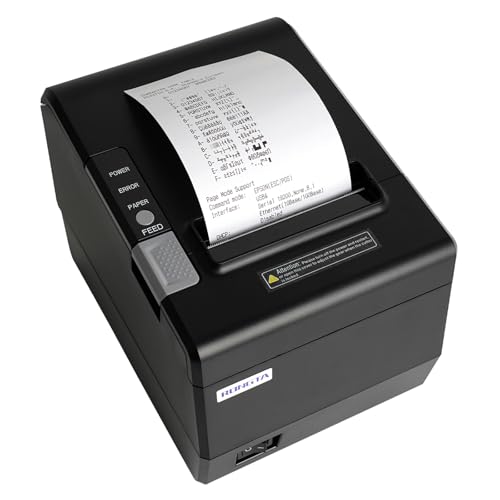
The RP850P’s listing introduces it as a kitchen and restaurant POS printer, and that framing tells you where Rongta expects it to live: on the pass, in the heat, printing the orders the kitchen cooks from. Its stated kit is the complete wired set — 80mm thermal printing, an auto cutter, USB, serial and Ethernet interfaces, ESC/POS support, and compatibility spanning Windows and Mac cash register systems per the listing. Ethernet is what makes the kitchen role real. The printer sits in the kitchen, the orders originate at the counter or a server’s terminal, and the network carries them; no computer needs to survive the kitchen’s steam and splash zone, because the printer was built to be the only electronics there.
Kitchen printing has its own physics, and the RP850P’s feature list reads like an answer to it. Thermal paper tolerates the environment better than ink systems would. The auto cutter produces a clean ticket a cook can tear off the rail and read at a glance, rather than a curling strip. The 80mm width gives orders room — items, modifiers, timing — in type large enough to read at arm’s length in poor light while wearing the expression of someone mid-service. None of this is luxury. A misread ticket is a remade dish, and a printer that jams at 8pm on a Friday is a story the restaurant tells for years. Value in this context does not mean fragile; it means the complete wired kit without the establishment premium, which is the RP850P’s entire pitch.
Against the Epson, the argument is arithmetic and the counter-argument is pedigree. The Rongta asks less and connects the same way; the Epson brings the deeper service story and the faster engine. Restaurants opening their first kitchen-printer setup, cafés adding a second networked printer, takeaways formalising their order flow — these buyers will find the RP850P sized to their reality. Judge it by its listing’s kit, wire it into the kitchen, and it will spend its life doing the one job restaurant technology must never fail at: making sure the kitchen knows what the customer ordered.
- Interfaces in listing: USB, serial, Ethernet
- Paper: 80mm thermal
- Finishing in listing: auto cutter
- Commands in listing: ESC/POS
- Compatibility in listing: Windows and Mac cash register systems
Strengths
- The complete wired interface set at a value position, Ethernet included.
- Kitchen and restaurant framing matches the toughest placement in hospitality.
- ESC/POS support keeps it fluent with mainstream point-of-sale software.
Trade-offs
- It lacks the establishment service network and pedigree the Epson carries.
- The listing does not headline a speed figure to rival the fastest picks here.
- Buyers standardising a large chain will weigh brand uniformity above its value.
Best for: restaurants, cafés and takeaways adding a networked kitchen or counter printer on a sane budget. Not suited for: chains standardising on one establishment brand, or the very highest-throughput counters.

NETUM NT-861 — LAN plus Bluetooth
The NT-861 is the diplomat of the list: a printer that refuses to make you choose between the wired foundation and wireless flexibility. Its listing describes an 80mm POS printer with auto cutter, a high-speed figure of 260 mm/s, a USB plus LAN plus Bluetooth interface set and ESC/POS support, aimed at retail. Hold the three interfaces apart in your mind, because each serves a different master. The LAN port is the qualification for this guide and the printer’s anchor — the fixed, always-findable network citizen. USB is the direct line to the till beside it. Bluetooth is the mobile concession, for the tablet that wanders the shop floor or the stall that rearranges itself every weekend. A printer fluent in all three can begin life in one layout and survive the next two redesigns of your counter.
That adaptability is the pick’s real argument, and the 260 mm/s speed supports it respectably — not the Epson’s headline pace, but comfortably in the class where receipts stop being a wait. The auto cutter completes the working kit. NETUM’s constituency is the independent retailer and hospitality business whose technology is bought piece by piece and rearranged often: the printer that can be kitchen-wired this year, counter-USB next year and stall-Bluetooth on the summer weekends is a printer that does not need replacing when the business changes shape. In a category where the establishment sells permanence, the NT-861 sells something nearly as valuable — forgiveness for an unknowable future layout.
Its cautions are the value-field cautions, honestly stated. The surrounding support ecosystem is thinner than Epson’s, and a business whose POS software is exotic should confirm ESC/POS behaviour with its provider before committing, as it should with any non-establishment printer. But the listing’s kit is complete and its interfaces are exactly the trio a flexible operation would specify. If your counter’s shape is still evolving, the NT-861 is the pick that evolves with it, wire first and wireless when wanted.
- Interfaces in listing: USB, LAN, Bluetooth
- Speed in listing: 260 mm/s
- Paper: 80mm
- Finishing in listing: auto cutter
- Commands in listing: ESC/POS
Strengths
- LAN, USB and Bluetooth together cover fixed, direct and mobile point-of-sale layouts in one body.
- 260 mm/s keeps receipt pace respectable at busy counters.
- Auto cutter and ESC/POS complete the standard working kit.
Trade-offs
- Support depth trails the establishment brand’s network.
- Its speed sits a step below the two fastest picks in this guide.
- Exotic POS software setups should verify compatibility before committing a fleet.
Best for: independent retailers and cafés whose counter layout changes, wanting wired reliability with wireless in reserve. Not suited for: buyers who will only ever use one fixed connection and prefer establishment support.

Volcora 2-in-1 Receipt and Label Printer — Receipts and labels
The Volcora asks a question the other five do not: why should the counter’s printer only print receipts? Its listing describes a 2-in-1 thermal receipt and linerless label printer with USB, serial and Ethernet interfaces, an auto cutter, support for 40, 58 and 80mm paper, and ESC/POS with Square compatibility. The second job — linerless labels — is the interesting one for food and drink businesses. Linerless labels are the sticky notes of the modern café and deli: the label on the coffee cup with the customer’s name, the seal on the sandwich box, the date dot on the prep tray. A machine that prints the receipt at the till and the cup labels beside it collapses two devices into one footprint, one network address and one paper order with several widths in it.
The width flexibility deserves attention, because 40, 58 and 80mm support means the machine adapts to the job rather than the reverse — narrow labels, standard small receipts, full-width receipts from the same body by changing the roll. Ethernet keeps it a network citizen, so the kitchen can print its prep labels while the counter prints receipts, each terminal sending its own kind of work to the one machine that understands both. Square compatibility, stated in the listing, speaks directly to the large population of small cafés and retailers running that ecosystem, for whom a printer their system already speaks to is worth more than a theoretically finer one it does not.
The compromise to weigh is specialisation. A dual-purpose machine is, by construction, a negotiation between its two jobs, and a business whose receipt volume alone saturates a printer at peak should buy a dedicated receipt engine like the Epson and let labels live elsewhere. But the businesses this pick describes — the café, the bakery, the deli counter, the food truck with a fixed pitch — rarely saturate anything except the coffee machine. For them, the Volcora’s two-in-one economy of space, money and network points is not a compromise at all. It is the shape of their counter, recognised by a manufacturer.
- Interfaces in listing: USB, serial, Ethernet
- Functions in listing: receipts and linerless labels
- Paper widths in listing: 40, 58 and 80mm
- Finishing in listing: auto cutter
- Compatibility in listing: ESC/POS and Square
Strengths
- Receipts and linerless labels from one networked machine halve the counter’s printer count.
- Three paper widths let one body follow the job from cup label to full receipt.
- Square compatibility speaks to the small-café ecosystem directly.
Trade-offs
- Peak receipt volume and label work share one engine and can queue behind each other.
- Pure receipt specialists outpace it in single-minded throughput.
- Linerless label stock is a specific supply to source alongside ordinary rolls.
Best for: cafés, bakeries and delis wanting receipts and cup or prep labels from one wired machine. Not suited for: high-volume pure-receipt counters, or businesses with no label work to consolidate.

Rongta 80mm Direct Thermal Receipt Printer — Straightforward wired value
This second Rongta pick is the listing that leads with its connections, and we present it exactly as listed: an 80mm direct thermal receipt printer with an auto cutter, a USB, serial and Ethernet interface set, support for Windows, Mac and Linux systems, and cash-drawer support, aimed at restaurant use. If the RP850P is the Rongta with a name and a kitchen brief, this is the Rongta as a specification sheet — and there is a kind of buyer who prefers exactly that. No story, no framing: a wired 80mm thermal printer with the full interface trio and the drawer connection, at the value end of the field. For a second printer, a backup printer, or a first networked printer bought to a tight specification, that plainness is the appeal.
The cash-drawer support earns its mention. The drawer’s kick — the signal that springs the till at the moment of sale — usually routes through the receipt printer, making the printer the counter’s quiet conductor: receipt prints, drawer opens, change happens, in one practiced motion. A listing that states drawer support is telling you the printer can hold that central place in a traditional counter setup, across the Windows, Mac and Linux systems its listing names. Combined with Ethernet, it describes a printer that can anchor a small shop’s entire money-handling choreography from one network address.
Compare it with its sibling honestly. We do not invent distinctions the listings do not state: both are 80mm Rongta thermal machines with cutters and the wired trio. The RP850P carries a model name and a kitchen-restaurant positioning; this listing carries the explicit cash-drawer and three-system compatibility statements. A buyer choosing between them should choose on which stated emphasis matches their setup — the named kitchen model, or the drawer-and-systems listing — and on the day, either delivers the category’s essentials. In a guide that values listings over legends, that is the correct and sufficient way to present them.
- Interfaces in listing: USB, serial, Ethernet
- Paper: 80mm direct thermal
- Finishing in listing: auto cutter
- Drawer support in listing: cash drawer supported
- Compatibility in listing: Windows, Mac, Linux
Strengths
- The full wired trio and cash-drawer support cover the classic counter setup completely.
- Three operating systems in the listing widen the tills it can serve.
- Straightforward value positioning suits second, backup and first networked printers.
Trade-offs
- It shares its maker’s thinner support ecosystem with the other value picks.
- No headline speed figure in its listing to set against the fastest here.
- Its plainness offers fewer distinguishing features for buyers who want a speciality.
Best for: shops wanting a wired 80mm printer with drawer support at a value position, on any of the three main systems. Not suited for: buyers chasing the fastest stated speed, or a named kitchen model’s specific positioning.

Qigreesol 80mm Thermal Receipt Printer — 300 mm/s with Bluetooth
The Qigreesol closes the list by nearly matching the Epson’s pace from the value end of the field. Its listing states a 300 mm/s high-speed figure, an auto cutter, and a USB, Bluetooth and Ethernet interface set, for restaurant and retail use. That combination — near-flagship speed, the wired qualification this guide requires, and Bluetooth as the mobility bonus — is the value field’s strongest possible argument, and it deserves a fair hearing. A busy restaurant counter that cannot stretch to establishment prices is being offered establishment-class throughput with the network port intact, and the receipts will not know the difference.
The honest counterweight is everything around the print engine. Speed and interfaces are listing facts, and they are strong ones; the unknowns are the long-tail virtues — support reach, years-later parts, the depth of other users’ solved problems — where a lesser-known name simply has less history to inspect. A single-counter business can rationally accept that trade, especially with the machine’s job being as standardised as ESC/POS-class receipt work. A multi-site business standardising a fleet should weigh the support question harder, because a fleet multiplies whatever support story it buys into.
Positioned carefully, the Qigreesol is the pick for the throughput-hungry independent: the restaurant whose Friday queue is real, the retailer whose itemised receipts are long, the counter that wants 300 mm/s and Ethernet and Bluetooth and a cutter, and is willing to source its confidence from the listing’s completeness rather than from a logo’s age. Wire it as the foundation, keep Bluetooth for the tablet that roams, and it will print at a pace that embarrasses machines with far grander names — which is, when you think about it, exactly what a value pick is for.
- Interfaces in listing: USB, Bluetooth, Ethernet
- Speed in listing: 300 mm/s
- Paper: 80mm thermal
- Finishing in listing: auto cutter
- Aimed at: restaurant and retail
Strengths
- 300 mm/s approaches the fastest stated speed here at a value position.
- Ethernet qualification plus Bluetooth covers wired foundation and mobile supplement together.
- Auto cutter completes the busy-counter kit without extras to specify.
Trade-offs
- A lesser-known name means a thinner public record of long-term support.
- Fleet buyers should test one unit against their POS software before standardising.
- Its case rests on listing specifications more than on accumulated reputation.
Best for: busy independent restaurants and retailers wanting near-top speed with wired and wireless connections. Not suited for: multi-site fleets that buy support history first and specifications second.
The wired six, compared at a glance
| Pick | Interfaces | Speed | Cutter | Natural home |
|---|---|---|---|---|
| Epson TM-T20IV | USB, Ethernet, serial | 310 mm/s | Auto | Peak-throughput counters |
| Rongta RP850P | USB, serial, Ethernet | Not headlined | Auto | Kitchens and restaurants |
| NETUM NT-861 | USB, LAN, Bluetooth | 260 mm/s | Auto | Changing layouts |
| Volcora 2-in-1 | USB, serial, Ethernet | Not headlined | Auto | Cafés printing labels too |
| Rongta 80mm Ethernet listing | USB, serial, Ethernet | Not headlined | Auto | Classic counters with drawers |
| Qigreesol 80mm | USB, Bluetooth, Ethernet | 300 mm/s | Auto | Busy independents |
Read the interfaces column first, because it is the guide’s promise kept in public: every row carries the wired connection the category is named for, with serial appearing in the establishment and classic-counter rows and Bluetooth in the two flexibility plays. The speed column is honest in both directions — two listings headline serious pace, the Epson at 310 and the Qigreesol at 300, one states a solid 260, and three do not headline a figure at all, which tells you where those makers chose to compete. A buyer should notice that a missing speed figure is information, not an oversight: it marks the machines sold on kit and value rather than on velocity.
The cutter column’s uniformity is the table’s quietest lesson. Six for six auto cutters means the feature has become the class standard at every price in this guide, and a receipt printer offered without one in this company would need a remarkable excuse. When a whole column agrees, the buying decision moves elsewhere — to speed, to interfaces beyond the wire, to the Volcora’s second job, to support pedigrees. That is a healthy category, and the table’s real message is that an ethernet receipt buyer today is choosing among complete machines, not gambling on incomplete ones.
What should you check about your POS software before ordering?
The printer is half a conversation; your point-of-sale software holds the other half, and the two must agree before money moves. The common language is ESC/POS, the command set named across these listings, and most mainstream POS systems speak it fluently to almost any printer here. But fluency has dialects. Drawer-kick behaviour, cutter commands, character sets for your language’s symbols, and the handling of logos and QR codes on receipts all live in the details of how a given system drives a given printer. The checks are cheap: confirm your software lists the printer or its class as supported, or offers a generic ESC/POS driver; confirm the connection type you intend — network printing is configured differently from USB in most systems; and if your receipts carry anything exotic, print a test from the actual software during the returns window rather than discovering a mangled logo in front of a queue.
Network setup deserves the same forethought. An Ethernet printer joins your network like any other device and is happiest with a stable address, arranged in the router’s settings so the POS system finds it at the same place after every restart. Put the printer on the same network segment as the tills unless you enjoy advanced networking before opening time. And keep the USB cable that several of these picks support as your fallback: the day the network itself is the problem, a direct cable turns a crisis into an anecdote. None of this is advanced administration. It is the first hour’s work, done once, that lets a receipt printer be what it should be for years — invisible.
Kitchen printer or counter printer: how do the jobs differ?
They print the same kind of paper and live opposite lives. The counter printer faces the customer: its receipt is a record, a proof, sometimes a marketing surface carrying the logo and the returns policy, and its pace is set by the queue’s patience. The kitchen printer faces the staff: its ticket is an instruction, read at a glance in heat and noise, hung on a rail, and discarded when the dish leaves. That difference in audience changes what matters. Kitchen tickets prize legibility and the cutter’s clean finish; counter receipts prize speed and presentability. A printer like the RP850P, framed by its maker for kitchen and restaurant duty, is specified by the first audience’s needs; the Epson’s pace serves the second. Many restaurants run one of each on the same network, which is Ethernet’s whole argument in a single sentence — two printers, two rooms, one ordering system, no computer in the steam.
Placement follows the audience. Kitchen printers live where the tickets are read, mounted or standing clear of the splash and the pass’s traffic, close enough to hear and reach. Counter printers live within the till’s choreography, near the drawer they trigger and the staff who tear — or rather, thanks to the cutters across this guide, collect — the output. Decide each printer’s audience before its model and the category simplifies wonderfully: you are not buying six printers’ worth of choice, you are filling two well-understood posts, and the picks divide between them almost by themselves.
How long does a thermal receipt stay readable?
Long enough for its job, with caveats a business should know. A receipt’s working life is the return window, the expense claim, the warranty drawer — weeks to months in a wallet or a file, where thermal print on decent paper stays legible. Its enemies are the usual thermal ones: heat, sunlight, friction and certain plastics, which can grey a receipt left on a dashboard or pressed against a PVC wallet window. Customers with a big purchase learn to photograph the receipt; businesses learn to keep their own records in the POS system, where the receipt’s data lives independently of its paper. None of this diminishes the thermal printer — it defines the receipt as what it always was, a working document rather than an archive — and it is why the archival paperwork of a business belongs to other machines in this cluster of guides, while the counter belongs, rightly and entirely, to thermal speed.
Which mistakes do buyers keep making with receipt printers?
The founding mistake is buying the connection you wish you needed instead of the one your layout needs — a USB-only printer for a kitchen that has no computer, or a Bluetooth-only printer as the foundation of a fixed counter, chosen because the listing’s photograph was pretty. This guide’s wired insistence exists because that mistake is expensive and common. The second mistake is ignoring the drawer. Buyers discover after installation that the cash drawer’s kick routes through the printer and their bargain printer’s listing never mentioned drawers; the listings here that state drawer support were quoted for a reason. The third is paper: 80mm machines fed 58mm rolls produce rattling, wandering receipts, and the width in the listing is a commitment, not a suggestion — the Volcora’s multi-width support being the deliberate exception.
Fourth, buyers under-provision speed for their peak rather than their average, then meet the printer’s true pace at the worst possible hour, with a queue watching. Average Tuesday is a liar; buy for Friday. And the fifth mistake is placement amnesia — putting a thermal printer where heat, steam or direct sun cooks its paper supply in the roll, then blaming the machine for faint prints that were baked before they were printed. Thermal paper is a recording medium with a memory for heat. Store the rolls cool, site the printer sensibly, and the prints stay dark and legible for the life a receipt needs.
How do you set up a networked receipt printer on day one?
Place the printer where the receipts are needed — that was the point of Ethernet — and connect it to the network with a real cable run, not a hopeful one across a doorway. Power it, let it take its network address, and then make that address stable in your router’s settings so every tomorrow starts where today left off. Load the 80mm roll in the orientation the lid diagram shows; thermal paper prints on one side only, and a backwards roll produces a convincingly blank receipt and a moment of existential doubt at every first installation in history. Add the printer to your POS software by its network address, selecting the ESC/POS driver the system offers, and print the software’s test receipt.
Then test the whole choreography, not just the print: a sale, the receipt, the cutter, the drawer if it kicks through the printer. Print a long itemised receipt to watch the cutter finish it cleanly. Print a kitchen ticket from the far terminal if the printer lives in the kitchen. Write the printer’s network address on a label and stick it to the machine — a touch of irony the IT-minded will forgive — because the person troubleshooting it in month nine will bless you. Keep a spare roll at the printer and the fallback USB cable in the drawer beneath it. Day one done this way is the last day you think about the printer until the paper runs out, which is the entire ambition of point-of-sale hardware.
What does it cost to keep a receipt printer fed for a year?
Paper, and almost only paper — which is precisely the thermal bargain. But paper at counter scale is a real line item, and it rewards the same discipline as any consumable. Count your receipts honestly for a month, multiply by your average length, and you have your roll consumption; then notice the two levers hiding in that arithmetic. The first is length: receipts padded with blank tail, oversized logos and surveys nobody reads are paper burned for ceremony, and trimming the template is a saving that repeats forever. The second is width discipline: the right roll, seated properly, prints to its edges without waste, while a too-narrow roll in an 80mm machine wastes the difference and wanders while doing it — the Volcora’s sanctioned multi-width design being the exception that proves the rule.
Keep a month’s rolls in the building and a spare at each printer, stored cool and dry, oldest stock forward. A receipt printer out of paper at peak is a more complete failure than a slow one, and it is the most preventable failure in this entire guide. The businesses that never experience it are not lucky; they are the ones who treated a humble paper shelf with the same seriousness as the network the printer hangs on.
How do you keep a receipt printer alive in a working kitchen?
Respect the environment and the printhead. Site the printer where steam and splash are neighbours rather than residents, wipe its exterior as part of the kitchen’s own cleaning rhythm, and keep the paper path free of the flour, grease film and ticket spikes’ debris that accumulate around any pass. A thermal printhead wants an occasional gentle clean with the method the manual allows, and it wants its paper dry and correctly loaded; in return it asks for no ink, no alignment rituals and no warm-up, which is why thermal owns the kitchen in the first place. When output fades, suspect the paper’s storage before the printer’s health — a roll that has lived above the fryer has been printing its own goodbye for weeks.
Plan the spare before you need it. Kitchens that cannot pause keep either a second printer or a known-next-day replacement route, and the value pricing of picks like the Rongtas makes the spare-printer strategy rational in a way it never was with establishment-only fleets. A spare on the shelf, configured and tested, converts the worst Friday failure into a two-minute swap. That is not extravagance; at kitchen stakes, it is the cheapest insurance in the building.
Final Recommendation
Build on the wire and choose by your counter’s reality. If peak throughput and pedigree matter most, the Epson TM-T20IV’s 310 mm/s and interface trio make it the establishment answer. If the printer’s home is a kitchen and the budget is real, the Rongta RP850P carries the complete wired kit into the heat. If your layout keeps changing, the NETUM NT-861’s LAN-plus-Bluetooth diplomacy forgives the future; if your counter prints labels as well as receipts, the Volcora folds two jobs into one network address; if you want the classic wired setup with drawer support stated plainly, the second Rongta listing is the specification-sheet buy; and if you want near-flagship speed from the value field, the Qigreesol’s 300 mm/s is the boldest figure in this guide after the Epson’s. Whichever you wire in, remember that a receipt is a promise printed at the speed of trust — and a printer on the network, in the right place, keeps that promise without ever being noticed.
Frequently Asked Questions
Why not just use a USB receipt printer and a long cable?
Because USB has practical distance limits and belongs to one host computer: that computer must be on, nearby and sharing correctly for anyone else to print. Ethernet removes all three constraints, placing the printer anywhere the network reaches and letting every terminal send directly. For a single till with the printer beside it, USB is fine — several picks here include it. For a kitchen or a second station, the wire is the answer.
What does the cash-drawer kick have to do with the printer?
On most counters, the drawer is triggered through the receipt printer: the POS sends the sale, the printer prints and signals the drawer to open in the same motion. That is why drawer support appears in listings and in this guide’s spec boxes. If your drawer setup works that way, a printer without stated drawer support is a gap in the choreography.
Do these printers need ink or toner?
No. All six are thermal printers: heat darkens the coated paper, and the only consumable is the roll. That is a large part of their counter appeal — nothing to run out of except paper, and no ink system to suffer in a hot kitchen. The corollary is paper quality matters, and rolls should be stored away from heat.
Is Bluetooth a substitute for Ethernet here?
In this guide, no — it is a supplement. The NETUM and Qigreesol earn their places through the LAN and Ethernet ports in their listings; their Bluetooth serves mobile and tablet scenarios on top of the wired foundation. A Bluetooth-only printer would not meet this category’s defining test, however convenient it might be elsewhere.
What is ESC/POS and why does it keep appearing?
It is the command language most receipt printers understand and most POS software speaks — the shared tongue that lets a till drive printers from different makers. Its presence in a listing is a compatibility promise of the practical kind. Confirm your software’s ESC/POS support, and the printers here become interchangeable at the level that matters.
How fast is fast enough for a receipt printer?
Match it to your longest receipt at your busiest hour. Short café tickets forgive almost anything; long itemised retail receipts at a queued till do not. The stated figures here run from a solid 260 mm/s to the Epson’s 310, with the Qigreesol at 300 — all respectable, with the right choice governed by Friday’s queue rather than Tuesday’s calm.
Can two tills share one receipt printer?
On Ethernet, yes — that is one of the connection’s defining advantages. Both terminals send to the printer’s network address, and the printer queues the jobs in order. In practice, sharing works best where receipts are collected centrally, such as a single counter with two tills or a kitchen serving every terminal. Where each till needs its own output in the customer’s hand at its own station, one printer per station remains the calmer arrangement, and the value picks in this guide make that second printer a modest decision rather than a capital one.
What width of paper should a small café choose?
The 80mm standard gives receipts room for itemised orders, logos and legible type, and it is the width every pick here is built around. Narrower paper suits simple totals and tight counters, and the Volcora’s stated 40, 58 and 80mm flexibility exists for businesses whose work spans labels and receipts of several widths. A café choosing fresh should default to 80mm unless counter space argues otherwise, because the receipt is also the customer’s record and the kitchen’s instruction, and both read better with room to breathe.
Does a receipt printer work with a tablet-based till?
Yes, provided the tablet’s POS software supports network printing to ESC/POS printers, which mainstream systems do. The Ethernet printer sits on the same network as the tablet’s router, and the software sends to its address — the tablet’s own lack of ports stops mattering. The Bluetooth in the NETUM and Qigreesol listings offers a second route for tablets that prefer it, but for a fixed counter the wired path remains the steadier foundation, with the tablet free to roam the floor while its printer stays exactly where the receipts are needed.
How do I print my logo on receipts?
Through the POS software, almost always: mainstream systems let you upload a logo image that is sent at the top of each receipt, and thermal printing renders it in monochrome, so a logo that survives conversion to black and white — bold shapes, no fine gradients — is the one that looks deliberate on paper. Test it on a real receipt at real size before the doors open, keep it compact to save paper, and remember the receipt’s hierarchy: the logo opens, but the items, the total and the tax lines are the document. A tasteful logo on a clear receipt reads as professionalism; a giant one on a cluttered receipt reads as a paper bill you are handing the customer, line by line, at every sale.
What should I do when the network printer stops mid-service?
Work the honest ladder: paper first, then the cable’s lights, then the printer’s power, then the network itself. Most mid-service silences are a finished roll, a knocked cable or a router having a moment, in that order of likelihood. If your setup includes a USB-capable pick — most of this guide — the fallback cable in the drawer turns the worst case into a direct connection and a deep breath. After service, find the actual cause and fix that, rather than canonising the workaround. And keep the spare-roll and spare-printer habits from the maintenance section, because the businesses that shrug at printer failures are the ones who rehearsed them on a quiet afternoon.
Are QR codes on receipts worth printing?
Often, yes, and thermal printers render them crisply at counter sizes. A QR code can carry the customer to a feedback form, a loyalty sign-up, a digital copy of the receipt or the week’s menu — turning the one document every customer receives into a doorway the business controls. Keep the destination durable, because a receipt in a wallet may be scanned weeks later, and keep the code a sensible size with its quiet zone respected, tested with an ordinary phone under your counter’s lighting. It is the cheapest marketing surface in the building: you were printing the paper anyway, for a customer who has already chosen you once and is holding the proof of it in their hand at that very moment, warm from the cutter, while the experience it records is still fresh enough to act upon generously, kindly and, with luck, in the form of a kind word left where future customers will read it before choosing you themselves one day soon, on an ordinary afternoon much like this one, in this same small, busy, well-loved shop of yours, among its regulars and its rituals and its lunchtime queue that stretches, happily, to the door most fine days of the long trading year round, in all weathers, come rain or shine, week in and week out, all year long, without fail, every single trading day of the year ahead now, truly.
Related Guides
The counter is one station in a building full of printers: the warehouse end is mapped out fully in best barcode printers, the secure paperwork end in best bank check printers, and the colourful middle in best color label printers.
The thermal family shrinks to pocket size in best mini pocket thermal printers.


