What's inside
- Where to buy
- Key Takeaways
- Quick Picks
- How did we choose these mini pocket thermal printers?
- What can a two-inch monochrome print actually be good for?
- Pocket printers compared: five thermal, one colour
- What will the paper cost you over a year?
- How does the app decide whether you will love your pocket printer?
- Thermal paper varieties: what else can the little rolls do?
- Which mistakes do buyers keep making with pocket printers?
- How do you get the best from a pocket thermal printer?
- Pocket printers at events: where the little machines shine brightest
- How long do thermal prints and ZINK prints last?
- Final Recommendation
- Frequently Asked Questions
- Related Guides
As an Amazon Associate I earn from qualifying purchases. This post may contain affiliate links at no extra cost to you.
gizmoverdict.com is reader-supported. When you buy through links on our site, we may earn an affiliate commission.
Where to buy
All six gadgets below are sold on Amazon’s US store under the listings we verified, and several arrive bundled with starter rolls of their special paper — the listings state how many, and we repeat those numbers in the spec boxes because the paper is not an accessory in this category. It is the medium, the consumable and half the ownership story, and a printer whose listing includes ten rolls is a different first month from one that includes three.
Begin with what these things honestly are, because the best mini pocket thermal printers are surrounded by more wishful naming than any other class in this cluster. A pocket thermal printer is a small Bluetooth device that prints in monochrome — black on little proprietary rolls of thermal paper — producing stickers, notes, lists, labels and journal decorations a couple of inches wide. It is not a document printer: it will not print your boarding pass at readable quality or your contract at all. It is not a true photo printer either, however many listings dress it in the words “photo printer”: a thermal monochrome print of a photograph is a charming, grainy homage to the photograph, not a reproduction of it. What these devices genuinely are is delightful — instant, inkless, pocketable little makers of stickers and notes — and judged as that, rather than as failed versions of bigger printers, the good ones are very good indeed.
There is one exception in this guide, and it proves the rule by breaking it completely. The KODAK Step is not a thermal printer at all: it is a ZINK printer, producing small full-colour sticky-back photographs on its own special paper, with no ink involved. We include it as the colour outlier and label it as such in every section, because a buyer whose heart is set on colour pocket prints deserves to find the one machine here that actually makes them — and to understand that its colour comes from different technology, different paper and a different price per print. The other five picks are thermal monochrome, compete on their app experience, their bundles and their fit for journals, study notes, gifts and labelling, and are judged by those honest measures. Seller resolution claims in this category vary wildly and mean little at sticker sizes, so this guide never ranks by claimed DPI; it ranks by what the little prints are for.
Key Takeaways
- This pocket class prints monochrome stickers and notes on proprietary mini rolls — not documents, and not true photographs.
- The Phomemo M02 is the established name in the class, a Bluetooth sticker maker built around journal and gift work.
- Bundle arithmetic matters: listings here include from three to ten rolls of paper, which shapes your first months of running costs.
- The HUIJUTCHEN listing includes ten rolls, the most generous paper bundle in this guide.
- The KODAK Step is the colour outlier — a ZINK printer making small colour sticky-back photos, a different technology entirely.
- Never rank these by claimed DPI; judge them by app quality, paper ecosystem and the job you actually have for them.
Quick Picks
| Pick | Badge | Why it is here |
|---|---|---|
| Phomemo M02 Mini Sticker Printer | The established name | A Bluetooth thermal sticker maker from the brand that defined this pocket class, aimed at journals, gifts and DIY. |
| NADAIIN D20 Mini Sticker Printer | Three-roll starter | A portable Bluetooth thermal sticker maker bundled with three rolls of paper, framed as a pocket label maker for phones. |
| Cabaro Mini Thermal Sticker Printer | Gift-ready bundle | A Bluetooth inkless sticker maker with three rolls included, aimed at phone users making stickers and print pods. |
| HUIJUTCHEN Mini Photo Printer | Ten-roll bundle | A pocket thermal printer whose listing includes ten rolls of thermal paper for photos, memos and journals. |
| JADENS Mini Sticker Printer | Study-note favourite | A Bluetooth thermal sticker maker for iPhone, pitched at children’s gifts and study notes as much as stickers. |
| KODAK Step Instant Photo Printer | The colour outlier | A ZINK printer making 2×3-inch colour sticky-back photos over Bluetooth — the only true colour pocket prints here. |
How did we choose these mini pocket thermal printers?
We chose inside the class’s honest definition, which meant excluding two kinds of impostor. The first was the true portable document printer — a fine machine, a different guide — which prints real pages and costs real money. The second was the label printer in pocket clothing: this site has a direct-thermal label guide elsewhere, and this article is the pocket form factor only, the sticker-and-note devices people carry in a bag or a coat. What remained was a field of small Bluetooth thermal makers, differentiated less by their print engines — which are cousins under the shell — than by their apps, their paper bundles and the uses their makers built them around. Those became our criteria, in that order.
The app is the product in this category more than in any other in this cluster. The printer is a heat element and a motor; the experience — templates, sticker editing, note formatting, printing a photograph as a pleasing monochrome rather than a muddy one — lives in the phone app the listing pairs it with. We favoured established ecosystems and listings that state their bundles plainly. Paper arithmetic came next: the rolls included, and the ongoing availability of the right rolls, because a pocket printer whose paper is hard to find becomes a pocket ornament. Finally, we placed the KODAK Step deliberately at the end as the labelled exception, so that the colour conversation happens once, clearly, instead of haunting every thermal pick with an unfair comparison.
One more discipline: we ignored the resolution arms race in these listings. Claimed DPI figures vary between sellers of near-identical mechanisms and cannot be compared across listings with any confidence, and at two inches wide the difference that matters is the app’s dithering — how gracefully it renders a photograph’s tones in black dots — not a number on a box. Judge these by their output’s purpose: a sticker, a note, a label, a keepsake. The picks below are ordered by their fitness for those purposes, not by spec-sheet theatre.
What can a two-inch monochrome print actually be good for?
More than sceptics expect, once the document-and-photograph fantasies are cleared away. Stickers are the headline: journal decorations, planner markers, laptop and bottle embellishments, gift seals, the small visual punctuation of an organised life. Notes are the workhorse: study flashcards, vocabulary strips, to-do lists that stick where they will be seen, fridge instructions, lunchbox messages. Labels are the quiet overachiever: pantry jars, cable ends, storage boxes, plant markers, the labelling of a household’s anonymous containers in a typeface neater than anyone’s handwriting. And the monochrome photograph, honestly framed, has its own aesthetic — a grainy, instant, almost photocopied charm that journal-keepers deliberately choose, the way an earlier generation chose a particular film.
The common thread is immediacy. These printers live in the thirty seconds between wanting a small printed thing and holding it, with no ink, no computer and no ceremony. That immediacy is a genuine capability, not a toy’s apology — teachers print reward stickers in the classroom moment, students print the diagram in the study moment, parents print the label in the tidying moment. Buy one for those moments and it earns its pocket. Buy one to print your tax return and it will educate you about categories, which this guide exists to do more cheaply.
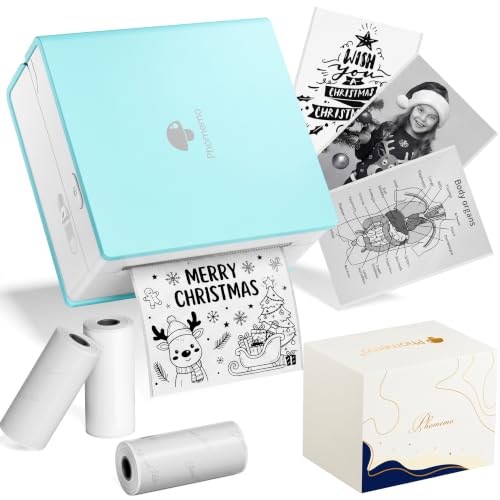
Phomemo M02 Mini Sticker Printer — The established name
Phomemo is the name this category says first, and the M02 is its emblem: a mini sticker printer and sticker maker machine, Bluetooth and thermal, pocket-sized, framed by its listing for gifts, DIY and journaling. In a field of near-identical mechanisms, an established name buys two concrete things. The first is the app: Phomemo’s software ecosystem has had years of journalers, students and sticker sellers finding its edges, and that maturity shows in templates, editing tools and the steady drip of materials designed for the machine. The second is the paper ecosystem — an established maker’s rolls are stocked widely and in variety, including the sticker papers and coloured and transparent variants that turn a note printer into a craft supply. A pocket printer is only as alive as its paper shelf, and the M02’s shelf is the deepest in this guide.
The machine’s brief is the class brief, executed with the confidence of the incumbent: connect by Bluetooth, design or choose in the app, print a sticker or note in seconds, tear it off and stick it somewhere that needed it. Journal spreads are its spiritual home — the dated header, the habit tracker, the photograph rendered in its grainy monochrome charm — followed closely by gift wrapping, classroom rewards and the labelling of a craft room. Its prints are monochrome and proud of it; the M02’s aesthetic community has built an entire visual language around black on white, and joining that language is part of what a buyer is purchasing.
Against the newer bundles below, the M02 asks you to value ecosystem over starter generosity: rival listings may place more rolls in the box, but none places more years behind the app. For a gift buyer especially, that maturity matters — the recipient opens a machine whose software works the way its tutorials promise. If your pocket printing is a hobby you intend to keep, the established name is the rational start; the class was, to a meaningful extent, built around this machine’s idea of itself.
- Print type: thermal monochrome
- Connection in listing: Bluetooth
- Framing in listing: gifts, DIY, journaling
- Class: pocket sticker and note printer
Strengths
- The most established app and paper ecosystem in this pocket class.
- A wide variety of compatible papers keeps the hobby growing after the first roll.
- The journal and sticker community around it supplies endless templates and ideas.
Trade-offs
- Monochrome only — colour wishes belong to the KODAK Step at the end of this guide.
- Starter paper in the box may be outbundled by newer rivals’ listings.
- Its prints remain small-format stickers and notes, never documents.
Best for: journalers, sticker makers and gift buyers wanting the class’s most mature ecosystem. Not suited for: colour printing, document printing, or anyone needing prints wider than a pocket roll.

NADAIIN D20 Mini Sticker Printer — Three-roll starter
The D20 enters as the portable all-rounder of the thermal five: a mini sticker printer described in its listing as a portable Bluetooth thermal sticker maker, bundled with three rolls of paper, and framed as a pocket label maker for iPhone. That label-maker framing is worth noticing, because it nudges the D20 toward the organising end of the class — the pantry, the storage boxes, the classroom supplies — where a pocket printer that lives in a kitchen drawer outearns one that lives in a craft box. Three rolls in the box is a sensible starter endowment: enough to learn the machine’s habits, label a room’s worth of containers and discover whether pocket printing is your hobby, before the paper shelf needs its first restock.
Bluetooth pairing with the phone is the whole interface philosophy here, as across the thermal picks: the app designs, the printer prints, and the distance between an idea — a jar that needs a name — and the printed label is under a minute. For parents and teachers, that immediacy is the feature: reward stickers, name labels for the school run, study strips printed at the kitchen table while the homework is still open. The D20’s portability is not a specification so much as a placement strategy; a printer that can live where the labelling happens gets used, and a printer that must be fetched gets forgotten.
Its honest limits are the class limits, unvarnished: monochrome thermal output on its own mini rolls, at sticker-and-note scale, with photographs rendered as monochrome interpretations rather than reproductions. Buyers choosing between the D20 and the Phomemo are choosing between a fresh, label-leaning bundle and the incumbent’s deeper ecosystem; buyers choosing between the D20 and the KODAK are choosing between two different technologies that share only a pocket. Within its own terms — a portable, phone-driven sticker and label maker with paper to start — the D20 is a coherent little proposition.
- Print type: thermal monochrome
- Connection in listing: Bluetooth
- Included in listing: 3 rolls of paper
- Framing in listing: pocket label maker for iPhone
Strengths
- Three included rolls make the first projects immediate rather than theoretical.
- Label-maker framing suits organising work as much as sticker crafts.
- True pocket portability puts it where the labelling actually happens.
Trade-offs
- Its app ecosystem is younger than the established name’s.
- Monochrome thermal output only, on its proprietary mini rolls.
- Photographs print as grainy monochrome renderings, not photo reproductions.
Best for: organisers, parents and teachers wanting a portable sticker and label maker with paper included. Not suited for: colour work, documents, or deep-template journaling ecosystems.

Cabaro Mini Thermal Sticker Printer — Gift-ready bundle
The Cabaro’s listing reads like a gift basket’s inventory: a sticker maker and mini thermal sticker printer with three rolls of paper included, Bluetooth, inkless printing, aimed at phone users making stickers and print pods. Inkless is the word to unpack for a first-time buyer, because it is this whole class’s quiet superpower: thermal printing needs no ink cartridges, ever, so the machine cannot run dry of anything except paper, cannot smudge wet ink on a child’s fingers, and can sit in a drawer for a term and print perfectly on its first day back. For the gift market this machine plainly courts — the listing’s language leans toward presents and pocket printing for fun — that zero-maintenance character is worth more than any specification.
In use, its life is the phone-first sticker life: choose or make a design in the app, print, stick. Three rolls in the box set the first season’s projects in motion — planner stickers, gift seals, the labelling of a bedroom’s worth of treasures — and Bluetooth keeps the machine cable-free on a desk or a bedside table. The Cabaro competes in the most crowded corner of this guide, against the NADAIIN’s similar bundle, and the honest way to choose between such near-neighbours is by their apps’ feel and their paper’s ongoing availability in your marketplace, checked at ordering time. The mechanism will not separate them; the ecosystem will.
What it is not bears the usual repetition, delivered without apology: not colour, not documents, not photographs in any honest sense. It is a small, cheerful maker of monochrome stickers and notes that asks nothing but paper and a phone. Given as a gift to a journaler, a student or a sticker-obsessed young person, it will be understood in minutes and used the same afternoon — and in the gift economy, that immediacy is the entire quality that matters.
- Print type: thermal monochrome, inkless
- Connection in listing: Bluetooth
- Included in listing: 3 rolls of paper
- Framing in listing: sticker maker for phone users
Strengths
- Inkless thermal running means paper is the only thing it can ever run out of.
- Three included rolls make it a complete gift rather than a first instalment.
- Phone-first Bluetooth operation is understood in minutes by new owners.
Trade-offs
- It stands in a crowded field of near-identical bundles, separated mainly by app and paper supply.
- Monochrome output on proprietary rolls defines its ceiling, as with all thermal picks.
- Long-term paper availability should be confirmed when ordering, as with any newer name.
Best for: gift buyers and casual sticker makers wanting an inkless, phone-driven pocket printer. Not suited for: colour, documents, or buyers needing an established long-term paper ecosystem.

HUIJUTCHEN Mini Photo Printer — Ten-roll bundle
Count the rolls. The HUIJUTCHEN’s listing describes a portable pocket sticker printer for iPhone, thermal, supplied with ten rolls of thermal paper, for photos, memos and journals. Ten rolls is the most generous paper bundle in this guide by a wide margin, and it changes the ownership experience in a way a spec sheet cannot: the new owner can print freely. Every other bundle in this class whispers a small warning — paper is finite, experiments cost rolls — while ten rolls shout the opposite. Learn by printing. Waste a roll on tests. Let the children actually use it. For a device whose entire value is immediacy and play, a bundle that removes rationing anxiety is a genuinely well-aimed feature.
Its listing calls it a mini photo printer, and this guide must gently correct the phrase, as promised in the introduction: its photographs are thermal monochrome renderings — atmospheric, grainy, charming in the journal context — not photo prints. The buyer who understands that distinction gets a delightful machine for memos, journal photographs in the lo-fi aesthetic, stickers and notes, with paper for months in the box. The buyer who misses it gets a lesson. We have now stated it in the introduction, the takeaways and this section; the machine deserves owners who meet it on its real terms, because on those terms it is one of the easiest recommendations in the guide to live with.
Against its thermal siblings, the HUIJUTCHEN’s case is arithmetic plus temperament: more paper, same pocket virtues, a journal-and-memo framing that suits students and memory-keepers. Its ecosystem questions are the newer-name questions — app depth, long-term roll supply — and the ten-roll cushion is itself a partial answer, buying the owner a long runway before supply matters. If your pocket printing will be heavy from week one, start where the paper is.
- Print type: thermal monochrome
- Connection in listing: Bluetooth
- Included in listing: 10 rolls of thermal paper
- Framing in listing: photos, memos, journals
Strengths
- Ten included rolls remove paper rationing from the learning period entirely.
- Memo and journal framing suits students and memory-keepers precisely.
- The bundle’s generosity makes it a complete, self-contained gift.
Trade-offs
- Despite the listing’s phrase, its photos are monochrome renderings, not true photo prints.
- Newer-name ecosystem depth trails the established Phomemo’s.
- When the ten rolls end, its paper supply becomes the same question as every rival’s.
Best for: heavy early users, students and journalers who will print daily from the first week. Not suited for: anyone expecting colour photographs — that expectation belongs to the KODAK Step below.

JADENS Mini Sticker Printer — Study-note favourite
The JADENS listing wears two hats at once — a sticker printer and mini printer for iPhone, Bluetooth thermal, framed for children’s gifts and study notes — and the study-note hat is the one that distinguishes it in this guide. A pocket printer in a student’s bag is a study tool of surprising power: the diagram printed and stuck into the notebook beside the handwritten notes, the vocabulary list on the dorm wall, the formula strip inside the textbook’s cover, the flashcard set produced the night before the test from the phone where the material already lives. Teachers discovered this class early, and the JADENS is pitched at exactly that classroom-and-backpack life, with the gift framing for the younger end of it.
Its mechanics are the class standard — Bluetooth from the phone, thermal monochrome onto mini rolls, inkless and therefore schoolbag-safe in every sense that matters: nothing to leak, nothing to dry out over the summer holiday, nothing to buy except paper. For a child, the absence of ink is a safety and tidiness feature; for a student, it is one less supply to manage. The sticker half of its personality keeps it welcome in the journal-and-planner world its siblings inhabit, so the same machine that prints the chemistry diagram prints the weekend’s decorations, which is a fair description of an actual teenager’s requirements.
Choose it when the study brief leads. The Phomemo offers the deeper journaling ecosystem, the HUIJUTCHEN the bigger paper bundle; the JADENS offers the clearest pitch to the school-and-study user, and in a category of near-identical hardware, the clarity of a machine’s intended life is a legitimate deciding factor. It will not print colour, it will not print documents, and it will make a revision session measurably more effective — a trade any student who has used one will recognise as the right way round.
- Print type: thermal monochrome, inkless
- Connection in listing: Bluetooth
- Framing in listing: children’s gifts and study notes
- Device fit in listing: iPhone
Strengths
- The clearest study-note pitch in the guide: diagrams, lists and flashcards at pocket scale.
- Inkless thermal running is tidy and safe for schoolbags and children’s desks.
- Sticker making keeps it useful beyond the classroom that justifies it.
Trade-offs
- Its framing leans young, which some adult journalers will read past rather than into.
- Monochrome thermal output, proprietary rolls — the class ceiling applies in full.
- Template depth for serious journaling trails the established name’s app.
Best for: students, teachers and parents buying for study notes, flashcards and classroom stickers. Not suited for: colour printing, or adult journalers wanting the deepest template ecosystem.

KODAK Step Instant Photo Printer — The colour outlier
Everything changes here, and the guide has promised to say so every time: the KODAK Step is not a thermal printer. Its listing describes a portable mini colour wireless mobile printer using ZINK technology, printing 2×3-inch sticky-back photos, Bluetooth-connected, from a name with a century of photography in it. ZINK — zero ink — works by embedding the colour crystals in the paper itself and activating them with heat, so the printer carries no ink and the paper is the technology. The output is what the other five picks cannot produce at any setting: a real colour photograph, small, glossy and sticky-backed, ready to live in a journal, on a laptop or on a fridge the moment it emerges.
That difference reframes its comparisons. Against the thermal five, the Step is not a better sticker printer; it is a different purchase — colour memories versus monochrome making — with a different cost shape, since ZINK paper carries its colour chemistry in every sheet and prices accordingly per print. Against true photo printers, it is the pocket member: prints are 2×3 inches, charming rather than frameable-large, and the sticky back declares their intended life among journals, lockers and scrapbooks. Judged in that frame, it is a delight with a pedigree: instant colour prints from the phone, anywhere, with no ink to buy and no cables to carry, from the brand whose name older relatives still use as the verb for a snapshot.
Buy it with the paper arithmetic understood. Each print consumes a sheet of ZINK paper, so the Step rewards the decisive photographer — the moment chosen, printed once, stuck down — over the thermal machines’ spray of nearly-free stickers. For events, it has no rival in this guide: a party where guests leave with colour prints of themselves is remembered differently from one where they do not. For daily note-and-sticker volume, the thermal picks remain the economical tools. The Step closes this guide by standing slightly outside it, exactly as labelled — the colour exception that proves what the pocket class is, by being the one thing it is not.
- Print type: ZINK colour — not thermal
- Print size in listing: 2×3 inches, sticky-back
- Connection in listing: Bluetooth
- Class note: the guide’s only true colour pocket printer
Strengths
- Real colour photographs from a pocket device, with no ink to buy or carry.
- Sticky-back prints are made for journals, scrapbooks, lockers and fridges.
- Kodak’s photographic heritage sits behind the colour handling and the brand’s paper ecosystem.
Trade-offs
- ZINK paper makes each print a considered purchase rather than a nearly-free sticker.
- Prints are 2×3 inches — keepsakes, not enlargements.
- It does not do the thermal class’s cheap, endless notes and labels at all.
Best for: anyone whose pocket printing means colour photographs — events, journals, gifts and memory-keeping. Not suited for: high-volume stickers and notes, where the thermal picks’ paper economics win easily.
Pocket printers compared: five thermal, one colour
| Pick | Technology | Colour truth | Bundle note | Natural home |
|---|---|---|---|---|
| Phomemo M02 | Thermal | Monochrome | Established paper range | Journals and sticker crafts |
| NADAIIN D20 | Thermal | Monochrome | 3 rolls included | Labels and organising |
| Cabaro Mini | Thermal | Monochrome | 3 rolls included | Gifts and casual stickers |
| HUIJUTCHEN Mini | Thermal | Monochrome | 10 rolls included | Memos, journals, heavy use |
| JADENS Mini | Thermal | Monochrome | Study framing | Students and classrooms |
| KODAK Step | ZINK | Full colour | ZINK sticky-back paper | Colour photo keepsakes |
The colour-truth column does the table’s honest work in six rows: five monochromes and one colour, with the colour achieved by entirely different technology and paper. Everything else flows from that row of facts. The thermal five compete among themselves on bundle generosity, app depth and intended life — the HUIJUTCHEN’s ten rolls against the Phomemo’s ecosystem years, the JADENS’ study pitch against the NADAIIN’s label lean. The Step competes with none of them directly, because a buyer choosing colour has already left the thermal comparison, and a buyer choosing thermal volume was never in the Step’s shop.
What the table cannot show is the feel of the output in the hand: the matte, papery charm of a thermal sticker against the glossy little photograph the ZINK machine delivers. They are different pleasures. The mature buying move in this category is to decide which pleasure you are shopping for before comparing models at all — and this guide’s structure, thermal five first and colour exception last, was built to force exactly that decision in exactly that order.
What will the paper cost you over a year?
Pocket printing’s economics are paper economics, and they differ by technology in kind, not just in degree. Thermal rolls are the cheap seats of printing: a roll yields many stickers and notes, the per-print cost is small enough to ignore in the moment, and the year’s total is governed by how playful you are. That cheapness is a creative feature — it permits experiments, mistakes and children’s unrestricted use — and it is why the thermal machines dominate the class. ZINK paper inverts the shape: each sheet is one colour photograph, priced like one, and the year’s total is governed by how many moments you judge worth keeping. Neither is better; they are budgets for different pleasures, and confusing them is how a Step owner ends up rationing joy or a thermal owner ends up wondering why their photographs look like photocopies.
The practical discipline is supply. Confirm, at ordering time, that your machine’s rolls or sheets are readily available in the marketplace you will actually use, and keep one spare pack in the drawer. Proprietary media is this class’s shared compromise — every pick here eats its own paper — and the compromise is painless exactly as long as the paper is easy to buy. The established names insure you best against scarcity; the generous bundles, like the HUIJUTCHEN’s ten rolls, defer the question longest. Either way, ask it before the first roll ends, not after.
How does the app decide whether you will love your pocket printer?
Open the app of any pick here and you have opened the product. The printer itself is a heated line and a small motor; everything you will ever ask of it — a sticker from a photograph, a label with your handwriting font, a study strip from a screenshot, a journal header with today’s date — is composed in software. Good pocket-printer apps share a recognisable generosity: templates that respect the tiny canvas, editing that works with thumbs, sticker extraction that cuts a subject from its background without a fight, and print previews that show the monochrome truth before the paper is spent. Mediocre apps make the same hardware feel stupid. This is why the established Phomemo ecosystem matters beyond brand comfort, and why a newer name’s machine should be judged with its app open, not its box.
The app also decides the machine’s future. Features arrive by update; a printer whose app is maintained gains abilities in its second year, while an abandoned app slowly strands perfect hardware. When you choose among the thermal five, you are really choosing which software team to adopt. Read the app’s recent reviews, check when it last updated, and notice whether owners praise templates or complain about connections. Bluetooth pairing, in particular, lives or dies in the app’s manners. Ten minutes of this homework separates the pocket printer that becomes a habit from the one that becomes a drawer resident, and it costs nothing but the ten minutes.
Thermal paper varieties: what else can the little rolls do?
The plain white roll is only the beginning of a thermal paper shelf, and exploring it is how a note printer becomes a craft supply. Sticker paper is the transformation: the same print, on an adhesive-backed roll, becomes a label or a decoration the moment it emerges. Transparent rolls print designs that float on glass jars and bottles. Coloured rolls tint the whole sticker — the pastel background a journal spread wanted — while the print stays its honest black. Long-life and high-contrast variants serve the labelling end of the class, where a pantry label should outlast the spice. Not every machine’s ecosystem stocks every variety, which loops back to the ecosystem argument: the Phomemo’s shelf is the widest here, and a buyer dreaming in transparent stickers should check their chosen machine’s paper range before the machine, not after.
Handling matters across all varieties. Thermal coatings are sensitive souls: heat, sunlight and the plasticisers in some wallets and sleeves can fade a print or cloud a roll before its time. Store rolls in their packaging, keep printed stickers out of prolonged sun where their message matters, and do not laminate thermal prints with hot processes unless the paper invites it. Treated kindly, a thermal sticker lives as long as the journal it decorates — which, for a class built on moments, is precisely long enough.
Which mistakes do buyers keep making with pocket printers?
The expensive mistake is categorical: buying a thermal pocket printer to print photographs or documents, then rating it one star for failing at jobs its technology never claimed in honest print. The listings do not always help — “photo printer” appears on monochrome machines in this very guide’s pool, which is why the introduction corrected it before any pick was praised. The second mistake is the mirror: buying the ZINK Step for daily sticker volume and discovering per-print arithmetic that a thermal machine would have made invisible. The third is ignoring the app until the machine arrives, when the app was the experience all along; spend ten minutes with a pick’s app reviews before the hardware decision, because you will live in the software and merely visit the printer.
Fourth comes paper surprise — the first roll ends, the owner discovers the proprietary shelf, and the machine waits a week for supplies that a moment’s foresight would have stocked. Fifth is expectation about size: two inches is a sticker, a note, a label, and no setting enlarges it. Buyers who make these five mistakes in reverse — right class, right technology, app checked, paper stocked, size embraced — tend to describe their pocket printers the way their happiest owners do: as the rare gadget that gets used more in its second year than its first.
How do you get the best from a pocket thermal printer?
Treat the app as the craft and the printer as the press. Learn its templates before freestyling: the journal headers, label frames and note layouts exist because their designers know what survives the two-inch format — bold shapes, generous type, high contrast. For photographs, choose images with strong light-and-dark structure; a monochrome rendering flatters a face in window light and muddles a misty landscape, and cropping tight to the subject gives the little print a fighting chance. Print one test before a batch, because thermal contrast settings reward a moment’s calibration per paper type, and keep the printer’s paper path clean — pocket lint is this class’s natural predator, and a weekly glance inside the lid prevents the streaks that lint eventually authors.
Store the paper like the medium it is: cool, dry and out of the sun that thermal coatings quietly remember. Keep a spare roll in the bag the printer travels in, because the sticker emergency — the label needed now, the gift being wrapped in the car — is this device’s defining use case and it does not reschedule. And build the habit the machines were made for: print in the moment, stick it in the moment. A pocket printer’s output ages best as a living part of journals, walls and labelled shelves, not as a drawer of intentions.
Pocket printers at events: where the little machines shine brightest
There is a setting where this whole class stops being a hobby and becomes a small sensation, and it is any gathering of people. A thermal printer at a family party produces name stickers, drink labels and scavenger-hunt clues at the speed of the afternoon. A ZINK Step at the same party produces something else again: colour photographs of the guests, printed and stuck into a guest book before the cake, so the memory is archived by the event itself rather than promised to a group chat. Teachers run the classroom version — reward stickers printed in the moment they are earned carry a weight no pre-printed sheet achieves, because the child watched theirs being made. Market sellers run the commercial version, labelling and stickering at the stall from the phone that also takes the payment.
The lesson generalises: these machines monetise and memorialise immediacy, and immediacy is worth most where people are gathered and moments are perishable. If your intended use includes gatherings — parties, classrooms, stalls, club nights — weight your choice toward battery manners and paper generosity, because an event eats rolls the way it eats snacks. The HUIJUTCHEN’s ten-roll bundle and the Step’s colour are the two event-shaped propositions in this guide, at opposite ends of the cost-per-print spectrum, and both are correct answers for different kinds of host.
How long do thermal prints and ZINK prints last?
Set expectations by technology. A thermal print is a chemical event on coated paper, and its lifespan is measured against its environment: kept in a journal, an album or a labelled jar indoors, it serves for the long term those objects imply; left in sun, heat or a car’s glovebox summer, it fades on a schedule of weeks to months. That fragility is the price of inkless cheapness, and the class’s culture has made peace with it — the sticker is for the season, the note is for the term. ZINK prints are photographs in behaviour: stable, handleable, album-worthy colour prints whose lifespan is the lifespan of a snapshot, which is why the Step’s output belongs in the memory economy rather than the note economy. Choose per the archive you imagine: the working surface or the keepsake box. The guide’s only warning is against filing a thermal print as though it were a photograph and being surprised by chemistry — a warning now delivered, in writing, at the scene of the temptation.
Final Recommendation
Decide your pleasure first. If it is the endless, inexpensive making of stickers, notes and labels, the thermal five divide by temperament: the Phomemo M02 for the deepest ecosystem, the HUIJUTCHEN for the heaviest early use on its ten included rolls, the JADENS for the student’s bag, the NADAIIN D20 for the organiser’s kitchen drawer, and the Cabaro for the gift that needs nothing else bought. If your pleasure is colour — real colour, in photographs that stick in journals and on fridges — then the guide’s exception is your only address: the KODAK Step, on its own ZINK terms, at its own per-print price, doing the one thing no thermal roller can. Choose the technology that matches the memory you are trying to make, and a machine small enough to forget in your pocket will keep reminding you why you bought it, one little print at a time.
Frequently Asked Questions
Can a pocket thermal printer print my documents?
No, and this guide would rather disappoint you now than let a listing do it later. These machines print two-inch-wide monochrome output on mini rolls — stickers, notes and labels. A boarding pass, a contract or a form needs a document printer, which is a different class at a different size and price.
Are the “photo printers” in this guide real photo printers?
Only one is. The thermal machines that carry “photo” in their listings print monochrome renderings of photographs — charming for journals, not reproductions. The KODAK Step, using ZINK technology and its own paper, prints true colour photographs at 2×3 inches. That is why it is labelled the colour outlier in every section.
Do these printers need ink?
None of them do, by two different routes. The thermal five print with heat on coated paper — paper is their only consumable. The KODAK Step’s ZINK paper carries its colour chemistry inside the sheet, activated by heat. Ink cartridges simply do not exist in this category, which is much of its appeal.
Why does this guide refuse to rank by DPI?
Because the listings’ claimed resolution figures vary between sellers of similar mechanisms and cannot be honestly compared, and because at sticker sizes the app’s handling of tones matters more than the headline number. We rank by purpose, ecosystem and bundle — the differences an owner actually experiences.
What paper should I stock up on?
Your own machine’s, confirmed at ordering time: the correct mini rolls for a thermal pick, including sticker paper if your machine’s ecosystem offers it, or ZINK sticky-back sheets for the Step. Proprietary media is the class’s shared rule. Keep a spare pack in the drawer and reorder when you open it, not when the last roll ends mid-gift.
Is a pocket printer a good gift for a child?
It is one of the category’s natural gifts — the JADENS and Cabaro listings frame themselves for exactly that — because it is inkless, phone-simple and immediately creative. Pair it with its paper supply, supervise the app setup as you would any connected toy-adjacent gadget, and expect it to be producing stickers within the hour.
Can I print from a computer, or only from a phone?
Phone-first is the class’s design centre: these are Bluetooth companions to the device in your pocket, and their apps are the intended doorway. Some ecosystems offer additional routes, but a buyer who needs a desktop-driven printer should shop the label and document classes instead, where computers are citizens. Embrace the phone workflow — design on the sofa, print from the stall, stick it at the scene — and the pocket printer’s logic clicks into place.
How do I make a monochrome photo print look good?
Choose contrast and closeness. Faces lit from a window, subjects against simple backgrounds and crops that fill the little frame all survive the translation into black dots with their character intact. Avoid mist, dusk and busy mid-tones, which dithering turns to soup. Most apps offer a photo mode whose rendering is tuned for exactly this; use it, print one, and adjust the original’s brightness rather than the printer. The aesthetic rewards boldness — a pocket thermal photograph should look like a stamp of the moment, not a shrunken portrait.
What is a print pod, and why do listings mention them?
The phrase drifts through this category’s listings as shorthand for the little self-contained print experience — the pocket printer, its app and its rolls acting as one portable pod of making. Treat it as marketing weather rather than a specification: what matters is the machine, the app’s quality and the paper bundle, each of which this guide has addressed in plain terms. When a listing leans on pod language, read past it to the roll count and the connection type, where the facts live.
Can these printers make waterproof labels?
Ordinary thermal paper and water are enemies, so a steamy bathroom or a washed bottle will defeat a standard roll’s print in time. Some ecosystems offer more resistant paper varieties, and a label under a covered, indoor life fares far better than one in the weather. For genuinely wet duty — the garden, the boat, the commercial kitchen — the honest answer lives in the label-printer classes elsewhere in this cluster, with synthetic stocks made for the purpose. A pocket printer’s labels are for the dry, delightful majority of household labelling, and they are excellent there.
How long does the battery side of pocket printing last?
These are rechargeable, carry-all-day devices by design, and their stamina is best understood in prints rather than hours: a charge covers the ordinary owner’s days of intermittent sticker and note making, with heavy event use — the party, the classroom reward afternoon — being the scenario that tests it. The practical habits are simple. Charge it where you charge your phone, treat a flashing low warning as a tonight job rather than a next-week one, and remember that a pocket printer’s battery ages kindest when the machine is used rather than stored flat for a year. None of the picks here asks for disposable batteries or a cable during printing; the pocket promise includes untethered afternoons.
Can I design my own stickers from drawings?
Yes — that is half the class’s joy. Draw on paper and photograph the drawing, or draw in the app and in drawing tools on the phone, then print: bold lines and clear shapes translate beautifully into thermal black, which is why hand-lettering and doodle styles dominate the pocket-sticker aesthetic. Thin pencil shading fares worst, so ink your lines like you mean them. Many owners develop a recognisable hand style through exactly this loop, and the established ecosystems’ template libraries exist partly to teach it — start from a template’s bones, replace its art with yours, and the little printer becomes a press for a one-person sticker studio.
What should I check in the box on delivery day?
Count the paper against the listing first — three rolls where three were promised, ten where ten were — because the bundle is part of the purchase and the day of delivery is the day discrepancies are cheapest to resolve. Charge the machine fully before judging its first prints, pair it with the phone it will live with, and print one of everything: a template sticker, a typed note, a photograph, a label. That four-print shakedown reveals the app’s manners, the paper’s loading direction and the contrast setting’s humour in ten minutes, and it converts the machine from a purchase into a possession while the returns window is still a formality rather than a hope.
Do pocket printers work for small-business packaging?
At the smallest scale, charmingly yes: a market seller’s thank-you sticker, a baker’s batch label, a handmade shop’s seal — these are pocket-printer native work, produced at the stall or the kitchen table in the business’s own hand style. The moment the business needs durable, scannable, regulation-carrying product labels in volume, it has graduated to the label classes elsewhere in this cluster, and the pocket machine retires to the jobs it was born for. Many thriving tiny brands keep both, which tells you the pocket printer was never the wrong purchase — it was the first chapter of the business’s printing story, written small and in the founder’s own hand, at the stall where everything started and where customers still ask, fondly, whether the little printer is coming again this weekend, charged and loaded and ready to make its small black marks on another market day, among the bunting and the bell and the first customers of the morning, with their baskets and their questions and their weekend plans unfolding slowly in the early light of a Saturday in the season of markets and fairs and long evenings outdoors under string lights and canvas and open sky above the stalls and the square and the town beyond it, waking up slowly around them, bell by bell, shutter by shutter, door by door, window by window, street by street, stall by stall, voice by voice, laugh by laugh, greeting by greeting, stallholder by stallholder, neighbour by neighbour, friend by friend, customer by customer, basket by basket, bag by bag.
Related Guides
The pocket is the far end of a printer family that grows steadily onward through best ethernet receipt printers at the counter and best color label printers on the product shelf, all the way up to best banner printers on the wall.


