What's inside
- Where to buy
- Key Takeaways
- Quick Picks
- How did we choose these colour label printers?
- Why does inkjet label stock matter as much as the printer?
- Six colour machines, one honest table
- What will a year of colour labels cost you?
- How do colour labels hold up in real product life?
- What should you know about label design software before choosing?
- Which mistakes do buyers keep making with colour label printers?
- How do you design a first colour label that actually works?
- How do you apply colour labels so they look factory-made?
- When does a print shop still beat printing your own colour labels?
- Final Recommendation
- Frequently Asked Questions
- Related Guides
As an Amazon Associate I earn from qualifying purchases. This post may contain affiliate links at no extra cost to you.
gizmoverdict.com is reader-supported. When you buy through links on our site, we may earn an affiliate commission.
Where to buy
The linked machines below are sold on Amazon’s US store under the listings we verified, and one pick — Primera’s LX910 — is covered in prose only because no clean listing for it was found, so it carries no link and no image marker with an identifier. Read each pick’s class label before its praise, because this guide deliberately gathers three different technologies that all answer to the phrase “colour label printer” while producing very different labels.
Colour changes labelling completely. A monochrome thermal printer gives a product its barcode and its facts; a colour label printer gives it its face — the brand red on the jar, the green band that means the mild one, the photograph of the orchard on the cider bottle, the warning colour a warehouse actually notices. The best color label printers exist for producers whose labels sell the product: small food and drink makers, cosmetics and candle businesses, breweries, farms, and any operation whose short runs change too often for a print shop’s minimums to make sense. Print a hundred labels for this week’s batch, redesign for next week’s, and never hold a cupboard of obsolete pre-printed stock again. That is the promise, and the machines below deliver it by three distinct routes.
Route one is true full-colour inkjet, the Epson ColorWorks and Primera class, printing any colour onto inkjet-coated label stock with proper product-label ambitions. Route two is the craft route: Liene’s PixCut S1, a dye-sublimation sticker printer with a built-in cutter, aimed at sticker sellers and gift makers rather than at regulated product labelling. Route three is the honest halfway house: Rongta’s dual-colour thermal printer, which prints black plus one colour — dual-colour, never full colour — for businesses whose labels need one accent colour and thermal simplicity. We label each route wherever it appears, because a buyer who orders dual-colour expecting full colour, or a craft sticker machine expecting a production label printer, has been failed by their guide. It will not happen here. One more fact belongs up front: inkjet label printers need matched, inkjet-coated label stock to perform, and that stock requirement shapes running costs as surely as ink does.
Key Takeaways
- True full-colour product labels come from the inkjet route — the Epson ColorWorks CW-4000 and the Primera machines in this guide.
- The Epson CW-4000 pairs matte inkjet output with an auto cutter for production-style label runs.
- The Primera LX500 prints at up to 4800 dpi with a built-in cutter, the established small-producer route into colour labels.
- The QL-E100 adds a built-in touchscreen and bundled design software for standalone label creation.
- The Rongta is a dual-colour thermal printer — black plus one colour — and is never a full-colour machine.
- The Liene PixCut S1 is a dye-sublimation sticker printer and cutter for craft sellers, a different class from production label printers.
Quick Picks
| Pick | Badge | Why it is here |
|---|---|---|
| Epson ColorWorks CW-4000 | Production colour labels | A matte inkjet label printer with an auto cutter, built for businesses printing their own product labels in real runs. |
| Primera LX500 | Small-producer classic | Full-colour printing at up to 4800 dpi with a built-in cutter, the long-established route for jars, bottles and boxes. |
| QL-E100 Full Color Label Printer | Touchscreen standalone | Full-colour inkjet with a built-in touchscreen, auto-cutter and free design software for computer-light workflows. |
| Liene PixCut S1 | Sticker maker and cutter | A thermal dye-sublimation sticker printer with cutting built in, for craft sellers making custom stickers and gift labels. |
| Rongta Dual-Color Thermal Label Printer | Dual-colour thermal | Prints black plus one colour by thermal printing, with Bluetooth, for labels needing a single accent colour without ink. |
| Primera LX910 | Step-up, prose only | Primera’s wider, faster step-up full-colour machine, covered without a link because no clean listing was verified for it. |
How did we choose these colour label printers?
We chose by class first and by model second, because the class errors are the expensive ones in this category. A buyer who needs full-colour product labels and buys a dual-colour thermal machine has not bought a worse printer; they have bought a different product that cannot do the job at any setting. So the guide’s spine is its labelling: full-colour inkjet picks are called full-colour, the dual-colour Rongta is called dual-colour in its heading, its table rows, its spec box and its verdict, and the craft sticker machine is called a sticker machine. Within the full-colour inkjet class — the heart of the category — we picked the two names that define it, Epson’s ColorWorks line and Primera’s LX line, plus the QL-E100 as the touchscreen-led alternative, because those are the machines a small producer will actually cross-shop.
We also insisted on the unglamorous compatibility fact: inkjet colour label printing is a system of printer, ink and coated stock, and a guide that reviews the printer alone misleads. Each inkjet pick’s section therefore treats stock as part of the machine. The Primera LX910 is included in prose because a guide to this class that omitted Primera’s step-up model would leave a hole exactly where advancing producers look next; with no clean listing verified, it is discussed honestly and linked nowhere. And we excluded the monochrome thermal shipping printers that crowd the search results for this keyword. They are fine machines in their own guide elsewhere on this site; here, unable to print colour at all, they are simply not answers to the question.
Finally, we judged the picks against the work colour labels actually do. A product label must survive its product’s life — condensation on a bottle, oil on a kitchen counter, sunlight on a market stall — and must look deliberate at arm’s length, because customers read quality off labels before they read ingredients. Print resolution, cutter convenience and software all matter, but they matter in service of that moment on the shelf. The sections below keep returning to it.
Why does inkjet label stock matter as much as the printer?
Drop ordinary label paper into an inkjet label printer and the result explains the entire stock industry. Uncoated paper drinks ink unevenly: colours bleed into each other, blacks go charcoal, fine text feathers at the edges, and the label dries slowly enough to smudge under a thumb. Inkjet-coated label stock carries a receiving layer engineered for the ink — the droplet lands, the colourant is held at the surface where it is vivid, and the print dries fast and sharp. The same printer, the same file, the same ink: two labels that look like they came from different decades. This is why the inkjet picks in this guide are systems, and why their running-cost conversation always includes the words “coated stock”.
Stock choice continues past coating. Matte stock flatters food and cosmetics brands and hides fingerprints; gloss stock makes colours pop for drinks and gifts; synthetic stocks resist the water and abrasion that paper cannot. The Epson pick in this guide is specifically the matte version of its line, a pairing Epson intends for exactly the matte-stock world. Whatever you choose, buy the stock the printer’s maker or a reputable label supplier specifies for that ink system, run a calibration sheet, and judge a printed label after it has lived on the product for a day — through the fridge, the sink-side, the market stall — rather than fresh off the cutter. Labels are judged by their second day, not their first minute.

Epson ColorWorks CW-4000 — Production colour labels
The CW-4000 is the machine in this guide that most plainly means business. Epson’s ColorWorks line was built to move colour label printing in-house for producers who had outgrown both the monochrome thermal printer and the print shop’s minimum order, and this model — the matte inkjet version with an auto cutter, per its listing — carries that brief in a desktop body. Matte output is a considered choice rather than a limitation: the food, beverage, cosmetics and supplement labels that dominate this market mostly live on matte stock, where the finish reads as craft rather than gloss, fingerprints stay invisible and barcodes scan without glare fighting the reader. A producer whose jars go to farmers’ markets and whose bottles go into fridges will find the matte system aimed precisely at their shelf.
The auto cutter deserves its paragraph, because it changes the rhythm of a print run. Without one, colour labels come off the printer as a continuous strip to be separated by hand or guillotine, a step that scales from trivial at fifty labels to a genuine chore at five thousand. With the cutter, the machine delivers finished labels at the run’s end, ready for the applicator or the hand that sticks them. Pair that with Epson’s inkjet engine — printing full colour onto matched matte stock — and the CW-4000 becomes the closest thing in this guide to a small production line: design in the morning, print at lunch, label in the afternoon, with this week’s batch wearing this week’s design.
Its demands are the system’s demands. Coated matte stock is a commitment, not a suggestion, and the ink and stock together set a per-label cost the buyer should model against their batch sizes before ordering. Businesses printing a dozen labels a week will find the machine’s capability idling; businesses printing thousands a month will find the print shop’s invoices were the expensive option all along. Between those poles, the CW-4000 is the professional answer in this category — the pick for the producer whose labels have become a brand asset worth owning outright.
- Print type: full-colour inkjet, matte version
- Finishing in listing: auto cutter
- Stock requirement: inkjet-coated label stock
- Role: in-house product label production
Strengths
- Matte full-colour output matches the finish most food, drink and cosmetics labels actually want.
- The auto cutter turns print runs into finished labels without a separate cutting step.
- Epson’s ColorWorks pedigree brings a production mindset to a desktop footprint.
Trade-offs
- It is a system commitment: matched coated stock and ink define its running costs.
- Very small producers may print too little to justify a production-oriented machine.
- Gloss-led brands should note this is the matte member of its family.
Best for: food, drink and cosmetics producers printing their own full-colour matte labels in genuine runs. Not suited for: sticker crafters, or anyone whose label needs are a dozen a week.
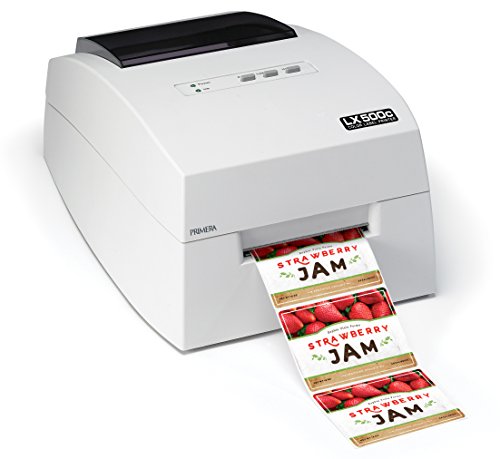
Primera LX500 — Small-producer classic
If the ColorWorks is the category’s production engineer, the LX500 is its beloved small-business institution. Primera has sold colour label printers to small producers longer than most, and the LX500’s listing states its credentials plainly: full-colour printing at up to 4800 dpi, with a built-in cutter. That resolution figure deserves context rather than worship — at label sizes, what matters is that photographs render smoothly, small text stays legible and brand colours land where the design put them, and a machine printing at this class of resolution does all three without strain. Jars of jam, bottles of sauce, tins, boxes, coffee bags: the LX500’s natural output is the label that makes a farmers’-market product look like it belongs in a delicatessen, because in many cases it now does.
The built-in cutter keeps the workflow in one box, as with the Epson, and Primera’s long presence in the niche brings the softer infrastructure small producers lean on: label design software familiarity, stock ecosystems from multiple suppliers who cut for these machines, and a user community of exactly the businesses you are joining, whose solved problems are searchable. A first-time colour label buyer is not only buying output; they are buying the number of questions they will have to answer alone, and on that measure the established Primera route is gentle. Feed it inkjet-coated stock, as its ink system requires, and it repays the discipline with labels whose colour sells the second jar.
Where does it yield to the Epson? In production posture. The CW-4000 reads as a machine for runs; the LX500 reads as a machine for producers — smaller batches, more variety, the constant redesign rhythm of a growing brand. Neither reading is a criticism. The candle maker testing four scents this season, the brewery labelling small-batch runs, the farm shop whose labels change with the harvest: these are LX500-shaped businesses, and the machine has been shaped by thousands of them. Buy it as the small producer’s full-colour press, keep its stock matched, and it will make your products look like the business you intend to become.
- Print type: full-colour inkjet
- Resolution in listing: up to 4800 dpi
- Finishing in listing: built-in cutter
- Stock requirement: inkjet-coated label stock
Strengths
- High-resolution full colour renders photographs, fine text and brand colours convincingly at label scale.
- Built-in cutter keeps the whole label workflow inside one desktop machine.
- Primera’s long small-producer ecosystem means stock, software and community answers are plentiful.
Trade-offs
- Production-scale runs are the Epson’s stronger suit than this producer-scale machine’s.
- Coated stock and ink costs must be modelled per label, as with every inkjet here.
- Buyers needing wider labels should look at the prose-only LX910 discussion before deciding.
Best for: small food, drink and goods producers printing varied full-colour labels in modest batches. Not suited for: high-volume production runs, or buyers wanting a touchscreen standalone workflow.
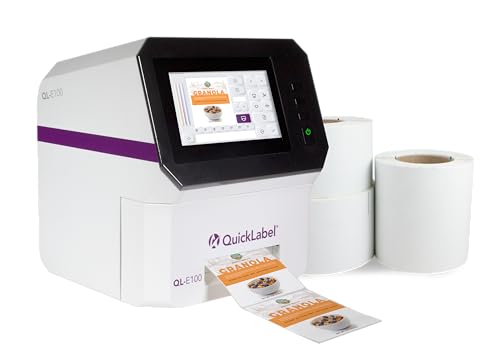
QL-E100 Full Color Label Printer — Touchscreen standalone
The QL-E100’s listing leads with a different idea of how a label printer should be operated: a built-in touchscreen and auto-cutter, with free design software, printing professional-quality labels on inkjet label rolls. The touchscreen is the tell. Most colour label printers are peripherals that assume a computer owns the workflow; a machine with its own screen is courting the environments where a computer is the awkward part — the market stall, the small packing bench, the shop counter where labels are designed and printed by whoever is standing there. Combined with the bundled design software, the proposition is a shorter distance between an idea for a label and a label in the hand, with fewer installations, drivers and desk rearrangements in between.
Underneath the interface, the machine plays by the inkjet rules this guide keeps repeating: full colour onto inkjet label rolls — coated stock matched to the system — with the auto-cutter finishing each run into separate labels. Buyers should therefore evaluate it in two layers. The output layer is the familiar inkjet bargain of vivid colour against stock discipline. The workflow layer is where the QL-E100 makes its case, and it will resonate most with businesses whose labelling is done by several people, in a couple of places, without an IT-minded owner hovering. A touchscreen everyone can understand is a feature with real economic value in a business where the alternative is training.
Its trade-offs are the mirror of the established names. Epson and Primera bring decades-deep ecosystems of stock, support and community knowledge; a newer entrant asks its buyers to accept a thinner surrounding world in exchange for its interface and value proposition. For some small businesses that exchange is obviously right — the machine will be understood by Friday and earning by the weekend. For a producer building a label operation they intend to scale for a decade, the incumbents’ depth may weigh more. Both judgements are respectable; the QL-E100 simply makes sure the touchscreen-shaped buyer has a genuine full-colour option rather than a compromise.
- Print type: full-colour inkjet
- Interface in listing: built-in touchscreen
- Finishing in listing: auto-cutter
- Software in listing: free design software included
- Stock requirement: inkjet label rolls
Strengths
- The built-in touchscreen suits shared, computer-light workplaces where labels are made on the spot.
- Auto-cutter and bundled design software shorten the path from idea to finished label.
- Full-colour inkjet output keeps it in the true product-label class, not a halfway technology.
Trade-offs
- Its surrounding ecosystem of stock and support is younger than Epson’s or Primera’s.
- Coated inkjet rolls remain a running-cost commitment, as with its inkjet peers.
- Production departments wanting deep integration will still look to the ColorWorks class.
Best for: small businesses and shared workspaces wanting full-colour labels with a walk-up touchscreen workflow. Not suited for: buyers who prize a decades-deep support ecosystem above interface convenience.

Liene PixCut S1 — Sticker maker and cutter
Class honesty first, because this pick’s charm could blur it: the PixCut S1 is not a production product-label printer, and it does not pretend to be once you read its listing — a colour sticker printer and cutting machine, an all-in-one sticker maker for DIY crafts, custom labels and gifts, using thermal dye-sublimation photo printing technology. Its world is the craft economy: sticker sheets for planners and laptops, custom gift labels, small-batch decorative stickers for online shops, the joyful end of printing. In that world its combination is genuinely clever. Dye-sublimation produces rich, continuous-tone colour of the kind photographs love, and the built-in cutting machine half means a sticker emerges not just printed but cut to its shape — the step that separates a printed sheet from a sellable sticker.
Understanding its technology explains both its glow and its limits. Dye-sublimation infuses colour into the receiving material rather than laying ink on top, which is why its stickers look photographic and feel integrated rather than printed-on. It is also a dedicated-media technology: the machine works with its own materials, sized for its sticker-and-gift brief, not with the roll stock of the production label world. A craft seller’s economics — small runs, high design variety, products whose value is their look — fit it beautifully. A food producer’s requirements — durable product labels on matched stock, at width, in volume — do not fit it at all, and the guide’s framing exists so that nobody discovers that mismatch with a delivery date looming.
Judged inside its true class, the S1 is a delightful consolidation: printer and cutter in one device, aimed at makers who currently juggle a printer, a cutting machine and a hope that the two align. Alignment, in sticker making, is the whole craft — a cut that drifts ruins the sheet — and an all-in-one that owns both steps owns the problem. If your labels are gifts, crafts and stickers, this is your pick in the guide and the production machines are the overkill. If your labels are products, reverse that sentence and choose above.
- Print type: thermal dye-sublimation colour
- Function in listing: sticker printer and cutting machine, all-in-one
- Aimed at: DIY crafts, custom labels, gifts
- Class note: craft sticker machine, not production labelling
Strengths
- Printing and shape-cutting in one device removes the alignment juggling of separate machines.
- Dye-sublimation colour has a rich, photographic quality that suits stickers and gift work.
- Consolidates a craft seller’s two core tools into a single desktop footprint.
Trade-offs
- It is not a production product-label printer and does not use production label stock.
- Dedicated media ties the owner to its own material ecosystem.
- Businesses labelling regulated products need the inkjet production class instead.
Best for: craft sellers, sticker makers and gift businesses wanting printed-and-cut stickers from one machine. Not suited for: product labelling for food, drink or cosmetics, or any volume label production.

Rongta Dual-Color Thermal Label Printer — Dual-colour thermal
Dual-colour. The Rongta prints in dual-colour — black plus one colour — by thermal printing, and this guide will call it dual-colour in every sentence that touches it, because the single most important service a review can perform for this machine is preventing a full-colour expectation. Its listing describes a dual-color thermal label printer with Bluetooth, in dark gray, compatible with iPad, iPhone, Android and Windows. Within its dual-colour brief, the concept is smart: a great many real-world labels need exactly one colour beyond black. The red “fragile” band. The green “vegan” marker. The blue size flash. A thermal machine that adds that single accent — with no ink, no ribbons of the colour kind, just its dual-colour thermal mechanism and the appropriate dual-colour label stock — serves those labels with shipping-printer simplicity.
Bluetooth connectivity and phone-and-tablet compatibility frame its working life: labels designed on the device in your hand, printed at the bench, in the stockroom or at the market stall. For small businesses whose labelling is operational rather than brand-led — colour-coded storage, dated stock rotation with a coloured day band, shipping and handling marks that use colour as a signal — dual-colour is not a compromise at all; it is the correct amount of colour, delivered by the cheapest-to-run printing technology there is. Thermal running means the consumable conversation is about labels, including the dual-colour stock its two-tone output requires, rather than about ink levels discovered mid-run.
What it cannot do must stay in view: no photographs, no gradients of brand colour, no full-colour product face. A jam label from this machine carries its barcode, its facts and one decisive colour accent — which, to be fair, describes a respectable share of the labels in any warehouse. Choose the Rongta when your colour need is a signal. Choose the inkjets above when your colour need is a picture. The machine’s honesty about being dual-colour is, in the end, its most likeable trait, and this guide has honoured it by never once upgrading it in print.
- Print type: dual-colour thermal — black plus one colour
- Colour capability: dual-colour only, never full colour
- Connection in listing: Bluetooth
- Compatibility in listing: iPad, iPhone, Android, Windows
- Finish in listing: dark gray
Strengths
- Dual-colour thermal output adds the one accent colour most operational labels actually need.
- No ink to manage: thermal running keeps the consumable story to label stock alone.
- Bluetooth with phone and tablet compatibility suits bench, stockroom and stall printing.
Trade-offs
- Dual-colour is its ceiling — photographs and full-colour branding are permanently outside its brief.
- Its two-tone output depends on suitable dual-colour label stock being loaded.
- Thermal prints share the family’s sensitivity to heat and long exposure over time.
Best for: small businesses whose labels need one clear colour signal — coding, warnings, rotation — with thermal simplicity. Not suited for: product branding, photographic labels, or anyone who read “colour” and pictured full colour.
Primera LX910 — Step-up, prose only
The LX910 earns its place in this guide the way a signpost earns its place on a road: producers who start with the LX500 and succeed tend to ask what the next step looks like, and in Primera’s line the answer is the LX910, the step-up full-colour machine offering a wider, faster expression of the same inkjet label idea. We cover it in prose only, deliberately: no clean listing for it was verified in the pool this guide is built from, so it receives no link, no identifier and no image marker beyond this note. A recommendation you cannot follow to a verified listing is context, and we label it as context rather than dressing it as a pick.
As context, it is valuable. The LX910 represents the point where a colour label operation stops being a sideline and becomes a department: wider labels for bigger products, throughput for longer runs, the same Primera ecosystem of stock and software knowledge scaled up. A producer whose LX500 runs daily and whose product range is widening — literally, into jars and bottles the smaller machine’s width strains at — is the reader this paragraph exists for. When that day comes, shop for the LX910 through Primera’s own channels and reputable dealers, verify the exact configuration as carefully as this guide verified its linked picks, and treat any marketplace listing with the scepticism that high-value niche machinery deserves.
For everyone else, the LX910’s role in this guide is to mark the horizon. The full-colour inkjet class does not end at desktop starter machines; it climbs, through this model and the ColorWorks range, toward genuine production equipment. Knowing the ladder exists helps a buyer choose their first rung with confidence — the LX500 today is not a dead end but a first step on a path whose upper reaches are already built. That is a more useful thing for a guide to tell you than a link it could not verify.
- Print type: full-colour inkjet, step-up class
- Status in this guide: prose-only — no verified clean listing
- Role: wider, faster Primera route for growing producers
- Buying note: source through Primera channels and verify configuration
Strengths
- Represents the natural growth path for producers outgrowing the LX500’s width and pace.
- Keeps growing businesses inside one maker’s stock and software ecosystem.
- Marks the bridge between desktop colour labelling and production equipment.
Trade-offs
- No verified listing here means no one-click route; buying takes dealer homework.
- Its scale and cost are surplus for producers whose batches stay modest.
- As a prose-only entry it carries no listing-confirmed specification in this guide.
Best for: successful LX500 owners whose labels are widening and whose runs are lengthening. Not suited for: first-time colour label buyers, who should start with a linked, verified pick.
Six colour machines, one honest table
| Pick | Class | Colour truth | Finishing | Natural home |
|---|---|---|---|---|
| Epson ColorWorks CW-4000 | Inkjet label printer | Full colour, matte | Auto cutter | Production-minded producers |
| Primera LX500 | Inkjet label printer | Full colour | Built-in cutter | Small producers, varied batches |
| QL-E100 | Inkjet label printer | Full colour | Auto-cutter, touchscreen | Shared, computer-light workplaces |
| Liene PixCut S1 | Dye-sublimation sticker machine | Full colour, craft media | Built-in shape cutting | Sticker and gift sellers |
| Rongta Dual-Color | Thermal label printer | Dual-colour only | Thermal simplicity | Colour-coded operations |
| Primera LX910 | Inkjet, prose only | Full colour | Step-up class | Growing Primera producers |
The colour-truth column is the table’s conscience, and it is worth reading down it slowly. Three machines print full colour for product labels. One prints full colour for craft stickers on its own media. One prints dual-colour — black plus one colour — and is the right answer to a narrower question. One is a prose-only horizon. A comparison that blurred those rows into a single “colour: yes” column would be shorter and worthless. The finishing column tells the second story: cutters everywhere, because a colour label workflow that ends in hand-cutting strips is a workflow abandoned by its second busy week.
What the table cannot show is the shelf moment — your label, on your product, under shop light, beside a competitor. That moment is why the inkjet production class exists, and why its stock discipline is worth its cost. If your labels live that moment daily, shop the table’s top rows. If your colour is a signal rather than a face, the dual-colour row is your honest home. If your colour is a craft, the PixCut’s row is. The guide’s only insistence is that you choose the row that describes your work, not the row whose description flatters it.
What will a year of colour labels cost you?
Model the year in labels, not in machines. Start with your honest monthly count, multiply by the per-label reality of your chosen system — ink plus coated stock for the inkjets, dual-colour stock for the Rongta, dedicated media for the PixCut — and compare that figure against the print shop’s quote for the same year, remembering to price your own flexibility honestly too. In-house printing’s hidden dividend is the batch you did not have to predict: the flavour that sold out, the regulation line that changed, the seasonal design that would have meant a cupboard of obsolete pre-printed labels. Businesses regularly find that avoided waste, not per-label cost, is where in-house colour wins its argument.
The discipline that protects the arithmetic is standardisation. Settle on a small family of label sizes that covers your range, buy stock for those sizes in sensible depth, and design within them. Every new size is a new roll on the shelf and a new minimum in the cupboard. Producers who standardise early discover that colour labelling’s economics behave; producers who improvise sizes weekly discover that the printer was never the expensive part. The machine decision takes an afternoon. The stock discipline is the business model.
How do colour labels hold up in real product life?
A label’s enemies are specific, and naming them turns stock selection from guesswork into engineering. Water arrives as condensation on cold drinks, as splashes beside sinks, as rain at outdoor markets. Oils arrive from the product itself — the candle’s fragrance, the sauce’s rim, the cosmetic’s residue on a customer’s fingers. Abrasion arrives from crates, shelves and other bottles. Sunlight arrives through shop windows with slow, bleaching patience. Paper labels with standard inks handle a dry, indoor, short life gracefully and surrender, one by one, to the other enemies. Synthetic stocks and matched ink systems were invented to hold those lines, and a producer whose products live wet, oily or sunny lives should choose stock by the enemy list, not by the sample book’s prettiest page.
Testing is refreshingly cheap. Label six real products and put them where they will actually live: two in the fridge, two by the sink or the fryer, two in the window. Inspect them weekly with a customer’s eyes. A label that survives a month of honest life will survive its commercial life; one that curls, fades or bleeds in the test has saved you from learning the same lesson across a thousand units. Producers who run this test once per stock change rarely speak of label failures again, because they stopped shipping experiments and started shipping results.
What should you know about label design software before choosing?
Every colour label begins as a file, and the software that makes the file shapes your working life as much as the printer does. The QL-E100 bundles its design software and a touchscreen, pitching a self-contained route. The Primera and Epson ecosystems assume the broader world of label design tools, from the makers’ own offerings to the professional packages that handle variable data — the batch numbers, dates and serials that change label to label while the design stands still. If your products carry best-before dates, lot codes or numbered editions, variable data is not a luxury feature; it is the difference between a label system and a label chore, and it deserves a direct question when you choose your route.
Colour management is the software’s second quiet job. The file on your monitor lives in screen colours; the label lives in ink on a particular stock, and the translation between those worlds is where brand colours go to be disappointed. Makers’ drivers and profiles exist to narrow that gap, and the proof-on-product ritual from the how-to section closes what remains. A buyer who plans to print a specific brand colour should test that colour, on that stock, before committing the range — a sentence that sounds cautious and is, in fact, the cheapest insurance in this entire category.
Which mistakes do buyers keep making with colour label printers?
The headline mistake is buying the word “colour” without its qualifier — expecting full colour from a dual-colour thermal machine, or production labels from a craft sticker maker. This guide has labelled classes relentlessly precisely because that mistake is so available. The second mistake is feeding inkjet machines uncoated stock and blaming the printer for the bleeding, smudging result; the coating is not an upsell, it is half the technology. The third is designing labels on a bright monitor and never proofing at final size on the real product, so the first honest look at the brand colour happens on a shelf, in public.
Fourth comes underestimating the cutter. Buyers compare print engines and forget the finishing step, then discover that a run of a thousand labels is also a thousand separations. Every pick here with production ambitions carries a cutter for that reason. And the fifth mistake is volume blindness in both directions: the production machine idling over a dozen labels a week, or the craft machine being asked for a product line’s worth of durable labels. Match the machine to the count and the class to the job, and colour labelling becomes what its happy owners describe — the moment a small product starts looking like a brand.
How do you design a first colour label that actually works?
Start from the shelf backwards. Decide the label’s size from the product’s flat, label-able surface — measured, not guessed — and choose the stock finish that suits the brand and the product’s life: matte for the pantry and the cosmetics shelf, synthetics where water and handling rule. Design at final size with the brand colour, the product name and the legally required information given clear hierarchy; a label is read in two seconds by a shopper and in detail by a customer who has already bought, so the two-second read must carry the name and the promise while the detail waits its turn. Keep small text comfortably above the size where any printer’s dots start to argue with letterforms.
Then proof like a sceptic. Print the label, apply it to the actual product, and live with it for a day: fridge it, handle it, stand it under the shop’s lighting, photograph it the way a customer would for a review. Check the barcode, if it carries one, with the scanner it will meet in the world. Adjust colour by what the proof shows, not by what the monitor insists. Only then print the run, letting the cutter finish what the design started. This ritual is an afternoon the first time and an hour ever after, and it is the entire difference between labels that look printed at home and labels that look like they were always part of the product.
How do you apply colour labels so they look factory-made?
The finest label in this guide can be ruined by the hand that applies it, and small producers underestimate application because printing felt like the hard part. Work on a clean, dry product surface; oils and condensation are adhesion’s enemies before they are print’s enemies. Peel the label fully before offering it up, align by the product’s own geometry — the jar’s seam, the bottle’s shoulder — and apply from the centre outward so air escapes instead of blistering. A simple jig, even a marked board that positions every jar identically, turns a wobbling hand process into a repeatable one, and repeatability is what the eye reads as “factory-made” across a shelf of twelve.
Speed comes from sequence, not hurry. Label in batches at a clean station, printed labels to one side, finished products to the other, and inspect every tenth unit with fresh eyes rather than trusting the rhythm. Store printed labels flat, away from sun and heat, if they wait before application, and keep the waiting short — a label applied the week it was printed lives the life it was designed for. None of this requires machinery beyond the picks above. It requires treating the last metre of the process with the same respect as the printing, which is, in the end, the producer’s whole craft in miniature.
When does a print shop still beat printing your own colour labels?
Honesty requires the comparison. A print shop wins when your runs are long and stable — ten thousand identical labels for a product that will not change this year will usually price better produced industrially, on presses whose per-label economics a desktop cannot match. It wins when your product needs materials or finishes outside the desktop world, and when a regulatory or retailer requirement specifies production standards you cannot verify in-house. It also wins, quietly, when your time is the scarcest input: a producer drowning in orders may rationally buy back the labelling hours.
In-house colour wins the opposite territory: short runs, changing designs, seasonal and experimental products, and the cash-flow shape of printing labels the week they are needed instead of financing a cupboard of them in advance. Most growing producers end up hybrid — the stable bestseller’s labels from a shop, the experiments and seasons from the machine on the bench — and the picks in this guide are sized for exactly that hybrid life. Buy the machine for the work it will genuinely take over, and let the shop keep the work it does better; that division, revisited yearly, is the mark of a label operation run by an adult.
Final Recommendation
Let the class choose before the model does. For full-colour product labels in real runs, the Epson ColorWorks CW-4000 is the production answer; for the small producer’s varied batches, the Primera LX500 remains the classic route, with the LX910 waiting in prose as the honest horizon for those who outgrow it. For a shared, walk-up workflow, the QL-E100’s touchscreen makes full colour approachable. For stickers and gifts, the PixCut S1 consolidates a craft with real charm. And for the one-colour signal on a thermal budget, the Rongta — dual-colour, proudly and only dual-colour — is the right amount of machine. Whichever you choose, your customers will meet the label before they meet the product, so choose the machine whose labels you would be happy to be judged by, in the two seconds a shelf allows.
Frequently Asked Questions
Can I use ordinary label paper in an inkjet label printer?
You can load it, but you should not expect it to work well. Inkjet colour needs inkjet-coated stock: the coating holds the colour at the surface, keeps edges sharp and dries fast. Uncoated paper bleeds, feathers and smudges. Matched stock is half the technology, and every inkjet pick in this guide assumes it.
Is the Rongta a full-colour printer?
No, and this guide has been careful never to call it one. It is a dual-colour thermal printer: black plus one colour. That is genuinely useful for colour-coded and signal labels, and genuinely incapable of photographs or full-colour branding. Buy it for the accent colour, not for a product’s face.
What is the difference between the LX500 and the LX910?
Position in Primera’s line. The LX500 is the established small-producer machine, linked in this guide from a verified listing. The LX910 is the wider, faster step-up for producers outgrowing it, covered here in prose only because no clean listing was verified — source it through Primera’s channels when your operation reaches for it.
Do colour labels survive on bottles in a fridge?
That depends on the stock more than the printer. Inkjet printing on matched synthetic or suitably coated stock handles condensation and cold well; paper stock in a wet, cold life will suffer. Choose the stock for the product’s environment, proof a labelled bottle through a few days of fridge life, and let the proof vote.
Why does every serious pick here have a cutter?
Because finishing is half the workflow. A print run that ends as a continuous strip hands you a second job with scissors or a guillotine, and that job scales terribly. Built-in and auto cutters deliver separated, ready-to-apply labels, which is the difference between a labelling system and a printing hobby.
Can the Liene PixCut S1 label my food products?
That is not its class. The PixCut S1 is a dye-sublimation sticker printer and cutter for crafts, custom stickers and gifts, using its own media. Food and product labelling belongs to the inkjet picks, printing on matched label stock at production widths. The PixCut is excellent at its own job; food labelling is a different job.
How many label sizes should a small producer standardise on?
Fewer than instinct suggests. Most small ranges can be covered by two or three sizes — a primary label, a smaller seal or neck label, and a shipping or case label — and every additional size multiplies stock inventory, design files and setup changes. Choose sizes from your largest product’s needs downward, so smaller products inherit a label that fits rather than forcing a new one. Producers who standardise early find that their design work speeds up too, because each new product begins from a proven template at a proven size instead of from a blank page and a fresh roll.
Can I print a barcode in colour?
You can, and usually should not. Scanners read contrast, and a barcode printed in a mid-tone colour on a tinted ground can fall below the contrast a reader needs, especially the older readers in small shops. Print the code itself in black on a white quiet zone, and let the colour live around it — in the bands, borders and brand elements where it sells without risking the scan. The production picks here make that discipline easy, since the same label carries both the code and the colour, each in its proper place.
What is the difference between die-cut and continuous label stock?
Die-cut stock arrives as individual labels of a fixed size on a roll, separated by gaps the printer senses — the straightforward route when your labels are always the same size, and the form most small producers live on. Continuous stock is an unbroken band that the printer’s cutter divides at lengths your design dictates, which suits variable-length labels and reduces the sizes you must stock, at the price of depending on the cutter for every label’s final dimension. The cutter-equipped picks in this guide handle the continuous route gracefully; die-cut remains the calmer default. Choose per your size discipline: fixed sizes favour die-cut, restless sizes favour continuous and a good cutter.
How should I store printed labels and spare stock?
Cool, dry, dark and flat-or-rolled as supplied — that is the whole doctrine, and each word defends against a named enemy. Heat and sunlight fade colour and tire adhesives before the label ever meets a product. Damp curls paper stock and clouds finishes. Dust settles on exposed roll edges and prints its autobiography across the next run. Keep spare rolls in their packaging until the day they load, keep printed labels waiting for application in a closed box rather than on the bench, and rotate stock so the oldest roll prints first. Producers treat finished goods this way instinctively; labels deserve the same respect, because on the shelf they are indistinguishable from the product’s own quality.
Does a colour label printer also print my shipping labels?
It can print them, and most owners sensibly do not ask it to. Shipping labels are monochrome, high-churn documents that a thermal printer produces faster and more cheaply, without touching ink or coated stock. Running them through a colour inkjet spends the premium consumables on the least glamorous paper in the building. The common arrangement in producer businesses is a division of labour — thermal for shipping and operations, colour inkjet for the product’s face — with the dual-colour Rongta in this guide sitting intriguingly between, able to give operational labels a colour signal while the inkjets keep their ink for the shelf. Buy each machine for its strength and the whole bench gets cheaper to run.
How fast will I use up ink printing photographic labels?
Faster than text-led labels, by the simple arithmetic of coverage: a photograph covers nearly every dot of the label with colour, while a typical product label leaves generous white space that costs nothing. Producers estimate their ink appetite from their most photographic design, not their average one, and keep the white-space instinct alive in design for economic as much as aesthetic reasons. The production-oriented picks here are built for that appetite; the discipline is in your forecasting. Print a counted test run of your richest label, note the ink movement honestly, and scale that observation to your batch sizes before the season’s big run teaches the same lesson at full price.
Can colour labels include variable dates and batch codes?
Yes — that capability is one of the strongest arguments for printing in-house at all. Label design software in the ecosystems around these machines can merge variable fields into a fixed design, so each label in a run carries its own best-before date, lot number or serial while the branding stands still. Set the merge up once, proof the first and last labels of a run to confirm the sequence advanced correctly, and a chore that print shops charge for as a variation becomes a field in your spreadsheet. For food and cosmetics producers especially, where dates and batches are not decoration but obligation, variable data is the feature that turns a colour printer into a compliance tool your whole production week can quietly and confidently rely upon every single batch it prints throughout the entire working year ahead of you and your growing little production team too, season after busy, label-hungry season of growth for the brand you are building daily.
Related Guides
Colour is one stop on the labelling line that begins right here today with best barcode printers, continues through the wide world of best banner printers, and shrinks to pocket size in best mini pocket thermal printers.


