What's inside
- Key Takeaways
- Quick Picks: The Best Hard Drives for Storing RAW Files at a Glance
- How Did We Choose These Picks?
- How Much Space Do RAW Files Really Consume Over a Year?
- How Do These Six Drives for RAW Photo Archives Differ in Space and Safety?
- How Should Photographers Name and Organise a Growing Archive?
- When Does a Second Archive Location Become Necessary?
- How Should You Ingest and Archive a Shoot Safely?
- Which Mistakes Do Photographers Make Most Often When Storing Libraries of RAW Files?
- How Should a Photographer Organise the Archive Across Several Drives?
- What Does a Photographer Owe Clients Regarding Storage?
- How Do Catalogue Backups Fit With RAW Archives?
- When Should a Photographer Migrate an Archive to a New Drive?
- How Should a Photographer Handle a Drive That Fails Verification?
- What Is the Role of Cloud Storage in a RAW Archive?
- How Does a Photographer Keep an Archive Searchable for Decades?
- How Should Second Shooters’ Files Join the Main Archive?
- What Does Insurance Think About a Photographer’s Archive?
- How Do You Archive Video Alongside RAW Stills?
- Why Do Photographers Keep the Outtakes, and What Does That Cost?
- How Should an Archive Survive a Studio Move?
- What Should Happen to the Archive When a Photographer Retires?
- How Do You Rehearse an Archive Restore Before It Matters?
- What Is the Simplest Possible RAW Archive That Still Works?
- Should the Archive Drive Ever Travel to a Shoot?
- Final Recommendation
- Frequently Asked Questions
- Related Guides
As an Amazon Associate I earn from qualifying purchases. This post may contain affiliate links at no extra cost to you.
gizmoverdict.com is reader-supported. When you buy through links on our site, we may earn an affiliate commission.
Where to buy: photography retailers stock several of these enclosures alongside general electronics stores, and the links below open the very product pages that were reviewed one by one as part of the research behind this guide. For the RAID models, confirm whether the quoted capacity describes the total across both internal drives or the mirrored usable space.
A single wedding or commercial shoot can produce thousands of RAW frames, and unlike JPEGs those files are the irreplaceable negatives of digital photography: once a card is formatted, the drive holding the RAW archive becomes the only place the original capture exists. The best hard drives for storing raw files therefore need generous capacity, calm sequential behaviour for huge copy jobs and, in two cases here, built-in RAID so one failed mechanism does not take a season of work with it.
This list mixes very large single desktop drives with two dual-bay RAID units, because photographers store RAW files in two distinct ways. Some want a simple, enormous volume that swallows card after card, while others want the archive itself to carry a mirrored copy inside the same enclosure from the moment the files land.
Every pick connects externally and works with the standard photo workflow of ingest, cull, edit and archive. The reviews explain which storage style each drive serves, how its capacity translates into real shooting volume, and where a second, separate backup still needs to enter the picture.
Key Takeaways
- RAW archives grow relentlessly, so buy capacity for roughly two years of shooting rather than the next two months of assignments.
- The two RAID enclosures in this list mirror files internally, which protects against a single drive failure but never replaces an off-site or separate backup copy.
- Large single drives suit the working archive that receives every shoot, while smaller desktop units make tidy year-by-year or client-by-client volumes.
- Ingest speed depends on the card reader and connection as much as the drive, and spinning disks handle long sequential RAW copies comfortably.
- Keep the archive drive’s catalogue and its backup on different physical devices, and verify copies with checksums during ingest rather than trusting a progress bar.
Quick Picks: The Best Hard Drives for Storing RAW Files at a Glance
| Drive | Badge | Why it earns a place |
|---|---|---|
| Seagate Expansion 24TB External Hard Drive HDD | Largest Single Volume | Twenty-four terabytes end capacity anxiety for prolific shooters. |
| WD 20TB Elements Desktop External Hard Drive, USB 3.0 drive for plug-and-play storage | Simple Archive Giant | Twenty terabytes of plain, dependable archive room. |
| WD 28TB My Book Duo Desktop RAID External Hard Drive HDD, USB 3.1, With Password Protectio | Mirrored Studio Vault | Two internal drives mirror every shoot inside one enclosure. |
| LaCie 2big Dock RAID 8TB External RAID Hard Drive HDD with SD Card CF Card Slots, for Mac | Dock With Card Readers | Card slots on the front turn ingest into a single motion. |
| SanDisk Professional 24TB G-RAID Project 2 | Professional RAID Speed | Fast dual-drive performance for studios that archive daily. |
| Seagate One Touch 8TB External Hard Drive Desktop HDD | Everyday Archive Desk Drive | Eight terabytes sized for a year or a single client archive. |
How Did We Choose These Picks?
Selection favoured capacity per enclosure, steady sequential write behaviour for long card offloads and connections that suit a photographer’s desk. The RAID models were included deliberately: a mirrored archive removes the most common single point of failure for a working photographer, and both RAID picks also offer reader slots or professional connections that slot into a studio workflow.
Single drives were judged as archive volumes rather than editing scratch disks. A RAW archive is written in big batches and read in browsing sessions, which is exactly the pattern spinning storage handles gracefully. Each review states how the drive fits an archive system, because the right question is never just how much a drive holds but how it behaves inside the photographer’s wider backup habits.
How Much Space Do RAW Files Really Consume Over a Year?
Do the arithmetic with your own camera’s files. A high-resolution body producing large RAW frames turns a busy month of weddings, portraits and commercial days into terabytes faster than most photographers expect, and keeping both the full take and the culled selects roughly doubles the working figure during the months before a job is finally trimmed.
Structure the archive so growth stays manageable. Many photographers keep the current year on the working archive, close each finished job into a dated folder, and roll completed years onto a separate volume that can be shelved. That rhythm pairs naturally with the drives here: a large single volume or RAID unit for the active year, and additional desktop drives as year archives accumulate.
Remember that the catalogue database and previews deserve protection too. Losing the edits, ratings and collections attached to a RAW library can cost as many hours as losing the frames themselves, so include the catalogue in the same backup routine and store its backup on a different device from the archive it describes.
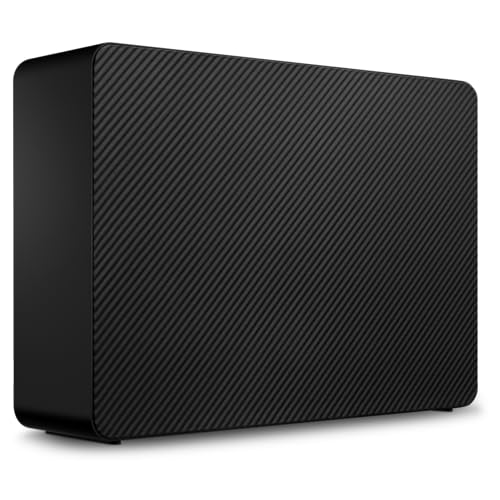
Seagate Expansion 24TB External Hard Drive HDD — Largest Single Volume
Twenty-four terabytes in one desktop enclosure changes a photographer’s habits, because entire years of RAW shooting can land here without the mid-season panic of a filling archive.
Its USB connection handles long sequential card offloads calmly, and bundled rescue services add a layer of comfort for a volume holding this much original work.
A twenty-four-terabyte archive changes studio conversation from where things fit to how things are organised, because capacity stops being the constraint and discipline becomes it. Photographers who thrive with it keep ruthless folder naming and a catalogue that points across the whole volume, rather than letting years blur into one searchable soup.
- Capacity: 24TB external desktop
- Connection: USB 3.0
- Support: Rescue data recovery services
- Power: mains adapter
- Role: whole-library archive
Twenty-four terabytes on one desk drive changes a photographer’s relationship with the delete key. Whole seasons can be kept in full, including the outtakes that occasionally become the image a client suddenly wants, and the archive stops requiring the monthly triage that smaller volumes impose. For a busy wedding or event photographer, that breathing room is not indulgence; it is the difference between an archive and a negotiation.
The responsibility scales with the capacity, because this single enclosure can hold a career’s worth of originals. Its rescue services are a comfort rather than a plan, and the photographer who buys it should buy its backup in the same breath — a second volume, a cloud tier, anything that means this drive’s failure would be an inconvenience instead of an ending. Treated as the centre of a system rather than the whole system, it is a magnificent centre.
There is a second career available to this drive in a mature studio: the consolidation point. Years of smaller archive drives can be copied onto it, verified once against their checksums, and then retired to cold storage as the duplicates they have become. The studio ends with one browsable present and a shelf of clearly labelled history, instead of a drawer where every retrieval begins with archaeology.
Power protection is the unglamorous companion this giant deserves. A drive holding twenty-four terabytes should never meet an unclean shutdown if a modest uninterruptible supply can prevent it, because the filesystem check after a hard power loss on a volume this size is a long, anxious wait. The pairing costs little against the value of the contents and turns thunderstorms from archival events into weather.
One more discipline suits this giant: the quarterly sample. Open a handful of shoots from different years, confirm they read cleanly, and note the date in the index. A drive this large will never be fully re-verified casually, so sampling is the honest compromise — provided the samples rotate and the second copy receives the same attention.
Say the quiet part aloud: a drive of this size tempts its owner to postpone the second copy because the first copy feels so substantial. Resist the feeling. Substantial is not the same as safe, and the photographers whose archives survive decades are the ones who treated every large drive in this list as half of a pair from the day it arrived.
Strengths
- Capacity for years of heavy shooting
- Calm handling of huge card offloads
- Rescue services included for comfort
Trade-offs
- Single mechanism holds a vast library
- Desk-bound size and mains power
- Backups of this volume take planning
Best for: prolific shooters centralising an archive.
Not suited for: photographers wanting internal mirroring.

WD 20TB Elements Desktop External Hard Drive, USB 3.0 drive for plug-and-play storage — Simple Archive Giant
The twenty-terabyte Elements is the straightforward archive giant: no elaborate features, just a large, quiet volume that accepts shoot after shoot and asks little in return.
Photographers who already maintain separate backups often prefer exactly this simplicity for the working archive that receives every card first.
The Elements twenty-terabyte model is often bought in pairs by working studios, one live archive and one clone updated weekly and kept across town. That pairing turns a plain drive into a genuine system, and its lack of elaborate features becomes an advantage: there is almost nothing to configure wrongly at midnight after a wedding.
- Capacity: 20TB external desktop
- Connection: USB 3.0
- Design: plug-and-play desktop unit
- Power: mains adapter
- Role: working RAW archive
The twenty-terabyte Elements is the archive drive for photographers who value a particular kind of peace: nothing to configure, nothing to update, nothing between the card reader and a finished, verified copy. Its plainness is a considered feature in a studio where the photographer’s attention belongs to clients and images, and where every elaborate system eventually meets a tired Friday evening.
Studios frequently buy it in pairs, and the pairing deserves emphasis. One lives on the desk as the working archive; the other lives elsewhere and receives a clone on a rhythm — weekly for a busy season, monthly for a quiet one. Two plain drives in two places outperform one clever drive in one place by every measure that matters when something goes wrong, and this model’s simplicity makes the discipline easy to keep.
Home-based photographers often place this Elements beside the router rather than the desk, turning it into the household’s shared photo vault as well as the studio archive. That dual role is legitimate provided the backup discipline covers both hats, and provided everyone in the house understands that the quiet box in the corner is not a toy to be unplugged during cleaning.
There is a teaching use for this drive’s plainness: it is the model to recommend to the talented amateur whose archive currently lives on a laptop and a prayer. Nothing about it requires expertise to run, yet it introduces the essential habits — one home for everything, verified copies, room to grow — that separate an archive from a pile of files.
The Elements’ lack of network features is sometimes raised as a limitation, yet for an archive it can be a virtue: a drive that is only ever connected during ingest and verification spends most of its life electrically invisible to ransomware, accidents and curious software. Air gaps are an old-fashioned protection that has aged remarkably well.
Keep its box. A plain drive’s original packaging, retained on a shelf, becomes its safest travelling case whenever the archive must move house, be posted to a second location or simply survive a studio reorganisation. Photographers discard packaging reflexively and regret it precisely once per move; this model’s box is worth the shelf space it asks for, many times over, across a career of moves.
Strengths
- Simple, quiet and very large
- No software learning curve
- Ideal first destination for every card
Trade-offs
- No redundancy inside the enclosure
- Plain design lacks reader slots
- A full surface check takes a long while
Best for: working archives inside a wider backup system.
Not suited for: studios wanting RAID in the same box.

WD 28TB My Book Duo Desktop RAID External Hard Drive HDD, USB 3.1, With Password Protectio — Mirrored Studio Vault
Inside this enclosure two drives mirror each other, so every RAW file lands twice from the moment of ingest, and a single mechanism failure cannot erase a wedding season.
Password protection and backup software round out a studio-friendly package, though the mirrored capacity means the usable space is half the headline figure.
My Book Duo owners should decide the RAID mode before the first ingest and resist changing it later, because switching modes erases the enclosure. Set to mirror, it becomes the archive that checks itself, and its password protection matters for photographers carrying client work between studio and home.
- Capacity: 28TB total, dual-drive
- Connection: USB 3.1
- Features: RAID, password protection
- Software: auto backup included
- Role: mirrored studio archive
The My Book Duo’s mirroring changes the emotional moment of ingest. When the copy finishes, the shoot exists twice, inside one enclosure, and the photographer can format the cards with a steadiness that single-drive workflows never quite provide. For wedding photographers, whose work cannot be restaged, that steadiness at midnight after a fourteen-hour day is worth a great deal of money.
Decide its RAID mode before the first card is copied, because changing modes later erases the enclosure, and treat its password protection as a genuine feature for client work that travels between home and studio. Remember, too, that its headline capacity halves in mirror mode; the figure that matters is the mirrored space, and photographers should size their purchase by that honest number.
Client confidentiality gives the Duo an argument beyond convenience. A mirrored enclosure with password protection, stored in a locked studio, presents a materially better story to a corporate client asking how their imagery is held than a scattering of unlabelled portables, and photographers who pitch for such work can describe this drive’s role in one confident sentence.
Studio managers running several photographers should note the Duo’s administrative kindness: one enclosure, one cable, one obvious place where the day’s work must land. Systems that a whole team can understand survive staff changes, and an archive that survives staff changes is worth more than a cleverer system understood by one departing assistant.
For photographers who deliver on location — same-day slideshows, event printing — the Duo’s mirroring protects the work before it even reaches the studio. The enclosure travels, the copies duplicate themselves inside it, and the day’s only-copy window shrinks to the hours between the ceremony and the ingest, which is as short as that window can reasonably be made.
One more audience for the Duo deserves naming: the photographer whose studio is also their home, where client work and family photographs share a desk. The enclosure’s mirroring and password protection let the professional half of that desk behave professionally, while its single-cable simplicity keeps the domestic half calm. Equipment that respects both lives tends to stay in service longer than equipment that serves only one.
Strengths
- Mirroring protects every ingest instantly
- Password protection for client work
- Backup software included in the box
Trade-offs
- Usable space halves in mirror mode
- Largest footprint on this list
- Premium route to protected storage
Best for: studios wanting protection inside the archive.
Not suited for: single-drive simplicity seekers.
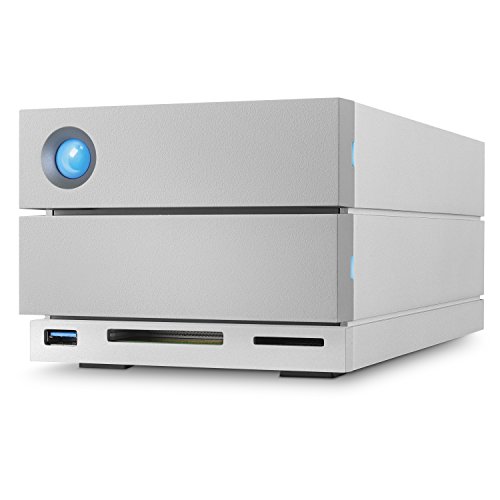
LaCie 2big Dock RAID 8TB External RAID Hard Drive HDD with SD Card CF Card Slots, for Mac — Dock With Card Readers
The 2big Dock earns its desk space at ingest time, where its front card readers let a photographer offload a shoot without hunting for a separate reader and spare cables.
Its dual-drive RAID offers the same mirroring comfort, and the Thunderbolt connection suits Mac-based studios that want the archive to keep pace with a busy culling session.
The 2big Dock’s readers change behaviour in a subtle way: because offloading is effortless, photographers do it immediately, before dinner, before sleep, before the cards can be lost. That immediacy is a genuine archival virtue, and the dock’s footprint on a studio desk is the price of making the safe habit the easy habit.
- Capacity: 8TB, dual-drive RAID
- Connection: Thunderbolt 3, USB-C, USB 3.0
- Readers: SD and CF slots on the dock
- Role: ingest-centred studio archive
- Fit: Mac and PC desktops
The 2big Dock earns its place at the exact point where archives usually fail: the human moment of ingest. Its front-facing card readers remove the small frictions — finding the reader, finding the cable, finding a free port — that cause shoots to sit on cards overnight. When offloading is effortless, photographers do it immediately, and immediacy is the cheapest data protection in this entire guide.
Its eight terabytes of mirrored space will not suit every studio’s volume, which is its honest limitation. High-volume shooters may treat it as the ingest and current-year station, rolling completed years onto larger plain volumes, and that tiered pattern plays to its strengths: speed and convenience at the front of the workflow, vast cheap capacity behind it.
The dock also suits the photographer who teaches. Students gather around an ingest station that visibly does the right thing — cards in, verified copies out, cards returned — and the hardware itself demonstrates the professional habit better than a lecture. Equipment that teaches by its design earns its desk space twice.
The dock’s card readers carry a subtle archival benefit: they encourage keeping the original folder structure from the card during ingest, because the copy begins the moment the card seats. Photographers who rename and reorganise during that first copy make fewer classification errors than those who move files in bulk weeks later from memory.
The dock has one more constituency: the photographer returning from travel with cards scattered through three bags. A single obvious ingest point in the studio — this enclosure, readers ready — collects that chaos into one verified copy before fatigue makes decisions. Travel archives fail at the front door more often than at the disk, and this design guards the front door.
Strengths
- Front card readers speed up ingest
- RAID mirroring available in the dock
- Thunderbolt suits Mac studios
Trade-offs
- Eight terabytes is the modest option here
- Dock format commits serious desk space
- Features exceed a simple archive brief
Best for: busy studios offloading cards daily.
Not suited for: photographers wanting a plain big volume.

SanDisk Professional 24TB G-RAID Project 2 — Professional RAID Speed
SanDisk Professional’s dual-drive unit is the pace-setter here, using two fast enterprise mechanisms to deliver throughput that makes huge archive copies feel brisk.
Studios ingesting several cards after every job will feel that speed weekly, and the enclosure’s professional build matches the rest of a working photographer’s desk.
Studios shooting tethered all day will feel the G-RAID’s pace at the evening copy, when hundreds of gigabytes move while the team packs down. Its Ultrastar mechanisms come from the datacenter world, and the enclosure’s professional finish matches the cameras and lighting that surround it in a working studio.
- Capacity: 24TB, dual-drive
- Connection: Thunderbolt 3, USB 10Gbps
- Mechanism: 7200RPM Ultrastar drives
- Read speed: up to 480MB/s stated
- Role: fast professional archive
The G-RAID Project 2 is built for studios where ingest is a daily industrial process rather than an occasional event. Several cards from several shooters can be copied in rotation while the enclosure’s dual enterprise mechanisms keep pace, and the stated read performance makes browsing a large catalogue from the archive feel brisk rather than archival. It is the professional’s answer to the question of how an archive keeps up with a growing studio.
Its pace is wasted on a drive destined to sit in a cupboard, so buy it for a working desk. Photographers who cull directly from the archive, deliver proofs from it and copy every shoot to it will feel its engineering weekly; those who simply need a vast, quiet shelf should spend the difference on the plainer volumes here and a second copy somewhere else.
Consider the G-RAID as the studio’s front door: everything enters through it, gets culled on it, and only later migrates to slower, larger shelves for its long rest. That pattern uses its speed where speed is felt daily and reserves the plain volumes for the years where nothing is felt at all, which is the correct economics of a growing archive.
resale and upgrade paths flatter the G-RAID as well: professional enclosures hold their usefulness across computer generations because their connections remain current longer than consumer gear. A studio can reasonably expect this unit to serve under two or three successive workstations, which spreads its cost across far more shoots than its purchase season suggests.
Studios should also weigh the G-RAID’s effect on delivery speed. Proofs and galleries exported from a fast archive reach clients sooner, and in a market where clients share their excitement in the first forty-eight hours, that responsiveness is marketing as much as logistics. The archive stops being a back-room concern and becomes part of the client experience.
And a final note on the G-RAID’s scale: because it holds so much working material at speed, studios should include it in the power-protection plan first. The faster and larger an archive volume is, the more a sudden outage interrupts, and the more its owner benefits from the few graceful minutes an uninterruptible supply provides.
Strengths
- Fast dual-drive archive copies
- Professional enclosure build
- High stated read performance
Trade-offs
- Speed is wasted on shelf-only archives
- Larger investment than single drives
- Fans and size suit a working desk
Best for: high-volume studios archiving every day.
Not suited for: quiet home archives on a shelf.

Seagate One Touch 8TB External Hard Drive Desktop HDD — Everyday Archive Desk Drive
The eight-terabyte One Touch is the modest member of this list, and that modesty has a purpose: a single year, a single client or a single project archive that can be shelved as its own volume.
Its tidy desktop format and rescue services suit photographers who organise archives as a series of complete, closable chapters rather than one endless library.
The One Touch makes an elegant closing ritual for a finished season: the year’s shoots are copied, verified, the drive is labelled and shelved, and a fresh volume begins the new year. Archives organised as completed chapters like this are easier to insure, easier to hand over and easier to restore from than one endless disk.
- Capacity: 8TB external desktop
- Connection: USB-C compatible design
- Support: Rescue recovery services
- Power: mains adapter
- Role: single-year archive volume
The One Touch at eight terabytes invites a particular archival style: the closed chapter. A year of personal work, one long client relationship, one finished project — copied, verified, labelled and shelved as a complete object. Archives built from such chapters are easy to insure, easy to hand over and easy to restore from, because each volume answers its own questions about what it contains.
Its rescue services suit that role, offering a manufacturer’s path back from certain failures for a drive that may sit quietly for long stretches. Photographers adopting the chapter style should still keep the catalogue backup and a second copy of anything unrepeatable elsewhere; a chapter system multiplies volumes, and each volume deserves the same respect as the single giant it replaces.
A chapter drive like this One Touch also makes an unusually good gift to one’s future self at tax time, at insurance renewal or at the moment a client disputes a delivery: one labelled object, lifted from the shelf, containing the entire contested period. Archives earn their keep in arguments as much as in accidents.
The One Touch’s modest size also suits the photographer who archives by client rather than by year: one drive per major relationship, delivered or shelved when the relationship concludes. That pattern gives client work a physical boundary that lawyers and clients both understand, and the drive’s tidy format makes the boundary easy to store respectfully.
For the chapter-style archivist, buy the One Touch in multiples when a season begins, so every chapter of the year shares a format, a labelling style and a shelf appearance. Uniformity across years is what turns a shelf of drives into a library a stranger can browse, and libraries are what archives aspire to be.
Strengths
- Tidy size for a closable archive chapter
- Rescue services for peace of mind
- Simple desktop operation
Trade-offs
- Eight terabytes cap a growing library
- Single drive with no mirroring
- Not built for daily ingest marathons
Best for: year-by-year or client-by-client archives.
Not suited for: one-volume lifetime libraries.
How Do These Six Drives for RAW Photo Archives Differ in Space and Safety?
| Drive | Capacity and format | Badge |
|---|---|---|
| Seagate Expansion 24TB External Hard Drive HDD | 24TB external desktop | Largest Single Volume |
| WD 20TB Elements Desktop External Hard Drive, USB 3.0 drive for plug-and-play storage | 20TB external desktop | Simple Archive Giant |
| WD 28TB My Book Duo Desktop RAID External Hard Drive HDD, USB 3.1, With Password Protectio | 28TB total, dual-drive | Mirrored Studio Vault |
| LaCie 2big Dock RAID 8TB External RAID Hard Drive HDD with SD Card CF Card Slots, for Mac | 8TB, dual-drive RAID | Dock With Card Readers |
| SanDisk Professional 24TB G-RAID Project 2 | 24TB, dual-drive | Professional RAID Speed |
| Seagate One Touch 8TB External Hard Drive Desktop HDD | 8TB external desktop | Everyday Archive Desk Drive |
How Should Photographers Name and Organise a Growing Archive?
Consistency beats cleverness: a year folder, inside it a date and job name, inside that the RAW files, the edits and the delivery exports. Search tools can find almost anything inside a consistent tree, while even the best software struggles with a decade of folders named by mood. Rename at ingest, when the information is fresh, rather than promising to tidy up later.
When Does a Second Archive Location Become Necessary?
The moment an archive holds client work that cannot be reshot, a copy in another place stops being a luxury. Many studios rotate a drive to a home shelf, a safe deposit box or a trusted colleague’s studio, updating it monthly. The rotation rhythm matters less than its existence, because distance is the only protection against the disasters that take a whole room at once.
How Should You Ingest and Archive a Shoot Safely?
Copy the cards with an ingest tool that verifies checksums, writing the shoot to the archive drive and to a second destination before any card is formatted. Rename files during ingest with the date and job name, and place them in a folder structure that a tired human can still navigate at midnight after a wedding.
Once the copies verify, import into the catalogue from the archive location rather than from the card, apply initial ratings during the first cull, and let the backup software pick up the new folders the same evening. Only after two verified copies exist should the cards return to the bag for the next job.
Every few months, open a handful of older shoots and confirm the files still read correctly, then check the archive drive’s health with its diagnostic tools. Drives that sit as archives still age, and a quiet afternoon of verification beats discovering a problem while a client waits for a reprint from a five-year-old session.
Which Mistakes Do Photographers Make Most Often When Storing Libraries of RAW Files?
Formatting cards before a second verified copy exists remains the most dangerous habit in digital photography. The second most common mistake is treating a RAID enclosure as the entire backup plan, forgetting that theft, fire or accidental deletion reaches both mirrored copies at the same moment.
Photographers also undermine archives by scattering shoots across many small drives with no index, by letting the archive fill completely so ingest jobs fail mid-shoot, and by storing the only catalogue backup on the same drive as the library it protects.
How Should a Photographer Organise the Archive Across Several Drives?
Let one drive be the present and the others be the past. The working archive holds the current year and anything still being delivered; completed years migrate to their own volumes, which are then treated as read-mostly and verified on a schedule. That separation keeps the working drive’s free space healthy, makes each year’s storage a finished object, and means a failure touches one chapter of a career rather than the whole library at once.
Whatever structure is chosen, write it down where a future assistant — or a future self — can find it. The archive’s index is part of the archive, and the five minutes spent recording which drive holds which years will be repaid the first time a client asks for a photograph from a decade ago.
What Does a Photographer Owe Clients Regarding Storage?
Whatever the contract says, and the contract should say something. Professional practice increasingly includes a retention commitment — how long the RAW files will be kept, in how many copies, and what retrieval costs after the included period. A photographer whose archive runs on the systems in this guide can make that commitment confidently and price it honestly, because the storage underneath the promise is real rather than hopeful.
Even without a contract, the moral arithmetic is simple: a wedding, a birth, a final family portrait cannot be reshot. The drives that hold such work deserve the redundancy and verification this guide keeps returning to, because the photographer’s reputation is stored on the same platters as the photographs.
How Do Catalogue Backups Fit With RAW Archives?
The catalogue is the archive’s memory of itself: ratings, edits, collections and the keywords that make a decade searchable. Losing it while keeping the RAW files is like keeping every book and burning the index. Back the catalogue up on the catalogue application’s own schedule, store those backups with the archive’s second copy rather than beside the working catalogue, and test one restoration a year so the process is familiar before it is urgent.
Version discipline matters too. When a catalogue is upgraded to a new application release, keep the pre-upgrade backup until the new version has survived a full delivery cycle. Archives outlive software fashions, and the photographer who can reopen an old catalogue owns a longer memory than the one who cannot.
When Should a Photographer Migrate an Archive to a New Drive?
On evidence and on schedule, whichever arrives first. Evidence means health warnings, failed verifications, a drive that mounts reluctantly or sounds different from its younger self. Schedule means a deliberate refresh every few years for the working archive, migrating to a current drive while the old one still reads perfectly, then keeping the old drive as a cold copy until the new one has proven itself across a season.
Migration is also the moment to re-verify everything, folder by folder, against the checksums written at ingest. A clean migration report is the archive’s health certificate, and photographers who collect a few of them across a career own something rare: proof, not hope, that the work is still whole.
How Should a Photographer Handle a Drive That Fails Verification?
Stop writing to it immediately. A failed checksum means the archive and its source no longer agree, and every additional write complicates the question of which copy is true. Copy everything readable to a fresh drive, compare folder by folder against the second copy or the cloud tier, and let the healthy source — never the suspect one — repopulate the archive. The suspect drive is then retired or tested in isolation, but it does not return to trusted duty on the strength of one good day.
Document the incident in the archive index: date, drive, folders affected, resolution. Patterns in those notes reveal whether a particular drive, cable or habit is quietly corrupting the collection, and a pattern noticed early is a career’s worth of photographs saved.
What Is the Role of Cloud Storage in a RAW Archive?
Cloud tiers excel as the archive’s distant copy: geographically separate, immune to the studio’s local disasters and patient about slow uploads. For most photographers the economics favour sending the selects, the finished work and the catalogue backups to the cloud while the complete RAW archive lives on drives like these, with perhaps the most valuable shoots also uploaded in full. That hybrid gives the working archive local speed and the essential work distant safety.
The mistake is treating the cloud as the archive itself while upload speeds quietly mean the newest six months — often the most commercially valuable work — exist only on the desk drive. Whatever the plan, it should be drawn from the restore direction: what can actually be brought back, and how long would it take, on the worst week of the year.
How Does a Photographer Keep an Archive Searchable for Decades?
Keywords and consistent naming, applied at ingest, are the whole secret, and they are tedious in exactly the way that matters. A photograph that cannot be found might as well not exist commercially, so the archive’s value grows with every shoot that is properly described on the day it lands. Drives like these provide the room; only the photographer’s habits provide the retrieval.
Review the system annually by performing three real searches: a client from five years ago, a location shot in a particular season, a single frame known only by its subject. If any search takes more than a few minutes, the archive’s organisation — not its hardware — is what needs the next investment of attention.
How Should Second Shooters’ Files Join the Main Archive?
A wedding photographed by two people produces two card sets, two naming habits and one client expectation. The archive should absorb the second shooter’s files into the same folder structure on the same evening, renamed to the studio’s pattern and verified like the principal’s own, because a shoot split across two archives is a shoot half lost to future searches. Drives with the capacity of the larger models here make that consolidation painless, which is precisely why they suit working studios rather than hobby shelves.
Agree the handover format before the season starts: cards delivered physically, or a verified copy transferred and checked against checksums on arrival. The archive’s integrity depends on every contributor following the same small ritual, and the ritual is easier to keep when the destination drive never makes anyone wait for space.
What Does Insurance Think About a Photographer’s Archive?
Insurers and clients both ask the same underlying question after a loss: was the archive run like a professional system? A documented arrangement — named drives from this guide, verified copies, one volume stored away from the studio, an index that can be produced — turns that conversation from apology into evidence. Photographers who carry business insurance should describe their storage honestly when arranging cover, because a claim is the worst moment to discover the archive was never what the policy imagined.
The same documentation helps a photographer value the archive itself. A decade of client work with proven integrity is a business asset that can be sold, licensed and mined for stock; the same decade on unverified drives is a rumour. The hardware choices in this guide are where that difference begins.
How Do You Archive Video Alongside RAW Stills?
Many photographers now deliver hybrid coverage, and video files dwarf stills in size while demanding the same protection. Keep the video masters inside the same job folder as the stills rather than in a parallel universe, because a job will always be retrieved as a whole. The larger drives in this list exist partly for this reality: a single hybrid season can outgrow volumes that served a stills-only practice for years.
Finished edits deserve archival copies alongside the masters, with the project files that produced them, so a future re-edit starts from the real timeline instead of a reconstruction. Storage is cheap compared with reshooting; the archive’s job is to make reshooting unnecessary, for stills and motion alike.
Why Do Photographers Keep the Outtakes, and What Does That Cost?
Because clients change their minds, because the frame behind the frame sometimes holds the expression everyone remembers, and because storage has become cheaper than regret. Keeping everything from a shoot roughly doubles or triples the archive’s growth compared with keeping only selects, which is why the capacity planning in this guide uses whole shoots rather than edited highlights. A photographer who keeps outtakes should buy the larger volumes here without guilt; a photographer who culls ruthlessly at ingest can live happily a size down, provided the culling happens before the cards are formatted and never after the archive becomes the only copy.
Either policy is defensible. The indefensible position is the accidental one — keeping everything until the drive fills, then deleting in a hurry under deadline pressure, which combines the cost of the first policy with the risk of the second.
How Should an Archive Survive a Studio Move?
Moves kill drives through knocks, heat in parked vehicles and the chaos of boxes. Before a move, refresh every backup, then transport the archive drives personally, padded, in the photographer’s own vehicle rather than in the truck. At the new studio, verify a sample from every volume before declaring the archive settled, and update the index with the drives’ new locations while the information is fresh.
A move is also the natural moment to retire the oldest volume in the system, migrating it at leisure in the old studio rather than under the new studio’s disorder. Archives that survive relocations intact are almost always the ones whose owners treated the move as an archival event rather than a furniture event.
What Should Happen to the Archive When a Photographer Retires?
Careers end; obligations to clients and to one’s own history do not end on the same day. A retiring photographer with an organised archive can offer clients a final retrieval window, transfer ongoing commercial rights cleanly, and place personal work with family or an institution in a form they can actually read. The drives in this guide, labelled and indexed, make that handover a matter of handing over objects with instructions rather than a hard drive-shaped mystery.
Plan the software side too: catalogue exports in open formats, finished files in standard formats, and a written note explaining the folder logic. The archive that survives its maker is the one designed, however modestly, to be understood by a stranger.
How Do You Rehearse an Archive Restore Before It Matters?
Pick an ordinary shoot from two years ago and pretend it is needed today for a paying reprint. Time the whole retrieval: finding the drive from the index, connecting it, locating the files, opening them in current software and producing the print file. Every hesitation in that rehearsal is a flaw in the system that can be repaired calmly, in daylight, for free. Photographers who rehearse annually discover their archive’s weaknesses as inconveniences; photographers who never rehearse discover them as emergencies, in front of clients.
Write the rehearsal result into the index beside the drive’s verification dates. Over years those notes become the archive’s service history, and they are what separates a collection that is believed safe from one that is known safe.
What Is the Simplest Possible RAW Archive That Still Works?
Two drives from this list, one folder pattern, one verification habit and one index. The working drive receives every shoot with checksums; the second drive, stored elsewhere, receives a clone on a fixed rhythm; the index records what lives where and when each copy was last proven. Nothing in that system is clever, and that is its strength, because systems photographers actually maintain beat sophisticated systems they abandon by March. Every refinement in this guide — RAID enclosures, docks, faster mechanisms — is an optimisation layered on that simple, durable core, and the core matters more than any of the layers.
Should the Archive Drive Ever Travel to a Shoot?
Generally, no. The archive is the destination, not the luggage, and every journey it takes is risk added to the collection’s whole history for the sake of one day’s convenience. Carry a portable working drive to the shoot, ingest to it carefully, and let it meet the archive in the safety of the studio. The one exception is the deliberate off-site rotation, where a backup copy travels to its other home — padded, labelled and treated as the valuable object it is.
Final Recommendation
Photographers who want the archive itself to carry protection should start with one of the mirrored RAID units, sized for the next two years of work, and still keep a separate backup copy in another place.
Those who already run a disciplined multi-copy routine can choose the largest single drives here and enjoy the simplest possible archive volume. Either way, treat the RAW library as the studio’s negative cabinet, verify copies at ingest and check the archive’s health a few times a year, and these drives will guard the frames your reputation is built on.
Frequently Asked Questions
Is a RAID drive enough backup for a RAW archive?
A mirrored RAID enclosure protects against one internal drive failing, which is valuable, yet it cannot protect against deletion, enclosure failure, theft or a disaster in the room. Keep at least one additional copy of the archive on a separate device, ideally in a different location.
Should I edit directly from the archive drive?
Browsing and light editing from the archive works fine, especially with smart previews handling the heavy lifting. Demanding retouching sessions feel better with the current job copied to faster storage, after which the finished files return to the archive and the backup routine picks them up.
How do I know when an archive drive needs replacing?
Watch for health warnings from diagnostic software, new clicking or vibration, copies that fail verification and a drive that disappears from the desktop intermittently. Any of those signs means migrating the archive to a fresh drive while the old one still reads, not after it stops.
What folder structure works best for years of shoots?
A year folder containing date-and-job folders, with consistent file renaming at ingest, stays navigable for decades and makes partial restores easy. Whatever structure you choose, the winning move is consistency, because a system you follow beats a cleverer system you abandon.
Can one very large drive hold my entire archive safely?
It can hold it, and the largest picks here exist for exactly that convenience, but holding everything in one enclosure concentrates risk. Photographers with client obligations usually pair the big working archive with a second copy elsewhere, even if that copy updates less frequently.
Treat whichever drive you choose as the beginning of a system rather than the end of a shopping trip: the verified ingest, the second copy in another place, the index that a stranger could follow and the calendar that brings you back to check on it all. Photographers who build those habits around any of the six drives in this guide will still be opening their RAW files, calmly and completely, when cameras, computers and fashions have all changed beyond recognition around them, again and again, across a whole working lifetime of pictures, which is, after all, the entire point of keeping them safe, organised, backed up and findable in the first place, for the clients who trusted the photographer with moments that will never, ever come again for anyone, anywhere, ever again.
Related Guides
Photographers refining a complete storage system can continue into our best external drives for photographers best raid enclosures for studios best large desktop drives coverage, which follows the same files from the memory card through to their final resting place.


