What's inside
- Where to buy
- Key Takeaways
- Quick Picks
- What did a detachable have to prove to enter this guide?
- What actually makes a detachable keyboard good?
- How do you live the tablet half of the day well?
- New flagship or renewed business detachable?
- How do you set up a detachable as your main desk machine?
- What does the detachable seam cost you, and when is it worth it?
- How should you care for a detachable so its second half-life is as good as its first?
- How do you choose between the two Surface generations in this guide?
- What should a first-time detachable owner expect in month one?
- How do the best laptops with detachable keyboards line up across the seam?
- Which detachable-keyboard purchases go wrong?
- Final Recommendation
- Frequently Asked Questions
- How does a detachable change the way a team works around one document?
- Related Guides
As an Amazon Associate I earn from qualifying purchases. This post may contain affiliate links at no extra cost to you.
gizmoverdict.com is reader-supported. When you buy through links on our site, we may earn an affiliate commission.
Where to buy
A detachable keyboard is a promise with two halves: a tablet that is genuinely complete without it, and a keyboard that is genuinely worth attaching. The best laptops with detachable keyboards are judged on both halves and on the seam between them — the connector, the hinge or kickstand that holds the assembly honest on a desk, and the typing feel that decides whether the keyboard is a tool or a cover with pretensions. This guide’s linked picks are the premium, purchasable heart of the class: two generations of Microsoft’s Surface Pro, ASUS’s creator-built ProArt PZ13, and the gaming-bred ROG Flow Z13.
Two further names are here without links, and their absence is information. Dell’s Latitude 7350 and 7320 Detachable and Lenovo’s ThinkPad X12 Detachable are the corporate wing of this category, and every Amazon listing we verified for them is renewed stock. They are discussed as what they are — excellent business detachables obtained through Dell, Lenovo or refurbishers with your eyes open — because a guide to this category that omitted them would be lying by silence, and one that linked them as ordinary purchases would be lying outright.
Read the six as a map of the whole territory: the new and warranted on one side, the renewed and deliberate on the other, and the keyboard — its feel, its connection, its cost within the kit — as the border every pick must cross.
Key Takeaways
- Surface Pro defines the purchasable class: the Pro 10 brings Intel business power, the Pro 11 bundle includes its keyboard in the package.
- ASUS’s ProArt PZ13 is the creator’s detachable, with a 2.8K AMOLED screen and a Snapdragon X Plus built for mobile work.
- The ROG Flow Z13 is the detachable that games — a 165 Hz screen and RTX 4050 graphics behind its keyboard cover.
- Dell’s Latitude detachables and Lenovo’s ThinkPad X12 are prose-only here: every verified listing is renewed stock.
- Keyboard cost is part of the machine’s cost wherever it is sold separately — count the whole kit before comparing.
- Typing feel varies more in this category than in any other laptop class; the keyboard deserves half your decision.
Quick Picks
| Pick | Badge | Why it earns its place |
|---|---|---|
| Microsoft Surface Pro 10 Ultra 7 | Business flagship detachable | Intel Core Ultra 7 with 32 GB of memory and a terabyte of storage — the corporate Surface at full strength. |
| ASUS ProArt PZ13 | Creator detachable | A 2.8K AMOLED canvas and Snapdragon efficiency in a detachable designed for people who make things. |
| ASUS ROG Flow Z13 (2023) | The gaming detachable | RTX 4050 graphics and a 165 Hz Nebula display behind a keyboard cover — a tablet that plays seriously. |
| Microsoft Surface Pro 11 OLED | Keyboard in the bundle | OLED screen, Snapdragon X Elite and the Pro Keyboard included in this package. |
| Dell Latitude 7350 / 7320 Detachable | Corporate route, unlinked | The fleet detachable with a keyboard built for all-day typing — renewed listings only, so shop deliberately. |
| Lenovo ThinkPad X12 Detachable | Keyboard benchmark, unlinked | The ThinkPad keyboard in detachable form, available through Lenovo and refurbishers rather than a clean listing. |
What did a detachable have to prove to enter this guide?
That both of its halves are real. The tablet half had to stand alone credibly — screen, pen, battery and build sufficient for meetings, reading and media without the keyboard playing chaperone. The keyboard half had to survive an hour of honest typing in our judgement of its class: key travel, stability on a desk, a trackpad that does not embarrass the machine behind it. And the seam had to be a designed connection, not a Bluetooth hope.
Listing honesty was the second gate, and it is why two famous names sit in the prose-only seats. Where the market offers only renewed units, the guide says so in the heading’s neighbourhood and withholds the link. Where a bundle includes the keyboard, that completeness is celebrated in the same prominent way. Readers should be able to learn a pick’s purchase reality from its first paragraph, not its last footnote.

Microsoft Surface Pro 10 Ultra 7 32GB/1TB — Business flagship detachable
The Surface Pro 10 is the detachable as corporate instrument, and this configuration is its full-dress form: a 13-inch 2-in-1 built around an Intel Core Ultra 7, with 32 GB of memory and a 1 TB solid-state drive in Platinum. Where the Snapdragon Surfaces chase efficiency, the Pro 10’s Intel platform speaks the language of IT departments — the established software compatibility, the managed deployment, the peripherals that simply work — and its specification gives that conservatism genuine muscle for years of service.
As a detachable, its virtues are the Surface virtues matured over a decade: a kickstand that holds the screen at working angles on any desk the business world provides, a tablet half slim enough to carry into a meeting as a notebook, and a Type Cover ecosystem that turns it back into a laptop in one magnetic gesture. That gesture, repeated daily, is the category’s benchmark — attach should feel like closing a book, and on the Pro line it does.
Thirty-two gigabytes of memory is the configuration’s quiet argument. Detachables are often bought as secondary machines and specced accordingly; this one is specced as a primary computer, for the executive or consultant whose entire practice — documents, models, calls, archives — must live in the object that also attends every meeting as a tablet. The terabyte drive completes that primary-machine claim.
Count the keyboard in the purchase, as with every Surface: the Type Cover is a separate line in the ecosystem, and its cost belongs inside your comparison from the start. Counted honestly, the Pro 10 kit is a premium business tool — and for the professional whose detachable must be the whole office, it is the most defensible premium in this guide.
A quarter of executive use reveals the Pro 10’s design intelligence in small change: the tablet attends the morning’s meetings as a notebook that raises no barrier, docks at the desk for the afternoon’s modelling without a file moving anywhere, and detaches again for the evening’s reading with the day still inside it. That continuity — one archive, three postures — is what primary-machine money buys, and no two-device arrangement replicates it, because two devices always eventually disagree about which one holds the truth.
IT departments add their own endorsement for colder reasons: an Intel Surface fleet images, manages and secures with the tools they already run, and a detachable that the help desk understands is worth more than a cleverer machine it does not. The Pro 10’s premium therefore buys two things at once — a flagship for its owner and a known quantity for the organisation behind them — and in corporate arithmetic the second often signs the cheque.
There is a travel dividend too. One machine, one charger discipline, a tablet that covers the flight’s reading and the destination’s presenting — the Pro 10’s owner packs the lightest serious bag in this guide relative to capability carried. Road professionals measure that in shoulders and in the absence of the second-device charger ritual, and they do not give the habit up willingly once formed.
There is also a boardroom semiotics to the Pro 10 that its owners understand instinctively: a Platinum Surface on a client’s table signals a professional who travels with serious tools and nothing extraneous. Detach it mid-meeting to pass a document across as a tablet, and the gesture communicates a fluency no slide can. Instruments carry messages, and this one has been fluent in boardrooms for a decade of refinements.
Key specifications
- 13-inch 2-in-1 tablet and laptop design
- Intel Core Ultra 7 processor
- 32 GB memory and 1 TB SSD storage
- Platinum finish
- Surface Type Cover and pen ecosystem
Strengths
- Primary-computer specification in a true detachable form
- Intel platform suits managed business environments
- Kickstand and magnetic keyboard seam set the class standard
Trade-offs
- Keyboard and pen are separate ecosystem purchases
- Premium positioning once the full kit is counted
- Intel efficiency trails the Snapdragon picks for unplugged endurance
Best for: executives, consultants and IT-standardised professionals who need one detachable that is also the whole office.
Not suited for: buyers seeking the gentlest route into the category — the budget guide’s Go models serve that purpose.

ASUS ProArt PZ13 16GB/1TB — Creator detachable
The ProArt PZ13 asks what a detachable would look like if it were designed for makers instead of managers, and answers with a 13.3-inch 2.8K AMOLED touchscreen, a Snapdragon X Plus processor with 45 TOPS of AI capacity, 16 GB of memory and a full terabyte of storage. The detachable form serves creators in a specific rhythm: keyboard attached for the edit bay and the email, keyboard off for the drawing session, the tablet propped or held with nothing between the pen and the AMOLED but intent.
That screen is the pick’s soul. AMOLED colour and a 2.8K density make it a trustworthy surface for photo and illustration work, and the Snapdragon platform’s efficiency suits the creator who works where the work is — location shoots, client sites, the café table that becomes a studio for the afternoon. Wi-Fi 7 and Bluetooth 5.4 keep its connections at the current standard, and the bundled hub in this listing widens its desk manners usefully.
As a keyboard proposition it follows the detachable pattern honestly: a backlit keyboard that serves writing and editing well, in a package whose centre of gravity is the tablet. Writers whose entire day is typing should weigh the ThinkPad discussion below; creators whose day alternates between pen, keys and camera will find the balance correctly struck for them.
Against the Surface Pro 10 it trades Intel’s corporate embrace for a creator’s screen and a more mobile temperament; against the Flow Z13 it trades gaming muscle for colour fidelity. In a category of generalists, the PZ13’s specialism is its recommendation — a detachable that knows whose desk it wants to live on.
A location photographer’s day is the PZ13’s home fixture. Tethered review on the AMOLED at the shoot, keyboard attached for the cull and the client email in the car, tablet alone for the evening’s retouch sketches at the hotel desk — the detachable seam is crossed half a dozen times, each crossing earning its engineering. Machines that make the crossing annoying get left assembled; the PZ13’s creators clearly designed for the crossing itself.
Colour confidence is the professional thread through all of it. A screen that shows the photograph truthfully at the moment of capture changes what gets reshot and what gets trusted, and AMOLED’s depth in shadow detail is where that trust is won or lost for photographers. The PZ13 is the only detachable in this guide whose screen a colour professional can treat as a reference rather than a preview.
Storage seals the working case: a terabyte aboard means the trip’s entire shoot lives on the machine that displays it, with backups to pocket drives as discipline rather than necessity. Detachables with small drives force a triage photographers resent; this one’s specification respects the way media work actually accumulates across a journey.
Students of design should not overlook the PZ13 as a portfolio machine: the AMOLED that judges their colour work is the same screen that presents it, and more than one young creator has won a client by passing the tablet across a café table with the work glowing on it. A detachable’s presentational gift — the screen, alone, in the client’s hands — is a sales tool disguised as a form factor.
Key specifications
- 13.3-inch 2.8K AMOLED touchscreen
- Snapdragon X Plus X1P-42, 45 TOPS
- 16 GB memory and 1 TB storage
- Backlit detachable keyboard, Wi-Fi 7 and Bluetooth 5.4
- Windows 11 Pro, hub included in this listing
Strengths
- AMOLED colour makes it the creator’s screen of the detachable class
- A terabyte of storage holds real project archives locally
- Efficient Snapdragon platform suits mobile, location-based work
Trade-offs
- Keyboard serves creators well but is not a typist’s benchmark
- ARM platform merits a check against unusual legacy plug-ins
- Creator premium over general-purpose detachables
Best for: photographers, illustrators and video creators who alternate pen, keyboard and location work in a single day.
Not suited for: full-time writers and corporate fleets standardised on Intel machines.

ASUS ROG Flow Z13 (2023) RTX 4050 — The gaming detachable
The Flow Z13 is the detachable that refuses the category’s manners. Behind its keyboard cover sit an Intel Core i9-13900H and an NVIDIA GeForce RTX 4050, driving a 13.4-inch QHD Nebula display at 165 Hz — specifications that belong to a gaming laptop, arranged in a tablet that detaches. For the player who travels, the proposition is singular: a machine that is a work tablet in the meeting, a laptop in the airport and a genuine gaming rig at the hotel desk, with the keyboard riding along as a cover rather than a separate peripheral.
That 165 Hz screen changes more than games. Pen strokes, scrolling documents and interface motion all inherit the smoothness, and the QHD density keeps text and artwork crisp on the tablet’s own display. Sixteen gigabytes of LPDDR5 memory and a terabyte PCIe drive match the gaming brief, and the whole assembly remains dramatically more portable than any conventional gaming laptop with the same graphics.
The detachable compromises are the honest ones: a keyboard cover types well for its class without pretending to be a mechanical board, and gaming loads will find the charger the way gaming loads always do. Thermals in a tablet chassis are engineered bravely but physics keeps a vote. Owners who accept those terms own the only pick in this guide that can end a work trip with a real gaming session rather than a compromise one.
As a 2023 model it also carries a value argument among flagships: the specification remains formidable while the generation has matured. For the player-professional hybrid — a real constituency, whatever procurement departments think — nothing else in the detachable class is even attempting the same trick.
The Flow Z13’s owner has a particular silhouette: the consultant-gamer, the developer who plays ranked, the creative whose render machine and recreation machine were forcibly merged by a travel schedule. For that silhouette the Z13 is not a compromise but a consolidation — one bag, one desk footprint, a tablet that clears customs as a work device and clears the evening as a rig. Consolidations are judged by what they retire, and this one retires an entire second computer.
Its keyboard cover deserves a fairer paragraph than gaming covers usually get: it types respectably, protects the Nebula screen in transit, and its presence means the tablet is never a keyboard short of being a laptop. Players will add a mouse and call the desk complete; writers borrowing the machine will find the keys entirely workable for a draft, if not a novel.
Heat and noise honesty completes the portrait: pushed hard, a tablet chassis works audibly for its performance, and late-night gaming in thin-walled hotels will want headphones for the room’s sake as much as the player’s. These are the known taxes of power in this shape, disclosed by every honest owner, and the Z13’s constituency pays them with a shrug that tells you the exchange rate suits them.
One more Z13 constituency hides in plain sight: LAN-party and tournament travellers, for whom a gaming rig that fits a carry-on and sets up on any hotel desk rewrites the logistics of their hobby. The keyboard cover, the single charger, the tablet that is also the screen — the whole competitive kit weighs less than some gaming laptops alone, and arrives as one object instead of a luggage category.
Key specifications
- 13.4-inch QHD Nebula display, 165 Hz
- Intel Core i9-13900H and GeForce RTX 4050 graphics
- 16 GB LPDDR5 memory and 1 TB PCIe SSD
- Wi-Fi 6E and Windows 11
- Detachable gaming tablet design
Strengths
- Real gaming graphics in a detachable tablet form
- 165 Hz screen flatters games, pen work and everyday motion alike
- Far more portable than a conventional gaming laptop of its power
Trade-offs
- Gaming sessions belong near a charger, as with all powerful portables
- Keyboard cover is good, not a typist’s instrument
- A 2023 generation — newer flagships exist for those who chase them
Best for: travelling professionals who game seriously and refuse to carry a second machine for it.
Not suited for: quiet-office traditionalists, or buyers whose detachable is purely a documents tool.
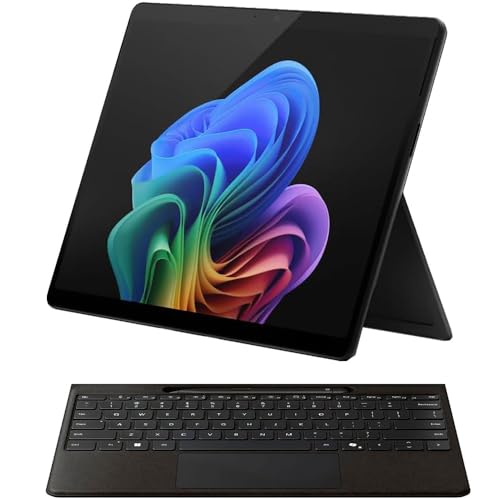
Microsoft Surface Pro 11 OLED Snapdragon X Elite — Keyboard in the bundle
This Surface Pro 11 package solves the category’s oldest budgeting annoyance by including the answer: the bundle pairs the 13-inch OLED tablet — Snapdragon X Elite, 16 GB of memory, a terabyte of storage in this configuration — with the Surface Pro Keyboard, so the detachable arrives as a detachable, complete on day one. For buyers weary of ecosystem arithmetic, that completeness is the headline, and the machine behind it is Microsoft’s OLED flagship of its generation.
The OLED screen transforms the tablet half’s solo career. Documents, media and pen work all gain the contrast that makes a display feel less like a window and more like a page, and the Snapdragon platform gives the Pro 11 an efficient, cool-running character suited to unplugged meetings and travel days. Detached, it is a superb reading and annotation slate; attached, a credible laptop; the seam between those lives is the magnetic moment Surface owners describe with genuine affection.
Sixteen gigabytes of memory places it a step below the Pro 10 configuration for the heaviest professional multitasking, and the ARM platform deserves the standard check against any exotic legacy software in your stack. For the mainstream of professional work — documents, cloud tools, creative applications in their current versions — those caveats rarely bite.
As the guide’s most frictionless premium purchase, it is the recommendation for anyone after the flagship detachable experience without a follow-up order: open the box, attach the keyboard, and the category’s promise is simply there, OLED and all.
The Pro 11 bundle’s completeness changes ownership psychology in a way worth naming: because nothing remains to be bought, nothing remains to be researched, and the machine goes to work the day it arrives instead of entering the accessory probation that delays so many detachables’ real lives. Bundle buyers consistently report using the pen and the tablet postures earlier and more often — the kit’s wholeness invites the behaviour the category exists for.
Travel is where the Snapdragon generation makes its case most warmly: cool, quiet, patient with power, and paired with an OLED that makes the flight’s film and the destination’s documents equally pleasurable. The Pro 11 in a cabin is a civilised object, and civilised objects get carried, and carried machines get used for the work that matters.
Against its Pro 10 sibling the choice is a genuine fork rather than a hierarchy: Intel’s corporate embrace and larger memory against Snapdragon’s efficiency, OLED and bundle completeness. Organisations choose the first; individuals, very often, choose the second — and this guide declines to call either choice wrong, because the fork is in the buyer’s life, not in the machines.
Households find a gentler Pro 11 story: it is the shared premium machine that nobody fights over, because its postures divide the day — laptop for the parent’s morning, tablet for the evening’s reading and the child’s supervised sketching, keyboard back on for homework. Expensive devices earn their keep in households by being several devices politely, and few machines change costumes as gracefully as this one.
Key specifications
- 13-inch OLED touchscreen
- Snapdragon X Elite processor
- 16 GB memory and 1 TB storage in this configuration
- Surface Pro Keyboard included in this bundle
- Windows 11 Copilot+ PC platform
Strengths
- Keyboard included — the detachable arrives complete
- OLED panel elevates the tablet half’s reading and pen life
- Efficient Snapdragon character for travel and unplugged days
Trade-offs
- 16 GB memory trails the Pro 10’s configuration for heavy multitasking
- Check specialist legacy software against the ARM platform
- Premium tier, even with the bundle’s completeness
Best for: professionals and travellers who want the flagship Surface experience in one complete purchase.
Not suited for: corporate buyers standardised on Intel, or heavy multitaskers who need the larger memory configuration.
Dell Latitude 7350 / 7320 Detachable — Corporate route, unlinked
Dell’s Latitude detachables are what this category looks like when it is bought by the thousand: business tablets with detachable keyboards, specified for fleets, managed by IT departments and carried by people whose work is other people’s emergencies. The 7350 and its 7320 predecessor share that corporate DNA, and their keyboards — built for employees who type all day, every day — are a standing rebuke to flimsier covers across the category.
They are not linked in this guide because the market will not let them be linked honestly: every Amazon listing we verified for both generations is renewed stock. That single fact reorganises the purchase. A Latitude detachable today is bought from Dell’s own channels, from corporate refurbishers, or as a deliberate renewed decision — with the refurbisher’s name, the battery terms and the warranty read as carefully as the specification.
None of that diminishes the machines. Renewed corporate hardware is one of the technology market’s open secrets: fleets retire capable devices on schedules set by accounting rather than by failure, and a graded Latitude detachable from a reputable refurbisher can deliver the business detachable experience — keyboard, build, manageability — at a fraction of its original fleet cost. The diligence is the price of admission, and for this class of machine it is a fair one.
Anyone after that experience without the diligence should look at the Surface Pro 10’s Intel proposition, bought new. Buyers willing to do the reading will find the Latitude detachables exactly where this guide leaves them: admired, explained, and deliberately unlinked.
Fleet veterans tell the Latitude story in retirements: units that served four years of corridors, sites and conferences, renewed by specialists, and sold to small firms and home offices that then run them for years more. That second life is the strongest build-quality evidence any product can produce — not a drop test, but a decade of Tuesdays — and it is why the renewed route for these machines deserves respect rather than embarrassment.
The keyboard across both generations is the through-line owners praise: a typist’s tool fitted to a tablet, stable and defined, the product of designing for employees whose output is measured in documents. Any buyer cross-shopping the linked flagships should, if the chance arises, type a paragraph on a Latitude detachable — if only to calibrate what the category’s business wing considers normal.
A closing Latitude consideration belongs to small firms: a matched pair of renewed detachables, bought from one refurbisher with matching terms, gives a two-person office a standardised, keyboard-serious fleet for less ceremony than a single new flagship — with spares and knowledge shared between the two units. Standardisation is a value at every scale, and the renewed market is where small firms can finally afford it.
Key specifications
- Business detachable design across two generations
- Detachable keyboard built for fleet typists
- Corporate manageability and build standards
- All verified Amazon listings are renewed stock
- No link in this guide — buy via Dell or refurbishers
Strengths
- A keyboard and build specified for all-day corporate typing
- Renewed fleet units can be outstanding value bought carefully
- Deep refurbisher and parts ecosystem from its fleet life
Trade-offs
- No clean new listing to recommend or link
- Renewed terms vary — battery and warranty need reading
- The buying process itself is the cost of the value
Best for: business users and value hunters willing to shop Dell or reputable refurbishers with care.
Not suited for: an order for new stock under a full manufacturer’s warranty — every verified listing is renewed fleet hardware, with battery condition and cover set by the refurbisher.
Lenovo ThinkPad X12 Detachable — Keyboard benchmark, unlinked
The X12 Detachable exists in this guide for one reason above all: the keyboard. ThinkPad’s keyboard heritage is the industry’s longest-running argument that typing feel is a feature, and the X12 carries that argument into detachable form — a keyboard half that writers, coders and email-heavy professionals can work on all day without the low-grade resentment that cover keyboards accumulate. In a category where the keyboard is half the product, the benchmark deserves its seat even when it cannot be linked.
And it cannot be linked, on the same honest footing as in our budget detachable guide: the second generation has no Amazon machine listing we could find, and the first generation’s listings are renewed. The X12 is therefore a Lenovo-channel or refurbisher purchase, to be made deliberately — grading understood, battery terms read, seller history weighed — by the buyer who knows exactly which keyboard they are hunting and why.
That buyer exists in numbers. Professions that produce text as their primary output feel keyboard quality in their hands, their speed and their error rates, and they will cross channels and read fine print for the right one. For them the X12’s renewed reality is not a deterrent but a route, and often a value-laden one, since corporate retirements feed the refurb market with exactly these machines.
Everyone else should treat the X12 as the guide treats it: as the standard that clarifies the linked picks. If your typing is occasional, the Surfaces and the PZ13 will serve you beautifully and new. If your typing is your trade, you now know where the benchmark lives and what its current market honestly looks like.
The X12 also anchors an ecosystem argument: ThinkPad docks, chargers and habits accumulated across a professional’s career do not reset because the laptop learned to detach. Owners arriving from conventional ThinkPads find their desk, their spares and their muscle memory all still valid, which makes the X12 the lowest-friction entry into detachables for the largest installed base of business typists on earth.
Its pen capability, sometimes treated as a footnote beside the keyboard, deserves its sentence: the X12’s tablet half is a genuine annotation and signature surface, and in fleet service it collects approvals, markups and field notes with the same unremarkable reliability as everything else ThinkPad. A benchmark keyboard attached to a competent pen tablet is a complete proposition — which is precisely why its absence from clean listings is a market frustration worth recording.
The X12’s final lesson is about patience in both directions: Lenovo’s channel rewards the buyer who waits for the right grade and configuration, and punishes the one who forces the purchase on a deadline. If your need is urgent, the linked Surface picks exist precisely for you. If your need is a keyboard you will love for five years, the wait is part of the specification.
Key specifications
- ThinkPad detachable with keyboard-first design
- Pen-capable business tablet
- Built for professional fleets
- Gen 2: no Amazon machine listing found
- Gen 1: renewed listings only — no link in this guide
Strengths
- The keyboard benchmark of the entire detachable category
- ThinkPad build and refurbisher support ecosystem
- A writer’s and coder’s detachable, by design
Trade-offs
- Not purchasable new through a clean listing here
- Renewed buying demands the usual diligence
- Its talents centre on typing; media and gaming buyers look elsewhere
Best for: writers, coders and keyboard devotees willing to shop Lenovo or refurbishers deliberately.
Not suited for: anyone after a new, warranted detachable in a single simple purchase.
What actually makes a detachable keyboard good?
Four things, in the order your hands notice them. Stability first: the assembly must not flex, bounce or slide on a desk, because a keyboard that moves teaches your hands to hover and hovering is fatigue. Key feel second: enough travel and definition that your fingers can trust a keystroke without watching for it. The trackpad third, because a detachable’s pad is small by birth and must be precise to be forgiven. And the connection last in notice but first in consequence — a designed magnetic or pinned seam that attaches instantly and charges or pairs without ritual, because a keyboard that makes you wait will eventually be left in the bag.
Lap use is the honest stress test. Every detachable is better on a desk than on knees; the kickstand designs spread their footprint across your lap with varying grace, and heavy typists who work in armchairs and trains should weight that test heavily. No pick in this guide is a true laptop on a lap. The best of them are good enough, often enough, that the tablet freedom they buy in exchange is worth it — a trade to make knowingly rather than discover.
How do you live the tablet half of the day well?
Detach deliberately. The tablet half earns its existence in specific postures: the meeting where a screen raised between people would be a wall, the site walk where a keyboard is ballast, the sofa where reading and annotating want a slate and nothing else. Owners who schedule those postures — who detach on purpose rather than as a party trick — report the form factor transforming their routines. Owners who never detach own an expensive laptop with a flexible stand, and should ask themselves, kindly, whether a conventional machine would serve them better for less.
Pen and touch complete the tablet half’s case. A detachable without pen use is half-exploited; even occasional annotation, signatures and sketches justify the form in a way pure media consumption cannot. If your tablet half will only ever play video, a cheaper tablet exists for that. The machines here are for people whose tablet time is working time with the keyboard off.
New flagship or renewed business detachable?
This guide’s split is the market’s split, and the choice is about temperament as much as money. The new flagship route — Surfaces, PZ13, Flow Z13 — buys warranty, battery youth, current platforms and a single simple transaction. The renewed business route — Latitude, X12 — buys corporate build and keyboard quality at gentler cost, paid partly in diligence: reading terms, choosing refurbishers, testing within return windows.
Neither route is the clever one in the abstract. A professional whose income rides on the machine should usually buy the warranty. A skilled buyer equipping a home office, a second machine or a small team on a budget can rationally choose the refurbishers — provided the diligence is real. What neither temperament should do is blur the routes: paying new-machine money for renewed stock through inattention is the only genuinely bad outcome in this category, and it is the one this guide’s prose-only honesty exists to prevent.
How do you set up a detachable as your main desk machine?
Dock it like you mean it. A single-cable dock or hub at the desk, a proper monitor at eye height, and the detachable’s own screen demoted to second display or pen surface — that arrangement turns the tablet into the engine of a full workstation, and the keyboard cover can rest while a full-size board takes the typing shift. The PZ13’s bundled hub and the Surface ecosystem’s docks exist for exactly this double life.
Then protect the transition. The magic of a detachable is the thirty-second change from desk engine to meeting slate; keep the desk cable discipline tight enough that undocking is one gesture, and keep the cloud sync honest so the slate in your hand holds the same truth as the desk you left. Detachables fail as main machines through friction, not power — remove the friction and the category’s promise is fully kept.
What does the detachable seam cost you, and when is it worth it?
The seam costs three things, honestly counted. Money, because two engineered halves and their connector cost more than one slab of laptop. Lap ease, because kickstands and covers will never match a clamshell’s knee-born stability. And a small daily tax of decisions — attach or not, dock or not — that rigid laptops never levy. Against those costs the seam buys a tablet that is truly a tablet, a machine that attends meetings without a screen for a shield, and a single archive that changes posture instead of changing devices. Professionals whose days contain real tablet postures — presenting, inspecting, annotating, reading at length — find the exchange obviously favourable. Professionals whose days are desk, desk and desk are paying for a door they never open, and this guide would rather tell them so than sell them a hinge.
How should you care for a detachable so its second half-life is as good as its first?
Keep the connector clean and the habits boring. A blast of air across the pins or magnets when grit appears, a desk clear of the paperclips that magnetic seams love to adopt, and a case that protects the tablet’s back — because in this category the tablet’s back is also, often, the machine’s face to the world. Store the keyboard attached; the cover is the screen’s best protection and the seam’s best dust seal. Software care is the usual discipline with one addition: firmware for keyboards and docks arrives through the maker’s channels, and detachable owners should let it, because seam behaviour — wake, charge, attach recognition — is firmware’s home territory. Machines cared for this way are exactly the machines that later make the renewed market worth shopping, a symmetry the Latitude and X12 sections above have already demonstrated from the other side.
How do you choose between the two Surface generations in this guide?
By operating allegiance and by what arrives in the box. The Pro 10 is the Intel machine: chosen by organisations, by owners of Intel-dependent software, and by heavy multitaskers who want the 32 GB configuration’s headroom — with the keyboard budgeted as the separate ecosystem purchase it is. The Pro 11 bundle is the Snapdragon machine: chosen by individuals for its OLED screen, its efficient travel temperament and the simple fact that its keyboard is included, ending the accessory question at the point of sale. Neither is the other’s successor in any simple sense; they are two answers sold side by side to two different working lives, and the honest comparison is between those lives. List your three most important applications, your travel pattern and your employer’s platform, and the fork resolves itself without a single benchmark being consulted.
What should a first-time detachable owner expect in month one?
A fortnight of small frictions, then a click. The frictions are real: the lap posture that is almost right, the seam you fumble twice, the desk arrangement that needs one rearrangement, the keyboard shortcuts your fingers seek in the wrong half of the machine. Owners who expect this valley cross it; owners who expected a laptop with a trick feel betrayed by a category behaving exactly as designed. By week three the choreography is muscle memory — detach for the meeting, dock for the deep work, cover closed for the train — and the rigid laptop you came from starts to feel like the restricted device. Judge any detachable at one month, by postures used weekly, and you will judge it the way its long-term owners do.
How do the best laptops with detachable keyboards line up across the seam?
Detachables should be compared at the joint: what the tablet is alone, what the keyboard adds, and how honestly the whole thing can be bought. This table keeps those three questions in front of every specification.
| Pick | Screen | Standout trait | Watch out for |
|---|---|---|---|
| Microsoft Surface Pro 10 Ultra 7 | 13-inch, Intel platform | Primary-computer power with 32 GB aboard | Keyboard is a separate ecosystem purchase |
| ASUS ProArt PZ13 | 13.3-inch 2.8K AMOLED | Creator screen and a terabyte of storage | Keyboard serves creators, not benchmark typists |
| ASUS ROG Flow Z13 (2023) | 13.4-inch QHD, 165 Hz | Gaming graphics in a detachable tablet | Power taxes apply near a charger |
| Microsoft Surface Pro 11 OLED | 13-inch OLED | Keyboard included in this bundle | 16 GB memory for the heaviest workloads |
| Dell Latitude 7350 / 7320 Detachable | Business fleet design | Fleet keyboard and build, renewed value route | Renewed listings only — unlinked here |
| Lenovo ThinkPad X12 Detachable | ThinkPad business design | The keyboard benchmark of the category | No clean new listing — unlinked here |
Which detachable-keyboard purchases go wrong?
Buying the tablet and postponing the keyboard is the classic self-deception: the keyboard is half the product, and a detachable bought in halves usually lives as a tablet while its owner tells themselves the keyboard is coming. Buy the kit or buy a tablet — both honourable, unlike the limbo between. The second error is judging the keyboard in a two-minute store tap; typing feel reveals itself at minute forty, in fatigue and error rates, so weight the judgements of all-day typists — the fleet buyers behind the Latitude and ThinkPad picks — accordingly.
Third, renewed stock bought on new-stock assumptions, the error this guide’s unlinked picks exist to prevent. Fourth, chasing the tablet’s specification while ignoring the seam: a brilliant tablet on a wobbly, ritual-bound keyboard assembly will annoy you daily in a way a modest tablet on a great seam never will. In this category, the joint is the product.
One final test before any detachable purchase, and it costs nothing: rehearse your own week against the seam. Count the moments a tablet alone would serve you better than a laptop — the inspections, the presentations, the reading, the shared documents — and the moments a real keyboard must be under your hands. If both counts are healthy, a detachable is not a novelty in your life but a description of it, and the only remaining question is which of these six maps onto your budget and your allegiances. If one count is near zero, believe it, and buy the honest single-purpose machine instead. Categories cannot want things for you; the week you actually live is the only specification that never lies.
Final Recommendation
Choose by the half of the day you value most. If the keyboard half rules — typing as trade, meetings as audience — the Surface Pro 10’s business flagship and, through deliberate channels, the ThinkPad X12’s benchmark keys define your shortlist. If the tablet half rules — creating, presenting, moving — the ProArt PZ13’s AMOLED and the Surface Pro 11 bundle’s completeness serve it best, the Pro 11 arriving with its keyboard in the box and the argument already settled. If both halves must also game, the Flow Z13 stands alone. And if the corporate Latitudes call to you, answer through Dell or a refurbisher you have actually read about. The best laptops with detachable keyboards are the ones whose seam you will cross a thousand times without once resenting it — buy the crossing, not just the two shores.
Rehearse it on paper, in the margin of an ordinary day, and notice how quickly the postures announce themselves once you are watching for them. Most professionals discover a detachable-shaped week they had been forcing into a clamshell out of habit — meetings endured behind a raised screen, documents printed purely so they could lie flat, a second tablet carried for reading that the laptop could have become. The rehearsal’s value is that it prices the category in your own hours rather than in a reviewer’s, and hours are the currency every recommendation in this guide is ultimately denominated in.
Frequently Asked Questions
Why are the Dell and Lenovo detachables not linked?
Because every Amazon listing we verified for the Latitude 7350 and 7320 Detachable is renewed stock, and the ThinkPad X12’s second generation has no machine listing we could find while its first generation is renewed. They are excellent business machines best bought through Dell, Lenovo or reputable refurbishers, with the renewed terms read carefully.
Is the keyboard included with the Surface Pro models?
It depends on the package, and the guide flags each case. The Surface Pro 11 listing here is a bundle that includes the Pro Keyboard. The Pro 10 follows the usual Surface pattern where the Type Cover is a separate ecosystem purchase — count it in the budget from the start.
Can a detachable really replace a laptop for typing-heavy work?
On a desk, yes for most professionals — the better keyboard covers type well beyond their thinness. On laps and in armchairs, kickstand designs remain a compromise no honest guide will hide. Typists whose work is desk-based can detach happily; typists who work anywhere should test the lap posture before committing.
Which pick is best for pen work?
The ProArt PZ13 and the Surface Pro 11 make the strongest pen cases — the ASUS through its creator design and AMOLED canvas, the Surface through its mature pen ecosystem and the tablet purity of a fully detachable slate. The Flow Z13’s high-refresh screen is a respectable third for pen users who also game.
Are renewed business detachables a sensible buy?
They can be, for deliberate buyers: refurbisher named and reputable, battery and warranty terms clear, a return window respected with real testing inside it. Corporate fleets retire capable machines on accounting schedules, and graded units carry that value. Bought casually or unknowingly, the same machines are how disappointment happens.
What should I check first when a detachable arrives?
The seam and the keyboard, before the specifications: attach and detach twenty times, type for an hour on a desk and ten minutes on your lap, and confirm the trackpad’s precision with your real applications. A detachable lives or dies at its joint and its keys, and both verdicts arrive inside the return window if you schedule them.
How does a detachable change the way a team works around one document?
It turns the document into a physical object again. A laptop screen faces one person; a detached tablet lies flat between four, accepts a pen from any hand, and gets passed across the table with the ease of a printed draft — while remaining the live, saving, version-controlled file. Architects around a plan, editors around a layout, teachers around a student’s work: the posture is older than computing, and detachables are the first laptop class that restores it without surrendering the file. Teams that discover this tend to reorganise their meetings around it, because review around a shared flat surface produces different — usually franker, usually faster — decisions than review projected on a wall.
That is also why the pen belongs in any detachable conversation even when the keyword is keyboards. The flat document invites annotation the way a wall projection never does, and the picks here all carry credible pen stories for exactly that moment. A detachable bought only to type on is a detachable half-understood; the category’s whole argument is the alternation — keys for production, slate for collaboration, pen for the marks in between.
Should I insure or warranty a detachable differently from a laptop?
The exposure differs in one respect: the tablet half travels naked more often, in hands and on site, so accidental-damage cover earns its premium here more than on a clamshell that lives closed in a bag. If your detachable will do field, classroom or site duty, price the damage cover into the kit the way you price the keyboard — as part of the machine, not as an afterthought at the till.
How long do detachable keyboards themselves last?
Good ones are consumables on a long fuse: years of daily typing, with the cover’s hinge area and the connector contacts ageing first. That is quietly an advantage of the form — when a clamshell’s keyboard tires, the computer is serviced; when a detachable’s keyboard tires, the half is replaced and the computer never leaves your desk. Budget-minded owners should note the replacement cost of their model’s keyboard at purchase time, the way pen owners note nib prices, so the eventual renewal is a planned errand rather than a surprise.
Planned renewals, honest listings, complete kits — the detachable category rewards the deliberate buyer at every step, which is a fair summary of this guide’s whole philosophy.
Buy deliberately, cross the seam daily, and the machine will justify itself in postures no specification sheet can photograph.
That daily crossing, unresented, is the whole test — and the whole prize.
Choose the seam you will enjoy crossing every single day of its long working life.
Related Guides
The neighbouring shelves: our budget detachable guide covers the under-ceiling end of this same category, renewed caveats included, the note-taking selection judges several detachables purely as pen notebooks, and our hybrid roundup explores the folding and dual-screen alternatives to detaching.
Related guides
- Best 3rd Party MacBook Chargers: 96W-Class Alternatives, the 100W Cable Rule, and the Apple Benchmark
- Best Built PC: Six Prebuilt Gaming PCs Judged on Parts, Power and Upgrades
- Best Affordable Wireless Printers
- Best Hard Drives for Mac Backups: Time Machine Drives From a Slim 2TB to an 8TB Household Vault


