What's inside
- Key Takeaways
- Quick Picks
- How Did We Choose These Picks?
- How Does Dust Actually Get Inside a PC?
- Which Case Makes Staying Clean Easiest in Your Home?
- How Do the Six Cases Compare Side by Side?
- How Do You Set Up Positive Pressure in Practice?
- What Does a Realistic Cleaning Routine Look Like?
- What Mistakes Let Dust Win Despite a Good Case?
- How Does the Room Itself Change the Dust War?
- What Does Dust Do to a PC Over Five Years?
- How Do Cables and Clutter Inside the Case Affect Dust?
- When Is It Time to Replace a Filter or Retire a Routine?
- Final Recommendation
- Frequently Asked Questions
- Related Guides
As an Amazon Associate I earn from qualifying purchases. This post may contain affiliate links at no extra cost to you.
gizmoverdict.com is reader-supported. When you buy through links on our site, we may earn an affiliate commission.
Where to buy: Every case below links to its own Amazon listing. The features named in the reviews — installed fans, mesh fronts, glass panels, form factors — come from what each listing title states; the dust strategy around them is explained as method, because dust protection is a system of case, fans and habits rather than a single specification.
Dust is the slow saboteur of every PC. It felts itself across heatsink fins until a cooler that once loafed begins to strain; it dulls fan blades, insulates components, and turns a quiet machine gradually louder as the same temperatures demand faster fans. The best dust protection pc cases are the ones designed with that enemy in mind — cases whose intake paths can be filtered and cleaned, whose fan layouts support the positive-pressure setup that keeps unfiltered air from sneaking in through every seam, and whose panels come off without a fight so the cleaning actually happens. Dust protection is not a force field. It is housekeeping, engineered to be easy.
That last clause deserves emphasis, because it decides which of these cases will still be protecting a build in year three. A case with elaborate filtration that requires a screwdriver, a free afternoon and a tolerance for frustration will be cleaned twice and then never again, while a case whose front lifts away in seconds gets its filters rinsed monthly without resentment. The six picks here were chosen as much for that human factor as for their panels and fans: two be quiet! designs built around silence and orderly interiors, Fractal’s mesh-fronted Meshify 2, Cooler Master’s airflow NR600, NZXT’s H5 Flow and ASUS’s compact AP201 — a spread of philosophies that all take the dust war seriously, by different tactics.
The tactics matter because dust enters a PC by specific routes, and each route has a counter. Intake fans pull air — and dust — through whatever opening they draw from; filtered intakes catch it at the door. Seams, slots and unfiltered vents leak air inward whenever the case runs at negative pressure; a positive-pressure fan balance reverses that leak, so every gap exhales instead of inhaling. Settled dust inside is removed by access and routine. A case earns its place in this guide by helping with at least the first two and never obstructing the third — and the reviews below judge each pick in those terms, honestly, including where a design’s airflow ambitions and its dust ambitions pull in opposite directions.
Key Takeaways
- Dust protection is a system: filtered intakes, positive internal pressure, and cleaning access that is easy enough to actually use.
- The be quiet! Silent Base 802’s title states three installed fans — the raw material for a positive-pressure layout from day one.
- Mesh-front airflow cases like the NR600 and Meshify 2 move air superbly; their dust story depends on keeping intake paths filtered and maintained.
- Positive pressure is the owner’s half of the bargain: more filtered intake than exhaust, so seams leak outward.
- The best filter is the one you will clean — panel access and filter removal speed decide real-world protection more than any specification.
Quick Picks
| Pick | Badge | Why it earns its place |
|---|---|---|
| be quiet! Silent Base 802 Black | Best dust-and-silence flagship | ATX midi tower with three installed fans and a silence-first design that treats clean air as part of quiet. |
| Fractal Design Meshify 2 Black | Best filtered airflow | Flexible ATX tower with a light-tinted glass window and the Meshify line’s mesh-front airflow discipline. |
| Cooler Master MasterBox NR600 | Best value airflow | Minimal ATX mid-tower whose title names an airflow mesh front panel — honest cooling at a sensible position. |
| NZXT H5 Flow | Best mainstream flow case | NZXT’s airflow-focused design for builders who want clean lines and a case that breathes through its front. |
| ASUS Prime AP201 | Best compact option | Micro-ATX case with a mesh-wrapped design philosophy that suits small, clean, easy-to-service builds. |
| be quiet! Dark Base Pro 701 White | Best premium white build | Windowed ATX midi tower in white — and white is the finish that shows dust early, while you can still act on it. |
How Did We Choose These Picks?
The first test was intake discipline: does the design route its breathing through defined intake paths — the kind that can be filtered, and whose fans can be balanced into positive pressure — rather than inhaling through a sieve of decorative gaps? Cases with mesh or engineered fronts and a coherent fan layout passed; the picks span that spectrum deliberately, from the Silent Base’s sealed-and-silent approach to the mesh fronts of the NR600 and Meshify 2, so the list shows the strategy’s range rather than one brand’s answer.
The second test was serviceability, judged as an owner lives it: panels that release without tools or tears, interiors that a brush and a blower can actually reach, and fan counts — stated in the Silent Base 802’s title as three installed — that let a positive-pressure balance be built without an immediate shopping trip. The third test was honesty of positioning. Dust protection overlaps silence (the be quiet! pair), airflow (the mesh cases) and compact design (the AP201), and each pick had to lead one of those conversations rather than merely attend it. No case here is dust-proof; the guide’s claim is narrower and truer — these are the cases that make staying clean a routine instead of a renovation.
How Does Dust Actually Get Inside a PC?
Follow the air. A running PC is a small weather system: fans move air in at some points and out at others, and every cubic centimetre that enters carries the room’s suspended dust with it. Where the entering air passes through a filter, the dust stops at the filter — visible, removable, harmless. Where air enters through an unfiltered opening — a vent slot, a cable gap, the seams around a side panel — the dust travels onward and settles on the first cool, still surfaces it finds: heatsink fins, fan blades, the tops of components. Gravity finishes the job overnight, adding the room’s settling dust to any surface the case leaves exposed to it.
Pressure decides the seams’ behaviour, and it is the most underused idea in home PC care. If the case’s exhaust fans move more air than its intakes supply, the interior runs at negative pressure and every gap becomes an intake — unfiltered, unplanned, and impossible to clean at the source. Reverse the balance, with filtered intakes supplying slightly more than the exhausts remove, and the same gaps become exits: air leaks outward, and dust can only enter where you have stationed a filter to receive it. That is the whole strategy of this guide in one paragraph. The case provides filterable intakes and coherent fan mounting; the owner provides the balance; the dust war is won at the seams.
One more route deserves naming because owners rarely suspect it: the top panel. A case that exhausts upward invites the room’s settling dust to fall straight back in whenever the machine sleeps — the fans stop, the chimney reverses its meaning, and eight hours of gravity deliver the shelf’s worth of dust onto the topmost heatsinks. A simple cover habit for a machine that sits idle for long stretches, or a top configuration that exhausts through a filtered or louvred path, closes that last quiet door. It is a small detail, but dust protection is a game of small details played consistently, and the top of the case is the one players most often forget to defend.
Environment sets the war’s intensity. A case on a carpeted floor in a house with pets fights a different campaign from the same case on a desk in a tiled studio — floor placement alone multiplies dust intake, because the floor is where dust lives between cleanings. Several recommendations later in this guide are really environmental: raise the case, mind the room, and let the case’s engineering fight a fair fight instead of an ambush.
Which Case Makes Staying Clean Easiest in Your Home?

be quiet! Silent Base 802 Black — Best dust-and-silence flagship
The Silent Base 802 approaches dust the way its maker approaches everything: as a noise problem’s close relative. be quiet!’s ATX midi tower arrives, per its listing title, with three fans installed, inside a design philosophy that seals the case’s body against the world and routes its breathing through deliberate paths. That sealed-and-deliberate approach is inherently dust-friendly — air enters where the design says it enters, which is where filtration and cleaning can be stationed — and it pairs with the silence that a dust-choked machine gradually loses. Clean and quiet are the same project, and this case is built by the company that has argued that point longest.
There is a buying-order insight hidden in this pick: the Silent Base rewards owners who set it up once, properly, and then leave it alone. Its sealed body and tuned fans are a system, and systems resent improvisation — a random extra exhaust fan bolted in during a later upgrade can quietly flip the pressure balance the whole dust strategy rests on. If you are the kind of builder who changes one thing a month, the mesh cases below will forgive you more readily. If you are the kind who builds carefully and then wants five quiet, clean years, this is your case, and the five years are genuinely on offer.
The three installed fans matter to the strategy concretely. A positive-pressure balance — filtered intake slightly outpacing exhaust — needs enough intake capacity to work with, and a case that arrives with a working fan complement lets its owner tune that balance from the first evening rather than after a parts order. In the Silent Base’s class, fan control is treated as part of the product: the owner is expected to set the machine’s breathing deliberately, and dust protection is one of the dividends.
Its trade is the sealed philosophy’s own: a case designed to keep the world out must be opened deliberately for service, and its airflow ceiling is set by design rather than by how much mesh a front panel can hold. Builders chasing maximum overclocking airflow should take a mesh pick instead. Builders whose priorities are a clean interior, a quiet room and a machine that ages gracefully — the dust brief in full — will find the Silent Base 802 the most complete answer in this guide.
- Form factor: ATX midi tower
- Fans stated in title: 3 installed
- Colour: Black
- Design family: be quiet! Silent Base
- Intended role: Quiet, clean flagship builds
Strengths
- Sealed, deliberate intake design routes air through paths that can be filtered and serviced.
- Three installed fans give the positive-pressure strategy its working material immediately.
- Silence-first engineering and dust discipline reinforce each other across the machine’s life.
Trade-offs
- The sealed design’s airflow ceiling sits below the open mesh cases’ maximum.
- Service is a deliberate panel-off session rather than a casual glance inside.
- Its flagship positioning prices it above the value picks in this list.
Best for: a quiet flagship build in a home that wants the cleanest long-term interior. Not suited for: an extreme-overclocking build chasing maximum airflow, because the Silent Base’s sealed, silence-first design deliberately trades peak airflow for control.

Fractal Design Meshify 2 Black — Best filtered airflow
The Meshify 2 is the case that argues airflow and dust discipline can share a front panel. Fractal’s listing describes a flexible ATX mid tower with a light-tinted tempered glass window, and the Meshify name carries the line’s founding idea: a mesh front, sculpted rather than flat, that lets the case inhale deeply across its whole face. In dust terms, a defined full-face intake is a strategy, not a surrender — air entering across one engineered surface is air that can be filtered at that surface and balanced into positive pressure, instead of leaking through a dozen incidental gaps.
Owners who run a Meshify-class case in a pet household develop a small ritual worth copying: the front comes off while the kettle boils, the intake gets its rinse or brush, and the whole transaction finishes before the tea does. That kind of embedding — maintenance attached to an existing habit rather than scheduled as its own event — is how a rhythm survives busy years, and it is only possible because the case’s front path was designed to be serviced by a person holding a mug in the other hand. When you evaluate any case in this guide, rehearse that moment honestly: if the filter’s removal cannot be pictured inside an ordinary morning, the design will lose to your calendar, and dust will collect the winnings.
“Flexible” in the title is the case’s second virtue, and it serves the dust war indirectly but genuinely. The Meshify 2’s interior reconfigures between storage-dense and airflow-dense personalities, which means the case adapts as the build’s life changes — and a case that adapts gets kept, opened, serviced and cleaned, while a case that fights its owner gets replaced or neglected. Longevity of the owner relationship is a dust feature; the cleanest PC in this guide’s terms is the one whose case is still being maintained in year five.
The light-tinted window plays its own small role: it shows the interior honestly enough that accumulating dust is visible before it becomes a felt blanket on the heatsinks — an early-warning system in glass. Pair that visibility with the mesh front’s serviceable intake and a positive-pressure fan tune, and the Meshify 2 becomes the airflow camp’s most complete dust answer: breathes like a mesh case, maintains like a designed system.
- Form factor: ATX mid tower
- Window stated in title: Light-tinted tempered glass
- Layout: Flexible interior
- Design family: Fractal Design Meshify
- Colour: Black
Strengths
- Full-face mesh intake concentrates the case’s breathing on one serviceable surface.
- Flexible interior adapts across the build’s life, keeping the case worth maintaining.
- Tinted window makes dust accumulation visible early, while it is still trivial to remove.
Trade-offs
- A mesh front’s filter discipline must be kept — an unmaintained mesh intake is just a wide door.
- The open-breathing design admits more room sound than the sealed be quiet! cases.
- Its size is a full mid tower; compact desks should measure before committing.
Best for: a performance build that wants maximum airflow with a maintainable dust strategy. Not suited for: an owner who will never clean an intake, because the Meshify’s mesh-front strategy only protects the build while its front path is kept clear.
Cooler Master MasterBox NR600 — Best value airflow
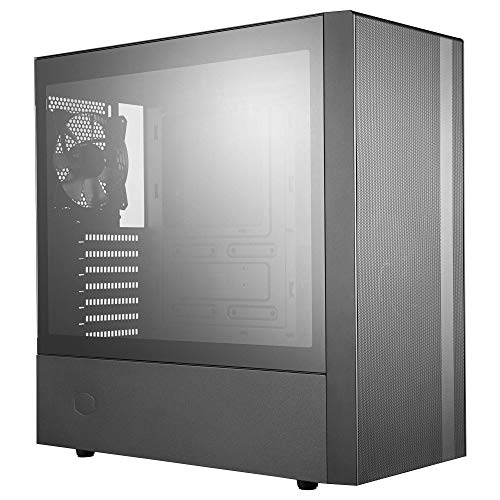
The NR600’s listing title is a small manifesto: an ATX mid-tower of minimal design with an airflow mesh front panel. Cooler Master’s NR line was built on the belief that a case’s first job is to breathe, and that ornament is a tax. For the dust-conscious buyer, that minimalism has a specific virtue — the case’s intake is its front, plainly and entirely, so the dust strategy writes itself: keep that front path filtered and clean, balance the fans toward positive pressure, and there is no second, hidden route for dust to take.
The NR600 also earns an honourable mention for a setting the other picks are too precious for: the genuinely dirty room. In a garage workshop, a hobby space, a teenager’s carpeted kingdom, a case will be knocked, neglected for a season, and cleaned in bursts rather than on a rhythm. A minimal, inexpensive, honestly built mesh case survives that life without its owner mourning every scuff, and its simple intake path means a burst clean actually restores it — there are no hidden chambers hoarding felt. Sometimes the best dust protection is a case cheap enough to be maintained without anxiety, and the NR600 has made that argument to a generation of pragmatic builders.
Value is the NR600’s other argument, and it is a dust argument too. Money not spent on the case is money available for the things that keep a build clean across years — quality fans to build the pressure balance with, a spare filter’s worth of budget, the blower or brushes of a cleaning kit. The NR600 has been the sensible person’s airflow case for years precisely because it refuses to spend its price on anything that does not move air or hold components.
Its compromises are the minimal brief’s own. There is no silence engineering to speak of beyond what your fan choices provide, no premium fit-and-finish theatre, and the mesh front asks the same maintenance discipline as the Meshify’s — the difference is that the NR600 asks it at a friendlier price and with fewer illusions. For a dusty-room build on a budget — a workshop PC, a family machine in a pet household — it is the pick that spends the money where the dust war is actually fought.
- Form factor: ATX mid-tower
- Front stated in title: Airflow mesh front panel
- Design language: Minimal
- Design family: Cooler Master MasterBox NR
- Intended role: Value airflow builds
Strengths
- Single, obvious intake path makes the dust strategy simple to run and keep.
- Minimal design spends the budget on airflow rather than ornament.
- Honest mid-tower room for standard components without premium pricing.
Trade-offs
- No dedicated silence engineering — fan choice carries the whole acoustic burden.
- The mesh front’s protection depends entirely on the owner’s cleaning rhythm.
- Fit and finish are workmanlike rather than premium, by design.
Best for: a budget-conscious airflow build in a genuinely dusty room. Not suited for: a silence-critical bedroom build, because the NR600’s open mesh design leaves noise control entirely to the fans you choose.

NZXT H5 Flow — Best mainstream flow case
NZXT’s H5 Flow is the mainstream’s version of the airflow argument: a clean-lined case whose very name announces that breathing is the design brief. The Flow line exists because NZXT’s earlier sealed designs taught the market — and the maker — that modern components want air more than they want a blank front panel. In dust terms, the H5 Flow follows the same logic as the other mesh-led picks: a case that inhales through an engineered front is a case whose dust intake has an address, and an address is what cleaning and filtration need.
A mainstream case lives a mainstream life, and the H5 Flow’s dust story should be read in that light. It will stand on floors and desks in ordinary rooms, breathe ordinary household air through long gaming evenings, and be serviced by owners whose enthusiasm is real but finite. NZXT’s design understands the assignment: nothing about the case’s access or layout gives that owner an excuse to postpone, and its airflow headroom means the machine forgives a filter that is a fortnight overdue rather than punishing it instantly. Forgiveness is an underrated specification in a case meant for everyone, and the Flow’s popularity suggests the market knows it.
The NZXT virtues are about ownership experience. The brand builds for builders who value a tidy interior and an uncomplicated assembly, and a case that is pleasant to open and work in is a case that gets its maintenance — the recurring theme of this guide, arriving this time via industrial design rather than via filtration hardware. A mainstream builder who would neglect a fiddly case will keep an H5 Flow clean almost by accident, because nothing about servicing it feels like a punishment.
Balance the fans toward positive pressure, keep the front path on a cleaning rhythm, and the H5 Flow delivers the modern airflow build’s full package — cool components, clean lines, a case that looks current — with a dust story as good as its owner’s habits. Its limits are the category’s: it is an airflow case first, so silence is fan-dependent, and its protection is a routine rather than a seal. For the mainstream buyer, that trade is the correct one, honestly labelled in the product’s own name.
- Form factor: ATX mid tower class
- Design line: Flow (airflow-focused)
- Design family: NZXT H series
- Colour: As listed
- Intended role: Mainstream airflow builds
Strengths
- Airflow-first front gives dust intake a single, serviceable address.
- Clean, builder-friendly design makes maintenance painless enough to happen.
- Contemporary styling suits desks where the case is part of the room’s look.
Trade-offs
- Protection is a cleaning routine, not a seal — the rhythm is the product.
- Open breathing means acoustics depend on your fan selection and curves.
- Less interior flexibility than the Meshify 2 for storage-heavy reinventions.
Best for: a mainstream gaming build that wants modern airflow with a manageable dust routine. Not suited for: a set-and-forget owner, because the H5 Flow’s open-front design protects the build only while its intake path is cleaned on schedule.
ASUS Prime AP201 — Best compact option
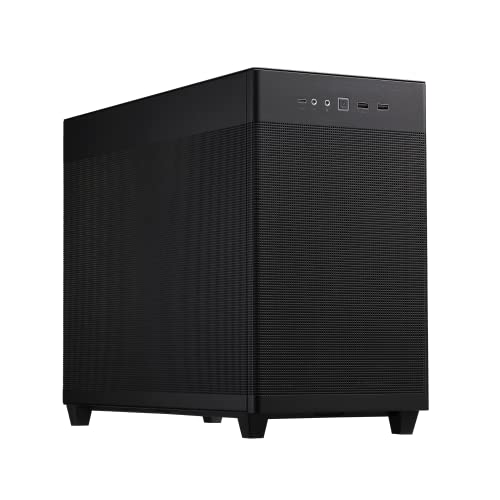
The AP201 shrinks the dust question to micro-ATX scale, and its design philosophy — a small case wrapped generously in mesh — turns out to be a dust strategy in disguise. A compact case has less interior volume to patrol, fewer surfaces for dust to colonise, and a cleaning session measured in minutes; the AP201’s mesh-led construction means its breathing is distributed across engineered panels rather than concentrated in leaks, and the whole machine can be carried to a balcony or workbench for its blow-out without a trolley.
Smallness changes the psychology of cleaning in a way worth naming. A mid tower’s deep clean is an event — scheduled, slightly dreaded, occasionally postponed into legend. The AP201’s clean is a task, closer in spirit to emptying a lint tray: carry the little case to where the dust can leave, brush and blow for a few minutes, carry it back. Owners simply do small tasks more often than events, and frequency is the whole game against an enemy that accumulates daily. If your honest self-assessment says the big case’s routine would slip, the compact case is not the lesser choice in this guide — it is the realistic one, and realism is what dust protection is made of.
ASUS’s Prime line positioning matters here: this is the thoughtful, mainstream-engineering end of the catalogue, and the AP201 applies it to the small-case problem — a compact build that assembles without the usual small-case bloodletting and services without disassembly heroics. For a dusty small room, a studio desk, or a household that wants one tidy machine rather than a tower estate, it is the pick whose size is itself the maintenance plan.
The compact caveats apply with their usual honesty. Micro-ATX bounds the build’s expansion, large components must be chosen by measurement, and a mesh-wrapped case in a truly harsh environment — a workshop with airborne grit — will want its cleaning rhythm kept short. But as the small answer to the dust question, the AP201 makes a persuasive claim: the easiest case to keep clean is the one small enough that cleaning it is a small job, and this is the smallest serious case in the guide.
- Form factor: Micro-ATX
- Design family: ASUS Prime
- Construction approach: Mesh-wrapped compact design
- Colour: As listed
- Intended role: Compact, tidy builds
Strengths
- Compact volume makes a full clean a minutes-long job instead of a project.
- Mesh-led panels give the case defined, serviceable breathing surfaces.
- Micro-ATX platform keeps the build and its maintenance footprint small.
Trade-offs
- Micro-ATX bounds expansion and the largest component choices.
- A mesh-heavy design in a gritty environment needs a short cleaning interval.
- Less room for elaborate cooling than the mid towers in this list.
Best for: a compact build in a small or dusty room, where easy servicing is the priority. Not suited for: a full-size ATX platform with multiple large cards, because the AP201’s micro-ATX interior is drawn for compact component lists.

be quiet! Dark Base Pro 701 White — Best premium white build
The Dark Base Pro 701 in white makes an argument no black case can: you can see the dust. Its listing describes a windowed ATX midi tower gaming case in white, from the same be quiet! stable as the Silent Base — flagship engineering, a glass window onto the build, and a finish that turns dust from an invisible accumulation into an early, visible reminder. Owners of white cases learn their cleaning rhythm faster than anyone, because the case reports on itself. In a guide about an enemy you cannot fight until you notice it, that honesty is a feature with real value.
The Dark Base Pro line is be quiet!’s flagship tier — the 701 carries the family’s premium construction and its signature balance of silence and airflow flexibility, in a design that can present as a showcase through its window while keeping the maker’s acoustic discipline. For the dust-conscious buyer, that means the same deliberate-air philosophy as its sibling: breathing routed through designed paths, an interior built to be serviced, and a machine whose quiet depends on staying clean — which, in white, it visibly will or visibly won’t.
White also collaborates with light in a way black cases cannot: in a bright room, a white case’s interior dust shows through its window in daylight, not just under a torch during a scheduled inspection. That ambient visibility turns every glance at the machine into a passive health check — the owner absorbs the build’s state the way a driver absorbs a dashboard, without deciding to. For households that run on noticing rather than scheduling, the Dark Base Pro 701’s finish is a monitoring system disguised as an aesthetic choice, and it may be the most effective dust feature in this entire guide precisely because it asks nothing of anyone.
Choose it when the build is a room’s centrepiece and the owner accepts the white finish’s contract: more frequent wiping, in exchange for never being surprised by the state of the machine. In a bright, modern setup it is the most striking case in this guide, and its premium is paid to the one maker whose entire reputation rests on the clean-and-quiet virtues this keyword is about. The dust does not stand a chance against an owner the case itself keeps informed.
- Form factor: ATX midi tower
- Window: Yes (windowed design)
- Colour: White
- Design family: be quiet! Dark Base Pro
- Intended role: Premium showcase builds
Strengths
- White finish reveals dust early — the case reports its own cleaning needs.
- Flagship be quiet! engineering pairs silence discipline with deliberate airflow.
- Windowed presentation suits a build meant to be seen in a bright room.
Trade-offs
- White shows every mark — the finish demands the most frequent wiping here.
- Premium flagship pricing sits at the top of this list’s range.
- The window’s showcase brief suits tidy builders; a messy interior is on display.
Best for: a premium white showcase build whose owner wants dust visible before it matters. Not suited for: a low-maintenance household, because the white finish and glass window turn every neglected week into a visible announcement.
How Do the Six Cases Compare Side by Side?
| Case | Strategy | Stated highlight | Owner’s job |
|---|---|---|---|
| be quiet! Silent Base 802 | Sealed and deliberate | 3 installed fans, ATX midi tower | Tune positive pressure, service seasonally |
| Fractal Meshify 2 | Full-face mesh intake | Flexible ATX, tinted glass window | Keep the front path clean |
| Cooler Master NR600 | Mesh-front value | Airflow mesh front panel | Same rhythm, smaller budget |
| NZXT H5 Flow | Mainstream airflow | Flow-series breathing design | Balance fans, clean the front |
| ASUS Prime AP201 | Compact mesh wrap | Micro-ATX small form | Short cleans, often |
| be quiet! Dark Base Pro 701 | Premium visibility | White windowed ATX midi tower | Wipe when the case tells you to |
The strategies divide by temperament. The sealed be quiet! approach suits owners who maintain on a schedule and value quiet. The mesh approach suits owners who will keep one obvious path clean in exchange for maximum air. The compact and white approaches cheat honestly — by making the job small, or the evidence impossible to ignore. None of them survives total neglect, and the comparison’s real lesson is to choose the strategy whose routine you will actually keep.
How Do You Set Up Positive Pressure in Practice?
Count air, not fans. The goal is for the filtered intake fans to deliver slightly more air than the exhaust fans remove, at the speeds the machine actually runs — so begin with the intakes: fit them behind the case’s filterable paths, and give them the stronger hand in the fan curves. Exhausts at the rear and top should assist, not dominate; a single rear exhaust against two or three working intakes is the classic recipe, and the Silent Base 802’s three installed fans give a builder exactly the pieces to arrange it.
Verify with the oldest instrument in computing: a tissue or a ribbon held near a case seam while the machine works. At a gap or slot, the tissue should drift gently outward — air leaving — rather than being drawn in. Check the unused vent slots and the front panel’s edges, the places dust would use. If any spot inhales, adjust a curve: slow an exhaust, wake an intake, or blank an unused opening. Ten minutes of this tuning, done once, protects the build every hour it runs — it is the highest-value maintenance in this entire guide, and it costs nothing but attention.
Revisit the balance whenever the build changes. A new radiator relocates fans; a removed drive cage opens a path; a fan that ages out of its curve quietly unbalances the system. The dust war is not won once — it is held, by a balance checked the way a cyclist checks tyre pressure: briefly, routinely, and whenever something feels off.
What Does a Realistic Cleaning Routine Look Like?
Monthly, in a normal home: the intake paths. Lift away the front or slide the filter — the operation these cases were chosen to make easy — and rinse, brush or vacuum the accumulated felt away from the machine, never through it. Wipe the case’s exterior and the shelf it stands on, because the shelf’s dust is tomorrow’s intake dust. Five minutes, no tools, and the system’s front door is restored.
Quarterly: the interior glance. Panels off, a soft brush and short bursts of air across the heatsinks, fan blades and the case floor, working from the top down and letting gravity help rather than driving dust deeper into fins. Check the seams’ tissue test while the machine is open, and look at the graphics card’s cooler with particular care — it is usually the build’s hardest-working heatsink and its most dust-sensitive. Annually, or when temperatures drift upward against your notes: the deep clean, with fans inspected, filters replaced if their material has degraded, and the whole pressure balance re-verified as if the build were new.
The routine’s secret is that it is calibrated to be kept. Owners who attempt a surgical deep clean monthly burn out and stop entirely; owners who rinse a filter monthly and glance quarterly sustain the habit for the machine’s whole life — and the sustained habit, not the heroic one, is what dust protection actually consists of. Choose the case whose access matches the routine you will keep, which is why this guide weighted serviceability as heavily as filtration.
What Mistakes Let Dust Win Despite a Good Case?
The first is placement: a filtered, balanced case standing on carpet beside a pet’s favourite sleeping spot is fighting with one hand tied. Raise the machine onto a stand or desk, give its intakes the cleanest air in the room, and the same case suddenly performs as designed. The second mistake is the negative-pressure accident — a powerful rear exhaust added for cooling, quietly converting every seam into an unfiltered intake. The third is filter amnesia: a filter never cleaned becomes a wall, the fans strain against it, temperatures climb, and the owner concludes the case “runs hot” when it is actually running suffocated.
The fourth mistake is cleaning theatre — blasting the interior with air while the machine sits in its dusty corner, resettling the same dust by morning, or worse, driving it deeper with a vacuum’s static-prone nozzle held to the board. Clean filters away from the case, clean interiors with the machine moved to a cleanable space, and let removed dust leave the room. Dust protection is logistics as much as hardware; the cases above handle the hardware half superbly, and this guide’s routines exist to keep the logistics half from surrendering the gains.
How Does the Room Itself Change the Dust War?
Every case in this guide will live in a specific room, and the room’s habits outrank the case’s specifications. Start with the floor: carpet is a dust reservoir that feet and fan intakes both draw on, and a case at carpet level breathes the room’s dirtiest stratum all day. A stand, a shelf board or a desk placement is worth more than any single filter upgrade, because it changes the air the machine is offered. Hard floors forgive more; a rug beneath the desk reintroduces the problem at ankle height, which is exactly intake height for a floor-standing tower.
Pets rewrite the calendar. Fur and dander arrive in quantities that turn a monthly filter rhythm into a fortnightly one, and they gather at the same floor level the case breathes from — one more argument for elevation in a pet household. Smoking, candles, open windows onto busy roads and renovation work in the next room each load the air in their own way; the case cannot know about any of them, so the owner must, adjusting the cleaning interval to the household’s reality rather than to a guide’s default. The routine sections above gave a starting rhythm; the room sets the final tempo.
There is one environmental ally worth recruiting: the vacuum cleaner, used near — never on — the machine’s station. The floor and shelf around a PC are its atmosphere’s source; a weekly pass of the surrounding area removes dust before the intakes ever meet it, which is why tidy-room PCs stay clean inside with almost suspicious ease. Dust protection, pursued honestly, ends up being partly a housekeeping philosophy with a PC attached. The cases in this guide are the hardware half of that philosophy, and they perform exactly as well as the room lets them.
What Does Dust Do to a PC Over Five Years?
The damage is gradual, which is why it is underestimated. In year one, a neglected build loses a little thermal headroom — temperatures a few degrees higher, fans a little busier, nothing an owner would swear to in a blind test. By year three, the felt on the heatsinks has become insulation with a measurable voice: the machine is audibly louder at the same workload, the graphics card reaches its thermal limits in games it once handled in silence, and boost clocks quietly shorten their stays. Nothing has broken. Everything has diminished — the cruellest failure mode, because there is never a dramatic day that forces a reckoning.
Year five is where the reckoning arrives uninvited. Fans that ran dry and dusty begin to complain mechanically; a power supply that inhaled through its own vents for years carries a private dust climate of its own; and the deep clean the machine finally receives is archaeology rather than maintenance, with compacted layers that resist the gentle methods this guide recommends. Owners who have performed that excavation once tend to become the routine’s most faithful converts. The cases above exist so the conversion can happen by reading instead — every design choice in them, from filterable intakes to quick-release panels, is aimed at making the five-year story read differently: a machine whose fifth year sounds like its first, because its owner was given a system they could actually keep.
There is a resale footnote, too. A five-year-old PC with a clean interior, service history in its owner’s habits and temperatures like new presents as a cared-for machine and sells like one; the same specification with grey felt on every surface announces neglect to any buyer who opens the panel. Dust discipline is one of the few maintenance habits that pays its owner back in currency as well as in quiet.
How Do Cables and Clutter Inside the Case Affect Dust?
An interior is an airflow landscape, and clutter changes the weather. Cables draped across the intake path create still pockets where dust settles undisturbed; a tidy interior, with runs following the case’s edges and channels, keeps the air moving evenly enough that less dust finds a resting place and the quarterly clean covers the whole volume in minutes. This is the unglamorous connection between the showcase virtues and the dust virtues — the same discipline that makes a build beautiful through the Meshify’s tinted window makes it cleanable, and the Dark Base Pro’s windowed owners discover that the case has been grading their housekeeping all along.
Storage choices join in. A build crowded with drives and brackets offers dust a city of ledges; a lean build — the AP201’s natural shape — offers it a village. Neither is wrong, but the crowded build should budget its cleaning time honestly, and every owner should treat a component upgrade as a cleaning appointment in disguise: the panels are off, the vacuum is out, and ten extra minutes return the whole machine to its baseline. Dust management is rarely a separate chore in a well-run build; it rides along on every other occasion the case is opened, which is one more reason to choose a case that opens graciously.
When Is It Time to Replace a Filter or Retire a Routine?
Filters are consumables wearing a permanent costume. Foam and mesh media survive years of rinsing, but they eventually thin, tear at their edges or hold a grey that washing no longer lifts — and a degraded filter fails in both directions, passing dust it once caught while still taxing the fans behind it. Inspect yours at the annual deep clean with fresh eyes: hold it to the light, look for thin spots and frayed borders, and replace on evidence rather than on age. The cases in this guide use serviceable intake paths precisely so that this small renewal stays cheap and obvious.
Routines need the same honest review. A cleaning rhythm designed for a child-free flat will not survive the arrival of a dog unchanged; a routine built around a desk PC collapses when the machine moves to the floor of a carpeted room. When the household changes — a pet, a move, a renovation, a new smoker’s porch door left open all summer — recalibrate the interval at the next monthly check by simply looking at what the filter collected. The filter is the household’s dust diary, written in felt; read it, and set the calendar by what it says rather than by what any guide, this one included, assumed about your home.
Final Recommendation
For most buyers, the Meshify 2 is the balanced answer — serious airflow through one maintainable front, in a flexible case that stays worth servicing. The Silent Base 802 is the quiet flagship for owners who maintain on schedule, and the Dark Base Pro 701 its white, self-reporting sibling for showcase rooms. The NR600 delivers the mesh strategy at a value price, the H5 Flow in mainstream form, and the AP201 shrinks the whole problem to a size where cleaning is trivial. Whichever you choose, set the pressure balance on day one and keep the small monthly appointment — because a year from now, when the machine still runs at its first-month temperatures in a pet-haired, carpet-dusted, real human home, that is the moment the right case quietly proves it was the right case.
Frequently Asked Questions
Is positive pressure or negative pressure better for dust?
Positive pressure, decisively, for dust: with filtered intakes supplying slightly more air than the exhausts remove, every seam and slot leaks outward, so dust can only enter through the filtered paths you maintain. Negative pressure turns every gap into an unfiltered intake.
Do mesh-front cases let in more dust?
They let in more air, through one defined surface — which is precisely what makes their dust manageable, since that surface is where filtration and cleaning are stationed. A mesh case with a kept cleaning rhythm stays cleaner inside than a sealed case running negative pressure through its seams.
How often should filters actually be cleaned?
Monthly is the sustainable rhythm for most homes; pet-heavy or carpeted rooms may want a shorter interval, and a desk in a clean studio can stretch it. The right interval is the one at which the filter shows a light felt rather than a blanket — check monthly until your home’s rate reveals itself.
Does raising the PC off the floor really matter?
Yes — floor level is where household dust concentrates and where intake fans graze on it, especially on carpet. Even a low stand changes the intake air noticeably, and a desk placement changes it completely. It is the cheapest dust upgrade available to any case in this guide.
Which pick is best for a home with pets?
The Silent Base 802 for its sealed, deliberate intake design and installed fan complement to build positive pressure with — paired with the case raised off the floor. The Meshify 2 is the alternative if the build also needs maximum airflow; either way, shorten the filter interval to match the household’s fur production.
My PC sits in a workshop with airborne grit. Which approach survives that?
The sealed-and-deliberate approach, with the shortest cleaning interval your honesty allows: the Silent Base 802’s controlled intake paths, positive pressure verified at the seams, the case raised well off the floor and as far from the grit’s source as the room permits. In genuinely harsh air, also shorten the deep-clean cycle — workshop dust is abrasive in a way household dust is not, and fan bearings are its first victims.
Is it safe to vacuum inside a PC?
Vacuum the room and the case’s exterior freely, but keep vacuum nozzles away from the interior and components — they generate static and their suction is indiscriminate around small parts. Inside the case, use a soft brush and short bursts of air, with the machine unplugged and moved to a space where the dislodged dust can actually leave.
Can I add dust protection to a build with fans I already own?
Largely, yes: the strategy is arrangement, not inventory. Place your strongest fans as filtered intakes, let exhausts assist rather than dominate, verify the seams with the tissue test, and keep the intake path clean. The cases here make that arrangement easy; the arrangement itself is free.
Related Guides
Keep the whole system healthy with our guides to quiet fan curves and airflow tuning, choosing PC case fans and deep-cleaning a desktop PC safely, each written to the same routine-over-heroics standard, because every part of a PC’s long, quiet life — its temperatures, its acoustics, its resale value, its owner’s patience — is quietly decided by whether the machine’s air was managed as a system from the first day, or left to become the archaeology of somebody’s neglected fifth year.


