What's inside
- Key Takeaways
- Quick Picks
- What Separates a Security Appliance From a Router With a Firewall Menu?
- Why Does the Licence Deserve to Be Read Like a Specification?
- The Six Appliances, Examined One at a Time
- How Do the Six Stack Up on Paper?
- How Would a Small Organisation Actually Roll One of These Out?
- What Goes Wrong in Security Appliance Purchases?
- What Does Three Years of Ownership Actually Look Like?
- How Should a Buyer Size an Appliance Without Guessing?
- Does the Ecosystem Matter More Than the Appliance?
- What Does Inspection Actually Do All Day?
- Why Do Guest and Gadget Networks Belong Behind the Same Door, Separately?
- Final Recommendation
- Who Should Not Buy Into This Class at All?
- Frequently Asked Questions
- Related Guides
As an Amazon Associate I earn from qualifying purchases. This post may contain affiliate links at no extra cost to you.
gizmoverdict.com is reader-supported. When you buy through links on our site, we may earn an affiliate commission.
Where to buy: These appliances are sold on Amazon through the linked names below. Read each listing carefully before ordering, because several picks are bundles whose licence term is part of what is being bought, and one is an appliance whose listing states plainly that no licence is included at all.
The best security focused routers are not really routers in the household sense, and honesty about that should come first. This is the next-generation firewall appliance class: boxes bought to inspect traffic, block known-bad destinations, join sites with encrypted tunnels and answer to a management console, rather than to make a lounge’s Wi-Fi faster. A second truth belongs beside it, just as plainly. Licensing is part of the product in this class. The subscription bundled with an appliance — or conspicuously not bundled — decides which protections actually run, so every review below treats the licence term printed in the title as a core specification, not as fine print.
That is also why throughput figures in this guide are handled with unusual care. A headline firewall number and a threat-prevention number are different measurements, and marketing titles do not always keep them apart. Where a title states a figure, the review repeats it in the title’s own terms and no stronger ones. Where a title states no figure at all — and two of these six do not — the spec box records the silence. A security purchase made on an inflated reading of a number is worse than no purchase, because it teaches its owner to feel protected by arithmetic that was never promised.
The six picks divide into three temperaments. Fortinet appears twice, at the small end and the muscular end of its line. SonicWall appears twice, once as a compact SOHO appliance with unusually complete titled figures and once as a larger multi-gigabit design. Cisco’s Meraki appears twice as the cloud-managed alternative, once as a tidy three-year bundle and once as a bigger appliance sold, pointedly, with no licence in the box. Choosing among them is less about a league table than about which operating philosophy a small organisation can actually sustain.
Key Takeaways
- Every pick is a security appliance first and a router second; none of the six is a Wi-Fi purchase, and wireless, where wanted, belongs to separate access points.
- Licence terms are stated in five of the six titles, ranging from one year to three; the Meraki MX95 bundle states that no licence is included.
- The SonicWall TZ80 is the only title here that prints both a firewall figure and a threat-prevention figure, 750 Mbps for each as titled.
- The Meraki MX95 title quotes 2 Gbps for VPN, a tunnel figure that must not be read as an inspection figure.
- Fortinet’s two bundles differ in both size class and protection tier: three years of Unified Threat Protection on the 30G, one year of Enterprise Protection on the 90G.
Quick Picks
| Pick | Badge | Why it made the cut |
|---|---|---|
| Fortinet FortiGate 30G bundle | The small-site Fortinet | A compact appliance sold with three years of FortiGuard Unified Threat Protection and FortiCare Premium already attached. |
| Fortinet FortiGate 90G bundle | The growing-branch Fortinet | The larger Fortinet here, bundled with one year of Enterprise Protection and FortiCare Premium. |
| SonicWall TZ80 | The fully-titled SonicWall | Five ports, SonicOS and 750 Mbps stated for both firewall and threat prevention, with a three-year secure upgrade package. |
| SonicWall TZ370 Gen7 | The multi-gigabit SonicWall | Gen7 appliance with 2.5 and 5 gigabit class interfaces, SD-WAN and real-time threat defence in its title. |
| Meraki MX67 bundle | The tidy cloud bundle | Appliance and three-year Advanced Security licence sold as one bundle, the simplest Meraki way in. |
| Meraki MX95 bundle | The licence-not-included Meraki | A larger cloud-managed appliance with dual WAN and a stated 2 Gbps VPN figure, sold with no licence included. |
What Separates a Security Appliance From a Router With a Firewall Menu?
Depth of inspection, and accountability for it. A consumer router’s firewall mostly decides which connections may start; a security appliance examines what flows inside permitted connections, compares traffic against continuously updated threat intelligence, and logs what it did in a form an administrator can review. The update stream is the crucial half of that sentence. Signatures and reputation data decay within days, which is why the licence — the thing that keeps the updates coming — is not an accessory in this class. It is the mechanism by which the appliance remains the product it claimed to be.
Management is the other separator. These six are administered through ecosystems: Fortinet’s FortiGuard and FortiCare services, SonicWall’s SonicOS, Meraki’s cloud dashboard. A small organisation is therefore choosing a working environment for whoever runs its network, not just a box. Readers arriving from the home side, perhaps after reading best routers for running a web server and realising the doorway has become a business asset, should expect a different ownership rhythm here: renewals on a calendar, policies written deliberately, and changes made through a console rather than a phone app between other tasks.
Why Does the Licence Deserve to Be Read Like a Specification?
Because in this class the licence is load-bearing. Let it lapse and the appliance typically keeps routing while its inspection intelligence goes stale — the worst failure mode available, since the network feels unchanged while its protection quietly becomes historical. The bundles in this guide make the economics visible in their titles: three years of one protection tier, one year of another, a licence explicitly absent. Comparing two appliances without comparing those terms is comparing two cars while ignoring that one includes three years of fuel and the other includes none.
Tier names matter the same way. Unified Threat Protection and Enterprise Protection are different bundles of services in Fortinet’s world, and Advanced Security is Meraki’s higher tier against its plainer alternative. This guide repeats tier names exactly as titled and does not decode them into feature lists the titles do not print; the listing and the maker’s licence documentation are where a buyer confirms which services a tier carries this year. What can be said from the titles alone is structural: longer terms defer the renewal cliff, higher tiers widen the service set, and an appliance with no licence included must be priced in the buyer’s head as appliance plus licence, always.
The Six Appliances, Examined One at a Time

Fortinet FortiGate 30G bundle — The small-site Fortinet
The 30G bundle’s title is mostly a licence document: a FortiGate-30G network security appliance plus three years of FortiGuard Unified Threat Protection and FortiCare Premium, with the bundle code printed at the end. For a small office, a shop, a clinic’s front desk network or a branch of one, that shape has a real appeal. The protection term is long, the support tier is named, and the buyer is not asked to perform licence arithmetic before the box can do its job. In a class where the subscription is part of the product, a three-year runway is a feature as tangible as any port.
What the title withholds is performance. No throughput figure of any kind is printed, and this review will not supply one from general knowledge, because the entire discipline of this guide is that figures travel only as titled. A buyer whose connection is fast, or whose staff count is growing, should treat that silence as homework: the maker’s documentation carries the rated numbers for each inspection mode, and the mode that matters is the one with the protections switched on. Judged strictly on its title, the 30G bundle is a statement about coverage and calm — three years of updates and premium support wrapped around Fortinet’s smallest current appliance here.
- Appliance: FortiGate-30G network security appliance
- Bundled services: 3 Year FortiGuard Unified Threat Protection (UTP)
- Support: FortiCare Premium included in the bundle
- Bundle code: FG-30G-BDL-950-36 as titled
- Throughput figures: Not stated in the listing title — verify with the maker’s documentation
- Port layout: Not stated in the listing title — verify with the maker’s documentation
Strengths
- Three years of threat protection included is the longest stated runway in this guide.
- Premium support is bundled rather than left as a later negotiation.
- The bundle code is printed, making like-for-like price comparison unusually easy.
Trade-offs
- No performance figure appears anywhere in the title.
- Unified Threat Protection is the tier named; buyers wanting the Enterprise tier should compare the 90G bundle’s different balance.
- A three-year term concentrates the renewal cost at one distant, forgettable date.
Best for: a single small site that wants Fortinet protection with the longest stated licence runway and minimal purchasing complexity. Not suited for: a gigabit-plus connection with heavy inspection switched on, because the title offers no throughput figure to size that pairing against. Confirm the rated inspection numbers in the maker’s documentation before this bundle is matched to a fast line.
There is a behavioural virtue in the three-year shape. Small organisations renew things late; it is practically a law of nature. A bundle whose protection runs three years gives its owner a wide margin against that tendency, and premium support means the inevitable configuration question has somewhere official to go. The 30G bundle is therefore best understood as risk management sold in a carton: modest appliance, long cover, named support. Buyers who find that framing dull are invited to consider how exciting an expired threat-intelligence feed feels in comparison.

Fortinet FortiGate 90G bundle — The growing-branch Fortinet
Fortinet’s second appearance trades term length for tier and size. The 90G is titled as hardware plus one year of FortiGuard Enterprise protection and FortiCare Premium — a higher service tier than the 30G bundle carries, attached to a larger appliance, for a shorter included period. That is a coherent proposition for a bigger branch or a headquarters of modest scale: the organisation most able to handle an annual renewal rhythm is offered the broader protection set from day one, on hardware with more room to grow into.
As with its smaller sibling, the title prints no throughput number, and the same homework applies with greater urgency, because a 90G-class buyer is more likely to be feeding a fast connection and several dozen staff. The comparison inside this guide is therefore deliberately narrow: within Fortinet’s own titled offerings here, the choice is between three years of Unified cover on the compact box and one year of Enterprise cover on the larger one. Neither title lets this review rank their speed, and any buyer whose decision turns on inspection throughput should be reading the maker’s sizing tables alongside these listings, not instead of them.
- Appliance: FortiGate 90G hardware as titled
- Bundled services: 1-Year FortiGuard Enterprise Protection
- Support: FortiCare Premium included
- Bundle code: FG-90G-BDL-809-12 as titled
- Throughput figures: Not stated in the listing title — verify with the maker’s documentation
- Included licence term: one year, the shortest stated in this guide
Strengths
- Enterprise Protection is the higher Fortinet tier named in this guide.
- The larger appliance class suits a growing branch better than the compact tier.
- Premium support is again bundled from the start.
Trade-offs
- One year of cover means the renewal decision arrives quickly.
- No titled throughput figure accompanies the bigger hardware.
- The higher tier’s value depends on services a very small site may never enable.
Best for: a larger branch or small headquarters that will actually use an Enterprise-tier service set and can run an annual renewal without drama. Not suited for: a set-and-forget installation with nobody tracking renewal dates, because the included cover ends after a single year. Put the renewal in the calendar on the day the box is racked, not the week it expires.
The 90G bundle also illustrates how this class should be bought: as a subscription relationship with hardware attached. Its real cost is a rhythm — appliance now, Enterprise renewal annually, support continuous — and organisations that budget that rhythm honestly tend to extract the value the tier promises. Organisations that treat the first year as the whole purchase are shopping for a surprise. Between the two Fortinet bundles, this is the one for buyers who already know they are the second kind of organisation and have the calendar discipline to prove it.

SonicWall TZ80 — The fully-titled SonicWall
SonicWall’s TZ80 has the most informative title in this guide, and it is not close. The listing calls it a 750 Mbps firewall, a Secure Upgrade Advanced three-year package with CSE, a SOHO next-generation firewall — then itemises five ports (four 1GbE and one SFP), 750 Mbps for firewall and threat prevention alike, SonicOS as the operating system, and SOHO, branch and IoT as the intended territory. A buyer can size this appliance from its title alone, which is precisely the courtesy the Fortinet listings decline to extend. The figure discipline still applies: 750 Mbps is quoted here for both functions because the title quotes it for both functions, and for no other reason.
The SOHO framing should be taken seriously rather than as modesty. This is an appliance for a small office or home office, a branch counter, a retail corner — places with a handful of staff, a card machine, some cameras and a growing herd of internet-of-things devices that nobody fully trusts. An SFP port among five is a thoughtful touch at this scale, giving one flexible uplink or fibre option in a box otherwise built from ordinary gigabit Ethernet. The three-year package term matches the Fortinet 30G’s runway, which makes those two the natural pair for a small site cross-shopping ecosystems on cover length.
- Class: SOHO next-generation firewall as titled
- Firewall figure: 750 Mbps as titled
- Threat prevention figure: 750 Mbps as titled
- Ports: 5 ports — 4x1GbE and 1x SFP
- Operating system: SonicOS
- Package: Secure Upgrade Advanced, 3-year, with CSE as titled
- Titled territory: SOHO, branch and IoT
Strengths
- Both firewall and threat-prevention figures are printed, each 750 Mbps as titled.
- An SFP port gives a small site one flexible uplink among its five ports.
- Three years of package cover matches the longest runway in this guide.
Trade-offs
- 750 Mbps as titled is a ceiling a gigabit line with inspection on will press against.
- Its stated territory is SOHO and branch scale, not a large office floor.
- The Secure Upgrade framing assumes an existing SonicWall context some buyers will not have; read the listing’s eligibility wording.
Best for: a small office, shop or serious home office that wants SonicOS, three years of cover and honestly printed figures. Not suited for: a site whose internet service already exceeds the titled 750 Mbps threat-prevention figure, because inspection would become the bottleneck by the title’s own arithmetic. Check the Secure Upgrade eligibility on the listing if no SonicWall is currently installed.
That eligibility note deserves emphasis rather than embarrassment. Secure Upgrade packages exist to move existing customers forward, and their pricing reflects a trade-in logic a first-time buyer may not qualify for. The listing is where that condition lives, and discovering it before ordering is the difference between a shrewd purchase and a returned parcel. None of this dims the TZ80’s central distinction: in a guide where several titles treat performance as a secret, SonicWall printed its numbers, both of them, in the open.
SonicWall TZ370 Gen7 — The multi-gigabit SonicWall
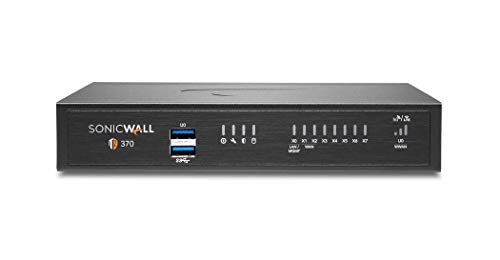
The TZ370’s title works by implication where the TZ80’s works by itemisation. SonicWall calls it a Gen7 firewall and an advanced SMB security appliance with multi-gigabit interfaces — 2.5 and 5 gigabit classes are named — plus SD-WAN and real-time threat defence, closing with the part code 02-SSC-2825. No Mbps figure for inspection appears, so none is claimed here. What the title does establish is the intended scale: a small or mid-sized business whose internal wiring and internet service have moved past gigabit, and whose branch links are managed as SD-WAN rather than as a single pipe.
That interface story matters more than it might seem. An appliance whose ports top out at gigabit becomes the narrowest point of a network that has otherwise upgraded — switches, access points, a 2.5-gigabit NAS — and security hardware is the worst place for a bottleneck, because the temptation it creates is to route around the inspection. Multi-gigabit interfaces keep the firewall in the path as the rest of the network speeds up. Buyers should still extract the inspection figures from the maker’s documentation before purchase; the title’s silence on them is the one gap in an otherwise well-aimed listing.
- Generation: Gen7 firewall appliance as titled
- Interfaces: multi-gigabit, 2.5 and 5 G classes named
- WAN behaviour: SD-WAN stated in the title
- Protection framing: real-time threat defence as titled
- Part code: 02-SSC-2825
- Threat-prevention throughput: Not stated in the listing title — verify with the maker’s documentation
- Bundled licence term: Not stated in the listing title — verify with the maker’s documentation
Strengths
- Multi-gigabit interfaces stop the firewall becoming the network’s bottleneck.
- SD-WAN is named, suiting multi-site and multi-link small businesses.
- Its SMB framing is explicit about the scale it was built for.
Trade-offs
- No inspection throughput figure is printed for sizing.
- No licence term is stated in the title, so the bundle arithmetic is unclear until the listing is read.
- Smaller sites pay for interface headroom they may never wire up.
Best for: an SMB whose cabling and internet service already run past gigabit and whose branches need SD-WAN discipline. Not suited for: a single gigabit connection in a five-person office, because the multi-gigabit interfaces would sit idle while the licence questions remain unanswered by the title. Read the listing closely for what services, if any, the part code carries.
Between the two SonicWalls, the choice is a tidy parable about buying security hardware. The TZ80 tells you its numbers and its term and asks to be placed in a small room. The TZ370 tells you its interfaces and its ambitions and asks to be placed in a growing network, with its figures and services confirmed in documentation. Neither approach is dishonest; they simply suit different buyers. The mistake is cross-applying them — demanding TZ80-style certainty from a title that never offered it, or assuming TZ370-style headroom exists in a box whose own title caps it at 750 Mbps.

Meraki MX67 bundle — The tidy cloud bundle
Meraki’s smaller entry is the shortest title in this guide and, in its way, the most confident: an MX67 with a three-year Advanced Security licence and the appliance, bundled. Everything about that sentence is the Meraki proposition. The hardware and its higher-tier licence arrive together, the term is long, and the management — Meraki’s cloud dashboard, the defining trait of the whole line — is so assumed by the maker that the title does not bother to describe the appliance’s ports or performance at all. Buyers are being sold an operating model: a network administered from a browser, with the appliance as its local agent.
That model genuinely suits a class of owner the other picks serve awkwardly — the small organisation with several sites and no network engineer, where consistency across locations beats per-box tinkering. It also carries the class’s purest form of the licensing truth this guide keeps repeating. A Meraki appliance and its licence are not two purchases that happen to share a carton; the licence is the product’s continuing permission to be managed and protected as designed, and the three-year bundle simply makes that explicit and prepaid. The title states no throughput figure, so sizing homework applies here as firmly as with the Fortinet pair.
- Appliance: Meraki MX67
- Bundled licence: 3 Year Advanced Security License
- Form of sale: licence and appliance bundle as titled
- Management model: cloud-managed by the nature of the Meraki line; confirm dashboard terms on the listing
- Throughput figures: Not stated in the listing title — verify with the maker’s documentation
- Port layout: Not stated in the listing title — verify with the maker’s documentation
Strengths
- Hardware and higher-tier licence arrive as one purchase with a three-year term.
- The cloud-managed model suits multi-site owners without a dedicated engineer.
- Advanced Security is the tier named, not a lesser bundle quietly substituted.
Trade-offs
- The title offers no performance or port information whatsoever.
- Cloud management is a philosophy some organisations will not accept for their boundary.
- When the three years end, renewal is not optional in any practical sense.
Best for: a small multi-site organisation that values one dashboard over per-box control and wants three years of licensing settled at purchase. Not suited for: an owner determined to run a boundary appliance indefinitely without an active licence, because the Meraki model makes the licence part of the product in the most literal way in this guide. Verify the appliance’s rated figures against your line speed in the maker’s documentation.
The MX67 bundle is also the easiest purchase in this guide to explain to a non-technical owner, and that is not a trivial virtue. One line item, one term, one dashboard, protection at the higher tier — the story survives being repeated in a budget meeting. Security purchases die in organisations when nobody can explain what was bought; whatever else divides opinion about cloud-managed networking, the bundle’s clarity about its own shape is a genuine organisational feature.

Meraki MX95 bundle — The licence-not-included Meraki
The MX95’s title is the longest here and the most revealing. It describes a security appliance bundle, an advanced cloud-managed firewall and SD-WAN router, quoting 2 Gbps for VPN, dual WAN and enterprise-grade security — and then, in the same breath, states that no licence is included. That final clause is the most important words in the listing, and this review places them at the centre rather than the margin. The appliance is a larger Meraki for a larger network; the 2 Gbps figure belongs to VPN throughput as titled and is not an inspection figure; and the licence, without which the Meraki model does not function as designed, is a second purchase the buyer must arrange and budget separately.
None of that makes the MX95 a bad pick. It makes it a pick for an organisation with procurement habits: one that already runs Meraki licensing, perhaps with co-termination across an estate, and prefers to attach this appliance to an existing licence arrangement rather than buy a bundled term. Dual WAN and SD-WAN in the title suit a headquarters or a busy branch whose connectivity is itself redundant. The failure mode to avoid is purely clerical — a buyer comparing this listing’s price against the bundled rivals above and concluding it is cheaper, when the honest comparison adds the licence the others include and this one pointedly does not.
- Appliance: Meraki MX95-HW security appliance
- Management: cloud-managed firewall and SD-WAN router as titled
- VPN figure: 2 Gbps as titled — a tunnel figure, not an inspection figure
- WAN: dual WAN stated
- Security framing: enterprise-grade security as titled
- Licence: No License Included, stated in the title
- Threat-prevention throughput: Not stated in the listing title — verify with the maker’s documentation
Strengths
- Dual WAN plus SD-WAN suits a site whose connectivity must survive a failed feed.
- A stated VPN figure helps size site-to-site tunnel expectations honestly.
- The no-licence clause is printed in the title itself, allowing accurate budgeting.
Trade-offs
- The licence is a separate, essential purchase on top of the appliance.
- The 2 Gbps figure covers VPN only; inspection performance is unstated.
- Its enterprise framing is oversized for a single small office.
Best for: an existing Meraki estate adding a larger dual-WAN appliance to licensing it already manages centrally. Not suited for: a first security purchase on a fixed hardware-only budget, because the essential licence sits outside the price on the listing. Price the licence term you intend alongside the appliance before comparing this with any bundle above.
Handled knowingly, the MX95 is the professional’s route into this shortlist: bigger iron, redundant connectivity, licensing folded into an estate-wide arrangement. Handled casually, it is the easiest way in the guide to under-budget a deployment by exactly one licence. The title, to its credit, tries to prevent that outcome in plain capital letters. A buying guide can do no more than repeat the warning at the same volume, which this one has.
How Do the Six Stack Up on Paper?
| Pick | Licence position as titled | Figure stated in title | Scale signal |
|---|---|---|---|
| Fortinet FortiGate 30G bundle | 3 years UTP plus FortiCare Premium | None stated | Small site appliance |
| Fortinet FortiGate 90G bundle | 1 year Enterprise plus FortiCare Premium | None stated | Larger branch appliance |
| SonicWall TZ80 | 3-year Secure Upgrade Advanced package | 750 Mbps firewall and threat prevention | SOHO, branch, IoT |
| SonicWall TZ370 Gen7 | Not stated in the listing title | None stated; 2.5 and 5 G interfaces | SMB, multi-gigabit |
| Meraki MX67 bundle | 3 Year Advanced Security License bundled | None stated | Small multi-site, cloud-managed |
| Meraki MX95 bundle | No License Included | 2 Gbps VPN | Enterprise-grade, dual WAN |
How Would a Small Organisation Actually Roll One of These Out?
Start with inventory rather than installation. List the sites, the line speeds, the headcounts and the handful of services that genuinely need protection — payment terminals, a server, guest wireless, the cameras nobody remembers installing. That list decides the appliance size far more honestly than a vendor’s headline figure, and it exposes the sites where a compact pick suffices alongside the one site that needs the larger iron. Then choose the ecosystem, because the second appliance will almost certainly match the first, and the management habits formed in month one become the organisation’s permanent posture.
Licence administration goes on the calendar before the hardware goes in the rack: term start, renewal date, tier, and the name of the human who owns the renewal. During installation, the guest and IoT segments get separated from the business segment from the outset, since retrofitting segmentation into a live network is where good intentions go to be postponed. Organisations whose offices are still on consumer routers can stage the migration through best medium office routers for the wireless side while the appliance takes over the boundary, rather than attempting a single weekend of total replacement.
Deployment week also deserves one unglamorous instruction: keep the old router, configured and labelled, in the cupboard for the first month. Appliances get mis-sized, licence activations get tangled with the wrong account, and a policy written on a Friday can lock out the very service the business opens with on Monday. A fallback that takes four minutes to restore converts each of those from a crisis into a story. After a month of clean running, retire it with thanks. The organisations that skip this step are not braver; they are simply the ones whose migration stories get told, at length, by their owners in the reviews of the next appliance they buy.
Documentation is the twin of that fallback. One page — segments, addresses, licence account, renewal date, the location of the configuration backup — written while the installer still remembers everything, is worth more than any single feature difference among these six appliances. Security hardware fails socially before it fails electronically: the knowledge walks out with a departing employee, the renewal notice lands in a dead mailbox, the console password retires with a contractor. The page in the cupboard is the cheapest continuity insurance in this entire guide, and it costs an hour on the calmest day of the deployment.
What Goes Wrong in Security Appliance Purchases?
The canonical error is sizing by the wrong number — taking a firewall throughput figure, or worse a VPN figure, and assuming inspection runs at the same rate. This guide has repeated the distinction until it echoes, because the industry titles invite the confusion and the disappointment arrives only after the policies are switched on. The second error is treating the licence as a warranty-style extra: deferring it, downgrading it without reading the tier difference, or letting it lapse while assuming the box remains what it was.
A third error is buying one impressive appliance for headquarters and leaving branches on whatever consumer router was already there, producing an estate whose protection is exactly as strong as its weakest doorway. A fourth is quieter: enabling nothing. Appliances ship with policies that must be shaped to the organisation, segments that must be drawn, alerts that must be routed to a person. An unconfigured NGFW is an expensive router with a guilty conscience, and the purchase only becomes security when someone does that shaping work in the first month.
What Does Three Years of Ownership Actually Look Like?
Year one is configuration and humility. The appliance arrives, policies are drafted, and the first month of alerts teaches the owner what their network actually does all day — the forgotten update server, the smart television phoning three countries, the accounts machine talking to a cloud service nobody documented. Good deployments treat that month as an audit they accidentally bought. The console’s value in this phase is not blocking; it is revelation. Organisations that rush to tighten every policy before understanding their own traffic end up blocking the business and loosening everything in a panic, which is worse than a patient start.
Year two is where the licence earns its keep in silence. Threat intelligence is a perishable good: the malicious addresses and exploit patterns of last spring are museum pieces by autumn, and the subscription is what keeps the appliance’s judgement current while its owner thinks about other things. This is also the year the hardware disappears from consciousness, which is the appliance working as intended. The budget line, however, should not disappear with it. The renewal visible on the calendar since installation day should be re-confirmed against current tiers, because makers rename and repackage services, and the tier bought three years ago may have a successor with a different name and a broader net.
Year three is decision year, and the bundles in this guide are timed to make it arrive at different moments of organisational maturity. A three-year term bought for a tiny office expires when that office knows exactly what it is; a one-year Enterprise term expires while the relationship is still young, which suits an organisation that expects to renegotiate from experience. Either way, the expiry should trigger a genuine review — headcount, line speed, sites, incidents — rather than an automatic renewal of a size class the organisation may have outgrown or never needed. Appliances are replaced on evidence or on autopilot, and the calendar discipline this guide keeps recommending exists to force the evidence version.
How Should a Buyer Size an Appliance Without Guessing?
Begin with the connection, then subtract honesty. The inspection figure that matters is the one measured with the services the organisation will actually enable, on traffic resembling its own. A design studio pushing large files through encrypted sessions loads an appliance differently from a dental practice with twelve workstations and a card terminal, even on identical internet packages. Makers publish several figures for several modes precisely because one number cannot carry that variety; the buyer’s task is to find the mode matching their intended policy set and size to it, with headroom for growth in staff and speed over the licence term.
Headroom deserves a number of its own in the planning, even if this guide cannot print one for the appliances. Connections get upgraded mid-term more often than appliances do, because internet service is easy to buy and hardware replacement is a project. An appliance sized exactly to today’s line becomes the ceiling on tomorrow’s upgrade, and the person who signed the faster contract will not thank the person who saved money at the boundary. This is the practical force behind the TZ370’s multi-gigabit interfaces and the MX95’s dual-WAN positioning: both assume the network around the appliance will change during its service life, and both are priced for organisations where that assumption is realistic.
Finally, count the tunnels. Site-to-site links, remote staff, a camera network reached from a second location — encrypted traffic concentrates work on the appliance in ways raw headcount hides. The MX95’s stated VPN figure exists because tunnel throughput is a sizing axis of its own, separate from inspection. A buyer with heavy tunnel ambitions should list them beside the line speed in the sizing conversation, and should be suspicious of any shortlist — including, respectfully, this one — that tries to settle the question without those two numbers on the table.
Does the Ecosystem Matter More Than the Appliance?
Over a five-year horizon, usually yes. The first appliance is a purchase; the second is a pattern. Staff learn one console’s logic, one licence calendar, one support relationship, and every subsequent site inherits that fluency. Switching ecosystems mid-estate means running two philosophies at once, which small teams feel as a permanent low-grade tax on every change. That is why the ecosystem paragraphs in the reviews above carry as much weight as the hardware ones: Fortinet’s bundle structure, SonicWall’s operating system lineage and Meraki’s dashboard are not flavours around the product. For a multi-site owner, they are the product, and the metal is its local representative.
The honest counterweight is that ecosystems also capture. Licence tiers get renamed, entry models get retired, and an organisation fluent in one console will tolerate a mediocre renewal quote longer than it should. The defence is the same calendar discipline applied to money: know what the estate’s protection costs per year, per site, and compare that figure — not the appliance prices — when renewal time invites a challenge. Buyers who can state their annual cost of being protected are buyers ecosystems cannot quietly farm.
Single-site readers can safely demote all of this. With one doorway and no plan for a second, the appliance in front of you matters more than the family behind it, and the choice collapses back to the titled facts: term length, tier, printed figures, interface classes. The TZ80 and the 30G bundle compete for exactly that reader, and either, bought with its numbers understood, will serve a small site honourably for its full term.
What Does Inspection Actually Do All Day?
Most of an appliance’s working life is spent on traffic that is neither clearly good nor dramatically evil. It watches a workstation fetch updates from an address that changed hosting last week. It sees a printer attempt a conversation no printer should need. It notices the point-of-sale terminal is suddenly curious about a foreign file server at three in the morning. The value of the security-focused class lives in those judgements: known-bad destinations refused by reputation, suspicious patterns flagged for a human, whole categories of traffic — the gambling site on the accounts machine, the unknown proxy on the guest network — handled by policy rather than by hope.
This is also where tier differences stop being abstract. The services bundled into the protection tiers are the sources of those judgements: the intelligence feeds, the sandboxing arrangements, the category databases. Two appliances with identical hardware and different active tiers are, in operational terms, different products sharing a chassis. That is the deep reason this guide reads licence names aloud in every review and refuses to let a bundle’s tier pass as packaging. When an owner asks what their appliance did this month, the honest answer is written in the services the licence kept alive, not in the metal on the shelf.
None of this requires the owner to become an analyst. It requires the owner to glance, periodically, at what the console has been seeing, and to keep one segment of the network — the payment machines, the server, the records — behind stricter rules than the rest. The appliances in this guide all presume that division of labour: tireless inspection by the box, occasional judgement by the human. Purchases fail when either half is expected to do the other’s job.
Why Do Guest and Gadget Networks Belong Behind the Same Door, Separately?
Every small organisation now hosts two populations it did not invite onto its real network: visitors, with phones full of other people’s security decisions, and gadgets, with firmware written by the lowest bidder. Card machines, cameras, smart displays, the thermostat with opinions — these devices share one trait, which is that their owners cannot vouch for their behaviour. A security appliance earns a large part of its price by keeping those populations in their own segments, able to reach the internet and nothing sideways, so that the cheapest camera in the building cannot become a corridor into the accounts system.
Segmentation is also the feature that survives every licence argument. Even in a week when no threat feed mattered, the separation between the guest wireless and the business segment was quietly the difference between a visitor’s compromised laptop being an anecdote and it being an incident. Buyers comparing these six should therefore ask a question the titles cannot answer and the documentation can: how gracefully does each console let a small team draw and maintain those boundaries? The appliance that makes segmentation easy gets segmented networks; the one that makes it a research project gets a flat network and a hopeful owner, whatever its inspection figures claim.
A fifth error hides in plain sight: buying the appliance and never deciding who may change it. Boundary hardware with five administrators has none, and the first unexplained policy usually turns out to be a well-meant favour somebody performed in March. One owner, one deputy, changes written down — the governance of a twelve-person firm fits on an index card, and appliances administered that way stay intelligible for their whole term instead of becoming archaeology with a power supply.
Final Recommendation
Small sites should start with the two three-year bundles and pick an ecosystem: Fortinet’s 30G for its tier-and-support package, SonicWall’s TZ80 for its printed figures and SFP flexibility, Meraki’s MX67 where several sites and one dashboard matter more than per-box control. Growing organisations step up to the 90G’s Enterprise tier or the TZ370’s multi-gigabit interfaces, confirming inspection figures in documentation either way. The MX95 belongs to estates that already speak Meraki licensing fluently.
Whichever appliance leaves the shelf, the purchase is only finished when the renewal date is written down, the segments are drawn and a named person owns the console — because in this class the box is merely the visible half of a security posture that has to be renewed, watched and believed in, and an appliance bought with its licence understood will still be protecting its network on the day a cheaper, misunderstood one has quietly become an ornament.
Who Should Not Buy Into This Class at All?
A household, full stop — and saying so protects this guide’s credibility with the offices it is for. A family network’s real risks are handled by a decent consumer router, individual accounts and updates; the appliance class adds cost, licences and administration that a home cannot amortise and will not perform. The same applies to the single laptop freelancer whose entire business lives in reputable cloud services: their boundary is the laptop itself, and money spent on an NGFW guards a corridor nobody walks down. Security spending is rational only when it stands in front of assets — servers, payment systems, records, multiple staff — whose compromise would actually wound someone.
The borderline case is the home-based business with staff logging in, a server in the cupboard and clients whose data carries obligations. That reader has quietly become a small organisation, and the tell is the obligation rather than the address. For them, the compact end of this shortlist — the TZ80 or the 30G bundle — is not overkill; it is the first proportionate response, sized to a SOHO reality both titles name themselves. The step into this class should feel slightly reluctant and completely deliberate, like insurance bought after reading the policy. Anyone who feels excited by the hardware has probably wandered in from the wrong keyword, and the gaming-router pages will welcome them back without judgement.
One last scenario ties the shortlist together. Imagine the same twelve-person firm in three parallel lives, identical except for the doorway. In one, the TZ80 inspects everything at figures its title printed, and the owner’s only recurring task is the three-year calendar entry. In another, the MX67 pair — office and small warehouse — report into one dashboard the owner checks from home. In the third, the 90G stands at a headquarters that grew teeth: more staff, an Enterprise tier, an annual renewal handled by someone with the title for it. None of these firms bought the best appliance. Each bought the appliance whose titled facts matched the shape of its own life, which is the only victory this category offers.
Frequently Asked Questions
Do these appliances replace my office Wi-Fi?
No. None of the six titles describes a wireless access point. These boxes guard the boundary; access points, chosen separately, provide the radios. Many deployments pair an appliance here with office routers or dedicated access points behind it, each device doing the half of the job it was built for.
What happens when the bundled licence term ends?
The routing generally continues while the subscription services — updated threat intelligence and the protections fed by it — stop being current, and in Meraki’s case the management model itself depends on licencing. Renewal is therefore part of the product’s cost of ownership, which is why this guide treats term length as a headline specification.
Is a higher firewall throughput number always better?
Only the figure measured the way you will use the box matters. Threat prevention with services enabled is the honest sizing number for an inspection appliance; a raw firewall figure, and especially a VPN figure, describe different workloads. Where titles omit the inspection number, the maker’s documentation is the only responsible source.
Which pick suits a single-person business?
The TZ80’s SOHO framing and three-year package, or the FortiGate 30G bundle’s long cover, fit that scale most naturally. The deciding factors are whether the titled 750 Mbps ceiling clears your connection with inspection on, and which console you would rather live in for three years.
Can one of these join two offices together?
Site-to-site tunnels are core work for this class, and the titles gesture at it through SD-WAN on the TZ370 and MX95 and the MX95’s stated VPN figure. Both ends of a tunnel need compatible appliances, which is another reason the ecosystem choice outranks any single box’s virtues.
And a closing administrative note, offered because it decides more deployments than any specification above: photograph the rack, the cabling and the licence confirmation on installation day, and file those photographs with the one-page record. Future-you, mid-incident, will not remember which cable is the warehouse feed. Present-you knows. Write it down for them.
Related Guides
The neighbouring questions in this cluster are handled in best quality of service routers, for offices whose problem is traffic priority rather than inspection, and best routers for remote camera viewing, where the same boundary discipline is applied to reaching cameras without exposing them.


