What's inside
- Key Takeaways
- Quick Picks
- How Did We Choose These Picks?
- Why Has the 5.25-Inch Bay Become So Hard to Find?
- Which Cases Actually State an Optical Bay — and Which Leave It Open?
- How Do the Six Cases Compare Side by Side?
- What Should You Check Before Buying a Case for an Optical Drive?
- How Do You Install an Optical Drive in a Modern Build?
- What Mistakes Do Buyers Make When Shopping for an Optical-Drive Case?
- Which Optical Drive Belongs in the Bay You Just Bought?
- How Does the Right Case Change Between a Media PC, an Office Machine and a Home Lab?
- How Long Will an Optical-Drive Build Stay Useful — and How Do You Keep It That Way?
- Final Recommendation
- Frequently Asked Questions
- Related Guides
As an Amazon Associate I earn from qualifying purchases. This post may contain affiliate links at no extra cost to you.
gizmoverdict.com is reader-supported. When you buy through links on our site, we may earn an affiliate commission.
Where to buy: Each case below links to its own Amazon listing, and every claim about drive bays in this guide is drawn from what that listing title actually states. Where a title stays silent about an optical bay, we say so in plain words rather than guessing, because a case bought for a disc drive it cannot hold is an expensive disappointment.
The search for the best modern pc cases that support optical drives starts from an awkward truth: the optical drive never actually died, it just lost its place in the marketing photos. People still rip CD collections to lossless files, still burn archival discs that will outlive any cloud subscription, still install legacy software from DVD, and still run home servers whose owners prefer a physical drive on the front panel to a USB dongle dangling off a cable. Blu-ray collections, Linux install media, medical and legal archives delivered on disc, retro game discs — the use cases shrank, but they did not vanish.
What vanished is the assumption that a case will have anywhere to put the drive. The modern tower is designed around glass panels, radiator brackets and uninterrupted front fascias, and the 5.25-inch bay — the wide external slot that held optical drives for three decades — was the first casualty. That is why this guide exists as a separate hunt rather than a footnote in a general case roundup. A case either physically offers an external 5.25-inch bay, or it does not, and no amount of clever cable management changes that.
There is also a quieter trap, and this guide is built around avoiding it. Some respected modern cases are widely assumed to support optical drives because their predecessors did, or because a sibling model does, yet the current listing title never mentions a 5.25-inch bay at all. Three picks below fall into exactly that category. Rather than repeating the assumption, we flag each one honestly: the bay is not stated in the listing title, and anyone whose build depends on it should confirm against the manufacturer’s own documentation before ordering. An honest “verify this” is worth more than a confident guess.
So the six cases here split into two honest groups. Three state their optical provision directly in the listing title — one retro-styled NAS tower with dual front bays, one compact micro-ATX box that even bundles a power supply, and one 4U rackmount chassis with six 5.25-inch bays for builders who think in rack units. The other three are excellent modern towers in their own right — a budget mini tower, a flagship silent case and a sound-dampened mid-tower — whose titles leave the optical question open. Read the flags, and you will know exactly what you are buying.
Key Takeaways
- An optical drive needs an external 5.25-inch bay; internal 3.5-inch and 2.5-inch mounts, however generous, cannot hold one.
- Three picks state their 5.25-inch provision in the listing title itself — the Rosewill with dual bays, the in Win with a named 5.25-inch drive slot, and the Silverstone rackmount with six.
- The Antec, Fractal Design Define 7 and Cooler Master Silencio S600 listings do not state a 5.25-inch bay in their titles, so treat optical support on those three as unverified until the manufacturer’s documentation confirms it.
- A bundled power supply, as in the in Win case, changes the value calculation completely for a budget office or media build.
- Rackmount is a legitimate answer for home builders with a rack — six front bays in 4U of space is density no tower matches.
Quick Picks
| Pick | Badge | Why it earns its place |
|---|---|---|
| Rosewill Retro NAS ATX Mid Tower Case | Best stated optical support | Dual 5.25-inch front bays named in the title, alongside six 3.5-inch HDD bays for a disc-and-storage sleeper build. |
| Antec VSK3000E-U3_US Mini Tower | Budget pick — verify bay | A compact micro-ATX mini tower at the affordable end of the range; its title does not state an optical bay, so confirm before buying for a drive. |
| in Win EFS712 Micro ATX Mini Tower | Best all-in-one value | Names a 5.25-inch drive bay in the title and bundles a 450W power supply with a tool-free interior. |
| Silverstone Technology RM41-506 4U Rackmount Case | Most bays of any pick | Six 5.25-inch drive bays in a 4U rackmount server chassis — optical density nothing else here approaches. |
| Fractal Design Define 7 Black Solid | Premium silent tower — verify bay | A flagship E-ATX silent modular tower; the listing title does not state a 5.25-inch bay, so check Fractal Design documentation first. |
| Cooler Master Silencio S600 | Quiet living-room option — verify bay | Sound-dampened steel panels and a reversible front door suit a quiet room; optical provision is not stated in the title. |
How Did We Choose These Picks?
The first filter was the keyword itself, applied strictly. A case only entered this list if it was a current, plausible home for an optical drive in a modern build — and then we separated the candidates by evidence rather than reputation. Listings whose titles state a 5.25-inch bay, or the count of one, were treated as confirmed. Listings whose titles say nothing about an external bay were kept only if the case is a well-known modern tower that buyers in this niche routinely ask about, and those entries carry an explicit verification flag everywhere it matters: the quick picks table, the detailed review and the spec box all tell the same story.
Beyond the bay question, we weighed the things that decide whether a case is pleasant to live with for five years. Form factor came first: this list spans micro-ATX mini towers, ATX mid towers, an E-ATX flagship and a 4U rackmount, because “modern PC with an optical drive” describes a dorm desk, a living-room media PC and a home-lab rack equally well. Storage depth mattered next, since optical-drive owners tend to be storage people — the same builder who keeps a Blu-ray drive often keeps a stack of hard drives. Finally we considered noise, because several of these builds end up in rooms where people sleep, watch films or record audio, and a silent-oriented case is worth real money there.
What we did not do is copy bay counts from forum posts, old reviews of discontinued revisions, or sibling models. Case lines get revised; a bay present in a 2016 version may be gone in the current one, and the listing title is the one piece of evidence every buyer can check in ten seconds. Where the title is silent, this guide is silent too — and says why.
Why Has the 5.25-Inch Bay Become So Hard to Find?
Understanding the scarcity helps you shop with realistic expectations. Case designers removed the external bay for three reinforcing reasons. First, front panels became display surfaces: tempered glass and mesh fascias sell cases, and a bay door interrupts both. Second, airflow engineering moved to uninterrupted front intakes, with fans and radiators occupying exactly the space a drive cage once used. Third, the drive cage itself was structural dead weight for the majority of buyers who would never install anything in it — removing it freed volume for longer graphics cards and cleaner cable runs.
The consequence is that optical support is now a deliberate design decision rather than a default. Manufacturers who keep a bay do so for identifiable audiences: NAS and home-server builders, workstation users, the Japanese and European markets where optical media remains common, and quiet-PC specialists whose customers rip and archive music. The six cases below come from exactly those pockets of the market, which is why the list looks eclectic — a retro NAS tower and a rackmount server chassis beside mainstream silent towers. That eclecticism is the honest shape of the niche in this decade.
There is a regional footnote worth knowing, because it explains several listings you will meet while shopping. Optical media never declined as steeply in Japan and parts of Europe, where rental, broadcast-recording and music cultures kept discs in daily use, so manufacturers headquartered in those markets — Silverstone among them — kept bays in designs aimed at home users long after North-American-focused lines dropped them. When a case seems oddly generous with front bays, it is often a design whose home market never stopped asking for them. That is good news for buyers everywhere else: the niche is sustained by real, ongoing demand somewhere, which keeps these models in production rather than leaving them as clearance oddities.
It also means compromise is rarely necessary on the rest of the build. Keeping an optical bay no longer forces you into a beige box from another era. The confirmed picks here include a case with six hard-drive bays and a retro sleeper aesthetic, a compact box with a bundled power supply, and a rackmount that belongs in a serious home lab. The bay survives; it just shares the stage now.
Which Cases Actually State an Optical Bay — and Which Leave It Open?

Rosewill Retro NAS ATX Mid Tower Case — Best stated optical support
The Rosewill leads this list because it removes all doubt. Its listing title describes a retro sleeper PC case with six 3.5-inch HDD bays and dual 5.25-inch front bays, which means two optical drives — or one drive plus a front-panel accessory such as a card reader or fan controller — can sit behind that deliberately understated fascia. In a guide where half the battle is verification, a title that simply tells you the answer is worth a great deal.
The personality of the case matters too. “Sleeper” is a real building philosophy: a machine that looks like a quiet storage box and hides a thoroughly modern ATX build inside. The six hard-drive bays tell you who Rosewill had in mind — the home-server and media-archive crowd, people whose storage grows by a drive every year or two and who still value a physical optical drive for ripping and burning their own discs. If your build plan involves a shelf of Blu-rays becoming a media library, this is the chassis shaped around that exact workflow, with the drive bays for the discs and the HDD bays for what comes off them.
Think about the pairing of those two bay types for a moment, because it is rarer than it sounds. Most NAS-leaning cases dropped the optical bay when they chased the server market, and most optical-friendly cases offer token hard-drive space. Holding six spinning drives and two 5.25-inch devices in one ATX mid tower is a combination aimed squarely at the archive builder, and it means one case can serve as ripping station and storage target at once instead of splitting those jobs across two machines.
- Form factor: ATX mid tower
- External bays stated in title: Dual 5.25-inch
- Internal storage stated in title: 6x 3.5-inch HDD bays
- Style: Retro sleeper
- Intended role: NAS and media-archive builds
Strengths
- Optical support is stated outright in the listing title — no verification homework before ordering.
- Two front bays allow a drive plus a second device, or two drives for disc-to-disc workflows.
- Six 3.5-inch bays give an archive build genuine room to grow over several years.
Trade-offs
- The retro sleeper styling is deliberately plain; builders wanting a showcase window should look elsewhere.
- A mid tower filled with six spinning drives needs deliberate fan planning to stay cool and quiet.
- It is a storage-first design, so extreme radiator or showcase-watercooling ambitions fit poorly here.
Best for: a home media or NAS build that pairs an optical drive with a growing stack of hard drives. Not suited for: a build centred on a large tempered-glass side window, since the retro sleeper design is a closed, understated enclosure.

Antec VSK3000E-U3_US Mini Tower — Budget pick — verify bay
Antec’s VSK line has been the default answer to “inexpensive case from a brand I trust” for a long time, and the VSK3000E-U3_US continues that role as a mini tower for micro-ATX boards. It earns its place in this guide with an asterisk we will not hide: the listing title identifies the case, its size and its form factor, but does not state a 5.25-inch bay. We include it because buyers hunting for a cheap optical-drive case ask about this exact model constantly, and the honest service we can do is to put it in front of you with the flag attached rather than pretend the question is settled.
So treat this entry as a shortlisted question, not a confirmed answer. If Antec’s own documentation for the VSK3000E-U3_US confirms an external bay, then it becomes arguably the value pick of the entire list: a compact, inexpensive mini tower from a long-established case maker, sized for the micro-ATX boards that power most office, family and light media builds. If the documentation shows no bay, walk away and take the in Win below, whose title settles the matter and which bundles a power supply besides.
What can be said without speculation is the shape of the proposition. A mini tower occupies noticeably less desk or floor than a mid tower, micro-ATX keeps motherboard and often power-supply costs down, and Antec’s value lines are built for straightforward assembly rather than exhibition. For a second PC, a family machine, or a workshop computer that needs to read and burn the occasional disc, that shape is exactly right — pending the one verification step we keep pointing at.
- Form factor: Mini tower, micro-ATX
- External 5.25-inch bay: Not stated in the listing title — verify with Antec documentation
- Brand line: Antec VSK value series
- Intended role: Budget office and family builds
- Size class: Compact footprint
Strengths
- Compact mini-tower footprint suits desks and rooms where a mid tower would dominate.
- Micro-ATX platform keeps the total build cost down across board and components.
- Comes from Antec’s long-running value line, with the straightforward layout that implies.
Trade-offs
- Optical bay provision is not stated in the listing title — the purchase depends on verifying it first.
- A mini tower leaves less room for large coolers, long cards and future expansion than the mid towers here.
- Value-line cases generally offer fewer cable-routing and finishing refinements than premium models.
Best for: a compact, low-cost micro-ATX build, provided Antec documentation confirms the external bay your drive needs. Not suited for: a build whose parts list is ordered before the bay check is done, since the VSK3000E-U3_US title does not state a 5.25-inch bay and the drive has nowhere else to mount.

in Win EFS712 Micro ATX Mini Tower — Best all-in-one value
The in Win EFS712 makes its case in the title: a micro-ATX mini tower with a 450W power supply included, a tool-free design, and a 5.25-inch drive bay named outright. That combination is quietly radical at the budget end of the market. Most cheap builds are assembled from a case here and a power supply there, with the compatibility and warranty split that implies; this one arrives as a single purchase that a first-time builder or an office IT buyer can deploy with minimal friction.
The tool-free design deserves more credit than it usually gets. Drive and card retention mechanisms that need no screwdriver sound like a small thing until you are the person maintaining a room of office machines, or a parent building a first PC with a child, or a technician swapping a drive on a bench with the screws long vanished. Combined with the named optical bay, it makes the EFS712 the natural home for the classic institutional build: a micro-ATX board, a DVD or Blu-ray drive up front, modest storage, and a job to do.
The bundled 450W supply frames the build’s ceiling honestly. That wattage serves integrated graphics and modest discrete cards comfortably — the office, education, media-centre and light-gaming machines this case is aimed at — and it is not the foundation for a high-draw gaming rig. Read the pick that way and it is excellent value: the case, the power and the optical bay, all confirmed in one listing, with assembly designed to be painless. The one check worth making is that your chosen components sit comfortably within the bundled supply’s capacity, which for its intended class of build they ordinarily will.
- Form factor: Micro-ATX mini tower
- External bay stated in title: 5.25-inch drive bay
- Power supply: 450W included
- Assembly: Tool-free design
- Intended role: Office, education and media builds
Strengths
- The 5.25-inch bay is stated in the title, so the optical question is settled before ordering.
- Bundled 450W power supply removes a separate purchase and a compatibility decision.
- Tool-free retention makes assembly and later drive swaps genuinely easier.
Trade-offs
- The included supply’s capacity suits modest builds; a power-hungry graphics card would outgrow it.
- Mini-tower dimensions limit cooler height, card length and storage expansion compared with mid towers.
- A bundled-PSU case is a package decision — upgrading the supply later means replacing part of what you paid for.
Best for: an office, school or media-centre build that wants the case, power supply and optical bay settled in one purchase. Not suited for: a high-wattage gaming build, because the bundled 450W power supply sets the ceiling for the components it can feed.

Silverstone Technology RM41-506 4U Rackmount Case — Most bays of any pick
Six 5.25-inch drive bays. That is the whole headline, and for the right builder nothing else in this guide comes close. The Silverstone RM41-506 is a 4U rackmount server case, and its front panel offers the kind of optical and front-device density that tower cases abandoned years ago: multiple optical drives, hot-swap modules, fan controllers, or any mixture of 5.25-inch devices a home lab or small studio could want, all in four rack units of vertical space.
Rackmount at home is a bigger idea than it first appears. A short rack in a cupboard, garage or studio corner organises a server, a network switch and a UPS into one tidy stack, and a case like this becomes the stack’s general-purpose bay box. Silverstone is one of the few consumer-facing brands that takes rackmount seriously for home and small-business builders — its RM series exists precisely for people who want server form without enterprise procurement. If your “PC” is really the household’s infrastructure, this is the most capable optical host on the list by a wide margin.
The caveats are about the format, not the execution. A 4U rackmount case needs a rack or a deliberate decision to run it as a wide desktop slab; its cooling is designed around rack airflow assumptions; and it looks like what it is — equipment, not furniture. None of that matters to the builder with six front bays of plans. For everyone else, the towers above are the saner shape. But judged purely on the question this guide asks — where can a modern builder put optical drives, plural, today — the RM41-506 is the emphatic answer.
- Form factor: 4U rackmount server case
- External bays stated in title: Six 5.25-inch drive bays
- Model: SST-RM41-506
- Intended role: Rack-based home lab and server builds
- Front-device capacity: Highest on this list
Strengths
- Six stated 5.25-inch bays allow several optical drives or a mix of front devices in one chassis.
- Rackmount format integrates with switches, UPS units and other rack equipment in a single stack.
- Silverstone’s RM line is designed for home and small-business rack use rather than adapted from towers.
Trade-offs
- Requires a rack or a willingness to house a wide 4U slab; it will not slip under a desk like a mini tower.
- Cooling and layout assume rack-style front-to-back airflow rather than a quiet-room tower setup.
- The industrial presentation suits a lab or cupboard, not a living-room sideboard.
Best for: a rack-based home lab or server build that wants several 5.25-inch devices in one chassis. Not suited for: a desk-side build without a rack, since the 4U rackmount format needs rack rails or a dedicated shelf to live in.
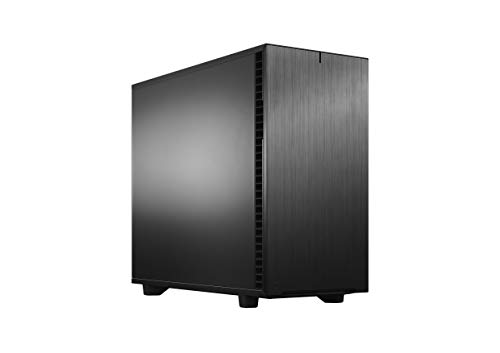
Fractal Design Define 7 Black Solid — Premium silent tower — verify bay
The Define 7 is the case people picture when they say “modern silent tower”: brushed aluminium and steel construction, a solid black front, E-ATX capacity, and a modular internal layout that can be rearranged between storage-heavy and airflow-heavy personalities. It is, by any measure, the most premium enclosure in this guide. It is also one of the three picks where honesty requires a flag: the listing title describes the case’s materials, size class and silent modular design, and does not state a 5.25-inch bay.
Why include a flagship with an open question? Because the Define line’s history makes it the single most asked-about case in this niche, and because buyers deserve the question framed correctly. Fractal Design’s own documentation for the Define 7 is the authority here — check it for an external bay position before ordering, and let that document, not forum memory of earlier Define generations, decide. If it confirms a bay, this becomes the connoisseur’s pick: a silent, modular E-ATX tower that can also hold your optical drive. If it does not, the Rosewill and in Win above are your confirmed alternatives, and the Define 7 remains a superb case for a different build.
What is not in question is the rest of the proposition. The solid-panel version prioritises silence over showcase, the modular interior adapts to unusually large storage arrays or long components, and the build quality is the kind that makes a case survive three successive system builds. For a workstation or a recording-room PC — environments where an optical drive for session archives often coexists with a demand for near-silence — that combination explains the Define 7’s following. Just do the one piece of homework its title leaves you.
- Form factor: E-ATX silent modular mid tower
- External 5.25-inch bay: Not stated in the listing title — verify with Fractal Design documentation
- Construction stated in title: Brushed aluminium and steel
- Front panel: Solid (silence-oriented)
- Layout: Modular interior
Strengths
- Flagship silent-tower design with sound-focused solid panels and premium materials.
- Modular interior adapts between storage-dense and component-dense layouts across rebuilds.
- E-ATX capacity gives it the longest useful life of any tower here as platforms change.
Trade-offs
- Optical bay provision is not stated in the listing title — verification with Fractal Design documentation is essential before buying for a drive.
- The solid front that keeps it quiet also means no showcase view of the interior.
- It is the premium-priced option in this guide, which is hard to justify if the bay check fails.
Best for: a silent workstation or studio build, provided Fractal Design documentation confirms the external bay position you need. Not suited for: a build scheduled around an unverified bay, because the Define 7 title does not state a 5.25-inch bay and the optical drive cannot be relocated to an internal mount.

Cooler Master Silencio S600 — Quiet living-room option — verify bay
The Silencio S600 approaches the modern tower from the direction of peace and quiet: a sound-dampened steel side panel, an ATX mid-tower frame, and a reversible front door whose hinge side can be swapped to suit the room. That door is a small detail with real domestic consequences — a case tucked to the left of a desk wants its door opening the opposite way from one tucked to the right, and the S600 is one of the few cases that lets you choose instead of living with the factory’s decision.
Its flag matches the Define 7’s: the listing title describes the sound dampening, the panel and the reversible door, and does not state a 5.25-inch bay. The Silencio name has history in this niche, which is precisely why the verification matters — reputation is not evidence. Cooler Master’s documentation for the S600 will settle whether an external bay is present; consult it before ordering if an optical drive is part of your plan, and treat anything less than the manufacturer’s word as a rumour.
If the check comes back positive, the S600’s natural home is the quiet room: a living-room PC that plays discs and files without announcing its fans, a bedroom machine, a home-office build in a shared space. Sound-dampened steel rather than glass keeps both noise and visual fuss down, and the mid-tower ATX frame accepts ordinary components without the compromises of a mini tower. If the check fails, it is still a fine quiet case — for a build that has given up on discs. The distinction is the whole reason this guide flags rather than assumes.
- Form factor: ATX mid tower
- External 5.25-inch bay: Not stated in the listing title — verify with Cooler Master documentation
- Side panel: Sound-dampened steel
- Front door: Reversible hinge
- Intended role: Quiet-room and living-room builds
Strengths
- Sound-dampened steel panel targets the quiet-room builds where optical drives often live.
- Reversible front door adapts to the case’s position in the room instead of fighting it.
- Full ATX mid-tower frame avoids the expansion limits of the mini towers in this list.
Trade-offs
- Optical bay provision is not stated in the listing title — confirm with Cooler Master documentation before relying on it.
- A closed, dampened design trades showcase visibility and maximum airflow for quiet.
- The door that enables the quiet front also adds a step every time you reach the optical drive.
Best for: a quiet living-room or home-office build, once Cooler Master documentation confirms the external bay. Not suited for: a build that needs the optical bay guaranteed at the point of purchase, since the S600 listing title does not state one.
How Do the Six Cases Compare Side by Side?
| Case | Form factor | 5.25-inch bay evidence | Defining feature |
|---|---|---|---|
| Rosewill Retro NAS | ATX mid tower | Dual bays stated in title | Six 3.5-inch HDD bays, sleeper styling |
| Antec VSK3000E-U3_US | Micro-ATX mini tower | Not stated in title — verify | Budget value line, compact footprint |
| in Win EFS712 | Micro-ATX mini tower | Bay stated in title | 450W PSU bundled, tool-free design |
| Silverstone RM41-506 | 4U rackmount | Six bays stated in title | Highest front-device density |
| Fractal Design Define 7 | E-ATX mid tower | Not stated in title — verify | Silent modular flagship construction |
| Cooler Master Silencio S600 | ATX mid tower | Not stated in title — verify | Sound-dampened panel, reversible door |
Read the evidence column first and the feature column second — that ordering is the discipline this niche demands. The three confirmed rows answer the optical question on the spot; the three flagged rows are excellent cases whose optical answer lives in manufacturer documentation rather than in the listing. Neither group is “better” in the abstract: the Rosewill is the natural archive station, the in Win the natural institutional build, the Silverstone the natural rack citizen, while the flagged towers compete on silence, size and finish for buyers willing to do one verification step.
What Should You Check Before Buying a Case for an Optical Drive?
Start with the bay itself, and be precise about vocabulary. You need an external 5.25-inch bay — a slot that opens to the front panel so the drive tray can eject. Internal 5.25-inch positions exist in a few cases for reservoirs and accessories, and internal 3.5-inch bays are sometimes described loosely in listings; neither accepts an optical drive in usable form. When documentation lists bay counts, confirm the 5.25-inch figure is external before anything else.
Next, check what sits behind the front panel. Some cases route a radiator bracket or a cable cover exactly where an optical drive’s body needs to be, so a stated bay plus a stated radiator position can still conflict in practice. Manufacturer manuals usually show the bay populated in a diagram; that diagram is worth more than any summary, ours included. While you are in the manual, confirm the drive’s depth clearance against any top-mounted radiator or power-supply shroud your build plans to use.
Then think about the drive’s connections, because a modern board may not cooperate. Optical drives are SATA devices, and most current motherboards still provide SATA ports — but compact boards provide few, and a build already carrying several SATA SSDs and hard drives can run short. Count your ports before the case arrives. Power is simpler: a SATA power connector from the supply, which the bundled 450W unit in the in Win provides as a matter of course, but which is worth confirming on any supply with an unusually short connector list.
Finally, decide how the drive will actually be used, because that shapes which confirmed pick fits. Occasional ripping and burning suits any of the three confirmed cases. A dedicated ripping station producing a media library wants the Rosewill’s pairing of optical bays with six hard-drive bays. A front panel that must host several devices — drives, card readers, fan controllers — wants the Silverstone’s six rack bays. Matching the case to the workflow, rather than to the bay count alone, is what separates a satisfying build from a merely compatible one.
How Do You Install an Optical Drive in a Modern Build?
The physical installation has barely changed in twenty years, which is part of the format’s charm. Slide the drive into the external bay from the front until its face sits flush with the panel, secure it with the case’s screws or tool-free rails — the in Win’s tool-free design makes this a genuinely thirty-second job — and connect SATA data to the motherboard and SATA power to the supply. If the case uses a removable bay cover, keep the cover; if you ever retire the drive, the cover restores the front panel’s finished look.
Software is the step modern builders forget. Current operating systems read data discs natively, but Blu-ray movie playback on a PC requires licensed playback software, and ripping or burning workflows need their own applications chosen for the task. Budget a few minutes for that layer rather than discovering it on movie night. Also check the drive’s region and firmware expectations if you are importing discs; optical drives carry legacy region behaviours that streaming has let most people forget.
One more practical step: test the drive before the build is closed up. Boot the machine with the side panel still off, load a disc of each type the drive is meant to handle, and confirm the operating system sees the drive and reads the media. A drive that is recognised in the BIOS but invisible to the operating system usually wants a different SATA port mode or a driver check, and both are far easier to address on an open bench than after the panels, cables and radiator of a finished build have turned the bay into the least accessible corner of the machine.
Cable routing deserves one sentence of respect: route the SATA data cable before installing a large graphics card or radiator that will block the path, because the optical bay sits at the front-top of most towers and its cables cross exactly the space those components occupy. A drive installed early in the build order is a five-minute job; installed last, it can be an hour of regrets.
What Mistakes Do Buyers Make When Shopping for an Optical-Drive Case?
The first mistake is assuming a famous case line still carries a bay because an older generation did. Case lines evolve, bays disappear quietly, and the listing for the current model is under no obligation to announce an absence. That is why three entries in this guide carry verification flags, and why the correct response to any unflagged claim elsewhere is to ask what evidence it rests on.
The second mistake is confusing bay types — ordering a case with generous 3.5-inch storage and discovering on build day that none of those bays opens to the front. The third is forgetting the ecosystem around the drive: too few SATA ports on a small board, no playback software for Blu-ray films, or a front door — like the Silencio’s — that must be opened for every disc swap in a case tucked somewhere awkward. None of these are exotic failures; all of them are prevented by ten minutes with the manual and an honest count of ports and plans.
The fourth mistake is overbuying the format. A builder who will rip one box of CDs and then never touch the drive again may be better served by any good modern case plus an external USB optical drive that lives in a drawer. The cases in this guide earn their keep when the drive is a permanent, frequently used part of the machine — a media library being built disc by disc, an archive workflow, a rack of front devices. Permanence is the criterion; buy the bay when the drive has a job, not a cameo.
Which Optical Drive Belongs in the Bay You Just Bought?
Choosing the case is only half the purchase; the drive itself splits into three tiers that map to different jobs. A DVD writer reads and burns CDs and DVDs, which covers data archives, music ripping and legacy software, and it is the least expensive tier by a comfortable margin. A Blu-ray reader adds film playback and reading of Blu-ray data discs but cannot burn them. A Blu-ray writer does everything — playback, reading and burning, including the high-capacity archival discs that some backup strategies are built around. Buying above your tier wastes money; buying below it means a second purchase, so decide by the discs you actually own and the ones you realistically plan to make.
Two details separate a pleasant drive from an irritating one. The first is tray behaviour: in a tower standing on the floor, a standard tray-loading drive is fine, but in a horizontal or rack installation the disc must sit securely as the tray closes, and drives designed with retaining tabs handle that orientation more gracefully. The Silverstone RM41-506’s rack context makes this worth a thought — a 4U case is vertical in the rack’s frame of reference, and a drive whose tray grips the disc will spare you the slow-motion fumble of a disc sliding as the tray retracts. The second detail is write-speed honesty: drives advertise their maximum burn rates prominently, but sustained, reliable burns happen at moderate speeds with quality media, and a drive chosen for archival work should be judged on burn consistency rather than headline numbers.
There is also the question of a second drive, which the Rosewill’s dual bays and the Silverstone’s six bays make practical. Two drives let a ripping workflow proceed in parallel — one disc being read while another is verified — and let a duplication setup copy directly without staging files on a hard drive first. For a single-purpose build this is excess; for the media-library builder working through a shelf of hundreds of discs, the hours saved are real, and the case is the component that either permits the arrangement or forbids it.
How Does the Right Case Change Between a Media PC, an Office Machine and a Home Lab?
The media PC lives in a room with people in it, which reorders every priority. Noise rises to the top of the list, appearance matters because the machine is furniture, and the optical drive gets used in the dark, mid-film, by someone holding a remote rather than a mouse. That profile is why the flagged silent towers — the Define 7 and the Silencio S600 — keep their appeal despite their open bay question: if their documentation confirms a bay, they are the cases that make a disc-playing machine disappear into a quiet room. The Silencio’s reversible door even acknowledges that the case will be placed by furniture logic, not by builder convenience.
The office machine answers to a different master: total cost across many units and minutes of technician time per unit. That is the in Win EFS712’s home ground, where the bundled supply, the tool-free interior and the stated bay compress procurement and assembly into the fewest decisions. An office refreshing a fleet does not want six case options and a bay investigation; it wants one listing that settles the matter, which is precisely what the EFS712 offers and why its confirmed status matters more in this context than any premium feature.
The home lab values density and access above all, and it is the one environment where the rackmount Silverstone and the storage-heavy Rosewill stop looking eccentric. In a lab, front bays are working surface — drives, swap modules and controllers cycle through them as projects change — and six 3.5-inch bays behind two optical bays, or six optical-width bays in 4U, translate directly into experiments that do not require a second chassis. The lab builder should also think hardest about SATA port counts, since lab machines accumulate storage devices the way workshops accumulate half-finished projects, and the motherboard — not the case — is usually where that expansion quietly runs out.
Across all three settings, one habit pays for itself: photograph the manufacturer’s bay diagram and your finished build’s front panel, and keep both with the build’s records. Case revisions change, memories blur, and the next upgrade conversation — yours or a buyer’s, if the machine is ever sold — goes faster with evidence than with recollection. The theme of this entire guide is that evidence beats assumption; your own build deserves the same courtesy you applied when choosing it.
How Long Will an Optical-Drive Build Stay Useful — and How Do You Keep It That Way?
Longer than fashion suggests. The optical drive’s jobs — reading a fixed, physical archive — do not depend on a service staying online or a subscription staying paid, and a disc burned today will be readable by any drive built to the same standard in twenty years. That independence is the format’s real durability argument. The case side of the equation is equally long-lived: a steel tower or rackmount chassis does not become obsolete when a socket changes, which is why the premium flagged towers can justify themselves across several successive builds, provided the bay check comes back in your favour.
Keeping the setup healthy is mostly housekeeping. Dust is the optical drive’s quiet enemy — a lens accumulates film over years, especially in a case sitting on carpet — so a cleaning disc run occasionally, and intake filters kept clear, preserve read reliability far better than any heroic intervention later. Keep a small stock of the blank media your archive strategy uses, bought while it is common and inexpensive, because niche media follows the same scarcity curve as the bays themselves. And keep the bay cover and any removed drive-cage parts in a labelled bag inside the case or with its box; cases outlive their first configuration, and the part you removed in year one is the part you will want in year four.
One forward-looking check completes the picture: when you next change motherboards, confirm the new board’s SATA count and layout before assuming the drive simply carries over. The trend in compact boards is fewer SATA ports as M.2 storage takes over, and the optical drive — patient, undemanding, still useful — is exactly the device that gets silently dropped in a port shortage discovered mid-build. A two-minute specification check at motherboard-buying time protects a decade of discs from an avoidable retirement.
Final Recommendation
If you want the optical question answered by the listing itself, three picks do that today. The Rosewill Retro NAS is the archive builder’s case, pairing dual stated 5.25-inch bays with six hard-drive bays in a sleeper tower. The in Win EFS712 is the simplest purchase on the list — case, 450W supply, tool-free assembly and a stated 5.25-inch bay in one box. The Silverstone RM41-506 is the density champion for anyone with a rack, with six stated bays no tower can match.
The Antec, the Define 7 and the Silencio S600 are fine cases standing behind one unopened door: their titles do not state an optical bay, so their place in your build depends on what the manufacturer’s documentation says. Do that check and they may serve you beautifully; skip it and you are gambling a build on a rumour. When the last disc in the ripping stack has been read and the library sits complete on the Rosewill’s drives, the quiet satisfaction of having checked the bay before buying will feel entirely earned.
Frequently Asked Questions
Can I add an optical drive to a case with no 5.25-inch bay?
Not internally — the drive’s width and tray mechanism require an external 5.25-inch bay. The practical alternative is an external USB optical drive, which suits occasional use and keeps the case choice unrestricted, at the cost of a peripheral living on the desk.
Why do some listings in this guide not confirm an optical bay?
Because their titles genuinely do not state one. Rather than repeat assumptions drawn from older models, we flag those cases — the Antec VSK3000E-U3_US, Fractal Design Define 7 and Cooler Master Silencio S600 — and direct you to the manufacturer’s documentation, which is the only reliable authority for the current revision.
Is a rackmount case a sensible choice for a home build?
Yes, if you own or plan a rack. The Silverstone RM41-506 turns 4U of rack space into six front 5.25-inch bays, which suits a home lab or studio stack. Without a rack, a tower is the more practical shape for the same job.
Does the in Win’s bundled power supply limit what I can build?
It frames the build class: 450W comfortably serves integrated graphics and modest discrete cards, which covers the office, education and media builds the EFS712 targets. A high-draw gaming card would call for a case-and-separate-supply approach instead.
Do modern motherboards still support optical drives?
Generally yes, through SATA — but count the ports on compact boards, since a build with several SATA storage drives can exhaust them. Playback and ripping software is a separate consideration, particularly for Blu-ray film playback, which needs licensed software on a PC.
Can I use the second 5.25-inch bay for something other than a drive?
Yes — the bay is a standardised front slot, and it also hosts card readers, fan controllers, front I/O panels and small storage drawers. That flexibility is part of the Rosewill’s and Silverstone’s appeal: a bay bought for an optical drive today can hold a different front device later without changing the case.
Will a full-height optical drive fit every bay mentioned here?
Standard optical drives share the 5.25-inch half-height format, so fit is rarely the issue; depth and the hardware behind the bay — a radiator bracket or cable cover — are the constraints worth confirming in the manufacturer’s manual, particularly in compact mini towers.
Is it worth paying for the Define 7 if the bay check fails?
Only if the build no longer needs an internal optical drive. As a silent E-ATX tower it stands on its own merits, but for this keyword its value depends on that verification; a failed check moves the confirmed Rosewill and in Win picks ahead of it for any disc-based plan.
Which pick should a media-library builder choose first?
The Rosewill Retro NAS, because its stated dual optical bays and six 3.5-inch hard-drive bays are designed to work together: discs are read at the front and their contents stored in the same chassis, with room for the library to grow.
Related Guides
Building out the rest of the machine? Our guides to quiet PC cases for recording spaces, home server storage cases and compact micro-ATX cases continue the same evidence-first approach on neighbouring questions, from bay counts and port layouts to the noise figures that decide whether a finished machine earns its place in a quiet room or gets banished to a cupboard.


