What's inside
- Key Takeaways
- Quick Picks
- How Did We Choose These Picks?
- Why Run Two Loops Instead of One Big One?
- Which Case Gives Two Loops the Room They Actually Need?
- How Do the Six Cases Compare Side by Side?
- How Do You Plan Two Loops on Paper Before Buying Fittings?
- How Do You Leak-Test and Maintain Two Loops Without Drama?
- What Mistakes Do Dual-Loop Builders Regret Most?
- Hard Tubing or Soft Tubing for a Two-Loop Build?
- How Do Pumps, Reservoirs and Fans Change Between Two Loops?
- What Does a Dual Loop Cost Beyond the Case — and Where Should the Money Go?
- How Quiet Can a Dual Loop Be — and What Does the Case Have to Do with It?
- When Should a Dual-Loop Build Be Rebuilt Rather Than Upgraded in Place?
- Final Recommendation
- Frequently Asked Questions
- Related Guides
As an Amazon Associate I earn from qualifying purchases. This post may contain affiliate links at no extra cost to you.
gizmoverdict.com is reader-supported. When you buy through links on our site, we may earn an affiliate commission.
Where to buy: Each case below links to its own Amazon listing. Radiator figures, motherboard formats and panel details are taken from what the listing titles state; where a title is short, the review describes the case’s established design role without inventing measurements.
A dual loop is the point where watercooling stops being a cooling method and becomes an architecture. The best dual loop watercool pc cases are not simply large cases — they are cases that give two independent circuits, one for the processor and one for the graphics card, the physical room to coexist: two pumps, two reservoirs, two radiator groups, and tubing runs that must be planned like plumbing in a house rather than cables in a box. Each loop gets its own coolant colour in many builds, its own flow path, its own maintenance schedule. Done well, it is the most beautiful and most thermally honest way to cool a flagship machine, because neither hot component ever warms the other’s water.
The case decides whether that ambition is a pleasure or a punishment. A dual loop needs radiator volume in two separate zones, mounting space for two pump-reservoir combinations, and enough interior geography that the CPU loop’s tubing never has to fight the GPU loop’s tubing for the same grommet. It also needs an owner-serviceable layout: dual loops are drained, refilled and inspected more often than any other build type, and a case that turns every maintenance session into a partial rebuild will slowly train its owner to neglect it — the one outcome a watercooled machine cannot afford.
The six cases here approach that brief from different directions. Two are panoramic full towers whose titles state serious radiator support. One is a super-tower built for maximum cooling hardware. One integrates a distribution plate into the case itself, collapsing much of the tubing work into machined channels. One is a server-edition chassis whose cavernous interior and workstation motherboard support suit loops built for rendering and compute as much as for games. And one is an openable mid-tower that converts between enclosed and open-air personalities. All six can host two loops; they differ in how much of the work they do for you, and how much theatre they add while doing it.
A word of expectation-setting before the picks. Dual-loop building is the deep end of the hobby: the fittings budget alone can rival a mid-range graphics card, a leak test is a mandatory ritual rather than a suggestion, and the build is measured in weekends. The cases below assume that commitment and reward it. Builders still deciding whether water is for them at all will find the single-loop and AIO guides linked at the end a saner starting point — there is no shame in the shallow end, only in pretending the deep end is shallow.
Key Takeaways
- A dual loop needs two independent radiator zones and mounting room for two pump-reservoir units — case volume alone is not the criterion, layout is.
- The Lian Li O11D EVO XL states support for three 420mm radiators in its title, the most explicit cooling canvas on this list.
- The Thermaltake DistroCase 350P builds the distribution plate into the case, replacing much of the tubing with machined channels.
- The Corsair 9000D is the super-tower option for builders whose loop plans outgrow full towers.
- Maintenance access matters as much as capacity: two loops mean two drain-and-fill routines, and the case should make both easy.
Quick Picks
| Pick | Badge | Why it earns its place |
|---|---|---|
| LIAN LI O11D EVO XL Black | Best panoramic dual-loop stage | E-ATX full tower whose title states three 420mm radiator positions — two loops, each with flagship cooling. |
| Thermaltake Core P8 Tempered Glass Full Tower | Best open showcase for loops | Full-tower glass chassis from the Core P line, built to exhibit elaborate custom cooling. |
| Thermaltake DistroCase 350P | Best integrated distribution | Mid tower with a built-in distro plate that turns tubing runs into clean machined channels. |
| CORSAIR 9000D RGB Airflow | Maximum capacity | Super full-tower scale for the largest radiator arrays and the most elaborate two-loop layouts. |
| Phanteks Enthoo Pro 2 Server Edition | Best workstation loop host | SSI-EEB motherboard support and a server-edition interior for compute builds that also run two loops. |
| Thermaltake Core P6 TG | Most flexible mid-tower | Three tempered glass panels and a convertible open-or-closed design in an ATX mid-tower. |
How Did We Choose These Picks?
The first test was zoning. A case qualified only if its layout plausibly separates two loops — radiator positions in distinct areas of the chassis, so the CPU circuit and GPU circuit are not stacked into one shared airflow path by necessity. Stated radiator support counted heavily: the EVO XL’s three 420mm positions and the 9000D’s super-tower scale are the kind of facts a dual-loop plan is built on, and both are declared in their listings rather than inferred.
The second test was serviceability. We favoured cases whose panels, brackets and interiors invite repeated access — removable radiator trays, open layouts, convertible frames — because a dual loop is serviced for its entire life. The third test was honesty of role: each pick had to be the best answer to a recognisable dual-loop scenario, from the panoramic showpiece to the workstation that happens to run two loops under a rendering load. A case that was merely big, without a scenario it serves better than the others, did not make the list.
Why Run Two Loops Instead of One Big One?
The thermal argument is separation. In a single loop, water passes the graphics card and the processor in sequence, so each component inherits the other’s heat; the order of the loop softens this, and for most builds a single generous loop is entirely sufficient. Two loops end the negotiation. The GPU loop can be sized, fanned and tuned purely for the card’s sustained gaming or compute load, while the CPU loop answers the processor’s spikier behaviour — and neither loop’s coolant temperature is a compromise between two different jobs.
The aesthetic argument is the one that actually sells dual loops: two coolant colours, two reservoirs glowing side by side, tubing choreography that reads as engineering rather than plumbing. Showcase culture runs on that image, and several cases in this list exist because builders wanted a stage worthy of it. There is no need to pretend otherwise — a dual loop is partly a sculpture, and choosing a case for it is partly choosing the sculpture’s plinth.
It is worth pausing on who actually finishes dual-loop builds, because the case market quietly sorts them. The finishers share a trait unrelated to budget: they treat the loop as a project with a plan, a parts list and a schedule, rather than as an upgrade that grew. They order the case first and live with its empty volume on the desk for a week, letting its geography teach them where radiators want to live. They dry-fit. They photograph the dry-fit and sleep on it. The cases in this guide reward that temperament at every size — the mid-towers by making the plan compact enough to hold in the head, the towers by forgiving the plan’s inevitable revisions. If that working style sounds like a pleasure rather than a chore, the dual loop is your genre, and the only remaining decision is which of these six rooms your two circuits will live in.
The honest counterweight is complexity squared. Two pumps to fail, two reservoirs to top up, twice the fittings to check, and a drain routine that must be planned per loop. Temperatures improve modestly over a well-built single loop; effort does not improve at all. The builders who thrive with dual loops are the ones who enjoy the maintenance as part of the hobby. The cases below are chosen for them — and the planning sections that follow are written to keep the sculpture reliable, because a beautiful loop that leaks is just expensive coloured water looking for a motherboard.
Which Case Gives Two Loops the Room They Actually Need?

LIAN LI O11D EVO XL Black — Best panoramic dual-loop stage
The EVO XL’s listing title carries the most useful sentence in this entire guide: an E-ATX full tower supporting three 420mm radiators. For a dual-loop builder, that single fact sketches the whole build — a 420mm radiator devoted to the graphics card, another to the processor, and a third position in reserve for expansion or for splitting one loop’s cooling across two exchangers. Around that capacity sits the O11 family’s panoramic glass, which is not decoration in this context: a dual loop is built to be seen, and the XL presents it on the largest stage Lian Li makes.
The dual-chamber architecture does the unglamorous work. Pumps, reservoirs and the cable mass live with discipline behind and beside the visible chamber, so the tubing runs — the part of the build that reads as craft — cross clean sightlines instead of a thicket. E-ATX support means the big workstation-class boards fit without negotiation, and the full-tower scale means two pump-reservoir combinations mount as a designed pair rather than as rivals for one bracket.
Its demands are space and budget honesty. The XL is a large object that wants a desk or floor position planned around it, and it will expose a tentative loop design mercilessly — panoramic glass forgives nothing. But for the builder whose dual loop is the machine’s centrepiece, this is the case the rest of the list is measured against: stated capacity, proven layout, and a stage worthy of the plumbing.
- Form factor: E-ATX full tower
- Radiator support stated in title: 3x 420mm
- Colour: Black
- Design family: Panoramic dual-chamber, O11 EVO line
- Model reference: O11DEXL-X
Strengths
- Three stated 420mm radiator positions let each loop have flagship-grade cooling with room to spare.
- Panoramic glass presents both loops as the centrepiece they were built to be.
- Dual-chamber layout gives two pump-reservoir units a disciplined home outside the sightlines.
Trade-offs
- Full-tower scale demands a planned position and a desk or floor area to match.
- The glass exposes every tubing shortcut; bends and runs must be finished to show standard.
- Its capacity tempts overspending on cooling hardware beyond what two loops require.
Best for: a flagship dual-loop showpiece with two generously sized radiator groups. Not suited for: a small desk setup, because the E-ATX full-tower frame and its three-radiator layout need a large, deliberate footprint.

Thermaltake Core P8 Tempered Glass Full Tower — Best open showcase for loops
The Core P8 comes from Thermaltake’s P line, the family that treats the case as a frame for machinery rather than a box around it, scaled here to a tempered-glass full tower. For dual loops, that philosophy has a practical edge: tubing, pumps and radiators in a P-series build are not threaded through a sealed interior but composed on an open structure, which makes the initial layout — and every later drain, reroute and refill — a bench exercise instead of an excavation.
Full-tower scale is doing real work in this design. Two loops need their radiators separated and their reservoirs visible, and the P8’s generous mounting field lets a builder arrange both circuits as a deliberate composition: radiators as the frame’s wings, reservoirs as the centre columns, tubing crossing between them in long, clean runs. The tempered glass elements then act as a protective skin over the composition rather than as the composition’s walls, which is a different and more forgiving relationship with glass than the sealed aquariums demand.
There is one more P8 virtue worth naming for the dual-loop context specifically: gravity is your colleague in an open build. Filling and bleeding air from two loops is faster when reservoirs sit high and openly, when a radiator can be tilted by hand to coax a bubble onward, and when a drain line can hang free over a jug rather than being threaded through a grommet at an angle. Sealed towers make each of those small operations a negotiation with panels and brackets. Across a machine’s life — two loops, serviced annually, bubbles bled at every fill — those small mercies compound into the difference between maintenance that happens on schedule and maintenance that happens eventually.
Choose the P8 when the build is a living project — the kind of machine whose loop layout evolves across hardware generations, whose owner enjoys the rebuild as much as the result. Its openness cuts both ways, as every P-series owner learns: dust reaches components directly, the room hears the pumps, and the build is never quite “finished” because access makes tinkering effortless. For the dual-loop hobbyist, that is not a warning. It is the product description.
- Form factor: Full tower chassis
- Panels: Tempered glass
- Design family: Thermaltake Core P open-structure line
- Intended role: Showpiece custom-cooling builds
- Colour: As listed
Strengths
- Open structure makes loop layout, draining and rerouting dramatically easier than a sealed tower.
- Full-tower mounting field separates the two loops’ radiators and reservoirs cleanly.
- Presents elaborate cooling hardware as the exhibit it was built to be.
Trade-offs
- Open design admits dust directly and offers components little physical protection.
- Pump and fan noise reach the room without an enclosure to soften them.
- Its project-friendly access encourages endless tinkering — a cost in time, if not in money.
Best for: a dual-loop showpiece that will be serviced, evolved and displayed continuously. Not suited for: a dusty or pet-shared room, because the open structure leaves both loops’ components directly exposed to the environment.

Thermaltake DistroCase 350P — Best integrated distribution
The DistroCase 350P attacks dual-loop complexity from an unexpected direction: it builds the distribution plate into the mid-tower case itself. A distro plate is a machined acrylic block whose internal channels replace long tubing runs — coolant travels through the plate’s polished channels between components, and the short connecting tubes that remain are straight, parallel and almost impossible to make ugly. Integrating that plate as the case’s own structure turns the hardest part of loop aesthetics, the tubing choreography, into something the chassis has already solved.
For a dual-loop builder, the appeal sharpens. Two loops mean two sets of runs competing for the same visual space, and a distribution approach imposes order on both: channels are fixed, routes are short, and the two circuits can be assigned their own territories of the plate with the coolant colours separated as cleanly as the plumbing. The mid-tower footprint is the surprise — this level of loop presentation usually demands full-tower acreage, and the 350P delivers its trick in a case that still fits an ordinary desk.
The trade is freedom. A distro layout decides your component geography for you: blocks, radiators and ports must align with the plate’s channels, so the build is planned around the case rather than improvised inside it, and unusual hardware combinations may not map onto the channels at all. Builders who experience that as guidance will love this case. Builders who experience it as constraint should take the EVO XL or the P8 and route their own lines.
- Form factor: Mid tower
- Defining feature: Integrated distribution plate
- Model reference: CA-1Q8-00M1WN-00
- Design family: Thermaltake DistroCase line
- Intended role: Clean, channel-routed custom loops
Strengths
- Built-in distro plate replaces long tubing runs with short, straight, orderly connections.
- Imposes a clean geography on both loops, separating their routes by design.
- Achieves showpiece loop presentation in a mid-tower footprint.
Trade-offs
- Component placement must align with the plate’s channels — improvisation is limited.
- Unusual hardware combinations may not map onto the fixed routing.
- The integrated plate makes the case a commitment to this loop style across rebuilds.
Best for: a dual-loop builder who wants machined, orderly runs without full-tower scale. Not suited for: a build with unconventional component placement, because the distribution plate’s fixed channels dictate where blocks and radiators must sit.
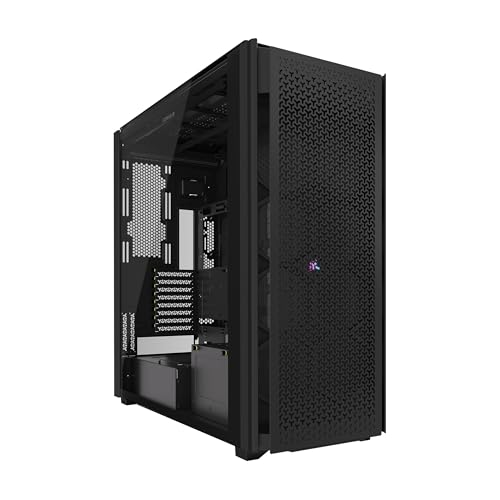
CORSAIR 9000D RGB Airflow — Maximum capacity
Some loop plans simply outgrow full towers, and the 9000D exists for the moment a builder says so out loud. Corsair’s listing describes a super full-tower — a size class above the ordinary flagship — in the RGB Airflow line, and for dual loops that scale translates into the one resource two circuits consume fastest: radiator and reservoir room, in multiple zones, without any component negotiating with another for the last mounting position.
The Airflow designation matters at this scale. A case this large, carrying two loops’ worth of radiators, moves serious air, and Corsair’s airflow-first design philosophy treats that movement as the product rather than an afterthought. The RGB layer is the presentation system for a build that will inevitably be looked at — a super-tower cannot be inconspicuous, so it may as well be deliberate. Builders inside Corsair’s fan and lighting ecosystem will find the 9000D the natural flagship of that system; builders outside it are buying volume and airflow engineering, which are reasons enough.
Respect the logistics before ordering. A super full-tower is furniture-scale: measure the desk or floor position, the doorway it arrives through, and the human beings required to move it once two loops have filled it with water — a filled 9000D build is not a one-person lift, and draining both loops before any move becomes part of ownership. Granted a permanent home, it is the capacity ceiling of this list, the case for the builder whose dual loop keeps growing a third radiator and a second reservoir and refuses to be told no.
- Form factor: Super full-tower
- Cooling line: RGB Airflow series
- Colour: Black
- Design family: Corsair flagship tower line
- Intended role: Maximum-capacity custom cooling
Strengths
- The largest capacity here — two loops expand without competing for mounting space.
- Airflow-first design suits the serious air movement multiple radiators require.
- Integrated RGB presentation matches the build’s inevitable centrepiece status.
Trade-offs
- Furniture-scale footprint and filled weight demand a permanent, planned position.
- Its capacity is wasted on modest loops — the case expects maximal hardware.
- Moving the finished build realistically requires draining both loops first.
Best for: a maximal dual-loop build whose radiator and reservoir plans exceed full-tower room. Not suited for: a build that may need to move rooms or homes often, since a filled super full-tower is effectively a fixed installation.

Phanteks Enthoo Pro 2 Server Edition — Best workstation loop host
Not every dual loop cools a gaming rig. Render workstations, simulation machines and AI development boxes run processors and accelerators at full load for hours, and their owners split loops for the same thermal-separation reasons gamers do — with uptime, not frame rates, as the prize. The Enthoo Pro 2 Server Edition is this list’s answer for them: Phanteks’ listing states SSI-EEB motherboard support, the workstation board format, in a server-edition chassis whose interior volume is organised for hardware density rather than display.
That orientation changes the loop conversation usefully. In a workstation, the two loops are infrastructure: radiators placed for airflow efficiency, reservoirs placed for service access, tubing routed for reliability rather than photography. The Enthoo Pro 2’s cavernous, panelled interior serves exactly that discipline, with room for the storage arrays and long accelerators that share a workstation’s life, and a presentation — fabric-and-steel sobriety rather than glass theatre — that suits an office or studio where the machine is a tool.
The “11-” fragment at the end of its listing title hints at the drive-bay generosity the Enthoo Pro line is known for, though we will not build a claim on a truncated line; what the title states plainly — SSI-EEB support and the server-edition brief — is enough to define the pick. If your dual loop’s home is a desk with a render queue rather than a streaming backdrop, this is the case that takes your priorities seriously.
- Form factor: Full tower, server edition
- Motherboard support stated in title: SSI-EEB
- Model reference: PH-ES620PTG_BK02
- Colour: Black
- Intended role: Workstation and server builds
Strengths
- SSI-EEB support hosts true workstation boards that gaming cases cannot accept.
- Server-edition interior prioritises hardware density and service access over display.
- Volume accommodates storage and long accelerators alongside two loops.
Trade-offs
- Its sober, tool-first presentation offers little of the glass theatre showpiece builders want.
- Workstation scale and layout are oversized for a purely gaming-focused loop.
- The density-first interior rewards methodical builders; casual layouts waste its organisation.
Best for: a dual-loop workstation on an SSI-EEB board, where the loops are infrastructure for long compute loads. Not suited for: a glass-showpiece gaming build, because the server-edition design spends its volume on density and access rather than display panels.

Thermaltake Core P6 TG — Most flexible mid-tower
The Core P6 TG is the diplomat of this list: a mid-tower ATX case with three tempered glass panels that can live two lives — enclosed as a glass showcase, or opened into the P-series’ exposed configuration when the build, or the season, calls for it. Its title also names wall mounting among its talents, which for a dual-loop build is more than a novelty: a wall-mounted machine frees the desk entirely and turns two coloured loops into the room’s artwork, provided the wall and the bracket are treated with the seriousness a water-filled PC deserves.
In mid-tower terms, a dual loop inside the P6 is a study in planning. The volume does not forgive sprawl the way the EVO XL or 9000D do; radiator assignment, reservoir placement and tube routing must be decided as one drawing before the first fitting is bought. Builders who enjoy that discipline get a reward the big towers cannot offer — a dual loop with the visual density of a well-composed photograph, every component earning its position, in a case that still fits a normal room.
Its flexibility is the deciding argument. Enclosed for the dusty months, open for a service weekend, wall-mounted when the desk needs to breathe — the P6 adapts to the owner’s life in a way the fixed-architecture flagships do not. For a first dual loop, where the builder’s own habits are still being discovered, that adaptability is worth more than raw capacity: the case can change its mind as the builder changes theirs.
- Form factor: Mid-tower ATX
- Panels stated in title: 3x tempered glass, 4mm
- Mounting: Wall-mount capable
- Design family: Thermaltake Core P convertible line
- Intended role: Flexible showcase and open builds
Strengths
- Convertible design lives enclosed or open, adapting to dust, service and taste.
- Three glass panels present the loops from multiple angles in a mid-tower footprint.
- Wall mounting frees the desk and displays both loops as room art.
Trade-offs
- Mid-tower volume demands a fully planned loop layout — improvisation runs out of room.
- Wall mounting a water-filled build requires serious anchoring and commitment.
- Two loops in this size means compact reservoirs and radiators chosen with care.
Best for: a first or space-conscious dual loop that values adaptability over sheer capacity. Not suited for: a maximal radiator array, because the mid-tower interior cannot host the multi-420mm layouts the full towers here are built around.
How Do the Six Cases Compare Side by Side?
| Case | Scale | Loop advantage | Defining trait |
|---|---|---|---|
| LIAN LI O11D EVO XL | E-ATX full tower | Three stated 420mm radiator positions | Panoramic dual-chamber stage |
| Thermaltake Core P8 | Full tower | Open structure for layout and service | Tempered glass show frame |
| Thermaltake DistroCase 350P | Mid tower | Integrated distro plate routing | Machined channels replace tubing |
| CORSAIR 9000D RGB Airflow | Super full-tower | Maximum radiator and reservoir room | Airflow flagship scale |
| Phanteks Enthoo Pro 2 Server Ed. | Full tower | Workstation density and access | SSI-EEB motherboard support |
| Thermaltake Core P6 TG | Mid-tower ATX | Convertible open or enclosed | Three glass panels, wall mount |
The comparison resolves into a single question: how much of the loop’s order should the case impose? The DistroCase imposes the most, deciding routes by machining. The big towers impose the least, offering volume and trusting the builder. The P-series cases impose a philosophy — openness — while leaving the layout free. There is no wrong answer, only a match or mismatch with the builder’s temperament, and dual-loop ownership is long enough that temperament deserves the deciding vote.
How Do You Plan Two Loops on Paper Before Buying Fittings?
Draw the case, then draw each loop in its own colour of pen. Assign radiators first: the GPU loop takes the position with the cleanest intake air, since the card produces the most sustained heat; the CPU loop takes the next-best zone. Then place pumps and reservoirs where they can be seen — coolant level is a weekly glance, and a hidden reservoir is a neglected one — and where their drain ports sit at each loop’s lowest practical point. A drain that requires tipping a full tower is a drain that will be postponed, and postponed maintenance is how good loops die.
Route tubing on the drawing with the discipline of a plumber: runs should be parallel or perpendicular where possible, crossings should be few and deliberate, and every run should be removable without dismantling the other loop. That last rule is the dual-loop-specific one — the entire point of two circuits is that each can be serviced while the other stays sealed, and a layout that interleaves them into a single knot throws the advantage away. Check, on paper, that the GPU loop can be drained, its block removed and its radiator lifted with the CPU loop untouched. If it cannot, redraw.
Finally, cost the fittings before falling in love with the drawing. Every bend avoided by a fitting is money; every run is two fittings minimum; two loops double everything. A fittings list written beside the drawing turns the plan from a sketch into a budget, and the budget — reviewed cold, a day later — is the difference between a build that finishes and a build that stalls at eighty percent with a forum thread asking for encouragement.
How Do You Leak-Test and Maintain Two Loops Without Drama?
Leak-test each loop separately, filled with distilled water, pumps running, electronics unpowered, for a full day — with paper towels beneath every fitting, because a slow weep announces itself on paper hours before it would announce itself on a motherboard. Air-pressure testing, where your fittings ecosystem supports it, is even better: it finds the loose joint without wetting anything. Test loop one, then loop two, then both together, because the second loop’s installation day is when the first loop’s fittings get knocked.
Maintenance runs on a calendar, not on symptoms. Coolant in both loops is inspected monthly — level, clarity, colour honesty — and replaced on the manufacturer’s schedule or annually, whichever arrives first; the two loops can share a service weekend, with each drained, flushed and refilled in turn so the machine is never doubly dismantled. Keep a small stock of the exact coolant, spare fittings of each size used, and the build’s own drawing annotated with what was actually installed. The drawing you planned from is a sketch; the annotated version is the machine’s medical record, and the second owner of a dual-loop build — or the first owner, eighteen months later, at midnight — will bless it.
Safety habits deserve one plain paragraph. Water and powered electronics are kept apart by your diligence alone: never fill or drain with the system powered, route no run directly above the power supply where a drip falls into its vents, and treat any unexplained coolant loss as a stop-and-inspect event rather than a top-up opportunity. Coolant goes somewhere. Finding where, early, is the whole art.
What Mistakes Do Dual-Loop Builders Regret Most?
The first is buying radiators by enthusiasm rather than by zone — filling every stated position because the case allows it, and discovering that three radiators on one loop and a starved second loop performs worse than a balanced split. The second is neglecting the drains: two beautiful loops with no drain ports become two syringes-and-regret sessions at the first coolant change, and builders routinely retrofit drains within the year, at the cost of a full teardown. Plan the drains with the same love as the reservoirs.
A related trap is symmetry worship: insisting the two loops mirror each other exactly — same radiator size, same reservoir height, same run geometry — when the components they cool have entirely different shapes and heat patterns. Symmetry is a fine servant in the visible runs and a poor master in the engineering. Let the GPU loop be the shape the card needs and the CPU loop the shape the processor needs, and unify them with colour, fitting finish and routing discipline instead. The builds that look most intentional are rarely the most symmetrical; they are the ones where every visible decision can be explained, and “the card runs hotter for longer” is a better explanation than “it matched the other side.”
The third mistake is aesthetic overreach in coolant choice. Deeply opaque, particle-heavy coolants photograph magnificently and settle, clog and stain magnificently too, doubling maintenance in both loops. Clear or lightly tinted coolant in two honest colours is the experienced builder’s choice — the sculpture survives on its tubing and layout rather than on a fluid that fights you. The fourth mistake is forgetting the room: a dual-loop flagship is a space heater with opinions, and a small unventilated room will teach that lesson across one summer of gaming.
Hard Tubing or Soft Tubing for a Two-Loop Build?
The tubing decision shapes a dual loop more than any other, because two loops double whatever the tubing makes difficult. Soft tubing — flexible, forgiving, installed with compression fittings — is the pragmatic medium: it tolerates imperfect measurements, it can be rerouted during a service session without a heat gun, and it forgives the small misalignments between a block and a radiator that every real build contains. In a working workstation like the Enthoo Pro 2 build, or a frequently serviced P8, soft tubing is not the compromise option; it is the professional one, and in matte black or clear finishes it can look entirely deliberate.
Hard tubing — acrylic or PETG bent with heat, or metal and glass for the truly committed — is the sculptural medium. Its straight runs and perfect right angles are the visual signature of the showpiece dual loop, the reason two colours in an EVO XL look like an engineering diagram brought to life. The costs are real: every run is measured, cut and bent to its exact path; a component change can invalidate several runs at once; and in a dual loop the labour is not doubled but compounded, because the second loop’s runs must thread a space already occupied by the first loop’s finished geometry.
The experienced compromise is to decide per loop. A common pattern runs hard tubing on the visible GPU loop — the sculpture — and soft tubing on the CPU loop or on the hidden segments behind a distro plate or chamber wall, where flexibility serves maintenance and nobody photographs the result. The DistroCase makes its own version of this decision for you, replacing runs with channels wherever the plate reaches. What matters is that the choice is made as a design decision at the drawing stage, with fittings counted accordingly, rather than discovered at the workbench with one loop already gleaming and the second loop’s tubing still on the shelf.
How Do Pumps, Reservoirs and Fans Change Between Two Loops?
Each loop needs its own pump and its own reservoir volume — that independence is the definition of the design — and the case choices in this guide were filtered partly on whether two of each can be mounted as a designed arrangement rather than a negotiation. Combination pump-reservoir units save space and simplify mounting, which is why mid-tower dual loops like the P6 build lean on them; separate pumps and tube reservoirs give the full towers their classic paired-column look and make each loop’s level readable at a glance across the room.
Pump control deserves planning in a dual build. Two pumps at mismatched speeds produce a beat frequency the ear finds oddly tiring, and two loops under different loads want different fan curves anyway — the GPU loop’s fans answer a sustained gaming load, the CPU loop’s fans answer bursts. Drive each loop’s pump and fans from its own control channel, tuned against its own component’s temperature, and the machine stays composed in a way a single shared curve never achieves. This is also where the two loops’ independence pays its quietest dividend: at desktop idle, one loop can fall nearly silent while the other handles a background render.
Fan direction across multiple radiators is the airflow puzzle the case either solves or leaves to you. The clean pattern feeds radiators with the coolest available air and gives heated air a short exit: intake radiators low and front, exhaust high and rear, with the two loops assigned so neither drinks the other’s exhaust. In the panoramic towers, the side and bottom positions make that pattern natural; in the open P-series frames, the room itself is the plenum and the puzzle dissolves. Whichever case you choose, draw the air’s path on the same sheet as the water’s — a dual loop is two fluid systems, coolant and air, and the build succeeds when both drawings agree.
What Does a Dual Loop Cost Beyond the Case — and Where Should the Money Go?
Honesty about the bill keeps dual-loop projects alive. Beyond the case, each loop wants a pump, a reservoir, radiators, fans, a block per component, tubing and a fittings count that surprises every first-time builder — and then doubles, because there are two of everything. The case is genuinely one of the smaller cheques in the project, which reframes the picks above: choosing the EVO XL over a lesser tower is not extravagance, it is protecting a much larger investment in cooling hardware with a chassis that will not fight it.
Spend first on the parts whose failure is wet: pumps from established makers, fittings counted generously so no run is ever forced, and a proper drain assembly per loop. Spend next on radiator quality and fans, where the money converts directly into silence. The place to economise is the decorative layer — elaborate coolant, novelty fittings, extra lighting — because decoration can be added to a sound loop at any later date, while a sound loop cannot be retrofitted under finished decoration. Builders who reverse that order own beautiful machines that are down for repairs; builders who follow it own machines that happen, over time, to become beautiful.
One more budget line belongs in every dual-loop plan: the contingency for the second attempt. A bent tube that must be remade, a fitting size misjudged, a reservoir position that collides with a card — the first dual loop teaches through small purchases, and a plan with no slack in it turns each lesson into a stall. The cases in this guide reduce the tuition by offering room and access, but no case eliminates it, and the builder who budgets for the learning curve is the one still enjoying the machine in year three.
How Quiet Can a Dual Loop Be — and What Does the Case Have to Do with It?
Watercooling’s founding promise was silence, and a dual loop keeps it better than any air-cooled flagship: two loops spread heat across so much radiator surface that fans can turn slowly, and slow fans under large radiators are the quietest cooling arrangement a powerful PC can have. The case’s contribution is threefold. It must hold the radiator area that makes slow fans possible — the EVO XL’s three 420mm positions are a silence feature as much as a cooling one. It must not rattle, hum or resonate with two pumps, which favours rigid frames and pumps mounted on decoupling material. And it must place the machine’s noise where the room tolerates it, which is why the open P-series builds, for all their serviceability, ask their owners to accept pump voices that an enclosed tower would have absorbed.
Pump placement is the detail that decides the result. A pump coupled rigidly to a thin panel turns the panel into a loudspeaker; the same pump on a decoupled mount, inside a chamber, is a murmur. When you draw the loops, draw the pumps onto structure — thick brackets, chamber floors, distro plates — and budget the decoupling mounts as part of the build rather than as an aftermarket apology. In the dual-chamber towers, the rear room is the pumps’ natural home: close to the reservoirs they serve, hidden from the glass, and wrapped in enough structure to keep their working sounds to themselves.
The final acoustic trick is fan-curve patience. Two loops give you two thermal masses of water, and water temperature moves slowly; fan curves tied to coolant temperature rather than component temperature stay calm through the processor’s spikes, rising only when the loop itself has genuinely warmed. Set that way, a dual-loop machine idles in near-silence, works in a murmur, and only announces itself in the hardest sustained loads — at which point the owner is usually wearing headphones or watching the render finish, and the announcement goes unremarked. That composure, as much as the colours, is what the cases above are really selling.
When Should a Dual-Loop Build Be Rebuilt Rather Than Upgraded in Place?
Dual loops age in layers, and knowing which layer you are touching saves money and tempers. Component upgrades — a new graphics card, a new processor — ask only for new blocks and, in a hard-tubed loop, the runs that touch them; the cases above were chosen partly so that surgery stays local, with the other loop sealed and undisturbed. Coolant and tubing age on their own schedule: soft tubing clouds and hardens across years, hard tubing can craze or stain under aggressive coolants, and a loop approaching a full fluid and tubing refresh is often the right moment to reconsider the layout itself, since the machine is already drained and open.
The case outlives all of it, which argues for buying the chassis one size more honest than the current plan. The builder who chooses the P6 for a compact dual loop and then falls for a second accelerator has bought a migration; the builder who chose the EVO XL or the 9000D has bought headroom that absorbs the same ambition as a weekend project. Neither is a mistake — tastes genuinely change — but the pattern is common enough to plan around: in this hobby, the second build is usually the first build plus the thing the first build taught you to want. A case with room for that lesson is the closest thing watercooling offers to future-proofing.
There is also a dignity in knowing when a loop is finished. A dual loop that runs quietly, holds its levels, and has survived two coolant changes without a weep is a completed work, and the healthiest owners resist reopening it for novelty’s sake. The cases will wait — that is the virtue of steel and glass — and the next platform change will give the rebuild its honest occasion. Until then, the machine’s job is to disappear under the desk’s edge, two colours moving silently, while the work or the game takes the whole of your attention.
Final Recommendation
Choose the Lian Li O11D EVO XL for the classic flagship answer — stated triple-420mm capacity inside the panoramic stage this hobby’s showpieces are built on. Choose the Corsair 9000D when the plan outgrows even that, the DistroCase 350P when you want the case itself to impose order on the runs, the Core P8 for an open showpiece that lives to be serviced, the Enthoo Pro 2 Server Edition when the loops cool a workstation, and the Core P6 TG when adaptability matters more than acreage. Whichever you build in, draw both loops on paper first and fit the drains you will thank yourself for — because the evening a finished dual loop first lights up, two colours moving through clean runs in a quiet room, is the moment every hour of planning gets repaid at once.
Frequently Asked Questions
Is a dual loop much cooler than a single loop?
Modestly, not dramatically. Its real gains are independence — each component’s coolant unaffected by the other’s heat — and tuning freedom. Builders chasing pure temperatures per pound spent are better served by one large, well-planned single loop; dual loops repay their cost in control and presentation.
How many radiators does each loop need?
As a planning rule, each loop wants radiator capacity matched to its component’s sustained heat, with more surface allowing slower, quieter fans. The EVO XL’s three stated 420mm positions let one loop take two radiators if its load justifies it — the drawing stage is where that assignment should be decided.
Can a mid-tower really hold two loops?
Yes, with discipline — the DistroCase 350P and Core P6 TG both prove it. The mid-tower tax is planning: compact reservoirs, radiators chosen by measurement rather than ambition, and runs drawn before fittings are ordered.
What is a distribution plate, and does it replace the pump?
A distro plate is a machined channel block that routes coolant between components, replacing long tubing runs with internal channels and short straight links. It does not replace the pump — plates integrate or mount pumps as part of the loop, and each loop in a dual build still needs its own pumping and reservoir provision.
How often do two loops need maintenance?
Monthly visual checks of level and clarity, and a drain, flush and refill on the coolant maker’s schedule — commonly annual. Two loops can share one service weekend, handled in turn, which keeps the routine to a single planned event rather than a drip of interruptions.
Do I need two pumps, or can one pump drive both loops?
One pump driving both circuits makes them one loop with a junction, not two loops — the independence that justifies the whole design disappears. Each circuit needs its own pump and reservoir so that flow, maintenance and failure stay separated; a failed pump then idles one component rather than draining the machine’s entire cooling system at once.
How much desk or floor space does this class of build really need?
More than the case’s footprint: allow working room on the panel side for service, clearance above and behind for exhaust air, and a stable position where a filled machine will not be nudged. The super-tower and full-tower picks are effectively furniture decisions, while the two mid-towers are the escape route when the room votes no.
Which pick suits a workstation rather than a gaming rig?
The Phanteks Enthoo Pro 2 Server Edition. Its stated SSI-EEB support and server-edition interior are designed for workstation boards, storage density and service access — the priorities of a machine whose loops cool long compute loads.
Related Guides
Go deeper with our guides to planning your first custom watercooling loop, choosing radiators and fans for quiet cooling and coolant types and maintenance schedules, each written for builders who measure twice and fill once, and who understand that in a two-loop machine the case is not the container of the project but its foundation — the one decision every later decision, from radiator order to drain placement, quietly stands on for the whole life of the build.


