What's inside
- Where to buy
- Key Takeaways
- Quick Picks
- How Did We Shortlist These Six Card Printers?
- What Actually Happens Inside a Dual-Sided Card Printer?
- Which Cards Will You Actually Be Printing?
- What Should You Know About Card Design Software Before It Strands You?
- When Do Magnetic Stripes, Barcodes and Chips Actually Matter?
- How Do You Keep a Card Printer Printing Cleanly for Years?
- Should Your Programme Add Lamination, and When?
- What Happens on Day One: Setting Up an Issuing Desk That Works
- How Do You Handle Lost, Stolen and Returned Cards?
- How Fast Is Fast Enough for a Card Office?
- What Makes a Card Design Read Well at Two Metres?
- What Should a Support and Spares Plan Look Like?
- How Do Multi-Site Organisations Keep Cards Consistent?
- Bundle or Bare Machine: Which Listing Shape Saves You Money?
- What Happens to All the Plastic? Cards, Waste and Honest Disposal
- How Should You Test a New Card Printer During Its First Week?
- Why Do Some Offices Still Print Single-Sided and Flip by Hand?
- Ribbons, Blank Cards and the Real Cost of a Finished Badge
- Where Do the Six Printers Stand When the Enrolment Queue Forms?
- Which Card-Printing Mistakes Waste the Most Money?
- Final Recommendation
- Frequently Asked Questions
- Related Guides
As an Amazon Associate I earn from qualifying purchases. This post may contain affiliate links at no extra cost to you.
gizmoverdict.com is reader-supported. When you buy through links on our site, we may earn an affiliate commission.
Where to buy
The best dual sided card printers share one mechanical trick — a flipper that turns the card inside the machine so the back prints in the same pass — and differ in almost everything that decides whether issuing badges feels effortless or endless. Throughput, ribbon economics, security features and software decide that experience far more than the duplex mechanism itself, which every machine in this guide performs. The six picks below come from the four manufacturers who define this market — Zebra, Magicard, Evolis and HID Fargo — plus IDP, whose SMART series has earned its place in plenty of school and club card offices. Two of the six are sold as supplies bundles, which matters more than it sounds, because a card printer without ribbons and blank cards is a paperweight with a flipper.
Think about what the back of your card carries before you think about brands. A magnetic stripe or a signature panel, a block of emergency contact text, a barcode, a second photo, the terms of a membership — the reverse side is where a card stops being a picture and becomes a document. Dual-sided printing in one pass keeps front and back registered to the same card every time, which sounds minor until you have watched an operator hand-flip two hundred cards through a single-sided machine and misalign a tenth of them. The machines here span the realistic range: compact desk units for a school office, mid-volume workhorses for a gym chain’s front desks, and security-minded models whose watermark and encoding options serve workplaces where a badge is also a key.
Key Takeaways
- Every pick prints both sides in a single pass; the differences that matter are ribbon cost per card, feeder capacity, encoding options and the software bundled or required.
- The Magicard 300 and Evolis Primacy 2 listings are supplies bundles, so their boxes start printing sooner than a bare-machine listing does.
- Zebra fields two picks with different jobs: the ZC300 is the connected all-rounder, while the ZC350 adds specialty ribbon support for effects a plain badge never needs.
- Security separates the field quietly — Magicard’s HoloKote watermark tradition and Fargo’s HID ecosystem answer different threat models than a club membership card faces.
- Card stock is not interchangeable in practice: match PVC card thickness and ribbon type to the printer’s stated design before ordering consumables in bulk.
Quick Picks
| Pick | Badge | Why it earns its place |
|---|---|---|
| Zebra ZC300 | The connected office standard | A slim, network-friendly machine from the maker whose card printers anchor corporate badge offices. |
| Magicard 300 Bundle | The security watermark bundle | Arrives with supplies and carries Magicard’s HoloKote anti-copy watermark heritage for badges that double as credentials. |
| Evolis Primacy 2 Bundle | The volume issuer’s bundle | Evolis built its name on fast, high-capacity issuance, and the bundle format suits a desk that prints in batches. |
| Fargo DTC1250e | The HID entry point | The approachable end of the Fargo line, for organisations already inside HID’s access-control world. |
| IDP SMART-51D Card Printer | The EZLoad bundle worker | IDP’s mid-range dual-sided machine in a bundle built around its cartridge-style ribbon loading. |
| Zebra ZC350 | The specialty ribbon step-up | Supports specialty ribbons and effects beyond plain colour, for cards meant to be looked at, not just scanned. |
How Did We Shortlist These Six Card Printers?
The first requirement was a genuine dual-sided mechanism from a manufacturer with a real consumables pipeline, because a card printer is a ten-year relationship with ribbon SKUs and driver updates, not a one-off gadget. Listings had to name the model plainly — the card market is full of vague titles hiding older or single-sided variants — and where a listing was a bundle, the bundle contents were treated as part of the value rather than decoration. Machines were then weighed on the questions an issuing office actually asks: how many cards sit in the feeder before someone must reload, what a finished card costs in ribbon and stock, whether magnetic stripe or smart-card encoding can be added, and how the printer behaves on a network shared by three departments that all print at nine in the morning.
Security was weighed separately from speed, because the two pull in different directions. A leisure centre printing membership cards needs neither watermarks nor encoding; a contractor badge that opens doors needs both conversations held before purchase, not after the first audit. The six below therefore do not form a single ladder from worst to best. They form a map: pick the territory your cards live in — volume, security, connectivity, presentation — and the right machine is the one whose strengths sit in that territory.
What Actually Happens Inside a Dual-Sided Card Printer?
Most desktop card printers print by dye sublimation: a ribbon carrying panels of yellow, magenta, cyan, black resin and a clear overlay passes under a thermal head, which vaporises dye into the card surface colour by colour, then seals the result under the overlay panel. The black resin panel prints the sharp text and barcodes that dye alone would render fuzzy, and the overlay is what stands between your badge and a year of wallet friction. In a dual-sided machine the card then meets the flipper — a rotating station that turns it over so the same process can decorate the back before the card leaves through the output hopper. One card, one journey, both faces finished.
Understanding that chain explains most buying advice in this category. Ribbon panels are consumed per card regardless of how little ink the design uses, so cost per card is a property of the ribbon, not of your artwork’s modesty. Edge-to-edge claims depend on the printhead and card handling, and true borderless work historically belongs to retransfer machines that print onto film and laminate it down — a different class above these desktop direct-to-card models. And because the image sits in and on a PVC surface, card quality matters: cheap warped blanks cause more jams and print faults than any printer setting ever will.
Which Cards Will You Actually Be Printing?
Sit with your real card before reading another specification. A staff badge usually wants a photo, a name in type large enough for a security guard’s glance, a department or colour band, and on the back a barcode or access number plus return instructions if the card is found. A membership card trades the photo for a big number and leans on the back for terms, a signature strip and a magnetic stripe the till can read. An event credential lives for three days and dies unmissed, which argues for the cheapest ribbon path that still looks intentional. A student card must survive four years of pockets, which argues for overlay discipline and decent stock over any printing flourish.
Each of those cards stresses a different line in the spec sheet. Photo-heavy work rewards colour consistency and a head in good health; text-heavy backs reward the resin black panel and honest resolution; encoded cards reward buying the encoder at purchase rather than retrofitting it in a panic before term starts. The six reviews below name, for each machine, the card it suits best — and the card it should be excused from.

Zebra ZC300 Dual Sided Card Printer — The connected office standard
Zebra’s ZC300 was designed to disappear into an office: a narrow footprint, a front-facing card path that lets it sit against a wall or under a shelf, and the kind of driver and network behaviour IT departments approve without a meeting. In badge-office terms that translates to a machine a receptionist can feed and a facilities manager can forget. The ZC300 prints both faces in one pass, handles the standard CR80 card world, and belongs to a consumables ecosystem — Zebra ribbons and cards — that any office supplier can source without drama.
Where the ZC300 earns repeat recommendations is the unglamorous middle of the market. It is quick enough that a morning intake of forty new starters does not become a queue, connected enough to live on the network rather than tethered to one ageing PC, and restrained enough in design that visitors mistake it for a label printer rather than a security asset worth pocketing. Buyers should confirm the exact connectivity and any encoding fitted to the listing’s configuration before ordering, since the ZC family ships in variants; a magnetic encoder is a factory decision, not an afternoon retrofit. For a general office issuing staff and visitor cards weekly, this is the pick that asks the fewest follow-up questions.
- Process: dye sublimation straight onto the card surface
- Duplexing: built-in flipper, both faces in one pass
- Maker: Zebra — card printer line with broad consumables support
- Encoding options: variant-dependent — not stated in the listing title, verify with the seller documentation
- Position: networked office all-rounder
Strengths
- A footprint and card path shaped for real desks, including against-the-wall placement.
- Zebra’s ribbon and card supply chain is about as easy to feed as this category gets.
- Balanced pace and quality for mixed photo-and-text badge work.
Trade-offs
- Configuration variants mean the listing’s exact options need checking before purchase.
- It prints direct-to-card, so true borderless retransfer quality sits in a class above it.
- Specialty ribbon effects belong to its ZC350 sibling rather than to this machine.
Best for: a general office or school issuing staff, visitor and student cards on a shared network. Not suited for: a high-security site whose badges must carry advanced encoding specified at tender.
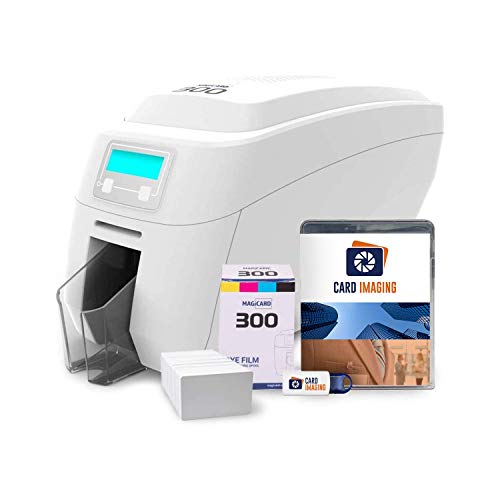
Magicard 300 Dual Sided Card Printer — The security watermark bundle
Magicard’s distinction in this market is a security feature the company has championed for decades: HoloKote, a watermark tiled across the card’s overlay during printing, visible when the card tilts in the light and miserable to reproduce on a colour copier. The Magicard 300 carries that heritage into a mid-range dual-sided machine, and this listing sweetens the arrangement by arriving as a supplies bundle, so the first ribbons and cards are a known quantity rather than a second order placed in a panic on enrolment day.
The 300 suits organisations whose card is a credential in the literal sense — it will be inspected, doubted and occasionally challenged. Training providers, examination centres, facilities with contractor churn: in those rooms a watermark quietly raises the cost of forgery from a printer cartridge to a genuine problem. Day to day, the machine behaves like the competent mid-volume printer it is, with a feeder sized for batch sessions rather than one-card interruptions. Confirm which HoloKote design and which bundle contents the listing includes, and whether the software your office will design cards in is accounted for, since design software is the piece bundles most often leave to the buyer.
- Technology: direct-to-card dye-sub with overlay panel
- Two-sided output: single-pass, automatic flip
- Security: HoloKote watermark tradition — confirm design with the seller documentation
- Listing format: printer and supplies bundle
- Position: credential-focused mid-volume machine
Strengths
- The watermark gives visual security no plain badge in this guide can match.
- Bundle format removes the consumables guesswork from the first print run.
- A feeder and pace matched to batch issuing sessions.
Trade-offs
- Visual security is not electronic security — access systems still need proper encoding choices.
- Bundle contents vary, so the ribbon yield in the box needs confirming.
- Card design software may remain a separate decision and cost.
Best for: training, education and contractor-heavy workplaces whose badges get visually inspected. Not suited for: a casual club card programme paying for security its doors never check.

Evolis Primacy 2 Dual Sided Card Printer — The volume issuer’s bundle
Evolis built the Primacy line around a simple observation: card offices print in floods, not drizzles. Term starts, season renewals, a conference next week — the feeder capacity, ribbon yield and print pace of a machine matter on exactly those days, and the Primacy 2 is the pick here shaped by that calendar. This listing packages the dual-sided machine as a supplies bundle, which suits the volume story: the first flood should not wait on a consumables delivery.
In service, the Primacy 2 is the machine a multi-site operation standardises on, because its consumables are consistent, its output is colour-stable across long runs, and its options path — encoding, and lamination in the wider Primacy ecosystem — lets a growing programme add capability without replacing the fleet. The honest caution is scale in the other direction: a two-person studio printing five cards a month will never feel the benefits it is paying for, and will feel the footprint. Buy this for the flood days you actually have, not the ones a brochure imagines, and verify the bundle’s ribbon type matches your card design — a half-panel ribbon in the box changes your cost maths pleasantly, but only if your design’s photo area fits the half panel.
- Imaging: thermal dye sublimation, direct to card
- Faces per pass: two, via internal turning station
- Listing format: printer and supplies bundle
- Maker: Evolis — issuance-focused card printer line
- Position: batch and multi-site volume work
Strengths
- Designed around batch issuing, with capacity and pace for flood days.
- Colour consistency across long runs suits branded membership programmes.
- An options path that lets a programme grow without replacing machines.
Trade-offs
- Oversized for offices whose card printing is a monthly handful.
- Bundle ribbon type must match your design’s layout to deliver its economy.
- Lamination and encoding live in the options list, not automatically in the box.
Best for: schools, gyms and member organisations issuing cards in seasonal batches. Not suited for: a micro-office printing a few badges a month from a desk corner.
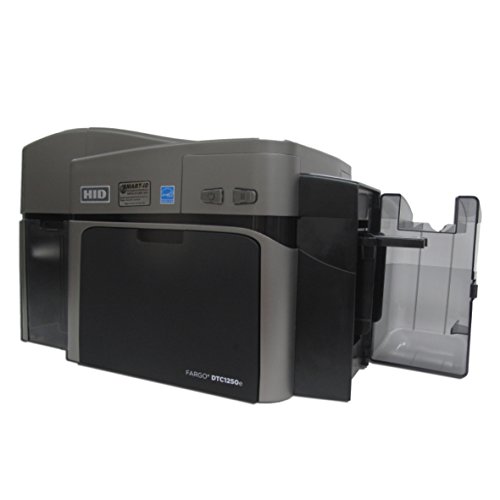
Fargo DTC1250e Dual Sided Card Printer — The HID entry point
The DTC1250e is the doorway into HID Fargo’s world, and its value is inseparable from that world. Organisations running HID access control, HID readers and HID credentials buy Fargo printers because the badge on the lanyard and the reader on the wall were designed to understand each other. As a machine, the 1250e is deliberately straightforward: fast for its class, compact, dual-sided in one pass, and aimed at small-to-mid issuance volumes where a facilities team prints badges as part of a wider security routine rather than as a production event.
That positioning cuts both ways, and the review should say so. If your building has no HID infrastructure and no plan for any, the Fargo premium buys you a badge your doors treat like anyone else’s, and rivals in this guide compete hard on exactly that plain ground. If your building does run HID — or a coming refit will — then starting card issuance inside the same ecosystem simplifies encoding decisions, credential sourcing and support conversations for years. Check the listing’s configuration for the encoder options fitted, and note that Fargo’s higher tiers exist precisely for the volumes and security features this entry model leaves out; buying the 1250e is buying the ecosystem’s ground floor, with stairs available.
- Print process: dye sublimation onto the card, sealed by overlay
- Duplex: yes — second face printed without re-feeding
- Maker: HID Fargo — access-control credential ecosystem
- Encoding options: configuration-dependent — not stated in the listing title, verify with the seller documentation
- Position: entry point for HID-aligned sites
Strengths
- Credential and reader decisions simplify when one ecosystem supplies both.
- Quick, compact and undemanding for routine badge issuance.
- A clear upgrade path within the Fargo range as volume grows.
Trade-offs
- The ecosystem logic weakens if your site has no HID doors to align with.
- Entry-tier capacity shows during enrolment-scale print floods.
- Advanced security printing belongs to higher Fargo tiers.
Best for: a site already invested in HID access control issuing routine staff badges. Not suited for: a standalone membership programme with no access-control ambitions.
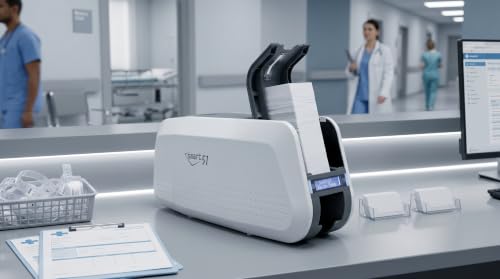
IDP SMART-51D Card Printer — The EZLoad bundle worker
IDP’s SMART-51D approaches the card office from the consumables drawer outward. Its EZLoad concept — the phrase this bundle is sold under — treats ribbon changing as a cartridge-style swap rather than a threading exercise, which anyone who has rethreaded a ribbon under time pressure, with a queue of new starters watching, will recognise as a quality-of-life feature rather than a gimmick. The 51D is the dual-sided member of IDP’s mid-range SMART family, a line that has quietly accumulated a following in education, healthcare administration and club programmes that print steadily all year.
Steadiness is the right word for its appeal. The SMART-51D does not chase the security theatre of watermarks or the presentation effects of specialty ribbons; it promises dependable two-sided cards, sensible running costs and a ribbon routine a new administrator can learn in one demonstration. The bundle format fits that promise, putting the first consumables in the same box. Two checks before ordering: confirm whether your programme will ever want lamination, because within the SMART family that conversation belongs to a sibling model, and confirm the bundle’s included software arrangements if your office designs cards in-house. For a programme whose needs are known and stable, this is the low-drama pick of the six.
- Method: direct-to-card dye sublimation with resin black panel
- Two-sided: yes, in a single pass through the machine
- Ribbon loading: EZLoad cartridge-style, per the listing
- Listing format: bundle
- Position: steady mid-volume programme work
Strengths
- Cartridge-style ribbon loading shortens the fiddliest routine in card printing.
- A steady, mid-volume temperament suits year-round programmes.
- Bundle packaging aligns the first consumables with the machine.
Trade-offs
- Lamination ambitions point to a different model in the maker’s family.
- No headline visual-security feature for inspection-heavy credentials.
- Design software arrangements need confirming for in-house card design.
Best for: schools, clinics and clubs running a constant, moderate flow of two-sided cards. Not suited for: a programme planning laminated, high-durability credentials from the outset.

Zebra ZC350 Dual Sided Card Printer — The specialty ribbon step-up
The ZC350 exists for the moment a card stops being purely functional. Built on the same family virtues as the ZC300 — slim body, office-friendly handling, Zebra’s consumables reach — it adds support for specialty ribbons: the pearlescent, metallic and colour-shifting effects that turn a gift card, loyalty card or event pass into something a wallet keeps facing outward. That is a narrower talent than it sounds, and a more commercial one. Cards people admire get retained, photographed and shown; cards people ignore get lost and reissued at your expense.
Choose it with your card’s job description in hand. A retail loyalty programme, a attractions pass, a premium membership tier — these repay presentation. A warehouse badge does not, and paying the step-up for effects no one will see is how card budgets quietly bleed. The ZC350 also inherits the family caution about configurations: encoding and connectivity are variant decisions, so read the listing’s specification rather than its headline. Paired with a designer who understands what specialty panels can and cannot do — they reward bold shapes and punish fine photographic detail — this is the pick that treats the card as a small piece of brand print, because for some programmes that is exactly what it is.
- Print method: direct-to-card dye sublimation
- Sides: dual-sided in a single pass
- Ribbons: specialty ribbon support beyond standard colour
- Maker: Zebra — sibling to the ZC300 in this guide
- Position: presentation-led cards and loyalty programmes
Strengths
- Specialty ribbons give loyalty and gift cards a finish plain colour cannot.
- Shares the ZC family’s desk-friendly design and consumables reach.
- Full dual-sided printing keeps functional backs available under the flourish.
Trade-offs
- Effects cost money every card, whether or not the card’s job rewards them.
- Specialty panels suit bold design, not fine photographic reproduction.
- Variant configurations still require a careful read of the listing.
Best for: loyalty, gift and premium membership cards where appearance drives retention. Not suited for: purely functional workplace badges audited on cost per card.
What Should You Know About Card Design Software Before It Strands You?
The printer is hardware; the programme lives in software. Somewhere in your office a person will design the card template, connect it to a spreadsheet or database of names and photos, and push print at enrolment. Whether that experience is smooth depends on the design software your setup uses — maker-supplied packages, third-party card design suites, or the access-control platform itself issuing directly. Bundles differ in what they include, and listings differ in what they say, so establish before purchase which program your operator will open on day one, what it costs if it is a subscription, and whether it imports the CSV your HR system exports without a fight.
Database behaviour is where cheap setups go to die. A template that prints one card beautifully but cannot merge four hundred records, suppress duplicates, or record which cards were printed and voided will turn enrolment week into archaeology. Ask how reprints are handled — a lost badge should reissue with a new card number while the old one is flagged dead in the same system that encoded it. None of the six printers in this guide can compensate for software that treats your people database as an afterthought, and all six look brilliant when the software underneath them is boringly competent.
When Do Magnetic Stripes, Barcodes and Chips Actually Matter?
Encoding is the feature buyers either obsess over or forget entirely, and both reactions waste money. A barcode costs nothing to add — it is printed, not encoded — and for libraries, gyms and asset tracking a printed barcode or QR code read by a cheap scanner does everything a stripe does. Magnetic stripes earn their complexity where an installed base of readers expects them: tills, turnstiles and legacy access panels. Contactless and contact chips earn theirs where the credential must be hard to copy and quick to revoke — doors, payments, transit — and there the printer is only the delivery vehicle for a credential system designed elsewhere.
The practical rule is to let the reader estate choose. Inventory the devices your card must talk to over its life, including the refit your facilities team keeps mentioning, and buy the printer configuration that serves that estate. If the honest answer is that the card talks to human eyes and a barcode scanner, spend the encoder budget on better stock and a spare ribbon instead — the ZC300 or SMART-51D will not miss the hardware, and neither will you.
How Do You Keep a Card Printer Printing Cleanly for Years?
Card printers die of dust and optimism. The dust part is mechanical: every machine in this category expects a cleaning cycle with its cleaning cards or rollers at ribbon-change intervals, because PVC blanks shed, offices shed more, and debris on the printhead prints as a white line through every face until someone runs the cleaning routine. The optimism part is human: the belief that a squeak, a ribbon wrinkle or a rising jam rate will resolve itself. It will not; it will resolve into a service call during enrolment week, because that is when marginal machines are asked to work hardest.
Build the small rituals instead. Clean on schedule and log it. Store ribbons sealed, at room temperature, away from the sunny windowsill where the last office kept them. Keep one known-good ribbon and a box of sacrificial blanks for diagnosis, so a fault can be isolated to machine, ribbon or stock in five minutes rather than argued about for a day. And keep the firmware and driver conversation alive with the maker’s support pages — card printers live long lives, and operating systems change underneath them; the office that checks driver support before a big Windows migration is the office still printing on the Monday after it.
Should Your Programme Add Lamination, and When?
Lamination lays a protective film — clear, or carrying a hologram — over the printed card, and it buys two things: abrasion life measured in extra years, and a second layer of visual security. Outdoor workforces, student cards expected to survive a full degree, and credentials inspected at gates are the classic beneficiaries. Indoor membership cards living in phone-case wallets rarely are; for them lamination adds cost per card and a process step to solve a wear problem they do not have.
Within this guide, lamination is mostly a roadmap question rather than a box feature: it lives in certain makers’ wider families and upgrade paths, which is why the reviews flag it where a programme’s growth makes it relevant. If your wear data — real reprint rates from your current cards — says cards die young, plan for lamination at purchase, in the model or the budget. If your cards die mainly by being lost, lamination spending is decoration, and the money serves better in the reissue workflow.
What Happens on Day One: Setting Up an Issuing Desk That Works
Set the printer where the cards are issued, not where the network point happens to be, and give the operator a workflow laid out left to right: blanks in, printed cards out, a tray for rejects, a camera position with a plain background and fixed light for badge photos. Photograph quality decides how professional a badge looks more than printer resolution does — a well-lit, consistently framed photo printed on a mid-range machine beats a corridor snapshot printed on anything. Fix the camera, mark the standing spot on the floor, and save the framing as a template so every operator produces the same badge.
Then print the unglamorous things: the test card set that lives in the drawer, the laminated settings sheet — ribbon type, template name, encoder configuration, cleaning log — and the reissue procedure written for the day the expert is away. Run one full rehearsal with twenty dummy records before the first real enrolment, including a deliberate reprint and a deliberate void, because the time to discover your software cannot void a card is during the rehearsal. Day one of real issuing should feel like the second time you have done it.
How Do You Handle Lost, Stolen and Returned Cards?
A card programme is a small security system whether it admits it or not, and its credibility rests on the boring lifecycle: issue, suspend, replace, retire. The moment a badge is reported lost, its number — barcode, stripe or chip credential — should be dead in every system that trusts it, and the replacement should carry a new number so the found original cannot quietly return to service. Printers support this only indirectly, through the software’s records, which is another reason the software conversation in this guide precedes the hardware one.
Returned cards from leavers deserve a decision too: destroy encoded credentials rather than recycling them into visitor stock, because a credential’s history follows its number. Visitor cards themselves are the one place recycling is sound — unencoded, visually distinct, signed in and out against a log. Keep the categories visually unmistakable at a glance across a room; colour bands and lanyard colours do this cheaply, and a guard’s two-second judgement is a security feature no ribbon can print.
How Fast Is Fast Enough for a Card Office?
Manufacturers quote card speeds under laboratory kindness: a standard design, a warm machine, an operator who never pauses. Your enrolment morning is none of those things. The honest measure is finished cards per hour at your desk, including photo capture, data checking, the occasional misprint and the human conversations issuing involves. Measured that way, the gap between the six machines in this guide narrows considerably, because the printer is rarely the slowest stage — the camera and the database are. A mid-paced machine fed by a slick capture routine out-issues a fast machine fed by a queue of people spelling their names.
Where raw printer pace does matter is the unattended batch: the overnight or lunchtime run of renewal cards printed from a prepared database, where feeder capacity and ribbon yield decide whether the job finishes or stops at card eighty waiting for a human. If your programme lives on batches, weigh hopper sizes and ribbon yields first — the Evolis and the bundle-format picks speak to you. If your programme lives on walk-ups, weigh handling, noise and the ribbon-change routine — the IDP’s cartridge loading and the ZC family’s desk manners speak louder. Speed is a property of your workflow wearing the printer, not of the printer alone.
What Makes a Card Design Read Well at Two Metres?
A badge has one job at distance: be legible to someone deciding whether its wearer belongs. That imposes a typographic discipline brochures ignore. Names should be set large, in a sturdy typeface, with the surname given room to breathe; role or department should read as a colour band before it reads as words, because colour is what a guard’s eye catches first. Photos should be cropped tight to the face — a badge photo that includes shoulders and scenery shrinks the one feature the card exists to verify. Logos, mottos and decorative gradients all compete with those three elements and should be rationed like the luxuries they are.
The back of the card is a document, and documents reward restraint of a different kind: one purpose per back. A return address and a lost-card instruction. A barcode with its number printed beneath in human-readable type, because scanners fail and eyes remain. Emergency contacts for a school. Terms in type small enough to fit and large enough to be honest. When a design tries to make the back do four jobs, it does none of them at the moment of need — usually a stressed moment, at a gate, in the rain. Design for that moment and the card earns its lanyard.
What Should a Support and Spares Plan Look Like?
Decide, before the first breakdown chooses for you, what your programme does when the printer stops. The minimum viable plan fits on an index card: one spare ribbon and cleaning kit on the shelf, the maker’s support number and your machine’s serial recorded in the settings sheet, a fallback arrangement — a sister site’s printer, a bureau service, a box of temporary paper badges — for the week a part is in transit. Programmes that issue access credentials cannot improvise that week; programmes that issue gym cards merely apologise through it, and the plan should be sized to which of those you are.
Spares philosophy divides by part. Ribbons, cleaning kits and blank stock are consumables — stock them like a kitchen stocks flour. Printheads are the expensive wear item: know the replacement cost and the warranty position for your model before the first head reaches old age, because a head priced into year three’s budget is maintenance, while the same head discovered in year three is a crisis. Keep the purchase records with the settings sheet. Future you, mid-enrolment, will be grateful in direct proportion to how boringly complete that folder is.
How Do Multi-Site Organisations Keep Cards Consistent?
The second site is where card programmes quietly fork. Site one has a template, a ribbon and a routine; site two buys a different printer on a local deal, approximates the template, and within a year the same organisation issues two visibly different credentials — a fact auditors and counterfeiters both notice. Standardising on one model family, one template file under version control, and one consumables list is unglamorous governance, and it is also the entire trick. The Primacy and ZC families both pitch at exactly this buyer, and their presence in this guide is no accident.
Consistency also means calibration habits: the same test card printed at each site monthly and compared, so colour drift is caught as a trend rather than discovered as a complaint. None of this requires the most expensive machine in the guide. It requires deciding that the card is a system, and that the printer — whichever of the six you choose — is the component you can replace without changing the system, provided the template, stock and ribbon discipline stay fixed around it.
Bundle or Bare Machine: Which Listing Shape Saves You Money?
Three of the six picks arrive as bundles and three as machine listings, and the difference deserves arithmetic rather than vibes. A bundle’s value is the yield of what is inside it: ribbon panels translate directly into finished cards, and a bundle carrying a full-size ribbon and a starter stack of blanks lets an office print its first hundred cards without a second transaction. Price that yield against buying the same consumables separately before crediting the bundle with savings — occasionally the bundle is convenience wearing a discount’s clothes, and occasionally it is a genuine head start, and the contents list is the only witness that matters.
Bare-machine listings invert the logic: they suit buyers who already know their ribbon architecture — half-panel versus full-panel, monochrome backs, specialty panels for the ZC350 — and would rather choose each consumable deliberately than inherit a bundle’s assumptions. Established programmes replacing a dead printer are exactly those buyers. First-time programmes almost never are, which is why the bundle picks in this guide skew toward the machines a new office can grow into, and why every bundle review above insists on confirming the contents rather than trusting the word bundle to mean the same thing twice.
What Happens to All the Plastic? Cards, Waste and Honest Disposal
A busy card office generates a quiet river of PVC: misprints, expired memberships, leavers’ badges, the sacrificial test cards this guide keeps recommending. PVC is not a friendly material in general waste, and encoded credentials are not friendly in any waste stream at all — a binned access card with a live credential is a key left in the street. Build the exit into the programme: a destruction routine for encoded cards, a collection habit for plain expired stock, and a check on whether your consumables supplier or local recycler runs a card take-back scheme, as several makers in this category now do.
The cheapest reduction is upstream. Accurate databases print fewer misprints; a rehearsed enrolment prints fewer still; and a reprint log — kept for a term, read once — usually reveals one fixable cause, a misspelled department list or a camera setting, behind half the waste. Programmes that track that log find their cost per good card falling for reasons that have nothing to do with ribbon prices, which is the recurring lesson of this whole category: the printer is the visible machine, but the programme around it is where the money and the quality actually live.
How Should You Test a New Card Printer During Its First Week?
Acceptance testing sounds corporate until the first enrolment morning depends on it. In the first week, print your real template — not the demo card — on your real stock, front and back, and inspect the results the way a sceptic would: barcode scanned by the actual reader at the actual desk, stripe or chip read by the actual access panel, photo judged under the corridor lighting where guards will judge it. Print fifty in a row and time the run; a machine that jams at card thirty has told you something a single perfect card concealed. Then print one card with every field at its longest — the double-barrelled name, the four-line department — because templates fail at the extremes, not at the averages.
Record everything in the settings sheet while it is still interesting: ribbon lot, driver version, the template file’s location, the cleaning date. A week-one fault is a conversation with the seller while returns are simple; the same fault discovered in month three is a negotiation. The six machines in this guide all come from makers with reputations to protect, and the first week is when that reputation is cheapest to invoke. Test like a buyer, and the machine that stays will behave like a colleague.
Why Do Some Offices Still Print Single-Sided and Flip by Hand?
Because for a handful of cards a month, hand-flipping works, and honesty requires admitting it before explaining why it stops working. The crossover arrives quietly: a second operator who loads cards in the wrong orientation, a batch where the backs land upside down relative to the fronts, a morning when forty cards become eighty handling steps and two of them belong to the wrong people. A dual-sided machine removes the flip as a human decision, and with it an entire species of error — misregistered backs, fingerprints on unprinted faces, cards married to the wrong fronts. Programmes rarely regret removing that species; they regret removing it a year late, after the error has introduced itself to someone important. If your issuing volume is growing at all, the six machines in this guide are priced against your future volume, not your present one, and the flipper you buy early is the apology you never have to write.
Ribbons, Blank Cards and the Real Cost of a Finished Badge
Ask a card office what a badge costs and the honest ones answer with the ribbon maths, not the printer invoice. A full-colour dual-sided card consumes a full set of ribbon panels — colour, black resin and overlay for each face as the design demands — so your cost per card is set the day you choose a ribbon family, and it barely moves with artwork. Half-panel colour ribbons exist for designs where the photo occupies one portion of the card, and they cut colour cost substantially for exactly those layouts; matching ribbon architecture to your real card design is the single largest saving available in this category, larger than any discount on the machine itself.
Blank stock is the second lever. Cards are specified by thickness and material, and a printer fed bargain blanks of inconsistent thickness repays the saving in jams, head wear and reprints. Buy stock that matches the printer maker’s stated card specification, keep it in its wrapping until the hopper needs it — PVC surfaces collect dust and fingerprints that print as faithfully as photos do — and handle blanks by their edges. None of this is thrilling, and all of it shows up in your reprint rate, which is where card programmes actually spend their money.
Where Do the Six Printers Stand When the Enrolment Queue Forms?
| Pick | Maker | Bundle | Distinguishing strength | Watch out for |
|---|---|---|---|---|
| Zebra ZC300 | Zebra | Machine listing | Networked office all-round balance | Variant configuration checks |
| Magicard 300 | Magicard | Supplies bundle | HoloKote visual security heritage | Software arrangements |
| Evolis Primacy 2 | Evolis | Supplies bundle | Batch capacity and run consistency | Scale beyond small offices |
| Fargo DTC1250e | HID Fargo | Machine listing | HID ecosystem alignment | Entry-tier ceiling |
| IDP SMART-51D | IDP | EZLoad bundle | Cartridge-style ribbon changes | Lamination sits with a sibling |
| Zebra ZC350 | Zebra | Machine listing | Specialty ribbon effects | Effects cost on every card |
The table hides one truth worth stating in prose: three of these machines would serve a typical school office perfectly well, and the choice among them is really a choice about which future you are buying insurance against — forgery, flood days, or an access-control refit. Name the future first and the printer selects itself.
Which Card-Printing Mistakes Waste the Most Money?
Buying the printer before designing the card wastes the most, because the design decides the ribbon, the encoder and half the software conversation. Second is skipping the encoder at purchase and discovering at enrolment that the access system expects encoded cards; retrofits range from awkward to impossible depending on the model. Third is treating PVC stock as a commodity and feeding a precision machine warped, dusty blanks. Fourth is printing test cards on the good stock during setup week — every office should own a box of sacrificial cards for alignment and colour checks. Fifth is forgetting the people side: a card programme with one trained operator is a programme that stops for every holiday and sick day, so train two, and write the ribbon-changing routine on a card taped inside the cupboard door.
Final Recommendation
For most offices the Zebra ZC300 is the safe centre of this guide: connected, balanced and easy to feed. Step toward the Magicard 300 when your badges are inspected by human eyes and doubted for a living, toward the Evolis Primacy 2 when your calendar is defined by enrolment floods, and toward the Fargo DTC1250e when your doors already speak HID. The IDP SMART-51D rewards programmes that value calm routine over features, and the ZC350 earns its premium only where a card’s appearance is part of the product. Whichever machine you choose, design the card first, cost the ribbon honestly, and train a second operator — the printer is the visible purchase, but those three decisions are the programme, and a well-run programme is what people actually remember when the badge in their hand still looks sharp in its third year of service. Choose the machine that fits the programme you truly run, then run that programme with unusual consistency.
Frequently Asked Questions
Can a dual-sided printer print two different designs back to back?
Yes — that is the normal case. The front and back are separate pages in your card design, printed in one pass as the card flips inside the machine. Photos and branding on the front, terms or a barcode on the back, is the standard arrangement for badges and membership cards alike.
Do I need special cards, or will any PVC blank work?
Use blanks that match the printer maker’s stated thickness and size specification — the standard CR80 format dominates this category — and buy from a reputable source. Inconsistent or warped bargain stock is the leading cause of jams and print defects that owners wrongly blame on the printer.
What is the difference between dye sublimation and retransfer printing?
These six print dye directly into the card surface, which is fast and economical. Retransfer machines print onto a film and laminate that film onto the card, achieving true edge-to-edge coverage and handling some chip cards better, at higher machine and consumable cost. Most office programmes never need the step up.
Should I buy the encoder with the printer?
If there is any realistic chance your cards will carry a magnetic stripe or chip credential, yes. Encoding is frequently a factory-fitted configuration, and retrofitting later can mean returning the machine or replacing it. Deciding at purchase costs a conversation; deciding later can cost a printer.
How long does a printed card last?
The clear overlay panel in the ribbon protects the image through years of normal wallet and lanyard life. Cards fade fastest in direct sun on dashboards and wear fastest loose in pockets with keys — which is why a badge holder is the cheapest durability upgrade in the entire programme.
Related Guides
Card issuance usually lives beside other small-office print jobs, so round out the bench with best color product label printers for the packaging those same programmes ship, best card stock professional printers for the paper documents behind the plastic, and best custom t shirt printers when the team wearing the badges needs kit to match.
Related guides
- Best 1440p 165Hz Monitors: One Native 165Hz Pick, Three 180Hz Upgrades, an Overclock Headline and a 160Hz Ultrawide
- Best 13×19 Professional Printers
- Best 3rd Party MacBook Chargers: 96W-Class Alternatives, the 100W Cable Rule, and the Apple Benchmark
- Best Built PC: Six Prebuilt Gaming PCs Judged on Parts, Power and Upgrades


