What's inside
- Key Takeaways
- Quick Picks
- How Did We Choose Between Televisions and Streamers for This Lineup?
- What Does Google TV Give You That Other Platforms Do Not?
- How Does Google TV Handle a Household’s Real Week?
- The Streamer Question, Taken Seriously: New Brain or New Television?
- What About Privacy, Voice Control and Children on This Platform?
- Which Connection Details Decide Whether the Setup Feels Premium?
- How Do Games, Sports and Films Each Stress This Platform Differently?
- What Should the First Week With a Google TV Look Like?
- Which Size and Room Pairings Does This Lineup Actually Cover?
- How Should Sound Be Handled Across Televisions and Streamers Alike?
- Televisions and Streamers, Laid Out Together
- How Do You Get the Most From a Google TV Setup?
- What Mistakes Do Android TV Shoppers Keep Making?
- What Should You Verify at Checkout, Device or Television?
- How Long Will a Google TV Stay a Good Google TV?
- Final Recommendation
- Frequently Asked Questions
- Related Guides
As an Amazon Associate I earn from qualifying purchases. This post may contain affiliate links at no extra cost to you.
gizmoverdict.com is reader-supported. When you buy through links on our site, we may earn an affiliate commission.
Where to buy: Amazon carries every television and streamer in this guide, but read the size selector carefully before ordering — the TCL and Hisense families below are sold in several sizes from one page, and the headline size is not always the variant in the basket. Streaming hardware, by contrast, is a single fixed configuration, so the two add-on devices here are the simplest purchases in the roundup.
Anyone searching for the best android smart tvs today deserves a straight answer about the name before anything else: the platform sold as “Android TV” on current televisions is Google TV. Google retired the old Android TV interface in favour of a recommendation-led home screen that still runs on Android underneath, still installs apps from the Play Store, and still accepts sideloading and casting the way Android loyalists expect. So this guide is a Google TV guide in practice — four televisions that run it natively, plus two streaming devices that add it to a screen you already own.
Why choose this ecosystem at all, when Roku, Fire TV, Tizen and webOS all compete for the same wall? Three reasons recur. First, app breadth: the Play Store on Google TV carries streaming services, media players like Plex and VLC, and utility apps that narrower stores skip. Second, integration: Google Assistant voice search, Chromecast built in and smart-home control through Google Home make the television a citizen of an Android household rather than a guest in it. Third, longevity through hardware: a streamer dongle or box can refresh an ageing panel’s brain for a fraction of a new set’s cost, which is why the final two picks are devices, honestly labelled as such.
The televisions themselves span the sensible range of the platform. Sony brings its processing pedigree and PlayStation-friendly features, TCL and Hisense bring Mini-LED muscle at two sizes, and the little TCL Q65 covers the bedroom-and-kitchen end of the market. Read the picks by room and by habit: the best Google TV for a film devotee is not the best one for a spare-room screen, and the streamer route may beat both if your current panel is still handsome.
Key Takeaways
- “Android TV” on a current set means Google TV — same Android foundation, newer recommendation-driven interface, full Play Store access.
- Sony’s BRAVIA 3 II is the processing snob’s pick, with the XR Processor, a 120Hz panel and PlayStation 5 features baked in.
- TCL’s QM6K and Hisense’s U7 are the Mini-LED heavyweights, both 65-inch, both built for HDR impact and fast gaming.
- The TCL Q65 at 43 inches proves the platform scales down gracefully to bedrooms and kitchens.
- Google TV Streamer 4K and the onn. box are add-on devices, not televisions — they modernise an existing screen through an HDMI port.
- Chromecast built in across the range means Android phones cast natively, with no extra puck required.
Quick Picks
| Pick | Badge | Why it earns its place |
|---|---|---|
| Sony BRAVIA 3 II 55″ | Best overall | XR processing, a 120Hz panel and PlayStation 5 features make it the most polished Google TV here. |
| TCL QM6K 65″ | Best picture quality | Mini-LED brightness and IMAX Enhanced support give HDR films genuine theatre weight. |
| Hisense U7 65″ | Best for gaming | A native 165Hz panel, very high VRR ceiling and anti-reflection finish aimed at serious play. |
| TCL Q65 43″ | Best small-room pick | Full Google TV and QLED colour in a 43-inch frame that fits the rooms big sets cannot. |
| Google TV Streamer 4K | Best add-on streamer (device) | Google’s own streaming device — not a TV — with 32GB of storage and smart-home control for an existing screen. |
| onn. Google TV 4K Streaming Box | Budget add-on streamer (device) | A streaming box — not a TV — that delivers the Google TV interface to an older panel for very little. |
How Did We Choose Between Televisions and Streamers for This Lineup?
The selection began with a platform audit. Every television considered had to run Google TV natively — not a skinned fork, not a store-limited variant — because the entire premise of the search is Android’s app ecosystem. Philips sets sold in the US currently run Roku and were therefore excluded, however good their panels are. From the Google TV field we then balanced the four variables readers actually weigh: picture processing, backlight ambition, gaming support and size coverage, aiming for a lineup where each television answers a different room.
The two devices earned their places by a different test: could they give an existing television a genuinely current Google TV experience, with 4K HDR output, a voice remote and enough storage that the interface stays fluid after a year of app updates? Google’s own Streamer passes that test with room to spare; the onn. box passes it at the budget end, where expectations adjust accordingly. Both are framed throughout this guide as add-on hardware, because pretending a streamer is a television would mislead exactly the readers this page exists to help.
All product details — panel rates, HDR formats, storage figures — come from the verified pool listings checked on 2026-11-26, and where a listing title makes a claim we could not corroborate as a core specification, the reviews below treat it as branding rather than fact.
One further selection principle deserves recording, because readers will feel its effects without seeing it: we favoured sets whose manufacturers publish their platform commitments plainly — model years in the open, update behaviour that can be researched, listings that name the operating system in the title rather than the footnotes. In a category historically polluted by televisions running phone software on a big screen, the willingness of these six listings to state exactly what they run is itself a quality signal, and it is why a shopper can buy from this page without the forensic reading the wider market demands.
What Does Google TV Give You That Other Platforms Do Not?
The Play Store is the deepest answer. Beyond the expected streaming giants, Google TV hosts serious media-centre software, file managers, VPN clients, game emulators within store policy, and regional services that never reach smaller platforms. For households with a home server library, the ability to install a full-featured player natively — no casting workaround, no second box — is a daily convenience that compounds. Sideloading remains possible for the technically inclined, a freedom Roku and the console-style platforms simply do not offer.
Google Assistant is the second pillar. Voice search aggregates results across your installed services, so asking for a film surfaces where it streams rather than where one storefront wishes it streamed. The same assistant controls compatible lights, thermostats and cameras, and the newer Gemini integration on recent sets and the Streamer aims at more conversational queries — finding “that series with the lighthouse keeper” rather than demanding an exact title. Results vary, but the direction is clear: the television as household hub, not dumb endpoint.
Chromecast built in completes the trio. Any Android phone, and most Chrome tabs on any computer, can cast to these screens natively. Photos, presentations, a recipe video, a podcast app that never made a TV version — all reach the big screen in two taps. Apple households should note the asymmetry: AirPlay is not standard on Google TV sets, so iPhone casting usually needs an app-based workaround, and that single fact legitimately steers some mixed households toward Roku instead.
There is a fourth, quieter advantage that only appears over time: portability of identity. A household’s watchlists, subscriptions and preferences live in the Google account rather than in any single set, so a bedroom Q65, a living-room QM6K and a Streamer behind the spare television all present the same viewing life in different rooms. Rival platforms approximate this to varying degrees, but the account-first design is native here, and families who move between rooms — or between houses, taking a streamer in a coat pocket — feel the benefit in the small currency of never setting anything up twice. It is the ecosystem argument at its most practical: not lock-in as a threat, but continuity as a daily courtesy.
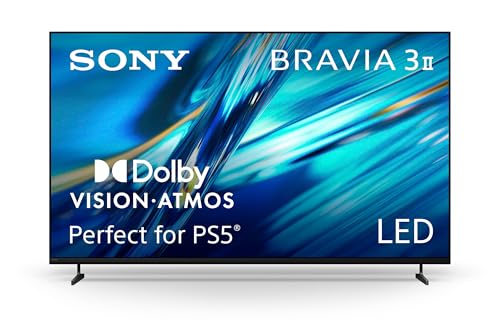
Sony BRAVIA 3 II 55″ — Best overall
Sony’s pitch in this class is processing, and it is a persuasive one. The BRAVIA 3 II pairs a 4K LED panel with the XR Processor, Sony’s image engine that analyses scenes the way the company has refined over decades of broadcast and cinema work. Skin tones hold together, upscaled broadcast television looks less smeared than rivals manage, and motion in sport stays composed without the artificial sheen of heavy interpolation. The panel runs at 120Hz, which a decade of mid-range Sonys did not, and the listing’s PlayStation 5 features make it the natural partner for Sony’s own console.
Dolby Vision and Dolby Atmos are both present, four HDMI 2.1 ports give unusually generous connectivity for the class, and Google TV here runs with Gemini assistance layered in. Sony also includes a bundle of 4K movie credits in the listing, a small sweetener that at least ensures your first weekend of viewing shows the panel at its best. The BRAVIA does not chase Mini-LED contrast — the TCL and Hisense below outgun it on raw HDR punch — but as a complete, well-mannered television it is the easiest recommendation in this guide.
- Panel: 55-inch LED, 4K HDR, 120Hz refresh
- Processing: XR Processor with AI technology
- HDR/audio: Dolby Vision and Dolby Atmos
- Ports: 4 x HDMI 2.1, with PlayStation 5 features
- Platform: Google TV with Gemini assistance
Strengths
- Upscaling of broadcast and older content is the class benchmark — most of what households watch is not native 4K
- Four full-bandwidth HDMI ports end the console-versus-soundbar-versus-streamer port shuffle
- Sony’s colour tuning flatters skin and scenery without the oversaturation budget sets default to
Trade-offs
- An LED panel without Mini-LED dimming concedes the contrast crown to the TCL QM6K and Hisense U7
- Sony’s remote and menu logic carry more depth than casual viewers will ever explore
- The brand premium is real: rivals here offer bigger screens for similar money
Best for: viewers who prize natural picture quality and own, or plan to own, a PlayStation 5. Not suited for: size maximisers, since the same budget stretches to 65 inches elsewhere in this lineup.

TCL QM6K 65″ — Best picture quality
The QM6K is TCL’s Mini-LED argument in its most accessible form: a 65-inch QLED panel with the zone-controlled backlight that separates modern HDR from the washed-out variety, a 144Hz refresh rate, and a format checklist — Dolby Vision, HDR10, IMAX Enhanced — that covers the ways prestige content is actually mastered. TCL describes the set as a high-brightness design, and brightness is precisely what Mini-LED needs to make its dimming worthwhile in a lit room.
Gaming is properly served rather than name-checked: the 144Hz panel, variable refresh support and TCL’s game features give consoles and PCs a fast, tear-free path. Dolby Atmos support handles the audio handshake with a soundbar or receiver. What the QM6K asks in return is wall space and a viewing distance that suits 65 inches; in a small room it will dominate in the wrong way. In the right room, it is the picture-quality summit of this particular guide, and the set film fans should audition first.
- Panel: 65-inch QLED Mini-LED, 4K HDR, 144Hz
- Formats: Dolby Vision, HDR10, IMAX Enhanced
- Audio: Dolby Atmos support
- Platform: Google TV with voice remote
- Positioning: TCL’s premium gaming and cinema line
Strengths
- Mini-LED zone control produces HDR highlights and shadow detail simultaneously, the trick lesser backlights cannot do
- IMAX Enhanced support flatters the growing catalogue of titles mastered for it
- 144Hz headroom future-proofs the set for high-frame-rate consoles and PC play
Trade-offs
- Needs a room and a stand or mount that can take 65 inches gracefully
- Google TV’s recommendation rows cannot be fully tamed for viewers who dislike algorithmic shelves
- Built-in sound, while Atmos-capable in signal terms, still wants a soundbar for scale
Best for: film-led households with the wall for 65 inches and a taste for HDR spectacle. Not suited for: compact flats where the screen would sit barely a metre from the sofa.

Hisense U7 65″ — Best for gaming
Hisense builds the U7 as a gaming television that happens to be excellent at everything else. The listing’s numbers tell the story: a native 165Hz Mini-LED panel — faster than the TCL’s already-quick 144Hz — with variable refresh support quoted up to a very high ceiling, HDR10+ alongside Dolby Vision IQ and Atmos, IMAX Enhanced certification and an anti-reflection screen finish. That is a specification aimed at players who read frame timings the way film fans read aspect ratios.
The 2.1.2-channel audio system deserves its sentence, because it is the rare built-in setup in this guide with genuine height-channel ambition, giving games and Atmos films more spatial presence before any soundbar enters the picture. Google TV keeps the platform consistent with the rest of this lineup. If your household’s prime time is a console session and your films arrive via the same screen afterwards, the U7 is the pick engineered around your actual life.
- Panel: 65-inch Mini-LED ULED, Hi-QLED colour, native 165Hz
- Gaming: high-ceiling VRR support, gaming-first feature set
- Formats: HDR10+, Dolby Vision IQ, IMAX Enhanced
- Audio: 2.1.2-channel built-in system with Dolby Atmos
- Finish: anti-reflection screen treatment
Strengths
- The fastest native panel in this guide, with refresh headroom even demanding PC setups can use
- Anti-reflection finish and strong brightness suit the bright rooms gaming often happens in
- Built-in 2.1.2 audio postpones the soundbar purchase more convincingly than rivals manage
Trade-offs
- Its gaming riches are wasted on households that never connect a console or PC
- Hisense’s picture presets need taming out of the box to avoid an over-eager default look
- At 65 inches with this feature set, it sits at the ambitious end of the guide’s budgets
Best for: console and PC players who want one big screen to rule both gaming and movie night. Not suited for: broadcast-and-soaps households, whose viewing never touches the features that justify it.

TCL Q65 43″ — Best small-room pick
Not every room wants a monument. The Q65 brings the full Google TV platform down to 43 inches without amputating the features that make the platform worth having: QLED colour, Dolby Vision and Dolby Atmos support, HDR Pro+, a voice remote and a Game Accelerator mode for the bedroom console or the PC-as-monitor crowd. A 2024 model, it represents the mature end of TCL’s small-set line, and maturity in software is a compliment — the interface is sorted, the bugs are known, the updates have landed.
Small televisions are where manufacturers traditionally hide their worst panels, so the QLED specification matters more here than its modest size suggests. Colours stay rich at the close viewing distances bedrooms impose, and Dolby Vision gives streamed films a tone-mapping quality that bargain small sets usually skip entirely. Kitchen counters, student rooms, caravans and spare bedrooms are its natural habitat; as a main family screen it would feel undersized, but that is a room mismatch, not a product flaw.
- Panel: 43-inch QLED, 4K UHD
- Formats: Dolby Vision, Dolby Atmos, HDR Pro+
- Gaming: Game Accelerator enhanced gaming mode
- Platform: Google TV, voice remote, works with Alexa
- Model: 43Q651G (2024)
Strengths
- Full-fat Google TV with no feature rationing despite the compact frame
- QLED colour at close range keeps bedroom viewing from feeling like a compromise
- Doubles credibly as a large PC monitor for a desk setup
Trade-offs
- 43 inches is simply too small for a main living-room screen in most homes
- As a 2024 model it lacks the newest interface refinements of the 2026 sets here
- Sound output is modest, as physics dictates at this size
Best for: bedrooms, kitchens, student rooms and desk setups wanting the real platform in miniature. Not suited for: anyone’s primary family screen, where its virtues would be swamped by its dimensions.
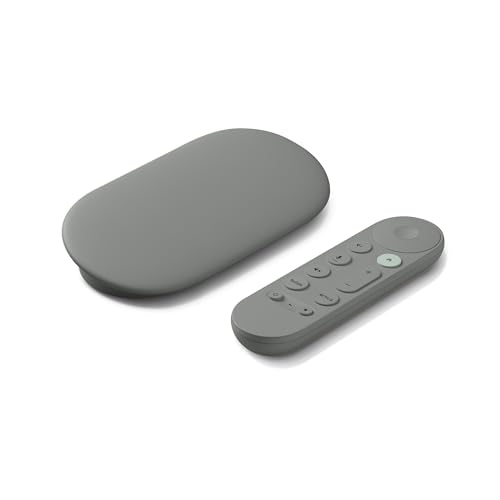
Google TV Streamer 4K — Best add-on streamer (streaming device, not a TV)
To be completely clear about what this pick is: the Google TV Streamer 4K is a streaming device, not a television. It is a small box that connects to a screen you already own by HDMI and gives that screen the current Google TV experience — apps, voice search, HDR streaming and smart-home control. It exists for the millions of households whose panel is still excellent but whose built-in software has slowed to a crawl, and for them it is the smartest purchase in this entire guide.
Google specified it generously: 32GB of storage is several times what stick-style streamers offer, so app libraries and updates stop triggering storage warnings, and performance stays fluid. The voice remote handles search across services, the device streams in HDR from the major platforms, and its smart-home role extends to controlling compatible lights and viewing camera feeds on the big screen. Thread and Matter support in Google’s ecosystem makes it a genuine home hub. If your television’s picture still pleases you, buy this before you buy any new set.
- Type: streaming device (add-on hardware, requires an existing TV)
- Output: 4K HDR streaming via HDMI
- Storage: 32GB built in
- Remote: voice search remote included
- Extras: Google Home smart-home control from the TV screen
Strengths
- Resurrects an ageing television’s software for a small fraction of a replacement set’s cost
- Storage headroom ends the delete-an-app-to-update dance that plagues stick streamers
- The most current Google TV experience available, straight from the platform’s owner
Trade-offs
- It cannot improve your existing panel — a dim or tired screen stays dim and tired
- Needs a free HDMI port and a power socket near the television
- Households with Apple-centric casting habits will miss AirPlay
Best for: owners of good panels with bad software, and renters who move their setup between homes. Not suited for: anyone actually shopping for a screen — this device pointedly does not include one.

onn. Google TV 4K Streaming Box — Budget add-on streamer (streaming device, not a TV)
The second device in this guide, and the same honesty applies: the onn. Google TV 4K Streaming Box is an add-on streaming box, not a television. Walmart’s house brand has built a quiet reputation for delivering the genuine Google TV interface — not a cut-down imitation — in hardware priced for impulse purchases and second rooms. You plug it into an HDMI port, sign in, and an old bedroom set or a hand-me-down panel gains 4K streaming, the Play Store and a voice remote.
Expectations should be calibrated to its station. Storage and processing headroom are tighter than Google’s own Streamer, so enormous app libraries and impatient channel-surfing will find its limits sooner. But the core transaction — modern apps on an old screen — is delivered intact, and for a guest room, a workshop television or a child’s first streaming setup, that is the whole requirement. It is also the cheapest insurance in this guide against a secondary television becoming e-waste over software alone.
- Type: streaming box (add-on hardware, requires an existing TV)
- Output: 4K streaming via HDMI
- Platform: Google TV with Play Store access
- Remote: voice remote included
- Positioning: budget route to the full platform
Strengths
- The genuine Google TV interface at the lowest commitment in this lineup
- Revives secondary televisions that would otherwise be replaced over apps alone
- Simple setup suits less technical households and gift purchases
Trade-offs
- Less storage and speed in reserve than the Google TV Streamer, so heavy app collectors should step up
- Long-term update cadence rests with a house brand rather than the platform owner
- Like every streamer, it inherits whatever picture quality the host screen already has
Best for: second rooms, guest spaces and rescuing a perfectly watchable older panel. Not suited for: a main living-room hub role, where the Google Streamer’s headroom earns its premium.
How Does Google TV Handle a Household’s Real Week?
Platform reviews tend to judge the first evening; households live with the five hundredth. Google TV’s weekly rhythm has a particular shape. The home screen’s shelves reorganise themselves around what the household actually watched, which means the set slowly stops looking like a storefront and starts looking like a continuation — the half-finished series surfaced, the Saturday film suggested in the same genre as last Saturday’s. Multi-profile support keeps that learning separate per viewer, so a child’s cartoon habit does not poison a parent’s documentary row, and the kids’ profiles carry their own content boundaries and bedtime logic.
The Google account is both the convenience and the commitment. One sign-in populates the television with your subscriptions, your watchlist and your voice assistant preferences, and the same account on a second Google TV elsewhere in the house reproduces the arrangement without a fresh afternoon of setup. The corollary is that the television becomes another surface where your viewing is legible to your account’s history — a trade most households accept knowingly for streaming generally, but worth stating in a guide that prides itself on straight answers. Guest mode and profile discipline exist for households that want the convenience with a fence around it.
Updates arrive on Google’s cadence rather than the manufacturer’s, which is the platform’s quiet longevity advantage: interface improvements and security patches are not hostage to a television brand’s enthusiasm for a two-year-old model. The televisions in this guide will age, as all televisions do, but they will age on the platform’s schedule, and when the hardware finally does feel slow, the two streamers at the end of the lineup exist precisely to reset that clock without touching the panel.
The Streamer Question, Taken Seriously: New Brain or New Television?
Because this guide mixes four televisions with two devices, the decision between them deserves its own examination rather than a footnote. The diagnostic is simple to state and worth performing honestly. Turn on your current television and watch a scene you love. Ignore the menus entirely. If the picture still satisfies you — brightness, contrast, colour, size — your problem is software, and software problems in 2026 are solved by a device costing a small fraction of a set. If the picture itself disappoints you, no streamer will save it, and the honest purchase is one of the four televisions above.
Sony BRAVIA 3 II 55″ — The case for replacing rather than upgrading is processing you cannot bolt on. No streamer gives an old panel Sony’s upscaling judgement or its colour discipline; if your current set’s broadcast picture is what frustrates you, the BRAVIA is the answer in this guide, and the streamer route is a postponement dressed as thrift.
TCL QM6K 65″ — Size and backlight are the un-upgradeable specifications. A streamer cannot add eleven inches or a Mini-LED array, so households whose real complaint is “too small and too dim for this room” should read the QM6K’s review as the whole argument and skip the device debate entirely.
Hisense U7 65″ — Gaming performance is the third un-bolt-on quality: panel refresh rate lives in the glass, not the HDMI port. A streamer can deliver apps to a slow panel forever without making it fast. Players whose current screen is the bottleneck belong with the U7, not with a new box feeding the old bottleneck.
TCL Q65 43″ — The Q65 answers the room that has no television at all, or one so old it lacks the HDMI generation streamers assume. In bedrooms and kitchens the total package — panel, platform, one remote — beats a device-plus-dinosaur arrangement on simplicity alone.
Google TV Streamer 4K — The strongest device case: a good panel from the last several years, strangled by its built-in software. The Streamer’s storage and speed restore the experience completely, and its smart-home layer adds capabilities the original set never had. This is the purchase that makes owners feel clever, because it is.
onn. Google TV 4K Streaming Box — The same logic at the second-room tier: the spare television that guests use twice a month does not need the flagship streamer, it needs current apps and a remote that works. The onn. box delivers exactly that and leaves the serious money for the room where viewing actually happens.
What About Privacy, Voice Control and Children on This Platform?
Google TV’s voice features run through the remote’s microphone, which listens when the button is pressed rather than continuously — a design worth understanding, because households conflate television voice remotes with always-listening smart speakers. The newer Gemini layer on recent sets and the Streamer extends what queries can do, from finding programmes by description to controlling compatible home devices, and it inherits the Google account’s privacy settings, which are managed in the same place as your phone’s. An hour in those settings, once, is the difference between a household that uses voice happily and one that mutes it in vague unease.
Children’s use is better served than platform critics suggest. Kids’ profiles restrict content by rating, hide the open web of the full store, and let parents set daily limits and bedtimes that the television enforces without a nightly negotiation. App installation outside the profile requires the adult’s approval. For families, the practical advice is to set profiles up on day one rather than retrofitting them after a child has built a viewing life inside an adult’s recommendation row — untangling a merged profile is tedious in exactly the way setting one up early is not.
Data-sharing toggles deserve the same day-one attention. Like every advertising-supported platform, Google TV offers personalisation controls that trade recommendation quality against data use, and the honest position is that the trade is yours to set, not the guide’s to set for you. What can be said is that the controls exist, are reachable, and survive updates — which is more than can be claimed for every platform in the wider market.
Which Connection Details Decide Whether the Setup Feels Premium?
Three unglamorous specifications separate a Google TV setup that feels flagship from one that feels budget, and none of them is the panel. The first is the HDMI count and standard on the television: the Sony’s four HDMI 2.1 ports in this guide are the luxury configuration, letting a console, a soundbar on eARC, a streamer and a spare input coexist without a switcher. Sets with fewer ports force a hierarchy on your devices, and the device at the bottom of the hierarchy is the one that gets unplugged and forgotten.
The second is network delivery. Every pick here streams over Wi-Fi, and 4K HDR streams are unforgiving of a weak signal at the television’s position — a room can have excellent Wi-Fi at the sofa and a dead patch behind a large metal-and-glass screen. If buffering haunts a new set, the fix is usually a mesh node or a wired run, not a different television, and buyers in large homes should budget the network into the same project as the screen. The third detail is the remote: voice remotes that pair by Bluetooth free you from line-of-sight pointing, a small liberation that is felt every evening and mentioned in almost no showroom conversation.
For the two streamers, the equivalents are port placement and power. A streamer wedged behind a panel needs its remote’s radio path clear and its power supply adequate — the wall adapter, not a television’s low-output USB socket, if performance stutters — and an HDMI extender, often included or cheap, buys the clearance that makes both problems disappear.
How Do Games, Sports and Films Each Stress This Platform Differently?
Gaming is the latency audit. A Google TV’s interface speed tells you nothing about its game mode, and the televisions here divide sharply: the Hisense U7’s native 165Hz panel and the QM6K’s 144Hz panel are built for high-frame-rate play, the Sony’s 120Hz panel with PlayStation features serves console owners deliberately, and the Q65’s Game Accelerator addresses casual play in a small room honestly. The streamers, notably, are not gaming picks in this sense at all — cloud gaming apps run on them respectably, but a console deserves a panel, and readers should not let a device’s app list blur that line.
Sport is the motion and upscaling audit. Broadcast sport arrives interlaced or compressed, pans constantly, and punishes both weak motion handling and weak processing. Sony’s heritage shows here, which is why the BRAVIA holds the overall crown despite conceding raw specifications elsewhere. Film is the format audit: Dolby Vision support, present across the televisions in this guide, determines whether the major services send their best master or a lesser one, and it is the single specification film households should refuse to surrender when comparing across platforms.
The useful conclusion is that “best” in this category is a rotation, not a throne. The guide’s badges assign each pick its strongest room, and readers whose evenings are dominated by one content type should let that type, rather than the overall badge, drive the final choice.
What Should the First Week With a Google TV Look Like?
Day one is for accounts, updates and the defect hunt: let the set or streamer complete its updates before judging its speed, sign in once, and run a plain-screen check for panel uniformity on the televisions while the return window is wide open. Days two and three are for the household’s real content — not demo reels — because the platform’s recommendations need genuine viewing to become useful, and your picture settings need your actual programmes to be judged fairly.
By the end of the week, three refinements separate a tuned setup from a merely installed one. The home screen should show your profiles and your services in your order, with the pre-installed clutter removed. The picture should have a film preset and a sport-tolerant preset you have actually compared on the same content. And the voice remote should have been used enough that reaching for it is habit rather than experiment — voice search is the platform’s party trick, and households that never build the habit never collect the benefit they paid for.
Streamer owners add one task: label the input. Every television in this scenario now has two smart systems — its own ageing one and the new device — and the household will use whichever is easier to reach. Set the television to power on to the streamer’s input, hide or ignore the native apps, and the old set’s software stops being a daily presence at all.
Which Size and Room Pairings Does This Lineup Actually Cover?
The four televisions divide the housing stock neatly. The Q65 at 43 inches owns the rooms where a television is a resident rather than a monument — bedrooms, kitchens, student flats, caravans with generous lockers — and its full platform means those rooms are not exiled from the household’s streaming life. The Sony at 55 inches is the classic main-screen size for the classic main room, and its processing bias suits the household whose main room is where broadcast and film share the evening. The two 65-inch Mini-LED sets compete for the dedicated viewing room, the one with the big wall and the seating arranged like an argument about cinema.
The streamers redraw that map entirely, because they decouple platform from size. A household with a beloved 75-inch panel from a previous era and a hatred of its software does not appear in the televisions’ sizing logic at all — it appears in the Streamer’s. Likewise the onn. box serves the television in the room nobody sizes for: the workshop, the guest annexe, the inherited set in the holiday flat. Reading this lineup by room rather than by product is the fastest route to the right row of the comparison table, and it is why the guide insists on presenting devices and televisions together instead of pretending they inhabit separate worlds.
One pairing deserves an explicit warning: a premium streamer behind a bargain panel produces a lopsided system — superb menus, mediocre movies. Money in this category should flow to the glass first and the brain second, in that order, whenever both are being bought in the same season.
How Should Sound Be Handled Across Televisions and Streamers Alike?
Audio is where the device-versus-television distinction briefly disappears, because both routes end at the same bottleneck: the speakers in the room. The televisions here range from the Hisense U7’s genuinely ambitious 2.1.2-channel system down to small-set adequacy, and all of them support Dolby Atmos as a signal, which is the part that matters for a soundbar or receiver — the television or streamer decodes and passes the format, and the external hardware does the physical work. When you shop for the bar later, the specification to match is the eARC port, present across this class, which carries the full-quality audio stream and lets one remote run the evening.
Streamer owners should note the pleasant asymmetry: a streamer feeding an old television that is itself feeding a soundbar often produces better sound than the old television’s own apps ever managed, because the device negotiates modern formats the set’s software had forgotten. Bluetooth headphone support in the Google TV ecosystem covers the private-listening case for both routes. The principle is consistent throughout this guide: buy the picture and the platform as one decision, and treat sound as the upgrade that can always arrive by a separate van.
Televisions and Streamers, Laid Out Together
| Pick | Type | Size / fit | Headline strength |
|---|---|---|---|
| Sony BRAVIA 3 II | Television | 55-inch | Processing polish and PlayStation 5 features |
| TCL QM6K | Television | 65-inch | Mini-LED HDR with IMAX Enhanced support |
| Hisense U7 | Television | 65-inch | Native 165Hz gaming panel and 2.1.2 audio |
| TCL Q65 | Television | 43-inch | Full platform in a small-room frame |
| Google TV Streamer 4K | Streaming device | Any HDMI screen | 32GB storage and smart-home hub duties |
| onn. Google TV 4K Box | Streaming device | Any HDMI screen | Budget route to the same interface |
The Type column is the most important one in this table. Four rows are screens; two rows are brains in search of a screen. Decide which problem you actually have — a missing display or an obsolete interface — and the table narrows itself to the honest half.
How Do You Get the Most From a Google TV Setup?
Begin in the settings with your Google account and the home screen. Google TV lets you build profiles, including kids’ profiles with content boundaries, and ten minutes spent there saves a year of shared-watchlist chaos. Turn on the apps-only view if recommendation rows annoy you; the option exists and transforms the interface into something closer to a calm grid. Then audit the pre-installed apps: manufacturers bundle services you may never open, and uninstalling or disabling them keeps the modest processors in these sets feeling quick.
Casting deserves a deliberate test on day one. Open a photo or a video on your Android phone, tap the cast icon, and confirm the television appears — this validates your network setup while the return window is still open. Gamers should enable the game mode per HDMI input rather than globally, so films keep their processing while the console gets its low-latency path. Voice remote pairing, finally, is worth doing properly: a remote that falls back to infrared line-of-sight loses half its convenience.
For streamer owners, one extra ritual applies: plug the device into the television’s best HDMI port, power it from the wall adapter rather than a low-output USB socket if performance stutters, and let it complete its first round of updates before judging its speed. First-boot sluggishness is installation, not character.
What Mistakes Do Android TV Shoppers Keep Making?
The naming trap is the first: buyers search for Android TV, find an old set running the retired interface or a no-name box running phone Android on a television, and conclude the platform is clunky. On current sets the platform is Google TV, and the difference in polish is the entire story. Check what the listing actually says the set runs. The second mistake is the mirror image — buying a streamer when the real problem is the panel. No device fixes weak contrast, and households sometimes spend twice: once on a streamer, then on the television they needed all along.
Storage blindness catches app collectors. Televisions and budget streamers ship with limited space, and a household that installs every service, game and utility will meet the storage warning within a year; the Google TV Streamer’s 32GB exists precisely because of this pattern. Finally, do not ignore the casting asymmetry: if your household lives on iPhones, test your casting workflow before committing a whole room to a platform without native AirPlay.
A last practical note on timing: television lines refresh annually and streamer lines almost as often, so a model researched in spring may be a run-out bargain or a replaced design by winter. The model years and codes in this guide’s reviews are the anchors — if the listing in front of you matches them, the analysis applies in full; if it shows a newer successor, the platform reasoning still holds and the panel reasoning deserves a fresh check against the successor’s own listing.
Keep the packaging for the first fortnight in either case. Panels reveal their uniformity flaws over evenings, not minutes, and streamers reveal their household fit over weekends of real use — the return window is part of the product, and using it deliberately is not indecision but method.
What Should You Verify at Checkout, Device or Television?
The checkout checks differ by species. For a television: the size variant, the model code, the model year, and the delivery terms for a large panel — the QM6K and U7 at 65 inches are furniture-scale objects whose arrival should be planned like furniture. For a streamer: the generation, because device lines refresh quietly and a listing’s photograph may show a newer remote than the box contains; the storage figure, since it decides the device’s useful life more than any other specification; and the return window, since a streamer’s success depends on your specific television’s HDMI behaviour in a way no review can fully predict.
Both species share one check that outranks the rest: buy from the listing whose title matches the verified title in this guide’s sources. Platform products attract lookalike listings — older devices in newer clothing, regional variants with different stores — and the title is the fingerprint. Match it, and the product that arrives is the product these reviews describe.
How Long Will a Google TV Stay a Good Google TV?
Longevity on this platform has two clocks running at different speeds. The hardware clock is the panel’s: LED televisions of this generation routinely serve the better part of a decade, and nothing in the four sets here suggests a shorter physical life. The software clock is Google’s: interface generations arrive every few years, app requirements creep upward, and a set that is sprightly today will feel deliberate in five years — still usable, no longer delightful. The platform’s saving grace is the one this guide is built around: the brain is replaceable. A television whose panel remains handsome can accept a future streamer and begin its software life again, which makes Google TV, paradoxically, the platform whose televisions are easiest to keep.
Buyers can tilt the odds at purchase. Favour the current model year where the guide offers one, favour storage headroom in devices, and favour the manufacturers — Sony above all in this lineup — with a record of supporting their sets beyond the second year. Then accept the platform’s rhythm: sign in once, keep the profiles tidy, and let the recommendations compound. A Google TV rewards the household that sets it up properly exactly once and then simply lives with it.
Final Recommendation
Buy the Sony BRAVIA 3 II if you want the most refined all-round Google TV and your gaming wears a PlayStation badge; buy the TCL QM6K if films in HDR are the point of the room; buy the Hisense U7 if the room’s heartbeat is a console. The little TCL Q65 owns the small-room brief outright. And if your current screen still makes you happy when a film starts, skip the television purchase entirely — the Google TV Streamer 4K is the honest upgrade, with the onn. box covering second rooms. The platform’s real promise was never a logo on a bezel; it is that your screen, however it got smart, keeps getting smarter — so choose the route that respects the hardware you already love.
Frequently Asked Questions
Is Google TV the same thing as Android TV?
Effectively, yes, for current products. Google TV is the successor interface built on the Android TV foundation: same Play Store, same app compatibility, same Chromecast built in, with a recommendation-led home screen replacing the older rows-of-apps design. A television advertised with Google TV is the modern form of what shoppers mean by an Android smart TV.
Can a streaming device really replace buying a new smart TV?
It can replace the smart part, completely. A Google TV Streamer or onn. box supplies current apps, voice search and casting to any screen with an HDMI port. What it cannot supply is a better picture. If your panel’s contrast, brightness or size is the complaint, only a new television answers it; if the complaint is slow, obsolete software, a device is the correct and far cheaper fix.
Do these televisions work with iPhones?
They work alongside them, with one caveat. The streaming apps themselves are identical, and you can control much from an iPhone, but native AirPlay casting is not a standard Google TV feature. iPhone households that cast photos and videos constantly should either accept app-based workarounds or look at Roku and Samsung platforms, where AirPlay support is routine.
Which pick suits a PlayStation 5 best?
The Sony BRAVIA 3 II is designed around it, with dedicated PlayStation 5 features and four HDMI 2.1 ports. The Hisense U7 is the alternative for players who also game on PC and want the 165Hz panel’s headroom, while the TCL QM6K’s 144Hz panel serves console play very well in a more cinema-led package.
How much storage does a Google TV need?
More than most televisions provide, if you are an app collector. Streaming households with a dozen services will be comfortable anywhere in this guide; households that install games and utilities should favour the Google TV Streamer’s 32GB or keep television installs disciplined. Storage warnings are the most common long-term annoyance reported with budget smart sets.
Can I install any Android phone app on these televisions?
No — Google TV runs its own Play Store catalogue of television-designed apps, not the phone store. The catalogue covers the major streaming services, serious media players, utilities and a growing games shelf, and sideloading remains possible for technically confident users. If a niche phone app is essential to you, casting it from the phone is usually the intended route.
Do the streaming devices work with non-smart televisions?
Yes, provided the television has an HDMI input — that is their purpose. Both the Google TV Streamer and the onn. box supply the entire smart experience externally, so a completely non-smart panel becomes a Google TV display. Very old sets without HDMI are the only true dead end, and they are rare survivors now.
Related Guides
Readers comparing ecosystems may also want the roundup of budget 55-inch televisions across every smart platform for a platform-neutral view, the guide to oversized screens that hold up in sunlit living rooms if 65 inches is only the starting point, and the survey of mid-size 50-inch 4K sets where platform choice matters most for the rooms between the sizes covered here.



[…] deciding on size and platform? Our companion roundup of compact 50-inch 4K smart televisions for smaller rooms covers the next size down, while the guide to Google TV and Android-based sets for app-driven […]