What's inside
- Key Takeaways
- Quick Picks
- How Did We Sort the Genuinely Dumb From the Merely Unconnected?
- Why Has the True Non-Smart Television Almost Disappeared?
- Who Actually Buys These Televisions? Five Households, Five Answers
- What Does an Offline Week Actually Look Like on Each Route?
- Why the Humble Tuner Is the Offline Television’s Backbone
- What About Computer Monitors and Commercial Displays as Alternatives?
- How Do You Wire an Offline Television Room, Source by Source?
- What If You Change Your Mind About the Network Later?
- How Should You Judge Picture Quality in a Full HD Class?
- One True Non-Smart Set and Five Labelled Smart Alternatives, Side by Side
- How Do You Run a Smart Television Offline, Step by Step?
- Which Mistakes Send Non-Smart Shoppers Home With the Wrong Set?
- A Final Word on Words: Why This Guide Insists on the Labels
- Final Recommendation
- Frequently Asked Questions
- Related Guides
As an Amazon Associate I earn from qualifying purchases. This post may contain affiliate links at no extra cost to you.
gizmoverdict.com is reader-supported. When you buy through links on our site, we may earn an affiliate commission.
Where to buy: Amazon’s listings for this corner of the market need careful reading, because the phrase “non smart” is pasted into titles and search results far more loosely than it should be. Before ordering anything in this guide, read the full listing title and the connectivity section yourself: the one genuine non-smart television below announces itself plainly, while the five alternatives are smart sets through and through, included here only because they can be run without ever joining a network.
Here is the market reality that any honest guide to the best affordable non smart tvs has to open with: the true non-smart television is nearly extinct. Manufacturers have folded streaming hardware into everything above a portable screen, because the chips cost little and the platforms subsidise the price. In our verified check of current listings, exactly one set qualifies as a genuine non-smart television — the Westinghouse 40-inch below, a Full HD panel with inputs and a tuner and no apps, no account, no Wi-Fi radio asking to join your network. One. Every other affordable screen in this class is a smart TV wearing a budget badge.
So this guide does two jobs and labels them relentlessly. Job one is the real thing: the Westinghouse, for buyers whose requirement is absolute — a camper, a bedroom, a relative who wants a television that behaves like televisions used to. Job two is the pragmatic route most readers will actually take: five budget smart televisions that can be set up and run entirely offline, never connected to Wi-Fi, fed by an aerial, a cable box, a console or a separate streaming stick you control. Wherever those five appear in this article — quick picks, reviews, comparison table — they are labelled as offline-friendly budget smart TVs, because calling them non-smart would be a lie of exactly the kind this guide exists to correct.
Why do people still want a dumb screen? The reasons are good ones. No accounts for children or elderly relatives to manage. No software updates rearranging menus overnight. No viewing data leaving the house. A television for a caravan, a rental property, a waiting room or a security monitor that simply shows its inputs. If any of that is you, read the Westinghouse review first — then read the offline route with clear eyes, because a smart set that never connects gives you most of the same life with a wider choice of screens.
Key Takeaways
- Only one pick here is a true non-smart TV: the Westinghouse 40-inch, with no apps, no Wi-Fi and no account of any kind.
- The other five picks are budget smart TVs, labelled as such everywhere in this guide, chosen because they run happily without ever being connected.
- Running a smart TV offline means skipping network setup, then feeding it through HDMI, aerial or a streaming device you choose.
- Offline use forfeits streaming apps, voice assistants and casting on the smart picks — the inputs still work perfectly.
- Small sizes dominate this end of the market: five picks are 40-inch class and one is 43-inch, all Full HD rather than 4K.
- For campers, spare rooms and technology-averse relatives, the honest choice is between one genuine dumb set and five tameable smart ones.
Quick Picks
| Pick | Badge | Why it earns its place |
|---|---|---|
| Westinghouse 40″ Non-Smart TV | Only true non-smart pick | The genuine article: a Full HD panel with a tuner and inputs, and no smart system whatsoever. |
| Hisense A4 40″ (offline-friendly budget smart TV) | Offline-friendly budget smart TV | A Roku smart set that can be left unconnected and used as a clean Full HD display for boxes and consoles. |
| Hisense A4KV 40″ (offline-friendly budget smart TV) | Offline-friendly budget smart TV | Hisense’s VIDAA smart model; skip the network step and it behaves as a straightforward 40-inch screen. |
| VIZIO 43″ D-Series (offline-friendly budget smart TV) | Offline-friendly budget smart TV | The largest screen here; a smart set whose HDMI inputs make a fine offline life with a cable box or console. |
| Roku Select Series 40″ (offline-friendly budget smart TV) | Offline-friendly budget smart TV | Roku’s own 40-inch smart TV; unconnected, it is a tidy Full HD panel with a simple remote. |
| Insignia F40 40″ (offline-friendly budget smart TV) | Offline-friendly budget smart TV | A Fire TV smart set that can be run unconnected as a display, with Alexa left entirely out of the picture. |
How Did We Sort the Genuinely Dumb From the Merely Unconnected?
The method for this guide was mostly forensic. We read full listing titles and specification sections rather than search-result snippets, because this is the category where marketing language blurs hardest: sets are described as suitable “for non-smart use” or bundled with phrases that imply a dumb panel while a smart platform sits in the fine print. Each candidate was classified by a simple test — does the television contain a smart operating system and network hardware at all? If yes, it is a smart TV in this guide, whatever the headline implies.
One candidate passed the true non-smart test: the Westinghouse, whose listing describes a television built around inputs — streaming sticks, PCs, consoles, cable boxes — rather than around its own apps. For the offline-friendly places, we required three things: a setup flow that can be completed or skipped without a network connection, HDMI inputs sufficient for a household’s boxes, and a tuner for aerial viewing, since offline households lean on broadcast more than streamers do. All five smart picks met those conditions in their listings; none is presented anywhere in this article as anything other than what it is.
We also fixed the size expectation honestly. True dumb panels and the cheapest smart sets cluster at 40 to 43 inches in Full HD, because that is where the remaining demand lives — second rooms and simple setups. Readers wanting a large, premium, genuinely non-smart panel are asking for a product the market has essentially stopped making, and the realistic routes are the Westinghouse class or a commercial display, which is a different purchase entirely.
Why Has the True Non-Smart Television Almost Disappeared?
Economics, mostly. A streaming chipset adds very little to a television’s build cost, while the platform deals around it — placement fees, advertising, data partnerships — actively subsidise the retail price. A manufacturer that strips the smart hardware out saves almost nothing and loses the subsidy, which is why the surviving non-smart sets are simple Full HD models from value brands rather than premium panels. The smart television is not more expensive to make; in commercial terms it is cheaper to sell.
There is also a demand illusion at work. Most buyers who say they want a non-smart TV actually want a television that does not nag them — no forced accounts, no home-screen advertising, no updates changing the interface. Those are software behaviours, and an unconnected smart TV exhibits none of them, because every one of those behaviours arrives through the network. Unplug the network and the smart TV becomes, in daily conduct, a dumb television with better picture hardware. That is the pragmatic insight this whole guide is built on.
The genuine exceptions are environments where network hardware itself is the problem: facilities with strict device policies, caravans and boats with no reliable connection, households deliberately minimising connected devices around children, and users for whom any account-based setup is a genuine barrier. For those readers the Westinghouse is not a compromise pick; it is the only pick, and its scarcity is worth knowing before a shopping trip assumes otherwise.

Westinghouse 40″ Non-Smart TV — Only true non-smart pick
This is the one: a 40-inch Full HD television whose listing describes exactly what a non-smart set should be — a flat screen that works with a Fire Stick or any other streaming device you plug into it, connects to a PC, a games console or a cable box, and is pitched squarely at campers and bedrooms. There is no app platform to name because there is no app platform. You turn it on, you choose an input, you watch. For a generation of buyers, that sentence is the entire product review they wanted.
The virtues are the absences. No Wi-Fi setup, no account creation, no terms-of-service scroll, no update that moves the menus your relative finally memorised. In a caravan it sips from the same simple setup as the rest of the van’s electrics and asks nothing of a patchy site network. As a monitor for a security system, a waiting-room information screen or a console display, it starts fast and stays out of the way. The compromises are equally clear: Full HD rather than 4K, modest speakers, and a picture tuned for adequacy rather than cinema. Buy it for what it refuses to do, and those compromises read as the price of the refusal.
- Panel: 40-inch Full HD 1080p flat screen
- Smart system: none — this is a true non-smart TV
- Inputs for: streaming sticks, PC, games console, cable box
- Positioning: campers, bedrooms, simple second rooms
- Tuner viewing: broadcast via aerial connection
Strengths
- The only set in this guide with zero accounts, zero apps and zero network demands
- Instant familiarity for anyone who finds smart menus a barrier rather than a feature
- Ideal temperament for caravans, rentals and rooms where the television is a utility
Trade-offs
- Full HD resolution and basic picture processing sit well below the 4K sets elsewhere on this site
- Streaming requires a separate device — by design, but still an extra purchase if you want apps later
- Sound is functional rather than enjoyable, like most slim sets of its size
Best for: campers, spare rooms, relatives who want a television and nothing else, and any room where network hardware is unwelcome. Not suited for: film enthusiasts, whose evenings would expose every one of its deliberate simplicities.
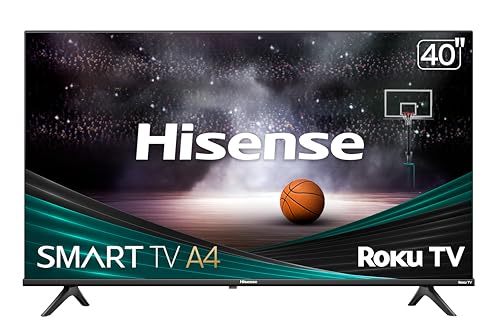
Hisense A4 40″ (offline-friendly budget smart TV) — Offline-friendly budget smart TV
Label first, as promised: the Hisense A4 is a budget smart TV — a Roku model, in fact — and it appears in this guide solely as an offline-friendly option. Never connect it to Wi-Fi, and what you own is a slim-bezelled 40-inch Full HD display with Dolby Audio, ready to serve a cable box, a console or an aerial. Roku’s setup includes paths that let you get to the inputs without building your life around the platform, and once there, an unconnected set raises no accounts and shows no promoted rows fetched from the internet.
Why include a Roku set in a non-smart guide at all? Because it answers the most common real-world version of the request: a cheap, decent second television for a household that streams through one main screen already, or through a stick they own and trust. The A4’s picture is honest Full HD with tidy bezels, and its smart hardware becomes an unused option rather than a burden — present if a future owner wants it, silent if they do not. Alexa and Google Assistant compatibility exist on paper; offline, they are simply absent, which for this guide’s readers is the point.
- Panel: 40-inch Full HD 1080p, slim bezel design
- Smart system: Roku TV (present — run it unconnected for offline use)
- Audio: Dolby Audio
- Assistants: Alexa and Google Assistant compatible when online
- Offline role: display for aerial, cable box, console or your own stick
Strengths
- A clean, modern-looking panel that does not advertise its budget origins on the wall
- Roku hardware gives a future owner a genuinely good smart platform if habits change
- Hisense’s value pricing logic makes it one of the least painful ways to fill a second room
Trade-offs
- It is a smart TV: readers wanting zero network hardware must take the Westinghouse instead
- Offline, you forfeit Roku’s channels, voice features and casting entirely
- Full HD at 40 inches is right for the size, but it is not a future-proof main screen
Best for: second-room buyers who want a tidy modern panel and intend to feed it from their own boxes. Not suited for: strict no-network households, for whom its unused smart hardware is still hardware too much.

Hisense A4KV 40″ (offline-friendly budget smart TV) — Offline-friendly budget smart TV
The A4KV is Hisense’s other 40-inch answer, and the label discipline applies identically: this is a budget smart TV, running Hisense’s own VIDAA platform, included here as an offline-friendly pick. The distinction between the two Hisense models is the software ecosystem — VIDAA instead of Roku — and for a buyer who never connects the set, that distinction shrinks to the setup screens you skip and the remote in your hand. What remains is a 40-inch Full HD LED panel from a major manufacturer at the affordable end of its range.
There is a quiet argument for the VIDAA model in an offline household: Hisense’s platform is lighter and less insistent than the big American ecosystems, and the television’s day job — broadcast tuner, HDMI inputs, a clear picture — is unencumbered. Feed it an aerial and a Blu-ray player or an old console and it behaves with the simplicity this guide’s readers are hunting, while keeping a smart platform in reserve should the set ever move to a room where streaming is wanted. As with every smart pick here, that reserve is a fact to state, not a feature to hide.
- Panel: 40-inch Full HD LED
- Smart system: VIDAA (present — run it unconnected for offline use)
- Series: Hisense A4 class
- Offline role: tuner plus HDMI display for boxes and players
- Model code: 40A4KV
Strengths
- VIDAA’s lighter footprint suits buyers who find the big platforms bloated even in passing
- Major-brand panel quality and support at the sharp end of the size class
- A sensible hand-me-down: offline today, a capable smart set for a student flat tomorrow
Trade-offs
- Again, a smart TV at heart — the genuinely non-smart reader has exactly one pick in this guide
- VIDAA’s app catalogue, if ever used online, is narrower than Roku’s or Google’s
- Specification is deliberately basic; there is no HDR story to speak of
Best for: buyers who like Hisense’s panel value and want the lightest-touch smart system to leave switched off. Not suited for: purists counting radios and chipsets, who should stop scrolling at the Westinghouse.

VIZIO 43″ D-Series (offline-friendly budget smart TV) — Offline-friendly budget smart TV
The VIZIO is the largest screen in this guide and — the label, again, because it matters — a budget smart TV serving here in an offline-friendly role. Its 43-inch Full HD panel suits the bigger second rooms: a den, a workshop, a rental lounge where 40 inches feels mean. VIZIO’s smart features include AirPlay and Chromecast when connected; unconnected, the set settles into honest work as a display for whatever you plug into it, and VIZIO’s input handling has always been a quiet strength of the brand.
A 2023 model, the D-Series carries the maturity of a line VIZIO has refined for years, and its Alexa compatibility exists only on the connected side of the fence. The offline pitch writes itself: aerial in for broadcast, HDMI for the cable box or the games console, and a remote that mostly changes inputs and volume because there is nothing else demanding your attention. For buyers whose “non-smart” request really means “a bigger, simple screen for the den,” this is the pragmatic peak of the guide — provided the smart label is understood and accepted.
- Panel: 43-inch Full HD 1080p
- Smart system: VIZIO Smart with AirPlay and Chromecast (present — run unconnected for offline use)
- Assistant: Alexa compatible when online
- Model: D43fM-K04 (2023)
- Offline role: the larger display option for box-fed rooms
Strengths
- The extra screen area over the 40-inch picks suits larger second rooms and group viewing
- VIZIO’s input switching and display behaviour are polished from years of D-Series production
- If connected later, its casting support is the broadest among the smart picks here
Trade-offs
- A smart TV, restated plainly — not a substitute for the Westinghouse where zero smart hardware is the requirement
- An older model year than most of this guide, so its connected features trail the newest sets
- Full HD resolution is stretched thinnest on this, the biggest panel in the group
Best for: dens, workshops and rentals wanting the roomiest simple screen that an offline setup allows. Not suited for: close-up viewing, where 1080p across 43 inches shows its working.

Roku Select Series 40″ (offline-friendly budget smart TV) — Offline-friendly budget smart TV
Roku’s own 40-inch Select Series is — say it with the guide — a budget smart TV, and its offline-friendly case rests on an appealing irony: the company that makes the friendliest smart platform also makes a set that behaves gracefully when that platform is never woken. Unconnected, you have a 1080p Full HD panel, a voice remote that simply will not do its online tricks, and a television whose maker understands simple interfaces better than anyone in the business.
The 2026 Select line is Roku’s value hardware, and its connected side offers the free live TV and streaming breadth Roku is known for, plus Bluetooth headphone listening through the ecosystem — all of which sits dormant offline. What does not sit dormant is the panel quality and the ergonomics: Roku designs for the least technical viewer in the room, and that design philosophy survives disconnection. For a guest room where visitors bring their own streaming stick or just watch broadcast, it is a civilised, inexpensive answer — filed, correctly, under smart TVs that tolerate an offline life.
- Panel: 40-inch Full HD 1080p LED
- Smart system: Roku TV (present — run unconnected for offline use)
- Remote: voice remote included
- Extras when online: Wi-Fi streaming, Bluetooth headphone mode, free live TV
- Series: Roku Select (2026)
Strengths
- Roku’s ergonomics make it the smart pick least likely to confuse the person actually using it
- A current model year, so panels, parts and support have the longest runway here
- The upgrade path is painless: connect it one day and a top-tier platform wakes up
Trade-offs
- Its smart identity is the most enthusiastically promoted of the group — offline discipline is entirely the owner’s job
- Voice remote features are dead weight until the set is connected
- Buyers seeking an actual non-smart set get nothing extra here over the other labelled smart picks
Best for: guest rooms and relatives’ houses, where simple manners matter and a future connection is plausible. Not suited for: committed offline purists, who will resent every dormant feature they paid to carry.

Insignia F40 40″ (offline-friendly budget smart TV) — Offline-friendly budget smart TV
Last of the labelled five: the Insignia F40 is a budget smart TV — a Fire TV model — presented here strictly as an offline-friendly option. Best Buy’s house brand has sold trainloads of these sets on a simple proposition: a 40-inch Full HD LED panel, a voice remote with Alexa, and access to Fire TV’s free and live offerings when connected. Disconnect it, and the proposition simplifies further, to a panel and a set of inputs at the kind of pricing that makes it a default choice for spare rooms across the continent.
The offline case is the same honest shape as its stablemates: skip the Amazon account world entirely, run broadcast through the tuner, plug the household’s existing box or console into HDMI, and let the Fire TV layer sleep. Insignia’s distribution through a major retailer also means the set is easy to see in person before buying, a small but real advantage in a category where listings blur. What it is not — and this guide will say it one final time — is a non-smart television. That title belongs to one pick only, and it is not this one.
- Panel: 40-inch Full HD LED
- Smart system: Fire TV (present — run unconnected for offline use)
- Remote: voice remote with Alexa
- When online: free and live TV through the Fire TV platform
- Offline role: retailer-friendly panel for box-fed spare rooms
Strengths
- House-brand pricing makes it the path of least resistance for a functional spare-room screen
- Widely stocked, so many buyers can inspect the actual set before committing
- Fire TV dormancy is total when unconnected — no account is required to use the inputs
Trade-offs
- A smart TV, definitively — the Westinghouse remains the sole genuine article in this guide
- Fire TV’s connected experience is the most commerce-forward of the platforms represented here
- Picture and sound are tuned for adequacy, not for impressing anyone
Best for: spare rooms and first flats where a known retailer and a simple panel beat every other consideration. Not suited for: the no-network-on-principle buyer, whose pick was decided three reviews ago.
Who Actually Buys These Televisions? Five Households, Five Answers
The caravan owner is the Westinghouse’s natural constituency, and the listing knows it. A touring setup wants a screen that runs from the van’s electrics, shows the site aerial’s broadcast or a stick in the evening, and never sulks about the absence of a home network. Weight, simplicity and a tuner matter; an app platform is ballast. For this household the genuine non-smart set is not nostalgia — it is the correct engineering for the environment, and its scarcity on the modern market is a genuine inconvenience rather than a curiosity.
The relative household is the second constituency: a parent or grandparent whose television must never present an account prompt, a software update or a redesigned menu. Here the choice splits honestly. The Westinghouse removes the entire category of confusion. The labelled smart picks, run offline, remove most of it while keeping a modern panel — and they carry a risk the Westinghouse does not: a helpful visitor connecting the set “to make it better” and waking the platform. Families choosing the offline route should agree the house rule explicitly: the television stays unconnected, by decision, not by oversight.
The landlord and the holiday-let owner form the third group. A rental television should show broadcast and accept a guest’s own devices without holding the owner’s accounts, and it should survive a factory reset between tenancies without an afternoon of reconfiguration. Both routes serve, with the offline smart sets offering better panels for the listing photographs and the Westinghouse offering the least to reset. The fourth group, the privacy-led household, has been covered in principle: no network, no telemetry, full stop — and for them the distinction between “cannot report” and “is configured not to report” is the whole purchase, which points one way only.
The fifth household is the quietest: the second-room pragmatist. They never asked for a dumb television as a philosophy; they asked for an inexpensive screen for the bedroom that will mostly show the news through an aerial and a film through the household’s existing box. For them the labelled smart picks are not a compromise at all but the market’s actual answer, and this guide’s insistence on labels costs them nothing while protecting the first four groups from a costly misunderstanding.
What Does an Offline Week Actually Look Like on Each Route?
Westinghouse 40″ Non-Smart TV — Monday begins with the power button and the last input, because there is nothing else for it to begin with. Broadcast breakfast news through the tuner, a console in the evening, a stick borrowed from the main room at the weekend. The week’s defining feature is the absence of events: no update Tuesday, no new home-screen layout Thursday, no sign-in prompt ever. Boredom, in this product category, is the premium feature.
Hisense A4 40″ (offline-friendly budget smart TV) — The A4’s week is identical in shape — tuner, box, console — with one difference in texture: the Roku platform exists beneath the surface, dormant, and the input menu carries the faint outline of the connected life not chosen. Owners report the arrangement stops feeling like a compromise within days; the set is simply the bedroom screen, and its smart hardware becomes as irrelevant as a car’s unused cigarette-lighter socket.
Hisense A4KV 40″ (offline-friendly budget smart TV) — The VIDAA model’s week runs a touch quieter still, Hisense’s lighter platform making fewer appearances in the corners of the interface. For the household that chose it, the week is broadcast-led: morning news, evening programmes, a disc player on Fridays. Its smart layer is the one most easily forgotten of the five, which for this guide’s readers is a compliment of the highest order available.
VIZIO 43″ D-Series (offline-friendly budget smart TV) — In the den, the VIZIO’s week is the most social of the six: the bigger panel hosts the console tournament and the Sunday match through its inputs, with the aerial covering the rest. Its connected talents — the casting it could do — go politely unused, and the household’s verdict is usually that they bought a good 43-inch display and the smart part was simply how displays are sold now.
Roku Select Series 40″ (offline-friendly budget smart TV) — The guest room is this set’s parish. Visitors get broadcast and their own stick; the household gets a television that never needs explaining because it never does anything unexpected. The Select’s week contains the fewest support questions of any pick here, which — for the person who would have to answer those questions — is a feature worth real money.
Insignia F40 40″ (offline-friendly budget smart TV) — The F40’s week is the spare-room standard: news through the tuner, the old console migrated from the main room, a film through the household’s spare streaming stick on Saturdays. Fire TV sleeps through all of it. The set’s owners tend to describe it without adjectives at all — it is simply the television in that room — and in this category, adjective-free is a five-star outcome.
Why the Humble Tuner Is the Offline Television’s Backbone
Streaming households forget that broadcast never left. A modern tuner fed by a decent aerial delivers the major channels in high definition, with no subscription, no account, no buffering and no data trail — a description that reads, in 2026, like a privacy manifesto written by accident. For the offline households in this guide, the tuner is not a legacy port; it is the primary source, and the quality of the aerial installation matters more to their evenings than any specification in these reviews.
The practical points are three. First, run the channel scan after the aerial is in its final position, not before, and rescan after any aerial work — the stored list is a snapshot, not a subscription. Second, a modest loft or outdoor aerial outperforms the novelty indoor designs in most locations, and a signal that is marginal in summer foliage can fail in winter storms, so install for the worst month. Third, remember that the tuner route keeps working when the internet does not: in power-cut-adjacent bad weather and network outages, the broadcast-fed television is the one still showing the news. For caravans, rentals and relatives alike, that resilience is part of the purchase.
What About Computer Monitors and Commercial Displays as Alternatives?
Two neighbouring product classes occasionally enter this conversation, and both deserve a fair hearing before dismissal. A computer monitor is a genuinely dumb display — no tuner, no speakers worth the name, no remote — and for a desk-based setup fed entirely by a PC or console, a 40-inch-class monitor can serve. In a living context it fails on the furniture questions: no broadcast without extra boxes, no couch-friendly remote, sound that must be built from scratch. It is a component, not a television, and households that buy one as a television usually spend the savings assembling the missing pieces.
Commercial displays — the signage-grade panels sold for shops and lobbies — are the other route: robust, often without consumer smart platforms, built for long daily hours. They cost more than this guide’s class, assume wall-mounting and external sources, and their warranties and menus speak a different dialect. For a facility with a device policy, they may be the correct procurement. For a bedroom or a caravan, they are an expensive answer to a question the Westinghouse answers directly. The consumer market’s one true non-smart set remains, for almost every reader of this guide, the honest end of the search.
How Do You Wire an Offline Television Room, Source by Source?
Begin with the aerial, because it is the only source that arrives without a box. A roof or loft aerial into the tuner, a channel scan, and the broadcast backbone of the room exists. Add the cable or satellite box next if the household has one, on the first HDMI input, and set the television to wake on that input if the household’s centre of gravity is the box’s own guide and remote. The games console takes the second HDMI, and on the smart picks with game modes, that is the input where the low-latency settings belong — a feature that works perfectly well with no network in sight.
Disc players and older equipment come next, and they are where an inventory of ports before purchase pays for itself: a treasured DVD player or a retro console may need connections that the newest sets are quietly dropping, and a five-minute check of the listing’s input list prevents the specific disappointment of a beloved machine with nowhere to plug in. Finally, the streaming stick — if the household wants one — takes the remaining HDMI and becomes the room’s only network citizen, removable in seconds, replaceable in minutes, and entirely separate from the television’s own character. That separateness is the architectural principle of the whole offline approach: intelligence lives in a puck you control, and the screen remains a screen.
Sound follows the same philosophy. A soundbar connected by HDMI ARC or optical works identically offline, television audio being gloriously indifferent to networks. For relatives’ rooms, a simple bar also solves the modern slim set’s dialogue problem, and it can be added months later without changing anything else in the room — the offline setup is modular in a way the all-in-one smart proposition never quite manages.
What If You Change Your Mind About the Network Later?
Circumstances change: the caravan gets a site with superb Wi-Fi, the relative discovers a streaming service carrying their favourite sport, the spare room becomes a teenager’s den. The two routes age differently through that change. The five smart picks simply wake up — connect, sign in, and the platform that slept through the offline years presents itself complete, with the caveat that a set bought for offline use may need a patient first round of updates. Nothing about the offline period harms them; it merely postponed their biography.
The Westinghouse changes by addition rather than awakening: a streaming stick in an HDMI port gives it the same services, with the television itself remaining exactly what it was. Some owners come to prefer this arrangement permanently, because the upgradeable part is the cheap part — when the stick slows in four years, it is replaced, and the panel’s life continues undisturbed. That is the deepest argument for the dumb-screen philosophy, and it survives even the household that eventually streams: the television was never the computer, so the computer’s ageing never becomes the television’s.
Either way, the decision made from this guide is reversible in the direction of more features, which is the safest direction for a decision to be reversible in. Buy the simplicity you need today; the complexity remains available tomorrow, on your terms, at the price of a stick or a sign-in rather than a new screen.
How Should You Judge Picture Quality in a Full HD Class?
Every screen in this guide is Full HD, and at 40 to 43 inches that is a considered match rather than a deprivation: at the viewing distances these rooms impose — across a bedroom, across a caravan, across a den — the pixel structure of a 1080p panel sits at or beyond the edge of what the eye resolves, and broadcast television, the class’s main diet, is largely delivered at or below that resolution anyway. The honest differences between these panels live elsewhere: in contrast, in colour discipline, and in how they handle the mixed lighting of real rooms.
Contrast is the first test, and it is a evening test: a film scene with a face against a dark background will show which of these panels keeps its blacks composed and which lifts them into grey. Colour is the second: the slim-bezel Hisense A4 and its stablemates aim for a natural palette, and the failure mode to watch for in this class is the oversaturated showroom preset, which should be switched for the standard or cinema mode in the first ten minutes of ownership. Motion is the third, and the most forgiving: at these sizes and for broadcast content, all six picks are adequate, and only the household planning serious console play should weigh it heavily — in which case the smart picks with game modes hold the advantage.
The meta-lesson is that this class should be judged like the appliance it is. Nobody cross-shops kettles by laboratory measurement; they check capacity, controls and whether the thing pours well. Judge these televisions by whether the picture is pleasant at your distance, whether the inputs match your sources, and whether the daily temperament — dumb, or smart-but-sleeping — matches your household, and the class will not disappoint you.
One True Non-Smart Set and Five Labelled Smart Alternatives, Side by Side
| Pick | What it actually is | Size / resolution | Offline life |
|---|---|---|---|
| Westinghouse 40″ Non-Smart TV | True non-smart TV — no smart system | 40-inch / Full HD | Its only life: tuner and inputs, nothing to disconnect |
| Hisense A4 40″ | Budget smart TV (Roku) — offline-friendly | 40-inch / Full HD | Skip network setup; feed via aerial, box or console |
| Hisense A4KV 40″ | Budget smart TV (VIDAA) — offline-friendly | 40-inch / Full HD | Skip network setup; tuner and HDMI carry the load |
| VIZIO 43″ D-Series | Budget smart TV (VIZIO) — offline-friendly | 43-inch / Full HD | Largest offline display here for box-fed rooms |
| Roku Select Series 40″ | Budget smart TV (Roku) — offline-friendly | 40-inch / Full HD | Gracious manners unconnected; platform wakes if wanted |
| Insignia F40 40″ | Budget smart TV (Fire TV) — offline-friendly | 40-inch / Full HD | Account-free input use; Fire TV layer stays asleep |
The middle column is the one to read twice. One row describes an absence; five rows describe a choice to leave a system unused. Both are legitimate purchases — but they are not the same purchase, and no honest table should let them blur.
How Do You Run a Smart Television Offline, Step by Step?
During first setup, decline or skip the network step. Every platform in this guide offers a path — sometimes labelled as setting up later, sometimes as a basic or limited mode — that takes you to live inputs without joining Wi-Fi or creating an account. If a set insists on presenting the option repeatedly, connect nothing and choose the skip each time; persistence at this stage is a sales technique, not a technical requirement. Once setup completes, set the default power-on behaviour to the last input used, so the television wakes on your cable box or console rather than on a home screen.
Next, connect your sources in priority order: aerial into the tuner for broadcast, then the cable or satellite box, the console, and any player you own. Run the channel scan for the tuner so broadcast favourites are stored. If you use a streaming stick of your own, plug it into an HDMI port and let it — not the television — hold your accounts; the stick becomes the only network device in the chain and can be removed in seconds. Finally, visit the settings once to disable any automatic update or data-sharing toggles that can be reached offline, and note the firmware version in case support ever asks.
For the Westinghouse, the equivalent guide is one line long: plug in your sources and watch. That contrast is, in the end, the product.
Which Mistakes Send Non-Smart Shoppers Home With the Wrong Set?
Trusting the search snippet is the big one. Retail search results compress listings until “works with streaming devices” and “non smart” blur together, and many disappointed buyers discover a full smart platform only when the setup screen demands an account. Read the full title and the specifications; if an operating system is named — Roku, Fire TV, VIDAA, anything — the set is smart, whatever the headline around it suggests. The second mistake is the opposite snobbery: assuming an offline smart set is a failure of the brief. For most households it delivers the desired daily experience with a better panel attached.
Size amnesia is the third trap. This end of the market is 40 to 43 inches and Full HD; buyers who order expecting a big 4K centrepiece have misread the category, not the product. Finally, check the tuner and input count against your actual sources before ordering — a set destined for an aerial, a box and a console needs the ports for all three, and splitters are a miserable solution to a five-minute check.
One practical corollary follows from everything above, and it is worth stating before the verdict: whichever route you choose, write the choice down for the household. A note in the drawer — “this television is deliberately not connected; please leave it that way” — prevents the well-meaning reset, the helpful upgrade and the visiting expert from undoing a considered decision in a single afternoon. Offline by design only stays offline by agreement, and agreements survive best when they are written where the remote lives.
The same note-keeping habit serves the second owner, incidentally. These sets are handed down constantly — to students, to sheds, to the next tenant — and a line explaining that the television was run offline on purpose, with its remote and its aerial lead in the drawer, turns a mysterious old screen into an understood one. Small courtesies of documentation are how simple technology stays simple across owners.
And should the set ever travel — sold, donated, inherited — that same note protects the next household from the category’s founding confusion, which is reason enough to write it even if your own family never needs the reminder.
A Final Word on Words: Why This Guide Insists on the Labels
It is worth closing the argument explicitly, because the labelling discipline in this article may strike some readers as pedantry. It is not. A buyer who orders a television believing it has no network hardware, and discovers a platform demanding accounts, has been mis-sold something — and in the neighbouring case, a buyer who passes over a perfectly suitable offline-capable set because a guide called everything “non-smart” and they stopped trusting it has been failed in the opposite direction. Precise words are the entire service a guide like this provides. The market has made the true dumb television rare; it has not made honesty about the alternatives rare, and the six rows of the table above are offered in that spirit: one genuine article, five clearly labelled substitutes, and no fog between them.
Final Recommendation
If your requirement is absolute — no smart system, no network hardware, no accounts, ever — buy the Westinghouse and accept its deliberate simplicities as the honest price of purity; it is the only television in this guide, and one of the last anywhere, that meets the brief in full. If your requirement is practical — a quiet, inexpensive screen that minds its own business — choose among the five labelled smart picks by room and retailer: the VIZIO for size, the Roku Select for manners, the Hisense pair for value, the Insignia for convenience. What this guide asks in return is only that the choice be made with open eyes: a dumb screen is now a specialist product, and the shoppers who fare best are the ones who knew exactly which of the two purchases they were making.
Frequently Asked Questions
Are any of these televisions really non-smart?
Exactly one: the Westinghouse 40-inch. It has no smart operating system, no apps and no network features, and its listing describes a set built around external devices. The other five picks are budget smart TVs from Hisense, VIZIO, Roku and Insignia. They are included, clearly labelled, because they can be run entirely offline — but they are smart televisions, and this guide will not call them anything else.
What do I lose by never connecting a smart TV?
The streaming apps, voice assistants, casting and software updates — everything that arrives through the network. You keep the tuner, the HDMI inputs, the panel and the remote’s basic functions, which for broadcast, cable, consoles and disc players is the complete experience. Some sets also limit certain settings menus until connected; the picks here were chosen because their offline paths are workable.
Can I add streaming later to the Westinghouse?
Yes, and its listing is written around exactly that: plug a streaming stick or box into an HDMI port and the television becomes the display for that device. The difference from a smart TV is control — the streaming hardware is yours, removable, and replaceable, and the television itself remains a simple screen underneath it.
Why are all the screens here 40 to 43 inches and Full HD?
Because that is where the surviving demand and the manufacturers’ remaining effort are concentrated: second rooms, caravans, rentals and simple setups. Large premium panels are all smart now. Readers needing a big screen without using smart features should plan on the offline route with a larger smart set, or investigate commercial displays, which are sold for signage rather than living rooms.
Is an offline smart TV private?
A smart TV that has never joined a network cannot send viewing data anywhere, which is the practical substance of the privacy argument. The Westinghouse goes one step further by lacking the hardware and software entirely. Either route is dramatically quieter than a connected set with data-sharing enabled; the offline discipline simply has to be maintained, including after any house move or reset.
Will an offline smart TV keep asking me to connect?
Expect an occasional nudge rather than a blockade: a banner after a reset, a suggestion when you open a streaming-labelled input, a prompt if a visitor presses the wrong remote button. The picks here were chosen because their offline paths remain usable without the network, and in daily input-based viewing the prompts fade into the background. The Westinghouse, having no platform, asks nothing, ever — the difference in temperament is real even when the difference in function is small.
Can I use one of these televisions as a security or information display?
Yes, and this is one of the strongest practical uses in the guide. A camera system’s HDMI output, a lobby information feed or a waiting-room presentation all run happily on any pick here, and the Westinghouse’s instant, account-free start makes it the natural choice where staff should never meet a sign-in screen. For all-day operation, keep brightness moderate and ventilation clear, as with any display asked to work office hours.
Related Guides
For readers whose second room might stream after all, the roundup of small Google TV sets for bedrooms and kitchens covers the connected alternative, while the guide to adding a streaming device to an older television explains the stick-and-box route in depth, and the survey of budget 55-inch screens for a main living room steps up in size when the spare-room brief outgrows itself.



[…] comparing ecosystems may also want the roundup of budget 55-inch televisions across every smart platform for a platform-neutral view, the guide to oversized screens that hold up in sunlit living rooms if […]