What's inside
- Key Takeaways
- Quick Picks
- How Did We Narrow a Crowded Budget Shelf Down to Six?
- What Actually Separates a Good Budget 55-Inch Set From a Mediocre One?
- How Does Sound Fit Into a Budget This Tight?
- A Second Look: The Evening Test Each Pick Has to Pass
- What About Longevity — Updates, Panels and the Second Owner?
- How Do the Three Platforms Behave When the Hardware Is Modest?
- Which Room Shapes and Habits Should Steer the Choice?
- What Changes After the First Month of Ownership?
- What Does the Whole Budget Field Look Like on One Page?
- How Do You Set Up a Budget 55-Inch Set So It Looks Its Best?
- What Should You Check in the First Evening Before the Return Window Shrinks?
- Why Do Model Codes Matter More Than Brand Names Here?
- Which Buying Mistakes Catch People Out in This Class?
- What If the Budget Stretches — or Snaps Shut?
- Final Recommendation
- Frequently Asked Questions
- Related Guides
As an Amazon Associate I earn from qualifying purchases. This post may contain affiliate links at no extra cost to you.
gizmoverdict.com is reader-supported. When you buy through links on our site, we may earn an affiliate commission.
Where to buy: Each television in this roundup sits in the same fiercely contested budget tier on Amazon, and that tier churns fast — models rotate, sizes sell through, and the figure attached to a set on Monday can be different by Friday. Treat every listing here as a live page to be checked on the day you order rather than a fixed promise, and confirm the 55-inch variant is the one selected before you pay, because several of these families are sold in half a dozen sizes from a single product page.
Shoppers hunting the best 55 inch tvs under 500 dollars are really asking a sharper question than the search box suggests: how much genuine picture technology survives once a manufacturer has squeezed a big 4K panel, a smart platform and a voice remote into the most price-sensitive shelf in the store? A decade ago the honest answer was “very little” — dim panels, smeary motion and software that aged like milk. The current generation tells a different story. Quantum-dot colour, Mini-LED backlights and native high-refresh panels have all migrated down from flagship lines, and the six sets below show exactly where that migration has landed.
What has not changed is the spread inside the class. Two televisions can sit side by side in this budget tier and behave like products from different decades: one holds a night scene together with controlled local dimming while the other turns it into grey soup. Panel type, backlight control and motion handling separate them far more than the badge on the bezel does. This guide therefore judges the six picks on the things you will actually notice from the sofa — contrast in a dark scene, colour volume in a bright one, smoothness when a camera pans across a football pitch, and whether the software gets out of your way.
A word about the money, because it shapes everything that follows. This article deliberately prints no figure for any individual model. Prices in this tier move daily, sometimes hourly, and a number typeset into a guide would be wrong before the guide finished loading for some readers. What can be said truthfully is qualitative: all six sets belong to the same sub-flagship budget class, the class where manufacturers fight hardest for your attention, and within it the differences are about which corners were cut and which were protected. Check the live listing for the number; use this guide to decide whether the set behind that number deserves it.
Key Takeaways
- Mini-LED has reached this budget tier: the Hisense U6 Pro brings a Mini-LED backlight and a native 144Hz panel to a class that recently offered neither.
- Platform is a genuine fork here — Roku TV, Google TV and Fire TV all appear, and the remote you live with matters as much as the panel behind it.
- Gamers are unusually well served: variable refresh rate, auto low-latency mode and high-refresh panels show up on several picks rather than one token model.
- The TCL R7D is the calm all-rounder of the group, balancing a bright QLED panel against Roku’s uncluttered software.
- Sound is the corner most often cut at this level; every pick here improves noticeably with even a modest soundbar later.
- Because figures in this tier shift daily, the sensible routine is shortlist first from picture and platform, then verify the live listing on purchase day.
Quick Picks
| Pick | Badge | Why it earns its place |
|---|---|---|
| TCL R7D 55″ | Best overall | A bright QLED panel, Roku’s friendliest software and casting for both phone ecosystems in one unruffled package. |
| Hisense U6 Pro 55″ | Best picture quality | Mini-LED backlight control plus a native 144Hz panel delivers contrast the rest of this class cannot match. |
| TCL T7 55″ | Best for gaming | A native 120Hz QLED with VRR and a game accelerator mode aimed squarely at console players. |
| Roku Plus Series 55″ | Best smart platform | Roku’s own hardware pairs its cleanest interface with a QLED MiniLED panel and an enhanced voice remote. |
| Hisense E6SR 55″ | Best value | Dolby Vision, Game Mode Plus and AirPlay at the sharp end of the tier, without stripping the essentials. |
| VIZIO M55Q6L4 Quantum | Best alternative platform | VIZIO’s own SmartCast-era approach and Quantum colour for households that prefer to drive viewing from a phone. |
How Did We Narrow a Crowded Budget Shelf Down to Six?
The starting pool for this class is enormous, because every major brand fields at least one 55-inch set in it and several field three. We began by requiring 4K resolution and a quantum-dot or Mini-LED panel story, since plain edge-lit sets in this tier are where washed-out pictures still hide. Sets that met the panel bar were then sorted by backlight behaviour: full-array designs with local dimming ranked ahead of direct-lit panels without it, because a single dark scene in a crime drama exposes the difference more honestly than any specification sheet.
Software carried real weight in the cut. A television is interacted with thousands of times, and a sluggish home screen taxes every one of those interactions. We favoured platforms with a track record of staying responsive on modest hardware — Roku TV above all — and treated voice remotes, AirPlay or Google Cast support and a sensible port count as tie-breakers. Gaming features formed the third filter: variable refresh rate and auto low-latency mode are no longer exotic, and a set in this class that omits both is asking console owners to compromise for no good reason.
Finally, we checked each surviving model against the verified product pool for this guide on 2026-11-26, taking panel claims, refresh rates and platform details from the manufacturers’ own listing titles rather than from roundup sites repeating each other. Anything we could not verify stayed out of the detailed reviews, and the six that remained each win a distinct job rather than filling six versions of the same brief.
What Actually Separates a Good Budget 55-Inch Set From a Mediocre One?
Contrast is the first separator, and it is mostly a backlight story. A Mini-LED backlight divides the screen into many small zones that dim independently, so a candlelit face can sit beside a genuinely dark background instead of a milky one. Direct-lit panels without meaningful zone control light the whole frame for the brightest object in it. In a bright showroom both look punchy; at home, on a night scene, only one of them does. If you watch films after dark, backlight architecture should outrank almost every other line on the specification sheet.
Colour is the second separator, and here quantum-dot films have levelled the field. QLED-branded sets from TCL, Hisense, Roku and VIZIO all use that technology to widen the colour palette beyond what a plain LCD manages, which shows up as richer grass on a pitch, deeper reds in a period drama and skin tones that stay believable under mixed lighting. Dolby Vision support matters alongside it, because the format adjusts tone mapping scene by scene on the streaming services that carry it, extracting more from the same panel.
Motion is the third. A native high-refresh panel — 120Hz or 144Hz on the strongest picks here — renders a panning shot as continuous movement rather than a juddering slideshow, and it gives games the headroom to run at high frame rates. Sets that rely on motion interpolation to fake smoothness can look impressive for sport and faintly soapy for film. Our advice is to value the native figure in the listing title and treat trademarked motion-rate numbers as marketing seasoning rather than the meal itself.

TCL R7D 55″ — Best overall
The R7D earns the top slot by refusing to be interesting in any one direction at the expense of the others. Its QLED panel is described by TCL as a high-brightness design, and in a class where many screens struggle against a sunlit room, that headroom is the difference between squinting at a matinee film and simply watching it. Roku TV runs the show, which means the home screen is a calm grid of apps rather than a billboard, the remote has few buttons and all of them make sense, and the set wakes up ready instead of negotiating with you.
Casting is quietly comprehensive: Google Cast and AirPlay 2 are both on board, so an Android phone and an iPhone can each throw a video or a photo slideshow to the big screen without extra hardware. TCL also bakes a live TV channel guide into the experience, pulling free streaming channels for news, sport and films into the same programme grid as broadcast channels, which suits households that graze rather than binge. Motion Rate 240 is TCL’s interpolation branding rather than a native figure, so judge motion on the panel’s behaviour with sport — generally tidy — rather than on the number.
- Panel: 55-inch QLED, 4K UHD with HDR
- Platform: Roku TV with live channel guide
- Casting: Google Cast and AirPlay 2 built in
- Motion branding: Motion Rate 240 (interpolated)
- Series/model: R7D, 55R7D (2026)
Strengths
- Brightness headroom that keeps daytime viewing comfortable without cranking contrast into chalkiness
- Roku’s interface stays quick on modest hardware and rarely interrupts viewing with promotions
- Both major casting standards included, a rarity that ends household arguments about whose phone works
Trade-offs
- No Mini-LED zone control, so the darkest film scenes cannot match the Hisense U6 Pro in this guide
- Roku’s app catalogue, while broad, occasionally trails Google TV for niche regional services
- Built-in speakers are serviceable for news and dialogue yet thin when a soundtrack swells
Best for: mixed households wanting one calm, capable screen for streaming, broadcast grazing and weekend films. Not suited for: dark-room film purists who will notice the absence of Mini-LED dimming in every night scene.
Hisense U6 Pro 55″ — Best picture quality
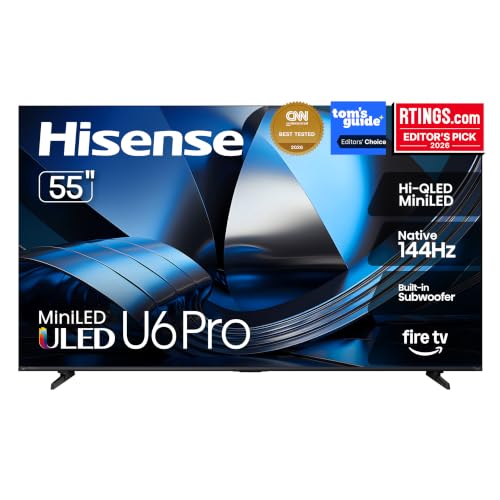
If the budget class has a picture-quality ceiling, the U6 Pro is the set pressing against it. The combination in its listing reads like a flagship hand-me-down list: a Mini-LED ULED panel with Hi-QLED colour, a native 144Hz refresh rate, Dolby Vision IQ that adapts tone mapping to your room’s ambient light, Dolby Atmos audio support and a glare-free screen finish. Any two of those would headline a rival’s marketing; together they make the strongest case in this guide for spending your attention here first.
The native 144Hz figure deserves emphasis because it is real panel speed, not interpolation. Fast sport stays coherent, games from a current console or a PC can run at high frame rates with variable refresh support, and the Motion Rate 480 branding layered on top is best ignored as arithmetic rather than engineering. Fire TV runs the interface, which brings Alexa voice control and a deep app library, though Amazon’s home screen promotes its own content more assertively than Roku’s does — the picture forgives the software its enthusiasm.
- Panel: 55-inch Mini-LED ULED, Hi-QLED colour, 4K UHD
- Refresh: native 144Hz panel
- HDR/audio: Dolby Vision IQ, HDR10+, Dolby Atmos
- Platform: Fire TV with Alexa voice control
- Finish: glare-free screen treatment
Strengths
- Mini-LED dimming delivers the deepest, most controlled blacks available anywhere in this budget tier
- Dolby Vision IQ adjusts the image to room lighting, sparing you the daytime-versus-evening settings shuffle
- A genuinely fast panel that serves film, sport and high-frame-rate gaming without mode-hunting
Trade-offs
- Fire TV’s promotional home screen will irritate viewers who prefer Roku’s restraint
- Viewing angles narrow sooner than on the group’s wider-angle designs, so very wide seating spreads suffer
- The feature density means more settings to learn before the picture looks its best
Best for: picture-first viewers who watch films at night and want flagship-style contrast inside a budget-class purchase. Not suited for: wide L-shaped sofas where half the audience sits far off to the side.

TCL T7 55″ — Best for gaming
The T7 is what happens when a manufacturer reads the room and notices how many budget televisions now live opposite a games console. Its listing leads with a native 120Hz QLED panel, then stacks gaming vocabulary that actually means something: variable refresh rate to keep frame delivery smooth, and a Game Accelerator mode that pushes responsiveness further for fast titles. Dolby Vision HDR and Atmos support mean films are not an afterthought either, but the centre of gravity here is unmistakably play.
Google TV runs the interface, which suits gamers who already live in Google’s ecosystem and brings a capable voice remote with Alexa compatibility noted in the listing as well. In practice the T7’s appeal is the absence of the usual budget-gaming compromise: you are not choosing between a big screen and a fast one, or between high frame rates and decent HDR. Competitive players chasing the lowest possible input lag at tournament level will still shop further up the market, yet for the living-room console majority this set removes every excuse.
- Panel: 55-inch QLED, 4K, native 120Hz refresh
- Gaming: VRR, Game Accelerator 240 mode
- HDR/audio: Dolby Vision, HDR10+, Dolby Atmos
- Platform: Google TV, voice remote, Alexa compatible
- Series/model: T7, 55T7 (latest model)
Strengths
- Native 120Hz with VRR covers current consoles at their best output without breaking the budget brief
- Google TV’s recommendations genuinely help surface games-adjacent video and streaming apps
- Picture quality for film nights is strong enough that the gaming focus costs nothing elsewhere
Trade-offs
- Backlight control is a step behind the Mini-LED U6 Pro, visible in the blackest scenes
- Google TV can feel busy compared with Roku’s plain grid, especially for older family members
- Serious PC gamers wanting 144Hz should look at the Hisense pick instead
Best for: console households where the television earns its keep in game sessions as much as in streamed series. Not suited for: technophobe relatives who want the simplest possible remote-and-grid experience.
Roku Plus Series 55″ — Best smart platform
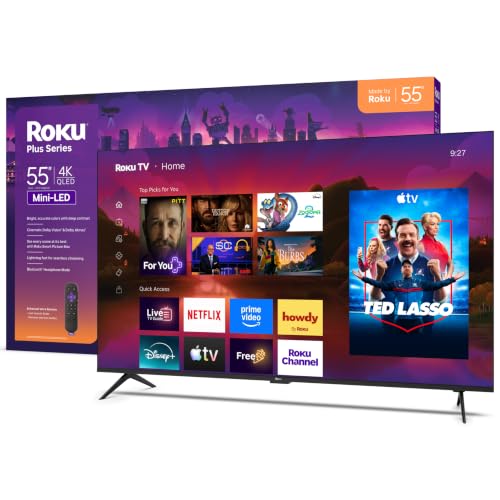
Roku building its own television changes the usual budget calculation. Instead of licensing software onto anonymous hardware, the Plus Series pairs the platform people already trust with a 4K QLED MiniLED panel, Dolby Vision and Dolby Atmos, and an enhanced voice remote in the box. The result is the most coherent budget package here for viewers whose priority is that the television simply works, every evening, without a settings expedition.
The software argument is familiar but decisive: Roku’s home screen is a grid, its search spans services without favouring a storefront, and its free live TV offering — news, sport and films — is woven into the same guide as everything else. The MiniLED backlight lifts picture quality well beyond Roku’s cheaper Select line, giving dark scenes a composure that earlier Roku-branded sets could not manage. For a household migrating from a plug-in Roku stick, this is the same familiar country, just with a far better screen attached.
- Panel: 55-inch QLED MiniLED, 4K
- HDR/audio: Dolby Vision, Dolby Atmos
- Platform: Roku TV, manufactured by Roku itself
- Remote: enhanced voice remote included
- Connectivity: Wi-Fi streaming with free live TV built in
Strengths
- The least frustrating software in the class, matched to hardware by the same company
- MiniLED backlight gives it picture credentials earlier Roku-branded sets lacked
- Private listening through the Roku ecosystem and a sane remote layout suit family viewing
Trade-offs
- High-refresh gaming is not its brief; console players should take the TCL T7 or Hisense U6 Pro
- Roku’s ecosystem locks you into its app store, with no sideloading flexibility of the Google TV route
- Design is functional rather than furniture-grade, with a plain bezel and feet
Best for: streaming-first families who value a calm interface and a good picture in equal measure. Not suited for: frame-rate-chasing gamers, for whom this panel leaves performance on the table.

Hisense E6SR 55″ — Best value
Value, properly defined, is not the cheapest ticket in the tier; it is the longest feature list that survives contact with a tight budget. The E6SR’s listing reads like a refusal to cut the fashionable corners: Hi-QLED colour, Dolby Vision, Game Mode Plus with variable refresh rate and auto low-latency mode, AirPlay for Apple households and compatibility with both Alexa and Google Assistant. Hisense has essentially taken the checklist shoppers bring to sets a class above and stapled it to its sharpest-priced 55-inch Roku model.
Roku TV keeps the experience friendly, and the gaming support is more than a badge — VRR and ALLM together mean a console gets smooth frame delivery and automatic low-lag switching without menu archaeology. DTS Virtual:X handles the audio side with spatial processing that flatters the modest built-in speakers. What you give up versus the U6 Pro is backlight sophistication and panel speed; what you keep is almost everything else, which is precisely the trade a value pick is supposed to offer.
- Panel: 55-inch Hi-QLED, 4K UHD
- HDR: Dolby Vision supported
- Gaming: Game Mode Plus, VRR, ALLM
- Audio: DTS Virtual:X processing
- Platform: Roku TV, AirPlay, Alexa and Google Assistant compatible
Strengths
- Feature density per pound of budget is the best in this guide — nothing obvious has been amputated
- Roku software plus AirPlay makes it the easiest set here for mixed-phone households to share
- Console support is complete enough that it can serve as a genuine gaming screen
Trade-offs
- Standard backlighting cannot darken a scene the way the Mini-LED picks can
- Panel brightness is adequate rather than commanding in a very sunlit room
- Hisense’s model naming is confusingly close to its own other lines, so double-check the exact model code when ordering
Best for: budget disciplinarians who refuse to surrender Dolby Vision or console features to hit their number. Not suited for: home-cinema devotees who will spend every film night comparing its blacks unfavourably with Mini-LED.

VIZIO M55Q6L4 Quantum — Best alternative platform
VIZIO has always marched slightly apart from the platform wars, and the M55Q6L4 Quantum is the pick for households that like it that way. The Quantum colour panel delivers the wide palette this class now expects, while VIZIO’s own smart approach leans on casting from phones and tablets — a workflow many families already prefer, since the phone in your pocket is faster and more personal than any television interface will ever be.
As the older design in this group, the VIZIO trades the newest software gloss for a straightforward, proven proposition: a good 4K QLED picture, HDR support and a manufacturer that has been building value televisions longer than most of its rivals have existed. It will not win the gaming-feature arms race against the TCL T7, nor the contrast contest against the U6 Pro. Its lane is the household that streams from a phone, watches broadcast and sport, and wants the screen itself — not the software circus around it — to justify the purchase.
- Panel: 55-inch Quantum QLED, 4K HDR
- Platform: VIZIO Smart TV with phone casting at its centre
- Class: M-Series Quantum line
- Model code: M55Q6L4
- Best paired with: a phone-driven streaming household
Strengths
- Quantum colour keeps streamed films and sport looking rich rather than rinsed
- Casting-first design suits viewers who treat the TV as a display and the phone as the remote
- VIZIO’s long value-lineage shows in sensible ergonomics and an unflashy, durable-feeling build
Trade-offs
- Its smart interface is less polished than Roku TV or Google TV on the rival picks
- Gaming features are basic beside the VRR-equipped TCL and Hisense models
- As an earlier model in the group, it misses the newest platform refinements
Best for: phone-centric streamers who want Quantum colour without joining the Roku or Google camps. Not suited for: anyone who expects the television’s own menus to be the star of the evening.
How Does Sound Fit Into a Budget This Tight?
Every manufacturer in this class makes the same quiet decision: the panel gets the money and the speakers get the apology. Slim cabinets leave no room for drivers with any real displacement, and the result is a sound that is perfectly intelligible for newsreaders and quietly inadequate for everything else — film scores flatten, explosions become polite, and dialogue in a noisy scene competes with the refrigerator. None of the six picks escapes this physics, though they differ in how gracefully they hand the problem to something else.
The handover options are better than they used to be. HDMI ARC or eARC on these sets means a soundbar wakes, sleeps and changes volume with the television remote, which removes the two-remote friction that used to make families resist adding one. Optical output covers older bars. DTS Virtual:X on the Hisense E6SR and Dolby Atmos signal support on several picks mean the television can at least pass or process the formats a bar or receiver understands. The practical advice is sequencing: if the budget forces a choice this month, buy the better panel now and the bar later, because a panel cannot be upgraded in pieces while sound can.
Headphone and private-listening routes deserve a mention for shared housing. Roku’s ecosystem, represented here by three of the six picks, supports listening through the Roku app or compatible remotes, which solves the night-owl problem without waking the house. It is a small feature with an outsized effect on domestic harmony, and it costs nothing beyond the phone already in your pocket.
A Second Look: The Evening Test Each Pick Has to Pass
TCL R7D 55″ — Put on the ten o’clock news followed by a nature documentary. The R7D’s test is tonal: skin tones on the newsreaders should look like people rather than waxworks, and the documentary’s water and foliage should stay rich without tipping into neon. It passes both in our judgement because TCL’s colour tuning at this level aims for pleasant accuracy rather than showroom theatre, and Roku’s interface means the test itself takes seconds to arrange.
Hisense U6 Pro 55″ — Its examination is a single dark scene: a night street, a face lit by one lamp. Watch the lamp’s halo. On lesser backlights the glow bleeds into a visible rectangle of lifted black; the U6 Pro’s Mini-LED grid keeps the halo tight and the surrounding street genuinely dark. Then replay the scene with the room lights on and Dolby Vision IQ engaged, and notice how the shadow detail survives the adaptation instead of being crushed by it.
TCL T7 55″ — The T7 sits an exam in two subjects. First, a console: load a fast game, turn in a circle, and look for tearing or smearing at the frame’s edges — VRR and the native 120Hz panel should keep the motion whole. Second, a football match, where the same panel discipline shows up as a ball that stays a ball during a long pass. A set that passes both is a set whose gaming badge is engineering rather than ink.
Roku Plus Series 55″ — Test the Roku with a stopwatch and a technophobe. From cold, how long until a chosen app is playing? How many button presses? The Plus Series was built to win exactly this trial, and its MiniLED panel means the picture waiting at the end of the short journey is worth arriving at. If your household includes anyone who has ever described a television as “complicated,” this is the pick whose exam results matter most.
Hisense E6SR 55″ — The E6SR’s test is an audit: list the features your household actually used this week — Dolby Vision on a streamed film, the console after dinner, AirPlay for a grandparent’s photographs — and count how many this value set covers. Its score is the reason it is in this guide. Then watch one dark scene to confirm the known concession: the blacks are good, not Mini-LED good, and decide whether the difference is worth money to you. For most rooms, honestly assessed, it is not.
VIZIO M55Q6L4 Quantum — Examine the VIZIO the way its owners will use it: from the phone. Cast a video, a photo set, a music app. The workflow should feel like the television is a natural extension of the handset, because that is the product VIZIO built. Follow with an hour of broadcast sport to confirm the Quantum panel’s colour holds up outside the casting story, and the VIZIO’s quiet, competent character is fully revealed.
What About Longevity — Updates, Panels and the Second Owner?
A budget television bought well should serve five to eight years, and the factors that decide whether it does are mostly not in the headline specifications. Software support is the first: Roku, Google TV and Fire TV all update their platforms for years, but the cadence on budget hardware slows over time, and a set that feels quick today should be bought with a small reserve of patience for year four. The pragmatic hedge is that every pick here can be re-brained later by a streaming stick, so a slowing interface is an inconvenience, not a death sentence.
Panel longevity is the second factor, and here the news is good: LED-backlit LCD panels of the kind all six picks use are mature, stable technology without the burn-in considerations of organic panels. Brightness fades slowly over very long horizons, and the realistic failure points are mundane — a power supply, a remote, a Wi-Fi module — rather than the picture itself. Keep the vents clear, avoid wall-mounting directly above a heat source, and the hardware will usually outlast the household’s desire for a bigger screen.
The third factor is the second owner. Budget sets are handed down — to students, to spare rooms, to relatives — and the picks that hand down best are the ones with simple platforms and standard connections. A Roku set can be factory-reset and re-homed in minutes; a set tied to a household’s Google or Amazon account needs the same reset discipline for privacy. Whichever pick you choose, learn the reset path on day one. It is the last setting you will ever use on the television, and the one that protects everything the set learned about you while it was yours.
How Do the Three Platforms Behave When the Hardware Is Modest?
Budget televisions share a constraint that flagship reviews never mention: the processor budget is small, and the platform’s manners on modest silicon decide how the set feels every single day. Roku TV was designed for exactly this hardware class, which is why its grid stays responsive on sets where richer interfaces begin to hesitate; its search is fast, its settings are shallow in the good sense, and its updates rarely rearrange furniture you had memorised. Three of the six picks run it, and that is not an accident of sampling — it is the class’s centre of gravity.
Google TV, on the TCL T7 here, asks slightly more of the hardware and gives slightly more back: recommendations that genuinely learn, a deeper app catalogue, and voice search that reaches across services. On a modern budget panel it runs well, with the occasional thoughtful pause when the home screen rebuilds its shelves. Fire TV, on the Hisense U6 Pro, is the most commerce-forward of the three and the most integrated with Amazon’s own services; households deep in that ecosystem experience the promotion as relevance, while households outside it experience it as noise. Neither reaction is wrong, and knowing which household you are is worth more than any benchmark.
The practical test, if you can perform it in a store or during a return window, is the three-app shuffle: open a streaming app, jump to live television, jump to a second app, and return. Time it, and count the stutters. Budget sets reveal themselves in transitions, not in demos. The picks in this guide were chosen partly because their platforms survive that shuffle with dignity at this level of hardware investment.
Which Room Shapes and Habits Should Steer the Choice?
Start with light. A 55-inch set in a room with a window to its side lives an easier life than one facing the glass, and in the harder arrangement the U6 Pro’s glare-free finish and brightness headroom, or the R7D’s high-brightness panel, earn their keep daily. In a controlled, curtain-friendly room, by contrast, backlight quality matters more than raw output, which again points to the Mini-LED picks but for the opposite reason: their dimming, not their lumens.
Then consider the audience’s spread. These are VA-type panels in the main, whose contrast is richest viewed from near the centre; a household that watches from a wide L-shaped arrangement will see the edges of the picture wash sooner than a household on a single sofa facing the screen. If your seating is wide, sit the whole family in their real places during the return window and judge from the worst seat, not the best one — the worst seat is where regret lives.
Finally, weigh the household’s technical centre of gravity. A home where one person is the unofficial IT department should buy for the least technical viewer’s independence: Roku’s grid, a remote with few buttons, and inputs that switch themselves when a console wakes. A home of enthusiasts can exploit Google TV’s depth. The best budget television is not the one with the longest feature list; it is the one whose features your actual household will still be using, happily, in month eighteen.
What Changes After the First Month of Ownership?
Week one with any of these sets is about spectacle; month two is about habits, and the habits are where budget televisions are truly judged. The home screen stops being a novelty and becomes a doorway you pass through half-asleep. The remote’s layout either lives in your hand’s memory or keeps demanding your eyes. The settings you tuned on day one either hold, or an update quietly resets a preference and teaches you which menus matter. Reviews written from a weekend cannot see this phase, which is why this guide weights platform manners and remote design as heavily as panel measurements.
Three patterns recur in long-term reports from this class. First, households stop using the television’s apps for anything except their two or three core services, and the breadth of a catalogue matters less than the speed of reaching the familiar. Second, the soundbar question resolves itself: families either add one within the first month, when film nights expose the speakers, or they acclimatise and never do — there is very little middle ground, and both outcomes are respectable. Third, the set’s role in the room settles: it becomes the news screen, the console screen, the film screen, and its secondary talents fade into trivia. Buying for the role it will actually settle into, rather than the role imagined in the store, is the deepest form of value in this entire category.
There is also a small maintenance rhythm worth adopting from the start. Keep the firmware updated while the set is young, because early updates in a model’s life fix real bugs; wipe the screen with a dry microfibre cloth rather than sprays; and once a year, revisit the picture settings with fresh eyes, since panels drift slightly and rooms change around them — new curtains, new lamps, new sofa positions. Ten minutes annually keeps a budget set looking like the television you chose rather than the one it slowly became.
What Does the Whole Budget Field Look Like on One Page?
| Pick | Panel | Platform | Headline strength |
|---|---|---|---|
| TCL R7D 55″ | QLED, high brightness | Roku TV | Balance of picture, casting and calm software |
| Hisense U6 Pro 55″ | Mini-LED ULED, native 144Hz | Fire TV | Contrast and HDR adaptation to room light |
| TCL T7 55″ | QLED, native 120Hz | Google TV | VRR gaming with film credentials intact |
| Roku Plus Series 55″ | QLED MiniLED | Roku TV | Software coherence from a single maker |
| Hisense E6SR 55″ | Hi-QLED | Roku TV | Fullest feature checklist at the tier’s sharp end |
| VIZIO M55Q6L4 Quantum | Quantum QLED | VIZIO Smart | Casting-led simplicity and colour |
Read the table by your own evenings rather than by specification envy. Night-film households gravitate to the U6 Pro’s dimming; console households to the T7’s refresh rate; households that argue about remotes to the Roku Plus. The E6SR is the hedge against future regret, the R7D the hedge against present friction, and the VIZIO the choice for people who already run their viewing life from a handset.
How Do You Set Up a Budget 55-Inch Set So It Looks Its Best?
Start with the picture mode, because the default is chosen for showrooms, not sofas. Switch from any vivid or dynamic preset to the movie, cinema or filmmaker-style mode, which restores accurate colour and stops the panel from crushing shadow detail. Then walk the television to a dark scene in a familiar film and set brightness — which on modern sets governs black level — so that letterbox bars look dark grey-black rather than glowing, without swallowing detail in coats and hair.
Motion settings come next. For film, reduce motion smoothing to its lowest effective setting or off entirely; the soap-opera sheen it adds is interpolation inventing frames the director never shot. For sport, a mild smoothing level can help a panning camera, and several picks here let you store different settings per input, so the console port and the streaming apps need not share one compromise. Gamers should confirm the game mode is engaged on the console’s HDMI port, since that single toggle is what unlocks the low-latency path and, where supported, variable refresh.
Finish with placement and sound. A 55-inch screen wants a viewing distance where the picture fills your attention without demanding head turns — roughly a couple of metres for most rooms — and a height where the centre of the panel sits near seated eye level. Then be honest about audio: every set here benefits from a soundbar, and the television’s optical or HDMI ARC/eARC output makes adding one a ten-minute job whenever the budget recovers.
What Should You Check in the First Evening Before the Return Window Shrinks?
Run a deliberate defect hunt while returning the set is still painless. Display a plain mid-grey screen — easily found in a settings menu or a test video — and look for blotches, bright corners or a dead pixel cluster; display a black screen in a dark room and judge the backlight’s uniformity with your own content rather than a demo loop. Play one demanding scene you know well, because familiarity exposes flaws that novelty hides: the night drive, the candlelit dinner, the subtitled foreign film where motion smoothing turns graceful camera moves into video-game glide.
Then test the life the set will actually live. Switch inputs the way your household does, pair the remote, cast from the household’s phones, and put a console through its game mode if one lives in the room. Check the stand’s wobble and the viewing angle from the worst seat. A budget television that passes an evening of deliberate scrutiny will almost certainly pass years of casual use, and the scrutiny costs nothing but an hour of the attention you were going to give the new screen anyway.
One more evening-one task protects every later evening: photograph the screen displaying a plain white page and keep the photograph with the receipt. If a uniformity issue develops months later, that dated baseline turns an argument about whether the panel changed into a comparison anyone can see. It takes thirty seconds, it costs nothing, and almost nobody does it — which is precisely why warranty conversations in this class so often go in circles. File the model code, the order confirmation and that photograph together, and the administrative side of the purchase is as well made as the viewing side.
Why Do Model Codes Matter More Than Brand Names Here?
Budget lines are where manufacturers reuse names most aggressively. A series badge can span several panel types across sizes, and a letter near the end of a model code can denote a retailer variant with a different remote or a trimmed feature. The six picks in this guide are therefore identified by their full model codes in the specification lists — 55R7D, 55U6SF Pro, 55T7, 55E6SR and M55Q6L4 among them — and those codes, not the marketing names, are what should be matched against the listing at checkout. If the code on the order confirmation differs from the code in the review you read, you are buying a different television that happens to share a surname.
The same discipline applies across model years. Budget families refresh annually with quiet changes — a panel supplier swapped, a port removed, a platform version advanced — and a review of the 2026 set does not describe the 2025 set wearing the same name. This guide’s pool was checked on 2026-11-26 against current listings, and the model years are stated in the reviews precisely so that a reader holding a listing for a different year can spot the discrepancy before money moves. Five minutes of code-checking is the cheapest insurance in the entire purchase.
Which Buying Mistakes Catch People Out in This Class?
The classic error is buying the showroom. Retail lighting flatters bright, saturated pictures, so the set that dazzled under strip lights can look cartoonish at home. Trust panel architecture — dimming, native refresh, HDR format support — over a dazzling demo loop. A related mistake is paying for motion-rate branding: trademarked numbers in the hundreds describe interpolation, and the native refresh figure is the one your games will actually use.
Size-variant confusion is the quiet budget-killer. These families are sold in many sizes from one listing page, and the variant selected at checkout is not always the 55-inch one from the headline. Confirm the size and the exact model code on the order confirmation. Finally, do not let the budget discipline stop at the screen: a wall mount, a longer HDMI cable for a console, or a basic soundbar may belong in the same plan, and discovering that afterwards stings more than including it would have.
And if the room itself is still undecided — a house move pending, a renovation half-finished — the wisest purchase in this class is sometimes a postponement measured in weeks rather than a compromise measured in years, because a television chosen for the wrong wall rarely becomes right by being discounted.
What If the Budget Stretches — or Snaps Shut?
Readers whose ceiling flexes should know what the next tier actually buys, so the decision to stay in this class is informed rather than accidental. Stepping up buys OLED contrast or a meaningfully larger screen; it does not buy a different daily experience, because the platforms and the content remain the same. Many households rationally conclude that the money serves them better as a soundbar, a wall mount and a year of streaming subscriptions beside a set from this guide. Readers whose budget snaps the other way should cut size before features: a 50-inch version of a well-chosen line preserves the platform and panel character that a same-size strip-down model surrenders, and the smaller screen in a smaller room is barely a compromise at all.
Final Recommendation
Most households should start with the TCL R7D: it is the set with the fewest daily frictions and a picture that flatters everything from breakfast news to a Friday film. If your viewing leans cinematic and your room goes properly dark, step sideways to the Hisense U6 Pro and enjoy Mini-LED contrast that embarrasses pricier sets. Gamers take the TCL T7, interface traditionalists take the Roku Plus Series, and the Hisense E6SR is the answer when the budget is truly immovable. The VIZIO remains the casting household’s quiet alternative. Whichever you choose, verify the live listing on the day — in a tier where the numbers dance daily, the last check is the one that counts, and a well-chosen 55-inch screen will repay that small diligence every single evening for years.
Frequently Asked Questions
Is 55 inches the right size for a typical living room?
For seating roughly two to three metres from the screen, 55 inches is the sweet spot of this class: large enough for 4K detail and sport to feel immersive, small enough to fit the alcoves and media units most rooms actually have. Measure your viewing distance before ordering; if you sit much closer, screen-door effects on lower-quality broadcasts can show, and if much further away, a larger class may serve you better.
Why does this guide print no figure for any model?
Because in this budget tier the number attached to a listing changes constantly — sometimes within a single day — and a figure printed here would mislead more readers than it helped. The guide’s job is the durable part of the decision: panel, platform and features. The listing’s job, on the day you buy, is the number. Check it there, confirm the 55-inch variant, and the two halves of the decision stay honest.
Does a budget set like these handle a games console properly?
Several do, genuinely. The TCL T7 offers a native 120Hz panel with variable refresh rate, the Hisense U6 Pro runs a native 144Hz panel, and the E6SR includes Game Mode Plus with VRR and auto low-latency switching. The Roku Plus and VIZIO are better understood as viewing-first sets. Match the pick to the console’s importance in your house rather than assuming the whole class is equal.
Which platform is easiest for less technical family members?
Roku TV, by a clear margin, which is why two picks and our overall recommendation run it. Its grid layout, unified search and restrained promotion make it the interface grandparents master fastest. Google TV is richer and better at recommendations; Fire TV integrates most deeply with Amazon services and Alexa households. None is difficult, but they reward different temperaments.
Should I budget for a soundbar straight away?
Plan for one eventually, even if you do not buy it on day one. Slim televisions have small speakers firing in unhelpful directions, and dialogue clarity is the first casualty. Every pick here offers the connections a basic soundbar needs, and adding one later is the single largest quality-of-life upgrade this class of television accepts.
How long will a television in this class realistically last?
Five to eight years of useful service is a fair expectation for the panel and core hardware. The likelier ageing path is software: interfaces slow gradually and app support narrows at the edges. Because every pick here accepts a streaming stick through HDMI, a tired interface can be bypassed in minutes, which stretches the honest life of the screen itself well beyond the life of its original software.
Is it worth waiting for a sale on a specific model?
This tier’s prices move constantly in both directions, which cuts both ways: patience is often rewarded, but the model you want can also rotate out of the range while you wait. The sensible approach is to shortlist two picks from this guide — a first choice and an acceptable substitute — and buy whichever presents its best face on the day you are ready, having confirmed the size variant and model code.
Related Guides
Still deciding on size and platform? Our companion roundup of compact 50-inch 4K smart televisions for smaller rooms covers the next size down, while the guide to Google TV and Android-based sets for app-driven households goes deeper on software, and the survey of frame-style televisions that double as wall art suits rooms where the screen must earn its wall space aesthetically too.


