What's inside
- Key Takeaways
- Quick Picks
- How Did a Keyword About LED End Up Led by OLED?
- LED or OLED at This Size: Which Behaviour Suits Your Room?
- Every Pick, With Its Technology and True Size in One View
- What Goes Wrong When Buyers Shop This Size Blind?
- How Do You Set Up a 42-Inch OLED as a Part-Time Monitor?
- How Do You Look After an OLED Panel Without Turning It Into a Chore?
- What Do Refresh Rate, Response Time and HDMI Bandwidth Actually Buy You?
- Why Does Room Light Change the Answer So Completely?
- Which Smart Platform Should Break a Tie at This Size?
- What Does a Year of Ownership Look Like on Each Side of the Divide?
- C4 or C5: How Do You Choose Between Two Generations of the Same Television?
- What Is Local Dimming, and Why Does the Samsung’s Version Matter?
- How Should the Desk-and-Television Corner Be Arranged?
- What Should Families With Children Weigh Differently?
- What Happens at Trade-In, Hand-Me-Down and Second-Room Time?
- How Do the Six Handle Sound in Small and Odd-Shaped Rooms?
- What Should You Verify in the First Week of Ownership?
- What About Energy Use and Heat in a Small Room?
- How Long Will the Smart Side of These Sets Stay Useful?
- A Short Field Guide to Reading Listings at This Size
- Final Recommendation
- Frequently Asked Questions
- Related Guides
As an Amazon Associate I earn from qualifying purchases. This post may contain affiliate links at no extra cost to you.
gizmoverdict.com is reader-supported. When you buy through links on our site, we may earn an affiliate commission.
The search for the best 42 inch led smart tvs contains a small trap, and it is kinder to spring it in the first paragraph than to let a delivery box spring it later. At exactly 42 inches, the smart television market is not an LED market at all. It belongs, almost entirely, to LG’s OLED evo panels in the C4 and C5 — superb screens, beloved by gamers and film watchers, but OLED by technology, with OLED’s behaviour, care requirements and pricing. True LED sets at this end of the catalogue measure 43 inches, one inch more, and they are excellent in their own right. So this guide does two honest jobs: it presents the two genuine 42-inch televisions as what they are, OLED flagships in miniature, and it presents four 43-inch LED models, each labelled 43 inches wherever it appears, for readers whose requirement was LED technology rather than the number 42.
Why does the distinction matter enough to lead a buying guide? Because LED and OLED are not trim levels of one thing. An LED television shines a backlight through a liquid-crystal layer; an OLED television lights each pixel individually and can switch it fully off. The OLED therefore produces perfect blacks and per-pixel contrast no LED at this size can match, responds almost instantly to a games console, and asks in return that you vary your content and respect its panel-care routines if static logos live on your screen all day. A buyer who wanted LED for a bright room, a news channel’s permanent ticker, or simple indifference to babying a panel should buy LED — at 43 inches. A buyer whose real desire was “the best picture that fits this desk or small room” should buy the OLED and stop apologising to the keyword.
Key Takeaways
- Forty-two inches exactly means LG OLED in today’s catalogue; there is no mainstream 42-inch LED smart TV to buy.
- The C4 and C5 at 42 inches are gaming-grade OLEDs that double as large PC monitors for many owners.
- Four 43-inch LED sets — Samsung, LG, TCL and Hisense — serve buyers who genuinely need LED behaviour.
- OLED asks for varied content and sensible brightness habits; LED asks for nothing and tolerates static images indefinitely.
- One inch of diagonal is about three-quarters of an inch of width; most 42-inch plans absorb a 43-inch set.
- Decide by room light and content habits first, and let the size settle itself afterwards.
Quick Picks
| Pick | Badge | Why it is here |
|---|---|---|
| LG 42 OLED evo C4 | The genuine 42-inch flagship | OLED contrast and high-refresh gaming in the only true 42-inch smart TV class that matters. |
| LG 42 OLED evo C5 | The newer OLED generation | A brighter, fresher revision of the same 42-inch formula for buyers starting the clock now. |
| Samsung 43 QN70H | 43-inch Mini LED muscle | Neo QLED brightness and gaming features, labelled honestly at forty-three inches. |
| LG 43 UT75 | 43-inch LED, LG software | A straightforward LED set for buyers who like webOS but not OLED’s care routine. |
| TCL 43 Q6 | 43-inch QLED value | Quantum-dot colour on Google TV at the friendliest end of this page’s pricing ladder. |
| Hisense 43 E6SR | 43-inch Roku simplicity | Hi-QLED colour with the calmest interface in the group, for mixed family rooms. |
How Did a Keyword About LED End Up Led by OLED?
Blame the panel factories. LED televisions are cut efficiently in 43-inch sheets across the industry, so every major maker’s LED line begins there, while LG Display manufactures a 42-inch OLED panel that has become the standard-bearer for small premium screens and large-monitor duty. The result is a catalogue with a one-inch fault line running through it: below the line, OLED owns the territory; above it, LED resumes. Search engines smooth that fault line away, and shoppers reasonably assume a 42-inch LED television must exist because the phrase can be typed. It can be typed about many things that do not exist.
Our selection method followed the facts rather than the phrase. We required a smart platform, current availability, and a listing that could be verified, then sorted the survivors by their true diagonal and their true technology, labelling both in every heading and table. Within the OLED pair, generation and brightness separate the two. Within the LED four, the separation is platform and purpose: Samsung’s Mini LED chases brightness and gaming, LG’s UT75 offers webOS familiarity, TCL’s Q6 leads on value with Google TV, and Hisense’s E6SR pairs QLED colour with Roku’s restraint. Six televisions, two technologies, one inch — and no relabelling anywhere to hide it.
LED or OLED at This Size: Which Behaviour Suits Your Room?
Start with light. A bright room with windows facing the screen favours LED, whose backlight can push luminance hard enough to hold a picture together at noon; the Samsung QN70H is built for exactly that fight. A controlled room — curtains, evening viewing, a desk in a study — favours OLED, whose contrast advantage multiplies as ambient light falls. Then consider content. News channels with permanent tickers, sports channels with fixed score bugs, and PC desktops with static taskbars are LED’s home ground, because an LED panel can show the same bright element for a decade without consequence. Films, prestige series and games are OLED’s, because their imagery moves and their dark scenes are where per-pixel light control becomes visible magic.
Longevity fears about OLED deserve a calibrated answer rather than a slogan. Modern OLED panels carry a suite of care features — pixel refresh cycles, logo luminance adjustment, screen shift — and for varied, ordinary viewing they age gracefully. The risk concentrates in one pattern: the same bright static element, many hours daily, for years. If that pattern describes a lobby screen, a news habit or a trading desk, LED is not the timid choice but the correct one. If it describes nothing in your life, OLED’s remaining trade-offs are price and a preference for dimmer rooms, both of which you can judge from your own sofa.

LG 42 OLED evo C4 — the real 42-inch television, gaming-grade
The C4 at 42 inches has become a phenomenon with a specific tribe: players and PC users who wanted an OLED monitor’s picture at a size monitors rarely reach, with a television’s speakers, tuner and streaming built in. Its panel runs at high refresh rates with the near-instant response that only OLED delivers, so a panning shot in a game stays crisp instead of smearing, and its perfect blacks make night scenes in films genuinely black rather than charcoal. webOS provides the smart layer, with every major streaming service present and a game optimiser menu that gathers the settings players actually touch into one place.
Living with it means accepting OLED’s house rules in exchange for the picture. Vary what you watch, let the panel’s automatic care cycles run when the set is off, and keep brightness sensible rather than maximum as a default. In return, a desk or small room gets a screen that makes visitors ask what it is. The 42-inch C4 also handles console gaming comprehensively — multiple high-bandwidth HDMI inputs, variable refresh support, low-latency modes — which is why so many end up in studies and bedrooms rather than lounges. It is not an LED television, and this guide will keep saying so; it is better than the thing the keyword asked for, for the rooms that suit it.
- Size and panel: exactly 42 inches, OLED evo, 4K, self-lit pixels
- Platform: LG webOS with game optimiser and all major streaming apps
- Useful extras: high-refresh gaming support, variable refresh, near-instant pixel response
- Connections: multiple full-bandwidth HDMI ports, eARC, USB, Bluetooth
Strengths
- Contrast and black levels no LED on this page can approach
- Gaming response and refresh capability in a television’s body
- Doubles convincingly as a very large PC display
Trade-offs
- OLED care habits apply; static all-day content is not its friend
- Peak brightness in a sunlit room trails the Mini LED Samsung
- Premium positioning within this group of six
Best for: gamers, film watchers and desk setups in rooms with controlled light.
Not suited for: all-day news tickers, trading desks or lobbies with fixed bright graphics.

LG 42 OLED evo C5 — the C4’s idea, pushed brighter
The C5 succeeds the C4 at the same 42 inches with the generational improvements LG’s OLED line has been pursuing: higher brightness from the panel and its processing working together, refined handling of near-black detail, and the newest webOS on board from day one. In a side-by-side evening the differences are refinements rather than revelations — highlights in films carry more punch, dark scenes separate their shadows more cleanly, and the interface moves with a little more ease. For a buyer choosing today with a decade of ownership in mind, the newer generation’s later starting point is itself an argument.
Everything said about the C4’s tribe applies here: this is the screen for the study, the gaming bedroom, the film lover’s small room. The care routine is the same, the gaming credentials are the same or better, and the “not an LED” label is the same, printed just as plainly. Choose between the two OLEDs by availability and by how much the brightness step matters in your room; a curtained study may never call on the C5’s extra headroom, while a room with one bright window will use it daily. Either way you are buying the genuine 42-inch article, in its current or its immediately previous generation.
- Size and panel: exactly 42 inches, OLED evo, 4K, brighter generation
- Platform: latest LG webOS with game optimiser
- Useful extras: improved near-black detail, high-refresh gaming, panel care suite
- Connections: full-bandwidth HDMI ports, eARC, USB, Wi-Fi and Bluetooth
Strengths
- Brightest, most refined picture of the two true 42-inch sets
- Newest software and processing baseline for a long ownership
- Retains the C4’s gaming and monitor credentials in full
Trade-offs
- Still OLED, with the same static-content cautions
- Commands the group’s premium as the newest flagship revision
- Extra brightness goes unused in a fully dark room
Best for: buyers starting a long ownership now, in rooms with some daylight to overcome.
Not suited for: static-content duty, or anyone whose room is dark enough that the C4 already suffices.

Samsung 43 QN70H — a 43-inch Mini LED that fights bright rooms
Now the honest inch appears. The QN70H measures 43 inches, and in exchange for that inch it offers the LED virtues in their strongest small-set form: a Neo QLED Mini LED backlight with the brightness to hold a picture in a sunlit room, quantum-dot colour, and Samsung’s gaming features including its hub for cloud services. Where the OLEDs win the night, this Samsung wins the afternoon — sport on a bright Saturday, a kitchen-adjacent family room, a space where curtains are not part of the plan. Its Tizen platform matches Samsung’s larger sets, so a Samsung household keeps one interface across rooms.
Mini LED backlighting also means local dimming that, while not per-pixel, gives this set contrast well beyond an ordinary LED’s, with blacks that satisfy in all but the darkest film scenes. Motion handling for sport is a Samsung strength, and the panel’s gaming support covers the refresh and latency needs of current consoles. Static content holds no fear here at all: tickers, score bugs and dashboards can live on this screen for years. If your requirement list said LED because your content or your room demanded LED behaviour, this is the most complete answer on the page — one inch larger than the search, and labelled so at every mention.
- Size and panel: 43 inches (labelled), Neo QLED Mini LED, 4K
- Platform: Samsung Tizen with Gaming Hub and free channel service
- Useful extras: high brightness for lit rooms, local dimming, strong motion processing
- Connections: HDMI with eARC, USB, optical out, Bluetooth
Strengths
- Brightness and glare resistance the OLEDs cannot match
- Static content can stay on screen indefinitely without panel worry
- Gaming and sport credentials are thoroughly covered
Trade-offs
- It is 43 inches, not the 42 in the search phrase
- Black levels, while strong for LED, stop short of OLED’s perfect dark
- Tizen’s app store is a little narrower than Google TV’s
Best for: bright rooms, sport, news and mixed family duty where LED behaviour is the point.
Not suited for: a hard 42-inch maximum, or a dark cinema room chasing perfect blacks.

LG 43 UT75 — webOS on a plain, dependable LED
Some buyers like LG’s software and rooms, but not OLED’s care instructions or flagship pricing. For them LG builds the UT75: a 43-inch 4K LED television on webOS, with the same app ecosystem and remote philosophy as the C-series, wrapped around a conventional backlit panel that asks nothing of anyone. The picture is honest mid-market LED — decent colour, decent contrast, brightness for ordinary rooms — and the experience is defined by familiarity: if a larger LG lives in your lounge, this set behaves like its smaller sibling in every menu.
The UT75 is the pick for the guest room, the rental, the kitchen extension, the places where a television should simply work for whoever is in front of it. It will show a news ticker for a decade without a thought, stream everything the household subscribes to, and accept a console happily for casual play. What it will not do is reproduce the OLEDs’ night scenes or the Samsung’s noon defiance, and it does not pretend to. Labelled at its true 43 inches, it is the conservative LED answer for LG households.
- Size and panel: 43 inches (labelled), LED backlit, 4K
- Platform: LG webOS with major streaming services
- Useful extras: familiar LG remote and menus, voice control support
- Connections: HDMI with eARC, USB, optical out, Bluetooth
Strengths
- Zero panel-care burden; static content is welcome
- webOS consistency for homes with larger LG televisions
- Simple, dependable behaviour for guest and family rooms
Trade-offs
- Contrast and brightness are mid-market rather than ambitious
- One inch over the searched size, like all true LED options here
- Gaming features cover casual play, not high-refresh ambitions
Best for: LG households wanting LED simplicity in a second room.
Not suited for: film lovers in dark rooms, who should be looking at the OLED pair.

TCL 43 Q6 — QLED colour and Google TV, 43 inches of value
TCL’s Q6 brings the quantum-dot colour layer — the Q in QLED — down to a price tier where it used to be absent, and pairs it with Google TV at 43 inches. The result is a set whose streamed films look richer than its station suggests, with Chromecast built in for Android households and a home screen that learns the family’s habits. For a first 4K television in a small flat, or a student house where the set must serve films, sport and games in rotation, the Q6’s balance of colour, platform and cost is the most persuasive on this page.
Its LED panel tolerates every content habit without supervision, and its gaming mode trims lag adequately for console play, though high-refresh ambitions belong to the OLEDs above. TCL’s processing of poor broadcasts is a step behind Samsung’s, so heavy antenna viewers may notice busier artefacts on weak channels. Labelled plainly at 43 inches like the rest of the LED four, the Q6 is where the money-conscious LED buyer should start — and, after checking the room’s light, quite possibly finish.
- Size and panel: 43 inches (labelled), QLED colour layer, 4K LED
- Platform: Google TV with Chromecast built in
- Useful extras: voice remote, profiles including children, Android casting
- Connections: HDMI with eARC, USB, optical out, Bluetooth
Strengths
- Colour performance above its price station
- Google TV’s app depth and casting for Android homes
- No content restrictions; every habit is safe on LED
Trade-offs
- Upscaling of weak broadcasts trails the Samsung
- Brightness suits ordinary rooms, not sun traps
- High-refresh gaming is beyond its brief
Best for: first 4K sets, student houses and Android families at 43 inches.
Not suited for: competitive gamers, or buyers with a strict 42-inch enclosure.
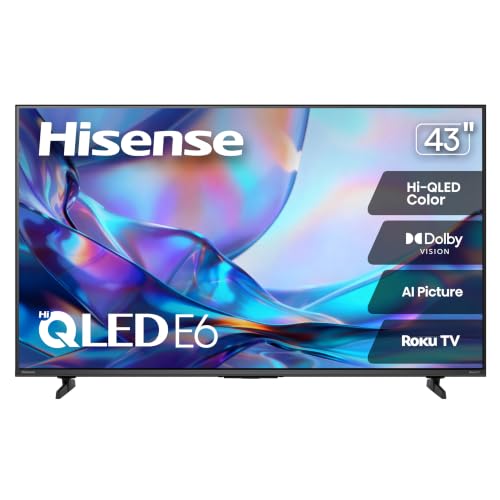
Hisense 43 E6SR — Hi-QLED colour wearing Roku’s calm interface
The last of the LED four combines Hisense’s Hi-QLED colour with the Roku platform, a pairing aimed at households that want a picture a cut above plain LED without learning a complicated television. Roku’s grid keeps the E6SR guest-proof, its search stays neutral between services, and private listening through the phone app serves bedrooms well. The panel’s colour layer shows in films and nature programmes, giving this set a warmer, richer cast than the LG UT75’s plainer LED, while its behaviour with static content remains pure LED: indifferent, indefinitely.
Hisense has built its name on exactly this kind of value engineering, and the E6SR’s compromises are the expected ones — processing polish a notch behind Samsung, brightness for normal rather than extreme rooms. For a family room that runs news in the morning, cartoons after school and a film on Friday, it may be the most liveable television on the page. It is 43 inches, labelled as such, and it completes the honest LED bench that the 42-inch shelf could not supply.
- Size and panel: 43 inches (labelled), Hi-QLED colour, 4K LED
- Platform: Roku, with a voice remote and control through the phone app
- Useful extras: private listening, AirPlay support, low-lag game mode
- Connections: HDMI with eARC, USB, optical audio, Bluetooth
Strengths
- Roku simplicity wrapped around better-than-basic colour
- Family-proof interface with neutral search
- Completely relaxed about static content and long hours
Trade-offs
- Processing refinement sits behind the Samsung’s
- Not the brightest here for difficult daylight
- One inch beyond the searched size, as with every LED pick
Best for: mixed family rooms wanting colour, calm software and no panel supervision.
Not suited for: dark-room film purists, whose answer on this page wears an OLED badge.
Every Pick, With Its Technology and True Size in One View
| Model | True size | Technology | Choose it when |
|---|---|---|---|
| LG C4 | 42 inches | OLED | Gaming or films in controlled light |
| LG C5 | 42 inches | OLED, brighter generation | The newest OLED with daylight headroom |
| Samsung QN70H | 43 inches | Mini LED | Bright rooms, sport, static content |
| LG UT75 | 43 inches | LED | webOS familiarity without OLED care |
| TCL Q6 | 43 inches | QLED (LED) | Value colour on Google TV |
| Hisense E6SR | 43 inches | Hi-QLED (LED) | Roku calm with richer colour |
The table is the guide in miniature: two rows at the searched size with a different technology than the search named, four rows at one inch more with the technology the search asked for. Any other page that shows you six rows of “42-inch LED” has edited at least four of these facts away.
What Goes Wrong When Buyers Shop This Size Blind?
The commonest failure is ordering a television described loosely as 42-inch class and receiving a 43-inch set that overwhelms a desk or refuses an enclosure — or, in reverse, receiving an OLED when the room’s all-day news habit will age it unevenly. Read the technology line and the dimension diagram, not the headline. A second failure is buying the OLED for a bright conservatory and blaming the panel for physics. A third is the opposite: buying a plain LED for a dedicated film room and wondering why night scenes look washed. And a fourth, specific to the C-series tribe, is forgetting the desk ergonomics of a 42-inch screen used as a monitor — it needs depth, a proper mount or stand position, and a chair distance that treats it as a television that computes, not a monitor that grew.
How Do You Set Up a 42-Inch OLED as a Part-Time Monitor?
Give it desk depth first: at 42 inches, a viewing distance around an arm’s length and a half keeps text comfortable and the whole screen within a natural gaze. Use the game or PC picture mode for the computer input so the panel disables processing that smears text, set the computer’s output to the panel’s native 4K, and let the television’s pixel-care features run by keeping it connected to power in standby rather than switching it off at the wall. Dark themes in your applications are kind to both your eyes and an OLED. When the workday ends, the same screen becomes the room’s cinema without moving a cable — which is, in the end, the entire reason this unusual size class has such devoted owners.
How Do You Look After an OLED Panel Without Turning It Into a Chore?
The care routine sounds fussy in summary and proves light in practice, because most of it is automated. The panel runs short refresh cycles by itself when the television goes into standby, which is why the set should stay plugged in rather than being killed at a wall switch — the single habit that matters most, and the one most often broken by tidy households with switched sockets. A longer refresh is offered occasionally by the software; accept it when it appears, usually overnight. Beyond that, the rules are content rules: vary what you watch across a week, let screen savers do their work during pauses, and avoid leaving a paused bright menu sitting while you make dinner. None of this asks for vigilance; it asks for variety, which varied households already have.
The PC use case adds two specifics. A desktop is a festival of static elements — taskbar, icons, window frames — so set the taskbar to hide itself, rotate wallpapers or use a plain dark background, and let the display sleep during long absences. LG’s panel settings include options aimed exactly at this life: logo dimming for fixed bright graphics and a screen-shift that moves the image by imperceptible steps. Owners who follow these basics report years of clean panels; owners who run a bright news channel twelve hours daily report the ticker’s ghost, and both reports are true, which is why this guide sorts buyers by habit rather than declaring a winner between technologies.
What Do Refresh Rate, Response Time and HDMI Bandwidth Actually Buy You?
Three numbers dominate gaming discussion at this size, and each buys something different. Refresh rate — how many times per second the panel can draw a new image — buys smoothness when the source can feed it: a PC or current console rendering above sixty frames per second will look fluid on the OLEDs in a way the 60Hz LED sets cannot reproduce, however good their processing. Response time — how fast a pixel changes — buys clarity within that motion; OLED’s near-instant response is why a fast pan stays readable instead of doubling. HDMI bandwidth buys permission: the full-bandwidth ports on the LG pair accept the high-refresh 4K signals that lesser ports refuse, so the cable and the port, not just the panel, decide what your console can send.
For television viewing rather than gaming, the hierarchy inverts. A film at twenty-four frames per second gains nothing from a high-refresh panel beyond good handling of its native cadence, and broadcast sport at fifty or sixty frames is served by every set here. This is why the LED four remain entirely respectable purchases for viewing households: the OLEDs’ technical triumphs are concentrated in gaming and PC duty and in dark-scene contrast. Pay for those triumphs if your evenings include them; save the money if your evenings are the news, a series and the football, in a room with the lights on and people talking through both.
Why Does Room Light Change the Answer So Completely?
A television picture is a negotiation between the light the screen emits and the light the room throws back at it. In a dark room, the screen’s own floor — its black level — dominates perception, and OLED’s floor is zero: black pixels emit nothing, so a night scene contains true darkness and the eye reads enormous contrast. Raise the room light and the negotiation shifts; reflections and ambient wash lift every panel’s floor toward grey, erasing OLED’s advantage while rewarding raw brightness, which is LED’s home territory and the Mini LED Samsung’s particular strength. Neither technology is cheating; they are optimised for different ends of the same dial, and the dial is in your room, not in the specification sheet.
Practical consequences follow for placement. An OLED placed opposite a bright window will spend its life fighting reflections it cannot win against, while the same window barely troubles the Samsung. Conversely, an LED in a dedicated dark film room will show its backlight’s glow in every night scene, a faint grey where the film intends nothing. Curtains are cheaper than either television and shift the dial themselves; a buyer willing to darken the room widens the OLED’s lead, and a buyer who loves a sunlit open-plan space should let the LED four fight it out among themselves.
Which Smart Platform Should Break a Tie at This Size?
When two sets remain after size, technology and light have voted, the platform is the daily texture of ownership. webOS on the three LGs is a tidy, pointer-friendly system with strong gaming menus. Tizen on the Samsung mirrors the interface of Samsung’s big sets and adds its free channel grid and cloud gaming hub. Google TV on the TCL brings the deepest app store and the best casting story for Android households. Roku on the Hisense brings calm: a grid that does not rearrange itself, neutral search, and the easiest guest experience of the four. None is the wrong answer; the right one is the one your household already speaks, because a second room’s television inherits the main room’s habits or becomes the television nobody uses.
Sound deserves its tie-breaking sentence too. The OLEDs carry surprisingly capable audio for their thinness, tuned for the desk distances they often serve. The Samsung and TCL project adequately into a family room. All six accept a soundbar by eARC without argument, and at these sizes a single compact bar remains the highest-value accessory in the category — more noticeable, nightly, than any difference between the LED four’s panels.
What Does a Year of Ownership Look Like on Each Side of the Divide?
Picture the OLED household first. The set lives in a study or a film-friendly bedroom. Weeknights alternate between a series and gaming; weekends bring a film watched properly, lights low, where the panel justifies itself in the first dark scene. Twice a year the owner accepts a panel refresh prompt. The taskbar hides itself; the wallpaper rotates; nobody thinks about any of it, because the habits folded into routines within a month. Five years in, the screen remains the best picture in the house, and guests still comment on it.
Picture the LED household. The set lives in a bright family room or a kitchen extension. Mornings run the news with its ticker; afternoons run sport; the screen shows a music app’s static artwork during dinner and a console dashboard during the children’s hour. Nobody has ever opened a panel-care menu, because there is nothing in one that concerns them. Five years in, the picture is exactly as it was, which was the entire point. Both households chose correctly, and the only incorrect household is the one that bought the other family’s television — the mistake this guide exists to prevent.
C4 or C5: How Do You Choose Between Two Generations of the Same Television?
Because the two OLEDs share a size, a panel family and a purpose, the choice between them deserves its own reasoning rather than a reflexive “newer is better.” The C5’s brightness advantage is real but conditional: it shows in highlights, in daylight resistance, and in HDR peaks, which means it shows most for film watchers with some ambient light and least for desk users in a dim study, where the C4’s output was already ample. The C5 also starts its software clock later, which matters to a buyer planning a decade of service, since platform support is the part of a modern television most likely to age first. Against that, the C4 is the known quantity with a long owner history documenting its behaviour, and when the outgoing generation is discounted at a model changeover, the value argument can be decisive.
Our practical rule: if the two are close in price when you shop, take the C5 and the longer runway. If the C4 is substantially keener, take it without a backward glance, particularly for a dark room or a desk, and put the difference toward the soundbar or the mount. What not to do is wait indefinitely for the next generation; OLED revisions at this size are annual and incremental, and a year of waiting buys a smaller improvement than a year of watching costs.
What Is Local Dimming, and Why Does the Samsung’s Version Matter?
An ordinary LED television lights its whole backlight evenly, so a star field and a daylight scene receive the same illumination and black is really a dark grey negotiated with the room. Local dimming divides the backlight into zones that brighten and dim with the picture; Mini LED technology shrinks the light sources so the zones can multiply and follow the image more closely. The QN70H’s implementation is why it can show a bright window in a dark room scene without flooding the shadows around it. It is not OLED’s per-pixel control — a small bright object on black can still wear a faint halo where a zone boundary falls — but at 43 inches, in a lit room, the difference between the Samsung’s dimming and a plain LED’s uniformity is the most visible panel gap among the LED four.
The UT75, Q6 and E6SR sit at simpler points on that spectrum, with colour layers on the TCL and Hisense doing more for their pictures than any dimming subtlety. That is not a condemnation; it is a price map. Buyers are choosing where their money works — in Samsung’s backlight engineering, in TCL and Hisense’s colour, in LG’s software familiarity — and the right answer depends on the room’s light and the evening’s content, which is why this guide keeps returning to those two questions instead of anointing a universal winner among the four.
How Should the Desk-and-Television Corner Be Arranged?
The hybrid desk is where the 42-inch OLEDs earn their cult, and its ergonomics deserve more care than a television corner usually gets. The screen’s centre should sit at or slightly below eye level from the chair, which for a panel this tall usually means a low stand or a wall mount rather than a raised shelf. Depth is the scarce resource: push the desk as deep as the room allows, because every extra inch of viewing distance relaxes both your eyes and the pixel structure. A bias light behind the panel — a simple strip casting a soft glow on the wall — reduces the strain of a bright screen in a dark room and flatters OLED contrast at the same time, a rare accessory that serves health and picture together.
Cabling and switching decide whether the hybrid feels like one device or two arguing. Run the computer and one console into the full-bandwidth ports, the streaming and antenna through the television’s own platform, and set the inputs’ names to the devices rather than the port numbers. Configure the computer’s display sleep to a short interval and the television’s screen saver to match, so an idle desk goes dark as one. When it all works, the corner is a workstation by day and the best small cinema in the house by night, and the 42 inches that seemed excessive for a desk become the reason the arrangement was built.
What Should Families With Children Weigh Differently?
Children change the weighting in two directions at once. Their content is bright, static in places — channel logos, game HUDs, paused menus left while dinner happens — and their viewing happens in daylight, all of which leans LED. Their parents’ evening viewing, after bedtime, in a dim room, leans OLED. The household that must pick one screen for both lives should count hours honestly: if the children’s daytime hours dominate, the LED four protect the purchase; if the set is really the parents’ evening screen that children occasionally borrow, the OLED pair remains defensible with the care habits taught as household rules. Profiles help on every platform here, and a PIN on purchases helps on all of them; set both up on day one rather than after the first surprise.
What Happens at Trade-In, Hand-Me-Down and Second-Room Time?
Small premium televisions have an afterlife that small budget ones rarely enjoy, and it is worth a thought at purchase. A 42-inch OLED that leaves desk duty in five years becomes a superb bedroom television, where its dark-room strengths suit the space and its static-content exposure drops to near zero. A 43-inch LED that leaves the family room becomes the kitchen, workshop or guest-room set, indifferent to whatever those rooms show it. Both paths argue for buying the set your first room actually needs rather than compromising for a hypothetical second one; each technology’s afterlife suits it, provided the first life was the right match. Keep the box if storage allows — a panel this size travels safely in its original packaging and precariously in anything else — and keep the remote with the set, because a television separated from its remote loses half its second-hand charm.
How Do the Six Handle Sound in Small and Odd-Shaped Rooms?
Television speakers fire downward or backward in most slim designs, which makes the furniture part of the audio system. A set on a hard dresser in a bare room will sound brighter and harsher than the same set in a furnished, carpeted one, and the first correction is placement — pull the television forward to the furniture’s edge so sound is not trapped beneath it, and avoid alcoves that boom. The OLEDs benefit from desk proximity, where their speakers were tuned to be heard. The LED four, aimed at rooms, project a little more. Dialogue modes on every platform here genuinely help at low volume, and the household that watches late at night should also test Bluetooth headphone pairing, which all six support and which solves the sleeping-household problem more completely than any speaker setting.
If a soundbar joins the setup, connect it by eARC and let the television’s remote run everything; the moment a second remote becomes necessary for volume, the bar starts being bypassed. At 42 and 43 inches, a bar without a separate subwoofer is the proportionate choice in all but the largest rooms, and it will outlast the television it was bought for, which is one more reason to choose it on its own merits rather than as a brand-matched accessory.
What Should You Verify in the First Week of Ownership?
Run the plain-screen checks while returns are effortless. On an LED set, a grey screen reveals backlight uniformity and a white screen reveals tinting at the edges; judge both from your actual seat, not from a photograph taken at an angle no viewer will occupy. On an OLED, a dark room and a near-black scene reveal banding that usually settles with the first automatic refresh cycles — give the panel its first week and its cycles before concluding anything, because young OLED panels characteristically improve as they bed in. On either technology, test every HDMI port with a real device, pair the headphones, run the antenna scan, and confirm the platform account and profiles behave. A fault found in week one is a swap; the same fault found in month three is a service call, and the ten minutes of checking is the entire difference.
What About Energy Use and Heat in a Small Room?
An OLED’s power draw follows the picture: dark scenes sip, bright full-screen scenes drink, and its average across a mixed evening lands in the same neighbourhood as a comparable LED’s steadier draw. In a small study or bedroom the heat either produces is trivial beside a gaming PC’s, and neither technology should be chosen on energy grounds at this size. Standby behaviour differs in one respect already mentioned: the OLED should remain connected so its care cycles can run, and its standby consumption is the small rent paid for panel health. The LED sets ask nothing in standby at all. If the room is a holiday property left empty for months, that single operational difference — plug in versus switch off — is worth writing on a card for whoever opens the house.
How Long Will the Smart Side of These Sets Stay Useful?
Every platform represented here — webOS, Tizen, Google TV, Roku — is a current, actively maintained system with the major services present, and the realistic expectation is years of full function. The variables are the maker’s update policy and the app developers’ minimum versions, neither of which can be dated honestly. What can be said is structural: sets from makers whose platform is their own product, and sets in active production like the six here, sit at the front of every queue. When the smart layer eventually ages, the panels will remain excellent through an HDMI port and a current streaming device, and at 42 and 43 inches that fallback costs little and loses less. Buy the picture and the size for a decade; rent the software, in effect, for as long as it lasts, and the economics of all six picks make sense.
A Short Field Guide to Reading Listings at This Size
Because this size class invites loose language, a few listing phrases deserve translation. “42-inch class” on a set that measures 43 is marketing rounding, and the dimension diagram is the court of appeal. “LED” in a headline above an OLED panel is either an error or a deliberate blur; the panel technology line in the specifications settles it. “QLED” and “Hi-QLED” describe LED televisions with colour layers, as this guide has treated them. “Up to” in front of a refresh rate usually signals processing rather than the panel’s native capability, which matters to gamers and to nobody else. A listing that cannot state its size, its technology and its platform in plain words within its own specifications table is telling you something about the seller, and at this size — where the genuine articles are all documented — there is no reason to accept the blur.
Model years deserve the same calm reading. A previous year’s C4 beside this year’s C5 is not old stock to be pitied; it is last season’s flagship with a full warranty, and the same logic applies across the LED four when their successors appear. The buyer’s task is to match the discount to the difference, which at this size is usually a matter of brightness steps and software starting points rather than any change in what the television fundamentally is.
Final Recommendation
Decide which half of the honest fork is yours. If the room is a study, gaming space or film corner with light you control, buy a true 42-inch set and accept that it is OLED: the C5 for the newest and brightest revision, the C4 when it is the available or better-value example of the same idea. If your content is static, your room is bright, or you simply want a television that asks nothing of you, buy LED at 43 inches and do not look back — the Samsung QN70H for maximum brightness and polish, the TCL Q6 for value colour, the Hisense E6SR for Roku calm, the LG UT75 for webOS familiarity. The keyword promised a television that does not exist; the six above are what exist instead, each labelled as itself, and any of them will serve you better than a fiction in a box.
Frequently Asked Questions
Does a 42-inch LED smart TV exist?
Not as a current mainstream model. The 42-inch smart class is OLED, from LG. LED production concentrates at 43 inches, which is why this guide labels four 43-inch LED sets plainly rather than rounding them down.
Is OLED risky for everyday television?
For varied everyday content, modern OLED care features manage the risk well. The pattern to avoid is one bright static element displayed many hours daily for years — news tickers, dashboards, lobby screens. That pattern belongs on LED.
How much bigger is 43 inches than 42 in practice?
Roughly three-quarters of an inch in width and under half an inch in height. Stand span matters more than screen diagonal; check the dimension diagram against your furniture.
Can the LG C4 or C5 replace a gaming monitor?
For many owners, yes: 4K resolution, high refresh, variable refresh support and near-instant response in a 42-inch panel. You will need desk depth and sensible brightness habits, and text-focused office work all day is still a dedicated monitor’s home ground.
Which of these is best for a bright room?
The Samsung 43 QN70H. Its Mini LED backlight produces the brightness and glare resistance that bright rooms demand, and it carries no static-content cautions.
Do the OLED picks need a different wall mount?
No. All six sets use standard mounting patterns for their size class, and a mount rated for a 43-inch television covers the 42-inch OLEDs as well. What differs is handling: an OLED panel should be lifted by its frame and never pressed on the screen, a caution printed in LG’s own packaging. Check the mount’s weight rating against the specific model, keep the original stand screws in a labelled bag, and either television can move between stand and wall as rooms change.
Which of the six suits a rented property or a holiday home?
One of the LED four, chosen by the platform your other properties already use, because a set in a rented space must survive unfamiliar hands, long idle periods and the occasional power cut with its settings and its temper intact. The OLED pair’s care habits and premium positioning argue against handing them to strangers. Among the LED options, the Hisense’s Roku grid is the most guest-proof, while the Samsung’s service network is the easiest to call upon from a distance; either instinct is defensible, and both beat optimising a holiday home for picture quality nobody there will calibrate.
Can these sets run from a streaming stick instead of their own platform?
Every one of them can, through any HDMI port, and the television will simply become a panel for the stick’s interface. Owners rarely need to on a current set, but the option matters twice: in a household that wants one identical interface across televisions of different brands, and years from now, if a platform ages before its panel does. ARC and CEC control usually let the television’s remote and the stick cooperate without a drawer full of controllers.
Should I buy an extended warranty for an OLED at this size?
Read what the warranty actually covers before deciding, because panel coverage for image retention varies widely between policies and is sometimes excluded in the small print. A policy that clearly covers the panel and parts for a set you intend to keep a decade can be rational, particularly for a desk-driven OLED with heavy static hours. A policy bought out of general anxiety, without reading its panel terms, is usually money spent on a document rather than on protection.
Is a 42-inch OLED too big for a desk?
It is large for a desk, and owners who thrive with it share three arrangements: a deep desk or a wall mount that returns the depth, a viewing distance of roughly an arm’s length and a half, and work that mixes media, design or code across a big canvas rather than eight hours of static documents. If your work is documents alone and your desk is shallow, a dedicated monitor plus one of the LED sets for the room’s viewing will serve you better than forcing one screen to be two things.
What does QLED mean on the TCL and Hisense?
Both are LED televisions with a quantum-dot colour layer that widens the colours the panel can show. The backlight and the LED behaviour — including complete tolerance of static images — remain, which is why they sit on the LED side of this guide’s divide.
Related Guides
Continue with our comparison of OLED and Mini LED in small televisions, explore the best 43-inch 4K TVs for bedrooms and studies, or read how to use a television as a PC monitor without regrets.


