What's inside
- Key Takeaways
- Quick Picks
- How Did We Choose These Picks?
- What Do Refresh Rate and Input Lag Actually Feel Like in Play?
- How Much Brightness Does a Gaming Room Really Need?
- How Do the Six Projectors Compare Side by Side?
- How Should You Set Up a Gaming Projector Room?
- Which Games Gain Most From a Hundred-Inch Screen?
- How Do You Connect Consoles and PCs Without Adding Lag?
- What Does Laser Light Change About Ownership?
- How Should You Choose Your Screen Size and Seating Distance?
- How Do You Handle Multiplayer Nights on One Big Screen?
- What About Eye Comfort During Long Sessions?
- How Does a Projector Fit a Rented or Temporary Room?
- What Maintenance Does a Gaming Projector Need?
- How Should You Budget the Whole Gaming Room?
- How Do Handheld PCs and Docks Change the Picture?
- What Is the Sensible Path From a Television to a Projector?
- How Do You Judge a Gaming Projector in a Shop or From Reviews?
- How Does HDR Change Big-Screen Gaming?
- Why Do Players Keep a Monitor Beside the Projector?
- How Will Your Library Judge the Purchase in a Year?
- What Should You Set Before the First Session?
- How Does Throw Distance Decide Which Pick Fits?
- What Role Does the Room’s Colour Play?
- How Do You Keep the Peace With Neighbours and Housemates?
- What Mistakes Do Gaming Projector Buyers Keep Making?
- Final Recommendation
- Frequently Asked Questions
- Related Guides
As an Amazon Associate I earn from qualifying purchases. This post may contain affiliate links at no extra cost to you.
gizmoverdict.com is reader-supported. When you buy through links on our site, we may earn an affiliate commission.
Where to buy: All six projectors below link to Amazon listings verified through our pool. Input-lag and refresh figures are used only where a listing itself states them; where a listing is silent, this guide says so instead of borrowing numbers from elsewhere.
The best 4k gaming projectors answer a question a television cannot: what does a racing game feel like at a hundred and twenty inches, with the road filling your peripheral vision and the dashboard low in your sightline like a real windscreen? Scale is the entire argument for gaming on a projector, and 4K is what makes the scale honest, because a hundred-inch 1080p image shows its pixel structure to anyone sitting at a sane distance, while a hundred-inch 4K image simply looks like a world. Add the refresh and latency figures a modern gaming projector now offers, and the category has quietly become a genuine alternative to a large television rather than a novelty beside one.
Two machines in our verified pool are true 4K gaming projectors, and they anchor this guide: the XGIMI Horizon 30 Pro, whose listing states 4K at 120Hz gaming with low latency and VRR, and the XGIMI Horizon 20 Pro, whose listing states a 1ms input lag figure alongside its 4K RGB triple-laser engine. The other four picks are 1080p machines included with their resolution stated in plain sight, because they answer real versions of the gaming question — the dedicated 1080p gaming projector with a listing-stated 8.3ms figure, the bright living-room machine, the portable session projector — for buyers whose budget or room makes them the honest choice. No pick in this guide is allowed to borrow 4K credibility it does not have.
A discipline note before the picks, because gaming marketing abuses numbers more than most: input lag depends on resolution, refresh rate and processing settings, and a figure quoted for one mode does not describe another. This guide therefore quotes lag and refresh numbers only from the listings in our pool, attaches each number to the mode the listing attaches it to, and treats every other claim qualitatively. A projector bought on a borrowed number is a disappointment with a receipt; a projector bought on an honest one becomes the centre of the room.
Key Takeaways
- Only the two XGIMI picks here are true 4K; the 1080p picks are labelled as such and chosen for other honest strengths.
- The Horizon 30 Pro listing states 4K 120Hz gaming, low latency and VRR — the headline combination for console and PC play.
- The Horizon 20 Pro listing states a 1ms input lag figure and optical zoom with lens shift for flexible installation.
- Room light is the real opponent: brightness and screen choice decide gaming quality more than small spec gaps.
- Keystone correction costs image quality; position the projector square and keep correction near zero.
- Sound matters at scale — plan for a soundbar or speakers even when the built-in audio is respectable.
Quick Picks
| Pick | Badge | Why it earns its place |
|---|---|---|
| XGIMI Horizon 30 Pro | The 4K 120Hz anchor | A 4K RGB triple-laser projector whose listing states 120Hz gaming, VRR and 4800 ISO lumens for big-screen play. |
| XGIMI Horizon 20 Pro | Low-lag 4K alternative | A 4K RGB triple-laser model whose listing states 1ms input lag, with optical zoom and lens shift for real rooms. |
| BenQ HT2060 | 1080p gaming specialist | A 1080p LED projector whose listing states 8.3ms at 120Hz, with lens shift and wide colour for dedicated rooms. |
| BenQ TH575i | Bright 1080p all-rounder | A 3800-lumen 1080p projector with Google TV and a listing-stated 16.7ms input lag for living-room gaming. |
| NEBULA Capsule 3 Laser | Portable session projector | A battery mini projector with laser light source and Google TV for gaming anywhere a wall exists. |
| Epson EpiqVision Flex CO-FH02 | Bright casual 1080p pick | A 3000-lumen 3LCD streaming projector for big casual gaming and sport in lit rooms. |
How Did We Choose These Picks?
We started from the verified pool alone, with a refusal to blur resolution. A pick could be a true 4K gaming machine, or it could be an excellent 1080p gaming machine, but its card in this guide had to say which, in the title line of its own section, before any praise. Within the 4K pair we weighed the listing-stated gaming figures, brightness for real rooms, installation flexibility and the smart platform, because a gaming projector lives in the room where films and sport also happen. Within the 1080p set we weighed stated lag figures where listings provide them, light output, and the distinct jobs — dedicated room, family room, portable — that keep 1080p rational in a 4K guide.
We also judged the installation layer, because gaming exposes it: a projector that needs heavy keystone correction to fit the room throws away resolution and can add processing the player then feels in the controls. Lens shift and optical zoom, both present in this pick list, are therefore gaming features in disguise. Sound was judged as a system question rather than a specification, since no built-in speaker at this size replaces even a modest soundbar for a hundred-inch racing game.
Finally, every pick had to make sense as the centre of a real setup: console or PC within cable reach, a wall or screen worth the image, seating at a distance where the chosen resolution holds up. A projector is a room decision wearing a product’s clothes, and the verdicts below are written room-first for that reason.
What Do Refresh Rate and Input Lag Actually Feel Like in Play?
Refresh rate decides how many distinct frames the image can show each second; input lag decides how long after your hands move that the image agrees. At 120Hz, a racing game or a fast shooter renders motion with a smoothness that 60Hz simply cannot counterfeit, and the benefit is largest exactly where projectors are largest, because a huge image moves across more of your vision and judder has further to travel. The Horizon 30 Pro’s listing-stated 4K 120Hz gaming mode is therefore the centrepiece specification of this entire guide: full resolution and full speed at once, the combination earlier projector generations made buyers choose between.
Input lag is felt rather than seen — a heaviness in aiming, a rhythm game that seems ungenerous, a fighting game where counters arrive late. Listings in this guide state figures for specific modes: 1ms on the Horizon 20 Pro, 8.3ms at 120Hz on the BenQ HT2060, 16.7ms on the TH575i. Read them as mode-specific claims in the manufacturers’ own words, and understand the practical ladder they imply: the lowest figures suit competitive reflex play, the middle figures suit almost everything, and even the largest figure here sits within what casual and story-driven gaming absorbs without complaint. What matters is matching the figure to your games, not worshipping the smallest number.
Variable refresh rate, stated in the Horizon 30 Pro’s listing, smooths the remaining wart: when a console’s frame rate wanders, VRR lets the display follow it instead of tearing or stuttering. On a hundred-inch screen, where every artefact is mural-sized, that grace is worth real money to players of big open-world games whose frame rates wander by design.
How Much Brightness Does a Gaming Room Really Need?
Brightness buys you the room you have rather than the cave you wish for. A dedicated, light-controlled room forgives almost any modern projector; a living room with lamps and a window taxes all of them. The listings here state their figures in their own units — ISO lumens on the XGIMI pair, lumens on the BenQ and Epson picks — and this guide repeats each unit as given rather than converting between standards that do not convert cleanly. Within a single maker’s range the comparisons are meaningful; across makers, treat the numbers as class indicators and lean on the room advice instead.
The practical ladder is consistent. Dark-room gaming at a hundred inches is glorious on any pick here. Family-room gaming with some lamps on favours the brighter listings and a screen with some gain or ambient-light rejection. Daylight gaming on a white wall is a compromise every projector loses gracefully at best, and the honest setup for it is the brightest machine, a smaller image and lowered expectations. Players who game mostly at night, as most do, should not over-buy brightness at the expense of the contrast and colour that make night sessions beautiful.
Screen choice multiplies whatever brightness you buy. A plain matte white wall is the free option and the dimmest; a proper screen returns more of the light to the viewers and less to the ceiling, and at gaming sizes that difference is visible in every dark scene of every game. Budget the screen as part of the projector, the way the last guide in this batch budgeted the heat press as part of the printer, because the system is the product.
XGIMI Horizon 30 Pro — The 4K 120Hz anchor
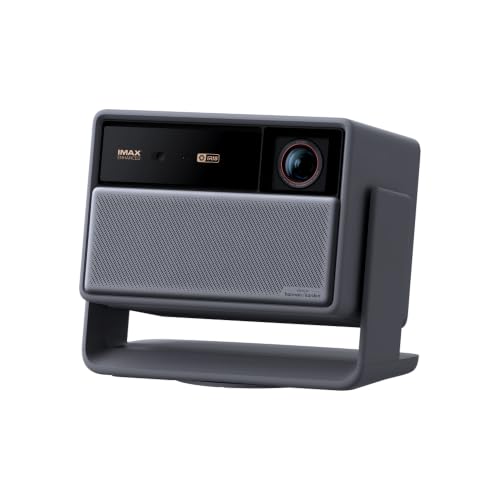
The Horizon 30 Pro is the machine this category has been promising for years, and its listing reads like the promise kept: 4K resolution, RGB triple-laser light, 4800 ISO lumens, 4K 120Hz gaming with low latency and VRR, Dolby Vision, Harman Kardon audio and Google TV in one polished unit. For the gamer, the centre of that list is the 120Hz at full 4K — motion clarity at mural scale, fed by a current console or a capable PC, with VRR smoothing the frame-rate wander of big games. For everyone else in the household, the same box is the cinema, which is how a purchase this size justifies its shelf: it is the room’s screen, full stop.
Installation is the modern XGIMI pattern of intelligent setup assistance, which shortens the path from box to first game considerably, though the standing advice of this guide still applies: position it as square to the screen as the room allows and let the optics, not the correction, do the work. Laser light means no lamp replacements across its service life and consistent brightness as the hours accumulate. Against the pick below it trades a little installation flexibility for the headline gaming mode; against everything else here it is simply playing a different, larger, sharper sport.
- Resolution: 4K per listing
- Light source: RGB triple laser per listing
- Brightness: 4800 ISO lumens per listing
- Gaming: 4K 120Hz, low latency and VRR per listing
- Platform and audio: Google TV, Harman Kardon, Dolby Vision per listing
Strengths
- True 4K at 120Hz is the category’s headline act
- Triple-laser colour and high brightness suit real rooms
- One box serves gaming, film and sport at full scale
Trade-offs
- Its price class demands a room and screen worthy of it
- Peak gaming figures belong to their stated modes
- Built-in audio, however good, still trails a soundbar at this scale
Best for: console and PC gamers building a true big-screen room around 4K 120Hz play.
Not suited for: casual players in bright rooms who would never feed it a 120Hz source.

XGIMI Horizon 20 Pro — Low-lag 4K alternative
The Horizon 20 Pro makes its case with a different pair of listing-stated numbers: a 1ms input lag figure and 4100 ISO lumens, wrapped around a 4K RGB triple-laser engine with optical zoom, lens shift, IMAX Enhanced and Dolby Vision support, Google TV with licensed Netflix aboard. The installation features deserve top billing alongside the lag claim, because optical zoom and lens shift are what let a projector fit a real room — a shelf that is not centred, a throw that is not perfect — without surrendering pixels to keystone correction, and a gaming image that keeps all its resolution keeps all its sharpness in the corners where the minimap lives.
Choosing between the two XGIMI picks is a genuine fork rather than a ranking. This machine courts the player who prizes the stated latency figure and installation grace, and the household that streams as much as it games. Its sibling courts the 120Hz headline. Both are laser-lit for the long term, both are honestly 4K, and a buyer choosing either has understood the category correctly: pick the specification your own games and room will actually use, in writing, before the boxes start competing on charisma.
- Resolution: 4K per listing
- Light source: RGB triple laser per listing
- Brightness: 4100 ISO lumens per listing
- Gaming: 1ms input lag figure stated in listing
- Installation: optical zoom and lens shift per listing
Strengths
- Listing-stated latency figure leads the guide
- Zoom and lens shift fit real rooms without pixel waste
- Full streaming platform with licensed Netflix aboard
Trade-offs
- The 120Hz headline belongs to its sibling
- Premium class pricing, as with any true 4K laser
- Room and screen still decide the final image
Best for: latency-priority players and streamers whose room needs optical flexibility.
Not suited for: players whose whole case rests on 120Hz at 4K — take the Horizon 30 Pro.

BenQ HT2060 — 1080p gaming specialist
The HT2060 enters a 4K guide with its resolution printed on its forehead: 1080p. What it brings in exchange is a dedicated home-theatre pedigree and a listing that states 8.3ms at 120Hz — a figure that makes it, for fast 1080p play, a serious instrument rather than a compromise. Its LED light source serves wide colour, with DCI-P3 and Rec.709 gamuts named in the listing, vertical lens shift and a 1.3x zoom for installation, and the kind of colour discipline that film lovers and story-game players feel in every dusk scene. In a dark room, at a sensible size and distance, a well-fed 1080p image from this machine satisfies far more players than resolution charts predict.
The honest framing is a fork in the road. A player whose library is competitive 1080p, whose room is dark, and whose budget prefers a specialist now over a 4K machine later, is well served here, and the LED engine’s long life sweetens the ownership. A player building toward current consoles at their best should save toward the XGIMI pair instead. This guide’s respect for the HT2060 is precisely that it never pretends to be the second thing while being excellent at the first.
- Resolution: 1080p — stated plainly, not 4K
- Light source: LED per listing
- Gaming figure: 8.3ms at 120Hz per listing
- Colour: DCI-P3 and Rec.709 gamuts per listing
- Installation: vertical lens shift, 1.3x zoom, 2D keystone per listing
Strengths
- Listing-stated low lag at 120Hz for fast 1080p play
- Colour discipline that flatters film and story games
- Lens shift makes dedicated-room setup civilised
Trade-offs
- It is not 4K and no setting makes it so
- Best in dark rooms; living-room glare taxes it
- Console flagships will outgrow its resolution first
Best for: dedicated-room players whose gaming is fast, 1080p and film-flavoured.
Not suited for: buyers whose first requirement is true 4K.

BenQ TH575i — Bright 1080p all-rounder
The TH575i is the living-room answer in 1080p: 3800 lumens per its listing, Google TV aboard, and a stated 16.7ms input lag that places it honestly in the casual-to-serious gaming band — plenty for platformers, racers, sports titles and the family gaming that actually fills most big screens, with competitive reflex players directed to the lower figures elsewhere in this guide. Brightness is its personality: this is the projector for the room with lamps, siblings, a window that will not be blacked out for a kart race, and its image holds together in that company where theatre-tuned machines wash out.
BenQ’s gaming lineage shows in the details that matter at the sofa: setup is quick, the smart platform removes the streaming stick from the equation, and the three-year warranty stated in the listing is a comfort few rivals print so plainly. Resolution remains 1080p and this guide keeps saying so, because at family distances with family content the trade is rational, and at enthusiast distances it is the buyer’s informed choice to make. As the bright, friendly, warrantied middle of this pick list, it earns its place without a single borrowed claim.
- Resolution: 1080p — stated plainly, not 4K
- Brightness: 3800 lumens per listing
- Gaming figure: 16.7ms input lag per listing
- Platform: Google TV with licensed dongle per listing
- Coverage: three-year warranty stated in listing
Strengths
- Brightness that survives real living rooms
- Google TV removes extra streaming hardware
- Stated warranty length is reassuringly plain
Trade-offs
- 1080p ceiling is real at large sizes and close seats
- Lag figure suits casual and family play, not tournament reflexes
- Lamp-based light means eventual replacement economics
Best for: families gaming and watching sport in lit living rooms.
Not suited for: competitive players and 4K seekers — both are served above.
NEBULA Capsule 3 Laser — Portable session projector
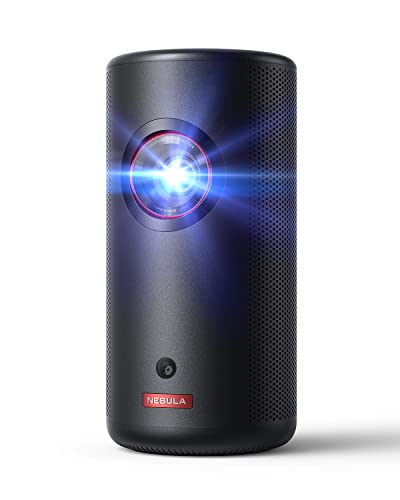
The Capsule 3 Laser shrinks the category to the size of a drinks can and changes the question from installation to occasion. Its listing describes a portable mini projector with a laser light source, Google TV with Netflix certification, Dolby Digital sound, a 120-inch maximum display and a two-and-a-half-hour built-in battery. Gaming on it is session gaming: a console or handheld dock connected in a garden, a bedroom wall converted for the evening, a holiday rental upgraded for a week. Resolution is 1080p class and brightness is mini-projector class, both stated here so the occasion can be judged fairly — at dusk, at moderate size, the experience is genuinely delightful.
What it cannot do is replace a room projector: daylight defeats it, huge sizes dim it, and its little speaker, however clever, is a can-sized speaker. What it can do, uniquely in this guide, is make big-screen gaming portable enough to actually happen — at friends’ houses, in gardens, in rooms with no television at all. Many households will own it second, after a room machine, and use it more often than they predicted, because gaming, like cinema, is partly a where-and-with-whom activity.
- Resolution: 1080p class — not 4K
- Light source: laser, portable mini format per listing
- Battery: two and a half hours built in per listing
- Platform: Google TV, Netflix certified per listing
- Display: up to 120 inches per listing, best smaller and darker
Strengths
- True portability with battery freedom
- Laser light in a genuinely tiny body
- Smart platform aboard for streaming between games
Trade-offs
- Brightness limits it to dusk and darkened rooms
- Not a primary-room machine at any setting
- Small speaker matches its small body
Best for: portable and occasional big-screen gaming, travel and garden sessions.
Not suited for: anyone furnishing a main gaming room — choose a room projector above.

Epson EpiqVision Flex CO-FH02 — Bright casual 1080p pick
The CO-FH02 closes the list as the bright, simple, big-image option for casual play and everything around it. Its listing states Full HD 1080p resolution, 3000 lumens of colour and white brightness from its 3LCD engine, and Android TV streaming aboard. The 3LCD architecture carries a specific gaming-relevant virtue: colour brightness equal to white brightness, so colourful games hold their saturation in lit rooms where single-chip rivals can look comparatively washed. For sports games, party titles and the family tournament on a big white wall, that cheerful brightness is the whole point.
Its limits are the honest ones of its class: it is a portable business-and-home crossover rather than a gaming specialist, its listing makes no low-lag claim and this guide invents none for it, and its resolution is 1080p. Buyers whose gaming is social and whose room is bright will find it the easiest machine here to live with; buyers chasing response figures should climb the list. A guide earns trust by placing such a machine accurately, and accurately placed, it is a good one.
- Resolution: Full HD 1080p per listing — not 4K
- Engine: 3-chip 3LCD per listing
- Brightness: 3000 lumens colour and white per listing
- Platform: Android TV streaming per listing
- Gaming figures: none stated in listing; none claimed here
Strengths
- Colour brightness suits lit-room casual gaming
- Simple, portable, streaming-ready in one box
- Big images without installation ceremony
Trade-offs
- No gaming latency claims — reflex players should look above
- 1080p ceiling like the other non-4K picks
- Crossover design lacks dedicated gaming tuning
Best for: bright-room casual gaming, sport and family big-screen fun.
Not suited for: latency-focused or 4K-focused buyers.
How Do the Six Projectors Compare Side by Side?
| Projector | Resolution | Light source | Stated gaming figure | Best room |
|---|---|---|---|---|
| Horizon 30 Pro | 4K | RGB triple laser | 4K 120Hz, VRR per listing | Dedicated or main room |
| Horizon 20 Pro | 4K | RGB triple laser | 1ms lag per listing | Flexible main room |
| BenQ HT2060 | 1080p | LED | 8.3ms at 120Hz per listing | Dark theatre room |
| BenQ TH575i | 1080p | Lamp | 16.7ms lag per listing | Bright living room |
| Capsule 3 Laser | 1080p class | Laser | None stated | Anywhere, at dusk |
| Epson CO-FH02 | 1080p | 3LCD lamp | None stated | Bright casual room |
How Should You Set Up a Gaming Projector Room?
Geometry first: mount or place the projector so its lens faces the screen squarely, at a distance that fills your chosen size from the optical middle of its zoom range, and use lens shift rather than keystone to finish the alignment. Every degree of keystone is resolution spent and processing added, and gaming is where both bills arrive. Cable the console or PC directly where possible, set the source to output the mode the projector games best in, and confirm the projector’s game mode is engaged, because several picture features that flatter film quietly tax responsiveness.
Sound second: at a hundred inches, television-scale audio feels like a radio in another building. A soundbar is the minimum credible partner, placed at the screen, with the console feeding it cleanly; the XGIMI pair’s built-in audio is respectable for casual sessions and the Capsule’s is heroic for its size, but the room system is what makes a stadium crowd or an engine note feel proportionate to the image. Latency discipline applies to audio chains too — keep processing simple and direct.
Light last: blackout where the room allows, lamps placed so none reflects in the screen, and a bias light behind the screen for long sessions, which eases eye strain at big sizes. Then sit down and measure your seating distance honestly against the resolution you bought: 4K rewards moving closer and going bigger, which is, after all, the entire idea.
Which Games Gain Most From a Hundred-Inch Screen?
Racing and flight games gain the most, because their whole illusion is peripheral: a cockpit that wraps your vision sells speed and altitude in a way no specification can. Open-world adventures gain second, their landscapes finally at landscape scale, with 4K keeping distant detail legible. Sports titles gain socially — a football match at a hundred inches with friends is an event, not a viewing. Story games with cinematic direction gain the film feeling their directors plainly intended.
Competitive shooters gain least and demand most: they want the lowest lag, the highest refresh and often a smaller, denser image than a room projector’s biggest. Many serious players keep a monitor for ranked play and the projector for everything else, a two-screen honesty this guide endorses. The projector’s empire is immersion; let it rule there.
How Do You Connect Consoles and PCs Without Adding Lag?
Keep the chain short and honest: console or PC into the projector or into a receiver that is known not to process the video, using cables rated for the bandwidth your chosen mode needs, because a cable that cannot carry 4K 120Hz quietly negotiates the session down to lesser modes. Enable the display’s game mode, disable motion smoothing and noise reduction for play, and let the source, not the projector, handle any scaling where a choice exists.
Wireless controllers are standard and fine; wireless video is not, for gaming. Streamed or mirrored play adds delay that even generous lag budgets feel. A cable across the room is ugly for an evening and invisible in memory, which is the correct trade for a medium whose entire pleasure is responsiveness at scale.
What Does Laser Light Change About Ownership?
A laser or LED engine removes the lamp from your life: no replacement lamps on a schedule, no slow dimming arc across the years, brightness that stays near its youth for the machine’s service span, and instant on-off behaviour that suits gaming sessions better than lamp warm-up rituals. The XGIMI pair and the little Nebula carry that advantage in this guide; the lamp-based picks carry lower entry costs and, eventually, a lamp bill, which is a fair and knowable trade rather than a defect.
Colour is the laser’s second dividend, particularly in the RGB triple-laser designs of the two 4K picks, whose listings lean on their wide gamuts for a reason: saturated game worlds — neon cities, jungle canopies, stadium kits — are rendered with a richness that makes players revisit older titles just to see them properly. At a hundred inches, colour is not a garnish. It is half the picture.
How Should You Choose Your Screen Size and Seating Distance?
Work backwards from the chairs. Seat the household where it actually sits, measure eye to screen, and let that distance nominate the size at which your chosen resolution looks clean: 4K sustains a larger image at the same distance, which is the practical meaning of its premium. Bigger is not automatically better — an image that forces head-turning in fast games fatigues players and buries the minimap in another postcode — and the sweet spot for most rooms is the size where the whole frame sits inside comfortable vision with presence to spare.
Test with gaffer tape on the wall before any screen purchase: outline the candidate size, play for an evening, and let the room vote. Households routinely discover their true size is one step down from their ambition and their satisfaction one step up, because comfort compounds across hundreds of hours in a way spectacle does not.
How Do You Handle Multiplayer Nights on One Big Screen?
Split-screen gaming is the projector’s party trick and its oldest social function: four players on one wall, each quarter still larger than the televisions of childhood. Modern consoles have drifted toward online play, but the households that keep local multiplayer alive — kart racers, sports titles, party games — find the projector transforms it from a squint into an arena. Brightness matters here more than lag, because party gaming happens with lamps on and snacks out, which is the TH575i and CO-FH02’s natural habitat in this guide.
Seating geometry decides fairness: arrange players across the screen’s width rather than at its edges, keep the image height modest enough that no one plays at a neck angle, and let the soundbar sit centre so audio cues belong to everyone equally. A multiplayer night run this way explains, better than any review, why these machines keep selling to people who already own excellent televisions.
What About Eye Comfort During Long Sessions?
A large image at a proper distance is, for many players, easier on the eyes than a small bright monitor close up, because the eyes focus at room distance and the image fills vision without demanding a stare at one hot spot. The comfort rules are the familiar ones applied at scale: keep some gentle ambient or bias light rather than playing in a pit of darkness, take the breaks the games themselves suggest, and set brightness for the room rather than at maximum because the lamp allows it.
Children’s sessions deserve the household’s usual judgement about duration and content, with one projector-specific note: the lens is a bright light source, and the standing rule of never staring into it, or letting small children treat it as a torch, belongs in the family briefing beside the recovery card for the printer in the other room. Stated once, it is simply how the house runs.
How Does a Projector Fit a Rented or Temporary Room?
Renters are the projector’s natural constituency: a hundred-inch screen that rolls up, packs away and leaves no bracket holes is a luxury no television can offer a tenancy. The lifestyle picks here — the XGIMI pair’s setup assistance, the Capsule’s outright portability — serve that life directly, and a painted wall or a pull-down screen keeps the deposit safe. Even the installation purism of this guide relaxes gracefully here: modest correction in a temporary room is a rational trade, honestly made.
The same logic serves students, posted workers and anyone whose next address is unknown. A gaming setup that fits in a car boot and rebuilds in an evening is not a lesser version of the hobby; for a mobile decade of life it is the only version, and modern machines have made it a genuinely good one.
What Maintenance Does a Gaming Projector Need?
Less than its ancestors, and mostly of the housekeeping kind: keep vents clear and filters, where fitted, cleaned on the maker’s schedule, because a hot projector throttles its own brightness to protect itself. Keep the lens clean with lens-appropriate cloths only, and keep the room’s dust honest. Laser and LED models retire the lamp calendar entirely, which is why their ownership feels appliance-like; lamp models ask for a replacement at long intervals and reward owners who note the hour count occasionally.
Firmware updates occasionally improve the smart platform and, rarely, the gaming modes themselves, so the connected picks here should be allowed their updates on a quiet afternoon rather than mid-tournament. Treat the projector like the room’s computer that it is, and it will behave like infrastructure instead of a hobby in itself.
How Should You Budget the Whole Gaming Room?
The projector is typically only the largest single line. The screen, the mount or furniture, the soundbar, the cables honestly rated for your modes, and the light control for the room together commonly approach the machine’s own cost, and a budget that ignores them buys a brilliant engine with no car around it. Sequence the purchases if funds require: projector and wall first, sound second, screen third, darkness throughout — because each stage is a complete, enjoyable setup rather than a fragment.
Resist only the false economy of the cable bin: the one component that must be right at full specification is the one carrying 4K 120Hz from source to screen. Everything else in the room forgives a staged upgrade; the signal chain forgives nothing and charges interest in confusion.
How Do Handheld PCs and Docks Change the Picture?
The modern handheld gaming PC, docked, is a projector’s ideal guest: a whole library in a coat pocket, outputting over a single cable, at resolutions and frame rates the owner can tune to the display in front of it. On the 4K picks a docked handheld upscales or renders beautifully at moderate settings; on the Capsule it becomes a cinema that travels in the same bag. Households that game this way should value quick input switching and painless setup in their projector, because the session’s charm is its spontaneity.
It also reframes the resolution question honestly: a handheld feeding a hundred-inch screen is rarely rendering native 4K, and the image still delights, because motion, scale and colour carry the experience while pixel arithmetic stays backstage. Buy the 4K machine for the sources that feed it fully, and enjoy everything else at the size where it becomes an event.
What Is the Sensible Path From a Television to a Projector?
Keep the television. The mature big-screen household runs both: the TV for news, daylight and casual viewing, the projector lowered or switched on for games, films and matches that deserve scale. That division removes the pressure that ruins projector purchases — the demand that one device win every hour of the day — and lets the projector be judged on the sessions it was bought for, where it is unbeatable.
Start with evening gaming on a wall, add sound, then decide about screens and darkness with a season of evidence. Most households that arrive this way stay, and their second purchase is never a bigger projector; it is the screen, the blackout blind and the better soundbar, the system growing around a machine that was chosen correctly the first time.
How Do You Judge a Gaming Projector in a Shop or From Reviews?
Distrust any demonstration in a fully darkened booth showing a nature documentary: it flatters every machine and describes no game you own. Ask instead for a game, in the mode you will use, with the room lights at the level your room keeps. Read lag figures with their modes attached and brightness figures with their units attached, as this guide has done throughout, and treat any number quoted without either as decoration rather than data.
Bring your own test if you can: a familiar racing track or a rhythm game your hands know, because your hands are the instrument that measures lag and your eyes, on your content, are the instrument that measures everything else. The right projector announces itself within one lap.
How Does HDR Change Big-Screen Gaming?
High dynamic range asks a projector to do the hardest thing in imaging: be bright and dark in the same frame, a torchlit cave with a sunlit exit. Projectors as a class fight physics here, because their black is the room’s darkness rather than a panel’s, which is why the dark-room discipline of this guide matters more for HDR than for anything else. In a properly darkened room the 4K picks’ HDR presentation, Dolby Vision included on both XGIMI listings, gives games a depth that standard range cannot imitate; in a lit room the same signal flattens, and standard range played bright is often the happier choice.
Set HDR per game rather than globally where the source allows, and judge it on shadow detail you can still read rather than on highlights alone. The goal is a world with weather in it, not a brighter menu screen, and a single evening of honest adjustment per favourite title is the whole cost of admission.
Why Do Players Keep a Monitor Beside the Projector?
Because the two displays are different instruments. The monitor is the scalpel: close, dense, brutally responsive, built for ranked ladders and strategy interfaces dense with text. The projector is the stadium: scale, company and spectacle. A desk that holds the first and a wall that holds the second is not indecision but a complete gaming life, and the combined cost of a good monitor and a good projector routinely undercuts the single giant television that does both jobs worse.
New buyers should therefore feel no pressure to make the projector win every category. Buy it for immersion sessions, keep whatever serves your competitive hours, and let each display be excellent at its own argument — the same philosophy this batch of guides applied to printers that engrave and filaments that warp, because matching tool to task is the whole of the craft.
How Will Your Library Judge the Purchase in a Year?
By the sessions, not the specifications. The games a household replays at scale — the annual kart tournament, the beloved open world revisited, the final watched together at a hundred inches — are the return on the purchase, and they accumulate quietly. Owners asked a year later rarely quote a single number from the listing; they describe the night the room became a stadium, or the race that filled the wall. That is the honest metric of this category, and it favours the buyer who matched machine, room and library at the start over the buyer who maximised a chart.
It also forgives the honest 1080p choices in this guide their missing pixels. A year of bright family tournaments on the TH575i or garden sessions on the Capsule is a library of evenings no specification can devalue, provided the purchase was made with its resolution known and its room understood — the only two promises this guide has asked of anyone.
What Should You Set Before the First Session?
Run the unglamorous checklist once: firmware updated, game mode found and saved, source output matched to the mode you intend, audio routed and its delay, if any, compensated, focus set at the screen’s centre after the machine has warmed, and one familiar game played end to end as a calibration of hands and eyes. Save the picture settings the session settles on, because the second session should begin at the first session’s wisdom rather than at the factory’s.
Then invite the household, because a gaming projector’s first night sets its social contract: this is the room where big games happen together now. Machines that become rituals get maintained, budgeted and loved; machines that stay personal gadgets get replaced. The hundred-inch screen wants to be a ritual, and the checklist is how it earns the title.
How Does Throw Distance Decide Which Pick Fits?
Every projector paints its size from a distance, and the room’s depth is therefore a specification of the buyer, not the machine. Measure from the screen wall to the furthest sensible projector position, then check that the pick’s zoom range can paint your target size from inside that distance, because a machine that must sit closer than the sofa or further than the back wall does not fit the room however fine its image. The Horizon 20 Pro’s optical zoom and lens shift widen its tolerance here, which is why installation flexibility keeps appearing in this guide disguised as a gaming feature.
Ceiling mounting buys back distance and tidiness at the cost of an installation afternoon, while a shelf or table keeps the setup honest and movable for renters. Neither is superior; the room decides, the tape measure reports, and the wise buyer lets both speak before the order rather than after the delivery.
What Role Does the Room’s Colour Play?
A projector lights its room as surely as it lights its screen, and pale walls and ceilings return that light onto the image as a gentle fog that no contrast figure survives intact. Dedicated rooms painted in deep, matte tones are not an affectation; they are half the contrast the owner paid for, harvested from paint. Living rooms that must stay pale can claw much of it back with an ambient-light-rejecting screen and seating placed close to the screen’s axis, which is why those screens exist and why bright-room picks in this guide pair so naturally with them.
Renters and the paint-forbidden can use curtains, a darker rug in the screen’s spill zone and the simple expedient of gaming after dusk, when the room’s colour stops arguing. Perfection is not required; awareness is, because the buyer who knows where the contrast went can always decide whether buying it back is worth a tin of paint.
How Do You Keep the Peace With Neighbours and Housemates?
A hundred-inch game at midnight is a household negotiation as much as a technical achievement: bass travels, crowd noise excites, and the soundbar that completes the stadium can complete a neighbour dispute with the same efficiency. The mature setup includes a night mode — restrained volume, bass tamed, perhaps headphones for the player while the screen stays gloriously public — and households that build the courtesy in from the first week never have the conversation that sours a good room.
Light discipline is the other half: a projector’s glow through thin curtains advertises the session to the street, which some households love and others prefer to keep private. Blackout at the window serves the image and the diplomacy in a single sensible purchase, one more entry in the long honest ledger of this guide where the room, treated properly and honestly, keeps on quietly and reliably solving, night after night, the product’s own problems for it every time.
What Mistakes Do Gaming Projector Buyers Keep Making?
The expensive mistake is buying resolution without a room: a true 4K machine aimed at a textured wall in a sunlit room, its premium dissolving into the plaster. The second is chasing a lag figure quoted for a mode they will never use, while ignoring the brightness and placement that decide every actual session. The third is keystone as a lifestyle — mounting wherever convenient and correcting the trapezoid away, then wondering why the image never looks sharp and the controls never feel instant.
Sound neglect and cable optimism complete the set: a cinematic image paired with a tiny speaker, and a wireless video chain adding the very delay the purchase was meant to banish. Every one of these errors is a system error rather than a product defect, and every one is preventable in the planning hour this guide keeps prescribing. Plan the room, and the projector — whichever pick fits the plan — becomes the best seat in the house.
Final Recommendation
Buy the image your room and library can actually feed. If a current console or gaming PC and a room worth darkening are in your life, the 4K pair are the real purchases: the Horizon 30 Pro for its listing-stated 4K 120Hz and VRR headline, the Horizon 20 Pro for its stated latency figure and the installation grace of zoom and lens shift. If your gaming is dedicated-room 1080p, the HT2060 is a specialist of genuine quality; if it is family gaming in a lit room, the TH575i’s brightness and warranty make the rational case; and if your gaming travels, the Capsule 3 Laser turns any dusk wall into an arcade while the Epson covers bright casual play. Whichever you choose, cable it directly, square it to the screen, add sound with scale — and then play something beautiful at a hundred inches, because that first full-throttle lap, wall-wide and window-deep, is the moment every number in this guide was for.
Frequently Asked Questions
Is 4K worth it over 1080p for gaming at projector sizes?
At a hundred inches and typical seating, yes — the pixel structure of 1080p becomes visible and text softens, while 4K stays clean. At smaller sizes or longer distances the gap narrows, which is why the honest 1080p picks remain rational buys.
What input lag do I actually need?
Competitive reflex players should chase the lowest stated figures and their correct modes. Story, racing, sports and family gaming remain comfortable at the middle figures stated in this guide. Match the number to your library, not to a leaderboard.
Can I game on a plain wall?
Yes, and most owners start there. A smooth, light wall is a serviceable screen; a real screen returns brightness and contrast the wall absorbs. Upgrade the surface when the room proves permanent.
Do I need a special HDMI cable for 4K 120Hz?
You need a cable honestly rated for the bandwidth of the mode you intend to run. An under-rated cable will not damage anything; it will quietly limit the mode, which is worse, because the session looks like the projector’s fault.
Are laser projectors better than lamp models for gaming?
For ownership, generally: consistent brightness, no lamp replacements, instant readiness. For entry cost, lamp models remain cheaper to buy. The gaming figures themselves depend on the model and mode, not the light source alone.
How big should I go?
As big as your seating distance keeps comfortable and your resolution keeps clean — tape the outline on the wall and play a session before committing to a screen size.
Related Guides
Continue through the big-screen shelf with our companion guides: Best 4K projectors for home theatre Best portable projectors Best projectors for sports, which cover the cinema side of these machines in depth.



[…] the picture with our companion guides: Best 4K gaming projectors Best home theatre projectors Best projector screens, covering play, cinema and the surface that […]