What's inside
- Where to buy a “2K” projector, starting with what 2K honestly means
- Key Takeaways
- Quick Picks
- How did we rank projectors for a resolution that barely exists?
- Why is there no native 1440p projector to recommend?
- The six “2K” answers, examined one at a time
- How do the real rungs compare?
- DLP, 3LCD, LED and laser — what is actually making the picture?
- Why does projector sound deserve a section of its own?
- How serious is projector gaming, and what should a gamer actually check?
- How do screen size and seating distance decide whether 1080p is enough?
- How should you set up a 1080p projector so it looks its best?
- What does owning each light source actually cost across a decade?
- What mistakes do “2K” projector shoppers keep making?
- Final Recommendation
- Frequently Asked Questions
- Related Guides
As an Amazon Associate I earn from qualifying purchases. This post may contain affiliate links at no extra cost to you.
gizmoverdict.com is reader-supported. When you buy through links on our site, we may earn an affiliate commission.
Where to buy a “2K” projector, starting with what 2K honestly means
Clicking a model name below lands you on that machine’s listing, and this is the one guide where you should read the listing’s resolution line before anything else, because the best 2K projectors are sold inside a fog of terminology. Here is the fog dispersed. True 2K, in the cinema standard the term comes from, is 2048 by 1080 pixels — a professional projection format home products essentially never use. In consumer marketing, “2K” is attached loosely to 1080p machines (1920 by 1080, close enough to invite the label) and occasionally whispers toward 1440p, a resolution native projectors have almost never shipped. So this guide does the honest thing: it ranks the finest 1080p projectors a “2K” shopper is actually choosing among, states each one’s true native resolution without decoration, includes the 4K machine that ends the argument for buyers with the budget, and explains the missing 1440p rung rather than pretending it exists.
None of this makes the search foolish. If anything, the shopper who types the honest question — what does 2K actually get me — is better served by this category than by most, because 1080p projection has had a decade of competition spent on everything except the label: light engines that last, colors that cover cinema gamuts, lag figures that shame televisions. The fog is in the marketing; the machines underneath it are the most honest generation of projectors ever sold at their tiers. A shopper typing “2K projector” usually means something sensible: sharper than the old 720p portable, not as costly as true 4K, bright enough for a living room, good enough for films and games. That machine exists in numbers — it is the modern 1080p projector, a mature category where the competition has moved to color quality, light source life and input lag, all of which matter more at this resolution than another marketing label. The six picks below are ranked for that shopper, with the terminology lesson built into every essay, so the reader leaves knowing both which projector to buy and what they actually bought.
Key Takeaways
- “2K” on a consumer projector almost always means 1080p in a looser coat: true DCI 2K (2048×1080) is a cinema format, and native 1440p projectors are effectively nonexistent.
- Every linked pick below states its real resolution: the BenQ HT2060, BenQ TH575i, Epson CO-FH02 and NEBULA Capsule 3 are native 1080p machines, honestly labeled here.
- At 1080p, the differences that matter are color, contrast, light source and lag — the HT2060’s wide-gamut LED picture and the TH575i’s brightness and gaming lag separate them more than any pixel count.
- The XGIMI Horizon 30 Pro is included as the honest exit from the terminology maze: a true 4K machine for buyers who discover their budget allows skipping the argument.
- Judge any “2K” listing by its native resolution line, its brightness in a stated standard, and its measured lag — never by the badge on the box.
Quick Picks
| Pick | Badge | Why it earns its place |
|---|---|---|
| BenQ HT2060 | The picture-quality answer | Native 1080p with DCI-P3 color, an LED light source and fast gaming response — the finest image in the honest-1080p class. |
| BenQ TH575i | Brightness and games | Native 1080p at a listed 3800 lumens with Google TV aboard and a 16.7ms input lag for the living-room gamer. |
| Epson CO-FH02 | The 3LCD all-rounder | Native 1080p, 3000 lumens of color and white brightness per the listing, Android TV, and 3LCD color that never rainbows. |
| NEBULA Capsule 3 | 1080p that travels | A battery portable with native 1080p resolution — the sharpest picture that fits in a jacket-adjacent bag. |
| XGIMI Horizon 30 Pro | The true-4K exit | Native-class 4K laser projection with 4800 ISO lumens per the listing, for buyers ending the 2K debate by leaving it. |
| Native 1440p projectors | The missing rung (prose-only) | Explained rather than linked, because the category barely exists: panel economics skipped this resolution in projection entirely. |
How did we rank projectors for a resolution that barely exists?
By translating the shopper’s intent rather than obeying their vocabulary. Search data says “2K”; living rooms say “sharper than what I have, sensible money, films and games.” So candidates were gathered from the native-1080p class that intent describes, plus one true-4K machine as the ceiling reference, and ranked on the qualities that separate projectors once resolution is held equal: color gamut and accuracy, contrast behavior in a real room, brightness measured in stated standards, light source longevity, input lag for the gamers this category quietly serves, and the streaming platform aboard, since most of these machines are bought as television replacements rather than as peripherals.
One further ranking choice deserves explanation, because attentive readers will notice the price spread between the portable and the flagship is enormous for a single guide. The spread is the honest shape of the intent “sharper than old, sensible money”: households mean wildly different things by sensible, and a guide that quietly assumed one budget would betray the others. Each pick is therefore ranked within its arena first and across the list second, and the essays say plainly when a machine’s arena excludes another’s — the portable cannot fill the cinema’s screen, the cinema cannot follow the portable to the garden. Cross-arena envy is the projector shopper’s most expensive emotion; the ranking is built to retire it.
Verification discipline shaped the labels. Each pick’s resolution is stated as its manufacturer specifies it — native 1080p where the imaging chip is 1080p — and pixel-shifting or “4K support” language is never allowed to impersonate native resolution anywhere in this guide. Brightness figures are quoted in the unit the listing itself uses, with no conversions invented between standards, because a lumen figure in one standard is not interchangeable with another and pretending otherwise is how projector shoppers get misled. Where a number could not be grounded in the listing, the essay argues qualitatively instead.
Why is there no native 1440p projector to recommend?
Because the panel industry never built one at consumer scale, and the reason is economic rather than technical. It is worth pausing on how strange this absence is from the shopper’s side of the counter: the same industry sells 1440p in phones-adjacent monitors, in laptops, in handheld consoles’ dreams — everywhere except the one product category whose shoppers type the neighboring term “2K” into search boxes by the million. Absences like this are never about demand; they are about tooling, and tooling follows the television market’s resolutions the way tributaries follow a river. Projector imaging chips — DLP mirrors and LCD panels alike — are manufactured in resolutions that serve two masters: the television-adjacent home market, which standardized on 1080p and then jumped to 4K, and the data-projector business market, which lingered at even lower resolutions. A 1440p chip would have served neither master’s volume, so the tooling was never justified, and the resolution that became the sweet spot for gaming monitors simply has no projector equivalent. The gap persists today: a shopper can buy a 1440p monitor in any electronics store and cannot buy a native 1440p projector at any sane tier.
What the market offers instead are three honest substitutes, all represented below. Native 1080p, which is within a few percent of “2K” pixel counts and benefits from a decade of refinement in color and light engines. Pixel-shifting 4K, where a 1080p-class chip oscillates to address a 4K grid — a legitimate technology whose output most viewers cannot separate from native 4K at seating distance, and which this guide names as shifting whenever it appears. And true native-class 4K, the Horizon 30 Pro’s territory, where the terminology fog finally lifts. The missing rung is not a scandal; it is a map of where the industry’s money went, and a shopper who understands the map stops hunting for a machine that was never manufactured.
The six “2K” answers, examined one at a time

BenQ HT2060 — The picture-quality answer
State it plainly first: the HT2060 is a native 1080p projector, and it is the best answer to the “2K” search because at this class the picture is made of color and contrast, not of the last few percent of pixel count. BenQ equips it with an LED light source — long-lived, instantly on, free of lamp replacement economics — and color covering the DCI-P3 and Rec.709 gamuts per the listing, which is cinema vocabulary appearing on a home machine at this tier. Films look like films on it: skin holds its gradations, dark scenes keep their detail in the shadows rather than crushing into gray, and the vertical lens shift and 1.3x zoom in the listing make the machine placeable in real rooms rather than only in geometric ideals.
Installation manners complete the HT2060’s portrait. Lens shift is the feature experienced owners refuse to surrender, because it lets the machine sit where the room wants it — a shelf, a mount slightly off-axis — while the picture stays geometrically perfect and digitally untouched. Combined with the zoom, it converts installation from a weekend of measurement into an afternoon of adjustment, and it preserves every one of the 1080p pixels the buyer paid for, where keystone correction on lesser machines spends them to buy the same squareness. In a guide preoccupied with honest resolution, a machine that lets you keep all of yours is making a philosophical point as well as a practical one.
Gaming gives the machine a second life, and the listing’s figures tell that story too: an 8.3ms response at 120Hz in its fast mode places it among the quickest projectors of its generation, so the same machine that flatters cinema on Friday runs rhythm games and racers on Saturday without the swimmy delay that exiles lesser projectors from the hobby. The honest limits are brightness and ambition: an LED engine of this class is a darkened-room instrument, happiest after dusk or behind curtains, and buyers in sunlit open-plan spaces should weight the next pick’s lumens more heavily. For the film-first household with a controllable room, the HT2060 is the “2K” search’s most satisfying destination.
- Native resolution: 1080p (1920 x 1080) — stated honestly
- Light source: LED, long life, no lamp replacements
- Color: DCI-P3 and Rec.709 coverage per the listing
- Gaming: 8.3ms at 120Hz fast mode per the listing
- Placement: vertical lens shift, 1.3x zoom, 2D keystone
Strengths
- The finest color and shadow behavior in the native-1080p class here.
- An LED source removes lamp economics from the lifetime ledger entirely.
- Gaming speed that embarrasses projectors sold as gaming machines.
Trade-offs
- Brightness suits darkened rooms, not sunlit open-plan living.
- It is a fixed installation temperament — no battery, no backpack ambitions.
- 1080p at very large screen sizes will show its grid to pixel-peepers in the front row.
Best for: film-first households with a controllable room, and gamers who share it.
Not suited for: bright-room sports viewing, or portable use.

BenQ TH575i — Brightness and games
Also native 1080p — the guide will keep saying it, because the reader deserves the refrain — the TH575i spends its budget where the HT2060 does not: brightness and immediacy. The listing quotes 3800 lumens, a figure aimed at living rooms that cannot or will not darken, and a 16.7ms input lag that keeps games honest at television-like responsiveness. Licensed Google TV rides aboard via its dongle, so the machine arrives as a complete streaming television replacement: switch on, choose the service, watch. For the household whose projector is the TV — sports in the afternoon, a film after dinner, games between — this is the configuration that fits the day.
There is a social dimension to the TH575i’s formula worth recording: brightness plus streaming plus games describes the projector as the room’s shared screen, the one the whole household gathers at rather than the connoisseur’s instrument in a dedicated room. Machines like this accumulate the hours — sports with friends, children’s films at sleepovers, the console tournament — and hours are the true denominator of value in this category. A projector watched nightly at 1080p delivers more joy per season than a finer machine reserved for occasions, and the TH575i is engineered, priced and featured precisely for nightly.
The trades are the physics of its virtues. Brightness-first lamp-class machines concede some of the HT2060’s color refinement and shadow subtlety, and a lamp engine reintroduces the replacement economics the LED rival abolished, albeit at long intervals. Placement flexibility is more modest — auto vertical keystone helps, lens shift does not appear in this listing’s story — so the room must meet the machine partway. None of that diminishes the pick for its intended life: in a bright, busy, game-playing living room, the TH575i is the 1080p machine most likely to be used daily and praised weekly, which is a higher honor than winning a dark-room shootout it was never designed for.
- Native resolution: 1080p (1920 x 1080)
- Brightness: 3800 lumens per the listing
- Input lag: 16.7ms per the listing
- Streaming: licensed Google TV via included dongle
- Placement: auto vertical keystone
Strengths
- Brightness that keeps sports and daytime viewing genuinely watchable.
- Television completeness — streaming aboard, nothing else to buy or connect.
- Gaming lag low enough for the household’s players to stop complaining.
Trade-offs
- Color and shadow refinement sit a rung below the HT2060’s cinema tuning.
- A lamp light source eventually asks for a replacement the LED rival never will.
- Placement aids are basic; the room must cooperate with the throw.
Best for: bright living rooms where the projector is the television and games are weekly.
Not suited for: dedicated dark-room cinema, or pixel-count purists.

Epson CO-FH02 — The 3LCD all-rounder
Epson’s entry in the honest-1080p class argues from a different technology: 3LCD, in which three panels handle the color channels simultaneously. The practical consequences are the two the listing advertises — 3000 lumens of color brightness and white brightness alike, meaning color images hold their punch rather than only white test patterns shining — and the absence of the rainbow artifacts a minority of viewers perceive on single-chip DLP machines. For households containing a rainbow-sensitive viewer, that last clause alone can end the search, and it cannot be discovered from a specification table; it is physiology, and the CO-FH02 is this guide’s answer to it.
Families should note one more 3LCD trait that rarely reaches reviews: color stability across the picture’s brightness range. Scenes that swing from a dim interior to a bright exterior hold their color character on a three-panel machine in a way that flatters exactly the mixed content — sport, animation, daytime drama — that flexible household projectors spend their lives showing. It is an unglamorous virtue, invisible in a dark-room screenshot comparison, and it is the sort of thing owners mean when they describe a projector as simply pleasant to live with month after month.
The machine wraps that engine in EpiqVision streaming convenience — Android TV aboard, a portable-leaning design that moves between rooms and occasions — at the cost of the cinema refinements the BenQ above lavishes on dark rooms. Contrast in a blacked-out theater is not its arena; the living room, the bedroom wall, the backyard screen at dusk are. Judged as the flexible household projector rather than the dedicated cinema instrument, the CO-FH02 is the most forgiving machine in this guide: forgiving of bright rooms, of sensitive eyes, of imperfect placement, and of owners who want television rather than a hobby.
- Native resolution: Full HD 1080p
- Technology: 3-chip 3LCD — no rainbow artifacts
- Brightness: 3000 lumens color and white per the listing
- Streaming: Android TV, Wi-Fi and Bluetooth per the listing
- Character: portable all-rounder for home theater use
Strengths
- Equal color and white brightness keeps real images vivid, not just test patterns.
- The rainbow-sensitive viewer’s safe harbor in this entire guide.
- Streaming and portability make it the household’s movable television.
Trade-offs
- Dark-room contrast and cinema color sit below the BenQ HT2060’s standard.
- Its flexibility is bought with installation refinements it does not offer.
- Gaming is served adequately rather than as a headline talent.
Best for: mixed households, sensitive eyes, and rooms that refuse to darken.
Not suited for: dedicated cinema builders chasing black levels.

NEBULA Capsule 3 — 1080p that travels
The portable end of projection spent years at 720p, which is why the Capsule 3 matters to this guide: it is a battery-powered, can-sized machine with native 1080p resolution, the full “2K-intent” pixel count in a body that travels in a bag’s side pocket. Anker’s NEBULA line wraps that engine in the portable rituals — autofocus and auto keystone that square the picture on a bedroom wall or a hotel ceiling in seconds, streaming aboard, a battery that covers a film — and the result is the projector as appliance for people who do not have a projector room: students, travelers, renters, the bedroom-ceiling cinema club.
The Capsule format has quietly created a viewing ritual the fixed machines cannot: the ceiling screening. A small projector lying on a bed or a nightstand throws its picture overhead, and the 1080p sharpness this guide keeps noting is precisely what the ritual needed — at ceiling distance and size, 720p’s softness was the difference between a novelty and a habit. Owners describe the machine migrating — bedroom ceiling on weeknights, a child’s wall for weekend films, a garden fence in summer — and that migration is a use-pattern no specification captures. A projector that is watched three times as often, in three places, at a modest size, delivers more cinema than a finer machine bolted to one ceiling, and the Capsule’s ranking in this guide honors that arithmetic.
Portability taxes brightness, as it always does, and the honest essay must say so: this is an after-dark machine, happiest at modest image sizes in dim rooms, where its 1080p sharpness is a genuine revelation against the 720p portables it replaces. At those sizes its pixel grid is invisible and its convenience total. The buyer’s question is purely situational — if the projector will live mounted in a dark room, the fixed machines above outclass it; if the projector will live a life of walls, ceilings, gardens and trips, nothing else in this guide can follow it there. Resolution honesty applies here too, in reverse: the Capsule 3’s 1080p is real, and in the portable class that is a headline, not a footnote.
- Native resolution: 1080p (1920 x 1080)
- Form: battery portable, can-sized
- Setup: autofocus and auto keystone class features
- Streaming: smart platform aboard
- Arena: dim rooms, modest sizes, anywhere a wall exists
Strengths
- True 1080p in the portable class, where 720p long reigned unchallenged.
- Setup in seconds on any surface — the ceiling cinema is real.
- Battery freedom makes it the only pick that projects beyond its own home.
Trade-offs
- Brightness confines it to darkness and moderate image sizes.
- Fixed installations deserve the brighter, finer machines above.
- Battery life is a film, not an evening — plan the charger for double features.
Best for: travelers, renters, students and bedroom-ceiling cinema.
Not suited for: bright rooms, big screens, or permanent theater builds.
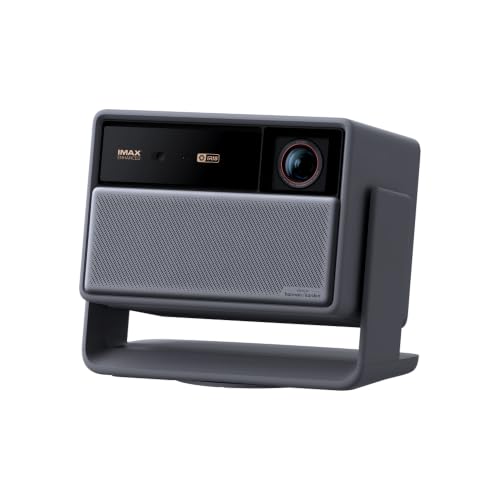
XGIMI Horizon 30 Pro — The true-4K exit
Some readers, having absorbed this guide’s terminology lesson, will ask the correct follow-up: what does it cost to stop compromising? The Horizon 30 Pro is the answer placed here deliberately — a true 4K laser projector whose listing quotes 4800 ISO lumens, a triple-laser RGB light source, 4K at 120Hz gaming support with low latency and VRR, Dolby Vision, Harman Kardon sound and Google TV. Every fog-word from the introduction evaporates: the resolution is 4K, the brightness is stated in ISO lumens, the gaming figures are headline features rather than fine print. It is the machine the “2K” shopper graduates to when the budget stretches, and its picture — bright, sharp, color-rich in ordinary rooms — is what the category’s ceiling currently looks like.
Consider, too, what the flagship does to the rest of a household’s technology. A projector with serious sound, a current streaming platform and gaming credentials at 120Hz consolidates three purchases into one appliance, and the room simplifies around it — no receiver archaeology, no dongle rotation, no separate gaming display negotiation. Premium pricing reads differently against a consolidated system than against a bare projector, and buyers evaluating the Horizon 30 Pro should total the system it replaces before judging the tier it occupies. That is not a sales argument; it is the same lifetime-ledger discipline this site applies to printers, aimed at a brighter target.
Its inclusion is also this guide’s honesty made structural: rather than stretching a lesser machine’s label upward, the ranking shows the actual ladder and lets the reader choose their rung with eyes open. The costs are the tier itself and the laser flagship’s physical presence — a substantial, premium appliance that commits the room to it. Buyers who take this exit rarely regret the resolution; the question is only whether the household’s viewing (screen size, seating distance, content sources) will actually spend 4K’s advantage, a calculation the FAQ below helps perform. If it will, the debate this article began with is over, and it ended a full generation above where it started.
- Native resolution class: true 4K (3840 x 2160)
- Light source: RGB triple laser
- Brightness: 4800 ISO lumens per the listing
- Gaming: 4K 120Hz support, low latency, VRR per the listing
- Extras: Dolby Vision, Harman Kardon audio, Google TV
Strengths
- Ends the resolution debate outright — genuine 4K with brightness to use it in real rooms.
- Gaming credentials that rival dedicated gaming displays at wall size.
- A complete premium package: picture, sound and streaming in one appliance.
Trade-offs
- A premium tier that must be justified by screen size and seating distance.
- A substantial flagship presence, not a discreet shelf machine.
- Overkill for small images, where the 1080p picks are indistinguishable.
Best for: buyers ending the debate — large screens, close seating, mixed film and game diets.
Not suited for: modest rooms, modest images, or modest budgets.
Native 1440p projectors — The missing rung (prose-only)
This final pick is an absence, documented. A native 1440p projector — 2560 by 1440 imaging chips, the resolution that would make “2K” marketing literally true for the gaming generation — is not a product this guide can link, because the consumer industry did not build it. Occasional listings borrow the number through input-acceptance language (a 1080p projector that accepts a 1440p signal and downscales it is not a 1440p projector), and professional niches have flirted with intermediate resolutions, but the shelf where a shopper could buy native 1440p projection is, for practical purposes, empty. Saying so is the pick: it saves the reader a hunt for a unicorn and redirects the budget to the rungs that exist.
Historians of the category will note the irony: 1440p conquered the gaming desk precisely because it balanced sharpness against the cost of driving it, and projection — where the same balance should have applied — skipped it for the economics of television panels. The shopper’s consolation is that the two rungs projection did build are unusually mature. A decade of 1080p refinement produced color and light engines earlier generations could not buy at any tier, and 4K’s arrival in laser flagships has been similarly thorough. The missing middle is a curiosity of industrial history, not a deprivation the viewer’s eye will ever report from the sofa.
The guidance that follows from the absence is practical. Gamers attached to 1440p should know their consoles and PCs will feed these 1080p machines beautifully at 120Hz where supported, and that the step to the 4K flagship buys the resolution headroom their hardware already produces. Film viewers should know that no streaming service’s “2K” tier exists to be matched — content arrives at 1080p or 4K, and the projector classes in this guide map exactly onto them. The missing rung, properly understood, simplifies the purchase it seemed to complicate: the ladder has two real rungs, both are in this guide, and the choice between them is made by room, screen and budget rather than by a number that was never manufactured.
- Status: no native consumer product class to link — prose-only by necessity
- Beware: “accepts 1440p input” is downscaling, not native resolution
- Content reality: services stream 1080p and 4K, not 1440p
- Gaming reality: 1080p/120Hz or true 4K are the real choices
- Guidance: buy the rung that exists, sized to your room
Strengths
- Knowing the rung is missing ends a fruitless and expensive-feeling search.
- The two real rungs cover every actual content source in existence.
- Input-acceptance marketing loses its power over an informed buyer.
Trade-offs
- Monitor gamers must accept that projection skipped their favorite resolution.
- The honest ladder offers a wide price gap between its two rungs.
- Future buyers must re-verify — an absence can end without announcement.
Best for: the informed shopper who wants the map before the machine.
Not suited for: readers who needed a sixth buyable product — the guide refuses to invent one.
How do the real rungs compare?
| Machine | True native resolution | Light source | Brightness as listed | Gaming note | Arena |
|---|---|---|---|---|---|
| BenQ HT2060 | 1080p | LED | Dark-room class | 8.3ms at 120Hz fast mode | Cinema first |
| BenQ TH575i | 1080p | Lamp class | 3800 lumens | 16.7ms lag | Bright living room |
| Epson CO-FH02 | 1080p | 3LCD lamp class | 3000 lumens color/white | Adequate, casual | Flexible household |
| NEBULA Capsule 3 | 1080p | Portable LED class | Darkness class | Casual | Anywhere, after dark |
| XGIMI Horizon 30 Pro | 4K | RGB triple laser | 4800 ISO lumens | 4K 120Hz, VRR | The ceiling |
| Native 1440p class | 1440p | — | — | — | Does not exist (prose-only) |
Let the first column govern your reading of every projector listing from now on: native resolution, stated plainly, is the only resolution a buyer owns. Notice what the empty row teaches by its emptiness — a comparison table with a deliberate blank is more useful than one padded with a product that cannot be bought, and a guide willing to print the blank is a guide whose other cells can be trusted. Everything else in the table — source, brightness, lag — describes how well that resolution will be served in your room, which is where projectors are actually won and lost.
DLP, 3LCD, LED and laser — what is actually making the picture?
Four technologies divide this guide’s picks, and each writes its character into the image. DLP, the BenQ machines’ technology, bounces light off a chip of microscopic mirrors — one chip, sequenced colors — producing sharp, high-contrast images with excellent motion, at the cost of those rainbow flashes a minority of viewers catch in high-contrast scenes. 3LCD, the Epson’s path, sends light through three color panels simultaneously: no rainbows, color brightness equal to white, and historically gentler native contrast. Neither is superior in the abstract; they are different wagers, and the viewer’s own eyes — rainbow-sensitive or not — cast the deciding vote, which is why this guide carries both.
The light source is the second axis, independent of the imaging chip. Lamps are bright and proven, and they dim across a lifespan measured in thousands of hours before asking for a replacement. LED sources, as in the HT2060, trade some peak brightness for longevity, instant switching and stable color across years. Laser, the flagship’s engine, combines brightness with longevity and adds the wide color gamuts triple-laser designs boast. When comparing any two projectors, separate the axes in your mind: a lamp DLP and an LED DLP share a picture character but not a lifetime ledger, and the total cost of a lamp machine across a decade includes its replacements as surely as its sticker.
Why does projector sound deserve a section of its own?
Because a projector is a television replacement that arrives with a fan. Two sound questions follow every buyer home. The first is the machine’s own noise: cooling fans are audible in quiet scenes, more so on bright lamp machines working hard, less so on LED designs in economy modes, and a projector mounted directly above the sofa announces itself in every whispered dialogue scene. Placement and picture mode are the mitigations — distance, an economy setting for films — and they belong in the purchase calculation for light sleepers and small rooms. The second question is the soundtrack itself. Built-in speakers across this class range from adequate to, in the flagship’s Harman Kardon case, genuinely respectable, but every machine here improves with a soundbar, and the audio connection — HDMI ARC or the S/PDIF output the HT2060’s listing notes — should be confirmed before the screen goes up, because a wall-sized picture with laptop-sized sound is the category’s most common home-movie disappointment.
Budget the sound with the screen, in other words, as part of the same line. A practical sequence serves most households: projector and screen first, the household’s existing speaker or a modest soundbar second, and any receiver ambitions last, after a month of viewing has revealed whether the room’s appetite is cinema or simply television at scale. Many households discover the modest endpoint is their true one, and the money not spent on audio architecture buys the blackout curtains that improved every picture since. The households that report projector delight almost always describe a system — image, darkness, sound — while the disappointed describe a device. This guide’s picks were ranked as systems’ hearts, and the heart deserves its accompanying organs purchased with equal honesty.
How serious is projector gaming, and what should a gamer actually check?
Serious enough that two of this guide’s five linked picks lead with their lag figures. The vocabulary needs the same honesty as resolution: input lag, quoted in milliseconds, is the delay between the controller’s command and the picture’s obedience, and it is the figure that decides whether a projector games well — refresh rate describes smoothness, lag describes responsiveness, and marketing prefers whichever number is larger. The HT2060’s listed 8.3ms at 120Hz is elite territory, television-class responsiveness at wall size; the TH575i’s 16.7ms is the classic one-frame-at-60Hz figure generations of console players have happily used. Beyond those thresholds, casual and rhythm play stays comfortable far longer than competitive players admit, and the honest gamer should match the machine to their genre rather than to a leaderboard.
Projection also returns a gaming gift no monitor offers: scale as a feature. Split-screen play on a wall restores the couch multiplayer of childhood at adult sizes; racing and flight games acquire a peripheral immersion a desk cannot sell; and the same machine hosts the film afterward. The gamer’s checklist, then, is short and grounded — the lag figure from the listing, a low-lag mode that survives the picture settings you actually use, the refresh your console or PC can feed, and a room dark enough for the machine you chose. Check those four, and the “2K” projector becomes the gaming display the monitor market cannot imitate. One last gaming note belongs to households rather than specifications: a projector’s session is a social event by default, because the screen is the room’s — and the machines in this guide that stream, switch and start quickly are the ones that keep the session social instead of technical.
How do screen size and seating distance decide whether 1080p is enough?
Resolution arguments dissolve when geometry enters. A viewer’s eye resolves a fixed amount of detail per degree of vision, so the question is never “1080p or 4K” in the abstract — it is how large the image is and how far away the sofa sits. At a modest image in a bedroom, viewed from across the room, the 1080p picks above are effectively perfect: no viewer alive can find their pixel grid, and money spent beyond them buys color or convenience, not sharpness. Grow the image toward the sizes a dedicated room invites, or pull the seating closer as gaming setups do, and the calculus tilts — first toward valuing the HT2060’s color and contrast, then, at genuinely large sizes, toward the 4K flagship’s pixel density becoming visible money.
A worked example steadies the theory. A bedroom projecting a modest image onto the far wall, watched from the bed, sits so far from the picture in angular terms that even the portable Capsule 3’s 1080p is beyond the eye’s interrogation — its purchase should be argued on convenience alone. The same household’s living room, with a screen spanning most of the wall and a sofa at conversational distance, lives in the HT2060’s sweet spot and would notice the flagship mainly in its brightness and color headroom. Only the third room — the dedicated space, the wide screen, the front seats — converts 4K’s pixels into a visible argument. Most “2K” shoppers own one of the first two rooms, which is why this guide’s ranking spends its enthusiasm there.
The practical exercise takes one minute and a tape measure. Note your intended image width and your seating distance, then be honest about your content: a household streaming films at a moderate size is served completely by native 1080p, and the savings against 4K buy the screen, the mount and the blackout curtains that will improve the picture more than pixels would. A household building around a very large screen, front-row seating and a library of 4K discs and games has already made the flagship’s argument for it. Projector regret is almost never about the resolution bought; it is about the room the resolution was bought for, imagined rather than measured.
How should you set up a 1080p projector so it looks its best?
Begin with the surface. A proper screen — even an inexpensive fixed or pull-down one — returns brightness and contrast that a wall, however white, quietly taxes, and at 1080p the screen’s smoothness also protects the image from wall texture masquerading as pixel structure. Align the projector to the screen before touching keystone: physical alignment preserves the full resolution, while digital keystone correction discards pixels to square the picture, a tax the honest-1080p buyer should pay only when placement leaves no choice. Lens shift, where a machine offers it, is the tax-free alternative and one of the HT2060’s quiet luxuries.
Throw distance deserves its minute in this setup liturgy, because it is the measurement buyers skip. Every projector projects a given image size from a given distance according to its throw ratio, and the room’s geometry — where the machine can sit or hang, where the screen can live — must be reconciled with that ratio before purchase, not discovered after. The zoom ranges in several listings exist to forgive a room’s imprecision, and lens shift forgives more, but no feature repeals geometry. Measure the room, consult the model’s throw figures, and let the reconciliation happen on paper: the projector that fits the room beats the projector that wins the comparison table, every single installation.
Then calibrate like an owner rather than a showroom. Choose the cinema-leaning picture mode for films rather than the vivid mode the box wakes in, set the light source to its economy setting in a dark room (extending life and deepening blacks at once), and feed the machine the best source you own — a streaming stick’s bargain tier will bottleneck a fine projector more surely than its resolution ever will. For gaming, find the low-lag mode and accept its small picture compromises as the price of responsiveness. An evening spent this way lifts any machine in this guide by more than the gap between adjacent picks.
What does owning each light source actually cost across a decade?
Projector economics rhyme with the printer economics elsewhere on this site: the sticker is the first payment, not the whole story. A lamp machine at family viewing rhythms will ask for replacement lamps across a decade — each a modest, predictable event, and each a small erosion of the brightness that made the machine delightful, since lamps dim as they age and a household often replaces late, having slowly accommodated a duller picture. The LED and laser machines abolish that rhythm: their sources are rated in spans that exceed a decade of ordinary evenings, their brightness stays where it began, and their lifetime ledger is purchase plus electricity plus nothing. This is a genuine argument for the HT2060’s and the flagship’s engines at their tiers, and it should be weighed as money, not as a footnote.
The counterweight is repairability’s shape. There is also a brightness-honesty corollary households learn in year two: a projector’s picture at month eighteen is the truer specification than its picture on day one, and the light-source choice is where that truth is decided. Shoppers comparing a lamp machine and an LED machine at equal sticker should silently price the lamp’s second year — its dimming curve, its replacement — into the comparison, the same way this site’s printer guides price the second cartridge set. The machines do not hide these costs; they merely decline to total them, and totaling is the buyer’s job. A lamp is a user-replaceable consumable — five minutes, a panel, a fresh engine of light — while a failed LED or laser source is a service event inside a sealed design. The lamp machine’s owner holds their projector’s future in a purchasable part; the solid-state owner holds a longer, brighter present and a dependence on the maker’s service. Neither philosophy is wrong, and households divide by temperament exactly as they did between printer systems: some prefer the consumable they control, others the decade they need not think about. Name your temperament before the store does it for you.
What mistakes do “2K” projector shoppers keep making?
Believing the badge is the founding error, and this guide’s introduction is its antidote: shoppers have bought 720p portables wearing “1080p supported” language, and paid 4K prices for pixel-shifted machines described in native terms. Read the native resolution line, in the specifications, every time. The second error is brightness illiteracy — comparing lumen figures across different stated standards as though they were one currency, or buying a darkness-class portable for a sunlit room because its resolution headline matched. Brightness must match the room first; resolution is the second conversation.
A final error belongs to the streaming age: buying the projector as a peripheral when the household needed a television. Machines without a competent platform aboard demand sticks, boxes and input rituals that the household’s least technical member will not perform, and the projector quietly becomes the enthusiast’s solo instrument. Every linked pick in this guide carries a real streaming platform for exactly this reason — a projector purchase is a household purchase, and the remote on the coffee table is as much a specification as the chip behind the lens.
Placement errors follow. Projecting huge because the wall allows it, then sitting close enough to interrogate every pixel and blaming the machine. Correcting a badly placed projector with heavy keystone and discarding the sharpness that justified the purchase. Feeding a fine projector from the weakest streaming tier and judging its picture. And the subtlest error: shopping for the missing 1440p rung — weeks spent hunting a product class that does not exist, while the two real rungs sat in stock. This guide’s prose-only pick exists to retire that error permanently.
Final Recommendation
Buy the resolution that exists, in the machine your room deserves. For the film household with a darkenable room, the BenQ HT2060 turns the “2K” search into the best 1080p picture in its class, with gaming speed as a bonus. For the bright living room that games, the TH575i’s lumens and completeness win the day; for sensitive eyes and flexible spaces, the Epson CO-FH02 is the forgiving all-rounder; for a life of walls and journeys, the Capsule 3 carries real 1080p anywhere. And if the tape measure says your screen and seating will truly spend it, skip the debate entirely for the Horizon 30 Pro’s genuine 4K. The shopper who arrived hunting a number leaves with something better — a projector matched to a room, a diet of content, and the knowledge of exactly which pixels they own.
Frequently Asked Questions
Is 1080p really “2K”?
Close, but not literally. Cinema 2K is 2048 by 1080; consumer 1080p is 1920 by 1080 — the same height, about six percent narrower. Marketers borrow the label on the strength of that kinship, and in practical sharpness the two are siblings. What matters for a buyer is not the label’s legitimacy but the habit it should build: read the native resolution in the specifications, where the truth is always printed, and let badges say whatever they like.
Will a 1440p signal from my PC or console work on these projectors?
Generally yes as an input — most modern projectors accept higher-resolution signals and downscale them to their native panel — but understand what you are seeing: a 1080p image rendered from a 1440p source, not a 1440p image. Many gamers prefer feeding 1080p at high refresh rates instead, which the BenQ picks here serve explicitly. True 1440p display requires a monitor; projection’s rungs are 1080p and 4K, as this guide’s missing-rung pick explains.
What is pixel shifting, and should it count as 4K?
Pixel shifting moves a lower-resolution imaging chip rapidly between offset positions, addressing a full 4K grid across multiple flashes. The eye integrates the result into an image most viewers, at normal seating distances, cannot distinguish from native 4K — which is why the technology is legitimate and widely used. It should still be labeled as shifting rather than native, because the distinction matters at very large sizes and close seating, and honest labeling is the whole theme of this guide. The flagship pick here was chosen partly because its 4K needs no asterisk.
How bright does a projector need to be for a living room?
Match the figure to the room’s darkness rather than to a universal number. A controllable, curtained room flatters even modest brightness — the HT2060’s arena — while a sunlit open-plan space needs the TH575i’s class of output to keep images from washing out, and no projector at any sane tier defeats direct sunlight on the screen. Compare brightness only within the same stated standard, treat cross-standard conversions with suspicion, and remember that a screen and curtains often buy more visible brightness than a brighter machine.
Is a screen necessary, or will a plain wall do?
A wall is enough to begin, and many households happily stay there — but a screen is the cheapest picture upgrade in this entire guide. A purpose-made surface returns brightness evenly, keeps its color neutral where wall paint quietly tints, and gives the image a border that transforms perceived contrast. At 1080p it also removes wall texture from the list of things your eye must ignore. Buy the projector first if the budget forces a sequence, live with the wall for a month, and let the screen be the upgrade you gift the setup once its habits are proven — that order spends money in the sequence the picture actually rewards.
Is a projector better than a TV at these sizes?
At the image sizes projectors make easy — well beyond the largest televisions most households can buy — the projector offers a scale of cinema no panel matches at comparable commitment, with the room’s darkness as its price. Televisions win on brightness, convenience and daylight. The households happiest with projection are those that wanted an event: lights down, wall filled, film as occasion. The picks in this guide serve that household at every rung from portable to flagship.
Related Guides
Continue with our 1080p home theater projector guide for the dedicated cinema angle, our 1080p mini projector roundup if portability is your direction, and our 4K gaming projector guide for the flagship class in full.


