What's inside
- Where to buy
- Key Takeaways
- Quick Picks
- How did we choose these best 4k projectors under a thousand?
- What does pixel shifting really give you at this price?
- How should you read the input lag and refresh figures?
- Lamp or laser at this tier: which ownership story fits?
- What does the smart platform change — and what does it cost?
- What should you expect from HDR at this tier?
- How do throw distance and room size shape the choice?
- What does the rest of the room cost at this tier?
- Which consoles and sources get the best from this tier?
- How loud and hot does a gaming projector get?
- How do the six compare side by side?
- What mistakes do buyers in this tier keep making?
- How should you set up your first 4K gaming projector?
- Final Recommendation
- Frequently Asked Questions
- Related Guides
As an Amazon Associate I earn from qualifying purchases. This post may contain affiliate links at no extra cost to you.
gizmoverdict.com is reader-supported. When you buy through links on our site, we may earn an affiliate commission.
Where to buy
All six projectors in this guide are sold through Amazon in the United States, and every linked pick leads to that model’s live listing. That instruction matters more in this tier than in any other we cover: the best 4k projectors under a thousand live exactly on a price boundary that street prices cross in both directions with the seasons, so we print no prices at all in this guide. The tier is a neighborhood, not a fence — check the live listing, and treat a machine sitting a little above the line on the day you shop as still belonging to this conversation if its specification earns the stretch.
First, the honest definition of what this money buys. A 4K projector at this tier is a pixel-shifting DLP machine: a fast, high-resolution imaging chip whose pixels are shifted at speed to address the full UHD grid. The detail on your wall is genuinely 4K-class — interfaces crisp, film texture resolved, games rendered at a fineness 1080p cannot imitate — produced by a technique we name plainly rather than dressing as a native 4K imager, which lives at multiples of this budget. Buyers who understand that sentence will be delighted by every machine here. Buyers who skip it sometimes feel misled by physics they were never told, so we tell it in the first paragraphs of every relevant section.
The second thing this money buys, unexpectedly, is speed. This tier is dominated by gaming projectors, because the same DLP quickness that shifts pixels also refreshes them: the listings here quote 240Hz ceilings and input lag figures of 4 to 4.2 milliseconds, numbers that belong to their high-refresh 1080p modes — the modes competitive play actually uses — while 4K play runs at console refresh rates. BenQ fields the TK700, the laser-lit TK710 and the Google TV-equipped TK705i; ViewSonic fields the PX701-4K, the laser LX700-4K and the 4,000-lumen PX749-4K. Between them they map the whole tier: lamp and laser, smart and pure, bright and brighter.
Key Takeaways
- At this tier, 4K means pixel-shifting DLP — genuine UHD-class detail from a shifted chip, honestly labelled, at a fraction of native 4K money.
- Prices in this class straddle the line seasonally, so this guide prints none: the check-price click on each listing is part of the research, not a formality.
- The headline input lag figures — 4 to 4.2ms across these listings — belong to high-refresh 1080p modes; 4K gaming runs at console refresh rates with higher, still-playable lag.
- The BenQ TK710 and ViewSonic LX700-4K are the laser pair, trading lamp economics for long, steady, maintenance-light light.
- The BenQ TK705i is the smart one: Google TV, HDMI 2.1, HDR10+ and MEMC in a 3,000-lumen machine that sets its own image up.
- The ViewSonic PX749-4K is the tier’s brightness ceiling at 4,000 lumens — the pick when the room will not darken and the games will not wait.
Quick Picks
| Pick | Badge | Why it earns its place |
|---|---|---|
| BenQ TK700 | Best all-round entry | The tier’s founding machine: 3,200 lumens, console-ready gaming with low-lag modes, and a three-year warranty in its listing. |
| BenQ TK710 | Best laser upgrade | Laser light at 3,200 lumens with a listed 4ms lag figure, 240Hz refresh, lens shift and eARC — the TK concept matured. |
| ViewSonic PX701-4K | Best simple speed | Three thousand two hundred lumens, 240Hz HDR gaming and a 4.2ms high-refresh figure in a straightforward, streaming-ready box. |
| ViewSonic LX700-4K | Best laser value | Laser at 3,500 lumens with Xbox-oriented 240Hz gaming, SuperColor and HDR — the brightest laser in this tier’s conversation. |
| ViewSonic PX749-4K | Brightest in the tier | Four thousand lumens with the same 240Hz, 4.2ms gaming brief — the ceiling machine for rooms that stay lit. |
| BenQ TK705i | Best smart projector here | Google TV inside, HDMI 2.1, HDR10+, MEMC motion and auto image adjustment at 3,000 lumens — the appliance version of the tier. |
How did we choose these best 4k projectors under a thousand?
The tier was defined by street reality rather than launch prices: machines whose listings live in this budget’s neighborhood across the retail year, verified against live listing data, with the explicit warning — printed above and repeated in our recommendation — that any individual price can sit either side of the line on a given week. Within the tier, a pick had to render a true pixel-shifted 4K image, because a guide with 4K in its title that admits 1080p machines with 4K inputs would be committing the exact fraud this category’s marketing tempts. HDR support had to be real, and gaming figures are quoted in this guide only with their modes attached.
We then sorted by the tier’s actual decision axes. Light source first: two lasers, three lamp-era designs and one smart-led hybrid philosophy divide the ownership stories. Brightness second, from the TK705i’s 3,000 lumens to the PX749-4K’s 4,000, because this tier’s rooms are living rooms, not caves. Smart platform third — the TK705i’s Google TV against the purer HDMI-fed designs — and placement optics last, where the TK710’s lens shift is a genuine luxury at this money. Six machines, three brands’ philosophies in duplicate, and no filler: at this tier, these are the listings the decision actually runs through.
What does pixel shifting really give you at this price?
Start with the mechanism, because the mechanism is the value. A pixel-shifting DLP chip carries a high-resolution mirror array — below UHD’s full count — and vibrates or switches its image position at very high speed, addressing each UHD pixel location in sequence faster than the eye can separate. Your visual system integrates the sequence into a single image with genuine UHD addressability: test patterns resolve to the grid, text renders with 4K fineness, and film carries texture that a 1080p machine physically cannot draw. This is not upscaling, which invents detail by interpolation; the shifted chip places real image information at every UHD address, in turn.
What you give up against a native 4K imager is simultaneity and a measure of per-pixel contrast — the native chip holds all its pixels at once, with the optical purity that implies, at a price that starts where this entire tier ends. At living-room sizes and seating distances, the visible difference between the techniques is far smaller than the price difference, which is the whole reason this tier exists and thrives. The dishonesty in this market is never the technology; it is the labeling, which is why this guide writes “pixel-shifted” beside every DLP 4K claim and lets the pictures argue from there.
There is a second dividend: the same chip speed that shifts pixels refreshes them. The 240Hz modes in these listings are the shifting hardware’s other talent, and the low input lag figures ride along. A native-4K theater machine at three times the price will typically game slower than the cheapest pick in this guide. Buyers whose evenings mix film and play are not compromising at this tier — they are shopping at the exact point where the technology’s strengths concentrate.
How should you read the input lag and refresh figures?
Every gaming number in this category carries a mode, and the mode is the meaning. When the TK710 lists a 4ms input lag and a 240Hz refresh, when the ViewSonic trio list 4.2ms beside 240Hz, those figures describe high-refresh operation at 1080p-class resolution — the configuration competitive players choose, because refresh rate and response are what fast play actually feels. The TK700’s listing states the duality most plainly, printing both a 4.2ms latency figure and a 16ms input lag figure: read as the tier’s standard grammar, the small number is the high-refresh mode and the larger is 4K console play, which remains comfortably responsive for everything short of tournament ambitions.
At 4K, these machines accept console signals at standard refresh and render them with the processing HDR and scaling require; the experience is the one most players actually live — cinematic, detailed, and responsive enough that the projector is never the reason a game felt slow. The honest shopping method is to decide which player you are. Competitive and rhythm-and-reflex players should buy the high-refresh figures and play in those modes. Everyone else should treat the 4K experience as the product and the fast modes as a bonus the tier throws in. Either way, insist on the mode being attached to the number — a lag figure quoted without one is a rumor.
One more figure deserves its footnote: screen size. The TK705i’s listing speaks of a 150-inch screen, the PX749-4K’s of up to 300 inches, and those ceilings describe geometry, not wisdom. At this tier’s brightness — 3,000 to 4,000 lumens — the satisfying range in dim rooms runs to roughly 120–150 inches, and in lit rooms considerably less. The projector will draw the giant picture; whether the giant picture glows is a question of lumens per square foot, and it is answered in the brightness section of every pick below.
Lamp or laser at this tier: which ownership story fits?
The lamp machines — TK700, PX701-4K, PX749-4K — carry the tier’s founding economics: the light source is a consumable with a long, predictable life and a replaceable future, which keeps the initial purchase in this neighborhood and lets a heavy user restore the machine to full youth years later for a modest errand. For households projecting a few evenings a week, that arithmetic is unanswerable — the lamp will likely outlast the console generation it serves, and the machine’s lower entry point is money that can go to the screen and the sound.
The lasers — TK710 and LX700-4K — sell the opposite ledger: a light engine rated in the tens of thousands of hours in spirit, waking instantly, drifting minimally, and asking nothing until the machine itself is old. Laser brightness also holds its level in a way lamps do not, so the picture in year four is the picture from the first month — a consistency that matters in bright rooms running at the edge of their lumen budget. The trade is finality: the engine is the machine, and when its long life ends, the replacement is a projector, not a part.
Choose by hours and temperament. Light users and value hunters should take the lamp machines without a backward glance. Daily drivers, bright-room owners squeezing every lumen, and anyone who has ever resented a maintenance errand should pay the laser’s premium inside the tier and enjoy the silence where the lamp calendar used to be. Both stories end happily; they simply bill different years.
What does the smart platform change — and what does it cost?
The TK705i is this tier’s argument that the projector should be the appliance: Google TV inside, licensed apps at the remote’s command, HDMI 2.1 for the consoles, Bluetooth for the headphones, HDR10+ for the dynamic-metadata libraries, MEMC motion processing for the sport, and auto image adjustment that squares and focuses the picture with a competence that would embarrass most owners’ first attempts. At 3,000 lumens it is the dimmest machine here, and the trade is naked: some light, exchanged for never thinking about sources, sticks or setup again.
The purer machines answer that the smart layer is the fastest-aging part of any projector — that a streaming stick replaced in three years keeps an HDMI-fed TK700 or PX701-4K perpetually young, while a built-in platform ages on its maker’s update schedule. Both arguments are true, which is why the tier keeps both philosophies in print. The deciding question is household-shaped: who else uses this projector? A machine that must serve grandparents, children and guests without a tutorial argues for Google TV inside. A machine with one owner and a considered rack argues for the clean HDMI life.
Either way, do not let the platform smuggle the decision past the picture. Lumens, lens and light source will still be governing your evenings when the interface is a memory. The TK705i earns its place because its 3,000 lumens and HDR10+ picture hold the tier’s standard while its software removes the friction — the appliance done properly, not the appliance as an excuse.

BenQ TK700 — Best all-round entry
The TK700 is the machine that defined this tier, and its listing reads like the tier’s constitution: 4K HDR for home entertainment, gaming and movies; 3,200 lumens; the dual latency story — a 4.2ms figure for its fastest play and 16ms for 4K console work — printed openly rather than hidden; HDMI 2.0; enhanced black detail; Dolby Atmos audio support for passthrough to a system that can use it; PS5 and Xbox readiness; and a three-year warranty. Nothing about it is experimental. It is the specification the rest of the tier is measured against, still standing at the entrance like a founder.
On the wall, its virtues are balance and brightness discipline. Three thousand two hundred lumens is the tier’s honest middle — enough for a dim living room at 120 inches, enough for games at dusk with the lamps low — and BenQ’s gaming tuning keeps the picture’s color composed in the fast modes where lesser machines wash out. Enhanced black detail is its quiet party trick: shadow gradation in night scenes that this price class usually crushes into a single gray decision. Film nights and game nights come out of the same box without either feeling like the other’s compromise.
Its age shows only in the places the tier has moved: it is a lamp machine in a guide that now contains lasers, and it carries no smart platform, expecting your console or stick to do the streaming. Neither is a flaw at its position — the three-year warranty is the founder’s confidence made contractual. For the buyer entering 4K projection and wanting the proven answer, the TK700 remains the door the tier was built around.
- Light engine: DLP 4K UHD (pixel-shifted), lamp class
- Brightness: 3,200 lumens
- Gaming per listing: 4.2ms latency figure in fast mode, 16ms at 4K play, PS5 and Xbox ready
- Audio path: Dolby Atmos support, HDMI 2.0
- Warranty per listing: 3 years
Strengths
- The tier’s reference balance of brightness, detail and gaming manners.
- Honest dual latency figures printed in its own listing.
- Three-year warranty — confidence you can read.
Trade-offs
- Lamp light in a tier that now offers laser.
- No built-in streaming; bring a console or stick.
- Pixel-shifted 4K, as throughout this tier.
Best for: first-time 4K buyers who want the proven all-rounder for film and console play. Not suited for: households wanting Google TV inside the box. Entrants should check the TK700’s current price on Amazon — the tier’s line moves, and this is the machine to catch on the right side of it.

BenQ TK710 — Best laser upgrade
The TK710 is the TK idea after a few years of listening. The lamp becomes a laser at the same 3,200 lumens, and around that steadier heart the listing assembles the upgrades owners asked for: a 4ms input lag figure in its fast mode, a 240Hz refresh ceiling, HDR10, eARC support so the projector can hand proper audio to a soundbar or receiver, lens shift — the installation luxury this tier almost never includes — a 1.3x zoom, and a three-year warranty to match its sibling. It reads less like a new model than like a corrected proof of the tier’s founding document.
Lens shift deserves the spotlight it rarely gets at this money. It means the TK710 can sit off-axis on a shelf or mount slightly high and still land a pixel-true image without keystone’s resampling tax — the difference between a projector that fits your room and a room rebuilt around a projector. Paired with the 1.3x zoom, the installation becomes a fitting rather than a construction project, and the laser’s instant-on, drift-free light means the fitting stays fitted: the picture in year three is the picture from the first evening, brightness intact.
The questions it asks are the laser questions — a premium within the tier, and an engine whose end is the machine’s end, at a distance measured in years of heavy use. It also stays an HDMI-fed purist, leaving streaming to your devices. For the buyer who games seriously, installs semi-permanently and hates maintenance calendars, it is the most grown-up machine in this guide.
- Light engine: DLP 4K (pixel-shifted), laser
- Brightness: 3,200 lumens
- Gaming per listing: 4ms input lag in fast mode, 240Hz refresh ceiling
- Optics: lens shift, 1.3x zoom
- Audio and warranty: eARC support, 3-year warranty per listing
Strengths
- Laser steadiness plus lens shift — two luxuries, one tier.
- The fastest listed lag figure in this guide’s fast modes.
- eARC makes it a citizen of real audio systems.
Trade-offs
- The tier’s premium position — check the live price against the line.
- No smart platform inside; sources are yours to supply.
- Laser finality at the end of a long life.
Best for: serious gamers and semi-permanent installs that want laser calm. Not suited for: buyers who need streaming built in. Installers can see the TK710’s live Amazon price and measure their shelf against its shift range.
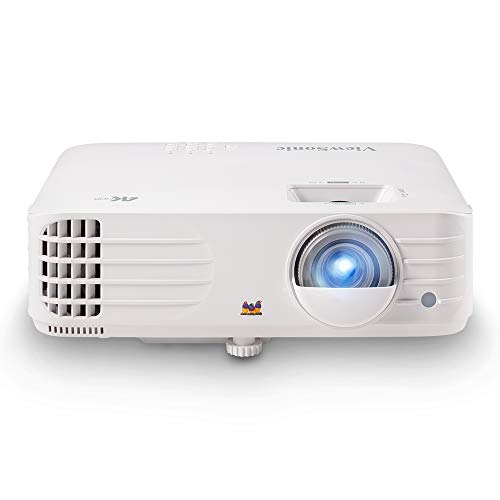
ViewSonic PX701-4K — Best simple speed
ViewSonic’s PX701-4K is the tier’s straightforward speed merchant: 3,200 lumens, a 240Hz HDR gaming brief, a 4.2ms input lag figure from its high-refresh mode, auto keystone for painless placement, dual HDMI, optical zoom, screens up to 300 inches in the listing’s geometry, and a streaming-ready posture that assumes your devices do the clever parts. Where BenQ’s TK machines write constitutions, this one writes a promise: big, bright, fast, simple.
Its appeal in the room is immediacy. Auto keystone and a forgiving zoom make it the projector most likely to be showing a game ten minutes after the box opens, and its brightness matches the BenQ pair lumen for lumen, so dusk-lit living rooms and 120-inch ambitions are equally in its gift. ViewSonic’s color tuning leans vivid — the house style across its gaming line — which flatters sport and animated worlds and asks film purists for a slightly tamed picture mode, a fair and familiar exchange.
As the tier’s elder design it lacks the newer machines’ ornaments: no laser, no lens shift, no smart platform. What it offers instead is the tier’s essential experience with the fewest moving parts between you and the wall — and at street prices that drift with the seasons, it is frequently the machine that makes the whole category suddenly affordable. Watch its listing the way you would watch a fare.
- Light engine: DLP 4K UHD (pixel-shifted)
- Brightness: 3,200 lumens
- Gaming per listing: 240Hz HDR, 4.2ms input lag in high-refresh mode
- Setup: auto keystone, optical zoom, dual HDMI
- Screen range per listing: up to 300 inches
Strengths
- The tier’s speed-and-brightness essence with nothing in the way.
- Fast, forgiving setup for rooms that rearrange.
- Frequently the price athlete of the class — check the live listing.
Trade-offs
- No laser, lens shift or smart platform.
- Vivid factory tuning; film viewers will tame a mode.
- Pixel-shifted 4K, per the tier’s honest label.
Best for: gamers and film fans who want the tier’s core experience, simply delivered. Not suited for: permanent installs craving lens shift. The value move is to check the PX701-4K’s price on Amazon today and strike when the line is kind.

ViewSonic LX700-4K — Best laser value
The LX700-4K brings laser light to the tier at 3,500 lumens — the brightest laser figure in this guide — wrapped in ViewSonic’s Xbox-oriented gaming brief: a 240Hz ceiling, a 4.2ms high-refresh lag figure, SuperColor tuning, HDR, optical zoom and keystone correction. It is the machine for the buyer who read the TK710’s laser sermon, nodded along, and then asked what ViewSonic’s version of the same idea looks like with a few hundred more lumens in hand.
Those lumens are not decoration. In the dim-but-not-dark rooms where this tier actually lives, 3,500 laser lumens hold a 120-to-150-inch image with a confidence the 3,200-lumen machines approach and the 3,000-lumen smart machine admires from behind — and because the source is laser, that confidence does not fade across the years the way a lamp’s does. The Xbox brief is more than a logo: the high-refresh mode and the console-first tuning make it the natural partner for the current console generation, with film inheriting the same bright, composed picture after the matches end.
Its compromises are positional rather than optical. There is no lens shift, so placement leans on zoom and keystone discipline, and no smart platform, so the console or a stick runs the streaming. Within the laser pair it is the extrovert — brighter, gamer-forward — against the TK710’s installer polish. Rooms with light to fight and games to win will know which temperament is theirs.
- Light engine: DLP 4K UHD (pixel-shifted), laser
- Brightness: 3,500 lumens
- Gaming per listing: 240Hz Xbox brief, 4.2ms input lag in high-refresh mode
- Color and HDR: SuperColor, HDR support
- Setup: optical zoom, keystone correction, dual HDMI
Strengths
- The tier’s brightest laser — headroom that does not fade.
- Console-first gaming tuning with the full high-refresh brief.
- Laser ownership calm at a ViewSonic value position.
Trade-offs
- No lens shift; placement discipline required.
- No built-in streaming platform.
- Laser finality, at the usual long distance.
Best for: Xbox-centric households and bright-ish rooms wanting laser value. Not suited for: installs that need lens shift to land square. Gamers can look at the LX700-4K’s current Amazon price and count the lumens their room has been asking for.

ViewSonic PX749-4K — Brightest in the tier
In a tier defined by a budget line, the PX749-4K is defined by a brightness line: 4,000 lumens, the ceiling here, carrying the same gaming brief as its siblings — 240Hz ceiling, 4.2ms high-refresh lag figure, Xbox-flavored HDR, dual HDMI, USB-C, optical zoom and two-axis keystone, screens to 300 inches in the listing’s geometry. It exists for the rooms the rest of the tier negotiates with: the living room with big windows, the basement that hosts at three in the afternoon, the household that will not organize its leisure around darkness.
Brightness at this level changes what 4K HDR means in practice. Tone mapping spends lumens on highlights, and a machine with 4,000 can keep HDR’s peaks authoritative in ambient light that reduces its 3,200-lumen rivals to suggestions. Games gain the same dividend — a bright, fast, enormous picture with the lamps on and the room alive. USB-C welcomes the modern laptop for work presentations, making this the tier’s most convincing double agent: boardroom-capable by day, arena by night.
The costs are the bright machine’s eternal costs. Black depth in a truly dark room trails the tier’s tamer models, its tuning favors vivid authority over calibration neutrality, and its position near the tier’s ceiling means its street price flirts with the line from above as often as below — the check-price discipline this guide opened with applies to it most of all. For the bright room, though, there is no substitute in this guide, and pretending otherwise would be a disservice dressed as thrift.
- Light engine: DLP 4K UHD (pixel-shifted)
- Brightness: 4,000 lumens
- Gaming per listing: 240Hz ceiling, 4.2ms input lag in high-refresh mode
- Inputs and optics: dual HDMI, USB-C, optical zoom, H/V keystone
- Screen range per listing: up to 300 inches
Strengths
- The tier’s brightness ceiling — HDR and games survive ambient light.
- Full gaming brief plus USB-C for work duty.
- Placement freedom for real, rearranging rooms.
Trade-offs
- Its price haunts the tier’s line from both sides — verify live.
- Dark-room blacks trail the tamer models.
- Vivid tuning over reference neutrality.
Best for: bright living rooms, daytime gaming and double-duty work-and-play spaces. Not suited for: blacked-out cinephile dens. If your room has windows and a schedule, check the PX749-4K’s Amazon price now and let the lumens close the argument.

BenQ TK705i — Best smart projector here
The TK705i is the tier’s newest temperament: a 3,000-lumen 4K HDR machine that behaves like a television. Google TV is the operating system and the remote is the scepter; HDMI 2.1 stands ready for consoles; Bluetooth pairs the headphones for midnight sessions; HDR10+ brings dynamic metadata to the picture; MEMC smooths motion for sport; and auto image adjustment performs the setup ritual — focus, squareness, fit — that every other machine in this guide leaves to you. Its listing even sizes the ambition plainly: a 150-inch screen.
Three thousand lumens is the honest price of the appliance philosophy, and in the rooms this machine targets — bedrooms, family rooms, dens that dim rather than black out — it is a price well spent. What the buyer receives in exchange is the disappearance of friction: no stick to buy, no input to hunt, no keystone to nudge, no tutorial for the family. The projector becomes the screen’s own computer, and for a large class of households that transformation is worth more than the few hundred lumens surrendered to buy it.
Purists will note the absences — no lens shift, no laser, a lamp-era heart — and they are right, in the way that critics of every appliance are right: the dedicated instruments do their single jobs more deeply. But the TK705i’s job is the whole evening, and it does the whole evening with a completeness no other pick here attempts. If your household’s projector must be everyone’s projector, this is the one that volunteers.
- Light engine: DLP 4K (pixel-shifted)
- Brightness: 3,000 lumens
- Platform: Google TV built in, Bluetooth
- HDR and motion per listing: HDR10+, MEMC
- Inputs and setup: HDMI 2.1, auto image adjustment, 150-inch screen per listing
Strengths
- The complete appliance: streams, adjusts and projects by itself.
- HDMI 2.1 and HDR10+ — the modern connection and format set.
- Auto setup that genuinely serves non-technical households.
Trade-offs
- The tier’s lowest brightness — dim rooms are its habitat.
- No lens shift or laser at this position.
- Smart platforms age on a software calendar.
Best for: families and bedrooms wanting a television-like projector with nothing to add. Not suited for: bright rooms or fixed-install purists. Households can see the TK705i’s current price on Amazon and retire three remotes at once.
What should you expect from HDR at this tier?
Honesty about HDR is where this tier is most often oversold, so let us set the expectation precisely. These machines accept HDR signals — HDR10 across the gaming lines, HDR10+ on the TK705i — and tone-map them with genuine competence: highlights roll off rather than clip, colors keep their saturation discipline, and an HDR film looks richer than its SDR twin on the same machine. What they cannot do is reproduce a premium television’s highlight violence, because no projector at any sane price can; the format’s peaks are spent from a lumens budget divided across a wall. The correct expectation is a bigger, more cinematic HDR — not a brighter one — and buyers who arrive with that sentence understood are the ones who write the tier’s happiest reviews.
Two habits protect the experience. First, keep the room honest: HDR’s gains live in gradation, and gradation is the first casualty of ambient light, so the evening modes and the curtains matter more here than in SDR. The PX749-4K’s 4,000 lumens buy back a portion of that loss in dusk conditions, which is its whole reason for existing. Second, feed the machines real HDR from real sources — a console or player actually outputting it, through the input actually configured for it. The tier’s most common disappointment is an HDR projector patiently showing an SDR signal its owner never switched on, and it is a disappointment with a menu-shaped cure.
There is also a quiet hierarchy inside the tier worth naming. The BenQ machines’ color discipline in HDR — the TK700’s enhanced black detail, the TK710’s laser stability behind its tuning — tends to flatter film; the ViewSonic line’s vividness flatters games and sport; the TK705i’s HDR10+ adds dynamic metadata to the conversation for libraries that speak it. None of these is the “best HDR” in the abstract. They are three accents in the same language, and your content library knows which accent it speaks.
How do throw distance and room size shape the choice?
These are standard-throw machines, and the geometry deserves a tape measure before a credit card. A 120-inch image from this class typically asks for a room-length throw — the projector on a coffee table or rear shelf, the screen or wall across the living room — with the zooms providing the fine adjustment: the TK710’s 1.3x range and lens shift give it the most placement grace, the auto-keystone machines forgive the most casual arrangements, and the PX749-4K’s two-axis correction rescues rooms that refuse to be theaters. Apartments with short throws should measure first and dream second; a projector that must sit closer than its minimum throw is a very bright paperweight.
Ceiling mounting changes the household physics in the owner’s favor — the machine leaves the coffee table, the cables leave the floor, the image stays fitted — and the tier’s lighter models mount without heroic hardware. But mounting converts a flexible appliance into a fixture, which is why renters and rearrangers should audition the table life first. The TK705i’s auto adjustment exists for exactly that life: set it down, let it square itself, watch. The installed machines reward permanence; the casual ones reward spontaneity. Your lease and your temperament both get votes.
Sound placement rides along with the geometry, since the projector’s speaker — where one is used — fires from wherever the machine sits. A rear-shelf projector puts its voice behind the audience, which casual viewing forgives and film does not. The eARC and Bluetooth paths in this tier are the elegant escapes: soundbar at the screen, voices with the faces, projector wherever the throw demands. Plan the audio’s address when you plan the projector’s, and the room will feel designed rather than assembled.
What does the rest of the room cost at this tier?
The projector is the headline purchase, but the tier’s honest budget includes its supporting cast, and planning them together prevents the staggered disappointment of a great engine feeding a wrinkled bedsheet. The surface comes first: a smooth wall is free and adequate, a fixed or pull-down screen buys flatness and a defined border, and at these brightness levels a modest screen outperforms an ambitious diagonal every time. Size the surface to the lumens you bought — the discipline this guide has repeated because it is the one buyers most enjoy breaking.
Then the source and the sound, whose costs the smart machine partly absorbs. The TK705i’s Google TV folds the streaming stick’s budget into the projector; the HDMI-pure machines ask for a console or stick you very likely already own, which is why their apparent price advantage is partly an accounting illusion — and partly real, since an owned console is a sunk cost. Sound is the line that grows: built-in speakers for the honeymoon, a soundbar when the room’s size announces itself, separated speakers when the hobby takes hold. The tier’s eARC and Bluetooth provisions are best read as upgrade paths, and they are well designed ones.
Finally, the consumables ledger, which divides exactly as the light sources do. Lamp owners should know their model’s lamp module and its rough service interval — not to fear it, but to have converted a future surprise into a planned errand. Laser owners skip that line entirely and instead accept the machine-scale replacement at the end of a much longer road. Either way, the five-year cost of any pick here is dominated by enjoyment rather than upkeep, which is precisely what a mature tier should offer.
Which consoles and sources get the best from this tier?
The current console generation is this tier’s natural partner, and the listings say so in their own vocabularies — PS5 and Xbox readiness on the TK700, an Xbox brief on the ViewSonic lasers and the PX749-4K, HDMI 2.1 on the TK705i. The practical meaning is that these projectors were specified against the consoles’ actual outputs: 4K at standard refresh for cinematic titles, high-refresh 1080p for competitive ones, HDR as the default rather than the exception. Connect the console to the projector’s full-bandwidth input, enable the console’s HDR and high-refresh settings deliberately rather than assuming them, and the partnership the listings promise is the one you get.
Streaming sources divide by philosophy, as they have throughout this guide. The TK705i is its own source. The rest accept sticks and boxes with the neutrality of good HDMI citizens, and there is a real argument that the stick is the better architecture: it upgrades for pocket money, it travels between displays, and it never strands a fine light engine behind an aging interface. Film collectors with disc players should note the tier’s HDR manners — HDR10 everywhere here, HDR10+ on the TK705i — and set the player’s output to the best format both ends speak, a thirty-second setting that decides evenings.
PC players get the tier’s most interesting homework. A gaming PC can drive the high-refresh modes with a freedom consoles ration, and at 1080p high-refresh these projectors become enormous, fast monitors with input lag figures that shame many televisions. Text at 4K from a PC is also the pixel-shifting technique’s sternest test and, at living-room distances, one it passes convincingly. The desk-bound need not apply — but the couch-PC household will find this tier speaks its language fluently.
How loud and hot does a gaming projector get?
Four thousand lumens and high-refresh electronics generate heat, and heat leaves through fans, so this tier’s acoustics deserve the same honesty as its lag figures. In full-brightness gaming modes these machines are audible presences in a quiet room — not defects, but physics — and their eco and evening modes trade light for calm in the usual proportion. Placement is the owner’s lever: a projector behind or above the seating, with its vents breathing freely, recedes from attention; one on the coffee table at elbow height, exhausting toward the sofa, will be discussed. The lasers hold a small structural advantage here, running their light sources with an efficiency that gives the fans less to say.
Heat has a second, slower consequence: dust. Fans move air, air carries dust, and filters exist to be cleaned on the schedule the manual sets — an errand whose neglect announces itself months later as rising noise and falling brightness, the projector’s only way of asking. Households with pets or dusty roads outside should treat the filter as a quarterly appointment rather than a repair. None of the six here is fragile; all of them reward the five minutes of stewardship that separates an appliance from an appliance that still performs in year four.
The encouraging summary is that this tier has matured past the era when gaming projectors sounded like hair dryers with opinions. Sit the machine sensibly, keep its air path clean, use the calm modes for midnight film, and the fan becomes what it should be — a sound you notice only when someone points it out, in a room enjoying a picture far larger than the budget had any right to expect.
How do the six compare side by side?
| Model | Brightness | Light source | Fast-mode lag per listing | Defining extra |
|---|---|---|---|---|
| BenQ TK700 | 3,200 lumens | Lamp class | 4.2ms (16ms at 4K) | 3-year warranty, Atmos support |
| BenQ TK710 | 3,200 lumens | Laser | 4ms | Lens shift, eARC |
| ViewSonic PX701-4K | 3,200 lumens | Lamp class | 4.2ms | Auto keystone simplicity |
| ViewSonic LX700-4K | 3,500 lumens | Laser | 4.2ms | Xbox-first laser value |
| ViewSonic PX749-4K | 4,000 lumens | Lamp class | 4.2ms | Brightness ceiling, USB-C |
| BenQ TK705i | 3,000 lumens | Lamp class | Console-ready HDMI 2.1 | Google TV, auto setup |
The table compresses the tier’s three arguments. Light source divides the ownership stories, brightness divides the rooms, and the smart platform divides the households. Everything else — the shared pixel-shifted 4K, the shared gaming speed — is the tier’s common inheritance, which is why the decision here is unusually personal for a specification sheet.
What mistakes do buyers in this tier keep making?
The first is treating the tier’s line as a law of nature. Street prices in this class breathe with the seasons, and the buyer who refuses a machine sitting slightly above the line on principle — or grabs one below it without reading its specification — has let a round number do a reviewer’s job. Check the live price, judge the machine, and let the two negotiate. The second mistake is the mirror image: believing the 4K badge without the pixel-shift sentence. Every machine here is honestly labelled in this guide; the market outside is not, and 1080p projectors that merely accept 4K signals crowd the same search results at tempting prices.
Third, gamers buy the 4.2ms headline and play at 4K, then blame the projector for the arithmetic of modes — the fast figures live in the high-refresh modes, as this guide has repeated at every opportunity. Fourth, buyers stretch these brightness budgets across enormous screens in lit rooms and call the tier dim; the lumens were never the problem, the division was. Fifth, they forget the room’s other half — sound. These are gaming-and-film machines whose built-in speakers are starting points; a soundbar in the budget from day one prevents the most common second purchase from feeling like a rescue. Finally, they skip the warranty column: two of the BenQ listings print three-year terms, and in a tier this competitive, that confidence is information.
How should you set up your first 4K gaming projector?
Geometry with a gamer’s priorities: place the machine square to the wall — keystone adds processing and processing can add lag, so the fast modes deserve a physically honest installation — and use optical zoom, or the TK710’s lens shift, to size the image. Feed the console into the input the manual designates for full-bandwidth signals, set the console’s output to match the mode you intend to play — high-refresh for competitive titles, 4K for cinematic ones — and confirm the projector’s enhanced-format input setting is awake. Half the tier’s support questions die at that menu.
Then tune the two pictures separately, because you own two projectors in one box. For games: the fast mode, brightness for the room’s real light, sharpness left honest. For film: a cinema-leaning mode, motion smoothing off or low, and the room as dark as the household allows. Save both, label them if the machine permits, and teach the household the two buttons. Finally, sound: route through eARC where the TK710 offers it, or accept the built-in speaker for casual play and keep the soundbar fund growing. A tier this good deserves voices at the screen.
Final Recommendation
The tier divides by temperament, so choose yours. The proven all-round door is the BenQ TK700, warranted and balanced; the grown-up upgrade is the TK710, whose laser and lens shift correct the founding design in the two places owners asked about. ViewSonic’s trio splits by appetite: the PX701-4K for the essential experience simply delivered, the LX700-4K for laser value with an Xbox heart, and the PX749-4K when the room’s light makes brightness the whole argument. Households that want the projector to behave like a television should take the TK705i and its Google TV completeness without a backward glance. Whichever name you land on, verify its live price against the line on the day you buy — in this tier, timing is a feature, and the wall is waiting. Set the machine square, feed it the mode your evening actually needs, and give the sound a home at the screen. Do those three small things and a projector from this shelf will not feel like a budget compromise for a single night of its long life.
Frequently Asked Questions
Are these really 4K projectors?
They render genuine 4K UHD images by pixel shifting — a high-speed technique that addresses every pixel of the UHD grid with real image information — rather than with a native 4K imager, which costs multiples of this tier. The detail on screen is honestly 4K-class. What this guide refuses to do is hide the method, because the method is the reason the tier can exist at this money at all.
Why do the prices move around the tier’s line?
Because this is the most contested shelf in home projection: two brands, seasonal promotions and console-cycle demand push individual models above and below the line across the year. That is why this guide prints no prices and sends you to the live listings. Judge the machine on its specification, then judge the day’s price against the tier — in that order. A model that sits a little above the line while carrying a laser engine, a longer warranty or the brightness your room demands may be the tier’s best value that week; a model below the line with the wrong light source for your hours is no bargain at all.
What does 4.2ms input lag actually mean for my games?
It is the delay between your input and the image in the projector’s high-refresh mode at 1080p-class resolution — the mode for competitive and fast-reflex play, and an excellent figure. At 4K console settings the delay rises — the TK700’s listing prints 16ms for that case — which remains entirely comfortable for cinematic and mainstream gaming. Match the mode to the game and the numbers stop being marketing.
Lamp or laser — which should a first-time buyer choose?
If the projector will serve a few evenings a week, the lamp machines’ economics are unbeatable and their lamps will serve for years. If it will run daily, live in a bright room where every lumen is spent, or sit in a semi-permanent install, the TK710 and LX700-4K’s lasers repay their premium in steadiness and silence. Hours, not hype, should decide.
How big a screen can this tier honestly feed?
In dim rooms, 120 to 150 inches is the satisfying range for the 3,200-to-3,500-lumen machines, with the 4,000-lumen PX749-4K stretching further and into brighter rooms; in lit rooms, pull those sizes in and let brightness win. Listings quote ceilings up to 300 inches as geometry. Your lumens per square foot are the real specification, and they argue for restraint.
Can I use one of these as my only display?
Many households do, and the tier supports the ambition better than any before it — the TK705i most explicitly, since its Google TV and auto setup make it behave like the television it replaces. The conditions are the ones this guide has circled throughout: a room that can dim for film, a screen size matched to the lumens, and a sound plan beyond the built-in speaker. Meet those, and the projector-as-television stops being an experiment and becomes the household’s normal — with the considerable bonus that the display vanishes when it is off, returning the room to being a room until the next evening’s screening calls the wall back into service.
Do I need a soundbar with these projectors?
Plan for one. The built-in speakers across this tier serve casual viewing and gaming chat, but film mixes and big rooms deserve sound at the screen — the TK710’s eARC support exists precisely to make that addition graceful. The TK705i’s integrated approach is the most appliance-like starting point, yet even its owners tend to graduate. Budget the bar early and it feels like a plan instead of a rescue.
Related Guides
Readers ready to spend past the line should continue to our best 4k hdr projectors roundup, where tone mapping and calibration take over the argument. If the room is the problem rather than the budget, the best 4000 lumen plus projectors guide leads with light. And console-first households should compare this tier against the specialists in our best 4k gaming projectors coverage before the next match starts. The older 1080p 3D class is audited in the best 3d hd projectors.



[…] being real, our best 4k projectors under a thousand roundup shows how much of this experience the tier below buys. Readers whose rooms refuse to darken […]