What's inside
- Key Takeaways
- Quick Picks
- How Did We Choose These Picks?
- What Is the Difference Between Laser Phosphor and RGB Triple Laser?
- Why Does Laser Light Change the Ownership Experience?
- How Do These Six Light Engines Stack Up Against Each Other?
- How Should You Choose a Screen for a Laser Projector?
- How Do You Install a 4K Laser Projector for Cinema Duty?
- What Does 4K Actually Add at Cinema Distances?
- How Long Is a Laser’s Service Life in Household Terms?
- What About Sound in a Laser Cinema?
- How Do You Live With a Flagship in a Family Room?
- How Does a Laser Projector Handle Sport Differently From Film?
- What Should Gamers Take From This Guide?
- How Do Streaming Platforms Look at a Hundred Inches?
- What Does the Second Year of Flagship Ownership Teach?
- How Should You Compare a Flagship Against a Large Television?
- How Do You Future-Proof a Room Built Around a Flagship?
- What Is the Environmental Ledger of Laser Projection?
- How Do You Demo a Flagship to Yourself Honestly?
- How Does a Laser Flagship Age Alongside a Growing Household?
- What Should You Write Down on Installation Day?
- Why Does the First Film Matter So Much?
- How Do You Share a Flagship Room With Different Tastes?
- What Is the Quiet Luxury Nobody Puts on the Box?
- How Should the Room Sound When the Lights Go Down?
- What Mistakes Do 4K Laser Buyers Keep Making?
- Final Recommendation
- Frequently Asked Questions
- Related Guides
As an Amazon Associate I earn from qualifying purchases. This post may contain affiliate links at no extra cost to you.
gizmoverdict.com is reader-supported. When you buy through links on our site, we may earn an affiliate commission.
Where to buy: Each projector below carries an Amazon link drawn from the pool our team verified for this site. Only two are both 4K and laser-lit, and they lead this guide; the others are included as clearly labelled contrasts — a portable laser that is not 4K, an LED theatre machine, and two lamp models — so the laser premium can be judged against honest alternatives.
The best 4k laser projectors exist because two technologies matured into each other. 4K resolution gave the big screen its detail; laser light gave it endurance, colour and immediacy. A lamp projector is a machine with a countdown inside it, dimming gently from the day it is unboxed toward the day its lamp wants replacing. A laser projector holds its brightness like a promise, switches on at full voice, and renders colour from a palette wide enough that sunsets and stadium kits stop looking like approximations. Put that engine behind a true 4K image at a hundred inches and you have the current summit of home projection — which is why this guide is strict about reserving its title for machines that are genuinely both things.
Two picks qualify outright, both from XGIMI’s Horizon line and both verified in our pool: the Horizon 30 Pro, an RGB triple-laser 4K machine whose listing states 4800 ISO lumens, and the Horizon 20 Pro, its RGB triple-laser sibling at a listing-stated 4100 ISO lumens with optical zoom and lens shift. Around them this guide arranges the instructive contrasts. The NEBULA Capsule 3 Laser is a genuine laser projector whose resolution is 1080p class, included so the laser-versus-lamp question can be separated from the 4K question. The BenQ HT2060 is LED-lit, the Epson CO-FH02 and BenQ TH575i are lamp-lit, and each is labelled accordingly wherever it appears, because a buyer comparing light sources deserves a table where nobody is wearing a borrowed badge.
The distinction inside laser itself matters and gets its own section below: laser-phosphor designs, where a blue laser excites a phosphor wheel to make white light, versus RGB triple-laser designs, where separate red, green and blue lasers mix directly into a wider, purer colour palette. Both of this guide’s 4K picks are the triple-laser kind, which is part of why they lead it — but the explanation is kept qualitative and honest, because the buyer’s real questions are simpler: how wide is the colour, how long does the light last, and what does the image feel like at a hundred inches on a Friday night.
Key Takeaways
- Only the two XGIMI Horizon picks here are simultaneously true 4K and laser-lit; every other pick is labelled with what it actually is.
- Both 4K picks use RGB triple-laser engines, mixing colour directly rather than through a phosphor stage.
- Laser light holds brightness across its service life and switches on instantly, retiring the lamp-replacement calendar.
- The Capsule 3 Laser proves laser and 4K are separate questions: it has the first, in miniature, without the second.
- LED and lamp picks remain rational where budget or room argues for them; the guide prices the laser premium honestly.
- At 4K sizes, the screen, the darkness and the seating distance decide as much as the light source does.
Quick Picks
| Pick | Badge | Why it earns its place |
|---|---|---|
| XGIMI Horizon 30 Pro | Flagship 4K triple laser | RGB triple-laser 4K with a listing-stated 4800 ISO lumens, Dolby Vision and the line’s fullest brightness. |
| XGIMI Horizon 20 Pro | 4K triple laser with installation grace | RGB triple-laser 4K at a stated 4100 ISO lumens, with optical zoom and lens shift for imperfect rooms. |
| NEBULA Capsule 3 Laser | Laser, portable, not 4K | A battery mini projector with a true laser light source and 1080p-class image for rooms that move. |
| BenQ HT2060 | LED theatre contrast | A 1080p LED projector with wide-gamut colour discipline, included as the solid-state lamp alternative. |
| Epson EpiqVision Flex CO-FH02 | Lamp 3LCD brightness contrast | A 3000-lumen 3LCD lamp projector showing what cheerful brightness without laser costs and gives. |
| BenQ TH575i | Lamp living-room contrast | A 3800-lumen lamp projector with Google TV, the bright mainstream against which laser endurance is measured. |
How Did We Choose These Picks?
The gate was double and non-negotiable for the guide’s title picks: a verified listing in our pool, true 4K resolution, and a laser light source, all three stated by the listing itself. Exactly two machines passed, and rather than pad the podium with relabelled pretenders, this guide built its remaining four places as an education: one true laser at lower resolution, one LED machine, and two lamp machines spanning the brightness classes, each present to answer a question a real buyer asks at the moment of paying the laser premium.
Within the 4K pair, judgement ran on the ownership virtues laser is bought for — brightness as stated in each listing’s own ISO-lumen terms, colour architecture, installation flexibility, platform completeness and the long, lamp-free service profile — rather than on gaming figures, which the companion guide in this batch covers for the same machines from the player’s side. The contrast picks were judged in their own classes and never marked down for failing a title they never claimed; an honest lamp projector is a better buy than a dishonest laser one, and the verdicts keep that hierarchy visible.
Every pick was also weighed as a room system: the screen it deserves, the darkness it rewards, the sound it still needs bought separately. A 4K laser projector is the most room-dependent purchase in home entertainment, and a guide that sold the box without the room would be repeating the industry’s favourite omission.
What Is the Difference Between Laser Phosphor and RGB Triple Laser?
In a laser-phosphor projector, a powerful blue laser shines on a rotating phosphor wheel, which glows yellow; that yellow, combined with some of the blue, is split and filtered into the red, green and blue from which the image is built. It is an elegant, efficient design that made laser projection affordable, and a great many fine projectors use it. Its colour ceiling, however, is set by that conversion chain: the palette is wide, but the primaries pass through a phosphor intermediary that costs them some purity.
An RGB triple-laser design removes the intermediary. Three laser light sources — red, green and blue — produce the primaries directly, and the image is mixed from light that was born the right colour. The practical dividends are a wider gamut, more saturated and accurate colour especially in the deep reds and greens that nature and cinema both love, and efficiency that does not pay the phosphor toll. Both 4K picks in this guide are triple-laser machines, and their listings’ emphasis on colour is the sound of that architecture describing itself.
One honest caveat belongs to laser light generally: highly coherent light can, on some screens and to some eyes, produce a subtle sparkle or speckle in bright uniform areas, an effect that varies with screen material and that modern designs work to minimise. It is rarely a deciding factor and often invisible in ordinary content, but a buyer choosing a screen for a triple-laser machine should favour materials known to behave well with laser light — a detail the screen section below returns to, because the pairing, as always, is the product.
Why Does Laser Light Change the Ownership Experience?
Begin with the calendar that disappears. A lamp projector’s light source is a consumable with a rated life, dimming across it, and the owner’s relationship with the machine includes watching that arc and budgeting its end. A laser engine is rated for a service span so long relative to household viewing that, for practical purposes, the light outlives the product cycle around it — the television will be replaced, the console twice, while the projector’s brightness simply persists. Films look in year four the way they looked in week one, which quietly changes how a household feels about having spent seriously on the machine.
Then there is immediacy. Laser and LED engines reach full brightness essentially at switch-on and can be switched off without a cooling vigil, so the projector behaves like a television in the rhythm of daily life: on for the match, off at the whistle, on again for a film. Lamp machines ask for a little more ceremony and reward it with lower purchase prices, a trade the contrast picks in this guide embody fairly. But households converting from lamp to laser consistently name the immediacy, as much as the image, as the upgrade they feel every single day.
Colour stability completes the trio. Because the light source is not ageing along a dimming curve, the colour balance the owner calibrated in the first month remains the colour balance of the fiftieth month, and a calibration becomes an investment rather than a snapshot. For the cinema-minded buyer, that permanence is the deepest argument in this guide: the picture you fell for is the picture you keep.
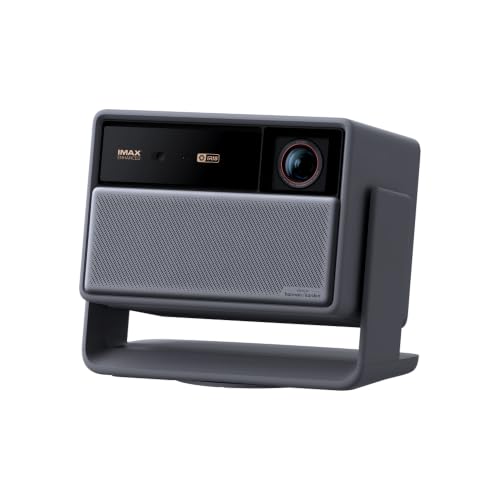
XGIMI Horizon 30 Pro — Flagship 4K triple laser
The Horizon 30 Pro leads this guide on the strength of the fullest expression of its theme: a true 4K image lit by an RGB triple-laser engine at a listing-stated 4800 ISO lumens, with Dolby Vision, Harman Kardon audio and Google TV completing a machine that asks the room for nothing but darkness and a wall worth lighting. The brightness figure matters in the laser context specifically, because it is brightness the machine will keep: a lamp rival can match a number on its first evening and then begin the long fade, while this engine’s number is a description of its whole life. For a main room that hosts films, sport and the occasional game, that constancy is the flagship argument in one sentence.
Its colour is the triple-laser dividend described above — direct primaries, saturated without vulgarity, with the native contrast its listing states giving dark scenes their architecture. Setup assistance shortens installation, though this guide’s standing counsel holds: give it a square position and a proper screen, because a flagship engine aimed at a wrinkled wall is a sports car on a farm track. Buyers choosing between the two 4K picks should weigh this machine’s brightness headroom against its sibling’s installation optics, a decision the next verdict frames.
- Picture: genuine 4K, exactly as its listing describes
- Engine: three-laser RGB design, no phosphor stage
- Output: the listing quotes 4800 in ISO lumens
- Extras named by the listing: Dolby Vision and Harman Kardon sound
- Streaming: Google TV built in
Strengths
- The brightest stated figure among the true 4K laser picks
- Triple-laser colour at full flagship strength
- Brightness and colour that persist across its service life
Trade-offs
- Demands a screen and darkness worthy of its engine
- Premium pricing is the category’s, not a discount line
- Built-in audio still yields to a soundbar at cinema scale
Best for: the main-room flagship buyer who wants 4K laser at full brightness, bought once and kept for years.
Not suited for: bright, casual rooms where its darkness-loving strengths cannot show.

XGIMI Horizon 20 Pro — 4K triple laser with installation grace
The Horizon 20 Pro is the same thesis with a different emphasis: RGB triple-laser 4K at a listing-stated 4100 ISO lumens, distinguished by the installation hardware — optical zoom and lens shift, both named in its listing — that lets a projector live where the room dictates rather than where the throw chart wishes. In real houses, where the shelf is off-centre and the ceiling mount lands where a joist allows, those optics are the difference between a 4K image using all of itself and one cropped by correction. Add IMAX Enhanced and Dolby Vision support and a full Google TV platform with licensed Netflix, and the machine presents itself as the connoisseur’s fitting problem solved.
Against its sibling, the trade is headroom for grace: a step less stated brightness, a step more freedom in placement, the same triple-laser colour bloodline and the same lamp-free permanence. Households with a cooperative room and a hunger for the largest, brightest image will lean one way; households with an awkward, beloved, immovable room will lean the other, and both will be right, which is what a genuine fork in a pick list looks like. Either way, the purchase is the same category of decision: 4K, laser, and done for years.
- Picture: genuine 4K, exactly as its listing describes
- Engine: three-laser RGB design, no phosphor stage
- Output: the listing quotes 4100 in ISO lumens
- Fitting the room: true optical zoom plus lens shift
- Streaming: Google TV, licensed Netflix and IMAX Enhanced aboard
Strengths
- Installation optics fit real, imperfect rooms without pixel waste
- Triple-laser colour with full streaming polish
- Laser permanence with a connoisseur’s feature set
Trade-offs
- A step below its sibling in stated brightness
- Still a premium purchase requiring a worthy room
- Lens-shift range is generous, not magical — placement still matters
Best for: buyers with imperfect rooms who refuse to spend resolution on correction.
Not suited for: buyers with a perfect dark room chasing maximum brightness first.
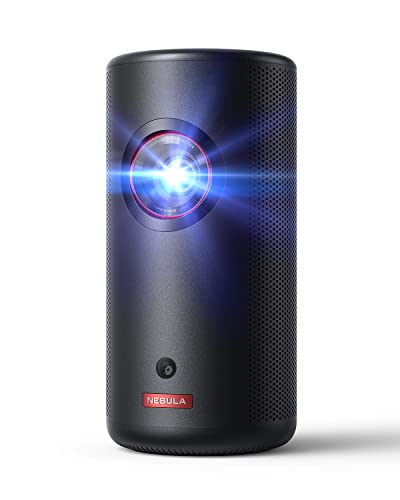
NEBULA Capsule 3 Laser — Laser, portable, not 4K
The Capsule 3 Laser is this guide’s control experiment: strip away 4K, shrink the laser to the size of a drinks can, and discover how much of the laser experience survives. The listing paints a pocket-size machine: laser illumination, Google TV with Netflix certification, Dolby Digital audio, images up to 120 inches and a battery good for a full film. What survives is the laser temperament — instant readiness, consistent colour, no lamp anxiety — in a machine that turns a garden wall, a bedroom ceiling or a holiday rental into a cinema at dusk. What does not survive is resolution and brightness at scale, and this guide states its 1080p-class image plainly so the experiment stays honest.
As a second projector in a house that owns a room machine, or a first projector in a life that moves too much for installations, it is a delight with a clear brief. As a substitute for the 4K pair it is nothing of the kind, and its presence here is precisely to make that boundary visible in product form: laser is a light source, 4K is a resolution, and the title of this guide belongs only where the two shake hands.
- Picture: 1080p class — laser-lit, honestly short of 4K
- Engine: a real laser inside a pocketable body
- Power: an internal battery the listing rates at two and a half hours
- Streaming: Google TV with Netflix certification aboard
- Image size: up to 120 inches claimed, happiest smaller after dusk
Strengths
- True laser behaviour in a genuinely portable body
- Battery freedom makes any wall a venue
- Smart platform and sound aboard for instant sessions
Trade-offs
- Not 4K, and brightness limits it to darker settings
- A companion machine, not a main-room flagship
- Small body means small sound, however well tuned
Best for: portable cinema, second rooms, travel and garden evenings.
Not suited for: the main 4K theatre purchase this guide’s title describes.

BenQ HT2060 — LED theatre contrast
The HT2060 represents the other solid-state answer: LED light, with the same freedom from lamp replacements as laser and a colour discipline its listing states in gamut terms — DCI-P3 and Rec.709 coverage — inside a 1080p home-theatre design with vertical lens shift and a 1.3x zoom. In a dark room, for film-first households, its picture has a composure that brightness-led rivals envy, and its ownership calendar is as empty of lamp errands as any laser machine’s. It is here so that a buyer intoxicated by the word laser can ask the sober question: is it the light’s longevity I want, or its colour and brightness ceiling?
For many dark-room film lovers, the honest answer is longevity and colour manners, and this machine delivers both at a gentler price than the 4K laser pair, surrendering resolution and peak brightness in exchange. For buyers whose room is bright, whose content is 4K, or whose screen is enormous, the surrender is too much. Either way, the HT2060 earns its contrast role by being a complete, coherent alternative philosophy — solid-state, theatre-tuned, resolution-humble — rather than a failed attempt at the flagship’s job.
- Picture: 1080p, and this guide will keep reminding you
- Engine: LED, so lamp changes vanish from its calendar too
- Colour story: the listing names DCI-P3 alongside Rec.709
- Fitting the room: vertical lens shift with a 1.3x zoom
- Role here: solid-state theatre thinking, minus the laser badge
Strengths
- Lamp-free LED life with theatre colour discipline
- Lens shift civilises dedicated-room installation
- A coherent, gentler-priced alternative philosophy
Trade-offs
- 1080p ceiling at 4K screen sizes
- Dark rooms flatter it; bright rooms expose it
- Peak brightness sits below the laser flagships
Best for: dark-room film households valuing colour manners and lamp-free life over resolution.
Not suited for: 4K seekers and bright-room buyers.

Epson EpiqVision Flex CO-FH02 — Lamp 3LCD brightness contrast
The CO-FH02 stands for the lamp tradition at its most cheerful: a three-chip 3LCD engine in a portable body, its listing promising Full HD pictures and equal 3000-lumen colour and white brightness, with Android TV streaming aboard. The equal colour and white brightness is its signature virtue, keeping colourful content saturated in lit rooms, and its whole design says ease: carry it, place it, stream. Against the laser flagships it surrenders resolution, contrast depth and the lamp-free calendar — its light source is a consumable on the old honourable terms — and in exchange it costs and weighs a fraction of them.
Its role in this guide is to price the premium by contrast. A household whose viewing is bright, casual and social may look at this machine’s simplicity and conclude, correctly, that laser permanence buys them little they will use. A household building a dark cinema will look at the same machine and see every compromise the flagships exist to retire. Both readings are this pick working as intended.
- Picture: Full HD, which means 1080p and not a pixel more
- Engine: three-chip 3LCD driven by a lamp
- Output: the listing promises 3000 lumens for colour and white alike
- Streaming: Android TV built in
- Role here: cheerful lamp brightness, priced against laser permanence
Strengths
- Equal colour and white brightness keeps lit rooms vivid
- Portable, simple, streaming-ready ownership
- Entry cost far below the laser flagships
Trade-offs
- Lamp light is a consumable with a dimming arc
- 1080p and crossover tuning, not cinema specification
- Contrast depth trails the laser pair in dark scenes
Best for: bright, casual, portable big-screen viewing.
Not suited for: dark-room cinema building at 4K.

BenQ TH575i — Lamp living-room contrast
The TH575i closes the contrasts as the mainstream lamp machine at full living-room brightness: a listing that promises 3800 lumens, carries Google TV, and prints a three-year warranty — a small manifesto of its maker’s confidence. It is the projector a family buys when the room will not be darkened, the content is sport and streaming and family gaming, and the budget prefers sense to summitry. Its lamp will, across the years, dim and eventually want replacing — the old contract, accepted knowingly — and for many households that contract remains the right one.
Placed at the end of this guide, it performs the final honest service: it proves the laser premium is a choice rather than a tax. The flagships above are better machines by the measures this guide cares about — resolution, colour architecture, permanence — and this one is better by two measures they cannot contest: price of entry and brightness per coin in a lit room. A buyer who can state which set of measures is theirs has already made the decision; the rest is delivery.
- Picture: 1080p, honestly labelled once more
- Engine: a lamp, with a lamp’s eventual replacement bill
- Output: the listing promises 3800 lumens for lit rooms
- Streaming: Google TV built in
- Reassurance: the listing prints a three-year warranty
Strengths
- Serious brightness for lit living rooms
- Full smart platform without extra boxes
- Stated warranty length is generous and plain
Trade-offs
- Lamp dimming and replacement are part of its life
- 1080p ceiling at large sizes
- No laser permanence or triple-laser colour
Best for: bright living rooms, sport and family viewing on a sensible budget.
Not suited for: the dark-room 4K cinema this guide’s title promises.
How Do These Six Light Engines Stack Up Against Each Other?
| Projector | Resolution | Light source | Stated brightness | Ownership note |
|---|---|---|---|---|
| Horizon 30 Pro | 4K | RGB triple laser | 4800 ISO lumens | Lamp-free permanence, flagship |
| Horizon 20 Pro | 4K | RGB triple laser | 4100 ISO lumens | Lamp-free, zoom and lens shift |
| Capsule 3 Laser | 1080p class | Laser | Mini class | Portable, battery, lamp-free |
| BenQ HT2060 | 1080p | LED | Theatre class | Lamp-free, dark-room colour |
| Epson CO-FH02 | 1080p | Lamp 3LCD | 3000 lumens | Lamp consumable, bright colour |
| BenQ TH575i | 1080p | Lamp | 3800 lumens | Lamp consumable, lit-room value |
How Should You Choose a Screen for a Laser Projector?
The screen is the second half of the light engine. A matte white screen of good quality is the faithful default, returning the triple-laser colour honestly and suiting dark rooms completely. Grey and ambient-light-rejecting materials trade a little peak brightness for black levels and lit-room dignity, and pair well with the flagships in rooms that cannot fully darken. With laser light specifically, favour screen materials known to minimise speckle, and view a sample under laser projection if the seller allows, because the pairing of coherent light and screen texture is the one place in this guide where eyes genuinely differ.
Size follows the seating, as the companion guide argues from the gaming side: measure the room, tape the outline, live with it for an evening of film. At 4K the temptation to go larger is justified by the resolution, and resisted only by brightness and comfort, both of which the tape test reports honestly. Buy the screen once, at the size the room proved, because it will outlast the projector it was bought for and serve the next one too.
How Do You Install a 4K Laser Projector for Cinema Duty?
Position for the optics: centred where possible, square always, with lens shift — the Horizon 20 Pro’s speciality — absorbing the room’s imperfections before any keystone is invited. Cable for the full signal your sources offer, keep the audio chain as considered as the video, and give the machine air around its vents, because even a laser engine is a small furnace with opinions about dust and clearance. Focus after warm-up, on a detailed scene, at the centre of the screen.
Then calibrate like you mean it: choose the picture mode that respects the source, set HDR behaviour per input, and resist the showroom settings that survived shipping. A 4K laser machine’s colour architecture rewards an hour of honest adjustment with years of dividends, and the calibration’s permanence — the laser virtue again — means the hour is spent once, not per season.
What Does 4K Actually Add at Cinema Distances?
At a hundred inches, 4K’s gift is not the ability to count pixels but the inability to see them: fine textures — fabric, foliage, film grain, the weave of a kit — resolve into the scene instead of into a pattern. Text and interfaces sharpen, subtitles sit crisply, and the image acquires the continuous-tone calm that makes viewers stop analysing and start watching. Move closer or go larger and the advantage grows; shrink the image or retreat across a long room and it politely diminishes, which is why this guide keeps tying resolution to the tape measure.
Source honesty completes the picture. A 4K projector fed a soft, heavily compressed stream shows the stream, not the machine, and households sometimes blame the flagship for the feed. Feed it well — the best stream tier, a disc, a proper file — at least for the films that matter, because the summit machine’s job is to reveal, and revelation is only flattering to good material.
How Long Is a Laser’s Service Life in Household Terms?
Translate the engineering into evenings. A household watching two hours a night accumulates a little over seven hundred hours a year; even the most conservative laser service ratings in this class of machine are counted in the tens of thousands of hours. The arithmetic lands somewhere beyond a decade of nightly cinema, by which time the platform, the connections and the household itself will have changed around an engine still near its first brightness. That is the practical meaning of permanence in this guide: not immortality, but a light that exits the list of things a buyer must think about.
Lamp arithmetic, for contrast, is counted in thousands of hours with dimming throughout, which is why lamp ownership includes a calendar and laser ownership includes a shrug. Neither is a moral position; they are different contracts, priced differently, and this guide’s contrasts exist so the buyer signs the one they actually want.
What About Sound in a Laser Cinema?
No projector in this guide, flagship included, turns a room into a cinema alone; the image is half the event. The Horizon pair’s built-in audio is respectable and intelligently tuned for casual viewing, and the honest upgrade path is the same as ever: a soundbar for most rooms, separates for dedicated ones, placed at the screen and fed as directly as the equipment allows. Budget sound as part of the flagship purchase, because a silent-looking waterfall at a hundred inches is a special effect missing its effect.
Room acoustics ask for softness: a rug, curtains, upholstered seating — the same furnishings that darken a room for contrast also civilise its echoes for dialogue. The cinema room, assembled thoughtfully, is a conspiracy of small comforts in which the projector is merely the brightest conspirator.
How Do You Live With a Flagship in a Family Room?
By refusing to make it precious. The laser engine’s instant readiness is a family feature: cartoons at breakfast brightness discipline, a film after bedtime at full glory, the match on Saturday with the curtains half-drawn and the brightness headroom earning its keep. Teach the household the remote’s geography, protect the lens from small fingers and smaller projectiles, and let the machine be furniture-grade infrastructure rather than a shrine with a power cable.
The families that keep flagships happily for years share one habit: the projector serves the room’s life instead of scheduling it. Laser light, patient and instant, is unusually good at that service — which may be the least technical and most decisive argument in this entire guide.
How Does a Laser Projector Handle Sport Differently From Film?
Sport is the bright-room, high-motion stress test: fast pans across grass that expose weak processing, kits whose colours are a loyalty test, and viewing conditions — afternoon, friends, lamps — that film never demands. The flagships’ brightness headroom and colour saturation serve it directly, and smooth motion handling keeps the ball a ball rather than a rumour during a counterattack. A household whose projector lives mostly on sport should weight brightness and motion above the last degree of black level, a weighting the TH575i contrast pick also exploits honestly at its own level.
Film reverses the priorities in the same room at night: contrast, colour accuracy and the patience of a dark scene. That one machine can serve both masters across a Saturday is the modern flagship’s quiet triumph, and it depends on the owner saving honest picture settings per input rather than asking one compromise to govern the day. Two presets, honestly built, are the whole secret.
What Should Gamers Take From This Guide?
Gamers should read this guide as the cinema half of a pair and take their response figures from the companion gaming guide in this batch, where the same two XGIMI machines are judged by refresh and latency with listing-stated numbers. What this guide adds for the player is the light: laser permanence means the thousandth gaming hour looks like the first, and triple-laser colour flatters game worlds built from neon, jungle and dusk as surely as it flatters film. A machine bought for both duties should be chosen where the two guides’ advice intersects, which is precisely the flagship pair.
The player’s room discipline also transfers: square placement, direct cabling, darkness for the story games and brightness for the party titles. One room, two guides, a single coherent setup — the household that builds it once stops reading projector content entirely, which is the sincerest success a guide can earn.
How Do Streaming Platforms Look at a Hundred Inches?
Streaming rewards the flagship and exposes the feed in equal measure. The best tiers of the major services deliver 4K with HDR that the Horizon pair’s listings explicitly court — Dolby Vision among them — and at a hundred inches the difference between a service’s best tier and its standard one stops being a settings-menu abstraction. Households upgrading to a flagship should audit their subscriptions in the same week, because the machine will faithfully reveal whatever it is fed, including the economy tier’s compromises.
Built-in platforms, Google TV on both flagships here, remove the external box and its remote from the ceremony, which matters more in daily life than in reviews. The fewer devices between a household and its film, the more often the big screen gets used for small occasions — and usage, as this guide keeps insisting in different vocabularies, is the only metric that compounds.
What Does the Second Year of Flagship Ownership Teach?
That the purchase was a room, not a device. By the second year the screen has a permanent place, the seating has migrated to its true distance, the sound has grown to match, and the projector itself has become the least-discussed component — switched on, correct, forgotten. Owners report that their upgrades stop being projectors entirely: a better blind, a deeper sofa, a second row of cushions. The engine’s permanence licenses that calm, because nobody is saving for a lamp or watching a fade.
They also report a changed relationship with the catalogue: films get rewatched because the room makes them new, and the household develops rituals — the Friday film, the final, the documentary series — that a television never quite inspired. A flagship laser projector, properly installed, is less an appliance than a standing invitation, and the second year is when the household realises it accepted long ago.
How Should You Compare a Flagship Against a Large Television?
On size per money, the projector wins before the argument starts: televisions at a hundred inches belong to a different economy entirely. On bright-room convenience and absolute contrast in daylight, the television wins as clearly. The household decision is therefore about the room’s life: a space that can darken and gather earns a projector; a space that must serve every hour in every light earns a television, or, in the mature arrangement this batch of guides keeps arriving at, both — each doing the hours it was born for.
Presence deserves a paragraph of its own. A television is a black rectangle that watches the room all day; a projector’s image vanishes when it is off, leaving a wall, a screen, a room that belongs to its people again. For many households that disappearing act is the deciding luxury, and no specification in this guide captures it — which is why it is recorded here, in the section about judgement rather than numbers.
How Do You Future-Proof a Room Built Around a Flagship?
Put the permanence in the infrastructure rather than the electronics: a screen sized generously, cabling with headroom run through a path that can be re-pulled, power at the mount, and seating that serves any future machine. Projectors will change their platforms and connections across a decade; a well-built room accepts each new engine in an afternoon. The laser’s long service makes this advice less urgent than it was in the lamp era, and more valuable for the same reason — the room may serve one machine so long that its infrastructure becomes the inheritance.
Keep the old connections honest too: a household library on disc, a player that still works, a cable for the laptop. Flagships serve the newest sources best, but a room that can only speak the newest dialect will eventually strand a beloved source, and the fix is a drawer of humble adapters rather than a philosophy.
What Is the Environmental Ledger of Laser Projection?
The laser case is mostly a longevity case: no recurring lamp consumables, a light engine that does not dim into early replacement, and a machine whose useful life is set by platforms rather than by its lamp’s mortality. Against it stands the honest entry that a flagship is a substantial piece of electronics whose manufacture matters, best answered by the decade of service this guide keeps describing. Buy once, buy the room’s true answer, keep it for years — the same ethic that closed the printer guides in this batch, applied to the largest screen in the house.
Power draw in use is modest beside the image produced, and the discipline of switching off a laser engine that restarts instantly — rather than idling a lamp machine to spare its warm-up — is a small, real saving multiplied by a decade of evenings. Permanence, it turns out, is an efficiency strategy wearing a luxury’s clothes.
How Do You Demo a Flagship to Yourself Honestly?
Use your own material and your own worst case: the darkest scene you love, the brightest sport you follow, the subtitles of a foreign film, all at your room’s real light levels rather than a showroom’s cave. Judge black by whether shadow detail survives, colour by skin before spectacle, and sharpness by text at your true seating distance. A flagship that passes your material in your room needs no further reviews, including this one.
And give the demo time. The laser virtues are disproportionately long-term — consistency, immediacy, calm — and a ten-minute audition undervalues them against a brighter rival’s first impression. Where a dealer allows an evening, take the evening. The machine is applying for a decade’s employment; an interview of one night is the least either party owes the decision.
How Does a Laser Flagship Age Alongside a Growing Household?
Gracefully, because its demands do not grow. The toddler who must not touch the lens becomes the child with a film ritual becomes the teenager whose friends treat the room as the street’s cinema, and through every stage the machine simply switches on at full voice and shows the thing. Households change their furniture, their platforms and their tastes around it; the light abides. That constancy is worth naming in a guide full of specifications, because it is the form the premium actually takes in a life: not a number, but an absence of decline.
Protect the investment with the ordinary courtesies — a lens kept clean, vents kept clear, small hands taught the one rule about bright lights — and the flagship will be the rare piece of technology a household’s children remember as part of the house itself, like a piano. Technologies that achieve furniture status have earned it the same way furniture does: by being beautiful, useful and entirely unbothered by the years.
What Should You Write Down on Installation Day?
The settings, as ever: the picture modes as calibrated per input, the lens position numbers if the machine reports them, the cable map, the screen’s model and gain, and the date. A flagship’s calibration is an asset with a decade to serve, and the household that can restore it after a factory reset, a firmware surprise or a curious guest owns its picture in a way the household of memory does not. Tape the card inside a cabinet door, beside the recovery cards this batch of guides has stationed all over the house.
Note also the room as found: seating distance, screen size, the lamp settings that worked for sport. When the room changes — and in a decade it will — the card is the baseline from which the new arrangement is reasoned rather than guessed. Every mature system in this batch, from sublimation bench to ABS chamber, runs on the same humble technology: somebody wrote it down.
Why Does the First Film Matter So Much?
Because it sets the room’s mythology. Choose the first screening with intent: a film the household loves, with darkness in it and colour in it, fed from the best source available, at an hour when nobody is tired enough to sleep through the evidence. The flagship will do the rest, and the room will acquire its founding story — the night the wall opened. Every subsequent session is measured against that one, usually kindly, because the machine’s whole design brief is to repeat it identically for years.
Resist demo reels and test patterns for the premiere; they flatter equipment and starve the occasion. The point of the room is not to admire a projector but to forget one, inside a story, at scale. A first film chosen for love rather than for specifications teaches the household what it bought more truly than any chapter of this guide — including, the author concedes, this one.
How Do You Share a Flagship Room With Different Tastes?
With presets and a calendar, the twin technologies of domestic peace. One picture mode for the film purist, one for the sports household, one forgiving setting for daytime animation; a rough rota for the big occasions and free rein for the small ones. The laser’s instant readiness dissolves the last friction, because nobody’s session requires the machine to warm into anyone else’s. A room that serves everyone gets used by everyone, and usage, for the final time in this guide, is the whole of the law.
What Is the Quiet Luxury Nobody Puts on the Box?
Silence about the machine itself. A lamp projector announces its ageing in every slightly dimmer month and its needs in every menu warning; a laser flagship simply never becomes a topic. The household talks about films, fixtures and family, and the most expensive object in the room behaves like the least demanding — on instantly, correct always, gone when off. Engineers call this reliability. Owners, a few years in, call it the reason they would not go back, and they say it the way people praise a roof: rarely, completely, and only when asked.
That is the note to end the buying analysis on, because it reframes the premium one last time. You are not purchasing lumens or even years; you are purchasing the absence of a subject — no lamp watch, no fade, no ceremony — across a decade of evenings. Some households will happily keep the subject and the savings, and this guide has shown them honourable machines. The rest know exactly what the flagship pair is for.
How Should the Room Sound When the Lights Go Down?
Quietly, in every sense but the soundtrack’s. A projector’s fan is part of its acoustic signature, and placement — not inside a sealed cabinet, not directly above the best seat where the room allows — keeps that signature beneath notice, while soft furnishings absorb what remains. Laser engines run their cooling with the same consistency as their light, which helps: a steady, low sound disappears from attention in a way a cycling, hunting fan never does. Judge it carefully in the demo’s quietest scene rather than in its loudest action passage, because that hushed, attentive register is exactly where the room will actually live for most of every film it shows. A fan that vanishes beneath a whispered exchange will never be noticed again; a fan that competes with one will be heard, faintly and forever, in every quiet scene the household ever watches together at home, on ordinary evenings and great occasions alike, for many good years to come, all together.
What Mistakes Do 4K Laser Buyers Keep Making?
The flagship mistake is buying the engine and starving the room: no screen, no darkness, television speakers, and a verdict that the technology was oversold, when in fact it was under-installed. The second is badge confusion in reverse — paying laser prices for a machine whose laser is mini, portable or phosphor-based without understanding which was bought, or paying 4K prices for a pixel-shifted claim read carelessly. This guide’s labelling discipline exists because both errors are common and both are expensive. The third is feeding the summit a diet of poor sources and judging it by the diet.
Finally, buyers under-plan the decade: a flagship is a long companion, and its mount, screen and cabling deserve the permanence the engine promises. Install for the years, calibrate once, feed it well, and the machine repays the seriousness by disappearing — leaving only the films, at a size and in colours that still, years later, make a room go quiet when the lights go down.
Final Recommendation
If the room is ready — darkenable, screened, seated at a distance where 4K breathes — the decision is between the two flagships and it is a happy one: the Horizon 30 Pro where brightness headroom and the fullest specification lead, the Horizon 20 Pro where the room needs optical grace and the streaming polish is complete. Both are true 4K, both are RGB triple laser, both retire the lamp calendar for good. Let the Capsule 3 Laser serve the life that moves, the HT2060 serve the dark film room that prizes manners over resolution, and the two lamp picks serve bright rooms and sensible budgets without a whisper of shame. But if the title of this guide is the thing you came for — 4K, laser, once and properly — then buy the flagship your room describes, install it like you mean it, and dim the lights: the first dusk scene, deep and unhurried at a hundred inches, will tell you the premium was never really about the light at all, but about the years of evenings it just made identical, and beautiful, and yours.
Frequently Asked Questions
Is every laser projector also 4K?
No. Laser describes the light source and 4K describes resolution; the Capsule 3 Laser in this guide is laser-lit and 1080p class. The title combination exists only where both are true, as in the two Horizon picks.
What is the advantage of RGB triple laser over laser phosphor?
Direct red, green and blue lasers mix colour without a phosphor conversion stage, giving a wider, purer palette — qualitatively richer saturation, especially in deep reds and greens — at the flagship end of the market.
Will a laser projector ever need a new light source?
Not on any household timescale that matters. Laser engines are rated in the tens of thousands of hours, which translates to well over a decade of nightly viewing, with brightness held far more consistently than a lamp’s.
Can a 4K laser projector work in a bright room?
The brighter flagships cope respectably, especially with an ambient-light-rejecting screen, but the technology’s contrast and colour are built for darkness. Bright-room-first buyers are honestly served by the high-brightness lamp picks.
Do I still need a soundbar with a flagship?
For cinema, yes. The built-in audio on the Horizon pair is good for casual viewing, but a hundred-inch image deserves sound with comparable scale, and no internal speaker yet argues otherwise.
Is a special screen required?
Not required, but consequential. A quality matte screen is the faithful default; laser-friendly materials minimise any speckle, and ambient-light-rejecting screens suit rooms that cannot fully darken.
Related Guides
Complete the picture with our companion guides: Best 4K gaming projectors Best home theatre projectors Best projector screens, covering play, cinema and the surface that serves them both.



[…] through the big-screen shelf with our companion guides: Best 4K projectors for home theatre Best portable projectors Best projectors for sports, which cover the cinema side of these machines […]