What's inside
- Where to buy
- Key Takeaways
- Quick Picks
- What did verification require before a screen could join this list?
- How do the honest exceptions — dual-UHD and 5K2K — change the buying question?
- What separates Mini-LED HDR from OLED HDR in a dark room?
- How should you feed and place a curved 4K panel for its best work?
- Which misjudgements do curved 4K shoppers repeat?
- What does a curved 4K screen do to ordinary work across a long week?
- What does the curve do to films, sport and shared viewing?
- Which cables and ports does this class quietly depend on?
- How long will a panel from this class stay current?
- Final Recommendation
- Frequently Asked Questions
- Related Guides
As an Amazon Associate I earn from qualifying purchases. This post may contain affiliate links at no extra cost to you.
gizmoverdict.com is reader-supported. When you buy through links on our site, we may earn an affiliate commission.
Where to buy
Curved and 4K is a narrower shelf than either word suggests on its own, and the best 4k curved monitors deserve a guide that begins by admitting it. Most 4K monitors are flat, because most 4K buyers are editors and office workers who prize geometry; most curved monitors stop at 1440p, because most curved buyers are gamers watching a budget. The screens that do both — a genuine 3840 by 2160 canvas wrapped around the viewer — form a small, serious class, and two of the six entries below stretch the definition in ways this guide will flag honestly rather than hide: a 57-inch Samsung whose panel is really two 4K screens fused into one dual-UHD expanse, and a 39-inch LG OLED running 5K2K, a resolution that steps beyond 4K rather than merely matching it. A sixth name, Samsung’s Odyssey Ark, appears without a link because no clean listing for it came back when we verified this class.
Why curve a 4K screen at all? Because at the sizes where 4K makes sense — 32 inches and upward — a flat panel’s corners drift measurably further from your eyes than its centre, and the picture’s edges lose a little of their authority. A curve pulls those edges back into the same focal conversation, and the effect at 4K density is a screen that feels less like a window you look through and more like an environment you sit inside. For flight and racing simulation, for sprawling strategy maps, for video timelines with a preview that deserves size, that envelopment is the product. For colour-critical grading and architectural line work, flat remains the professional default, and this guide will not pretend otherwise.
The six entries divide by ambition. Two Samsung Odyssey models bring Mini-LED-class HDR ambition and high refresh to 32 and 37 inches; Dell’s entry brings the curve to the office with a calmer 120Hz VA panel; the giant Neo G9 and the LG OLED redefine what the category’s ceiling looks like; and the Ark stands as the class’s famous absentee, discussed in prose so readers researching it understand its position. Every linked pick was verified against its live listing, and every resolution claim in the reviews below is stated exactly as the panel truly is — including where a pick’s canvas is more, or other, than plain 4K.
It helps to understand who has historically bought this class, because their satisfaction is the category’s evidence. Sim racers and flight enthusiasts came first, chasing envelopment; video editors followed, chasing a timeline and a preview that could share one screen at full size; then came the premium gaming mainstream, once graphics cards grew strong enough to feed 4K at speed. Each wave stayed. A class whose buyers keep it — through card upgrades, desk moves and operating systems — is a class whose core promise is sound, and the refinements in this year’s models are polish on a proven shape rather than experiments looking for an audience.
Prepare your desk and your machine before you prepare your shortlist. A curved 4K panel at these sizes wants depth, a sturdy surface and a graphics card that treats 3840 by 2160 as a starting point rather than a stretch goal, because the same hardware must also sustain the refresh rates these panels advertise. Readers with that foundation will find this class the most cinematic corner of the monitor market; readers without it will be happier, and better served, in the 1440p curved guides elsewhere on this site.
Reading order matters in a class with two labelled exceptions, so here is the map in one breath. Entries one, two and three are curved 4K monitors in the plain sense — 3840 by 2160, at 32, 37 and 32 inches respectively — and they answer the keyword directly. Entries four and five are the category’s ceiling, included because shoppers in this class inevitably cross-shop them, and described with their true resolutions in every sentence. Entry six is a paragraph of honest prose about a famous model with no verified listing. Readers who keep that map in mind will never be misled by this page, which is the standard the page sets for itself.
Key Takeaways
- Samsung’s Odyssey Neo G7 32″ is the complete 4K curved package: 165Hz, a 1000R bend, Quantum HDR2000 ambition and FreeSync Premium Pro.
- The 37-inch Odyssey G7 (G75F) scales the formula up, keeping 4K and 165Hz with DisplayHDR 600 on a larger canvas.
- Dell’s S3225QS brings the curve to work, a 120Hz 4K VA panel with 99% sRGB colour and eye-comfort engineering.
- The 57-inch Neo G9 is not a plain 4K monitor: its dual-UHD panel fuses two 4K screens into one 7680 by 2160 curve at 240Hz.
- LG’s 39GX950B steps beyond 4K entirely, a 5K2K OLED with dual-mode refresh up to 330Hz in its reduced-resolution mode.
- The Odyssey Ark is prose-only here because our checks before publication returned no clean listing for it.
Quick Picks
| Pick | Badge | Why it earns its place |
|---|---|---|
| Samsung Odyssey Neo G7 32″ | Best overall | True 4K, deep 1000R curve, 165Hz pace and the strongest HDR hardware in the mainstream part of this class. |
| Samsung Odyssey G7 37″ (G75F) | Best big-screen | The 4K curved gaming formula at 37 inches, with 165Hz and DisplayHDR 600. |
| Dell S3225QS | Best for work | A curved 4K VA panel at 120Hz with honest sRGB colour and comfort features for long days. |
| Samsung Odyssey Neo G9 57″ | Best dual-4K curve | Two 4K panels’ worth of pixels in a single 1000R sweep, at 240Hz over DisplayPort 2.1. |
| LG UltraGear 39GX950B 5K2K OLED | Best OLED step-up | 5K2K OLED contrast and 0.03ms response for readers ready to step past 4K itself. |
| Samsung Odyssey Ark 55″ | Prose-only — no clean listing | The class’s rotating showpiece, acknowledged without a link because none could be verified. |
What did verification require before a screen could join this list?
Three tests, applied without exceptions. First, the panel had to be genuinely curved and genuinely in the 4K conversation — 3840 by 2160 at minimum, with the two deliberate over-achievers labelled as what they are rather than rounded down to 4K for tidiness. Second, the listing had to be live and specific, naming the exact model and its headline capabilities, because this class’s pricing makes a mistaken variant an expensive education. Third, each entry needed a distinct reason to exist: a size, a technology or a temperament its companions do not offer, since a small class has no room for duplicates.
Availability was the final gate, and in a class this small it bites. Models drift in and out of listings as production runs and retailer allocations change, so each linked pick below was confirmed orderable in the configuration described at verification time — and readers should still expect this shelf to look slightly different across the year, which is another reason the guide’s prose-only honesty about the Ark matters: it is the visible example of a rule applied everywhere, not an exception invented for one famous name.
HDR claims received particular scrutiny, because the gap between HDR as a logo and HDR as hardware is widest in this category. The Samsung Neo models’ Mini-LED backlights represent the real article — many zones of local dimming that let highlights blaze while shadows stay dark — while simpler panels accept an HDR signal and present it politely. The reviews below keep that distinction in plain sight, because a reader paying this class’s prices deserves to know which kind of HDR their money buys.
The Ark’s prose-only status came from the same discipline that admitted the others. No clean listing surfaced during verification, so the model is discussed as context — it matters to the class’s history and to many readers’ research — without a purchase link, a marker with an ASIN, or any implication that a reader can order it from this page. When the shelf is small, honesty about its gaps is part of the guide’s value.

Samsung Odyssey Neo G7 32″ — Best overall
The Neo G7 is the monitor this category exists to produce. Its 32-inch panel is a true 3840 by 2160 4K canvas bent at Samsung’s deep 1000R radius, refreshed at 165Hz with a 1ms response claim, and lit by a Quantum Mini-LED backlight under a Quantum HDR2000 banner — Samsung’s language for HDR hardware with the local dimming to make night scenes genuinely dark and highlights genuinely bright, rather than an HDR badge on an edge-lit panel. AMD FreeSync Premium Pro and G-Sync compatibility cover the variable-refresh bases, and the height-adjustable stand treats the owner like an adult.
Playing on it clarifies the whole 4K-curved proposition. The density means individual pixels vanish at normal distance, so worlds look continuous rather than rendered; the curve means the edges of those worlds sit at the same visual depth as the centre; and the Mini-LED backlight means a cave is dark at its edges and blinding at its torch, in the same frame, without the grey wash that betrays lesser HDR. Ultrawide Game View and Samsung’s gaming interface polish complete a package that feels engineered as a system rather than assembled from a parts bin.
The asks are the class’s usual ones, concentrated. Feeding 4K at high refresh in modern titles requires a graphics card from the strong end of the market, the deep curve is a single-viewer embrace that shared seating dilutes, and colour-critical professionals will still choose a calibrated flat panel for production work. Within the brief this guide actually covers — the finest curved 4K gaming and media experience at a mainstream size — the Neo G7 has no serious rival here, and it earns the top badge without needing the giant models’ spectacle to argue for it.
Long-session behaviour is better than the specification’s theatre suggests. At sensible brightness the panel settles into ordinary desktop work gracefully, text at 4K density on 32 inches is a genuine productivity luxury, and the curve that felt dramatic in a game becomes, by the second week of ownership, simply the shape a screen is supposed to be. That adaptability — spectacle on demand, calm on request — is the mark of the class’s best all-rounder.
There is a detail worth dwelling on for creators who game, a growing tribe. The same Mini-LED contrast that flatters a night level also gives video previews and photo work a dynamic range that ordinary gaming panels flatten, so a desk that edits by day and plays by night gets one screen that respects both shifts. It will not replace a calibrated reference display for client-critical grading, and this guide will not pretend otherwise — but for the creator whose deliverables live on the web, the Neo G7’s picture is honest enough to work on and dramatic enough to celebrate on, a combination rarer than either virtue alone.
- Panel: 32-inch 4K UHD curved, 3840 x 2160, 1000R
- Refresh: 165Hz, 1ms response class
- Backlight: Quantum Mini-LED, Quantum HDR2000
- Sync: FreeSync Premium Pro, G-Sync compatible
- Stand: height adjustable
- Role: flagship 4K curved gaming and media
Strengths
- Mini-LED HDR hardware delivers real contrast, not a badge
- True 4K density and 165Hz pace in one panel
- Deep 1000R curve suits single-viewer immersion completely
Trade-offs
- High-refresh 4K gaming demands a powerful graphics card
- Deep curve shares poorly with a second viewer
- Production colour work still belongs on calibrated flat panels
Best for: gamers and media lovers who want the definitive curved 4K experience at a desk-friendly size.
Not suited for: colour graders, shared-screen households, or modest graphics hardware.
Samsung Odyssey G7 37″ (G75F) — Best big-screen
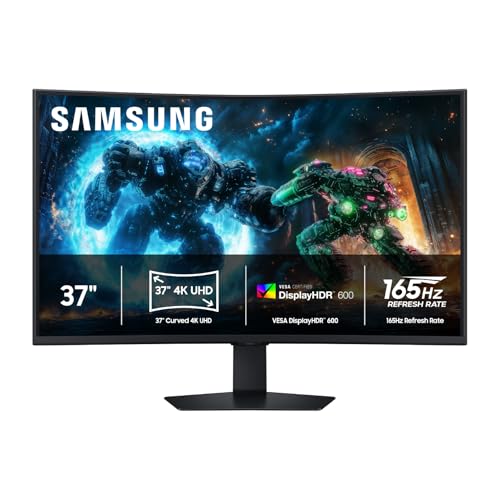
Thirty-seven inches is the size 4K gaming grew into when 32 started feeling like the sensible choice, and Samsung’s G75F-series Odyssey G7 is the class’s straightforward answer: a 37-inch 4K UHD curved panel at 165Hz with a 1ms GtG response claim, VESA DisplayHDR 600 and AMD FreeSync Premium Pro. The extra diagonal over the Neo G7 changes the experience in a way numbers understate — at the same resolution, everything is simply larger, text included, which makes this the 4K curved pick for readers who sit a little further back or whose eyes prefer their pixels generous.
The trade against its smaller sibling is backlight ambition. DisplayHDR 600 is a respectable, genuinely useful tier — highlights carry real structure beyond an SDR presentation — but it is not the Mini-LED theatre of the Neo line, and viewers who watch a great deal of HDR film will notice the difference in the darkest scenes. In exchange, the G75F delivers the size, the full 4K resolution and the full gaming pace in a single, simpler proposition, and for many desks that exchange is the right one: presence now, rather than perfection at a smaller scale.
Desk planning matters here. Thirty-seven curved inches wants depth and a sturdy surface, and the panel’s scale makes it the room’s visual centre whether you planned that or not. Gaming from a chair pulled close is enveloping; working at it rewards the reader who organises windows into zones rather than maximising everything into cinema. As the big-screen route into curved 4K gaming, the G75F is coherent, current and easy to recommend to the reader whose brief begins with the word bigger.
It also future-proofs a setup gracefully. The resolution and refresh sit at the market’s high-end centre, the sync support covers the dominant graphics ecosystem, and the size flatters the next console or PC generation as readily as the current one. Readers who buy monitors rarely and keep them long will find this the class’s low-drama route to scale.
Consider who sits at 37 inches most happily. It is the reader whose desk doubles as the room’s entertainment centre, who watches films from a chair rolled back and plays from the same seat, and for whom a 32-inch panel always felt like a monitor while this feels like a venue. Text at this size and resolution is large-print comfortable without any scaling assistance, which readers with tired eyes or glasses prescriptions quietly rank above every gaming statistic. The G75F’s proposition is that scale itself is a feature, and for its constituency it is the feature.
- Panel: 37-inch 4K UHD curved
- Refresh: 165Hz, 1ms GtG response
- HDR: VESA DisplayHDR 600
- Sync: AMD FreeSync Premium Pro
- Series: Odyssey G7 (G75F)
- Role: big-screen 4K curved gaming
Strengths
- 4K gaming presence at a genuinely larger scale
- 165Hz and DisplayHDR 600 keep the specification complete
- Larger pixels suit readers who sit further back
Trade-offs
- HDR hardware a tier below the Mini-LED Neo models
- Size demands desk depth and a sturdy surface
- Same pixel count as 32 inches, spread wider
Best for: players who found 32-inch 4K impressive but small, and sit at a distance that rewards scale.
Not suited for: HDR perfectionists, who should take the Neo G7’s backlight over this one’s inches.

Dell S3225QS — Best for work
Dell is the only maker in this guide that curved a 4K panel for the office first, and the S3225QS shows what that priority produces. The 31.5-inch VA panel runs the full 3840 by 2160 at 120Hz — double the refresh of the standard office screen — with a 3,000:1 contrast ratio, 300 cd/m2 brightness, 99% sRGB colour, a 4ms response figure and anti-glare treatment, under Dell’s Eye Comfort banner. The curve at this size is gentle in intent: it keeps the wide 4K canvas at an even distance for the single worker in front of it, rather than wrapping a game world around a player.
The working experience is the argument. Four-K density at 32 inches renders text with a smoothness that makes long documents feel printed, the wide canvas holds a spreadsheet beside its source data without a second monitor, and the 120Hz refresh lends scrolling and window movement a composure that 60Hz panels cannot imitate. VA contrast gives presentations and dashboards a depth that office IPS panels often flatten, and Dell’s stand, menus and support culture bring the predictability professionals pay for. This is the curved 4K monitor a company could deploy, or a home worker could expense, without a gaming excuse anywhere in the paperwork.
Gaming is a respectable sideline rather than the brief. The 120Hz ceiling and FreeSync Premium support handle after-hours play enjoyably, and the contrast flatters cinematic titles, but the response character and feature set are tuned for desks, not leaderboards. HDR is a presentation mode here, not hardware theatre. Judged as the class’s working instrument — the one pick in this guide a non-gamer should shortlist first — the S3225QS is complete and convincing.
There is a longevity dividend to Dell’s conservatism. Nothing in this panel chases a fashion: the resolution, refresh and colour sit in the market’s durable centre, the support network is business-grade, and the design will look appropriate in any office that exists five years from now. Buyers who measure a monitor in years of unremarkable service will recognise their pick.
The curve question deserves a direct answer for office readers, since it is the one they ask first. At 32 inches and a working distance, the bend does not distort spreadsheets or documents in any way the eye registers; columns remain columns, and the benefit arrives as comfort — the far corners of a wide workbook sit at the same focal distance as its centre, so the eyes stop refocusing across the day. Readers who share the screen with a colleague standing beside the desk will notice the curve’s single-viewer bias, and meeting-room deployments should weigh that honestly. For the solo professional, the geometry is all dividend.
- Panel: 31.5-inch 4K UHD VA curved, 3840 x 2160
- Refresh: 120Hz, FreeSync Premium
- Colour: 99% sRGB, 3,000:1 contrast
- Brightness: 300 cd/m2, anti-glare
- Comfort: Dell Eye Comfort engineering
- Role: professional curved 4K workstation
Strengths
- 4K text clarity with an office-grade comfort brief
- 120Hz composure for scrolling and window work
- Dell support and design suit professional deployment
Trade-offs
- Gaming pace and features trail the Odyssey models
- HDR presentation is modest rather than theatrical
- VA angles shift for viewers seated far to the side
Best for: professionals who want 4K width and clarity with a gentle curve and no gaming costume.
Not suited for: competitive players or HDR film devotees chasing backlight drama.

Samsung Odyssey Neo G9 57″ — Best dual-4K curve
Precision about this monitor matters, so here it is plainly: the 57-inch Neo G9 is not a 4K monitor in the ordinary sense. Its panel carries 7680 by 2160 pixels — exactly two 4K UHD screens’ worth, fused into a single dual-UHD canvas with no bezel down the middle — bent at a 1000R radius and refreshed at up to 240Hz through DisplayPort 2.1, with a Quantum Mini-LED backlight and DisplayHDR 1000 behind it. It belongs in this guide because it is what the 4K curved idea becomes at its limit: the resolution of a dual-4K desk, delivered as one continuous curved surface.
The experience defies smaller comparisons. A racing cockpit wraps past the edge of vision; a video timeline holds an hour of footage with the preview at genuine size; a strategy map becomes a table you lean over. Productivity users running picture-by-picture can even treat it as two integrated 4K monitors sharing one stand and one backlight, then reclaim the full sweep when the work ends. The Mini-LED HDR hardware, which would headline any other review in this guide, is here almost a supporting actor to the sheer geography of the thing.
The demands scale with the spectacle. The panel needs a desk with the depth and strength of a workbench, a graphics card from the market’s summit to feed dual-UHD at speed, and a room whose lighting respects a screen that is also a significant light source. Text density is that of a 32-inch 4K monitor stretched sideways — crisp, but the width, not the sharpness, is the luxury. Readers who clear those bars own the most extreme object in this guide; readers who cannot should admire it the way one admires a grand piano in a showroom, then buy the Neo G7.
Ownership at this scale is a commitment with its own rituals: delivery is a two-person event, the stand assembly is furniture-grade work, and cable runs are planned rather than improvised. None of that is a criticism. The Neo G9 57″ is a flagship in the naval sense — the largest, most capable vessel in the fleet — and it asks to be berthed accordingly.
Workflows that justify the geography deserve naming, because spectacle alone is a thin reason. Sim racers with a wheel stand find the mirrors and apexes where peripheral vision expects them. Composers and video editors hold a full session’s tracks and a cinema-sized preview simultaneously. Traders and analysts — the panel’s quietest constituency — replace a wall of mismatched monitors with one continuous, colour-consistent surface and a single cable philosophy. In each case the Neo G9 is not a bigger monitor but a different instrument, and its price and demands should be judged against the multi-screen rigs it replaces rather than against any single display in this guide.
- Panel: 57-inch dual-UHD curved, 7680 x 2160, 1000R
- Resolution truth: two 4K panels fused, not a single 4K
- Refresh: 240Hz over DisplayPort 2.1
- Backlight: Quantum Mini-LED, DisplayHDR 1000
- Sync: AMD FreeSync Premium Pro
- Role: the category’s limit case
Strengths
- A dual-4K workspace with no centre bezel
- 240Hz and Mini-LED HDR at a scale nothing else here attempts
- Picture-by-picture flexibility for work, full sweep for play
Trade-offs
- Desk, room and graphics demands are the largest in this guide
- Width is the luxury; text density matches a 32-inch 4K
- Delivery and setup are genuinely two-person undertakings
Best for: simulation devotees and power users who want a dual-4K desk as one curved surface.
Not suited for: ordinary desks, ordinary graphics cards, or anyone seeking a simple life.

LG UltraGear 39GX950B 5K2K OLED — Best OLED step-up
The second honest label in this guide belongs to LG. The 39GX950B is a 39-inch curved OLED running 5120 by 2160 — the 5K2K format, an ultrawide canvas with more pixels than 4K spread across a wider shape — at 165Hz, with a dual-mode trick that trades resolution down to WFHD to reach 330Hz for competitive play, a 0.03ms response figure that only OLED can print without blushing, DisplayHDR True Black 500, and both NVIDIA G-Sync and FreeSync Premium Pro credentials. It is in a 4K curved guide as the step-up: the screen for the reader who came looking for 4K and discovered the category has a floor above it.
OLED changes the terms of every scene. Each pixel lights itself, so black is the absence of light rather than a backlight’s best effort, contrast is effectively infinite, and dark game environments and night cinematography acquire a depth that even the Neo models’ Mini-LED hardware approaches but cannot equal. Motion is the other dividend: with response measured in hundredths of a millisecond, fast pans and flick shots render without the smear that LCD technology manages rather than eliminates. On a 39-inch curved canvas, those virtues stop being specifications and become the atmosphere of the room.
The OLED brief carries its own disciplines. Static desktop elements left burning at high brightness for years are the technology’s known long-term risk, so this panel flatters gamers and media viewers more than it flatters a spreadsheet that never changes, and LG’s panel-care features should be left to do their quiet work. The 5K2K resolution also asks more of a graphics card than plain 4K does. For the reader whose desk is entertainment-first and whose budget has reached this floor, those are acceptable terms for the finest picture in this guide.
Design and connectivity complete the flagship impression: USB-C joins the modern port selection, the UltraGear styling is assertive without costume excess, and the dual-mode feature means one panel serves both the cinematic evening and the competitive one. It is the connoisseur’s exit from the 4K category — through the top.
Desk behaviour at this tier is suitably grown-up. The panel wakes and sleeps with the machine without drama, its pixel-care routines run in the background of ownership rather than interrupting it, and the curve at 39 inches in the 21:9 shape feels like the format’s natural size — wide enough for a timeline and a preview to coexist, tall enough that documents do not feel letterboxed. Readers stepping up from a 34-inch 1440p ultrawide will feel the density gain in every line of text; readers stepping across from a 32-inch 4K will feel the width. Both migrations end at the same screen, which is a neat definition of a flagship.
- Panel: 39-inch curved OLED, 5120 x 2160 (5K2K)
- Resolution truth: beyond 4K, an ultrawide step-up
- Refresh: 165Hz native; dual-mode WFHD at 330Hz
- Response: 0.03ms class, OLED-native
- HDR: DisplayHDR True Black 500
- Sync: G-Sync and FreeSync Premium Pro; USB-C included
Strengths
- Self-lit OLED contrast no backlight here can match
- Dual-mode refresh serves cinematic and competitive play alike
- 5K2K width with 4K-class density in both dimensions
Trade-offs
- Static desktop work is OLED’s long-term weak scenario
- More pixels than 4K means a heavier graphics burden
- Panel-care features should be left enabled, not dismissed
Best for: entertainment-first readers ready to step past 4K to OLED’s contrast and speed.
Not suited for: all-day static spreadsheet desks or graphics cards already at their limit.
Samsung Odyssey Ark 55″ — Prose-only: no clean listing returned
The Odyssey Ark is the class’s celebrity and its absentee in this guide: a 55-inch curved 4K showpiece famous for rotating into a vertical cockpit mode and for a presence closer to a television event than a monitor purchase. It is discussed here, without a link, because the listings we reviewed for this guide contained no clean listing for it — and a guide that invents a purchase route for a product of this size and price would be failing its only job. Readers researching the Ark should go through Samsung’s own channels and major retailers directly, and should verify the exact generation on offer, since the Ark line has been revised and listings in the wild mix its versions freely.
Its conceptual place in the class is still worth recording. The Ark proved that a curved 4K panel could anchor a room rather than a desk, and its cockpit orientation anticipated the immersive setups the Neo G9 now serves at even greater width. If a clean, current listing appears in a future verification round, the Ark will be judged here on the same terms as every other pick — resolution stated plainly, hardware described as it is, compromises named. Until then it stands as this guide’s second lesson in the same virtue: a recommendation is a verified thing, or it is a paragraph like this one.
For completeness, the Ark’s paper brief can be stated briefly: a 55-inch curved 4K panel on a stand that rotates the screen into portrait orientation, marketed as a personal cockpit for gaming and media, with the multi-window theatre tricks Samsung loves to demonstrate. As a concept it remains genuinely interesting; as a purchase it belongs to channels where the exact unit, its generation and its warranty can be interrogated directly. This guide’s linked five are where its recommendations live, and the Ark’s paragraph is the map’s honest edge — here the verified territory ends.
- Status: prose-only — no clean listing was on offer when this guide was prepared
- Class: 55-inch curved 4K showpiece
- Known for: rotating cockpit orientation
- Advice: buy via manufacturer or major retailers; verify generation
- Link: none, deliberately
- Marker: no ASIN attached
Strengths
- A category-defining concept with genuine room-scale presence
- Cockpit mode anticipated today’s immersive setups
- Available through manufacturer channels for determined buyers
Trade-offs
- No verified listing exists for this guide to link
- Generations mix in the wild; verification burden is the buyer’s
- Television-scale footprint exceeds most desk briefs
Best for: researchers completing their map of the class and buyers comfortable shopping manufacturer-direct.
Not suited for: anyone who needs a verified, orderable pick from this page today.
How do the honest exceptions — dual-UHD and 5K2K — change the buying question?
They convert it from a resolution question into a shape question. Plain 4K, the shape of the first three picks, is a 16:9 canvas of about eight million pixels: ideal for a single centred task, for consoles, for video in its native frame. The Neo G9’s dual-UHD doubles the width and keeps the height, suiting work and play that spread horizontally — timelines, cockpits, multi-window command centres. The LG’s 5K2K splits the difference, wider than 16:9 and denser than 1440p ultrawides, suiting the reader who wants one screen to be both the cinema and the workstation. None of the three shapes is the correct one; each is correct for a geometry of life, and the reader’s own desk habits are the only honest arbiter.
| Pick | True resolution | Refresh | Defining trait |
|---|---|---|---|
| Samsung Neo G7 32″ | 3840 x 2160 | 165Hz | Mini-LED HDR, 1000R |
| Samsung G7 37″ G75F | 3840 x 2160 | 165Hz | Big-screen scale, HDR 600 |
| Dell S3225QS | 3840 x 2160 | 120Hz | Office manners, sRGB colour |
| Samsung Neo G9 57″ | 7680 x 2160 dual-UHD | 240Hz | Two 4K panels fused |
| LG 39GX950B | 5120 x 2160 5K2K OLED | 165Hz / 330Hz dual-mode | OLED step-up beyond 4K |
| Samsung Odyssey Ark | 4K class | — | Prose-only entry, deliberately unlinked |
There is also a content audit worth doing before choosing a shape. Count your week honestly: the hours in a single centred application, the hours spread across several windows, the hours of film and games and in which ratios they arrive. A week dominated by one document at a time flatters plain 4K. A week of simultaneous sources flatters the wider shapes. Readers are often surprised by their own audit — the spreadsheet devotee discovers a film habit, the gamer discovers a streaming one — and the surprise is valuable precisely because it arrives before the purchase rather than after it.
Pixel budgets follow shape. Dual-UHD asks a graphics card to render twice the plain-4K load, 5K2K asks roughly a third more, and refresh ceilings only matter where frames actually arrive. The wise sequence is to choose the shape your week needs, then audit your hardware against it, then enjoy the panel without the low-level anxiety of a system permanently at its limit.
What separates Mini-LED HDR from OLED HDR in a dark room?
Mechanism, and therefore character. The Samsung Neo models light their panels with a Mini-LED backlight divided into many dimming zones, so a bright object can blaze while the zone behind a shadow stays dark — contrast that is dramatic, bright enough to hold a sunlit room, and free of any burn-in anxiety across years of desktop use. The LG’s OLED lights every pixel individually, so its blacks are absolute and its contrast effectively infinite, with a peak brightness more modest than the Neo hardware and a long-term sensitivity to static images that its care features exist to manage.
In practice the choice is temperament again. Mixed desks that work all day and play all evening lean Mini-LED, valuing brightness and indifference to static content. Entertainment-leaning desks that dim the lights and prize the deepest possible night scenes lean OLED, accepting its disciplines as the price of the picture. Both technologies are the genuine article; the badge-only HDR of lesser panels is the only impostor in the room, and this guide contains none of it among the linked picks’ headline claims.
How should you feed and place a curved 4K panel for its best work?
Connection first: DisplayPort carries the full resolution at the full refresh on the gaming picks here, and the Neo G9’s 240Hz specifically assumes DisplayPort 2.1-class bandwidth, so use the supplied cable and connect the strongest port before judging anything. Confirm in the operating system that the panel is running at its native resolution and advertised refresh, enable variable refresh in the driver, and only then evaluate the picture — a curved 4K panel judged at a defaulted 60Hz is a flagship being reviewed as a dinghy.
Placement second: centre the screen on your chair, give it the deepest desk position available, and manage light so that no window sits directly behind you to mirror in the curve. Sound third: panels of this class and size become the room’s cinema after hours, and a modest soundbar completes what the picture starts. Finally, organise the canvas with window zones from the first day, because 4K width without a system is just a larger place to lose windows.
Which misjudgements do curved 4K shoppers repeat?
A fifth mistake is subtler and entirely modern: judging the new panel through a photograph of it, or through the old monitor’s settings inherited by the operating system. Colour profiles, scaling choices and refresh defaults all carry across a monitor swap like furniture moved between houses, and several of them will be wrong for the new resident. Give the panel a clean setup — its own profile, its native resolution, its full refresh, a picture mode chosen deliberately — before forming the opinion you will live with for years.
The recurring error is buying the resolution and forgetting the engine: 4K at high refresh is a flagship workload, and a graphics card that was content at 1440p will announce its limits immediately. The second is expecting every source to fill the shape — consoles and much streaming content are 16:9 citizens, happiest on the 16:9 picks and centred with bars on the wider ones. The third is treating HDR badges as interchangeable, when the hardware gap between a Mini-LED array and a polite edge-lit panel is the difference between a feature and a logo. And the fourth is furnishing casually: a curved panel of 37 or 57 inches on a shallow or flexing desk will dominate the room in the wrong way within a week.
What does a curved 4K screen do to ordinary work across a long week?
It flatters it quietly. The density of 4K at these sizes makes text an aesthetic experience rather than merely a legible one — code, prose and spreadsheets all gain the smoothness of print — and the curve keeps that text at a consistent distance across a canvas wide enough to hold a working day in view. Video calls gain a naturalism that smaller, flatter screens flatten; photo sorting gains a preview size that makes keep-or-delete decisions faster. The Dell in this guide is the purest expression of the work case, but every linked pick, the gaming flagships included, doubles as a remarkable office display once its picture mode is set for documents rather than drama.
The week’s other lesson is ergonomic. Large curved panels reward a deliberate chair position and punish a wandering one, because the geometry assumes a centred viewer. Readers who work from a fixed, well-set chair will feel the design working with them; readers who perch at angles, share the screen constantly or work standing at a bench should weigh the gentler curves and the work-tuned picks, or consider the flat class entirely. The screen is honest about its assumptions, and the happiest owners are the ones who share them.
What does the curve do to films, sport and shared viewing?
Films in wide cinematic ratios are the curve’s home cinema argument: they occupy more of these canvases than they ever do of a flat 16:9 screen of similar height, and on the Mini-LED and OLED picks their night scenes carry the contrast the format’s directors intended. Sport is a more divided case — the width flatters a pitch or a circuit, the curve keeps the far touchline at an even distance, and a single viewer in the sweet spot gets the best seat in the house. It is the second viewer who pays: from an angle, the far edge of a curved panel turns away, and a sofa shared by three people will always prefer the television’s flat democracy.
The practical synthesis most owners reach is a division of labour. The curved 4K panel becomes the personal cinema — films watched deliberately, alone or as a pair in the centre seats — while the household’s casual, multi-angle viewing stays on whatever flat screen the room already owns. Readers whose film life is mostly the first kind can buy this class with confidence; readers whose film life is mostly the second should let the television keep its job and choose their monitor on work and gaming merits alone.
Which cables and ports does this class quietly depend on?
Bandwidth is the invisible specification of the 4K era. The gaming picks need DisplayPort to express their full resolution and refresh together; the Neo G9’s 240Hz dual-UHD feed specifically assumes the newest DisplayPort generation and the cable rated for it; HDMI serves consoles and second machines, with its own ceilings that vary by model and generation. USB-C, present on the LG, collapses a laptop’s picture and charging into one lead where supported. In every case the cable in the box is the known-good starting point, and the longest, cheapest aftermarket lead is the most common cause of a flagship panel flickering, dropping signal or silently capping its refresh.
Docks deserve the same suspicion as cables. A laptop dock between the computer and a panel of this class inserts its own bandwidth ceiling, frequently lower than the monitor’s, and the symptom — a screen stuck at a lesser refresh — gets blamed on everything except the true culprit. When a new curved 4K panel underperforms its listing, the first diagnostic is always a direct connection, computer to screen, with the supplied cable. Five minutes of that test has saved more returns than any review ever written.
How long will a panel from this class stay current?
Longer than almost any other component you own. The resolutions here sit at or beyond the market’s high-end standard, the refresh rates exceed what most content can feed, and the connection standards — DisplayPort in its current generations, HDMI, USB-C — are the ones the industry is building on rather than retiring. A Neo G7 or the LG OLED bought today will still be flattering the machines of several upgrade cycles from now, because monitor progress moves in panel technology and backlight hardware, both of which these picks already hold in their strongest current forms.
The realistic reason to replace one will be a changed life rather than an obsolete screen: a bigger room, a new profession, a hobby that outgrows the desk. That horizon argues for buying the shape and technology that fit the present honestly, without paying anxiety premiums for hypothetical futures — the class’s sensible picks are future-proof in the only sense that has ever mattered, which is that their owners stop thinking about monitors for years.
Final Recommendation
A note on sequencing for readers building toward this class in stages. The panel and the graphics card are a system, and the satisfying order is to know which of the two you already own. A strong card waiting for a worthy screen points straight at the Neo G7 or the LG. A modest card and a large ambition argue for the Dell’s calmer demands today, or for staging the purchase — card first, flagship panel when the system can honour it. Either sequence ends at the same desk; only the frustration along the way differs.
For most readers, the Odyssey Neo G7 32″ is the answer this category was invented to give: true 4K, a deep curve, Mini-LED HDR hardware and 165Hz pace in a size an ordinary desk can host. Readers who sit further back should take the 37-inch G75F’s scale; professionals should take Dell’s S3225QS and its office manners. Beyond those sensible shores lie the two honest extremes — the Neo G9 57″ for the reader who wants a dual-4K desk as one sweeping surface, and LG’s 5K2K OLED for the reader stepping past 4K altogether — while the Odyssey Ark remains a name to pursue through Samsung’s own channels rather than a link on this page. Choose the shape your week actually lives in, feed it properly, and a curved 4K screen will repay the decision every single evening.
Frequently Asked Questions
Do I need to calibrate one of these for everyday use?
For gaming, media and general work, no — a sensible picture mode, brightness matched to the room and a few minutes of warm-up will carry any of these panels honourably, and the Dell and the LG arrive with colour behaviour aimed at exactly that audience. Readers who produce colour-critical work for clients should treat calibration as a professional tool regardless of panel, and will likely pair it with a flat reference display. The distinction is the job, not the screen.
How future-proof is DisplayPort 2.1 on the largest pick?
It is the current summit of the standard the whole industry is migrating toward, and on the Neo G9 it is not decoration: the panel’s dual-UHD resolution at 240Hz cannot travel over older connections at full specification. Graphics hardware with matching output is the newest generation’s territory, which is why this guide keeps returning to the system audit — panel, cable standard and card generation must agree, and where they do, the setup has years of headroom.
Is curved or flat better at 4K?
For a single viewer at a desk, curved panels keep the edges of a large 4K canvas at a more even distance, which suits games, simulation and immersive media. Flat panels keep straight lines geometrically true across the whole surface, which suits architectural work, precise design and shared viewing. The picks in this guide are the curved class’s best; readers whose work is line-critical should cross-shop flat 4K equivalents with this guide’s verdicts in mind.
Why is a 57-inch monitor in a 4K guide if its resolution is higher?
Because its canvas is quite literally two 4K screens fused into one panel — 7680 by 2160 — and it is the product readers researching curved 4K most often mean to compare. The guide labels it dual-UHD everywhere it appears rather than rounding it down to 4K, so the comparison is available without the description ever being untrue.
And why is a 5K2K OLED here?
For the mirror-image reason: the LG 39GX950B is the step-up that 4K curved shoppers cross-shop once they see it, an ultrawide OLED with more pixels than 4K rather than fewer. It is presented as beyond 4K in every mention, so readers can weigh the climb honestly — OLED contrast and dual-mode speed against a heavier graphics burden and OLED’s care disciplines.
What graphics card does curved 4K gaming realistically need?
One from the strong end of recent generations for the 16:9 picks at high refresh, and the market’s summit for the Neo G9’s dual-UHD canvas at anything near its ceiling. Less demanding genres — strategy, simulation at moderate settings, older titles — are far kinder, and variable refresh across these picks smooths the frame rates real hardware delivers. Buy the panel for the machine you own or have genuinely budgeted.
Is a monitor arm a sensible addition at these sizes?
For the 37-inch and 57-inch models it can be the difference between a desk that hosts the panel and a desk that surrenders to it, because an arm reclaims the stand’s footprint and places the screen at the precise distance the curve assumes. The condition is honesty about weight: arms must be rated well beyond the panel’s mass, mounted to a surface that will not flex, and the monitor’s VESA pattern confirmed before ordering. The 32-inch picks are content on their included stands, which adjust properly; the giants reward the upgrade.
Can these monitors double as televisions?
The larger picks make magnificent film displays, especially the Mini-LED and OLED models in a darkened room, and wide-ratio films fill their canvases beautifully. The caveats are practical: streaming devices assume 16:9 behaviour, built-in tuner and smart features are absent, and sound deserves a soundbar. As a deliberate desk-cinema, they excel; as a living-room television replacement, a television remains the simpler tool.
Related Guides
And if the audit of your room delivers a firm no — the desk cannot deepen, the card cannot climb, the budget is spoken for — let that verdict stand without resentment. The 1440p curved classes elsewhere in this programme deliver most of this experience at a fraction of the system’s demands, and a well-matched screen from those shelves will make its owner happier than a flagship starved by its surroundings. Fit, in monitors as in tailoring, is the first luxury.
Whichever of the five linked screens earns the desk, the first evening has a reliable shape: the box larger than expected, the first power-on briefly theatrical, and then a settling quiet as the curve stops being a feature and becomes the room’s new geometry. Owners of this class consistently describe the same second-week discovery — that they have stopped noticing the specifications entirely and started noticing their work and their games. That disappearance of the hardware into the experience is the true product at this tier, and every pick above delivers its own route to it.
Neighbouring shelves worth a look before the desk is finalised: best 34 inch ultrawide monitors for WQHD width best 27 monitors for eye strain and long sessions best affordable ultrawide monitors in the value tier


