What's inside
- Where to buy
- Key Takeaways
- Quick Picks
- How were these six separated into a fair contest?
- QHD or FHD at 27 inches — which camp is actually yours?
- What does a curve genuinely add at only 27 inches?
- How do you set up a high-refresh curved panel so it actually runs at its ceiling?
- Which errors do curved 27-inch shoppers repeat most?
- How do these panels behave across a full evening of mixed use?
- What separates the two ASUS picks from each other in practice?
- Which settings should each camp change first?
- Can a curved 27-inch panel anchor a two-screen desk?
- What should you check in the first week of owning one?
- Final Recommendation
- Frequently Asked Questions
- Related Guides
As an Amazon Associate I earn from qualifying purchases. This post may contain affiliate links at no extra cost to you.
gizmoverdict.com is reader-supported. When you buy through links on our site, we may earn an affiliate commission.
Where to buy
Twenty-seven inches is where curved gaming monitors meet the real world of ordinary desks, and the best curved 27 monitors share one honest complication this guide will keep in plain sight from the first paragraph: the class is split by resolution. Two of the six verified picks below are QHD screens at 2560 by 1440, giving the size its sharpest text and its most detailed game worlds. The other four are Full HD screens at 1920 by 1080 that trade that density for very high refresh rates — up to 280Hz — at gentler prices of admission and far gentler demands on a graphics card. Neither half is the impostor. They are two different answers to the same desk, and each review below states its pick’s true resolution in its first lines, because an FHD panel described in QHD language would be a disservice this page refuses to commit.
The curve itself, at this size, is a subtler pleasure than the ultrawide classes sell. A 27-inch panel is not wide enough to wrap a world around you; instead the bend — 1000R on the Samsung, 1500R on most of the rest — keeps the screen’s edges at a consistent distance and gives games a gentle depth that flat panels at this size lack. Players who sit centred, as gaming encourages, feel it as presence. Readers who mostly work should know the same curve slightly complicates shared viewing and does nothing for a document, which is why this guide is a gaming guide first and says so.
Choosing within the six is therefore a two-step decision. First, resolution: QHD if your graphics card is strong and your week mixes work with play, FHD if your priority is the highest frame rates your budget can reach and your games are the fast, competitive kind where motion outranks detail. Second, temperament within the resolution: the deepest curve, the highest refresh, the most complete feature set. Every pick was verified against its live listing before admission, and the comparisons below keep the two resolution camps clearly separated so no reader buys one expecting the other.
There is a demographic truth under this class’s popularity worth stating: it is the size of the second monitor, the student desk, the spare-room battlestation and the first serious gaming purchase, and its makers know it. That is why the warranties here run to three years, why the inputs court consoles as well as PCs, and why the value engineering is so competent — this shelf is where brands win the customers they hope to keep for the ultrawide and 4K upgrades of later years. Buying into it means buying into the most contested, most refined corner of the monitor market, and the six picks above are its current state of the art at their respective positions.
Desk reality is kind to this class. A 27-inch curved panel fits the desks that ultrawides evict, runs happily at arm’s length, and asks nothing exotic of the room. What it asks of the machine depends entirely on the resolution camp: FHD at high refresh is the natural partner of mid-range graphics cards, while QHD at 165Hz and beyond is a genuine step up in demand. Match the camp to the card you own, and this size class delivers the highest gaming satisfaction per unit of fuss in the entire monitor market.
A note on how to read what follows, since the two camps can make a page like this feel like two guides stapled together. It is one guide with one question — which curved 27-inch screen belongs on your desk — and the resolution split is the honest shape of the market’s answer. Each review opens by declaring its pick’s camp in plain numbers, judges the panel within that camp’s values, and closes by naming the reader who should take it and the reader who should walk to the other camp without hard feelings. Readers who keep their own week in view will find the stapling invisible.
Key Takeaways
- The class splits honestly in two: two QHD picks for detail and mixed use, four FHD picks for maximum refresh at accessible tiers.
- Samsung’s Odyssey G5 27″ leads overall, a QHD panel with the deepest 1000R curve and 165Hz pace.
- AOC’s CQ27G4H is the QHD value route, running 180Hz with HDR and a three-year warranty.
- ASUS fields the FHD all-rounder and the FHD speed king: the VG27VQ3B at 180Hz with speakers, the VG27VQM1B at a remarkable 280Hz.
- MSI’s MAG 274CF X24 brings 240Hz FHD pace in a tilt-and-VESA design aimed at competitive desks.
- AOC’s C27G4H2 is the budget FHD entry, 200Hz with HDR and console-ready inputs.
Quick Picks
| Pick | Badge | Why it earns its place |
|---|---|---|
| Samsung Odyssey G5 27″ (1000R) | Best overall | QHD detail, the class’s deepest curve and 165Hz refresh in one balanced gaming panel. |
| AOC CQ27G4H | Best QHD value | 2560 by 1440 at 180Hz with HDR support and warranty cover that respects the buyer. |
| ASUS TUF Gaming VG27VQ3B | Best FHD all-round | Full HD at 180Hz with ELMB Sync, wide colour and speakers for a complete desk. |
| ASUS TUF Gaming VG27VQM1B | Best FHD refresh | 280Hz of Full HD pace with eye-care features and long warranty cover. |
| MSI MAG 274CF X24 | Best FHD curve | 240Hz FHD gaming with HDR Ready presentation in MSI’s MAG line. |
| AOC C27G4H2 | Best budget FHD | 200Hz Full HD speed with HDR and modern inputs at the class’s gentlest position. |
How were these six separated into a fair contest?
By refusing to run one contest at all. The QHD pair were judged against each other and against the reader who mixes documents with games: panel detail, curve depth, warranty and all-round manners. The FHD four were judged as competitive instruments: refresh ceiling, motion features, colour ambition within the resolution, stand and warranty. Cross-camp comparisons are made in this guide only where they help a reader choose a camp — never to pretend a 1080p panel out-resolves a 1440p one or that a 165Hz QHD screen matches a 280Hz FHD panel for raw pace.
Verification followed the usual discipline: live listings, exact model names, resolution and refresh confirmed in the specification rather than the headline, because 27-inch gaming is the most variant-riddled shelf in the monitor market and a single character in a model code can halve a refresh rate. Each pick also had to be a curved panel in fact, not a flat screen wearing gaming language, and each had to give its camp something the others do not — a curve, a ceiling, a warranty, a feature set — so the six read as a field of choices rather than a row of clones.
Stock reality shaped the edges of the list as well. The 27-inch curved shelf churns with seasonal variants, and a pick had to be orderable in the configuration described at verification time, not a ghost listing for a discontinued twin. Readers should still confirm the exact model code at checkout — in this class above all — because the difference between a satisfying purchase and a month of returns is frequently a single character that nobody read aloud.
One more criterion deserves naming: honesty of ecosystem. Every pick here supports adaptive sync in some recognised form, because a modern gaming monitor that tears is a monitor failing its only job, and the reviews note each model’s sync and motion toolkit in plain terms so a reader can match the screen to their graphics card’s family without decoding marketing dialects.

Samsung Odyssey G5 27″ (1000R) — Best overall
Resolution first, as promised: this is a QHD monitor, 2560 by 1440, and that density at 27 inches is the class’s sweet spot for a desk that works as well as plays. Samsung bends the panel at 1000R — the deepest curve among these six — refreshes it at 165Hz with a 1ms MPRT response claim, adds HDR10 support, AMD FreeSync and an Eye Saver mode, and connects over HDMI and DisplayPort. The result is the most complete curved 27-inch package in this guide: detail for the document, pace for the game, and a curve with genuine presence.
The 1000R bend at this size deserves its own sentence, because it behaves differently from the same radius on an ultrawide. On a 27-inch panel it does not wrap a world; it cups the picture, pulling the corners close enough that the screen feels like a single continuous surface rather than a rectangle you scan. For centred gaming it is quietly addictive, and for work it is unobtrusive once the first day passes. Samsung’s Odyssey tuning gives colours a vividness that flatters games while remaining tameable for documents through the standard picture modes.
Compromises are proportionate. The stand and feature set are gaming-line standard rather than luxurious, the HDR10 presentation is a gentle enhancement on this class of panel, and the deep curve is a centred viewer’s friend and a side viewer’s shrug. None of it displaces the G5 from the top of this guide, because it is the pick that asks its owner to give up the least: QHD clarity, real pace and the class’s most involving geometry in one verified listing.
Longevity thinking agrees. A 165Hz QHD panel sits in the market’s durable centre, demanding enough to flatter a future graphics card and modest enough to be fed by a current mid-range one, and Samsung’s gaming line gives the model the firmware and support attention a multi-year purchase deserves. For the reader who wants one curved 27-inch monitor and no regrets in either resolution direction, this is the starting point.
Workday manners deserve a final word, because this is the pick most likely to be bought by someone whose desk refuses to choose a tribe. In its standard modes the G5 renders documents with the calm that QHD density grants, its Eye Saver setting tempers the panel for long reading, and the curve that cupped a game world the night before simply holds a spreadsheet at an even distance. Few gaming monitors make the transition between shifts this gracefully, and none in this guide do it with a deeper bend or a sharper picture.
- Panel: 27-inch QHD curved, 2560 x 1440
- Curve: 1000R, deepest in this guide
- Refresh: 165Hz, 1ms MPRT class
- HDR: HDR10 support
- Sync and comfort: FreeSync, Eye Saver Mode
- Inputs: HDMI and DisplayPort
Strengths
- QHD detail serves documents and games equally
- 1000R curve gives the class’s most involving picture
- 165Hz pace with FreeSync smoothness onboard
Trade-offs
- Deep curve favours the centred seat over side viewers
- QHD pace puts heavier demands on the graphics card than the FHD picks
- Stand is functional rather than a premium mechanism
Best for: mixed-desk gamers who want QHD clarity and the deepest curve in one panel.
Not suited for: competitive players chasing refresh ceilings past 200Hz, who live in the FHD camp below.

AOC CQ27G4H — Best QHD value
The second QHD pick, and the value heart of the sharper camp: AOC’s CQ27G4H runs its 27-inch curved VA panel at 2560 by 1440 and 180Hz, with a 0.5ms response claim, HDR support, AMD FreeSync Premium, DisplayPort 1.4 and HDMI 2.0 inputs, an earphone output and a three-year warranty, and it describes itself — accurately — as console ready. That is a flagship-shaped specification arriving at the position this guide calls QHD value, and it makes the CQ27G4H the pick for the detail-minded player who counts the cost.
In play, the combination of QHD density and 180Hz pace is the class’s most grown-up gaming experience under the flagship tier. Worlds carry texture that FHD cannot render, motion stays composed at frame rates strong cards can actually sustain at this resolution, and the VA panel’s contrast gives darker titles their depth. AOC’s gaming software and crosshair-class conveniences are present in spirit — this is a line built by people who expect to be judged inside matches — while the warranty quietly removes the value purchase’s oldest anxiety.
The honest costs are furniture and finish. Ergonomics on value AOC models lean on VESA mounting for full flexibility, the HDR is a supporting feature rather than a headline act, and the design language is purposeful rather than premium. Readers who want the deepest curve should look to the Samsung; readers who want QHD pace with money left for the graphics card that feeds it should look no further than here.
There is a systems argument for this pick, too. Money not spent on the monitor is money available for the component that decides frame rates, and a QHD 180Hz panel paired with a stronger card will out-play a costlier screen starved by a weaker one in every title that matters. Value, properly understood, is a property of the whole rig, and the CQ27G4H is the pick that respects the rig.
Session comfort rounds out the value case. The VA panel at sensible brightness is an easy screen to spend an evening inside, the curve radius keeps the wide-for-its-size picture gathered rather than spread, and AOC’s flicker-conscious backlight behaviour suits the long sessions that ranked play involves. Owners stepping up from a basic 144Hz FHD screen consistently describe the same double discovery: the detail they expected, and a composure in motion they did not. That is the sound of a value pick punching at the weight its specification promised.
- Panel: 27-inch curved VA, 2560 x 1440 QHD
- Refresh: 180Hz, 0.5ms response claim
- Sync: AMD FreeSync Premium
- HDR: HDR support onboard
- Inputs: DisplayPort 1.4, HDMI 2.0, earphone out
- Warranty: three-year cover
Strengths
- QHD and 180Hz together at the value position
- Three-year warranty backs the bargain properly
- Console-ready inputs suit a mixed gaming desk
Trade-offs
- Full ergonomic freedom may want a VESA arm
- HDR plays a supporting role rather than the lead
- Design is purposeful rather than premium
Best for: detail-minded players balancing monitor spend against graphics-card spend.
Not suited for: readers who prize the deepest curve or flagship furniture over pace per pound.
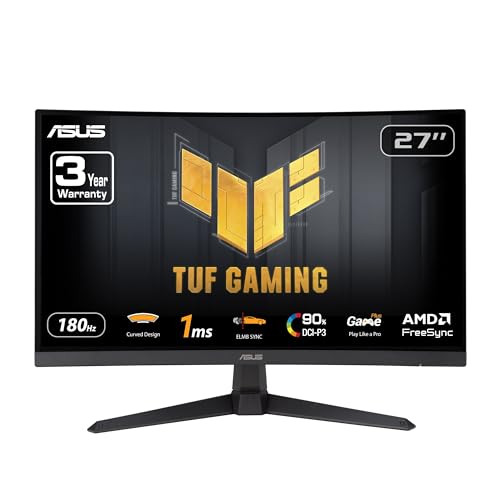
ASUS TUF Gaming VG27VQ3B — Best FHD all-round
Now the honest crossing into the FHD camp: the VG27VQ3B is a 1920 by 1080 monitor, and nothing in this review will borrow QHD language for it. What that resolution buys at 27 inches is pace and completeness — a 180Hz refresh behind a 1500R curve, ELMB Sync motion clarity working alongside FreeSync Premium, 90% DCI-P3 colour that is wide for this camp, Shadow Boost for dark scenes, HDR support and built-in speakers, in a TUF package the listing aims at PC and console players alike. As an all-round FHD instrument, nothing else in this guide is as complete.
The FHD-at-27-inches question deserves a straight answer. Pixel density is lower than the QHD pair’s, and a reader who leans into documents will see softer text than the Samsung or AOC QHD screens render. In games — the brief this panel was built for — the trade reverses: frames arrive faster and more consistently, competitive titles reach the refresh ceiling on mid-range hardware, and the wide colour and motion tools make those frames look their best. Owners who game first and browse second consistently report the density question dissolving within a week of play.
ASUS’s TUF line earns its keep in the details: the ELMB Sync combination is genuinely useful in fast titles, the speakers spare a small desk a separate audio purchase for casual use, and the build carries the line’s military-grade branding with actual substance behind it. Console owners are explicitly courted, and the monitor switches between a PC and a console life without complaint. For the mixed gaming household, this is the FHD camp’s most civilised citizen.
Value completes the case. The complete feature set arrives at the camp’s accessible position, leaving budget for the rest of the setup, and the three-year-class TUF support culture stands behind it. Readers who have decided the FHD camp is theirs — pace over pixels, frames over finesse — should audition this ASUS before its faster, narrower siblings.
Picture modes are where this ASUS quietly outclasses its camp. Shadow Boost lifts the murk in dark scenes without washing the whole frame, the colour modes span from a vivid game presentation to something a photograph can be sorted by, and the ELMB Sync toggle lets a player choose their motion philosophy per title rather than per purchase. A monitor that expects to be tuned, and rewards it, suits the enthusiast desk this camp serves — and the TUF’s controls make that tuning a habit rather than a project.
- Panel: 27-inch Full HD curved, 1920 x 1080, 1500R
- Refresh: 180Hz, 1ms class
- Motion: ELMB Sync with FreeSync Premium
- Colour: 90% DCI-P3, Shadow Boost, HDR support
- Audio: built-in speakers
- Role: complete FHD gaming all-rounder
Strengths
- Most complete FHD feature set in this guide
- ELMB Sync keeps fast motion readable and tear-free
- Speakers and wide colour suit a whole household’s gaming
Trade-offs
- Full HD density softens fine text beside the QHD pair
- 180Hz is the FHD camp’s gentlest ceiling here
- Document-first readers should choose the sharper camp
Best for: gaming households and console-plus-PC desks that want one complete FHD screen.
Not suited for: readers whose days are documents and whose eyes will audit every pixel.

ASUS TUF Gaming VG27VQM1B — Best FHD refresh
The VG27VQM1B exists for one reader: the competitive player for whom refresh is not a feature but the sport itself. Its 27-inch Full HD panel — 1920 by 1080, stated plainly again — runs at 280Hz behind a 1500R curve, with a 1ms response claim, Extreme Low Motion Blur, FreeSync Premium, Shadow Boost, Eye Care features, 90% DCI-P3 colour, DisplayWidget Center software and warranty cover spanning three years. Two hundred and eighty hertz is a figure that flagship esports monitors built their reputations on, and ASUS delivers it here in the curved 27-inch class at the FHD camp’s performance summit.
What 280Hz feels like is worth describing for readers who have never sat before it. In a fast shooter the world stops behaving like a sequence of pictures and starts behaving like a place: tracking a moving target becomes a continuous act rather than a series of corrections, and the latency between intention and image shrinks toward the imperceptible. The dividend is largest in competitive titles and on hardware that can feed it — a strong card in esports games will — and it is honestly wasted on slow, cinematic play, which this guide will say before the marketing does.
ASUS wraps the pace in more civilisation than the figure suggests. Eye Care features temper marathon sessions, the colour coverage is wide for the camp, and the software conveniences of the TUF line are present. The trade-offs are the camp’s own: Full HD density at 27 inches, and a refresh ceiling that only competitive play and strong hardware can cash. For the player whose rank is a hobby and whose desk is an instrument, this is the curved 27-inch monitor that takes their brief most seriously.
It is also, quietly, a future-proof purchase in its niche. Esports titles are engineered to run fast on modest hardware, so a 280Hz panel bought today will be fed properly by the graphics cards of several upgrade cycles, while the same titles at QHD would demand ever-stronger hardware to reach lesser rates. Specialisation, chosen knowingly, is its own kind of longevity.
The desk around this panel tends to evolve, and the ASUS anticipates it. DisplayWidget Center moves the monitor’s controls into software where a competitive player actually lives, profiles can follow games rather than the other way round, and the Eye Care features acknowledge that the athlete at this desk trains in sessions measured in hours. It is a specialist instrument that has thought about its specialist’s whole day, which is rarer in this camp than the refresh figures suggest and worth as much as several of them.
- Panel: 27-inch Full HD curved, 1920 x 1080, 1500R
- Refresh: 280Hz, highest in this guide
- Motion: Extreme Low Motion Blur, 1ms class
- Sync: FreeSync Premium
- Colour: 90% DCI-P3, Shadow Boost
- Warranty: three-year cover; Eye Care features
Strengths
- 280Hz pace is esports-grade by any standard
- ELMB and FreeSync Premium keep the speed usable
- Eye Care and warranty civilise a specialist instrument
Trade-offs
- Full HD density is the deliberate price of the pace
- Slow, cinematic games cannot spend the ceiling
- Requires strong hardware in demanding titles to shine
Best for: competitive players whose titles and hardware can feed a 280Hz panel.
Not suited for: story-game devotees or document desks, who should shop the QHD camp.

MSI MAG 274CF X24 — Best FHD curve
MSI’s MAG line is the company’s gaming-monitor workhorse, and the 274CF X24 brings its virtues to the curved FHD camp: a 27-inch 1920 by 1080 panel at 240Hz, a 0.5ms response claim, AMD FreeSync Premium, HDR Ready presentation, HDMI and even a legacy VGA port among its connections, VESA mounting and tilt adjustment, in the black, angular MAG styling that gaming desks recognise. The refresh figure places it between the ASUS all-rounder and the 280Hz summit — a pace that competitive players feel immediately and that mid-range graphics cards in esports titles can genuinely sustain.
The 240Hz position is more considered than it may appear. It is fast enough that motion clarity stops being the limiting factor in all but the most elite play, yet it asks meaningfully less of the graphics card than 280Hz at the same resolution, which matters across a season of varied titles rather than a single benchmark. MSI’s gaming software ecosystem and the MAG line’s track record in the value-performance tier give the pick a support story that marketplace panels cannot print on their boxes.
Furniture is where the discipline shows. Tilt adjustment and VESA mounting cover the essentials, but readers who want height adjustment from the included stand should note its absence and budget an arm if their ergonomics demand it. The HDR Ready label is the modest tier of HDR language and should be read as such. None of this dents the core case: a 240Hz curved FHD panel from a first-rank gaming brand, at the camp’s competitive heart.
There is also a build-philosophy point in MSI’s favour. The MAG series is engineered to be sold in volume to players who will judge it nightly, and its menus, firmware and panel choices reflect that accountability. In a class where anonymous listings bloom and vanish, a pick whose maker will still be answering for it in three years carries a value that never appears in a refresh figure.
Everyday texture is the MAG’s quiet strength. The panel’s gaming modes are organised for quick swaps between titles, the matte-class surface keeps a bright room from turning the screen into a mirror during daytime sessions, and the whole unit has the bolted-together solidity that high-volume gaming lines either achieve or get returned for. Players who have been burned by a flimsy no-name panel at this tier will feel the difference in the first week, in the menus as much as in the chassis.
- Panel: 27-inch Full HD gaming, 1920 x 1080
- Refresh: 240Hz, 0.5ms response claim
- Sync: AMD FreeSync Premium
- HDR: HDR Ready presentation
- Connections: HDMI, VGA among inputs
- Mounting: VESA ready, tilt adjustment
Strengths
- 240Hz pace that real esports hardware can sustain
- First-rank gaming brand behind a value-tier panel
- VESA support lets an arm complete the ergonomics
Trade-offs
- No height adjustment on the included stand
- HDR Ready is the modest tier of HDR claims
- Full HD density, as with the whole FHD camp
Best for: competitive players who want 240Hz from a major gaming brand’s proven line.
Not suited for: readers who need full stand ergonomics from the box or QHD detail.

AOC C27G4H2 — Best budget FHD
The gentlest door into this entire class is AOC’s C27G4H2, and it is a better door than its position suggests. The 27-inch curved VA panel runs Full HD — 1920 by 1080, in this guide’s house style of saying so — at 200Hz with a 0.3ms response claim, HDR support, adaptive sync, DisplayPort 1.4 and HDMI 2.0 inputs, an earphone output, VESA mounting and console-ready manners, all of it covered for three years. Two hundred hertz at the class’s budget position would have been a flagship boast not long ago; here it is the entry ticket, which tells you how far the FHD camp’s value has travelled.
For the reader it serves — the player upgrading from a 60Hz office hand-me-down, the student building a first gaming desk, the household adding a second screen for play — the transformation is total. Motion that smeared now tracks; the curve gives games a presence the old flat panel never suggested; and the whole experience arrives without the graphics-card demands that QHD or higher FHD refresh rates impose. AOC’s gaming line has made this exact reader its constituency for years, and the C27G4H2’s specification reads like a letter to them.
The budget position takes its payment in finish rather than in fundamentals: stand adjustment leans on the VESA mount for full flexibility, HDR is a supporting feature, and the panel’s VA character rewards the centred seat. What it does not take is the warranty, the modern inputs or the refresh — the three things its buyer will actually feel. As the class’s entry point, it is honest, fast and complete enough to postpone any upgrade itch for years.
Upgrade paths from here are graceful, which matters for a first purchase. Add an arm when the desk matures, add a stronger card when the library demands it, and the panel keeps pace with both. First gaming monitors are often replaced within a year when they are bought on price alone; this one is bought on specification that happens to be gentle, and that difference is the whole review.
Household versatility is the entry pick’s bonus chapter. The same screen that runs a student’s games at 200Hz on Friday hosts the family’s film on Saturday — VA contrast flattering the dark scenes — and a parent’s spreadsheets on Sunday with the curve forgotten entirely. Budget panels are often bought for one person and inherited by a whole home, and the C27G4H2’s manners across all three shifts explain why this end of the AOC line sells in the quiet volumes it does.
- Panel: 27-inch curved VA FHD, 1920 x 1080
- Refresh: 200Hz, 0.3ms response claim
- HDR: HDR support onboard
- Sync: adaptive sync
- Inputs: DisplayPort 1.4, HDMI 2.0, earphone out
- Warranty: three-year cover; VESA mount
Strengths
- 200Hz at the class’s gentlest position
- Modern inputs and a three-year warranty survive the budget brief
- Forgiving hardware demands suit first gaming PCs
Trade-offs
- Stand flexibility leans on adding a VESA arm
- HDR here assists the picture instead of headlining it
- Full HD density, shared with its camp
Best for: first gaming desks, students and upgraders leaving 60Hz behind.
Not suited for: detail-first readers, who should pay the QHD camp’s admission instead.
QHD or FHD at 27 inches — which camp is actually yours?
Answer with your week, not your wishes. Count the hours: if documents, browsing and creative work occupy most of the screen’s life, the QHD pair’s density will pay you back daily in text that feels printed, and their 165Hz to 180Hz pace is already faster than most players can distinguish from the FHD camp’s ceilings in real titles. If the screen’s life is overwhelmingly competitive gaming, the arithmetic inverts — FHD’s higher ceilings are reachable by real hardware in real games, and the density you surrender is the density you were never looking at mid-match.
Graphics hardware casts the deciding vote when the week is tied. A strong current card feeds QHD at high refresh and makes the sharper camp the obvious home. A mid-range card, or a laptop, will live at the FHD camp’s ceilings happily for years while struggling to honour a QHD panel’s promise. Buy the camp your machine can feed, and the monitor will feel like a flagship in its class rather than a compromise in another one.
| Pick | Resolution | Refresh | Defining trait |
|---|---|---|---|
| Samsung Odyssey G5 27″ | QHD 2560 x 1440 | 165Hz | Deepest curve, 1000R |
| AOC CQ27G4H | QHD 2560 x 1440 | 180Hz | Sharp camp’s value route |
| ASUS VG27VQ3B | FHD 1920 x 1080 | 180Hz | Complete FHD all-rounder |
| ASUS VG27VQM1B | FHD 1920 x 1080 | 280Hz | Fastest in the guide |
| MSI MAG 274CF X24 | FHD 1920 x 1080 | 240Hz | Major-brand middle pace |
| AOC C27G4H2 | FHD 1920 x 1080 | 200Hz | Gentlest FHD entry |
What does a curve genuinely add at only 27 inches?
Less drama than the ultrawide classes, and more comfort than sceptics expect. At this size the bend’s gift is consistency: the edges of the picture sit at the same distance as the centre, so a game world reads as one surface and the eyes stop making the tiny refocusing adjustments a flat wide-ish panel asks for across a session. Players describe the result as presence rather than immersion — the screen feels like a place you sit inside the edge of, not a window you peer through.
The honest limits deserve equal time. A 27-inch curve will not wrap your peripheral vision, will not improve a spreadsheet, and slightly penalises viewers seated off to the side. Readers whose desk is a stage for shared viewing should weigh flat alternatives. Readers who game alone in a centred chair — the constituency this entire class serves — will find the curve a small, daily, cumulative pleasure that is hard to surrender once lived with.
How do you set up a high-refresh curved panel so it actually runs at its ceiling?
Connect over DisplayPort with the cable from the box, because that is the route that carries the full resolution at the full refresh on every pick here. Then verify rather than assume: open the operating system’s display settings and confirm the refresh rate matches the figure on the box, since systems default conservatively and a 280Hz panel idling at 60Hz is a heartbreak this guide has seen too often. Enable adaptive sync in the graphics driver, and choose the monitor’s gaming picture mode for play and a standard mode for documents, so each half of the desk’s life gets the panel it deserves.
Sound is the setup step most often postponed and most often regretted. Two of these picks carry speakers adequate for casual play and calls; the rest assume your audio lives elsewhere, and a modest set of desktop speakers or a trusted headset completes the gaming desk in a way no panel setting can substitute for. Decide the audio plan in the same evening as the picture settings, and the setup is genuinely finished rather than merely functional.
Position completes the ritual. Centre the screen on your chair, set its centre near eye level — with an arm where the stand’s range falls short — and sit at the distance where the curve’s edges feel present but undemanding, roughly an arm’s length for this size. Give your eyes a few evenings before judging the bend; the near-universal report is that the curve feels theatrical on day one, invisible by day five, and missed immediately when its owner sits before a flat screen again.
Which errors do curved 27-inch shoppers repeat most?
There is a fourth, quieter error: buying the panel and starving it of a chair. A curved screen’s geometry assumes a centred, consistent seating position, and the reader who games from a slumped sofa edge or a wandering stool will judge the bend unfairly for a fault that lives in the furniture. The fix costs less than any monitor in this guide — a chair that holds you centred at the right height — and it completes the setup the panel was designed for.
The signature error is resolution confusion: ordering an FHD model while imagining QHD sharpness, or the reverse — paying for QHD and feeding it with a card that cannot — because variant names in this class differ by a letter and listings are written to blur exactly that line. Verify the resolution in the specification table, not the headline. The second error is leaving the refresh at its default and reviewing the monitor in your head as ordinary. The third is judging FHD text harshly from a word processor while intending to game — or judging QHD pace harshly in a shooter while intending to write. Match the camp to the week, set the panel up properly, and this class contains no bad purchases among its verified six.
How do these panels behave across a full evening of mixed use?
Picture the desk this class actually serves. Six o’clock is a document finished on the QHD pair with the light fading, or a homework session on the FHD screens with their colour modes calmed down. Eight o’clock is the main event — a ranked session, a story title, a film — where each pick’s real brief takes over: the Samsung’s cupped QHD world, the AOC QHD’s composed pace, the ASUS pair’s motion toolkits at their different ceilings, the MSI’s sustained 240Hz, the little AOC’s cheerful 200Hz. Midnight is a screen dimmed to its comfort settings, kind to a tired face. A monitor that handles all three shifts without complaint is doing more than its specification promises, and every pick here was chosen with that evening in mind.
The mixed evening is also why this guide refuses to crown a single camp. The reader whose evenings are ninety percent one thing should buy that thing’s champion. The reader whose evenings rotate — and most do — should weigh the all-rounders at the top of each camp, because versatility across an ordinary week outranks supremacy in a single hour of it.
What separates the two ASUS picks from each other in practice?
They share a badge, a camp and a design language, and divide on a single question: how much of the FHD proposition is pace? The VG27VQ3B answers with completeness — 180Hz, speakers, the full toolkit — for the desk that games in company and variety. The VG27VQM1B answers with extremity — 280Hz and a feature set organised around the competitive session — for the desk that games in earnest and alone. Neither is the other’s upgrade; they are siblings raised for different sports, and the reader who tries to rank them without reference to their own titles will miss what ASUS understood when it built both.
The same logic, applied across the guide, explains the two AOCs and the Samsung’s solitude. AOC splits its offering by resolution camp and lets price position follow; Samsung declines to field an FHD entry at all and concentrates its curve at QHD. Brand strategies differ, but the reader’s method does not: camp first, temperament second, badge last.
Which settings should each camp change first?
QHD owners should begin with scaling and sharpness. At 2560 by 1440 on 27 inches, most readers can run the operating system at its native scale and enjoy the density they paid for; those who find text small should raise the scaling a single step rather than dropping the resolution, which would surrender the camp’s entire point. Then set a standard or sRGB-leaning mode for the workday and let the gaming modes out after hours, because the QHD pair’s colour is good enough to reward the discipline.
FHD owners should begin with motion. Confirm the refresh, enable the sync, and then experiment honestly with the blur-reduction modes — ELMB and its relations — in your most-played title, because their benefit is title-dependent and their cost, a dimmer image, is room-dependent. A bright room may vote against them; a dim gaming corner will wonder how it lived without them. Both camps should finish with brightness matched to the room and a colour temperature they can read under for an hour, since the settings evening is the cheapest performance upgrade in this entire guide.
Can a curved 27-inch panel anchor a two-screen desk?
Happily, and many of this class’s owners run exactly that arrangement: the curved gaming panel centred as the main stage, a smaller or older flat screen to the side holding chat, streams, references or a permanent document. The curve’s centred-viewer bias stops mattering in that company, because the main screen’s job is the game or the primary task and the side screen’s job is to be glanced at. Readers planning the pairing should match heights roughly — an arm under one of the two makes alignment painless — and should drive the curved panel from the graphics card’s strongest output, leaving the auxiliary screen to whatever port remains.
The pairing also softens the resolution decision in an interesting way. A QHD curved main screen beside a humble FHD side panel gives a desk both density where it matters and acreage where it does not, for less than two premium screens. Conversely, an FHD speed panel centred for competition, flanked by a sharper screen for reading, is a legitimate esports-desk architecture. This class plays well with others, which is one more reason it outsells the grander formats it shares the market with.
What should you check in the first week of owning one?
Four small audits, each worth more than a month of reviews. Confirm the refresh in the operating system, as this guide keeps insisting, because the default is rarely the ceiling. Run your most-played title and your most-read document on the same day, and assign each its picture mode while the contrast between them is fresh. Sit a friend in the chair and look at the screen from where a second viewer would sit, so the curve’s social cost is known rather than discovered at a party. And register the warranty while the box is still in the room — in a class with three-year cover as a recurring virtue, the paperwork is part of the product.
Then give the panel its fair trial. A week is the honest unit: long enough for the curve to become invisible, for the resolution camp to prove itself against your real library, and for any genuine fault to announce itself inside the easiest return window. Judged on that week rather than on the first theatrical evening, these six are remarkably hard to regret.
Final Recommendation
One last piece of sequencing advice for readers building the desk in stages. Buy the panel that matches the graphics card you own today, not the one you describe in future tense, because a monitor’s ceiling only exists when frames arrive to touch it — and if a card upgrade is genuinely scheduled, let it land first and choose the camp with the new hardware’s real output in hand. The six picks above will still be the field when you return, and the decision will be easier for being made with evidence.
Start at the resolution decision and the rest resolves quickly. The Samsung Odyssey G5 is the curved 27-inch monitor for the reader who wants one screen to do everything well — QHD detail, a deep curve, honest pace — and the AOC CQ27G4H is its value shadow for the detail-minded. In the FHD camp, the ASUS VG27VQ3B is the complete all-rounder, the VG27VQM1B the specialist’s 280Hz instrument, the MSI MAG the 240Hz middle path from a proven line, and the AOC C27G4H2 the gentlest honest door into the whole class. Every pick here was verified, every resolution stated plainly, and every camp given its due — choose the one whose trade-offs match your week, and the curve will do the rest.
Frequently Asked Questions
Which pick suits a laptop with a modest graphics chip?
The FHD camp, and within it the gentler ceilings. A laptop’s integrated or entry-level graphics will drive 1920 by 1080 at respectable frame rates in a wide range of titles, and the AOC C27G4H2 or the ASUS VG27VQ3B will show that output at its best without demanding what the machine cannot give. Feeding a QHD panel from such a laptop is possible for desktop work — the Samsung makes a fine laptop display for documents — but its gaming ceilings will live out of reach until the hardware changes.
Is Full HD too coarse at 27 inches?
For gaming, most players find it entirely comfortable, especially at the high refresh rates the FHD camp offers, where motion rather than static detail dominates perception. For all-day document work the lower density is visible as softer text, and that reader should choose the QHD pair. The question is never the diagonal alone; it is the diagonal married to the week’s actual content.
Can my mid-range graphics card drive the QHD picks?
Yes, with judgement. Esports and older titles will reach high frame rates at 2560 by 1440 on mid-range hardware, and demanding titles remain beautiful at the rates adaptive sync smooths over. What a mid-range card cannot do is hold the QHD pair’s ceilings in the newest blockbusters — but that is an argument about ceilings, not about enjoyment, and the FHD camp exists for readers who refuse all compromise on pace.
Do consoles benefit from these high refresh rates?
Consoles connect happily and look excellent within their own output limits, and several picks here describe themselves as console ready with good reason — the inputs, HDR handling and response behaviour flatter console games. The headline refresh ceilings, though, are PC territory: a console will not feed 200Hz or 280Hz, so console-first readers should weight the all-round features — the ASUS VG27VQ3B’s completeness, for instance — over raw pace.
Why do the FHD models carry such wide colour claims?
Because colour and resolution are separate axes. A panel can be Full HD in pixel count and genuinely wide in gamut, and the ASUS pair’s 90% DCI-P3 coverage means games and films show richer, more saturated colour than a basic FHD screen, even though the pixel grid is the same. Readers who watch and play more than they read will feel that colour daily; it is not a consolation prize but a different virtue.
How long will a panel in this class stay satisfying?
Years, because the class sits on the market’s settled centre: 27 inches is the size software and games are designed around, the resolutions here are the two the industry has standardised on, and refresh rates from 165Hz upward exceed what most content can feed. The FHD speed picks have a particular longevity in esports, where titles are built to run fast on modest hardware indefinitely. Expect the computer beside the monitor to be replaced first — probably twice.
Does HDR on these panels change how games look?
It adds tone rather than transformation at this tier: highlights gain some structure, dark scenes some separation, and supported titles look modestly richer with it enabled. It is worth switching on and judging per game, since implementations vary, but no pick in this guide should be bought for its HDR alone — the backlights here are not the local-dimming hardware of the flagship classes, and the reviews above score HDR as the supporting feature it honestly is.
Is a monitor arm worth adding to a 27-inch setup?
Where the included stand lacks height adjustment — a pattern in the value half of this class — an arm is the single most satisfying accessory purchase available, reclaiming desk space and placing the curve at exactly the distance and height your posture wants. Confirm the VESA pattern and the panel’s weight against the arm’s rating, and the combination will out-serve many flagship stands.
Related Guides
And a closing reassurance for the reader still hovering between camps with a finger over two listings: this is the rare technology decision with no trapdoor in it. Both camps contain picks this guide would defend in a year, both will be fed by the next graphics card as happily as by the current one, and the difference between them is a preference about where pixels earn their keep — in detail or in motion — rather than a judgement about quality. Preferences can be trusted. Choose yours, set the panel up properly, and get back to the games and the work that made you shop in the first place.
Whatever camp earns the desk, expect the same small ceremony of adjustment the whole curved market reports: an evening of settings, a week of the bend becoming invisible, and then the faint surprise, months later, of sitting before a flat screen somewhere else and finding it oddly distant at the corners. That is the curve’s signature — not spectacle, but a preference that sets in quietly and stays.
For neighbouring sizes and briefs, continue with: best 4k curved monitors for the sharpest class best affordable ultrawide monitors for wider value best 27 monitors for eye strain on long workdays


