What's inside
- Where to buy
- Key Takeaways
- Quick Picks
- Why does this guide contain five linked picks instead of six?
- How does the 38-inch canvas change a working day compared with 34 inches?
- Why choose 38 inches over the larger 40-inch and super-ultrawide formats?
- What kind of computer does a 3840 by 1600 display demand?
- How should you arrange a desk around a screen this large?
- What habits make a 38-inch canvas feel organised instead of overwhelming?
- Which errors do shoppers in this tiny class repeat?
- What separates Nano IPS from ordinary IPS at this size?
- What will you notice in the first month of owning a screen this size?
- How do you verify you are buying the genuine 38-inch model?
- Final Recommendation
- Frequently Asked Questions
- Related Guides
As an Amazon Associate I earn from qualifying purchases. This post may contain affiliate links at no extra cost to you.
gizmoverdict.com is reader-supported. When you buy through links on our site, we may earn an affiliate commission.
Where to buy
Honesty first, because the best 38 inch ultrawide monitors shelf is unlike any other in this category: it is nearly bare. When we verified listings for this guide, the entire 38-inch class on Amazon amounted to five monitors with clean, orderable listings — plus a sixth famous model, the LG 38WP85C-W, for which the search returned only power adapters and no screen at all. That model appears below as an unlinked, prose-only entry so the record is complete, but the practical truth is that this is a five-product market. Readers cross-shopping this size should absorb what that means: less discounting pressure, fewer variants to confuse, and a shortlist that can genuinely be read end to end before deciding.
What the class lacks in numbers it repays in stature. Every genuine 38-inch ultrawide shares the same imposing canvas — 3840 by 1600 pixels in the 21:9 ratio, a resolution sometimes labelled WQHD+ — which keeps the height of a large 1440p-class display while adding width that swallows timelines, codebases and multitracked audio sessions whole. Pixel density lands in the same comfortable zone as the 34-inch class, so text stays crisp without scaling gymnastics, yet the physical panel is unmistakably grander: this is the size readers graduate to when a 34-inch screen started feeling like a compromise they could see.
Because the field is so small, the five linked picks divide by temperament rather than by specification warfare. Two are LG Nano IPS panels tuned for speed, one is Dell’s UltraSharp hub monitor engineered for the professional desk, one is Alienware’s gaming flagship, and one is LG’s calmer, colour-calibrated value route into the size. Between them they cover the realistic ways a person uses a screen this large, and the reviews below resist inventing distinctions the hardware does not support — at 38 inches, the honest differences are panel character, refresh, docking depth and stand quality, and those are the axes this guide judges.
One practical warning belongs at the front. A 38-inch curved panel is furniture as much as electronics: it spans close to ninety centimetres, its stand needs depth, and a shallow desk will push it close enough to turn viewing into head-swivelling. Measure your surface, consider a heavy-duty VESA arm, and confirm your graphics hardware can feed 3840 by 1600 at the refresh you are paying for. Readers who clear those hurdles will find this class the most commanding single-screen experience that still fits a home office; readers who cannot should step down to the 34-inch class without shame, where the choice is wider and the demands kinder.
A note on the prose-only entry, since transparency is this guide’s policy. The LG 38WP85C-W is a real monitor that retailers have sold and owners rate kindly, but with no monitor listing to link — only replacement power adapters surfaced — it cannot be a linked recommendation here. It is discussed in its proper place below so readers researching the model understand its position in the class, and anyone determined to own one should shop specialist retailers and check the exact unit’s condition and warranty with unusual care.
Readers should also know what this size is not. It is not a television substitute, though films look magnificent on it; it is not a dual-monitor killer for every workflow, since some professionals still prefer a separate portrait screen; and it is not a budget category wearing a disguise, because panel costs at this diagonal keep every member in flagship territory. It is, plainly, the connoisseur’s ultrawide: the size for readers who have already decided that one great screen anchors their desk, and who now need to know which of the few genuine candidates deserves the honour.
Key Takeaways
- The 38-inch class on Amazon is five linked monitors deep, and this guide says so in the open rather than padding the list with other sizes.
- LG’s 38BN95C-W leads the class, combining a Nano IPS 3840 by 1600 panel, 144Hz refresh, DisplayHDR 600 and a Thunderbolt 3 connection.
- Dell’s UltraSharp U3824DW is the professional’s hub, a 37.5-inch IPS panel built around USB-C docking for serious work desks.
- Alienware’s AW3821DW and LG’s 38GL950G-B contest the gaming crown, one through flagship polish, the other through a 144Hz G-SYNC specification.
- LG’s 38WK95C-W is the calm value route: calibrated colour, USB-C and an adjustable stand without gaming premiums.
- The LG 38WP85C-W is prose-only in this guide because no monitor listing exists to link — adapters alone came back from search.
Quick Picks
| Pick | Badge | Why it earns its place |
|---|---|---|
| LG 38BN95C-W | Best overall | Nano IPS colour, 144Hz pace, HDR 600 and Thunderbolt 3 in the class’s most complete single package. |
| Dell UltraSharp U3824DW | Best for work | A USB-C hub UltraSharp that turns the giant canvas into the centre of a tidy professional desk. |
| Alienware AW3821DW | Best for gaming | A 2300R curved gaming flagship with Alienware’s design and quality-control polish at 38 inches. |
| LG 38GL950G-B | Best refresh rate | Nano IPS speed with NVIDIA G-SYNC and a 144Hz refresh aimed squarely at players. |
| LG 38WK95C-W | Best value | Calibrated sRGB colour, USB-C connection and a height-adjustable stand in the class’s gentlest package. |
| LG 38WP85C-W | Prose-only — no monitor listing | A respected model reduced to an unlinked mention because only power adapters surfaced for it. |
Why does this guide contain five linked picks instead of six?
Because five is the truthful number. The selection process began with every 38-inch ultrawide we could surface, then applied the same verification discipline used across this site: a pick must have a live listing that names the exact model and its 3840 by 1600 panel, so a reader can check the identical product we describe. Models from adjacent sizes were not borrowed to fill the grid — a 38-inch guide padded with 34-inch and 40-inch screens would be a worse guide wearing a bigger number — and the one genuine class member without a listing, the 38WP85C-W, was demoted to prose rather than dressed in an invented link.
It is worth pausing on how unusual that discipline makes this guide. In crowded categories, verification trims a long list to a strong one. Here, verification revealed the actual population of the class, and the guide’s job changed from selection to honest cartography: here is the whole territory, here is what each region is like, and here is the one neighbouring country — the prose-only LG — that you can visit only through other channels. Readers who prefer that honesty to a padded list will find the five linked picks sufficient, because they are, in fact, the market.
Judgement criteria then ranked the survivors on the axes this size rewards. Panel character came first, since Nano IPS colour and viewing behaviour define the daily experience at this scale. Refresh and sync followed for the gaming-leaning models, docking depth for the professional ones, and stand quality throughout, because a panel this large punishes a flimsy mount every single day. Warranty and brand support networks were weighed last, as the tiebreakers they properly are.
One listing quirk deserves a footnote for careful readers. The LG 38GL950G-B’s listing title prints its resolution as 2840 by 1600, an evident typographical slip, since the model is a WQHD+ panel in the 3840 by 1600 class like every other pick here; this guide describes it by its class and flags the discrepancy rather than silently repeating a misprint. It is a small thing, and exactly the kind of small thing worth modelling: read listings closely, because even flagship products accumulate typos.

LG 38BN95C-W — Best overall
If the 38-inch class has a flagship in the complete sense — colour, speed, connections, presence — the 38BN95C-W is it. The Nano IPS panel delivers the 3840 by 1600 resolution with the wide, accurate colour behaviour Nano IPS is known for, refreshes at 144Hz with a 1ms response claim, and carries DisplayHDR 600 certification, a tier that gives highlights and local contrast noticeably more authority than the basic HDR10 modes common in smaller ultrawides. A Thunderbolt 3 port anchors the connectivity, letting a compatible laptop drive the giant canvas and draw power through the same ecosystem of cables professionals already trust.
The daily experience matches the specification’s confidence. Colour-critical work — photo editing, interface design, video grading for the web — benefits from a panel whose accuracy is a design goal rather than a happy accident, while the 144Hz refresh keeps the enormous desktop feeling weightless when windows are dragged across it. Games, when the working day ends, inherit both gifts at once: the colour richness of a creator panel and the pace of a gaming one, moderated by LG’s Black Stabilizer and Dynamic Action Sync features for competitive visibility. Few monitors at any size genuinely serve two masters; this one was engineered to, and it shows in the absence of an obvious weak column in its specification.
Ownership asks are proportionate to the class. The panel wants desk depth, a sturdy surface and a graphics card with the appetite for six million pixels, and its Thunderbolt-centred convenience flatters laptop owners more than desktop towers with ports to spare. Readers who meet those conditions get the most complete 38-inch monitor in this guide, and the one against which the other four are measured.
There is also a maturity to this model that newer rivals sometimes lack. It has been in professionals’ studios long enough for its behaviour to be thoroughly understood — how its colour holds up, how its stand ages, how its firmware behaves with successive laptop generations — and that known-quantity status carries real value when the purchase is this large. In a class with only five members, the safest flagship is also, happily, the most capable one.
Picture a week inside this panel to understand its pull. Monday is a photo set graded across a canvas wide enough to hold the image, its histogram and the client’s comments simultaneously. Wednesday is a strategy game played at a scale where the map feels like a war-room table. Friday is a film in a wide ratio that finally uses the whole screen. The 38BN95C-W does not ask its owner to declare a primary use and defend it; it simply keeps being the right screen for the next thing, which at this tier is the highest compliment available.
- Panel: 38-inch Nano IPS curved, 3840 x 1600
- Refresh: 144Hz, 1ms response class
- HDR: DisplayHDR 600 certified
- Connection: Thunderbolt 3 port
- Gaming: Black Stabilizer, Dynamic Action Sync
- Role: flagship for mixed creative and gaming desks
Strengths
- Nano IPS colour and 144Hz speed in one panel, no either-or compromise
- DisplayHDR 600 gives HDR content genuine structure
- Thunderbolt 3 suits professional laptop workflows
Trade-offs
- Demands a deep, sturdy desk and a strong graphics card
- Thunderbolt focus flatters laptops more than desktop towers
- Flagship of a small class, priced accordingly
Best for: creators and players who want one definitive 38-inch screen and the hardware to feed it.
Not suited for: shallow desks, modest graphics cards, or anyone who would use a third of its ability.

Dell UltraSharp U3824DW — Best for work
Dell’s UltraSharp line exists for people whose monitor is infrastructure, and the U3824DW scales that philosophy to 37.5 inches of curved IPS. The WQHD+ canvas — the same 3840 by 1600 class as every pick here — is framed as a USB-C hub monitor, meaning the screen is designed to be the docking heart of a desk: laptop connects once, peripherals hang off the display, and the working surface stays as clear as a panel this size permits. UltraSharp panels are bought for colour consistency and panel uniformity as much as for resolution, and fleet managers as well as individuals pay the premium for screens that match each other and behave for years.
The professional brief shapes every choice. Where the gaming picks chase refresh, the Dell chases continuity: a panel you can grade a presentation on in the morning, review photography on after lunch, and trust to look the same next quarter. The curve at this size serves the single centred worker, keeping the far edges of a genuinely vast desktop at an even distance, and the UltraSharp stand and build quality carry the line’s reputation for furniture-grade solidity. For a home office that doubles as a company’s satellite, or a studio desk where the monitor must simply never be the problem, this is the class’s natural centre.
Gaming is the deliberate sacrifice. Nothing in the UltraSharp brief promises esports pace, and readers whose evenings are competitive should look to the Alienware or the gaming LGs further down. Nor does the hub concept reward a desktop tower that already bristles with ports. Judged as what it is — the professional’s 38-inch monitor — the U3824DW has no real rival in this guide, and its presence is precisely why the class, for all its thinness, still covers every serious use.
Consider, too, the support proposition. UltraSharp ownership comes with Dell’s business-grade warranty culture and panel guarantees that creative professionals lean on when a screen is a tool of trade. Spread across the years a monitor like this typically serves, that assurance is part of the specification, and readers equipping a desk they depend on for income should weigh it alongside the pixels.
There is a fleet logic here that individuals can borrow. Offices standardise on UltraSharp hubs because any employee can sit at any desk, connect one cable and inherit the same vast, colour-consistent workspace — and a home professional running a main desk plus a studio corner can reproduce that trick at personal scale. The monitor becomes the fixed point while laptops come and go across upgrade cycles, which is the correct hierarchy for equipment this substantial. Dell understands that buyer deeply, and the U3824DW is the class’s clearest expression of the idea.
- Panel: 37.5-inch curved IPS, WQHD+ 3840 x 1600 class
- Design: USB-C hub monitor for docked desks
- Line: Dell UltraSharp professional series
- Colour: consistency-focused IPS presentation
- Build: business-grade stand and construction
- Role: centrepiece of a professional workstation
Strengths
- Hub design turns a vast panel into a tidy desk’s command centre
- UltraSharp colour consistency suits professional review work
- Business-grade support culture behind a tool-of-trade purchase
Trade-offs
- Refresh pace is not the brief; competitive players should look elsewhere
- Hub value fades for desktop towers already rich in ports
- Professional pricing for a professional feature set
Best for: professionals and studios building a docked, dependable 38-inch workstation.
Not suited for: competitive gamers or anyone paying for hub features they will never plug in.

Alienware AW3821DW — Best for gaming
The AW3821DW is Alienware’s statement that a gaming monitor can be enormous without being crude. Its 38-inch curved panel bends at a gentle 2300R — the shallowest arc in this guide — which suits its dual life: wide enough to envelop a racing or flight title, restrained enough that the desktop still looks dignified when the games close. Alienware’s gaming pedigree brings the expected emphases of fast panel behaviour and design presence, wrapped in the brand’s distinctive industrial styling that either delights its owner daily or dates the desk, depending on taste.
Playing on a screen this size is a different sensation from playing on a fast small one. The world occupies your forward vision rather than a rectangle within it, and the Nano IPS-class colour presentation Alienware favours gives landscapes and night scenes a richness that pure speed merchants miss. For the single-player, cinematic end of gaming — open worlds, simulators, story titles played from a chair pulled close — the AW3821DW makes the strongest case in this guide, with the physical scale doing work that no refresh figure can imitate.
The compromises are the flagship’s usual companions. This is a large, heavy, premium object that wants a serious desk and a serious graphics card, and its gaming-first tuning is not the choice for colour-critical production work, where the Dell or the flagship LG speak more carefully. Its gentler curve also means the wrap effect is subtler than on deeply bent rivals. None of that undermines the brief: as the gaming centrepiece of a 38-inch desk, it is the pick with the most presence per pixel.
Long-term ownership flatters the Alienware as well. Flagship gaming lines receive firmware attention, the build quality anticipates years of adjustment and repositioning, and the panel’s specification has enough headroom that a graphics card upgrade in two years will still find new performance to unlock. Buyers at this tier are purchasing a platform for their hobby, and the AW3821DW behaves like one.
Sound and session comfort complete the picture in ways spec sheets underplay. A screen this size tends to anchor long evening sessions, and the Alienware’s panel behaviour at moderate brightness, its flicker-conscious backlight approach and the sheer distance at which its size lets you sit all soften the cost of those hours. Pair it with a chair and desk height that respect the panel’s centre and the setup disappears into the game, which is the oldest promise gaming hardware makes and the one this flagship actually keeps.
- Panel: 38-inch curved gaming display
- Curve: 2300R, gentle and desk-friendly
- Line: Alienware flagship gaming series
- Colour: Nano IPS-class gaming presentation
- Design: distinctive Alienware styling
- Role: cinematic gaming centrepiece
Strengths
- Immense canvas makes open-world and simulation games feel physical
- Gentle curve keeps the desktop dignified outside games
- Flagship build and firmware support suit long ownership
Trade-offs
- Gentler bend means subtler wrap than deep-curve rivals
- Size, weight and appetite for graphics power are all substantial
- Colour-critical production belongs to the professional picks
Best for: dedicated players building a showcase setup around cinematic, single-player worlds.
Not suited for: colour graders, small desks, or rigs already straining at lower resolutions.
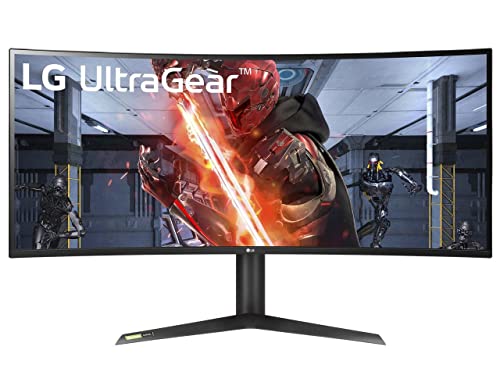
LG 38GL950G-B — Best refresh rate
Where the 38BN95C-W balances, the 38GL950G-B declares. This is LG’s UltraGear gaming interpretation of the 38-inch Nano IPS canvas: a WQHD+ curved panel running at 144Hz with a 1ms response claim and NVIDIA G-SYNC at its heart, built for players whose graphics cards wear the green badge and whose games punish hesitation. The specification reads like a smaller esports panel that refused to stop growing, and in fast titles the combination of genuine size and genuine pace is rare at any price — most screens this large ask you to choose between the two.
G-SYNC’s presence defines the ownership contract. Paired with a compatible NVIDIA card, frame delivery stays smooth and tear-free across the fluctuating rates real games produce, and the Nano IPS panel ensures the speed does not come at the cost of the washed-out colour that older fast panels accepted. Shooters gain a world that fills your vision without smearing; racing titles gain scenery that streams past the edges of the screen the way speed actually feels. For the player who has waited for the ultrawide format to stop compromising on pace, this model is the answer the class produced.
The declaration has edges. G-SYNC’s value is ecosystem-specific, so readers on other graphics hardware will pay for a headline feature they cannot fully use, and the gaming tuning — like the Alienware’s — sits behind the professional picks for colour-critical work. The listing title’s misprinted resolution, flagged earlier in this guide, is a reminder to verify the exact unit at checkout. Within its declared territory, though, the 38GL950G-B is the speed pick of the 38-inch class, and it is not close.
It also earns a word about restraint in design. UltraGear styling is assertive without tipping into costume, the stand is built for a heavy panel rather than borrowed from a smaller sibling, and the on-screen tools are organised for quick changes between titles. Players who tweak per game will appreciate a monitor that expects to be adjusted rather than merely admired.
A word for the sim racers and flight enthusiasts reading a refresh-rate review with suspicion: pace matters to you differently, through smoothness of scenery flow rather than target acquisition, and the 38GL950G-B serves that too. A 144Hz feed across a panel this wide turns panning across a landscape into something close to looking through a window, and the G-SYNC module keeps that flow even when a demanding scene drags the frame rate around. Speed at this size is not only an esports virtue; it is an immersion virtue wearing a competitive badge.
- Panel: 38-inch Nano IPS curved, WQHD+ class
- Refresh: 144Hz with NVIDIA G-SYNC
- Response: 1ms class
- Line: LG UltraGear gaming series
- Colour: Nano IPS wide-colour presentation
- Role: speed-first gaming at flagship size
Strengths
- 144Hz and G-SYNC bring esports manners to a giant canvas
- Nano IPS colour keeps fast games looking rich, not washed out
- UltraGear tools and stand suit per-game adjustment
Trade-offs
- G-SYNC value depends on owning compatible NVIDIA hardware
- Gaming tuning trails the professional picks for colour judgement
- Listing title misprints the resolution; verify the unit at checkout
Best for: NVIDIA-equipped players who refuse to trade size for speed.
Not suited for: other graphics ecosystems, or desks where colour grading pays the bills.

LG 38WK95C-W — Best value
Value at 38 inches is a relative term — nothing in this class is an impulse buy — but the 38WK95C-W is where the size stops charging for adrenaline. Its curved IPS panel delivers the full 3840 by 1600 canvas with 99% sRGB coverage, factory colour calibration and HDR10 support, connects over USB Type-C, and stands on a tilt and height adjustable base, all in a white finish that suits bright rooms and design-studio desks. This is the 38-inch monitor for readers whose work is documents, photography, development and media, and whose games, if any, are unhurried.
The calibrated colour deserves emphasis, because it is the feature owners feel longest. A screen that arrives colour-calibrated, presenting the sRGB space that web and office work live in, removes a whole category of doubt from photo editing and design review. USB-C connection keeps a laptop desk to one cable for picture and data, and the adjustable stand — so often the first casualty of value engineering — survives here intact, which at this size is a genuine ergonomic blessing rather than a bullet point.
What the calmer brief leaves behind is pace. There is no high-refresh gaming story to tell, and HDR10 on this panel is a presentation mode rather than a spectacle. Readers who split their desk evenly between production and play should stretch to the 38BN95C-W instead. But for the substantial audience that wants the grand canvas purely for work and entertainment at a civilised pace, the 38WK95C-W is the class’s most sensible door in.
Its white chassis, a rarity in a category addicted to black and gunmetal, deserves its sentence too. In Scandinavian-style offices, bright studios and shared living spaces, a white monitor changes the room’s mood rather than merely occupying it, and owners consistently cite the finish as a reason the desk feels designed rather than assembled. A small thing, at a size where everything is visible.
Long-session behaviour seals the work case. The panel’s presentation is calm at sensible brightness, the stand holds the large screen steady through a day of desk bumps and adjustments, and the whole unit asks for nothing across a working week except the occasional input switch. Owners moving up from a pair of ageing 24-inch monitors consistently describe the same relief: one bezel-free expanse, one colour character, one cable for the laptop. That simplicity, more than any single specification, is what the value pick in a flagship class is really selling.
- Panel: 38-inch curved IPS, 3840 x 1600
- Colour: sRGB 99%, colour calibrated
- HDR: HDR10 support
- Connection: USB Type-C
- Stand: tilt and height adjustable
- Finish: white chassis for bright rooms
Strengths
- Calibrated sRGB colour suits photo and design work out of the box
- USB-C keeps a laptop desk simple
- Full ergonomic stand survives the value brief intact
Trade-offs
- No high-refresh gaming capability to grow into
- HDR10 presentation is gentle rather than dramatic
- White finish will not suit every setup’s aesthetic
Best for: work-first readers who want the grand canvas, calibrated colour and a calmer tier of entry.
Not suited for: players, or anyone whose desk is a gaming station first and an office second.
LG 38WP85C-W — Prose-only: no monitor listing found
This entry exists so the guide’s account of the class is complete, and it carries no purchase link for a plain reason: when listings were verified, searching this model returned replacement power adapters and nothing else — no monitor, from any seller, that a reader could actually order. The 38WP85C-W itself is a genuine member of this class, a curved 3840 by 1600 model with USB-C that has been sold through other retailers and sits logically between the 38WK95C-W’s calm brief and the flagship’s ambitions. Readers who encounter one through a specialist retailer or the secondary market should verify its condition, panel hours and warranty status with particular care, since the usual Amazon route simply is not there.
Its absence from the linked picks is also the guide’s thesis in miniature. A recommendations page earns trust by linking only to what it has verified, and a missing listing is information, not an inconvenience to be papered over with a plausible-looking link. If a clean listing for this model appears in future, it would slot into this guide on its merits; until then, it stands as the class’s honourable mention, acknowledged and unlinked.
For readers assembling the fullest possible picture of the size class, the model’s paper position is easy to state: it aimed at the same professional-leaning buyer as the 38WK95C-W, with a more recent specification and the USB-C convenience modern laptops expect. That it is the hardest member of the class to actually buy through the usual channels is a market quirk, not a judgement on the hardware. The guide simply refuses to let enthusiasm for the model manufacture a listing that does not exist.
- Status: prose-only — no monitor listing returned
- Class: 38-inch curved, 3840 x 1600
- Connection noted in class references: USB-C
- What search returned instead: power adapters only
- Advice: specialist retailers, verify condition carefully
- Link: none, deliberately
Strengths
- A genuine class member with a sensible position in LG’s range
- USB-C brief suits the same work desks as its listed siblings
- Availability through specialist channels may suit patient shoppers
Trade-offs
- No verified Amazon monitor listing exists to recommend
- Secondary-market units demand extra condition checks
- Warranty position varies by channel and must be confirmed
Best for: researchers completing their picture of the class and patient shoppers comfortable with specialist retailers.
Not suited for: anyone who needs to order a verified screen today — the five linked picks above exist for that reader.
How does the 38-inch canvas change a working day compared with 34 inches?
The difference is vertical as much as horizontal. Both classes share the 21:9 shape, but the 38-inch panel’s 1600-pixel height gives documents, timelines and code more breathing room before scrolling begins, and its physical scale lets three substantial windows coexist without any of them feeling like a sidebar. Writers see more of the page; editors see more of the timeline and its tracks; analysts see the workbook and the chart that explains it. The gain is not dramatic in any single moment, which is precisely why owners describe it cumulatively — hundreds of small moments a week where the screen simply did not ask them to compromise.
| Pick | Panel | Refresh character | Defining trait |
|---|---|---|---|
| LG 38BN95C-W | Nano IPS | 144Hz | Complete flagship, Thunderbolt 3 |
| Dell UltraSharp U3824DW | IPS | Work-paced | USB-C hub professional centre |
| Alienware AW3821DW | Curved gaming | Gaming-paced | 2300R flagship presence |
| LG 38GL950G-B | Nano IPS | 144Hz, G-SYNC | Speed pick of the class |
| LG 38WK95C-W | IPS | Work-paced | Calibrated colour, calm value |
| LG 38WP85C-W | — | — | Prose-only: no listing to link |
The cost side is equally cumulative. Everything is slightly further away or slightly larger, the desk gives up more of itself, and the graphics hardware works harder for the same frame rate. Readers upgrading from 34 inches should expect a week of recalibrating their sense of where windows live. Readers choosing between the classes cold should weigh room and hardware honestly: the 38-inch canvas rewards a spacious desk and a strong machine, and gently punishes their absence every day.
Why choose 38 inches over the larger 40-inch and super-ultrawide formats?
Because 38 inches is where the ultrawide idea keeps its manners. The 40-inch class adds mostly height and price, often on flatter panels that reintroduce the corner-distance problem the curve exists to solve, while the 49-inch super-ultrawides trade the 21:9 shape for a 32:9 panorama that many applications, games and video sources handle awkwardly. The 3840 by 1600 canvas, by contrast, is a native citizen of the 21:9 world: films fill it, games support it, operating systems manage it gracefully, and it still fits — just — on furniture designed for humans rather than for trading floors.
There is a pixel argument as well. Super-ultrawide panels often spread a similar pixel count across far more glass, softening text; the 38-inch class concentrates its six million pixels into an area where density stays in the crisp zone for reading at normal distances. Readers whose work is text — code, documents, data — consistently find this class the most legible of the very large formats, and legibility across an eight-hour day outranks spectacle across an eight-minute demo.
What kind of computer does a 3840 by 1600 display demand?
For work, almost any modern machine qualifies. Integrated graphics in recent laptops drive this resolution for documents, browsing and development without complaint, especially through the USB-C and Thunderbolt connections the professional picks provide, and the panel’s size rather than its pixel count is the bigger adjustment. Video editing at this resolution is comfortable on machines already specced for editing, with the wide timeline acting as a genuine productivity feature rather than decoration.
Gaming is where the demand sharpens. Six million pixels at 144 frames per second is a flagship workload, and the gaming picks in this guide assume a graphics card from the strong end of recent generations, with settings judgement in the most demanding titles. Strategy, simulation and older games are far kinder, and variable refresh smooths the remainder. The honest rule: buy the panel for the machine you have or the machine you have genuinely budgeted, not for an upgrade that lives in the imagination.
How should you arrange a desk around a screen this large?
Begin with distance. A 38-inch curved panel is most comfortable viewed from roughly an arm’s length and a half, which usually means the deepest desk you can accommodate or a VESA arm pulling the screen back toward the wall. Centre the panel on your seated position, set its centre near eye level, and give the stand’s footprint a surface that does not flex — a panel of this mass on a wobbling desk announces itself with every keystroke. Cable runs deserve planning too: at this scale, a dangling cable is visible from across the room, and the hub-equipped picks repay tidy routing with a desk that looks as composed as it feels.
Sound deserves a thought at this scale as well. A screen this wide usually becomes the room’s film and media display after hours, and the built-in speakers across this class range from serviceable to forgettable. A compact soundbar or a pair of desktop speakers, positioned at the panel’s edges where the curve naturally suggests, completes the cinema illusion the picture starts. It is an optional flourish, but owners who add it rarely remove it, because width of sound is the natural partner to width of image.
Lighting is the second arrangement. Large glossy-adjacent panels mirror bright windows behind the viewer, so position the desk so daylight arrives from the side, and prefer the matte-leaning finishes of the professional picks in bright rooms. Finally, organise the canvas deliberately from day one: assign zones for communication, primary work and reference, and let the operating system’s snapping tools hold the discipline. A 38-inch screen without a system becomes a very expensive pile of overlapping windows.
What habits make a 38-inch canvas feel organised instead of overwhelming?
Scale rewards system. The owners who thrive at this size treat the panel as three cooperating zones — a centre stage for the task in hand, a left wing for reference and a right wing for communication — and they let window-snapping shortcuts enforce the geography until it becomes reflex. The centre zone matters most: a 38-inch screen is wide enough that the middle third functions like a complete monitor in its own right, and keeping the primary document there, rather than wherever it happened to open, is the difference between a command centre and a very wide mess.
Brightness discipline is the second habit. A panel this large is a significant light source in a room, and running it at showroom intensity through an evening is a reliable recipe for tired eyes and a glowing face on video calls. Set brightness for the room you actually work in — usually far below the maximum — and let the professional picks’ ambient-aware behaviours help if your model offers them. The canvas should feel like paper on a desk, present and calm, not like a cinema screen competing with the walls.
Which errors do shoppers in this tiny class repeat?
A fourth error is furnishing around the panel as an afterthought. A screen of this mass and width exposes a lightweight desk’s flex, a cheap arm’s droop and a room’s glare with complete honesty, usually within the first week. Budgeting for the support act — surface, mount, lighting — at the same time as the panel prevents the peculiar disappointment of a flagship screen undermined by a wobbling table. The monitor is the star of this purchase, but the desk is the stage, and the play fails if the stage does.
The signature mistake is assuming the class works like others — waiting for a sale season to flood it with options, or expecting a mid-tier model to appear and undercut the flagships. With five products, neither happens on a helpful schedule, and readers who have identified their pick gain little from delay. A second error is importing a 34-inch mindset: reusing a shallow desk, a lightweight arm or a mid-range graphics card and discovering the hard way that every supporting actor must scale with the panel. A third is overlooking the prose-only trap in reverse — finding the 38WP85C-W’s name in older round-ups and chasing listings that turn out to be accessories, renewed units or other sizes wearing its search terms.
What separates Nano IPS from ordinary IPS at this size?
Nano IPS is LG’s wide-colour panel technology, using a nanoparticle layer to sharpen the backlight’s output so the panel can cover a broader, cleaner colour gamut without the muddy bleed that wide-gamut screens once accepted. On a 38-inch canvas the benefit is visible in gradients — skies, skin tones, shaded game environments — that stay smooth and saturated at the edges of your vision rather than only in the centre. Three of the five linked picks here use it or its close relations, which tells you where the class’s centre of gravity sits: at this size, buyers are paying for colour as much as for area.
The ordinary IPS in the Dell and the 38WK95C-W answers with a different virtue: restraint. Their colour presentation targets the sRGB world most work lives in, with consistency and calibration as the selling points rather than gamut fireworks. Neither approach is a compromise in disguise. Choose Nano IPS when the screen must entertain as well as inform, and the calibrated standard panels when the work itself defines the colour space and deviation is the enemy.
What will you notice in the first month of owning a screen this size?
Owners report a predictable sequence. The first days are logistical: the box is enormous, the stand assembly is a two-person courtesy, and the desk rearranges itself around the new centre of gravity. Then comes the quiet week, where the surprises are behavioural — documents stop being minimised, reference material lives permanently in view, video calls gain a dedicated corner, and the old habit of printing things merely to see them whole quietly dies. By the end of the month the panel’s size stops registering as size at all; it registers as the absence of friction, which is the most expensive feeling in any workspace and the reason this class exists.
The month also reveals which pick you truly bought. The Dell owners describe a desk that feels administered, the Alienware owners a room that feels staged for play, the flagship LG owners a tool that keeps volunteering for new jobs. None of those experiences is an accident; each is the manufacturer’s brief made visible over time, and it is why this guide insists on temperament as the deciding axis in a class too small for specification shopping to settle anything.
How do you verify you are buying the genuine 38-inch model?
Thin classes attract listing confusion, so verification deserves its own ritual. Confirm the model number character by character against the manufacturer’s product page, confirm the resolution reads 3840 by 1600 in the specification table rather than only in the headline, and confirm the diagonal in the same table, because search results cheerfully mix the 34-inch siblings of these very models into the results. Where a listing’s title and its specification table disagree — as with the 38GL950G-B’s misprinted resolution — trust the table and the manufacturer, and keep a screenshot of both until the box arrives.
On delivery, the checks continue in miniature: the on-screen menu will report the native resolution the panel believes it has, and a tape measure across the diagonal settles the size question in seconds. These steps sound fussy until you remember the class’s economics — five products, flagship prices, long ownership. Ten minutes of verification at both ends of the purchase is the cheapest insurance in the whole transaction.
Final Recommendation
One consideration should not be postponed: stock in a five-product class behaves like stock in any small market, appearing and thinning without the constant replenishment crowded categories enjoy. A reader who has done the measuring, checked the hardware and found their pick in this guide has little to gain from a long deliberation, because the deliberation itself is the main risk to the plan. Decide with the information here, verify the listing once more at the moment of ordering, and then enjoy being one of the few readers whose desk is genuinely finished.
Choose by temperament and the short list resolves itself. The LG 38BN95C-W is the complete 38-inch monitor — colour, pace, HDR and Thunderbolt in one panel — and the default recommendation for a reader who wants the class’s best without a specialisation. Professionals building a docked workstation should take the Dell UltraSharp U3824DW and its hub-centred calm. Players divide between Alienware’s presence and the UltraGear’s G-SYNC pace, while work-first readers on the gentlest budget the class allows will be happiest with the calibrated 38WK95C-W. The 38WP85C-W remains a name to research rather than a link to click. Five honest options, each with a reader it fits exactly — at this size, that is not a limitation but the entire point.
Frequently Asked Questions
Why are there so few 38-inch ultrawide monitors?
The size sits between two popular classes — the mainstream 34-inch ultrawides and the very large 40-inch and super-ultrawide panels — and panel production follows volume. Manufacturers make few 38-inch panels, so few models exist, and retailers stock the ones that do sparingly. The result is a connoisseur’s class: small, stable and populated almost entirely by flagships, which is why this guide treats completeness differently from guides in crowded categories.
Is 3840 by 1600 noticeably sharper than 3440 by 1440?
At the larger diagonal, the density works out similarly, so text looks comparably crisp on both. The 38-inch advantage is not sharpness but room: more pixels in both dimensions means more content visible at that same comfortable crispness. Readers choosing purely on perceived clarity can save with the 34-inch class; readers choosing on workspace should weigh the 38’s extra canvas.
Can my laptop run one of these over a single cable?
In most modern cases, yes. The LG 38BN95C-W’s Thunderbolt 3 connection and the USB-C arrangements on the Dell and the 38WK95C-W are designed for exactly that pattern — one lead carrying the picture while the laptop charges or docks. Confirm your laptop’s port supports video output, since some USB-C ports are data-only, and expect gaming frame rates from a laptop to trail a desktop with a dedicated graphics card.
Does the LG 38WP85C-W not exist, then?
It exists as a product; what does not currently exist is a clean Amazon listing for the monitor itself. Search returned power adapters for it, which tells you the model is real and supported with accessories, but a guide cannot link an adapter and call it a screen. Specialist retailers are the route for that specific model, with the condition and warranty checks its prose-only entry describes.
Is a monitor arm worth adding at this size?
For many desks, it is the accessory that completes the purchase. A heavy-duty arm rated well beyond the panel’s weight frees the entire footprint the stand would occupy, lets the screen float at exactly the distance your eyes prefer, and makes the difference between a shallow desk that fights the format and one that accommodates it gracefully. Check the arm’s weight rating and the monitor’s VESA pattern before ordering either, and treat a cheap arm under a flagship panel as the false economy it reliably turns out to be.
How long should a monitor in this class last?
Plan on many years. These are flagship panels built around mature technology, and monitors generally outlive the computers connected to them, often by several system generations. The practical limits are usually changing needs — a different room, a different job, a new connection standard on a future laptop — rather than panel failure, and the professional picks add business-grade support cultures behind that expectation. Buy the pick that fits your temperament and the class will repay the decision with unusual longevity.
Will a 38-inch ultrawide work for console gaming?
It will display a console’s picture, centred in the panel with dark bars at the sides, because consoles output a 16:9 image and this class is 21:9. Within that frame the size and colour of these panels make games look grand, and the gaming picks handle the pairing smoothly. Even so, a reader whose play is exclusively console-based is buying a great deal of canvas their machine cannot fill, and a large fast 16:9 screen usually serves that reader better.
How much desk depth do I honestly need?
Plan for the deepest arrangement you can manage: the panel plus a viewing distance that keeps its edges comfortable usually adds up to a surface around eighty centimetres deep, or a shallower desk rescued by a wall-mounted or clamped VESA arm that holds the screen further back than its stand would. Measure before ordering, because at this size the tape measure is the most valuable review tool of all.
Related Guides
And if the measuring tape delivers bad news — the desk is too shallow, the room too narrow, the budget genuinely spoken for — take that as the guide working as intended rather than as a defeat. The 34-inch class exists precisely for excellent desks that cannot host this one, and a well-chosen screen from that shelf will serve better than a flagship forced into a room that resents it. Fit first, flagship second, is the ordering that keeps owners happy in every size class this site covers.
Whatever name survives your shortlist, the experience that follows has a consistent shape: a first day of rearranged furniture and rearranged habits, a first week of noticing how rarely you minimise anything, and a settling realisation that the screen has stopped being equipment and become the room’s centre of gravity. That is what this small, serious class sells, and each of the five linked picks delivers its own dialect of it.
Readers weighing the neighbouring sizes will find these useful: best 34 inch ultrawide monitors for the mainstream wide class best curved 27 monitors for smaller gaming desks best affordable ultrawide monitors when the budget leads


