What's inside
- Where to Buy and What This Guide Covers
- Key Takeaways
- Quick Picks: The Shortlist for 1080p Cameras
- How We Chose These Picks
- The Six Picks in Detail: Which 1080p Cameras Fit Which Job?
- Does 1080p Still Make Sense When 4K Exists?
- Sensor Size, Explained Through These Six Cameras
- Side-by-Side Comparison
- How Do You Choose the Right 1080p Cameras?
- Setting Up and Getting Consistent Results
- What Are the Most Common Mistakes Buyers Make?
- Frame Rates Within 1080p, and Why They Matter
- What the Kit Lens Really Decides on the Canons
- Carrying the Thing: Size as a Specification
- Field Notes: Small Practices That Decide Results
- Final Recommendation
- Frequently Asked Questions
- Related Guides
As an Amazon Associate I earn from qualifying purchases. This post may contain affiliate links at no extra cost to you.
gizmoverdict.com is reader-supported. When you buy through links on our site, we may earn an affiliate commission.
Where to Buy and What This Guide Covers
The best 1080p cameras are not failed 4K cameras; they are tools matched to how most footage is actually watched. Full HD remains the resolution of televisions in most homes, of school and office projectors, of the platforms where family and small-business video ends up. This guide compares six cameras that record proper 1080p, from pocket compacts anyone can operate to two Canons with sensors large enough to change what your photographs look like, and it judges each on the work it will really do.
One clarification before the picks: 1080p describes video resolution, not stills quality, and the cameras here differ enormously as stills machines. A compact’s 1080p frame and the Rebel T7’s 1080p frame contain the same number of pixels and noticeably different depth, colour and low-light cleanliness, because sensor size shapes video just as it shapes photographs. Readers who mostly film will weigh autofocus and screens; readers who mostly photograph should weigh sensors and lenses, then enjoy the video as a bonus.
Where to buy: you will find an Amazon link for every pick twice below, once in the Quick Picks table and once at its detailed review, so bundle contents, cards and batteries can be checked before you decide. Bundles change often at this end of the market, and a kit that includes a second battery or a case can be worth more than a small headline saving on a bare box. Compare the full contents, not only the camera name, on the day you order.
Key Takeaways
- 1080p is a video specification; stills quality varies hugely across these six cameras.
- The two Canons use APS-C sensors many times larger than the compacts’ sensors.
- The Rebel T7 is the stills champion; the EOS R100 adds eye-detection autofocus for moving subjects.
- Kodak’s FZ55 and FZ45 deliver the simplest route to clean Full HD family clips.
- The PIXPRO C1 is the only pick with a fully forward-flipping screen for solo recording.
- Judge bundles by included batteries and cards, not by the camera name alone.
Quick Picks: The Shortlist for 1080p Cameras
| Pick | Badge | Why it earns its place |
|---|---|---|
| KODAK PIXPRO FZ55 | Easiest 1080p compact | Full HD clips and 16MP stills with zero learning curve and a useful 5x zoom. |
| Canon EOS Rebel T7 | The learning DSLR | The large-sensor learning camera whose stills outclass everything else here. |
| Canon EOS R100 | Mirrorless step-up | Mirrorless autofocus and APS-C quality in a body a beginner can grow into. |
| KODAK PIXPRO C1 | Flip-screen snapshot pick | The flip screen pick for solo recording at arm’s length. |
| KODAK PIXPRO FZ45 | AA-powered family camera | AA power and a wide lens make it the always-ready household camera. |
| Panasonic Point and Shoot Digital Camera 4K | Travel point-and-shoot | A travel generalist with dependable exposure and a 4K option in reserve. |
How We Chose These Picks
Selection began with a simple filter: each camera had to record genuine 1080p video at a usable frame rate, from a sensor and lens combination a buyer could verify. That removed a long tail of generic camcorders advertising resolution figures achieved by interpolation. The survivors were then divided by intent, because a single ranked list would mislead: the right 1080p camera for a school play, a product channel and a photography student are three different machines, and this guide keeps those jobs separate in every review.
Sensor size was weighted heavily for stills and honestly for video. Large sensors gather more light, which cleans up indoor footage and photographs alike, and they blur backgrounds in a way audiences read as professional. The cost is bulk and price, and the guide states both wherever they bite. Compact sensors answer with size, simplicity and cost, qualities that decide real purchases every day. Neither philosophy wins in the abstract; each review names the buyer it serves.
Autofocus behaviour during video received its own scrutiny, because it is the specification brochures describe worst. Contrast-based systems in compacts and the Rebel T7 focus accurately but deliberately, suiting seated and slow subjects. The R100’s eye detection represents the modern approach and changes what a beginner can film successfully. Screens were judged the same way: a flip screen is not a luxury for a solo creator, it is the difference between framing yourself and guessing.
Finally, every camera was considered as an ownership proposition over three years, not a first-weekend toy. Battery systems, lens mounts, card formats and the availability of affordable spares all shape that horizon. The T7’s lens mount is a long-term asset; the FZ45’s AA diet is a long-term convenience; the C1’s simplicity is a long-term match for a narrow job. The reviews below argue each case on those terms.
The Six Picks in Detail: Which 1080p Cameras Fit Which Job?
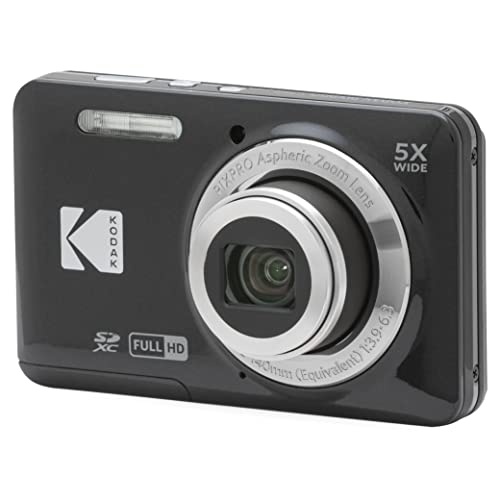
KODAK PIXPRO FZ55 — Easiest 1080p compact
For a buyer whose video needs begin and end with birthdays, school concerts and holiday clips, the FZ55’s 1080p mode is honestly sufficient, and that sufficiency is its charm. Press the record button and it captures clean Full HD footage with sound, no menus to configure, no settings to misunderstand. Stills come from a 16 megapixel sensor behind a 5x optical zoom starting at 28mm, a range that covers group portraits at one end and a child’s face across a table at the other.
Understand what its 1080p is and is not. It is fixed-frame-rate, simply exposed footage that looks good on a television and entirely respectable on a laptop. It is not stabilised cinematic material, and walking while filming produces the gentle bounce every basic compact produces. Keep feet planted, pan slowly, and the results please everyone who will ever watch them. The rechargeable battery supports a full day of mixed stills and short clips, which matches how this camera is actually used: dozens of photographs, a handful of videos, no drama.
Key specifications — FZ55:
- Sensor: 16 megapixels, compact class
- Lens: 5x optical zoom from 28mm
- Video: 1080p Full HD with sound
- Power: Rechargeable lithium battery
- Screen: 2.7 inch rear LCD
Strengths
- 1080p recording needs no setup or knowledge to start
- 5x zoom frames portraits without crowding subjects
- Rechargeable battery suits a full day out
Trade-offs
- No meaningful stabilisation for walking footage
- Autofocus in video is leisurely and can hunt indoors
- Small sensor limits quality once light falls
Best for: families who want stills and simple Full HD clips from one pocket camera.
Not suited for: creators who film moving subjects, vlog on foot, or need microphone inputs.

Canon EOS Rebel T7 — The learning DSLR
The Rebel T7 is the camera in this guide for readers who suspect they might actually learn photography. Its APS-C sensor is many times larger than any compact sensor here, and that size shows everywhere: cleaner indoor files, shallower depth of field for portraits, and 1080p video with a cinematic softness compacts cannot imitate. The kit lens covers 18-55mm, the classic starter range, and the EF-S mount opens a vast cupboard of affordable lenses when skills grow. It records Full HD video rather than 4K, which for this guide’s purpose is the point.
Video on the T7 demands honesty about its autofocus. In live view it focuses contrast-style, accurately but without the snappy subject tracking of mirrorless rivals, so it suits tripod interviews, product demonstrations and seated presenters better than children charging toward the lens. Manual focus with magnification is genuinely usable and teaches a skill every videographer eventually needs. As a stills camera it is the strongest tool in this roundup by a wide margin, and buyers whose interest is growing will feel that headroom every month they own it.
Key specifications — Rebel T7:
- Sensor: 24.1 megapixels, APS-C CMOS
- Lens: EF-S 18-55mm kit lens, interchangeable mount
- Video: 1080p Full HD recording
- Viewfinder: Optical pentamirror viewfinder
- Mount: Canon EF and EF-S lenses supported
Strengths
- Large APS-C sensor transforms indoor image quality
- Interchangeable lenses give years of growing room
- Optical viewfinder makes bright-day composition easy
Trade-offs
- Video autofocus is slow compared with mirrorless rivals
- Body and lens are far bulkier than the compacts here
- No touchscreen or flip screen for self-recording
Best for: beginners ready to learn real photography with stills first and seated video second.
Not suited for: vloggers who film themselves walking, or travellers counting every gram of bag weight.

Canon EOS R100 — Mirrorless step-up
The EOS R100 brings the same large APS-C advantage as the Rebel T7 into a smaller mirrorless body, then adds the autofocus intelligence the DSLR lacks. Canon’s subject-aware focusing finds eyes and holds them, which transforms both stills of children and 1080p video of anyone who moves. It can record 4K as well, cropped, but its cleanest and most practical mode for most owners is the Full HD recording this guide is about: sharp, well-exposed, and easy to share without conversion or heavy editing.
The kit lens is compact and retractable, keeping the whole outfit jacket-pocket-adjacent in a small bag, though nobody should call it pocketable. Controls assume a beginner graduating from automatic modes, with a guided interface that explains settings in plain language. Two compromises deserve naming: the screen is fixed rather than flipping, so self-recording means a phone app or a separate monitor, and the lens mount’s native range is still maturing compared with the DSLR’s vast EF cupboard, though adapters close that gap. For image quality per unit of size, nothing else here competes.
Key specifications — EOS R100:
- Sensor: 24.1 megapixels, APS-C CMOS
- Lens: RF-S 18-45mm kit lens, retractable
- Video: 1080p Full HD plus cropped 4K option
- Autofocus: Eye and subject detection autofocus
- Screen: Fixed rear screen, no flip mechanism
Strengths
- Eye-detection autofocus keeps moving subjects sharp
- APS-C quality in the smallest interchangeable body here
- Guided interface teaches settings while you shoot
Trade-offs
- Fixed screen frustrates solo video creators
- Native RF-S lens range is still growing
- 4K mode crops the frame noticeably
Best for: upgraders from phones who want real quality and autofocus without DSLR bulk.
Not suited for: self-filming creators who need a flip screen, or buyers wanting the cheapest route in.

KODAK PIXPRO C1 — Flip-screen snapshot pick
The C1 approaches 1080p from the creator’s chair rather than the photographer’s. Its screen flips fully forward, its fixed 26mm lens frames a face and shoulders at arm’s length, and its 1080p recording starts with one button. For a teenager recording room tours, a grandparent video-calling-era diary clips, or a seller filming quick product introductions, that directness beats specification depth. Stills at 13 megapixels are honest snapshot quality, and the wide fixed lens keeps everything in a room recognisably in frame.
The limits arrive the moment a subject is far away or light turns poor. There is no optical zoom to rescue a distant stage, and the small sensor’s indoor video shows the grain common to its class. Audio is whatever the built-in microphone gathers, fine for speech in a quiet room and challenged by wind or traffic. Judge the C1 as a framing tool for close subjects in decent light and it succeeds on its own terms. It is the only pick here designed around seeing yourself while you record, and for some buyers that single feature settles the whole decision.
Key specifications — C1:
- Sensor: 13 megapixels, compact class
- Lens: Fixed 26mm lens; zooming is done with your feet
- Video: 1080p Full HD recording
- Screen: 2.8 inch display that flips fully forward
- Audio: Built-in microphone only
Strengths
- Flip screen makes solo recording genuinely easy
- Fixed wide lens frames faces well at arm’s length
- One-button video suits absolute beginners
Trade-offs
- No zoom for distant subjects of any kind
- Indoor video grain is visible on large screens
- Built-in audio struggles outdoors in wind
Best for: solo creators and families filming close subjects in good light.
Not suited for: anyone recording performances, sport, or wildlife from a distance.

KODAK PIXPRO FZ45 — AA-powered family camera
The FZ45 records the same honest 1080p as its FZ55 sibling and differs in philosophy rather than footage. AA batteries power it, so the camera that lives in a holiday home, a club cupboard or a grandparent’s drawer is always one shop visit away from working. Its 4x zoom starts wider, at 27mm, which helps indoor video where stepping back is impossible. For shared cameras passed between many hands, that combination of wide framing and universal power is quietly ideal.
Video expectations should be set at family-archive level. The FZ45 captures the school play recognisably, the birthday candles clearly, the holiday beach brightly, and asks nothing of its operator beyond pointing and pressing record. Autofocus adjusts at a stroll, the microphone hears the room, and files play anywhere without conversion. Photographers wanting deliberate control should look at the Canons. Households wanting a camera that simply works whenever anyone picks it up, months after it was last charged because there is nothing to charge, have found their pick.
Key specifications — FZ45:
- Sensor: 16 megapixels, compact class
- Lens: 4x optical zoom from 27mm
- Video: 1080p Full HD recording
- Power: AA batteries, universally available
- Screen: Fixed rear LCD
Strengths
- AA power means the camera is never found flat and forgotten
- 27mm wide start suits indoor video framing
- Simple enough for any family member to operate
Trade-offs
- Shot pace and flash recycle are slow on AA power
- Video autofocus wanders with fast-moving subjects
- No stabilisation worth the name for handheld pans
Best for: shared household cameras and occasional shooters who value readiness over refinement.
Not suited for: enthusiasts who review footage critically or film action of any speed.

Panasonic Point and Shoot Digital Camera 4K — Travel point-and-shoot
This Panasonic point-and-shoot is the generalist of the group: a travel-shaped compact that records 1080p cleanly and offers 4K for buyers who want the option without buying into an interchangeable system. Panasonic’s compact heritage shows in sensible menus and dependable exposure, the two qualities travellers actually notice after a week of shooting in unfamiliar light. It slips into the role the phone cannot quite fill: a dedicated device whose battery and storage are not shared with maps, messages and boarding passes.
Treat its headline zoom and resolution claims with the calm scepticism this guide applies everywhere, and judge it on output: bright, pleasing stills, stable-feeling handheld video at 1080p, and operation simple enough to hand to a stranger for a group shot. Low light remains compact territory, competent rather than remarkable, and serious creators will miss microphone options. As a holiday camera that records the trip in Full HD without a learning curve, it earns its place as the sixth pick for buyers who found the Kodaks too basic and the Canons too much.
Key specifications — Panasonic P&S:
- Sensor: Compact-class sensor, travel point-and-shoot design
- Lens: Built-in zoom lens for everyday travel ranges
- Video: 1080p Full HD plus 4K recording option
- Power: Rechargeable battery
- Handling: Automatic modes with guided scene options
Strengths
- Dependable exposure metering in unfamiliar travel light
- 4K option adds flexibility beyond the 1080p brief
- Dedicated battery and card free the phone for travel duties
Trade-offs
- Specification headlines deserve verification against output
- No microphone input for serious recorded sound
- Low-light video is competent rather than outstanding
Best for: travellers wanting one simple camera for stills and Full HD clips.
Not suited for: budget buyers served cheaper by the Kodaks, or learners needing the Canons’ depth.
Does 1080p Still Make Sense When 4K Exists?
For most viewing, yes, and the reasons are practical rather than nostalgic. Full HD files are a quarter the size of 4K equivalents, so cards fill slowly, laptops edit them without stuttering, and uploads finish while you still remember making them. School, club and small-business screens are overwhelmingly 1080p panels. A creator publishing to social platforms watches the platform recompress everything anyway. In that real pipeline, a well-lit, well-focused 1080p frame beats a shaky, noisy 4K frame every time an audience judges the result.
Where 4K earns its place is cropping and future-proofing: reframing a wide shot in editing, or archiving footage for screens not yet bought. Two picks here, the R100 and the Panasonic, offer 4K as an option, and both sections describe its compromises honestly. The mature buying position is to treat 4K as a sometimes tool rather than an identity. Buy the camera whose 1080p behaviour, autofocus, screen and handling suit your Tuesdays; let the occasional 4K project borrow the modes that exist.
Sensor Size, Explained Through These Six Cameras
Place the Rebel T7’s APS-C sensor beside a compact sensor and the area difference is roughly tenfold. Each photosite gathers far more light, so indoor photographs keep detail instead of dissolving into noise reduction, and video frames hold together in the evening light where family life actually happens. Backgrounds separate from subjects at modest apertures, giving portraits the depth audiences associate with proper cameras. These are not subtle laboratory differences; they are visible in the first indoor portrait a new owner takes.
Compact sensors answer with a different physics bargain. Their depth of field is enormous, so everything from the birthday cake to the grandparents behind it stays sharp without skill. Their lenses can be tiny yet cover useful zoom ranges, and the whole camera costs less than one good APS-C lens. For documentation, travel snapshots and video diaries in decent light, that bargain is rational. The mistake is expecting one philosophy to win everywhere; this guide’s job is matching the physics to your rooms, your subjects and your patience.
Side-by-Side Comparison
| Camera | Sensor | Lens system | Video | Screen |
|---|---|---|---|---|
| KODAK PIXPRO FZ55 | 16MP compact | Fixed 5x zoom | 1080p Full HD | Fixed LCD |
| Canon EOS Rebel T7 | 24.1MP APS-C | Interchangeable EF-S kit | 1080p Full HD | Fixed LCD, optical finder |
| Canon EOS R100 | 24.1MP APS-C | Interchangeable RF-S kit | 1080p plus cropped 4K | Fixed LCD |
| KODAK PIXPRO C1 | 13MP compact | Fixed 26mm lens | 1080p Full HD | 180-degree flip screen |
| KODAK PIXPRO FZ45 | 16MP compact | Fixed 4x zoom | 1080p Full HD | Fixed LCD |
| Panasonic Point and Shoot Digital Camera 4K | Compact class | Built-in travel zoom | 1080p plus 4K option | Fixed LCD |
The sensor column is the table’s honest dividing line. Two cameras carry APS-C sensors and behave like serious photographic tools; four carry compact sensors and behave like convenient ones. Neither group embarrasses itself at 1080p video in good light, which is why the cheaper cameras remain recommendable, but indoor stills separate the groups immediately and permanently.
Screens quietly decide the creator question. Only the C1 flips fully forward, only the R100 tracks eyes, and only the T7 offers an optical viewfinder for bright days. Read the table by the row that removes your most frequent frustration, rather than by any notion of an overall winner: the best 1080p camera is the one whose specific strength matches the footage and photographs you actually make.
How Do You Choose the Right 1080p Cameras?
Decide Whether Stills or Video Leads
Write down your last twenty camera outings, phone included, and mark each as mainly stills or mainly video. Most buyers discover a lopsided pattern they had not admitted: the photography student who films twice a year, the parent who films everything and prints nothing. Let that tally lead. Stills-led buyers should start at the Canons and work down only if bulk frightens them; video-led buyers should start with screens and autofocus, which puts the C1 and R100 at the front of the conversation.
Mixed users exist, and the R100 was practically designed for them, but honesty about the ratio still helps because it sets the compromise direction. A 70-30 stills shooter tolerates a fixed screen; a 70-30 video shooter should not. The compacts serve the genuinely casual middle, where neither craft is being learned and reliability matters more than ceiling. There is no wrong answer in the tally, only wrong purchases made without it.
Read Autofocus Claims Like an Engineer
Brochures say a camera has autofocus; your footage depends on which kind. Contrast detection, used by the compacts and the T7’s live view, rocks the lens back and forth to find peak sharpness: accurate, calm with still subjects, visibly hunting with restless ones. Phase and eye-detection systems, represented here by the R100, predict and track, holding a child’s face through movement that defeats the older approach. For interviews and demonstrations, either works. For toddlers, pets and sport, the difference is the footage itself.
Sound belongs in the same audit. Every pick here relies on built-in microphones, which record the room along with the subject. A seated presenter two metres away sounds fine; a presenter across a hall competes with echo and audience noise. Buyers whose video carries speech that matters should position subjects close, choose quiet rooms, and accept that no camera in this guide replaces a dedicated microphone strategy for larger spaces.
Plan Storage and Editing Around File Size
1080p’s kindness to storage is a genuine feature. An hour of Full HD from these cameras occupies a fraction of the space 4K demands, so a modest card covers a holiday and a modest laptop edits without proxy files or patience. That simplicity keeps beginners finishing projects instead of abandoning them in an editing timeline that stutters. When choosing cards, buy name-brand media sized generously rather than the largest available; two mid-size cards rotated beat one giant card lost or corrupted with everything on it.
Editing expectations should match the tool. These cameras produce footage that cuts happily in free editors, takes titles and music without complaint, and exports quickly. Colour grading depth is limited compared with professional log formats, so expose carefully while filming: what you see is close to what you keep. That discipline, forced by simple tools, is the same one professionals describe learning first. The camera that teaches it cheaply has done a creator a lasting favour.
Setting Up and Getting Consistent Results
Configure the Camera for Clean 1080p on Day One
Set video resolution to 1080p at the frame rate matching your region’s lighting to avoid flicker under artificial light, then lock white balance for indoor scenes rather than letting it drift mid-clip. On the Canons, enable lens correction profiles and set picture style to a neutral, low-sharpening option for the most forgiving footage. On the compacts, disable digital zoom in video, choose the highest quality setting, and format the card in camera before the first real outing.
Record a two-minute test in your most-used room: speech at normal distance, a pan across windows, a face near a lamp. Watch it on the television, not the camera screen, because the small screen forgives focus and noise errors the big one exposes. Adjust one setting at a time based on what you see. This single rehearsal prevents the classic discovery, made at an unrepeatable event, that the camera was set to its smallest video size all along.
Stabilise With Technique Before Accessories
None of these cameras carries high-end stabilisation, so technique is the stabiliser. Hold compacts with both hands and elbows tucked, plant feet before pressing record, and pan by rotating your whole upper body slowly rather than swinging your arms. With the Canons, a neck strap pulled taut against your neck creates a third contact point that visibly calms handheld footage. Short clips edited together look steadier than long wandering takes, and audiences prefer them anyway.
A basic tripod transforms the seated work these cameras do best: interviews, demonstrations, performances from a fixed seat. It also enables the low-light stills advantage of the large sensors, since a still camera on a tripod can use slow shutter speeds no handheld shot survives. Buy the tripod before any lens upgrade; it improves more photographs per unit of money than anything else in the accessory catalogue.
What Are the Most Common Mistakes Buyers Make?
Assuming 1080p means identical quality across cameras
Identical pixel counts conceal different sensors, lenses and processing. The R100’s 1080p frame carries cleaner shadows and softer background separation than a compact’s frame of the same dimensions, because the light was gathered by a far larger sensor. Judge sample footage and stills, not the resolution badge, and expect to pay for sensor area rather than for numbers on a box.
Buying a DSLR for video without checking its focusing style
The Rebel T7 is a superb learning camera whose live-view focusing is deliberate rather than fast. Buyers who imagined filming running children with it feel misled, although the specification never promised tracking. Match the focusing system to the subject’s speed before purchase: seated and slow subjects forgive everything here; fast subjects belong to the R100 or to compact simplicity at wide angles.
Filming everything at maximum settings on day one
New owners often enable every quality option, fill a card in an afternoon, then stop filming because the files feel unmanageable. Start at plain 1080p with standard settings, finish a few small projects end to end, and raise settings only when a real limitation appears in a finished piece. Completed modest projects teach more and please audiences more than abandoned ambitious ones.
Ignoring audio until the first important recording
Built-in microphones record rooms, wind and handling noise along with voices. The fix is placement and environment, not menu settings: move the camera closer, choose soft-furnished rooms, shield outdoor recording from wind, and keep fingers still during takes. Test speech recordings at home before trusting the setup to a speech, a lesson or a product demonstration that cannot be repeated.
Letting the phone comparison end the discussion
A flagship phone is a formidable camera, and for some buyers it genuinely suffices. The dedicated camera’s case rests on separate battery and storage, real zoom glass, larger sensors in the Canons’ case, and a device that can be handed to a child or left mounted on a tripod without surrendering your communications. If none of those matter to your life, save the money with a clear conscience; if two or more do, the picks here earn their bag space.
Frame Rates Within 1080p, and Why They Matter
1080p is a frame size, not a complete description. At 24 or 25 frames per second, footage takes on the cadence audiences associate with film and drama; at 30, it matches everyday television and online video; at 50 or 60, motion looks fluid and sports or children’s play stays readable, with the bonus that clips can be slowed to half speed cleanly. The Canons offer the wider menu here, while the compacts typically fix a sensible rate and remove the decision, which beginners often experience as relief rather than restriction.
Match the rate to the subject before pressing record. Speech and interviews gain nothing beyond 30 and cost double storage at 60. A school sports day, a dog at full sprint or a cyclist passing close all reward the higher rates, because each frame freezes a thinner slice of the motion. Artificial lighting adds one caution: mains flicker interacts with shutter choices, so the test-recording ritual described in this guide should include your most-used indoor room at the rate you plan to favour.
What the Kit Lens Really Decides on the Canons
Both Canon kits arrive with a standard zoom covering wide group shots through short-telephoto portraits, the range in which most photography lives. That lens, more than the body, will shape your first year of images: its aperture limits low-light ambition, its sharpness sets the ceiling the sensor can reach, and its focusing motor’s quietness matters in video. The good news is that both mounts accept inexpensive, excellent fixed-focal-length lenses, and a single fast prime transforms either camera’s evening performance more than any body upgrade at this level.
Budget thinking should therefore treat the kit as chapter one. Buy the body whose handling and focusing suit you, learn the kit lens’s limits by running into them, and let experience name the second lens. The T7’s mount offers a deep used market for that second lens; the R100’s offers modern designs and adapters to the same heritage glass. Either path is a decade-long platform, which is the fundamental difference between the Canons and every fixed-lens pick in this guide.
Carrying the Thing: Size as a Specification
Specifications list weight in grams; owners experience it as whether the camera comes along. The compacts vanish into pockets and handbags, so they attend the small events that make up a family archive. The R100 asks for a small bag and repays it with quality. The T7 asks for a real bag and a decision, and in return delivers the full photographic instrument. None of these is the correct answer in isolation: the archive of a family whose camera stays home is empty regardless of its sensor size.
Be honest about your carrying history with past gadgets. If a previous camera died of being left behind, buy the compact and enjoy the photographs it makes possible. If you already carry a bag everywhere and feel a phone’s limits weekly, the Canons’ bulk will not trouble you. This unglamorous self-knowledge predicts satisfaction better than any benchmark, and it costs nothing to consult before the money moves.
Field Notes: Small Practices That Decide Results
Match your frame rate to your lighting region before a big shoot. Under mains-powered lights, the wrong rate produces a slow pulsing flicker in footage that no editor can remove. The Canons expose this setting plainly; the compacts usually tie it to a region or video-system option. Set it once, record a lamp-lit test, and forget it for the life of the camera.
A lavalier microphone clipped near a speaker’s collar transforms interview footage more than any camera upgrade in this guide, for cameras that accept external audio through accessories or companion recorders. Where no input exists, moving the camera a metre closer improves speech clarity more than any menu setting. Audio distance obeys an unforgiving square law; respect it and your footage sounds produced.
For product demonstrations, lock exposure once the framing is set. Automatic exposure that breathes brighter and darker as hands move through the frame distracts viewers from the product itself. The Canons offer straightforward exposure locking; on the compacts, half-pressing and holding or choosing a fixed scene mode approximates it. Steady exposure is one of the quiet signatures of competent video.
Shoot a colour reference when it matters: a plain grey card, or even a sheet of white paper, filmed for three seconds at the start of a session. In editing, that reference lets you correct white balance across clips shot under mixed lighting. It is a professional habit that costs three seconds and rescues the skin tones in exactly the footage families rewatch most.
Keep clips short on purpose. Five ten-second clips of a birthday edit into a watchable sequence; one ten-minute clip becomes a file nobody opens. The compacts encourage this discipline naturally with their simple record buttons, and the Canons reward it with faster card handling. Future viewers, including your future self, are the audience your shooting habits should serve.
When filming children with the R100, enable its eye autofocus and then compose loosely, leaving headroom on every side. Children move toward the interesting thing, which is rarely the centre of your frame, and headroom in the shot becomes cropping freedom in the edit. The camera’s tracking does the precision work; your job is generosity with space.
The Rebel T7’s optical viewfinder is an asset in bright sun, where every rear screen in this guide washes toward invisibility. Photographers who learn to compose through it gain a camera that works at the beach and in snowfields without squinting. Video still uses the screen, which is one more reason this guide positions the T7 as a stills-first instrument.
Carry a microfibre cloth sized for lenses, not the corner of a shirt. Shirt fabric carries grit that micro-scratches coatings over time, and the front elements of the kit lenses and compacts here are exposed to pockets and bags daily. A cloth in each camera bag is the cheapest image-quality insurance in photography, renewed for pennies whenever one is lost.
For time-lapse sequences, several picks here offer interval shooting or can be driven patiently by hand for short sequences. A cheap tripod, a shaded position and a fully charged battery are the whole technical requirement. Clouds, markets and building projects all reward the technique, and 1080p output keeps the resulting files light enough to share without compression battles.
Disable any digital zoom in video menus permanently. On the compacts it is tempting in the moment and regrettable in the edit, where the same crop can be applied reversibly to the full-resolution file. Filming at native framing keeps every option open. Editors thank shooters who protect the negative, even when the negative is a family clip of a school concert.
Learn your camera’s minimum focusing distance before filming close-ups of products, food or crafts. Each lens here has a closest point, and footage shot inside it is soft no matter how often autofocus hunts. Backing off ten centimetres and cropping slightly in the edit produces a sharper result and a calmer autofocus, a trade worth making every time.
Charge batteries the night before an event, not the morning of it. Lithium packs that sat for months self-discharge slowly, and a camera showing two bars at breakfast may show none by the ceremony. The FZ45’s AA design dodges this failure entirely, which is a real argument for it in event-heavy households despite its slower pace in every other respect.
Set a file-naming and folder routine the day the camera arrives: year, month, event, copied weekly. The Canons and compacts all produce similarly anonymous filenames, and an archive of ten thousand unsorted clips is functionally a lost archive. Five minutes of routine per week keeps a decade findable, and findability is what separates an archive from a pile.
For seated interviews on the T7, switch to manual focus after autofocus finds the subject, then leave it. A seated subject moves within a shallow plane, and contrast autofocus hunting during an answer is the one flaw viewers never forgive. Manual focus with the magnified live view is precise, silent and final, which is why professionals default to it for this exact setup.
Use the Panasonic’s scene intelligence for travel days when photography is incidental. Its automatic choices in markets, beaches and old towns are consistently sensible, freeing attention for the trip itself. Switch to deliberate modes when a specific photograph matters. Knowing which mode of attention you are in, tourist or photographer, is a skill the camera cannot supply and experience reliably teaches.
Protect footage of unrepeatable events with an immediate second copy. A card reader and a laptop, or a phone adapter in a pinch, turn a single fragile card into two copies before the journey home. Cards fail rarely and always at the worst moment; the two-copy habit converts that catastrophe into an inconvenience, and it applies to every camera in this guide equally.
When filming in wind with any pick here, cup your hand as a shield near the microphone or reposition so your body blocks the airflow. Built-in microphones cannot distinguish speech from wind pressure, and wind noise is the most common reason family footage gets muted on playback. A foam cover or the ZV-style muff approach helps where fitted; position helps everywhere.
Practise the handover shot: filming while passing an object to another person, or receiving one, at normal speed first. It is the bread-and-butter shot of demonstration channels, and the compacts’ simplicity makes it easy to rehearse. Smooth handovers, in focus and steadily exposed, are the unglamorous craft that makes a small channel look professional long before resolution enters the discussion.
Review footage on the television monthly, not only on the camera screen. Focus errors, exposure breathing and audio problems all hide at small sizes and announce themselves at large ones. A monthly review session with a notebook turns vague dissatisfaction into specific settings changes, and it doubles as the family screening that makes the archive feel alive rather than stored.
Keep the C1’s flip screen hinge clean and unforced. It is the mechanism the whole camera’s appeal hangs on, and grit in a hinge or a screen forced past its stop ends the feature permanently. The same care applies to any articulated part on any camera here: mechanisms reward gentleness with years, and punish hurry exactly once.
Consider a small LED panel as the first accessory for indoor filming. Every camera here exposes more honestly when the subject is lit deliberately, and a panel the size of a paperback lifts faces out of the murk that makes viewers call footage amateur. It serves the compacts and Canons alike, costs less than any lens, and outlives several camera generations.
When two people film the same event, agree beforehand who takes the wide shot and who takes close-ups. Two cameras at the same framing produce duplication; two at complementary framings produce an edit. The R100 and a compact, or the T7 and the C1, pair naturally in these roles, which is a genuine argument for households owning one of each class.
Learn to read a histogram for stills on the Canons, where the display offers one. The graph shows whether highlights are clipping and shadows are drowning before you commit to a scene’s whole series. Five minutes of practice with test shots teaches the skill, and it transfers to every serious camera you will ever handle afterwards.
For school concerts, arrive early enough to choose an aisle seat near the front third of the hall. Position beats zoom in this entire category: a compact from row six outperforms a DSLR from row thirty for framing, light and sound alike. The best accessory for event filming is a chair chosen with intent, and it is free.
Keep a short demo reel of your own best clips, updated quarterly. Watching your strongest work teaches your eye faster than watching tutorials, because the footage is yours and its flaws are personal. It also gives a creator something to show a client or a collaborator, which turns a hobby archive into a working asset with almost no effort.
If a camera offers zebra or highlight warnings for video, switch them on for a week. The stripes mark overexposed areas while you film, training your exposure instincts in real time. After a week the warnings can go off again; the instinct remains, and your skies, windows and stage lights will stop blowing out in the footage that matters.
Shoot interviews with the camera slightly above the subject’s eye line, angled gently down. The position flatters faces, opens eyes and reads as confident on screen. A stack of books under a compact achieves it as reliably as a tripod riser under a Canon. Small geometry decisions like this one separate produced-looking footage from accidental footage across every pick here.
Back up footage before editing, and edit the copy. Editing software rarely destroys originals, but drives fail and laptops are stolen on their own schedule. The two-copy rule from the setup section applies doubly to project files: the finished edit of a wedding or a product launch is worth more than the camera that shot it.
When filming outdoors at midday, turn the subject so the sun falls across them rather than into their face or directly behind it. Side light models features without squinting, and every camera here exposes it more kindly. The reposition costs three steps and improves the clip more than any picture profile buried in a menu.
Practise a complete shoot at home: set up, film five minutes, transfer, edit, export, watch. The rehearsal exposes every missing cable, full card and forgotten setting while the stakes are zero. Professionals call this a tech rehearsal and never skip it before paid work; families filming a graduation deserve the same reliability for the same reason.
Notice how each camera renders skin under your home’s actual lamps, and write the observation down. One model’s automatic white balance may flatter your family while another’s needs a nudge toward warmth. This unglamorous knowledge, specific to your rooms and your people, is worth more than any laboratory colour chart ever published.
Finish projects. A folder of finished, exported, watchable videos, however modest, teaches more and pleases more than terabytes of ambitious raw footage. The 1080p pipeline these cameras offer is deliberately finishable on ordinary computers. Use that kindness: shoot less, complete more, and let completed work set the standard the next shoot tries to beat.
Final Recommendation
Choose the EOS R100 if one camera must do the most: its autofocus, sensor and size balance make it the strongest all-round 1080p tool here, held back only by its fixed screen. Choose the Rebel T7 if photography itself is the project and video is a seated, occasional guest. Both Canons reward learning in a way no compact attempts.
Choose the FZ55 for family life at its simplest, the FZ45 when AA readiness matters more than rechargeable convenience, the C1 when you film yourself, and the Panasonic when travel wants a dedicated device with a 4K reserve. Each of those sentences describes a real household we can picture, which is exactly how a shortlist should resolve.
Full HD endured because it fits the screens, storage and patience of real life, and the right 1080p camera is the one whose strengths line up with the footage and photographs you were already trying to make.
Frequently Asked Questions
Is 1080p enough for a family television in 2026?
Yes. Most broadcast and streaming family content is still delivered at or near Full HD, and a well-exposed 1080p recording from any pick here looks clean on a typical living-room set. Viewing distance hides the difference from 4K in most rooms. Spend the money saved on the camera whose handling and autofocus suit your subjects, because focus and exposure are visible at every resolution.
Which of these cameras takes the best photographs?
The two Canons, by a clear margin, because their APS-C sensors gather far more light than the compact sensors. Between them, the R100 focuses faster on moving subjects and the T7 offers a wider world of affordable used lenses. For daylight snapshots the compacts narrow the gap considerably, and for many families that narrower gap is the only one that matters.
Can I start a small video channel with a 1080p camera?
Many successful channels run on less. Audiences forgive resolution long before they forgive inaudible speech, chaotic framing or dull content. The C1 frames solo presenters easily, the R100 tracks a moving presenter, and either leaves budget for lighting and a quiet recording space, which improve perceived quality more than a resolution upgrade would.
Why does the Rebel T7 focus slowly in video?
Its live-view system uses contrast detection, which measures sharpness at the sensor and adjusts until contrast peaks. The method is precise and entirely adequate for seated subjects, product shots and interviews. It was designed before eye-tracking video autofocus became expected at this level. Buyers filming restless subjects should choose the R100, whose system was designed for exactly that work.
Should I buy the Panasonic for its 4K instead of the Kodaks?
Only if you have a defined use for 4K, such as cropping footage in editing or matching another 4K camera. As a 1080p travel camera it competes on exposure dependability and general polish. If your filming is family clips watched in Full HD, the Kodaks deliver the same end result for less money and with simpler operation.
Related Guides
Three companion guides continue the research from here: Best 10 megapixels cameras and the honest alternatives Best 120fps cameras for slow motion Best 1080p cameras with flip screens for vlogging.


