What's inside
- Key Takeaways
- Quick Picks
- How Did We Sort Two Different Products Into One Honest List?
- What Does an IP Camera Do All Day That a Webcam Never Will?
- Two Categories, One Table — Read the Kind Column First
- What Do Buyers Confuse Most Often Between These Categories?
- Storage, Subscriptions and the Cost After the Camera
- Wi-Fi: The Invisible Half of Every IP Camera
- How Do You Keep a Home Camera Private and Secure?
- Night Vision, Two-Way Talk and the Features That Decide Daily Satisfaction
- Four Rooms, Four Configurations
- Wyze or Reolink: Two Ecosystems, Two Temperaments
- What Does “1080” Even Mean Across These Two Categories?
- Installing an IP Camera Without Regretting the Holes
- Troubleshooting the Three Complaints Every Camera Owner Meets
- When One Camera Becomes Three: Growing a System Sensibly
- The Legal and Courteous Boundaries of Watching
- What to Do on the Day the Camera Arrives
- How the Two Categories Age Over Five Years
- A Note on Elder Care, Where These Cameras Do Delicate Work
- Final Recommendation
- Frequently Asked Questions
- Related Guides
As an Amazon Associate I earn from qualifying purchases. This post may contain affiliate links at no extra cost to you.
gizmoverdict.com is reader-supported. When you buy through links on our site, we may earn an affiliate commission.
The phrase best 1080 ip webcams hides two different products inside one search, and buying the wrong one is a small tragedy that happens weekly. In the first meaning, an IP camera is a network camera: it joins your Wi-Fi by itself, has no need of a computer, and lets you watch a room, a pet, a driveway or a sleeping baby from an app on your phone, from another city if you like. In the second meaning, people use “webcam” loosely for the USB camera that sits on a monitor and shows your face on video calls — a device that does nothing at all until a computer hosts it. The two share a lens and a resolution figure and almost nothing else: different buyers, different software, different failure modes, different ideas of what “1080” is even for.
This guide serves the first meaning as its main subject, because “IP” is the operative word in the search. Three picks are genuine network cameras — from Wyze and Reolink — that watch spaces over your network and record to cards or the cloud. Three further picks are USB meeting webcams, included deliberately and labelled as a different kind of device wherever they appear, for the readers whose search actually meant “a 1080p camera for my calls.” Every pick is named for what it is. Nobody should finish this page believing a Wyze will improve their Zoom presence, or that a Logitech will watch their front door while the computer sleeps — and after the introduction, nobody will.
Key Takeaways
- An IP camera works alone on Wi-Fi and is watched through an app; a USB webcam works only through a computer on a call.
- The three network picks here — Wyze and two Reolinks — cover indoor monitoring, pan-and-tilt coverage and dual-band reliability.
- Modern IP cameras often exceed 1080p; the resolution figure in the search is a floor these cameras have moved past, not a ceiling.
- The three USB picks are meeting cameras, labelled as such, for readers whose “webcam” meant calls all along.
- Storage is the IP camera’s ongoing decision: local card, subscription cloud, or a recorder — choose before the camera arrives.
- Placement, Wi-Fi strength and privacy settings matter more to an IP camera’s success than any specification on its box.
Quick Picks
| Pick | Badge | Why it is here |
|---|---|---|
| Wyze Cam v4 | IP camera — indoor/outdoor all-rounder | A network camera that watches a space day and night and reports to your phone, no computer involved. |
| Reolink E1 | IP camera — pan and tilt indoors | A motorised indoor camera that turns to follow the room instead of staring at one wall. |
| Reolink E1 Pro | IP camera — dual-band step-up | The E1 idea with stronger Wi-Fi and sharper imaging for busier networks and bigger rooms. |
| Logitech C920S | USB webcam — not an IP camera | The classic meeting camera with a privacy shutter, for calls on a computer. |
| Logitech Brio 101 | USB webcam — not an IP camera | A simple, current 1080p call camera for desks that need nothing more. |
| EMEET C960 | USB webcam — not an IP camera | A budget call camera with built-in microphones for home workers. |
How Did We Sort Two Different Products Into One Honest List?
Selection began with the distinction itself. For the network side, we required a camera that connects to Wi-Fi independently, is viewed through its maker’s app, records without a host computer, and comes from a maker whose app and cloud behaviour are documented and current. Resolution had to meet or exceed the 1080p the search names — and here the market has moved: current IP cameras commonly record at resolutions above Full HD, because their job is identification at a distance, where extra pixels are evidence. We describe each camera’s class accurately rather than pretending the whole category still lives at 1920×1080.
For the USB side, we required the opposite virtues: plug-and-play behaviour with the major calling platforms, a mount that suits a monitor or laptop lid, and a microphone arrangement that spares a home worker from wearing a headset for every call. The two sets of criteria share one word — camera — and no other, which is precisely the point this page exists to make. A reader who arrived meaning calls should buy from the second trio with confidence and skip the first; a reader who arrived meaning monitoring should do the reverse, and both readers deserve headings that never blur which trio they are standing in.
What Does an IP Camera Do All Day That a Webcam Never Will?
An IP camera’s day is mostly vigilance. It watches a doorway, a nursery, a till, a pet’s favourite chair, and it divides its attention between recording continuously to a local card, where fitted, and reacting to events — motion, a person, a sound — by saving a clip and notifying a phone. Its owner checks in live from a train, reviews the moment the parcel van arrived, speaks through the camera’s two-way audio to tell a dog to leave the sofa. None of this involves a computer being awake, present or even in the building. The camera is a small network citizen with its own address on your Wi-Fi, which is what the “IP” in its name has always meant.
A USB webcam’s day is mostly waiting. It wakes when a call starts, lends its lens and microphones to the computer’s software, and sleeps when the call ends. It has no app of its own to notify anyone, no storage, no night vision ambitions, no opinion about your front door. Judged as a monitoring device it is useless; judged as a call device, the IP camera is equally useless, since no meeting platform will accept a security camera’s stream without a relay of adapters and regret. The categories are not better and worse. They are answers to different questions that happen to share a noun in casual speech, and this guide’s structure — IP first and fully, USB second and labelled — is the argument made visible.

Wyze Cam v4 — IP camera for indoors, outdoors and everything between
The Wyze Cam v4 is the network camera most households start with, and its fourth generation shows why the line endures: a compact weather-resistant body that can live on a porch or a nursery shelf, colour night viewing that makes a dark garden readable rather than merely visible, and an app that a non-technical owner can genuinely operate. It records at a resolution above the 1080p in this search’s title — Wyze has moved its line upward — which matters when the clip you need is a face at ten paces or a number plate at the gate. Motion and sound events can be saved to a local memory card or to Wyze’s subscription cloud, and that choice, made once, defines the camera’s running cost.
Daily life with it is phone-shaped: a notification, a glance, occasionally a word through two-way audio. Wyze’s ecosystem adds doorbells, plugs and more cameras under the same app, which suits a household building outward from one camera. The honest cautions are the platform’s: the richest detection features live behind the subscription, the camera depends on your Wi-Fi reaching its mounting point, and a budget line’s app evolves quickly, which mostly improves things and occasionally rearranges them. As an answer to “watch my space from my phone,” it is the most approachable complete package on this page.
- Device kind: standalone IP/network camera — not a USB webcam
- Resolution class: above 1080p, with colour night vision
- Viewing and storage: Wyze app; local card recording or optional cloud subscription
- Useful extras: two-way audio, weather resistance for sheltered outdoor mounting, smart-home integrations
Strengths
- Works indoors or in sheltered outdoor spots without extra housings
- Colour night picture that owners actually use
- App and ecosystem that beginners can grow into
Trade-offs
- Best detection features sit behind the optional subscription
- Performance follows your Wi-Fi’s reach to the mounting point
- Not a meeting camera; it will not appear in your call software
Best for: first-time monitoring of a home, pet, porch or small business.
Not suited for: video calls, or sites with no reliable Wi-Fi at the camera’s position.

Reolink E1 — the indoor IP camera that turns its head
A fixed camera sees a slice of a room; the Reolink E1 rotates and tilts under motor control, so one camera covers a whole indoor space — panning across a living room, tilting down to a pet’s bed, returning to its post when told. From the Reolink app you steer it live, set positions it should revisit, and receive motion alerts with clips stored on a local card or through Reolink’s services. Its resolution sits above plain 1080p, which helps when the pan stops at the far end of a long room and the detail is a face rather than a shape.
Reolink’s character differs from Wyze’s in a way owners feel: the company builds for camera people, with desktop viewing options, recorder compatibility and a local-storage-first attitude that treats the cloud as an option rather than the point. The E1 is an indoor citizen — no weather ambitions — and its night vision is the infrared kind, monochrome and clear. For a flat, a nursery that becomes a playroom, or a small shop floor, one E1 often replaces the two fixed cameras a buyer was about to order, which is its quiet economic argument.
- Device kind: standalone indoor IP camera with motorised pan and tilt
- Resolution class: above 1080p, infrared night vision
- Viewing and storage: Reolink app and desktop options; local card or recorder
- Useful extras: preset positions, two-way audio, motion alerts
Strengths
- One camera covers a whole room by moving
- Local storage and recorder options suit privacy-minded owners
- Clear night picture for indoor checks
Trade-offs
- Indoor only; a porch needs a different model
- Pan-and-tilt mechanics add a moving part to maintain
- Richest smart detection belongs to higher models in the range
Best for: flats, nurseries, playrooms and small shops needing whole-room coverage.
Not suited for: outdoor mounting, or anyone wanting a camera for video calls.

Reolink E1 Pro — the E1 idea on a stronger network footing
The E1 Pro takes the same motorised indoor formula and strengthens the two things busy households strain: the wireless connection, with dual-band Wi-Fi that can move the camera onto the less crowded 5GHz band, and the image, with a sharper sensor class that holds detail further across a room. In a home where the router serves laptops, televisions and a dozen smart devices, that dual-band option is not a specification-sheet garnish; it is the difference between a live view that opens instantly and one that buffers while the moment passes.
Everything else follows the Reolink pattern established by its sibling: app and desktop viewing, local card storage, recorder compatibility, two-way audio, preset positions. Choose the Pro when the camera will live far from the router, when the room is large, or when the household’s network is crowded enough that a camera must compete politely for airtime. Choose the standard E1 when the room is small and the router is near. Either way, be clear about the category: this is a network camera for watching spaces, and its considerable talents do not include appearing in a team meeting.
- Device kind: standalone indoor IP camera, pan and tilt, dual-band Wi-Fi
- Resolution class: above 1080p, infrared night vision
- Viewing and storage: Reolink app/desktop; local card, recorder or cloud options
- Useful extras: 5GHz band support, preset positions, two-way audio
Strengths
- Dual-band Wi-Fi for crowded or spread-out homes
- Sharper imaging for larger rooms and longer sightlines
- Same local-storage freedom as the rest of Reolink’s line
Trade-offs
- Indoor only, like its sibling
- Costs more than the standard E1 for network and sensor gains
- Still not, and never, a meeting webcam
Best for: larger homes, busy networks and rooms where the camera sits far from the router.
Not suited for: outdoor duty or tiny flats where the standard E1 already covers everything.

Logitech C920S — a USB meeting webcam, included for the other meaning of the search
Now the labelled change of category. The C920S is not an IP camera: it has no Wi-Fi, no app watching your house, no existence outside a computer’s call. What it is, is the most proven 1080p meeting camera ever made — the C920 family’s privacy-shutter edition — with a glass lens, autofocus, dual microphones and a decade of compatibility with every calling platform a workplace might choose. If your search meant “my laptop camera is dreadful and my meetings matter,” this is the device you were looking for, and its presence here is a signpost, not a confusion.
On a call it behaves like the professional standard it became: faces stay in focus as you lean, the image holds up in ordinary room light, and the shutter slides shut afterward for physical privacy no software setting can match. It records and streams at 1080p and 30 frames per second, which is the correct specification for meetings whatever the marketing of faster cameras implies. It will not watch your door, and this guide will not pretend otherwise in either direction.
- Device kind: USB webcam for computers — not a network camera
- Resolution: 1080p at 30 frames per second, autofocus, glass lens
- Audio: built-in dual microphones
- Useful extras: physical privacy shutter, universal clip mount, tripod thread
Strengths
- Compatibility with effectively every calling platform
- Autofocus and image quality proven over years of meetings
- A real shutter for privacy after the call
Trade-offs
- Does nothing without a host computer
- No monitoring, storage or night-vision capability of any kind
- 30 frames per second, by design for calls
Best for: professionals whose “webcam” search meant meetings from the start.
Not suited for: home monitoring, pets, doors or any computer-free purpose.

Logitech Brio 101 — the simple current USB webcam for everyday calls
The Brio 101 is Logitech’s straightforward modern answer for the desk that needs a decent call camera and nothing else: 1080p video, a built-in microphone, an integrated privacy shutter and a plug-and-play connection that asks no software installation of its owner. It exists for the home worker whose laptop lid camera flatters nobody, and its virtues are the domestic ones — it mounts in seconds, it works with the platforms employers actually use, and it closes with a click when the day ends.
Like its neighbour above, it is categorised in this guide under its true name: a USB meeting webcam, not an IP camera. It cannot watch a room in your absence, and it is not diminished by that; a hammer is not diminished by being a poor screwdriver. Buy it for calls, lighting it with a window or a desk lamp for best results, and let the network cameras at the top of this page handle the watching.
- Device kind: USB webcam for computers — not a network camera
- Resolution: 1080p for video calls
- Audio: built-in microphone
- Useful extras: integrated privacy shutter, plug-and-play setup
Strengths
- Immediate, driver-free improvement over a laptop camera
- Shutter included rather than sold as an accessory
- Compact mount suits laptop lids and monitors alike
Trade-offs
- Computer required for any function at all
- Single microphone, adequate rather than broadcast
- No monitoring features, by category
Best for: home workers needing a clean, simple upgrade for daily calls.
Not suited for: security, nurseries, or any watching while you are away.
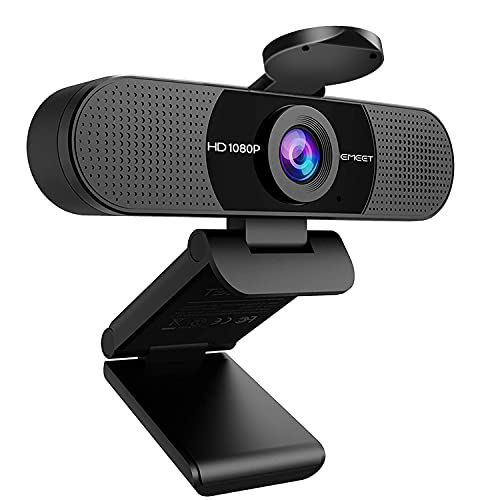
EMEET C960 — the budget USB webcam that covers the basics kindly
The third of the labelled USB trio is the budget representative: EMEET’s C960 offers 1080p call video and a pair of built-in microphones at the friendliest price point of the three, which has made it a common choice for students, occasional home workers and spare-room desks. Its image is a clear step above a typical laptop camera, its microphones spare a casual user from buying a headset, and its setup is the same plug-and-play ritual as the Logitechs’.
Its limits are the budget’s usual ones — low-light polish, build refinement — and its category is the same as theirs: a meeting camera for a computer, included here because some searches for “webcam” mean exactly this and deserve a good answer. It will not notify your phone about the cat. Nothing in this trio will. That job belongs, entirely and only, to the three network cameras above.
- Device kind: USB webcam for computers — not a network camera
- Resolution: 1080p for video calls
- Audio: dual built-in microphones
- Useful extras: plug-and-play connection, flexible clip mount
Strengths
- The gentlest price in the USB trio
- Microphones good enough to skip a headset for casual calls
- Instant compatibility with the common platforms
Trade-offs
- Low-light performance is the budget’s, not the flagship’s
- Wholly dependent on a host computer
- No surveillance capability in any form
Best for: students and occasional home workers upgrading a laptop camera cheaply.
Not suited for: monitoring a home, which requires the IP cameras at the top of this guide.
Two Categories, One Table — Read the Kind Column First
| Model | Kind | Works without a computer? | Main job |
|---|---|---|---|
| Wyze Cam v4 | IP camera | Yes | Watching spaces, day and night |
| Reolink E1 | IP camera | Yes | Whole-room indoor coverage |
| Reolink E1 Pro | IP camera | Yes | Coverage on busy networks |
| Logitech C920S | USB webcam | No | Meetings on a computer |
| Logitech Brio 101 | USB webcam | No | Everyday calls |
| EMEET C960 | USB webcam | No | Budget calls |
If a row’s second column does not match the job you walked in with, the row is not for you, however good it is. That single check prevents nearly every disappointed purchase this search phrase produces.
What Do Buyers Confuse Most Often Between These Categories?
The expensive confusion is buying a USB webcam to watch a pet, discovering it needs a computer awake and a call running to show anything at all. The reverse confusion — pointing an IP camera at a desk and expecting a meeting platform to find it — ends in adapter hunts and forum threads. A third confusion lives inside the IP category itself: assuming every camera includes free cloud recording forever, when most offer local card storage included and cloud history as a subscription. A fourth is mounting an indoor camera outside under an eave and calling it weatherproof by optimism. Each confusion is preventable by the same habit: name the job in a full sentence — “watch the nursery from my phone while the house sleeps” or “look professional on client calls” — and buy the category that answers the sentence.
Storage, Subscriptions and the Cost After the Camera
An IP camera is the rare gadget whose purchase price is the smaller half of its economics, because the footage has to live somewhere and the choices recur monthly or not at all. Local storage — a memory card in the camera — costs once, keeps footage inside your home, and overwrites its oldest hours when full, which for most households means days to weeks of rolling history depending on card size and how much motion the camera sees. Its weakness is physical: a stolen camera takes its evidence with it, and a card in a busy doorway wears faster than a card in a quiet nursery. Cloud storage answers the theft problem by keeping event clips on the maker’s servers, at the price of a subscription and of trusting that maker’s security and longevity. Recorder-based storage, Reolink’s home ground, suits multi-camera homes that want one box holding everything without a monthly bill.
Choose the arrangement by the footage’s purpose. A pet camera’s clips are entertainment and reassurance; a card suffices, and the subscription’s richer detection is a luxury. A door camera’s clips may become evidence; cloud backup earns its fee the one time it is needed. A nursery’s camera raises the privacy side of the ledger, and many parents prefer local storage precisely because the footage never leaves the house. None of the three network picks forces one answer — each supports local recording, with cloud as an addition — and that freedom, rather than any single plan’s price, is the trait to preserve when you choose. Read the current plan terms at purchase time, because detection features migrate between tiers as apps evolve, and buy the camera for the storage it guarantees locally rather than for a cloud feature that may be repriced.
Wi-Fi: The Invisible Half of Every IP Camera
More IP cameras are returned for network reasons than for camera reasons, and the diagnosis is usually distance wearing a disguise. A camera mounted at a home’s far corner may show a strong signal during setup — phone in hand, body not yet between router and camera — and then struggle at night when doors close and the household’s other devices wake. Test the actual mounting point with a phone’s Wi-Fi indicator and, better, a speed test at that spot before drilling anything. If the result is marginal, the fixes in order of cost are: move the camera or the router a few feet, since walls and appliances matter more than raw distance; add the camera to the less crowded band, which is where the E1 Pro’s dual-band support stops being a specification and becomes the solution; or extend the network with a mesh node placed halfway, not at the camera, because an extender in a dead zone extends the deadness.
Bandwidth per camera is modest for live viewing and brief clips, but a house with several cameras recording to a network recorder, plus a family streaming in 4K, should think in totals. Wired backhaul between mesh nodes, where the house allows it, is the unglamorous upgrade that makes every wireless device in the building behave, cameras included. And keep the router’s firmware and the cameras’ firmware current: a meaningful share of “camera keeps going offline” stories end at an update somebody postponed for a year.
How Do You Keep a Home Camera Private and Secure?
Begin with the account, because the account is the camera. A unique password and two-factor authentication on the Wyze or Reolink account are not optional garnish; they are the lock on every lens in the house. Use the apps’ sharing features deliberately — a partner, a pet-sitter for a defined week — and review the shared list occasionally, because access granted casually tends to persist quietly. Position cameras with the same deliberation: entrances, valuables and the pet’s territory are legitimate views; a guest bedroom is not, and a camera in a rental property’s private spaces is a legal and ethical failure regardless of its resolution.
Then use the privacy tools the cameras provide. Both ecosystems here offer modes to pause recording or turn the camera to a wall on the pan-and-tilt models, scheduling that sleeps the nursery camera during the hours the family is home and awake, and indicators that show when a camera is being viewed. In a household with children old enough to have opinions, talk about the cameras openly — where they are, when they record, who can see — because a monitoring system a family understands is a tool, and one it discovers is a grievance. The technology is neutral; the manners are the owner’s, and this guide would rather spend a paragraph on manners than pretend the question does not arise.
Night Vision, Two-Way Talk and the Features That Decide Daily Satisfaction
Night performance divides into two philosophies. Infrared vision, used by the Reolinks, lights the scene invisibly and renders it in monochrome with excellent clarity at indoor distances. Colour night viewing, the Wyze v4’s party piece, uses a sensitive sensor and whatever ambient light exists — a porch lamp, a hallway spill — to keep colours readable, which helps identify a visitor’s jacket or a pet’s whereabouts at a glance. In a truly black room, infrared is the more reliable witness; in a dim real home, colour is the more informative one. Match the choice to the room’s actual darkness rather than to the drama of the demonstration video.
Two-way audio is the feature owners underestimate until the first use: the delivery driver told where to leave a parcel, the dog corrected from the office, the elderly parent reassured without a phone hunt. Its quality depends on the room’s echo as much as the camera’s speaker, and a camera in a bare hallway will always sound like a camera in a bare hallway. Detection intelligence — distinguishing a person from a swaying curtain — is the third daily feature, and it is where subscriptions concentrate their value on the Wyze side and where Reolink’s on-device processing appeals to the subscription-averse. Set detection zones and sensitivity patiently in the first week, because a camera that cries wolf twenty times a day will be muted by Friday, and a muted camera is furniture.
Four Rooms, Four Configurations
The nursery wants a camera that watches a cot, hears a cry, and respects a family’s privacy as the child grows: an E1 or E1 Pro on a shelf, angled at the cot, local recording chosen, sleep scheduling set for family hours, and the two-way talk used sparingly for a soothing voice. The pet household wants coverage of the room the animal actually owns, event clips of the day’s adventures, and a camera mounted beyond paw and tail range — the Wyze’s toughness or a Reolink’s pan following the action, with detection tuned to the animal rather than to every passing shadow. The front door, inside or in shelter, wants the Wyze’s weather resistance and colour night view, cloud backup for evidence, and a notification discipline that alerts for people rather than for every moth in the porch light.
The small business — a shop counter, a stockroom, a salon after hours — wants the recorder path: Reolink cameras storing centrally, retention measured in weeks, and viewing rights shared to exactly the staff who need them. Across all four rooms the pattern repeats: the camera model was the easy decision, and the configuration — storage, zones, schedules, sharing — was the product. Budget an evening for that configuration with any pick in this guide, and the camera will pay it back in quiet reliability for years.
Wyze or Reolink: Two Ecosystems, Two Temperaments
Since two of the network picks share one maker and the third belongs to another, the ecosystem choice deserves its own reasoning. Wyze builds a broad, inexpensive smart-home universe — cameras, doorbells, plugs, lighting — under one friendly app, with a subscription that unlocks its cleverest detection. It suits the household that wants one app for the whole home and is comfortable with cloud services as the centre of gravity. Reolink builds a camera specialist’s universe: fewer product categories, deeper camera features, desktop software, recorder compatibility and a local-first storage philosophy. It suits the household that wants cameras to be cameras, footage to live at home, and a system that can grow from one E1 to a recorded multi-camera installation without changing platforms.
Neither temperament is a flaw. The friction appears when a buyer mixes them casually — two apps, two notification styles, two storage logics — for a single property. Pick the ecosystem whose centre of gravity matches your own, put all the property’s cameras in it, and let the other maker’s virtues remain theoretical. The USB trio, by contrast, mix freely, because a meeting camera’s ecosystem is the computer it plugs into, and that is one more structural difference between the categories this page exists to separate.
What Does “1080” Even Mean Across These Two Categories?
In the USB world, 1080p is a complete description: the call platform will likely compress it further, the meeting does not need more, and the figure has been stable for a decade because the job stopped changing. In the IP world, 1080p has become the floor of a rising staircase, because the job — identification at distance — keeps rewarding more pixels, and because a security camera’s footage is viewed by cropping into it: a face in the corner of a wide frame, a plate at the gate. When an owner zooms into a recorded clip, the resolution above 1080p stops being a specification and becomes the difference between a description and an identification.
This is why the search phrase dates itself. It was written when IP cameras were commonly Full HD and “webcam” was their casual nickname. Both halves have since moved: the cameras upward in resolution and outward into ecosystems, the word “webcam” back to its deskbound meaning. A buyer in the present market should translate the phrase before spending — “a network camera, at least Full HD class, for watching my space” or “a Full HD camera for my calls” — and then shop the translation. This guide has done that translation for you, in the open, which is why its two trios look so different from each other.
Installing an IP Camera Without Regretting the Holes
Live with the camera’s position for a day before fixing anything permanently: a temporary shelf placement, a stack of books, an evening of checking the view at the hours that matter. Confirm the frame covers the door rather than the wall beside it, confirm faces are lit rather than silhouetted by the window behind them, and confirm the night view, because a position that flatters noon may blind itself on its own infrared reflecting from a nearby surface after dark. Only then drill, and when you drill, plan the cable’s path to power with the same care as the view — a camera is a powered device, and the nearest socket often argues with the best angle until a longer cable or a moved shelf settles the negotiation.
Finish the installation in the app, not on the ladder: name the camera for its room, set its detection zone to the floor and doors rather than the whole frame, schedule its quiet hours, invite the household members who should share it, and run one deliberate test — walk the route a visitor walks, then watch the clip the camera kept. That walk is the acceptance test. If the clip identifies you clearly and the notification arrived while you were still in the room, the installation is done; if not, adjust the angle now, while the ladder is still out and the lesson is still cheap.
Troubleshooting the Three Complaints Every Camera Owner Meets
“It keeps going offline” is the first, and its causes queue in a predictable order: weak signal at the mounting point, a router band the camera dislikes, an update half-applied, or a power supply — often a borrowed phone charger — delivering less than the camera wants. Work the queue in that order, testing at each step, because the fix is in the queue nine times in ten. “Too many notifications” is the second complaint, and its cure is configuration rather than hardware: shrink the detection zone to the ground a person must cross, lower sensitivity a notch, enable person detection where your plan or camera offers it, and give the changes a day to prove themselves before adjusting again, since a camera judged hourly is a camera being tuned by anecdotes. “The night picture is foggy” is the third, and it is usually geometry: infrared light reflecting from a wall, a shelf edge or the camera’s own cable near the lens. Move the camera a few inches, angle it away from the reflecting surface, and the fog lifts as if a different camera had been installed.
Notice what none of these cures required: a replacement. The IP camera category’s dirty secret is that its hardware is mature and its failures are environmental, which is good news disguised as frustration — the camera you own is probably the camera you need, placed and configured slightly differently. The USB trio’s complaints, for contrast, are mostly optical and acoustic: a window behind you turning you into a silhouette, a room’s echo flattering nobody, a laptop lid wobbling the frame. Their cures are a turned chair, a rug, a monitor mount — a reminder that both categories reward arrangement more than expenditure.
When One Camera Becomes Three: Growing a System Sensibly
Most monitoring systems grow by accident — a second camera for the back door, a third for the garage — and the accidents go better inside one ecosystem, with one storage logic, chosen at the first purchase. That is the practical reason this guide compared Wyze and Reolink as temperaments rather than as spec sheets. Growth also changes the network arithmetic: each camera is a permanent resident of your Wi-Fi, and a house heading toward four or more should plan the mesh and the recorder questions early rather than after the third camera’s live view starts stuttering during the evening streaming peak.
Resist, however, the completionist urge to cover every corner. A camera’s value is the question it answers — who came to the door, is the baby asleep, did the dog get out — and a room with no question does not need a lens. Systems that grow by questions stay configured, watched and trusted; systems that grow by coverage become noise with a subscription attached. Start with one room’s question, configure it properly, and let the second camera be bought by a second question rather than by a sale.
The Legal and Courteous Boundaries of Watching
A home camera records more than its owner’s household: visitors, neighbours’ comings and goings at the frame’s edge, the voices of people who did not agree to be heard. Laws differ by place, and audio recording is restricted more tightly than video in many jurisdictions, so the specifics belong to your local rules — but the courtesies generalise. Point cameras at your own spaces and entrances rather than into a neighbour’s windows or garden. Tell guests a camera is present in the rooms it watches; a small sign at a door camera costs nothing and converts surveillance into security in everyone’s mind. In any property you rent out, private-space cameras are off the table entirely, full stop, whatever the local law’s letter says about disclosure.
Employers of domestic staff and carers should be equally plain: cameras in working areas, disclosed in writing, with agreed purposes, are a defensible arrangement in many places; an undisclosed camera is a breach of trust even where it is not a breach of law. The households that handle this well share one habit — they treat the camera as a member of the household’s agreements, discussed like the alarm code, rather than as a secret the house keeps from the people inside it. Technology made watching cheap; the manners still have to be supplied by the watcher.
What to Do on the Day the Camera Arrives
Charge the evening, not the week. Unbox, connect the camera to the app while it sits beside the router, apply its updates there where the signal is strongest, and only then carry it to its post. Configure the account’s security before the first clip exists: unique password, two-factor on, sharing list empty until deliberately filled. Fit the memory card before mounting if the slot will be hard to reach afterward — a detail that has generated more ladders-at-midnight than any other in this category. Run the walk-through test from the installation section, set the detection zone and schedule, and write the camera’s name, position and card size in a household note. A camera commissioned this way disappears into the home’s routine within a day, which is the highest compliment a monitoring device can earn: it is forgotten until the moment it is needed, and ready in that moment because its first evening was taken seriously.
How the Two Categories Age Over Five Years
A USB webcam ages like a good keyboard: slowly, mechanically, and mostly in the owner’s perception. Its sensor does not improve, but its job does not change, and a C920-family camera bought years ago still opens meetings today without apology. Its risks are a worn cable, a mount’s hinge loosening, a platform update that rearranges settings — annoyances, not obsolescence. An IP camera ages like a phone: its lens and sensor stay capable while its software environment moves around it, apps are redesigned, cloud tiers are repriced, and the maker’s fortunes become part of the product’s lifespan in a way no USB device’s ever are. That asymmetry argues for choosing IP cameras from makers with a durable, focused business — one reason this guide’s network trio comes from two of the category’s most established names — and for valuing local recording, which keeps a camera useful even if its cloud fashions change.
Plan the replacement rhythm accordingly. Expect a meeting webcam to serve until its mount or cable tires. Expect an IP camera to serve five or more years with its app evolving under it, and budget the occasional memory card as its only consumable. Neither expectation requires regret at purchase; both reward the buyer who knew which kind of ageing they were signing for, which returns — as everything in this category does — to naming the job correctly at the start.
A Note on Elder Care, Where These Cameras Do Delicate Work
One use deserves separate, careful mention because it is growing and because it is tender: the camera placed, with agreement, in an elderly parent’s home so a distant family can confirm that the morning happened — kettle used, hallway walked, no long stillness where stillness is wrong. Done with consent and conversation, an E1 in a kitchen or a Wyze at a door becomes a reassurance line that preserves independence longer than worry would. Done without consent, the same hardware is a betrayal that no image quality excuses. The configuration follows the ethics: shared access agreed aloud, privacy modes for personal spaces and personal hours, and the parent holding the power to pause the camera — literally, a switch they control. Families who build that agreement find the technology almost invisible afterward, which is the sign it was integrated into care rather than imposed on it.
Final Recommendation
For the search’s main meaning, buy a network camera: the Wyze Cam v4 for the most approachable all-round monitoring indoors or in shelter, the Reolink E1 for whole-room indoor coverage with local-storage freedom, or the E1 Pro when your Wi-Fi is busy or the room is large. For the search’s other meaning, buy a meeting camera and know that is what you are doing: the C920S for proven professional calls, the Brio 101 for simple modern adequacy, the C960 for the budget desk. Two honest trios, labelled at every step — because the only bad purchase available on this page is the right device bought for the other category’s job.
Frequently Asked Questions
Can I use an IP camera as a webcam for Zoom or Teams?
Not directly. Meeting platforms expect a USB or built-in camera. Workarounds exist through virtual camera software and network streams, but they are fragile and unsupported; if calls are the job, buy a USB webcam from the labelled trio above.
Can a USB webcam record my room while I am out?
No. A USB webcam only operates while a computer hosts it and software runs. Room monitoring requires an IP camera with its own network connection and storage, like the Wyze or Reolink picks.
Do IP cameras need a subscription?
Not to function. Local card recording works without one on the picks here. Subscriptions buy cloud clip history and richer person or parcel detection; whether they are worth it depends on how much you value reviewing events after the card would have overwritten them.
Why do the IP cameras exceed 1080p?
Because identification benefits from pixels. A monitoring camera may need to resolve a face or a plate across a room or drive, so the category has moved above Full HD. The 1080 in the search is best read as a minimum class, not a target.
Where should I place an indoor IP camera?
High in a corner, angled down across the room’s entrances, within honest Wi-Fi range of the router, and pointed away from windows where backlight blinds it at noon. For a pan-and-tilt model, centre it so its rotation covers doors rather than walls.
Can housemates or family members share access?
Yes, through each app’s sharing controls, and the sharing should mirror the household’s real agreements: full access for the adults responsible for the home, time-limited access for a sitter, none for anyone whose role has ended. Review the list when someone moves out or a service arrangement finishes, the same week you change the door code, because digital keys deserve the same housekeeping as physical ones.
What internet speed does an IP camera need?
Less than households fear. A single camera’s live view and event uploads fit comfortably inside the upload capacity of an ordinary home connection, and even several cameras recording events rather than streaming continuously make modest demands. The constraint that bites in practice is not the internet plan but the local Wi-Fi between camera and router, which is why this guide spends its network advice there. If your connection already carries video calls and streaming, it will carry these cameras; if a camera struggles, look at the wall between it and the router before upgrading the plan.
Can an IP camera watch through a window at night?
Poorly, and the reason is physics rather than quality: infrared night lighting reflects off glass back into the lens, fogging the view, and colour night modes fare little better through a pane. A camera intended to watch a drive or garden belongs outside the glass — in the Wyze’s case, in a sheltered outdoor position its weather resistance allows — while an indoor camera should be aimed at the room it lives in. Owners who discover this after mounting a camera behind a window have usually solved it by moving the camera six feet, not by replacing it.
How many IP cameras does a typical home actually need?
Fewer than the marketing suggests. Most households’ questions concentrate in two places — the main entrance and one interior room, usually a nursery, a pet’s room or a living area — and two well-placed, well-configured cameras answer them better than five hasty ones. Add a camera when a new, specific question appears, configure it as carefully as the first, and stop when the questions run out. A system sized to its questions stays trusted; a system sized to its anxieties becomes background noise.
Will an IP camera work during a power cut or internet outage?
During an internet outage, a camera with local card storage generally keeps recording to the card while live viewing and notifications pause until the connection returns — one more argument for fitting the card even if you also subscribe to cloud storage. During a power cut, a mains-powered camera stops with everything else unless it sits on a backup supply. If either scenario is central to your purpose, plan for it explicitly rather than discovering the behaviour during the first storm.
What memory card should an IP camera use?
Choose a card rated for continuous video recording — endurance lines exist precisely because surveillance writes constantly, and a bargain card designed for occasional photo use will tire early in a busy camera. Size it by the camera’s traffic: a quiet nursery overwrites slowly, a door camera in a busy house cycles quickly. Format the card in the camera itself after fitting it, and replace it at the first sign of recording errors rather than debating with it.
Can I view an IP camera on my television or computer?
Usually, yes. Reolink offers desktop viewing alongside its app, and many owners keep a small monitor or an old tablet showing a door camera during the day. Wyze viewing centres on its phone app, with web viewing options that have expanded over time. Check the maker’s current viewing options if a big-screen display is central to your plan, because this is one of the features that shifts as apps evolve.
Are IP cameras private?
They can be, with deliberate settings: strong account passwords, two-factor sign-in, local storage where preferred, and the camera’s privacy or sleep mode used in bedrooms. A camera is a network device; treat its account with the same care as your email’s.
Related Guides
Related reading: our guide to 1080p 60fps webcams for smoother calls and streaming, how to choose an indoor security camera for pets and nurseries, and USB webcam lighting basics for a better meeting picture.


