What's inside
As an Amazon Associate I earn from qualifying purchases. This post may contain affiliate links at no extra cost to you.
gizmoverdict.com is reader-supported. When you buy through links on our site, we may earn an affiliate commission.
Where to Buy These Cameras
All six cameras below are listed on Amazon; use the check-price button on each listing rather than trusting figures quoted in older videos, because vlogging models are discounted in waves and the renewed market moves independently. Two cautions before you buy anything in this category. First, confirm whether a listing is a body-only sale or a working kit, since one pick here arrives without a lens. Second, slow-motion specifications hide in sub-menus: a camera advertising huge frame rates may only reach them in a special burst mode, and the reviews below separate continuous 120p recording from those short high-frame-rate bursts.
Hunting the best 1080 120p vlog cameras means learning to read frame-rate claims like a lawyer. Recording Full HD at 120 frames per second lets a creator slow walking footage, gestures and product reveals to a smooth quarter-speed in a 30p timeline, and it has become the dividing line between cameras designed for vloggers and cameras merely capable of video. Yet the headline number conceals three different implementations: continuous 120p you can record until the card fills, variable-frame-rate modes that bake slow motion into the file, and burst buffers that capture a few seconds at a time.
This roundup contains all three kinds, deliberately. The two Sony ZV models record 1080/120p as an ordinary movie setting you can leave engaged for a whole segment. The DJI action camera and the Panasonic GH6 go further, reaching 240 frames per second at Full HD for even slower playback. The RX100 VII takes the burst route for its extreme rates, and the ZS99 confines slow motion to a dedicated high-speed mode. Each approach suits a different filming rhythm, and the reviews spell out which is which so the camera you buy matches the way you actually shoot B-roll. Keep that taxonomy beside you while reading the reviews, because two cameras with identical numbers on a comparison site can behave like entirely different instruments once a real filming day begins and the light starts to fail.
Key Takeaways
- Continuous 120p and burst slow motion are different tools: the ZV-1 and ZV-1 II record 1080/120p as a normal mode, while the RX100 VII reserves its highest rates for clips lasting only a few seconds.
- The DJI Osmo Action 4 is the only pick here you can mount on a helmet, dunk in a pool or strap to a chest harness, and it doubles the field at 1080/240.
- The Panasonic GH6 is a production camera that happens to vlog: unlimited recording, 1080/240 variable frame rate and professional audio options, at the cost of size and a separate lens purchase.
- The ZS99’s slow motion lives in a high-speed HD mode rather than its main movie menu, a compromise accepted in exchange for a 30x zoom in a coat-pocket body.
- Audio separates serious vlogging tools from toys in this list: microphone inputs appear on the RX100 VII, GH6 and Action 4, while the ZV pair lean on unusually good built-in three-capsule microphones.
- Slow motion eats storage and light in equal measure; budget fast cards and expect to raise ISO or add light whenever 120p becomes your default B-roll setting.
Quick Picks: Best 1080 120p Vlog Cameras
| Camera | Badge | Why it earns its place |
|---|---|---|
| Sony ZV-1 Digital Camera for Content Creators | The original creator compact | Continuous 1080/120p, a bright 24-70mm zoom and the best built-in microphone arrangement of any pocket camera here. |
| Sony ZV-1 II Premium Compact Digital Camera | Widest selfie framing | An 18-50mm zoom that fits the room behind you, continuous 1080/120p and creator touches like Cinematic Vlog presets. |
| Sony RX100 VII Premium Compact Camera (Renewed) | Pocket zoom with burst slow motion | A 24-200mm pocket camera whose extreme frame rates arrive as short HFR bursts; this listing is a Renewed unit, sold as refurbished stock. |
| DJI Osmo Action 4 Essential Combo | Slow motion that survives the action | 4K/120 and 1080/240 from a waterproof body with front and rear screens, magnetic mounts and class-leading stabilisation. |
| Panasonic LUMIX GH6 | The production-grade option | 1080/240 variable frame rate, unlimited recording and professional audio and monitoring in a body-only Micro Four Thirds flagship. |
| Panasonic LUMIX ZS99 Point and Shoot Camera | Travel zoom with a slow-motion mode | A 24-720mm travel zoom whose slow motion lives in a dedicated high-speed HD mode; the zoom is the reason to buy it. |
How We Chose These Picks
Every candidate had to offer a genuine route to slow-motion Full HD footage, a screen arrangement a solo creator can monitor, and autofocus that does not need a camera operator standing behind it. Cameras whose 120p existed only as a menu rumour or a heavily degraded crop were excluded. Priority then went to the honesty of the implementation: modes were classified as continuous recording, variable frame rate written directly to file, or buffered bursts, and that classification is stated in each review rather than smoothed over, because a creator planning a skate session needs to know whether the camera records for minutes or seconds.
Vlogging fundamentals carried the rest of the judging. A flip or articulating screen, a microphone solution that survives a breeze, stabilisation that forgives walking, and a lens wide enough for arm’s-length framing matter more to a channel than exotic codecs. Size was scored as a real feature rather than an afterthought, since the camera left at home records nothing. Finally, each pick was placed by temperament: pocket compacts for creators who film daily life as it happens, the action camera for movement sports, and the GH6 for creators whose vlog has quietly become a small production company with clients and deadlines. Weight was also scored with mounts in mind: a camera intended for a gimbal, a chest strap or a suction cup lives under different rules from one living on a desk, and the shortlist deliberately spans those worlds instead of crowning a single compromise.
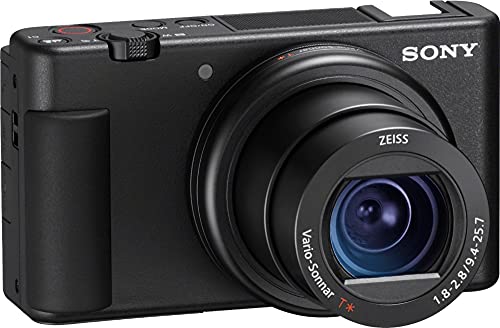
Sony ZV-1 Digital Camera for Content Creators — The original creator compact
The ZV-1 was designed from a blank sheet for exactly the person this article addresses, and its slow-motion provision reflects that focus. Set the movie mode to Full HD and 120p is simply one of the frame rates on offer, recording continuously for as long as the card and battery allow rather than rationing you to bursts. Played back at 24 or 30 frames per second, walking shots gain a floating calm, coffee pours stretch into ribbons and a hand presenting a product moves with deliberate grace. Sony also includes a separate high-frame-rate mode reaching far beyond 120p for a few seconds at reduced quality, but the headline for vloggers is that the useful rate, 120p, behaves like a normal setting.
Around that mode sits the most considered vlogging toolkit in the compact class. The 24-70mm equivalent lens opens to f/1.8 at the wide end, gathering enough light for indoor filming without heroic ISO, and its built-in neutral-density filter keeps shutter speeds sensible in bright sun. A side-opening flip screen, a prominent record button, a tally lamp and a three-capsule microphone with a supplied wind muff address the daily irritations of solo filming. The Product Showcase mode snaps focus to an object held toward the lens and back to your face when you lower it, a trick beauty and gadget reviewers use in nearly every segment.
Age shows in a few places. The menu system predates Sony’s current touch-friendly layout, the micro-USB port feels antique, battery life asks for spares on a full filming day, and there is no headphone socket for monitoring audio. The lens range also ends at 70mm, so distant subjects stay distant. None of this displaces the ZV-1 as the benchmark pocket vlogger, because its fundamentals — continuous slow motion, dependable eye autofocus, credible sound without accessories — are the fundamentals channels are built on. If your filming happens at desks, in kitchens and on city walks, this remains the reference point against which the rest of this list is measured.
A workflow detail that wins the ZV-1 long-term fans is how gracefully it hands footage to a phone. The Imaging Edge transfer sends marked clips over for same-day posting, and the camera’s vertical-video metadata means portrait clips arrive correctly oriented for short-form platforms without a desktop detour. For creators publishing daily, that friction reduction matters as much as any specification, because the channel that posts is the channel that grows, and every removed step between filming and publishing quietly compounds across hundreds of uploads over a year of consistent work.
Slow-motion practice on this body is best learned with deliberate subjects: a kettle coming to the boil, a page turning, a dog crossing the garden. At 120p those mundane motions reveal structure invisible at normal speed, and reviewing them teaches you which gestures in your own presenting style benefit from stretching and which merely become ponderous. Experienced ZV-1 owners keep a mental catalogue — pours yes, head turns no, hand reveals yes, walking to camera only in wide scenic shots — and that catalogue, more than the camera, is what polished B-roll is actually made of.
Finally, consider colour workflow: the ZV-1’s standard picture profile is tuned to flatter straight out of camera, which is why so many channels built on it never grade at all. Creators who later want a log workflow can switch to S-Log and learn grading on the same body, an upgrade path inside one purchase that cheaper compacts rarely offer without punishing noise in the shadows.
A note on stills: the ZV-1 shoots perfectly respectable photographs with its fast lens and one-inch sensor, and for channels that began as photography blogs it can be the only camera carried. Its burst rate and buffer suit family action rather than sport, but the files themselves — colour, sharpness, dynamic range in good light — hold up in print far better than its video-first marketing suggests.
- Sensor: 20.1MP 1-inch stacked CMOS
- Lens: 24-70mm equivalent f/1.8-2.8
- Slow motion: 1080/120p continuous, plus HFR bursts
- Audio: three-capsule built-in mic, mic input, wind muff included
- Screen: side-flip touchscreen
Strengths
- 120p behaves as an ordinary recording mode rather than a rationed special effect
- Built-in microphone quality reduces the accessory list for new creators
- Bright zoom and ND filter keep exposure flexible indoors and in harsh sun
Trade-offs
- No headphone output, so audio can only be checked after recording
- Dated menus and micro-USB charging betray the model’s age
- Zoom range ends at 70mm, limiting reach for events and wildlife
Best for: desk, beauty, food and city vloggers who film themselves daily and want slow motion on tap.
Not suited for: creators needing long telephoto reach, headphone monitoring or the widest possible selfie framing.

Sony ZV-1 II Premium Compact Digital Camera — Widest selfie framing
The ZV-1 II answers the single loudest complaint about its predecessor: at arm’s length the original’s 24mm wide end cropped out context and occasionally foreheads. The newer camera’s 18-50mm zoom opens dramatically wider, so a creator filming in a small apartment can show the kitchen, the desk or the workshop behind them without a wide converter or a longer arm. Slow motion carries over in the form vloggers actually use — Full HD at 120 frames per second as a continuous movie setting — so B-roll habits learned on the first camera transfer unchanged, and footage from both bodies cuts together without a workflow detour.
Sony used the redesign to modernise the shell around the sensor. USB-C replaces the old port, the menus are the current touch-oriented generation, and the Cinematic Vlog setting applies letterbox bars, a 24p cadence and curated colour looks in one tap for creators who want a filmic segment without a grading session. The three-capsule microphone and wind muff return, as do Product Showcase focus behaviour and the background-defocus shortcut. Autofocus gains Sony’s newer subject recognition, and the camera streams as a webcam over USB with noticeably less fuss than the first generation required.
The trade sits in the lens. That wider range costs maximum aperture at the long end and gives up telephoto reach entirely, ending where the original kept going to 70mm, and optical quality at 18mm asks the camera’s corrections for help around the edges. There is still no headphone socket and no viewfinder, and the single card slot remains. Choose the Mark II when your filming is wide, indoor and presenter-led — apartment tours, desk setups, travel pieces to camera in tight streets — and the original when you regularly punch in on products, faces across a room or small stage performances from the back row.
Group filming is where the Mark II’s wide lens quietly changes social dynamics: two or three people can stand around the camera at arm’s length and all appear in frame with room to spare, which suits collaboration videos, market stalls and family travel pieces where asking everyone to squeeze together breaks the moment. The wider view also forgives imperfect aiming on a mini tripod, a small mercy when you are filming yourself while cooking, building or repairing something that occupies both hands and most of your attention during the take.
Battery strategy deserves planning on this body, because 120p recording and the bright rear screen draw power briskly and the battery is the compact removable type shared with its predecessor. Two spares in the bag is the working minimum for a filming day, and USB-C power delivery means a power bank can keep a static desk setup running indefinitely — one of the practical upgrades over the first generation that owners mention most after a month of daily use.
Travel creators should weigh the Mark II’s pocketability against its appetite: it is the camera most likely to be in a jacket when an unplanned moment happens, and its 120p mode turns a rainy arcade, a night market steam cloud or a fountain square into publishable atmosphere. The specification sheet calls that convenience; audiences experience it as a channel that always seems to be somewhere interesting.
The Mark II also inherits a small but telling convenience: it can be powered and charged over USB-C while filming, so a creator recording a long desk session, a craft build or a live shopping segment need not watch a battery icon. Combined with clean HDMI output for capture cards, it doubles as a studio camera on weekdays and a pocket camera at weekends, a dual life its predecessor managed only with adapters and patience.
- Sensor: 20.1MP 1-inch CMOS
- Lens: 18-50mm equivalent f/1.8-4
- Slow motion: 1080/120p continuous recording
- Audio: three-capsule mic, mic input, wind muff included
- Connectivity: USB-C charging, streaming and transfer
Strengths
- 18mm wide end transforms arm’s-length framing in small rooms
- Continuous 120p plus modern menus and USB-C remove the original’s dated edges
- Cinematic Vlog presets give filmic segments without colour-grading skills
Trade-offs
- Zoom stops at 50mm, surrendering the reach product reviewers often need
- Aperture narrows quickly, so low-light zooming pushes sensitivity upward
- Still no headphone monitoring or viewfinder for bright-day filming
Best for: presenters filming in compact spaces who want themselves and their surroundings in frame.
Not suited for: creators who zoom on distant subjects or monitor audio through headphones while recording.

Sony RX100 VII Premium Compact Camera (Renewed) — Pocket zoom with burst slow motion
The RX100 VII is the connoisseur’s compact: a 24-200mm zoom, a pop-up electronic viewfinder and autofocus inherited from Sony’s professional bodies, all inside a jacket pocket. Its slow-motion story, however, differs fundamentally from the ZV pair above, and buyers must understand the distinction before paying its premium. The camera’s headline frame rates live in a High Frame Rate mode that records to a buffer for only a few seconds at a time — enough for a skateboard trick, a splash or a dog shaking off water, after which the camera pauses to write the clip while you watch your next moment walk away. It is a special-effects instrument, not a mode you leave running through an afternoon.
Within those bursts, quality is remarkable for the size: the stacked sensor reads out fast enough to keep rolling shutter in check, and the resulting slow motion at several hundred frames per second reveals motion no continuous mode in this list can show. Everyday vlogging is equally well served in ordinary modes, with real-time eye autofocus for people and animals, a tilting screen that faces forward, and — rare in this class — a microphone input for proper audio. The 200mm reach changes what a pocket camera can cover: stage performances, wildlife on a walk, compressed city layers at dusk.
Two honest caveats frame this listing. First, it is sold as a Renewed unit, meaning refurbished stock rather than a factory-fresh box; condition grading, included accessories and warranty terms follow the renewed programme’s wording on the listing, so read them as carefully as the specification. Second, the camera’s sophistication brings tiny controls, a menu system of real depth and a battery that heavy burst sessions drain quickly. Creators who want slow motion woven continuously through their vlogs should take the ZV models. Creators who want one pocket camera that zooms far, focuses brilliantly and produces occasional spectacular slow-motion inserts will find nothing else like it.
The Renewed question deserves one more layer of practical guidance: on arrival, run the camera through its paces within the return window — test the zoom through its range, record HFR bursts, check the screen hinge and the pop-up finder, and photograph a plain wall to look for sensor spots. Renewed units that pass a deliberate first-week inspection tend to serve as reliably as new stock, and the saving against the original retail price is what put this level of autofocus and zoom within reach of creators who could never justify it fresh.
Stills photographers sometimes overlook that this is also the strongest stills camera among the pocket picks: blackout-free bursts at high speed, single-shot autofocus that locks onto a bird’s eye, and a leaf shutter heritage in the lens design that syncs flash at speeds ordinary compacts cannot reach. A creator whose channel mixes photography tutorials with video will find the RX100 VII covers both crafts without the compromises that force the ZV models’ owners to carry a second body for serious still work.
One underappreciated RX100 VII trick is its minimum focus behaviour at the wide end, which lets it film a product or a flower filling the frame before the zoom carries the same shot out to a distant subject. That single-lens storytelling range, from macro-ish detail to 200mm compression, is why documentary-minded creators keep one in the bag beside far larger systems that cannot match its discretion in museums, markets and places where big cameras attract officials.
- Sensor: 20.1MP 1-inch stacked CMOS
- Lens: 24-200mm equivalent f/2.8-4.5
- Slow motion: HFR mode, short buffered bursts at very high frame rates
- Audio: microphone input, no headphone output
- Condition: Renewed (refurbished) listing
Strengths
- Ten-times zoom range in a body that genuinely fits a pocket
- Professional-grade autofocus tracking for people and animals
- Burst slow motion reveals fleeting action invisible to continuous modes
Trade-offs
- HFR clips last seconds and force a wait while the buffer writes
- Renewed stock means condition and accessories follow the refurb programme, not a new box
- Small controls and deep menus slow down beginners
Best for: experienced creators wanting reach and occasional dramatic slow-motion inserts from one pocket camera.
Not suited for: vloggers who record 120p continuously or anyone uncomfortable buying refurbished stock.
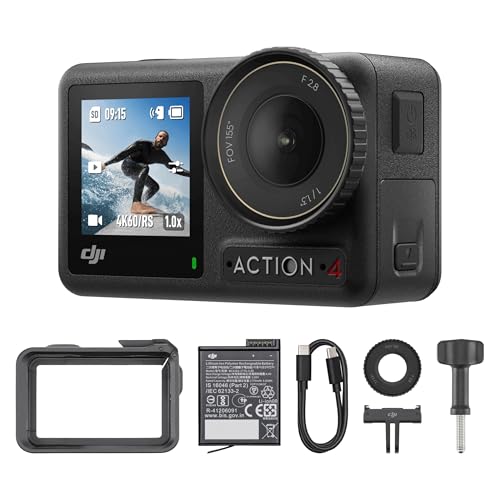
DJI Osmo Action 4 Essential Combo — Slow motion that survives the action
Every other camera in this roundup assumes the action happens in front of a tripod or at the end of an arm. The Osmo Action 4 assumes the action is the point. It records 4K at 120 frames per second and doubles down at Full HD with 240, so a mountain-bike descent, a surf session or a snowboarder’s run can be slowed to an eighth of real speed while retaining the wide, immersive framing action cameras are known for. The large 1/1.3-inch sensor is the quiet revolution here: low-light footage at dawn trailheads or in indoor skate parks holds together where older action cameras dissolved into noise.
The vlogging credentials are more serious than the rugged shell suggests. A front touchscreen lets you frame yourself on a chest or helmet mount, the magnetic quick-release system moves the camera between mounts in seconds, and RockSteady stabilisation smooths footage that would be unwatchable from a compact camera on the same trail. DJI’s microphone ecosystem connects wirelessly for presenters who narrate while moving, and the camera is waterproof as sold, with no housing to fog or muffle sound. Vertical shooting modes acknowledge that much action content now publishes to portrait-format platforms first.
Its limits are the format’s limits. The fixed ultra-wide lens distorts faces held close, there is no optical zoom for framing distant subjects, and stills photography is a sideline rather than a strength. Battery swaps are easy but the camera’s talents encourage recording everything, so storage fills at a pace that surprises newcomers to high frame rates. Buy the Action 4 when your channel’s stories involve motion, weather or water; the slow motion is not a garnish here but the native language of the footage, and no pocket compact in this list can follow it where it goes.
Mounting versatility is the Action 4’s hidden curriculum. The magnetic latch accepts chest, helmet, handlebar and suction mounts, and because the camera is small and tough, creators place it where a compact would never survive: on a paddle, inside a goalmouth, under a skateboard. Slow motion from those angles looks genuinely new rather than merely slower, which is why action channels treat placement as their signature. Spend an afternoon experimenting with mounts before the trip that matters; the footage from odd angles is usually what an audience remembers and shares.
Cold and heat behaviour also favour this body in its niche: batteries are swappable in seconds with gloves half-off, the lens cover is replaceable after the inevitable gravel strike, and the touchscreen responds to wet fingers better than most. None of that appears in frame-rate tables, yet it decides whether the camera is running at the summit or the shoreline when the light turns good. Ruggedness is a creative feature on an action camera, because it determines which moments get filmed at all.
Heat management in the Action 4 benefits from its element: wind over a bike mount or water against the case sheds warmth that desk cameras must radiate into still air. Long 4K120 recordings on a static tripod in summer sun are the stress case, and even there the camera warns before it stops rather than corrupting a file. For most action uses, battery changes arrive long before thermal limits become the story of the day.
For vloggers who narrate while moving, the Action 4’s wind handling deserves respect: the internal microphones cope with moderate airflow better than most compacts, and pairing DJI’s wireless microphone turns a windy summit commentary into clean, level speech. That combination — rugged body, credible voice audio, slow motion — is why travel channels that once carried a compact and an action camera increasingly carry this alone.
- Sensor: 1/1.3-inch CMOS
- Video: 4K/120, Full HD up to 240fps
- Body: waterproof to recreational depths without housing
- Screens: front and rear touchscreens
- Mounting: magnetic quick-release system
Strengths
- 240fps Full HD slow motion built for sport and movement
- Waterproof, mountable body goes where compacts cannot follow
- Front screen and stabilisation make solo action vlogging practical
Trade-offs
- Fixed ultra-wide lens distorts close faces and offers no zoom
- High frame rates consume cards and batteries at a startling pace
- Still photography plays a distant second to video
Best for: cyclists, skiers, surfers, skaters and travel creators whose vlogs move fast and get wet.
Not suited for: desk-based presenters needing natural facial rendering and zoom flexibility.

Panasonic LUMIX GH6 — The production-grade option
The GH6 is what happens when a vlog grows into a production. Its variable frame rate mode records Full HD at up to 240 frames per second with sound considerations handled properly, writing slow motion directly to file for as long as the card allows — no bursts, no buffers, no rationing. Around that capability sits the most complete video toolset in this article: unlimited recording times backed by an internal cooling fan, 10-bit internal colour, waveform and vectorscope displays, four-channel audio recording with an accessory interface, full-size HDMI and dual card slots across CFexpress and SD formats. This is a camera specified by people who deliver footage to clients.
For the solo creator, the practical gifts are reliability and monitoring. The fan means a summer talking-head session does not end in a thermal shutdown warning; the tilting and rotating screen articulates without disturbing cables on the side ports; the body is weather-sealed and built around a magnesium shell that shrugs off location work. Autofocus is the debated point: Panasonic’s contrast-based system with depth-from-defocus is dependable for presenters and products, and it has improved through firmware, yet it lacks the phase-detection tenacity of the Sony compacts for erratic subjects moving toward the lens.
Remember that the GH6 listing here is a body: a Micro Four Thirds lens is a mandatory companion purchase, and the combined weight moves this setup out of the pocket category entirely and into a camera bag with intent. That is the honest framing. Choose the GH6 when your vlog involves interviews, products for sponsors, event coverage or any footage someone pays for, and when slow motion is a regular production ingredient rather than a novelty. Its Micro Four Thirds mount also opens a vast, comparatively affordable lens library, so the system grows gracefully once the initial commitment is made.
Post-production is where the GH6’s depth repays its learning curve. Its log profiles grade alongside footage from larger cinema cameras, the waveform stops exposure guesswork on location, and timecode provisions let multi-camera interviews sync without clapping rituals. A vlogger may never touch half of this, but a creator graduating to sponsored work discovers each feature exactly when a client brief demands it, which is the definition of a camera that grows with a business rather than being replaced by one.
Lens choice shapes the GH6 vlogging experience more than any menu setting. A compact wide zoom keeps the rig walkable for travel pieces, while fast primes turn it into a low-light interview machine; the mount’s depth means both can be bought used at civilised prices. Owners who plan their first two lenses alongside the body avoid the common trap of a flagship camera permanently wearing a slow kit zoom that hides everything the sensor can do.
Solo operators should also note the GH6’s tally lamps, custom frame markers for vertical and square crops, and the ability to punch in for focus checking while recording continues. These are working professional’s details, invisible in a headline specification, and they are why this camera appears on small commercial sets far more often than its sensor size would predict. It behaves like a crew camera that happens to be operable by a crew of one.
One caution for GH6 buyers filming in mixed company: its size reads as professional equipment, and venues that wave through a pocket compact may ask questions of a rigged GH6 with a matte box and microphone. The discretion gap between this and the compacts in this list is real, and creators filming in sensitive locations should weigh it alongside the capability gap rather than discovering it at a doorway.
- Sensor: 25.2MP Micro Four Thirds
- Lens included: none, body only
- Slow motion: Full HD variable frame rate to 240fps
- Recording: unlimited duration, active cooling
- Audio: four-channel capability with accessory interface
Strengths
- Continuous high-frame-rate recording with no thermal drama
- Professional monitoring, audio and media options in a still-portable body
- Enormous, comparatively affordable Micro Four Thirds lens ecosystem
Trade-offs
- Body-only sale makes the true starting cost higher than the listing suggests
- Contrast-based autofocus trails Sony rivals on unpredictable moving subjects
- Size and weight end any notion of pocketable filming
Best for: semi-professional creators filming interviews, sponsored products and events as paid work.
Not suited for: casual daily vloggers who want a camera that disappears into a jacket pocket.

Panasonic LUMIX ZS99 Point and Shoot Camera — Travel zoom with a slow-motion mode
The ZS99 earns its place in a slow-motion roundup with an asterisk that must be printed in full size. Its high frame rates are not part of the main movie mode at all: they live in a dedicated High Speed Video mode recording at HD resolution, designed for analysing a golf swing, capturing a pet’s leap or slowing a street performer’s flourish for a few shareable seconds. That is a narrower promise than the continuous 120p offered by the Sony pair, and this review will not pretend otherwise. What the ZS99 offers in exchange is the one capability no other pick approaches: a 30x zoom, running from 24mm to 720mm equivalent, inside a camera that slips into a coat pocket.
For travel vloggers that trade can be rational. A single pocketable body covers wide street scenes, portraits with genuine background compression and distant details — a lighthouse, a performer across a square, wildlife on a safari drive — that a 50mm-limited vlogger compact simply cannot frame. The tilting screen faces forward for pieces to camera, 4K video is available for main footage, and Panasonic’s post-focus and 4K Photo modes rescue stills from moments that moved too fast for a shutter press. As a holiday storytelling machine it is coherent and undemanding.
The small 1/2.3-inch sensor sets the ceiling: low-light footage softens early, the high-speed mode’s HD resolution shows its limits on large screens, and there is no microphone input, so narration in wind depends on sheltered positioning and post-production rescue. Buy the ZS99 when zoom range and pocketability lead your travel filming and slow motion is an occasional garnish for a swing, a splash or a skate trick. Buy the ZV-1 II when slow motion and sound quality are the main event and your subjects stay within a few metres of the lens.
Holiday logistics quietly favour the ZS99: one small charger, one pocketable body, no lens changes on windy beaches and no bag to guard at café tables. Families filming a trip rather than producing a channel often value that invisibility above image-quality margins they would never inspect. The camera also starts fast and its zoom motor covers the range smoothly for video pans, provided you zoom slowly enough to keep the small sensor’s stabilisation composed and the footage free of the wobble that hurried focal changes introduce.
A realistic way to use its high-speed mode on holiday is sparingly and deliberately: the hotel pool dive, the market juggler, the cable-car swing. Two or three planned slow-motion clips per trip, shot in bright light where the small sensor is happiest, will look better in the final edit than an afternoon of hopeful high-speed recording in dim streets. The ZS99 rewards that discipline because its ordinary 4K footage, not its special mode, is what most of your travel film will be built from.
Charging and media keep the ZS99 firmly in holiday territory: USB charging from the same power bank as a phone, one inexpensive SD card for a fortnight of mixed shooting, and a battery small enough that carrying two spares costs less pocket space than a passport. The whole ownership experience is deliberately frictionless, which for its intended owner is not a compromise but the entire proposition of the camera.
Parents filming children on holiday often become the ZS99’s happiest owners: the zoom reaches across a sports field or a stage, the screen flips for the family selfie video, and nobody needs to learn what an aperture is. Its high-speed mode slows a child’s first dive or a grandparent’s dance just enough to delight the family group chat, which is a legitimate measure of success for a camera bought to keep memories rather than to build an audience.
- Sensor: 20.3MP 1/2.3-inch CMOS
- Lens: 30x zoom, 24-720mm equivalent
- Slow motion: dedicated High Speed Video mode at HD resolution
- Video: 4K30 main movie mode
- Screen: tilting, faces forward for selfies
Strengths
- Thirty-times zoom covers subjects no other pick in this list can reach
- Pocketable body with a selfie-friendly tilting screen
- 4K Photo modes pull sharp stills from fleeting moments
Trade-offs
- Slow motion is confined to a separate HD mode, not continuous 1080/120p
- Small sensor limits low-light video quality noticeably
- No microphone input for upgrading travel audio
Best for: travellers who want one pocket camera for scenery, distant subjects and occasional slow-motion clips.
Not suited for: creators building a channel around 120p B-roll or filming mainly after dark.
Comparison Table
| Camera | Defining traits |
|---|---|
| Sony ZV-1 | 20.1MP 1-inch sensor, 24-70mm f/1.8-2.8 lens, continuous 1080/120p, side-flip screen, three-capsule microphone. |
| Sony ZV-1 II | 20.1MP 1-inch sensor, 18-50mm f/1.8-4 lens, continuous 1080/120p, USB-C, Cinematic Vlog mode, touchscreen menus. |
| RX100 VII (Renewed) | 20.1MP 1-inch stacked sensor, 24-200mm zoom, HFR burst slow motion, pop-up viewfinder, microphone input. |
| Osmo Action 4 | 1/1.3-inch sensor, 4K/120, 1080/240 slow motion, waterproof without a case, dual touchscreens, RockSteady stabilisation. |
| LUMIX GH6 | 25.2MP Micro Four Thirds, body only, 1080/240 VFR, unlimited record times, full-size HDMI, CFexpress plus SD slots. |
| LUMIX ZS99 | 20.3MP 1/2.3-inch sensor, 30x 24-720mm zoom, 4K30 video, high-speed HD slow-motion mode, tilting selfie screen. |
Which Slow-Motion Implementation Fits the Way You Film?
Frame rate on a specification sheet is a single number; frame rate in practice is a workflow. Before choosing, decide whether slow motion is your channel’s house style, an occasional garnish or a sports-analysis tool, then match that answer to the three implementations in this roundup. The sections below walk through the decision in the order experienced creators make it.
Separate continuous modes from burst modes first
A continuous 120p mode changes how you film an entire day: you can leave the camera in that setting for a market walk, a cooking sequence or a workshop build, knowing every clip can be slowed in the edit. Burst systems demand foresight — you arm the mode, wait for the moment, and accept a write-out pause afterwards. Neither is wrong, but they serve different temperaments. Spontaneous filmmakers should weight the ZV pair, Action 4 and GH6 heavily; planners who stage their slow-motion moments can happily exploit the RX100 VII’s more extreme rates.
Do the playback arithmetic before filming
Slow motion is a ratio, not a feeling. Footage shot at 120 frames per second and played in a 30p timeline runs at quarter speed; in a 24p timeline it runs at one fifth. At 240 frames per second those become one eighth and one tenth. Quarter speed flatters walking and gestures while keeping a scene’s rhythm recognisable, which is why 120p is the workhorse rate for vlogging. Reserve 240 for genuinely fast subjects — wheels, water, blades, balls — because everyday actions stretched that far turn languid and strange, and the storage bill arrives regardless.
Feed high frame rates the light they demand
Doubling the frame rate halves the light each frame can gather at a given shutter angle, so 120p footage shot indoors at the same settings as your 30p material will be noisier or darker unless you compensate. Practical fixes are mundane: film slow motion near windows, open the aperture, add a small LED panel for desk work, or accept a higher ISO from the larger sensors in this list. The Action 4 and GH6 tolerate that sensitivity rise best; the ZS99’s small sensor is where high-frame-rate ambitions go to be humbled after sunset.
Plan cards and batteries around the mode, not the camera
A day shot mostly at 120p or beyond consumes storage several times faster than the same day at 30p, and the processing load shortens battery life on every body here. Carry at least twice the card capacity your normal vlogging day requires, choose cards whose sustained write speed matches the camera’s highest bit rates, and rotate batteries before the camera forces the issue mid-sequence. Creators who treat slow motion as their default B-roll setting learn this arithmetic once, expensively, or plan for it from the start.
Match the camera to your editing patience
High-frame-rate footage multiplies edit decisions: every clip needs a speed choice, sound needs replacing or designing, and timelines fill with material that must be reviewed at two speeds. Creators who edit on a phone between other jobs should favour cameras whose ordinary footage already looks good, using slow motion as punctuation. Creators with a desktop workflow and time to grade will extract the GH6’s full value. Be honest about which editor you are on a tired Tuesday evening, because that person, not your ambitious Sunday self, will process most of what you shoot.
Think about where the camera points at rest
Vlogging cameras spend most of their lives on desks, dashboards and mini tripods waiting for a moment, and small design choices govern that life: whether the screen can stay flipped out without blocking a microphone shoe, whether cables exit without bending at cruel angles, whether the record button can be found by touch. The ZV bodies were arranged around exactly these indignities, the GH6 around cable discipline on a rig, and the Action 4 around being grabbed one-handed. Judge your shortlist at rest as well as in motion, because friction in the boring moments is what quietly ends daily filming habits.
What Mistakes Do Buyers Keep Making Here?
Believing the biggest frame-rate number on the box
Marketing leads with the most extreme figure a camera can reach under any conditions, which is how a burst mode of a few seconds ends up compared against a rival’s continuous recording. Always ask three questions of any slow-motion claim: at what resolution, for how long, and with autofocus and sound or without. The answers, all stated in the reviews above, separate the tools from the party tricks.
Filming everything in slow motion just in case
New owners of 120p cameras often record entire days at high frame rates, then face an edit where nothing has natural sound, every clip needs speed decisions and the storage is gone. Slow motion is seasoning. Shoot your dialogue and establishing material at normal rates with clean audio, and reserve high frame rates for the moments whose motion genuinely deserves stretching: pours, splashes, tricks, reveals and arrivals.
Ignoring shutter speed flicker under artificial light
High frame rates under mains-powered lighting can produce pulsing bands in footage, because the light itself flickers at the supply frequency. The cure is to match shutter speeds to your region’s mains frequency or to film slow motion under daylight and flicker-free LED sources. Discovering banding across a day’s B-roll is a rite of passage best skipped by testing one clip under your actual room lights before the real shoot.
Forgetting that slow motion silences the moment
Most high-frame-rate modes record without usable audio, and even where sound exists it cannot be slowed gracefully with the picture. If the laugh, the splash or the engine note matters to the scene, record a separate normal-speed clip for its sound or capture wild audio on a phone. Editors rebuild slow-motion soundtracks from such fragments constantly, but only when someone remembered to record them.
Holding the camera at full arm stretch for every clip
Slow motion magnifies camera shake along with subject motion, and a fully extended arm is the least stable mount a vlogger owns. Tuck elbows in, use a short grip or mini tripod as a handle, and let the stabilisation in these bodies work from a steadier starting point. The difference between floaty professional B-roll and queasy amateur footage is usually posture, not equipment.
Final Recommendation
For most vloggers the Sony ZV-1 II is the balanced answer: continuous 120p, the widest selfie framing here, modern connectivity and sound that needs no accessories. The original ZV-1 remains the value alternative with a longer lens, the Action 4 owns anything involving speed or water, the GH6 serves creators whose channel has become a business, the RX100 VII rewards planners who want reach plus spectacular inserts, and the ZS99 suits travellers who prize zoom over slow-motion purity. Between the two Sonys, let your rooms decide: wide lenses forgive small spaces and group filming, while the original’s longer zoom serves solo presenters who demonstrate objects at a distance and prefer money left over for lighting, which improves a channel’s look more reliably than any camera body swap at this level.
Pick the camera whose slow-motion mode matches the rhythm of your filming days, because the best 120p camera is the one still recording at the speed you need when the moment you wanted finally happens.
Frequently Asked Questions
Does 120p footage work in a normal 24p or 30p project?
Yes, and that mismatch is precisely the point. Interpreted at the project rate, 120p material plays back at one fifth or one quarter speed respectively, producing smooth slow motion from real time. Alternatively, a 120p clip can be conformed to play at normal speed with frames to spare for stabilisation or reframing, which editors use to rescue shaky B-roll.
Why does my slow-motion footage look grainy indoors?
Each frame at 120p receives a quarter of the exposure time available at 30p, so the camera compensates with sensitivity, and small sensors show that cost first. Add light, open the aperture, or move the slow-motion work outdoors. Among these picks the GH6 and Action 4, with their larger sensors, hold up best when the light falls.
Can I livestream or use these as webcams?
The Sony ZV models and the GH6 support USB streaming for desk-based creators, and the Action 4 joins calls through its own USB mode. Slow-motion modes do not apply to streamed output, which leaves the camera at standard rates, but the lens quality and autofocus still lift the picture far beyond a laptop camera for lessons, meetings and live shopping segments.
Is the Renewed RX100 VII a risky purchase?
Renewed stock is refurbished and graded under the programme described on the listing, so the sensible approach is procedural rather than fearful: read the condition wording, confirm what accessories are included, and check the return terms before ordering. Many creators buy renewed bodies deliberately as second cameras. What you should not do is assume a factory-fresh box or a new-camera warranty without the listing saying so.
Which camera here records slow motion with sound?
Continuous modes on the Sony ZV pair and the GH6 can retain audio at high frame rates depending on the exact setting, while burst high-frame-rate modes generally record without usable sound. Treat audio at 120p as a bonus to verify in your chosen model’s manual rather than a given, and plan separate sound recording for any moment whose noise is part of the story.
Do I need 120p if my platform plays at 30p?
The delivery rate does not waste the capture rate: the extra frames are what allow smooth quarter-speed playback inside that 30p stream, and they give the editor freedom to stabilise or re-time moments. What you do not need is 120p for talking segments, where it adds storage cost and removes natural motion blur while contributing nothing an audience can perceive.
Related Guides
Creators weighing their next step can compare the field in our action camera stabilisation showdown, then work through the desk audio upgrades that transform vlog sound, and finally plan a kit with the creator bag packing guide before committing to a full setup.
Related guides
- Best Airbnb Security Cameras: Compliant Outdoor Cameras and Noise Sensors for Hosts
- Best 400 FPS High Speed Cameras: The Honest Truth About Burst Slow Motion
- Best Kids Smartwatches for Texting and Calling: Six Watch-Phones Under Parent Control
- Best Fast Charge Qi Wireless Chargers: Qi2 at 15W and Qi2.2 at 25W


