What's inside
- Key Takeaways
- Quick Picks: Affordable PC Gaming Headsets at a Glance
- How Did We Choose These PC Headsets?
- USB or 3.5mm on PC: What Actually Changes?
- The Software Layer: Sonar, G Hub, NGENUITY and Friends
- How Do the Six PC Headsets Compare Side by Side?
- How Do You Set Up a PC Headset for Discord and Streaming?
- What Mistakes Do PC Headset Buyers Make?
- Equalisation on PC: A Beginner’s Map That Actually Helps
- The Desk Itself: Ergonomics Nobody Puts on the Box
- What About Audiophile Headphones and a ModMic-Style Setup?
- Troubleshooting: The Four PC Headset Complaints and Their Real Causes
- When Does a PC Player Outgrow This Class?
- Final Recommendation
- Frequently Asked Questions
- Related Guides
As an Amazon Associate I earn from qualifying purchases. This post may contain affiliate links at no extra cost to you.
gizmoverdict.com is reader-supported. When you buy through links on our site, we may earn an affiliate commission.
Where to buy: each headset below links to its Amazon listing, where you can check the current price on Amazon, confirm the connector arrangement in the title, and verify what cables and adapters are in the box before ordering.
The best affordable gaming headsets pc players can buy are a different shortlist from the console world’s, even where the hardware overlaps, because a PC changes what a headset is. On a computer, the headset is one citizen of a software city: Discord owns the conversation, the game owns the soundscape, a streaming tool may be listening to both, and the headset maker’s own application wants a say in equalisation, surround processing and microphone behaviour. Affordable on PC therefore does not mean merely inexpensive. It means the whole arrangement — drivers, microphone, connection and software — composes into something a PC player can set up once and then forget, at a price that leaves money for the games.
Two connection philosophies divide this guide, and choosing between them is the first real decision. A USB headset carries its own digital audio path: it arrives with a DAC in the chain, offers the maker’s surround processing and microphone handling as designed, and behaves identically on every machine it visits. A 3.5mm headset is a pure analogue instrument: simpler, universally compatible, dependent on the PC’s own audio hardware and software for any processing. Neither is the correct answer in the abstract. USB suits players who want the maker’s complete recipe and a consistent voice across machines; analogue suits players with good onboard audio, an existing software setup, or a second life for the headset at a controller.
The six picks below are all wired, which on PC is less a limitation than it sounds — the desk is right there, the cable doubles as a guarantee of zero-latency audio and a microphone that never dies mid-raid, and the budget that wireless would spend on radios goes into drivers and capsules instead. Within that wired field, the picks spread across the PC player’s real priorities: one all-round champion, one esports featherweight, one software-rich design piece, one surround specialist, one microphone that thinks it belongs in a broadcast booth, and one comfort instrument for the longest sessions. Read for your priority; the ranking follows the generalist’s order.
Key Takeaways
- HyperX Cloud III is the PC all-rounder: USB for the desk with its processing, 3.5mm in reserve, and a detachable microphone that leaves a clean pair of headphones behind.
- Corsair’s HS80 RGB USB is the stretch pick, bought for a broadcast-quality microphone that streamers and heavy Discord users will feel every day.
- Logitech G432 is the surround specialist, with DTS Headphone:X 2.0 over USB and 50mm drivers at an honest mid-class position.
- Razer BlackShark V2 X brings the esports brief to PC: 240 grams by its listing and a cardioid microphone tuned for callouts.
- SteelSeries Arctis Nova 1 plugs into the Sonar software ecosystem, the most playful audio toolbox in this guide.
- Logitech G335 is the comfort answer for marathon sessions and glasses, with flip-to-mute simplicity and no software at all.
Quick Picks: Affordable PC Gaming Headsets at a Glance
| Pick | Badge | Why it made the cut |
|---|---|---|
| HyperX Cloud III | Best All-Round PC Headset | USB-C, USB-A and 3.5mm wiring, memory foam comfort and a detachable mic — the complete desk citizen. |
| Corsair HS80 RGB USB | Best Microphone, Stretch Pick | A broadcast-quality microphone brief, Dolby Audio 7.1 processing and memory foam, at the top of the affordable frame. |
| Logitech G432 | Best Surround on a Budget | DTS Headphone:X 2.0 via its USB path, 50mm drivers and a flip-to-mute mic in Logitech’s G ecosystem. |
| Razer BlackShark V2 X | Best for Competitive Play | TriForce Titanium 50mm drivers and a HyperClear cardioid mic in a frame its listing puts at 240 grams. |
| SteelSeries Arctis Nova 1 (White) | Best Software Playground | Nova design in white, with SteelSeries’ Sonar suite giving PC players deep, game-by-game audio control. |
| Logitech G335 | Best for Marathon Comfort | A suspension-fit featherweight with memory foam pads and flip-to-mute, kind to glasses and long evenings. |
How Did We Choose These PC Headsets?
The shortlist was built from the PC outward. Every pick had to earn its place in a desktop ecosystem, which meant weighing things console guides can ignore: whether the maker’s PC software is a help or a hostage situation, whether the microphone survives Discord’s processing with its clarity intact, whether the connection story suits a machine that may be a hand-built tower, a gaming laptop or both across a week. Headsets that are merely console products with a PC mention were passed over in favour of models whose makers maintain real PC software and real PC intentions.
The spread across the six is deliberate. Two Logitechs appear because they answer different questions — one about surround processing, one about comfort — and no other brand’s pair divides the territory as cleanly. Corsair’s HS80 is included as the honest stretch: the guide would be poorer if it pretended the affordable frame had no upper edge worth reaching for, and the microphone difference there is the largest single-step improvement available within reach of this budget. As everywhere in this batch of guides, surround claims are treated as processing over two drivers, and figures quoted are the listings’ own.
USB or 3.5mm on PC: What Actually Changes?
More than the plug shape. A USB headset defines its own audio device in Windows, which means the game’s sound and your voice travel a path the maker controlled end to end: the conversion from digital happens in the headset’s chain, the surround processing is the maker’s recipe, and the microphone’s level and character are consistent whether the headset is plugged into your tower or a borrowed laptop. For players who move between machines, or whose PC’s analogue jack is noisy — a real phenomenon on some front panels, where interference from the machine’s internals leaks into the audio — USB is not a preference but a fix.
The analogue path has its own honours. A 3.5mm headset works with everything, including the controller on the sofa and the handheld in a bag, and it lets the PC’s own ecosystem — a good motherboard’s audio, a dedicated sound solution, or software you already own — do the processing to your taste rather than the headset maker’s. It also never asks you to install anything. The practical test: if your current analogue jack sounds clean and you already live in a software ecosystem you like, analogue picks lose nothing. If your front-panel jack hisses, or you want the maker’s surround and microphone recipe exactly as designed, take USB — and note that the Cloud III, characteristically, refuses the dilemma by including both.
The Software Layer: Sonar, G Hub, NGENUITY and Friends
PC headsets arrive with applications, and the applications are part of the product whether the listing dwells on them or not. SteelSeries’ Sonar, bundled into its GG platform, is the most ambitious here: per-game equalisation, a genuinely capable spatial audio implementation, and microphone processing with noise management that can rescue a voice from a loud room. Logitech’s G Hub serves the G432 with DTS processing and profile management shared across the G ecosystem. HyperX’s NGENUITY handles the Cloud III’s settings with a lighter touch. Corsair’s iCUE governs the HS80 alongside the rest of a Corsair desk, for better and for ecosystem weight.
The mature way to treat these suites is as seasoning, not as the meal. Install one, set the equaliser and microphone once, save the profile, and then judge the headset on the months that follow, during which the application should be invisible. Players allergic to background software should weight the analogue picks and the G335’s blessed softwarlessness accordingly. Players who enjoy shaping their audio per game will find Sonar’s depth a genuine reason to choose the Nova 1 over rivals it otherwise merely matches. Software is a tiebreaker with real weight — just never let it outrank the microphone and the fit, which you will use in every session, over features you will use in every settings menu.

HyperX Cloud III — Best All-Round PC Headset
On PC, the Cloud III’s party trick is completeness of citizenship. It connects by USB-C or USB-A at the desk, where its digital path handles surround processing and its microphone behaves exactly as HyperX tuned it, and it keeps a 3.5mm life in reserve for the controller, the laptop’s analogue jack, or the day you lend it to a console player. The frame is the line’s traditional tank — metal-reinforced, memory-foam cushioned, indifferent to being dropped on a desk ten thousand times — and the microphone detaches, which on a PC desk matters more than anywhere: the headset becomes your work-call and music headphones without a boom photobombing your video meetings.
Its sound signature suits the PC library’s breadth: controlled, present bass for the cinematic titles, a forward midrange that keeps Discord voices and in-game dialogue intelligible over the action, and none of the shrillness that makes long sessions fatiguing. The detachable microphone sits among the clearest in the affordable class, with a mute indicator you can see — a detail whose value compounds across every meeting and match. Other picks in this guide beat it at single things: the HS80’s microphone, the G432’s surround focus, the BlackShark’s weight. None of them assembles the whole desk life — game, call, music, second machine — as completely for the money, which is why it leads a PC ranking just as it leads the general one, on different evidence.
Consider the working week of a typical owner, because that is where this pick separates itself. Monday, the microphone is on for stand-up calls and off for focus music, the headset indistinguishable from office equipment. Wednesday, it is in a laptop bag’s side pocket — no, it is not, it is wired and stays home, but its twin connections mean the laptop at the kitchen table gets the same voice as the tower at the desk. Friday night, the boom returns for the raid. A headset that must be swapped out for any of those roles generates a second purchase; the Cloud III’s completeness is the absence of that second purchase, which is the most affordable property a PC headset can have.
- Connection: USB-C, USB-A and 3.5mm — every desk scenario covered
- Microphone: detachable, with visible mute indication
- Fit: memory foam cushions on a durable reinforced frame
- Software: HyperX NGENUITY for settings and profiles
Strengths
- The only pick that is equally at home on the gaming PC, the work laptop and the controller.
- Detachable microphone and cable make its wear parts renewable and its desk life flexible.
- Build quality that treats years of daily use as the design brief.
Trade-offs
- Its microphone, while excellent, is outclassed by the HS80’s broadcast brief.
- NGENUITY is functional rather than beloved; Sonar users get the richer playground.
- Wired only — the desk is its kingdom, the commute is not.
Best for: PC players who want one headset for gaming, calls and everything between. Not suited for: streamers whose microphone is a production tool — that is the HS80’s brief.
Corsair HS80 RGB USB — Best Microphone, Stretch Pick
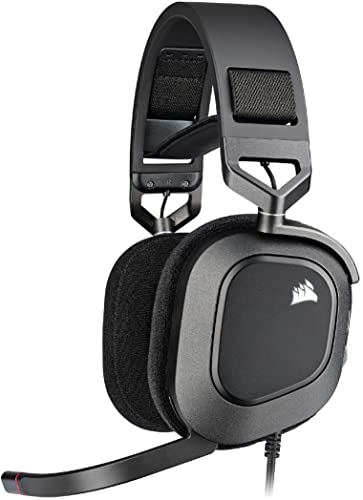
The HS80 RGB USB is in this guide under a declared flag: it stretches the affordable frame, and it earns the stretch with one component. Its microphone is specified to a broadcast-quality brief, and in practice it captures a voice with a fullness and proximity that makes teammates and stream audiences hear a person rather than a headset. For the player who streams, records, leads a raid or simply spends their evenings in Discord, that microphone is not a luxury — it is the product, and everything else about the HS80 is a well-executed supporting cast: memory foam earpads, a sturdy frame, Dolby Audio 7.1 processing over its USB connection, and on-ear controls where your hand expects them.
The USB-only connection is the honest price of the design: this is a PC instrument, wired to the desk, with no analogue second life at a controller. Corsair’s iCUE software runs its settings and its lighting, which integrates beautifully into an all-Corsair setup and merely adequately into anyone else’s. Weigh the purchase as a microphone acquisition with a headset attached. If your voice is content — streamed, recorded, or simply central to how your group plays — the stretch pays for itself in the first week. If your voice is occasional, the same money is better distributed across the Cloud III’s completeness. The guide’s job is to make that fork visible; the HS80 is the finest microphone affordable PC gaming offers below the professional tier.
One practical consequence follows streamers around: because the HS80’s microphone does the heavy lifting, the rest of a budget streaming setup gets easier. The noise suppression and gain staging that lesser capsules need to sound acceptable can be run gentler here, preserving a natural voice, and the headset’s own sidetone monitoring lets its owner hear exactly what the audience hears. Players graduating from a lesser headset often describe the change as their whole channel sounding more expensive, when in fact only one component moved. That is the stretch, itemised — and why this guide, which spends most of its words defending affordable choices, defends this reach above the frame with equal conviction.
- Connection: USB wired, PC-focused, plug-and-play
- Microphone: broadcast-quality brief — the class’s defining component
- Processing: Dolby Audio 7.1 surround over the USB path
- Fit: memory foam earpads, on-ear controls, RGB via iCUE
Strengths
- A microphone that changes how you sound to everyone you play and stream with.
- Comfortable, well-built frame that supports the long sessions its audience keeps.
- Dolby processing and iCUE integration for Corsair-ecosystem desks.
Trade-offs
- It stretches the affordable frame; the premium is real and concentrated in one component.
- USB-only means no controller or analogue second life.
- iCUE is a substantial software commitment for a single peripheral.
Best for: streamers, content creators and voice-central players on PC. Not suited for: multi-platform players, or anyone whose microphone use is occasional.

Logitech G432 — Best Surround on a Budget
The G432 is Logitech’s argument that surround processing belongs in the affordable class, delivered properly. Its USB path carries DTS Headphone:X 2.0, Logitech’s spatial implementation, which builds its soundstage from the game’s own audio with a sophistication that generic virtual-surround dongles do not approach — in supported titles the effect genuinely separates the world around you, and in everything else it widens the stage without wrecking the tuning. The 50mm drivers give the presentation body, and the flip-to-mute microphone keeps the interaction vocabulary consistent with the rest of the G line.
Its dual connection is the practical heart: USB at the desk for the full DTS treatment, 3.5mm in reserve for the controller and the laptop, so the G432 moonlights across a household’s devices instead of belonging to one machine. The build is the honest mid-class article — lighter and more plastic in feel than the Cloud III, with leatherette cushions that seal well and a frame that asks for ordinary care. For the PC player whose games are atmospheric and whose budget is firm, this is the pick that spends its money on the soundscape. Competitive players may prefer the BlackShark’s leaner, cue-focused tuning; explorers of open worlds will prefer this, and both preferences are the guide working as intended.
The G432 also deserves its longevity footnote. It has held its place in Logitech’s line and in players’ affections across years of newer launches, which in the affordable class is a form of evidence no launch review can manufacture: the model that survives is the model whose compromises were chosen well. Spare cushions and the G ecosystem’s familiarity surround it, and its price position has settled into the honest middle of the class. A buyer who wants the surround story without the stretch, from the maker with the deepest bench in PC peripherals, has their pick — and the years of ownership reports behind it are the calmest reading in this guide.
- Connection: USB with DTS Headphone:X 2.0, plus 3.5mm
- Drivers: 50mm audio drivers per the listing
- Microphone: flip-to-mute boom
- Ecosystem: Logitech G Hub for profiles and settings
Strengths
- The most credible surround implementation available at this level of spend.
- USB and analogue connections cover desk and sofa without a second headset.
- Full, cinematic sound that flatters big single-player worlds.
Trade-offs
- Build feel is mid-class plastic beside the Cloud III’s reinforced frame.
- The rich tuning is less surgical for competitive cue-hunting than the Razer’s.
- DTS benefits need the USB path; analogue use is plain stereo.
Best for: PC players of immersive, atmospheric games who want real surround processing affordably. Not suited for: competitive-first players, or buyers who rank build feel above soundscape.

Razer BlackShark V2 X — Best for Competitive Play
Brought to a PC ranking, the BlackShark V2 X argues the esports case in its purest affordable form. The listing’s 240-gram figure translates to a headset that ranked-session players genuinely forget, the breathable cushions suit the warm focus of competition, and the TriForce titanium-coated 50mm drivers are tuned toward information — footsteps placed, abilities telegraphed, the geometry of a fight rendered in sound before it appears on screen. Its HyperClear cardioid microphone completes the brief: in Discord it produces the clipped, clear callout register that team play runs on, rejecting the mechanical keyboard beneath your hands with a discipline budget capsules rarely manage.
The PC-specific caveats are two, and both are matters of fit with a setup rather than faults. The connection is analogue 3.5mm, so the headset brings no processing of its own; on a clean motherboard output that is no loss at all, and competitive players often prefer the unmediated signal, but a noisy front-panel jack will be audible and a USB pick would sidestep it. And the fixed boom, fine at a gaming desk, does not detach for the work-call life the Cloud III moonlights in. Judge it as a single-purpose instrument — the affordable PC headset most completely dedicated to winning fights and being understood while doing it — and it has no rival in this guide at its weight.
There is a team-level effect worth naming, because competitive players buy in squads more often than they admit. A team whose members all run disciplined, cardioid, close-talking microphones hears itself better as a unit: callouts layer without mud, the quiet player’s information survives, and the post-match review can actually reconstruct who said what. The BlackShark is the affordable pick most often found on every head in such a team, not because teams coordinate purchases, but because the same brief — light, clear, cue-focused — selects it independently five times. If your group is standardising, this is the standard that forms naturally.
- Drivers: TriForce Titanium 50mm per the listing
- Microphone: HyperClear cardioid, fixed boom
- Weight: 240 grams per the listing
- Connection: 3.5mm analogue — bring your own processing
Strengths
- Competitive tuning and microphone clarity that serve ranked play directly.
- The lightest serious frame here, kind across tournament-length sessions.
- No software layer between you and the game, ever.
Trade-offs
- Analogue-only connection exposes you to a noisy PC audio path.
- Fixed microphone limits its double life as work headphones.
- Lean tuning undersells cinematic single-player spectacle.
Best for: competitive PC players in voice-driven team games. Not suited for: players wanting USB processing or a detachable-mic all-rounder.

SteelSeries Arctis Nova 1 (White) — Best Software Playground
On a PC, the Nova 1’s hardware — the Nova line’s lightweight design language, hi-fi drivers, a discreet microphone, that clean white finish — is only half its proposition. The other half is Sonar, SteelSeries’ audio suite, which gives this affordable headset a control room its price has no business including: parametric equalisation per game, spatial audio management, and microphone processing with noise handling that can make a budget capsule sound composed in a loud room. For the PC player who enjoys shaping their setup — a profile for the shooter, another for the strategy game, a third for calls — the Nova 1 plus Sonar is the most capable affordable system in this guide, and it is not close.
The trade is commitment. Sonar lives inside SteelSeries’ GG platform, a substantial application that wants to be your desk’s audio headquarters; players who relish that get a headquarters, and players who wanted a headset get an application suite as a stowaway. The headset itself, run plainly through 3.5mm, remains a light, comfortable, good-sounding Nova — so the software is an option with an upside rather than a toll. Choose this pick when the option appeals: when your games are many, your ears are curious, and your desk’s aesthetic can use the white. It is the enthusiast’s affordable PC headset, in a class where enthusiasm is usually the first thing priced out.
A word for players choosing between this and its closest rival, the G335, since both court the light-and-comfortable vote. The G335 is the purer object: no software, no platform, a fit and a gesture and nothing else. The Nova 1 is the richer system: a good fit plus a control room. The deciding question is temperamental, and it is worth answering honestly — do you enjoy tuning your equipment, or do you enjoy forgetting it exists? Neither answer is a compromise. But they lead to different headsets, and buying the rich system while being a forgetting person produces the baffled negative reviews that puzzle everyone else. Know thyself; the guide will handle the rest.
- Design: Nova-family lightweight frame, white finish
- Software: SteelSeries Sonar within GG — per-game EQ, spatial and mic tools
- Audio: hi-fi drivers with 360° spatial audio positioning per the listing
- Connection: 3.5mm multi-system
Strengths
- Sonar gives it the deepest audio customisation in the affordable class.
- Light, design-led hardware that looks at home on a considered desk.
- Microphone processing in software lifts its voice beyond its capsule’s class.
Trade-offs
- The full experience asks you to adopt a substantial software platform.
- Run without software, it is a good headset rather than a standout one.
- White finish demands more housekeeping than the black majority.
Best for: tinkerers and multi-game PC players who will actually use deep audio software. Not suited for: set-and-forget buyers who want zero applications between them and the game.
Logitech G335 — Best for Marathon Comfort
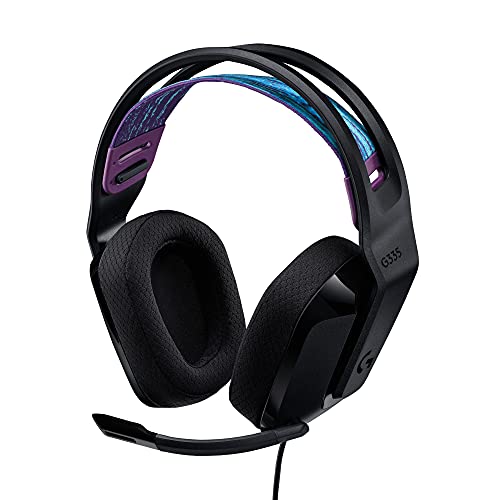
Some PC sessions are not matches; they are vigils — the strategy campaign that eats a Sunday, the MMO raid night, the co-op marathon with friends in three time zones. The G335 is built for those, and its design is a single argument about weight and pressure: a suspension headband that floats the frame on a strap, memory foam earpads with a gentle clamp, and a total presence so light that the headset’s main sensory contribution, by hour four, is the game itself. Glasses wearers, whose temples are the usual battlefield, consistently find this the kindest fit in the affordable class, and in a PC guide that kindness earns the final seat over louder rivals.
Everything else about it is deliberate simplicity. The 3.5mm connection means no software, no drivers, no processing — the PC’s own audio and your chat application’s tools do whatever shaping happens, and for many players that stack is already tuned to their taste. The flip-to-mute microphone is clear and honest, a step in richness below the BlackShark’s and the HS80’s, and entirely sufficient for the social play this headset serves. Buy it when your buying criterion, stated honestly, is “the one I will still be happy wearing at midnight.” In a guide full of specifications, that criterion is a specification too, and the G335 is its champion.
It also makes an unusually good second headset for a household with one premium desk setup: the G335’s simplicity means a partner, a visiting friend or a teenager can be seated at the spare machine in seconds, sounding perfectly respectable, with nothing to configure and nothing expensive to endanger. Households discover this role by accident and then defend it fiercely. Between its marathon comfort at the main desk and its frictionless service at the spare one, the G335 may be the most-used object in this guide relative to its price — a quiet, unglamorous superlative that its owners will recognise immediately.
- Connection: 3.5mm — no software, no drivers, no fuss
- Microphone: flip-to-mute boom
- Fit: suspension headband, memory foam earpads, featherweight class
- Character: the marathon-session and glasses-friendly pick
Strengths
- Comfort that outlasts every other pick across genuinely long sessions.
- Total software independence — it works identically on any machine, instantly.
- Flip-to-mute simplicity that never interrupts play.
Trade-offs
- No USB processing; surround, if wanted, must come from your software.
- Microphone is honest rather than rich beside the class leaders.
- The light build trades away the premium heft some buyers equate with quality.
Best for: long-session PC players, glasses wearers, and the software-averse. Not suited for: players wanting the maker’s surround processing built in.
How Do the Six PC Headsets Compare Side by Side?
| Headset | Connection | Software home | Defining trait |
|---|---|---|---|
| HyperX Cloud III | USB-C, USB-A, 3.5mm | NGENUITY | The complete desk all-rounder |
| Corsair HS80 RGB USB | USB only | iCUE | The broadcast microphone stretch |
| Logitech G432 | USB + 3.5mm | G Hub with DTS | The surround specialist |
| Razer BlackShark V2 X | 3.5mm | None needed | The competitive featherweight |
| SteelSeries Arctis Nova 1 | 3.5mm | Sonar in GG | The software playground |
| Logitech G335 | 3.5mm | None at all | The marathon comfort pick |
Read the connection column as the ranking’s skeleton. USB picks sell you a complete, maker-controlled audio path; analogue picks sell you an instrument for your own stack. Both are honourable, and the right column for you is decided by your machine and your habits, not by this guide’s order — which is why the all-rounder that refuses to choose, the Cloud III, sits on top, and specialists fill the seats beneath it.
How Do You Set Up a PC Headset for Discord and Streaming?
Begin in Windows: set the headset as the default device for both playback and recording, then open your chat application and select it explicitly there too, because applications left on “default” have a talent for choosing a webcam microphone at the worst moment. Record a test in the chat app’s own check, speaking at match volume, and set the input level so your loudest callout stays clean; then enable noise suppression, which on modern platforms removes keyboard and fan noise with startling competence, and re-check, because suppression set too aggressively can clip soft speech.
Streamers add one layer: route the headset microphone and the game audio as separate sources in the streaming software, set the microphone’s level against the game’s loudest moment rather than its average, and record a private test stream before going live — thirty seconds of playback will teach you more than any meter. Everyone should finish with the physical audit: boom at the corner of the mouth, cable routed behind the desk’s edge and clear of the chair, and the maker’s software, if you use it, updated and then left alone. Setup on PC is a small project with a permanent payoff, and it is the difference between this class sounding affordable and sounding professional.
Write down what you set. A sticky note or a text file with your input level, your chosen processing layer and your equaliser’s shape sounds like bureaucracy until the day a driver update, a new Windows install or an borrowed laptop resets the board — and then it is the difference between five minutes of restoration and an evening of rediscovery. PC audio is a system of small settings held in several places; the players who document theirs are the players whose headsets always sound like themselves.
What Mistakes Do PC Headset Buyers Make?
The classic error is buying the headset and ignoring the stack: a fine analogue headset plugged into a hissing front-panel jack, blamed for the jack’s sins, when a rear-panel connection or a USB pick would have acquitted it. The second is software sprawl — installing every maker’s suite for a desk of mixed brands until three applications fight over the default device; choose your ecosystem deliberately, or choose the software-free picks and opt out of the war. The third is microphone neglect: never recording a test, never setting a level, and sounding like a weather report for a year while blaming the capsule.
Two more complete the set. Players buy surround badges instead of implementations, when the DTS and Dolby and Sonar names in this guide are the actual products and the generic badge is a sticker. And players forget the second machine: the headset that serves the gaming tower but cannot visit the laptop or the controller narrows a household’s options, which is why the dual-connection picks punch above their specifications. Audit your machines, your software tolerance and your voice’s importance before ordering, and the affordable PC class will reward you out of proportion to its price.
The final mistake is buying for the games you intend to play rather than the ones you actually play. A library that is ninety percent competitive shooter does not need the cinematic surround pick, however atmospheric its trailers look, and a diet of open-world adventures gains little from an esports featherweight’s lean tuning. Your play history — the last three months of it, honestly read — is the most accurate buying guide ever written for you, and it is free. Consult it before the comparison table, and let it break every tie this guide leaves open.
Equalisation on PC: A Beginner’s Map That Actually Helps
Every software suite in this guide offers an equaliser, and most players either ignore it or drag the bass slider up and call it tuning. A better first hour exists. Start flat — every slider at zero — and play a game you know well for ten minutes, because the flat signature is the maker’s intent and your baseline. Then make exactly one change: if voices and callouts feel buried, raise the upper midrange slightly, the region where speech intelligibility lives, and play again. If footsteps and effects feel indistinct in shooters, a gentle lift in the presence region sharpens them without touching the bass you enjoy. If the whole presentation feels fatiguing over an hour, the treble is usually the culprit, and a small cut there buys comfort at no cost to information.
Save profiles per game rather than chasing one universal curve, because a cinematic adventure and a competitive shooter want different things from the same drivers — the suites in this guide, Sonar above all, exist precisely to hold those profiles. Resist stacking changes: surround processing, bass boost and a loudness feature applied together will muddy any headset in this class, and the player then blames the hardware for the software’s pile-up. One processing layer at a time, judged in a real session, is the method. Equalisation done this way is the cheapest upgrade in PC audio — it costs an hour, once, and it pays in every session after.
The Desk Itself: Ergonomics Nobody Puts on the Box
A PC headset’s comfort is partly the desk’s doing. The cable’s route decides whether you feel tethered: run it to the rear or side of the desk the hand you do not favour uses least, give it a gentle service loop so turning your head never tugs, and keep it out of the chair’s wheel path, which is where affordable headsets go to die. A simple under-desk hook gives the headset a home that is not the monitor’s top or the chair’s seat, and it prevents the two classic accidents — the sit-on and the roll-over — more reliably than any reinforced frame.
Monitor and microphone geometry matter too. The boom should clear your peripheral vision of the screen’s lower corner; if it does not, rotate it a fraction upward and re-check your recorded level, since small position changes move the voice more than any software slider. Players on multi-monitor setups, who turn their heads across a wide arc, should weight the light picks in this guide more heavily, because neck load multiplies with every glance. None of this appears in any listing, and all of it decides whether a headset feels like equipment or like furniture. The affordable class rewards the player who sets the stage as carefully as they chose the actor.
What About Audiophile Headphones and a ModMic-Style Setup?
PC culture keeps a respectable alternative on the table: a good pair of music headphones, often open-back, plus an attachable boom microphone. Priced honestly, that combination usually lands above this guide’s frame once the microphone is included, and it buys real things — a wider, more natural soundstage from open-back designs, and music performance no gaming headset here matches. It also gives up real things: the integrated mute gestures, the maker’s gaming software, the single-cable simplicity, and the closed-back isolation that keeps a household’s noise out and your game’s noise in.
The verdict mirrors the console guide’s, sharpened for PC. A music-first player who games socially a few nights a week, at a desk in a quiet room, should price the audiophile route seriously before buying. Everyone else — the voice-first, the late-night, the shared-room, the simply practical — is better served by the integrated headsets above, whose compromises point away from music and toward the actual job. Affordable gaming headsets are not failed audiophile gear; they are successful gaming gear, and this guide ranks them on the job they were hired for.
Troubleshooting: The Four PC Headset Complaints and Their Real Causes
“My friends say I sound quiet.” Almost never the microphone. The cause is usually an input level set by an application’s default, or a boom positioned under the chin instead of at the mouth’s corner; fix the level in the chat application’s own meter first, then the geometry, and record the proof. “I hear a buzz or hiss.” On analogue picks this is the front-panel jack sharing space with the machine’s noisy internals — move to the rear panel output, which is wired more quietly, or accept it as the argument for a USB pick next time. On USB picks, a buzz usually traces to a hub; plug directly into the machine for one session to identify the culprit.
“The surround sounds worse than stereo.” It often does, when two processing layers stack — the headset’s and the game’s own, or Windows’ spatial setting on top of both. Choose one layer, the maker’s, and disable the rest; the comparison that follows is the honest one. “My headset works in the game but not in chat.” An application permission or device-selection issue, not a hardware one: the chat program has chosen a different microphone, usually a webcam’s. Every one of these complaints arrives in forums as a product review, and every one is a setup matter wearing a product’s name — which is why this guide keeps spending words on setup. On PC, the system is the product.
When Does a PC Player Outgrow This Class?
Not when the marketing says so — when a specific, nameable limit starts taxing your sessions. The honest triggers are three. Your microphone has become a production input: you stream to an audience, record commentary, or lead a community, and the HS80’s step no longer covers the gap to a dedicated microphone and interface. Your library has become a hi-fi library: you listen more than you play, in a quiet room, and the open-back audiophile route described earlier starts returning more joy per hour than any gaming feature. Or your desk has dissolved into a living room, and the cable’s geography no longer works — the wireless class’s founding argument.
Notice what is absent from that list: a vague sense that a newer model must be better, and the surround badge on a rival box. Players who upgrade on triggers buy once and keep the new tier for years. Players who upgrade on vibes churn through the affordable class repeatedly, spending flagship money in instalments on headsets that were never the problem. This guide’s six picks are chosen so that none of them forces the issue: each is good enough, at its own brief, that the decision to leave the class can be made calmly, from experience, at the moment a real limit appears — and not one session earlier.
Final Recommendation
For the typical PC player, the HyperX Cloud III remains the answer this guide gives first: every connection, a detachable microphone, build for years, and no weakness the desk will ever find. Reach for the Corsair HS80 when your voice is your content and the stretch buys the one component that matters to you; for the Logitech G432 when your worlds are cinematic and DTS surround is the point; for the BlackShark V2 X when the games are ranked and the callouts are constant; for the Nova 1 when you will genuinely play in Sonar’s control room; and for the G335 when the sessions are long and comfort is the whole argument. Affordable on PC is not a euphemism for compromised — it is a class with a champion for every honest priority, and the best affordable gaming headsets pc players can choose are the ones above, matched to the desk, the software and the voice they will serve every single day — which is the only definition of affordable that survives contact with a year of evenings: not the least money spent, but the most sessions in which the equipment simply never came up — no hiss to forgive, no level to fix, no cushion to nurse, just the game, the squad, and the hardware holding its peace.
Frequently Asked Questions
Is USB or 3.5mm better for PC gaming?
Neither in the abstract. USB gives you the maker’s complete audio path — its DAC, surround processing and microphone handling — identically on every machine, and it bypasses noisy analogue jacks. The 3.5mm path is simpler, universal and lets your own audio stack do the work. The Cloud III’s inclusion of both is why it leads this guide.
Do I need the maker’s software for these headsets to work?
No headset here requires its software for basic game audio and voice. The suites unlock equalisation, surround configuration and microphone processing — valuable, especially Sonar’s depth and the G432’s DTS path — but every pick functions the moment it is plugged in, which matters more than it sounds: a headset that works on a friend’s machine, a work laptop with locked-down installs, or a fresh Windows build with nothing on it yet is a headset that never strands you, and that plug-and-play floor under every pick in this guide is a deliberate part of the shortlist.
Which of these is best for streaming on a budget?
The Corsair HS80 RGB USB, because streaming is a microphone discipline and its broadcast-quality brief is the largest single upgrade in this guide. Players who cannot stretch should take the Cloud III and spend setup time on levels and noise suppression, which closes much of the practical gap — a well-set Cloud III will out-voice a badly set HS80 every time, which is the guide’s recurring sermon in miniature: on PC, the settings are part of the equipment, and the player who masters them owns the better headset regardless of which box it came in.
Will these headsets work with my gaming laptop?
Yes. USB picks work with any free port, and the analogue picks suit laptops’ combined jacks directly. Laptop players who move between desks benefit most from USB’s consistency, since the headset carries its own audio behaviour from machine to machine — the same microphone level, the same surround recipe, the same equaliser, whether the laptop is docked at home or open in a library. Analogue picks remain the lighter travel companions, needing nothing but the jack, and for a single-laptop life the distinction hardly matters at all.
Is virtual surround worth it for competitive games?
It depends on the implementation and the game. Credible systems like DTS Headphone:X and Sonar’s spatial audio can help with verticality and immersion, while many top competitive players still prefer clean stereo for its unaltered cues. Treat surround as a flavour to test with the return window, not a specification to buy blind — enable exactly one processing layer, play your most familiar map for an evening, then disable it for the next; the version in which your ears locate danger faster is your answer, and no review, including this one, can hear it for you.
My front headphone jack crackles. Which picks avoid that?
Any of the USB picks — the Cloud III, HS80 or G432 — because they bypass your PC’s analogue path entirely and convert the audio in their own chain. If you prefer an analogue pick like the BlackShark, try the motherboard’s rear-panel output first; it is usually wired away from the interference that afflicts front panels, and it rescues many a headset that was blamed for its computer’s noise. Run the test with the game closed and the volume raised in a quiet menu: if the hiss follows the machine’s activity — brightening when the graphics card works — it is the analogue path confessing, and the fix is routing or USB, never a different analogue headset.
Can I use one headset for both my PC and my work laptop?
Yes, and USB picks make it cleanest, since the headset carries its audio behaviour with it and both machines see the same device with the same microphone character. The Cloud III is the guide’s specialist in exactly this double life, with its detachable microphone keeping video calls free of gaming plumage. One caution for locked-down work machines: a standard USB audio device needs no special drivers and is almost always permitted, but if your employer’s policy blocks unknown peripherals, the analogue picks sidestep the question entirely through the humble headphone jack.
Why are there no wireless headsets in this guide?
Because at the affordable level, wireless spends the budget on radios and batteries that these wired picks spend on drivers and microphones, and a desk-bound PC player feels that trade in every session — the cable reaches the tower without effort, the microphone never dies in the third hour of a raid night, and there is no pairing ritual between you and the game. Wireless has its own class and its own guide, where the connection earns its cost for players whose setups genuinely move; at a fixed desk, the wire is not the compromise it is marketed as, it is the subsidy that makes the rest of these headsets possible.
Related Guides
Continue with best 100 dollar headsets for the cross-platform view of this budget, best 50 dollar gaming headsets to see the tier below, and best affordable wireless gaming headsets when the cable itself becomes the problem to solve. Players curious how far the resolution ladder actually goes can see the best 8k graphics cards for the flagship end of it.



[…] up or sideways with best 100 dollar headsets to see what the next tier adds, best affordable gaming headsets pc for the PC-specific shortlist, […]