What's inside
- Key Takeaways
- Quick Picks
- How Did We Choose These Picks for Office Rooms?
- Why Does Brightness Matter More Than Contrast in a Lit Office?
- Which Throw Distance Suits a Meeting Room Table?
- How Do You Set Up an Office Projector So Meetings Start on Time?
- What Should a Hybrid Meeting Room Demand From Its Projector?
- How Do Screens and Room Light Change the Picture You Actually Get?
- Which Pick Fits Which Kind of Working Room?
- How Should an Office Test a Projector Before Committing?
- What Connectivity Does a Guest Laptop Actually Need?
- Does Fan Noise Really Change How a Meeting Feels?
- Comparison Table
- What Mistakes Do Offices Make When Buying a Projector?
- Final Recommendation
- What Does Ownership Look Like After the First Quarter?
- Frequently Asked Questions
- Related Guides
As an Amazon Associate I earn from qualifying purchases. This post may contain affiliate links at no extra cost to you.
gizmoverdict.com is reader-supported. When you buy through links on our site, we may earn an affiliate commission.
Where to buy: The linked models below were verified against this site’s own product pool before a single paragraph was drafted. Two picks are not native 4K machines at all, and both are flagged in plain language wherever they appear, because an office buyer comparing spreadsheets deserves a table where the resolution column never flatters anyone.
Choosing the best 4K projectors for office work starts with a confession most buying guides avoid: a meeting room is a hostile place for a projector. The lights stay on because people take notes. The blinds leak because facilities fitted the cheap ones. Somebody always sits too close, somebody else always sits at an angle, and the material on screen is not a film but a dense grid of figures, a contract clause in eleven-point type, or a dashboard whose red and amber cells carry the whole argument. A projector that thrives in a darkened cinema can fail every one of those tests while still looking wonderful in a showroom.
That is why this guide judges office projection by office evidence. Brightness matters more than contrast theatre, because ambient light washes out a picture from the screen side and no specification sheet can repeal that. Text legibility matters more than cinematic colour volume, because the decisive moment in a presentation is a colleague across the table asking what the small number in the corner says. Connectivity matters more than streaming apps, because the laptop that walks into the room is unknown until it arrives, and it will expect an HDMI cable, a USB-C lead, or a casting handshake that simply works. And fan noise matters more than almost anyone admits, because a projector that drones through a negotiation changes the temperature of the conversation itself.
Four of the six picks below carry verified links. The two XGIMI Horizon models are conventional-throw 4K laser machines that suit smaller, light-controlled meeting rooms surprisingly well. The Epson LS800 and the BenQ V7050i are ultra-short-throw designs that sit against the wall, which solves the oldest office problem of all: the presenter’s shadow falling across the chart at the exact moment the chart matters. The Epson CO-FH02 joins as a clearly labelled 1080p context pick for huddle spaces where 4K money is hard to justify, and a ceiling-mounted installation class closes the list for boardrooms that should buy infrastructure rather than a box that travels between rooms.
Key Takeaways
- In a lit meeting room, honest brightness and a matte screen beat cinematic contrast claims every time.
- Ultra-short-throw models remove presenter shadows and cable runs across the table in one move.
- 4K resolution earns its premium on spreadsheets, CAD views and dense dashboards, not on slide titles.
- Two picks here are 1080p context options, labelled as such, for rooms where the budget argument fails.
- Budget for the screen, the mount and a spare cable with the projector, not as an afterthought.
- The quietest machine in the room usually wins the second hour of a long workshop.
Quick Picks
| Pick | Badge | Why it earns its place |
|---|---|---|
| XGIMI Horizon 30 Pro | Brightest linked pick | Its listing states 4800 ISO lumens, the strongest office daylight figure among the linked models here. |
| XGIMI HORIZON 20 Pro | Best for smaller rooms | Optical zoom and lens shift make placement forgiving in a compact meeting space. |
| Epson EpiqVision Ultra LS800 | Wall-hugging boardroom choice | Ultra-short throw, a 4K PRO-UHD picture and a listing that states 4,000 lumens. |
| BenQ V7050i | UST with a businesslike warranty | A 4K laser ultra-short-throw design whose listing states 2500 ANSI lumens and a three-year warranty. |
| Epson EpiqVision Flex CO-FH02 | 1080p context pick, labelled | A portable 3LCD meeting projector, included honestly as the Full HD alternative. |
| Ceiling-Mounted Laser Installation Class | Prose-only infrastructure pick | Fixed laser installation projectors suit boardrooms that present daily and never move the kit. |
How Did We Choose These Picks for Office Rooms?
We began by throwing out the home-theatre scorecard. Contrast ratios measured in darkness, colour gamuts tuned for film, and gaming latency figures tell an office buyer almost nothing, so the shortlist was rebuilt around the working day. Every candidate had to answer four questions convincingly. Could a spreadsheet stay readable with the ceiling lights on? Could a guest connect a laptop in under a minute without an IT ticket? Could the machine run a three-hour workshop without its fan becoming the loudest voice present? And could facilities mount it, cable it and forget about it for a year at a time?
Brightness claims were read with deliberate suspicion. Manufacturers measure light output under different standards, and a figure in ISO lumens is not interchangeable with a figure in ANSI lumens or a plain marketing lumen. Rather than converting numbers we could not verify, this guide repeats each listing’s own unit and treats the figures as ordering hints within a brand family, not as laboratory truth. What an office buyer can trust is the underlying physics: a laser light source holds its output far steadier across its life than a lamp, and a 3LCD design delivers equal white and colour brightness, which is precisely what saturated charts and highlighted table cells need.
Resolution was judged against viewing distance and content, not against fashion. In a six-person huddle room showing slide decks, 1080p is genuinely adequate, which is why the CO-FH02 appears without apology. In a boardroom where analysts lean over a twelve-column forecast at a hundred inches, the extra pixels of a 4K image stop being a luxury and become the difference between reading the footnote and guessing it. The picks are arranged so that both rooms find their answer, and neither is sold the other room’s machine.
Why Does Brightness Matter More Than Contrast in a Lit Office?
A projected image competes with every photon already in the room. Sunlight through a blind, downlights over the table and the glow of six laptop screens all land on the same surface as your chart, and they raise the black level of the picture before the projector has said a word. Deep blacks are the first casualty, which is why a projector famous for cinema contrast can look washed out at two in the afternoon. What survives ambient light is raw, honest brightness paired with a screen that rejects some of the room’s glare, and that pairing is the real purchase.
Practical consequences follow. Size the image to the light you have, not to the wall you wish you had: a smaller, brighter picture beats a vast, grey one in every meeting we have ever sat through. Treat window control as part of the projector budget, because blackout blinds frequently improve the picture more than the next model up the range. And prefer laser or LED light sources for rooms that present all day, since their output stays consistent month after month, while a lamp quietly dims toward the presentation where somebody important finally notices.
Which Throw Distance Suits a Meeting Room Table?
Conventional-throw projectors sit at the back of the room or hang from the ceiling, and they reward that commitment with flexible image sizes and, in the Horizon models here, optical zoom and lens shift that tidy the geometry without digital distortion. Their office weakness is human: anyone who stands to point at the screen steps into the beam, and the table between projector and wall collects cables, water glasses and laptops in the light path.
Ultra-short-throw machines invert the arrangement. They sit on a credenza inches from the wall, throw a large image upward at a steep angle, and leave the table completely clear. Presenters can stand beside the picture and gesture at it like a whiteboard. The trade-offs are equally real: the screen must be flat and is ideally a fixed, ambient-light-rejecting panel, the unit’s own speakers and optics carry a price premium, and a bumped credenza means a crooked image until somebody realigns it. For a dedicated boardroom, that exchange is usually worth making. For a projector that tours three rooms, it is not.
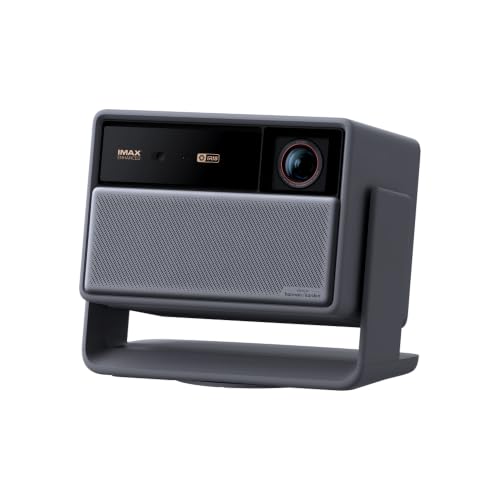
XGIMI Horizon 30 Pro — Brightest linked pick
The Horizon 30 Pro arrives in this guide wearing a home-projector badge, yet its headline figure is the most office-relevant number on the page: a listing-stated 4800 ISO lumens from an RGB triple-laser engine. In a small or mid-sized meeting room with ordinary blinds, that output is the difference between a forecast table that reads crisply at noon and one that dissolves into pastel. The 4K image keeps small type intact at large sizes, and the Google TV platform means a room can cast a deck or open a shared file without waiting for a laptop to wake.
Its office manners are better than its living-room styling suggests. Laser light reaches full brightness quickly, so the machine is ready when the meeting is, and it holds that brightness across long workshop days instead of fading through the afternoon. The dual-iris arrangement named in the listing aims at steadier contrast, which in office terms translates to darker text lines against white slide backgrounds. Built-in Harman Kardon audio covers speech intelligibility for hybrid calls in a modest room, sparing the table yet another speakerphone puck.
Honesty requires the caveats. This is a portable-form projector without the installation hardware story of a ceiling unit, so a permanent boardroom will need a mount and cable plan bought separately. Its brightness figure is an ISO-lumen number from the manufacturer, not a promise that a sunlit glass-walled room will behave. And a room that mainly shows slide titles will never notice its 4K advantage. Bought for a working room that shows real data, though, it is the strongest linked all-rounder here.
- Resolution: 4K, per listing
- Light source: RGB triple laser
- Brightness: 4800 ISO lumens, listing-stated
- Platform: Google TV
- Audio: Harman Kardon built-in
Strengths
- Listing-stated brightness leads the linked field for lit rooms
- Laser output stays steady through long presentation days
- 4K detail keeps dense tables and small footnotes readable
Trade-offs
- Portable form needs a separate mount for permanent rooms
- ISO-lumen figures cannot be compared directly with ANSI claims
- Hybrid-call audio still benefits from a dedicated microphone
Best for: a data-heavy team room that presents spreadsheets and dashboards all day with the lights on
Not suited for: a glass-walled space in direct sun, where no projector in this class will rescue the picture

XGIMI HORIZON 20 Pro — Best for smaller rooms
Where the 30 Pro wins on output, the HORIZON 20 Pro wins on placement manners, and placement is the problem smaller meeting rooms actually have. Its listing names optical zoom and lens shift, two features that let an installer nudge the image into square from wherever the ceiling mount or shelf happens to be, instead of twisting the whole unit or reaching for digital keystone correction that softens text. For an office, that translates directly into sharper figures after a five-minute setup rather than a half-hour one.
The listing states 4100 ISO lumens from an RGB triple-laser engine, a figure comfortably matched to a six-to-ten-person room with controlled light. Google TV with licensed Netflix is a living-room flourish, yet the underlying platform earns its keep in offices by making casting and screen sharing predictable for guests. The model also carries IMAX Enhanced and Dolby Vision badges, which an office buyer may ignore safely; what matters at work is that the same colour discipline keeps brand palettes and chart series consistent from slide to slide.
Choose it over its brighter sibling when the room is smaller, the screen is nearer ninety inches than a hundred and twenty, and the mount position is awkward. Skip it when the room is large or bright enough that the 30 Pro’s extra output is the safer margin. Either way, it is a reminder that the best office projector is often the one that fits the room’s geometry, not the one with the longest feature list.
- Resolution: 4K, per listing
- Light source: RGB triple laser
- Brightness: 4100 ISO lumens, listing-stated
- Optics: Optical zoom and lens shift
- Platform: Google TV with licensed Netflix
Strengths
- Lens shift and zoom forgive awkward mount positions
- Strong output for small and mid-sized meeting rooms
- Consistent laser colour keeps charts faithful week after week
Trade-offs
- Less brightness headroom than the Horizon 30 Pro
- Cinema badges add cost an office may never use
- Still a portable form factor rather than installation hardware
Best for: a compact meeting room whose projector must fit an existing shelf or mount point
Not suited for: a large, bright boardroom where the bigger-output model is the prudent buy
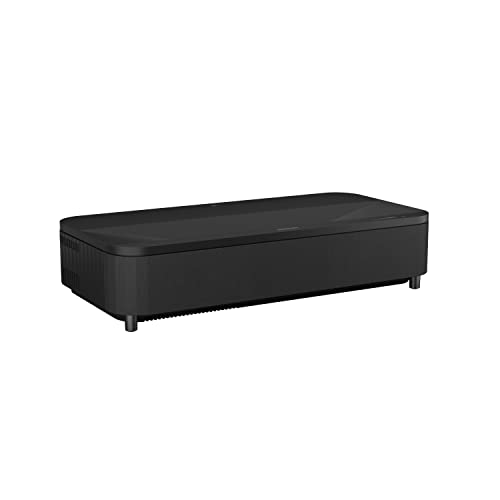
Epson EpiqVision Ultra LS800 — Wall-hugging boardroom choice
The LS800 solves the boardroom’s oldest embarrassment: the presenter silhouetted against their own chart. As an ultra-short-throw design it sits on furniture directly beneath the screen, projects a very large image from a very short distance, and leaves both the table and the presenter’s path completely clear. Epson’s 3LCD engine delivers a listing-stated 4,000 lumens with equal colour and white brightness, which matters when the material is a saturated dashboard rather than a film still. Its picture uses Epson’s 4K PRO-UHD pixel-shifting approach rather than a native 4K panel, and this guide names that plainly because an office buyer is entitled to know which kind of 4K they are purchasing.
In daily office life the design keeps giving. Nobody trips over a cable run to a ceiling mount. A presenter can walk up to the image and point at a cell the way they would at a whiteboard, without casting a shadow or squinting into a lens. The built-in Yamaha-branded 2.1-channel audio named in the listing is unusually serious for a projector, and for hybrid meetings in a mid-sized room it can carry voices without a separate soundbar, though a proper conference microphone remains a separate purchase.
The listing for this unit is a renewed one, and this guide treats that neutrally: renewed stock can be sensible value for a facilities budget, provided the buyer checks the warranty and returns terms on the listing itself before ordering. The LS800 also asks for a flat, preferably fixed screen to shine, and its steep throw angle punishes wavy pull-down screens. On a proper wall panel in a dedicated room, it is the most boardroom-native design among the linked picks.
- Resolution: 4K PRO-UHD pixel-shifting, per listing
- Design: Ultra short throw, 3LCD
- Brightness: 4,000 lumens, listing-stated
- Audio: 2.1-channel Yamaha built-in, per listing
- Listing note: Renewed unit; check warranty terms on the listing
Strengths
- Ultra-short throw ends presenter shadows for good
- Equal colour and white brightness suits saturated charts
- Serious built-in audio reduces extra boardroom hardware
Trade-offs
- Pixel-shifted 4K is not a native 4K panel
- Needs a flat fixed screen to look its best
- Renewed listing means warranty terms deserve a careful read
Best for: a dedicated boardroom that presents daily and wants the table kept clear
Not suited for: a projector that must travel between rooms or hang from a rental ceiling

BenQ V7050i — UST with a businesslike warranty
BenQ builds projectors for meeting rooms as a day job, and the V7050i carries that accent into the ultra-short-throw category. It is a 4K laser design whose listing states 2500 ANSI lumens, a more conservative unit than the ISO figures elsewhere on this page, so the number should be read as a promise aimed at light-controlled rooms rather than bright open spaces. In a boardroom with decent blinds, that output behind an ambient-light-rejecting screen produces a composed, colour-disciplined picture, helped by the HDR-PRO tone work the listing describes.
The office case rests on ownership as much as image. The listing names a three-year warranty, a detail facilities managers notice because a boardroom projector is infrastructure, not a gadget. Android TV and wireless casting cover the guest-laptop problem from the software side, while two HDMI inputs and an SPDIF connection with ARC cover the wired side, including a return path to a soundbar. The unit sits against the wall like the Epson, so presenters keep their shadows to themselves.
Its limits are the honest mirror of its strengths. A buyer whose room cannot be darkened should look at the brighter picks first, because 2500 ANSI lumens is a controlled-light figure. The ultra-short-throw format also commits the room to a fixed screen position. Within a managed boardroom, though, the V7050i is the pick that reads like it was specified by somebody who has run a facilities budget.
- Resolution: 4K, per listing
- Design: Ultra short throw laser
- Brightness: 2500 ANSI lumens, listing-stated
- Inputs: HDMI x2 and SPDIF with ARC, per listing
- Warranty: Three years, per listing
Strengths
- Warranty and brand support suit facilities purchasing
- Conservative ANSI brightness figure is easy to plan around
- Wired and casting connections cover guest laptops both ways
Trade-offs
- Output assumes a room that can control its light
- Fixed UST placement commits the screen position
- Premium format costs more than a portable box
Best for: a managed boardroom with blinds, a fixed screen and a facilities team buying for years
Not suited for: a bright, open-plan presentation corner with no light control at all

Epson EpiqVision Flex CO-FH02 — 1080p context pick, labelled
This pick is here to keep the guide honest, and it announces its own limitation in its badge: the CO-FH02 is a 1080p projector in a 4K guide. It earns the seat because a large share of office projection happens in huddle rooms and borrowed spaces where the material is a slide deck, the screen is modest, and the honest question is whether the room needs 4K money spent on it at all. Epson’s 3LCD engine delivers a listing-stated 3,000 lumens of both colour and white brightness, which is the right kind of brightness for charts, and the portable form moves between rooms in one hand.
For that touring life, its virtues compound. It sets up fast, its streaming platform is built in, and its picture stays legible at the sizes huddle rooms actually use. A team that presents weekly in a six-person room will get years of service from a machine like this and will never once miss the extra pixels, because slide titles and bullet points do not contain 4K information in the first place.
The boundary is equally clear. Put a twelve-column financial model on a hundred-inch screen and the CO-FH02 will show you its resolution ceiling, in the footnotes first. It is the right answer to a smaller question, and this guide includes it so that buyers with that smaller question are not upsold past it. When the room grows up, the 4K picks above are waiting.
- Resolution: Full HD 1080p, per listing
- Design: Portable 3LCD
- Brightness: 3,000 lumens colour and white, listing-stated
- Platform: Android TV with Wi-Fi and Bluetooth
- Role in this guide: Labelled non-4K context pick
Strengths
- Portable form serves several small rooms with one purchase
- Equal colour and white brightness keeps charts honest
- Fast setup suits ad-hoc and huddle-space presenting
Trade-offs
- 1080p ceiling shows on dense data at large sizes
- No installation features for permanent boardrooms
- Streaming platform matters less than laptop connectivity at work
Best for: huddle rooms and small teams whose material is slides rather than fine data
Not suited for: analysts reading dense spreadsheets on a very large boardroom screen
Ceiling-Mounted Laser Installation Class — Prose-only infrastructure pick
Some boardrooms should not buy a portable projector at all, and this prose-only pick exists for them. The class in question is the fixed laser installation projector: a larger, brighter machine bolted to the ceiling, wired into a room system with wall-plate inputs, controlled from a panel or a remote that lives in a drawer, and expected to work every morning for years without being touched. Models in this class are sold through AV integrators as often as through retail listings, which is why no single verified listing anchors it here.
What the class buys is operational silence. Interchangeable or long-zoom lenses fit the throw to the room exactly. HDBaseT and multiple digital inputs let the table offer HDMI and USB-C at seated positions while the projector lives far away. Sealed laser light engines shrug off dust and hold brightness without a lamp calendar. For a headquarters boardroom or a training suite with a daily schedule, that boring reliability is worth more than any single specification.
The costs are commitment and complexity. Installation is a project with a contractor, a control system and a maintenance conversation, not a parcel at reception. A small company with one meeting room should buy one of the linked machines and spend the difference on blinds and a good screen. A company whose boardroom hosts clients weekly should at least price this class before deciding.
- Resolution: 4K models widely available in the class
- Design: Fixed ceiling installation, interchangeable lenses on many models
- Light source: Laser, typically sealed and long-life
- Inputs: Multiple HDMI, HDBaseT and control ports, class-typical
- Availability: Sold via AV integrators and retail; prose-only here
Strengths
- Built to run daily for years without attention
- Lens options fit awkward ceiling and screen geometry
- Room-system integration gives one-touch meeting starts
Trade-offs
- Installation is a contractor project, not an unboxing
- Total cost includes control, cabling and mounting labour
- Oversized for a single small meeting room
Best for: a headquarters boardroom or training suite with a daily presenting schedule
Not suited for: a small team that needs a projector it can carry to whichever room is free
How Do You Set Up an Office Projector So Meetings Start on Time?
Start with the screen, because the screen is the picture. In a lit room, an ambient-light-rejecting surface earns its cost by refusing light from ceiling fixtures while accepting the projector’s beam, and a fixed flat panel always beats a rippled pull-down. Measure the seating before choosing a size: the farthest viewer should sit no more than roughly six times the image height away when fine data is on the agenda, and the nearest viewer should not be close enough to count pixels on a 1080p image.
Then remove every recurring friction. Run two cables to the table, HDMI and USB-C, and label both ends, because the meeting that fails always fails on an unlabelled cable. Set the projector’s input to the one the room actually uses, disable eco timers that blank the screen mid-workshop, and store a spare remote battery in the room rather than in a facilities cupboard three floors away. For hybrid meetings, position a dedicated conference microphone at the table’s centre and test it with a remote colleague before the important call, not during it.
Finish with a one-page room card taped inside a cupboard door: how to power up, which input shows the table cable, how to cast, and who to call. It sounds humble, and it will save more meetings in a year than any specification on this page. Technology that needs a manual has already lost the first five minutes, and the first five minutes are where meetings decide whether they are working sessions or apologetic ones.
What Should a Hybrid Meeting Room Demand From Its Projector?
Hybrid work quietly rewrote the office projector’s job description. The machine no longer serves only the people at the table; it serves the colleague on a screen at the table’s end, whose entire view of the room may be a camera feed and whose entire view of the material is whatever the projector shows the room. That changes priorities in ways spec sheets rarely mention. The image must stay legible to a camera, which means avoiding extreme brightness hotspots and keeping contrast steady. The room’s content must also reach the remote participant as a shared digital feed, not as a camera pointed at a wall, so the projector and the conferencing system need a sane signal path between them: laptop shares content digitally, projector displays it locally, and nobody photographs a screen with a webcam and calls it collaboration.
Start-up behaviour matters more in hybrid rooms than in any other. A projector that needs a warm-up minute and a hunting expedition for its input adds dead air to every call, and dead air at the start of a video meeting is where remote participants decide the room does not have its act together. Laser models in this guide reach brightness almost immediately, which is a genuine operational advantage rather than a showroom trick. Equally, instant-off behaviour lets the room clear for the next booking without a cool-down fan chorus under the following team’s first minutes.
Audio deserves its own paragraph in any hybrid discussion, because the projector is often blamed for failures that belong to the microphone. Built-in speakers, including the unusually capable Yamaha arrangement in the LS800, handle playback: hearing the remote side clearly. Capture is a different job. Voices at a boardroom table need a dedicated conference microphone or a ceiling array, placed for the talkers rather than for the projector. Budget for capture explicitly, test it from the remote end, and the hybrid room stops being the meeting everyone apologises for.
How Do Screens and Room Light Change the Picture You Actually Get?
Two identical projectors can produce wildly different meetings in two different rooms, and the variables are the screen surface and the light falling on it. A plain white wall is the most expensive free screen in the building: its texture softens fine text, its paint tint shifts colour, and its sheen reflects ceiling fixtures straight into the front row. A matte white screen fixes texture and tint. An ambient-light-rejecting screen goes further, using a structured surface that accepts the projector’s steep or frontal beam while refusing light arriving from above and the sides, which is exactly the geometry of office downlights and windows.
Ultra-short-throw models pair especially well with lenticular ambient-light-rejecting panels designed for their throw angle, and that pairing is close to mandatory for the LS800 and V7050i in lit rooms: the same surface that rejects ceiling light also sharpens the UST image’s perceived contrast. Conventional-throw models benefit from grey or ALR surfaces too, though the gain is smaller and the choice less specialised. In every case, the screen decision should be made with the projector decision, in the same budget line, because a premium projector on a bad wall will lose to a mid-range projector on a good screen in any honest side-by-side meeting test.
Light control is the third leg. Blinds that actually black out, rather than merely decorate, can transform a west-facing room at four in the afternoon. Dimming the row of downlights directly above the screen, or putting that row on its own switch, costs an electrician’s visit and pays it back at every presentation. Facilities teams sometimes resist these small works because they are not the projector purchase itself; the correct framing is that they are the projector purchase, the part of it that happens to be installed in the ceiling.
Which Pick Fits Which Kind of Working Room?
Consider first the analyst floor: a ten-person room, blinds half-drawn, where the daily ritual is a forecast model walked through cell by cell. This room lives or dies on small-type legibility and midday brightness, and it is the Horizon 30 Pro’s home ground. Mount it, fit a matte screen at a size the back row can read, and the numbers stop being the meeting’s bottleneck. The same room should resist the temptation of an ultra-short-throw unit on a pull-down screen, because the slightest ripple in that surface will bend the spreadsheet’s grid, and bent grids are surprisingly hard to read.
Next, the client-facing boardroom: wood, glass, a credenza, and a managing director who cares how the room feels. Here the LS800 earns its premium without showing a single specification. It hides in the furniture line, fills the wall, and lets a presenter stand beside the figures like a person rather than a shadow puppet. Pair it with its fixed ALR panel and a discreet conference microphone, and the room reads as designed rather than assembled. The V7050i serves the same room when the buyer prefers BenQ’s support story and can darken the space properly.
Then there is the huddle archipelago: six small rooms, none of them bookable for long, all of them expected to just work. This is CO-FH02 territory, one portable unit per room or one per pair of rooms, showing decks and documents at sizes where 1080p is not a compromise anyone can detect. Spending 4K money here would buy pixels no slide contains. The money saved belongs in the big room, which is where fine data actually gathers.
Finally, the training suite: thirty seats, sessions all day, a facilitator who is not an AV technician and must never become one. This room justifies the installation class. A ceiling laser unit on a room-control panel, one button labelled with the session’s name, speakers that cover the back row, and a service arrangement behind it. The purchase conversation will involve an integrator and a longer procurement form, and it will be worth both, because downtime in a training suite is measured in cancelled courses rather than awkward minutes.
How Should an Office Test a Projector Before Committing?
Run the exam the room will set daily. Borrow or buy one candidate unit, install it roughly where it will live, and present the worst material the team owns: the densest spreadsheet, the palest template, the dashboard with the amber warnings. Do it at the brightest hour the room experiences, with the lights in their normal working state, and seat the judges at the farthest chairs. If the footnotes survive that hour, the projector passes. If they do not, no specification sheet argument should overrule the evidence of the room itself.
Test the human factors in the same session. Time a guest connecting a laptop, from lid-open to picture-on-wall, and be honest about whether it needed help. Start a hybrid call and ask the remote participant to read a figure from the shared content and to judge the room audio. Run the machine through a two-hour workshop and note when its fan first enters anyone’s awareness. These are the metrics that decide whether a projector is used willingly for five years or quietly resented from the second month.
And test the exit conditions before signing anything: warranty length and process, what a renewed listing’s coverage actually includes, lamp-free running costs, and the price of the screen and mount the room needs. A projector is a small system wearing a single product name. Offices that buy the system, test the system and assign the system an owner are the ones whose meetings start on time, with the numbers on the wall sharp enough to argue about.
What Connectivity Does a Guest Laptop Actually Need?
Every office has a drawer story about the presentation that died on a dongle. Connectivity is where projector purchases succeed or fail in the wild, because the presenter is often a guest whose laptop nobody controls. The modern fleet arrives with USB-C as its default display path, sometimes with HDMI, occasionally with only a casting hope and a prayer. A room that offers both a wired HDMI lead and a USB-C lead at the table, clearly labelled and long enough to reach the far chairs, covers nearly every arrival without an adapter hunt. Wireless casting then becomes the convenience layer rather than the only bridge.
Casting deserves a sober word. Platform-based sharing through the projector’s smart system is effortless when the guest’s laptop and the room network cooperate, and genuinely obstructive when a corporate guest network, a captive portal or a device policy intervenes. That is why this guide treats casting as the second path, never the only one. The cable is the diplomacy: it works for the auditor, the client and the candidate in the job interview alike, with no passwords exchanged and no network joined.
Cable quality is a real variable at 4K. Long, thin, bargain leads that behaved at 1080p may flicker or drop at higher bandwidths, especially over the distances a boardroom table demands. Buy certified cables of the shortest length that reaches comfortably, route them so chair castors cannot chew them, and keep a spare coiled in the room. For ceiling installations, a wall plate and a proper in-wall rated run turn the same principle into architecture. None of this is glamorous, and all of it is the difference between a room people trust and a room people book only when the good one is taken.
Sound follows the same rule of redundancy. The projector’s speakers are the fallback, a soundbar or room speakers are the plan, and the conference microphone is the part remote attendees actually judge. Wire the audio path once, label the remote that controls its volume, and tape that label where a presenter can find it under pressure. The best office projector setup is the one nobody discusses, because the picture appeared, the voices carried, and the meeting got to be about the work.
Does Fan Noise Really Change How a Meeting Feels?
It does, and the mechanism is fatigue. A projector fan produces a broadband hiss that the brain must continuously filter out in order to follow speech, and that filtering is work. In a one-hour meeting nobody names it. In a three-hour negotiation or a full-day workshop, the room grows tired faster, voices rise to compete, and breaks get taken for reasons people describe as needing air. Manufacturers quote noise figures measured in eco modes at a distance, so treat the numbers as hints and the placement as the real decision: a machine directly above the table’s centre will always be more present than the same machine a metre behind the last row.
Laser and LED models help here in a structural way, because their light sources generate less waste heat than a lamp of comparable output, and less heat means less fan. Eco modes quieten any projector further, at the cost of brightness an office may not be able to spare at midday; the smarter use is a schedule, full output for the bright morning sessions and a gentler mode for the darkened video review after lunch. Ceiling insulation, a hush box on an installation unit, or simply choosing the ultra-short-throw format that moves the machine to the room’s edge all attack the same problem from the placement side. Judge noise in the actual room, during a pause in speech, because that is when your colleagues will hear it too.
One last office reality deserves naming before the comparison table: security and housekeeping on the room network. A smart projector is a small computer on the corporate LAN, with a platform account, firmware updates and a microphone-free but networked presence that IT should onboard like any other device. Put it on the appropriate network segment, keep its firmware current through the named room owner, and sign it out of any personal streaming accounts a well-meaning presenter may have added during a long workshop. None of the picks in this guide demands exotic handling, but treating the projector as managed infrastructure rather than as a television is what keeps a convenient casting feature from becoming an audit finding. It also keeps the room’s setup stable, because managed devices get their settings documented, and documented settings survive staff changes, refurbishments and the occasional factory reset performed by a helpful visitor.
Accessibility belongs in the same conversation, because a meeting room serves colleagues whose eyesight and hearing vary. High-contrast templates, minimum font sizes in shared decks and a projector bright enough to keep text crisp all serve the colleague at the back who will never announce that the amber cell looked identical to the red one. Captioning on hybrid calls, a hearing-friendly volume level and seating that keeps nobody staring into the beam are cheap, permanent courtesies. A room specified with those habits in mind is not merely compliant; it is a room where the whole team can actually follow the argument the projector was bought to show.
Keep that accessibility test in the pre-purchase trial as well: ask the colleague with the weakest eyesight in the team to read the smallest line from the farthest chair, and let their verdict outrank every brochure in the room.
Comparison Table
| Pick | Resolution honesty | Throw | Listing brightness | Office role |
|---|---|---|---|---|
| XGIMI Horizon 30 Pro | Native-class 4K claim | Conventional | 4800 ISO lumens | Bright data room |
| XGIMI HORIZON 20 Pro | Native-class 4K claim | Conventional | 4100 ISO lumens | Smaller fitted room |
| Epson LS800 | 4K PRO-UHD pixel-shift | Ultra short | 4,000 lumens | Dedicated boardroom |
| BenQ V7050i | 4K | Ultra short | 2500 ANSI lumens | Managed boardroom |
| Epson CO-FH02 | 1080p, labelled | Conventional portable | 3,000 lumens | Huddle spaces |
| Installation class | 4K available | Ceiling fixed | Varies by model | Daily-use suite |
What Mistakes Do Offices Make When Buying a Projector?
The classic error is buying for the film night the room will never host. A team falls for contrast demonstrations in a dark showroom, installs the winner under office lighting, and spends years squinting at grey charts. Judge any candidate with the room’s lights in their working state and a spreadsheet on screen, because that is the exam the projector will sit every day.
A second error is forgetting the last three metres. The projector arrives; the mount does not fit the ceiling, the cable is a metre short, the screen is still in procurement, and the room presents off a painted wall for a quarter. Buy the mount, screen, cables and a spare of each in the same order, and the room works the week the box lands.
Third, offices underestimate sound. Speech intelligibility decides whether a hybrid meeting includes the remote half of the team or merely broadcasts at them, yet audio is routinely left to whatever speaker happened to be moulded into the projector. Even a modest conference microphone and a soundbar transform comprehension, and they cost a fraction of the projector they support.
Finally, nobody owns the room after installation day. Remotes wander, firmware prompts get dismissed by guests, and a filter or a setting drifts until the picture quietly degrades. Assign the room to a named person, schedule a ten-minute quarterly check, and the projector will look in year three the way it looked in week one.
Final Recommendation
For most working rooms, the Horizon 30 Pro is the safest linked buy: its listing-stated brightness survives office lighting, its 4K image respects fine data, and its laser engine asks for almost nothing in return. Rooms with awkward geometry should take the HORIZON 20 Pro and its forgiving optics instead. A dedicated boardroom that can commit to a fixed screen should seriously consider the LS800’s shadow-free ultra-short-throw layout, with the V7050i as the warranty-minded alternative, while small huddle spaces can save honestly with the labelled 1080p CO-FH02. Buy the screen and the blinds with whichever machine you choose, because in a lit office the room itself is half the projector — and a team that can read every footnote on the forecast is a team that argues about the numbers instead of about whether anyone can see them.
What Does Ownership Look Like After the First Quarter?
The purchase price of an office projector is the smallest cheque it will ever write. Ownership costs arrive as small frictions: the remote that vanishes before the client visit, the firmware prompt a guest dismisses into a broken casting handshake, the lens that collects a film of dust in a room above a busy road. Laser light engines remove the lamp-replacement line from that ledger, which is one reason they dominate this guide, but they do not remove the ledger. Filters on some designs still want inspection, vents still want clearance, and a ceiling unit still wants its mount checked when the building settles or the office above gets refitted.
Sensible offices write the boring playbook early. The projector gets an asset label and a named owner. A spare remote and batteries live in the room, not in a store cupboard. The settings that took an afternoon to perfect get photographed and filed, so a factory reset is an inconvenience rather than a re-commissioning. Warranty paperwork, including the terms attached to any renewed listing, is saved where the facilities team can find it at the moment something fails, which is never the moment anyone wants to go hunting through email.
There is also a refresh rhythm worth planning. Connectivity ages faster than optics: the casting standard guests expect, the port on the current laptop fleet, the conferencing platform the company standardises on. A projector bought with two HDMI inputs, a USB-C path and standards-based casting has room to absorb that churn. When the room is next refurbished, the question to ask is not whether the projector still works, but whether the way people bring content to it has moved on. Answer honestly, and upgrades become small and planned rather than emergency purchases made the week a board presentation failed.
Frequently Asked Questions
Is 4K worth it for office presentations?
It depends entirely on the material. Slide titles and bullet points contain no 4K information, and a 1080p machine serves them perfectly. Dense spreadsheets, engineering drawings, design reviews and multi-window dashboards are different: at boardroom sizes the extra resolution keeps small type legible from the far end of the table. Buy 4K for data, not for decks.
How bright should a meeting-room projector be?
Judge brightness in the room’s real lighting, and be suspicious of cross-brand number comparisons, because ISO, ANSI and plain marketing lumens are different measures. As a working rule, a light-controlled room can live with the lower figures in this guide, while a room with windows and full ceiling light should shop at the top of the range and budget for an ambient-light-rejecting screen as part of the same decision.
Ultra-short throw or conventional for a boardroom?
Ultra-short throw wins when the room is dedicated: no shadows, no ceiling cable run, a clear table. Conventional throw wins when the projector must move, the ceiling is already wired, or the screen position may change. The deciding question is whether the room belongs to the projector or the projector tours the building.
Can a projector replace a large meeting-room display?
At sizes beyond roughly a hundred inches, projection is usually the practical route, and modern laser models start fast enough to feel display-like. Below that size, a large flat panel offers better performance in bright light and zero alignment fuss. Many offices end up with a panel in small rooms and projection in the boardroom, which is a sensible division rather than a compromise.
What should we budget beyond the projector itself?
Plan for a screen suited to the room’s light, a mount, two labelled table cables, a conference microphone for hybrid calls, and window treatment if the room has glass. Together these routinely decide more of the meeting experience than the step between two projector models, and they are far cheaper to buy once, together, than to retrofit after a quarter of complaints.
How long will a laser office projector last?
Laser light sources are built for very long service lives compared with lamps and, just as importantly for offices, they fade slowly and predictably rather than dimming noticeably month by month. The practical lifespan of the installation is more often set by connectivity standards and room redesigns than by the light engine itself.
Related Guides
Keep exploring with our companion coverage: best 4K short throw projectors for rooms that want the projector against the wall, best 4K laser projectors for a deeper look at light-source choices, and best 1080p home theater projectors when the same machine has to work after hours.
Related guides
- Best 43 1080p TVs: Why 43 Inches Went 4K — and Where True Full HD Survives
- Best 1080p IP Cameras: PoE Domes, Turrets, Bullets and a PTZ That Earn Their Cable
- Best Doorbell Cameras No Subscription: Local Storage Picks, and the Ring/Blink Truth
- Best AC Powered Wireless Security Cameras: Wi-Fi Data, Mains Power, Zero Sleep


