What's inside
- Key Takeaways
- Quick Picks: Gaming Projectors for the Back of the Room at a Glance
- How Did We Choose These Best Gaming Long Throw Projectors?
- Detail, Light and Stated Responsiveness: The Six in One View
- How Do You Set Up a Back-of-Room Gaming Projector?
- What Actually Decides a Gaming Projector: Lag, Refresh and the Chain Between
- Short Throw Versus Standard Throw, Argued Fairly
- Sound for Gaming: Speakers, Optical Out and the Headphone Hour
- Three Gaming Rooms, Played Through
- Brightness for Play Is Not Brightness for Film
- What Mistakes Do Buyers Make in This Category?
- The Screen, the Wall and the Size of the Picture
- Multiplayer on One Enormous Screen
- Living With the Machine Across Years of Play
- Reading a Gaming Projector’s Title Without Being Played
- HDR for Games, in Plain Terms
- The Two-Console Household and the Input Discipline
- When the Honest Answer Is a Television
- Fan Noise, and Why the Back Wall Is Its Cure
- The First Weekend: Setting the Picture Properly
- Shelf or Ceiling: The Gamer’s Version of the Argument
- Gaming With the Lights On Is a Legitimate Way to Play
- A Note on 3D, Because One Title Still Carries It
- Final Recommendation
- Frequently Asked Questions
- Related Guides
As an Amazon Associate I earn from qualifying purchases. This post may contain affiliate links at no extra cost to you.
gizmoverdict.com is reader-supported. When you buy through links on our site, we may earn an affiliate commission.
Where to buy: the six projectors below are all sold on Amazon, but an honest and necessary correction must come before any listing is opened, because the best gaming long throw projectors are simply not what the gaming-projector headlines suggest. The gaming-projector market today is dominated by short-throw models — the headline machines sit mere inches from the screen and fill it from the coffee table. These six are the other, older route: standard-throw projectors with 1.3x-zoom-class lenses that can live at the back of the room, on a shelf or a proper ceiling mount, and still carry the low-input-lag modes that serious gaming demands. If your room has real depth and you want the projector out of the playing space entirely and for good, this is your category — read it as the long-room answer to a real problem, not as a rival to the short-throw class.
That single framing decides absolutely everything that follows. A back-of-room projector trades the short-throw machine’s placement drama for a different set of virtues: the fan noise sits behind the players instead of beside them, nobody’s head shadows the picture during a goal celebration, and the same machine can serve film night without moving an inch. What it must not trade away is responsiveness — the delay between a button press and the screen’s answer — and the picks below were chosen because their titles speak to that duty directly, with lag figures or high-refresh low-lag modes stated where the makers chose to state them.
Key Takeaways
- The gaming-projector market is short-throw-led; these six are the standard-throw route for rooms with depth, and none is described here as a measured “long throw” specification.
- Input-lag figures appear only where a title states them: the BenQ HT2060 states 8.3ms at 120Hz, and the ViewSonic PX701-4K states 4.2ms.
- The two Epson picks are 4K PRO-UHD machines — pixel-shift technology, honestly labelled — and are never described in this article as native 4K.
- The BenQ TK710 and ViewSonic PX701-4K carry the 4K UHD banner with 240Hz low-lag positioning for players who want resolution and response together.
- Placement flexibility — zoom range, lens shift, keystone — is the category’s real currency, because the projector must fit the room’s back wall, not the other way round.
Quick Picks: Gaming Projectors for the Back of the Room at a Glance
Two BenQs, two ViewSonics and two Epsons walk the standard-throw route at three resolutions — badges name the player each one suits.
| Pick | Badge | Why it is here |
|---|---|---|
| BenQ HT2060 1080p LED Projector | Colour-First Player’s Pick | Wide-gamut LED colour with a stated 8.3ms at 120Hz and lens shift, for players who value the picture’s richness. |
| BenQ TK710 4K Laser Gaming Projector | 4K Laser All-Rounder | 4K UHD laser light, 3,200 ANSI lumens and 240Hz low-lag positioning in one ceiling-ready machine. |
| ViewSonic PX701-4K Gaming Projector | Stated-Lag Leader | A 4.2ms input-lag figure in its own title, with 240Hz and 3,200 lumens for competitive leanings. |
| ViewSonic PX700HDH 1080p Projector | Bright 1080p Route | 3,700 stated lumens at 1080p for rooms that cannot be fully darkened for play. |
| Epson Home Cinema 2350 4K PRO-UHD | Streaming-Friendly PRO-UHD | Android TV built in, PRO-UHD detail and low-latency positioning for the room that games and streams. |
| Epson Home Cinema 3800 4K PRO-UHD | Established PRO-UHD Step | The elder Home Cinema flagship of the pair, for players who want the range’s mature design. |
How Did We Choose These Best Gaming Long Throw Projectors?
The selection began with the premise correction itself: short-throw gaming headliners were set aside, however decorated, because this keyword belongs to the rooms that cannot use them. What remained had to satisfy three tests. First, gaming intent stated in the machine’s own positioning — a low-lag mode, a high-refresh claim, or a gaming brief in the title — rather than a home-theatre projector being wished into a second career. Second, placement tools for a back-of-room life: zoom, and where offered, lens shift, because a projector that must sit at one exact distance is a projector most rooms cannot host. Third, honesty of resolution, recorded exactly as titled — the Epson pair as PRO-UHD, the BenQ and ViewSonic 4K models as their titles present them, the 1080p pair without apology.
Input lag was handled with the discipline this category’s marketing makes necessary. A lag figure is quoted in this article only where the listing title itself prints one; where a title speaks of low lag or high refresh without a number, the review repeats the words and invents nothing. Readers comparing the short-throw mainstream we deliberately excluded can find it surveyed in our best 4k gaming projectors roundup, and the value end of the gaming field in our best affordable gaming projectors guide — both written with the same figure-only-where-stated rule.
The result is a shortlist that spans the honest range of the route: LED and laser and lamp light, 1080p and PRO-UHD and 4K UHD, a stated-lag leader and a colour-first alternative. What unites them is the room they imagine — one with enough depth to put the projector where projectors historically lived, behind the audience, doing their work unnoticed.

BenQ HT2060 1080p LED Projector — Colour-First Player’s Pick
The HT2060 leads this list because it understands what most gaming rooms actually look like at nine in the evening: a film in the afternoon, a game after dinner, and a household that judges the projector on both. Its title is a colourist’s manifesto with a gamer’s footnote — a 1080p HDR LED home theatre projector with DCI-P3 and Rec.709 wide colour gamut, a stated 8.3ms at 120Hz, vertical lens shift, 2D keystone, a 1.3x zoom, S/PDIF and HDMI 2.0 connections, built-in 5W stereo speakers and 3D support. The LED light source is the foundation of the argument: wide, rich colour without a colour wheel’s compromises, in a machine whose gaming credentials are stated in milliseconds rather than adjectives.
That 8.3ms figure, tied to 120Hz in the title, places the HT2060 exactly where most players honestly live: responsive enough that the screen stops feeling like a delay, in a package that spends its budget on the picture’s quality rather than on a resolution the room’s screen size cannot reveal. Vertical lens shift is the placement luxury here — the image can be moved up or down optically from a shelf or mount that is not perfectly centred, without spending resolution on keystone correction — and it is the feature back-of-room installations quietly depend on. Players whose library is 1080p-era and whose taste runs to colour will find this the most considered machine in the roundup; players chasing 4K detail should read on, with this one’s colour as the benchmark they ask the others to meet.
- Resolution: 1080p with HDR, per the title
- Light source: LED, per the title
- Stated lag: 8.3ms at 120Hz, as printed in the title
- Placement: vertical lens shift, 2D keystone, 1.3x zoom
- Connections and extras: HDMI 2.0, S/PDIF, 5Wx2 speakers, 3D
Strengths
- DCI-P3 and Rec.709 gamut give games and films unusually rich colour.
- Lens shift makes shelf and ceiling placement forgiving without keystone costs.
- A stated lag figure at 120Hz keeps its gaming promise specific.
Trade-offs
- 1080p in a roundup that also offers two classes of 4K detail.
- Its colour-first budget is wasted on a purely competitive setup.
- Built-in speakers serve the room casually; serious audio still wants a system.
Best for: players who game and watch films in the same room and prize colour. Not suited for: a dedicated 4K competitive rig counting every pixel.

BenQ TK710 4K Laser Gaming Projector — 4K Laser All-Rounder
The TK710 is the pick that refuses to make the room choose: a 4K UHD laser DLP gaming projector stating 3,200 ANSI lumens, HDR10, 240Hz low input lag, a 1.3x zoom, a ceiling mount in its bundle language and a three-year manufacturer warranty in its title. Laser light is doing strategic work in that sentence — brightness that holds steady across years of evenings, in a machine that can hang from the ceiling and be forgotten between sessions. The 240Hz low-lag positioning speaks to the high-refresh end of PC and console play, and this article repeats it exactly as the title frames it: a refresh class with low lag, not a millisecond figure the listing did not print.
Position the TK710 against its BenQ sibling and the family’s logic shows. The HT2060 spends on colour at 1080p; the TK710 spends on resolution and light source at 4K, for the bigger screen and the longer ownership. A 1.3x zoom gives the back wall a corridor of workable distances, and the warranty stated in the title suits a machine bought as furniture rather than as a gadget. For the room that games hard, streams films on Fridays and wants one ceiling-mounted answer to both, the TK710 is the roundup’s most complete single purchase — provided the player accepts its honest framing, which is that refresh class and low-lag design are the promise, and a laboratory lag number is not.
- Resolution: 4K UHD with HDR10, per the title
- Light source: laser, per the title
- Brightness: 3,200 ANSI lumens, as stated
- Gaming position: 240Hz low input lag, as framed in the title
- Extras named in the title: 1.3x zoom, ceiling mount, three-year warranty
Strengths
- 4K detail and laser steadiness suit a big screen owned for years.
- 3,200 stated ANSI lumens hold up in rooms not fully darkened.
- A warranty stated in the title steadies a flagship-tier purchase.
Trade-offs
- No millisecond lag figure is printed, so competitive purists must accept the class claim.
- Laser flagship deliberation for a room that might only need 1080p.
- Ceiling life rewards a proper installation rather than a portable habit.
Best for: mixed gaming-and-cinema rooms wanting 4K laser at the back wall. Not suited for: a player who wants a printed lag number above all else — that is the next pick.
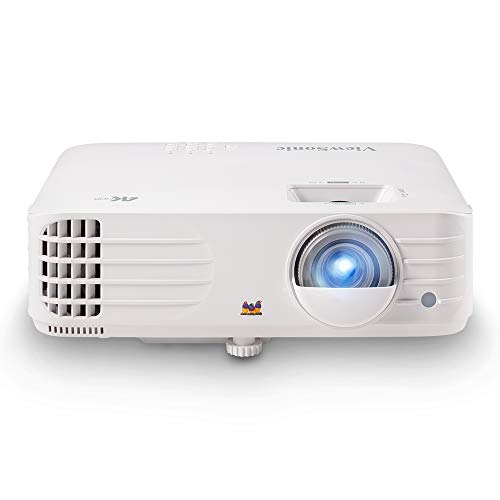
ViewSonic PX701-4K Gaming Projector — Stated-Lag Leader
The PX701-4K prints the number the TK710 leaves in prose: a 4.2ms input lag, stated in its title, alongside 3,200 lumens, 240Hz HDR positioning, auto keystone, dual HDMI, optical zoom and support for screens up to a stated 300 inches. In a category where responsiveness is usually marketed in adjectives, a title that commits to a figure deserves the headline it gets here. Competitive-leaning players — fighting games, rhythm titles, the shooters where a frame is a verdict — are this machine’s natural constituency, and its 4K UHD resolution means the responsiveness does not arrive at the cost of the picture’s detail.
The rest of the title serves the room around the player. Three thousand two hundred lumens is genuine brightness for a room that plays with some light on; dual HDMI keeps a console and a PC both resident without a cable swap; auto keystone and optical zoom forgive the shelf that is not quite where the brochure would put it. The honest balance to strike is that a single stated lag figure describes the machine’s best gaming mode, and the player’s job is to use that mode — the right input, the right settings — rather than assume every configuration inherits the headline. Used as intended, the PX701-4K is the roundup’s answer for the player who reads specifications the way lap times are read, and wants the number in writing.
- Resolution: 4K UHD, per the title
- Brightness: 3,200 lumens, as stated
- Stated lag: 4.2ms input lag, as printed in the title
- Gaming position: 240Hz with HDR, per the title
- Connections and extras: dual HDMI, auto keystone, optical zoom
Strengths
- The roundup’s most specific responsiveness claim, printed in its own title.
- 4K detail means competitive play need not sacrifice the picture.
- Dual HDMI keeps two gaming machines permanently connected.
Trade-offs
- The headline lag belongs to its gaming mode; settings discipline is required.
- Colour purists may still prefer the HT2060’s gamut-first design.
- A big stated screen ceiling invites rooms to oversize the image for their light.
Best for: competitive-leaning players who want responsiveness in writing. Not suited for: a colour-first film room, where the HT2060 argues better.

ViewSonic PX700HDH 1080p Projector — Bright 1080p Route
The PX700HDH makes the brightness argument at 1080p: 3,700 stated lumens — the highest figure in this roundup — with dual HDMI, a 1.1x optical zoom, SuperColor positioning and a title that names home theatre, movie and gaming use in one breath. Not every gaming room can be a cave. The family room with windows, the shared flat where the projector serves everyone, the basement that hosts both the console and the laundry — those rooms need lumens before they need resolution charts, and this is the pick that spends accordingly.
Its zoom is the modest end of this list’s range, and honesty requires the consequence to be stated: a 1.1x zoom gives a narrower corridor of mounting distances than the BenQ pair’s 1.3x class, so the PX700HDH’s shelf or mount position must be chosen with the screen size already decided. In exchange, the room gets the brightest picture here at the resolution most game libraries were built in, with SuperColor as ViewSonic’s colour positioning for the mixed diet of games and films the title describes. Players whose consoles and tastes live at 1080p, in rooms that refuse to darken, will find this the most practical machine in the guide — the one that solves their actual problem rather than the problem a showroom invented.
- Resolution: 1080p, per the title
- Brightness: 3,700 lumens — the highest stated in this roundup
- Lens: 1.1x optical zoom, named in the title
- Connections named in the title: dual HDMI
- Positioning in the title: home theatre, movie and gaming, SuperColor
Strengths
- Roundup-leading stated brightness for rooms that play with light present.
- Dual HDMI suits a console-plus-PC household without cable swaps.
- 1080p matches the native resolution of a vast game library.
Trade-offs
- The 1.1x zoom narrows placement freedom against the 1.3x-class picks.
- No lag figure is printed in its title; gaming is positioned, not quantified.
- 4K detail hunters should climb to the TK710 or PX701-4K instead.
Best for: bright shared rooms gaming at 1080p across consoles and film nights. Not suited for: a dedicated dark room chasing maximum detail per inch.

Epson Home Cinema 2350 4K PRO-UHD — Streaming-Friendly PRO-UHD
The Epson pair enter with their label read aloud, as this article promised: 4K PRO-UHD is Epson’s pixel-shift technology, which places a very detailed, genuinely sharp image on screen by shifting a lower native pixel count — and it is not native 4K, a distinction this review states once here and honours everywhere. The Home Cinema 2350’s title builds its case on that foundation: a 3-chip 3LCD smart streaming projector with Android TV, 2,800 lumens of colour and white brightness, HDR10 and HLG, low-latency positioning, a 10W speaker and Bluetooth. That is a living-room machine’s manifesto — the projector as the room’s whole entertainment system, streaming apps aboard, no separate box required.
For gaming, read the title’s own words with care: low latency is the claim, unaccompanied by a printed figure, and this article will not lend it one. What can be said is that Epson positions this machine for play as well as viewing, that its 3LCD design carries the colour-brightness honesty Epson titles are known for, and that the Android TV layer makes it the easiest pick here to live with for a household whose gaming shares the room with streaming, sport and family film nights. The competitive purist has two picks above with numbers in writing; the household that wants one bright, smart, back-of-room machine for everything has this one, and its elder sibling next.
- Resolution: 4K PRO-UHD (pixel-shift) — not native 4K, stated plainly
- Brightness: 2,800 lumens colour and white, as stated
- Platform: Android TV built in, per the title
- Gaming position: low latency, as framed in the title — no figure printed
- Extras named in the title: HDR10 and HLG, 10W speaker, Bluetooth
Strengths
- Android TV aboard makes it a complete entertainment system in one machine.
- PRO-UHD detail with 3LCD colour honesty suits mixed household content.
- A 10W speaker gives casual rooms sound without a separate system.
Trade-offs
- Pixel-shift detail is not native 4K, whatever the shelf talk says.
- No printed lag figure for players who buy by the millisecond.
- The roundup’s lowest stated brightness, for the most controlled rooms.
Best for: households wanting one smart back-of-room machine for games and streaming. Not suited for: competitive players who require responsiveness in writing.

Epson Home Cinema 3800 4K PRO-UHD — Established PRO-UHD Step
The Home Cinema 3800 is the 2350’s elder in the range, carrying the same honest label — 4K PRO-UHD, 3-chip 3LCD, HDR technology per its title — in the design that defined Epson’s serious home cinema tier for its generation. Its title is the most economical in this roundup, and this review will match that economy with candour: the listing promises the PRO-UHD platform and the Home Cinema pedigree, and the detailed figures a flagship buyer wants belong to the full listing, where they should be confirmed as part of the purchase’s ordinary diligence.
What justifies its place is the role it plays in the family’s staircase. The 2350 is the smart, streaming-forward all-rounder; the 3800 is the step toward the dedicated room — the machine for the player-viewer who has a screen, a mount position at the back wall, and a preference for a projector designed as a projector rather than as a media hub. Pixel-shift honesty applies with the same force as its sibling: the detail is real, the label is PRO-UHD, and native 4K is a different claim made by different machines elsewhere in this very list. Buyers who understand that sentence will get years of satisfaction from this design; buyers who need the words “native 4K” to be true should take the TK710 or the PX701-4K and leave this one to its proper audience.
- Resolution: 4K PRO-UHD (pixel-shift) — not native 4K, stated plainly
- Technology: 3-chip 3LCD, per the title
- Positioning in the title: HDR technology, Home Cinema flagship class
- Role: the established step above the streaming-focused 2350
- Detail figures: confirm from the full listing before purchase
Strengths
- A mature flagship design from the Home Cinema line’s serious tier.
- PRO-UHD detail with 3LCD colour character for film-and-game rooms.
- Suits a dedicated back-of-room installation over a media-hub role.
Trade-offs
- Its title states few figures, so diligence carries more of the purchase.
- Pixel-shift, again, is not native 4K and should not be sold as such.
- Newer streaming conveniences belong to its younger sibling.
Best for: dedicated rooms wanting the established Epson flagship design. Not suited for: buyers who want smart-platform convenience or printed gaming figures.
Detail, Light and Stated Responsiveness: The Six in One View
Lag figures appear below only where a title prints them; elsewhere the cell repeats the title’s own framing, which is the honest entry.
| Pick | Resolution as titled | Stated brightness | Responsiveness as titled | Placement tools |
|---|---|---|---|---|
| BenQ HT2060 | 1080p | Not the headline figure | 8.3ms at 120Hz | Lens shift, 1.3x zoom, 2D keystone |
| BenQ TK710 | 4K UHD | 3,200 ANSI lumens | 240Hz low input lag | 1.3x zoom, ceiling mount |
| ViewSonic PX701-4K | 4K UHD | 3,200 lumens | 4.2ms input lag, 240Hz | Optical zoom, auto keystone |
| ViewSonic PX700HDH | 1080p | 3,700 lumens | Gaming positioned, no figure | 1.1x optical zoom |
| Epson HC 2350 | 4K PRO-UHD (pixel-shift) | 2,800 lumens colour and white | Low latency, no figure | Smart streaming platform aboard |
| Epson HC 3800 | 4K PRO-UHD (pixel-shift) | Confirm from full listing | Home Cinema positioning | Installation-class design |
The table’s lesson is that this category cannot be ranked on one axis. The brightest machine is a 1080p one; the most responsive claim belongs to a 4K machine; the richest colour belongs to the LED; the two PRO-UHD machines trade a native-resolution claim for 3LCD colour character and platform depth. Our best home theater projectors short throw guide covers the opposite placement philosophy for rooms without the depth these six require.
How Do You Set Up a Back-of-Room Gaming Projector?
Measure the room’s depth against the screen’s width before anything is ordered, because the standard-throw bargain is written in that ratio. The projector’s zoom range defines the corridor of distances from which it can fill your screen; choose a shelf or mount point comfortably inside that corridor, not at its ragged edge, so the inevitable furniture change does not exile the machine. Centre the lens on the screen’s axis as closely as the room allows, use lens shift where the HT2060 offers it, and let keystone handle only the final degrees — every degree of digital correction spends a little of the resolution and responsiveness the machine was bought for.
Then wire for the player, not the brochure. The console or PC should reach the projector by the shortest honest cable run, with the gaming input the titles’ lag figures assume; a second cable for the streaming box or the second console — dual HDMI picks make this painless — and power that does not share a strip with the kettle. Set the picture to the machine’s gaming mode for play and its cinema manners for film, and save both where the household can find them. A back-of-room setup succeeds when the player on the sofa never thinks about the machine behind them, which is the entire point of putting it there. Give the installation one final rehearsal with the room’s least technical resident — the person who will start the Saturday session while the expert is out — and correct whatever that rehearsal exposes, because a setup only its installer can operate is a setup that will be operated wrongly, at length, in your absence.
What Actually Decides a Gaming Projector: Lag, Refresh and the Chain Between
Responsiveness is a chain, and the projector is only its last link. The console’s output settings, the cable, the receiver if one sits in the path, and the projector’s own mode each add or spare their share of delay, which is why this article quotes lag figures only as titles state them and treats the rest of the chain as the player’s craft. High refresh — the 240Hz positioning on the BenQ and ViewSonic 4K picks, the HT2060’s stated 120Hz figure — matters when the source can feed it and the game rewards it; a 60Hz console library gains nothing from a refresh figure it cannot use, and gains everything from low, honest latency in the mode it actually runs.
The practical test is embarrassingly simple and worth more than any table: play the game you know best, the one your hands understand, and notice whether the screen answers like a companion or like a translator. Rhythm and fighting players will feel differences the spreadsheet cannot rank; explorers of vast slow worlds may never feel them at all. Buy for the hands you have, in the room you have, and let the stated figures in this guide narrow the field to the machines worth that test.
Short Throw Versus Standard Throw, Argued Fairly
Since this article opened by correcting the category’s premise, it owes the short-throw class its fair hearing. A short-throw gaming projector earns its headlines honestly: it fills a huge screen from the coffee table, it shrugs at small rooms, and nobody’s shadow crosses it because nobody can stand between it and the wall. For a flat, a bedroom or a rented room where the back wall is six feet away, it is not the fashionable choice — it is the only choice, and the machines in our short-throw coverage serve those rooms well.
The standard-throw route argued here wins on the rooms it fits. Depth buys silence, because the fan sits behind the players; it buys an unshadowed picture during the most animated celebrations; it buys one fixed installation that serves games, films and sport without being moved, aimed or negotiated with. It also buys the classic projector market’s depth of choice — the six here span LED, laser and lamp, three resolution classes and two manufacturers’ whole philosophies — because standard throw is where projectors have always lived. Neither class is the future and the other the past. They are answers to two different floor plans, and the floor plan, as this guide keeps insisting, is the first specification.
Sound for Gaming: Speakers, Optical Out and the Headphone Hour
Two picks here state their speakers outright — the HT2060’s 5W stereo pair and the 2350’s 10W unit — and the calibration is familiar: built-in sound serves the casual room completely and the dedicated room barely. Gaming adds a wrinkle film never does, because audio is information in a game — the footstep, the engine note, the callout — and the player at the back of the room deserves it as clearly as the picture. The HT2060’s S/PDIF connection is the quiet professional in its title: an optical path out to a soundbar or receiver, letting the projector be the picture while something better is the voice.
And then there is the headphone hour, gaming’s private shift, when the household sleeps and the session continues at a whisper. A projector at the back of the room is the wrong place for a headphone socket, which is why the chain matters — console or PC to headphones directly, picture travelling separately to the screen. Plan that path at installation and the late session needs no improvisation. Sound, in short, should be designed the way the throw was: measured against the room and the household, not inherited from whichever speaker happened to be built in.
Three Gaming Rooms, Played Through
The first room is a family living room, twelve feet of depth, a screen where the television used to be, a console and a streaming habit sharing the evenings. The 2350 was designed for this room’s exact biography — Android TV for the household, PRO-UHD detail for the films, low-latency positioning for the games, a speaker that covers casual use — with the TK710 waiting as the upgrade the room graduates to when the screen grows. The second room is a dedicated games den: blackout blinds, a fixed screen, a PC and a console both resident, a player whose library is fighting games and racers. That room reads this list from the stated figures outward — the PX701-4K’s printed 4.2ms, dual HDMI for both machines, a mount at the back wall inside the zoom corridor — and treats colour gamut as a secondary pleasure.
The third room is the shared flat’s compromise: bright, multipurpose, the projector on a shelf that also holds books, film nights on Fridays and a 1080p console library. The PX700HDH’s brightness and the HT2060’s colour argue this room between them, and the shelf decides — if it can be centred and given a clean throw, the BenQ’s lens shift and gamut win the evenings; if the light is the room’s undefeated problem, the ViewSonic’s lumens win them instead. Three rooms, three different winners from one list of six, and in each case the room — not the ranking — did the choosing.
Brightness for Play Is Not Brightness for Film
A game’s picture lives under different pressures from a film’s. Games are bright, saturated and fast, played for hours in rooms that rarely achieve cinema darkness, and their darkest scenes are gameplay rather than mood — the player must see the corridor, not merely sense it. That is why the lumens column matters in this roundup with unusual directness, and why the PX700HDH’s roundup-leading figure is a gaming feature rather than a statistic. It is also why a machine’s gaming mode should be judged in the room’s real light: a mode that looks heroic in a dark showroom can look washed at home at seven in the evening, and the stated brightness is the buyer’s only advance warning of that difference.
The counterweight is restraint. In a properly darkened room, the brightest machine run at full tilt is a torch, and the picture modes exist to be used — full output for the bright room’s afternoon session, a gentler setting for the midnight one. Laser and LED sources, the TK710 and HT2060 respectively, hold their character across those settings and across years, which is part of what their buyers are paying for: not merely light, but light that stays the light they calibrated.
What Mistakes Do Buyers Make in This Category?
The first is shopping the wrong throw: falling for a short-throw headliner for a room whose furniture puts the screen wall out of its reach, or buying a standard-throw machine for a room with no depth to give it. The second is resolution confusion, in both directions — paying for native 4K claims that a title never made, or dismissing PRO-UHD machines without understanding that pixel-shift detail, honestly labelled, satisfies most rooms completely. The third is lag by adjective: accepting “low lag” as a number, or chasing a number without using the gaming mode it describes.
Placement mistakes finish the set. A mount at the corridor’s edge that a new sofa invalidates; keystone asked to perform the whole installation; the projector’s fan placed directly above the player’s head in a room that had a back wall available. Every one of these is a measuring failure rather than a product failure, and the measuring is the cheapest part of the whole purchase.
The Screen, the Wall and the Size of the Picture
Gaming seduces players toward size, and the stated screen ceilings in these titles — the PX701-4K speaks of up to 300 inches — should be read as possibilities rather than targets. A picture grows less bright as it grows larger, because the same lumens are spread thinner, and a game whose dark corridors must be read needs its brightness concentrated at a size the room’s light can support. The mature calculation runs the other way from the showroom’s: choose the largest size at which the picture still looks commanding in your room’s real light, and let the leftover zoom range be placement freedom rather than unclaimed inches. A wall can serve while the screen is chosen — projectors forgive walls more than reputations suggest — but a matte, light, even surface is the standard the wall is being judged against, and the proper screen remains part of the same purchase’s logic.
Multiplayer on One Enormous Screen
One joy belongs to this category alone, and it deserves a paragraph of celebration between the cautions: four players, one sofa, one wall-sized picture. Split-screen gaming on a projector is a different social object from the same game on a television — each player’s quarter is the size of a whole ordinary screen, the room’s laughter has somewhere to go, and the back-of-room placement means the audience behind the sofa can watch over the players’ heads without shadowing anything. Responsiveness matters here in aggregate rather than in milliseconds; the party notices a sluggish screen the way it notices a warm drink. Every pick in this roundup serves that evening honourably, and for many households it — not the competitive ladder, not the film night — will be the memory the projector is bought for.
Living With the Machine Across Years of Play
Projectors age by hours, and the light source decides the ageing’s shape. LED and laser designs — the HT2060, the TK710 and the Epson pair’s long-service class — promise steady output across years of evenings with no lamp diary. Lamp-based ownership elsewhere in the wider market runs on the familiar rhythm of a gradual fade and a planned change. Whichever philosophy a room chooses, the care is mostly calendar: filters checked on the household’s rhythm, vents kept clear of the shelf’s slow accumulation, firmware left to the machine’s own schedule, and the mount given an annual glance. Keep a note of the installation date and the settings that won the room’s approval, because the second year of a projector’s life is configured by whoever wrote things down in the first.
Reading a Gaming Projector’s Title Without Being Played
This category’s titles compress harder than most, so here is the reading order this guide used, offered for your own shortlists. Resolution first, translated without mercy: 1080p is 1080p, PRO-UHD is pixel-shift and says so, 4K UHD is the discrete-pixel claim. Lag second, and only where a number is actually printed — an adjective is not a figure, and a figure belongs to a mode and a refresh rate, both of which the title should name beside it, as the HT2060’s does. Brightness third, as the maker’s own figure, compared within the class rather than worshipped across it. Placement tools last — zoom, shift, keystone — because they decide whether the machine fits your room at all, which outranks every other virtue combined. A title read in that order stops being an advertisement and becomes what it should have been: a specification you can argue with.
HDR for Games, in Plain Terms
Several titles here carry HDR — HDR10 on the TK710 and the 2350, HDR positioning on the PX701-4K and the HT2060, HLG alongside on the Epson — and a plain translation serves the buyer better than another acronym. HDR asks the projector to hold detail in the brightest highlights and the deepest shadows at once, which in a game means the sunlit exit of a tunnel and the corridor behind you both remain readable. A projector’s HDR is a different instrument from a television’s — the projector’s total light is spread across a far larger picture — so judge it as atmosphere rather than as spectacle: highlights with shape, shadows with information, colour that deepens rather than merely brightens. The wide-gamut designs, the HT2060 above all, are where this roundup’s HDR argument is strongest, because gamut is the half of HDR a projector can genuinely deliver at wall size.
The Two-Console Household and the Input Discipline
Modern gaming rooms rarely hold one machine. A current console, a PC, perhaps a retro box resurrected for the classics — the dual HDMI picks in this list exist because the cable swap is the enemy of the spontaneous session. Wire both residents permanently, name the inputs in the projector’s menu where it allows, and keep the gaming mode set per input rather than per mood, so the responsive configuration is the one the player actually lands in. The discipline sounds administrative and pays like a feature: the session that starts in ten seconds happens three times as often as the session that starts with a drawer of cables, and a projector’s real usage — the hours that justify it — is built from exactly those small frictions removed.
When the Honest Answer Is a Television
A projector guide earns its credibility by naming the rooms it cannot serve. A small, bright room used at midday, where the picture must fight full sun at conversational size and the back wall is a window — that room belongs to a television, and no lumens figure in this roundup should be stretched to pretend otherwise. A player whose entire library is competitive and whose desk is the venue belongs to a gaming monitor’s world, covered elsewhere in this site’s coverage. The projector’s kingdom is the room with depth, some command of its light, and an appetite for scale — and inside that kingdom, which is a great many living rooms, the six machines here are not a compromise against the television. They are the reason the television started to look small.
Fan Noise, and Why the Back Wall Is Its Cure
Every projector is a lamp or laser with a fan attached, and in a short-throw layout that fan sits in the middle of the audience, working hardest exactly when the game is loudest in the player’s attention. The standard-throw placement this guide argues for is also an acoustic decision: the machine behind the sofa is masked by distance, by the room’s own sound and by the simple fact that nobody is sitting beside it. In quiet games — the stealth corridor, the dialogue scene — that distance is the difference between immersion and accompaniment. When you survey the room, stand at the player’s seat and listen for where the projector will be; a back wall that is also the room’s quietest corner is worth more than a specification nobody prints.
The First Weekend: Setting the Picture Properly
Give the new machine one unhurried hour before the first real session. Align it optically, focus it at the screen’s centre and check the corners, then walk the picture modes with the room in its two real states — afternoon light and evening dark — saving the settings each state prefers. Play the familiar game, the one your hands grade with, and adjust until the screen’s answer feels like your own reflex; then watch ten minutes of a film you know well and confirm the colour is the colour you remember. Write the winning settings in the household’s notes, photograph the remote’s layout for the drawer, and put the spare batteries where the batteries live. A projector calibrated in this spirit disappears into the room’s life; one left on its shipping settings will be blamed, unfairly and forever, for a picture nobody ever actually tuned.
Shelf or Ceiling: The Gamer’s Version of the Argument
A shelf is the honest starter: the projector arrives, the room is measured, the picture is proven — and if the shelf sits at the right height inside the zoom corridor, it may be the permanent answer, with the HT2060’s lens shift forgiving the shelf that is not quite at screen centre. A ceiling mount is the committed version: the machine leaves the furniture’s world entirely, immune to bumps, borrowers and the slow creep of objects across its line of sight, at the price of an installation afternoon and cables run properly through the room’s bones. Gaming argues for commitment slightly more than film does, because a nudged projector mid-session is a ruined frame at the worst moment — and because the player who has aligned a shelf machine four times will align it a fifth with diminishing love. Choose the shelf to learn the room; choose the ceiling when the room has told you its answer and you believe it.
Gaming With the Lights On Is a Legitimate Way to Play
One prejudice deserves retiring before the verdict: the idea that projected gaming only counts in a blacked-out room. Most real sessions are social and lit — friends drifting between the sofa and the kitchen, a family evening with lamps on, a tournament in a hall that was never going to be a cave. The brightness-first picks in this list, the PX700HDH above all and the two 3,200-lumen 4K machines behind it, exist for that reality, and a room that plays lit should choose by lumens and contrast in its own light rather than apologising to a standard set by cinema. Darkness remains the connoisseur’s preference and the film night’s ritual; it is not the entrance requirement for a wall-sized game, and the households that understand that get a projector that is used daily instead of ceremonially.
A Note on 3D, Because One Title Still Carries It
The HT2060’s title ends with a feature the rest of the roundup has quietly dropped: 3D support. It survives here as a genuine, if niche, pleasure — a shelf of 3D film discs and a handful of games from the format’s enthusiastic years, playable at a scale domestic 3D never enjoyed on televisions. Nobody should buy a projector in this category for 3D alone, and this guide does not ask them to; but the household that owns the discs will find the BenQ’s completeness on the point a small, real delight, and a reminder that a well-chosen projector gathers features the way a well-kept room gathers uses — gradually, and for the people who actually live there.
Final Recommendation
Choose by the room’s depth and the library’s demands. The colour-first player takes the HT2060 and its lens shift; the mixed room wanting 4K laser takes the TK710; the competitive player who buys by the printed number takes the PX701-4K; the bright shared room takes the PX700HDH and its roundup-leading lumens. The household that streams as much as it plays takes the 2350, and the dedicated room takes the 3800 with its figures confirmed from the full listing. Measure the throw, honour the labels, use the gaming mode you paid for. A projector at the back of the room, answering instantly, troubling nobody and asking nothing of the players in front of it, is gaming’s oldest and most comfortable luxury made new again.
Frequently Asked Questions
Are these really “long throw” projectors?
They are the standard-throw route, described honestly. The gaming market’s headline machines are short-throw; these six use standard lenses with zoom ranges that suit the back of a room, and this article frames them as placement flexibility rather than printing a throw specification no title states. If your room needs the projector feet from the screen, the short-throw class is your category instead, and choosing it knowingly — for a room that genuinely lacks depth — is a better purchase than forcing any of these six into a space they were never shaped for.
Is 4K PRO-UHD the same as native 4K?
No, and the distinction is printed throughout this guide wherever the Epson pair appears. PRO-UHD is pixel-shift technology: it produces a detailed, sharp image by shifting pixels, and many viewers find it entirely satisfying at real screen sizes. Native 4K renders every pixel discretely. Both are legitimate; they are not the same claim, and a seller who blurs them is telling you something about the seller. At ordinary living-room screen sizes and seating distances, a great many viewers cannot separate the two in a blind comparison — which is an argument for buying PRO-UHD happily when its other virtues suit the room, and an equal argument for refusing to pay a native-4K premium for a label the title never actually claimed.
How much input lag is low enough for gaming?
It depends entirely on the games your hands play and how honestly you play them. The figures stated in this roundup — 8.3ms at 120Hz on the HT2060, 4.2ms on the PX701-4K — sit comfortably in the range most players, including keen ones, experience as immediate. Story-driven and exploratory games forgive far more; rhythm and fighting games forgive least. Buy by your library, and remember the whole chain — console settings and the gaming mode included — shares the result.
Can one of these replace our TV for everything?
The streaming-equipped 2350 makes the strongest case, with Android TV aboard and a speaker suited to casual rooms. The others assume a source — console, PC, streaming box — and reward it with a far larger picture. What none of them does well is a bright room at midday on a white wall; a screen and some light discipline are part of the same purchase, whichever pick you choose. Households that accept that single condition routinely retire the television within a season, because the projector’s picture — at three times the size, from a machine nobody sees — quietly becomes the room’s idea of normal, and the old screen’s corner begins to look like a photograph of one.
How far back does the projector need to sit?
Far enough that its zoom range can fill your chosen screen from that wall — which is a measurement, not a mood. Decide the screen size first, read the pick’s zoom class, and place the shelf or mount comfortably inside the corridor the lens offers rather than at its edge. Rooms vary far too much for a universal distance, and any guide that prints one without asking your screen size first is simply guessing with your money.
Does a higher refresh rate always mean smoother gaming?
Only when the source can feed it. A 240Hz-positioned projector shows its advantage with a high-refresh source and a game that rewards it; a 60Hz console library will look identical on it and on a humbler machine, apart from latency. Match the refresh ambition to the hardware you own, not the hardware in the advertisement — and if a more powerful console or PC is genuinely on the household’s horizon, buying the refresh headroom now is one of the few future-proofing decisions in this category that history tends to vindicate.
Related Guides
Rooms that cannot give a projector depth should read our best 1080p home theater projectors roundup for the wider standard-throw field, and the sanctuary-scale thinking in the best church projectors over 4000 lumens guide translates surprisingly well to very large gaming rooms.
Projection trades raw refresh for scale, and readers weighing the opposite trade will find it in our guide to the best 360hz monitors.


