What's inside
- Key Takeaways
- Quick Picks
- How Did We Decide What Belongs in a 5,000-Lumen Guide?
- ANSI, ISO and LED Lumens: Why the Unit Matters More Than the Number?
- Which Bright Projectors Come Closest to the 5,000-Lumen Line?
- How Much Brightness Does Your Room Actually Need?
- How Do You Install a Very Bright Projector Without Regretting It?
- What Happens to Contrast When the Room Will Not Darken?
- Portable Bright or Installed Bright: Which Duty Cycle Is Yours?
- Worked Examples: Matching Output to Screen and Room
- What About Fan Noise, Heat and Eco Modes at Full Output?
- How Can You Sanity-Check a Brightness Claim Before You Buy?
- What Does Chasing Brightness Do to Colour and Skin Tones?
- Why Do Throw Distance and Zoom Position Quietly Steal Brightness?
- Comparison Table
- What Mistakes Do Bright-Projector Buyers Keep Making?
- Final Recommendation
- Frequently Asked Questions
- Related Guides
As an Amazon Associate I earn from qualifying purchases. This post may contain affiliate links at no extra cost to you.
gizmoverdict.com is reader-supported. When you buy through links on our site, we may earn an affiliate commission.
Where to buy: Four picks below link to verified Amazon listings from our pool, and each is labelled with the brightness figure from its own listing — none of them reaches 5,000 lumens, and this guide says so plainly. The two machines that genuinely belong to the 5,000-lumen-and-above class are covered as prose-only picks, because we could not verify listings for them in our pool.
The best 5000 lumen projectors are bought for rooms that refuse to go dark: the community hall with windows along one wall, the classroom that teaches through the afternoon, the sports bar, the church, the bright family room where a weekend match matters more than a midnight film. In those rooms, brightness is not a vanity metric — it is the whole product. A projector’s image is light competing against the room’s light, and when the room brings daylight to the fight, only serious output keeps text readable, colours distinguishable and faces watchable. That is the honest promise of the 5,000-lumen class, and it is why this keyword exists.
It is also why this guide has to begin with a confession about the market. Genuine 5,000-plus-lumen projectors are overwhelmingly installation and business machines — heavier, louder, built for mounting and maintenance schedules — and verified consumer listings for them are scarce in our pool. What the pool does hold, and holds well, is the tier immediately below: home and portable projectors whose listings state figures between 3,000 and 4,800 lumens, measured under differing standards that this guide will untangle rather than average away. So the shortlist below is built in two honest halves. Four linked picks approach the threshold as closely as verified listings allow, each with its real number printed next to its name. Two prose-only picks — a BenQ installation laser and an Epson PowerLite-class machine — represent the true 5,000-plus territory for buyers whose rooms genuinely demand it.
Read the numbers in this guide with the units attached, because the units are where this category hides its sins. A lumen figure without a standard behind it is advertising, not measurement, and the section after the picks explains ANSI, ISO and the unregulated LED-lumen claims that make a 500-lumen toy sound like a conference-room cannon. The short version: compare like with like, discount any figure whose maker will not name its standard, and remember that perceived brightness also depends on screen size — the same projector that floods a 100-inch screen will look merely adequate at 180 inches, because its light is spread over more than three times the area.
Key Takeaways
- No verified listing in our pool reaches 5,000 lumens; the brightest linked pick states 4800 ISO lumens, and the true 5,000-plus class is covered honestly as prose-only.
- Lumen figures are only comparable within the same standard — ANSI and ISO measure rigorously, while unlabelled “LED lumens” can overstate real output several times over.
- Brightness needs scale with screen area: doubling the diagonal quadruples the light required for the same perceived image.
- Colour brightness matters as much as white brightness in lit rooms; projectors that publish both figures are easier to trust.
- In a genuinely dark room, every pick here is already bright enough — the 5,000-lumen hunt only makes sense where light cannot be controlled.
Quick Picks
| Pick | Badge | Why it earns its place |
|---|---|---|
| XGIMI Horizon 30 Pro | Closest to the threshold | A listing-stated 4800 ISO lumens from an RGB triple-laser 4K engine — the nearest verified machine to this class. |
| XGIMI HORIZON 20 Pro | Bright with placement manners | 4100 ISO lumens as listed, plus optical zoom and lens shift for rooms that cannot be rearranged around the projector. |
| Epson EpiqVision Ultra LS800 | Brightest ultra-short-throw | 4,000 lumens of colour and white brightness from a console inches from the wall — big output with zero throw distance. |
| BenQ TH575i | Bright living-room value | A listing-stated 3800lm with Google TV aboard, aimed at lit-room sport and family viewing rather than dark-room cinema. |
| BenQ LU935 (prose-only) | The genuine article, installation class | A laser installation projector in the 6,000 ANSI lumen class — what true 5,000-plus ownership actually looks like. |
| Epson PowerLite L630U class (prose-only) | Venue-grade laser | A 6,000-plus-lumen-class laser built for halls and large venues, with the weight and mounting hardware to match. |
How Did We Decide What Belongs in a 5,000-Lumen Guide?
The first rule was arithmetic honesty: a pick could only be described with the brightness figure its own listing states, in the unit that listing uses, and no figure was converted, rounded up or “interpreted” toward the keyword. That rule immediately shaped the list. Our verified pool tops out at 4800 ISO lumens, so the guide says so, ranks the near-threshold machines by how their output survives real rooms, and reserves the genuine 5,000-plus class for two prose-only representatives described at the class level their makers publish. Inventing a listing or borrowing a number from a different model would have been easier; it would also have been fiction.
The second rule was to judge brightness the way rooms experience it. A projector’s usable output in a lit space depends on colour brightness as well as white, on the contrast the machine can hold when ambient light lifts its blacks, and on fan noise — because a bright projector that must run its cooling at full voice in a classroom will be turned down or turned off. Smart platforms were weighed lightly; in halls and classrooms the projector is usually fed by a laptop or a fixed source, and in bright living rooms a streamer can be added. What could not be verified was not linked, and what is not 5,000 lumens is never called 5,000 lumens anywhere in this article, including the table.
ANSI, ISO and LED Lumens: Why the Unit Matters More Than the Number?
Three different rulers circulate in projector listings, and they do not agree. ANSI lumens follow a long-established standardised method: the screen is divided into a grid, brightness is measured at multiple points with the projector set up as a viewer would use it, and the results are averaged. ISO lumens, used by several Japanese and Chinese makers including XGIMI in these listings, follow a closely related international method, and figures from the two standards are broadly comparable — a 4800 ISO lumen projector and a 4,800 ANSI lumen projector are playing the same sport. The third ruler is no ruler at all: unqualified “lumens”, “LED lumens” or “lux-derived” figures quoted by some budget brands are measured at the light source, or by methods the maker declines to publish, and can overstate the light that actually reaches a screen by a factor of three or more. Experienced buyers learn to hear those figures the way they hear a fisherman’s estimate of the one that got away — as a story about enthusiasm, not about size.
Epson’s habit of publishing colour brightness alongside white brightness adds a fourth consideration. A projector can produce a bright white test pattern while its colour output — the light available for reds, greens and blues — is substantially lower, which is why a football pitch can look vivid while a face looks drained on the same machine. The 3LCD picks in this guide publish both numbers as equal, which is the honest configuration. The practical protocol for any buyer reading listings beyond this guide: find the standard named next to the number; if none is named, treat the number as marketing and look for independent measurements; and always scale your expectation by screen size, because lumens describe total light, not brightness per square foot.
Which Bright Projectors Come Closest to the 5,000-Lumen Line?
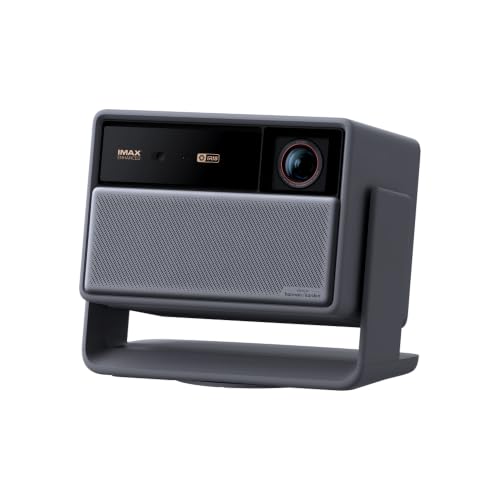
XGIMI Horizon 30 Pro — Closest to the threshold
At a listing-stated 4800 ISO lumens, the Horizon 30 Pro stands 200 lumens short of this guide’s title — close enough that the difference is invisible, far enough that we print the real number. Its output comes from an RGB triple-laser engine, which matters for bright-room use in a specific way: because colour is generated directly by red, green and blue lasers rather than filtered from white light, saturated colours keep their intensity as brightness rises. In a lit room that is the difference between a presentation chart whose red column still reads as red and one that fades toward pink under the ceiling lights. The 4K resolution and Dolby Vision support are home-theater credentials, but they travel well into bright spaces, where text in streamed content and fine detail in shared documents benefit from the pixel count.
Where this machine differs from the true installation class below is in everything around the light. It is a consumer projector — compact, quick to set up, with Google TV and Harman Kardon sound built in — designed to be carried to the room rather than bolted into it. In a bright living room or a small hall with modest windows it will hold a 120-inch image respectably with curtains drawn; asked to fight direct sun on a 180-inch screen, it will lose, and no honesty about its 4,800 lumens should pretend otherwise. Buy it as the ceiling of the portable class, not as a substitute for venue hardware.
- Brightness: 4800 ISO lumens as stated in the listing
- Light engine: RGB triple laser
- Resolution: 4K UHD, Dolby Vision support
- Platform: Google TV, Harman Kardon speakers
- Form: portable long-throw, no installation hardware needed
Strengths
- Highest verified output in our pool, within a whisker of the class line.
- Triple-laser colour holds saturation as brightness climbs.
- Sets up in minutes anywhere — no mount, no technician, no downtime.
Trade-offs
- Still short of a true 5,000-plus rating for very large, sunlit spaces.
- Fan and heat at full output suit living rooms better than hushed boardrooms.
- Consumer build assumes gentle handling, not venue duty cycles.
Best for: bright living rooms and small halls that need near-class brightness without installation. Not suited for: sunlit venues or screens well beyond 150 inches.

XGIMI HORIZON 20 Pro — Bright with placement manners
The HORIZON 20 Pro lists 4100 ISO lumens, and pairs that output with the two features bright-room buyers most often forget they need: optical zoom and lens shift. Bright spaces are rarely purpose-built; the projector lands on a sideboard, a bookcase, a borrowed table — and a machine that can only be squared to the screen from one exact spot will end up keystone-corrected, throwing away resolution and a slice of its brightness in the process. The 20 Pro’s optics let it keep its full rated output and full 4K grid from imperfect positions, which in practice can make its real delivered image brighter than a nominally stronger projector installed badly.
Its RGB triple-laser engine is the same family as the flagship’s, so the colour-under-brightness argument applies with equal force, and the listing’s Dolby Vision and IMAX Enhanced support, plus licensed Netflix on Google TV, make it a complete bright-room streamer without extra boxes. In a family room that hosts afternoon sport and evening films in equal measure, this is arguably the most balanced machine in the guide: not the brightest, not the cheapest, but the one whose brightness survives contact with an uncooperative room layout. Rooms that can offer a perfect central shelf should take the 30 Pro’s extra output instead; rooms that cannot should take this one’s manners.
- Brightness: 4100 ISO lumens as stated in the listing
- Light engine: RGB triple laser
- Resolution: 4K UHD, Dolby Vision, IMAX Enhanced
- Optics: optical zoom and lens shift
- Platform: Google TV with licensed Netflix
Strengths
- Optics preserve full brightness and resolution from off-centre placements.
- Laser colour stays vivid under ambient light better than filtered designs.
- Complete smart platform removes the need for an external streamer.
Trade-offs
- Roughly 700 listed lumens behind the flagship — visible on very large screens.
- Long-throw only; it cannot sit at the screen wall like a UST.
- Its flexibility costs setup attention that casual users may skip.
Best for: bright mixed-use rooms with fixed furniture and imperfect projector positions. Not suited for: very large screens in rooms that cannot dim at all.
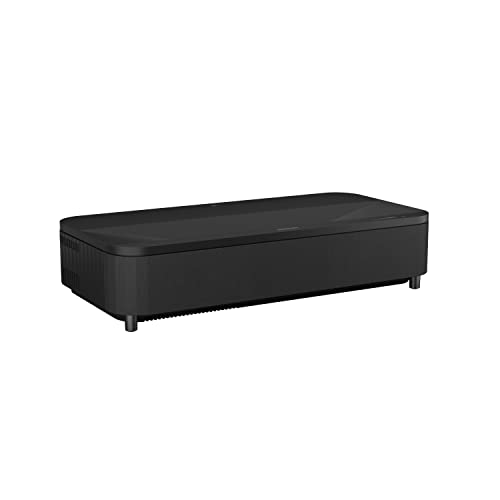
Epson EpiqVision Ultra LS800 — Brightest ultra-short-throw
The LS800 attacks the bright-room problem from geometry rather than wattage. As an ultra-short-throw projector it sits inches from the screen, so its light travels a foot instead of fifteen — and, paired with an ambient-light-rejecting UST screen, much of the room’s ceiling light is refused by the screen’s lenticular surface before it can wash the image out. Its listing states 4,000 lumens of both colour and white brightness, the dual figure that signals honest colour output, delivered by a 3-chip 3LCD engine with 4K PRO-UHD resolution. In a bright family room this combination — strong, colour-true output plus a screen that fights ambient light — routinely outperforms nominally brighter long-throw setups firing across a lit room onto a plain wall.
The conditions are the usual UST conditions, and they are not optional: a flat wall or proper screen, a console at the prescribed height, and care around the upward lens. The verified listing for this model is renewed stock, so its condition notes and warranty terms deserve a read before ordering; the underlying model is a flagship with a known record. The built-in 2.1-channel Yamaha audio also earns a mention in a brightness guide, because bright-room viewing is social viewing — sport, family films, shared events — and sound that fills the room without extra hardware keeps the setup as simple as the geometry promises.
- Brightness: 4,000 lumens colour and white, per the listing
- Light engine: laser, 3-chip 3LCD
- Resolution: 4K PRO-UHD
- Throw: ultra-short — console at the screen wall
- Audio: built-in 2.1-channel Yamaha system
Strengths
- Short light path plus an ALR screen defeats ambient light more cleverly than raw output.
- Equal colour and white brightness keeps lit-room colours believable.
- No throw distance to calculate, no shadows from people crossing the room.
Trade-offs
- Needs the right screen to show its bright-room advantage; a bare wall wastes it.
- Verified listing is renewed — check its specific terms before buying.
- Console placement is dictated by geometry, limiting furniture choices.
Best for: bright living rooms wanting a huge everyday screen without ceiling work. Not suited for: halls and classrooms, where its UST geometry and consumer build do not belong.

BenQ TH575i — Bright living-room value
The TH575i lists 3800lm — BenQ does not attach a standard name to the figure in the listing title, so this guide repeats it exactly as given and treats it as the maker’s number rather than a laboratory result. What the machine is, beyond the figure, is a 1080p living-room projector with Google TV supplied on a licensed dongle, auto vertical keystone, and a listing-stated 16.7ms input lag that speaks to its second job as a big-screen gaming display. In the ecology of a bright family room, that combination is coherent: sport in the afternoon with the curtains open a crack, games in the evening, films when the room finally darkens, all from a machine that asks little setup ceremony of anyone.
Its honesty requirement runs the other way from the flagships: nobody should buy a 3800lm 1080p projector believing they have bought into the 5,000-lumen class, and at screen sizes past 130 inches in lit rooms its image will soften and wash in ways the picks above resist longer. Within its brief, though, it is the value anchor of this guide — the machine for the buyer who priced true installation projectors, winced, and wants most of the bright-room experience for ordinary money. The three-year warranty stated in its listing is a final, practical comfort in a category where budget machines often carry a fraction of that cover.
- Brightness: 3800lm as stated in the listing (standard not named there)
- Light engine: lamp-based DLP
- Resolution: 1080p Full HD
- Platform: Google TV via licensed dongle
- Warranty: three years as stated in the listing
Strengths
- The most accessible route here to a genuinely bright, large image.
- Low listed input lag makes it the gamer’s pick among the bright machines.
- Long stated warranty softens the risk of a lamp-based design.
Trade-offs
- 1080p and a lamp engine sit a clear class below the laser picks.
- Its brightness figure arrives without a named measurement standard.
- Lamp output fades with hours in a way the laser picks’ does not.
Best for: bright family rooms, sport and casual gaming on a sensible budget. Not suited for: venues, very large screens, or buyers who need verified 5,000-class output.
BenQ LU935 class — The genuine article, installation class
This is what the keyword actually describes. The LU935 is BenQ’s laser installation projector, published in the 6,000 ANSI lumen class — an ANSI figure, measured to the standard, from a maker whose business line lives or dies by such numbers. It is built for the rooms the consumer picks above cannot serve: conference spaces with glass walls, lecture rooms, houses of worship, exhibition areas, anywhere a 150-to-200-inch image must survive working light. The supporting details are installation details — a sealed laser engine rated for long service intervals, lens options and shift for mounting where the building allows, networking for central management, and a chassis meant to be lifted by two people and then ignored for years.
No verified listing for it exists in our pool, so it carries no link and no price talk; treat this entry as a signpost to the correct shelf in the catalogue. Buyers whose requirement is truly 5,000-plus should shop this class deliberately — through AV dealers as often as retail listings — and should expect the ownership model to differ as much as the hardware: installation, a proper mount, possibly a professional calibration, and a maintenance conversation instead of an impulse checkout. The gap between this machine and the Horizon 30 Pro is not 1,200 lumens; it is a whole philosophy of what a projector is.
- Brightness: 6,000 ANSI lumen class, as published by the maker
- Light engine: laser, sealed installation design
- Resolution: WUXGA class for data and video
- Intended use: conference, worship, lecture and exhibition spaces
- Ownership: installed and managed, often dealer-supplied
Strengths
- Genuine standardised output above the 5,000 line, with headroom to spare.
- Built for duty cycles and mounting realities that consumer machines never face.
- Laser engine suits years of daily service with minimal attention.
Trade-offs
- Size, weight and fan presence belong to venues, not living rooms.
- Total cost includes installation, mount and screen — not a checkout-price product.
- No verified listing in our pool, so availability and terms need dealer confirmation.
Best for: organisations lighting large images in rooms that stay lit. Not suited for: home buyers, renters, or anyone wanting a projector that travels.
Epson PowerLite L630U class — Venue-grade laser
Epson’s PowerLite L series is the other natural home of the true 5,000-plus buyer, and the L630U class sits in the low-6,000s of lumens as published by Epson, with the company’s characteristic insistence on quoting colour and white brightness together. These are 3LCD laser machines for auditoria, large classrooms and event spaces: interchangeable-lens ecosystems on some siblings, generous lens shift, edge-blending and geometric correction tools for complex installs, and control protocols that let a facilities team manage a building’s worth of projectors from one desk. If the BenQ above is the class’s conference-room expression, the Epson line is its campus-and-venue expression.
Like the BenQ, it appears here without a link because our pool holds no verified listing for it, and its presence is the guide’s closing act of honesty: the 5,000-lumen class is real, it is excellent, and it is simply not the same product category as the four consumer machines above it. A buyer who needs this class should welcome the difference — these projectors are specified, quoted and installed, and the dealer conversation that feels like friction is actually the service model working as intended. A buyer who merely wants a bright family room should save the difference and take the LS800 or a Horizon, which will be brighter in spirit — quieter, quicker, friendlier — in every way that matters at home.
- Brightness: low-6,000-lumen class, colour and white, as published by the maker
- Light engine: laser, 3-chip 3LCD
- Resolution: WUXGA class with 4K enhancement on some configurations
- Intended use: auditoria, large classrooms, event and worship venues
- Ownership: facilities-managed, dealer or integrator supplied
Strengths
- Venue-scale output with colour brightness published alongside white.
- Installation toolset — shift, correction, control — is the deepest here.
- 3LCD image has no rainbow artefacts for sensitive viewers in the audience.
Trade-offs
- Far beyond home needs in output, size, noise and total installed cost.
- Buying route is a specification process, not a next-day delivery.
- No verified listing in our pool; figures are the maker’s class data.
Best for: institutions equipping large, lit venues for years of service. Not suited for: any room with a sofa in it.
How Much Brightness Does Your Room Actually Need?
The useful way to think about lumens is per square foot of screen, under the light the room will actually have during viewing. A fully dark room asks very little — the home-theater guide’s 2,500-ANSI-lumen pick is cinematic there — because the eye adapts and the screen’s black floor sits low. Add controlled ambient light, the kind in a living room with lamps and drawn curtains, and the requirement roughly doubles for the same punch. Open the curtains on a bright day, or light a hall to working levels, and the requirement climbs again, steeply, because ambient light does not merely add competition — it raises the screen’s black level, compressing contrast from below no matter how hard the projector pushes from above. This is why the same 4,000-lumen machine can look heroic at 110 inches in a shaded room and tired at 170 inches in a glazed one: screen area multiplies the demand while ambient light taxes the result.
Two levers besides raw output deserve a place in the calculation. Screen gain and ambient-light-rejecting surfaces redirect light toward the audience and away from the room’s glare, effectively multiplying a projector’s useful brightness without touching its fan or its electricity bill. And content matters: a spreadsheet, a football match and a noir film ask different things of the same image — text needs contrast at small sizes, sport needs colour brightness, film needs black depth. The 5,000-lumen specification, honestly understood, is the answer to a specific compound question — large screen, lit room, mixed content — and buyers whose rooms ask only part of that question can stop several models earlier and spend the difference on the screen that makes brightness count.
How Do You Install a Very Bright Projector Without Regretting It?
Heat and noise are the installation facts that brightness brings with it. A high-output projector is a small heater with a fan, and in a classroom or meeting room it belongs on a proper ceiling mount, clear of occupants’ ears and of the sprinklers and sensors building codes care about, with power and signal runs planned rather than improvised. Throw distance must be calculated from the lens’s actual range for the screen size chosen — installation models offer lens options precisely because rooms differ — and the image should be aligned optically, with lens shift, rather than corrected digitally, because keystone correction discards pixels and, with them, some of the brightness that justified the purchase.
For the consumer picks in this guide the same principles apply in miniature. Give the XGIMIs ventilation space on every side, keep the TH575i’s lamp housing accessible for its eventual service, and on the LS800 keep the upward lens clean and the console level. In all cases, commission the setup with the content the room actually shows: if the projector will spend its life on spreadsheets and streamed matches, judge it on those, in the room’s working light, at the working hour — a projector that impresses at midnight and disappoints at noon was bought for the wrong room.
What Happens to Contrast When the Room Will Not Darken?
Brightness gets the headlines, but contrast is what ambient light actually murders. A projector’s black is not a substance it produces; it is the absence of its light on your screen — which means the room’s light becomes part of every dark pixel. In a hall at working light levels, the screen’s floor rises until shadow detail, the lower third of most film scenes and the fine print of most slides, compresses into a narrow band of greys. Doubling the projector’s output raises the ceiling of the image and restores some of that range, which is the real mechanism by which lumens rescue a bright room: not by making white whiter in the abstract, but by widening the distance between the room’s floor and the image’s peak until content becomes legible again.
This is also why grey and ambient-light-rejecting screens punch above their cost in bright spaces. A grey surface absorbs a portion of the room’s stray light along with a portion of the projector’s, and because the projector’s light is concentrated and directional while the room’s is diffuse, the trade nets out in the image’s favour — blacks deepen more than whites dim. ALR surfaces go further, structuring the screen to accept light from the projector’s angle and reject light from the ceiling’s. Neither technology creates contrast from nothing; both spend the projector’s lumens more wisely. A buyer choosing between a 4,000-lumen projector on an ALR screen and a 5,000-lumen projector on a white wall is often, in measured on-screen contrast, choosing between equals — with the first option quieter and cheaper to run.
Portable Bright or Installed Bright: Which Duty Cycle Is Yours?
The consumer and installation halves of this guide differ less in peak output than in what a day looks like. A consumer bright projector — the XGIMIs, the LS800, the TH575i — is designed around sessions: switched on for a match, a film, a lesson, then off, unplugged perhaps, carried perhaps. Its cooling, its power supply and its interface all assume a human nearby and a duty cycle measured in evenings. An installation projector assumes the opposite life: mounted once, powered for ten or twelve hours a day, expected to wake on a schedule, report its health over a network, and survive years of that rhythm with filter cleans and little else. The 5,000-lumen figure means something different in each world — in the first, a peak to be visited; in the second, a working level to be sustained at hour eight of a conference day without the fan becoming the loudest voice in the room.
Matching the duty cycle matters more than matching the number. A school that mounts a consumer projector over a classroom will meet its thermal limits by half-term; a family that installs a venue laser over the sofa will live with fan noise, heat and a service contract they never wanted. The honest question behind this keyword is therefore not “how bright” but “how long, how often, and who maintains it” — and the six picks above sort themselves the moment those three answers are spoken aloud. Venues with facilities staff belong to the prose-only class. Households, however bright their rooms, belong to the linked four, and will be happier there than their first instinct toward maximum lumens suggested.
Worked Examples: Matching Output to Screen and Room
Three concrete cases show the arithmetic in action. A family room with a 110-inch screen, curtains that close and lamps that dim: the LS800’s 4,000 colour-true lumens or the HORIZON 20 Pro’s 4100 ISO lumens produce a bright, confident image with output to spare, and even the TH575i serves on overcast afternoons. A training room with a 140-inch screen, ceiling panels that stay on and windows along one side: this is the Horizon 30 Pro’s outer edge — workable with blinds managed and a modest-gain screen, visibly happier if the screen drops to 120 inches — and it is exactly the scenario where stepping into the installation class stops being extravagance. A hall with a 180-inch screen and light that cannot be touched: no consumer pick in this guide is the right tool, full stop, and the LU935-class machines exist precisely because this sentence is true.
Notice what the examples share: screen size moved the answer as much as room light did. Buyers fixated on the lumen figure alone routinely buy a projector for the screen they described in the shop and then install the larger screen they actually wanted, halving their brightness per square foot in the process. Fix the diagonal first, in tape on the wall, and let the lumen requirement be whatever the arithmetic says it is — the number will usually be smaller, and always more honest, than the one the keyword arrived with.
What About Fan Noise, Heat and Eco Modes at Full Output?
Every lumen in this guide is paid for twice: once at the till and once in the room, as heat the projector must expel and fan noise it must make doing so. Consumer projectors quote their quietest eco-mode noise figures, which are real but describe the machine loafing; at full brightness in a warm room, any of the linked picks becomes audible in quiet passages, and the installation class solves the problem with size — bigger chassis, slower fans, and mounting distance from ears — rather than with silence. Placement is the buyer’s lever: a projector behind the audience, inside a ventilated hush position or simply farther from the seating will trouble a film less than a nominally quieter model mounted overhead. In classrooms and meeting rooms the calculus flips — speech intelligibility is the product, and a projector whose fan masks consonants at the back row has failed at its job regardless of its lumen count.
Eco modes deserve respect rather than suspicion. Dropping a bright projector to seventy or eighty percent output typically costs little perceived brightness — the eye judges logarithmically, not linearly — while cutting fan speed, heat and power draw substantially and extending light-source life. The correct commissioning ritual for any machine in this guide is to set it up at full output, confirm the image defeats the room, then step down until the image just begins to soften, and live one notch above that point. Most owners discover their projector’s honest working level sits well below its headline maximum, which is another way of saying the headline was headroom, and headroom is a feature — as long as nobody mistakes it for the everyday setting.
How Can You Sanity-Check a Brightness Claim Before You Buy?
Start at the listing and read it like a contract. A trustworthy figure names its standard — ANSI or ISO — sits near the top of the specification, and is repeated consistently in the manual, which is the document makers are most careful with. Cross-check the model on the maker’s own regional sites; a projector that is 4,800 lumens in one territory and 9,000 in another is telling you which figure is marketing. Independent reviews that publish measured lumens are the gold standard of verification, and for any model in the installation class, dealer spec sheets will state the figure with the standard attached, because business buyers audit them. Weight and power draw offer a rough physical audit too: light is energy, and a machine claiming venue output from a pocket chassis at a few dozen watts is claiming to repeal thermodynamics.
The second check happens after delivery, and it is simpler than buyers expect. Project a full-white image at your intended screen size in your room’s working light, then display the content the projector was bought for — the spreadsheet, the match, the film — and judge legibility from the farthest seat. Standards exist to make pre-purchase comparison possible, but the room is the final laboratory, and every pick in this guide was chosen to survive that test at the screen sizes and light levels its section describes. If a projector fails it, the failure will be obvious within one scene, which is precisely why honest figures matter: they predict the room test instead of contradicting it.
What Does Chasing Brightness Do to Colour and Skin Tones?
Output and colour pull against each other in most projector designs, and the tension explains several choices in this guide. The cheapest way to raise a white-brightness figure is to favour the parts of the spectrum the eye reads as bright — greens and whites — which is how a machine can post a heroic number while rendering faces waxy and foliage electric. Colour brightness, the figure Epson publishes alongside white, exists to expose exactly this gap. The RGB triple-laser picks sidestep the trade structurally: because each primary has its own laser, raising output raises the primaries together, and saturation survives the climb. The 3LCD picks achieve a similar honesty by giving each primary its own light path. Single-chip designs with white segments in their colour wheels are where the trade bites hardest, and buyers in that territory should weigh measured colour output, not the headline.
For the rooms this guide serves, the implication is practical. A training room lives on slides and faces on video calls; a sports bar lives on kits, pitches and skin under floodlights; a bright family room lives on all of it. In each case the colour figure predicts satisfaction better than the white figure does, and the shortlist above was ordered with that in mind — the machines whose colour output is published, structural or both stand ahead of the machine whose number arrives alone.
Why Do Throw Distance and Zoom Position Quietly Steal Brightness?
Two projectors with identical lumen ratings can deliver visibly different screen brightness in the same room, and the lens is usually why. A zoom lens passes light most efficiently at one end of its range; at the telephoto extreme — the setting used when the projector sits farthest from the screen — many lenses surrender a noticeable slice of output. Installation models publish this honestly in their lens data, which is one more reason the venue class quotes its figures the way it does. The consumer implication is simple: where a room offers a choice of mounting positions, the position that lets the lens work near its wide end keeps more of the brightness you paid for, and a machine with optical zoom and lens shift, like the HORIZON 20 Pro, gives you that choice instead of dictating a single spot.
Throw geometry also decides how forgiving a bright image is of the screen itself. Long throws strike the screen at a shallow angle and spread light evenly; ultra-short throws arrive steeply, which is why the LS800’s pairing with a lenticular screen matters — the screen’s structure is engineered for exactly that angle, returning light to the audience instead of scattering it to the ceiling. Hot-spotting, the bright centre patch visible on some high-gain screens, grows more likely as projector output rises, so very bright machines often pair best with moderate-gain surfaces. None of this appears on a listing’s headline, and all of it appears on the wall — which is the recurring lesson of this entire category: lumens are the budget, and the lens, the screen and the room decide how the budget gets spent.
Comparison Table
| Pick | Listed brightness | Standard named | Resolution | Class |
|---|---|---|---|---|
| XGIMI Horizon 30 Pro | 4800 lumens | ISO | 4K UHD | Portable consumer |
| XGIMI HORIZON 20 Pro | 4100 lumens | ISO | 4K UHD | Portable consumer |
| Epson LS800 | 4,000 lumens (colour and white) | Maker’s dual figure | 4K PRO-UHD | Ultra-short-throw |
| BenQ TH575i | 3800lm | Not named in listing | 1080p | Living-room consumer |
| BenQ LU935 class | 6,000-lumen class | ANSI | WUXGA class | Installation (prose-only) |
| Epson PowerLite L630U class | Low-6,000s class | Maker’s dual figure | WUXGA class | Venue installation (prose-only) |
What Mistakes Do Bright-Projector Buyers Keep Making?
The champion mistake is trusting an unlabelled number. Listings exist in this market quoting five-figure lumen counts for projectors that independent measurement finds producing a few hundred; the tell is always the missing standard. If a figure does not say ANSI or ISO next to it, it is not a measurement, it is a mood. The second mistake is buying for the brightest hour of the week — sizing a projector for the one sunlit afternoon match and then watching films all year through a machine whose fan and heat were specced for a stadium. Rooms have dominant uses; buy for those, and rent or borrow brightness for the exceptions.
Third comes ignoring the screen’s arithmetic: shoppers compare projector lumens while doubling screen size between options, not noticing that the larger image needs four times the light for the same brightness. Fourth is forgetting colour brightness, so the venue projector renders the data vividly and the people grey. And the quiet fifth mistake is treating installation-class machines like consumer ones — ordering a 6,000-lumen laser without a mount plan, a power plan or a noise plan, then blaming the hardware for an integration that was never designed. Every one of these errors is a reading error before it is a buying error, which is good news: they are all preventable at the listing page.
Final Recommendation
Decide first which side of the line your room truly sits on. If the honest answer is a home — even a bright one — the Horizon 30 Pro’s 4800 ISO lumens are effectively this class’s output with none of its burdens, the LS800 out-thinks ambient light with geometry and a proper screen, and the HORIZON 20 Pro and TH575i fill the bright-room brief at gentler levels of commitment. If the honest answer is a venue, close this tab’s shopping cart and open a conversation with the installation class the LU935 and PowerLite L machines represent, because that is where 5,000 real lumens live. Brightness, chased truthfully, ends at the projector your room was asking for all along — and a number you can finally believe. Keep the receipt of that thinking: the standard beside the figure, the diagonal taped on the wall, the farthest seat tested at the brightest hour. A buyer who can produce those three things was never really shopping for lumens at all, but for certainty — and certainty, unlike a headline figure, is something a good projector actually delivers every single time it is switched on.
Frequently Asked Questions
Are ISO lumens and ANSI lumens the same thing?
They are different standards with closely related methods, and in practice their figures are broadly comparable — both measure the light that actually reaches a screen under defined conditions. Either label next to a number is a sign the maker submitted to a ruler. The figures to distrust are those with no standard named at all, particularly the “LED lumens” quoted by some budget brands, which can run several times higher than the same machine’s ANSI or ISO result.
Why do budget projectors claim 10,000 lumens or more?
Usually because the number describes the light source’s theoretical output, a single-point peak measurement, or a method the maker does not publish — anything except the averaged screen brightness the ANSI and ISO standards require. A projector genuinely producing five-figure ANSI lumens is a large, expensive installation machine. When a pocket-sized projector claims the same territory, the claim, not the physics, is doing the work.
Is 4,000 lumens enough for a bright living room?
For screens up to roughly 120 inches with curtains drawn against direct sun, yes — especially from a projector that publishes colour brightness equal to its white figure, like the LS800, and doubly so on an ambient-light-rejecting screen. What 4,000 lumens cannot do is defeat direct sunlight on the screen itself; no consumer projector can, and the honest fix there is shade, not lumens.
Does a brighter projector always look better?
In a lit room, up to the point where the image defeats the ambient light, yes. In a dark room, extra brightness buys little and can cost black depth and fan quietness if the machine lacks a good eco mode. Brightness is a tool for fighting room light; once the room is beaten, contrast and colour decide the picture, which is why the dark-room rankings in our home theater guide look nothing like this one.
What screen works best with a very bright projector?
In lit rooms, an ambient-light-rejecting screen — or, for ultra-short-throw models, a lenticular UST screen — returns the most visible improvement per unit of money, because it rejects the room’s light while accepting the projector’s. In controlled rooms a matte white screen of modest gain preserves viewing angles and colour honesty. Either way, keep the diagonal honest: a smaller, brighter image beats a larger, washed one for every kind of content.
How long do the light sources in these projectors last?
The laser engines in the XGIMI and Epson picks, and in the installation-class prose picks, are rated in the tens of thousands of hours and fade slowly and evenly. The TH575i’s lamp is the exception: it will dim progressively across its service life and eventually need replacement, which its long stated warranty partly cushions. For daily venue use, laser’s stability is a large part of what the installation class’s price buys.
Should I buy a renewed or second-hand bright projector?
It can be the smartest money in this category, with two checks. First, the light source’s hours: a laser machine with a fraction of its rated life used is a rational purchase, while a lamp machine near its lamp’s end carries a replacement cost that must be priced in. Second, the warranty route — renewed stock sold with manufacturer or refurbisher cover, such as the renewed LS800 listing in this guide, is a different proposition from a private sale with none. Venue-class machines appear on the secondary market from office closures at tempting figures; they are tempting precisely because their remaining life is real, but confirm fan noise and filter state in person, since a hard-worked unit announces both.
Can I use a 5,000-lumen-class projector outdoors?
At dusk and after dark, comfortably — outdoor screens are large, and brightness that seems excessive indoors becomes appropriate against a 150-inch inflatable screen with neighbourhood light around. In daylight, no: outdoor daytime projection is a fight against the sun that even venue projectors lose, which is why outdoor events use LED walls. For garden cinema, the portable picks here are the right tools, chosen for setup speed and sound as much as output, and the laser models’ instant start suits an audience that will not wait for a lamp to warm.
Do I need more lumens for a grey or ALR screen?
Some headroom helps, because ambient-light-rejecting and grey surfaces return less of the projector’s light than a white screen does — that refusal is their job. The exchange is favourable in lit rooms: the screen gives up a portion of the projector’s output and takes away a larger portion of the room’s interference, so perceived contrast rises even as measured peak brightness falls. Size the pairing together rather than sequentially; a mid-output projector on the right screen will outperform a brighter one on the wrong surface in almost every lit room this guide describes.
Related Guides
For the dark-room end of the brightness spectrum, see our guide to the best 4K projectors for home theater; for a dedicated look at laser light sources, read the best 4K laser projectors; and for smaller spaces entirely, browse the best 1080p mini projectors.


